A mid-size logistics company runs about 220 Airflow DAGs — nightly warehouse reconciliations, hourly carrier-rate pulls, a few heavy Spark-submit jobs — on a single fat VM with the CeleryExecutor and a pinned worker pool. It works until it doesn’t: one runaway pandas task balloons to 30 GB and the OOM killer takes down three unrelated workers, a numpy upgrade for one team’s DAG breaks another team’s image because every task shares one Python environment, and scaling means manually adding Celery workers nobody right-sizes. The data platform team’s mandate is blunt: every task runs in its own isolated pod, DAGs ship through Git not SCP, no database password lives in a values file, and the whole thing autoscales to zero between batch windows. That is exactly what Airflow’s KubernetesExecutor plus the official Helm chart gives you, and this guide walks the full deployment end to end on a real cluster.
The KubernetesExecutor changes Airflow’s execution model fundamentally. Instead of a fixed fleet of always-on workers pulling from a queue, the scheduler asks the Kubernetes API to launch one ephemeral pod per task instance, the pod runs that single task and exits, and Kubernetes reclaims the resources. Each task gets its own CPU/memory request and limit, its own image if it needs one, and a hard blast radius — a task that OOMs kills only itself. You pay only for pods that are actually running tasks, which between a 02:00 batch and a 09:00 report is often zero workers.
In a nutshell
Apache Airflow is a workflow orchestrator — think of it as a much smarter cron. Instead of “run this one script at 2am,” Airflow runs pipelines: ordered graphs of steps where step B only starts after step A succeeds, failures retry on their own, and a web UI shows exactly what ran, when, and why it broke. If you have ever chained shell scripts with && and prayed, Airflow is the grown-up version of that.
A few words you will meet everywhere:
- A DAG (Directed Acyclic Graph) is one pipeline — the recipe. It lists the steps and their order (“acyclic” just means the arrows never loop back on themselves). You write it as a Python file.
- A task is one step in that recipe (e.g. “download today’s carrier rates”). A task instance is one run of that task for a specific date.
- An operator is the pre-built tool a task uses:
BashOperatorruns a shell command,PythonOperatorruns a function,KubernetesPodOperatorlaunches a container. You pick an operator; Airflow does the plumbing. - The executor is the part of Airflow that decides where each task actually runs. This is the single most important choice on Kubernetes, and it is what this lesson is about.
The KubernetesExecutor answers “where does each task run?” with: in its own brand-new, throwaway pod. When a task is ready, Airflow’s scheduler asks the Kubernetes API to create a pod, the pod runs that one task and exits, and Kubernetes deletes it. The mental model is a temp agency: you do not keep a room full of workers on payroll waiting for jobs (that is the CeleryExecutor); you call the agency for exactly one worker when a job appears, and they go home the moment it is done. Between your nightly batch and your morning report, the “room” is empty — you pay for nothing.
Level: Intermediate · Time: ~35 min · Format: concept walkthrough plus a full, copy-pasteable production deployment.
After this lesson you will be able to:
- Explain what the KubernetesExecutor does and how it differs from the Celery, CeleryKubernetes, and Local executors — and pick the right one.
- Deploy Airflow with the official Helm chart against an external Postgres, a custom image, and Git-delivered DAGs.
- Give a single heavy task more memory without touching any other task, using
executor_config. - Keep secrets out of Git with a real secrets backend, and stop losing task logs when pods vanish.
New to the building blocks? These siblings pay off first: Helm fundamentals, Pods, Deployments & Services, ConfigMaps & Secrets, and — for the autoscaling section later — HPA, KEDA & Karpenter.
Prerequisites
- A Kubernetes cluster, v1.27+, with at least 3 schedulable nodes and a working default
StorageClass(managed AKS/EKS/GKE or a solid on-prem cluster).kubectlcontext pointed at it. - Helm 3.12+ and the
helmCLI on your machine. - A PostgreSQL 13+ instance for Airflow’s metadata DB — strongly prefer a managed external Postgres (Azure Database for PostgreSQL, Amazon RDS, Cloud SQL) over the chart’s bundled one for any non-toy use.
- A Git repository holding your DAGs, plus a read-only deploy key (SSH) for git-sync.
- An OCI registry for your custom Airflow image (ACR / ECR / GHCR).
cluster-admin(or enough RBAC to create a namespace, ServiceAccounts, Roles, and RoleBindings).- Optional but assumed in production here: a HashiCorp Vault cluster reachable from the namespace.
Target topology
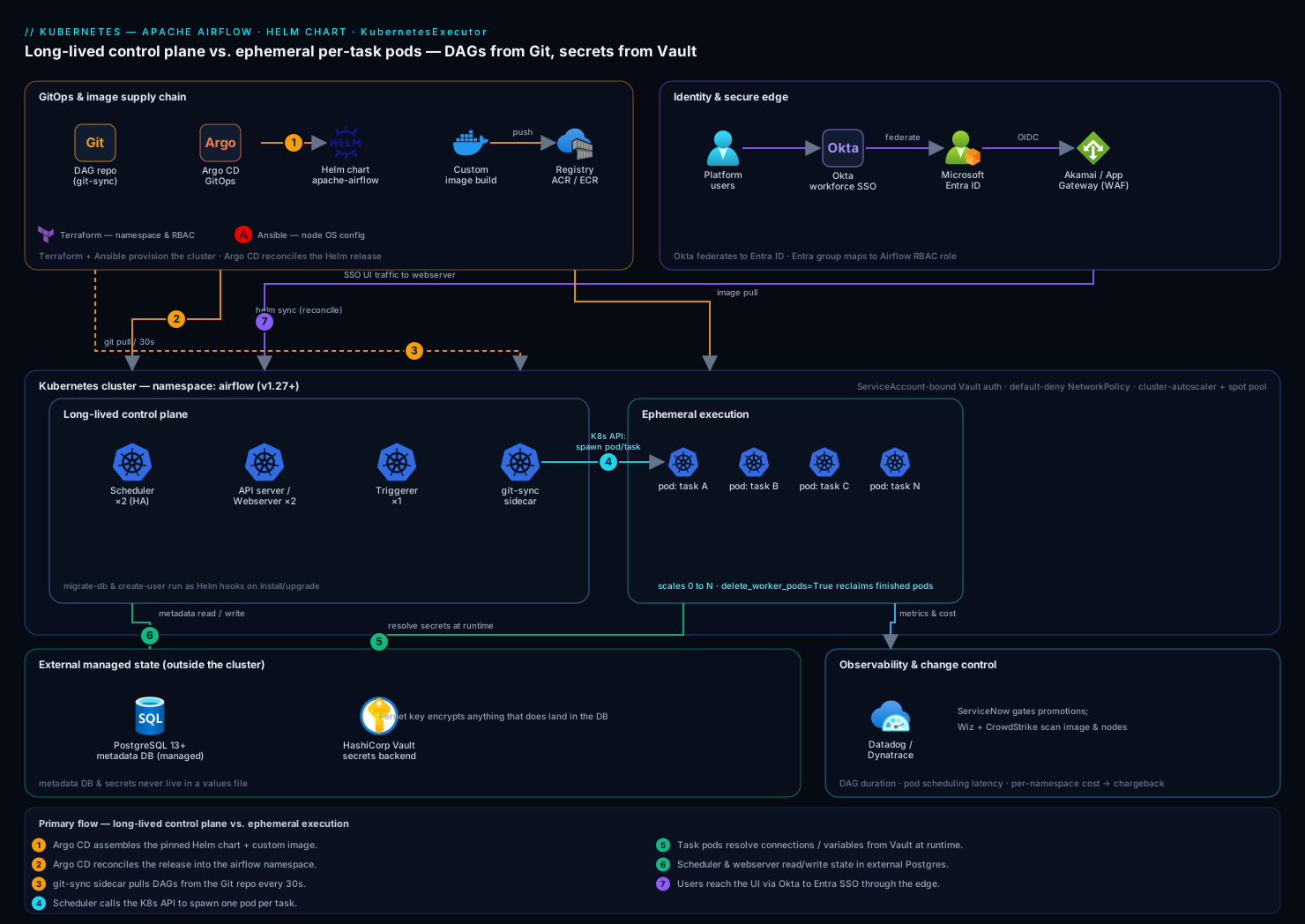
The deployment has a small set of long-lived components and a swarm of short-lived ones. Long-lived: the scheduler (watches the DB, decides what to run, and calls the Kubernetes API to spawn task pods), the API server / webserver (the UI and REST API), the triggerer (runs deferrable operators efficiently), and a git-sync sidecar that keeps DAGs current from your repo. Short-lived: one worker pod per task instance, created on demand by the scheduler and torn down on completion. State lives in external PostgreSQL; secrets resolve from HashiCorp Vault through Airflow’s secrets backend; identity is brokered by Okta federated to Microsoft Entra ID in front of the webserver; and the whole release is reconciled by Argo CD from Git. Keeping the “long-lived control plane vs. ephemeral execution” split clear in your head is the single most useful mental model for operating this.
Here is each moving part, what it does, and how long it lives:
| Component | Kind | Lifetime | Replicas here | Job |
|---|---|---|---|---|
| Scheduler | Deployment | Long-lived | 2 (active-active) | Parses DAGs, decides what’s runnable, and calls the Kubernetes API to create one task pod per ready task instance. |
| Webserver | Deployment | Long-lived | 2 | Serves the UI and REST API; renders logs, DAG graphs, and run history. In Airflow 3 this splits into a dedicated API server plus a separate UI. |
| Triggerer | Deployment | Long-lived | 1 | Runs an async event loop for deferrable operators, so a task waiting on an external event releases its pod instead of blocking one. |
| git-sync | Sidecar / init container | Long-lived | with scheduler & webserver | Clones your DAG repo into a shared volume and re-pulls on a timer, so DAGs update without an image rebuild. |
| DAG processor | Deployment (optional) | Long-lived | inline by default | Parses DAG files; run it standalone via dagProcessor.enabled when parsing load or DAG-author isolation matters. |
| Worker pod | Pod (bare) | Ephemeral | 0 → N → 0 | One per task instance. Created on demand, runs a single task with LocalExecutor inside itself, then exits. |
| Migrations / create-user | Job (Helm hook) | One-shot | on install/upgrade | Runs the Alembic schema migration and seeds the admin user. |
Everything in the top rows is a Deployment you can see with kubectl get deploy -n airflow; the worker pods are the exception — they exist only while a task runs, which is why a healthy idle cluster shows zero of them.
Choosing an executor
The executor is Airflow’s most consequential setting. All four below run the same DAGs — they differ only in where and how tasks are dispatched. The KubernetesExecutor this guide uses is one of them:
| Executor | Where tasks run | Broker needed? | Isolation | Dispatch latency | Scales to zero? | Reach for it when |
|---|---|---|---|---|---|---|
| LocalExecutor | Subprocesses on the scheduler host | No | None (shared host) | Instant | No | Dev, tiny single-node setups |
| CeleryExecutor | A fixed pool of always-on Celery workers | Yes (Redis/RabbitMQ + result backend) | Shared worker env | Near-zero (workers are warm) | Not by default (KEDA can) | High throughput, many short tasks, low latency |
| KubernetesExecutor | One fresh pod per task, via the K8s API | No | Full — per-task pod, image, limits | Seconds–tens of seconds (pod start + image pull) | Yes, natively | Spiky/heterogeneous batch, hard isolation, cost-to-zero |
| CeleryKubernetesExecutor | Hybrid: routes each task to Celery or K8s | Yes (for the Celery half) | Mixed | Mixed | Partial | Mostly-small tasks with a few heavy/isolated ones |
The trade-off that decides most deployments is latency versus isolation and cost. A warm Celery worker starts a task in milliseconds but shares one Python environment and one blast radius with every other task on that worker; a KubernetesExecutor pod is fully isolated and costs nothing when idle, but pays a cold-start tax (schedule the pod, pull the image, boot Airflow) on every single task. For 220 nightly batch DAGs where a task takes minutes, tens of seconds of startup is noise. For a stream of thousands of one-second tasks, that same startup would dominate — which is exactly what the hybrid CeleryKubernetesExecutor exists to solve: route the fast, uniform tasks to Celery and send only the heavy, needs-its-own-environment tasks to Kubernetes. Selecting the hybrid is a one-liner plus a routing rule — tasks on the kubernetes queue go to pods, everything else to Celery:
executor: "CeleryKubernetesExecutor"
config:
  celery_kubernetes_executor:
    kubernetes_queue: "kubernetes"
A heavy task then opts into a pod with queue="kubernetes"; untagged tasks ride Celery.
Under the hood, the KubernetesExecutor doesn’t invent each pod from nothing. It starts from a pod_template_file — an ordinary Kubernetes Pod manifest that defines the base container (image, service account, volumes, default resources) — and stamps out a copy per task, injecting the airflow tasks run command and the task’s labels. The official chart generates this template for you from the workers.* block in values.yaml, so for most teams you never write it by hand. When you need full control (a custom sidecar, a specific securityContext, node affinity), you provide your own template; we take that apart in Going deeper below.
1. Create the namespace and the metadata database
Isolate Airflow in its own namespace and create the Postgres database/role it will use. Run the database statements against your managed Postgres, not a pod.
kubectl create namespace airflow

# On your managed PostgreSQL instance (psql as an admin):
# CREATE ROLE airflow LOGIN PASSWORD '<set-a-strong-one>';
# CREATE DATABASE airflow OWNER airflow;
# GRANT ALL PRIVILEGES ON DATABASE airflow TO airflow;
Create the Kubernetes Secret holding the SQLAlchemy connection string. We bootstrap with a Secret now and migrate the value into Vault in step 6 — but the metadata DB connection is needed before the secrets backend is up, so it stays a native Secret.
kubectl create secret generic airflow-metadata-db \
  --namespace airflow \
  --from-literal=connection='postgresql://airflow:<password>@pg-airflow-prod.postgres.database.azure.com:5432/airflow?sslmode=require'
Also generate the Fernet key (encrypts connections/variables at rest in the DB) and a webserver secret key (signs UI sessions) — both must be stable across pod restarts, so never let the chart auto-generate them in production:
kubectl create secret generic airflow-fernet-key \
  --namespace airflow \
  --from-literal=fernet-key="$(python3 -c 'from cryptography.fernet import Fernet; print(Fernet.generate_key().decode())')"

kubectl create secret generic airflow-webserver-secret \
  --namespace airflow \
  --from-literal=webserver-secret-key="$(openssl rand -hex 32)"
2. Add the chart repo and pin the version
Use the official Apache Airflow Helm chart (apache-airflow/airflow), not a third-party one. Pin both the chart version and the Airflow app version — a floating tag is how a 3am batch silently changes behavior.
helm repo add apache-airflow https://airflow.apache.org
helm repo update

# Inspect what you're about to install
helm show chart apache-airflow/airflow --version 1.16.0
helm search repo apache-airflow/airflow --versions | head
3. Build and push a custom Airflow image
Most teams need at least a few provider packages and Python deps baked in. Extend the official image rather than installing at runtime (runtime installs make task pods slow and non-reproducible).
# Dockerfile
FROM apache/airflow:2.10.3-python3.11

USER root
RUN apt-get update && apt-get install -y --no-install-recommends \
      build-essential libpq-dev \
    && rm -rf /var/lib/apt/lists/*

USER airflow
COPY requirements.txt /requirements.txt
RUN pip install --no-cache-dir -r /requirements.txt
# requirements.txt
apache-airflow-providers-cncf-kubernetes==10.0.0
apache-airflow-providers-amazon==9.1.0
apache-airflow-providers-hashicorp==4.0.0
pandas==2.2.3
Build and push to your registry:
export IMG=acrkvairflow.azurecr.io/airflow:2.10.3-r3
az acr login --name acrkvairflow            # or: aws ecr get-login-password | docker login ...
docker build -t "$IMG" .
docker push "$IMG"
This image becomes the default base for every task pod the KubernetesExecutor launches, so a single, version-controlled environment ends the “works in my DAG, breaks in yours” problem.
4. Author the Helm values file
This is the heart of the deployment. Create values.yaml. The decisive line is executor: "KubernetesExecutor"; the rest wires in the external DB, your image, git-sync, and the pre-created secrets.
# values.yaml
executor: "KubernetesExecutor"

# Use the image you built in step 3 everywhere (scheduler, webserver, AND task pods)
images:
  airflow:
    repository: acrkvairflow.azurecr.io/airflow
    tag: 2.10.3-r3
    pullPolicy: IfNotPresent

# Do NOT use the bundled Postgres in production
postgresql:
  enabled: false

data:
  # Point the chart at the Secret created in step 1
  metadataSecretName: airflow-metadata-db

# Stable, externally-managed keys (step 1) — never auto-generate in prod
fernetKeySecretName: airflow-fernet-key
webserverSecretKeySecretName: airflow-webserver-secret

# Core Airflow config injected as AIRFLOW__* env vars
config:
  core:
    # Default resources/behaviour for spawned task pods come from this template
    dags_folder: /opt/airflow/dags/repo/dags
    load_examples: "False"
  kubernetes_executor:
    namespace: airflow
    delete_worker_pods: "True"          # reclaim finished pods
    delete_worker_pods_on_failure: "False"  # keep failed pods for triage
    worker_pods_creation_batch_size: "16"

# git-sync sidecar: DAGs come from Git, not a baked image or PVC
dags:
  gitSync:
    enabled: true
    repo: git@github.com:kloudvin/airflow-dags.git
    branch: main
    rev: HEAD
    depth: 1
    subPath: ""
    period: 30s                         # poll cadence
    wait: 30
    sshKeySecret: airflow-git-ssh-key   # created in step 5
  persistence:
    enabled: false                      # git-sync replaces a shared DAG PVC

# Long-lived control-plane components
scheduler:
  replicas: 2                           # HA scheduler; both safe to run together
triggerer:
  replicas: 1
webserver:
  replicas: 2

# Resource hints for the EPHEMERAL task pods
workers:
  resources:
    requests:
      cpu: "500m"
      memory: "1Gi"
    limits:
      cpu: "2"
      memory: "4Gi"

# Run the one-shot DB migration as a Helm hook on install/upgrade
migrateDatabaseJob:
  enabled: true

createUserJob:
  useHelmHooks: true
A note on what delete_worker_pods_on_failure: "False" buys you: when a task fails, its pod sticks around so you can kubectl logs it and read exactly why — invaluable for debugging a DAG that only fails in the cluster.
5. Wire git-sync to your DAG repository
Create the SSH deploy-key Secret git-sync references. Generate a dedicated read-only key, add the public half as a deploy key on the repo, and store the private half:
ssh-keygen -t ed25519 -C "airflow-gitsync" -f ./gitsync_ed25519 -N ""
# Add ./gitsync_ed25519.pub as a READ-ONLY deploy key in GitHub repo settings.

kubectl create secret generic airflow-git-ssh-key \
  --namespace airflow \
  --from-file=gitSshKey=./gitsync_ed25519
shred -u ./gitsync_ed25519 ./gitsync_ed25519.pub   # don't leave keys on disk
git-sync clones into /opt/airflow/dags/repo and re-pulls every 30s; the scheduler and every task pod mount that path, so a git push to main propagates to running Airflow within a minute — no image rebuild, no redeploy.
6. Configure the HashiCorp Vault secrets backend
So that DAG connections and variables are never stored in the Airflow DB or a values file, point Airflow at HashiCorp Vault as its secrets backend. Vault holds the connections (e.g. the warehouse Postgres, the carrier-API token); Airflow resolves them at task runtime via the hashicorp provider.
Add to values.yaml under config:
config:
  secrets:
    backend: "airflow.providers.hashicorp.secrets.vault.VaultBackend"
    backend_kwargs: >-
      {
        "connections_path": "airflow/connections",
        "variables_path": "airflow/variables",
        "mount_point": "secret",
        "url": "https://vault.kloudvin.internal:8200",
        "auth_type": "kubernetes",
        "kubernetes_role": "airflow"
      }
Configure Vault to trust the namespace’s ServiceAccount (run against Vault):
vault auth enable kubernetes
vault write auth/kubernetes/config \
  kubernetes_host="https://kubernetes.default.svc:443"

vault policy write airflow - <<'EOF'
path "secret/data/airflow/*" { capabilities = ["read"] }
EOF

vault write auth/kubernetes/role/airflow \
  bound_service_account_names=airflow-worker,airflow-scheduler,airflow-triggerer \
  bound_service_account_namespaces=airflow \
  policy=airflow \
  ttl=1h
Now a connection stored at secret/airflow/connections/warehouse_pg is reachable in any DAG as Connection.get('warehouse_pg') with zero plaintext in Git or the metadata DB. The Vault token is short-lived (1h TTL) and bound to the exact ServiceAccounts, so a leaked DAG file exposes nothing.
7. Install the release
With values complete, install. Use --atomic so a failed install rolls itself back instead of leaving a half-deployed mess, and --timeout generous enough for the DB migration.
helm install airflow apache-airflow/airflow \
  --namespace airflow \
  --version 1.16.0 \
  --values values.yaml \
  --atomic \
  --timeout 10m
Watch the control plane come up:
kubectl get pods -n airflow -w
You should see airflow-scheduler-*, airflow-webserver-*, airflow-triggerer-*, and the airflow-run-airflow-migrations-* job complete. Note there are no standing worker pods — that is correct for the KubernetesExecutor; workers appear only when a task runs.
8. Put identity in front of the webserver
Do not expose the Airflow UI with basic auth on a public IP. Front it with an ingress that delegates authentication to Okta, federated to Microsoft Entra ID so the same workforce SSO and conditional-access policies that gate the rest of the platform gate Airflow too. A typical pattern is an OAuth2-proxy sidecar or an ingress annotation that enforces an OIDC flow; the webserver itself maps the resulting groups to Airflow RBAC roles (Admin, Op, Viewer).
# values.yaml (FlaskAppBuilder OAuth → Entra, brokered from Okta)
webserver:
  webserverConfig: |
    from flask_appbuilder.security.manager import AUTH_OAUTH
    AUTH_TYPE = AUTH_OAUTH
    AUTH_USER_REGISTRATION = True
    AUTH_USER_REGISTRATION_ROLE = "Viewer"
    OAUTH_PROVIDERS = [{
        "name": "azure",
        "token_key": "access_token",
        "icon": "fa-microsoft",
        "remote_app": {
            "client_id": "<entra-app-client-id>",
            "client_secret": "<from-vault>",
            "api_base_url": "https://login.microsoftonline.com/<tenant>/oauth2",
            "server_metadata_url":
              "https://login.microsoftonline.com/<tenant>/v2.0/.well-known/openid-configuration",
            "client_kwargs": {"scope": "openid profile email"},
        },
    }]
    AUTH_ROLES_MAPPING = {"airflow-admins": ["Admin"], "airflow-ops": ["Op"]}
Users authenticate with their corporate Okta identity, Okta federates to Entra, and their Entra group membership decides whether they land as Admin, Op, or Viewer in Airflow — no separate Airflow password to manage or leak. Put Akamai at the edge in front of the ingress for TLS termination, global anycast, and WAF/bot protection so the UI never takes raw internet traffic.
9. Reconcile the release with Argo CD (GitOps)
For repeatable, auditable deployments, do not run helm install by hand in production after the first bootstrap — let Argo CD reconcile the Helm release from Git so the cluster always matches the committed values.yaml. A Jenkins or GitHub Actions pipeline builds and pushes the image (step 3) and bumps the tag in Git; Argo CD detects the change and rolls it out.
# argocd-airflow-app.yaml
apiVersion: argoproj.io/v1alpha1
kind: Application
metadata:
  name: airflow
  namespace: argocd
spec:
  project: data-platform
  source:
    repoURL: https://airflow.apache.org
    chart: airflow
    targetRevision: 1.16.0
    helm:
      valueFiles:
        - $values/airflow/values.yaml
  sources: []
  destination:
    server: https://kubernetes.default.svc
    namespace: airflow
  syncPolicy:
    automated:
      prune: true
      selfHeal: true
The cluster’s namespace and base RBAC are themselves provisioned with Terraform (and any node-level or OS configuration via Ansible), so the full stack — infra, then release, then DAGs — is reconstructable from version control. A change request that promotes a new chart version flows through ServiceNow for approval before Argo CD is allowed to sync to production, giving change management a documented gate.
Going deeper
You can run the deployment above without reading this section — but the moment a task pod misbehaves, a log disappears, or someone asks “can we autoscale this?”, the internals below are what you reach for.
The worker-pod lifecycle, step by step
When the scheduler marks a task instance runnable, the KubernetesExecutor does this:
- Build the pod spec. It loads the base
pod_template_file, then merges any per-taskpod_overridefrom the DAG’sexecutor_configon top (override wins, field by field). Labels are stamped on:dag_id,task_id,run_id,try_number,kubernetes_executor: "True", andairflow-worker: <scheduler-job-id>. - Create the pod through the Kubernetes API in the configured namespace. Nothing is queued in a broker — the API is the queue.
- Watch, don’t poll. A single Kubernetes watch stream (keyed on
resourceVersion) reports pod-phase changes for every task pod at once, which is far cheaper than polling each pod individually. - Run the task. Inside the pod, the
basecontainer runsairflow tasks run <dag_id> <task_id> <run_id> --local ...underLocalExecutor— so a KubernetesExecutor task pod is really a tiny, one-task Airflow that streams logs and reports status. - Reconcile and clean up. On
Succeeded/Failedthe executor writes the final state to the metadata DB. Thendelete_worker_podsdecides the pod’s fate:Truereclaims it immediately; a failed pod is kept whendelete_worker_pods_on_failure: Falseso you cankubectl logsit.
One subtlety worth knowing: if the scheduler restarts while task pods are running, it does not orphan them. On startup it queries pods by the airflow-worker label and adopts the ones from its previous incarnation, resuming their status tracking. That is why a scheduler rollout mid-batch does not kill in-flight tasks.
The pod template and per-task overrides (executor_config)
The base template is a normal Pod manifest. The one hard rule: the task container must be named base — that is where Airflow injects the command.
# pod_template_file.yaml — the base every task pod is stamped from
apiVersion: v1
kind: Pod
metadata:
  name: placeholder-name          # Airflow overwrites this per task instance
  labels:
    component: worker
    release: airflow
spec:
  restartPolicy: Never
  serviceAccountName: airflow-worker
  securityContext:
    runAsUser: 50000
    fsGroup: 0
  containers:
    - name: base                  # MUST be "base" — Airflow injects the command here
      image: acrkvairflow.azurecr.io/airflow:2.10.3-r3
      imagePullPolicy: IfNotPresent
      env:
        - name: AIRFLOW__CORE__EXECUTOR
          value: LocalExecutor    # the task pod runs the task locally, not more pods
      resources:
        requests:
          cpu: "500m"
          memory: "1Gi"
        limits:
          cpu: "2"
          memory: "4Gi"
      volumeMounts:
        - name: dags
          mountPath: /opt/airflow/dags
          readOnly: true
  volumes:
    - name: dags
      emptyDir: {}
Note AIRFLOW__CORE__EXECUTOR: LocalExecutor inside the pod — the task pod runs its one task locally; it does not spawn more Kubernetes pods.
Now the payoff. Remember the runaway pandas task from the opening? Give only that task 16Gi, without touching the global workers.resources that every other task inherits — set a pod_override in the DAG:
from kubernetes.client import models as k8s
from airflow.operators.python import PythonOperator

heavy = PythonOperator(
    task_id="reconcile_warehouse",
    python_callable=run_reconciliation,
    executor_config={
        "pod_override": k8s.V1Pod(
            spec=k8s.V1PodSpec(
                containers=[
                    k8s.V1Container(
                        name="base",  # must match the template's container
                        resources=k8s.V1ResourceRequirements(
                            requests={"cpu": "1", "memory": "8Gi"},
                            limits={"cpu": "4", "memory": "16Gi"},
                        ),
                    )
                ],
                node_selector={"workload": "memory-optimized"},
            )
        )
    },
)
Airflow deep-merges that V1Pod onto the base template, so this one task lands on a memory-optimized node with 16Gi while its neighbours keep the 4Gi default. This per-task control is the thing CeleryExecutor cannot give you.
Resource tuning and scheduler throughput
requestsset the QoS and what the autoscaler provisions;limitscap the pod. For batch, requests close to real usage keep node bin-packing tight; limits above requests (Burstable QoS) absorb spikes without OOM. Requests equal to limits (Guaranteed QoS) is safest for latency-sensitive tasks but wastes headroom.worker_pods_creation_batch_size(16 here) caps how many task pods the executor creates per scheduler loop — raise it for wide fan-out DAGs, but watch the API server’s request budget.- Scheduler parsing (
AIRFLOW__SCHEDULER__PARSING_PROCESSES,min_file_process_interval) governs how fast new DAG code is noticed; on a big repo, offloading parsing to a standalonedagProcessorkeeps the scheduling loop responsive. - Watch
kube_client_request_argsand API QPS if thousands of pods churn per hour — at that scale the bottleneck becomes the Kubernetes API server, not Airflow.
Don’t lose logs: remote logging to object storage
This is the KubernetesExecutor footgun. Task logs are written inside the task pod. When delete_worker_pods: True reclaims a finished pod, its filesystem — and its logs — go with it. Wire up remote logging so logs land in object storage the moment they’re written:
# values.yaml — persist logs off the ephemeral pod
config:
  logging:
    remote_logging: "True"
    remote_base_log_folder: "s3://kv-airflow-logs/airflow"
    remote_log_conn_id: "aws_s3_logs"
    encrypt_s3_logs: "False"
    delete_local_logs: "True"
remote_log_conn_id points at an Airflow connection (store it in Vault, per step 6) that grants write access to the bucket. The webserver then streams live logs from a running pod and, once it’s gone, transparently reads the archived copy from S3/GCS/Azure Blob — the UI experience is seamless, but only if you set this up before your first failed pod is reclaimed.
KEDA autoscaling — but only on the Celery path
A common request is “autoscale the workers with KEDA.” Important: KEDA is for the CeleryExecutor, not the KubernetesExecutor. The KubernetesExecutor already scales per task — one pod per task instance, zero when idle — so there is no worker fleet for KEDA to size. KEDA earns its keep on the Celery path, where it scales the standing worker Deployment from zero based on how many tasks are queued in the metadata DB:
# values.yaml — KEDA-driven Celery workers (a DIFFERENT executor)
executor: "CeleryExecutor"
workers:
  keda:
    enabled: true
    pollingInterval: 5
    cooldownPeriod: 60
    minReplicaCount: 0
    maxReplicaCount: 20
  persistence:
    enabled: false
redis:
  enabled: true
With minReplicaCount: 0, KEDA scales the Celery workers all the way down between batches — clawing back the KubernetesExecutor’s scale-to-zero benefit while keeping Celery’s warm-dispatch latency when work arrives. This is why many mature platforms end on CeleryKubernetesExecutor: KEDA-scaled Celery for the firehose of small tasks, KubernetesExecutor pods for the heavy isolated ones. See HPA, KEDA & Karpenter for the scaler mechanics.
Secrets backends beyond Vault
Vault (step 6) is one option; the same secrets.backend slot takes any provider. Airflow resolves a connection or variable in a fixed order — secrets backend → environment variable → metadata DB — and stops at the first hit:
| Backend | backend class |
Typical auth |
|---|---|---|
| HashiCorp Vault | airflow.providers.hashicorp.secrets.vault.VaultBackend |
Kubernetes ServiceAccount |
| AWS Secrets Manager | airflow.providers.amazon.aws.secrets.secrets_manager.SecretsManagerBackend |
IRSA / Pod Identity |
| GCP Secret Manager | airflow.providers.google.cloud.secrets.secret_manager.CloudSecretManagerBackend |
Workload Identity |
| Azure Key Vault | airflow.providers.microsoft.azure.secrets.key_vault.AzureKeyVaultBackend |
Workload Identity |
On AKS, for example, swap the Vault block for Key Vault with workload identity:
# values.yaml — Azure Key Vault instead of Vault
config:
  secrets:
    backend: "airflow.providers.microsoft.azure.secrets.key_vault.AzureKeyVaultBackend"
    backend_kwargs: >-
      {
        "connections_prefix": "airflow-connections",
        "variables_prefix": "airflow-variables",
        "vault_url": "https://kv-airflow.vault.azure.net"
      }
Whatever the backend, the win is identical: no connection string in Git, in a ConfigMap, or in the values file.
The HA scheduler
scheduler.replicas: 2 runs two schedulers active-active — both parse and schedule at once, with no leader election and no standby. They stay consistent because each scheduling decision takes a row-level lock in the metadata DB using SELECT ... FOR UPDATE SKIP LOCKED; a task instance is picked up by exactly one scheduler, and the other simply skips the locked row. This is why Airflow’s HA scheduler requires PostgreSQL (9.6+) or MySQL (8+) — SQLite cannot do it — and why the managed Postgres from step 1 is load-bearing, not a nicety. Two schedulers roughly double parsing/scheduling throughput and mean a single node loss never stalls the batch.
Validation
Confirm the executor and prove a task actually spawns its own pod.
# 1. Verify the executor in effect
kubectl exec -n airflow deploy/airflow-scheduler -- airflow config get-value core executor
# -> KubernetesExecutor

# 2. Check DB connectivity and migration state
kubectl exec -n airflow deploy/airflow-scheduler -- airflow db check
kubectl exec -n airflow deploy/airflow-scheduler -- airflow db check-migrations

# 3. Confirm git-sync pulled your DAGs
kubectl exec -n airflow deploy/airflow-scheduler -- ls /opt/airflow/dags/repo/dags

# 4. Trigger a DAG and WATCH the ephemeral worker pod appear
kubectl exec -n airflow deploy/airflow-scheduler -- airflow dags trigger example_warehouse_recon
kubectl get pods -n airflow -w     # a *-task-* pod is created, runs, then disappears

# 5. Verify a Vault-backed connection resolves
kubectl exec -n airflow deploy/airflow-scheduler -- \
  airflow connections get warehouse_pg
Seeing a transient ...-task-... pod spin up for the triggered run, then vanish when delete_worker_pods=True reclaims it, is the definitive proof the KubernetesExecutor is doing its job.
Rollback / teardown
Helm makes rollback a one-liner; keep the metadata DB intact so history survives.
# Roll back to the previous release revision (DB schema permitting)
helm history airflow -n airflow
helm rollback airflow <previous-revision> -n airflow --wait

# Full teardown of the workload (DB and secrets are external, so they persist)
helm uninstall airflow -n airflow

# Remove the namespace and its in-cluster secrets only when you truly mean it
kubectl delete namespace airflow
One caveat: an Airflow upgrade may run a DB migration that a helm rollback cannot cleanly reverse. For major version jumps, snapshot the Postgres database first (pg_dump or a managed point-in-time backup) so rollback means restoring the DB, not just the chart.
Common pitfalls
- Auto-generated Fernet / webserver keys. Let the chart generate them and every
helm upgraderotates the keys — existing connections become undecryptable and all UI sessions drop. Always pre-create them as Secrets (step 1). - Bundled Postgres in production. The chart’s in-cluster Postgres has no HA and a PVC that is easy to lose. Set
postgresql.enabled: falseand use managed Postgres. - Tasks can’t find DAGs. The git-sync mount path and
core.dags_foldermust agree (/opt/airflow/dags/repo/dagshere). A mismatch shows up as DAGs visible in the UI butDagBagerrors at task runtime. - RBAC denied creating pods. If the scheduler’s ServiceAccount lacks pod-create permission in the namespace, every task fails to launch. The chart’s default RBAC handles this — don’t override
rbac.create: falsewithout supplying equivalent Roles. - Worker pods OOMKilled. The
workers.resources.limitsapply to task pods; a heavy task needs its own higher limit via apod_overridein the DAG’sexecutor_config, not a global bump. - Image pull failures on task pods. Every ephemeral pod pulls your image; without an
imagePullSecrets(or a node identity granting registry access) tasks stayErrImagePull. Set it underregistry.secretName.
Security notes
The posture here is secrets-out-of-Git by construction: connections and variables live in HashiCorp Vault resolved via short-lived, ServiceAccount-bound tokens, while the Fernet key encrypts anything that does land in the DB. Human access to the UI is Okta → Entra SSO with group-to-role mapping — no shared Airflow password. Scan the namespace and your custom image continuously: Wiz (and Wiz Code on the DAG repo and Dockerfile) for cloud and IaC misconfigurations, exposed-secret detection, and attack-path analysis across the cluster; CrowdStrike Falcon sensors on the node pool for runtime threat detection on the ephemeral task pods, feeding the SOC. A flagged finding — a publicly exposed webserver, a leaked credential in a DAG — auto-raises a ServiceNow incident so security gets a ticket, not just a log line. Lock down the namespace with a default-deny NetworkPolicy, allowing only the egress task pods actually need (Postgres, Vault, your data sources). Where a task must reach a legacy system, route it through the appropriate virtual appliances (firewall/proxy VMs) rather than opening the cluster’s egress wholesale.
Cost notes
The KubernetesExecutor is the cost story: because workers are ephemeral, a cluster sized with cluster-autoscaler and a spot/low-priority node pool scales node count toward zero between batch windows instead of paying for an always-on Celery fleet. Right-size workers.resources.requests honestly — over-requesting wastes scheduled capacity, under-requesting risks OOMKills. Keep the long-lived control plane (2 schedulers, 2 webservers, 1 triggerer) on a small on-demand pool and let task pods land on cheaper spot nodes, tolerating the occasional preemption with Airflow retries. Instrument the whole release with Datadog (or Dynatrace) — DAG run duration, task pod scheduling latency, queue depth, and per-namespace node cost — so you can see exactly which DAG drives spend and chargeback to the owning team; the same dashboards surface a scheduling-latency regression before it delays a batch. Finally, if your platform also fronts internal training content, the same Entra SSO can gate a Moodle instance for the team’s Airflow onboarding course, reusing the identity layer you already built rather than standing up another login.
Common beginner mistakes
These are misconceptions, not error messages — the Common pitfalls table above is the symptom→fix reference; this list is about the mental models that trip people up first.
- “The KubernetesExecutor needs Redis/Celery.” It does not. That is the
CeleryExecutor. The KubernetesExecutor talks directly to the Kubernetes API — no broker, no result backend. If you deployed Redis for it, you deployed the wrong thing. - “Something’s wrong — I see no worker pods.” An idle KubernetesExecutor cluster showing zero worker pods is healthy, not broken. Pods appear only while a task runs. Trigger a DAG and watch one flash into existence; that is the whole point.
- “DAGs belong in the image.” Baking DAGs into the image means a rebuild-and-redeploy for every one-line change. git-sync delivers DAGs from Git in ~30s with no rebuild. Bake dependencies into the image; deliver DAGs through Git.
- “Every task needs its own image.” All tasks share the base image by default. You only override the image (or resources) for the rare task that needs something special, via
executor_config— you do not build 200 images for 200 tasks. - “
executor_configresources apply to the whole DAG.” Apod_overrideapplies to the one task it is set on. Putting 16Gi on a heavy task leaves every other task on the global default. That granularity is the feature, not a bug. - “Scale-to-zero means the cluster turns off.” Only task pods go to zero. The scheduler, webserver, and triggerer stay up 24/7 — they must, to notice the next scheduled run and to serve the UI. “Zero workers” is not “zero pods.”
- “Logs are safe on the pod.” With
delete_worker_pods: True, a finished pod and its logs are deleted seconds after the task ends. Without remote logging configured first, you will open the UI to read a failure and find the log already gone. - “Airflow 2’s active-active scheduler needs a leader election / ZooKeeper.” No coordination service. Two schedulers stay correct purely through Postgres row locks. Just set
replicas: 2.
Practice challenges
Work these in order; they escalate from “read the config” to “redesign the execution model.” Each solution notes the why, not just the what.
1. (Beginner) Prove which executor is live. Without opening the UI, confirm the cluster is running the KubernetesExecutor and explain why kubectl get pods -n airflow shows no *-task-* pods right now.
<details><summary>Solution</summary>
kubectl exec -n airflow deploy/airflow-scheduler -- \
  airflow config get-value core executor      # -> KubernetesExecutor
kubectl get pods -n airflow                    # scheduler/webserver/triggerer only
No worker pods is correct: the KubernetesExecutor creates a pod only when a task instance is runnable and deletes it on completion. An idle cluster has none.
</details>
2. (Beginner) Slow the DAG refresh to once a minute. git-sync currently re-pulls every 30s. Change it to 60s and roll it out.
<details><summary>Solution</summary>
dags:
  gitSync:
    period: 60s
Then helm upgrade airflow apache-airflow/airflow -n airflow --version 1.16.0 -f values.yaml. dags.gitSync.period sets the git-sync poll interval; nothing else changes.
</details>
3. (Intermediate) Give one task 16Gi without touching the others. A single reconciliation task OOMs at the 4Gi default. Raise its limit to 16Gi and pin it to a memory-optimized node — global limits unchanged.
<details><summary>Solution</summary>
Set a pod_override in the task’s executor_config (container name must be base):
executor_config={"pod_override": k8s.V1Pod(spec=k8s.V1PodSpec(
    containers=[k8s.V1Container(name="base",
        resources=k8s.V1ResourceRequirements(
            requests={"memory": "8Gi"}, limits={"memory": "16Gi"}))],
    node_selector={"workload": "memory-optimized"}))}
Airflow merges this onto the base template for that task instance only. A global workers.resources bump would over-provision all 220 DAGs.
</details>
4. (Intermediate) Keep failed pods, reclaim successful ones. You need to kubectl logs pods that fail, but don’t want finished pods piling up.
<details><summary>Solution</summary>
config:
  kubernetes_executor:
    delete_worker_pods: "True"
    delete_worker_pods_on_failure: "False"
Successful pods are reclaimed; a failed pod is left behind for triage. Pair it with remote logging (challenge 5) so successful task logs survive reclamation too.
</details>
5. (Advanced) Stop losing task logs. After enabling delete_worker_pods, logs for finished tasks 404 in the UI. Fix it so logs persist in S3, with the bucket credential kept out of Git.
<details><summary>Solution</summary>
Enable remote logging and point it at a connection resolved from Vault:
config:
  logging:
    remote_logging: "True"
    remote_base_log_folder: "s3://kv-airflow-logs/airflow"
    remote_log_conn_id: "aws_s3_logs"
Store aws_s3_logs in Vault (secret/airflow/connections/aws_s3_logs) so the credential never touches Git or the values file. The webserver reads live logs from the pod and archived logs from S3 after it is gone.
</details>
6. (Advanced) The “autoscale with KEDA” trap. A teammate wants to add workers.keda.enabled: true to this KubernetesExecutor deployment to “scale the workers.” Explain why that does nothing here, and what you’d change to make KEDA meaningful.
<details><summary>Solution</summary>
KEDA scales a standing Celery worker Deployment by queue depth. The KubernetesExecutor has no such Deployment — it already scales one pod per task and to zero when idle — so workers.keda is inert. To use KEDA you must switch to CeleryExecutor (or CeleryKubernetesExecutor to keep per-task pods for heavy jobs) and add a broker (redis.enabled: true); only then does a worker fleet exist for KEDA to grow and shrink.
</details>
Glossary
- Airflow — an open-source platform to author, schedule, and monitor workflows as code.
- DAG (Directed Acyclic Graph) — one pipeline: the ordered set of tasks and their dependencies, defined in a Python file. “Acyclic” means no task can loop back to depend on itself.
- Task — a single step in a DAG. Task instance — one run of that task for a specific logical date /
run_id. - Operator — a template for a task:
BashOperator,PythonOperator,KubernetesPodOperator, and so on. Sensor — an operator that waits for a condition (a file, a partition) before succeeding. - Executor — the component that decides how and where task instances run. The four: Local, Celery, Kubernetes, CeleryKubernetes.
- KubernetesExecutor — runs each task instance in its own ephemeral pod created via the Kubernetes API; no broker, full per-task isolation, scales to zero.
- CeleryExecutor — dispatches tasks to a pool of always-on Celery workers via a broker (Redis/RabbitMQ). CeleryKubernetesExecutor — hybrid that routes each task to Celery or Kubernetes by queue.
- Scheduler — the long-lived process that parses DAGs, decides what is runnable, and (with the KubernetesExecutor) creates task pods.
- Webserver / API server — serves the Airflow UI and REST API. Triggerer — async process that services deferrable operators so a waiting task does not hold a pod.
- Deferrable operator — an operator that suspends itself (freeing its pod) while waiting on an event, resumed by the triggerer.
- DAG processor — optional separate process that parses DAG files, isolating parsing from the scheduling loop (
dagProcessor.enabled). - Worker pod — the ephemeral pod a KubernetesExecutor task runs in; internally runs
LocalExecutor. pod_template_file— the base Kubernetes Pod manifest every task pod is stamped from; its task container must be namedbase.executor_config/pod_override— per-task settings that merge onto the base template (extra memory, a node selector, a sidecar) for that one task only.- git-sync — a sidecar that clones your DAG repo into a shared volume and re-pulls on a timer, delivering DAGs without an image rebuild.
- Metadata database — the external Postgres holding DAG runs, task states, connections, and variables; the source of truth Airflow’s components coordinate through.
- Fernet key — symmetric key that encrypts connections/variables at rest in the metadata DB. Webserver secret key — signs UI session cookies. Both must stay stable across restarts.
- Secrets backend — an external store (Vault, AWS/GCP/Azure secret managers) Airflow resolves connections and variables from at runtime, ahead of the metadata DB.
- Remote logging — shipping task logs to object storage (S3/GCS/Azure Blob) so they survive the deletion of the ephemeral pod that produced them.
- KEDA — Kubernetes Event-Driven Autoscaler; scales the Celery worker Deployment by queue depth (irrelevant to the KubernetesExecutor).
- Helm chart / values / release — the packaged Airflow deployment (
apache-airflow/airflow), thevalues.yamlthat configures it, and the installed instance in the cluster.