There is a specific afternoon in every sysadmin’s career when the job changes shape. You have always managed servers the way you manage a pet: you name it, you SSH in, you install what it needs by hand, you nurse it back to health when it gets sick, and you know it. That works beautifully for one server. It works, barely, for ten. Then a project lands that needs a hundred, or a thousand, or an autoscaling group that goes from twelve instances at 3am to four hundred at noon and back again — and the pet model doesn’t just get harder, it becomes physically impossible. You cannot SSH into four hundred machines. You cannot remember what you did to each. You cannot be sure any two are the same.
This lesson is about the discipline that replaces the pet: fleet management — treating servers as interchangeable, disposable, code-defined cattle that you provision, converge, and replace by the hundred without ever logging into one by hand. It is the hinge between “I administer Linux” and “I run production infrastructure.”
We will build the full picture from first principles: the three paradigms and where each fits, how cloud-init finishes a generic image into a specific instance on first boot, how Packer bakes golden images and virt-sysprep makes them clean, how Ansible enforces desired state agentlessly across the whole fleet, what config drift is and how to see it before it bites you, and why immutable infrastructure would rather rebuild a server than patch it. Every credential you see will be a fake placeholder — that is not laziness, it is the single most important habit in fleet work.
Why this matters
The problem is scale, and scale breaks the assumptions that make single-server administration comfortable. When you have one server, state lives in your head and in the machine. You remember that you edited /etc/nginx/nginx.conf last Tuesday, that the TLS cert is renewed by a cron job you added, that the kernel is held back a version because of a driver bug. None of that is written down anywhere except the machine itself. That is the definition of a pet: a server whose configuration is unique, hand-crafted, undocumented, and irreplaceable. If it dies, you rebuild it from memory over a stressful weekend.
A fleet cannot work that way, because there is no room in anyone’s head for a thousand machines’ worth of hand-edits. The only way to manage a fleet is to make the servers boring: every one built the same way from the same source of truth, every difference expressed as data (this one is in us-east-1, that one has 4 CPUs), and every change made to the definition and rolled out, never typed into a live box. This is the cattle model — you don’t name them, you number them; when one is sick you don’t nurse it, you shoot it and boot a replacement from the same image.
The mental shift has three moving parts, and the rest of this lesson is really just those three parts in detail. First, how a server gets built — from a blank image to a running, configured instance. Second, how you keep it the way you want it over time as the world tries to push it off course. Third, how you change it when the desired state itself changes. Pets answer all three with “a human SSHes in.” Fleets answer them with, respectively, golden images plus cloud-init, configuration management (Ansible), and either convergence or a full rebuild. Get those three answers right and 1,000 servers is genuinely no harder to run than 10.
The table below is the whole motivation in one glance — watch how each management technique quietly stops working as the count grows:
| Fleet size | Feasible management style | What breaks first | The tell you’ve outgrown it |
|---|---|---|---|
| 1 server (a pet) | SSH in, edit by hand, remember what you did | Nothing — until the human forgets or leaves | “How was this set up?” has no written answer |
| ~10 servers | A shared shell script or a runbook wiki page | Servers drift apart; script assumes state that isn’t there | Two boxes that should match, don’t |
| ~100 servers | Configuration management (Ansible/Puppet), a real inventory | Manual one-offs; a hand-fix on box 47 that nobody codified | You can’t answer “is the whole fleet compliant?” without checking |
| ~1,000 servers | Golden images + cloud-init + config mgmt, ideally immutable | Any per-node human step; long-lived mutable state accumulating drift | You stopped trusting that instances are identical |
| Autoscaling (N changes hourly) | Immutable images + launch templates; zero human boot steps | Anything that isn’t fully automated at boot; state on the instance | A newly-scaled node behaves differently from an old one |
The three paradigms: imperative scripts, config management, immutable images
Before any tool, understand the three philosophies of building a server, because every tool in this lesson is an expression of one of them. They form a ladder, and you climb it as your fleet grows.
Paradigm 1 — imperative scripts. You write down the exact sequence of commands a human would type: apt-get install -y nginx, sed -i ..., systemctl enable nginx. This is just automating the pet. It is the natural first step, it is readable, and it is where everyone starts. Its fatal weakness is that it describes steps, not state: a script that says “append this line to the config” appends it again every time it runs, and a script written for a fresh box makes assumptions that a six-month-old box violates. Imperative scripts are not idempotent by default — running them twice is not the same as running them once. If you want to go deep on writing these well, the shell-scripting foundations are covered in Bash scripting for sysadmins; here we treat scripts as the rung you climb off as soon as the fleet grows.
Paradigm 2 — configuration management. Instead of listing steps, you declare desired state: “nginx should be present, this file should have exactly these contents, the service should be enabled and running.” A tool (Ansible, Puppet, Chef, Salt) compares that declaration to reality and makes only the changes needed to close the gap. Declared state is idempotent by construction — running it against a compliant box does nothing; running it against a broken box repairs exactly what’s broken. This is the workhorse of fleet management and it is what keeps long-lived servers converged.
Paradigm 3 — immutable images. You stop changing running servers at all. You bake a complete, configured golden image, boot instances from it, and when something must change you bake a new image and replace the instances. There is no “converge” step because there is nothing to converge — the instance is disposable and short-lived. This is the endgame for large, cloud-native fleets: drift becomes impossible, rollback is trivial, and scaling is just “boot more of the same.”
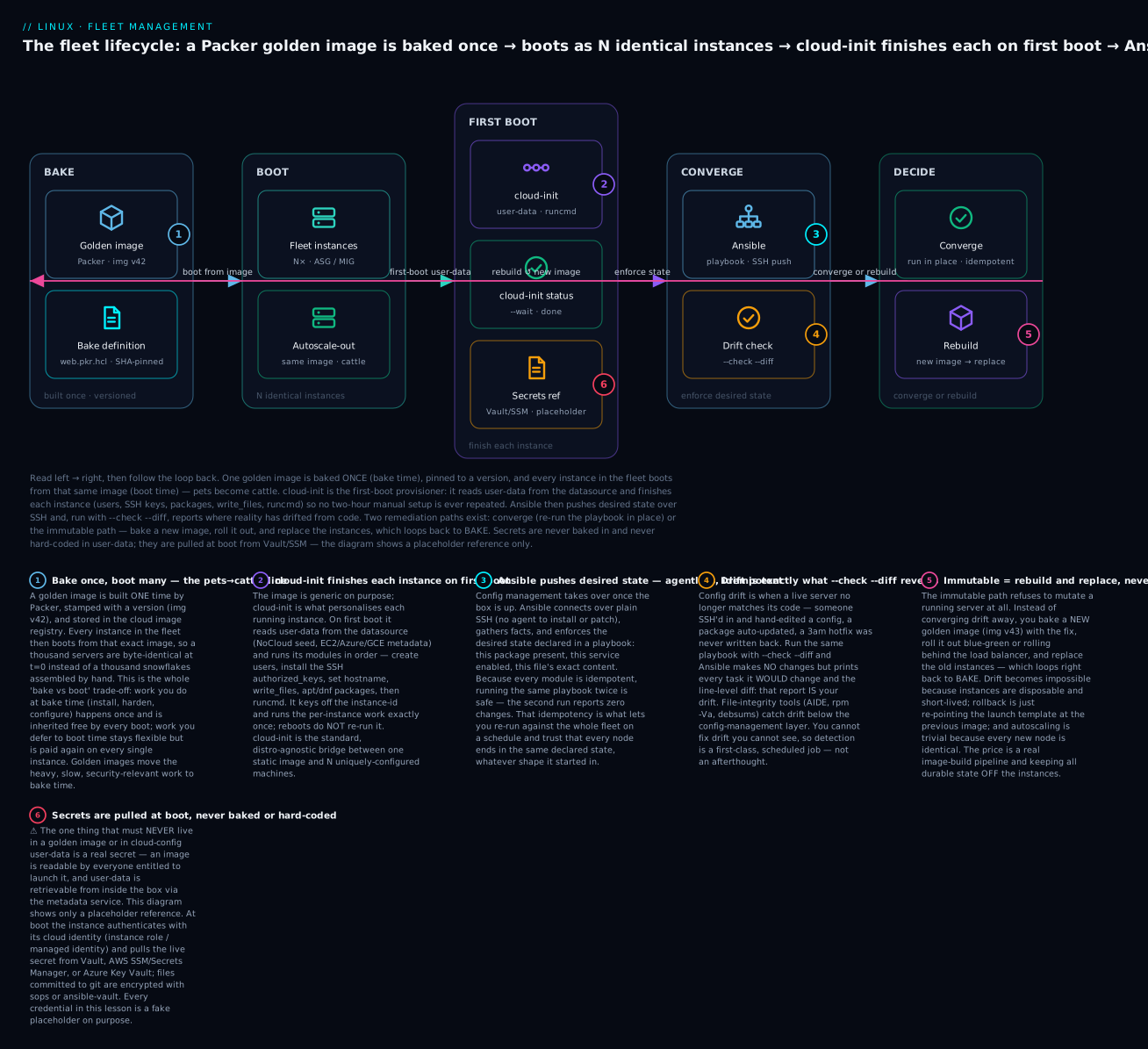
These are not mutually exclusive; production fleets blend them. The dominant modern pattern is golden image + minimal cloud-init + light config management: bake the slow, security-sensitive work into the image, use cloud-init to inject the few per-instance specifics at first boot, and use config management either to converge the rare long-lived boxes or purely to detect drift on the immutable ones. The diagram below is that exact lifecycle — trace it left to right, then follow the loop back, because every command in the rest of this lesson maps onto one of these boxes.
The fleet lifecycle is a loop, not a line: a golden image is baked once and boots as many identical instances; cloud-init finishes each one on first boot; Ansible enforces desired state and flags drift; and you either converge in place or rebuild a fresh image and replace, which closes the loop back to the bake stage.
Here is how to choose a paradigm for a given workload — the honest trade-offs, not the hype:
| Dimension | Imperative scripts | Config management (Ansible) | Immutable images |
|---|---|---|---|
| What you write | Steps to run | Desired end state | A full image definition |
| Idempotent? | No (unless you hand-guard every step) | Yes, by construction | N/A — you never re-run on a live box |
| Handles an existing/drifted box | Poorly — assumes a known start | Yes — converges any start state | No — you replace it |
| Speed of a change | Instant (just run it) | Minutes (push to fleet) | Slow (bake image, then roll out) |
| Drift over time | Accumulates freely | Corrected on each run | Impossible (boxes are short-lived) |
| Rollback | Write a reverse script (fragile) | Re-declare old state | Re-point to previous image (clean) |
| Best for | One box, glue, bootstrapping | Long-lived servers, gradual change | Autoscaling, stateless tiers, large fleets |
| Where it hurts | Doesn’t scale, not repeatable | Live boxes can still be tampered with | Build pipeline overhead; state must live elsewhere |
And the cultural line underneath all of it — pets versus cattle — is worth stating explicitly because it decides how you feel about a sick server, and that feeling drives every operational decision:
| Pet | Cattle | |
|---|---|---|
| Identity | Named, unique, known personally | Numbered, interchangeable |
| How it’s built | By hand, over time | From an image, in seconds |
| When it’s sick | You diagnose and nurse it | You terminate and replace it |
| Config source of truth | The machine itself (+ your memory) | Code in git (image def + playbooks) |
| Uptime goal | Individual server stays up for years | Individual server is disposable; the service stays up |
| Scaling | Buy/build another by hand | Change a number |
| Fits | Legacy DBs, appliances, that one Jenkins box | Web tiers, workers, anything stateless |
Provisioning with cloud-init: the first-boot standard
A golden image is deliberately generic — it has no hostname of its own, no user accounts beyond a default, no SSH keys, no idea which environment it’s in. Something has to finish the job on first boot, and on virtually every Linux cloud image that something is cloud-init. It is the de-facto industry standard: the same tool runs on Ubuntu, RHEL, Rocky, Debian, SUSE, and Amazon Linux, and it works identically across AWS, Azure, GCP, OpenStack, and plain KVM. Learn it once, use it everywhere.
cloud-init’s job is to read user-data (what you provide) and meta-data (what the platform provides — instance ID, hostname, the SSH key the cloud injected) from a datasource, and use them to configure the instance the first time it boots. The most common and most powerful user-data format is cloud-config, a YAML document whose first line must be exactly #cloud-config.
Here is a real, production-shaped cloud-config that finishes a generic image into a specific web node:
#cloud-config
# user-data for a web-tier instance. First line MUST be #cloud-config.

hostname: web-07
fqdn: web-07.prod.internal
manage_etc_hosts: true
timezone: Etc/UTC

# Create a login user with sudo and an SSH key (NOT a password).
users:
  - name: deploy
    groups: [sudo]
    shell: /bin/bash
    sudo: "ALL=(ALL) NOPASSWD:ALL"
    ssh_authorized_keys:
      - ssh-ed25519 AAAAC3NzaC1lZDI1... deploy@ci   # your real public key here

# Never enable SSH password auth on a fleet.
ssh_pwauth: false

# Patch the base image's package index and install what this role needs.
package_update: true
package_upgrade: false          # patching is a separate, controlled process
packages:
  - nginx
  - chrony

# Drop exact-content files onto disk (idempotent, declarative).
write_files:
  - path: /etc/nginx/conf.d/app.conf
    owner: root:root
    permissions: "0644"
    content: |
      server {
        listen 80 default_server;
        root /var/www/app;
        location /healthz { return 200 "ok\n"; }
      }
  - path: /etc/profile.d/fleet.sh
    permissions: "0644"
    content: |
      export FLEET_ROLE=web
      export FLEET_ENV=prod

# Commands run once, late in boot, in order. Use for the last-mile only.
runcmd:
  - [ systemctl, enable, --now, nginx ]
  - [ systemctl, enable, --now, chrony ]

# A clear signal in the console log that first-boot config finished.
final_message: "cloud-init finished for $hostname after $UPTIME seconds"
That single document creates a user, installs a key, lays down config files with exact permissions, installs packages, and starts services — all declaratively, all exactly once. Notice what is not here: no real secret, no password. That is deliberate and non-negotiable.
user-data formats
cloud-config YAML is the format you’ll use 90% of the time, but cloud-init dispatches on the first line of the user-data and supports several formats. Knowing them prevents the classic “my script silently did nothing” confusion:
| First line / type | Meaning | When to use |
|---|---|---|
#cloud-config |
A cloud-config YAML document (modules) | The default and best choice — declarative, idempotent |
#!/bin/bash (any shebang) |
A user-data script, run once late in boot | Quick imperative last-mile; runs as root, output to cloud-init-output.log |
#cloud-boothook |
Script run very early, on every boot | Rare — you need something before other modules; must self-guard against re-runs |
#include |
A list of URLs, each fetched as further user-data | Pull user-data from a server; keep the inline data tiny |
#part-handler |
Python that teaches cloud-init a new MIME type | Advanced/rare |
| MIME multipart | Combine several of the above in one payload | Cloud-config and a shell script together |
| Gzip-compressed | Any of the above, gzipped | You hit the platform’s user-data size limit (e.g. 16 KB on EC2) |
## template: jinja (line 2) |
The body is Jinja-templated against instance data | Reference {{ v1.local_hostname }}, {{ ds.meta_data.instance_id }} |
The single most common mistake here: forgetting the #cloud-config line, or letting an editor turn it into # cloud-config (with a space) or add a BOM. cloud-init then fails to recognise the format, treats your careful YAML as an opaque blob, and does nothing — with no obvious error unless you read the logs.
The cloud-init modules
cloud-config is really a front-end to a pipeline of modules, each handling one concern. You don’t call them directly; you provide the top-level keys and cloud-init runs the matching module at the right boot stage. These are the ones you will actually use:
| Module (config key) | What it does | Real example |
|---|---|---|
users / groups |
Create accounts, groups, sudo rules | users: [{name: deploy, groups: [sudo]}] |
ssh / ssh_authorized_keys |
Install authorized keys; regenerate host keys | ssh_authorized_keys: [ssh-ed25519 AAAA...] |
ssh_pwauth / set-passwords (chpasswd) |
Toggle SSH password auth; set/expire passwords | ssh_pwauth: false |
package-update-upgrade-install |
packages:, package_update, package_upgrade |
packages: [nginx, chrony] |
write_files |
Write files with content, owner, permissions, encoding | see the cloud-config above |
runcmd |
Commands run once, late, in order (final stage) | runcmd: [[systemctl, enable, --now, nginx]] |
bootcmd |
Commands run early, every boot (guard yourself) | bootcmd: [[cloud-init-per, once, mkfs, ...]] |
disk_setup / fs_setup / mounts |
Partition, make filesystems, add to /etc/fstab |
attach and mount a data volume at first boot |
growpart / resizefs |
Grow the root partition/FS to fill the disk | on by default in most cloud images |
apt / yum_repos |
Configure apt sources / yum repos, keys, mirrors | add an internal package mirror |
ca-certs |
Install trusted CA certificates | trust an internal CA |
hostname / set_hostname / update_hostname |
Set the hostname/FQDN | hostname: web-07 |
timezone / locale / ntp |
Set timezone, locale, NTP servers | timezone: Etc/UTC |
power_state |
Reboot/poweroff after config (e.g. to apply a kernel) | power_state: {mode: reboot} |
phone_home |
POST instance facts to a URL when done | notify a CMDB that the node is ready |
Boot stages: why order matters
cloud-init doesn’t run all at once. It splits into stages wired into systemd, and understanding the order explains why network config can’t reference downloaded data and why runcmd runs last:
| Stage (systemd unit) | Runs when | Responsible for |
|---|---|---|
| Generator | Very early, in the systemd generator | Decides whether cloud-init runs at all this boot |
Local (cloud-init-local.service) |
Before networking is up | Finds the datasource, applies network-config |
Network (cloud-init.service) |
After network is up | Fetches user-data + meta-data; runs bootcmd, disk setup, mounts |
Config (cloud-config.service) |
After the network stage | Runs config modules: users, packages, write_files, ssh |
Final (cloud-final.service) |
Last | Runs runcmd, user-data scripts, phone_home, final_message |
The practical takeaway: bootcmd runs in the network stage (early, every boot) while runcmd runs in the final stage (late, once). If you put something in runcmd that a service needed at the config stage, it’s too late. If you put a one-time action in bootcmd without guarding it, it runs on every reboot.
meta-data, network-config, and datasources
user-data is yours; meta-data and network-config come from the platform via a datasource. The datasource is how cloud-init discovers where it’s running and pulls the platform-provided identity. You rarely configure it by hand on a real cloud (it’s auto-detected), but you must know them — especially NoCloud, which is how you test locally without any cloud at all:
| Datasource | Platform | Where cloud-init reads it | Note |
|---|---|---|---|
| NoCloud | Local KVM, bare metal, testing | A seed ISO labeled cidata, or files in /var/lib/cloud/seed/nocloud/ |
The one you’ll use to test on your own laptop |
| EC2 | AWS | IMDS at http://169.254.169.254/latest/ |
Prefer IMDSv2 (token-based) |
| Azure | Azure | IMDS 169.254.169.254 + an OVF blob during provisioning |
Uses the walinuxagent/azure-init path historically |
| GCE | Google Cloud | http://metadata.google.internal/computeMetadata/v1/ |
Requires header Metadata-Flavor: Google |
| OpenStack / ConfigDrive | OpenStack, some on-prem | Metadata service or an attached config-drive disk | ConfigDrive works without a metadata network |
| None | Fallback | Nothing | cloud-init effectively no-ops |
The NoCloud path is the one to internalise, because it lets you build and test the exact user-data your fleet will use, on a local KVM VM, before it ever touches a cloud bill. You create a tiny seed ISO containing two files — user-data (your cloud-config) and meta-data (at minimum an instance-id) — labeled cidata, and attach it as a CD-ROM. The local KVM/libvirt workflow, including how cloud-init consumes that seed, is covered end-to-end in KVM, QEMU, libvirt & cloud-init; here we focus on the fleet-scale use.
Debugging cloud-init
When first-boot config goes wrong — and it will — you diagnose it with a small, fixed set of commands. Memorise these; they’re the difference between a five-minute fix and an afternoon lost:
| Command / file | What it tells you |
|---|---|
cloud-init status --long |
Whether cloud-init is done, running, error, or disabled, and which boot stage |
cloud-init status --wait |
Blocks until cloud-init finishes — use in provisioning scripts before you SSH-configure |
cloud-init status --format json |
Machine-readable status for automation |
/var/log/cloud-init.log |
The detailed, timestamped internal log — start here for why |
/var/log/cloud-init-output.log |
The stdout/stderr of runcmd and user-data scripts — start here for what your commands printed |
cloud-init schema --config-file user-data.yaml --annotate |
Validate your cloud-config before you boot — catches typos and bad keys |
cloud-init query userdata |
Show the user-data this instance actually received |
cloud-init query --all |
Dump all instance data (meta-data + parsed user-data) as JSON |
cloud-init analyze blame |
Which modules/boot took the most time |
sudo cloud-init clean --logs |
⚠️ Wipe cloud-init state + logs so the next boot re-runs everything as if first boot |
sudo cloud-init single --name write_files |
Re-run a single module by hand (debugging) |
Two behaviours trip up everyone. First, cloud-init runs per-instance work exactly once. It records the instance-id (from meta-data) under /var/lib/cloud/instances/<instance-id>/, and if that id is unchanged on the next boot, per-instance modules don’t re-run. So editing your user-data and rebooting does nothing — you must cloud-init clean (⚠️ this resets first-boot state) or change the instance-id to force a re-run. Second, cloud-init schema is your pre-flight check: a single mis-indented key means the whole module is skipped silently, and validating before boot turns a silent no-op into a loud, fixable error at your desk.
Golden images: bake vs boot
cloud-init is powerful, but every action it takes is paid on every instance, on every boot. Installing 300 MB of packages via cloud-init means every one of your thousand instances downloads and installs 300 MB before it’s ready — slow, fragile (a package mirror hiccup fails the boot), and non-deterministic (you might get a slightly newer package version next week). The alternative is to do that work once, ahead of time, and capture the result as a golden image: a pre-baked disk image with the OS, packages, hardening, and config already in place, from which every instance boots ready-to-go in seconds.
This is the bake vs boot trade-off, and it is the central design decision of fleet provisioning. Anything you bake into the image is done once and inherited free by every instance; anything you defer to boot (cloud-init, config management) stays flexible but is re-executed on every machine. The art is putting the slow, stable, security-critical work in the bake and leaving only the fast, per-instance, frequently-changing bits for boot.
| Bake into the image | Do at boot (cloud-init / config mgmt) | |
|---|---|---|
| When it runs | Once, in the build pipeline | On every instance, every launch |
| Boot speed | Fast — instance is ready in seconds | Slower — work happens while you wait |
| Determinism | High — frozen package versions, tested | Lower — depends on mirrors/network at boot |
| Good for | OS, agents, big packages, hardening, CVE patches | Hostname, keys, env-specific config, secrets refs |
| Bad for | Anything per-instance or frequently changing | Anything huge, slow, or version-sensitive |
| Failure blast radius | Caught once, in the pipeline, before rollout | Fails live, per instance, during an outage |
| Change latency | Minutes-to-hours (rebuild + roll out) | Seconds (edit user-data / playbook) |
Here’s the same decision framed as golden images versus pure configuration management — the two are complementary, not rivals, but they answer “how does the software get onto the box?” differently:
| Aspect | Golden image (bake) | Config management only (boot-time converge) |
|---|---|---|
| Software gets on the box | Pre-installed in the image | Installed by the tool after boot |
| First-boot time | Seconds | Minutes (must install everything) |
| Reproducibility | Byte-identical instances | Depends on repo/mirror state at run time |
| Drift resistance | High (short-lived, re-baked) | Requires scheduled re-convergence |
| Change workflow | Rebuild image, replace instances | Push new playbook to live boxes |
| Extra machinery needed | An image-build pipeline (Packer) | A control node + inventory |
| Sweet spot | Immutable, autoscaling tiers | Long-lived servers, gradual change |
Building golden images with Packer
The industry-standard tool for baking images is HashiCorp Packer. You describe, in HCL, a source (what base image to start from and where to build), one or more provisioners (how to customise it — shell, Ansible, file uploads), and optional post-processors (what to do with the result — tag it, generate a manifest, upload it). Packer spins up a temporary instance, runs the provisioners, snapshots it into a reusable image, and tears the temporary instance down.
Here is a real, complete Packer template that bakes an Ubuntu AMI on AWS, provisioning it with a shell hardening script and then an Ansible playbook, and emitting a build manifest:
# web-image.pkr.hcl — bake a hardened web-tier golden image.

packer {
  required_plugins {
    amazon = {
      source  = "github.com/hashicorp/amazon"
      version = "~> 1.3"
    }
    ansible = {
      source  = "github.com/hashicorp/ansible"
      version = "~> 1.1"
    }
  }
}

variable "region"      { default = "us-east-1" }
variable "image_version" { default = "v42" }     # bump every build

locals {
  ami_name = "web-golden-${var.image_version}-${formatdate("YYYYMMDD-hhmm", timestamp())}"
}

# SOURCE: where and from what we build.
source "amazon-ebs" "web" {
  region        = var.region
  instance_type = "t3.medium"
  ssh_username  = "ubuntu"
  ami_name      = local.ami_name

  source_ami_filter {
    filters = {
      name                = "ubuntu/images/hvm-ssd/ubuntu-jammy-22.04-amd64-server-*"
      virtualization-type = "hvm"
      root-device-type    = "ebs"
    }
    owners      = ["099720109477"]   # Canonical
    most_recent = true
  }

  tags = {
    Name          = local.ami_name
    Role          = "web"
    ImageVersion  = var.image_version
    BaseOS        = "ubuntu-22.04"
    BakedBy       = "packer"
  }
}

# BUILD: the provisioners that customise the temporary instance.
build {
  sources = ["source.amazon-ebs.web"]

  # 1. Wait for cloud-init on the *builder* to finish before we touch it.
  provisioner "shell" {
    inline = ["cloud-init status --wait || true"]
  }

  # 2. Hardening + base packages via a shell script.
  provisioner "shell" {
    script          = "scripts/harden.sh"
    execute_command = "sudo -E bash '{{.Path}}'"
  }

  # 3. Application config via Ansible (reuse your fleet's roles).
  provisioner "ansible" {
    playbook_file = "ansible/web.yml"
    extra_arguments = ["--extra-vars", "baking=true"]
  }

  # POST-PROCESSOR: record what we built, for the CMDB / promotion pipeline.
  post-processor "manifest" {
    output = "manifest.json"
    strip_path = true
  }
}
You drive it with a tiny, memorable set of commands:
packer init .            # download the required plugins
packer fmt .             # canonically format the HCL
packer validate .        # syntax + config check BEFORE spending money on a build
packer build .           # spin up, provision, snapshot, tear down
The same template with a different source block builds for a different target — swap amazon-ebs for azure-arm, googlecompute, or qemu (for a local .qcow2) and the provisioners are unchanged. That portability is why Packer won: one image definition, many clouds.
| Packer block | Purpose | Key fields |
|---|---|---|
packer { required_plugins } |
Pin builder/provisioner plugins | source, version |
variable / locals |
Parameterise and compute values | default, interpolation |
source |
The builder: base image + where to build | source_ami_filter, instance_type, ssh_username, tags |
build { sources } |
Ties sources to provisioners | list of source.* |
provisioner "shell" |
Run scripts/commands on the builder | script, inline, execute_command |
provisioner "ansible" |
Run a playbook against the builder | playbook_file, extra_arguments |
provisioner "file" |
Upload files into the image | source, destination |
post-processor "manifest" |
Emit build metadata | output |
virt-sysprep and virt-customize: cleaning and building images without a cloud
Packer is the cloud path. When you’re building images for on-prem KVM/libvirt or need to clean an existing VM into a reusable template, the libguestfs tools do it without booting anything:
# virt-customize: modify an existing qcow2 image offline (no boot needed).
sudo virt-customize -a web-base.qcow2 \
  --update \
  --install nginx,chrony \
  --run-command 'systemctl enable nginx' \
  --timezone Etc/UTC

# virt-sysprep: strip machine-specific identity so the image is a clean template.
# ⚠️ This MODIFIES the image in place — always run it on a COPY, never a live disk.
sudo virt-sysprep -a web-base.qcow2

# virt-builder: build a fresh image from a template repo in one shot.
sudo virt-builder ubuntu-22.04 --size 20G -o new-web.qcow2
virt-sysprep is the step people forget, and forgetting it causes some of the nastiest fleet bugs. A golden image must not carry machine-specific identity, or every clone inherits it. virt-sysprep removes exactly this class of data:
| What sysprep removes (or should) | Why it must go before cloning |
|---|---|
SSH host keys (/etc/ssh/ssh_host_*) |
Otherwise every instance has the same host key — MITM-indistinguishable, and known-hosts collisions |
/etc/machine-id (emptied, not deleted) |
A shared machine-id breaks systemd, journald, and DHCP (duplicate leases) |
/var/lib/dbus/machine-id |
Same reason; often a symlink to /etc/machine-id |
| DHCP leases, persistent net rules | A baked-in MAC/IP mapping fights the new instance’s real NIC |
| Logs, shell history, temp files | Leaks build-time data and bloats the image |
cloud-init state (/var/lib/cloud) |
So cloud-init treats the clone as first-boot |
⚠️ The machine-id subtlety is worth stating loudly: the file must be present but empty (truncate -s 0 /etc/machine-id), not deleted. systemd regenerates it on first boot only if the file exists and is empty. Delete it entirely and some distros won’t regenerate it correctly. virt-sysprep handles this for you; if you sysprep by hand, get it right.
Versioning, tagging, and the “golden image + minimal cloud-init” pattern
A golden image is worthless if you can’t tell which one is running where. Every image gets an immutable version (never overwrite latest in place) and rich tags/metadata so the fleet is auditable:
| Metadata | Example | Why |
|---|---|---|
| Version | web-golden-v42 |
Roll forward/back to a specific build |
| Base OS + patch date | ubuntu-22.04, 2026-07-01 |
Prove CVE posture |
| Source commit | git-sha: 9f3c1a |
Trace the image to the code that built it |
| Role | role: web |
Which launch template consumes it |
| Build pipeline run | ci-run: 5591 |
Reproduce or audit the exact build |
The pattern that ties this whole section together — and the one you should default to — is golden image + minimal cloud-init. Bake everything slow, large, and security-relevant (OS, agents, hardened config, patched packages) into a versioned image. Then keep cloud-init tiny: hostname, the fleet’s SSH keys, the two or three environment-specific values, and a reference (not the value) to any secret. You get fast, deterministic boots and per-instance flexibility, without paying the install cost a thousand times.
Configuration management with Ansible
For the boxes that do live a long time — or purely to detect drift on the immutable ones — you need a tool that enforces desired state across the fleet. On Linux that tool is overwhelmingly Ansible, and its defining feature is that it is agentless: there is no daemon to install, secure, and patch on every managed node. The control node connects over ordinary SSH, pushes over the modules it needs, runs them using the Python already present on the target, and disconnects. That “push over SSH, no agent” model is why Ansible spread so fast — you can manage a box the moment it has SSH and Python, with nothing pre-installed.
The full depth of Ansible — modules, roles, Jinja templating, collections, dynamic inventory, check mode — is its own course; this lesson uses it as the fleet’s convergence engine and points you to the Ansible Zero-to-Hero course for the deep dives. Here we cover exactly the parts that make a fleet work.
Inventory: static and dynamic
Ansible acts on an inventory — the list of hosts and how they group. For a handful of known boxes, a static inventory is fine:
# inventory/hosts.ini
[web]
web-07.prod.internal
web-08.prod.internal

[web:vars]
ansible_user=deploy
ansible_ssh_private_key_file=~/.ssh/fleet_ed25519
But a fleet is never a fixed list — instances come and go with autoscaling. Hard-coding hostnames is the pet mindset. Instead you use dynamic inventory: a plugin queries the cloud provider’s API at run time and returns the live set of instances, grouped by tag, region, or state. You never edit a host list again; the cloud is the inventory.
# inventory/aws_ec2.yml — a dynamic inventory source (file must end in aws_ec2.yml)
plugin: amazon.aws.aws_ec2
regions:
  - us-east-1
keyed_groups:
  - key: tags.Role          # group hosts by their Role tag: web, worker, ...
    prefix: role
filters:
  instance-state-name: running
  tag:Env: prod
ansible-inventory -i inventory/aws_ec2.yml --graph # see the live, tag-grouped fleet
| Provider | Inventory plugin | Groups by |
|---|---|---|
| AWS | amazon.aws.aws_ec2 |
Tags, region, VPC, instance type, state |
| Azure | azure.azcollection.azure_rm |
Tags, resource group, location |
| GCP | google.cloud.gcp_compute |
Labels, zone, network |
| OpenStack | openstack.cloud.openstack |
Metadata, flavor, availability zone |
| Generic/CMDB | constructed, nmap, custom script |
Whatever your source of truth exposes |
A playbook that enforces desired state
Here is a real playbook that declares the desired state of a web node. Read it as a specification, not a script — every task says “make it so,” and Ansible figures out whether anything needs doing:
# web.yml — enforce the desired state of the web tier.
- name: Converge web tier
  hosts: role_web           # the dynamic-inventory group from tags.Role=web
  become: true
  tasks:
    - name: nginx is installed
      ansible.builtin.package:
        name: nginx
        state: present

    - name: app vhost has exactly this content
      ansible.builtin.copy:
        dest: /etc/nginx/conf.d/app.conf
        owner: root
        group: root
        mode: "0644"
        content: |
          server {
            listen 80 default_server;
            root /var/www/app;
            location /healthz { return 200 "ok\n"; }
          }
      notify: reload nginx

    - name: nginx is enabled and running
      ansible.builtin.service:
        name: nginx
        state: started
        enabled: true

  handlers:
    - name: reload nginx
      ansible.builtin.service:
        name: nginx
        state: reloaded
Run it once and Ansible reports changed for the tasks that had work to do. Run it again and it reports changed=0 — nothing to do, because reality already matches. That property is idempotency, and it is the entire reason config management works at fleet scale: you can run this against ten thousand nodes on a schedule and trust that compliant nodes are untouched while non-compliant ones are repaired. Only the copy task’s notify fires the handler, and only when the file actually changed — so nginx reloads exactly when it needs to and never gratuitously.
| Module | Idempotent behaviour |
|---|---|
package |
Installs only if absent; changed=0 if already present |
service |
Starts/enables only if not already in that state |
copy / template |
Writes only if content/permissions differ (compares a checksum) |
lineinfile |
Ensures a line matches a regex; edits only on mismatch |
user |
Creates/modifies only the attributes that differ |
command / shell |
NOT idempotent — always changed; guard with creates:/when: |
That last row is the number-one source of false drift: a bare command or shell task reports changed on every single run because Ansible can’t know what it did. Guard it (creates:, removes:, when:, changed_when:) or your drift reports cry wolf forever.
Roles and ansible-pull
Real playbooks get organised into roles — reusable bundles of tasks, handlers, templates, files, and defaults with a fixed directory layout (roles/web/{tasks,handlers,templates,files,defaults}/main.yml). Roles are how you keep a fleet’s worth of config DRY and composable; ansible-galaxy init roles/web scaffolds one.
For large fleets, the default push model has a scaling ceiling: one control node opening SSH connections to thousands of targets in a batch is a lot of fan-out. The pull model inverts it: each node runs ansible-pull on a schedule (from cron or a systemd timer), clones the playbook repo, and converges itself against localhost. Now the work is distributed — ten thousand nodes converge in parallel with no central bottleneck, and a newly-autoscaled node converges the moment it boots.
# ansible-pull: the node converges ITSELF from a git repo. Cron this.
ansible-pull -U https://git.internal/fleet/playbooks.git \
  -i "localhost," --limit localhost web.yml
Push (ansible-playbook) |
Pull (ansible-pull) |
|
|---|---|---|
| Who initiates | Central control node | Each node, itself, on a timer |
| Scaling limit | Control node fan-out | Essentially none — fully parallel |
| New autoscaled node | Waits for the next push | Converges on first boot |
| Ordering / orchestration | Easy (serial, rolling, delegation) | Hard (nodes act independently) |
| Best for | Coordinated changes, moderate fleets | Very large, autoscaling, self-healing fleets |
Where Puppet, Chef, and Salt fit
Ansible is not the only config-management tool, and in a long career you will meet the others — often in shops that adopted them years earlier. The essential differences:
| Ansible | Puppet | Chef | Salt | |
|---|---|---|---|---|
| Model | Agentless, push | Agent, pull | Agent, pull | Agent (minion) or agentless (salt-ssh) |
| Transport | SSH | HTTPS to a Puppet master | HTTPS to a Chef server | ZeroMQ (very fast) or SSH |
| Language | YAML playbooks (+ Jinja) | Puppet DSL (declarative) | Ruby DSL (recipes) | YAML + Jinja (states) |
| Paradigm | Procedural-ish, ordered tasks | Declarative, resource graph | Procedural recipes, convergence | Declarative states, event-driven |
| Agent to install/patch | None | puppet-agent on every node |
chef-client on every node |
salt-minion (or none with salt-ssh) |
| Default run | On demand (you run it) | Every 30 min by the agent | Periodic chef-client |
On demand or scheduled; reactive via the event bus |
| Strengths | Zero footprint, fast to learn, huge module library | Mature, strong for large stable estates, model-driven | Powerful for complex app logic (real Ruby) | Blazing fast at massive scale, real-time event reactor |
| Where it hurts | Push fan-out at extreme scale | Heavier setup, its own DSL to learn | Ruby learning curve, heavier | Steeper concepts (grains/pillars/reactor) |
The industry has largely converged on Ansible for new work precisely because “no agent” removes an entire class of bootstrap-and-maintenance problems. But Puppet’s model-driven, always-on convergence remains a strong fit for large, slow-moving estates, and Salt’s event bus is unmatched when you need thousands of nodes to react to an event in near-real-time.
Config drift: detecting and remediating
You converge the fleet on Monday and every node is perfect. By Friday, three of them aren’t — and nobody remembers touching them. That gap between the state you declared and the state that’s actually running is configuration drift, and it is the quiet killer of fleet reliability. Drift is why “it works on the other twenty nodes but not this one” happens, and why the incident you’re debugging at 2am is on the one box someone hand-fixed six weeks ago.
Drift has a small number of recurring causes, and naming them helps you hunt them:
| Drift source | Example | Prevention |
|---|---|---|
| Manual hotfix | Someone SSH’d in during an incident and edited a config, never codified | Break-glass logging; convergence overwrites it back |
| Unmanaged package updates | Unattended-upgrades bumped a version out from under you | Pin versions; patch via a controlled process |
| Failed/partial convergence | A playbook run errored halfway on some nodes | Fail loudly; alert on non-zero convergence |
| Out-of-band tooling | Another team’s agent rewrote a file | Declare it in config mgmt so it’s re-asserted |
| Snowflake at build | A node built before the current image/playbook | Rebuild or re-converge from current source |
| Local state accumulation | Logs, caches, tmp files filling disk over months | Immutability (short-lived nodes) sidesteps it entirely |
Detecting drift
You cannot fix drift you cannot see, so detection is a first-class, scheduled activity — not something you do only when things break. The most elegant detector is already in your toolbox: run your convergence playbook in check mode. --check makes zero changes; --diff prints, line by line, exactly what it would change. If the check run reports changed=0 across the fleet, you have no drift. If it reports changes, those changes are your drift report:
# Drift detection: change nothing, but show what has diverged from desired state.
ansible-playbook -i inventory/aws_ec2.yml web.yml --check --diff
TASK [app vhost has exactly this content] **************************
--- before: /etc/nginx/conf.d/app.conf
+++ after
@@ -3,1 +3,1 @@
-    root /var/www/app;
+    root /var/www/app-HOTFIX;      # someone hand-edited this box
changed: [web-07.prod.internal]

PLAY RECAP ********************************************************
web-07.prod.internal : ok=3 changed=1 unreachable=0 failed=0
web-08.prod.internal : ok=3 changed=0 unreachable=0 failed=0
web-08 is compliant (changed=0); web-07 has drifted (changed=1) and the diff shows exactly how. That is drift detection with the tool you already run — no extra product required. Below the config-management layer, file-integrity tools catch drift in files nothing is supposed to touch:
| Tool | What it detects | How |
|---|---|---|
ansible-playbook --check --diff |
Drift from declared config-mgmt state | Dry-run compare, per task |
| AIDE | Any change to watched files vs a baseline DB | aide --check against a hashed baseline |
| Tripwire | Same class as AIDE (commercial lineage) | Signed baseline database |
rpm -Va (RHEL) |
Package files changed since install | Compares against the RPM manifest |
debsums -c (Debian) |
Same, for .deb packages |
Compares md5sums from the package |
| osquery | Fleet-wide state as SQL queries | SELECT against a live schema |
Terraform plan |
Infrastructure drift (not in-OS) | Compares state to real cloud resources |
Remediating drift: converge or rebuild
Once you’ve found drift there are exactly two philosophies for fixing it, and which you choose defines whether you’re running a mutable or an immutable fleet:
- Converge — re-run the playbook without
--check. Ansible pushes the declared state back onto the drifted node, overwriting the hand-edit. The node is repaired in place, in seconds, with no reboot. This is the config-management answer, and it’s the right one for long-lived, stateful, or expensive-to-replace boxes. - Rebuild — don’t touch the drifted node at all. Bake (or reuse) the current golden image, boot a fresh instance from it, move traffic, and terminate the drifted one. The replacement is guaranteed clean because it never had a chance to drift. This is the immutable answer, and it’s the right one for stateless, disposable fleet members.
Converge is faster per-incident; rebuild is more certain (a fresh boot has zero accumulated state, not just the drift you happened to detect). Mature fleets use both: converge the pets, rebuild the cattle.
Immutable infrastructure: rebuild, don’t patch
The logical endpoint of everything above is a rule that sounds extreme until you’ve lived the alternative: never change a running server. No patching in place, no apt upgrade on live boxes, no hand-edits, not even a converge for a real change. When the desired state changes — a new app version, a kernel CVE, a config tweak — you bake a new golden image with the change baked in, roll it out, and replace the running instances. The old instance is never modified; it is terminated. Servers become immutable: fixed from birth, disposable at death, never mutated in between.
This inverts the traditional relationship with servers, and the payoff is large:
| Mutable (traditional) | Immutable | |
|---|---|---|
| How change happens | Modify the running server | Replace it with a new-image instance |
| Config drift | Accumulates; must be detected + corrected | Impossible — nothing lives long enough |
| Reproducibility | “Works on my server” | Every instance is byte-identical to the image |
| Rollback | Reverse the change (fragile) | Re-point the launch template to the previous image |
| Debugging a bad box | Investigate the mutation history | It has none — compare it to the image |
| Server lifespan | Months to years | Hours to days |
| State on the instance | Fine to keep local | Must be externalised (DB, EBS, object store) |
| Cost | Cheap per change | Needs a build pipeline; slower per change |
The mechanism that makes immutability practical at the fleet level is the same one autoscaling already uses. In the cloud, an autoscaling group (AWS ASG) or managed instance group (GCP MIG) launches instances from a launch template that references an image ID. To deploy a change, you don’t SSH anywhere — you build a new image, point the launch template at the new image ID, and trigger an instance refresh: the group replaces instances in controlled batches, draining and terminating the old, booting the new. This is where fleet management and autoscaling become the same discipline — the cloud-instance and autoscaling mechanics across AWS, Azure, and GCP are a topic in their own right, and rolling replacement is exactly how patching is delivered on immutable fleets rather than the in-place apt upgrade/reboot orchestration you’d use on mutable ones.
The rollout strategies you use to replace a fleet without an outage are worth knowing by name:
| Strategy | How it replaces the fleet | Trade-off |
|---|---|---|
| Rolling | Replace N instances at a time behind the LB until all are new | Slow, gradual; brief mixed-version window |
| Blue-green | Stand up a whole new (green) fleet, cut traffic over, keep blue as instant rollback | Doubles capacity briefly; costs more |
| Canary | Send a small % of traffic to new-image instances first, watch metrics, then proceed | Safest; needs good metrics + traffic control |
| Instance refresh | Cloud-native: ASG/MIG replaces instances per a min-healthy % policy | Managed for you; less fine-grained control |
The catch — and it is a real one — is state. An immutable instance can be terminated at any moment, so nothing durable can live on it. Databases, uploaded files, session state, and logs must all live somewhere the instance isn’t: managed databases, attached block volumes that survive termination, object storage, and a central log pipeline. Making a tier immutable is often really an exercise in evicting state from the instance. Once you’ve done that, the instance is truly disposable, and disposability is what makes drift impossible and scaling free.
Inventory, fleet visibility, and secrets at scale
Two cross-cutting concerns make or break a fleet regardless of paradigm: knowing what you have, and getting secrets onto boxes safely.
Fleet visibility: CMDB, tags, and facts
At fleet scale, “how many nginx-1.24 boxes are running the v42 image in us-east-1?” must be answerable in seconds, from data, not by SSH-ing around. Three overlapping sources give you that visibility:
| Source | What it answers | How you query it |
|---|---|---|
| Cloud tags/labels | Which instances exist, their role/env/image, right now | Provider console/CLI; Ansible dynamic inventory |
| Ansible facts | The live OS truth of each node (packages, kernel, IPs, mounts) | ansible -m setup; ansible_facts in plays |
| CMDB | The system of record across time (ownership, lifecycle) | ServiceNow/NetBox/etc.; fed by phone_home, tags |
| osquery | Ad-hoc fleet state as SQL | SELECT version FROM deb_packages WHERE name='nginx' |
Ansible facts deserve a special mention because they’re free and always available. Before every play, Ansible gathers a rich dictionary about each host — you can dump it with ansible <host> -m setup — and use those facts to make plays adapt to the node:
| Fact | Example value | Use |
|---|---|---|
ansible_facts.distribution |
Ubuntu |
Branch apt vs dnf logic |
ansible_facts.default_ipv4.address |
10.0.7.31 |
Register the node’s IP |
ansible_facts.kernel |
5.15.0-107-generic |
Audit kernel/CVE posture |
ansible_facts.mounts |
list of mount points | Check a data volume is attached |
ansible_facts.packages (with a task) |
full package map | Fleet-wide inventory of installed software |
You can also ship custom facts — drop an executable or INI file in /etc/ansible/facts.d/*.fact on each node (baked into the image) and its output appears under ansible_local, letting a node report its own image version, build id, or role back to every play and to your CMDB.
Secrets at fleet scale
This is where fleets get people fired, so read it twice. The two things you must never do:
- ⚠️ Never bake a secret into a golden image. Anyone entitled to launch the image can read every file in it. A password baked into
img v42is a password shared with your entire org and anyone who exfiltrates the image. - ⚠️ Never put a real secret in cloud-config user-data. User-data is retrievable from inside the instance via the metadata service (
http://169.254.169.254/...) and is stored in plaintext under/var/lib/cloud/. Anything running on the box — including a compromised process — can read it.
The correct pattern is reference, not value: the image and user-data contain only a pointer to a secret plus the instance’s own cloud identity (an instance role / managed identity, which is not itself a secret). At boot, the instance authenticates with that identity and fetches the live secret from a dedicated secrets backend. The secret never sits in an image, never sits in git, and can be rotated centrally without rebuilding anything.
| Backend | How the instance gets the secret | Notes |
|---|---|---|
| HashiCorp Vault | Auth via AppRole/cloud identity, fetch (often short-lived/dynamic) | Best-in-class; supports dynamic, auto-expiring secrets |
| AWS SSM Parameter Store / Secrets Manager | Instance role → API call at boot | Native on AWS; IAM-scoped; auto-rotation available |
| Azure Key Vault | Managed identity → Key Vault API | Native on Azure |
| GCP Secret Manager | Service account → API | Native on GCP |
| sops | Files encrypted in git, decrypted at deploy via KMS/age | Great for config-as-code; keeps secrets in git safely |
| ansible-vault | Encrypt vars files; Ansible decrypts at run time | Built into Ansible; good for playbook-level secrets |
In examples — including every one in this lesson — secrets are always fake placeholders: {{ vault_db_password }}, ssm:/prod/db/password, <VAULT_TOKEN>. That is not a stylistic choice; it is the habit that keeps a real credential from ever reaching a git history, an image, or a log. Write placeholders everywhere and you can never leak by accident.
Hands-on lab
This lab is fully self-contained and runs on any Linux VM, WSL, or container (run as root, or with sudo). You’ll validate a cloud-config, then use Ansible against your own machine to converge desired state, prove idempotency, deliberately drift the box, detect the drift with --check --diff, and remediate it — the exact loop the diagram describes, shrunk to one host.
Step 1 — Install the tools. Ansible and the cloud-init utilities.
# Debian/Ubuntu
sudo apt-get update && sudo apt-get install -y ansible cloud-init

# RHEL/Fedora/Rocky
sudo dnf install -y ansible-core cloud-init
You should see both install cleanly. What just happened: you now have the config-management engine (ansible-playbook) and the cloud-init CLI (cloud-init) locally.
Step 2 — Write and validate a cloud-config. Create the user-data your fleet would use, and pre-flight it.
mkdir -p ~/fleet-lab && cd ~/fleet-lab
cat > user-data.yaml <<'YAML'
#cloud-config
hostname: web-lab
users:
  - name: deploy
    groups: [sudo]
    shell: /bin/bash
packages:
  - nginx
write_files:
  - path: /etc/fleet-demo.conf
    permissions: "0644"
    content: |
      role = web
      image_version = v42
runcmd:
  - [ systemctl, enable, --now, nginx ]
YAML

cloud-init schema --config-file user-data.yaml --annotate
Expected output:
Valid cloud-config: user-data.yaml
What just happened: cloud-init schema parsed your YAML and confirmed every key is a real cloud-init directive. This is the check that turns a silent first-boot no-op into a caught-at-your-desk error. Try breaking it — change packages: to package: and re-run — and watch it flag the exact line.
Step 3 — Declare desired state in an Ansible playbook. This is the same shape as a real convergence play, targeting localhost.
cat > site.yml <<'YAML'
- name: Converge the fleet-demo state
  hosts: localhost
  connection: local
  become: true
  tasks:
    - name: fleet-demo config has exactly this content
      ansible.builtin.copy:
        dest: /etc/fleet-demo.conf
        mode: "0644"
        content: |
          role = web
          image_version = v42
    - name: a demo directory exists
      ansible.builtin.file:
        path: /opt/fleet-demo
        state: directory
        mode: "0755"
YAML
What just happened: you declared two facts about the machine — a file with exact content, and a directory. No steps, just desired state.
Step 4 — Converge (first run). Apply the desired state.
ansible-playbook -i "localhost," site.yml
Expected recap:
PLAY RECAP *********************************************************
localhost : ok=3 changed=2 unreachable=0 failed=0 skipped=0 rescued=0 ignored=0
What just happened: both resources needed creating, so changed=2. The box now matches your declaration.
Step 5 — Prove idempotency (second run). Run the identical command again.
ansible-playbook -i "localhost," site.yml
Expected recap:
PLAY RECAP *********************************************************
localhost : ok=3 changed=0 unreachable=0 failed=0 skipped=0 rescued=0 ignored=0
What just happened: changed=0. Reality already matched desired state, so Ansible did nothing. This is idempotency — the property that lets you safely re-run against a whole fleet on a schedule.
Step 6 — Introduce drift. Simulate a human hand-editing the box during an incident. ⚠️ This edits the lab file only.
echo "image_version = v41-HOTFIX" | sudo tee -a /etc/fleet-demo.conf
What just happened: the live file no longer matches the declared state. The box has drifted — exactly what happens when someone SSHes in and “just fixes one thing.”
Step 7 — Detect the drift (change nothing). Run in check mode with a diff.
ansible-playbook -i "localhost," site.yml --check --diff
Expected (abridged):
TASK [fleet-demo config has exactly this content] ******************
--- before: /etc/fleet-demo.conf
+++ after
@@ -1,3 +1,2 @@
 role = web
 image_version = v42
-image_version = v41-HOTFIX
changed: [localhost]

PLAY RECAP *********************************************************
localhost : ok=3 changed=1 unreachable=0 failed=0 ...
What just happened: --check made no changes, but --diff showed you precisely what drifted (changed=1, and the offending line). This is a drift report generated by the tool you already run — no extra product needed.
Step 8 — Remediate by converging. Re-run without --check to push desired state back.
ansible-playbook -i "localhost," site.yml
cat /etc/fleet-demo.conf
Expected:
PLAY RECAP ... changed=1 ...
role = web
image_version = v42
What just happened: Ansible overwrote the drifted file back to the declared content (changed=1), and the hand-edit is gone. In an immutable fleet you’d instead terminate this box and boot a fresh one from img v42 — same end state, different philosophy.
Step 9 — Clean up.
sudo rm -f /etc/fleet-demo.conf
sudo rm -rf /opt/fleet-demo
cd ~ && rm -rf ~/fleet-lab
You have now run the entire fleet loop — validate, converge, prove idempotent, drift, detect, remediate — on a single host. At scale the only thing that changes is the inventory: -i "localhost," becomes -i inventory/aws_ec2.yml, and one host becomes a thousand.
Common mistakes and troubleshooting
| Symptom | Likely cause | Fix |
|---|---|---|
| Edited user-data, rebooted, nothing changed | cloud-init runs per-instance work once; same instance-id | sudo cloud-init clean --logs then reboot (⚠️ resets first-boot state), or launch a fresh instance |
| cloud-config silently ignored | Missing/space-corrupted #cloud-config first line, or bad indentation |
cloud-init schema --config-file ... --annotate; ensure line 1 is exactly #cloud-config |
| All clones share one SSH host key / duplicate machine-id | Image wasn’t virt-sysprep’d before cloning |
Re-bake: run virt-sysprep; empty /etc/machine-id; let cloud-init regenerate host keys |
Ansible task always reports changed |
Bare command/shell task — not idempotent |
Add creates:/removes:/when:/changed_when:, or use a real module |
| Dynamic inventory returns no hosts | Wrong filename, missing plugin/creds, filter too strict | File must end *.aws_ec2.yml; install the collection; check ansible-inventory --graph |
| Drift reappears after every converge | Something out-of-band rewrites the file between runs | Find the other writer (another agent/cron); declare the file so config-mgmt wins, or stop the writer |
| Packer build hangs at “Waiting for SSH” | Security group/user/key mismatch on the builder | Check ssh_username, the temp key, and that port 22 is reachable to the builder |
| Autoscaled node behaves differently from the rest | It booted a newer/older image, or converged against a newer playbook | Pin the launch template to a specific image version; converge from a pinned playbook revision |
| Secret ended up in a log or git history | Real credential placed in user-data / playbook vars | Rotate it now; switch to a secrets backend + placeholders; scrub history |
Three gotchas cause more fleet incidents than the rest combined.
cloud-init’s run-once semantics. The number-one “cloud-init is broken” ticket is really “cloud-init already ran.” It keys per-instance modules off the instance-id and won’t repeat them on the same instance. During image development you’ll iterate on user-data and reboot expecting changes — and get none. The fix is cloud-init clean (⚠️ it wipes first-boot state and logs) or, better, always test by launching a fresh instance, because that’s what your fleet actually does. Never conclude “my user-data doesn’t work” until you’ve tested it on a first boot.
The un-syspreped golden image. If you snapshot a running VM into a template without virt-sysprep, every instance you clone inherits that VM’s SSH host keys and machine-id. Symptoms are baffling: SSH host-key warnings everywhere, two instances fighting over one DHCP lease, journald and systemd acting strangely on “different” machines that secretly share an identity. The cure is prevention — virt-sysprep (or Packer’s clean baseline) every image, and confirm /etc/machine-id is empty in the template.
Non-idempotent tasks poisoning drift detection. The whole value of --check --diff as a drift detector collapses if half your tasks report changed on every run regardless of state. A single unguarded shell: curl ... | bash makes every drift report show changed=1 forever, and real drift hides in the noise. Treat “this play isn’t clean-idempotent” as a bug: every command/shell gets a creates:, a when:, or a changed_when: until a converged fleet reports a true changed=0.
Cheat-sheet
cloud-init
| Command | Does |
|---|---|
cloud-init status --long |
Show state + current boot stage |
cloud-init status --wait |
Block until first-boot config finishes |
cloud-init schema --config-file f.yaml --annotate |
Validate cloud-config before boot |
cloud-init query --all |
Dump all instance data (JSON) |
cloud-init analyze blame |
Time spent per module |
sudo cloud-init clean --logs |
⚠️ Reset first-boot state so it re-runs |
sudo cloud-init single --name write_files |
Re-run one module |
/var/log/cloud-init.log |
Why something failed (internal log) |
/var/log/cloud-init-output.log |
What your runcmd/scripts printed |
Packer + image hygiene
| Command | Does |
|---|---|
packer init . |
Install required plugins |
packer fmt . && packer validate . |
Format + check before building |
packer build . |
Bake the image |
virt-customize -a img.qcow2 --install nginx |
Modify an image offline |
virt-sysprep -a img.qcow2 |
⚠️ Strip machine identity (run on a copy) |
truncate -s 0 /etc/machine-id |
⚠️ Empty (not delete) machine-id for templating |
Ansible + drift
| Command | Does |
|---|---|
ansible-inventory -i src --graph |
Show the (dynamic) fleet grouped |
ansible-playbook -i inv site.yml |
Converge desired state |
ansible-playbook -i inv site.yml --check --diff |
Detect drift — change nothing, show diffs |
ansible <host> -m setup |
Dump a node’s facts |
ansible-pull -U <repo> -i "localhost," site.yml |
Node converges itself (pull mode) |
ansible-galaxy init roles/web |
Scaffold a role |
rpm -Va / debsums -c |
Detect package-file drift below config-mgmt |
Interview and exam questions
Q: Explain “pets vs cattle” and why it forces a change in tooling. A: Pets are unique, hand-built, irreplaceable servers whose config lives in the admin’s head; cattle are interchangeable, code-defined, disposable instances. Pets scale to ~1 machine because a human is the config source of truth. Fleets require the source of truth to move into code (image definitions + playbooks) and the servers to become identical and replaceable — which is exactly what golden images, cloud-init, and config management provide.
Q: What are the three provisioning paradigms, and where does each fit? A: Imperative scripts (steps, not idempotent — good for bootstrapping/glue), configuration management (declared desired state, idempotent — good for long-lived servers and gradual change), and immutable images (bake + replace, never mutate — good for autoscaling, stateless tiers, and eliminating drift).
Q: cloud-init: what’s the difference between bootcmd and runcmd?
A: bootcmd runs early, in the network stage, on every boot (guard it against re-runs); runcmd runs late, in the final stage, once on first boot. Put one-time last-mile setup in runcmd; put must-run-every-boot early actions in bootcmd.
Q: You edited an instance’s user-data and rebooted, but nothing changed. Why?
A: cloud-init runs per-instance modules once per instance-id and records completion under /var/lib/cloud/instances/<id>/. The same instance won’t re-run them. Force it with cloud-init clean (resets first-boot state) or test on a fresh instance — which is what the fleet actually does.
Q: What does virt-sysprep remove, and what breaks if you skip it?
A: It strips machine-specific identity: SSH host keys, machine-id (emptied, not deleted), DHCP leases, persistent net rules, logs, and cloud-init state. Skip it and every clone shares a host key (SSH warnings, MITM risk) and a machine-id (duplicate DHCP leases, systemd/journald misbehaviour).
Q: Why is Ansible “agentless,” and what’s the trade-off vs Puppet/Chef? A: Ansible pushes modules over SSH and runs them using the target’s existing Python — no daemon to install, secure, or patch. Puppet/Chef run an agent that pulls from a server on a schedule, giving always-on convergence but adding an agent to maintain. Ansible trades continuous convergence for zero footprint; the others trade footprint for hands-off periodic enforcement.
Q: Define config drift and give two ways to detect it.
A: Drift is when a running server’s actual state diverges from its declared/desired state (a hand-edit, an unmanaged update). Detect it with ansible-playbook --check --diff (the tasks it reports as changed are the drift) and with file-integrity tools (AIDE, rpm -Va, debsums -c) for files below the config-management layer.
Q: A drift report shows changed=1 on the same shell task every single run. Is that real drift?
A: Almost certainly not — bare command/shell tasks are non-idempotent and always report changed. It’s a false positive poisoning the report. Guard the task with creates:, when:, or changed_when:, or replace it with a proper module, until a converged fleet reports changed=0.
Q: What is immutable infrastructure, and how does it eliminate drift? A: You never modify a running server; to change anything you bake a new image and replace instances. Drift becomes impossible because instances are short-lived and never mutated — there’s no time or mechanism for reality to diverge from the image. Rollback is re-pointing the launch template at the previous image version.
Q: In immutable infrastructure, where does state go? A: Off the instance. Since any instance can be terminated at any time, durable state must live in managed databases, block volumes that survive termination, object storage, and central log pipelines. Making a tier immutable is largely the work of evicting local state.
Q (LFCS/RHCSA-style task): Write cloud-config that creates a deploy user with sudo and an SSH key, installs nginx, and enables it.
A: A #cloud-config with users: [{name: deploy, groups: [sudo], sudo: "ALL=(ALL) NOPASSWD:ALL", ssh_authorized_keys: [<key>]}], packages: [nginx], and runcmd: [[systemctl, enable, --now, nginx]] — validated with cloud-init schema before boot.
Q (task): Detect, then remediate, config drift on a fleet with Ansible.
A: Detect with ansible-playbook -i inventory site.yml --check --diff (no changes, shows diffs). To remediate in place, re-run without --check. To remediate immutably, rebuild the current image and replace the drifted instances rather than converging them.
Key takeaways
- The fleet mindset is pets → cattle: stop hand-crafting unique servers; make them identical, code-defined, and disposable. The source of truth must live in git (image definitions + playbooks), never in your head or the machine.
- Three paradigms, climbed as you scale: imperative scripts (bootstrap/glue), configuration management (idempotent desired state for long-lived boxes), and immutable images (bake + replace for autoscaling fleets). Real systems blend them.
- cloud-init is the first-boot standard: it finishes a generic image into a specific instance from user-data + datasource, runs per-instance work exactly once, and is validated before boot with
cloud-init schema. Debug withcloud-init statusand the two logs. - Bake vs boot is the core trade-off: put slow, stable, security-critical work in the golden image (Packer,
virt-sysprep); leave only fast, per-instance bits for cloud-init. Default to golden image + minimal cloud-init. - Ansible enforces desired state agentlessly: push over SSH, idempotent modules, dynamic cloud inventory, roles, and
ansible-pullfor scale. Its idempotency is what makes fleet-wide, scheduled convergence safe. - Drift is the quiet killer — detect it on a schedule:
--check --diffturns your convergence playbook into a drift report; file-integrity tools catch drift below it. Remediate by converging (pets) or rebuilding (cattle). - Immutable infrastructure rebuilds instead of patching: never mutate a running box; replace it via rolling/blue-green/canary. Drift becomes impossible and rollback trivial — but all durable state must move off the instance.
- Secrets are always references, never values: never bake a secret into an image or user-data; fetch it at boot from Vault/SSM/Key Vault via the instance’s cloud identity, encrypt files with sops/ansible-vault, and write only placeholders in every example.