A single Linux server is a single point of failure wearing a hostname. It runs beautifully until the moment the PSU dies, the kernel panics, the hypervisor host reboots for patching, or someone trips over the wrong cable — and then everything that depended on it is simply gone until a human notices, diagnoses, and rebuilds. High availability is the discipline of removing that “until a human notices” from the critical path: you run the service on more than one node, put an automatic referee between them, and let the survivors keep serving while the dead one is dealt with. Done right, the only evidence of a 03:00 node death is a moved Virtual IP, a line in the cluster log, and a page you can answer after coffee.
This lesson builds that capability from the ground up, in two tiers. The lightweight tier is keepalived running VRRP: two boxes negotiate ownership of a floating Virtual IP (VIP), and if the master’s health check fails the backup grabs the VIP in about a second. It is perfect for fronting stateless things — a pair of HAProxy or nginx load balancers — and it is gloriously simple. The full cluster tier is Corosync + Pacemaker driven by pcs: a real cluster resource manager that tracks membership and quorum, starts and stops services (not just an IP) in the right order on the right node, moves a whole resource group on failover, and — critically — fences a misbehaving node with STONITH before it can corrupt shared data. We cover the two hard problems every cluster must solve (quorum and split-brain), build a working two-node cluster hands-on with a floating VIP + Apache + a filesystem, make fencing real with SBD, and finish by mapping every hand-rolled piece to its managed cloud equivalent so you know when not to build this. ⚠️ Two ideas in here — fencing and split-brain — are where clusters eat data if you get them wrong; they carry explicit warnings.
Why this matters
Availability is a business number before it is a technical one. A checkout service that is down for six hours a year sounds fine until you price the six hours against revenue, SLA penalties, and the reputational tail. The whole reason clusters exist is that hardware and kernels fail on their own schedule, and the difference between a five-minute blip and a six-hour outage is whether a second node was already running and a referee moved the workload automatically. That is not something you bolt on during an incident; it is architecture you build, and then rehearse, in advance.
The trap beginners fall into is thinking “high availability” means “two servers.” Two servers with no coordination is not HA — it is two independent single points of failure and a new, worse failure mode: split-brain, where both nodes decide they are in charge, both grab the Virtual IP, both mount the shared disk, and both write to it simultaneously. The filesystem does not survive that. So the real content of HA is not “add a second box”; it is the coordination layer that guarantees exactly one node owns the workload at any instant, even when the network between the nodes is cut and neither can see the other.
That guarantee rests on two mechanisms you will meet over and over in this lesson. Quorum is majority voting: a partitioned cluster only lets the side holding a majority of votes run resources, so a minority partition shuts itself up instead of fighting. Fencing (STONITH) is the enforcement: before a survivor takes over a resource, it forcibly powers off the node it can no longer see, so there is no chance the “dead” node is actually alive-but-silent and still writing to the disk. Quorum decides who is allowed to act; fencing makes the other node incapable of acting. Miss either one and you have built a data-corruption machine with excellent uptime statistics.
The mental model to hold for the whole lesson:
HA = redundancy + automatic failover + a referee that guarantees single ownership. The referee is the hard part. Quorum decides who may run the service; fencing forces the other node offline so it cannot. A cluster without fencing is not a safer system — it is a faster way to corrupt shared storage.
HA fundamentals: the nines, SPOFs, RTO/RPO, and the two hard problems
Before any config, get fluent in the vocabulary, because it is how availability gets specified, sold, and measured.
The nines: what an availability target actually costs
Availability is usually quoted as a percentage of uptime — “three nines,” “five nines” — but the number that matters is the downtime budget it implies. This is the table you quote back to anyone who casually asks for “100% uptime.”
| Availability | “Nines” | Downtime / year | Downtime / month | Downtime / week | What it typically takes |
|---|---|---|---|---|---|
| 99% | Two nines | 3d 15h 36m | 7h 18m | 1h 41m | A single well-run server + backups |
| 99.9% | Three nines | 8h 45m | 43m 49s | 10m 4s | Redundant hardware, fast manual recovery |
| 99.95% | Three-and-a-half | 4h 22m | 21m 54s | 5m 2s | Active-passive cluster, automated failover |
| 99.99% | Four nines | 52m 33s | 4m 23s | 1m 0s | Multi-node cluster, tested fencing, HA storage |
| 99.999% | Five nines | 5m 15s | 26s | 6s | Active-active across fault domains, no human in the loop |
| 99.9999% | Six nines | 31s | 2.6s | 0.6s | Redundant everything, multi-region, only a handful of systems ever need it |
Two lessons hide in that table. First, every nine is roughly 10× harder and more expensive than the last — the jump from three nines to four is the jump from “a human can recover in the budget” to “no human can, so it must be automatic.” Second, the budget is cumulative across your whole dependency chain: if your app needs the database, the load balancer, DNS, and storage to all be up, your effective availability is the product of theirs. Four components at 99.9% each give you 0.999⁴ ≈ 99.6% — you lost a nine just by having dependencies. HA is as much about removing single points of failure from the chain as it is about clustering any one component.
Single points of failure (SPOF): the thing you are actually hunting
A single point of failure is any component whose death takes the whole service down. HA work is, concretely, walking the request path and eliminating SPOFs one at a time. The catch: it is easy to make the app redundant and leave a SPOF hiding in the plumbing.
| Layer | The SPOF | How it fails you | HA mitigation |
|---|---|---|---|
| Power | One PSU / one feed | PSU dies, or the rack PDU trips | Dual PSU on separate feeds; nodes in different racks |
| Compute | One server / one VM | Kernel panic, hardware fault, host reboot | Second node + cluster failover |
| Network | One NIC / one switch | Cable, NIC, or switch dies | NIC bonding, redundant switches (see the networking lesson) |
| The IP itself | A hard-coded server IP | Clients target a dead node | Floating VIP that moves to the survivor |
| Storage | One disk / one array | Disk death, controller fault | RAID, shared SAN, or replicated (DRBD) storage |
| The cluster’s own network | A single Corosync ring | Heartbeat path dies → false failover / split-brain | Redundant Corosync rings (knet, two networks) |
| Site | One datacentre | Power, cooling, fibre cut for the whole site | Multi-site / multi-region (usually cloud or DR) |
Notice the two rows people forget: the client-facing IP (if clients connect to node1’s real address, moving the workload to node2 helps nobody — hence the floating VIP) and the cluster’s own heartbeat network (if the nodes talk over a single link and it dies, each thinks the other is dead — the split-brain trigger — which is why serious clusters run Corosync over two independent networks). Redundant NICs at the OS layer come from bonding; if that is unfamiliar, the networking fundamentals lesson covers ip, addresses, and links you will lean on here.
RTO and RPO: how much outage, and how much data loss
Two numbers pin down what an HA/DR design must achieve, and they are constantly confused.
| Term | Full name | Question it answers | Measured in | Driven by |
|---|---|---|---|---|
| RTO | Recovery Time Objective | “How long may we be down?” | Time (seconds → hours) | Failover speed, automation, fencing time |
| RPO | Recovery Point Objective | “How much data may we lose?” | Time (0 → hours) | Replication method: synchronous vs async vs backup-interval |
RTO is about time to recover; RPO is about data at the moment of failure. A synchronous, shared-storage cluster can hit RPO = 0 (the survivor mounts the exact same bytes) with an RTO of seconds. Asynchronous replication (DRBD in async mode, or shipping backups every 15 minutes) trades RPO — you may lose the last few seconds or the last 15 minutes of writes — for lower cost and distance tolerance. You cannot talk sensibly about an HA design without stating both: “RTO 30 seconds, RPO 0” is a very different (and more expensive) system than “RTO 5 minutes, RPO 15 minutes.”
Active-active vs active-passive
The two topologies differ in whether the standby node does useful work while it waits.
| Active-passive (failover) | Active-active (load-shared) | |
|---|---|---|
| Standby node | Idle, waiting to take over | Also serving traffic |
| Capacity used | ~50% (one node’s worth) | Up to 100% (both nodes) |
| On failover | Passive node starts the service | Survivors absorb the dead node’s share |
| Storage need | Shared or replicated; one writer | Usually a cluster filesystem (many writers) or shared-nothing app-level sharding |
| Complexity | Lower — one owner at a time | Higher — concurrency, locking, split-brain risk everywhere |
| Good for | Databases, stateful services, “just don’t go down” | Stateless web tiers, read-heavy caches, horizontally-scalable apps |
| Example here | Pacemaker: VIP + Apache + FS group on one node | GFS2 mounted on all nodes; keepalived across two HAProxy |
Most stateful HA (databases, a filesystem-backed service) is active-passive: exactly one node writes, which sidesteps a mountain of concurrency problems. Active-active is the right answer for stateless tiers that can be load-balanced, and for read-mostly workloads on a cluster filesystem — but every active-active design has to answer “what happens when the nodes cannot see each other?” more carefully, because now both were legitimately writing.
The two hard problems, stated plainly
Everything Corosync and Pacemaker do is in service of two problems. Quorum: when a cluster partitions (the network between nodes breaks), which partition is allowed to keep running? Answer: the one with a majority of votes — so a 3-node cluster split 2-vs-1 lets the 2-side run and the 1-side stand down. Split-brain: what stops a node that looks dead (silent, unreachable) but is actually alive from continuing to write to shared storage after the survivor has taken over? Answer: fencing — you power it off before taking over, so “looks dead” becomes “is dead.” Quorum without fencing is not enough (a node can have quorum and still be lying about the state of a peer it can’t reach); fencing without quorum is not enough (a fully partitioned cluster could fence each other into oblivion). You need both. Hold onto that; it justifies half the config in this lesson.
The lightweight tier: keepalived and VRRP
Before the heavy machinery, meet the tool that solves the single most common HA need — a floating IP between two boxes — in about twenty lines of config. keepalived implements VRRP (Virtual Router Redundancy Protocol, RFC 5798): a set of nodes share a virtual IP, elect a MASTER by priority, and the MASTER answers for the VIP while the others sit as BACKUP. The MASTER multicasts a heartbeat (a VRRP advertisement) every second; if the BACKUP stops hearing it, or the MASTER’s own health check fails, the highest-priority BACKUP promotes itself, claims the VIP, and fires a gratuitous ARP so the switch re-points traffic. Failover is sub-second and needs no shared storage, no quorum, no fencing — because VRRP only moves an IP, not a stateful service.
Where VRRP is enough — and where it is not
| Use keepalived/VRRP when… | Reach for Pacemaker when… |
|---|---|
| You only need a floating IP to move | You need to start/stop/monitor an actual service and move it |
| The service behind it is stateless (LB, web, cache) | The service is stateful and must run on exactly one node |
| You want dead-simple, sub-second IP failover | You need ordered, colocated resource groups |
| No shared storage is involved | You have shared or replicated storage that must never double-mount |
| Two (or a few) equivalent nodes | You need quorum + fencing to prevent data corruption |
| Load balancing (LVS/IPVS) is a bonus you want | You need cluster-wide policy, constraints, and STONITH |
The honest boundary: VRRP moves an address; it does not guarantee single ownership of data. If your health checks are wrong or the network partitions oddly, two keepalived nodes can both believe they are MASTER and both raise the VIP — harmless-ish for a stateless load balancer (some ARP confusion, self-corrects), but catastrophic if that VIP fronts a service writing to a shared disk. Never use bare keepalived to guard shared storage; that is exactly the job Pacemaker + fencing exists for.
A worked keepalived config: floating VIP across two load balancers
Two HAProxy nodes, lb1 (10.0.0.11) and lb2 (10.0.0.12), sharing VIP 10.0.0.100. Install with apt install keepalived (Debian/Ubuntu) or dnf install keepalived (RHEL/Rocky/Fedora). Here is /etc/keepalived/keepalived.conf on the MASTER:
# /etc/keepalived/keepalived.conf  — on lb1 (MASTER)
global_defs {
    router_id LVS_LB1
    enable_script_security      # refuse to run scripts owned by non-root — do this
    script_user keepalived_script
}

# Health check: is HAProxy actually alive? If not, shed priority so we lose MASTER.
vrrp_script chk_haproxy {
    script "/usr/bin/killall -0 haproxy"   # signal 0 = "does the process exist?"
    interval 2                              # run every 2s
    weight  -30                             # on failure, subtract 30 from priority
    fall    2                               # 2 consecutive failures = down
    rise    2                               # 2 consecutive successes = up
}

vrrp_instance VI_1 {
    state           MASTER
    interface       eth0
    virtual_router_id 51        # 0-255; MUST match on both nodes, MUST be unique per LAN
    priority        150         # higher wins; MASTER should be highest
    advert_int      1           # heartbeat every 1s
    authentication {
        auth_type PASS
        auth_pass changeme8     # same on both nodes (max 8 chars for type PASS)
    }
    virtual_ipaddress {
        10.0.0.100/24 dev eth0
    }
    track_script {
        chk_haproxy             # tie the health check to this instance
    }
    notify_master "/etc/keepalived/notify.sh MASTER"
    notify_backup "/etc/keepalived/notify.sh BACKUP"
    notify_fault  "/etc/keepalived/notify.sh FAULT"
}
The BACKUP (lb2) is identical except two lines: state BACKUP and priority 100. Everything else — virtual_router_id, auth_pass, the VIP — must match. Start it with systemctl enable --now keepalived on both. On lb1 you will see the VIP: ip addr show eth0 lists 10.0.0.100/24; on lb2 it is absent until failover.
Every directive that matters:
| Directive | Scope | What it controls |
|---|---|---|
state MASTER / BACKUP |
instance | Initial role; real role is decided by priority, this is just the starting hint |
priority 0-255 |
instance | Election weight — highest live priority becomes MASTER |
virtual_router_id 0-255 |
instance | The VRRP group ID — must be identical on all members and unique per LAN |
advert_int 1 |
instance | Seconds between MASTER heartbeats; BACKUP waits ~3× this before promoting |
interface eth0 |
instance | NIC the VRRP heartbeat and VIP live on |
virtual_ipaddress { … } |
instance | The floating VIP(s) the MASTER raises |
authentication { auth_type PASS; auth_pass … } |
instance | Shared secret so a rogue host can’t hijack the group (weak; prefer isolated VLAN) |
nopreempt |
instance | Once a BACKUP is promoted, don’t hand back automatically when the old MASTER returns |
preempt_delay |
instance | Wait N seconds before preempting (let the recovered node warm up) |
vrrp_script { … } |
global | A health check whose result adjusts priority |
track_script { … } |
instance | Binds a vrrp_script to this instance |
notify_master/backup/fault |
instance | Script to run on each state change (raise/lower a service, alert) |
The vrrp_script is what turns “is the peer’s keepalived alive?” into “is the service actually working?” — the distinction that makes VRRP useful rather than merely present:
vrrp_script field |
Meaning | Typical value |
|---|---|---|
script |
Command to run; exit 0 = healthy, non-zero = failed | killall -0 haproxy, or a curl -f http://localhost/health |
interval |
How often to run it | 2 (seconds) |
weight |
Priority adjustment on failure (negative) or success (positive) | -30 |
fall |
Consecutive failures before declaring the check down | 2 |
rise |
Consecutive successes before declaring it up again | 2 |
timeout |
Kill the check if it hangs this long | 5 |
Here weight -30 on lb1 (priority 150) drops it to 120 when HAProxy dies — still above lb2’s 100, so nothing moves yet. Make the weight big enough to actually lose the election (-60 here would drop 150→90, below 100, forcing failover). This is the classic keepalived tuning bug: a health check that “runs” but whose weight never crosses the peer’s priority, so the VIP never moves.
The VRRP state machine is small enough to hold in your head, and reading it is how you debug “why won’t my VIP move”:
| From → To | Trigger | What happens |
|---|---|---|
| BACKUP → MASTER | No advert heard for ~3×advert_int, or highest live priority |
Raise the VIP, send gratuitous ARP, run notify_master |
| MASTER → BACKUP | Higher-priority advert seen (preempt), or admin | Drop the VIP, run notify_backup |
| MASTER/BACKUP → FAULT | vrrp_script failed hard, or interface down |
Leave the election, run notify_fault |
| FAULT → BACKUP | Fault cleared | Rejoin election as BACKUP |
⚠️ Two keepalived gotchas cause phantom outages. virtual_router_id collisions: if another VRRP group on the same LAN uses the same ID, the two groups fight over the VIP — always pick unique IDs and document them. Multicast blocked: VRRP uses multicast 224.0.0.18 (IP protocol 112); cloud VPCs and some switches drop it, so keepalived silently sees no peer and both nodes become MASTER. On such networks use unicast_peer (list the peers’ IPs explicitly) instead of multicast.
The full cluster stack: Corosync + Pacemaker
keepalived moves an IP. When you need to move a service with state — start Apache only after the shared filesystem is mounted, keep the VIP on the same node as the database, and guarantee the old node is truly dead before taking over — you need a real cluster resource manager. On Linux that is the Corosync + Pacemaker stack, and you drive it with pcs (RHEL family) or crmsh (SUSE). Two layers, two jobs:
- Corosync is the communication and membership layer. It runs the heartbeat between nodes, maintains the authoritative list of who is a member, calculates quorum, and delivers ordered, reliable messages so every node has the same view of the world. Config lives in
/etc/corosync/corosync.conf. - Pacemaker is the brain — the Cluster Resource Manager (CRM). It sits on top of Corosync’s membership, holds the desired state of every resource in the CIB (Cluster Information Base, an XML document), decides where each resource should run given your constraints, and starts/stops/monitors them through resource agents. It also drives fencing.
They are complementary, and this diagram is the whole architecture in one picture — clients on the left reach a floating VIP, Corosync and Pacemaker in the middle decide and place the workload, the active node runs the resource group, STONITH guards the pair, and shared or replicated storage sits underneath. Trace it left to right before you build it, because every command later maps to one of these boxes.
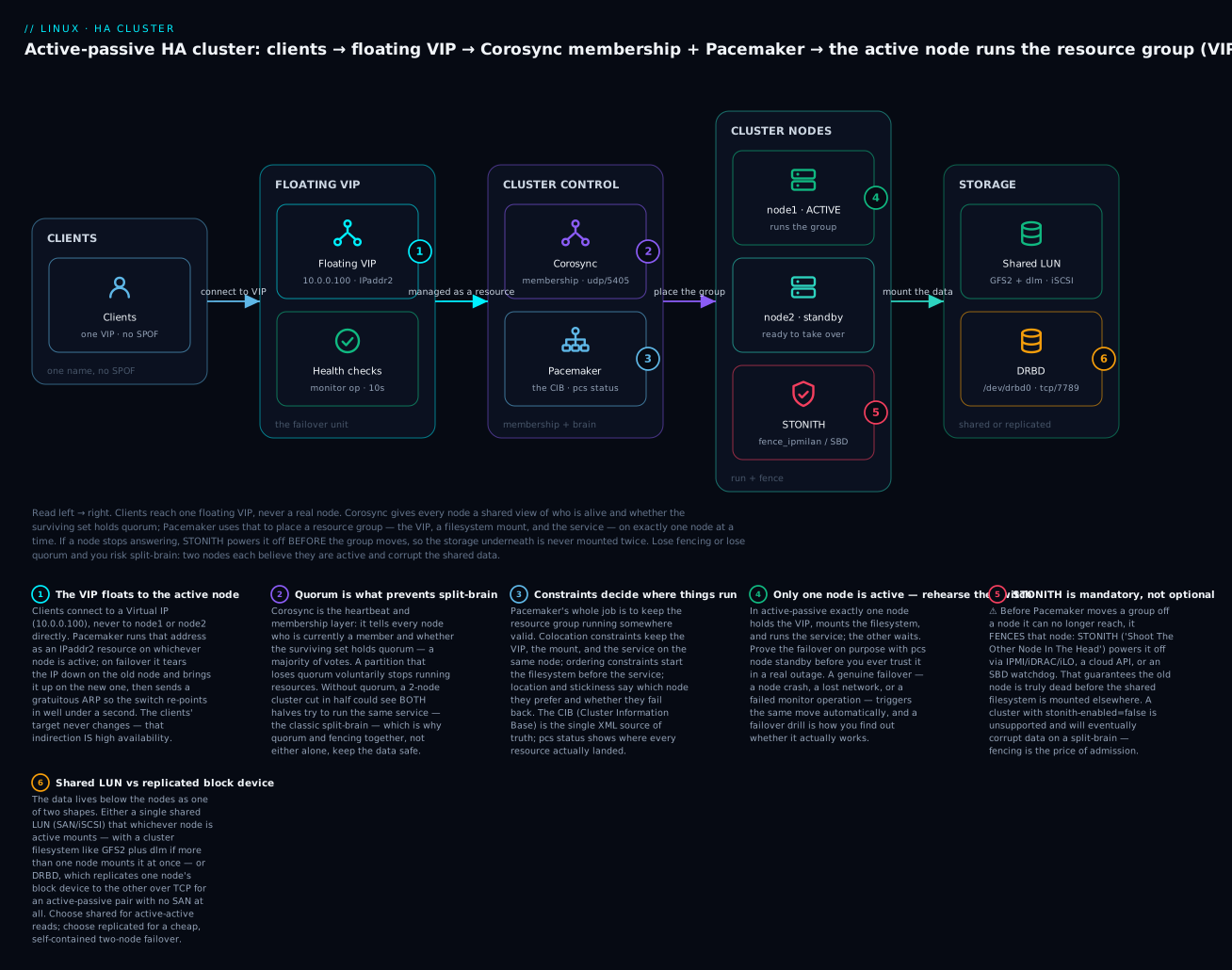
Corosync: membership, messaging, and quorum
Corosync’s job is to give every node the same, consistent answer to “who is in the cluster right now, and do we have quorum?” It does this over one or more rings (network paths). Modern Corosync (v3, RHEL 8/9, recent Debian/Ubuntu) uses the knet transport, which supports multiple links with automatic failover and built-in encryption — so you can run the heartbeat over two independent networks and survive one dying without a false failover. Here is a minimal /etc/corosync/corosync.conf for a two-node cluster (in practice pcs cluster setup writes this for you — read it, don’t hand-craft it):
# /etc/corosync/corosync.conf  (generated by: pcs cluster setup ...)
totem {
    version: 2
    cluster_name: ha_cluster
    transport: knet            # v3 default; supports multiple links + crypto
    crypto_cipher: aes256      # encrypt cluster traffic
    crypto_hash: sha256        # authenticate it (needs /etc/corosync/authkey)
}
nodelist {
    node {
        ring0_addr: 10.0.0.11  # node1's heartbeat address (link 0)
        # ring1_addr: 10.1.0.11   # a SECOND, independent link — do this in production
        name: node1
        nodeid: 1
    }
    node {
        ring0_addr: 10.0.0.12
        name: node2
        nodeid: 2
    }
}
quorum {
    provider: corosync_votequorum
    two_node: 1                # special 2-node handling (implies wait_for_all)
}
logging {
    to_logfile: yes
    logfile: /var/log/cluster/corosync.log
    to_syslog: yes
    timestamp: on
}
The totem block tunes the heartbeat and crypto; nodelist names the members and their ring addresses (add ring1_addr for a redundant link — the single most valuable thing you can do to prevent false failover); quorum selects the vote engine. The parameters you actually touch:
corosync.conf parameter |
Block | What it does |
|---|---|---|
cluster_name |
totem | Names the cluster (used by fencing keys, GFS2 lock tables) |
transport: knet |
totem | Multi-link transport with failover + crypto (v3 default) |
crypto_cipher / crypto_hash |
totem | Encrypt + authenticate cluster traffic (needs a shared authkey) |
token |
totem | ms before a silent node is declared lost (default 3000; raise on flaky nets) |
ring0_addr / ring1_addr |
node | The node’s address on link 0 / link 1 — two links = redundant heartbeat |
nodeid |
node | Stable integer ID for the node |
provider: corosync_votequorum |
quorum | The voting quorum engine |
two_node: 1 |
quorum | 2-node mode: each node “sees” quorum with just itself, so failover works |
wait_for_all: 1 |
quorum | Don’t grant quorum on boot until all nodes have been seen once (anti-split-brain) |
expected_votes |
quorum | Total votes when everyone is present (usually auto) |
Inspect the live membership and quorum state with corosync-quorumtool and corosync-cfgtool:
# Is the cluster quorate, and who are the members?
corosync-quorumtool -s
# Quorum information
# ------------------
# Nodes:             2
# Quorate:           Yes
# Votequorum information
# Expected votes:    2
# Total votes:       2
# Quorum:            1          <- with two_node, quorum needed is 1
# Flags:             2Node Quorate WaitForAll
# Membership information
# Nodeid  Votes  Name
#      1      1  node1 (local)
#      2      1  node2

# Check the health of each Corosync link (ring):
corosync-cfgtool -s
# LINK ID 0  addr = 10.0.0.11  status: nodeid 1 = localhost, nodeid 2 = connected
Quorum in a two-node cluster is the classic edge case, so understand the options precisely:
| Quorum scenario | Setting | Behaviour | Risk / note |
|---|---|---|---|
| 3+ odd nodes | default votequorum | Majority (e.g. 2 of 3) survives; minority stops | The clean, recommended shape |
2 nodes, two_node: 1 |
2-node mode | Each node alone counts as quorate → failover works | Relies entirely on fencing to prevent split-brain |
2 nodes, wait_for_all |
on (implied by two_node) | Won’t start resources until both seen once after boot | Stops a lone-booting node from grabbing everything |
| 2 nodes + qdevice | corosync-qdevice + qnetd arbiter |
A 3rd tie-breaker host casts the deciding vote | Best 2-node practice — real majority without a 3rd full node |
last_man_standing |
LMS flag | Recalculates expected votes as nodes leave gracefully | Lets a shrinking cluster stay quorate |
The honest summary for two nodes: two_node: 1 makes failover work, but it does so by letting each node consider itself quorate — which means the only thing standing between you and split-brain is fencing. That is why the next-best-practice for a two-node cluster is a quorum device (qdevice): a lightweight arbiter process (corosync-qnetd) on a third machine that casts a tie-breaking vote, giving you a genuine majority without paying for a third full cluster node.
Pacemaker: the CIB, the DC, and the daemons
Pacemaker is a set of cooperating daemons, and knowing which one does what turns “the cluster is being weird” into a targeted diagnosis.
| Component | Daemon (modern name) | Role |
|---|---|---|
| CIB | pacemaker-based |
Holds and replicates the Cluster Information Base — the XML that is the single source of truth for config + live state |
| Controller / DC | pacemaker-controld |
One elected node is the Designated Coordinator (DC) that runs the policy engine and orchestrates actions |
| Scheduler | pacemaker-schedulerd |
The “policy engine”: given the CIB + current state, computes what actions to take (start/stop/move) |
| Executor | pacemaker-execd |
Actually runs resource-agent start/stop/monitor on the local node |
| Fencer | pacemaker-fenced |
Executes STONITH — runs fence agents to power off a node |
| Attribute mgr | pacemaker-attrd |
Tracks per-node attributes (e.g. pingd connectivity scores) |
The DC is worth internalising: exactly one node is elected DC at a time; it runs the scheduler and tells the other nodes what to do. If the DC dies, the survivors elect a new one. The CIB is the other key idea — you never edit resource state on a node directly; you change the CIB (via pcs), it replicates to every node, and Pacemaker reconciles reality to match. pcs is just a friendly front-end that generates CIB edits and Corosync config for you.
Building the cluster with pcs
Installing and standing up a cluster is a fixed sequence. Package names differ by family:
# --- RHEL / Rocky / AlmaLinux / Fedora ---
sudo dnf install -y pacemaker corosync pcs fence-agents-all
sudo systemctl enable --now pcsd            # the pcs daemon (TCP 2224)
sudo firewall-cmd --permanent --add-service=high-availability
sudo firewall-cmd --reload

# --- Debian / Ubuntu ---
sudo apt install -y pacemaker corosync pcs fence-agents
sudo systemctl enable --now pcsd
pcs needs a shared password for the hacluster user (created by the packages) to authenticate nodes to each other:
# On BOTH nodes: set the hacluster password (use the same one)
echo 'StrongClusterPw!' | sudo passwd --stdin hacluster    # RHEL
#   or:  sudo passwd hacluster                              # interactive, any distro

# From ONE node: authenticate the nodes to pcsd, then create + start the cluster
sudo pcs host auth node1 node2 -u hacluster -p 'StrongClusterPw!'
sudo pcs cluster setup ha_cluster node1 node2           # writes corosync.conf everywhere
sudo pcs cluster start --all                            # start corosync+pacemaker now
sudo pcs cluster enable --all                           # and on boot

# Look at what you built:
sudo pcs status
The pcs subcommands you will live in:
| Command | What it does |
|---|---|
pcs host auth <nodes> -u hacluster |
Authenticate nodes to each other’s pcsd (once) |
pcs cluster setup <name> <nodes> |
Generate + distribute corosync.conf |
pcs cluster start --all / stop --all |
Start/stop Corosync+Pacemaker on every node |
pcs cluster enable --all |
Auto-start the cluster on boot |
pcs status |
The dashboard: nodes, resources, failures, DC |
pcs status corosync |
Membership + ring view |
pcs quorum status |
Quorum + votes |
pcs cluster cib |
Dump the raw CIB XML |
pcs node standby <node> |
Move all resources off a node (drain it) |
pcs node unstandby <node> |
Let it host resources again |
pcs property set <k>=<v> |
Set a cluster-wide property (e.g. stonith-enabled) |
pcs cluster stop --all && pcs cluster destroy |
Tear it all down |
Reading pcs status fluently is the core operational skill — every field tells you something:
pcs status field |
Meaning | What you want to see |
|---|---|---|
Online: [ node1 node2 ] |
Which nodes Corosync sees as up | All nodes online |
Current DC: node1 |
The elected coordinator | Some node named (not NONE) |
2 nodes configured |
Expected membership | Matches reality |
partition with quorum |
This partition can run resources | with quorum, never WITHOUT quorum |
Started node1 (per resource) |
Where each resource is running | Started on the intended node |
Stopped / FAILED |
A resource is down or errored | Investigate — check Failed Resource Actions |
Failed Fencing Actions |
A STONITH attempt failed | Must be empty — a stuck fence blocks failover |
Cluster resources: primitives, groups, clones, and constraints
A resource is anything Pacemaker manages — an IP, a filesystem mount, a service. Pacemaker doesn’t know how to start Apache; it delegates to a resource agent (RA), a small script with a fixed interface (start, stop, monitor, meta-data). The RA’s class tells Pacemaker how to call it.
Resource agent types
| Class | Syntax | What it is | Monitoring | Use when |
|---|---|---|---|---|
| OCF | ocf:heartbeat:IPaddr2 |
Open Cluster Framework script — the gold standard: rich parameters, real health monitor, returns fine-grained status |
Full (deep health checks) | Almost always — VIPs, filesystems, DBs, apps |
| systemd | systemd:httpd |
Wraps a systemd unit as a cluster resource | Shallow (is the unit active?) | A service with a good unit but no OCF agent |
| LSB | lsb:myapp |
An old /etc/init.d/ SysV script |
Shallow, and must be LSB-compliant | Legacy apps with only an init script |
| service | service:httpd |
Pacemaker auto-picks systemd or LSB | Depends on backend | Portable shorthand |
| stonith | stonith:fence_ipmilan |
A fence agent (special-cased) | N/A | Fencing devices only |
The OCF ocf:heartbeat:IPaddr2 triple reads class:provider:type. Prefer OCF whenever an agent exists — its monitor actually probes the resource’s health (e.g. the apache agent fetches server-status), whereas systemd: only knows whether the unit is “active.” If a service has only a systemd unit, wrapping it as systemd: is fine; just know the health check is shallow. (For the difference between a systemd unit and a cluster-managed service, the systemd units lesson is the reference.) ⚠️ One hard rule: a service Pacemaker manages must be disabled in systemd (systemctl disable httpd) — if both systemd and Pacemaker start it, they fight, and you get exactly the double-start you were trying to prevent.
The OCF agents you will reach for most:
| Agent | Manages | Key parameters |
|---|---|---|
ocf:heartbeat:IPaddr2 |
A floating VIP | ip=, cidr_netmask=, nic= |
ocf:heartbeat:Filesystem |
Mounting a filesystem | device=, directory=, fstype= |
ocf:heartbeat:apache |
Apache httpd | configfile=, statusurl= |
ocf:heartbeat:nginx |
nginx | configfile=, status10url= |
ocf:heartbeat:pgsql / mysql |
PostgreSQL / MySQL | pgctl=, config=, replication params |
ocf:heartbeat:LVM-activate |
Activate a volume group | vgname=, vg_access_mode= |
ocf:linbit:drbd |
A DRBD device (promotable) | drbd_resource= |
ocf:heartbeat:galera |
Galera multi-master MariaDB | wsrep_cluster_address= |
ocf:pacemaker:ping |
Test upstream connectivity → a node attribute | host_list=, dampen= |
Creating resources and defining operations
You create a primitive with pcs resource create <name> <agent> <params...> op <operations...>:
# A floating VIP resource, health-checked every 10s
sudo pcs resource create ClusterVIP ocf:heartbeat:IPaddr2 \
     ip=10.0.0.100 cidr_netmask=24 \
     op monitor interval=10s timeout=20s

# Apache, monitored via its own server-status page every minute
sudo pcs resource create WebSite ocf:heartbeat:apache \
     configfile=/etc/httpd/conf/httpd.conf \
     statusurl="http://127.0.0.1/server-status" \
     op monitor interval=1min
The operations (op) are how Pacemaker keeps a resource honest — especially monitor, which is what makes the cluster notice a service failing (not just a node dying):
| Operation | When it runs | Key attributes |
|---|---|---|
start |
Bringing the resource up | timeout= (how long to allow) |
stop |
Taking it down / moving it | timeout= (a stop that times out → fencing) |
monitor |
Repeatedly, to detect failure | interval= (how often), timeout= |
promote / demote |
Promotable (master/slave) resources | for ocf:linbit:drbd, pgsql replication |
Resource behaviour is further shaped by meta attributes — the policy knobs, set with pcs resource meta <rsc> <k>=<v> or as cluster-wide pcs resource defaults:
| Meta attribute | Effect | Typical value |
|---|---|---|
resource-stickiness |
How much a resource “wants” to stay put (resist fail-back) | 100 (stops needless flapping) |
migration-threshold |
Failures on a node before Pacemaker bans the resource from it | 3 |
failure-timeout |
After this long with no new failure, forget past failures | 60s |
target-role |
Force Started / Stopped |
admin control |
is-managed |
If false, Pacemaker monitors but won’t act (maintenance) |
true |
priority |
Which resources win when the cluster can’t run them all | integer |
Stickiness is the one beginners underuse. With resource-stickiness=0 (the default in some setups), a recovered node can pull resources back the instant it returns, causing a second, needless outage during the fail-back. Set a positive stickiness (say 100) and resources stay where they are unless there’s a stronger reason to move — no ping-pong.
Groups, clones, and promotable resources
Individual primitives are rarely useful alone; you combine them:
| Construct | What it is | Behaviour | Example |
|---|---|---|---|
| primitive | A single resource | Runs on one node | ClusterVIP |
| group | An ordered set of primitives | Start in order, stop in reverse, all colocated on one node, move together | webgroup = FS → VIP → Apache |
| clone | A resource that runs on many nodes | One instance per node (e.g. dlm, a cluster fs, ping) | dlm-clone, ping-clone |
| promotable clone (multi-state) | A clone with Master/Slave roles | One (or N) promoted, rest secondary | DRBD, pgsql replication |
A group is the workhorse for active-passive: putting the filesystem, the VIP, and the service in one group is a shorthand that says “start them in this order, keep them together, and move them as a unit.” It replaces writing the colocation and ordering constraints by hand.
Constraints: telling the cluster where and in what order
Constraints are the rules the scheduler obeys when placing resources. Three types cover almost everything:
| Constraint | Answers | Command |
|---|---|---|
| colocation | “Must A run on the same node as B?” | pcs constraint colocation add A with B INFINITY |
| ordering | “Must A start before B?” | pcs constraint order A then B |
| location | “Which node does A prefer / avoid?” | pcs constraint location A prefers node1=50 |
| ticket (advanced) | “May this site run A right now?” (multi-site/booth) | pcs constraint ticket … |
Constraints carry a score that the scheduler sums per node; the highest-scoring eligible node wins. Scores are where the cluster’s decisions actually come from:
| Score | Meaning |
|---|---|
INFINITY (1000000) |
Mandatory “must” (colocation/order that cannot be violated) |
-INFINITY |
Mandatory “must not” (never run here) |
Positive finite (e.g. 50) |
A preference — can be overridden by a stronger score |
Negative finite (e.g. -50) |
An anti-preference |
0 |
Neutral |
So colocation add WebSite with ClusterVIP INFINITY means “Apache must be wherever the VIP is — always”; location WebSite prefers node1=50 means “prefer node1, but not so hard that stickiness or a failure can’t move it.” Building the group instead of hand-wiring these is cleaner for the common case, but you reach for explicit constraints when the relationships aren’t a simple linear chain (e.g. “the VIP may run anywhere, but the DB must avoid the backup node”).
Fencing / STONITH: the non-negotiable
⚠️ This is the most important section in the lesson. STONITH — “Shoot The Other Node In The Head” — is Pacemaker forcibly powering off a node it can no longer trust, before it lets another node take over that node’s resources. It exists to answer one question with certainty: “Is the node I can’t reach actually dead, or just silent-but-alive and still writing to the shared disk?” Fencing removes the ambiguity by making the node dead. Without it, a partitioned cluster where each side thinks the other is gone leads to two nodes mounting the same filesystem and writing to it at once — and a shared filesystem does not survive concurrent uncoordinated writers. The corruption is total and there is no fsck back from it.
⚠️ A cluster with stonith-enabled=false is unsupported by Red Hat and SUSE, and is a data-loss incident waiting for a network blip. Test labs disable it for convenience (we will, briefly, then turn it on). Production never does. If you take one thing from this lesson: fencing is not an optional hardening step — it is the mechanism that makes the whole cluster safe. No fencing, no cluster.
How fencing fits the failover sequence
When Pacemaker decides to move resources off a node it has lost contact with, the sequence is: (1) node goes silent → (2) Corosync declares it lost → (3) pacemaker-fenced runs the fence agent to power it off → (4) only after the fence confirms success does Pacemaker start the resources elsewhere. Step 4 is the safety interlock: if fencing fails (or is disabled), Pacemaker refuses to recover the resources — it would rather leave them down than risk a double-mount. That is why a stuck fence device freezes failover: “Failed Fencing Actions” in pcs status is an all-hands problem.
Fence agent types
You fence a node by controlling something it cannot override — its power, its hypervisor, or a watchdog on the node itself:
| Fence method | Agent(s) | How it kills the node | Notes |
|---|---|---|---|
| IPMI / BMC | fence_ipmilan |
Talks to the board management controller to power-cycle | The bare-metal workhorse; needs BMC network + creds |
| Dell iDRAC | fence_idrac (IPMI-based) |
Via iDRAC | Dell servers |
| HPE iLO | fence_ilo4, fence_ilo5, fence_ilo_ssh |
Via iLO | HPE servers |
| APC / PDU | fence_apc, fence_apc_snmp |
Cuts the outlet the node is plugged into | When there’s no BMC; fences the power, not the node |
| Cloud | fence_aws, fence_gce, fence_azure_arm |
Calls the cloud API to stop/terminate the instance | The right answer for cloud VMs |
| Hypervisor | fence_vmware_rest, fence_xvm (KVM/libvirt) |
Tells the hypervisor to power off the guest | fence_xvm is great for KVM labs |
| SCSI / storage | fence_scsi, fence_mpath |
SCSI-3 persistent reservations block the node’s disk access | Fences storage access, not power — needs shared SCSI |
| SBD (watchdog) | fence_sbd + sbd daemon |
The node’s own hardware/software watchdog reboots it | Works with or without shared storage; ideal where you can’t reach a BMC |
| kdump | fence_kdump |
Confirms a node crashed into kdump | Not a real fence alone — a helper; combine with a real one |
The pcs stonith commands mirror pcs resource:
# List available fence agents, then their parameters:
sudo pcs stonith list
sudo pcs stonith describe fence_ipmilan

# Create a STONITH device for node1 driven by its IPMI BMC:
sudo pcs stonith create fence-node1 fence_ipmilan \
     pcmk_host_list="node1" ip=10.0.9.11 \
     username="admin" password="secret" lanplus=1 \
     op monitor interval=60s

# Turn fencing ON (the cluster-wide switch) and test it:
sudo pcs property set stonith-enabled=true
sudo pcs stonith status
sudo pcs stonith fence node2       # ⚠️ ACTUALLY powers off node2 — this is the real test
pcs stonith command |
What it does |
|---|---|
pcs stonith list |
List installed fence agents |
pcs stonith describe <agent> |
Show an agent’s parameters |
pcs stonith create <name> <agent> … |
Define a fence device |
pcs stonith status |
Show configured fence devices + state |
pcs stonith fence <node> |
⚠️ Manually fence a node (real power-off — the acid test) |
pcs property set stonith-enabled=true |
The master switch — leave it true |
pcs stonith history show |
Past fence actions |
SBD vs power fencing, and why SBD is the lab-friendly choice
Two philosophies of fencing, and the trade-off between them:
| Power fencing (IPMI/PDU/cloud) | SBD (Storage-Based Death / watchdog) | |
|---|---|---|
| Kills the node by | External power control | The node’s own watchdog timer resets it |
| Needs | A reachable BMC/PDU/cloud API | A hardware or software (softdog) watchdog; optionally a shared disk |
| “Diskless” mode | n/a | Yes — watchdog only, no shared storage needed |
| Failure mode if fence device unreachable | Fencing fails → failover blocks | Node self-fences via watchdog even if isolated |
| Great for | Bare metal with BMC, cloud VMs | VMs/labs, clusters without a BMC, belt-and-braces alongside power fencing |
| Gotcha | BMC on the same power feed as the node = useless | Watchdog must be real; softdog is fine for labs, hardware watchdog for prod |
SBD is beautiful for two reasons. First, in diskless mode it needs only a watchdog device (/dev/watchdog, provided by the softdog kernel module in a VM), so you can have real, working fencing on two throwaway VMs — no BMC, no SAN. Second, it self-fences: an isolated node whose watchdog isn’t reset in time reboots itself, which is exactly the guarantee you want. That is why the hands-on lab uses SBD — it lets you learn fencing properly without hardware.
Shared and replicated storage
Active-passive on a stateful service needs the data to be available on whichever node takes over. Two shapes, and the choice defines the rest of your design.
| Approach | What it is | Concurrency | Cost/complexity | Use when |
|---|---|---|---|---|
| Shared LUN + normal FS (ext4/xfs) | One SAN/iSCSI LUN, mounted by one node at a time | Single mounter only (Pacemaker enforces) | Needs a SAN/iSCSI target | Active-passive, one writer |
| Shared LUN + cluster FS (GFS2/OCFS2) | One LUN, mounted by all nodes at once | Concurrent (cluster-locked) | High — needs dlm + lvmlockd | Active-active reads/writes |
| DRBD (replicated) | Block device mirrored node→node over TCP | One Primary at a time (or dual-primary + cluster FS) | Moderate — no SAN needed | 2-node active-passive without shared storage |
| Managed / NFS | Hand storage to a NAS/managed service | Server handles it | Low — offload the problem | When a filer or cloud storage exists |
Shared LUN and cluster filesystems (GFS2/OCFS2)
A shared LUN (a SAN or iSCSI volume both nodes can see) is the classic HA storage. In active-passive you format it with a normal filesystem (xfs/ext4) and let Pacemaker’s Filesystem resource mount it on exactly one node — the single-mount guarantee comes from the cluster (and fencing), not the filesystem. For iSCSI as the shared block layer, the advanced storage lesson covers targetcli/iscsiadm end to end.
⚠️ A normal filesystem (ext4/xfs) mounted on two nodes at once = instant corruption. ext4/xfs assume they are the only writer and cache metadata aggressively; two of them on one LUN will destroy it. If you genuinely need concurrent mounts (active-active), you must use a cluster filesystem — GFS2 (Red Hat) or OCFS2 (SUSE/Oracle) — which coordinate every metadata change through the DLM (Distributed Lock Manager). These need supporting cluster resources:
| Requirement | Resource | Why |
|---|---|---|
| DLM | ocf:pacemaker:controld (clone) |
Distributed lock manager — arbitrates concurrent access |
| Shared LVM locking | ocf:heartbeat:lvmlockd (clone) |
Coordinates LVM metadata across nodes (replaces old clvmd) |
| The cluster FS | ocf:heartbeat:Filesystem (clone, fstype=gfs2) |
The actual mount, cloned to all nodes |
| Fencing | (mandatory) | GFS2/DLM refuse to run without working STONITH |
# Make a GFS2 filesystem (⚠️ destroys the target device):
# -t <clustername>:<fsname>  ties locks to THIS cluster; -j 2 = journals for 2 nodes
sudo mkfs.gfs2 -p lock_dlm -t ha_cluster:webdata -j 2 /dev/vg_shared/lv_web
Note that last table row: GFS2 and the DLM literally will not start if fencing is not configured, because concurrent writers without the ability to fence a stuck node is the definition of the corruption scenario. The storage layer enforces the “no fencing, no cluster” rule for you.
DRBD: replicated block storage without a SAN
When you don’t have shared storage, DRBD (“Distributed Replicated Block Device”) gives you HA storage anyway: it mirrors a block device from one node to the other over the network — RAID-1 across two machines. One node is Primary (mounted, read-write), the other Secondary (receiving the replicated writes, not mounted). On failover, Pacemaker promotes the survivor to Primary and mounts it.
# /etc/drbd.d/r0.res  — the resource definition (same on both nodes)
resource r0 {
    device    /dev/drbd0;
    disk      /dev/vg/lv_data;      # backing device
    meta-disk internal;
    on node1 { address 10.1.0.11:7789; }
    on node2 { address 10.1.0.12:7789; }
}
sudo drbdadm create-md r0          # init metadata (⚠️ writes to the backing device)
sudo drbdadm up r0                 # bring the resource up on both nodes
sudo drbdadm primary --force r0    # on node1 ONLY, for the first sync
# watch the initial sync:
drbdadm status r0
DRBD’s state is two roles + a connection + a disk state; reading it is how you diagnose replication:
| Field | Healthy value | Trouble value |
|---|---|---|
| Role | Primary (one) / Secondary (other) |
Primary/Primary (dual — only OK with a cluster FS) |
| Connection | Connected |
StandAlone, WFConnection (won’t talk), Unconnected |
| Disk state | UpToDate/UpToDate |
Inconsistent, Outdated, Diskless |
In Pacemaker, DRBD is a promotable clone (ocf:linbit:drbd): the cluster promotes one node to Primary and colocates the Filesystem + service with the Primary via constraints. ⚠️ DRBD has its own split-brain: if both nodes were Primary while disconnected (each took writes), they now disagree, and reconnecting requires choosing a victim whose divergent writes are discarded — drbdadm secondary r0 then drbdadm connect --discard-my-data r0 on the loser. That command throws away data; it is a last resort, and the reason DRBD split-brain is best prevented by proper fencing (fencing resource-and-stonith; in the DRBD config, tied to Pacemaker).
For where LVM fits — a shared VG activated on one node at a time via ocf:heartbeat:LVM-activate, or the system_id feature that stamps a VG with an owning host so only that host activates it — see the LVM lesson; in a cluster you set vg_access_mode=lvmlockd for shared VGs or use system_id for exclusive ones.
Hands-on lab: a two-node VIP + Apache + fencing cluster
⚠️ Do this on two disposable VMs (KVM/VirtualBox/cloud), never on anything you care about. You will crash a node on purpose. Steps 6 and 11 reboot/fence a node.
We build an active-passive cluster: node1 (10.0.0.11) and node2 (10.0.0.12) share VIP 10.0.0.100 and run Apache, all as one group, with real fencing via diskless SBD + softdog. RHEL/Rocky/Alma commands shown; Debian/Ubuntu notes inline.
Step 0 — Prep both nodes. Set hostnames, /etc/hosts, and open the firewall.
# On EACH node — names must resolve both ways
sudo hostnamectl set-hostname node1        # (node2 on the other)
printf '10.0.0.11 node1\n10.0.0.12 node2\n' | sudo tee -a /etc/hosts
sudo dnf install -y pacemaker corosync pcs fence-agents-all sbd httpd
sudo firewall-cmd --permanent --add-service=high-availability
sudo firewall-cmd --permanent --add-service=http
sudo firewall-cmd --reload
sudo systemctl enable --now pcsd
What just happened: both nodes have the stack installed, can resolve each other, and pcsd (TCP 2224) is listening. On Debian/Ubuntu: apt install pacemaker corosync pcs fence-agents sbd apache2.
Step 1 — Give Apache a status page (so the OCF agent can health-check it). On both nodes:
sudo tee /etc/httpd/conf.d/status.conf >/dev/null <<'EOF'
<Location /server-status>
    SetHandler server-status
    Require ip 127.0.0.1
</Location>
EOF
echo "<h1>Served by $(hostname)</h1>" | sudo tee /var/www/html/index.html
sudo systemctl disable --now httpd        # ⚠️ CRUCIAL: Pacemaker owns it, not systemd
What just happened: Apache can report health on /server-status, and — critically — systemd will not start httpd, so only Pacemaker does. Forgetting this last line is the #1 lab bug.
Step 2 — Authenticate and create the cluster. On node1 only:
echo 'ClusterPw123!' | sudo passwd --stdin hacluster          # also run on node2
sudo pcs host auth node1 node2 -u hacluster -p 'ClusterPw123!'
sudo pcs cluster setup ha_cluster node1 node2
sudo pcs cluster start --all
sudo pcs cluster enable --all
sudo pcs status
What just happened: pcs cluster setup wrote /etc/corosync/corosync.conf to both nodes and the cluster is live. pcs status should show Online: [ node1 node2 ] and a Current DC.
Step 3 — Confirm quorum.
sudo pcs quorum status
sudo corosync-quorumtool -s
What just happened: you see Quorate: Yes, 2Node, WaitForAll. A two-node cluster is quorate with both up; fencing (next) is what keeps it safe when one goes away.
Step 4 — Set up REAL fencing with diskless SBD. On both nodes:
sudo modprobe softdog                              # software watchdog for the VM
echo softdog | sudo tee /etc/modules-load.d/softdog.conf
ls -l /dev/watchdog                                # confirm the device exists
Then on node1, configure and enable SBD in the cluster:
sudo pcs stonith sbd enable watchdog=/dev/watchdog SBD_DELAY_START=yes
sudo pcs cluster stop --all
sudo pcs cluster start --all
sudo pcs stonith config                            # sbd should show enabled
sudo pcs property set stonith-enabled=true
What just happened: SBD now runs against the softdog watchdog in diskless mode — genuine self-fencing with no SAN. stonith-enabled=true means the cluster will actually fence. This is the step production clusters must never skip. ⚠️ If /dev/watchdog is missing, SBD won’t arm — fix the watchdog before proceeding.
Step 5 — Create the resources and group them. On node1:
sudo pcs resource create ClusterVIP ocf:heartbeat:IPaddr2 \
     ip=10.0.0.100 cidr_netmask=24 op monitor interval=10s
sudo pcs resource create WebSite ocf:heartbeat:apache \
     configfile=/etc/httpd/conf/httpd.conf \
     statusurl="http://127.0.0.1/server-status" op monitor interval=30s
# Group them: starts VIP then Apache, keeps them together, moves them as one
sudo pcs resource group add webgroup ClusterVIP WebSite
# Don't ping-pong on fail-back:
sudo pcs resource defaults update resource-stickiness=100
sudo pcs status
What just happened: webgroup runs on one node (say node1). pcs status shows both resources Started node1. Grouping gave you ordering (VIP before Apache) and colocation (same node) for free.
Step 6 — Prove it works: the failover drill. From your workstation:
curl http://10.0.0.100/        # -> "Served by node1"
# Now drain node1 gracefully:
sudo pcs node standby node1
watch sudo pcs status          # webgroup moves to node2 within seconds
curl http://10.0.0.100/        # -> "Served by node2"  — SAME VIP, new node
sudo pcs node unstandby node1  # node1 rejoins; stickiness keeps the group on node2
What just happened: the VIP and Apache moved together to node2, and the client — talking to 10.0.0.100 the whole time — never changed its target. That indirection is the entire point of HA. Because stickiness is 100, nothing bounced back when node1 returned.
Step 7 — Simulate a real crash (fencing in action). ⚠️ This hard-crashes node2:
# On node2 (where webgroup now runs): force an instant kernel panic
echo c | sudo tee /proc/sysrq-trigger        # ⚠️ node2 dies immediately
Back on node1, watch sudo pcs status: Corosync loses node2 → Pacemaker fences it (SBD/watchdog reboots it) → webgroup recovers onto node1. curl http://10.0.0.100/ returns “Served by node1” again.
What just happened: a genuine node death triggered the full sequence — lost membership, fence, then recover. Note recovery waited for the fence to complete; that interlock is what prevents a double-mount.
Step 8 — Maintenance mode and cleanup.
sudo pcs property set maintenance-mode=true     # Pacemaker stops acting (patch safely)
# ... do your maintenance ...
sudo pcs property set maintenance-mode=false
sudo pcs resource cleanup webgroup              # clear stale failure history
# Full teardown when done:
sudo pcs cluster stop --all && sudo pcs cluster destroy
What just happened: maintenance-mode froze cluster actions so you can work on resources without triggering failover; cleanup wiped old failcounts so the group can run freely again.
Extension (real shared filesystem). To add the filesystem tier, give both nodes a shared block device (iSCSI LUN or DRBD /dev/drbd0), then insert a Filesystem resource first in the group:
sudo pcs resource create WebFS ocf:heartbeat:Filesystem \
     device="/dev/drbd0" directory="/var/www/html" fstype="xfs" \
     op monitor interval=20s
sudo pcs resource group add webgroup WebFS --before ClusterVIP   # mount before serving
Common mistakes and troubleshooting
The failures below are the ones that eat weekends. The table is the fast path; the prose after it covers the three that are genuinely dangerous.
| Symptom | Likely cause | Fix |
|---|---|---|
| Split-brain: both nodes active, data corrupt | Fencing disabled or fence device unreachable; heartbeat network partitioned | ⚠️ Configure + test STONITH; add a redundant Corosync ring; use a qdevice for 2-node |
| Fencing loop: nodes keep rebooting each other | Both nodes lose contact and both try to fence; or a fence agent misreports success | Add pcmk_delay_base/pcmk_delay_max (fence delay) so one node wins the race; fix the network; check BMC creds |
Resource won’t start (FAILED) |
Missing package, wrong RA params, service still enabled in systemd, SELinux | pcs status → Failed Resource Actions; check the RA params; systemctl disable the service; check SELinux/AVC |
| Quorum lost — cluster stops resources | A node down + no majority (2-node without qdevice), or wait_for_all after a full reboot |
Bring nodes back; add a qdevice arbiter; check corosync-quorumtool -s |
| VIP won’t move / duplicate VIP | keepalived: virtual_router_id clash or blocked multicast; Pacemaker: constraint pins it |
Unique VRID + unicast_peer; check pcs constraint show and location scores |
pcs status shows a node UNCLEAN (offline) |
Pacemaker can’t confirm the node is dead (fencing needed but failed/absent) | This is a stuck fence — resources won’t recover until it’s resolved; fix/trigger fencing |
| Corosync flapping / false failovers | Single heartbeat link is congested or dropping; token timeout too low |
Add ring1_addr (second link); raise token; separate cluster traffic onto its own NIC |
DRBD StandAlone / Inconsistent |
DRBD split-brain (both were Primary while disconnected) | ⚠️ Pick a victim: drbdadm secondary, then connect --discard-my-data (loses that node’s diverging writes) |
| Failover works but is slow (30–60s) | Long token + fence timeout + monitor interval stacking |
Tune token, fence timeout, and op monitor interval — but don’t go so low you get false positives |
The UNCLEAN/offline deadlock (and why disabling fencing “fixes” nothing). When a node stops responding and Pacemaker cannot confirm it’s dead, pcs status marks it UNCLEAN (offline) and refuses to recover its resources — deliberately. Beginners “fix” this by setting stonith-enabled=false, which makes the resources recover instantly and feels like a win. ⚠️ It is the opposite: you have removed the only thing preventing the silent node from also running those resources. The correct fix is to make fencing work (right BMC creds, reachable watchdog, tested pcs stonith fence). An UNCLEAN node is the cluster protecting your data; the answer is to help it fence, not to blind it.
The fencing loop / fence race. In a two-node cluster, a network partition means each node simultaneously decides the other must die — and if both fence at once, both reboot, and you get a ping-pong of mutual murder. The fix is asymmetry: pcs stonith update <dev> pcmk_delay_base=5s (or pcmk_delay_max) makes one node pause before fencing, so the other wins the race and survives. Real production two-node clusters combine this with a qdevice (so only the majority-holding side fences) and a redundant heartbeat ring (so a single link failure never partitions the cluster in the first place). A fence loop is almost always “single heartbeat link died” plus “no delay to break the tie.”
Split-brain is a config failure, not bad luck. Every split-brain traces back to one of: fencing off/broken, a single heartbeat path that failed, or two_node mode with no qdevice on a flaky network. It is entirely preventable, and the prevention is boring: test your fencing (pcs stonith fence should really power a node off), run two Corosync rings, and add a qdevice for two-node clusters. A cluster you haven’t fenced-tested is a cluster you don’t know is safe.
Where managed/cloud HA replaces hand-rolling this
Building Pacemaker clusters is a genuine skill — and often the wrong tool in 2026, because the cloud and Kubernetes have absorbed most of what these clusters do. Know the mapping so you build a cluster only when you truly need one (usually: a stateful service on your own hardware or VMs that has no managed equivalent).
| Hand-rolled HA (this lesson) | Managed / cloud equivalent | When the managed option wins |
|---|---|---|
| keepalived floating VIP | Cloud Load Balancer (ALB/NLB, Cloud LB, Azure LB) | Almost always in cloud — no VRRP, no multicast headaches |
| Pacemaker VIP + service group (stateless) | Auto Scaling Group behind a load balancer | Stateless web/API tiers — let the platform replace dead instances |
| Pacemaker + DRBD/GFS2 for a database | Managed DB (RDS/Aurora, Cloud SQL, Azure DB) Multi-AZ | Failover, backups, patching handled for you |
| Shared GFS2/NFS for files | Managed NFS (EFS, Filestore, Azure Files) | Multi-AZ, no dlm/lvmlockd to operate |
| STONITH fence agents | Cloud fencing (fence_aws/fence_gce/fence_azure_arm) or the platform’s own instance replacement |
If you must run Pacemaker on cloud VMs, use cloud fence agents |
| Whole active-passive service cluster | Kubernetes Deployment + Service (+ readiness probes) | Stateless & many stateful workloads — k8s reschedules pods, no Corosync |
| Multi-site failover (booth/tickets) | Multi-region managed services / global load balancing | Cross-region is a platform problem, not a Pacemaker one |
The honest verdict: reach for Pacemaker/Corosync when you have a stateful service on your own machines (bare metal or self-managed VMs) with no managed substitute — a self-hosted PostgreSQL that must not lose a transaction, an NFS server, a SAP or legacy app certified only on RHEL HA. For anything stateless, or anything with a managed equivalent, a cloud load balancer + auto-scaling group, a managed database, or a Kubernetes Deployment gives you the same availability with a fraction of the operational surface — and without you personally owning the correctness of fencing at 03:00. keepalived still earns its place as the dead-simple VIP tool on-prem and in VPCs that permit it.
Cheat-sheet
| Task | Command |
|---|---|
| Install stack (RHEL) | dnf install pacemaker corosync pcs fence-agents-all sbd |
| Install stack (Debian) | apt install pacemaker corosync pcs fence-agents sbd |
| Set hacluster pw | passwd hacluster (same on all nodes) |
| Authenticate nodes | pcs host auth node1 node2 -u hacluster |
| Create + start cluster | pcs cluster setup ha_cluster node1 node2 && pcs cluster start --all |
| Enable on boot | pcs cluster enable --all |
| Status dashboard | pcs status |
| Quorum / membership | pcs quorum status · corosync-quorumtool -s · corosync-cfgtool -s |
| Create a VIP | pcs resource create VIP ocf:heartbeat:IPaddr2 ip=10.0.0.100 cidr_netmask=24 op monitor interval=10s |
| Create a service | pcs resource create Web ocf:heartbeat:apache configfile=/etc/httpd/conf/httpd.conf statusurl=http://127.0.0.1/server-status |
| Group resources | pcs resource group add webgroup VIP Web |
| Constraints | pcs constraint colocation add Web with VIP INFINITY · pcs constraint order VIP then Web · pcs constraint location Web prefers node1=50 |
| Stickiness | pcs resource defaults update resource-stickiness=100 |
| Enable fencing | pcs property set stonith-enabled=true |
| SBD (diskless) | modprobe softdog && pcs stonith sbd enable watchdog=/dev/watchdog |
| Create IPMI fence | pcs stonith create f-n1 fence_ipmilan pcmk_host_list=node1 ip=… username=… password=… lanplus=1 |
| Manually fence (test) | pcs stonith fence node2 ⚠️ real power-off |
| Fence race delay | pcs stonith update <dev> pcmk_delay_base=5s |
| Drain a node | pcs node standby node1 / pcs node unstandby node1 |
| Move a resource | pcs resource move <rsc> node2 then pcs resource clear <rsc> |
| Maintenance mode | pcs property set maintenance-mode=true |
| Clear failures | pcs resource cleanup <rsc> |
| Show constraints | pcs constraint show --full |
| Tear down | pcs cluster stop --all && pcs cluster destroy |
| keepalived VIP | edit /etc/keepalived/keepalived.conf (state/priority/virtual_router_id/vrrp_script) |
Interview and exam questions
Q: Why is fencing (STONITH) mandatory in a Pacemaker cluster, not optional hardening?
A: Because it is the only mechanism that guarantees a node you can’t reach is actually dead before another node takes over its resources. Without it, a silent-but-alive node can keep writing to shared storage while a survivor also mounts it — split-brain, and irreversible corruption. Red Hat and SUSE treat stonith-enabled=false as unsupported for exactly this reason.
Q: What’s the difference between quorum and fencing? Do you need both? A: Quorum is majority voting — it decides which partition is allowed to run resources so a minority stands down. Fencing forcibly powers off a node so it cannot run them. You need both: quorum without fencing can’t stop a silent node from writing; fencing without quorum can let a partitioned cluster fence each other. Quorum grants permission; fencing enforces reality.
Q: When would you use keepalived instead of Pacemaker? A: When all you need is a floating IP in front of a stateless service (a pair of HAProxy/nginx). keepalived/VRRP is simpler and sub-second. Pacemaker is for stateful services that must run on exactly one node, need ordered/colocated resources, and involve shared storage that must never double-mount — i.e. when you need quorum and fencing.
Q: Explain RTO vs RPO. A: RTO (Recovery Time Objective) is how long you may be down; RPO (Recovery Point Objective) is how much data you may lose. Synchronous shared storage gives RPO=0; async replication or interval backups trade RPO for cost/distance. They’re independent axes and both must be stated.
Q: A two-node cluster loses the network link between nodes. What happens, and how do you prevent disaster?
A: Each node thinks the other is dead. With working fencing + pcmk_delay, one node fences the other and safely takes over. Without fencing, both may run the resources → split-brain. Prevention: test STONITH, run two Corosync rings so a single link loss doesn’t partition the cluster, and add a qdevice so only the majority side acts.
Q: What is a resource group and what does it give you? A: An ordered set of primitives that Pacemaker starts in order, stops in reverse, keeps colocated on one node, and moves together. It’s shorthand for the colocation + ordering constraints you’d otherwise write by hand — ideal for “filesystem → VIP → service” active-passive stacks.
Q: What’s the difference between OCF, systemd, and LSB resource agents?
A: OCF agents are purpose-built scripts with rich parameters and deep health monitor (e.g. apache fetching server-status) — prefer them. systemd agents wrap a unit but only know if it’s “active” (shallow check). LSB wraps old init.d scripts. Whatever the class, the service must be disabled in systemd so only Pacemaker starts it.
Q: (RHCSA/LFCS-style) Configure a floating VIP resource and force it onto node1.
A: pcs resource create VIP ocf:heartbeat:IPaddr2 ip=10.0.0.100 cidr_netmask=24 op monitor interval=10s then pcs constraint location VIP prefers node1=INFINITY (or a finite score like 50 to keep it a preference).
Q: (Task) You need HA storage for a two-node active-passive DB but have no SAN. What do you use?
A: DRBD — it replicates a block device node→node over TCP. One node is Primary (mounted), the other Secondary. In Pacemaker it’s a promotable clone (ocf:linbit:drbd) with the Filesystem + DB colocated on the Primary. Configure fencing tied to DRBD to avoid DRBD’s own split-brain.
Q: pcs status shows a node UNCLEAN (offline) and resources aren’t recovering. What’s wrong?
A: Pacemaker can’t confirm the node is dead, so it refuses to recover its resources (protecting against double-run). Fencing is needed but hasn’t succeeded — fix the fence device (BMC creds/reachability, watchdog) so the node gets fenced; then recovery proceeds. Do not disable fencing to “unstick” it.
Q: Why do we set resource-stickiness?
A: To stop resources bouncing back to a recovered node the instant it returns (a second, needless outage). A positive stickiness makes a resource resist fail-back unless there’s a stronger reason to move — no ping-pong.
Q: What does a qdevice do and when do you add one?
A: A corosync-qdevice talks to a qnetd arbiter on a third host that casts a tie-breaking vote. It gives a two-node cluster a genuine majority (avoiding the fencing-only safety of two_node mode) without the cost of a third full node — the recommended two-node production pattern.
Key takeaways
- HA = redundancy + automatic failover + a referee that guarantees single ownership. Two servers without that referee is not HA — it’s a split-brain machine.
- Quorum and fencing are the two hard problems, and you need both. Quorum (majority voting) decides who may run resources; fencing/STONITH forcibly powers off the other node so it cannot. ⚠️ A cluster with fencing disabled is unsupported and will eventually corrupt shared storage.
- Match the tier to the need. keepalived/VRRP for a floating VIP in front of stateless services (simple, sub-second); Corosync + Pacemaker for stateful services that need ordered/colocated resources and shared storage that must never double-mount.
- Corosync does membership + messaging + quorum; Pacemaker is the brain (the CIB holds desired state; the DC orchestrates; resource agents start/stop/monitor). Drive it all with
pcs. - Resources become useful through groups and constraints: groups give ordering + colocation + move-together for free; colocation/ordering/location constraints with scores (
INFINITY= mandatory) express everything else; stickiness stops fail-back flapping. - Storage is shared or replicated: a shared LUN with a normal FS (one mounter) or a cluster FS (GFS2/OCFS2 + dlm) for active-active, or DRBD for a SAN-less two-node pair. ⚠️ A normal filesystem mounted twice = instant corruption; GFS2/DLM refuse to run without fencing.
- Test the failover, always.
pcs node standby, then a real crash, thenpcs stonith fence— a cluster you haven’t fence-tested is a cluster you don’t know is safe. Rehearse before the outage, not during it. - Prefer managed HA when it exists. Cloud load balancers, managed databases, managed NFS, and Kubernetes have absorbed most hand-rolled clustering; build Pacemaker when you own the machines and the stateful service has no managed substitute.