If you remember one sentence from this lesson, remember this: a container is a normal Linux process — the kernel has just isolated what it can see, limited what it can use, and confined what it can do. There is no “container” data structure in the Linux kernel. There is no struct container. When you run docker run, podman run, or a pod on Kubernetes, what actually gets created is a process (or a small tree of processes) with three sets of properties bolted on:
- Namespaces — the process gets its own private view of the system: its own process table, its own network stack, its own mounts, its own hostname. This is isolation — what the process can see.
- cgroups (control groups) — the process is placed in a box with a ceiling on CPU, memory, block I/O, and process count. This is limiting — what the process can use.
- Capabilities, seccomp, and an LSM (SELinux or AppArmor) — the process is stripped of most of root’s powers, has a chunk of the syscall table blocked, and is labelled so it can’t touch anything it shouldn’t. This is confinement — what the process can do.
That is the whole trick. Docker, Podman, containerd, CRI-O, and Kubernetes are elaborate, genuinely useful machinery on top of those three kernel features — but the features themselves are old, plain, and completely usable from the command line with tools that ship in util-linux. By the end of this lesson you will have built a container by hand with unshare and pivot_root, watched a cgroup throttle a process, dropped capabilities off a running shell, and read the seccomp state out of /proc. You will never again think of a container as a magic box.
This is an expert lesson. It assumes you are comfortable with processes, signals, and PIDs (see Processes, jobs, signals & kill), with systemd units (see systemd units, services, targets & journald), and with reading /proc and /sys (see Kernel modules, /proc, /sys & sysctl). Type every command. The concepts only lock in when you watch the isolation happen on your own machine.
Why this matters
Almost every confusing thing about containers dissolves the moment you hold the “it’s just a process” model correctly.
“Why is my app PID 1 inside the container?” Because the container has its own PID namespace, and the first process in a PID namespace is PID 1 — with all the special responsibilities PID 1 carries (reaping zombies, receiving signals differently). “Why can root inside the container not reboot the host or load a kernel module?” Because the runtime dropped those capabilities and, in rootless mode, that “root” is a UID-mapped ordinary user. “Why does my container see 64 GB of RAM when I gave it a 512 MB limit?” Because a cgroup meters what it can use but a namespace does not fake what free reads from /proc/meminfo — a real footgun that crashes JVMs and Go runtimes that size their heap off host RAM. “Why can one container not see another’s processes?” Separate PID namespaces. “Why did my volume mount get a weird SELinux label?” Because the LSM labelled it, and you forgot :Z.
Every one of those is a direct, mechanical consequence of one of the three pillars. Learn the pillars and you can debug any container platform — because they all, without exception, come down to namespaces, cgroups, and confinement provided by the one shared host kernel. That last point is the load-bearing difference between a container and a virtual machine, and it is worth stating plainly before we go further.
A virtual machine runs a second kernel on virtual hardware; the hypervisor’s isolation boundary is the CPU’s virtualization extensions. A container shares the host’s single kernel — every containerized process makes syscalls into the exact same kernel your shell uses. That is why containers start in milliseconds and cost almost nothing, and it is also why container isolation is “only” as strong as namespaces + cgroups + seccomp + the LSM, rather than a hardware boundary. When you read that “a container escape” is a kernel bug, this is why: there is only one kernel, and getting out of the box means fooling it. Hold that distinction and the rest of this lesson is just detail.
A container is just a process: the three primitives
Let’s make the thesis concrete. The kernel exposes exactly two system calls that create namespaces — clone(2) (fork a child straight into new namespaces) and unshare(2) (move the calling process into new namespaces) — plus setns(2) (join an existing namespace). cgroups are a filesystem: you create a directory under /sys/fs/cgroup, write limits into files, and write a PID into cgroup.procs. Capabilities, seccomp, and the LSM are set with prctl(2), capset(2), seccomp(2), and LSM-specific calls, all before the process execve()s your program. A container runtime is a program that performs these calls in the right order and then execs your entrypoint. Nothing more.
Here is the anatomy as one picture. Read it left-to-right as an assembly line: an ordinary process, wrapped in namespaces (isolation), bounded by a cgroup (limits), confined by capabilities + seccomp + an LSM (restriction), and out the other end comes what we call a container — assembled by runc from a single config.json, still sharing the host’s one kernel.
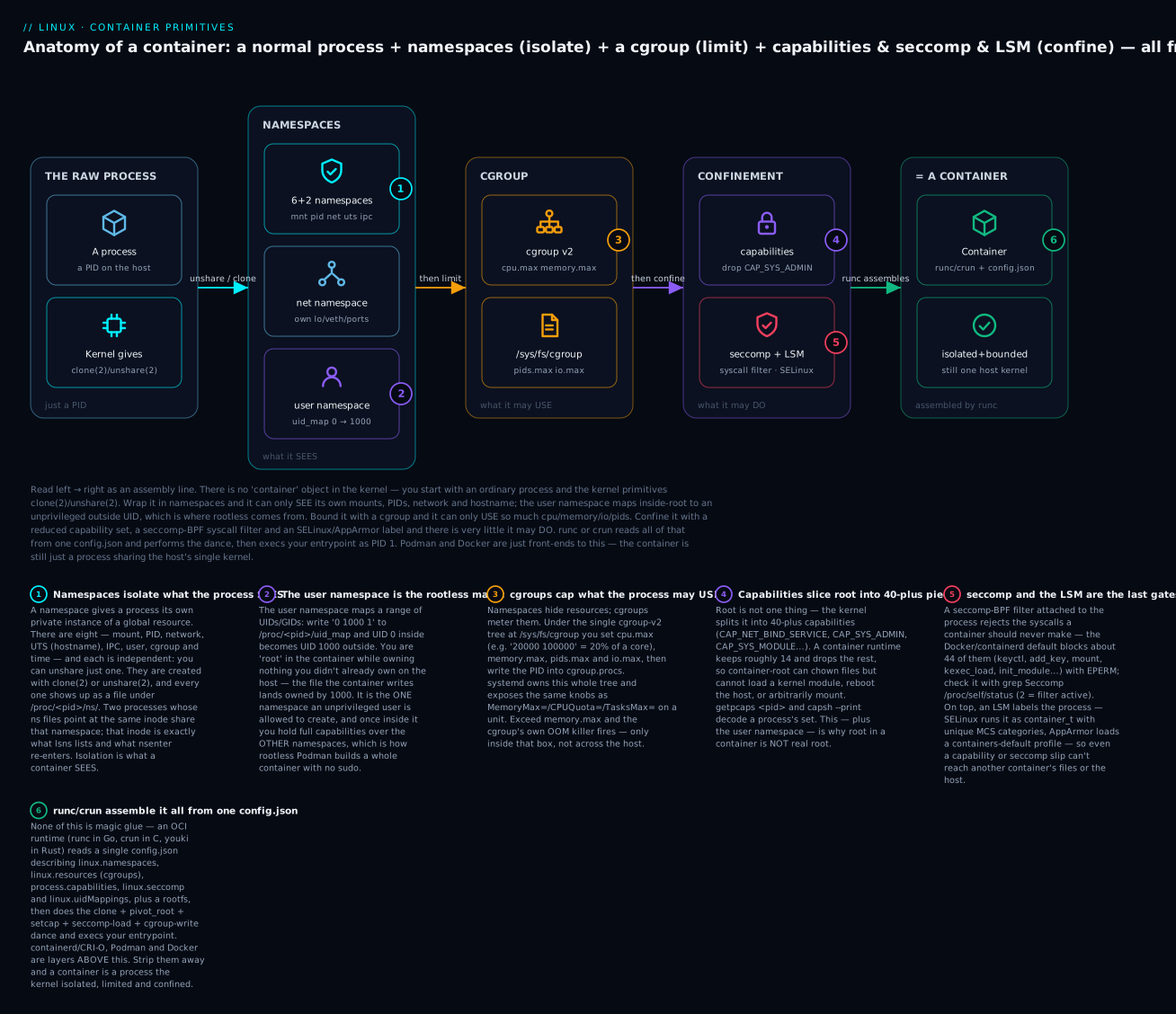
The three pillars map cleanly onto three questions and three kernel mechanisms. Keep this table in your head — every later section is one row of it in depth:
| Pillar | The question it answers | Kernel mechanism | You set it with |
|---|---|---|---|
| Isolation | What can the process see? | Namespaces (clone/unshare/setns) |
unshare, nsenter, ip netns |
| Limiting | What can the process use? | cgroups (a filesystem) | /sys/fs/cgroup/…, systemd-run, systemctl set-property |
| Confinement | What can the process do? | Capabilities, seccomp-BPF, LSM (SELinux/AppArmor) | capsh, setcap, seccomp profiles, chcon/AppArmor profiles |
A subtle but crucial point that beginners miss: these three are orthogonal and independently applied. You can create a namespace with no cgroup limit, or a cgroup limit with no namespace, or drop capabilities on a process that has no namespaces at all. A “container” is simply the convention of applying all three together with sensible defaults. Once you internalize that they’re separable, you can reason about half-containers (a systemd service is a process in a cgroup with dropped capabilities but no namespaces — see the systemd section), and about why --privileged is dangerous (it re-grants the confinement pillar while keeping the isolation, giving you an isolated-but-almighty process).
Let’s take each pillar apart, starting with the one that does the most work: namespaces.
Namespaces: isolating what a process can see
A namespace wraps a global system resource in an abstraction that makes the process inside believe it has its own isolated instance of that resource. The classic example is the PID namespace: globally there is one process table, but a process in a new PID namespace sees a fresh table starting at PID 1 — and cannot see (or signal, or ptrace) any process outside it. There are eight namespace types in a modern kernel. Here is the complete set, each with what it isolates and the unshare/clone flag that creates it:
| Namespace | Isolates | unshare flag |
clone(2) flag |
Since |
|---|---|---|---|---|
| Mount (mnt) | The set of mount points / the filesystem tree view | -m, --mount |
CLONE_NEWNS |
2.4.19 (2002) |
| UTS | Hostname and NIS domain name | -u, --uts |
CLONE_NEWUTS |
2.6.19 |
| IPC | System V IPC objects, POSIX message queues | -i, --ipc |
CLONE_NEWIPC |
2.6.19 |
| PID | Process IDs (fresh table, own PID 1) | -p, --pid |
CLONE_NEWPID |
2.6.24 |
| Network (net) | Interfaces, IP stacks, routes, ports, /proc/net |
-n, --net |
CLONE_NEWNET |
2.6.29 |
| User | UID/GID ranges and capabilities | -U, --user |
CLONE_NEWUSER |
3.8 (2013) |
| Cgroup | The cgroup root directory the process sees | -C, --cgroup |
CLONE_NEWCGROUP |
4.6 (2016) |
| Time | CLOCK_MONOTONIC and CLOCK_BOOTTIME offsets |
-T, --time |
CLONE_NEWTIME |
5.6 (2020) |
“UTS” is a historical name — it stands for UNIX Time-sharing System, the struct utsname that uname() fills in, which is where the hostname lives. Note that the time namespace virtualizes only the monotonic and boot clocks, not CLOCK_REALTIME (the wall clock) — every container shares the host’s wall-clock time, which is why you never see a container with a different date.
Every namespace a process belongs to is exposed as a magic symlink under /proc/<pid>/ns/. This is the single most useful diagnostic surface for isolation:
# Look at your own shell's namespaces
ls -l /proc/self/ns/
lrwxrwxrwx 1 vinod vinod 0 Jul  9 10:14 cgroup -> 'cgroup:[4026531835]'
lrwxrwxrwx 1 vinod vinod 0 Jul  9 10:14 ipc -> 'ipc:[4026531839]'
lrwxrwxrwx 1 vinod vinod 0 Jul  9 10:14 mnt -> 'mnt:[4026531841]'
lrwxrwxrwx 1 vinod vinod 0 Jul  9 10:14 net -> 'net:[4026531840]'
lrwxrwxrwx 1 vinod vinod 0 Jul  9 10:14 pid -> 'pid:[4026531836]'
lrwxrwxrwx 1 vinod vinod 0 Jul  9 10:14 time -> 'time:[4026531834]'
lrwxrwxrwx 1 vinod vinod 0 Jul  9 10:14 user -> 'user:[4026531837]'
lrwxrwxrwx 1 vinod vinod 0 Jul  9 10:14 uts -> 'uts:[4026531838]'
The number in brackets is an inode number, and it is the namespace’s identity. Two processes are in the same namespace if and only if these inodes match. That single fact powers every tool in the next table:
/proc/<pid>/ns/<type> file |
What it is | The trick it enables |
|---|---|---|
A magic symlink to type:[inode] |
The namespace’s identity | Compare inodes to test “same namespace?” |
| Holding it open keeps the ns alive | An open fd is a reference | ip netns bind-mounts it to persist an empty netns |
setns(fd, …) on it |
Join that namespace | This is exactly what nsenter does |
readlink /proc/PID/ns/net |
Print the inode | Scriptable “are these two in the same net ns?” |
The tools: unshare, nsenter, lsns, ip netns
Four commands do everything. Learn these and you can inspect and manipulate any container’s isolation without the container runtime installed at all:
| Tool | Package | What it does | Canonical use |
|---|---|---|---|
unshare |
util-linux |
Create new namespaces and run a command in them | Build a container by hand |
nsenter |
util-linux |
setns() into an existing process’s namespaces |
What docker exec / podman exec do |
lsns |
util-linux |
List all namespaces and their members | Audit what is isolated on a host |
ip netns |
iproute2 |
Manage named, persistent network namespaces | Wire up container networking with veth |
Let’s demo each namespace with unshare. The pattern is always the same: unshare <flags> <command>. Start with the two easiest.
UTS (hostname). This is the “hello world” of namespaces because the effect is instantly visible:
# Need CAP_SYS_ADMIN to change a hostname, so either be root or add a user ns.
sudo unshare --uts bash
# Now inside the new UTS namespace:
hostname container01     # set it
hostname                 # -> container01
Open a second terminal on the host and run hostname — it is unchanged. You have two hostnames on one machine. exit the unshared shell and the isolated hostname vanishes with it, because a namespace is destroyed when its last member exits.
PID. The PID namespace has two gotchas baked into this one command, and they teach the whole model:
sudo unshare --pid --fork --mount-proc bash
# Inside:
echo $$          # -> 1     (this bash is PID 1 of the new namespace)
ps aux           # shows ONLY bash and ps — the host's hundreds of processes are invisible
Why --fork? Because unshare(CLONE_NEWPID) does not move the calling process into the new PID namespace — it arranges for its children to be born there. --fork makes unshare fork the bash, so bash is the first process in the namespace and thus PID 1. Why --mount-proc? Because ps reads /proc, and unless you mount a fresh procfs (which reflects the new PID namespace), ps would read the host’s /proc and show host PIDs. --mount-proc implies --mount and mounts a new procfs for you. Forget it and you get the classic “I’m in a PID namespace but ps still shows everything” confusion.
Mount. A new mount namespace gets a private copy of the mount table; mounts you make don’t leak to the host:
sudo unshare --mount bash
# Inside:
mount -t tmpfs tmpfs /mnt
mount | grep /mnt        # -> tmpfs on /mnt type tmpfs ...
# In another host terminal: mount | grep /mnt  -> nothing
util-linux’s unshare helpfully sets mount propagation to private by default when you --mount, so your mounts don’t propagate back up to the host through shared subtrees. This is the same mount --make-rprivate / that container runtimes do.
Network. A fresh network namespace is empty — one loopback interface, and it’s DOWN:
sudo unshare --net bash
# Inside:
ip link          # -> only "lo", state DOWN. No eth0, no addresses, no routes.
ping 8.8.8.8     # fails — there is no route to anywhere
That is a completely isolated network stack with its own ports (you could run two “port 80” servers on one host, one per netns). To give it connectivity you connect it to the host with a veth pair — a virtual Ethernet cable. That’s what ip netns is for, and it’s worth showing because it’s how real container networking is plumbed:
# Create a *named*, persistent netns (bind-mounted under /run/netns/blue)
sudo ip netns add blue
sudo ip netns list                          # -> blue

# A veth pair: two ends of a virtual cable
sudo ip link add veth-host type veth peer name veth-blue
sudo ip link set veth-blue netns blue       # move one end into the namespace

# Address + bring up the host end
sudo ip addr add 10.10.0.1/24 dev veth-host
sudo ip link set veth-host up

# Address + bring up the namespace end (run commands *inside* blue)
sudo ip netns exec blue ip addr add 10.10.0.2/24 dev veth-blue
sudo ip netns exec blue ip link set veth-blue up
sudo ip netns exec blue ip link set lo up

# Prove connectivity across the cable
sudo ip netns exec blue ping -c1 10.10.0.1   # -> reply from 10.10.0.1
That veth-pair-plus-address is, at the wire level, exactly what Docker’s default bridge and Kubernetes CNI plugins build for you — just automated and attached to a bridge instead of a single peer. Note that ip netns namespaces persist even with no process inside them (that’s the bind-mount trick from the table above), which is why they show up differently from the ephemeral ones unshare makes. Clean up with sudo ip netns del blue.
IPC, cgroup, and time, quickly, to complete the set:
# IPC: create a SysV message queue on the host, then prove a new IPC ns can't see it
ipcmk -Q                 # host: Message queue id: 0
sudo unshare --ipc bash -c 'ipcs -q'    # -> empty list; the queue is invisible

# Cgroup: the cgroup ns virtualizes the root of the cgroup tree the process sees
cat /proc/self/cgroup                    # host: 0::/user.slice/user-1000.slice/session-3.scope
sudo unshare --cgroup bash -c 'cat /proc/self/cgroup'   # -> 0::/  (its cgroup looks like the root)

# Time: shift the boot clock forward 7 days for children (needs --fork)
sudo unshare --time --boottime $((7*24*3600)) --fork bash -c 'cat /proc/uptime'
# -> uptime reads ~604800s higher than the host
Listing and entering namespaces: lsns and nsenter
lsns reads /proc/*/ns/* across the whole system and groups processes by namespace. It’s how you audit isolation:
lsns                     # every namespace, its type, member count, and lowest PID
lsns -t net              # only network namespaces
lsns -p 1                # every namespace that PID 1 belongs to
        NS TYPE   NPROCS   PID USER  COMMAND
4026531840 net       142     1 root  /sbin/init
4026532278 net         1  4821 vinod /usr/bin/some-rootless-thing
nsenter does the reverse of unshare: it joins the namespaces of an existing process. This is the single most useful debugging command for containers, because it is literally what docker exec and podman exec do — find the container’s PID on the host, then setns() into its namespaces and exec a shell:
# Suppose a container's main process is host PID 4821. Enter ALL its namespaces:
sudo nsenter --target 4821 --all bash        # -a is short for "all namespaces"

# Or enter selectively — e.g. only the network namespace, to run tcpdump with host tools:
sudo nsenter --target 4821 --net tcpdump -i eth0
That last trick — entering only a container’s net namespace with host-installed tooling — is how you debug a container that ships no tcpdump, no ss, no curl. You keep the tools on the host and step into the isolation. It works because namespaces are orthogonal: you can join one without joining the others.
The user namespace: where “rootless” comes from
The user namespace deserves its own section because it is the most powerful, the most confusing, and the foundation of rootless containers. Its job is to map a range of UIDs and GIDs so that a process can be UID 0 (root) inside while being an ordinary unprivileged UID outside. This is the mechanism behind “root in a container is not real root.”
Watch it happen with no sudo at all:
# As an ordinary user (uid 1000):
id                       # uid=1000(vinod) gid=1000(vinod) ...
unshare --user --map-root-user bash
# Now inside the new user namespace:
id                       # uid=0(root) gid=0(root) groups=0(root)
cat /proc/self/uid_map   # -> "         0       1000          1"
You are root — but only in here. The uid_map line has three fields with a precise meaning:
| Field | In the example 0 1000 1 |
Meaning |
|---|---|---|
ID-inside-ns |
0 |
The first UID as seen inside the namespace |
ID-outside-ns |
1000 |
The UID that maps to on the host |
length |
1 |
How many consecutive UIDs the mapping covers |
So 0 1000 1 says “inside-UID 0 through 0 map to outside-UID 1000.” --map-root-user is just shorthand for writing that line. Any file this “root” creates on a shared filesystem lands owned by 1000 on the host — because on the host, that’s who you really are. Try to touch a root-owned file on the host filesystem and you get EACCES, because your real UID is unchanged where it counts.
The killer feature: inside the user namespace you hold a full capability set over the other namespaces you own. That is why an unprivileged user can unshare --user and then create mount, PID, net, and UTS namespaces that would normally need root. The user namespace is the bootstrap — the one namespace an unprivileged user is allowed to create, which then unlocks all the others. This is the entire basis of rootless Podman and rootless Docker.
But mapping only your one UID is limiting — a real container image has files owned by many UIDs (root, www-data, postgres…). To map a whole range, you need delegated subordinate ID ranges in /etc/subuid and /etc/subgid, applied by the setuid helpers newuidmap/newgidmap:
| File / tool | Example content or call | What it does |
|---|---|---|
/etc/subuid |
vinod:100000:65536 |
Grants user vinod outside-UIDs 100000–165535 to map |
/etc/subgid |
vinod:100000:65536 |
Same, for GIDs |
newuidmap |
newuidmap PID 0 1000 1 1 100000 65535 |
setuid-root helper that writes a multi-range uid_map |
newgidmap |
(analogous) | Writes gid_map from /etc/subgid grants |
podman unshare |
podman unshare cat /proc/self/uid_map |
Enter Podman’s user namespace to inspect/chown mapped files |
With that range, inside-UID 0 maps to your host UID and inside-UIDs 1–65536 map to 100000–165535 on the host — so the container’s www-data (say inside-UID 33) is host-UID 100032, an unprivileged, unused UID. Perfect isolation with zero real privilege.
⚠️ User-namespace gotchas — read these before you file a bug.
- Distros can disable unprivileged user namespaces entirely. If
unshare --userfails withOperation not permitted, checksysctl kernel.unprivileged_userns_clone(Debian/Ubuntu, must be1) andsysctl user.max_user_namespaces(must be non-zero). Ubuntu 23.10+ added an AppArmor restriction —sysctl kernel.apparmor_restrict_unprivileged_usernsdefaults to1, which blocks unprivileged userns creation unless the program has an AppArmor profile allowing it. This is a very current source of “it worked on my old box” confusion.- Root in a userns is not root on the host. Your capabilities apply only to objects owned by your user namespace. You cannot load kernel modules, reboot the host, mount arbitrary block devices, or read another user’s files. The capabilities are real but their scope is the namespace.
- Unmapped files show as
nobody(65534). Inside the namespace, any file owned by a host UID that isn’t in your mapping displays as the overflow UID65534/nobody. It’s not corrupted — it’s just outside your map.- You can only write
uid_maponce, and mapping more than your own UID needs the helpers. Withoutnewuidmap/newgidmapand/etc/subuidgrants, an unprivileged process can map exactly one UID (its own). That’s a security rule, not a bug.
Root-in-userns is powerful but bounded. Here’s the mental model of what it can and can’t do:
| Inside a user namespace, “root” (UID 0) can | but cannot |
|---|---|
| Create mount/PID/net/UTS/IPC namespaces | Load or unload kernel modules |
Mount proc, tmpfs, sysfs, bind mounts |
Mount arbitrary block devices (/dev/sda1) |
chown/chmod files owned within the mapping |
Change ownership of host-owned files |
| Set the hostname (in its own UTS ns) | reboot() the host or set the real-time clock |
| Bind low ports inside its own net ns | Touch another user’s or the host’s processes |
cgroups: limiting what a process can use
Namespaces hide resources; cgroups meter them. A control group is a set of processes with limits and accounting attached. Where a namespace answers “what can it see?”, a cgroup answers “how much can it use, and how much has it used?” The two are completely independent — a cgroup with no namespace is a perfectly normal thing (that’s how systemd limits every service), and a namespace with no cgroup is unlimited.
Modern Linux uses cgroup v2, the “unified hierarchy.” You will still meet v1 on older systems, and the difference matters, so start here:
| Aspect | cgroup v1 (legacy) | cgroup v2 (unified) |
|---|---|---|
| Hierarchy shape | One separate tree per controller | A single tree for all controllers |
| Mount layout | /sys/fs/cgroup/cpu/, /memory/, … (many) |
/sys/fs/cgroup/ (one) |
| A process belongs to | Possibly a different cgroup per controller | Exactly one cgroup |
| Enabling a controller | Mount that controller’s hierarchy | Write +cpu to parent cgroup.subtree_control |
| CPU limit file | cpu.cfs_quota_us + cpu.cfs_period_us |
cpu.max ("quota period" in one file) |
| Memory limit file | memory.limit_in_bytes |
memory.max |
| “No internal processes” rule | No | Yes — a cgroup with child controllers holds no procs of its own |
| Pressure stall info (PSI) | No | Yes (cpu.pressure, memory.pressure, io.pressure) |
| Default on | RHEL 7, old Ubuntu | RHEL 9, Fedora 31+, Ubuntu 21.10+, Debian 11+ |
Check which one you’re on — this is the first thing to do before touching /sys/fs/cgroup:
stat -fc %T /sys/fs/cgroup/
# cgroup2fs  -> pure cgroup v2 (what you want)
# tmpfs      -> cgroup v1, or the v1/v2 "hybrid" layout
Why v2 won. In v1, a process could be in the cpu cgroup /foo but the memory cgroup /bar — controllers were independent, which made coherent resource management (and safe delegation to unprivileged users) nearly impossible. v2’s single hierarchy means one cgroup = one consistent box, which is what containers actually want. Everything below is v2.
What cgroups control: the controllers
Each controller governs one resource. The set available on your machine is listed in /sys/fs/cgroup/cgroup.controllers:
| Controller | Governs | Key v2 files |
|---|---|---|
cpu |
CPU time (quota + weight) | cpu.max, cpu.weight, cpu.stat |
memory |
RAM and swap | memory.max, memory.high, memory.current, memory.swap.max |
io |
Block-device bandwidth and IOPS | io.max, io.weight, io.stat |
pids |
Number of processes/threads | pids.max, pids.current |
cpuset |
Which CPUs / NUMA nodes are allowed | cpuset.cpus, cpuset.mems |
hugetlb |
Huge-page usage | hugetlb.<size>.max |
rdma |
RDMA/IB resources | rdma.max |
misc |
Scalar resources (e.g. SEV ASIDs) | misc.max |
Two controllers you’ll reach for constantly are memory (stop a leak from taking the host down) and pids (stop a fork bomb). Note the device controller: in v1 it was a cgroup controller with interface files; in v2 device access is enforced by an eBPF program attached to the cgroup, so there are no devices.* files — a common “where did devices.allow go?” surprise.
Setting limits by hand
The v2 interface is just files. Here is a complete, real example that caps a shell at 20% of one CPU, 128 MiB of RAM, and 20 processes:
# 1. Make sure the controllers you want are delegated to children of the root.
cat /sys/fs/cgroup/cgroup.controllers        # what's available
cat /sys/fs/cgroup/cgroup.subtree_control     # what's enabled for children
# If cpu/memory/pids aren't listed in subtree_control, enable them (systemd usually has):
echo '+cpu +memory +pids' | sudo tee /sys/fs/cgroup/cgroup.subtree_control

# 2. Create a cgroup — it's just a mkdir. The kernel auto-populates the interface files.
sudo mkdir /sys/fs/cgroup/demo
ls /sys/fs/cgroup/demo/          # cpu.max, memory.max, pids.max, cgroup.procs, ...

# 3. Write the limits.
echo '20000 100000' | sudo tee /sys/fs/cgroup/demo/cpu.max   # 20ms per 100ms = 20% of 1 CPU
echo 128M           | sudo tee /sys/fs/cgroup/demo/memory.max
echo 20             | sudo tee /sys/fs/cgroup/demo/pids.max

# 4. Put the current shell into the cgroup — from now on it and its children are capped.
echo $$ | sudo tee /sys/fs/cgroup/demo/cgroup.procs

# 5. Prove the CPU cap. This should peg at ~20% of one core, not 100%.
yes > /dev/null &          # a CPU hog
top -p $!                  # watch it sit at ~20% CPU
kill %1
The cpu.max format is "$QUOTA $PERIOD" in microseconds: 20000 100000 grants 20,000 µs of CPU every 100,000 µs = 20% of one core. Set it to max 100000 for unlimited. memory.max accepts suffixes (128M, 2G). The core control files you’ll use across every cgroup are:
| File | Direction | Meaning |
|---|---|---|
cgroup.procs |
read/write | The PIDs in this cgroup; write a PID to move it here |
cgroup.controllers |
read | Controllers available in this cgroup |
cgroup.subtree_control |
read/write | Controllers enabled for child cgroups (+cpu/-cpu) |
cgroup.events |
read | populated 0/1 — is anything running here? |
cgroup.type |
read/write | domain (normal) vs threaded |
cpu.max |
read/write | "quota period" µs — the CPU ceiling |
memory.max |
read/write | Hard memory ceiling; hitting it invokes the cgroup OOM killer |
memory.high |
read/write | Soft ceiling; the kernel throttles reclaim instead of killing |
memory.current |
read | Bytes currently charged to this cgroup |
pids.max / pids.current |
rw / read | Process-count ceiling / current count |
⚠️ cgroup-v2 gotchas that produce baffling errors.
- The “no internal processes” rule. In v2, a cgroup that has controllers enabled for its children cannot itself hold processes (except the root cgroup). If you try to
echo $$ > cgroup.procson a cgroup that has child cgroups with controllers, you getEBUSY/Device or resource busy. Fix: put processes only in leaf cgroups.- You can only enable in a child what the parent delegated. A controller must appear in a cgroup’s
cgroup.controllers(put there by writing+cputo the parent’scgroup.subtree_control) before you can use it. Enable top-down.- Rootless can’t just
mkdirin/sys/fs/cgroup. Writing there needs the cgroup to be delegated to your user (systemd does this foruser.sliceviaDelegate=yes). Otherwise you getPermission denied— usesystemd-run --user --scopeinstead of raw filesystem writes.- The
free/nproclie. A cgroup limits use but does not fake/proc/meminfoor/proc/cpuinfo. A memory-limited container runningfree -hstill reports host RAM; a JVM or Go program that sizes itself off that number will over-allocate and get OOM-killed. This is why container-aware runtimes readmemory.max, and why you pass-XX:MaxRAMPercentage/GOMEMLIMITexplicitly.
Clean up: move your shell back out (echo $$ | sudo tee /sys/fs/cgroup/cgroup.procs) and sudo rmdir /sys/fs/cgroup/demo. A cgroup can only be removed when empty.
systemd owns the cgroup tree
Here’s the part that trips up people who go straight to /sys/fs/cgroup: on any systemd machine, systemd is the sole manager of the cgroup tree, and you’re expected to go through it rather than around it. systemd organizes everything into a hierarchy of slices, scopes, and services:
| Unit type | cgroup role | Example | Created by |
|---|---|---|---|
.slice |
A branch that groups and sub-limits units | system.slice, user.slice, machine.slice |
systemd, for organization |
.service |
A leaf cgroup for a daemon systemd started | nginx.service |
A unit file / systemctl start |
.scope |
A leaf cgroup for processes started externally | session-3.scope, a Podman container’s scope |
systemd-run --scope, login sessions, container runtimes |
The tree is rooted at -.slice and fans out: system.slice holds daemons, user.slice/user-1000.slice holds your login session, machine.slice holds VMs and system containers. See it as a tree, and see live per-cgroup resource use, with:
systemd-cgls              # the whole cgroup tree, as a tree
systemd-cgtop             # top(1), but per-cgroup — CPU/memory/IO by slice/service
systemctl status sshd     # look for the "CGroup:" line — the exact path of that service
To set a limit on a service, never hand-edit /sys/fs/cgroup (systemd will overwrite it). Use resource-control properties, which systemd translates into the cgroup files for you and persists across restarts:
# Live + persistent (writes a drop-in under /etc/systemd/system.control/)
sudo systemctl set-property nginx.service MemoryMax=500M CPUQuota=20% TasksMax=100

# One-off, run a command in a transient scope with limits (great for testing):
systemd-run --scope -p MemoryMax=200M -p CPUQuota=50% stress-ng --vm 1 --vm-bytes 300M
# rootless variant uses the user manager and user.slice delegation:
systemd-run --user --scope -p MemoryMax=200M yes > /dev/null
The mapping between the friendly systemd names and the raw cgroup-v2 files is worth memorizing, because it lets you translate any tuning guide in either direction:
| systemd property | cgroup v2 file | Effect |
|---|---|---|
CPUQuota=20% |
cpu.max |
Hard CPU cap (of one core) |
CPUWeight=100 |
cpu.weight |
Relative CPU share under contention (default 100) |
MemoryMax=500M |
memory.max |
Hard cap; OOM-kill inside the cgroup at the limit |
MemoryHigh=400M |
memory.high |
Soft cap; throttle reclaim before the hard limit |
TasksMax=100 |
pids.max |
Max processes + threads |
IOWeight=100 |
io.weight |
Relative block-I/O share |
AllowedCPUs=0-3 |
cpuset.cpus |
Pin to a CPU set |
This is also the cleanest proof of the thesis: a plain systemd service is a process in a cgroup with dropped capabilities (CapabilityBoundingSet=) and often a seccomp filter (SystemCallFilter=) — the limiting and confinement pillars — but usually no namespaces. It’s a container missing only the isolation pillar. Add PrivateNetwork=yes, PrivateTmp=yes, ProtectSystem=strict and you’re bolting namespaces on too. systemd and containers are the same primitives wearing different clothes.
Confinement: capabilities, seccomp, and the LSM
Isolation and limits still leave a process that, if it runs as root, has all of root’s power within its namespaces. The third pillar cuts that power down. Three independent mechanisms stack here.
Capabilities: root, sliced into 40-plus pieces
Traditional UNIX has a binary model: you’re root (UID 0, can do anything) or you’re not. Linux capabilities break root’s omnipotence into 40-plus independent privileges you can grant or drop individually. This is why “root inside a container” is not the same as “root on the host” — the runtime keeps a handful of capabilities and drops the rest. The ones you must know:
| Capability | Grants the power to… | Why it matters for containers |
|---|---|---|
CAP_SYS_ADMIN |
Mount, sethostname, and dozens more — the “new root” |
The most dangerous single cap; often the line between contained and escaped |
CAP_SYS_MODULE |
Load/unload kernel modules | Full host compromise — never grant to a container |
CAP_SYS_BOOT |
reboot(), kexec_load() |
Would let a container reboot the host |
CAP_SYS_PTRACE |
ptrace any process |
Debugging — and a container-escape / secret-theft vector |
CAP_NET_ADMIN |
Configure interfaces, routes, firewall | Needed by VPN/network containers; powerful |
CAP_NET_BIND_SERVICE |
Bind ports below 1024 | Lets a non-root service listen on :80/:443 |
CAP_NET_RAW |
Open raw/packet sockets | ping needs it; also enables ARP/DNS spoofing |
CAP_DAC_OVERRIDE |
Bypass file read/write/execute permission checks | Read/write any file (still subject to LSM) |
CAP_CHOWN |
Change file ownership | Kept by default (image extraction needs it) |
CAP_SETUID / CAP_SETGID |
Change process UIDs/GIDs | Needed to drop privileges (su, gosu) |
CAP_MKNOD |
Create device special files | Kept by default in a limited form |
CAP_SYS_TIME |
Set the system clock | Would let a container change host time |
A single capability lives in five sets on every process/thread — this is the part people find fiddly, so here it is plainly:
| Capability set | Abbrev | What it means |
|---|---|---|
| Permitted | CapPrm |
The superset a thread may move into Effective |
| Effective | CapEff |
The caps actually checked right now for privileged operations |
| Inheritable | CapInh |
Preserved across execve() (combined with the file’s inheritable) |
| Bounding | CapBnd |
A ceiling — a cap not in the bounding set can never be acquired again |
| Ambient | CapAmb |
Inheritable caps that survive execve() of a normal (non-setuid) binary |
The bounding set is the important one for containers: runtimes drop dangerous caps from it, and once gone from the bounding set they cannot be regained even by a setuid-root binary. Inspect and manipulate all of this with:
| Command | What it shows / does |
|---|---|
capsh --print |
Decode the current shell’s capability sets in readable names |
getpcaps <pid> |
Print the capabilities of a running process |
getcap <file> |
Show file capabilities stored in the security.capability xattr |
setcap cap_net_bind_service=+ep <file> |
Grant a file capability (so a non-root binary can bind :80) |
cat /proc/<pid>/status | grep Cap |
Raw hex bitmasks (CapEff, CapBnd, …) — decode with capsh --decode=0x… |
File capabilities are why modern ping isn’t setuid-root anymore:
getcap /usr/bin/ping
# /usr/bin/ping cap_net_raw=ep      <- has exactly the one cap it needs, nothing more
Drop capabilities off a running shell to feel how a container’s root differs from real root:
# Start a shell with an empty capability set (needs the 'capsh' from libcap)
sudo capsh --drop=cap_sys_admin,cap_sys_module,cap_sys_boot -- -c 'bash'
# Inside, you're still "root" but sethostname/mount/reboot now fail with EPERM.
Container runtimes ship a default-drop policy: they start from ALL, drop everything, and add back a conservative allow-list of roughly 14 capabilities. Knowing the default list tells you exactly what container-root can still do:
| Kept by default (≈14) | Dropped by default (dangerous) |
|---|---|
CHOWN, DAC_OVERRIDE, FOWNER, FSETID |
SYS_ADMIN, SYS_MODULE, SYS_BOOT |
SETUID, SETGID, SETPCAP, SETFCAP |
SYS_PTRACE, SYS_TIME, SYS_RAWIO |
NET_BIND_SERVICE, NET_RAW, KILL |
NET_ADMIN, MAC_ADMIN, MAC_OVERRIDE |
MKNOD, AUDIT_WRITE, SYS_CHROOT |
DAC_READ_SEARCH, LINUX_IMMUTABLE, SYSLOG |
docker run --cap-drop=ALL --cap-add=NET_BIND_SERVICE … is you overriding that policy — and --privileged is you throwing it away entirely (all caps, all devices, no seccomp), which is why --privileged is a red flag in any security review.
seccomp: filtering the syscall table
Capabilities gate privileged operations, but many dangerous things are plain syscalls. seccomp (secure computing) attaches a BPF program to a process that is consulted on every syscall and decides: allow, block with an errno, kill, trace, or notify a supervisor. Once installed, a filter cannot be removed — it only ever narrows. The two modes and the filter verdicts:
| seccomp mode | Meaning |
|---|---|
SECCOMP_MODE_STRICT (1) |
Only read, write, _exit, sigreturn allowed — everything else kills the process |
SECCOMP_MODE_FILTER (2) |
A BPF program decides per-syscall — this is what containers use |
Filter action (SCMP_ACT_*) |
Effect when a syscall matches |
|---|---|
ALLOW |
Permit the syscall |
ERRNO |
Deny and return an errno (e.g. EPERM) — the default for blocked container syscalls |
KILL / KILL_PROCESS |
Terminate the thread / whole process |
TRAP |
Deliver SIGSYS (the app can catch it) |
LOG |
Allow but log (great for building a profile) |
NOTIFY |
Hand the decision to a user-space supervisor (seccomp notify — used for rootless device emulation) |
The Docker/containerd default seccomp profile allows most of the ~350 syscalls but blocks about 44 that a normal container never needs and that are dangerous — returning EPERM (not killing, so software degrades gracefully). The blocklist is exactly the “escape and host-tamper” toolbox:
| Blocked syscall(s) | Why a container shouldn’t call it |
|---|---|
keyctl, add_key, request_key |
Kernel keyring is not namespaced — cross-container leak risk |
mount, umount2, pivot_root |
Filesystem manipulation / escape vector (unless CAP_SYS_ADMIN) |
init_module, finit_module, delete_module |
Loading kernel code = game over |
kexec_load, kexec_file_load, reboot |
Rebooting / replacing the host kernel |
bpf |
Loading BPF programs into the kernel |
perf_event_open |
Broad kernel introspection / side channels |
clock_settime, settimeofday |
Changing host wall-clock time |
ptrace (historically), process_vm_readv |
Reading other processes’ memory |
Check whether a process has a seccomp filter — a one-liner that works inside any container:
grep Seccomp /proc/self/status
# Seccomp:  0   -> no filter
# Seccomp:  2   -> filter mode active (the container is confined)
LSM: SELinux and AppArmor around containers
The final gate is a Linux Security Module — mandatory access control that the administrator (or the distro) sets, which even root cannot override. For containers this is the “belt and suspenders”: even if a process defeats its capability drops and seccomp filter, the LSM label still confines it. Which LSM you meet depends on the distro:
| Aspect | SELinux (RHEL, Fedora, Rocky) | AppArmor (Ubuntu, Debian, SUSE) |
|---|---|---|
| Model | Type enforcement + labels on everything | Path-based per-program profiles |
| Container process domain | container_t (aka the SVirt domain) |
docker-default / containers-default-* |
| Per-container separation | MCS categories (s0:c123,c456) — unique per container, so container A can’t touch container B’s files even at the same UID |
One shared profile by default (less granular) |
| Volume-mount relabel | :z (shared) / :Z (private) triggers chcon to container_file_t |
Not needed (path rules) |
| Turn off for one container | --security-opt label=disable |
--security-opt apparmor=unconfined |
| See it | `ps -eZ | grep container, ls -Z /var/lib/containers` |
The MCS-category trick on RHEL is elegant: each container gets a random unique pair of categories, and the policy says a process may only access files bearing its own categories. Two containers both running as UID 0 with container_t still can’t read each other’s files, because their categories differ. This is why forgetting :Z on a Podman volume mount gives Permission denied even though the UNIX bits look fine — the file has the wrong SELinux label. The full SELinux decision path (subject context, DAC-checked-then-MAC, type enforcement, and the AVC denial log) is a large topic in its own right; the takeaway here is that the LSM label is a mandatory gate the container process cannot remove, no matter what capabilities or seccomp it has.
The OCI picture: runc, crun, and config.json
You now have every primitive. The last question is: what glues them into the thing you call an image and a docker run? The answer is the Open Container Initiative (OCI) — two specifications that standardized the ecosystem so any tool can run any image:
- image-spec — how an image is packed: layers (tarballs), a config, a manifest, content-addressed by digest.
- runtime-spec — how to run an unpacked image: a bundle = a directory containing a
rootfs/and aconfig.json.
The config.json is the star. It is a plain JSON file that describes, declaratively, every primitive from this lesson — and a runtime (runc, crun, …) reads it and performs the clone/mount/setcap/seccomp/cgroup dance. The mapping is one-to-one with what you did by hand:
config.json field |
Kernel primitive it drives | This lesson’s section |
|---|---|---|
process.args / process.env |
The command finally execve’d |
(the entrypoint) |
linux.namespaces[] |
Which namespaces to create (pid, net, mount, …) |
Namespaces |
linux.uidMappings / gidMappings |
The user-namespace uid_map/gid_map |
User namespace |
linux.resources |
cgroup limits (memory.limit, cpu.quota, pids.limit) |
cgroups |
process.capabilities |
The five capability sets (bounding, effective, …) | Capabilities |
linux.seccomp |
The seccomp default action + syscall rules | seccomp |
linux.mountLabel / process.selinuxLabel |
The LSM label (container_t:s0:c…) |
LSM |
root.path + mounts[] |
The rootfs (pivot_root target) and its mounts (/proc, /sys, /dev) |
Mount namespace / lab |
Generate a starter config.json yourself with runc spec and read it — every field above is right there in a file you can diff. There are several interchangeable runtimes because the runtime-spec is a standard:
| OCI runtime | Language | Notes |
|---|---|---|
runc |
Go | The reference implementation; Docker/containerd default |
crun |
C | Faster, lower memory, first-class cgroup v2; Podman/RHEL default |
youki |
Rust | Newer, memory-safe implementation |
runsc (gVisor) |
Go | A user-space kernel — intercepts syscalls for stronger isolation |
kata-runtime |
— | Runs each container inside a lightweight VM (hardware isolation) |
Above the runtime sit the tools you actually type: a high-level runtime (containerd, CRI-O) pulls images, unpacks bundles, and manages lifecycle, calling the low-level runtime to do the kernel work; and a user-facing tool (Docker, Podman) drives all of it. So the full stack for podman run alpine is: Podman → (no daemon) → crun → the exact unshare/cgroup/seccomp calls you ran by hand. This is the bridge to the next lesson: Containers with Podman, Docker & Buildah (rootless) picks up here, where the primitives end and the tooling begins.
Hands-on lab: build a container by hand
Time to assemble all three pillars yourself. You will build a minimal root filesystem, isolate a shell inside a full set of namespaces (rootless — no sudo needed for the core steps), pivot_root into the rootfs the way a real runtime does, mount a fresh /proc, and prove the isolation. Runs on any modern Linux VM, WSL2, or cloud instance with util-linux and unprivileged user namespaces enabled.
Step 0 — Preflight. Confirm your kernel supports what we need.
uname -r                                   # 5.6+ ideal (any 4.x works minus time ns)
stat -fc %T /sys/fs/cgroup/                 # want: cgroup2fs
unshare --user --map-root-user true && echo "userns OK" || echo "userns BLOCKED"
What just happened: if the last line prints BLOCKED, unprivileged user namespaces are disabled — set sudo sysctl -w kernel.unprivileged_userns_clone=1 (Debian/Ubuntu) and, on Ubuntu 23.10+, sudo sysctl -w kernel.apparmor_restrict_unprivileged_userns=0. You can still do the whole lab with sudo and without --user.
Step 1 — Build a root filesystem. A container needs a / to chroot into. Pick the method for your distro (any one works):
| Method | Command | Notes |
|---|---|---|
| Debian/Ubuntu | sudo debootstrap --variant=minbase stable ./rootfs http://deb.debian.org/debian |
~250 MB, full apt-based rootfs |
| RHEL/Fedora/Rocky | sudo dnf --installroot=$PWD/rootfs --releasever=9 --setopt=install_weak_deps=False install -y bash coreutils |
dnf into a directory |
| Any distro (fast) | mkdir rootfs && curl -sSL https://dl-cdn.alpinelinux.org/alpine/v3.20/releases/x86_64/alpine-minirootfs-3.20.3-x86_64.tar.gz | tar -xz -C rootfs |
~5 MB Alpine rootfs, no build tools needed |
| Zero-download | mkdir -p rootfs/bin && cp $(command -v busybox) rootfs/bin/ && for c in sh ls cat mount ps id hostname; do ln -s busybox rootfs/bin/$c; done |
Needs a static busybox (apt install busybox-static) |
For the rest of the lab we’ll assume ./rootfs exists. The Alpine one-liner is the most portable choice.
ls rootfs/ # bin dev etc lib ... usr var
What just happened: you created an ordinary directory tree that looks like a Linux root. There is nothing special about it — it becomes a container’s / only when a process pivot_roots onto it.
Step 2 — First isolation (UTS + PID + mount). Enter three namespaces and chroot:
sudo unshare --uts --pid --mount --fork --mount-proc \
     chroot rootfs /bin/sh
# Inside the "container":
hostname sandbox      # set an isolated hostname
echo $$               # -> 1   (we are PID 1)
ps -ef                # only sh + ps — the host is invisible
exit
What just happened: --fork --mount-proc gave you PID 1 and a private /proc; --uts let you rename the host without affecting it; --mount + chroot gave you the rootfs as /. That is already a recognizable container — three of the eight namespaces.
Step 3 — Go rootless with the user namespace. Now drop the sudo. The user namespace lets an unprivileged user create all the others:
unshare --user --map-root-user --uts --pid --mount --ipc --fork --mount-proc \
     chroot rootfs /bin/sh
# Inside:
id                    # uid=0(root) — but only in here
hostname sandbox
cat /proc/self/uid_map   # 0  1000  1   (inside-root == outside-you)
touch /marker; ls -ln /marker    # owned by 0 inside...
exit
# Back on the host:
ls -ln rootfs/marker  # ...but owned by YOUR uid (1000) outside
What just happened: with no privileges, you became root in a container and created files — which land owned by your real UID on the host. This is rootless containers in one command. The --map-root-user wrote that uid_map line for you.
Step 4 — Add a network namespace. Prove the network stack is isolated:
unshare --user --map-root-user --net --uts --pid --mount --fork --mount-proc \
     chroot rootfs /bin/sh
# Inside:
ip link              # only "lo", DOWN — no eth0, no connectivity
exit
What just happened: you got a private, empty network stack. Giving it real connectivity from rootless mode needs a user-space helper (slirp4netns or pasta) or, from root, a veth pair to a bridge — exactly what Podman and Docker automate. The isolation is the kernel’s; the plumbing is the runtime’s job.
Step 5 — pivot_root like a real runtime. chroot is weak (a privileged process can escape it); real runtimes use pivot_root, which swaps the actual root mount. Save this as enter.sh:
#!/bin/sh
# enter.sh — assemble a container properly with pivot_root
set -e
NEWROOT="$1"
mount --bind "$NEWROOT" "$NEWROOT"     # pivot_root requires the new root to be a mount point
mkdir -p "$NEWROOT/oldroot"
cd "$NEWROOT"
pivot_root . oldroot                   # . becomes /, old / becomes /oldroot
cd /
mount -t proc proc /proc               # fresh procfs for the new PID namespace
umount -l /oldroot                     # detach the host's old root...
rmdir /oldroot                         # ...and hide it entirely
exec /bin/sh                           # become the container's PID 1
chmod +x enter.sh
unshare --user --map-root-user --uts --pid --mount --ipc --net --fork \
     ./enter.sh rootfs
# Inside:
ls /                 # the rootfs — and NO /oldroot, the host root is gone
mount | wc -l        # a tiny mount table — you can't even see the host's mounts
⚠️ The
mount --bind "$NEWROOT" "$NEWROOT"line is not optional —pivot_rootfails withEINVAL(“Invalid argument”) if the new root isn’t a mount point. This one requirement is the most common reason a hand-built container refuses to start.
What just happened: you performed the exact root-swap runc does. After pivot_root + umount -l /oldroot, the host filesystem is genuinely unreachable — a real filesystem boundary, not the leaky chroot.
Step 6 — Add the cgroup limit (the third pillar). Isolation done; now cap resources. Easiest reliable way is a transient systemd scope:
# Cap a workload at 128 MB and 20% of one CPU, then watch it get throttled/OOM-killed:
systemd-run --user --scope -p MemoryMax=128M -p CPUQuota=20% \
     sh -c 'yes | head -c 500M > /dev/null; echo survived'
# Watch live per-cgroup usage in another terminal:
systemd-cgtop
What just happened: systemd created a leaf .scope cgroup, wrote memory.max/cpu.max, and ran your command inside it. Exceed the memory and the cgroup’s OOM killer fires — killing your process, not touching the host. You’ve now applied all three pillars.
Step 7 — Confine it (capabilities + seccomp check). Inside a pivot_rooted shell from Step 5, prove the confinement pillar:
grep -E 'CapEff|CapBnd|Seccomp' /proc/self/status
# CapEff:  000001ffffffffff  (full set — because we're userns-root; a real runtime narrows this)
# Seccomp: 0                 (no filter — a real runtime would show 2)
# Decode the hex to names:
capsh --decode=000001ffffffffff | head
What just happened: you saw the raw confinement state. Your hand-built container is isolated and limited but not yet confined — a real runtime would additionally drop the bounding set to ~14 caps and load a seccomp filter (Seccomp: 2). That gap is precisely what runc adds from config.json, and precisely why --privileged (which removes it) is dangerous.
Step 8 — Watch it from the host and clean up. In another terminal, find and inspect your handmade container from the outside:
lsns -t pid | grep -v NPROCS | tail          # your ephemeral PID namespace
ps -ef | grep '[e]nter.sh'                    # the host PID of your container's init
sudo nsenter -t <that-PID> -a /bin/sh         # step INTO it, exactly like docker exec
# Clean up
exit                                           # leave the container (namespaces vanish)
sudo rm -rf rootfs enter.sh                    # ⚠️ removes the whole rootfs — check the path first
What just happened: from the host you listed the container’s namespace, found its init PID, and nsentered in — the same mechanism docker exec/podman exec use. You have now built, entered, limited, and inspected a container using nothing but util-linux, iproute2, and systemd. Docker adds convenience, images, and networking — but not one new kernel primitive beyond what you just used.
Common mistakes and troubleshooting
| Symptom | Cause | Fix |
|---|---|---|
unshare: unshare failed: Operation not permitted (as non-root) |
Unprivileged user namespaces disabled | sysctl -w kernel.unprivileged_userns_clone=1; Ubuntu 23.10+: kernel.apparmor_restrict_unprivileged_userns=0; or use sudo |
In unshare --pid, ps still shows all host processes |
/proc is still the host’s procfs |
Add --mount-proc (implies --mount); or mount -t proc proc /proc after entering |
unshare --pid and the shell isn’t PID 1 |
Missing --fork — the caller stays in the old PID ns |
Always pair --pid with --fork |
Files inside a userns show owner nobody / 65534 |
Those host UIDs aren’t in your uid_map |
Extend /etc/subuid//etc/subgid; use podman unshare chown; or ignore (display only) |
pivot_root: Invalid argument |
The new root isn’t a mount point | mount --bind rootfs rootfs before pivot_root |
| Container root can load a module / reboot the host | Ran --privileged or kept CAP_SYS_MODULE/CAP_SYS_BOOT |
Never use --privileged; --cap-drop=ALL then add back only what’s needed |
mkdir /sys/fs/cgroup/x: Permission denied (rootless) |
cgroup subtree not delegated to your user | Use systemd-run --user --scope -p … instead of raw writes |
Writing a PID to cgroup.procs fails EBUSY |
“No internal processes” rule — the cgroup has child cgroups with controllers | Move the process into a leaf cgroup |
echo +cpu > cgroup.subtree_control fails ENOENT/EINVAL |
Controller not present in this cgroup’s cgroup.controllers |
Enable it top-down: write +cpu to the parent’s subtree_control first |
| Java/Go in a memory-limited container OOM-kills unexpectedly | free//proc/meminfo reports host RAM, not memory.max |
Set -XX:MaxRAMPercentage / GOMEMLIMIT; use a cgroup-aware runtime |
Podman volume gives Permission denied despite correct rwx |
Wrong SELinux label on the host path | Mount with :Z (private) or :z (shared) to relabel to container_file_t |
hostname: you must be root to change the host name in unshare --uts |
No CAP_SYS_ADMIN (you’re not userns-root) |
Add --user --map-root-user, or run under sudo |
Three gotchas are worth extra words because they burn hours.
The PID-namespace --fork/--mount-proc pair. These two flags trip up nearly everyone the first time. unshare(CLONE_NEWPID) deliberately does not move the calling process into the new namespace — it can’t, because a process’s PID can’t change underneath it. Instead the next child is born as PID 1. So without --fork, your unshare --pid bash puts bash in the old namespace and only its children get the new one — confusing and useless. And even with --fork, ps reads /proc, which is still the host’s until you mount a fresh procfs — hence --mount-proc. Memorize the trio: --pid --fork --mount-proc always travel together.
The free lie will crash your app. This is the single most expensive container gotcha in production. A cgroup limits what a process can use, but it does not virtualize what /proc/meminfo reports. A container with memory.max=512M running on a 64 GB host sees 64 GB from free, nproc sees all host cores, and any runtime that auto-sizes off those numbers (older JVMs, Go before GOMEMLIMIT, Node, nginx worker auto-tuning) will over-commit and get OOM-killed by the cgroup with a cryptic exit code 137. The fix is always explicit: tell the runtime the real limit (-XX:MaxRAMPercentage=75, GOMEMLIMIT=460MiB, --cpus awareness) rather than letting it guess from the host.
--privileged throws away the entire third pillar. It’s tempting when something doesn’t work, and it almost always “fixes” it — because it re-grants all capabilities, disables seccomp, and exposes all host devices. A --privileged container is an isolated-but-omnipotent process: it still has its own PID/net/mount view, but from inside it can mount the host disk, load kernel modules, and trivially escape. If a container “needs” --privileged, the right answer is almost always a specific --cap-add, a device passthrough (--device), or a custom seccomp profile — never the sledgehammer.
Cheat-sheet
Namespaces and inspection:
| Command | What it does |
|---|---|
unshare --uts --pid --net --mount --ipc --user --map-root-user --fork --mount-proc CMD |
Run CMD in a full set of new namespaces, rootless |
unshare --pid --fork --mount-proc bash |
New PID namespace with a working ps |
nsenter -t PID -a bash |
Enter all of process PID’s namespaces (= docker exec) |
nsenter -t PID --net ss -tlnp |
Enter only the net namespace to run host tools |
lsns / lsns -t net / lsns -p PID |
List namespaces (all / by type / by process) |
ls -l /proc/PID/ns/ |
Show a process’s namespace inodes |
ip netns add NAME / ip netns exec NAME CMD |
Create / run in a persistent named netns |
ip link add veth0 type veth peer name veth1 |
Create a virtual Ethernet pair to wire a netns |
User namespace and capabilities:
| Command | What it does |
|---|---|
cat /proc/PID/uid_map |
Show the UID mapping (inside outside length) |
podman unshare CMD |
Run CMD in Podman’s user namespace |
capsh --print |
Decode the current shell’s capability sets |
getpcaps PID |
Capabilities of a running process |
getcap FILE / setcap cap_net_bind_service=+ep FILE |
Read / set file capabilities |
capsh --decode=0x00000000a80425fb |
Turn a hex CapEff mask into names |
| `grep -E 'Cap | Seccomp’ /proc/PID/status` |
cgroups (v2):
| Command | What it does |
|---|---|
stat -fc %T /sys/fs/cgroup/ |
cgroup2fs (v2) vs tmpfs (v1/hybrid) |
mkdir /sys/fs/cgroup/NAME |
Create a cgroup (auto-populates interface files) |
echo '20000 100000' > .../cpu.max |
Cap CPU to 20% of one core |
echo 128M > .../memory.max / echo 50 > .../pids.max |
Cap memory / process count |
echo $$ > .../cgroup.procs |
Move the current shell into the cgroup |
systemd-cgls / systemd-cgtop |
Tree of the cgroup hierarchy / live per-cgroup usage |
systemctl set-property U MemoryMax=500M CPUQuota=20% |
Limit a service (persistent) |
systemd-run --scope -p MemoryMax=200M CMD |
Run a command in a limited transient scope |
OCI:
| Command | What it does |
|---|---|
runc spec |
Generate a template config.json to read |
runc run NAME |
Run an OCI bundle in the current dir (no Docker) |
crun / youki / runsc |
Alternative OCI runtimes |
Interview and exam questions
Q: In one sentence, what is a container? A: A normal Linux process that the kernel has isolated with namespaces (what it sees), limited with cgroups (what it uses), and confined with capabilities, seccomp, and an LSM (what it does) — all on the single shared host kernel, with no separate kernel or hardware boundary.
Q: Name the eight namespaces and give one thing each isolates. A: Mount (filesystem/mount table), UTS (hostname), IPC (SysV IPC & message queues), PID (process IDs), Network (interfaces/ports/routes), User (UID/GID ranges & capabilities), Cgroup (the cgroup-tree root the process sees), Time (monotonic & boot clocks).
Q: Why does unshare --pid bash not make bash PID 1, and why does ps still show host processes?
A: unshare(CLONE_NEWPID) puts the caller’s children, not the caller, in the new namespace — so you need --fork to make bash the first (PID 1) process. And ps reads /proc, which is still the host procfs until you mount a fresh one with --mount-proc.
Q: Explain why “root inside a container” is not the same as “root on the host.” Give two independent reasons.
A: (1) The runtime drops most of root’s capabilities — container-root typically keeps ~14 of 40+, so it can’t load modules, reboot, or arbitrarily mount. (2) In rootless mode a user namespace maps inside-UID 0 to an unprivileged host UID via uid_map, so “root” owns nothing privileged on the host, and its capabilities only apply to namespace-owned objects.
Q: What are the three fields of a uid_map line, and what does 0 1000 1 mean?
A: ID-inside-ns, ID-outside-ns, length. 0 1000 1 maps inside-UID 0 to host-UID 1000 for a range of one UID — i.e. root inside == user 1000 outside.
Q: What is the key structural difference between cgroup v1 and v2, and why did v2 win? A: v1 has one hierarchy per controller, so a process could be in different cgroups for cpu vs memory; v2 has a single unified hierarchy where a process is in exactly one cgroup. v2’s coherent single tree makes consistent resource management and safe delegation to unprivileged users possible — which is what containers need.
Q: A container has memory.max=512M on a 64 GB host. Your JVM keeps getting OOM-killed with exit 137. Why, and how do you fix it?
A: A cgroup limits use but doesn’t fake /proc/meminfo — free still reports 64 GB, so the JVM sizes its heap for 64 GB and the cgroup OOM-kills it when it exceeds 512 MB. Fix: tell the JVM the real limit explicitly (-XX:MaxRAMPercentage) or use a cgroup-aware version; the exit code 137 = 128 + SIGKILL(9).
Q: What does the seccomp value in /proc/<pid>/status tell you, and what does 2 mean?
A: It reports the process’s seccomp mode: 0 = none, 1 = strict, 2 = filter mode (a BPF syscall filter is installed). 2 inside a container means the runtime’s seccomp profile is active.
Q: Why is --privileged dangerous even though the container still has its own namespaces?
A: It removes the entire confinement pillar — grants all capabilities, disables the seccomp filter, and exposes host devices. The process is still isolated (own PID/net/mount view) but omnipotent, so from inside it can mount the host disk, load kernel modules, and escape trivially.
Q (LFCS/RHCSA-style): Limit nginx.service to 500 MB of RAM and 25% of one CPU, persistently, without editing /sys/fs/cgroup.
A: sudo systemctl set-property nginx.service MemoryMax=500M CPUQuota=25% — systemd writes a drop-in, applies it live to memory.max/cpu.max, and reapplies on restart. Verify with systemctl show nginx.service -p MemoryMax -p CPUQuota and systemd-cgtop.
Q (practical): You need to run tcpdump inside a running container that ships no tcpdump. How, using only host tools?
A: Find the container’s host PID, then sudo nsenter -t <PID> --net tcpdump -i eth0 — this enters only the container’s network namespace and runs the host-installed tcpdump against its interfaces. Namespaces are orthogonal, so you can join the net namespace without the others.
Q: What is a config.json in OCI terms, and what does runc do with it?
A: It’s the OCI runtime-spec file in a bundle (alongside rootfs/) that declaratively describes the namespaces, cgroup resources, capability sets, seccomp profile, UID mappings, and mounts. runc reads it and performs the corresponding clone/pivot_root/setcap/seccomp/cgroup syscalls, then execs the entrypoint as PID 1.
Key takeaways
- A container is a normal process the kernel has isolated (namespaces), limited (cgroups), and confined (capabilities + seccomp + LSM). There is no
containerobject — Docker/Podman/Kubernetes are tooling on top of those three plain kernel features, all sharing one host kernel. - Namespaces = what a process sees. Eight of them (mnt, uts, ipc, pid, net, user, cgroup, time), each independently created with
unshare/clone, each a file under/proc/PID/ns/, all enterable withnsenterand auditable withlsns. Remember--pid --fork --mount-proctravel together. - The user namespace is the rootless keystone. It maps inside-root to an unprivileged outside UID (
uid_map), is the one namespace an unprivileged user may create, and bootstraps all the others — so container-root owns nothing real on the host. - cgroups = what a process may use. cgroup v2’s unified tree under
/sys/fs/cgroupmeters cpu/memory/io/pids via files likecpu.maxandmemory.max; systemd owns the tree and exposes the same knobs asMemoryMax=/CPUQuota=. A cgroup limits use but does not fake/proc/meminfo— thefreelie is a top production footgun. - Confinement = what a process may do. Root is 40+ separable capabilities (runtimes keep ~14); seccomp-BPF blocks ~44 dangerous syscalls with
EPERM; SELinux (container_t+ MCS) or AppArmor labels the process as a last gate.--privilegeddiscards all of this — treat it as a red flag. - OCI ties it together. A
config.jsondeclaratively lists every primitive, and a runtime (runc/crun) performs the syscalls and execs your entrypoint. Strip away every layer and you are left with the process, the namespaces, the cgroup, and the confinement you just built by hand.