Every other lesson in this course eventually bottoms out here. When a process is killed and you don’t know why, when a NIC won’t come up, when a database begs you to raise a limit, when a disk starts throwing errors, when a driver misbehaves after a kernel upgrade — the answer lives in one of five places: a loaded module, a file under /proc, a file under /sys, a sysctl knob, or a line in the dmesg ring buffer. Master those five surfaces and the kernel stops being a mysterious monolith you pray to and becomes a system you can read, tune, and repair.
This is an expert lesson, but it is built from first principles. We will not memorise commands; we will understand the interfaces those commands drive, because the commands are just thin skins over a small number of kernel-provided windows. Once you see that sysctl net.ipv4.ip_forward is literally reading the file /proc/sys/net/ipv4/ip_forward, that lsmod is just formatting /proc/modules, and that dmesg is just draining a fixed-size in-memory buffer, the whole subject collapses into something you can hold in your head.
Type every command. Where you see expected output, run it on your own box and compare. The kernel is the one part of Linux where guessing is genuinely dangerous, so we earn every claim with real output.
Why this matters
The kernel is the program that owns the hardware. It is the only code allowed to talk to the CPU’s privileged instructions, the memory controller, the disks, and the network cards. Everything else — your shell, your web server, systemd, even init — is userspace: unprivileged programs that must ask the kernel for everything through a narrow, guarded doorway. A beginner’s mental model of “Linux” is usually a pile of commands. The professional’s model is a boundary: a thin, well-defined membrane between userspace and the kernel, with a handful of ways to cross it or peer through it.
Here is where a beginner first hits this wall. You run an application and it dies with “Killed” and no stack trace — the log is empty, but dmesg has a one-line obituary written by the kernel’s OOM killer. You plug in a USB adapter and nothing happens — dmesg shows the kernel probing it and failing to find a driver. Your Elasticsearch node refuses to start until vm.max_map_count is raised — a sysctl. Your monitoring says a disk is “rotational” and picks the wrong I/O scheduler — a file under /sys/block. Your VPN needs net.ipv4.ip_forward=1 to route packets — another sysctl. None of these are application problems. They are all conversations with the kernel, and you cannot have them if you don’t know where the kernel keeps its state.
The mental model to build is this: the kernel exposes itself to userspace through exactly a few interfaces, and every diagnostic and tuning tool you know is a client of one of them. Syscalls are the active API (programs do things). /proc and /sys are pseudo-filesystems the kernel synthesises on the fly so you can read its state as if it were files. sysctl writes to a slice of /proc to tune it. dmesg reads the kernel’s own log. Loadable modules are how the kernel grows new capabilities — drivers, filesystems, netfilter hooks — without a reboot. Get this map straight and you will always know where to look.
This lesson is the “internals” capstone of the fundamentals track. It pairs naturally with what you already know about the boot process, GRUB, and initramfs (where the kernel and its early modules first load), processes and signals (whose truth lives in /proc/<pid>/), and performance tuning (which is mostly sysctl and /sys knobs applied with judgement).
1. The kernel and its interfaces to userspace
Start with the boundary. A CPU runs in one of (at least) two privilege levels. On x86 these are “rings”: ring 0 is kernel mode, where code may execute privileged instructions and touch any memory; ring 3 is user mode, where it cannot. Your programs run in ring 3. They cannot open a file, send a packet, or allocate memory from the OS directly — those all require privileged operations. Instead they make a system call (syscall): they put a number and some arguments in registers and execute a special trap instruction (syscall on x86-64) that hands control to a fixed kernel entry point, in ring 0, which does the work and returns. This is the only true API of the kernel. Everything else is a convenience built on top.
You almost never write raw syscalls; the C library (glibc on most distros, musl on Alpine) wraps them in familiar functions. fopen() calls open(2); printf() eventually calls write(2). You can watch the real syscalls a program makes with strace:
# Trace every syscall the command 'id' makes (truncated)
strace -f id 2>&1 | head -12
execve("/usr/bin/id", ["id"], 0x7ffe... /* 30 vars */) = 0
brk(NULL)                               = 0x55e3...
openat(AT_FDCWD, "/etc/ld.so.cache", O_RDONLY|O_CLOEXEC) = 3
openat(AT_FDCWD, "/lib/x86_64-linux-gnu/libc.so.6", O_RDONLY|O_CLOEXEC) = 3
read(3, "\177ELF\2\1\1\3\0\0\0\0\0\0\0\0\3\0>\0\1\0\0\0"..., 832) = 832
...
write(1, "uid=1000(vinod) gid=1000(vinod) ", 32) = 32
Every line is a crossing of the userspace↔kernel boundary. That is what your programs do all day. But syscalls are an active interface — you call them, they act, they return. For reading and tuning the kernel’s state, Linux offers something more ergonomic: it makes the state look like files. This is the Unix “everything is a file” philosophy taken to its logical conclusion, and it gives us the four windows you will use constantly.
The interfaces, at a glance. The table below is the map for the entire lesson. Everything after this is detail on one of these rows.
| Interface | What it is | Mounted / reached at | You use it to | Backed by |
|---|---|---|---|---|
| syscalls | The kernel’s true API (trap into ring 0) | CPU trap instruction, via glibc | Do things: open, read, write, mmap, ioctl, socket | The kernel’s syscall table |
| /dev | Device special files (char + block) | /dev (devtmpfs) |
Talk to a specific device via open/read/ioctl |
Device drivers |
| /proc | Per-process + system info as files | /proc (procfs) |
Read process and system state | CONFIG_PROC_FS, synthesised on read |
| /sys | The device + kernel-object model | /sys (sysfs) |
Inspect and set device/driver attributes | CONFIG_SYSFS, the driver core |
| sysctl | Named kernel tunables | /proc/sys/ (a slice of procfs) |
Read and write runtime knobs (vm.*, net.*, …) | procfs, sysctl front-end |
| netlink | A socket-based control channel | AF_NETLINK sockets |
Config networking (ip, ss), get udev events |
Kernel netlink subsystem |
| dmesg | The kernel’s log (ring buffer) | /dev/kmsg, dmesg |
Read what the kernel is saying | printk, a fixed-size buffer |
Two of these deserve an early word because beginners trip on them. First, /proc and /sys are not real files. Nothing is stored on a disk. When you cat /proc/meminfo, the kernel generates that text at the instant of the read, from live counters. That is why their sizes are usually reported as 0 and why you cannot meaningfully cp the whole tree. They are pseudo-filesystems: a filesystem API bolted onto in-memory kernel data. Second, netlink is the modern control plane for networking and device events. You will not poke it by hand, but know that when ip addr shows you an address or udevadm monitor shows a device appearing, that data arrived over a netlink socket — another distinct userspace↔kernel interface beyond the file-like ones.
You can see the pseudo-filesystems that implement all this, mounted right now:
# Show the virtual filesystems the kernel projects into your namespace
mount | grep -E '^(proc|sysfs|devtmpfs|tmpfs|cgroup2|debugfs) '
proc on /proc type proc (rw,nosuid,nodev,noexec,relatime)
sysfs on /sys type sysfs (rw,nosuid,nodev,noexec,relatime)
devtmpfs on /dev type devtmpfs (rw,nosuid,relatime,size=8123456k,nr_inodes=...)
tmpfs on /run type tmpfs (rw,nosuid,nodev,...)
cgroup2 on /sys/fs/cgroup type cgroup2 (rw,nosuid,nodev,noexec,relatime)
| Pseudo-FS | Type | Mount point | Holds |
|---|---|---|---|
| procfs | proc |
/proc |
Per-PID dirs + system files + /proc/sys (sysctl tree) |
| sysfs | sysfs |
/sys |
Device/driver/bus/class object model + module params |
| devtmpfs | devtmpfs |
/dev |
Device nodes the kernel auto-creates on boot |
| cgroup2 | cgroup2 |
/sys/fs/cgroup |
Resource-control hierarchy (CPU, memory limits) |
| debugfs | debugfs |
/sys/kernel/debug |
Ad-hoc kernel debug knobs (root only) |
| securityfs | securityfs |
/sys/kernel/security |
LSM (SELinux/AppArmor/lockdown) state |
| tracefs | tracefs |
/sys/kernel/tracing |
ftrace / event tracing control |
The diagram below is the whole picture. On the left is userspace — your programs and you as root. In the centre is the one true doorway (syscalls, plus the /dev nodes reached through them) leading into the kernel and its loadable modules. On the right the kernel projects its state back out as /proc and /sys, accepts live tuning through sysctl, and — running off the bottom of the core — writes everything it wants to tell you into the dmesg ring buffer. Trace the badges in order and you have the reading path for every problem in this lesson.
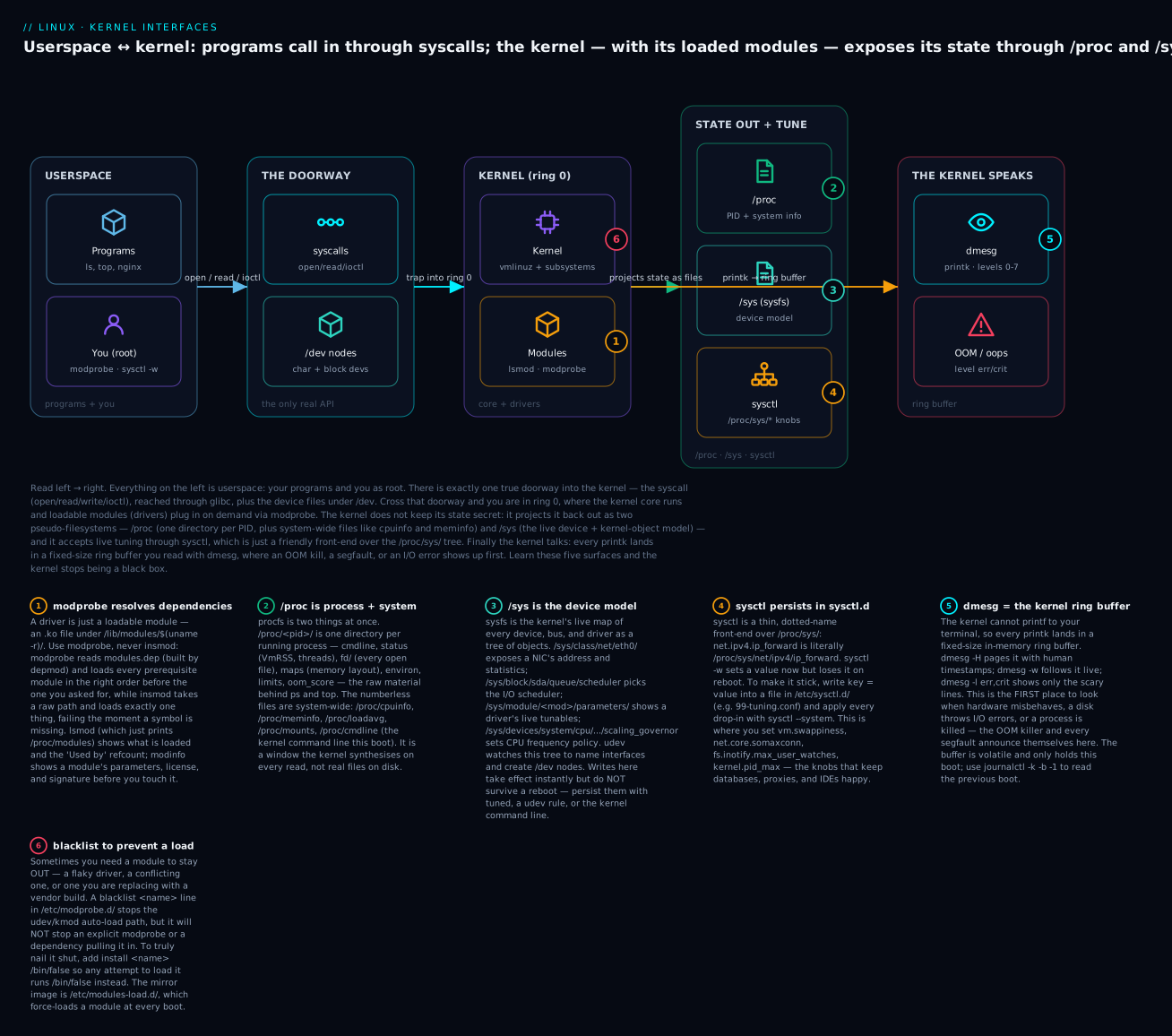
Keep this map in mind: the rest of the lesson walks the windows one at a time, starting with the kernel’s own identity.
2. Which kernel are you running? Version, config, and command line
Before you tune or troubleshoot a kernel you must be able to identify it precisely, because module compatibility, available features, and known bugs are all version-specific. A module built for 6.8.0-31 will refuse to load on 6.8.0-35. A tunable that exists on a 6.x kernel may be absent on the 5.14 kernel RHEL 9 ships. So the first question is always: exactly which kernel, built with what config, booted with what parameters?
uname: the kernel’s name tag
uname -a
Linux web01 6.8.0-31-generic #31-Ubuntu SMP PREEMPT_DYNAMIC Sat ... x86_64 x86_64 x86_64 GNU/Linux
That single line packs several fields. The one you will type a hundred times is uname -r, the kernel release, because it is the directory name under /lib/modules/ where this kernel’s modules live — you will splice $(uname -r) into paths constantly.
| Flag | Prints | Example |
|---|---|---|
-r |
Kernel release (use in module paths) | 6.8.0-31-generic |
-v |
Kernel version (build string + date) | #31-Ubuntu SMP PREEMPT_DYNAMIC ... |
-m |
Machine hardware (architecture) | x86_64 |
-o |
Operating system | GNU/Linux |
-n |
Node (hostname) | web01 |
-p |
Processor type (often unknown) |
x86_64 |
-a |
All of the above | (full line) |
Decode a release string like 6.8.0-31-generic: 6 = major, 8 = minor (the “6.8 mainline series”), 0 = patch, -31 = the distro’s build/ABI number (Ubuntu’s 31st build of 6.8), -generic = the flavour (vs -lowlatency, -aws, -rt). On RHEL 9 you would instead see 5.14.0-427.el9.x86_64, where .el9 marks it as Red Hat’s heavily back-ported “Enterprise Linux 9” kernel — nominally 5.14 but carrying thousands of patches from far newer kernels. This is the single most important thing to understand about kernels in the real world:
Distro kernels vs mainline vs LTS
The kernel your distro ships is not the vanilla kernel from kernel.org. Distros take a base version and back-port security fixes, drivers, and features onto it for years while keeping the version number frozen for ABI stability. “Is RHEL 9 really on the ancient 5.14?” — no; it is 5.14 in name only, patched to behave like something far newer. Meanwhile Ubuntu tracks closer to mainline and rolls the base version forward across point releases.
| Kernel line | What it is | Who uses it | Support window |
|---|---|---|---|
| mainline | Torvalds’ latest rc/release on kernel.org |
Kernel developers, bleeding-edge | Weeks (until next release) |
| stable | Mainline + fixes for a short spell | Rolling distros (Arch, Fedora) | ~Until next stable |
| LTS | A stable line maintained for years | Debian, Ubuntu LTS base, Android | ~2–6 years |
| distro / enterprise | An LTS/stable base heavily back-ported, version frozen | RHEL, SLES, Ubuntu LTS | 5–10+ years |
| -rt (PREEMPT_RT) | Real-time preemption patchset | Industrial, audio, robotics | Tracks its base |
| hardened | Extra security hardening (grsec-style, Alpine) | Security-focused distros | Tracks its base |
The practical rule: on a server, run the kernel your distro ships and let apt/dnf update it. You inherit tested drivers, signed modules for Secure Boot, and a security team back-porting CVE fixes for you. Build your own only for a genuine reason (unusual hardware, kernel development, a feature your distro’s config omits) — and we will see at the end of this section why that is rarely worth it.
What was this kernel built with? The config
A kernel is compiled from thousands of options — CONFIG_* symbols set to y (built in), m (built as a loadable module), or unset. To know whether a feature or driver is even possible on your running kernel, read its config. There are two places it may live:
# 1) Almost always present: the config saved beside the kernel in /boot
grep -c '=y' /boot/config-$(uname -r)      # count built-in options
grep CONFIG_SYSFS /boot/config-$(uname -r) # is sysfs compiled in?
CONFIG_SYSFS=y
# 2) Sometimes exposed by the running kernel itself (needs CONFIG_IKCONFIG_PROC)
zcat /proc/config.gz 2>/dev/null | grep CONFIG_TRANSPARENT_HUGEPAGE=
| Source of config | Availability | How to read it |
|---|---|---|
/boot/config-$(uname -r) |
Ships on Debian/Ubuntu and RHEL/Fedora | grep CONFIG_X /boot/config-$(uname -r) |
/proc/config.gz |
Only if built with CONFIG_IKCONFIG_PROC=y (Arch: yes; Debian/RHEL: usually no) |
zcat /proc/config.gz | grep ... |
/lib/modules/$(uname -r)/build/.config |
If kernel-headers/-devel installed |
grep ... .../.config |
| Config value | Meaning | Consequence |
|---|---|---|
CONFIG_XYZ=y |
Feature/driver built into the kernel image | Always present; cannot be unloaded |
CONFIG_XYZ=m |
Built as a loadable module | Present as an .ko; load/unload with modprobe |
# CONFIG_XYZ is not set |
Not compiled at all | Feature unavailable without rebuilding the kernel |
This y/m/unset distinction is the bridge to the next section: a feature marked m in the config is exactly what shows up as a loadable module you can manage at runtime.
The kernel command line
When the bootloader launched this kernel it passed a command line — a space-separated list of parameters that tune the kernel before userspace even exists. Read the one in force right now:
cat /proc/cmdline
BOOT_IMAGE=/vmlinuz-6.8.0-31-generic root=UUID=1e0e... ro quiet splash mitigations=off
| Common parameter | Effect |
|---|---|
root=UUID=… |
Which device to mount as / |
ro / rw |
Mount root read-only (then remount rw) or read-write |
quiet |
Suppress most boot messages |
nomodeset |
Disable kernel mode-setting (rescue a black-screen GPU) |
single / systemd.unit=rescue.target |
Boot to a rescue shell |
transparent_hugepage=never |
Disable THP globally (common for databases) |
mitigations=off |
Disable CPU vulnerability mitigations (⚠️ security trade-off) |
intel_iommu=on |
Enable the IOMMU (for VFIO/passthrough) |
init=/bin/bash |
Skip systemd, land in a raw shell (password recovery) |
To make a change permanent you do not edit /proc/cmdline (it is read-only truth). You edit the bootloader config, as covered in the boot-process lesson: on Debian/Ubuntu set GRUB_CMDLINE_LINUX in /etc/default/grub then sudo update-grub; on RHEL/Fedora use sudo grubby --update-kernel=ALL --args="transparent_hugepage=never" or edit and run sudo grub2-mkconfig -o /boot/grub2/grub.cfg. To try a parameter once without committing, press e at the GRUB menu and edit the linux line — it applies for that one boot only.
A taste of building a kernel (and why you usually don’t)
You can compile your own kernel, and it is educational to do once. The rough shape on Debian/Ubuntu:
# ⚠️ Illustrative only — do not run on a machine you care about
sudo apt build-dep linux            # pull build toolchain
apt source linux-image-$(uname -r)  # fetch the distro's source
cd linux-*/
make localmodconfig                 # start from a config matching THIS machine's loaded modules
make -j"$(nproc)"                    # compile (minutes to hours)
sudo make modules_install install    # install modules + image, update GRUB
Now the reasons you almost never should on a server: you lose the distro’s continuous CVE back-porting; every kernel update becomes a manual rebuild; with Secure Boot on you must sign the image and modules yourself; and any out-of-tree module (GPU, VPN) must be rebuilt to match. The distro’s kernel team does all of this for you, tested, for free. Build your own for learning, for exotic hardware, or for a feature your distro genuinely omits — otherwise dnf upgrade / apt full-upgrade is the professional answer. The exception that is common is a single out-of-tree module (an NVIDIA driver, a VirtualBox module), and for that the right tool is DKMS, which we meet next.
3. Loadable kernel modules
A loadable kernel module (LKM) is a chunk of kernel code — a .ko (“kernel object”) file — that can be inserted into or removed from the running kernel without a reboot. Drivers, filesystems, netfilter/nftables hooks, and crypto algorithms are nearly all modules. This is how one kernel image supports thousands of devices without being gigantic: it loads only the modules the hardware present actually needs, on demand. Modules for your running kernel live under /lib/modules/$(uname -r)/ (a symlink target of /usr/lib/modules/... on some distros).
# Where your modules live, and how many there are
ls /lib/modules/$(uname -r)/
find /lib/modules/$(uname -r)/kernel -name '*.ko*' | wc -l
build  kernel  modules.alias  modules.dep  modules.order  modules.symbols  ...
6417
Seeing what’s loaded: lsmod
lsmod | head -6
Module                  Size  Used by
nf_conntrack          188416  3 xt_conntrack,nf_nat,nf_conntrack_netlink
xfs                  2555904  1
overlay               188416  2
dummy                  16384  0
bridge                311296  1 br_netfilter
Three columns: the Module name, its Size in bytes, and Used by — a reference count followed by the names of the modules that depend on it. lsmod is nothing but a formatter for the file /proc/modules; prove it with cat /proc/modules | head. That “Used by” count is the single most important number for troubleshooting: you cannot remove a module whose count is above zero. dummy above has a count of 0 and can be unloaded; nf_conntrack has 3 and cannot until its dependents go first.
Inspecting a module before you touch it: modinfo
modinfo dummy
filename:       /lib/modules/6.8.0-31-generic/kernel/drivers/net/dummy.ko.zst
license:        GPL
description:    Dummy net driver
depends:
retpoline:      Y
intree:         Y
name:           dummy
vermagic:       6.8.0-31-generic SMP preempt mod_unload
sig_id:         PKCS#7
signer:         Build time autogenerated kernel key
parm:           numdummies:Number of dummy pseudo devices (int)
modinfo field |
Tells you |
|---|---|
filename |
Path to the .ko on disk (note .zst/.xz compression) |
license |
GPL etc.; a non-GPL module “taints” the kernel |
depends |
Other modules it needs (modprobe loads these first) |
vermagic |
The exact kernel it was built for — must match or load fails |
intree |
Y = shipped with the kernel; blank = out-of-tree |
signer / sig_id |
Its cryptographic signature (matters under Secure Boot) |
parm |
Tunable parameters you can pass, with type and description |
That parm: line is gold — it tells you a module accepts numdummies, an int. modinfo -p dummy lists only the parameters. And vermagic explains the classic failure: a module built for a different kernel refuses to load, because its version magic doesn’t match the running kernel.
Loading and unloading: modprobe, insmod, rmmod
There are two tools that insert a module and they are not equals.
# The RIGHT way — resolves dependencies, searches by name
sudo modprobe dummy

# The low-level way — takes a full path, resolves NOTHING
sudo insmod /lib/modules/$(uname -r)/kernel/drivers/net/dummy.ko.zst
Always prefer modprobe. Here is why, mechanically. Each module may depend on others (its depends: line). The map of every module’s dependencies is precomputed into /lib/modules/$(uname -r)/modules.dep by a tool called depmod. modprobe reads that map and inserts every prerequisite in the correct order before inserting the module you named — by name, searching the tree for you. insmod does none of this: you hand it an exact file path, and if that module needs a symbol from another module that isn’t loaded yet, insmod fails with “Unknown symbol in module.” insmod is a scalpel for kernel developers; modprobe is what you use in real life.
| Command | Purpose | Resolves deps? | Takes |
|---|---|---|---|
modprobe <name> |
Load a module and its dependencies | ✅ (via modules.dep) |
Module name |
modprobe -r <name> |
Unload a module and now-unused deps | ✅ | Module name |
modprobe --show-depends <name> |
Print the insert order without loading | ✅ | Module name |
modprobe -c |
Dump the full effective modprobe config | — | — |
insmod <path.ko> |
Insert exactly one module file | ❌ | File path |
rmmod <name> |
Remove exactly one module | ❌ | Module name |
depmod -a |
Rebuild modules.dep/modules.alias after adding modules |
— | — |
lsmod |
List loaded modules (formats /proc/modules) |
— | — |
modinfo <name> |
Show a module’s metadata + parameters | — | — |
To unload, modprobe -r is the mirror of modprobe — it also removes dependencies that are no longer used. rmmod removes exactly one module and nothing else.
⚠️
rmmodon an in-use module. If a module’slsmod“Used by” count is non-zero,rmmodrefuses:rmmod: ERROR: Module xfs is in use. The count is a real reference count — unloading a live driver would rip the rug out from under running code and can panic the kernel. Never reach forrmmod -f(force-unload) to get around this: it requires a specially built kernel and, when it works, frequently crashes the machine. The correct move is to stop whatever is using the module (unmount the filesystem, down the interface, kill the process) so the count drops to zero, then unload normally.
Loading a module with parameters
You can pass parameters at load time on the command line, or configure them permanently.
# Load 'dummy' asking for two virtual interfaces
sudo modprobe dummy numdummies=2
ip -br link show type dummy
dummy0           DOWN           7a:1c:...
dummy1           DOWN           2e:9b:...
The current value of every parameter of a loaded module is readable under /sys/module/<name>/parameters/ — another example of /sys exposing kernel state:
cat /sys/module/dummy/parameters/numdummies
2
To set a parameter permanently, drop an options line into /etc/modprobe.d/. These .conf files are read by modprobe (and by the udev auto-load path) every time the module is loaded.
# Persist a parameter across reboots
echo 'options dummy numdummies=2' | sudo tee /etc/modprobe.d/dummy.conf
Directive in /etc/modprobe.d/*.conf |
Does |
|---|---|
options <mod> key=val … |
Set default parameters whenever <mod> loads |
blacklist <mod> |
Stop auto-loading of <mod> (not explicit modprobe) |
install <mod> /bin/false |
Replace loading of <mod> with a command — the hard block |
install <mod> … |
Run an arbitrary command instead of the normal insert |
alias <name> <mod> |
Map an alias (e.g. alias eth0 e1000e) to a module |
softdep <mod> pre: <a> post: <b> |
Order-load helper modules around <mod> |
Blacklisting: keeping a module OUT
Sometimes you need a module to never load — a buggy driver, one that conflicts with a vendor build, or a wireless card you are disabling for security. This has a famous gotcha, so read carefully.
# Prevent the Nouveau GPU driver from auto-loading (classic before installing NVIDIA's)
echo 'blacklist nouveau' | sudo tee /etc/modprobe.d/blacklist-nouveau.conf
blacklist nouveau stops the automatic load path — udev matching a PCI ID to the module and pulling it in. But blacklist does not stop an explicit modprobe nouveau, and it does not stop another module from pulling it in as a dependency. If you truly must nail a module shut, add the install override, which tells modprobe to run /bin/false instead of ever inserting the module:
# The belt-and-braces block
printf 'blacklist nouveau\ninstall nouveau /bin/false\n' | \
  sudo tee /etc/modprobe.d/blacklist-nouveau.conf
Because blacklists and driver changes affect the early boot environment too, you often must rebuild the initramfs so the change is present before the real root is mounted. This differs by distro:
| Distro family | Rebuild initramfs after a module/blacklist change |
|---|---|
| Debian / Ubuntu | sudo update-initramfs -u -k "$(uname -r)" |
| RHEL / Fedora / Rocky | sudo dracut -f |
Auto-loading at boot: the mirror image
The opposite need — force a module to load on every boot even if nothing has requested it yet — is served by /etc/modules-load.d/, read by systemd-modules-load.service at boot. (Debian also honours the older /etc/modules file.)
# Load the 'br_netfilter' module on every boot (common for Kubernetes nodes)
echo 'br_netfilter' | sudo tee /etc/modules-load.d/k8s.conf
| Path | Read by | Purpose |
|---|---|---|
/lib/modules/$(uname -r)/modules.dep |
modprobe |
The dependency map (built by depmod) |
/etc/modprobe.d/*.conf |
modprobe, udev |
options, blacklist, install, alias |
/usr/lib/modprobe.d/*.conf |
modprobe |
Distro-shipped defaults (don’t edit; override in /etc) |
/etc/modules-load.d/*.conf |
systemd-modules-load |
Modules to force-load at boot |
/etc/modules |
Debian init | Legacy force-load list |
Signed modules, Secure Boot, and DKMS
On a machine with UEFI Secure Boot enabled, the kernel refuses to load a module unless it carries a trusted cryptographic signature — this stops an attacker loading a malicious rootkit-as-module. Distro modules are signed by the distro’s key, which the kernel trusts. An out-of-tree module you build yourself is not, so it will be rejected with a dmesg line like Loading of unsigned module ... rejected or module verification failed: signature and/or required key missing (E). The fix is to enrol your own Machine Owner Key (MOK) with mokutil --import (you confirm it in a blue firmware screen at the next reboot) and sign the module with that key.
# Is Secure Boot on? (needs the mokutil package)
mokutil --sb-state
SecureBoot enabled
This is exactly the pain point that DKMS (Dynamic Kernel Module Support) exists to smooth. When you install an out-of-tree driver (NVIDIA, VirtualBox, ZFS, a Wi-Fi chipset) via your package manager, DKMS registers its source. On every kernel upgrade, DKMS automatically recompiles the module against the new kernel — and on distros configured for it, re-signs it — so your GPU still works after apt upgrade pulls a new kernel. Without DKMS you would rebuild by hand after every kernel bump.
# What out-of-tree modules is DKMS managing, and for which kernels?
dkms status
nvidia/550.90.07, 6.8.0-31-generic, x86_64: installed
virtualbox/7.0.18, 6.8.0-31-generic, x86_64: installed
For DKMS to build anything it needs the matching kernel headers: linux-headers-$(uname -r) on Debian/Ubuntu, kernel-devel on RHEL/Fedora. A “module missing after kernel upgrade” incident is almost always a missing-headers or failed-DKMS-build problem, and dkms status plus dmesg tell you which.
4. /proc: the process and system window
procfs, mounted at /proc, is two interfaces sharing one directory. Its numbered entries are one directory per running process — this is the raw truth behind ps, top, and every process tool. Its named entries are system-wide kernel state. Nothing under /proc exists on disk; the kernel manufactures each file’s contents at the moment you read it.
Per-process entries: /proc/<pid>/
Every process has a directory named for its PID. /proc/self is a magic symlink to your current process’s directory, handy in scripts.
# Start a background sleeper and explore its /proc directory
sleep 600 &
PID=$!
ls /proc/$PID/
attr  cgroup  cmdline  comm  cwd  environ  exe  fd  limits  maps  mounts
oom_score  oom_score_adj  root  stat  status  task  wchan  ...
# The command line, NUL-separated — translate the NULs to spaces
tr '\0' ' ' < /proc/$PID/cmdline; echo
sleep 600
/proc/<pid>/ entry |
What it exposes | Everyday use |
|---|---|---|
cmdline |
The exact argv (NUL-separated) | See a process’s real invocation |
comm |
Short command name (≤15 chars) | Quick label |
status |
Human-readable state: VmRSS, Threads, State, UIDs |
Memory & thread count without ps |
stat |
Raw single-line stats (what ps parses) |
Scripting |
fd/ |
Symlinks to every open file descriptor | Find leaked FDs, deleted-but-open files |
maps |
The full memory map (libraries, heap, stack) | Debug memory layout / mmap |
environ |
The process’s environment (NUL-separated) | See what env a service actually got |
cwd |
Symlink to working directory | Where is it running from |
exe |
Symlink to the executable on disk | Identify the binary (even if deleted) |
limits |
Effective ulimits (open files, stack, …) | Verify LimitNOFILE actually applied |
oom_score / oom_score_adj |
OOM-killer target score / your bias | Protect or sacrifice a process |
root |
Symlink to the process’s root (chroot/container) | Detect namespacing |
Two of these solve problems that stump beginners. fd/ reveals files that are deleted but still held open (a classic “disk is full but du shows nothing” cause — a log file was rm’d while a daemon still writes to it):
# Which open files does our sleeper hold? (0,1,2 = stdin/out/err)
ls -l /proc/$PID/fd/
environ answers “what environment did this service actually receive?” — invaluable when a systemd unit misbehaves because a variable wasn’t set (reading another process’s environ needs root or matching ownership):
sudo tr '\0' '\n' < /proc/$PID/environ | head
kill $PID   # clean up our sleeper
System-wide entries
The un-numbered files in /proc are the system’s vital signs. You have met many already through friendly tools; here they are at the source.
/proc file |
Contents | The friendly tool over it |
|---|---|---|
/proc/cpuinfo |
Per-core CPU model, flags, MHz | lscpu |
/proc/meminfo |
Every memory counter (MemFree, Cached, Slab…) | free, top |
/proc/loadavg |
1/5/15-min load + running/total procs | uptime |
/proc/uptime |
Seconds since boot + idle seconds | uptime |
/proc/mounts |
Every mounted filesystem (live) | mount, findmnt |
/proc/cmdline |
The kernel command line for this boot | — |
/proc/version |
Kernel version + compiler + build date | uname -a |
/proc/stat |
Cumulative CPU/interrupt/context-switch counters | vmstat, mpstat |
/proc/interrupts |
Per-CPU interrupt counts by device | debugging IRQ storms |
/proc/swaps |
Active swap areas and usage | swapon --show |
/proc/modules |
Loaded modules (raw) | lsmod |
/proc/filesystems |
Filesystem types the kernel understands | — |
/proc/partitions |
Block devices and sizes the kernel sees | lsblk |
/proc/sys/ |
The sysctl tree (tunables as files) | sysctl |
/proc/net/ |
Network stack tables (tcp, dev, …) | ss, ip |
# Load average and memory, straight from the kernel
cat /proc/loadavg
grep -E '^(MemTotal|MemAvailable|SwapTotal):' /proc/meminfo
0.14 0.09 0.03 1/412 20531
MemTotal:        8123456 kB
MemAvailable:    6210344 kB
SwapTotal:       2097148 kB
Notice /proc/sys/ in the table — that entire subtree is the sysctl interface, which is important enough to get its own section. But first, the other pseudo-filesystem, which handles devices rather than processes.
5. /sys and sysfs: the device and kernel-object model
Where /proc grew organically into a grab-bag of process and system files, sysfs (mounted at /sys) was designed with one clean idea: expose the kernel’s internal object model — every device, bus, driver, and class — as a navigable tree of directories, one attribute per file. If /proc is “how are things running,” /sys is “what is the hardware, and what can I set on it.” It is the data source udev uses to name your network interfaces and populate /dev, and the place you tune per-device behaviour.
ls /sys/
block bus class dev devices firmware fs kernel module power
/sys area |
Contains | You’d go here to |
|---|---|---|
/sys/devices |
The canonical device tree (by physical topology) | See the real hardware hierarchy |
/sys/class |
Devices grouped by function (net, block, tty, thermal…) | Find “all network interfaces” quickly |
/sys/block |
Every block device + its queue/ tunables |
Set I/O scheduler, see rotational flag |
/sys/bus |
Devices and drivers per bus (pci, usb, scsi…) | Bind/unbind drivers, rescan |
/sys/module |
One dir per loaded module + parameters/ |
Read/tune live module parameters |
/sys/class/net |
Each NIC: address, mtu, statistics/, operstate |
Read link state and counters |
/sys/kernel/mm |
Memory-management knobs (THP, ksm) | Toggle transparent hugepages |
/sys/devices/system/cpu |
Per-CPU: online, cpufreq/ governor |
Set frequency scaling policy |
/sys/firmware |
ACPI/EFI tables, DMI | Inspect firmware data |
/sys/fs |
Per-filesystem + cgroup2 tunables | cgroups, ext4/xfs knobs |
Most /sys files are a single value you can cat to read and, where writable, echo to change. A few of the tunables you will actually touch:
# Which I/O scheduler is a disk using? (brackets show the active one)
cat /sys/block/sda/queue/scheduler
none mq-deadline [bfq]
# Is transparent hugepage on? (databases often want it off)
cat /sys/kernel/mm/transparent_hugepage/enabled
[always] madvise never
# Set the CPU frequency governor to performance (per core)
cat /sys/devices/system/cpu/cpu0/cpufreq/scaling_governor
powersave
Example /sys tunable |
Reads / sets | Notes |
|---|---|---|
/sys/block/<dev>/queue/scheduler |
Active I/O scheduler | none, mq-deadline, bfq, kyber |
/sys/block/<dev>/queue/rotational |
1 HDD / 0 SSD |
Drives scheduler defaults |
/sys/block/<dev>/queue/read_ahead_kb |
Read-ahead size | Tune for sequential I/O |
/sys/kernel/mm/transparent_hugepage/enabled |
THP policy | never for Mongo/Redis/Oracle |
/sys/devices/system/cpu/cpu*/cpufreq/scaling_governor |
Freq governor | performance vs powersave |
/sys/class/net/<if>/mtu |
Interface MTU | Read (set via ip, not here, on live NICs) |
/sys/class/net/<if>/statistics/rx_bytes |
RX/TX counters | Raw byte/packet/error counts |
/sys/module/<mod>/parameters/<p> |
A module’s live parameter | Some are writable at runtime |
⚠️
/syswrites do not persist. Echoing a value into/syschanges it now and reverts on the next reboot. To make a/systunable stick, use the right persistence mechanism: a udev rule (/etc/udev/rules.d/) for per-device attributes, a tuned profile (see the performance-tuning lesson), a small systemd unit, or — for things like THP — a kernel command-line parameter such astransparent_hugepage=never. Do not try to write/sysfrom/etc/sysctl.d/; sysctl only covers/proc/sys.
How udev uses /sys
When you plug in a device, the kernel creates its /sys objects and fires a uevent over netlink. udev (as systemd-udevd) catches that event, reads the device’s attributes from /sys, applies rules in /etc/udev/rules.d/ and /lib/udev/rules.d/, and then does things like create the /dev node, assign a persistent interface name (enp3s0 from PCI topology rather than the unstable eth0), or run a helper. You can inspect exactly what udev sees:
# Everything udev knows about the first network interface
udevadm info -q all -p /sys/class/net/$(ls /sys/class/net | grep -v lo | head -1)
# Watch device events live — plug a USB stick in while this runs
udevadm monitor --udev --property
This closes the loop from the diagram: /sys is the device model, netlink carries the events, and udev turns them into the /dev nodes and stable names userspace relies on.
6. sysctl and dmesg: runtime knobs and the kernel’s voice
Two interfaces remain: the one you use to change the kernel’s behaviour while it runs, and the one you use to hear what the kernel has to say. They are the day-to-day workhorses of production Linux.
sysctl: tuning the running kernel
sysctl reads and writes kernel parameters exposed under /proc/sys/. The trick that demystifies it: a sysctl name is just the path under /proc/sys/ with slashes turned into dots. net.ipv4.ip_forward is the file /proc/sys/net/ipv4/ip_forward. Anything sysctl does, you could do with cat and echo — sysctl is a friendlier, safer front-end with config-file management on top.
# These three are equivalent reads
sysctl net.ipv4.ip_forward
sysctl -n net.ipv4.ip_forward       # value only, no "key = "
cat /proc/sys/net/ipv4/ip_forward
net.ipv4.ip_forward = 0
0
0
| Command | Does |
|---|---|
sysctl -a |
Dump every tunable and its current value |
sysctl <key> |
Read one value (as key = value) |
sysctl -n <key> |
Read just the value |
sysctl -w <key>=<val> |
Set a value now (lost on reboot) |
sysctl -p [file] |
Load settings from a file (default /etc/sysctl.conf) |
sysctl --system |
Load all drop-in files in the correct precedence order |
sysctl -a --pattern 'vm\.' |
Filter the dump by regex |
To set a value for the current boot:
# Enable IP forwarding right now (routers, VPNs, containers, k8s)
sudo sysctl -w net.ipv4.ip_forward=1
But -w is volatile — it reverts on reboot. To persist a tunable, write it into a drop-in file under /etc/sysctl.d/ and apply with sysctl --system. This is the single most-tested sysadmin skill in this section, so learn the pattern exactly:
# Persist across reboots
cat <<'EOF' | sudo tee /etc/sysctl.d/99-tuning.conf
net.ipv4.ip_forward = 1
vm.swappiness = 10
fs.inotify.max_user_watches = 524288
EOF
sudo sysctl --system        # apply all drop-ins now, in precedence order
Precedence matters because several directories may set the same key. systemd-sysctl collects files from all of these directories, and the rules are: for two files with the same name, the one in the higher-priority directory wins; then the surviving files are applied in lexicographic filename order, so a later name (like 99-…) overrides an earlier one (10-…) for the same key.
| Directory | Priority | Who puts files here |
|---|---|---|
/etc/sysctl.d/*.conf |
Highest | You — your overrides live here |
/run/sysctl.d/*.conf |
Middle | Runtime-generated (volatile) |
/usr/lib/sysctl.d/*.conf |
Lowest | Distro/package defaults (don’t edit) |
/etc/sysctl.conf |
Applied as a drop-in (legacy single file) | Historical; prefer /etc/sysctl.d/ |
The convention is to prefix filenames with two digits (99-tuning.conf) so ordering is explicit, and to keep your changes in /etc/sysctl.d/ — never edit the distro files in /usr/lib/sysctl.d/, or an update will overwrite them. Note that legacy sysctl -p with no argument loads only /etc/sysctl.conf; use sysctl --system to load the whole drop-in tree.
The knobs themselves fall into four families. Here are the ones you will actually reach for, with real defaults.
vm.* — the memory manager.
| Knob | Typical default | What it controls |
|---|---|---|
vm.swappiness |
60 |
Eagerness to swap (lower = keep pages in RAM; 1–10 for DB hosts) |
vm.overcommit_memory |
0 |
0 heuristic, 1 always allow (Redis wants this), 2 strict accounting |
vm.max_map_count |
65530 |
Max memory-map areas per process (Elasticsearch needs 262144) |
vm.dirty_ratio / vm.dirty_background_ratio |
20 / 10 |
% of RAM of dirty pages before sync throttles / background flush starts |
vm.min_free_kbytes |
sized to RAM | Reserve the kernel keeps free to avoid deadlock |
vm.drop_caches |
write-only | Write 1/2/3 to drop caches (⚠️ diagnostic only) |
net.* — the network stack.
| Knob | Typical default | What it controls |
|---|---|---|
net.ipv4.ip_forward |
0 |
Route packets between interfaces (routers, VPNs, containers) |
net.core.somaxconn |
128 (4096 on ≥5.4) |
Max accept-queue backlog (raise for busy web servers) |
net.ipv4.tcp_syncookies |
1 |
SYN-flood protection |
net.core.rmem_max / wmem_max |
~212992 |
Max socket receive/send buffer (raise for high-bandwidth links) |
net.ipv4.conf.all.rp_filter |
1/2 |
Reverse-path filtering (⚠️ can break asymmetric routing) |
net.ipv4.ip_local_port_range |
32768 60999 |
Ephemeral port range (widen for many outbound connections) |
net.netfilter.nf_conntrack_max |
sized to RAM | Max tracked connections (raise on firewalls/NAT gateways) |
kernel.* and fs.* — the core and filesystem layer.
| Knob | Typical default | What it controls |
|---|---|---|
kernel.pid_max |
32768 |
Highest PID (raise on huge machines: 4194304) |
kernel.panic |
0 |
Seconds to auto-reboot after a panic (0 = never; set 10 on servers) |
kernel.dmesg_restrict |
1 on Ubuntu |
Whether non-root may read dmesg |
kernel.sysrq |
176/1 |
Magic SysRq key bitmask (⚠️ powerful) |
kernel.core_pattern |
distro-set | Where core dumps go (often piped to systemd-coredump) |
fs.file-max |
sized to RAM | System-wide max open file handles |
fs.inotify.max_user_watches |
8192 |
Watches per user (raise to 524288 for IDEs/file-watchers) |
fs.inotify.max_user_instances |
128 |
inotify instances per user |
⚠️ Dangerous sysctls. A wrong value here can hang or expose a box.
vm.overcommit_memory=1lets allocations always succeed — great for Redis, a route to the OOM killer for a general host. Writing3tovm.drop_cacheson a busy database evicts the page cache and tanks performance while it re-warms — it is a diagnostic toy, never a “free up memory” fix. Disablingnet.ipv4.conf.all.rp_filtercan silently break connectivity on asymmetrically-routed hosts.kernel.sysrqand/proc/sysrq-triggercan reboot the machine instantly (echo b > /proc/sysrq-triggerreboots with no sync — data loss). Change one knob at a time, know its default so you can revert, and test before you persist.
dmesg: the kernel ring buffer
The kernel cannot printf to your terminal — it has no terminal, and it runs long before and after any shell. So every message the kernel emits, via its internal printk() function, is written into a fixed-size, in-memory circular buffer: the ring buffer. When it fills, the oldest lines are overwritten. dmesg is the tool that prints that buffer. This is the first place to look for anything hardware-, memory-, or driver-related, because the kernel narrates those events here and nowhere else.
# Human-friendly: relative timestamps, colour, paged
dmesg -H | tail -15
[Jul 9 10:14] usb 1-2: new high-speed USB device number 4 using xhci_hcd
[  +0.148903] usb-storage 1-2:1.0: USB Mass Storage device detected
[  +1.203114] sd 6:0:0:0: [sdb] 30310400 512-byte logical blocks: (15.5 GB/14.5 GiB)
[Jul 9 10:15] EXT4-fs (sdb1): mounted filesystem with ordered data mode
dmesg flag |
Effect |
|---|---|
-H |
Human: relative time, colour, sent to a pager |
-w |
Wait/follow — stream new messages live (like tail -f) |
-T |
Human wall-clock timestamps (⚠️ can drift after suspend) |
-l err,crit |
Show only messages at these levels |
-f kern |
Filter by facility |
-k |
Kernel messages only |
-x |
Decode facility and level for each line |
-t |
No timestamps (clean copy-paste) |
--clear / -C |
Empty the ring buffer (⚠️ you lose history) |
-n <level> |
Set the console log level |
Every message carries a log level from printk, 0 (most urgent) to 7 (debug). Filtering by level is how you cut through noise to find the problem.
| # | Level | Macro | Meaning |
|---|---|---|---|
| 0 | emerg | KERN_EMERG |
System is unusable (panic imminent) |
| 1 | alert | KERN_ALERT |
Action must be taken immediately |
| 2 | crit | KERN_CRIT |
Critical condition (hardware, serious failure) |
| 3 | err | KERN_ERR |
Error (I/O error, driver failure) |
| 4 | warning | KERN_WARNING |
Warning |
| 5 | notice | KERN_NOTICE |
Normal but significant |
| 6 | info | KERN_INFO |
Informational (device probing) |
| 7 | debug | KERN_DEBUG |
Debug-level chatter |
# Show only errors and worse — the fast path to a real problem
sudo dmesg -l err,crit
The console log level (which messages print to a physical console during boot) is controlled by /proc/sys/kernel/printk — four numbers: current, default, minimum, boot-time default. The quiet kernel parameter simply lowers the first number so boot is silent. You can raise or lower it live with sysctl kernel.printk or dmesg -n <level>.
Reading real messages. The value of dmesg is recognising the important lines. These are the ones that answer support tickets:
Message pattern in dmesg |
Means | Your move |
|---|---|---|
Out of memory: Killed process 1234 (java) |
The OOM killer killed a process to save the system | Add RAM, set limits, tune oom_score_adj, fix the leak |
segfault at 0 ip … sp … error 4 in libX.so |
A process crashed (invalid memory access) | Match the binary/library; check for corruption or a bug |
blk_update_request: I/O error, dev sda, sector … |
The disk returned a read/write error | Check SMART; the drive may be failing |
EXT4-fs error … / remounting filesystem read-only |
Filesystem detected corruption | fsck on next boot; investigate the disk |
nvme nvme0: I/O … timeout, aborting |
NVMe device stopped responding | Firmware/thermal/cabling; check /sys/class/nvme |
<iface>: Link is Up/Down |
Network link state changed | Correlate with cabling/switch/driver events |
mce: … Machine check events logged |
A CPU/memory hardware error (ECC) | mcelog/ras-mc-ctl; suspect RAM/CPU |
module verification failed: … key missing |
An unsigned module rejected (Secure Boot) | Enrol a MOK and sign it, or disable Secure Boot |
One crucial limitation: the ring buffer is volatile and holds only the current boot. If a machine crashed and rebooted, its dmesg is gone. To read a previous boot’s kernel log you need the persistent journal, using the kernel-only filter of journalctl — this is where dmesg and journald connect:
# The kernel ring buffer, from the journal, for the PREVIOUS boot
journalctl -k -b -1 --no-pager | tail -20
journalctl -k (-k = --dmesg) shows the same kernel messages dmesg does, but because journald can persist across reboots (when /var/log/journal/ exists), it can travel back to boots that dmesg has long since lost. For deep, live kernel tracing beyond static messages — attaching probes to functions, counting events, watching syscalls in flight — Linux offers eBPF, bpftrace, perf, and ftrace (via /sys/kernel/tracing), which are a subject of their own beyond this fundamentals lesson.
Hands-on lab
Run this on any throwaway Linux VM, WSL2 instance, or container with a real kernel (a full VM is best; some /sys/module steps are limited in containers). You need sudo. Everything here is safe and fully reversible — we load a harmless dummy network module, read the interfaces, tune a knob, then undo it all.
Step 1 — Identify your kernel.
uname -r
grep CONFIG_DUMMY= /boot/config-$(uname -r)
You should see your kernel release and CONFIG_DUMMY=m (the dummy driver is a module). What just happened: you confirmed the kernel version and that the module we’re about to load exists as an .ko.
Step 2 — Inspect the module before loading it.
modinfo dummy | grep -E '^(filename|depends|vermagic|parm)'
You’ll see its path, its vermagic (must match uname -r), and the numdummies parameter. What just happened: you read a module’s metadata without touching the kernel.
Step 3 — Watch the kernel talk while you load it. Open a second terminal and run:
sudo dmesg -w # live-follow the ring buffer; leave this running
Back in the first terminal:
sudo modprobe dummy numdummies=1
The dmesg -w window prints a line about dummy0. What just happened: modprobe inserted the module (resolving any deps), and the kernel announced the new device in the ring buffer.
Step 4 — See it through three interfaces.
lsmod | grep dummy                               # /proc/modules
ip -br link show type dummy                       # the new device
cat /sys/module/dummy/parameters/numdummies       # /sys sees your parameter
lsmod shows dummy … Used by 0; ip shows dummy0; /sys shows 1. What just happened: the same loaded module is visible through /proc (lsmod), the network stack, and /sys — three windows onto one kernel object.
Step 5 — Read process truth from /proc.
sleep 300 &
PID=$!
tr '\0' ' ' < /proc/$PID/cmdline; echo
grep -E '^(State|VmRSS|Threads):' /proc/$PID/status
ls -l /proc/$PID/fd/
kill $PID
You see the sleeper’s command line, memory, thread count, and open file descriptors — the raw data behind ps/top. What just happened: you read live per-process state directly from procfs.
Step 6 — Tune a sysctl temporarily, then persist it.
sysctl vm.swappiness                     # note the current value (e.g. 60)
sudo sysctl -w vm.swappiness=10          # change it NOW
cat /proc/sys/vm/swappiness              # 10 — the same file sysctl wrote
Now make it survive reboot, then apply:
echo 'vm.swappiness = 10' | sudo tee /etc/sysctl.d/99-lab.conf
sudo sysctl --system 2>/dev/null | grep swappiness
What just happened: -w changed a live /proc/sys file; the drop-in file makes it permanent; --system re-applied every drop-in in precedence order.
Step 7 — Explore /sys device tunables (read-only, safe).
for d in /sys/block/sd* /sys/block/nvme* /sys/block/vd*; do
  [ -e "$d" ] && echo "$d: sched=$(cat $d/queue/scheduler) rotational=$(cat $d/queue/rotational)"
done
cat /sys/kernel/mm/transparent_hugepage/enabled
You see each disk’s active I/O scheduler and whether the kernel thinks it’s rotational, plus the THP policy. What just happened: you read the device model and MM tunables from sysfs without changing anything.
Step 8 — Unload and clean up completely.
sudo modprobe -r dummy                   # unload the module + unused deps
lsmod | grep dummy || echo "dummy unloaded"
sudo rm /etc/sysctl.d/99-lab.conf        # remove our persisted knob
sudo sysctl -w vm.swappiness=60          # restore the default (use yours from step 6)
Stop the dmesg -w in the second terminal with Ctrl-C. What just happened: you reversed every change — module gone, drop-in removed, swappiness restored. The box is exactly as you found it.
Common mistakes and troubleshooting
The module/kernel problem table below is the one to bookmark — it maps the symptom you’ll actually see to its real cause and fix.
| Symptom | Likely cause | Fix |
|---|---|---|
modprobe: FATAL: Module X not found |
Module isn’t built for this kernel, or depmod map is stale |
Confirm it exists: modinfo X; if you just added it, sudo depmod -a |
insmod: ERROR: could not insert: Unknown symbol |
Used insmod, which doesn’t resolve dependencies |
Use modprobe X instead — it loads prerequisites first |
modprobe: ERROR: could not insert: Invalid module format / Version magic … should be … |
Module’s vermagic ≠ running kernel (built for another kernel) |
Rebuild for this kernel (DKMS), or install the matching module package |
rmmod: ERROR: Module X is in use |
Something still references it (Used by > 0 in lsmod) |
Stop the user (unmount FS, ip link down, kill process), then unload |
Module keeps auto-loading despite blacklist |
blacklist only stops auto-load, not deps/explicit load |
Add install X /bin/false to /etc/modprobe.d/, then rebuild initramfs |
module verification failed: … key missing (E) |
Secure Boot rejects an unsigned out-of-tree module | Enrol a MOK (mokutil --import) and sign it, or (lab only) disable Secure Boot |
| Out-of-tree driver gone after kernel upgrade | DKMS didn’t rebuild — missing headers | Install linux-headers-$(uname -r) / kernel-devel; check dkms status |
sysctl -w change vanished after reboot |
-w is runtime-only |
Persist in /etc/sysctl.d/99-*.conf + sudo sysctl --system |
sysctl: cannot stat /proc/sys/…: No such file |
Knob doesn’t exist on this kernel, or its module isn’t loaded | Check kernel version; some keys need a module (e.g. br_netfilter for bridge knobs) |
dmesg: read kernel buffer failed: Operation not permitted |
kernel.dmesg_restrict=1 blocks non-root |
Use sudo dmesg, or journalctl -k |
| Process “Killed”, no app log | Kernel OOM killer | dmesg -l err / journalctl -k for “Out of memory: Killed process” |
| Wrong network interface name after adding a NIC | udev renamed it from /sys topology |
Check udevadm info; pin a name with a udev rule if needed |
Three gotchas deserve extra words, because they are where hours disappear.
blacklist is not a lock. The number-one wasted afternoon in this topic is discovering that a “blacklisted” module loaded anyway. blacklist nouveau only removes the alias that lets udev auto-load it from a PCI ID. A modprobe nouveau, a softdep, or another module depending on it will still bring it in. If you genuinely need a module dead, pair the blacklist with install <mod> /bin/false and rebuild the initramfs (update-initramfs -u or dracut -f), because the auto-load can happen inside the initramfs before your /etc config is even consulted. Verify after reboot with lsmod | grep <mod>.
vermagic mismatch after an upgrade. A module built against one kernel will not load on another — the vermagic string encodes the exact version, SMP-ness, and preemption model, and the kernel checks it. This is by design: loading a mismatched module could corrupt memory. When a self-built or third-party driver “stops working after updates,” it’s almost always this. The right answer is DKMS, which recompiles the module for each new kernel automatically. Reading dmesg right after the failed modprobe shows the exact expected-vs-found version.
Persisting a /sys value in the wrong place. People try to put a /sys tunable (like the block scheduler or THP) into /etc/sysctl.d/ and are baffled when it’s ignored. sysctl only manages /proc/sys. A /sys attribute needs a different persistence mechanism — a udev rule, a tuned profile, a systemd unit, or a kernel parameter. Mixing up the two pseudo-filesystems is one of the most common conceptual errors, and the diagram at the top of this lesson exists precisely to keep them straight: /proc/sys = sysctl; /sys = the device model.
Cheat-sheet
| Command / path | What it does |
|---|---|
uname -r |
Kernel release (use in /lib/modules/$(uname -r)/) |
uname -a |
Full kernel identity line |
cat /proc/cmdline |
Kernel command line for this boot |
grep CONFIG_X /boot/config-$(uname -r) |
Was feature X built in (y), as a module (m), or not |
lsmod |
List loaded modules (formats /proc/modules) |
modinfo <mod> |
Module metadata: path, deps, vermagic, parm, signer |
modinfo -p <mod> |
Just the module’s parameters |
sudo modprobe <mod> |
Load module + dependencies (the right way) |
sudo modprobe <mod> key=val |
Load with a parameter |
sudo modprobe -r <mod> |
Unload module + now-unused deps |
sudo modprobe --show-depends <mod> |
Show insert order without loading |
sudo insmod <path.ko> |
Insert one module by path (no dep resolution) |
sudo rmmod <mod> |
Remove one module (fails if in use) |
sudo depmod -a |
Rebuild modules.dep after adding modules |
/etc/modprobe.d/*.conf |
options, blacklist, install, alias |
/etc/modules-load.d/*.conf |
Force-load modules at boot |
cat /proc/<pid>/status |
A process’s memory, threads, state, UIDs |
ls -l /proc/<pid>/fd/ |
A process’s open file descriptors |
tr '\0' ' ' < /proc/<pid>/cmdline |
A process’s real argv |
cat /proc/meminfo | /proc/loadavg | /proc/cpuinfo |
System memory / load / CPU |
cat /sys/block/<dev>/queue/scheduler |
Active I/O scheduler (bracketed) |
cat /sys/module/<mod>/parameters/<p> |
A loaded module’s live parameter |
udevadm info -q all -p /sys/... |
What udev knows about a device |
sysctl <key> / sysctl -n <key> |
Read a tunable (with / without the name) |
sudo sysctl -w <key>=<val> |
Set a tunable now (volatile) |
/etc/sysctl.d/99-*.conf + sudo sysctl --system |
Persist and apply tunables |
dmesg -H |
Kernel ring buffer, human-friendly, paged |
sudo dmesg -w |
Follow the ring buffer live |
sudo dmesg -l err,crit |
Only error/critical kernel messages |
journalctl -k -b -1 |
Kernel log from the previous boot |
mokutil --sb-state |
Is Secure Boot enabled |
dkms status |
Out-of-tree modules DKMS is managing |
Interview and exam questions
Q: Why prefer modprobe over insmod?
A: modprobe resolves dependencies. It reads /lib/modules/$(uname -r)/modules.dep (built by depmod) and inserts every prerequisite module in the correct order, searching by module name. insmod takes a raw file path and inserts exactly one module with no dependency handling, so it fails with “Unknown symbol” if a required module isn’t already loaded. Use modprobe in practice; insmod is a low-level developer tool.
Q: A blacklist line in /etc/modprobe.d/ isn’t stopping a module from loading. Why, and what actually works?
A: blacklist only disables the automatic (udev alias-based) load path. It does not block an explicit modprobe, a softdep, or a module pulled in as a dependency. To truly prevent a load, add install <mod> /bin/false so any load attempt runs /bin/false instead — and rebuild the initramfs (update-initramfs -u or dracut -f) so the block applies during early boot too.
Q: What’s the difference between /proc and /sys?
A: Both are pseudo-filesystems the kernel synthesises in memory. /proc (procfs) holds per-process directories (/proc/<pid>/) plus system-wide files (cpuinfo, meminfo) and the sysctl tree (/proc/sys). /sys (sysfs) is the structured device/driver/bus/class object model — one attribute per file — used by udev and for per-device tuning. Rule of thumb: process/system info and sysctls live in /proc; the device model lives in /sys.
Q: You set net.ipv4.ip_forward=1 with sysctl -w but it’s gone after a reboot. Fix it.
A: -w is runtime-only. Persist it: write net.ipv4.ip_forward = 1 into a file such as /etc/sysctl.d/99-router.conf, then apply all drop-ins with sudo sysctl --system. On next boot systemd-sysctl reads the drop-in automatically.
Q: Explain the relationship between a sysctl name and a file path.
A: A sysctl key is the path under /proc/sys/ with slashes replaced by dots. net.ipv4.ip_forward is /proc/sys/net/ipv4/ip_forward. sysctl -w key=val and echo val > /proc/sys/.../file are equivalent; sysctl just adds name translation and config-file management.
Q: A process died with only “Killed” in the output. How do you find out why?
A: Check the kernel ring buffer: sudo dmesg -l err or journalctl -k. An OOM kill logs Out of memory: Killed process <pid> (<name>) with the memory state. If it was a crash rather than OOM you’ll see a segfault line. dmesg is the kernel’s voice and the first stop for any “no application log” death.
Q: rmmod xfs returns “Module is in use.” What now?
A: The module’s reference count is above zero (visible as “Used by” in lsmod). Something is using it — here, a mounted XFS filesystem. Stop the user first (umount the XFS mounts), which drops the count to zero, then unload. Never use rmmod -f; force-unloading a live module typically panics the kernel.
Q: How do you tell whether a kernel feature is built-in, a module, or absent?
A: Grep the config: grep CONFIG_X /boot/config-$(uname -r). =y means built into the kernel image, =m means a loadable module (an .ko you can modprobe), and # CONFIG_X is not set means it wasn’t compiled and needs a kernel rebuild to get.
Q (RHCSA-style task): Persistently disable transparent hugepages on a database host.
A: THP is a /sys knob (/sys/kernel/mm/transparent_hugepage/enabled), not a sysctl, so persist it via the kernel command line: add transparent_hugepage=never to GRUB_CMDLINE_LINUX in /etc/default/grub, run sudo grub2-mkconfig -o /boot/grub2/grub.cfg (or grubby --update-kernel=ALL --args="transparent_hugepage=never"), and reboot. Verify with cat /sys/kernel/mm/transparent_hugepage/enabled showing [never].
Q (LFCS-style task): Load the br_netfilter module now and on every boot, and confirm.
A: sudo modprobe br_netfilter loads it now; echo br_netfilter | sudo tee /etc/modules-load.d/br_netfilter.conf makes systemd-modules-load load it every boot. Confirm the running state with lsmod | grep br_netfilter.
Q: Why won’t a self-compiled module load after a kernel update, and what’s the durable fix?
A: The module’s vermagic no longer matches the running kernel, and the kernel refuses the mismatch to protect memory integrity. The durable fix is DKMS: register the module’s source with DKMS so it automatically recompiles (and, where configured, re-signs) against each new kernel. Requires the matching linux-headers/kernel-devel.
Q: How do you read the kernel messages from the boot before the current one?
A: dmesg only shows the current boot’s ring buffer (it’s volatile). Use the persistent journal: journalctl -k -b -1 shows kernel (-k) messages from the previous (-b -1) boot — provided persistent journaling is enabled (/var/log/journal/ exists).
Key takeaways
- The kernel exposes itself through a few interfaces, and every tool is a client of one: syscalls (do things), /proc and /sys (read state as files), sysctl (tune
/proc/sys), and dmesg (read the kernel’s log). Know which window your problem lives behind. /procand/sysare pseudo-filesystems the kernel synthesises on every read — nothing is on disk./proc= process + system info (and the sysctl tree);/sys= the device/kernel-object model.- Use
modprobe, notinsmod— it resolves dependencies viamodules.dep.lsmodreads/proc/modules;modinfoshows parameters andvermagic; a mismatchedvermagicis why modules “stop loading” after upgrades (fix with DKMS). blacklistonly stops auto-loading. To truly block a module addinstall <mod> /bin/falseand rebuild the initramfs; to force-load one at boot, use/etc/modules-load.d/.- A sysctl name is a
/proc/syspath with dots for slashes.-wis temporary; persist in/etc/sysctl.d/99-*.confand apply withsysctl --system, mindful of drop-in precedence. /syswrites don’t persist — use a udev rule,tuned, a systemd unit, or a kernel parameter (e.g.transparent_hugepage=never), never/etc/sysctl.d.dmesgis the kernel’s voice and your first stop for OOM kills, segfaults, disk I/O errors, and hardware faults. Filter with-l err,crit; follow with-w; and reach forjournalctl -k -b -1when you need a previous boot.- ⚠️ Respect the sharp edges: never
rmmod -fan in-use module, and change one sysctl at a time knowing its default so you can revert.