In the previous lesson you learned that a container is not a thing the kernel knows about — it is a normal process that the kernel has been told to lie to, using namespaces (its own view of PIDs, mounts, network, users) and cgroups (its slice of CPU, memory, I/O). If that mental model is fuzzy, go back to Namespaces, cgroups & containers under the hood first — everything below assumes it.
This lesson is the layer you actually type at. Nobody assembles containers by hand with unshare and clone() in production; they run podman run or docker run, and a stack of tooling turns an image and a one-line command into a correctly-namespaced, cgroup-limited, network-attached, restart-on-failure process. Our job here is to make that stack stop being magic. We will use Podman as the primary tool — it is daemonless, rootless-first, ships as the default on RHEL/Fedora, and its CLI is a drop-in for Docker’s — while showing the Docker equivalent at every step because you will meet Docker constantly.
Why this matters
Here is the problem containers solve, stated plainly: “it works on my machine” is a lie about the environment, not the code. Your app depends on a specific Python, a specific glibc, three shared libraries, two environment variables, and a directory that exists on your laptop and not on the server. A container image freezes that entire userland — every file below your app — into one immutable, content-addressed artifact that runs bit-identically on your laptop, in CI, and in production. The kernel is shared; everything above it is shipped with the app.
The second thing that matters is who runs the container. For a decade the default was Docker, whose architecture is a single root daemon (dockerd) that every user talks to through a socket. That daemon runs as root, owns every container as its own child, and — because its socket is effectively a root shell — makes membership in the docker group equivalent to sudo with no password and no audit trail. That was a security compromise everyone quietly accepted. Podman’s bet is that you don’t have to: it runs daemonless (no background service) and rootless (your unprivileged user, mapped through a user namespace, is “root” only inside the container). If a rootless container is compromised, the attacker lands as your uid 1000 on the host, owning nothing.
The third thing — and the reason this lesson ties into the rest of the course — is lifecycle. A container you started by hand dies when you close your laptop. A production service must start on boot, restart on failure, log to the journal, and be managed like every other service on the box. On Linux that means systemd, and Podman integrates with systemd through Quadlet so cleanly that a container becomes just another unit file. If you already understand systemd units, services & targets, Quadlet will feel like coming home.
Get these three ideas — immutable userland, rootless isolation, systemd lifecycle — and you can run a real fleet. Let’s build up to it.
The container ecosystem and the OCI standards
The reason podman run docker.io/library/nginx works, and the reason an image Docker built runs under Podman and then under Kubernetes without modification, is a set of open specifications governed by the Open Container Initiative (OCI). The OCI is not software; it is three text specs that everyone implements. Understanding them dissolves most “why are there so many tools?” confusion.
| OCI specification | What it standardises | Concretely |
|---|---|---|
Image spec (image-spec) |
The on-disk/registry format of an image: a JSON config, an ordered list of filesystem layers (tar+gzip), and a manifest tying them together, all addressed by SHA-256 digest | Why the same image file works in Podman, Docker, containerd, Kubernetes |
Runtime spec (runtime-spec) |
How to take an unpacked root filesystem plus a config.json and turn it into a running, namespaced, cgroup-limited process |
The contract that runc and crun implement |
Distribution spec (distribution-spec) |
The registry HTTP API: how a client pushes/pulls layers and manifests to a registry over HTTPS | Why docker.io, quay.io, GHCR and a self-hosted registry all speak the same protocol |
Below the CLI you type sits a two-layer stack. The tool you invoke (Podman, Docker, or Kubernetes’ kubelet) is a high-level manager: it resolves image names, pulls layers, prepares storage and networking, and writes an OCI config.json. It then calls a low-level OCI runtime — a small program whose entire job is the runtime-spec: create the namespaces, apply the cgroup, drop capabilities, set up the mounts, and exec your process. That is where runc and crun live.
| OCI runtime | Language | Notes / when you’d choose it |
|---|---|---|
| runc | Go | The original reference implementation, extracted from Docker; still the Docker default and extremely widely deployed |
| crun | C | Much smaller and faster to start, lower memory per container, first-class cgroups v2 support; the default on Fedora/RHEL and the better choice for rootless and high-density hosts |
| youki | Rust | Newer, memory-safe reimplementation of the runtime-spec; production-capable, less ubiquitous |
| kata-runtime | Go + VM | Runs each container in a lightweight VM for hardware-enforced isolation; a runtimeClass you opt into, not a default |
| gVisor (runsc) | Go | Intercepts syscalls in a user-space kernel for a stronger sandbox at some performance cost |
You can see and switch the runtime directly:
# Which runtimes does this Podman know about, and which is default?
podman info --format '{{.Host.OCIRuntime.Name}}'
# crun

# Force a specific low-level runtime for one container
podman run --runtime crun --rm docker.io/library/alpine echo hi
# hi
The practical payoff: because everyone targets the same runtime-spec, an image is a portable, tool-agnostic artifact. You are never locked into the tool that built or ran it. That is the whole point of the OCI, and it is why the rest of this lesson can teach Podman without stranding you if your shop uses Docker or ships to Kubernetes.
Podman vs Docker: daemonless and rootless by design
Podman (pod + manager) and Docker do the same job and share almost the same CLI, but their architecture differs in two ways that matter enormously in production: daemon vs daemonless, and root vs rootless by default.
Docker is a client/server system. The docker command is a thin client that sends every request over a Unix socket (/var/run/docker.sock) to dockerd, a long-running daemon that runs as root and is the parent of every container. Podman has no daemon: when you run podman run, podman itself forks and execs the OCI runtime as you, then largely gets out of the way — a tiny C monitor called conmon stays behind per container to hold the TTY and report the exit code. Because your containers were never children of a daemon, there is no daemon to restart, crash, or attack, and containers keep running across a Podman upgrade.
The diagram below traces the full rootless Podman flow — from your unprivileged shell, through the user-namespace id mapping and the image pull, into the crun/runc runtime, and finally under systemd via Quadlet — with the Docker daemon model shown as the red contrast node.
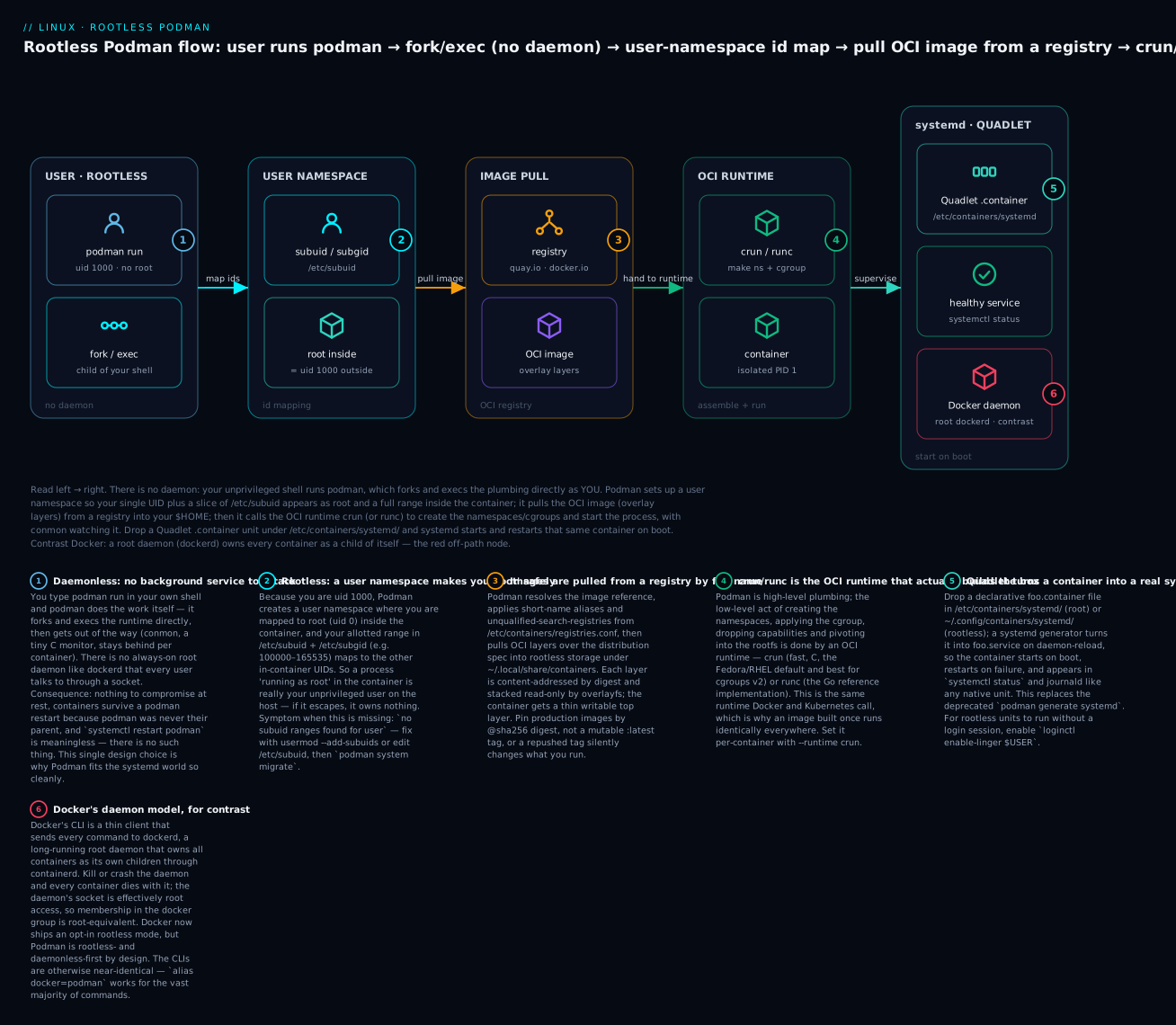
Read it left to right: daemonless entry (badge 1), the rootless user-namespace id map from /etc/subuid (badge 2), the image pulled from a registry (badge 3), the OCI runtime crun/runc doing the low-level work (badge 4), the container promoted to a Quadlet systemd service (badge 5), and the Docker daemon contrast (badge 6). Here is the same contrast as a reference table.
| Dimension | Podman | Docker |
|---|---|---|
| Architecture | Daemonless — podman forks/execs the runtime directly; conmon monitors each container |
Client → root daemon (dockerd) → containerd → runc; daemon owns all containers |
| Default privilege | Rootless by default (unprivileged user via user namespace); rootful optional with sudo |
Rootful by default; opt-in rootless mode exists (dockerd-rootless-setuptool.sh) |
| What “restart the service” means | Nothing — there is no daemon; systemctl restart podman is meaningless |
systemctl restart docker kills/recreates the daemon and can disrupt containers |
| Group = root? | No shared privileged socket; no podman group grants root |
Membership in the docker group is root-equivalent (socket = root) |
| systemd integration | Native and first-class via Quadlet; runs cleanly inside systemd | Historically fights systemd (double-fork, daemon as parent); works but less clean |
| Pods | Built-in podman pod (Kubernetes-style shared namespace) |
No native pod concept |
| Build | podman build (uses Buildah under the hood) or Buildah directly |
docker build (BuildKit) |
| Compose | podman compose / podman-compose, or Docker Compose against the Podman socket |
docker compose (v2 plugin) |
| CLI compatibility | Deliberately mirrors Docker; alias docker=podman works for the vast majority of commands |
The reference the Podman CLI copies |
| Desktop GUI | Podman Desktop (free, open source) | Docker Desktop (GUI; paid license for larger orgs) |
Because the CLIs match, the single most useful fact for a Docker user moving to Podman is:
# Everything you know still works — just swap the binary.
alias docker=podman
docker run --rm docker.io/library/hello-world   # actually runs podman
A frequent point of confusion is Docker Engine vs Docker Desktop — they are not the same product.
| Docker Engine | Docker Desktop | |
|---|---|---|
| What it is | The open-source daemon (dockerd) + CLI, installed natively |
A GUI application bundling a Linux VM, the engine, Compose, Kubernetes, and a dashboard |
| Runs on | Linux (native) | macOS, Windows, and Linux — spins up a Linux VM because containers need a Linux kernel |
| On Linux you | Install directly; containers share the host kernel | Do not normally need it — the native engine is enough |
| License | Apache 2.0, free | Free for individuals/small business; paid subscription for large enterprises |
| Why it matters | This is what runs in production | This is a developer convenience; the license change in 2021 is a big reason many teams moved to Podman |
The takeaway: on a Linux server, “install Docker” means Docker Engine (a root daemon). Podman gives you the same commands without the daemon and without root. For the rest of this lesson every podman command has a docker twin — where they differ, we will call it out.
Images: registries, layers, tags and digests
An image is the frozen userland; a container is a running (or stopped) instance of an image with a thin writable layer on top. You get images by pulling them from a registry — an HTTPS server that speaks the OCI distribution spec.
Pulling, and the short-name problem
# Fully-qualified: registry / namespace / repository : tag
podman pull docker.io/library/nginx:1.27-alpine
# Trying to pull docker.io/library/nginx:1.27-alpine...
# Getting image source signatures
# Copying blob sha256:...  done
# Writing manifest to image destination
# 9c... (image ID)
Docker silently assumes docker.io/library/ in front of a bare name like nginx. Podman does not guess by default — it consults unqualified-search-registries and, in enforcing mode, either resolves a known short-name alias or asks you which registry you meant. This is a security feature: it stops a typo or a malicious short name from silently pulling evil.io/nginx.
| Registry | Host | What lives there |
|---|---|---|
| Docker Hub | docker.io |
The default public registry; library/ namespace holds the official images |
| Quay | quay.io |
Red Hat’s registry; many Fedora/RHEL and CNCF images |
| Red Hat | registry.access.redhat.com, registry.redhat.io |
UBI (Universal Base Images) and Red Hat products |
| Fedora | registry.fedoraproject.org |
Official Fedora base images |
| GitHub | ghcr.io |
GitHub Container Registry, tied to repos/orgs |
gcr.io, *-docker.pkg.dev |
Google Container Registry / Artifact Registry |
Registry behaviour is configured in registries.conf (system-wide /etc/containers/registries.conf, per-user ~/.config/containers/registries.conf), a TOML file:
| Key / file | Purpose |
|---|---|
unqualified-search-registries |
Ordered list of registries to search for a bare name, e.g. ["registry.fedoraproject.org", "quay.io", "docker.io"] |
short-name-mode |
enforcing (prompt if ambiguous — the default), permissive, or disabled |
[[registry]] blocks |
Per-registry settings: location, insecure = true (plain HTTP — ⚠️ testing only), blocked = true |
[[registry.mirror]] |
Pull-through mirrors for a registry (air-gapped or caching setups) |
/etc/containers/registries.conf.d/*.conf |
Drop-in fragments; short-name aliases live here, e.g. "nginx" = "docker.io/library/nginx" |
/etc/containers/policy.json |
Signature-verification policy — which registries you trust and how signatures are checked |
# See exactly which registries a bare name would search, and the aliases in effect
podman info --format '{{.Registries}}'
cat /etc/containers/registries.conf.d/000-shortnames.conf | head
# [aliases]
#   "nginx" = "docker.io/library/nginx"
#   "fedora" = "registry.fedoraproject.org/fedora"
Tags, digests, and why :latest will burn you
An image reference has the shape registry/namespace/repo:tag or registry/namespace/repo@sha256:digest.
| Reference part | Example | Mutable? | Use when |
|---|---|---|---|
| Tag | nginx:1.27-alpine |
Yes — a tag is a human label the publisher can repoint at any time | Development, readability |
:latest |
nginx:latest |
Yes, and worst of all — it is just a default tag, not “the newest” | ⚠️ Never in production; it silently changes underfoot |
| Digest | nginx@sha256:e4b0... |
No — content-addressed; this digest is this image forever | Production, supply-chain integrity, reproducible builds |
# Find the immutable digest of an image you trust, then pin to it
podman image inspect nginx:1.27-alpine --format '{{index .RepoDigests 0}}'
# docker.io/library/nginx@sha256:e4b0b2...

# Deploy by digest — this can never silently change
podman pull docker.io/library/nginx@sha256:e4b0b2...
⚠️ Pinning to :latest in a Quadlet unit or Compose file is the classic self-inflicted outage: someone repushes latest, your host restarts, it pulls a new incompatible image, and the service that worked yesterday won’t start today. Pin by digest for anything you can’t afford to have change.
Layers and the overlay filesystem
Each image is an ordered stack of read-only layers, each a tarball of filesystem changes, content-addressed by digest and shared between images. At run time the container gets a thin writable upper layer; the kernel’s overlayfs presents the union as one filesystem.
| Overlay concept | Role |
|---|---|
| lowerdir | The stacked read-only image layers (shared across all containers using that image) |
| upperdir | The container’s private writable layer — every file the container creates or modifies lands here |
| Copy-up | Modifying a file from a lower layer copies it up into upperdir first (why writing a huge existing file is slow the first time) |
| Whiteout | A special marker in upperdir that “deletes” a file present in a lower layer, without touching the shared layer |
| Merged view | What the process inside the container actually sees: lowers + upper unioned |
The operational consequences: layers are shared, so ten containers from one image cost roughly one image’s disk plus ten small writable layers; and anything written inside a running container lives only in its ephemeral upper layer and vanishes when the container is removed — which is exactly why volumes exist (later).
# List images and their real sizes; inspect config and layer history
podman images
# REPOSITORY                 TAG         IMAGE ID      CREATED       SIZE
# docker.io/library/nginx    1.27-alpine 9c7a54a9a... 2 weeks ago   52.1 MB

podman history docker.io/library/nginx:1.27-alpine   # layer-by-layer provenance
podman image inspect nginx:1.27-alpine               # full JSON: env, entrypoint, layers, digest
Pruning reclaims space — and is where people accidentally nuke things:
podman image prune                 # remove dangling (untagged) images — safe
podman image prune -a              # ⚠️ remove ALL images not used by a container
podman system df                   # show reclaimable image/container/volume space
podman system prune -a --volumes   # ⚠️ removes stopped containers, unused images, networks AND volumes — data loss
Running containers: podman run and the lifecycle
podman run (and identical docker run) is the command you’ll type most. It creates a container from an image and starts its process. Learn its flags well; almost every production behaviour is one flag.
# A representative production-style run
podman run -d --name web \
  -p 8080:80 \
  -v web-content:/usr/share/nginx/html:ro \
  -e NGINX_ENTRYPOINT_QUIET_LOGS=1 \
  --restart on-failure:5 \
  --memory 256m --cpus 1.5 \
  --read-only --tmpfs /var/cache/nginx --tmpfs /run \
  --cap-drop ALL --cap-add NET_BIND_SERVICE \
  docker.io/library/nginx:1.27-alpine
| Flag | Meaning | Notes / gotcha |
|---|---|---|
-d, --detach |
Run in background, print the container ID | Without it the container holds your terminal (foreground) |
-it |
-i keep STDIN open + -t allocate a TTY |
The interactive-shell combo: podman run -it alpine sh |
--name web |
Human name instead of a random one | Names are unique; must rm before reusing |
-p 8080:80 |
Publish host 8080 → container 80 |
-p 127.0.0.1:8080:80 binds only localhost; host port <1024 needs privilege when rootless |
-v NAME:/path |
Mount a named volume at a path | :ro read-only, :Z/:z SELinux relabel (see storage) |
--mount type=… |
Verbose, explicit mount syntax | Preferred for clarity: --mount type=bind,src=…,dst=…,ro |
-e KEY=val |
Set an environment variable | --env-file app.env loads many; ⚠️ don’t bake secrets into images |
--rm |
Auto-remove the container when it exits | Great for one-shot jobs; don’t combine with -d for a service you want to inspect |
--restart |
Restart policy: no, on-failure[:N], always, unless-stopped |
Rootless needs linger + podman-restart.service or a Quadlet unit to survive reboot |
--network |
bridge (default), host, none, container:NAME, or a named network |
host shares the host net namespace (no isolation, no port mapping) |
-u, --user |
Run as uid[:gid] inside the container |
--user 1000:1000; combine with a non-root USER in the image |
--memory 256m |
Hard memory limit (cgroup) | Exceeding it → OOM-kill (exit 137) |
--cpus 1.5 |
CPU quota (1.5 cores’ worth) | --cpu-shares for relative weighting instead |
--pids-limit 100 |
Cap number of PIDs (fork-bomb defence) | |
--read-only |
Mount the container rootfs read-only | Pair with --tmpfs for the few writable paths the app needs |
--cap-drop/--cap-add |
Remove/add Linux capabilities | --cap-drop ALL then add only what’s needed is the hardening baseline |
--security-opt |
seccomp/SELinux/no-new-privileges tuning | e.g. --security-opt no-new-privileges |
--health-cmd |
Define a health check | Surfaces in podman ps as healthy/unhealthy |
Once containers exist, you manage their lifecycle:
| Command | Does |
|---|---|
podman ps |
List running containers; -a includes stopped, -q IDs only |
podman logs web |
Show a container’s stdout/stderr; -f follow, --tail 50 last lines |
podman exec -it web sh |
Run a command (usually a shell) inside a running container |
podman inspect web |
Full JSON: state, IP, mounts, env, exit code, restart count |
podman stop web |
Send SIGTERM, then SIGKILL after --time (default 10s) |
podman kill web |
Send a signal now (default SIGKILL); --signal HUP for reloads |
podman rm web |
Remove a stopped container; -f force-removes a running one |
podman start/restart/pause/unpause |
Other lifecycle transitions |
podman stats |
Live CPU/mem/net/IO per container (like top) |
podman cp web:/etc/nginx/nginx.conf . |
Copy files in/out of a container |
Exit codes tell you what happened
A container’s exit code is the exit code of its main process — with a few reserved values the engine adds. Reading them saves hours.
| Exit code | Meaning |
|---|---|
0 |
Clean success |
1–124 |
The application’s own non-zero exit (app-specific) |
125 |
Podman/Docker itself failed — bad flag, image not found, couldn’t create the container |
126 |
The command was found but is not executable (permissions, or it’s a directory) |
127 |
The command was not found inside the container (bad ENTRYPOINT/CMD path, missing binary) |
137 |
128 + 9 → process received SIGKILL — almost always OOM (hit --memory) or podman kill |
139 |
128 + 11 → SIGSEGV, a segmentation fault in the app |
143 |
128 + 15 → SIGTERM — normal podman stop, or the orchestrator asked it to stop |
# The exit code of the last-run container
podman inspect web --format '{{.State.ExitCode}}'
# 137   ← was OOM-killed; raise --memory or fix the leak
The --restart policies deserve a table because their reboot behaviour surprises everyone:
| Policy | Restarts on crash? | On podman stop? |
Survives host reboot? |
|---|---|---|---|
no (default) |
No | — | No |
on-failure[:N] |
Only on non-zero exit, up to N times | No | Only via Quadlet/podman-restart.service |
always |
Yes, always | Restarts even after you stop the app (but not after manual podman stop) |
Only with linger + a systemd unit |
unless-stopped |
Yes, unless you explicitly stopped it | No | Same caveat |
⚠️ A crucial subtlety: --restart always does not by itself make a container come back after a reboot when rootless — the policy is enforced by the (absent) daemon-equivalent, not by systemd. For real boot persistence you use Quadlet (covered later), or systemctl --user enable podman-restart.service plus loginctl enable-linger. This is the number-one “my container didn’t come back after reboot” gotcha.
Rootless containers: the user-namespace mapping
This is Podman’s headline feature and the thing worth understanding deeply. Rootless means an ordinary user — no sudo, not in any privileged group — runs full containers, and processes that believe they are root inside are really that unprivileged user on the host.
The mechanism is the user namespace (from the previous lesson). When you, uid 1000, run a rootless container, Podman creates a user namespace in which:
- Your host uid
1000is mapped to uid0(root) inside the container. - A pre-allocated range of “subordinate” UIDs is mapped to the other in-container UIDs (1, 2, … up to 65535).
That range comes from two files that must contain an entry for your user:
| File | Format | Example line | Meaning |
|---|---|---|---|
/etc/subuid |
name:start:count |
vinod:100000:65536 |
User vinod may use host UIDs 100000–165535 as subordinate IDs inside user namespaces |
/etc/subgid |
name:start:count |
vinod:100000:65536 |
Same for GIDs |
So inside the container, root (uid 0) == host uid 1000 (you), and container uid 33 (www-data) == host uid 100032. Verify it:
# Inside a rootless container: it thinks it's root
podman run --rm docker.io/library/alpine id
# uid=0(root) gid=0(root) groups=0(root),...

# From the host: enter YOUR user namespace and see the real mapping
podman unshare cat /proc/self/uid_map
#          0       1000          1     ← container uid 0 = host uid 1000
#          1     100000      65536     ← container uid 1..65535 = host 100000..165535
podman unshare runs a command inside your Podman user namespace — indispensable when you need to chown files in a rootless volume to a UID that only exists inside the container:
# A rootless volume owned by container-uid 33 must be chowned in the namespace
podman unshare chown 33:33 ~/.local/share/containers/storage/volumes/data/_data
Why rootless is more secure — and its trade-offs
The security argument is simple and strong: if a rootless container is compromised and the process breaks out, it lands as your unprivileged uid 1000 on the host. It can’t read /etc/shadow, can’t load kernel modules, can’t touch other users’ files. A rootful container breakout, by contrast, lands as host root. Rootless shrinks the blast radius from “own the box” to “own your own files.”
| Aspect | Rootful (sudo podman / Docker default) |
Rootless (default podman) |
|---|---|---|
| Breakout lands as | Host root — total compromise | Your unprivileged user — owns nothing |
| Storage | /var/lib/containers |
~/.local/share/containers (per user) |
| Ports < 1024 | Allowed | ⚠️ Blocked by default (see below) |
| Network | Full netavark bridge with real routing |
pasta/slirp4netns user-mode net by default (some perf cost) |
| cgroup limits | Always work | Need cgroups v2 + systemd delegation (modern distros: fine) |
| Ideal for | Some host-integration cases, legacy needs | The default for everything else — dev and prod |
The port-below-1024 caveat is the rootless gotcha you will hit. Unprivileged users can’t bind ports below 1024, so podman run -p 80:80 fails rootless. Three fixes:
# Option A: publish to a high host port and let a reverse proxy / NAT handle 80
podman run -d -p 8080:80 nginx

# Option B: lower the unprivileged port floor system-wide (a deliberate policy choice)
sudo sysctl net.ipv4.ip_unprivileged_port_start=80
# persist in /etc/sysctl.d/99-rootless.conf

# Option C: grant CAP_NET_BIND_SERVICE just to rootless podman (advanced)
Other rootless caveats worth internalising:
| Caveat | Why | Workaround |
|---|---|---|
| Ports < 1024 blocked | Kernel forbids unprivileged bind | Sysctl above, or high port + proxy |
No --restart always across reboot on its own |
No daemon to re-launch | Quadlet + loginctl enable-linger $USER |
ping may fail inside container |
Needs a sysctl for the group ping range | sysctl net.ipv4.ping_group_range="0 2000000" |
Some mounts (nfs, certain --privileged tricks) restricted |
You genuinely lack the privilege | Use rootful for those specific workloads |
| First rootless run after adding subuids errors | Storage was initialised without the new range | podman system migrate |
Building images: Containerfile, multi-stage and Buildah
You consume images by pulling; you produce them by building. The build recipe is a Containerfile — identical in syntax to a Dockerfile (Podman/Buildah accept either filename; Containerfile is just the vendor-neutral name). Each instruction that changes the filesystem produces a layer.
Here is a real, production-shaped, multi-stage, non-root Containerfile for a small Go service:
# ---- Stage 1: build (has the toolchain; thrown away) ----
FROM docker.io/library/golang:1.22 AS build
WORKDIR /src
COPY go.mod go.sum ./
RUN go mod download                        # cached unless go.mod/go.sum change
COPY . .
RUN CGO_ENABLED=0 go build -o /out/app ./cmd/server

# ---- Stage 2: runtime (tiny, no toolchain, non-root) ----
FROM docker.io/library/alpine:3.20
RUN adduser -D -u 10001 appuser            # create an unprivileged user
COPY --from=build /out/app /usr/local/bin/app   # copy ONLY the binary from stage 1
ENV APP_ENV=production
EXPOSE 8080
USER appuser                               # ⚠️ never run as root by default
ENTRYPOINT ["/usr/local/bin/app"]
CMD ["--listen=:8080"]
| Instruction | Purpose | Key detail |
|---|---|---|
FROM image[:tag] [AS name] |
Base image; starts a (named) build stage | FROM scratch = empty base for static binaries |
WORKDIR /path |
Set & create the working directory | Prefer over RUN cd, which doesn’t persist |
COPY src dst |
Copy build-context files into the image | COPY --from=stage pulls from an earlier stage |
ADD src dst |
Like COPY, plus URL fetch and tar auto-extract | Prefer COPY; ADD’s magic surprises people |
RUN cmd |
Execute a command in a new layer | Chain with && and clean up in the same layer to avoid fat images |
ENV KEY=val |
Set an env var baked into the image | Visible at runtime and to later build steps |
ARG KEY[=default] |
Build-time-only variable | Not present at runtime; --build-arg KEY=val |
EXPOSE 8080 |
Document the port | Documentation only — does not publish; you still need -p |
USER appuser |
Set the default runtime UID | The single most important hardening line |
VOLUME /data |
Declare a mount point | Auto-creates an anonymous volume if none supplied |
ENTRYPOINT ["…"] |
The fixed executable | Exec form (JSON array) — no shell, correct signal handling |
CMD ["…"] |
Default args (or default command) | Overridden by podman run … <args> |
HEALTHCHECK |
Container-level health probe | Surfaces healthy/unhealthy |
LABEL key=val |
Metadata (maintainer, source, license) | OCI annotations for provenance |
The ENTRYPOINT vs CMD relationship confuses everyone, so pin it down:
| ENTRYPOINT | CMD | |
|---|---|---|
| Role | The executable that always runs | Default arguments to it (or the whole default command if no ENTRYPOINT) |
| Overridden by | --entrypoint flag only |
Any args after the image name on podman run |
| Together | ENTRYPOINT ["app"] + CMD ["--help"] → runs app --help; podman run img --version → app --version |
|
| Exec vs shell form | ["app","-x"] (exec, PID 1 is the app, gets signals) vs app -x (shell form, PID 1 is /bin/sh, swallows signals) |
⚠️ Prefer exec form for correct stop behaviour |
Two files/practices govern build quality:
- Layer caching: instructions are cached; a layer is rebuilt only if it or an earlier one changed. Order from least- to most-frequently-changing — copy
go.mod/package.jsonand install deps before copying source, so a code edit doesn’t bust the dependency layer. .containerignore(or.dockerignore): excludes files from the build context (secrets,.git,node_modules, build artifacts). Smaller context = faster builds and no accidental secret leakage.
Multi-stage builds are the single biggest image-size and security win:
| Without multi-stage | With multi-stage |
|---|---|
| Toolchain (compilers, headers, git) ships in the final image | Toolchain stays in the throwaway build stage |
| Hundreds of MB, huge attack surface | Final image = base + your binary, often <20 MB |
| Build secrets can leak into a layer | Secrets confined to the discarded stage |
Building, with Podman or Docker:
# Podman (uses Buildah internally)
podman build -t quay.io/vinod/app:1.0 -f Containerfile .

# Docker (uses BuildKit)
docker build -t quay.io/vinod/app:1.0 .

# Push to a registry (log in first)
podman login quay.io
podman push quay.io/vinod/app:1.0
Buildah: builds without a Dockerfile
Buildah is the tool Podman calls under the hood, but you can use it directly for two things: (1) buildah bud (“build using dockerfile”) is a drop-in for podman build; and (2) its native verbs let you script an image step-by-step with no Dockerfile at all — powerful when you want loops, conditionals, or to inject files from the host at build time.
# 1) Dockerfile-based, same as podman build
buildah bud -t quay.io/vinod/app:1.0 .

# 2) Scriptable, Dockerfile-free build
ctr=$(buildah from docker.io/library/alpine:3.20)   # start from a base, get a working container
buildah run  $ctr -- apk add --no-cache curl        # run commands in it
buildah copy $ctr ./app /usr/local/bin/app          # copy files in
buildah config --entrypoint '["/usr/local/bin/app"]' --user 10001 $ctr
buildah commit $ctr quay.io/vinod/app:1.0           # freeze into an image
buildah rm $ctr                                     # clean up the working container
| Build tool | Style | Use when |
|---|---|---|
podman build |
Containerfile → image | Everyday builds; you already use Podman |
docker build |
Dockerfile → image (BuildKit) | Docker shops; advanced BuildKit cache mounts |
buildah bud |
Containerfile → image | Same as podman build, in CI without a full Podman |
buildah native verbs |
Imperative, scripted | No Dockerfile; dynamic/looped builds; minimal scratch images |
Storage and networking
Two container facts drive everything here: the writable layer is ephemeral (deleted with the container), and each container gets its own network namespace. So persistence needs volumes, and connectivity needs a network.
Volumes vs bind mounts
There are two ways to give a container persistent or shared storage, and choosing correctly matters.
| Named volume | Bind mount | |
|---|---|---|
| Source | Managed by Podman under ~/.local/share/containers/storage/volumes/ (rootless) or /var/lib/containers/storage/volumes/ |
Any host path you specify |
| Create | -v myvol:/data or --mount type=volume,src=myvol,dst=/data |
-v /host/path:/data or --mount type=bind,src=/host/path,dst=/data |
| Lifecycle | Independent of the container; survives rm; explicitly podman volume rm |
You own the host directory entirely |
| Portability | Portable — no host-path assumptions | Tied to a specific host layout |
| SELinux | Handled for you | ⚠️ You often need :z/:Z (below) |
| Best for | Databases, app state, anything Podman should manage | Dev “edit on host, see in container”, config files, host logs |
| Perf | Native | Native |
podman volume create app-data
podman volume ls
podman volume inspect app-data --format '{{.Mountpoint}}'   # real host path
podman run -d -v app-data:/var/lib/postgresql/data docker.io/library/postgres:16

# Bind mount a host config, read-only, with SELinux relabel
podman run -d -v /etc/myapp/config.yml:/app/config.yml:ro,Z docker.io/vinod/app:1.0
⚠️ The :Z / :z SELinux trap. On SELinux systems (RHEL, Fedora, Rocky) a bind-mounted host directory carries a label the container is not allowed to access, so the app inside gets Permission denied even though ls -l shows the right Unix perms. The fix is a mount-option suffix that relabels the content:
:z(lowercase) — relabel as shared (multiple containers may use it).:Z(uppercase) — relabel as private to this one container.
⚠️ Never put :Z on a system directory like /usr or /home — Podman will recursively relabel it and can break the host. Only relabel directories you created for the container. This ties directly into SELinux & mandatory access control.
podman volume command |
Does |
|---|---|
podman volume create NAME |
Create a named volume |
podman volume ls |
List volumes |
podman volume inspect NAME |
Show mountpoint, driver, options |
podman volume rm NAME |
⚠️ Delete a volume and its data |
podman volume prune |
⚠️ Delete all volumes not used by any container |
Container networking
By default each container joins a bridge network with a private IP, and its outbound traffic is NAT’d to the host. Podman 4+ uses netavark (replacing the older CNI plugins) as the network stack, with aardvark-dns giving containers name-based DNS resolution to each other on the same user-defined network.
| Network mode | --network value |
Behaviour |
|---|---|---|
| Bridge (default) | bridge or a named net |
Private IP, NAT to host, port publishing via -p |
| Host | host |
Shares the host’s network namespace — no isolation, no -p needed, uses host ports directly |
| None | none |
No network at all (loopback only) — for pure compute/batch |
| Container | container:NAME |
Shares another container’s netns (how pods work) |
| Named/custom | mynet |
A user-created bridge — required for DNS-by-name between containers |
The DNS point is a frequent stumbling block:
| Fact | Consequence |
|---|---|
The default podman network historically has no automatic DNS |
Containers on it can’t resolve each other by name |
| A user-created network runs aardvark-dns | Containers on it resolve each other by container name automatically |
| Rootless default networking uses pasta (Podman 5+) or slirp4netns | User-mode networking; outbound works, inbound needs -p |
netavark replaced CNI |
Old /etc/cni/net.d configs are legacy; new setups use netavark |
# Create a network → containers on it resolve each other BY NAME via aardvark-dns
podman network create appnet
podman run -d --name db     --network appnet docker.io/library/postgres:16
podman run -d --name web    --network appnet docker.io/vinod/app:1.0
# 'web' can now reach the database at host 'db' — no IPs, no /etc/hosts hacks
podman exec web getent hosts db
# 10.89.0.2   db
podman network command |
Does |
|---|---|
podman network create NAME |
Create a bridge network (with DNS) |
podman network ls |
List networks |
podman network inspect NAME |
Subnet, gateway, connected containers |
podman network connect NET CTR |
Attach a running container to another network |
podman network rm NAME |
Remove a network |
For deeper bridge, VLAN and namespace networking on the host itself, see Advanced Linux networking: bridges, VLANs & namespaces — container networking is that machinery applied automatically.
Multi-container: compose and pods
Real apps are several containers — an app, a database, a cache. Two ways to run them together:
Compose — a compose.yaml/docker-compose.yml file declaring services, networks and volumes, driven by docker compose (v2 plugin), podman compose, or the Python podman-compose. Podman can also expose a Docker-compatible socket (podman system service) so the real docker compose drives Podman.
# compose.yaml — two services on an auto-created network with DNS
services:
  web:
    image: quay.io/vinod/app:1.0
    ports: ["8080:8080"]
    depends_on: [db]
    environment: { DB_HOST: db }
  db:
    image: docker.io/library/postgres:16
    volumes: ["db-data:/var/lib/postgresql/data"]
    environment: { POSTGRES_PASSWORD_FILE: /run/secrets/pg }
volumes:
  db-data:
podman compose up -d      # start the whole stack
podman compose ps         # status
podman compose down       # stop & remove (add -v to remove volumes ⚠️)
Pods — Podman’s native, Kubernetes-style grouping. A pod is a set of containers that share a network namespace (and can share more): they see each other on localhost, share published ports, and are managed as a unit. A hidden infra container (the “pause” container) holds the shared namespaces. This is deliberately the same concept as a Kubernetes pod.
| Compose | Pod (podman pod) |
|
|---|---|---|
| Definition | YAML file, multiple isolated services on a shared network | A namespace-sharing group; containers reach each other on localhost |
| Networking | Each service is a separate container with DNS | All share one network namespace and IP |
| Analogy | Docker’s multi-service pattern | A Kubernetes Pod, exactly |
| Manage as unit | compose up/down |
podman pod start/stop/rm |
| Bridge to k8s | Indirect | Direct — podman kube generate/play emits/consumes k8s YAML |
podman pod create --name app-pod -p 8080:8080
podman run -d --pod app-pod --name web docker.io/vinod/app:1.0
podman run -d --pod app-pod --name cache docker.io/library/redis:7   # web reaches redis on localhost:6379
podman pod ps

# The bridge to Kubernetes: turn a pod into k8s YAML, or run k8s YAML locally
podman kube generate app-pod > app-pod.yaml
podman kube play app-pod.yaml
That kube generate/play pair is the on-ramp from “containers on one Linux box” to orchestration — when a pod outgrows a single host you move the YAML to a cluster. If that’s where you’re headed, the Kubernetes Zero-to-Hero course picks up exactly here.
Running containers as services: Quadlet and systemd
A container you started by hand is not a service — it won’t come back after a reboot, isn’t supervised, and doesn’t log to the journal. On Linux, “a thing that starts on boot and restarts on failure” is a systemd unit. Podman’s modern answer is Quadlet: you write a declarative .container (or .pod, .network, .volume, .kube, .image, .build) file, and a systemd generator turns it into a real .service at boot.
Place units in one of:
/etc/containers/systemd/— rootful, system-wide.~/.config/containers/systemd/— rootless, per-user./usr/share/containers/systemd/— shipped by packages.
A minimal, hardened Quadlet unit — ~/.config/containers/systemd/web.container:
[Unit]
Description=Web app (rootless, Quadlet-managed)
After=network-online.target

[Container]
Image=quay.io/vinod/app:1.0
PublishPort=8080:8080
Volume=app-data:/data:Z
Environment=APP_ENV=production
# hardening
User=10001
ReadOnly=true
NoNewPrivileges=true
DropCapability=ALL
AddCapability=NET_BIND_SERVICE

[Service]
Restart=on-failure

[Install]
WantedBy=default.target
Then it behaves like any other unit:
systemctl --user daemon-reload           # the generator turns web.container → web.service
systemctl --user start web.service       # note: the .service name, not .container
systemctl --user status web.service
journalctl --user -u web.service -f      # logs, in the journal, like every service

# ⚠️ For a rootless service to start at BOOT (before you log in), enable linger:
loginctl enable-linger $USER
| Quadlet unit type | Manages |
|---|---|
.container |
A single container as a service (the common case) |
.pod |
A pod as a service (Podman 5+) |
.network |
A network created/managed by systemd |
.volume |
A volume created/managed by systemd |
.kube |
Run a Kubernetes YAML via kube play under systemd |
.image |
Pre-pull an image as a dependency |
.build |
Build an image from a Containerfile as part of the unit graph |
Common [Container] keys map one-to-one to podman run flags:
[Container] key |
Equivalent podman run flag |
|---|---|
Image= |
the image argument |
PublishPort=8080:80 |
-p 8080:80 |
Volume=name:/path:Z |
-v name:/path:Z |
Environment=K=V |
-e K=V |
Network=appnet |
--network appnet |
User=10001 |
--user 10001 |
ReadOnly=true |
--read-only |
DropCapability=ALL / AddCapability= |
--cap-drop/--cap-add |
PodmanArgs= |
escape hatch for any flag without a dedicated key |
Before Quadlet (Podman < 4.4) the tool was podman generate systemd, which emitted a .service file from a running container. It still exists but is deprecated — prefer Quadlet for anything new.
podman generate systemd (deprecated) |
Quadlet (current) | |
|---|---|---|
| How | Generates a .service file from an existing container you then install |
You write a declarative .container; systemd generates the service at boot |
| Source of truth | The generated .service (drifts from the container) |
The .container file (declarative, versionable) |
| Reproducible | You must regenerate after every change | Edit the file, daemon-reload |
| Status | Deprecated | Recommended |
This is the payoff of the whole lesson: a rootless, capability-dropped, read-only container that starts on boot and is managed exactly like sshd or nginx — reviewed in depth in the systemd units & journald lesson.
Container security hardening
Rootless is the foundation, but a container should also run with the least privilege it needs. The defaults are already decent (a restrictive seccomp profile, a dropped capability set, a fresh network namespace), but the hardening baseline goes further.
| Control | Flag / setting | Why |
|---|---|---|
| Rootless | run as a normal user (default) | Breakout lands unprivileged |
| Non-root inside | USER in image / --user |
Even inside the namespace, don’t be uid 0 |
| Drop capabilities | --cap-drop ALL then --cap-add X |
Remove CAP_SYS_ADMIN, CAP_NET_RAW, etc.; add back only what’s needed |
| Read-only rootfs | --read-only + --tmpfs |
App can’t tamper with its own binaries |
| No privilege escalation | --security-opt no-new-privileges |
Blocks setuid binaries from gaining privileges |
| seccomp | --security-opt seccomp=profile.json |
Restrict the syscalls the container may make |
| SELinux label | --security-opt label=…, :Z mounts |
Mandatory access control on the container |
Never --privileged |
avoid it | ⚠️ --privileged disables nearly all of the above at once |
| PID limit | --pids-limit |
Fork-bomb containment |
| Trusted registries | registries.conf + signed images (policy.json) |
Only run images you can verify |
| Scan images | Trivy / Grype / Clair in CI | Catch known CVEs before deploy |
Capabilities are the granular pieces of “root” you add back selectively:
| Capability | Grants | Typical need |
|---|---|---|
NET_BIND_SERVICE |
Bind ports < 1024 | Web servers on 80/443 |
CHOWN |
Change file ownership | Package installers, some entrypoints |
SETUID/SETGID |
Drop privileges to another user | Servers that fork workers as a lower user |
NET_RAW |
Raw sockets | ping, some network tools (often droppable) |
SYS_ADMIN |
A huge grab-bag of admin ops | ⚠️ Rarely needed; a red flag if requested |
# See a running container's effective capabilities
podman exec web grep Cap /proc/1/status
# Then compare against a decoded set:
podman run --rm --cap-drop ALL --cap-add NET_BIND_SERVICE alpine \
  sh -c 'apk add -q libcap; capsh --print' 2>/dev/null | grep Current
⚠️ --privileged is the anti-pattern to internalise: it gives the container almost all capabilities, disables SELinux/seccomp confinement, and exposes host devices. If a tutorial tells you to use it, treat that as “I couldn’t be bothered to find the one capability I actually need.” Scanning (Trivy/Grype), signed images, and pinning by digest complete the picture — a hardened container is rootless, non-root inside, cap-dropped, read-only, from a trusted+scanned+digest-pinned image.
Hands-on lab
This lab runs on any Linux with Podman (Fedora/RHEL/Rocky ship it; on Debian/Ubuntu sudo apt install -y podman, on Fedora/RHEL sudo dnf install -y podman). Everything is rootless — no sudo. Each step says what you should see and what just happened.
Step 0 — verify rootless is wired up.
podman info --format '{{.Host.Security.Rootless}}'   # true
grep "^$(id -un):" /etc/subuid /etc/subgid           # you should have a range in each
# /etc/subuid:vinod:100000:65536
# /etc/subgid:vinod:100000:65536
What just happened: confirmed you have subordinate UID/GID ranges — the prerequisite for rootless. If either line is missing, sudo usermod --add-subuids 100000-165535 --add-subgids 100000-165535 $USER then podman system migrate.
Step 1 — run your first rootless container and prove the mapping.
podman run --rm docker.io/library/alpine id            # uid=0(root) — inside the namespace
podman unshare cat /proc/self/uid_map                  #  0 1000 1  → you ARE container-root
What just happened: the process thinks it’s root; the host maps that to your uid 1000. Isolation with no real privilege.
Step 2 — run a web server, publish a port, hit it.
podman run -d --name web -p 8080:80 docker.io/library/nginx:1.27-alpine
podman ps
curl -s localhost:8080 | head -n1     # <!DOCTYPE html> ... the nginx welcome page
What just happened: a detached, port-published, rootless nginx. Note we used 8080, not 80 — rootless can’t bind low ports.
Step 3 — inspect, log, exec, and read the exit story.
podman logs --tail 3 web
podman exec -it web sh -c 'nginx -v; ls /etc/nginx'   # poke around inside
podman inspect web --format 'IP={{range .NetworkSettings.Networks}}{{.IPAddress}}{{end}} State={{.State.Status}}'
What just happened: you observed a running container from the outside (logs, state, IP) and the inside (exec).
Step 4 — persistent storage with a named volume.
podman volume create site
podman run --rm -v site:/data alpine sh -c 'echo "hello from a volume" > /data/index.txt'
podman run --rm -v site:/data alpine cat /data/index.txt   # data survived a container that no longer exists
What just happened: the first container wrote to the volume and was removed; the second still sees the data. Volumes outlive containers.
Step 5 — build your own image (multi-stage, non-root).
mkdir -p ~/lab && cd ~/lab
cat > index.html <<'EOF'
<h1>Built rootless with Podman</h1>
EOF
cat > Containerfile <<'EOF'
FROM docker.io/library/nginx:1.27-alpine
COPY index.html /usr/share/nginx/html/index.html
EOF
echo ".git"  > .containerignore
podman build -t localhost/mysite:1.0 .
podman run -d --name mysite -p 8081:80 localhost/mysite:1.0
curl -s localhost:8081        # <h1>Built rootless with Podman</h1>
What just happened: you authored a Containerfile, built an image with Buildah (via podman build), and ran it.
Step 6 — two containers talking by name over a custom network.
podman network create labnet
podman run -d --name api   --network labnet docker.io/library/nginx:1.27-alpine
podman run -d --name probe --network labnet docker.io/library/alpine sleep 600
podman exec probe getent hosts api        # 10.89.x.x  api  ← DNS by container name (aardvark-dns)
What just happened: on a user-created network, containers resolve each other by name automatically — the default network wouldn’t.
Step 7 — promote a container to a boot-persistent systemd service with Quadlet.
mkdir -p ~/.config/containers/systemd
cat > ~/.config/containers/systemd/mysite.container <<'EOF'
[Unit]
Description=Lab site via Quadlet
[Container]
Image=localhost/mysite:1.0
PublishPort=8082:80
[Service]
Restart=on-failure
[Install]
WantedBy=default.target
EOF
systemctl --user daemon-reload
systemctl --user start mysite.service
systemctl --user status mysite.service --no-pager | head -n4
curl -s localhost:8082       # your page, now served by a systemd-managed container
loginctl enable-linger "$USER"   # so it starts on boot even before you log in
What just happened: a declarative .container file became a real systemd service — supervised, journald-logged, boot-persistent. This is production shape.
Step 8 — clean up.
systemctl --user stop mysite.service
rm ~/.config/containers/systemd/mysite.container && systemctl --user daemon-reload
podman rm -f web mysite api probe
podman network rm labnet
podman volume rm site
# ⚠️ optional deep clean — removes ALL unused images/containers/networks/volumes:
# podman system prune -a --volumes
What just happened: you tore down every artifact. The commented deep-clean is destructive — read it before you run it.
Common mistakes and troubleshooting
| Symptom | Likely cause | Fix |
|---|---|---|
| Container won’t start; exits immediately | ENTRYPOINT/CMD path wrong, or the main process is a one-shot |
podman logs NAME; check exit code (127=not found, 126=not executable); fix the command |
Error: rootlessport ... bind: address already in use |
Host port already taken | `ss -ltnp |
Rootless -p 80:80 fails |
Unprivileged users can’t bind ports < 1024 | Publish a high port + proxy, or sysctl net.ipv4.ip_unprivileged_port_start=80 |
Permission denied on a bind-mounted dir (SELinux host) |
Volume carries a label the container can’t access | Add :Z (private) or :z (shared) to the mount; check ausearch -m avc -ts recent |
no subuid ranges found for user |
Missing /etc/subuid//etc/subgid entry |
Add a range with usermod --add-subuids …, then podman system migrate |
short-name did not resolve to an alias / pull prompt |
Ambiguous bare image name | Use the fully-qualified name (docker.io/library/…) or add an alias |
x509: certificate signed by unknown authority |
Private registry with an untrusted/self-signed cert | Install the CA, or (⚠️ testing only) mark the registry insecure = true in registries.conf |
| Container OOM-killed (exit 137) | Hit --memory limit or leaked memory |
Raise --memory, fix the leak; check podman inspect --format '{{.State.OOMKilled}}' |
| Rootless container doesn’t come back after reboot | --restart always isn’t enough rootless |
Use a Quadlet unit and loginctl enable-linger $USER |
| Containers can’t resolve each other by name | They’re on the default network (no DNS) | Put them on a podman network create’d network |
podman: command not found after a Docker tutorial |
Tutorial assumes Docker | alias docker=podman, or install Podman; commands are otherwise identical |
Three gotchas deserve extra prose because they eat the most hours:
1. The SELinux :Z denial is invisible in ls -l. On RHEL-family hosts you bind-mount /opt/appdata into a container, the Unix permissions look perfect, and the app still gets Permission denied. Nothing about the file mode is wrong — it’s the SELinux type label on the host directory, which the container’s confined process may not access. ls -Z /opt/appdata shows the label; ausearch -m avc -ts recent shows the denial. The fix is the :Z/:z mount suffix, which relabels the content to a container-accessible type. ⚠️ Only ever apply it to directories you made for the container — :Z on /home or /var will recursively relabel and break the host.
2. --restart always is a lie about reboots (rootless). People assume the restart policy means “starts on boot.” It doesn’t — there is no daemon to enforce it while you’re logged out. Rootless containers only survive a reboot if (a) they’re managed by a Quadlet/systemd unit and (b) you’ve run loginctl enable-linger $USER so your user manager runs without an active login session. Miss either and the service is silently gone after a reboot, usually discovered during an outage.
3. :latest and un-pinned images cause “worked yesterday, broken today.” A tag is a mutable label. If your Quadlet unit or Compose file references :latest (or any tag), a publisher repushing that tag plus a host restart pulls a new image that may not be compatible. The whole point of content-addressing is defeated. Pin production images by @sha256: digest so the artifact is frozen, and update the digest deliberately as a reviewed change.
Cheat-sheet
| Task | Command |
|---|---|
| Run detached, named, port-published | podman run -d --name web -p 8080:80 nginx:1.27-alpine |
| Interactive shell in a new container | podman run -it --rm alpine sh |
| Shell into a running container | podman exec -it web sh |
| Follow logs | podman logs -f --tail 100 web |
| List (all) containers / images / volumes / networks | podman ps -a · podman images · podman volume ls · podman network ls |
| Stop / kill / remove | podman stop web · podman kill -s HUP web · podman rm -f web |
| Inspect a field | podman inspect web --format '{{.State.ExitCode}}' |
| Pull by digest (immutable) | podman pull nginx@sha256:… |
| Prune dangling images / whole system | podman image prune · ⚠️ podman system prune -a --volumes |
| Rootless UID map | podman unshare cat /proc/self/uid_map |
| chown inside the user namespace | podman unshare chown 33:33 <volpath> |
| Build from a Containerfile | podman build -t localhost/app:1.0 -f Containerfile . |
| Scriptable build | buildah from … → buildah run/copy/config → buildah commit |
| Create volume / network | podman volume create data · podman network create appnet |
| Create a pod, add containers | podman pod create --name p -p 8080:8080 · podman run --pod p … |
| Pod ↔ Kubernetes YAML | podman kube generate p > p.yaml · podman kube play p.yaml |
| Compose up/down | podman compose up -d · podman compose down |
| Quadlet: install → activate | drop foo.container in ~/.config/containers/systemd/ → systemctl --user daemon-reload && systemctl --user start foo.service |
| Boot-persist rootless | loginctl enable-linger $USER |
| Hardened run | podman run --read-only --cap-drop ALL --cap-add NET_BIND_SERVICE --security-opt no-new-privileges --user 10001 … |
| Docker → Podman | alias docker=podman |
Interview and exam questions
Q: What does “daemonless” mean for Podman, and name one concrete operational advantage over Docker.
A: Podman has no central background service; podman run forks/execs the OCI runtime directly as the invoking user, with a small conmon monitor per container. Advantages include: no root daemon to attack; membership in a group isn’t root-equivalent; containers survive a Podman upgrade because they were never the daemon’s children; and it integrates cleanly with systemd instead of fighting it.
Q: A process shows uid=0(root) inside a rootless container. Is that a security problem? Explain the mapping.
A: No. It’s root only inside a user namespace. Your host uid (e.g. 1000) is mapped to container uid 0, and your /etc/subuid range (e.g. 100000–165535) maps to the other in-container UIDs. A breakout lands as your unprivileged host user, not host root.
Q: What are the three OCI specifications and why do they matter? A: The image spec (image format — layers, config, manifest by digest), the runtime spec (how to turn a rootfs + config.json into a running namespaced/cgrouped process — implemented by runc/crun), and the distribution spec (the registry push/pull HTTP API). They make images portable and tool-agnostic across Podman, Docker, containerd and Kubernetes.
Q: podman run -p 80:80 fails for a normal user with a bind/permission error. Why, and give two fixes.
A: Unprivileged users cannot bind ports below 1024. Fixes: publish a high host port (e.g. -p 8080:80) and reverse-proxy/NAT 80 to it; or lower the floor with sysctl net.ipv4.ip_unprivileged_port_start=80; or run that specific workload rootful.
Q: Difference between a named volume and a bind mount — and when do you need :Z?
A: A named volume is Podman-managed storage under its storage dir, portable and lifecycle-independent; a bind mount maps an arbitrary host path you own. On SELinux hosts, bind-mounting a host directory needs a :z (shared) or :Z (private) suffix so Podman relabels the content to a type the confined container can access — otherwise the app gets Permission denied despite correct Unix modes.
Q: Explain ENTRYPOINT vs CMD, and exec vs shell form.
A: ENTRYPOINT is the fixed executable; CMD supplies default arguments (or the default command if there’s no ENTRYPOINT) and is overridden by args after the image name. Exec form (["app","-x"]) makes your app PID 1 and lets it receive signals for clean shutdown; shell form (app -x) runs it under /bin/sh, which becomes PID 1 and swallows signals — so prefer exec form.
Q: Why is a multi-stage build better than a single-stage one? A: The build toolchain (compilers, headers, git, build secrets) lives only in an early stage that’s discarded; the final image copies just the built artifact. Result: dramatically smaller images, a smaller attack surface, and no build-time secrets leaking into shipped layers.
Q: You set --restart always on a rootless container but it’s gone after a reboot. Why, and what’s the correct fix?
A: The restart policy isn’t enforced across a reboot when rootless — there’s no daemon running while you’re logged out. The correct approach is a Quadlet .container unit (or podman-restart.service) plus loginctl enable-linger $USER so your user’s systemd instance runs without an active login.
Q: What is Quadlet and why is it preferred over podman generate systemd?
A: Quadlet lets you write a declarative .container (or .pod/.network/.volume/.kube) file in /etc/containers/systemd/ (or the rootless ~/.config/...) that a systemd generator turns into a real .service. It’s the single source of truth, versionable and reproducible, whereas the deprecated podman generate systemd emits a static .service that drifts from the container and must be regenerated on every change.
Q: runc vs crun?
A: Both implement the OCI runtime spec. runc is the original Go implementation (Docker’s default). crun is a smaller, faster C implementation with better cgroups v2 support and lower per-container memory — the Fedora/RHEL default and preferable for rootless and high-density hosts. Images run identically under either.
Q (LFCS/RHCSA-style task): Configure a rootless Podman container running quay.io/library/redis that starts at boot as a systemd service and restarts on failure.
A: Create ~/.config/containers/systemd/redis.container with [Container] Image=…redis, PublishPort=6379:6379, [Service] Restart=on-failure, [Install] WantedBy=default.target; run systemctl --user daemon-reload && systemctl --user start redis.service; then loginctl enable-linger $USER so it survives reboot without a login session.
Q (task): Prove a rootless container’s in-container root maps to your unprivileged host user.
A: podman unshare cat /proc/self/uid_map shows 0 <your-uid> 1 (container uid 0 = your host uid), and podman run --rm alpine id shows uid=0(root) inside — the two together demonstrate the user-namespace mapping.
Key takeaways
- A container is an immutable userland + isolation. Images (layered, content-addressed, OCI-standard) ship the whole environment above the shared kernel; runc/crun turn one into a namespaced, cgroup-limited process. The OCI specs make images portable across every tool.
- Podman is daemonless and rootless by default; the CLI mirrors Docker. No root daemon to attack, no root-equivalent group, clean systemd integration — and
alias docker=podmancovers almost everything you already know. - Rootless is real security, not a toggle. A user namespace maps your unprivileged host uid to in-container root via
/etc/subuid//etc/subgid, so a breakout owns nothing. The main price is the sub-1024 port caveat and needing linger for boot persistence. - Pin images by digest, build multi-stage, run non-root.
:latestis a mutable label that will change under you; multi-stage keeps toolchains and secrets out of the shipped image; a non-rootUSERplus--cap-drop ALL,--read-onlyandno-new-privilegesis the hardening baseline. Never--privileged. - Volumes persist; bind mounts share host paths; SELinux needs
:Z. The writable layer is ephemeral — use named volumes for state, and remember the:Z/:zrelabel on SELinux hosts. - User-created networks give DNS; the default one doesn’t. Put related containers on a
podman network create’d bridge so they resolve each other by name via aardvark-dns. - Quadlet makes a container a first-class systemd service. A declarative
.containerfile in/etc/containers/systemd/becomes a supervised, journald-logged, boot-persistent unit — the modern replacement for the deprecatedpodman generate systemd, and the right way to run containers in production on a single Linux host. When one host isn’t enough,podman kube generateis your on-ramp to Kubernetes.