There is a rite of passage in every Linux administrator’s life. A service that worked perfectly on your laptop refuses to start on the RHEL box. The logs say permission denied. You check the file — it’s owned by the right user, the mode is 0644, cat reads it fine as that user. Everything about the traditional permission model says this should work, and yet the daemon is blocked. Frustrated, you find a Stack Overflow answer that says setenforce 0, you run it, the service springs to life, and you move on.
You have just disabled one of the most effective security controls on the system to work around a two-minute fix.
This lesson exists to break that reflex. SELinux and AppArmor are not obstacles to be switched off — they are a second, mandatory layer of access control that confines even root, and once you can read a denial they are quick to fix. We will build the mental model of mandatory access control from first principles, learn the SELinux context and type-enforcement system that RHEL, Rocky, Alma and Fedora enable by default, walk through the exact commands to diagnose and repair a denial the correct way, and then look at AppArmor, the path-based alternative that Ubuntu and SUSE ship. When you finish, setenforce 0 will feel like what it is: giving up.
This is an advanced lesson. It assumes you are comfortable with the traditional permission model — if rwx, owner/group/other, chmod, the setuid bit and root’s DAC bypass are not second nature yet, read Users, Groups & Permissions: chmod, chown & sudo first. Everything here sits on top of that model.
Why this matters
The traditional Linux permission model — the rwx bits you set with chmod, the owner and group you set with chown — is called DAC: Discretionary Access Control. Discretionary is the key word: the owner of a resource decides, at their own discretion, who may access it. If you own a file, you may chmod 777 it and hand the whole world write access. Nothing stops you, because under DAC you are trusted to make that call.
That model has a fatal flaw for servers: it trusts programs with the full authority of the user running them. When your web server runs as the apache user, DAC lets it read, write and execute anything apache can — and, more dangerously, when a program runs as root (or briefly becomes root through setuid), DAC gives it the keys to the entire machine. So when an attacker finds a bug in your web server and tricks it into reading /home/alice/.ssh/id_rsa or opening an outbound connection to their command-and-control host, DAC shrugs: the apache process is allowed to do those things, because DAC only asks “who are you,” never “what are you supposed to be doing.” This is the confused-deputy problem — a trusted process is tricked into misusing its authority.
Mandatory Access Control (MAC) closes that gap. A central policy, written by the administrator and enforced by the kernel, states exactly what each program is allowed to do — which files it may touch, which ports it may bind, which networks it may reach — and nothing else is permitted, no matter who owns what. The owner cannot override it. The user cannot override it. Even root cannot override it. That last point is what makes it “mandatory” rather than “discretionary.” A web server confined by MAC can be fully compromised and still be unable to read the SSH keys or phone home, because its policy simply has no rule that permits it — and there is no chmod that turns that rule on.
Every mainstream server distro ships a MAC system enabled by default: SELinux on the Red Hat family (RHEL, CentOS Stream, Rocky, AlmaLinux, Fedora, Oracle Linux), AppArmor on the Debian/Ubuntu and SUSE families. If you administer Linux servers, you are running one of them whether you have noticed it or not, and the day you notice is usually the day something is denied. The goal of this lesson is to make that day a five-minute diagnosis instead of a security regression.
DAC vs MAC: why rwx and root aren’t enough
Let us make the two models precise, because the entire lesson rests on the distinction. DAC and MAC are not competitors — they are layers, and both must agree before an access succeeds.
| Property | DAC (rwx, owner/group/other) | MAC (SELinux / AppArmor) |
|---|---|---|
| Who sets the rules | The resource’s owner, at their discretion | The administrator, in a system-wide policy |
| What the check asks | “Who is the process (UID/GID)?” | “What is the process, and is this action in its policy?” |
| Can the owner loosen it | Yes — chmod 777 and it’s open |
No — the policy is not the owner’s to change |
| Does it constrain root | No — UID 0 bypasses the rwx check | Yes — root is confined to its domain’s policy |
| Granularity | Per-file: read / write / execute | Per-action: read a type, bind a port, connect a network |
| Default stance | Whatever the bits say | Deny by default — only listed actions allowed |
| Where it’s stored | Inode mode bits + owner/group | A compiled policy + per-object security labels |
| Failure looks like | EACCES “Permission denied” |
EACCES “Permission denied” + an AVC log line |
| When it’s checked | First | Second — only if DAC already allowed |
Read the last two rows together, because they are the source of most confusion. DAC is checked first; MAC is checked second, and only if DAC passed. A file access must clear both gates. This has two consequences you must internalise:
- MAC can only ever subtract access, never add it. If the
rwxbits deny you, you are denied before SELinux is even consulted — a permissive SELinux policy will not grant you access the mode bits refuse. So when you hit “permission denied,” the very first question is which layer said no: a plain DAC failure has no AVC in the audit log; a MAC failure does. That single fact tells you where to look. - Both failures print the identical
Permission deniedmessage. The kernel returnsEACCESeither way. This is exactly why beginners misdiagnose SELinux problems as file-permission problems, “fix” the mode bits (which were never wrong), see no change, and then blame — and disable — SELinux. The message is the same; the cause and the fix are completely different.
The reason MAC matters even on a box where you trust every user is the confined-service argument. Consider a real incident shape: a PHP application has a file-upload flaw, an attacker uploads a webshell, and now they have code execution as the apache user. Under DAC alone, that process can read every world-readable file on the system (/etc/passwd, application configs, other tenants’ data), write anywhere apache can write, and open a reverse shell to any host on the internet. Under SELinux’s default targeted policy, that same webshell runs in the httpd_t domain, which has no allow rule to read users’ home directories, no rule to read shadow_t, and — unless you turned a specific boolean on — no rule to make arbitrary outbound network connections. The compromise is contained to what a web server legitimately does. That containment is worth far more than the ten seconds setenforce 0 saves you, and it is why hardening standards such as CIS mandate keeping it in enforcing mode — a theme we return to in Server Hardening: CIS, SSH, kernel & fail2ban.
SELinux: subjects, objects, contexts and type enforcement
SELinux (Security-Enhanced Linux, originally from the NSA, upstream in the kernel since 2003) models the whole system as subjects acting on objects. A subject is a running process. An object is anything a subject can act on: a file, a directory, a socket, a network port, a device, another process. The genius — and the initial difficulty — of SELinux is that it attaches a security context (also called a label) to every subject and every object, and every access decision is a lookup on those labels.
A context has four fields, written colon-separated:
user:role:type:level
For a file you might see system_u:object_r:httpd_sys_content_t:s0. For a process, system_u:system_r:httpd_t:s0. For your own login shell, something like unconfined_u:unconfined_r:unconfined_t:s0-s0:c0.c1023. Here is what each field is:
| Field | Example | What it is | Suffix |
|---|---|---|---|
| SELinux user | system_u, unconfined_u, staff_u |
An SELinux identity, not your Linux user. Many Linux users map to one SELinux user. Gates which roles are reachable. | _u |
| Role | object_r, system_r, unconfined_r |
Used by RBAC. Objects always use object_r. A user’s role limits which domains they may enter. |
_r |
| Type | httpd_t, httpd_sys_content_t, sshd_t |
The field that matters most. For a process the type is its domain; for an object it is its type. Type enforcement is the main mechanism. | _t |
| Level | s0, s0:c0.c1023 |
Sensitivity + categories for MLS/MCS. On the default targeted policy it is mostly s0 and used by containers/sVirt (MCS) to isolate instances. |
— |
Do not let the four fields intimidate you. On the default targeted policy — the one every RHEL-family box ships with — the type field carries almost all the weight. The user and role fields mostly exist so that Role-Based Access Control (RBAC) and Multi-Level Security (MLS) can be layered on for high-assurance deployments, but day to day you will reason almost entirely about types. Ninety percent of the SELinux problems you will ever fix are a wrong type on a file or a type not permitted to bind a port.
Here are contexts you will actually meet, so the abstraction becomes concrete:
| Object | Typical context | The type means |
|---|---|---|
Web content in /var/www/html |
system_u:object_r:httpd_sys_content_t:s0 |
Files Apache may read |
| Writable web dir (uploads) | system_u:object_r:httpd_sys_rw_content_t:s0 |
Files Apache may read and write |
The httpd process |
system_u:system_r:httpd_t:s0 |
The Apache domain |
The sshd process |
system_u:system_r:sshd_t:s0 |
The SSH daemon domain |
| A user’s home file | unconfined_u:object_r:user_home_t:s0 |
A home-directory file |
/etc/shadow |
system_u:object_r:shadow_t:s0 |
The password hash type |
| TCP port 80/443 | http_port_t (a port type) |
Ports Apache may bind |
| Your interactive shell | unconfined_u:unconfined_r:unconfined_t:s0-... |
Unconfined — normal user, no confinement |
Type enforcement: the core mechanism
The heart of SELinux is Type Enforcement (TE). The policy is, at bottom, a giant list of allow rules of this shape:
# "A process in the httpd_t domain may read, open and get attributes of
#  files labelled httpd_sys_content_t."
allow httpd_t httpd_sys_content_t:file { read open getattr };
Read it as allow SUBJECT-type OBJECT-type:object-class { permissions } — five parts:
| Part | In allow httpd_t httpd_sys_content_t:file { read open getattr } |
Meaning |
|---|---|---|
| Rule kind | allow |
Grants access (other kinds: dontaudit, auditallow, neverallow) |
| Source | httpd_t |
The subject’s domain — the acting process |
| Target | httpd_sys_content_t |
The object’s type — the thing acted on |
| Class | file |
The object class: file, dir, tcp_socket, process, … |
| Permissions | { read open getattr } |
The exact operations permitted on that class |
And here is the rule that makes SELinux strict: anything without a matching allow rule is denied. SELinux is default-deny (a whitelist), the opposite of DAC’s default-allow. If Apache (httpd_t) tries to read a file that is somehow labelled user_home_t, there is no allow httpd_t user_home_t:file read rule, so the read is refused — even though the file’s rwx bits may say 0644 and DAC would happily allow it. This is precisely the mismatch behind the “the file looks perfectly readable but the service can’t read it” mystery. The bits are fine; the label is wrong.
The other pieces layer on top of type enforcement but you will touch them rarely:
| Mechanism | What it adds | When you meet it |
|---|---|---|
| TE (type enforcement) | Domain→type allow rules — the main engine | Constantly |
| RBAC (roles) | Limits which domains a user’s role may transition into | Multi-admin staff_u/sysadm_u setups |
| MCS (categories) | Tags objects with categories c0..c1023 to isolate peers |
Containers, KVM/sVirt isolate instances from each other |
| MLS (sensitivity) | Bell-LaPadula levels s0..s15, “no read up / no write down” |
Government / high-assurance mls policy only |
Now put the whole decision together. When a process touches an object, the kernel runs the DAC check first (owner/group/other rwx); if that passes, the SELinux hook consults the type-enforcement policy for a matching allow rule between the subject’s domain and the object’s type. Match → allowed. No match → denied, and the denial is written to the audit log as an AVC (Access Vector Cache) message. Whether that denial actually blocks the syscall depends on the mode — enforcing blocks and logs, permissive only logs — which is the next section.
Here is the full path in one picture:
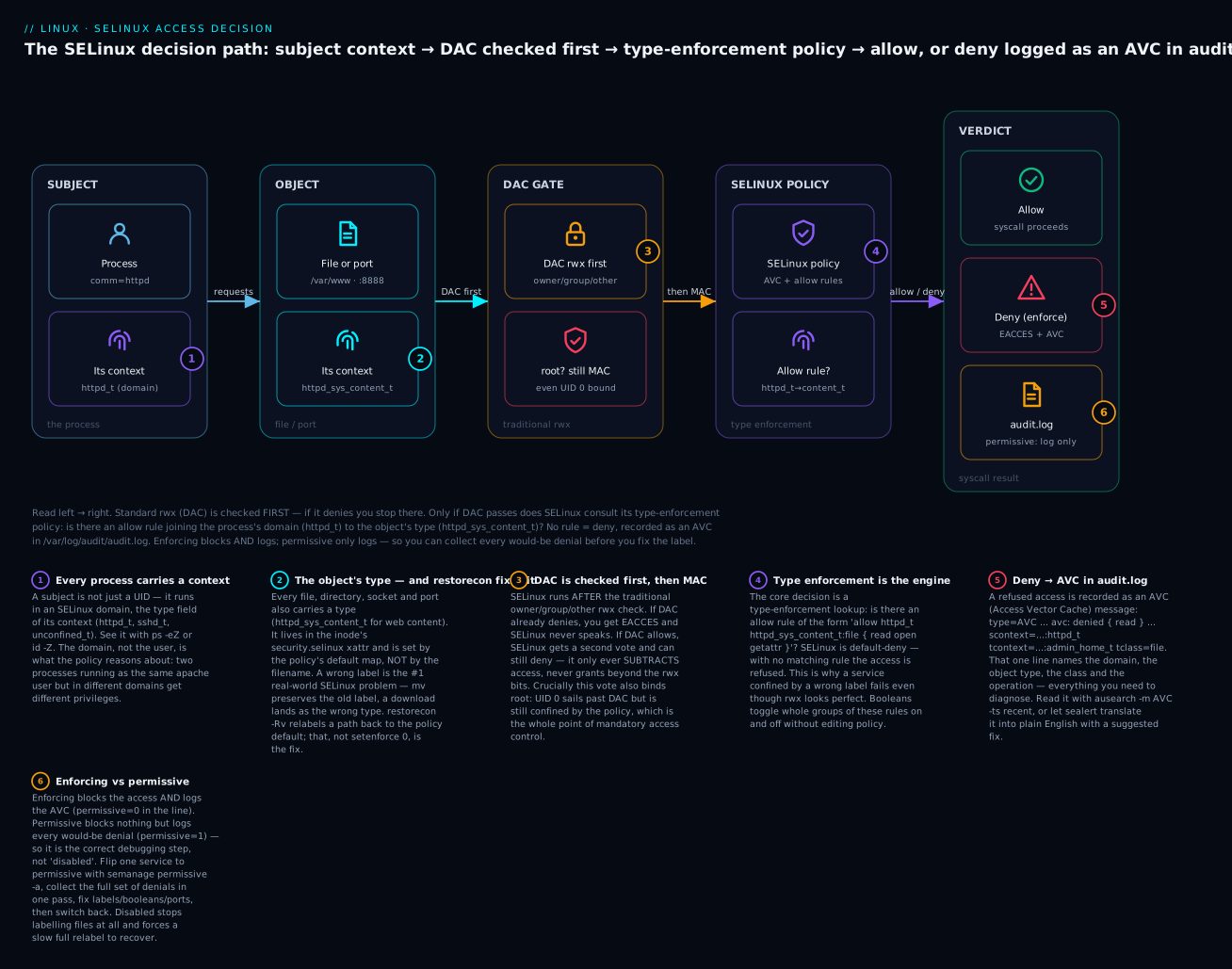
Walk it left to right: the subject (a process in domain httpd_t) requests access to an object (a file typed httpd_sys_content_t, or a port). The kernel checks DAC first; only if rwx passes does it consult the SELinux type-enforcement policy. A matching allow rule yields allow; no rule yields deny, returned to the program as EACCES and written as an AVC to /var/log/audit/audit.log. In enforcing mode the deny is real; in permissive mode the same line is logged but the access is let through — which is exactly why permissive, not disabled, is the correct place to debug.
SELinux modes: enforcing, permissive, disabled (and why never “disabled”)
SELinux runs in one of three modes. Knowing them cold is what separates fixing a denial from nuking the whole subsystem.
| Mode | Denials blocked? | Denials logged? | Labels maintained? | Use it for |
|---|---|---|---|---|
| Enforcing | Yes | Yes | Yes | Production. The only correct steady state. |
| Permissive | No | Yes | Yes | Debugging. Collect every would-be denial without breaking the app. |
| Disabled | No | No | No | Almost never. Turns SELinux off entirely and stops labelling files. |
Check the current mode:
getenforce            # one word: Enforcing, Permissive, or Disabled
sestatus              # the full picture
# sestatus output on a healthy box:
SELinux status:                 enabled
SELinuxfs mount:                /sys/fs/selinux
SELinux root directory:         /etc/selinux
Loaded policy name:             targeted
Current mode:                   enforcing
Mode from config file:          enforcing
Policy MLS status:              enabled
Policy deny_unknown status:     allowed
Max kernel policy version:      33
Switch mode at runtime with setenforce — but note this is temporary, it does not survive a reboot:
setenforce 0          # -> Permissive (also accepts: setenforce Permissive)
setenforce 1          # -> Enforcing  (also accepts: setenforce Enforcing)
setenforce can only toggle between enforcing and permissive. It cannot reach disabled — that is a boot-time decision only. The persistent mode lives in /etc/selinux/config:
# /etc/selinux/config  — read at boot, survives reboots
SELINUX=enforcing         # enforcing | permissive | disabled
SELINUXTYPE=targeted      # targeted (default) | minimum | mls
Now the single most important judgement in this whole lesson. When something is being denied and you need to debug, the right move is permissive, never disabled. The difference is subtle and decisive:
- Permissive keeps SELinux fully active: it still labels every new file correctly, and it logs every denial that would have happened — so in one pass you see the complete set of things the app needs, not just the first thing that broke. You fix the labels/booleans/ports, flip back to enforcing, done. Nothing drifts.
- Disabled turns the whole machine off from SELinux’s point of view. It stops maintaining labels entirely. Every file created while disabled gets no meaningful context. When you later try to re-enable it, the on-disk labels no longer match reality, so the system must perform a full filesystem relabel at the next boot — walking every inode on every filesystem, which on a large server can take a very long time and requires a reboot. You have turned a two-minute fix into a maintenance window.
⚠️ On RHEL 9 and later, Red Hat additionally recommends that if you must fully disable SELinux you do it with the selinux=0 kernel command-line argument rather than the config file. But the real advice is the one this whole section is built around: do not disable it. Use permissive to debug, then return to enforcing. If you only ever remember one sentence from this lesson, remember that one.
You do not even need whole-system permissive. You can put a single domain into permissive while the rest of the system stays enforcing — the surgical debugging tool:
semanage permissive -a httpd_t     # only httpd_t is permissive; everything else still enforces
semanage permissive -d httpd_t     # remove it again when you're done
semanage permissive -l             # list domains currently marked permissive
Where SELinux keeps its state, for when you need to find something:
| Path | Holds |
|---|---|
/etc/selinux/config |
Boot-time mode + policy type |
/sys/fs/selinux/ |
The live kernel interface (enforce, policy, booleans) |
/var/log/audit/audit.log |
AVC denial records (when auditd runs) |
/etc/selinux/targeted/ |
The active policy, contexts and file-context database |
/etc/selinux/targeted/contexts/files/file_contexts |
The default label for every path (the map restorecon uses) |
Contexts and labels: chcon, semanage fcontext, restorecon
Because every decision is a label lookup, managing labels correctly is 80% of operating SELinux. First, learn to see them. Almost every core tool takes a -Z flag to show the SELinux context:
ls -Z /var/www/html            # file contexts
ps -eZ | grep httpd            # process contexts (domains)
id -Z                          # your own shell's context
netstat -Z    # or: ss -Z     # socket contexts
# ls -Z /var/www/html
unconfined_u:object_r:httpd_sys_content_t:s0 index.html

# ps -eZ | grep httpd
system_u:system_r:httpd_t:s0    1234 ?  00:00:00 httpd

# id -Z
unconfined_u:unconfined_r:unconfined_t:s0-s0:c0.c1023
Now, changing labels. There are two ways, and choosing the wrong one is itself a classic mistake, so this table is the crux of the section:
| Tool | What it changes | Persistence | Use it for |
|---|---|---|---|
chcon |
The label on disk, right now | Temporary — a relabel reverts it | Quick tests only |
semanage fcontext |
The default-label rule in the policy DB | Permanent | The real, durable fix |
restorecon |
Re-applies the policy default to files on disk | Applies the permanent rule | After semanage fcontext, or to repair drift |
The trap: chcon looks like it fixed the problem — the label changes, the service works — but it wrote a label that the policy does not consider correct for that path. The moment anything triggers a relabel (a restorecon, a package update that touches the path, a .autorelabel reboot), your chcon label is reverted to the policy default and the breakage returns, now weeks later and thoroughly mysterious. chcon is for testing a hypothesis; it is never the durable fix.
The correct, permanent pattern is two commands — teach the policy the default, then apply it:
# 1. Register the default context for a custom web root (a regex path).
#    (/.*)? means "this directory and everything under it."
semanage fcontext -a -t httpd_sys_content_t "/srv/web(/.*)?"

# 2. Apply that rule to the files that already exist on disk.
restorecon -Rv /srv/web
# restorecon -Rv output tells you exactly what it fixed:
Relabeled /srv/web from unconfined_u:object_r:default_t:s0 to unconfined_u:object_r:httpd_sys_content_t:s0
Relabeled /srv/web/index.html from unconfined_u:object_r:default_t:s0 to unconfined_u:object_r:httpd_sys_content_t:s0
Because the rule now lives in the policy database, any future relabel re-derives the correct context. That is the whole difference: chcon writes a value, semanage fcontext writes a rule. Useful restorecon flags:
| Flag | Effect |
|---|---|
-R |
Recurse into subdirectories |
-v |
Verbose — print every file it relabels |
-n |
Dry run — show what would change, change nothing (run this first!) |
-F |
Force — also reset the user and role fields, not just the type |
To see what a path’s context should be according to policy, without changing anything, ask directly:
matchpathcon /srv/web/index.html    # prints the policy's expected context for that path
semanage fcontext -l | grep '/srv'  # list default-context rules matching /srv
The service types you will most often assign:
| Type | For |
|---|---|
httpd_sys_content_t |
Web files Apache/Nginx read |
httpd_sys_rw_content_t |
Web dirs the server must write (uploads, cache) |
httpd_sys_script_exec_t |
CGI / executable scripts |
samba_share_t |
Files shared over Samba |
public_content_t |
Read-only content shared by several services (FTP, web, Samba) |
container_file_t |
Files a container may access (bind mounts) |
default_t |
The catch-all for unlabelled paths — usually a symptom of a missing rule |
The #1 real-world issue: relabeling and the mv trap
If you take one operational habit from this lesson, take this: mv preserves a file’s SELinux label; cp gives it the destination’s default. This single fact is behind an enormous share of real SELinux tickets. Watch it happen:
# You write index.html in your home directory, then move it into the web root.
echo "hello" > ~/index.html
ls -Z ~/index.html
# -> unconfined_u:object_r:user_home_t:s0   ~/index.html   (a HOME label!)

sudo mv ~/index.html /var/www/html/
ls -Z /var/www/html/index.html
# -> unconfined_u:object_r:user_home_t:s0   index.html      (mv KEPT the home label!)
The file is now sitting in the web root wearing a user_home_t label. Apache (httpd_t) has no rule to read user_home_t, so it returns 403 and logs an AVC — while ls -l shows a perfectly innocent -rw-r--r--. Had you used cp (or cp --preserve deliberately not), the new file would have inherited httpd_sys_content_t from the directory’s default and worked. The fix is always the same and never involves disabling anything:
sudo restorecon -Rv /var/www/html/ # snap every file back to its policy default
Sometimes labelling across an entire filesystem is suspect — after restoring from a backup that didn’t preserve xattrs, after re-enabling SELinux from disabled, or after a botched migration. For that there is the full relabel:
| Trigger | Command | Scope |
|---|---|---|
| One path drifted | restorecon -Rv /path |
That subtree |
| Whole system suspect | touch /.autorelabel && reboot |
Every filesystem, at next boot |
| Same, without the touch-file | fixfiles -F onboot && reboot |
Every filesystem, at next boot |
| Relabel now, no reboot | fixfiles -F relabel |
Online (careful on busy systems) |
⚠️ touch /.autorelabel && reboot forces SELinux to walk and re-label every inode on every mounted filesystem during the next boot. It is safe for your data but can add many minutes to boot on a large server, during which the machine is unavailable. Schedule it; don’t fire it blindly on a production host at peak.
Booleans and ports: tuning policy without writing policy
A huge fraction of “SELinux is blocking my app” cases are intended behaviours the policy ships with a switch for — you just have to flip it. These switches are booleans and port labels, and reaching for them (instead of a custom policy module) is the mark of someone who actually understands SELinux.
Booleans
A boolean toggles an entire group of allow rules on or off at runtime, no recompilation needed. The policy authors anticipated common variations — “should the web server be allowed to make outbound network connections?” — and gated them behind a named switch.
getsebool -a                              # list every boolean and its state
getsebool httpd_can_network_connect       # query just one
setsebool httpd_can_network_connect on    # runtime only — LOST on reboot
setsebool -P httpd_can_network_connect on # -P = persistent, the one you almost always want
semanage boolean -l                       # list with description + default vs current
The -P flag is the whole game with booleans. Without it, your change works until the next reboot and then silently vanishes — a maddening “it broke again and I didn’t touch anything” bug. Always use -P for a real fix. Booleans you will meet often:
| Boolean | Turning it on allows | Classic symptom it fixes |
|---|---|---|
httpd_can_network_connect |
Apache to make any outbound TCP connection | PHP app can’t reach a remote API / reverse proxy 502s |
httpd_can_network_connect_db |
Apache to connect to database ports | App can’t reach a remote MySQL/PostgreSQL |
httpd_can_sendmail |
Apache to send mail | Contact form silently fails |
httpd_enable_homedirs + httpd_read_user_content |
Serving files from users’ ~/public_html |
~user pages 403 |
httpd_use_nfs |
Apache to serve content from NFS mounts | Web root on NFS is unreadable |
ftpd_full_access |
vsftpd full read/write to the filesystem | FTP uploads denied |
samba_enable_home_dirs |
Samba to share home directories | [homes] share denied |
nis_enabled |
Services to talk to a broad set of network ports | Legacy auth/network daemons blocked |
# See only what you've changed from the shipped defaults — great for audits/handover:
semanage boolean -l -C
Ports
SELinux labels network ports too, and a domain may only bind ports of a type its policy allows. Apache (httpd_t) may bind ports typed http_port_t; try to make it listen on an unlabelled port and the bind() is denied — the service fails to start with “permission denied” even though nothing is using the port and the config is perfect.
semanage port -l                          # list all port labels
semanage port -l | grep http_port_t       # what ports is Apache allowed to bind?
# http_port_t   tcp   80, 81, 443, 488, 8008, 8009, 8443, 9000
To let Apache listen on a genuinely non-standard port, say 8888, add that port to the right type:
semanage port -a -t http_port_t -p tcp 8888 # -a = add a new port label
| Task | Command |
|---|---|
| List ports for a type | semanage port -l | grep http_port_t |
| Add a new port to a type | semanage port -a -t http_port_t -p tcp 8888 |
| Modify a port already labelled something else | semanage port -m -t http_port_t -p tcp 8888 |
| Delete a local port rule | semanage port -d -t http_port_t -p tcp 8888 |
| Find which type owns a port | semanage port -l | grep 8888 |
Note the -a vs -m distinction: -a adds a brand-new port label and fails if the port is already defined under another type; in that case use -m to move it. And remember this is only the SELinux half — the port must also be open in the firewall, which is a separate layer covered in Firewalls: firewalld, nftables & iptables. A service on a custom port typically needs both a semanage port rule and a firewall rule.
Troubleshooting denials the right way
This is the section that replaces setenforce 0 forever. When SELinux denies something, it leaves a detailed record. Learn to read it and the fix is usually obvious.
Denials are logged as AVC (Access Vector Cache) messages in /var/log/audit/audit.log when auditd is running. Here is a raw one, which looks like line noise until you know the fields:
type=AVC msg=audit(1719580800.123:456): avc:  denied  { read } for
  pid=1234 comm="httpd" name="index.html" dev="sda1" ino=98765
  scontext=system_u:system_r:httpd_t:s0
  tcontext=unconfined_u:object_r:user_home_t:s0
  tclass=file permissive=0
Decode it and the diagnosis writes itself:
| Field | Value here | Meaning |
|---|---|---|
denied { read } |
read |
The operation that was blocked |
comm |
httpd |
The process name |
scontext |
...:httpd_t:s0 |
Source (subject) context — the domain |
tcontext |
...:user_home_t:s0 |
Target (object) context — here’s the smoking gun: a home label on a web file |
tclass |
file |
The object class (file, dir, tcp_socket, …) |
permissive |
0 |
0 = enforcing (blocked); 1 = permissive (allowed but logged) |
That one line says: the httpd domain was denied read on a file labelled user_home_t. You do not need to guess — the target type is wrong, and the fix is restorecon. Now the toolchain to find and interpret these:
| Tool | What it does | Package (RHEL) |
|---|---|---|
ausearch -m AVC -ts recent |
Pull AVC records from the audit log (last 10 min) | audit |
ausearch -m AVC -ts today -i |
Same, -i interprets numbers into names |
audit |
aureport -a |
Summary report of all AVC events | audit |
sealert -a /var/log/audit/audit.log |
Plain-English analysis + suggested fix commands | setroubleshoot-server |
audit2why |
Explains why a denial happened (e.g. “a boolean is off”) | policycoreutils-python-utils |
audit2allow |
Generates a policy module that would allow the denial | policycoreutils-python-utils |
semodule -i mod.pp |
Install a compiled policy module | policycoreutils |
journalctl -t setroubleshoot |
The friendly “SELinux is preventing…” alerts | setroubleshoot-server |
The friendliest starting point is sealert, from the setroubleshoot-server package. Its daemon watches the audit log and writes human-readable summaries — you will see them in the journal or /var/log/messages as “SELinux is preventing httpd from read access… For complete SELinux messages run: sealert -l <uuid>.” Run the suggested command and it hands you an analysis with the actual commands to fix it, ranked by likelihood. It is genuinely good; use it.
To see why without generating anything, pipe the denials through audit2why:
ausearch -m AVC -ts recent | audit2why
# ...
#   Was caused by:
#   The boolean httpd_can_network_connect was set incorrectly.
#   Allow httpd to can network connect
#   Then execute:
#   setsebool -P httpd_can_network_connect 1
That output is the dream case: audit2why recognises the denial as a known boolean and tells you the exact setsebool -P to run. You are done, and you fixed it correctly.
audit2allow — powerful, and a trap for the unwary
When no boolean or label fits — a legitimate application does something genuinely novel — you can generate a custom policy module with audit2allow. It reads AVC denials and emits allow rules that would permit exactly what was denied:
ausearch -m AVC -ts recent | audit2allow -M myapp_policy
# generates myapp_policy.te (readable rules) and myapp_policy.pp (compiled module)
semodule -i myapp_policy.pp        # install it
⚠️ Understand the denial before you generate a module. audit2allow is dangerous precisely because it always works — it will happily write a rule to permit whatever was blocked, including:
- A denial caused by a wrong label that
restoreconshould fix.audit2allowwould instead teach the policy to allowhttpd_tto readuser_home_teverywhere, permanently widening your policy to paper over a one-file mislabel. - A denial caused by a misconfiguration — a service pointed at the wrong path — where the real fix is the config, not the policy.
- A denial that is the attack. If a compromised service is trying to do something it never should, the AVC denial is SELinux doing its job. Blindly running
audit2allowhere writes the attacker a permission slip.
So the discipline is: always read the .te file audit2allow produces before installing it, and only reach for a custom module after you have ruled out a mislabel (restorecon), a boolean, and a port rule. A custom .pp module is a legitimate last resort for genuine, novel application behaviour — but it is the last resort, not the first tool. Manage installed modules with semodule -l (list) and semodule -r myapp_policy (remove).
Here is the correct diagnostic ladder as a table — pin it above your desk:
| Denial symptom | Diagnose with | Correct fix (in order of preference) |
|---|---|---|
| Service can’t read a file it owns | ausearch -m AVC -ts recent, check tcontext |
restorecon -Rv /path (wrong label) — not audit2allow |
| Service can’t write where it should | AVC shows write denied on a read-only type |
semanage fcontext to *_rw_content_t + restorecon |
| Service can’t reach network / DB | audit2why names a boolean |
setsebool -P <boolean> on |
| Service can’t bind a custom port | AVC name_bind on a tcp_socket |
semanage port -a -t <type> -p tcp <port> |
| Denials keep appearing after you “fixed” it | You used chcon, then a relabel reverted it |
Use semanage fcontext + restorecon, never chcon |
| App does something genuinely novel | Read the AVC, confirm it’s legit, audit2allow -M |
Review .te, then semodule -i — last resort |
| You can’t tell what’s being denied | Nothing in audit.log? |
It may be a DAC failure, not SELinux — check rwx |
That last row matters: if there is no AVC for your “permission denied,” SELinux is not your problem — you are looking at a plain DAC (owner/group/mode) failure, and no amount of SELinux tinkering will help.
AppArmor: the path-based alternative (Ubuntu/SUSE)
Switch distros and the MAC system switches with it. Ubuntu, Debian and SUSE ship AppArmor instead of SELinux. It solves the same problem — confine each program to only what it should do — but with a fundamentally different model that many find far easier to read and write.
The core contrast: SELinux is label-based, AppArmor is path-based. SELinux attaches a type to every inode and reasons about types; AppArmor writes rules about filesystem paths directly. An AppArmor profile is close to plain English:
# /etc/apparmor.d/usr.sbin.mysqld  (excerpt)
#include <tunables/global>

/usr/sbin/mysqld {
  #include <abstractions/base>

  capability sys_resource,
  capability dac_override,

  /etc/mysql/**            r,        # may READ config
  /var/lib/mysql/          r,        # may READ the data dir
  /var/lib/mysql/**        rwk,      # read, write, lock the data files
  /var/log/mysql/**        rw,       # read/write its logs
  network tcp,                       # may use TCP
}
You can see the whole confinement at a glance: which paths, which access, which capabilities. That readability is AppArmor’s headline advantage. The trade-off is that because rules key on pathnames, the same inode reached through a different path (a hard link, a bind mount, a symlink) can fall under different rules — a subtlety SELinux’s inode labels sidestep, and one reason SELinux is considered stronger for high-assurance work. Profiles live in /etc/apparmor.d/, named after the binary with slashes turned into dots (/usr/sbin/mysqld → usr.sbin.mysqld), and reuse shared chunks from abstractions/. The layout you’ll navigate:
| Path | Holds |
|---|---|
/etc/apparmor.d/ |
The profiles, one per confined binary (usr.sbin.mysqld) |
/etc/apparmor.d/abstractions/ |
Reusable rule chunks pulled in via #include <abstractions/base> |
/etc/apparmor.d/tunables/ |
Variables used in profiles (@{HOME}, @{PROC}) |
/etc/apparmor.d/disable/ |
Symlinks marking profiles to skip at load time |
/var/log/audit/audit.log (or /var/log/syslog) |
apparmor="DENIED" records |
AppArmor has the exact same enforce vs complain duality that SELinux has as enforcing vs permissive — but per-profile, not per-system:
sudo aa-status                 # (aka apparmor_status) what's loaded, enforce vs complain, confined PIDs
sudo aa-complain /usr/sbin/mysqld   # put ONE profile into complain (learning) mode — logs, doesn't block
sudo aa-enforce /usr/sbin/mysqld    # put it back into enforce mode
sudo aa-disable /usr/sbin/mysqld    # unload + disable a profile entirely
Complain mode is AppArmor’s equivalent of “permissive for a single service”: the profile logs every violation but blocks nothing, so you can exercise the app and collect what it really needs. Then you feed those logs back into the profile — interactively — with the learning tools:
sudo aa-genprof /usr/sbin/myapp    # generate a NEW profile: run the app, AppArmor watches, you approve rules
sudo aa-logprof                    # scan logs for complain-mode events, update EXISTING profiles interactively
sudo apparmor_parser -r /etc/apparmor.d/usr.sbin.mysqld   # reload a profile after editing by hand
aa-genprof and aa-logprof (from the apparmor-utils package) walk you through each access the program attempted and let you Allow, Deny or Glob it, then write the profile for you — a genuinely pleasant workflow with no audit2allow footguns. The access modes inside a profile:
| Mode | Grants |
|---|---|
r |
Read |
w |
Write |
a |
Append only |
k |
File locking |
l |
Link |
m |
Memory-map as executable (mmap PROT_EXEC) |
ix |
Execute, inheriting this profile |
px / Px |
Execute under the target’s own profile (discrete; P scrubs env) |
cx / Cx |
Execute under a child profile defined inline |
ux / Ux |
Execute unconfined — ⚠️ escapes confinement; avoid |
AppArmor logs denials to the same audit stream, tagged differently — you will see apparmor="DENIED" instead of avc: denied:
type=AVC ... apparmor="DENIED" operation="open" profile="/usr/sbin/mysqld"
  name="/etc/shadow" pid=999 comm="mysqld" requested_mask="r" denied_mask="r"
Read it the same way: profile X was denied r on path Y. The fix is to add the path to the profile (by hand or via aa-logprof) and reload — the direct analogue of fixing a label under SELinux. Reach the whole subsystem’s audit trail the same way you reach any logs, via journald and /var/log/audit/ — see Logging: journald, rsyslog & logrotate.
SELinux vs AppArmor, side by side
| Dimension | SELinux | AppArmor |
|---|---|---|
| Model | Label-based — type on every inode | Path-based — rules on pathnames |
| Default on | RHEL, Rocky, Alma, Fedora, Oracle, CentOS Stream | Ubuntu, Debian, SUSE/openSUSE |
| Granularity | Very fine (types, MLS/MCS, RBAC) | Coarser, per-program paths |
| Learning curve | Steep — contexts, types, policy | Gentle — profiles read like English |
| Objects with no path (sockets, IPC) | Fully labelled and controlled | Harder to express |
| Move/rename behaviour | Label travels with the inode | Rule follows the path, not the file |
| Debug “don’t block, just log” | Permissive (or per-domain permissive) | Complain mode (per-profile) |
| Denial log tag | avc: denied in audit.log |
apparmor="DENIED" in audit.log |
| Tune without new policy | Booleans + port labels | Edit the profile |
| Generate rules from logs | audit2allow (⚠️ review first) |
aa-logprof / aa-genprof (interactive) |
| Relationship | Two “major” LSMs — you run one or the other, chosen by the distro at boot | same |
Which one you deal with is decided by your distro, not by you — they are mutually exclusive major Linux Security Modules, and the distro picks one at boot. Here is who ships which, so you know what you’re walking into on an unfamiliar box:
| Distro family | MAC system | Default state | Toolkit package |
|---|---|---|---|
| RHEL, Rocky, AlmaLinux, CentOS Stream, Oracle Linux | SELinux | Enforcing, targeted policy |
policycoreutils-python-utils |
| Fedora | SELinux | Enforcing, targeted policy |
policycoreutils-python-utils |
| Ubuntu | AppArmor | Enabled, most shipped profiles enforcing | apparmor-utils |
| Debian (10+) | AppArmor | Enabled by default | apparmor-utils |
| openSUSE, SLES | AppArmor | Enabled | apparmor-utils, yast2-apparmor |
Know both models, because a mixed fleet will hand you both.
Hands-on lab
This lab is self-contained. Part A runs on any RHEL-family box (RHEL, Rocky, AlmaLinux, Fedora, CentOS Stream — a VM, cloud instance or container with systemd). Part B runs on Ubuntu/Debian. You need sudo. Nothing here is destructive, but do it on a throwaway VM, not production.
Part A — SELinux: break it, read it, fix it properly (RHEL family)
Step 1 — Confirm you’re enforcing.
getenforce
# Expect: Enforcing
sudo dnf install -y httpd policycoreutils-python-utils setroubleshoot-server
What just happened: you confirmed SELinux is active and installed Apache plus the semanage/audit2allow and sealert tooling.
Step 2 — Create a custom web root and hit the label denial.
sudo mkdir -p /srv/web
echo "<h1>Hello from SELinux lab</h1>" | sudo tee /srv/web/index.html
sudo sed -i 's#^DocumentRoot.*#DocumentRoot "/srv/web"#' /etc/httpd/conf/httpd.conf
sudo systemctl enable --now httpd
curl -s localhost/ | head -1
# Expect: 403 Forbidden — NOT your heading
What just happened: the files exist and are 0644, but they were created under /srv and carry a default_t/var_t-ish label, not httpd_sys_content_t. DAC is fine; SELinux blocks the read.
Step 3 — Prove it’s SELinux by reading the AVC.
sudo ausearch -m AVC -ts recent -i | tail
# Look for: avc: denied { read/getattr } ... comm="httpd" ... tcontext=...:default_t ...
sudo sealert -a /var/log/audit/audit.log | sed -n '1,25p'
# sealert prints a plain-English analysis and a suggested restorecon/semanage fix
What just happened: the AVC names httpd_t denied on a default_t file — the smoking gun is the target type. sealert translates it and suggests the fix.
Step 4 — Fix it the correct, permanent way.
# Register the default context for the new web root, then apply it:
sudo semanage fcontext -a -t httpd_sys_content_t "/srv/web(/.*)?"
sudo restorecon -Rv /srv/web
ls -Z /srv/web/index.html
# Expect: ...:httpd_sys_content_t:s0
curl -s localhost/ | head -1
# Expect: <h1>Hello from SELinux lab</h1>   — fixed, still in enforcing mode!
What just happened: you taught the policy the right default and relabelled — without ever leaving enforcing mode. This is the whole lesson in four lines.
Step 5 — The port denial, and its fix.
sudo sed -i 's/^Listen 80$/Listen 8888/' /etc/httpd/conf/httpd.conf
sudo systemctl restart httpd
# Expect: FAILS to start
sudo ausearch -m AVC -ts recent -i | grep name_bind | tail -1
# avc: denied { name_bind } ... tcontext=...:http_port_t? no — port 8888 is unlabelled
sudo semanage port -a -t http_port_t -p tcp 8888
sudo systemctl restart httpd
sudo ss -tlnpZ | grep 8888        # now listening, with an http_port_t socket context
What just happened: SELinux would not let httpd_t bind an unlabelled port; semanage port added 8888 to http_port_t and the service starts. (In real life you would also open 8888 in the firewall.)
Step 6 — The right way to collect all denials: per-service permissive.
sudo semanage permissive -a httpd_t   # httpd is now permissive; the rest of the box still enforces
# ... exercise the app fully; every would-be denial is logged but nothing blocks ...
sudo ausearch -m AVC -ts recent -i | grep httpd_t   # the COMPLETE list, in one pass
sudo semanage permissive -d httpd_t   # back to enforcing for httpd
What just happened: instead of a blunt setenforce 0, you relaxed exactly one domain, gathered the full set of denials at once, and restored enforcement. This is how professionals debug SELinux.
Cleanup:
sudo systemctl disable --now httpd
sudo semanage fcontext -d "/srv/web(/.*)?"
sudo semanage port -d -t http_port_t -p tcp 8888
sudo rm -rf /srv/web
Part B — AppArmor: complain, learn, enforce (Ubuntu/Debian)
# Step 1 — See what's confined.
sudo apt install -y apparmor-utils
sudo aa-status
# Note the counts: profiles in enforce mode vs complain mode, processes confined.

# Step 2 — Put one profile into complain (learning) mode.
sudo aa-complain /usr/sbin/tcpdump   # or any profiled binary from aa-status
sudo aa-status | grep -A2 complain   # confirm it moved to complain

# Step 3 — Exercise the program so it generates access events, then learn from them.
sudo timeout 3 tcpdump -c 5 -w /tmp/lab.pcap 2>/dev/null || true
sudo aa-logprof                      # interactively review each access: Allow / Deny / Glob

# Step 4 — Return it to enforce and verify.
sudo aa-enforce /usr/sbin/tcpdump
sudo aa-status | grep tcpdump
What just happened: you flipped a single profile to complain mode (AppArmor’s “permissive for one program”), watched the app’s real accesses, used aa-logprof to fold them into the profile interactively — no hand-editing, no audit2allow footgun — then re-enforced. That round trip, complain → exercise → logprof → enforce, is the entire AppArmor operational loop.
Common mistakes and troubleshooting
| Symptom | Likely cause | Fix |
|---|---|---|
Service can’t read a file that’s 0644 and owned correctly |
Wrong SELinux label (often after mv or a download) |
restorecon -Rv /path; make it durable with semanage fcontext |
You setsebool X on, reboot, it’s broken again |
Forgot -P — the change was runtime-only |
setsebool -P X on |
You chcon’d the fix, it worked, weeks later it broke |
A relabel reverted your chcon to the policy default |
Use semanage fcontext -a ... + restorecon, never chcon for durable fixes |
| Service won’t start on a custom port, “permission denied” | Port not labelled for that domain | semanage port -a -t <type> -p tcp <port> |
| App can’t reach a remote DB/API | A network boolean is off | audit2why names it → setsebool -P <bool> on |
“Permission denied” but nothing in audit.log |
It’s a DAC failure, not SELinux | Fix owner/group/mode; SELinux is innocent |
| Re-enabling SELinux from disabled hangs the boot for ages | Full relabel of every inode is running | Expected — let it finish; avoid disabled in future, use permissive |
audit2allow module “fixed” it but widened the policy dangerously |
You allowed a mislabel/attack instead of fixing the real cause | Remove the module (semodule -r), restorecon or boolean instead |
Three gotchas deserve extra emphasis, because they burn people repeatedly:
1. The chcon mirage. chcon changing a label and “fixing” the problem is the most seductive trap in SELinux, because it works — right up until the next relabel silently reverts it and the breakage returns detached from any change you remember making. Train yourself: chcon is for testing an idea in ten seconds; the moment the idea is confirmed, throw away the chcon and encode the real fix with semanage fcontext + restorecon. If a colleague’s SELinux fix “randomly stopped working,” look for a chcon in their history first.
2. setenforce 0 is not a fix, it’s a confession. It proves the problem is SELinux (useful signal) but resolves nothing, disables protection on the whole system, and — worst of all — trains you to stop reading the denial that was about to tell you exactly what was wrong. If you must confirm SELinux is the culprit, prefer per-domain permissive (semanage permissive -a <domain>), which narrows the blast radius to one service and keeps the rest of the box protected while you read the AVCs.
3. mv versus cp into a service directory. Because mv preserves the source label and cp inherits the destination’s default, how a file arrived in /var/www, /etc/pki, a Samba share or a container bind-mount determines whether it works. Files that arrived by mv, rsync -X, tar extraction, or a download almost always need a restorecon afterwards. Make restorecon -Rv <dir> a reflex after any bulk file operation into a service directory.
Cheat-sheet
| Command | Does |
|---|---|
getenforce / sestatus |
Show current mode / full status |
setenforce 0 / setenforce 1 |
Permissive / Enforcing (runtime, not persistent) |
/etc/selinux/config |
Persistent mode (SELINUX=) + policy (SELINUXTYPE=) |
ls -Z / ps -eZ / id -Z |
Show contexts of files / processes / your shell |
chcon -t TYPE path |
Change a label temporarily (testing only) |
semanage fcontext -a -t TYPE "PATH(/.*)?" |
Register the permanent default label for a path |
restorecon -Rv path |
Apply policy default labels to files (-n = dry run) |
matchpathcon path |
Show the context a path should have |
touch /.autorelabel && reboot |
Force a full-filesystem relabel at next boot |
getsebool -a / getsebool NAME |
List / query booleans |
setsebool -P NAME on |
Set a boolean persistently (drop -P = runtime only) |
semanage boolean -l / -l -C |
List booleans (all / only changed) |
semanage port -a -t TYPE -p tcp N |
Let a domain bind port N (-m to move, -d to remove) |
semanage permissive -a DOMAIN |
Make one domain permissive; -d reverts; -l lists |
ausearch -m AVC -ts recent -i |
Read recent AVC denials, interpreted |
sealert -a /var/log/audit/audit.log |
Plain-English denial analysis + suggested fix |
audit2why |
Explain why a denial happened |
audit2allow -M name |
Generate a policy module (⚠️ review the .te first) |
semodule -l / -i mod.pp / -r name |
List / install / remove policy modules |
aa-status |
AppArmor: loaded profiles, enforce vs complain |
aa-complain PROG / aa-enforce PROG |
AppArmor: complain (learn) / enforce a profile |
aa-logprof / aa-genprof PROG |
AppArmor: update / generate a profile from logs |
apparmor_parser -r PROFILE |
AppArmor: reload a profile after editing |
Interview and exam questions
Q: In one sentence, what is the difference between DAC and MAC?
A: DAC lets the owner of a resource decide access at their discretion (the rwx bits), and root bypasses it; MAC enforces an administrator-defined, system-wide policy that even root cannot override, checked after DAC.
Q: A file is -rw-r--r--, owned by the right user, and cat reads it fine, but the web server gets 403. What’s happening and how do you confirm it?
A: DAC is satisfied but SELinux is denying on a wrong label. Confirm with ausearch -m AVC -ts recent — an AVC naming httpd_t denied on the file’s tcontext proves it’s SELinux (a pure DAC failure leaves no AVC).
Q: Why is permissive the correct debugging mode and disabled the wrong one?
A: Permissive keeps SELinux active — it still labels new files and logs every would-be denial in one pass, so you fix and return to enforcing cleanly. Disabled stops labelling entirely, so re-enabling later forces a slow full-filesystem relabel at boot.
Q: What’s the difference between chcon and semanage fcontext + restorecon?
A: chcon changes a label on disk temporarily; the next relabel reverts it to the policy default. semanage fcontext records the default rule in the policy database, and restorecon applies it — so the fix survives relabels. Always use the latter for durable changes.
Q: You set setsebool httpd_can_network_connect on, it works, but after a reboot the app fails again. Why?
A: You omitted -P. Without -P the boolean change is runtime-only and is lost on reboot. Use setsebool -P httpd_can_network_connect on.
Q: Apache won’t start on port 8888 with “permission denied,” but nothing is using the port. Why, and what fixes it?
A: SELinux only lets httpd_t bind ports typed http_port_t; 8888 is unlabelled, so bind() is denied (name_bind AVC). Fix with semanage port -a -t http_port_t -p tcp 8888 (and open it in the firewall).
Q: What does audit2allow do, and why is it dangerous?
A: It reads AVC denials and generates a policy module allowing exactly what was denied. It’s dangerous because it always works — it will paper over a mislabel (better fixed with restorecon), a misconfiguration, or even an active attack. Always understand the denial and review the generated .te before installing.
Q: You copied files into /var/www/html with mv and the site 403s. Why does cp behave differently, and what’s the fix?
A: mv preserves the source label (e.g. user_home_t), which Apache can’t read; cp inherits the destination directory’s default (httpd_sys_content_t). Fix with restorecon -Rv /var/www/html.
Q: How is AppArmor’s model fundamentally different from SELinux’s? A: AppArmor is path-based — profiles list filesystem paths and access modes — while SELinux is label-based, attaching a type to every inode. AppArmor profiles are easier to read; SELinux handles renames and path-less objects (sockets) more robustly.
Q: (RHCSA-style) Configure a directory /webdata so Apache can serve its contents, and make the labeling survive a relabel. Show the commands.
A: semanage fcontext -a -t httpd_sys_content_t "/webdata(/.*)?" then restorecon -Rv /webdata. Verify with ls -Z /webdata.
Q: (RHCSA-style) A service must be debugged without disabling protection on the rest of the system. What do you do?
A: Put just that service’s domain into permissive: semanage permissive -a <domain>, reproduce the issue, read all AVCs with ausearch -m AVC -ts recent -i, fix, then semanage permissive -d <domain>.
Q: (Ubuntu) How do you let AppArmor “learn” what a program needs without blocking it, then lock it back down?
A: aa-complain /path/to/prog (complain mode logs but doesn’t block), exercise the program, aa-logprof to fold the logged accesses into the profile interactively, then aa-enforce /path/to/prog.
Key takeaways
- MAC is a second gate, checked after DAC. Both must allow; MAC only ever subtracts access and constrains even root. That confinement is why you keep it on, not why you turn it off.
- The same “Permission denied” has two very different causes. A DAC failure has no AVC; a MAC failure logs one. Check
ausearch -m AVCbefore touching anything — it tells you which layer said no. - On SELinux, the type field is almost everything. Most problems are a wrong file type or an unlabelled port, and most fixes are
restorecon, a boolean, orsemanage port— not a custom policy. chconis temporary;semanage fcontext+restoreconis permanent. If a fix “randomly stops working,” someone usedchconand a relabel reverted it.- Use
-Pon booleans andpermissive(notdisabled) to debug. Per-domain permissive (semanage permissive -a) narrows debugging to one service while the rest of the box stays protected. audit2allowis a last resort, not a first tool. It will happily allow a mislabel or an attack. Understand the denial, rule out label/boolean/port, and review the.tebefore installing a module.- AppArmor is the path-based cousin. Same idea, gentler syntax: profiles in
/etc/apparmor.d/,complainmode to learn,aa-logprof/aa-genprofto build,enforceto lock down. - The reflex to unlearn is
setenforce 0. Reading one AVC line is faster than the incident you cause by shipping a box with its mandatory access control switched off.