Linux is a multi-user operating system. Even on a laptop that only you touch, dozens of accounts already exist — root, www-data, sshd, systemd-network, nobody — and every file, every process, and every network socket is owned by one of them. Permissions are the fence between those owners. Get the fence right and a compromised web server can’t read your SSH keys. Get it wrong and one bad chmod exposes a database password to the entire machine.
This is the lesson beginners most often get wrong, usually in the same three ways: they “fix” a Permission denied by running chmod 777 (which fixes the symptom and opens a hole), they can’t explain why they were able to delete a file they had no write permission on, and they log in as root for everything because they never learned sudo. By the end of this lesson none of those will be mysterious. We’ll build the model from the ground up — identity, the account databases, the rwx bits on files and directories, the octal shortcut, umask, the special bits, and sudo — with real commands and real output at every step.
Read it slowly and type the examples on a throwaway VM, container, or WSL. This is muscle memory you’ll use every single day of a Linux career.
Why this matters
Three concrete situations where this lesson pays off immediately:
- “Permission denied” and you don’t know why. The right fix is almost never
chmod 777. It’s understanding which class (owner / group / other) you fall into for that file, and granting the minimum bit needed. This lesson makes that a 10-second diagnosis. - A service can read something it shouldn’t — or can’t read something it should. Web servers, databases, and cron jobs run as their own users. Whether
nginx(running aswww-data) can read/etc/app/secret.envdepends entirely on ownership and mode. You have to reason about it as that user, not as yourself. - Sharing a directory between teammates. Two developers both need to create and edit files in
/srv/project. Do it naively and every file ends up owned by whoever created it, unreadable by the other. The correct answer — a shared group plus the setgid bit — is unteachable until you understand the model.
The mental model to hold onto: identity meets label meets decision. A process has an identity (a UID and a set of GIDs). Every file carries a label (an owner, a group, and nine permission bits). On every access, the kernel makes one decision by picking a single class and checking only that class’s bits. Everything below is detail on those three things.
Who you are: identity, UID and GID
To Linux you are not your username — you are a UID (user ID), a number. The username is a human-friendly label mapped to that number in a text file. Likewise every group is a GID. Names are for people; the kernel only ever compares numbers.
Run these on any Linux box:
whoami          # your login name
# vinod

id              # your full numeric identity
# uid=1000(vinod) gid=1000(vinod) groups=1000(vinod),27(sudo),999(docker)

groups          # just the group names you belong to
# vinod sudo docker
Read that id output carefully — it’s the most important line in this lesson:
uid=1000(vinod)— your user ID.gid=1000(vinod)— your primary group (the one new files you create are grouped under by default).groups=…— every group you belong to: your primary group plus your secondary (supplementary) groups (sudo,dockerhere). Membership insudois what lets you runsudo; membership indockerlets you talk to the Docker daemon.
root is UID 0
The account with UID 0 is root, the superuser. The name “root” is just convention — any account with UID 0 is all-powerful. Root bypasses the normal permission checks entirely (with one nuance we’ll cover under the special bits). This is why you don’t hand out root, and why sudo exists.
Accounts fall into three number ranges. The exact boundaries live in /etc/login.defs (UID_MIN, SYS_UID_MIN), but the modern defaults are near-universal:
| UID / GID | Class | Who lives here | Login? |
|---|---|---|---|
0 |
Superuser | root |
Yes (usually disabled for SSH) |
1–999 |
System / service | daemon, www-data, sshd, systemd-*, mysql |
No — nologin/false shell |
1000–60000 |
Regular (human) | You and your teammates | Yes |
65534 |
The nobody account |
Unprivileged fallback (NFS, sandboxes) | No |
Service accounts get UIDs below 1000 and a non-interactive shell (/usr/sbin/nologin or /bin/false) so that even if their service is compromised, nobody can log in as them. That separation is a core Linux security principle: one service, one unprivileged user.
Real vs effective identity (the short version)
A process actually carries two user IDs: the real UID (who launched it) and the effective UID (EUID) — the one the kernel uses for permission checks. They’re normally identical. The setuid mechanism (later in this lesson) is exactly the trick that makes them differ, and it’s how a normal user can run a program that briefly acts as root. For now: permission checks use the effective UID/GID. A process’s identity travels with it — see the companion lesson on processes, jobs and signals for how a process inherits and carries these IDs.
The account databases: passwd, shadow and group
User and group definitions are plain text files in /etc — no database server, just colon-separated lines you can read with cat (or, better, getent, which also consults LDAP/SSSD if the box uses network accounts). These files live under /etc, part of the standard layout covered in the Filesystem Hierarchy lesson.
/etc/passwd — one line per account
Despite the name, /etc/passwd holds no passwords anymore (that’s /etc/shadow). It’s world-readable and maps names to numbers. A line looks like:
getent passwd vinod
# vinod:x:1000:1000:Vinod H,,,:/home/vinod:/bin/bash
Seven colon-separated fields:
| # | Field | Example | Meaning |
|---|---|---|---|
| 1 | Login name | vinod |
The username. |
| 2 | Password | x |
Always x today — the real hash is in /etc/shadow. */! here would mean “no valid password”. |
| 3 | UID | 1000 |
Numeric user ID. 0 = root. |
| 4 | GID | 1000 |
Numeric primary group ID. |
| 5 | GECOS | Vinod H,,, |
Comment field: full name, office, phone (comma-separated). Cosmetic. |
| 6 | Home directory | /home/vinod |
Where you land at login; $HOME. |
| 7 | Login shell | /bin/bash |
Program run at login. /usr/sbin/nologin = can’t log in interactively. |
/etc/shadow — the hashed passwords and aging rules
/etc/shadow is readable only by root (mode 640, group shadow) — that’s the whole point of splitting it out. It holds the password hash and the account-aging policy:
sudo getent shadow vinod
# vinod:$y$j9T$Ha3l...$k2Vd...:19834:0:99999:7:::
Nine fields:
| # | Field | Example | Meaning |
|---|---|---|---|
| 1 | Login name | vinod |
Must match /etc/passwd. |
| 2 | Hashed password | $y$j9T$… |
Salted hash (see below). !/* = locked/no login. !! = never set. Empty = no password required (dangerous). |
| 3 | Last change | 19834 |
Days since 1 Jan 1970 the password was last changed. 0 = must change at next login. |
| 4 | Min age | 0 |
Days you must wait before changing again. |
| 5 | Max age | 99999 |
Days before the password expires and must be changed. |
| 6 | Warn | 7 |
Days before expiry to start warning the user at login. |
| 7 | Inactive | (empty) | Days after expiry the account is still usable before it’s locked. |
| 8 | Expire | (empty) | Absolute account-expiry date (days since epoch) — the whole account dies. |
| 9 | Reserved | (empty) | Unused. |
Field 2 has the form $id$salt$hash, where the leading $id$ names the hashing algorithm: $1$ is legacy MD5 (never use it), $5$ is SHA-256, $6$ is SHA-512 (a common RHEL/Rocky default), $2b$/$2y$ is bcrypt, and $y$ is yescrypt — the modern default on Debian 11+ and Ubuntu 22.04+.
/etc/group — group definitions and membership
getent group docker
# docker:x:999:vinod,deploy
| # | Field | Example | Meaning |
|---|---|---|---|
| 1 | Group name | docker |
Human-friendly label. |
| 2 | Password | x |
Rarely used; group passwords live in /etc/gshadow. |
| 3 | GID | 999 |
Numeric group ID. |
| 4 | Members | vinod,deploy |
Comma-separated secondary members. Your primary group membership comes from /etc/passwd field 4 and is not listed here. |
That last point trips people up: getent group vinod may show an empty member list even though vinod is clearly in the vinod group — because it’s his primary group, recorded in passwd, not in group’s member field.
Managing users and groups
Two families of commands exist. useradd/groupadd/usermod are the low-level tools present on every distro and used in scripts. adduser/addgroup are Debian/Ubuntu’s friendly interactive Perl wrappers (on RHEL, adduser is merely a symlink to useradd). Prefer the low-level tools for portability.
⚠️ All of these need root, so prefix with sudo.
| Task | Portable (all distros) | Debian/Ubuntu friendly |
|---|---|---|
| Create user + home + shell | useradd -m -s /bin/bash alice |
adduser alice (interactive) |
| Create a system user | useradd -r -s /usr/sbin/nologin svc_app |
adduser --system svc_app |
| Set a password | passwd alice |
passwd alice |
| Create a group | groupadd developers |
addgroup developers |
| Delete user + home | userdel -r alice |
deluser --remove-home alice |
useradd without -m does not create the home directory — a classic surprise where the user logs in and lands in / with no dotfiles. Always pass -m for a human account.
usermod — and the one flag everyone gets wrong
usermod modifies an existing account:
| Flag | Does | Note |
|---|---|---|
-aG grp |
Append to secondary groups | The safe way to add a group. |
-G g1,g2 |
Set (replace) all secondary groups | ⚠️ Overwrites — omit a group and the user loses it. |
-g grp |
Change primary group | Affects the GID of newly created files. |
-l newname |
Rename the login | Does not rename the home dir. |
-d /new/home -m |
Move the home directory | -m migrates existing files. |
-s /bin/zsh |
Change login shell | Use /usr/sbin/nologin to disable login. |
-L / -U |
Lock / unlock the password | -L prepends ! to the hash. |
-e YYYY-MM-DD |
Set account expiry | Empty string clears it. |
The single most common beginner mistake in all of user management:
# WRONG — you meant to *add* docker, but -G REPLACES every secondary group.
# alice is now ONLY in docker; she just lost sudo, adm, and everything else.
sudo usermod -G docker alice

# RIGHT — -a means append. Add docker, keep the rest.
sudo usermod -aG docker alice
Always use -aG, never bare -G, unless you truly mean “set the complete list.” And one more gotcha: group membership is evaluated at login. After usermod -aG, the user’s current shell still doesn’t have the new group — they must log out and back in, or run newgrp docker to start a subshell with the group active. Verify with id.
Passwords and aging: passwd and chage
sudo passwd alice        # set/reset alice's password (prompts twice)
passwd                   # change YOUR OWN password
| Command | Effect |
|---|---|
passwd -l alice |
Lock the account (disable password login). |
passwd -u alice |
Unlock it. |
passwd -e alice |
Expire now — force a change at next login. |
passwd -S alice |
Show status (locked? last change? aging). |
chage -l alice |
List all aging settings, human-readable. |
chage -M 90 alice |
Password expires every 90 days. |
chage -m 1 alice |
Minimum 1 day between changes. |
chage -W 7 alice |
Warn 7 days before expiry. |
chage -E 2026-12-31 alice |
Whole account expires on that date. |
chage -d 0 alice |
Force a password change at next login. |
⚠️ passwd -d alice deletes the password, leaving the account able to log in with no password. Almost never what you want.
Group tools and inspecting identity
Create and delete groups with groupadd developers and groupdel developers (a group can’t be deleted while it’s still someone’s primary group). To manage membership you can also use gpasswd -a alice developers to add and gpasswd -d alice developers to remove — a convenient alternative to usermod -aG. To inspect identity: id alice shows a user’s full UID/GID/groups, groups alice shows just the group names, and newgrp developers starts a subshell whose active primary group is developers (handy right after you’ve added yourself to a group and don’t want to log out).
userdel -r alice removes the account and its home directory and mail spool. ⚠️ -r is destructive and irreversible — the user’s files are gone. Files elsewhere on the system that alice owned become “orphaned” (owned by a now-unused UID); find / -uid <old-uid> locates them.
The permission model: three classes, three perms
Now the heart of the lesson. Every file and directory carries nine permission bits, arranged as three classes each with three perms:
- Classes (who): user/owner, group, other (everyone else).
- Perms (what): read, write, execute.
ls -l prints them as a 10-character string:
ls -l report.txt
# -rw-r--r-- 1 vinod staff 4096 Jul  9 10:12 report.txt
Decoding -rw-r--r--:
| Position | Chars | Meaning |
|---|---|---|
| 1 | - |
File type: - file, d directory, l symlink, c/b device, s socket, p pipe. |
| 2–4 | rw- |
Owner (user) class: read + write, no execute. |
| 5–7 | r-- |
Group class: read only. |
| 8–10 | r-- |
Other class: read only. |
The two names after the bits — vinod staff — are the file’s owner and group. So this file: owner vinod may read/write; anyone in group staff may read; everyone else may read.
The crucial subtlety, and the one the diagram below makes concrete: the kernel checks exactly one class. It asks, in order, “are you the owner? then only owner bits apply. Else are you in the group? then only group bits apply. Else other bits apply.” The first matching class wins and no other is consulted — even if a later class would grant more. This produces the classic surprise: if you own a file whose mode is ----rw-r-- (owner gets nothing, group gets read/write), you — the owner — are matched to the owner class and denied, even though your group would have allowed it.
What r/w/x mean — on a FILE
| Perm | On a file | Concretely lets you |
|---|---|---|
r |
Read | cat, less, cp the file’s contents. |
w |
Write | Modify or truncate the contents (append, edit, overwrite). |
x |
Execute | Run it as a program or script. A script needs r+x; a compiled binary needs only x. |
Note what write on a file does not let you do: it does not let you delete or rename the file. That power lives on the directory, which is the single biggest source of confusion for beginners.
What r/w/x mean — on a DIRECTORY (the surprise)
A directory is really a list of names mapped to inodes. So the bits mean something different:
| Perm | On a directory | Concretely lets you |
|---|---|---|
r |
Read the listing | ls the directory to see the names. Without x too, you get names but no details. |
w |
Modify the listing | Create, delete, and rename entries inside it. This is the power to delete files. |
x |
Traverse / enter | cd into it and access items by name (cat dir/file). Also called the “search” bit. |
Read that w-on-a-directory row again, because it explains the eternal beginner riddle:
“Why can I delete a file I have no write permission on — or can’t delete one I own?”
Deleting a file is really removing its name from the directory listing. That’s a write to the directory, not a write to the file. So:
- You can delete a read-only file you don’t even own, as long as you have
won the directory it lives in.rmwill ask for confirmation, but it will let you. - You cannot delete your own file if you lack
won its directory — even though you own the file outright.
This is why /tmp needs the sticky bit (below): the directory is world-writable so anyone can create temp files, but the sticky bit stops you deleting other people’s files. And it’s why x without r on a directory is useful: you can reach dir/known-file if you know its exact name, but you can’t ls to discover what’s there — a common pattern for locked-down home directories. Deleting and renaming are covered hands-on in the files & directories lesson.
The decision, visualized
When a process touches a file, the kernel walks a short decision path: take the process’s effective UID/GID, pick the one applicable class (owner → else group → else other), and check whether that class holds the requested r/w/x bit — with root (UID 0) bypassing the check and setuid having already changed the effective UID upstream.
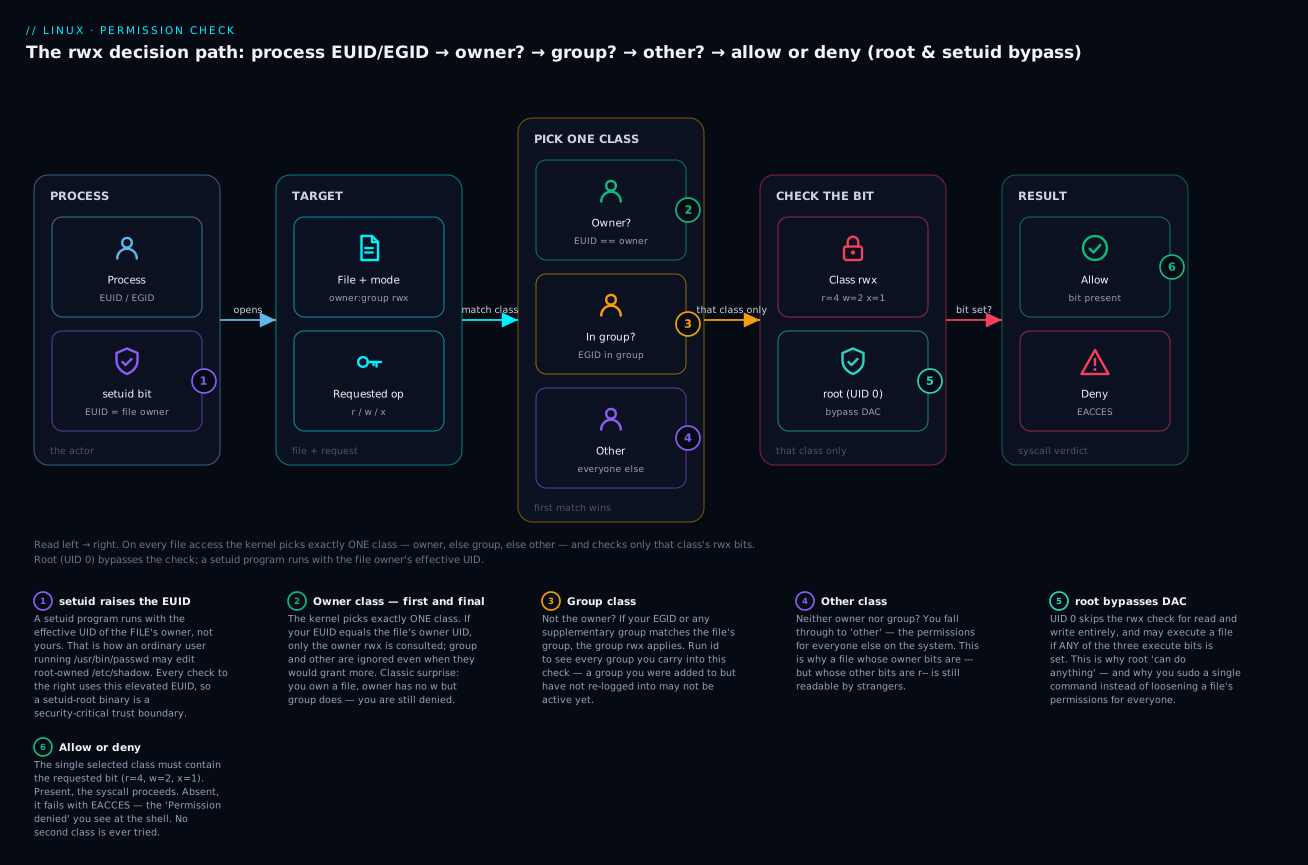
Trace it once and it sticks: identity enters on the left, exactly one class is chosen in the middle, one bit is checked on the right, and the answer is allow or deny — with root and setuid as the two ways the normal rules bend.
Reading and changing permissions: symbolic and octal
There are two notations for permissions, and you need both: symbolic (letters — great for relative tweaks) and octal (numbers — great for stating an absolute mode). chmod (change mode) accepts either.
Octal: three digits, each 0–7
Give each perm a value — r = 4, w = 2, x = 1 — and add them up per class. One octal digit (0–7) encodes one class’s three bits:
| Octal | Binary | Symbolic | Perms granted |
|---|---|---|---|
7 |
111 |
rwx |
read + write + execute |
6 |
110 |
rw- |
read + write |
5 |
101 |
r-x |
read + execute |
4 |
100 |
r-- |
read only |
3 |
011 |
-wx |
write + execute |
2 |
010 |
-w- |
write only |
1 |
001 |
--x |
execute only |
0 |
000 |
--- |
nothing |
A full mode is three digits: owner, group, other. To read rw-r--r--: owner rw- = 4+2 = 6, group r-- = 4, other r-- = 4 → 644. To build “owner full, group read+execute, other nothing”: 7, 5, 0 → 750. That’s the entire trick.
The modes you’ll use constantly:
| Octal | Symbolic | Typical use | Reasoning |
|---|---|---|---|
644 |
rw-r--r-- |
Normal files (docs, config) | Owner edits; everyone reads. |
755 |
rwxr-xr-x |
Directories; executables/scripts | All can enter/run; only owner writes. |
600 |
rw------- |
Private files (~/.ssh/id_ed25519) |
Owner only; SSH requires this. |
700 |
rwx------ |
Private directories (~/.ssh) |
Owner only can enter. |
640 |
rw-r----- |
Group-readable secrets/config | Owner writes, group reads, other nothing. |
750 |
rwxr-x--- |
Group-shared directory, no outsiders | Group can enter; other locked out. |
664 |
rw-rw-r-- |
Group-collaborative files | Owner + group write; other reads. |
775 |
rwxrwxr-x |
Group-collaborative directory | Owner + group create/delete. |
400 |
r-------- |
Read-only key material | No accidental edits. |
777 |
rwxrwxrwx |
⚠️ Almost always wrong | Everyone can write — a security hole. |
⚠️ chmod 777 is the cargo-cult “fix” that beginners reach for. It does make “Permission denied” go away — by letting every account on the system modify the file or fill the directory. The correct fix is to grant the minimum bit to the right class (usually via correct ownership + 640/750). Never leave 777 on anything real.
Symbolic: relative edits with letters
Symbolic mode reads as chmod [who][op][perm]. The who is one or more of u (owner), g (group), o (other), or a (all — the default if you omit it). The op is + (add), - (remove), or = (set exactly, clearing whatever else was there). The perm is r, w, or x, plus three specials you’ll meet shortly: X, s (setuid/setgid), and t (sticky).
X (capital) is a gem: “execute only if it’s a directory or already has some execute bit.” It lets you chmod -R a+rX a tree to make directories traversable and scripts runnable without slapping execute on every plain data file.
chmod u+x deploy.sh        # add execute for the owner
chmod go-w report.txt      # remove write from group AND other
chmod a=r notes.txt        # set EXACTLY read for everyone (clears w/x)
chmod u=rw,go=r config.ini # multiple clauses, comma-separated → 644
chmod -R a+rX,go-w website/ # recursive: dirs+scripts executable, no group/other write
chmod on many files at once uses -R (recursive). ⚠️ Never run chmod -R 777 / or chmod -R from the wrong directory — recursive mode changes are one of the fastest ways to make a system unbootable or insecure. Double-check your target path before pressing Enter.
Changing ownership: chown and chgrp
Permissions decide what each class can do; ownership decides which class you are. Only root can give a file away to another user (chown); a regular owner may change only the group, and only to a group they belong to.
The forms are quick to learn: chown alice file changes the owner; chown alice:devs file sets owner and group in one shot; chown :devs file (note the leading colon) or the dedicated chgrp devs file changes only the group; chown -R alice:devs /srv/app re-owns a whole tree recursively; and chown --reference=a.txt b.txt copies a.txt’s owner and group onto b.txt.
# Give a web directory to the web user and its group, recursively.
sudo chown -R www-data:www-data /var/www/html

# Fix a private key that somehow ended up group-readable.
chmod 600 ~/.ssh/id_ed25519 && ls -l ~/.ssh/id_ed25519
# -rw------- 1 vinod vinod 411 Jul  9 10:20 /home/vinod/.ssh/id_ed25519
umask: the filter for new files
When you create a file, why does it come out 644 and not 666? Because of umask — a mask that subtracts permission bits from the base defaults at creation time.
- Base default for a new file:
666(rw-rw-rw-) — note: no execute, ever, from creation. - Base default for a new directory:
777(rwxrwxrwx). - The kernel then removes whatever bits the
umasknames. Result = base AND NOT umask.
umask            # show current mask
# 0022
umask -S         # show it symbolically
# u=rwx,g=rx,o=rx
With the common 022, the mask removes write from group and other:
| umask | New file becomes | New dir becomes | Who uses it |
|---|---|---|---|
022 |
644 (rw-r--r--) |
755 (rwxr-xr-x) |
System default; single-admin boxes. |
002 |
664 (rw-rw-r--) |
775 (rwxrwxr-x) |
Default for regular users on Debian/RHEL (user-private-group scheme) — enables group collaboration. |
027 |
640 (rw-r-----) |
750 (rwxr-x---) |
Hardened: nothing for “other”. |
077 |
600 (rw-------) |
700 (rwx------) |
Maximum privacy; each user isolated. |
Because the file base is 666 (no execute bit to begin with), umask can never make a new file executable — that’s why fresh scripts always need an explicit chmod +x. Set your session mask with umask 027; make it permanent by adding that line to ~/.bashrc (per-user) or /etc/profile / /etc/login.defs (system-wide).
Special bits: setuid, setgid and the sticky bit
Beyond the nine standard bits sit three special bits, encoded as an optional fourth (leading) octal digit — setuid = 4, setgid = 2, sticky = 1. They change how the perms behave, and they surface in ls -l by overloading the execute positions with s/S (setuid/setgid) or t/T (sticky):
| Bit | Octal | On a file | On a directory | Shows in ls -l as |
|---|---|---|---|---|
| setuid | 4000 |
Run with the file owner’s effective UID | (ignored on Linux) | s in owner-exec slot: -rwsr-xr-x |
| setgid | 2000 |
Run with the file group’s effective GID | New files/subdirs inherit the directory’s group | s in group-exec slot: -rwxr-sr-x / drwxr-sr-x |
| sticky | 1000 |
(ignored on modern Linux) | Only a file’s owner (or dir owner or root) may delete/rename it | t in other-exec slot: drwxrwxrwt |
A capital S/T means the special bit is set but the underlying execute bit is not — usually a mistake worth noticing.
setuid in the wild — passwd. How can an ordinary user change their own password when that means writing to root-owned /etc/shadow? Because passwd is setuid-root:
ls -l /usr/bin/passwd
# -rwsr-xr-x 1 root root 59976 Feb  6  2024 /usr/bin/passwd
The s in the owner slot means: whoever runs passwd, the process’s effective UID becomes root (the file’s owner) for its lifetime — just long enough to update the shadow file, with the program’s own logic ensuring you only change your entry. ⚠️ setuid-root binaries are a top security concern; audit them with find / -perm -4000 -type f 2>/dev/null.
setgid for shared directories — the teammate problem, solved. Put a shared group on a directory and set the setgid bit; now every file created inside inherits that group automatically, so both teammates can read each other’s work:
sudo groupadd project
sudo usermod -aG project alice
sudo usermod -aG project bob
sudo mkdir /srv/project
sudo chgrp project /srv/project
sudo chmod 2775 /srv/project           # 2 = setgid; 775 = group can write
ls -ld /srv/project
# drwxrwsr-x 2 root project 4096 Jul  9 10:30 /srv/project
The s in the group slot is setgid. Any file alice or bob creates in /srv/project is group-owned by project (not by their personal primary group), so the other can read/edit it. Pair with umask 002 so the group write bit survives.
The sticky bit — why /tmp is safe. /tmp must be writable by everyone (any program creates temp files there), but you must not be able to delete my temp file. The sticky bit does exactly that:
ls -ld /tmp
# drwxrwxrwt 10 root root 4096 Jul  9 10:31 /tmp
The trailing t means: even though the directory is rwxrwxrwx (anyone can create), you can only delete or rename files you own. Set it yourself with chmod +t dir or chmod 1777 dir.
sudo: run one command as another user, safely
You almost never log in as root. Instead you use sudo (“substitute user do”) to run one command with elevated privilege. Why the indirection?
- Audit trail. Every
sudois logged (to/var/log/auth.logon Debian,journalctl//var/log/secureon RHEL) with who ran what. A shared root login logs nothing useful. - Least privilege. You can grant a user exactly one command (
systemctl restart nginx) instead of the whole machine. - No shared secret. Nobody needs to know the root password; users authenticate with their own password.
- Fewer catastrophes. You escalate deliberately, per-command, instead of living as root and fat-fingering
rm -rfwith no seatbelt.
Common invocations:
| Command | What it does |
|---|---|
sudo cmd |
Run cmd as root. |
sudo -u alice cmd |
Run cmd as alice, not root. |
sudo -i |
Start a login root shell (loads root’s env, like su -). |
sudo -s |
Start a root shell keeping your environment. |
sudo -l |
List what you are allowed to run. |
sudo -k |
Forget the cached credential (next sudo re-prompts). |
sudo -v |
Refresh the credential timestamp (default cache ~15 min). |
sudo !! |
Re-run your previous command with sudo (shell history trick). |
Who may sudo: the wheel / sudo group
Membership in one administrative group grants sudo rights out of the box — but the group name differs by family. On Debian/Ubuntu it’s the sudo group (sudo usermod -aG sudo alice); on RHEL/Fedora/Rocky it’s the wheel group (sudo usermod -aG wheel alice). Add a user to the right one — then have them re-login — and they can immediately escalate.
Reading a sudoers line
Rules live in /etc/sudoers and drop-in files under /etc/sudoers.d/. ⚠️ Never edit /etc/sudoers with a plain editor — a syntax error can lock everyone out of root. Use visudo, which validates the file on save and refuses to write a broken one.
A sudoers rule has this grammar:
who where = (as_whom[:as_group]) [tags] what
| Field | In alice ALL=(ALL:ALL) NOPASSWD: /usr/bin/systemctl |
Meaning |
|---|---|---|
| who | alice (or %group) |
The user, or a group prefixed with %. |
| where | ALL |
On which hosts the rule applies (relevant for shared sudoers). |
| as_whom | (ALL:ALL) |
Which target user and group they may become. |
| tags | NOPASSWD: |
Optional; e.g. run without re-entering a password. |
| what | /usr/bin/systemctl |
The exact command(s) permitted; ALL = anything. |
Worked examples:
# Full admin, must enter own password. This is what wheel/sudo membership expands to:
%wheel   ALL=(ALL:ALL)  ALL

# A deploy user may restart nginx as root, no password, and nothing else:
deploy   ALL=(root)  NOPASSWD: /usr/bin/systemctl restart nginx

# alice may run backups as the 'postgres' user:
alice    ALL=(postgres)  /usr/local/bin/pg_backup.sh
The middle rule is the least-privilege ideal: deploy gets exactly one root action and cannot, for example, sudo -i into a root shell. Prefer many narrow rules in /etc/sudoers.d/ over granting blanket ALL.
Hands-on lab
A self-contained lab you can run on any throwaway Linux VM, container (docker run -it --rm ubuntu bash), or WSL. You’ll need sudo/root. Every step has the command, what you should see, and a one-line “what just happened.”
1. Know yourself.
id; umask
# uid=1000(you) gid=1000(you) groups=1000(you),27(sudo)
# 0022
What happened: you confirmed your UID, primary group, secondary groups, and the mask applied to new files.
2. Create a shared group and two users.
sudo groupadd project
sudo useradd -m -s /bin/bash alice
sudo useradd -m -s /bin/bash bob
sudo passwd alice          # set a password when prompted
What happened: two regular accounts (UID ≥ 1000) with home dirs and a shell, plus an empty project group.
3. Read the databases you just changed.
getent passwd alice
# alice:x:1001:1001:...:/home/alice:/bin/bash
sudo getent shadow alice | cut -c1-25
# alice:$y$j9T$....
getent group project
# project:x:1002:
What happened: you saw alice’s passwd line, the hashed password living in root-only shadow, and the still-memberless project group.
4. Add both users to the group — the right way — and verify.
sudo usermod -aG project alice
sudo usermod -aG project bob
id alice
# uid=1001(alice) gid=1001(alice) groups=1001(alice),1002(project)
What happened: -aG appended project without wiping alice’s other groups. (In a real login, alice must re-login or newgrp project before the group is active in her shell.)
5. Build a setgid shared directory.
sudo mkdir /srv/project
sudo chgrp project /srv/project
sudo chmod 2775 /srv/project
ls -ld /srv/project
# drwxrwsr-x 2 root project 4096 ... /srv/project
What happened: the s in the group slot means new files inside inherit the project group, so alice and bob can collaborate.
6. Prove group inheritance.
sudo -u alice touch /srv/project/from-alice.txt
ls -l /srv/project/from-alice.txt
# -rw-r--r-- 1 alice project 0 ... from-alice.txt
What happened: the file’s group is project (inherited from the setgid dir), not alice’s personal group — that’s the whole point.
7. See the directory-write rule in action (the “delete a file you don’t own” demo).
sudo chmod 1777 /srv/project        # world-writable + sticky (like /tmp)
sudo -u bob rm -f /srv/project/from-alice.txt
# rm: cannot remove '/srv/project/from-alice.txt': Operation not permitted
What happened: bob can write the directory, so ordinarily he could delete any entry in it — but the sticky bit overrides that and denies the unlink because bob doesn’t own the file. (-f skips the “write-protected?” prompt so you see the sticky-bit denial itself.) Remove the sticky bit (chmod 0775) and bob could delete alice’s file despite not owning it — exactly the danger the sticky bit exists to prevent.
8. Symbolic vs octal chmod.
echo 'secret=42' | sudo tee /srv/project/app.env >/dev/null
sudo chmod 640 /srv/project/app.env       # octal: owner rw, group r, other none
sudo chmod g+r,o-r /srv/project/app.env   # symbolic tweak (already there — no-op)
ls -l /srv/project/app.env
# -rw-r----- 1 root project 10 ... app.env
What happened: 640 locks the secret to the owner (write) and project group (read); “other” gets nothing — the correct pattern for a shared secret, not chmod 777.
9. Try sudo scoping.
sudo -l                    # what may YOU run?
sudo -u alice whoami       # → alice
sudo whoami                # → root
What happened: you ran commands as another regular user and as root, and listed your own sudo rights.
10. Clean up. ⚠️ userdel -r deletes home directories.
sudo userdel -r alice
sudo userdel -r bob
sudo groupdel project
sudo rm -rf /srv/project
What happened: the accounts, their homes, the group, and the lab directory are gone. (Files they owned elsewhere would now show a bare numeric UID.)
Common mistakes and troubleshooting
| Symptom | Likely cause | Fix |
|---|---|---|
Permission denied running a script |
No x bit, or wrong interpreter |
chmod +x script.sh; confirm the shebang and that you have r too. |
Permission denied reading a file you can ls |
You’re in the wrong class, or missing x on a parent dir |
ls -l the file; check every parent has x with namei -l /path/to/file. |
| Added user to a group but access still denied | Group membership only applies at login | Log out/in, or newgrp <group>; verify with id. |
usermod -G removed the user from other groups |
Used -G (set) instead of -aG (append) |
Re-add the lost groups; always use -aG. |
New user can’t log in / lands in / |
Created without -m (no home) or with nologin shell |
useradd -m -s /bin/bash; fix shell with usermod -s. |
| SSH refuses your key: “bad permissions” | ~/.ssh or the private key is group/other-accessible |
chmod 700 ~/.ssh; chmod 600 ~/.ssh/id_*. |
| Web server 403 on a file that exists | The service user (www-data) isn’t owner/group, or a parent dir lacks x |
Reason as www-data; fix ownership/chmod on the file and its parents. |
| Can delete a file you didn’t create | You have write on the directory | Expected. Add the sticky bit (chmod +t dir) to restrict deletes to owners. |
sudo: command not found or “not in sudoers” |
User isn’t in sudo/wheel |
usermod -aG sudo alice (Debian) / wheel (RHEL) as root. |
The three nastiest gotchas, in prose:
-
chmod 777“fixes” nothing safely. When something is “Permission denied,” resist777. Find out which class you are for that file (ls -l+id) and grant the smallest bit to the right class — usually by correcting ownership (chown) and using640/750.777on a directory lets any local account plant or replace files there; on a web root it’s a remote-code-execution waiting room. -
The
-Gvs-aGamputation.usermod -G docker alicesilently strips alice fromsudo,adm, and every other secondary group, replacing them all with justdocker. People discover it when they lose sudo. Burn-aGinto your fingers, and alwaysidafterward to confirm. -
Missing
xon a parent directory. You set a file to644and still get denied — because you (or the service) can’t traverse into a parent directory that lacksxfor your class. Permissions are checked at every component of the path.namei -l /srv/project/app.envprints the mode of each segment so you can spot the one blocking you. This is the number-one “but the file permissions look fine!” mystery.
Cheat-sheet
| Command | Does |
|---|---|
id / id user |
Show UID, GID, and group membership. |
whoami / groups |
Current username / your groups. |
getent passwd|shadow|group NAME |
Look up an account/group (honours LDAP/SSSD). |
sudo useradd -m -s /bin/bash NAME |
Create user with home + shell. |
sudo userdel -r NAME |
⚠️ Delete user and home. |
sudo usermod -aG GRP NAME |
Append a secondary group (the safe way). |
sudo passwd NAME |
Set/reset a password. |
chage -l NAME |
Show password-aging policy. |
sudo groupadd NAME / groupdel |
Create / delete a group. |
newgrp GRP |
Activate a group in the current session. |
ls -l / ls -ld DIR |
Show file / directory permissions. |
chmod 640 FILE |
Set octal mode (r=4 w=2 x=1 per class). |
chmod u+x,go-w FILE |
Symbolic edit (who ± perm). |
chmod -R a+rX DIR |
Recursive; X = execute only on dirs/existing-x. |
chown user:group FILE |
Change owner and group. |
chgrp GRP FILE |
Change group only. |
umask 027 |
Set the new-file mask (→ files 640, dirs 750). |
chmod 2775 DIR |
setgid dir (files inherit its group). |
chmod +t DIR / 1777 |
Sticky bit (owners-only delete, like /tmp). |
find / -perm -4000 -type f 2>/dev/null |
Audit all setuid binaries. |
namei -l /path/to/file |
Show the mode of every path component. |
sudo -l |
List your sudo rights. |
sudo visudo |
Safely edit sudoers (validates on save). |
Interview and exam questions
Q: You own a file with mode ----rw----. Can you read it?
A: No. The kernel matches you to the owner class (because you’re the owner) and stops there — owner has ---. The group’s rw is never consulted, because only the first matching class applies. Ownership is checked before group membership.
Q: Explain how you can delete a file you have no write permission on.
A: Deleting a file removes its name from the containing directory — that’s a write to the directory, governed by the directory’s w bit, not the file’s. If you have w (and x) on the directory, you can delete even a read-only file you don’t own. The sticky bit is what prevents this in shared dirs like /tmp.
Q: What’s the difference between usermod -G and usermod -aG?
A: -G sets (replaces) the complete list of secondary groups — omitting a group removes the user from it. -aG appends without touching existing memberships. Always use -aG unless you deliberately want to overwrite.
Q: Convert rwxr-x--- to octal, and 2750 back to symbolic.
A: rwx=7, r-x=5, ---=0 → 750. 2750: the leading 2 is setgid; 750 = rwxr-x---, so rwxr-s--- (setgid shown in the group slot).
Q: Why is /usr/bin/passwd setuid-root, and how do you spot it?
A: Changing your password writes to root-owned /etc/shadow, which an ordinary user can’t do. The setuid bit makes passwd run with the file owner’s (root’s) effective UID. You spot it by the s in the owner-execute slot: -rwsr-xr-x.
Q: A user was added to the docker group but docker ps still says permission denied. Why?
A: Group membership is granted at login. Their current shell predates the change. They must log out and back in, or run newgrp docker. Confirm with id.
Q: What does umask 027 produce for a new file and a new directory, and why can’t a new file be executable?
A: File 640, directory 750. The file base is 666 (never 777), so it has no execute bit to keep — umask can only remove bits, so new files are never executable and always need explicit chmod +x.
Q: (RHCSA-style) Create user deploy, make /srv/web a directory the web group can collaborate in with correct group inheritance.
A:
sudo groupadd web
sudo useradd -m -G web deploy
sudo mkdir /srv/web
sudo chgrp web /srv/web
sudo chmod 2775 /srv/web     # setgid so new files inherit group 'web'
Q: (LFCS-style) Grant the user ci permission to restart nginx via sudo — and nothing else.
A: Run sudo visudo -f /etc/sudoers.d/ci and add:
ci ALL=(root) NOPASSWD: /usr/bin/systemctl restart nginx
This is least privilege — ci cannot open a root shell or run any other command.
Q: How do you find every setuid binary on a system, and why would you?
A: find / -perm -4000 -type f 2>/dev/null. setuid-root binaries run as root regardless of who invokes them, so each is a potential privilege-escalation vector; you audit them to ensure only trusted, patched programs carry the bit.
Q: A file has mode 644 and correct ownership, but a service still can’t read it. What’s the most likely cause?
A: A parent directory lacks execute (x) for the service’s class, so the path can’t be traversed. Permissions are enforced at every path component; use namei -l /full/path to find the offending directory.
Q: Why prefer sudo over logging in as root?
A: Per-command auditing (who ran what), least privilege (grant single commands), no shared root password (users use their own), and fewer accidents (you escalate deliberately instead of living as root).
Key takeaways
- Identity is numeric. You are a UID with a set of GIDs;
rootis UID 0 and bypasses permission checks. Names are just labels mapped in/etc/passwdand/etc/group; hashes and aging live in root-only/etc/shadow. - The kernel checks exactly one class. Owner → else group → else other; the first match wins and no other class is consulted — even when a later class would grant more.
r/w/xmean different things on files and directories. On a directory,x= traverse/enter,r= list names, andw= create/delete entries — which is why you can delete a read-only file you don’t own if you can write its directory.- Octal is just
r=4, w=2, x=1summed per class.644,755,640,700,600should become instant.chmod 777is almost never the right fix; grant the minimum bit to the right class. umaskfilters new files (base666for files,777for dirs), which is why new files are never executable.022→644/755;002→664/775;027→640/750.- The special bits solve real problems: setuid (
passwdacting as root), setgid on a directory (shared-group inheritance), and the sticky bit (owners-only delete in/tmp). Spot them ass/tinls -l. - Use
sudo, not a root login. It gives you audit trails and least privilege. Edit sudoers only withvisudo, prefer narrow per-command rules in/etc/sudoers.d/, and know your family’s admin group (sudoon Debian,wheelon RHEL).