Every Auto Scaling group, every launch template, every “just spin up another node” moment resolves to one question: what’s on the AMI? If the answer is “a bare Amazon Linux image plus 300 lines of user-data that installs the agent, patches the OS, clones the repo, and prays,” then every single boot is a fresh chance for a package mirror to be down, a dnf transaction to change under you, or a config drift to slip in unnoticed. You’ve turned every scale-out event into a small, unaudited software build running on the critical path of your capacity. That is the problem a golden AMI solves: you do the build once, bake the result into an immutable image, and every instance after that boots from an artifact that is byte-for-byte identical, already patched, already hardened, and already tested.
A golden AMI (also called a “gold image” or “baked image”) is a pre-configured, versioned Amazon Machine Image that contains the OS, agents, runtime, security baseline, and sometimes the application — everything except the last-mile, instance-specific configuration. EC2 Image Builder is AWS’s managed service for producing golden AMIs (and container images) on a repeatable, automated pipeline: you declare an image recipe (a parent image + a list of components + storage), point it at an infrastructure configuration (how to launch the throwaway build instance) and a distribution configuration (where to publish and who can use the result), wrap it in a pipeline (schedule, triggers), and Image Builder spins up a build instance, runs your components through build → validate → test phases, snapshots the disk into an AMI, copies it to every region you named, shares it with every account you named, and tears the build instance down.
This guide teaches the whole machine. You’ll learn the bake-vs-bootstrap trade-off and when immutable images win; the complete Image Builder resource model with every field that matters; how to author components in the YAML document schema using action modules like ExecuteBash, UpdateOS, S3Download and Reboot; how to harden with AWS-managed STIG and CIS components; how to distribute encrypted AMIs across regions and accounts; how to keep the sprawl of old AMIs and snapshots under control with lifecycle policies; how to wire CVE-driven rebuilds with Amazon Inspector and EventBridge; and how Image Builder stacks up against HashiCorp Packer. Then you’ll build the whole thing hands-on — custom hardening component, recipe on Amazon Linux 2023, two-region distribution, a pipeline run, verification, and teardown — in both the aws CLI and Terraform, followed by a troubleshooting playbook for when the build hangs, the test phase reboot-loops, or cross-account distribution fails on a KMS grant.
What problem this solves
The alternative to a golden AMI is bootstrapping — booting a generic base AMI and configuring it at first boot with user-data, cloud-init, or a config-management agent (Ansible/Chef/Puppet pulling state). Bootstrapping is fine for a lab or a single box. At fleet scale it fails in specific, expensive ways:
- Slow, unpredictable boot. A node that must
dnf update, install an agent, pull artifacts, and warm a cache can take 3–8 minutes to become healthy. During a scale-out storm or an AZ failover, those minutes are when you have too little capacity. A golden AMI boots to healthy in 30–60 seconds because the work is already done. - Configuration drift and snowflakes. Two instances launched a week apart from the same base AMI get different package versions because the upstream mirror moved. Multiply across a fleet and you have a population of subtly different “snowflake” servers that no one can reason about. A golden AMI is a single immutable artifact with a version number.
- A build on the critical path. Every boot that installs software is a build that can fail in production, at the worst time. Golden AMIs move that build off the launch path into a controlled pipeline where a failure just means “don’t publish this version.”
- A larger, unaudited attack surface. Bootstrapping needs outbound internet to package repos and Git at boot, plus build tooling (compilers,
git, package managers) living on production hosts. A baked, hardened image can ship with the build tools removed, the baseline locked down, and no need to reach the internet at runtime. - Manual “click-baking” doesn’t scale. The old way to make a golden AMI was to launch an instance, SSH in, install everything by hand, run
aws ec2 create-image, and write down what you did in a wiki that immediately went stale. It’s unrepeatable, unversioned, unhardened, and untested. Image Builder replaces that ritual with declarative, versioned, tested pipelines.
| Symptom in production | Root cause with bootstrap-at-boot | What golden AMIs change |
|---|---|---|
| Scale-out is slow to add healthy capacity | Every node runs a 3–8 min install on boot | Work is pre-baked; boot-to-healthy in seconds |
| Two “identical” nodes behave differently | Upstream package versions drifted between boots | One immutable, versioned artifact |
| A deploy fails only on new instances | User-data build broke against a moved mirror | Build moved off the launch path into a pipeline |
| Security asks “prove the baseline” | No record of what each host installed | Recipe + component versions are the audit trail |
| Compliance flags build tools on prod hosts | gcc/git/package cache needed at boot |
Bake, then strip build tooling from the image |
| CVE lands, must patch 400 hosts fast | Re-run config mgmt on every live host | Rebuild one AMI, roll it via instance refresh |
Everyone who runs more than a handful of EC2 instances hits this: SREs chasing slow scale-outs, security teams demanding a provable baseline, and platform engineers tired of debugging user-data at 3am. It’s also exam material — SAA-C03 and SOA-C02 expect you to know Image Builder as the managed golden-AMI path, and SCS-C02 expects the hardening and lifecycle story.
Learning objectives
By the end of this guide you can:
- Explain the bake-vs-bootstrap trade-off and choose immutable images where they pay off.
- Model an Image Builder solution end to end: image recipe, components, infrastructure configuration, distribution configuration, pipeline, image.
- Author a component in the YAML document schema — parameters, the build/validate/test phases, steps, and action modules (
ExecuteBash,UpdateOS,S3Download,Reboot,Assert) — and version it semantically. - Configure the build instance correctly (instance profile, subnet, security group, SSM connectivity, logging) so builds don’t hang.
- Distribute an encrypted AMI to multiple regions and share it cross-account with launch permissions and KMS grants.
- Apply AWS-managed STIG/CIS hardening components and a SCAP compliance check, and run boot/reboot/Inspector test components.
- Control AMI/snapshot sprawl with lifecycle policies (deprecate → disable → delete) and drive CVE-based rebuilds with Inspector + EventBridge.
- Compare Image Builder with Packer and build the whole thing in
awsCLI and Terraform.
Prerequisites & where this fits
You should be comfortable with EC2 fundamentals — AMIs, EBS snapshots, security groups, subnets, IAM instance profiles — and know how an Auto Scaling group consumes an AMI through a launch template. You should have the AWS CLI v2 configured with a profile that can create Image Builder, EC2, IAM, S3 and KMS resources, and (for the Terraform track) Terraform ≥ 1.5 with the aws provider ≥ 5.x. Everything in the lab fits inside a normal account; the only cost is a short-lived build instance and the AMI/snapshot storage (teardown at the end).
Where this sits: the golden AMI is the artifact that everything downstream consumes. It replaces the install logic you’d otherwise cram into EC2 user-data and cloud-init bootstrapping — you keep user-data only for the last-mile, instance-specific glue (hostname, environment, secrets fetch) and move the heavy install into components. The image you produce is referenced by a launch template, consumed by an Auto Scaling group doing rolling instance refresh to adopt new versions, and patched on a schedule by AWS Systems Manager Patch Manager between rebuilds (Session Manager and Run Command are the runtime-access counterparts to the bake-time work you do here). Picking the right build and runtime instance shape is its own skill — see choosing the right EC2 instance type.
Core concepts
Golden-AMI thinking rests on three ideas: immutable infrastructure, the bake-vs-bootstrap split, and Image Builder’s resource model. Get these straight and the rest is detail.
Immutable infrastructure means you never modify a running server in place — no ssh in and patch, no live config edits. To change anything, you build a new image, launch new instances from it, shift traffic, and terminate the old ones. The server becomes a disposable, versioned artifact rather than a pet you nurse for years. Golden AMIs are the enabling primitive: the immutable unit is the AMI, and the deploy is “roll the ASG to a new AMI version.”
Bake vs bootstrap is the spectrum of when configuration happens. Bake = do it at image-build time and freeze the result. Bootstrap = do it at instance-launch time. Real systems blend the two: bake everything slow, stable, and security-relevant (OS patches, agents, runtime, hardening, the app binary); bootstrap only what’s genuinely per-instance (hostname, region, feature flags, secrets pulled from Secrets Manager). The skill is drawing that line correctly.
| Building block | What it is | Image Builder resource | Versioned? |
|---|---|---|---|
| Parent image | The base AMI you start from (AL2023, Ubuntu, Windows, or your own) | referenced in recipe | n/a (pinned or “latest”) |
| Component | A YAML document of build/validate/test steps | aws_imagebuilder_component |
yes — semantic x.y.z |
| Image recipe | Parent image + ordered components + storage | aws_imagebuilder_image_recipe |
yes — semantic x.y.z |
| Container recipe | Same idea, output is a container image to ECR | aws_imagebuilder_container_recipe |
yes |
| Infrastructure config | How to launch the throwaway build/test instance | aws_imagebuilder_infrastructure_configuration |
mutable |
| Distribution config | Which regions/accounts get the output + permissions | aws_imagebuilder_distribution_configuration |
mutable |
| Image pipeline | Ties recipe + infra + distribution + schedule/triggers | aws_imagebuilder_image_pipeline |
mutable |
| Image | One build’s output (an AMI or container image version) | aws_imagebuilder_image |
yes — build version |
| Lifecycle policy | Rules to deprecate/disable/delete old AMIs + snapshots | aws_imagebuilder_lifecycle_policy |
mutable |
The mental model of a pipeline run: the pipeline reads its recipe, uses the infrastructure configuration to launch one build instance, runs each component’s build then validate phase on it, snapshots the disk into an AMI, launches a second instance from that new AMI to run the test phase, and finally uses the distribution configuration to copy/share the AMI everywhere you specified. If any phase fails, no AMI is published (or it’s marked FAILED), and — depending on terminateInstanceOnFailure — the build instance is left running for you to inspect or torn down.
The golden AMI pattern: bake vs bootstrap
Where to draw the line
The single most important design decision is what goes in the image versus what stays at runtime. Bake anything slow to install, security-relevant, or identical across the fleet. Bootstrap anything that differs per instance or must be fetched fresh at boot.
| Concern | Bake it (in the AMI) | Bootstrap it (at launch) | Why |
|---|---|---|---|
| OS patches | ✅ | — | Slow, must be consistent + tested |
| Agents (CloudWatch, SSM, security) | ✅ | — | Same everywhere; slow to install |
| Language runtime / JVM / .NET | ✅ | — | Stable, heavy |
| Hardening baseline (STIG/CIS) | ✅ | — | Must be provable + uniform |
| App binary / container image | ✅ usually | sometimes | Bake for immutable deploys; bootstrap only if you decouple app from AMI |
| Hostname / instance ID | — | ✅ | Per-instance |
| Environment (dev/prod), region | — | ✅ | Per-launch |
| Secrets / DB passwords | — | ✅ (fetch from Secrets Manager) | Never bake secrets |
| Feature flags / config | — | ✅ | Changes without a rebuild |
| TLS cert (per host) | — | ✅ | Per-instance identity |
The trade-off, dimension by dimension
| Dimension | Bake (golden AMI) | Bootstrap (user-data/config mgmt) |
|---|---|---|
| Boot-to-healthy | Seconds | Minutes (installs on boot) |
| Consistency | Byte-identical, versioned | Drifts with upstream repos |
| Failure blast radius | Build fails in pipeline, prod unaffected | Build fails on the launch path, in prod |
| Change speed | Rebuild + roll (minutes to an hour) | Redeploy config, live (fast, but risky) |
| Attack surface | Minimal; strip build tools | Needs repos + build tooling at boot |
| Auditability | Recipe/component versions = manifest | Scattered scripts, hard to prove |
| Upfront effort | Pipeline to build | A script to write |
| Best for | Fleets, ASGs, regulated workloads | Single boxes, fast-moving config, dev |
Note that bake and bootstrap are complementary, not exclusive. The production-grade pattern is a thin bootstrap on a thick bake: the AMI carries everything stable and hardened; a ~20-line user-data script sets the hostname, pulls secrets, writes the environment file, and starts the service. Aim to keep user-data idempotent and under a page.
Boot time and the numbers that justify it
| Task done at boot (bootstrap) | Typical time | If baked instead |
|---|---|---|
dnf update -y (weeks of patches) |
60–180 s | 0 (done at bake) |
| Install CloudWatch + SSM + security agents | 30–90 s | 0 |
| Install runtime (JDK/Node/.NET) | 20–60 s | 0 |
| Pull + start app container | 10–40 s | 0 or seconds |
| Apply hardening (dozens of controls) | 30–120 s | 0 |
| Total to healthy | ~3–8 min | ~30–60 s |
At 8-minute boots, a 50-node scale-out for a traffic spike takes minutes of under-capacity; at 45-second boots it’s effectively instant. During an AZ failover the difference is the same, and it’s exactly when you can least afford the wait.
EC2 Image Builder building blocks
This is the heart of the service. Work through each resource in the order the pipeline uses them.
Image recipe — parent image + components + storage
The image recipe is the declarative spec of what to build: which base image, which components in which order, and how the disk is laid out. Recipes are immutable and semantically versioned — you never edit 1.0.0; you create 1.0.1.
| Recipe field | What it does | Notes / gotcha |
|---|---|---|
name |
Human name of the recipe | Immutable identity with the version |
semanticVersion |
x.y.z version of this recipe |
Must be new each create; can’t overwrite |
parentImage |
Base image: AMI ID, SSM param path, or Image Builder image ARN | “Latest” via ARN pins freshness; AMI ID pins exactly |
components |
Ordered list of build + test component ARNs (with optional parameters) | Order matters — build phases run top-to-bottom |
blockDeviceMappings |
Root + extra EBS volumes (size, type, IOPS, encryption, KMS key, deleteOnTermination) | Set encryption + size here |
workingDirectory |
Scratch dir on the build instance | Default /tmp; move off root if root is small |
additionalInstanceConfiguration |
systemsManagerAgent (uninstall after build), userDataOverride |
Uninstall SSM agent if the final AMI must not carry it |
Parent image options decide how fresh and how controlled your base is:
| Parent image type | Example | Freshness | When to use |
|---|---|---|---|
| Image Builder managed ARN | arn:aws:imagebuilder:us-east-1:aws:image/amazon-linux-2023-x86/x.x.x |
Always latest AWS-published | Default; auto-picks newest base |
| SSM parameter path | /aws/service/ami-amazon-linux-latest/al2023-ami-kernel-default-x86_64 |
Latest at build time | Track “latest AL2023” declaratively |
| Explicit AMI ID | ami-0abc123... |
Frozen | Reproducible builds, air-gapped bases |
| Your own golden AMI | a previous pipeline output | Your baseline | Layered images (base → app) |
| AWS Marketplace / ISV | vendor AMI | Vendor cadence | Licensed/hardened vendor bases |
Storage / block device mappings control the disk of the resulting AMI. This is where you set volume size, gp3 performance, and encryption:
| Block device field | Values | Default | Why change |
|---|---|---|---|
volumeType |
gp3, gp2, io1/io2, st1, sc1 |
gp2/gp3 per base |
gp3 for cheaper, tunable baseline |
volumeSize |
GiB | Base image size | Grow root if the bake needs space |
iops / throughput |
numbers (gp3/io) | gp3 baseline 3000/125 | Faster builds, faster app disk |
encrypted |
true/false |
account default | Always true for the golden AMI |
kmsKeyId |
KMS key ARN | AWS-managed aws/ebs |
CMK for cross-account/compliance |
deleteOnTermination |
true/false |
true |
Keep true unless a data volume |
virtualName |
ephemeral0… (instance store) |
— | Map local NVMe on supported types |
Components — the YAML documents
A component is a versioned YAML (or JSON) document describing steps grouped into phases. It’s the reusable unit of work — “install nginx,” “apply the STIG baseline,” “run a boot test” — and the same component can be shared across many recipes.
Phases run at different points in the pipeline:
| Phase | Runs where | Purpose | Fails the build? |
|---|---|---|---|
build |
On the build instance, before the AMI is snapshotted | Install, configure, harden | Yes — no AMI produced |
validate |
On the build instance, before snapshot | Assert the build is correct (files exist, service enabled) | Yes |
test |
On a new instance launched from the built AMI | Prove the image boots and behaves | Yes — AMI marked FAILED |
The component document schema has a small, fixed shape. Learn these keys:
| Schema key | Meaning | Example |
|---|---|---|
name |
Document name | HardenAndInstall |
description |
Free text | “Install nginx + baseline” |
schemaVersion |
Document schema | 1.0 |
parameters |
Typed inputs with defaults | NginxPkg: {type: string, default: nginx} |
constants |
Immutable named values | CfgPath: {type: string, value: /etc/app} |
phases |
List of build/validate/test |
see below |
phases[].steps |
Ordered steps in a phase | each with name, action, inputs |
steps[].action |
The action module to run | ExecuteBash, UpdateOS, … |
steps[].inputs |
Module-specific inputs | commands: [...] |
steps[].loop |
for/forEach iteration |
loop over a list |
steps[].if |
Conditional execution | run only when a condition holds |
steps[].onFailure |
Abort / Continue / Ignore |
control failure behaviour |
steps[].timeoutSeconds / maxAttempts |
Retry + timeout per step | resilient installs |
Action modules are the verbs. The important ones, by category:
| Category | Action module | Platform | What it does |
|---|---|---|---|
| Execute | ExecuteBash |
Linux | Run inline shell commands |
| Execute | ExecutePowerShell |
Windows | Run PowerShell |
| Execute | ExecuteBinary |
both | Run a binary with args |
| Execute | ExecuteDocument |
both | Run another SSM/Image Builder doc |
| OS/state | UpdateOS |
both | Patch the OS (dnf/yum/apt/Windows Update) |
| OS/state | Reboot |
both | Reboot and resume the document |
| OS/state | SetRegistry |
Windows | Set registry keys |
| Files | S3Download |
both | Pull objects from S3 to disk |
| Files | S3Upload |
both | Push files to S3 (logs, artifacts) |
| Files | WebDownload |
both | Download from an HTTP(S) URL |
| Files | CopyFile/CopyFolder/MoveFile |
both | Filesystem ops |
| Files | CreateFile/CreateFolder/DeleteFile |
both | Create/remove |
| Files | SetFileOwner/SetFilePermissions |
Linux | chown/chmod |
| Files | ReadFile/ListFiles |
both | Read/enumerate |
| Archive | ExpandArchive |
both | Unzip/untar |
| Software | InstallMSI/UninstallMSI |
Windows | MSI install |
| Assertion | Assert |
both | Fail the phase if a condition is false |
AWS-managed vs custom components — you rarely start from scratch:
| Aspect | AWS-managed component | Custom component |
|---|---|---|
| Owner | aws namespace |
your account |
| Examples | update-linux, aws-cli-version-2-linux, amazon-cloudwatch-agent-linux, stig-build-linux-high, reboot-test-linux, inspector-test-linux |
your install/harden/test docs |
| Versioning | AWS bumps versions | you own x.y.z |
| Editable | No (reference only) | Yes (new version each change) |
| Cost | Free | Free (you pay build compute) |
| Use for | Patching, agents, hardening, tests | Your app + org-specific config |
Component versioning follows strict semantic versioning, and the resolution rules bite people:
| Version reference | Resolves to | Behaviour |
|---|---|---|
1.0.0 (full) |
Exactly that build | Reproducible |
1.0.x (wildcard) |
Latest patch of 1.0 |
Auto-picks patch fixes |
x.x.x |
Latest of everything | Always newest (managed images) |
create with existing x.y.z |
— | Error — versions are immutable |
| new patch fix | bump to 1.0.1 |
Never overwrite an existing version |
Loops and conditionals let one step do repetitive work:
| Construct | Syntax sketch | Use |
|---|---|---|
forEach loop |
loop: { forEach: [a,b,c] } then {{ loop.value }} |
Install a list of packages |
for range loop |
loop: { for: { start: 1, end: 5 } } |
Numbered iterations |
if condition |
if: { stringEquals: ["{{ Param }}", "yes"] } |
Optional steps |
| Step output ref | {{ build.StepName.outputs.stdout }} |
Chain results between steps |
| Parameter ref | {{ ParameterName }} |
Inject inputs |
Here’s a real component that patches, installs and hardens, with all three phases:
name: HardenNginxAL2023
description: Patch, install nginx, apply baseline hardening, validate and test
schemaVersion: 1.0
parameters:
  - NginxPkg:
      type: string
      default: nginx
      description: Package to install
phases:
  - name: build
    steps:
      - name: PatchOS
        action: UpdateOS
      - name: InstallNginx
        action: ExecuteBash
        inputs:
          commands:
            - dnf install -y {{ NginxPkg }}
            - systemctl enable nginx
      - name: Hardening
        action: ExecuteBash
        inputs:
          commands:
            - 'sed -i "s/^#*PermitRootLogin.*/PermitRootLogin no/" /etc/ssh/sshd_config'
            - 'sed -i "s/^#*PasswordAuthentication.*/PasswordAuthentication no/" /etc/ssh/sshd_config'
            - chmod 600 /etc/ssh/sshd_config
            - 'echo "umask 027" >> /etc/profile.d/hardening.sh'
      - name: StripBuildTools
        action: ExecuteBash
        inputs:
          commands:
            - dnf remove -y gcc gcc-c++ || true
            - dnf clean all
  - name: validate
    steps:
      - name: NginxBinaryExists
        action: ExecuteBash
        inputs:
          commands:
            - test -x /usr/sbin/nginx
      - name: RootLoginDisabled
        action: Assert
        inputs:
          - grep -q "^PermitRootLogin no" /etc/ssh/sshd_config
  - name: test
    steps:
      - name: NginxEnabledOnBoot
        action: ExecuteBash
        inputs:
          commands:
            - systemctl is-enabled nginx
Infrastructure configuration
The infrastructure configuration describes the throwaway EC2 instance Image Builder launches to run the build and test phases. Getting this wrong is the #1 reason builds hang, so read every field.
| Infra config field | What it does | Default / gotcha |
|---|---|---|
instanceTypes |
Candidate types for the build instance | Pick something with enough RAM/CPU; e.g. m6i.large. Larger = faster bakes |
instanceProfileName |
Required IAM instance profile | Must have EC2InstanceProfileForImageBuilder + AmazonSSMManagedInstanceCore |
subnetId |
Where the build instance runs | Needs a route to SSM + package repos (IGW/NAT or VPC endpoints) |
securityGroupIds |
SGs on the build instance | Needs egress 443 to SSM/S3/repos; no inbound required |
keyPair |
SSH key (optional) | For manual debugging when a build fails |
terminateInstanceOnFailure |
Tear down on failure? | true default; set false to SSH in and debug |
snsTopicArn |
Notify on build state changes | Wire to alerting |
logging.s3Logs |
Ship build logs to S3 (s3BucketName, s3KeyPrefix) |
Set it — logs are how you debug |
instanceMetadataOptions |
httpTokens (IMDSv2), httpPutResponseHopLimit |
Force IMDSv2 (required) |
resourceTags |
Tags on the build instance | Cost allocation + find orphaned instances |
Image Builder drives the build instance through AWS Systems Manager. That’s why the instance profile needs AmazonSSMManagedInstanceCore and the subnet needs to reach the SSM endpoints. In a private subnet with no NAT, you must add interface VPC endpoints for ssm, ssmmessages, and ec2messages, plus an S3 gateway endpoint (components and logs move via S3). Miss those and the build sits until it times out with “the instance did not respond.”
| IAM policy on the instance profile | Why it’s needed |
|---|---|
EC2InstanceProfileForImageBuilder |
Pull components, write build metadata, talk to Image Builder |
AmazonSSMManagedInstanceCore |
Let SSM register + drive the instance (run the document) |
EC2InstanceProfileForImageBuilderECRContainerBuilds |
Only for container recipes (push to ECR) |
| S3 read on your artifact bucket | If components S3Download your files |
KMS Decrypt/GenerateDataKey |
If artifacts or volumes use a CMK |
Distribution configuration
The distribution configuration decides where the output goes and who can use it: which regions to copy the AMI into, what to name it, which accounts/OUs get launch permission, whether to re-encrypt with a per-region KMS key, and (Windows) fast-launch.
| Distribution field | What it does | Notes |
|---|---|---|
region (per distribution) |
A target region for a copy | One block per region |
amiDistributionConfiguration.name |
AMI name template | Use tokens: myapp-{{ imagebuilder:buildDate }} |
amiDistributionConfiguration.description |
AMI description | Free text |
amiTags / targetAccountIds |
Tags + accounts to copy the AMI into | Copy differs from share (see below) |
launchPermission.userIds |
Accounts allowed to launch (share, no copy) | Cross-account without duplicating storage |
launchPermission.organizationArns / organizationalUnitArns |
Share to an Org/OU | Scales sharing across many accounts |
kmsKeyId |
Re-encrypt the copy with this key in that region | KMS keys are regional — one per region |
launchTemplateConfigurations |
Auto-update a launch template’s default version to the new AMI | Wire straight into an ASG |
fastLaunchConfigurations |
Pre-provision snapshots for faster Windows launches | Windows only |
licenseConfigurationArns |
Attach License Manager configs | BYOL tracking |
Share vs copy is a crucial distinction:
| Mechanism | What happens | Storage cost | Cross-region? |
|---|---|---|---|
launchPermission (share) |
Grant other accounts permission to launch your AMI | One copy (yours) | Same region only |
targetAccountIds (copy) |
The AMI is copied into the other account | Duplicated per account | With per-region distributions |
| Cross-region distribution | AMI + snapshots copied to another region | Duplicated per region | Yes |
| Encrypted cross-account | Copy re-encrypted; target needs KMS grant | Duplicated | Needs key policy + cross-account role |
AMI naming uses substitution tokens so every build is uniquely named:
| Token | Expands to | Example result |
|---|---|---|
{{ imagebuilder:buildDate }} |
Build timestamp | myapp-2026-07-14T09-30Z |
{{ imagebuilder:buildVersion }} |
Numeric build version | myapp-3 |
| plain text | literal | myapp- prefix |
The image pipeline
The pipeline binds a recipe, an infrastructure configuration, and a distribution configuration together, and adds scheduling and triggers. You can also build a one-off image with create-image (no pipeline) when you just want a single artifact.
| Pipeline field | What it does | Notes |
|---|---|---|
imageRecipeArn / containerRecipeArn |
The recipe to build | One or the other |
infrastructureConfigurationArn |
How to launch the build instance | Required |
distributionConfigurationArn |
Where to publish | Optional (defaults to build region) |
imageTestsConfiguration |
imageTestsEnabled, timeoutMinutes |
Turn tests off only to debug faster |
schedule.scheduleExpression |
cron(...) or rate(...) |
When to auto-build |
schedule.pipelineExecutionStartCondition |
EXPRESSION_MATCH_ONLY or EXPRESSION_MATCH_AND_DEPENDENCY_UPDATES_AVAILABLE |
Build every time, or only when a dependency changed |
status |
ENABLED / DISABLED |
Pause without deleting |
enhancedImageMetadataEnabled |
Collect installed-package metadata via SSM | On by default; useful audit trail |
executionRole / workflows |
Custom build/test workflows | Advanced: reshape the phases |
Triggers — how a build starts:
| Trigger | How | Use case |
|---|---|---|
| Manual | start-image-pipeline-execution |
Ad-hoc / CI-driven builds |
| Schedule (cron) | cron(0 9 ? * mon *) = 09:00 UTC Mondays |
Weekly patch rebuild |
| Schedule (rate) | rate(7 days) |
Simple periodic cadence |
| Dependency updates | EXPRESSION_MATCH_AND_DEPENDENCY_UPDATES_AVAILABLE |
Only rebuild when the base image or a component changed — saves cost |
| Event-driven | EventBridge rule → StartImagePipelineExecution |
CVE-driven rebuild on an Inspector finding |
Schedule expression cheatsheet:
| Expression | Meaning |
|---|---|
cron(0 9 ? * mon *) |
09:00 UTC every Monday |
cron(0 3 1 * ? *) |
03:00 UTC on the 1st of each month |
rate(7 days) |
Every 7 days from creation |
rate(1 day) |
Daily |
Image build states — what get-image reports as it progresses:
| State | Meaning |
|---|---|
PENDING |
Queued |
CREATING |
Provisioning the build instance |
BUILDING |
Running build + validate phases |
TESTING |
Running test phase on the new AMI |
DISTRIBUTING |
Copying/sharing across regions/accounts |
INTEGRATING |
Running any post-distribution workflow actions |
AVAILABLE |
Done — AMI ready in every target |
CANCELLED |
Manually cancelled |
FAILED |
A phase failed — read the logs |
DEPRECATED / DELETED |
Lifecycle marked/removed it |
Test stage & reboot handling
The test phase is what separates a real pipeline from “click-bake.” After the build phase snapshots the AMI, Image Builder launches a fresh instance from that AMI and runs the test phase of every component — proving the image actually boots and works, not just that the build script exited 0.
| Test component | What it verifies |
|---|---|
simple-boot-test-linux / -windows |
The AMI boots and the instance reaches “running/ready” |
reboot-test-linux / -windows |
The instance survives a reboot cleanly |
inspector-test-linux / -windows |
Runs an Amazon Inspector assessment during the pipeline |
chrony-time-configuration-test |
Time sync is configured |
your custom test phase |
Service is enabled, port listens, health endpoint returns 200 |
Reboot handling is subtle and a common source of loops. Some build steps (kernel update, driver install) need a reboot to take effect. The Reboot action module reboots the instance and Image Builder resumes the document from the next step afterward — it checkpoints progress so you don’t restart the whole build.
| Reboot concern | Mechanism | Gotcha |
|---|---|---|
| A step needs a reboot | action: Reboot with inputs.delaySeconds |
Image Builder resumes after boot |
| Reboot after a specific step only | Put Reboot as its own step |
Don’t reboot on every pass |
| Reboot loop | A step that unconditionally reboots each run | Guard with if: so it reboots once, then converges |
| Test phase reboot | reboot-test-linux component |
Verifies clean reboot; add it |
| Failure after reboot | Instance profile/SSM lost connectivity post-boot | Check SSM agent + endpoints survive reboot |
Validate vs test — two different guarantees:
validate phase |
test phase |
|
|---|---|---|
| Runs on | The build instance (pre-snapshot) | A new instance from the built AMI |
| Proves | The build produced the right files/config | The AMI boots and behaves as an image |
| Failure means | Build is wrong → no AMI | AMI is bad → marked FAILED, not published |
| Example | test -x /usr/sbin/nginx |
curl -f http://localhost/health after boot |
Security hardening
The strongest reason to adopt golden AMIs is a provable, uniform security baseline. Image Builder ships AWS-managed hardening components so you don’t hand-roll CIS/STIG controls.
| Hardened base / component | Standard | Levels |
|---|---|---|
stig-build-linux-high / -medium / -low |
DISA STIG for Linux | High / Medium / Low |
stig-build-windows-high / -medium / -low |
DISA STIG for Windows | High / Medium / Low |
scap-compliance-checker-linux / -windows |
SCAP scan against the benchmark | Produces a report artifact |
| CIS Benchmark hardening (AWS Marketplace / CIS-published components) | CIS Level 1 / Level 2 | Subscribe + add as a component |
| CIS pre-hardened AMIs (Marketplace) | CIS | Use as the parent image |
STIG hardening levels map to how aggressive the lockdown is:
| Level | What it applies | Trade-off |
|---|---|---|
| Low | Baseline STIG controls, least disruptive | Safe for most workloads |
| Medium | More controls (auditing, stricter perms) | May need app testing |
| High | Full STIG (Category I controls) | Can break apps; test hard |
The pattern for a hardened image: start from a clean base (or a CIS Marketplace base), run update-linux to patch, add your app components, then add stig-build-linux-medium (or the CIS component), then run scap-compliance-checker-linux in the test phase to produce a compliance report you can archive for auditors. Order matters — harden after you install, or your app install may undo a control (e.g. re-opening a port).
| Hardening design rule | Why |
|---|---|
Patch first (UpdateOS), then install, then harden |
Hardening can lock down what installs need |
| Harden after app config | App config may re-open what you closed |
| Run SCAP in the test phase | Report reflects the final booted image |
Strip build tooling last (gcc, package caches) |
Reduce attack surface + image size |
| Force IMDSv2 in infra config + the image | Kill SSRF-to-credentials paths |
| Archive the SCAP report to S3 | Audit evidence per image version |
Image lifecycle management
Golden AMIs breed. A weekly pipeline across three regions produces ~150 AMIs a year, each with EBS snapshots you keep paying for. Lifecycle policies automate cleanup so you don’t end up with hundreds of orphaned snapshots.
The lifecycle is a three-step ramp, so nothing you’re still using vanishes abruptly:
| Action | What it does | Reversible? |
|---|---|---|
| Deprecate | Marks the AMI deprecated (hidden from default lists) but still launchable | Yes |
| Disable | De-registers so it can’t launch new instances; snapshots kept | Partly |
| Delete | De-registers the AMI and deletes its snapshots | No |
| Lifecycle policy field | What it does | Notes |
|---|---|---|
resourceType |
AMI_IMAGE or CONTAINER_IMAGE |
Pick the artifact class |
policyDetails[].action.type |
DEPRECATE / DISABLE / DELETE |
The ramp above |
policyDetails[].filter.type |
AGE or COUNT |
Age-based or keep-N |
filter.value + filter.unit |
e.g. 30 DAYS |
Threshold |
filter.retainAtLeast |
Keep at least N regardless of age | Safety floor |
resourceSelection |
Which images: by recipes[] or tagMap |
Scope the policy |
exclusionRules |
Never touch AMIs that are public, in-use, shared, recently launched, or tagged | Protect live images |
executionRole |
IAM role with Ec2ImageBuilderLifecycleExecutionPolicy |
Required |
| Exclusion rule | Protects | Why it matters |
|---|---|---|
isPublic |
Publicly shared AMIs | Don’t delete something others depend on |
lastLaunched |
Recently launched images | Still in active use |
sharedAccounts |
AMIs shared cross-account | Another account may be using it |
regions |
AMIs in listed regions | Region-scoped protection |
tagMap (e.g. keep=true) |
Explicitly pinned images | Manual override |
A sane default policy: deprecate at 30 days, disable at 60, delete at 90 — but always retainAtLeast: 3 and exclude anything launched in the last 14 days or tagged keep=true. Without a policy you get stale-AMI sprawl: hundreds of AMIs, unbounded snapshot storage cost, and confusion about which image is current.
Patch integration & CVE-driven rebuilds
Golden AMIs and runtime patching are complementary. You rebuild the AMI on a cadence (weekly/monthly) to bake in patches, and between rebuilds you use Systems Manager Patch Manager to patch running instances so you’re not exposed while waiting for the next image. The immutable ideal is: patch the image, roll the fleet; use live patching only as a stopgap for urgent CVEs.
| Approach | When | How |
|---|---|---|
| Scheduled rebuild | Routine patch cadence | Pipeline cron + update-linux/UpdateOS |
| Dependency-triggered rebuild | Base image or component changed | EXPRESSION_MATCH_AND_DEPENDENCY_UPDATES_AVAILABLE |
| CVE-driven rebuild | Critical CVE lands | Inspector finding → EventBridge → StartImagePipelineExecution |
| Live patch (stopgap) | Can’t wait for a rebuild | SSM Patch Manager patch baseline + maintenance window |
CVE-driven rebuild is the mature pattern: Amazon Inspector continuously scans your published AMIs (and running instances) for known CVEs; a finding above a severity threshold fires an EventBridge rule that calls StartImagePipelineExecution, which rebuilds the AMI from the freshest base and patched packages, runs the tests, and republishes. Add the inspector-test component to fail a build that ships with a known critical vulnerability.
| Integration | Role in the loop |
|---|---|
| Amazon Inspector v2 | Continuously scans AMIs + instances for CVEs |
inspector-test-linux component |
In-pipeline assessment during the test phase |
| EventBridge | Turns a finding into a pipeline trigger |
| SSM Patch Manager | Live patching between rebuilds |
| SNS | Notifies on build success/failure |
Image Builder vs HashiCorp Packer
Both bake golden images from a declarative spec. Choose on operating model, not dogma.
| Dimension | EC2 Image Builder | HashiCorp Packer |
|---|---|---|
| Type | AWS-managed service | Open-source CLI (+ HCP Packer registry) |
| Runs where | AWS runs the build instance via SSM | You run Packer (laptop/CI) driving a build instance |
| Multi-cloud | AWS (+ on-prem via components) | AWS, Azure, GCP, VMware, Docker, … |
| Config language | YAML components + service resources | HCL templates + provisioners |
| Provisioners | Action modules; can call Ansible via ExecuteBinary |
Native shell, Ansible, Chef, Salt, PowerShell |
| Test phase | First-class (build/validate/test) | DIY (or provisioner + external tests) |
| Distribution | Built-in multi-region + cross-account + launch perms | amazon-ami post-processors / copy steps you script |
| Scheduling/triggers | Built-in (cron, dependency, EventBridge) | External (CI cron, HCP Packer) |
| Lifecycle cleanup | Built-in lifecycle policies | DIY scripts / HCP Packer channels |
| Hardening | AWS-managed STIG/CIS/SCAP components | Community/roles you supply |
| State/registry | Image versions in the service | HCP Packer registry (channels, revocation) |
| Cost | Free service; pay build compute | Free OSS; HCP Packer paid tiers |
| Best when | AWS-only, want managed pipelines + native tests/sharing | Multi-cloud, existing HCL/Ansible, want portability |
The honest summary: if you’re AWS-only and want a managed pipeline with native testing, cross-account sharing, hardening components, and lifecycle cleanup, Image Builder removes the most undifferentiated work. If you’re multi-cloud, already invested in HCL/Ansible, or want image provenance and revocation across clouds, Packer + HCP Packer is the stronger fit. Many shops run both — Packer for portability, Image Builder for the AWS-native pieces.
Container image pipelines (bonus)
Image Builder builds container images too, with the same components and pipeline machinery. Instead of an image recipe you use a container recipe whose output is pushed to Amazon ECR.
| Aspect | Image recipe (AMI) | Container recipe (ECR) |
|---|---|---|
| Output | AMI + EBS snapshots | Container image in ECR |
| Parent image | Base AMI | Base container image (e.g. amazonlinux:2023) |
| Extra input | block device mappings | a Dockerfile template with {{{ imagebuilder:parentImage }}} |
| Build host | build EC2 instance | build EC2 instance running Docker |
| Instance profile add-on | — | EC2InstanceProfileForImageBuilderECRContainerBuilds |
| Distribution | AMI to regions/accounts | image to ECR repos (multi-region) |
The same hardening/test components apply, so you get one pipeline pattern for both VM and container artifacts — handy when you run EKS nodes (baked AMI) and app containers (baked image) from the same discipline.
Architecture at a glance
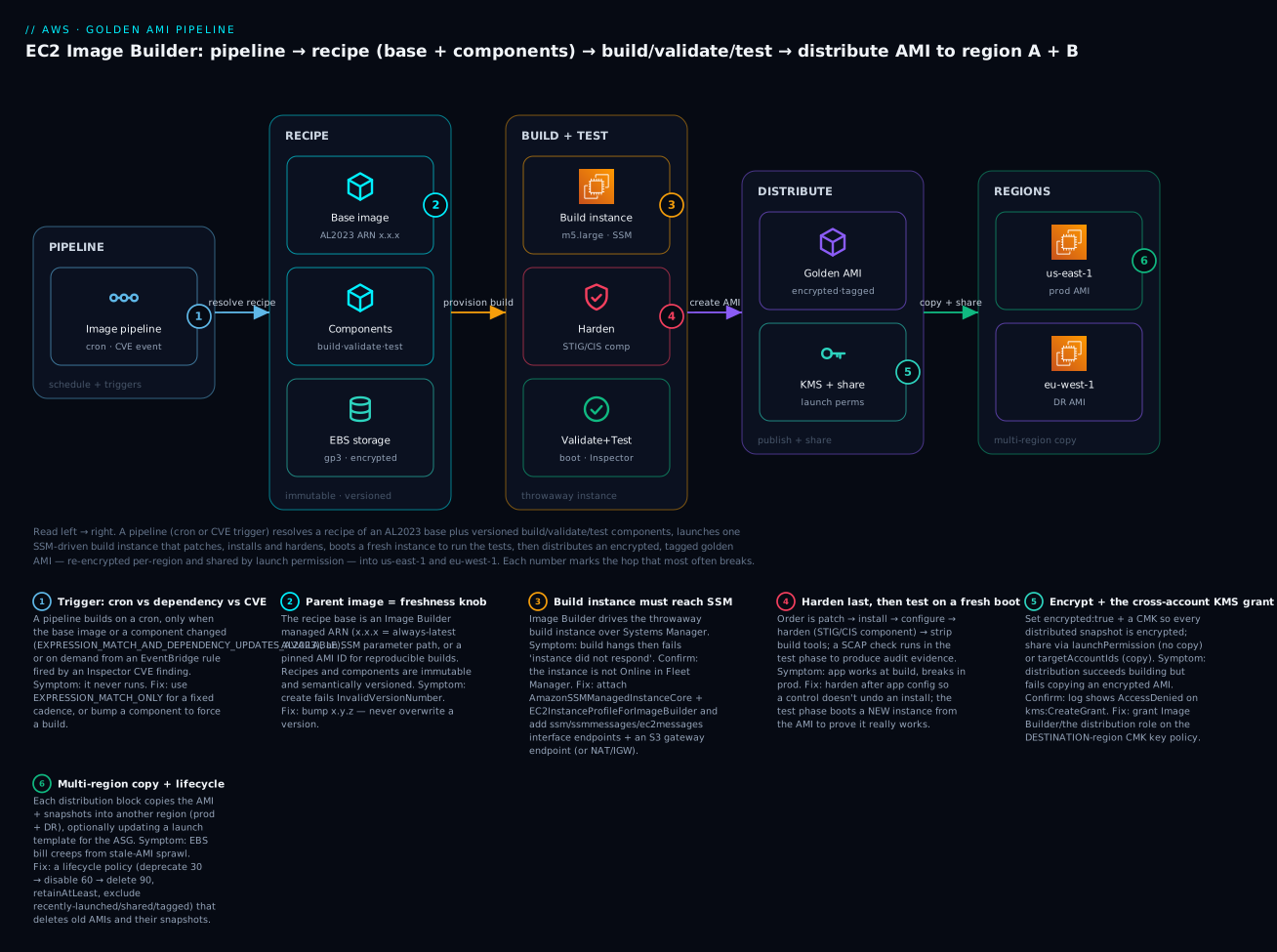
The diagram traces one pipeline run left to right: the image pipeline (triggered by cron or a CVE event) resolves its recipe (an Amazon Linux 2023 base image + your ordered build/validate/test components + an encrypted gp3 root), which the infrastructure configuration uses to launch a single throwaway build instance driven over SSM. That instance patches, installs, and applies the STIG/CIS hardening components, then Image Builder snapshots the disk and boots a second instance to run validate + test (boot test, Inspector). The finished, encrypted, tagged golden AMI is then handed to the distribution configuration, which re-encrypts with a per-region KMS key, sets launch permissions, and copies it into region A (us-east-1) and region B (eu-west-1). The numbered badges mark the hops where builds most often break: the trigger, the base-image choice, the build subnet/instance-profile, the hardening order, the cross-account KMS grant, and the multi-region copy.
Real-world scenario
FinlyPay, a fictional Indian payments startup, runs a PCI-DSS-scoped fleet of ~120 EC2 instances behind Auto Scaling groups in ap-south-1, with a DR footprint in ap-southeast-1. Their original build was a 400-line user-data script that patched the OS, installed the CloudWatch and their EDR agent, pulled the app from CodeArtifact, and applied a hand-written hardening script. It worked — until it didn’t. During a Diwali traffic spike the ASG tried to add 30 nodes; the distro mirror was rate-limiting, dnf failed on 11 of them, and those instances joined the load balancer unhealthy because the app never installed. Latency spiked, the on-call spent 40 minutes force-cycling instances, and the post-mortem action item was blunt: “get the build off the boot path.”
They adopted EC2 Image Builder. The team wrote three custom components — install-finlypay-agents (CloudWatch + EDR + the app runtime), install-finlypay-app (the service binary, pinned), and finlypay-baseline (their org hardening on top of stig-build-linux-medium) — and an image recipe on the AL2023 managed base with an encrypted gp3 root. The infrastructure configuration launched an m6i.large build instance in a private subnet with interface endpoints for SSM and an S3 gateway endpoint (PCI scope forbade a NAT to the internet), and shipped build logs to a locked-down S3 bucket. The distribution configuration re-encrypted the AMI with a per-region CMK and copied it to ap-south-1 and ap-southeast-1, updating the ASG’s launch template to the new version automatically.
The first cutover surfaced two classic failures. The private-subnet build hung for 30 minutes then failed with “instance did not respond” — they’d forgotten the ssmmessages and ec2messages interface endpoints, so SSM couldn’t drive the instance. Adding those fixed it. Then cross-region distribution failed on the DR copy because the ap-southeast-1 CMK’s key policy didn’t grant the Image Builder service the right to create a grant — a two-line key-policy fix. Once green, they wired a weekly cron(0 20 ? * sat *) rebuild plus an EventBridge rule so an Inspector critical finding triggered an immediate rebuild.
Six months later the numbers told the story: boot-to-healthy dropped from ~6 minutes to ~45 seconds, scale-outs stopped failing, and the PCI auditor accepted the per-version SCAP report as baseline evidence — no more screenshots of a hand-run script. A lifecycle policy (deprecate 30 / disable 60 / delete 90, retainAtLeast: 4) quietly reclaimed ~2.1 TB of orphaned snapshots that the old click-bake era had left behind, saving roughly ₹9,500/month in EBS snapshot storage. The one-line lesson the team repeats: the AMI is the deploy artifact; treat it like code — versioned, tested, and cleaned up.
Advantages and disadvantages
| Advantages | Disadvantages |
|---|---|
| Fast, predictable boots (work is pre-baked) | Upfront pipeline setup vs a quick script |
| Immutable, versioned, byte-identical fleet | A change means a rebuild, not a live edit |
| Build failures stay off the production launch path | Build compute cost per run (small, but real) |
| Native test phase proves the image boots | Longer feedback loop than editing a live host |
| Built-in multi-region + cross-account distribution | Cross-account/KMS setup has sharp edges |
| AWS-managed STIG/CIS/SCAP hardening | STIG-High can break apps without testing |
| Lifecycle policies kill snapshot sprawl | Must design retention or costs still creep |
| Managed service, no build orchestration to run | AWS-only (use Packer for multi-cloud) |
The trade-off resolves by workload. For fleets, ASGs, and regulated workloads, the immutability, testing, and hardening are decisive — the upfront pipeline pays for itself the first time a scale-out doesn’t fail. For a single box or fast-moving config, a thin user-data script is simpler and the rebuild loop is overhead you don’t need. Most teams land on a thick bake + thin bootstrap: golden AMI for everything stable and security-relevant, a short idempotent user-data for per-instance glue.
Hands-on lab
You’ll build a golden AMI on Amazon Linux 2023: a custom component that patches, installs nginx, hardens, and tests; an image recipe; an infrastructure configuration; a distribution config to two regions; a pipeline; then run it, verify the AMI, share it, and tear everything down. Do it in the CLI first, then the Terraform equivalent.
⚠️ Costs money: the build launches a short-lived EC2 instance (a few minutes of
m5.large), creates EBS snapshots, and copies them to a second region (cross-region data transfer + duplicated snapshot storage). All of it is torn down in the teardown step. Run in a sandbox account.
Step 0 — Prerequisites and variables
export AWS_REGION=us-east-1
export DR_REGION=eu-west-1
export ACCT=$(aws sts get-caller-identity --query Account --output text)
export BUCKET=imgbuilder-logs-$ACCT-$AWS_REGION
aws s3 mb s3://$BUCKET --region $AWS_REGION
Step 1 — IAM instance profile for the build instance
aws iam create-role --role-name ImgBuilderInstanceRole \
  --assume-role-policy-document '{"Version":"2012-10-17","Statement":[{"Effect":"Allow","Principal":{"Service":"ec2.amazonaws.com"},"Action":"sts:AssumeRole"}]}'

aws iam attach-role-policy --role-name ImgBuilderInstanceRole \
  --policy-arn arn:aws:iam::aws:policy/EC2InstanceProfileForImageBuilder
aws iam attach-role-policy --role-name ImgBuilderInstanceRole \
  --policy-arn arn:aws:iam::aws:policy/AmazonSSMManagedInstanceCore

aws iam create-instance-profile --instance-profile-name ImgBuilderInstanceProfile
aws iam add-role-to-instance-profile \
  --instance-profile-name ImgBuilderInstanceProfile --role-name ImgBuilderInstanceRole
Expected: each call returns JSON with the created ARN. The two managed policies are the non-negotiable pair — without AmazonSSMManagedInstanceCore the build will hang.
Step 2 — Author and create the component
Save the HardenNginxAL2023 component YAML shown earlier as harden-nginx.yaml, then:
COMPONENT_ARN=$(aws imagebuilder create-component \
  --name harden-nginx-al2023 --semantic-version 1.0.0 \
  --platform Linux --supported-os-versions "Amazon Linux 2023" \
  --data file://harden-nginx.yaml \
  --query 'componentBuildVersionArn' --output text)
echo "$COMPONENT_ARN"
Expected: an ARN like arn:aws:imagebuilder:us-east-1:<acct>:component/harden-nginx-al2023/1.0.0/1. Re-running with the same --semantic-version fails with InvalidVersionNumber — versions are immutable; bump to 1.0.1.
Step 3 — Image recipe on Amazon Linux 2023
RECIPE_ARN=$(aws imagebuilder create-image-recipe \
  --name golden-nginx-al2023 --semantic-version 1.0.0 \
  --parent-image "arn:aws:imagebuilder:$AWS_REGION:aws:image/amazon-linux-2023-x86/x.x.x" \
  --components componentArn=$COMPONENT_ARN \
  --block-device-mappings '[{"deviceName":"/dev/xvda","ebs":{"volumeSize":10,"volumeType":"gp3","encrypted":true,"deleteOnTermination":true}}]' \
  --query 'imageRecipeArn' --output text)
echo "$RECIPE_ARN"
Expected: arn:aws:imagebuilder:...:image-recipe/golden-nginx-al2023/1.0.0. The x.x.x parent-image ARN auto-resolves to the latest AWS-published AL2023 base, and encrypted:true guarantees the golden AMI’s snapshots are encrypted.
Step 4 — Infrastructure configuration
INFRA_ARN=$(aws imagebuilder create-infrastructure-configuration \
  --name imgbuilder-infra \
  --instance-profile-name ImgBuilderInstanceProfile \
  --instance-types m5.large \
  --logging '{"s3Logs":{"s3BucketName":"'$BUCKET'","s3KeyPrefix":"build-logs"}}' \
  --instance-metadata-options '{"httpTokens":"required","httpPutResponseHopLimit":2}' \
  --terminate-instance-on-failure \
  --query 'infrastructureConfigurationArn' --output text)
echo "$INFRA_ARN"
Expected: an infra config ARN. With no --subnet-id it uses the default VPC (which has an internet gateway, so the build can reach SSM and package repos). httpTokens=required forces IMDSv2 on the build instance.
Step 5 — Distribution configuration (two regions, encrypted, shared)
cat > dist.json <<EOF
[
  {"region":"$AWS_REGION","amiDistributionConfiguration":{
     "name":"golden-nginx-{{ imagebuilder:buildDate }}",
     "amiTags":{"app":"nginx","managedBy":"imagebuilder"}}},
  {"region":"$DR_REGION","amiDistributionConfiguration":{
     "name":"golden-nginx-{{ imagebuilder:buildDate }}",
     "amiTags":{"app":"nginx","role":"dr"}}}
]
EOF

DIST_ARN=$(aws imagebuilder create-distribution-configuration \
  --name imgbuilder-dist --distributions file://dist.json \
  --query 'distributionConfigurationArn' --output text)
echo "$DIST_ARN"
Expected: a distribution config ARN. This copies the AMI to both us-east-1 and eu-west-1. (To share cross-account, add "launchPermission":{"userIds":["111122223333"]} inside amiDistributionConfiguration.)
Step 6 — Create the pipeline and run it
PIPELINE_ARN=$(aws imagebuilder create-image-pipeline \
  --name golden-nginx-pipeline \
  --image-recipe-arn $RECIPE_ARN \
  --infrastructure-configuration-arn $INFRA_ARN \
  --distribution-configuration-arn $DIST_ARN \
  --image-tests-configuration '{"imageTestsEnabled":true,"timeoutMinutes":60}' \
  --schedule '{"scheduleExpression":"cron(0 9 ? * mon *)","pipelineExecutionStartCondition":"EXPRESSION_MATCH_AND_DEPENDENCY_UPDATES_AVAILABLE"}' \
  --status ENABLED \
  --query 'imagePipelineArn' --output text)

BUILD_ARN=$(aws imagebuilder start-image-pipeline-execution \
  --image-pipeline-arn $PIPELINE_ARN --query 'imageBuildVersionArn' --output text)
echo "$BUILD_ARN"
Expected: the pipeline builds weekly only when the base image or component changed, and start-image-pipeline-execution kicks off a manual run now, returning the build version ARN.
Step 7 — Watch the build and verify the AMI
# Poll until AVAILABLE or FAILED (build+test ~15-25 min)
watch -n 30 "aws imagebuilder get-image --image-build-version-arn $BUILD_ARN \
  --query 'image.state.status' --output text"

# When AVAILABLE, get the AMI IDs per region:
aws imagebuilder get-image --image-build-version-arn $BUILD_ARN \
  --query 'image.outputResources.amis[].{Region:region,AMI:image,Name:name}' --output table
Expected output (once AVAILABLE):
------------------------------------------------------------
|                         GetImage                         |
+------------+---------------------------+-----------------+
|  Region    |  AMI                      |  Name           |
+------------+---------------------------+-----------------+
|  us-east-1 |  ami-0abc123def456...     | golden-nginx-...|
|  eu-west-1 |  ami-0def456abc789...     | golden-nginx-...|
+------------+---------------------------+-----------------+
Confirm the AMI is encrypted and inspect its snapshot:
AMI=$(aws imagebuilder get-image --image-build-version-arn $BUILD_ARN \
  --query "image.outputResources.amis[?region=='$AWS_REGION'].image | [0]" --output text)
aws ec2 describe-images --image-ids $AMI \
  --query 'Images[0].BlockDeviceMappings[0].Ebs.{Encrypted:Encrypted,Snapshot:SnapshotId}'
Expected: "Encrypted": true with a snapshot ID — proof the golden AMI is encrypted.
Step 8 — Share the AMI to another account (optional)
aws ec2 modify-image-attribute --image-id $AMI \
  --launch-permission "Add=[{UserId=111122223333}]" --region $AWS_REGION
Expected: no output (success). Account 111122223333 can now launch this AMI (same region). For a repeatable share, put launchPermission in the distribution config instead of doing it by hand.
Step 9 — Teardown
# Deregister AMIs + delete snapshots in both regions
for R in $AWS_REGION $DR_REGION; do
  A=$(aws imagebuilder get-image --image-build-version-arn $BUILD_ARN \
      --query "image.outputResources.amis[?region=='$R'].image | [0]" --output text)
  SNAP=$(aws ec2 describe-images --image-ids $A --region $R \
      --query 'Images[0].BlockDeviceMappings[0].Ebs.SnapshotId' --output text)
  aws ec2 deregister-image --image-id $A --region $R
  aws ec2 delete-snapshot --snapshot-id $SNAP --region $R
done

# Delete Image Builder resources
aws imagebuilder delete-image-pipeline --image-pipeline-arn $PIPELINE_ARN
aws imagebuilder delete-distribution-configuration --distribution-configuration-arn $DIST_ARN
aws imagebuilder delete-infrastructure-configuration --infrastructure-configuration-arn $INFRA_ARN
aws imagebuilder delete-image-recipe --image-recipe-arn $RECIPE_ARN
aws imagebuilder delete-component --component-build-version-arn $COMPONENT_ARN

# IAM + bucket
aws iam remove-role-from-instance-profile --instance-profile-name ImgBuilderInstanceProfile --role-name ImgBuilderInstanceRole
aws iam delete-instance-profile --instance-profile-name ImgBuilderInstanceProfile
aws iam detach-role-policy --role-name ImgBuilderInstanceRole --policy-arn arn:aws:iam::aws:policy/EC2InstanceProfileForImageBuilder
aws iam detach-role-policy --role-name ImgBuilderInstanceRole --policy-arn arn:aws:iam::aws:policy/AmazonSSMManagedInstanceCore
aws iam delete-role --role-name ImgBuilderInstanceRole
aws s3 rb s3://$BUCKET --force
Verify clean: aws imagebuilder list-image-pipelines --query 'imagePipelineList[].name' should no longer list golden-nginx-pipeline, and aws ec2 describe-images --owners self should not show the golden AMIs.
The same thing in Terraform
terraform {
  required_providers { aws = { source = "hashicorp/aws", version = "~> 5.0" } }
}
provider "aws" { region = "us-east-1" }
provider "aws" { alias = "dr", region = "eu-west-1" }

data "aws_caller_identity" "me" {}

# --- IAM instance profile ---
resource "aws_iam_role" "build" {
  name = "ImgBuilderInstanceRole"
  assume_role_policy = jsonencode({
    Version = "2012-10-17"
    Statement = [{ Effect = "Allow", Action = "sts:AssumeRole",
      Principal = { Service = "ec2.amazonaws.com" } }]
  })
}
resource "aws_iam_role_policy_attachment" "core" {
  role       = aws_iam_role.build.name
  policy_arn = "arn:aws:iam::aws:policy/AmazonSSMManagedInstanceCore"
}
resource "aws_iam_role_policy_attachment" "ib" {
  role       = aws_iam_role.build.name
  policy_arn = "arn:aws:iam::aws:policy/EC2InstanceProfileForImageBuilder"
}
resource "aws_iam_instance_profile" "build" {
  name = "ImgBuilderInstanceProfile"
  role = aws_iam_role.build.name
}

# --- Component (inline YAML) ---
resource "aws_imagebuilder_component" "harden" {
  name       = "harden-nginx-al2023"
  platform   = "Linux"
  version    = "1.0.0"
  supported_os_versions = ["Amazon Linux 2023"]
  data       = file("${path.module}/harden-nginx.yaml")
}

# --- Recipe ---
resource "aws_imagebuilder_image_recipe" "golden" {
  name         = "golden-nginx-al2023"
  version      = "1.0.0"
  parent_image = "arn:aws:imagebuilder:us-east-1:aws:image/amazon-linux-2023-x86/x.x.x"
  component { component_arn = aws_imagebuilder_component.harden.arn }
  block_device_mapping {
    device_name = "/dev/xvda"
    ebs {
      volume_size = 10
      volume_type = "gp3"
      encrypted   = true
      delete_on_termination = true
    }
  }
}

# --- Infrastructure configuration ---
resource "aws_imagebuilder_infrastructure_configuration" "infra" {
  name                          = "imgbuilder-infra"
  instance_profile_name         = aws_iam_instance_profile.build.name
  instance_types                = ["m5.large"]
  terminate_instance_on_failure = true
  instance_metadata_options {
    http_tokens                 = "required"
    http_put_response_hop_limit = 2
  }
}

# --- Distribution to two regions ---
resource "aws_imagebuilder_distribution_configuration" "dist" {
  name = "imgbuilder-dist"
  distribution {
    region = "us-east-1"
    ami_distribution_configuration {
      name       = "golden-nginx-{{ imagebuilder:buildDate }}"
      ami_tags   = { app = "nginx", managedBy = "imagebuilder" }
    }
  }
  distribution {
    region = "eu-west-1"
    ami_distribution_configuration {
      name     = "golden-nginx-{{ imagebuilder:buildDate }}"
      ami_tags = { app = "nginx", role = "dr" }
    }
  }
}

# --- Pipeline ---
resource "aws_imagebuilder_image_pipeline" "pipe" {
  name                             = "golden-nginx-pipeline"
  image_recipe_arn                 = aws_imagebuilder_image_recipe.golden.arn
  infrastructure_configuration_arn = aws_imagebuilder_infrastructure_configuration.infra.arn
  distribution_configuration_arn   = aws_imagebuilder_distribution_configuration.dist.arn
  status                           = "ENABLED"
  image_tests_configuration {
    image_tests_enabled = true
    timeout_minutes     = 60
  }
  schedule {
    schedule_expression                = "cron(0 9 ? * mon *)"
    pipeline_execution_start_condition = "EXPRESSION_MATCH_AND_DEPENDENCY_UPDATES_AVAILABLE"
  }
}
Run with terraform init && terraform apply. Trigger a build with the CLI (aws imagebuilder start-image-pipeline-execution --image-pipeline-arn $(terraform output -raw ...)) or add an aws_imagebuilder_image resource to build on apply. Tear down with terraform destroy (deregister the produced AMIs separately — Terraform doesn’t own images built by a run it didn’t create).
Common mistakes & troubleshooting
The playbook. Symptom → root cause → how to confirm → fix. These are the failures that actually happen.
| # | Symptom | Root cause | Confirm (command / console path) | Fix |
|---|---|---|---|---|
| 1 | Build stuck in BUILDING, then fails “instance did not respond” |
Build instance can’t reach SSM (private subnet, no NAT/endpoints) | Console → EC2 → the build instance → Systems Manager “Ping status” is not Online; no SSM agent registration |
Add interface endpoints ssm, ssmmessages, ec2messages + S3 gateway endpoint, or use a subnet with NAT/IGW |
| 2 | Build fails immediately with a permissions error | Instance profile missing AmazonSSMManagedInstanceCore or EC2InstanceProfileForImageBuilder |
aws iam list-attached-role-policies --role-name <role> |
Attach both managed policies to the build role |
| 3 | Component step fails: dnf: command not found / package not found |
Build subnet can’t reach package repos, or wrong OS mirror | Read the failed step’s log in the S3 logs bucket / CloudWatch | Give egress 443 to repos (NAT/IGW) or mirror internally; verify supportedOsVersions |
| 4 | create-component fails InvalidVersionNumber |
Re-creating an existing semantic version | aws imagebuilder list-component-build-versions --component-version-arn ... |
Bump the version (1.0.0 → 1.0.1); versions are immutable |
| 5 | Build succeeds but test phase fails | Service enabled at build but doesn’t start on a clean boot | Read test-phase logs; SSH into a test instance (terminateInstanceOnFailure=false) |
Fix the unit/dependency; test with systemctl is-active on a fresh boot, not just at build |
| 6 | Reboot loop — build never finishes, keeps rebooting | A step reboots unconditionally on every pass | Watch the SSM automation / instance reboot count in logs | Guard the reboot with if: so it runs once; remove reboots that don’t converge |
| 7 | Distribution to another region fails on encrypted AMI | Target-region KMS key policy doesn’t allow Image Builder to CreateGrant/Encrypt |
Distribution log shows AccessDenied on kms:CreateGrant |
Add the Image Builder service + distribution role to the target-region CMK key policy |
| 8 | Cross-account copy fails | Target account lacks the EC2ImageBuilderDistributionCrossAccountRole |
Distribution log: assume-role failure into target account | Create the cross-account distribution role in the target account with the required trust |
| 9 | Golden AMI is not encrypted | No kmsKeyId/encrypted set and account EBS default-encryption off |
aws ec2 describe-images --image-ids <ami> --query 'Images[0].BlockDeviceMappings[0].Ebs.Encrypted' = false |
Set encrypted:true (+ kmsKeyId) in block device mapping, or enable EBS default encryption |
| 10 | Instances launched from the AMI can’t decrypt the volume | CMK used for the AMI not shared with the launching account/role | Launch fails with Client.InternalError / KMS access denied |
Grant the launching principal kms:Decrypt/CreateGrant on the CMK |
| 11 | Hundreds of old AMIs + snapshots, EBS bill creeping | No lifecycle policy — stale-AMI sprawl | aws ec2 describe-images --owners self --query 'length(Images)'; snapshot count/size |
Create a lifecycle policy (deprecate→disable→delete) with retainAtLeast + exclusions |
| 12 | App works at build, breaks in prod after hardening | Hardening ran before app config and closed a needed port/perm | Diff the SCAP report vs the app’s requirements; check sshd/firewall/SELinux |
Reorder: patch → install → configure → harden last; test the hardened image |
| 13 | Pipeline never runs on schedule | pipelineExecutionStartCondition = dependency-updates but nothing changed |
aws imagebuilder get-image-pipeline shows the condition |
Use EXPRESSION_MATCH_ONLY for a fixed cadence, or bump a component to force a build |
| 14 | Build instance left running after failure | terminateInstanceOnFailure=false (intentional for debug) or an orphan |
aws ec2 describe-instances --filters Name=tag:CreatedBy,Values=EC2ImageBuilder |
Terminate manually after debugging; set true for hands-off runs |
| 15 | Container build fails pushing to ECR | Missing EC2InstanceProfileForImageBuilderECRContainerBuilds or repo doesn’t exist |
Build log: ECR AccessDenied / repo not found |
Attach the ECR container policy; pre-create the ECR repo |
Error / status reference:
| Error / status | Meaning | Likely cause | Fix |
|---|---|---|---|
FAILED state |
A phase failed | Build/validate/test step non-zero exit | Read the S3/CloudWatch logs for the failing step |
| “instance did not respond” | SSM never drove the instance | No SSM connectivity/permissions | Endpoints + AmazonSSMManagedInstanceCore |
InvalidVersionNumber |
Version already exists | Immutable versioning | Bump x.y.z |
ResourceDependencyException on delete |
Resource still referenced | Deleting a recipe used by a pipeline | Delete the pipeline first, then the recipe |
AccessDenied on kms:CreateGrant |
Distribution can’t use target CMK | Key policy too tight | Grant Image Builder/dist role on the CMK |
CallerLimitExceeded / throttling |
API/limit hit | Too many concurrent builds/resources | Request a quota increase; stagger schedules |
Client.InternalError on launch |
KMS/permissions on the AMI’s snapshot | CMK not shared to launcher | Share the CMK; grant Decrypt |
The three nastiest real failures, in prose:
The private-subnet SSM hang. By far the most common. Image Builder drives the build instance over Systems Manager, so if the instance can’t reach the SSM endpoints, the build sits in BUILDING until it times out (~roughly half an hour) and fails with “the instance did not respond.” In a public subnet with an internet gateway this “just works.” In a locked-down private subnet — exactly where security-conscious teams put it — you must add interface VPC endpoints for ssm, ssmmessages, and ec2messages, plus an S3 gateway endpoint (components and logs traverse S3). Symptom: the instance shows up in EC2 but never appears as “Online” in Fleet Manager. Fix the endpoints and the same recipe builds in minutes.
The cross-account KMS grant. When you distribute an encrypted AMI to another region or account, EC2 must re-encrypt the snapshot with a key in that destination. If that destination CMK’s key policy doesn’t allow the Image Builder distribution path to kms:CreateGrant and kms:Encrypt, distribution fails after a successful build — infuriating because the AMI built fine and only the copy broke. The fix is a key-policy statement on the destination key granting the Image Builder service (and the cross-account distribution role) the grant/encrypt actions. Always test distribution to every target the first time, not just the build region.
The test-phase reboot loop. A build step that unconditionally reboots (say, to apply a kernel update) will reboot on every resume, because Image Builder checkpoints and re-enters the document — if the reboot isn’t guarded by a condition that becomes false after the first pass, it loops until the pipeline times out. Guard reboots with an if: that checks whether the change already took effect (e.g. compare the running kernel to the installed one), so the reboot fires once and the build converges.
Best practices
- Bake thick, bootstrap thin. Everything stable, slow, and security-relevant goes in the image; keep user-data to per-instance glue, idempotent, under a page.
- Version everything and pin deliberately. Use semantic versions for components and recipes; pin the parent image with an explicit ARN for reproducible builds, or
x.x.xwhen you want the latest base. - Always enable the test phase.
simple-boot-test+reboot-test+ a health-check test catch “builds fine, won’t boot” before it hits prod. - Harden last, after install and config. Patch → install → configure → harden → strip build tools. Run a SCAP check in the test phase and archive the report.
- Encrypt the AMI with a CMK and force IMDSv2 in both the infra config and the image.
- Put the build instance where it can reach SSM. Public subnet, or private subnet with
ssm/ssmmessages/ec2messagesendpoints + S3 gateway endpoint. - Ship build logs to S3/CloudWatch and wire SNS notifications — you cannot debug a failed build you didn’t log.
- Use dependency-update triggers (
EXPRESSION_MATCH_AND_DEPENDENCY_UPDATES_AVAILABLE) to avoid rebuilding identical images every week. - Wire CVE-driven rebuilds with Inspector → EventBridge →
StartImagePipelineExecutionfor critical findings. - Always have a lifecycle policy (deprecate → disable → delete,
retainAtLeast, exclusions) so snapshots don’t sprawl. - Roll new AMIs via ASG instance refresh, not by editing live hosts — that’s the whole point of immutability.
- Layer images — a shared org “base” golden AMI, then per-app AMIs built from it — so hardening lives in one place.
Security notes
Golden AMIs are a security win precisely because they make the baseline provable and uniform, but the build pipeline is itself a privileged system — treat it accordingly.
- Least privilege on the instance profile. The build role can pull your artifacts and (often) reach the internet. Scope its S3/KMS permissions to exactly the buckets/keys it needs; don’t attach
AdministratorAccessfor convenience. - Encrypt at rest. Set
encrypted:true+ a CMK in the recipe’s block device mappings so every snapshot — build region and every distribution target — is encrypted. Manage the per-region CMKs and their key policies deliberately (that’s the cross-account gotcha). - Network isolation. Run the build in a private subnet with VPC endpoints when compliance forbids internet egress; the SG needs egress to SSM/S3/repos and no inbound.
- Force IMDSv2 (
httpTokens=required) on the build instance and bake it into the image to close SSRF-to-credential paths. - No secrets in the image. Never bake credentials, keys, or tokens. Fetch them at boot from Secrets Manager/Parameter Store via a scoped instance role. A baked secret ships to every account you share the AMI with.
- Strip build tooling. Remove compilers, package caches, and SSH keys used only for building; smaller image, smaller attack surface.
- Sign and scan. Run
inspector-testin-pipeline and Inspector v2 continuously on published AMIs; gate on critical CVEs. - Control sharing. Prefer
launchPermissionto Org/OU ARNs over pasting account IDs; audit who can launch each AMI. A shared AMI is only as trustworthy as its baking pipeline.
Cost & sizing
The Image Builder service itself is free — you pay for the resources a build consumes. That reframes cost around the build instance, snapshots, and copies:
| Cost driver | What you pay for | Rough figure |
|---|---|---|
| Build/test instance | EC2 for the minutes a build runs | m5.large ≈ $0.096/hr → ~$0.03–0.05 per ~20-min build |
| EBS snapshots (per AMI) | Snapshot storage per region | ~$0.05/GB-month → a 10 GB AMI ≈ $0.50/mo per region |
| Cross-region distribution | Data transfer + duplicated snapshots | Snapshot copy transfer + storage in each extra region |
| Cross-account copy | Duplicated snapshots per account | Same snapshot storage, multiplied |
| S3 build logs | Log storage | Negligible (KBs–MBs per build) |
| SNS / EventBridge | Notifications / triggers | Effectively free at this volume |
The real money is snapshot sprawl, not build compute. A weekly pipeline across 3 regions retained forever is ~156 AMIs/year × 3 regions × snapshot size — easily hundreds of GB-months of dead storage. A lifecycle policy that deletes past 90 days (keeping ≥4) turns an unbounded, growing bill into a small fixed one. In INR terms, the lab above costs a few rupees per build and a few rupees/month of snapshot storage; the FinlyPay lifecycle cleanup reclaimed ~₹9,500/month purely by deleting orphaned snapshots. Right-size the build instance for build speed (bigger instance = shorter build = cheaper per build up to a point), and right-size the golden AMI’s root volume to what the bake needs — don’t ship a 100 GB root when 10 GB does. There is no free-tier line item for Image Builder because the service is free; the build’s EC2/EBS usage counts against the normal EC2 free tier.
Interview & exam questions
Q1. What is a golden AMI and why use one? (SAA-C03) A golden AMI is a pre-baked, versioned image containing the OS, patches, agents, runtime, and hardening baseline — everything stable and security-relevant. It gives fast, consistent boots, an immutable/auditable fleet, and moves the software build off the instance launch path into a controlled pipeline.
Q2. Bake vs bootstrap — how do you decide what goes where? Bake anything slow, stable, or security-relevant (OS patches, agents, runtime, hardening, usually the app). Bootstrap only per-instance, per-launch data (hostname, environment, secrets fetched from Secrets Manager, feature flags). The production pattern is a thick bake with a thin, idempotent user-data bootstrap.
Q3. Name the six core EC2 Image Builder resources. Image recipe (parent image + components + storage), component (YAML build/validate/test doc), infrastructure configuration (the build instance), distribution configuration (regions/accounts + permissions), image pipeline (schedule/triggers), and the image (the built AMI/container version). Lifecycle policy manages cleanup.
Q4. What are the three component phases and where does each run?
build and validate run on the build instance before the AMI is snapshotted; test runs on a new instance launched from the built AMI. Build/validate prove the build is correct; test proves the image actually boots and behaves.
Q5. A build hangs and fails with “instance did not respond.” Cause and fix? (SOA-C02)
The build instance can’t reach Systems Manager (Image Builder drives it over SSM). Usually a private subnet without NAT or VPC endpoints, or a missing AmazonSSMManagedInstanceCore policy. Fix: add ssm/ssmmessages/ec2messages interface endpoints + an S3 gateway endpoint, and attach the SSM managed policy.
Q6. How do you distribute a golden AMI to multiple regions and share it cross-account?
The distribution configuration copies the AMI per region and, per region, sets launchPermission (share, no copy) or targetAccountIds (copy into the account). Encrypted AMIs need the destination CMK’s key policy to grant Image Builder kms:CreateGrant/Encrypt, and cross-account copies need the distribution cross-account role in the target account.
Q7. How do you keep old AMIs and snapshots from piling up?
A lifecycle policy with a deprecate → disable → delete ramp, AGE or COUNT filters, a retainAtLeast floor, and exclusion rules (public, recently launched, shared, or tagged keep=true). Delete removes the AMI and its snapshots.
Q8. How do you drive a CVE-based rebuild? (SCS-C02)
Amazon Inspector continuously scans published AMIs and instances; an EventBridge rule matches a finding above a severity threshold and calls StartImagePipelineExecution to rebuild from a patched base. Add the inspector-test component to fail a build that ships a known critical CVE.
Q9. Image Builder vs Packer — when each? Image Builder is AWS-managed with native test phases, cross-account/region distribution, managed STIG/CIS components, and lifecycle cleanup — best when you’re AWS-only. Packer is multi-cloud, uses HCL + provisioners (Ansible/Chef), and with HCP Packer adds cross-cloud image provenance/revocation — best for portability or existing HCL/Ansible investments.
Q10. How do you apply and prove a security baseline?
Add AWS-managed hardening components (stig-build-linux-medium, CIS components) after install/config, then run scap-compliance-checker-linux in the test phase to produce a compliance report you archive per image version as audit evidence. Harden last so app config doesn’t undo controls.
Q11. What causes a test-phase reboot loop and how do you fix it?
A step that reboots unconditionally on every resume; Image Builder checkpoints and re-enters the document, so an unguarded reboot never converges. Guard it with an if: condition that becomes false after the change takes effect, so the reboot fires once.
Q12. Why encrypt the golden AMI and what breaks if you don’t manage keys?
Encryption protects data at rest across every region/account you distribute to. If you don’t set encrypted/kmsKeyId and account default encryption is off, the AMI ships unencrypted; if you use a CMK but don’t share it with launching accounts, instances fail to launch with KMS access-denied errors.
Quick check
- Which two component phases run on the build instance before the AMI is snapshotted, and which runs on a fresh instance after?
- Your encrypted AMI builds fine but distribution to
eu-west-1fails with a KMS error. Where do you fix it? - What’s the single most common cause of a build that hangs then fails “instance did not respond”?
- Name the deprecate → ? → ? ramp a lifecycle policy uses, and which step deletes snapshots.
- Give one thing you should always bootstrap (never bake) and one you should always bake.
Answers
buildandvalidaterun on the build instance pre-snapshot;testruns on a new instance launched from the built AMI.- On the destination-region CMK’s key policy — grant the Image Builder service/distribution role
kms:CreateGrantandkms:Encrypt. KMS keys are regional, so theeu-west-1key must allow it. - The build instance can’t reach Systems Manager (private subnet without NAT/VPC endpoints, or missing
AmazonSSMManagedInstanceCore) — Image Builder drives the instance over SSM. - Deprecate → disable → delete; delete removes the AMI and its EBS snapshots.
- Always bootstrap: secrets (fetch from Secrets Manager), hostname, or environment. Always bake: OS patches, agents, runtime, or the hardening baseline.
Glossary
| Term | Definition |
|---|---|
| Golden AMI | A pre-baked, versioned image with OS, patches, agents, runtime, and hardening — the immutable deploy artifact |
| Bake | Doing configuration at image-build time and freezing the result |
| Bootstrap | Doing configuration at instance-launch time (user-data/cloud-init/config mgmt) |
| Immutable infrastructure | Never modifying running servers in place; changes ship as new images |
| Image recipe | Parent image + ordered components + storage; immutable, semantically versioned |
| Component | A versioned YAML/JSON doc of build/validate/test steps using action modules |
| Action module | The verb in a step — ExecuteBash, UpdateOS, S3Download, Reboot, Assert, … |
| Infrastructure configuration | Defines the throwaway build/test instance (profile, subnet, SG, logging) |
| Distribution configuration | Where the output goes: regions, accounts, launch permissions, KMS re-encryption |
| Image pipeline | Binds recipe + infra + distribution and adds schedule/triggers |
| STIG / CIS | Security hardening benchmarks; AWS ships managed components to apply them |
| SCAP | Security Content Automation Protocol — scans an image against a benchmark, emits a report |
| Lifecycle policy | Rules to deprecate/disable/delete old AMIs and snapshots automatically |
| Instance refresh | ASG mechanism to roll a fleet onto a new AMI version |
| Parent image | The base AMI a recipe builds from (managed ARN, SSM path, AMI ID, or your own) |
Next steps
- Consume the AMI in a fleet: wire the golden AMI into a launch template and Auto Scaling group, and roll new versions with instance refresh — the immutable-deploy payoff.
- Keep the last-mile thin: revisit EC2 user-data and cloud-init bootstrapping to move everything heavy out of boot and into components.
- Right-size build and runtime instances: use choosing the right EC2 instance type to pick a fast build instance and an efficient runtime shape.
- Patch between rebuilds: stand up Systems Manager Patch Manager with a patch baseline and maintenance window so live instances stay current until the next golden-AMI build.
- Layer your images: build a shared, hardened org “base” golden AMI, then build per-app AMIs from it so the security baseline lives in exactly one recipe.