At 9:58 on a Friday your clickstream service is fine. At 10:00 a marketing push lands and the ingest rate quadruples, and by 10:03 your producers are throwing ProvisionedThroughputExceededException, your consumer’s IteratorAge is climbing past ten minutes, and the “real-time” dashboard the CEO is watching is now twenty minutes stale. Nothing is down — every component returns 200s — but the pipeline has silently fallen behind, and the events that expired out of the buffer while you were paging the on-call are gone for good. This is the failure mode that separates people who have used streaming from people who have read about it: the problems are never a crash, they are backpressure, skew, and lag.
Amazon Kinesis is the AWS family for exactly this: getting a firehose of events from thousands of producers into somewhere useful, in seconds, without losing ordering or dropping records under load. It has two members people constantly confuse. Kinesis Data Streams (KDS) is a durable, replayable, sharded log — think a managed Kafka topic — that many independent consumers can read at their own pace, rewinding up to a year. Amazon Data Firehose (formerly Kinesis Data Firehose) is a fully managed delivery pipe with no shards to run: it buffers, optionally transforms, converts to columnar formats, and lands data in S3, Redshift, OpenSearch, Splunk, Iceberg or an HTTP endpoint. One gives you a replayable stream you build consumers on; the other gives you managed load-and-forget delivery. Choosing wrong — or worse, not knowing they are different — is how teams end up rebuilding a pipeline six months in.
This article is the hands-on, production-grade tour. You will learn the shard as the atomic unit of throughput and ordering, why a bad partition key creates a hot shard that no capacity can fix, every producer (SDK PutRecords, the KPL, the Kinesis Agent) and consumer (KCL, Lambda event source mapping, enhanced fan-out), retention and resharding, and the IteratorAge metric that tells you the truth about lag. Then you will learn Firehose end to end — buffering, the Lambda transform contract, Parquet conversion against a Glue schema, dynamic partitioning, retry and S3 backup — and the crisp KDS vs Firehose vs SQS vs Amazon MSK decision. You will build the whole thing in a copy-pasteable aws CLI + Terraform lab that produces records, transforms them, lands Parquet in S3, and queries it in Athena — then tear it down. And you will get a 15-row troubleshooting playbook for the day the push lands.
What problem this solves
The pain is not “we need a message bus.” The pain is that high-volume event data has four hard requirements at once — durable buffering so a slow consumer never drops data, ordering so a state machine can be rebuilt from the log, replay so a new consumer (or a bug fix) can reprocess history, and managed delivery so analytics land in a queryable lake without a fleet of servers — and no single primitive gives you all four. Kinesis splits the problem: KDS owns durable-ordered-replayable, Firehose owns managed-delivery, and you compose them.
| Symptom in production | Root cause (a design gap) | What Kinesis gives you instead |
|---|---|---|
| A slow consumer drops events under a traffic spike | You put ingestion behind a synchronous API or an in-memory queue with no durable buffer | KDS decouples producers from consumers with a durable log; producers keep writing while consumers catch up |
| A bug corrupted a day of derived data and you cannot rebuild it | Your transport deletes messages on read (a queue), so history is gone | KDS retention (24 h–365 d) lets you rewind and reprocess from any point |
| Two teams both need the raw event feed and are fighting over it | One queue = one logical consumer group; a second reader steals messages | KDS supports many independent consumers, each with its own position, and enhanced fan-out for dedicated throughput |
| One “power user” tenant makes the whole pipeline lag | A low-cardinality partition key concentrates traffic on one shard | Higher-cardinality keys spread load across shards; on-demand absorbs skew automatically |
| Landing clickstream in the lake needs a Spark job and a server fleet | You hand-rolled buffering, batching, compression and partitioning | Firehose buffers, transforms, converts to Parquet and writes partitioned S3 objects with zero servers |
| Athena queries scan terabytes of raw JSON and cost a fortune | You dumped raw JSON to S3 with no format or partitioning | Firehose Parquet conversion + Hive partitions cut bytes scanned by 10–100× |
| Events arrive but the dashboard is minutes behind | Buffering interval too long, or the consumer is under-provisioned | Tune Firehose buffer hints; watch IteratorAge; add enhanced fan-out |
Who hits this: anyone building clickstream analytics, IoT telemetry, application/security log pipelines, change-data-capture fan-out, real-time metrics, or fraud/anomaly scoring. The teams that thrive treat Kinesis as two purpose-built tools and pick per workload; the teams that suffer reach for one, force it to do the other’s job, and pay in lag, cost and lost data.
Learning objectives
By the end of this article you will be able to:
- Explain the shard as the unit of both throughput (1 MB/s or 1,000 records/s in, 2 MB/s out) and ordering, and size a stream from a target record rate.
- Choose a partition key that spreads load evenly and diagnose a hot shard from
WriteProvisionedThroughputExceededand per-shard metrics. - Pick the right producer (
PutRecord,PutRecords, KPL, Kinesis Agent) and the right consumer (KCL, Lambda event source mapping, enhanced fan-out) for latency, fan-out and cost. - Read
IteratorAgeto detect consumer lag, and reshard (split/merge,UpdateShardCount, or on-demand) to add capacity without losing order. - Configure Firehose end to end — buffering, Lambda transform, JSON→Parquet conversion with a Glue table, dynamic partitioning, compression, encryption, retry and S3 backup.
- Decide correctly between KDS, Firehose, SQS/SNS and Amazon MSK for a given workload, and know where Managed Service for Apache Flink fits.
- Build and query a full ingestion pipeline — producer → KDS → Firehose (transform + Parquet) → S3 → Athena — with
awsCLI and Terraform, then tear it down.
Prerequisites & where this fits
This is an Advanced Data article. You should be comfortable with the AWS CLI and IAM roles/policies, with S3 and basic partitioning, and with the idea of a serverless function. Nothing here needs a running Kafka or a data-engineering background — we build from first principles — but you will move faster if you have deployed a Lambda before.
| You should already know | Why it matters here | If not, start with |
|---|---|---|
| IAM roles, trust policies, least privilege | Firehose and Lambda assume service roles to read the stream and write S3/Glue | An IAM roles primer |
| S3 buckets, prefixes, object keys | Firehose lands objects under Hive-style dt=/hr= prefixes |
An S3 fundamentals article |
| Lambda basics (handler, timeout, IAM) | Both the KDS consumer and the Firehose transform are Lambdas | AWS Lambda Patterns: Event-Driven Functions That Scale to Zero |
| Glue Data Catalog + Athena | Parquet conversion needs a Glue table; Athena queries the lake | AWS Data Lake and Analytics Architecture: S3, Glue, Athena, Redshift and Kinesis |
| Queues vs streams mental model | The KDS vs SQS decision hinges on it | Amazon SQS Hands-On: Standard vs FIFO Queues, Visibility Timeout & DLQs |
Where it fits in a bigger picture: Kinesis is the ingestion tier of a data platform. Upstream are producers (apps, agents, IoT, CDC). Downstream, KDS feeds real-time consumers (Lambda, Flink, KCL apps) and Firehose feeds the lake (S3/Parquet) and search/warehouse (OpenSearch/Redshift). It sits alongside event routing (Event-Driven Architecture on AWS: EventBridge, SQS, SNS, Lambda and Step Functions) — EventBridge routes discrete business events; Kinesis moves high-volume record streams.
Core concepts
Get the vocabulary exact, because every troubleshooting decision downstream depends on it.
| Term | What it is | The one thing to remember |
|---|---|---|
| Stream | A named, durable, ordered collection of records, made of shards | The unit you create; capacity is the sum of its shards (or auto in on-demand) |
| Shard | The atomic unit of capacity and ordering: 1 MB/s or 1,000 rec/s in, 2 MB/s out | Order is guaranteed only within a shard, never across shards |
| Record | One data blob (≤1 MB) plus a partition key and a sequence number | Max 1 MB including the partition key; bigger needs chunking |
| Partition key | A string you supply; its MD5 hash maps the record to a shard | Same key → same shard → ordered; skewed keys → hot shard |
| Sequence number | A unique, strictly increasing ID assigned per record per shard | Ordering token; not globally ordered, only per-shard |
| Shard iterator | A cursor a consumer uses to read from a position in a shard | Expires after 5 minutes; you must keep calling GetRecords |
| Retention period | How long records stay readable: 24 h default, up to 365 days | The replay window; expired records are gone forever |
| Capacity mode | Provisioned (you set shard count) or on-demand (AWS scales) | On-demand removes hot-shard toil at higher per-GB cost |
| Consumer | Anything that reads: KCL app, Lambda ESM, Firehose, Flink | Shared throughput (2 MB/s/shard) or enhanced fan-out (2 MB/s/consumer/shard) |
| Enhanced fan-out (EFO) | A registered consumer with dedicated 2 MB/s per shard via HTTP/2 push | Buys isolation + ~70 ms latency; costs per consumer-shard-hour |
IteratorAge |
Age of the last record a consumer read; the lag metric | Climbing = falling behind; the single most important alarm |
The two products at a glance
| Dimension | Kinesis Data Streams (KDS) | Amazon Data Firehose | Amazon MSK (Kafka) | Amazon SQS |
|---|---|---|---|---|
| Primitive | Sharded, replayable log | Managed delivery pipe | Kafka topics/partitions | Message queue |
| You manage | Shards (or on-demand) | Nothing (serverless) | Broker cluster (or Serverless) | Nothing (serverless) |
| Ordering | Per shard | Not a design goal (delivery) | Per partition | FIFO queues only |
| Replay / retention | Yes, 24 h–365 d | No (delivers then done) | Yes, configurable | No (deleted on ack) |
| Multiple consumers | Yes (many, independent) | N/A (it is the consumer) | Yes (consumer groups) | One logical group |
| Typical latency | ~200 ms (poll) / ~70 ms (EFO) | ~60 s+ (buffered) | ~ms | ~ms |
| Best at | Real-time processing + replay | Load-and-forget to a store | Kafka ecosystem/tooling | Decoupling work items |
Two mental hooks. First, Firehose is often a consumer of KDS, not a competitor — a very common pattern is KDS for real-time consumers and a Firehose reading the same stream to archive everything to S3. Second, Managed Service for Apache Flink (formerly Kinesis Data Analytics) is the processing tier: it reads KDS/MSK, runs windowed SQL or Flink jobs (aggregations, joins, anomaly detection), and writes results onward. We point to it rather than cover it in depth.
Kinesis Data Streams: shards, capacity and keys
A stream is a bag of shards. Everything about KDS throughput, cost, ordering and failure modes traces back to the shard, so start there.
Shard limits — the numbers you must memorize
| Limit | Value | Notes |
|---|---|---|
| Write per shard (bytes) | 1 MB/s | Includes partition keys; sustained |
| Write per shard (records) | 1,000 records/s | Whichever cap you hit first applies |
| Read per shard — shared | 2 MB/s | Shared across all classic consumers of that shard |
GetRecords call rate |
5 calls/s per shard | Per shard, across consumers |
GetRecords per call |
≤10 MB and ≤10,000 records | A big call then forces a short cooldown |
| Read per shard — EFO | 2 MB/s per registered consumer | Dedicated pipe; does not share the 2 MB/s |
| Max record size | 1 MB (1,048,576 bytes) | Blob + partition key |
PutRecords batch |
≤500 records and ≤5 MB per call | Partial failures returned per record |
| Registered EFO consumers | 20 per stream (default) | Soft quota |
| Provisioned shards per stream | 500 (US East/West, EU) / lower elsewhere | Soft quota; request increases |
The cap that bites first is usually 1,000 records/s, not 1 MB/s — teams sending tiny 200-byte events hit the record cap at 200 KB/s of actual data, far below the 1 MB budget. If your records are small, either aggregate them (KPL) or plan shards on the record-rate cap.
On-demand vs provisioned capacity mode
| Aspect | Provisioned | On-demand |
|---|---|---|
| Who sizes it | You (set/adjust shard count) | AWS (auto-scales) |
| Scales on | Your UpdateShardCount / resharding |
Automatically, up to 2× the last 30-day peak |
| Starting capacity | Your chosen shards | 4 MB/s and 4,000 records/s write |
| Ceiling (default) | 500 shards ≈ 500 MB/s | 200 MB/s write, 200,000 rec/s (soft quota) |
| Read | 2 MB/s/shard shared + EFO | Managed; EFO supported |
| Hot-shard toil | Yours to solve (keys, resharding) | Absorbed automatically |
| Cost model | Per shard-hour + per PUT unit | Per GB ingested + per GB retrieved + stream-hour |
| Best when | Steady, predictable, cost-sensitive | Spiky/unknown traffic, want zero toil |
| Switch frequency | — | Between modes twice per 24 h |
Rule of thumb: start on-demand for anything new or spiky — it removes the hardest operational problem (hot shards and reshard timing) — and move to provisioned once traffic is predictable and you have done the math showing provisioned is cheaper.
Sizing math — how many shards?
| Input | Example | Formula |
|---|---|---|
| Peak record rate | 30,000 rec/s | — |
| Peak data rate | 12 MB/s | — |
| Shards for records | 30 | ceil(30,000 / 1,000) |
| Shards for bytes | 12 | ceil(12 MB / 1 MB) |
| Shards required | 30 | max(records-bound, bytes-bound) |
| Headroom (add ~25%) | ~38 | Absorb bursts + skew |
Always size on the max of the two bounds and add headroom, because traffic is never perfectly even across keys. If 38 shards feels like a lot of tuning, that is the exact moment on-demand earns its price premium.
Partition keys and the hot-shard problem
A record’s partition key is hashed (MD5) into a 128-bit space; each shard owns a contiguous slice of that space. Ordering is per key (same key → same shard → strictly increasing sequence numbers), which is a feature — but if too many records share one key (or a few keys), they pile onto one shard and you get a hot shard: that shard throttles at 1 MB/s while the rest sit idle.
| Partition key strategy | Cardinality | Ordering guarantee | Hot-shard risk | Use when |
|---|---|---|---|---|
Constant ("all") |
1 | Total order (single shard) | Severe — 1 shard only | You truly need one global order and low volume |
| Low-cardinality (region, status) | Tens | Per region | High if skewed | A few big tenants dominate |
| Entity id (user, device, order) | Millions | Per entity | Low, if evenly distributed | The common, correct default |
Composite (tenant#user) |
High | Per tenant+user | Low | Multi-tenant with per-user order |
| Random / UUID | Very high | None (spreads a key’s records) | Lowest | You do not need ordering at all |
ExplicitHashKey |
You choose | You control shard placement | You manage | KPL/advanced routing |
The trap: you need some ordering (per user, say), so you key by userId — correct — but one whale user generates 40% of traffic and melts their shard. Fixes, in order of preference: on-demand (auto-absorbs), a higher-cardinality composite key if per-whale order is not required, write sharding the whale (userId#0..N with scatter-gather on read), or more shards so the hash space is finer-grained. You cannot fix a genuinely skewed key by only adding shards if all the hot records share one key — they still land on one shard.
Producers: getting data in
| Producer | What it is | Throughput approach | Ordering | Best for |
|---|---|---|---|---|
PutRecord |
Single-record SDK call | One record per HTTP call | Per key | Low volume, simplest code |
PutRecords |
Batch SDK call, ≤500 rec / ≤5 MB | Amortizes HTTP overhead | Per key; partial failures | Most application producers |
| KPL (Kinesis Producer Library) | C++ daemon + Java/other wrapper | Aggregates many user records into one 1 MB record; batches; async; retries | Per key | High throughput, small records |
| Kinesis Agent | Java agent that tails files | Batches file lines to KDS/Firehose | Per key | Log/file shipping, no code |
| Firehose Direct PUT | PutRecordBatch to Firehose |
Managed | N/A | When you only want delivery |
Two producer facts that cause real incidents. First, PutRecords returns partial success: the HTTP call can be 200 while individual records failed with ErrorCode ProvisionedThroughputExceededException or InternalFailure. You must inspect FailedRecordCount and resend only the failed records — naive code that checks only the HTTP status silently drops data. Second, the KPL aggregates user records into larger KDS records to beat the 1,000 rec/s cap; the trade-off is that consumers must de-aggregate (the KCL does this automatically; a raw Lambda needs the KPL de-aggregation helper).
PutRecord vs PutRecords |
PutRecord |
PutRecords |
|---|---|---|
| Records per call | 1 | Up to 500 |
| Max payload per call | 1 MB | 5 MB |
| Failure granularity | Whole call | Per record (FailedRecordCount) |
| Ordering across the call | N/A | Not guaranteed to preserve request order on retry |
| Efficiency | Low (1 HTTP/record) | High (amortized) |
| Retry responsibility | Yours | Yours, per failed record |
Consumers: getting data out
This is where KDS beats a queue: many consumers can read the same records independently, each at its own position, and replay history.
| Consumer | How it reads | Throughput | Latency | Checkpointing | Best for |
|---|---|---|---|---|---|
| KCL (Kinesis Client Library) | Long-poll GetRecords; one worker per shard |
2 MB/s/shard shared | ~200 ms–1 s | DynamoDB lease table | Custom stateful stream apps |
| Lambda event source mapping | Kinesis polls, invokes your function with a batch | 2 MB/s/shard shared (or EFO) | ~200 ms–1 s (poll) | Managed by ESM | Serverless processing |
| Enhanced fan-out | SubscribeToShard HTTP/2 push |
2 MB/s per consumer per shard | ~70 ms | Depends on client (KCL/Lambda) | Multiple/latency-sensitive consumers |
| Firehose | Reads the stream as a consumer | Managed | ~60 s+ (buffered) | Managed | Deliver to S3/Redshift/OpenSearch |
| Managed Service for Apache Flink | Flink source connector | Scales with parallelism | Sub-second | Flink checkpoints | Windowed analytics, joins |
Shared throughput vs enhanced fan-out
| Aspect | Shared (classic) | Enhanced fan-out (EFO) |
|---|---|---|
| Bandwidth | 2 MB/s shared across all consumers of a shard | 2 MB/s dedicated per registered consumer per shard |
| Delivery | Pull (GetRecords, 5 calls/s cap) |
Push (SubscribeToShard, HTTP/2) |
| Latency | ~200 ms typical (poll interval) | ~70 ms typical |
| Consumers before contention | ~2–3 before they starve each other | Up to 20 registered, each isolated |
| Extra cost | None beyond shard/PUT | Per consumer-shard-hour + per GB retrieved |
| Use when | 1–2 consumers, cost-sensitive | Many consumers or you need low latency |
The classic reason to reach for EFO: you have three teams all consuming one stream and they are starving each other on the shared 2 MB/s, and/or a fraud consumer needs sub-100 ms latency. EFO gives each its own dedicated pipe. The cost is real, so do not enable it reflexively for a single consumer.
Lambda event source mapping — the knobs
Lambda is the most common KDS consumer, and its event source mapping (ESM) has a dozen tuning parameters that decide throughput, latency and failure behavior.
| ESM setting | Range / values | Default | Effect / when to change |
|---|---|---|---|
| Batch size | 1–10,000 records | 100 | Larger batch = higher throughput, higher per-invoke latency |
Batch window (MaximumBatchingWindowInSeconds) |
0–300 s | 0 | Wait to fill a batch; trades latency for fewer invokes |
| Starting position | LATEST / TRIM_HORIZON / AT_TIMESTAMP |
— | TRIM_HORIZON reprocesses from oldest retained |
| Parallelization factor | 1–10 | 1 | Concurrent batches per shard; more consumer parallelism while keeping per-key order |
Retry attempts (MaximumRetryAttempts) |
0–10,000 / -1 (infinite) | -1 | Cap poison-pill retries |
Max record age (MaximumRecordAgeInSeconds) |
60–604,800 / -1 | -1 | Skip records older than N (drop stragglers) |
Bisect on error (BisectBatchOnFunctionError) |
true/false | false | Split a failing batch to isolate the poison record |
| On-failure destination | SQS / SNS ARN | none | Send failed batch metadata to a DLQ |
| Report batch item failures | enabled/disabled | disabled | Return partial success so only failed records retry |
| Tumbling window | 0–900 s | none | Stateful aggregation across batches |
| Concurrency (EFO consumer) | register consumer ARN | shared | Attach ESM to an EFO consumer for dedicated throughput |
The most abused defaults: retries default to infinite and bisect is off, so a single un-deserializable “poison” record can block its shard forever while IteratorAge climbs and every good record behind it waits. The fix is to set a finite MaximumRetryAttempts, enable BisectBatchOnFunctionError, configure an on-failure destination, and — best of all — implement ReportBatchItemFailures so your function returns only the sequence numbers that failed and the rest are marked done.
Retention, ordering and resharding
Retention
| Setting | Value | Cost tier | Notes |
|---|---|---|---|
| Default retention | 24 hours | Included | The replay window out of the box |
| Extended retention | Up to 7 days (168 h) | Extra per shard-hour | IncreaseStreamRetentionPeriod |
| Long-term retention | 7–365 days (8,760 h) | Extra per GB-month + retrieval | Reads older than 24 h bill a retrieval fee |
| Minimum | 24 hours | — | Cannot go below 24 h |
Retention is your safety margin. Set it comfortably above your worst-case consumer downtime: if a bad deploy can wedge a consumer for six hours, 24 h retention is thin. Long-term retention (up to a year) turns the stream into a cheap replay archive, but reads beyond 24 h incur a retrieval charge, so it is for occasional reprocessing, not routine reads.
Ordering guarantees
| Scope | Guarantee | Caveat |
|---|---|---|
| Within a shard | Strict order by sequence number | The core guarantee |
| Within a partition key | Strict order (same key → same shard) | Holds only while the key maps to one shard |
| Across shards | No ordering | Never assume global order |
| Across a reshard | Preserved per key via parent→child | Consumer must drain the parent shard first |
| Delivery semantics | At least once | Design consumers to be idempotent |
Two things burn people. At-least-once means duplicates happen (producer retries, consumer reprocessing after a checkpoint gap) — make writes idempotent with a dedup key. And order across a reshard is preserved only if the consumer reads the closed parent shard fully before its children; the KCL and Lambda ESM handle this for you, hand-rolled GetRecords code must respect the parent/child lineage.
Resharding — adding and removing capacity
| Operation | What it does | Capacity effect | When |
|---|---|---|---|
| Split shard | One shard → two children (splits hash range) | +1 shard of capacity | Relieve a hot shard / scale up |
| Merge shards | Two adjacent shards → one | −1 shard of capacity | Scale down / cut cost |
UpdateShardCount |
Uniform scale to a target count | Set N shards | Bulk scale (up to 2× or down to ½ per call) |
| On-demand | AWS reshards for you | Auto | You do nothing |
UpdateShardCount limit |
Value |
|---|---|
| Max scale-up per call | 2× current count |
| Max scale-down per call | ½ current count |
| Scaling operations per rolling 24 h | 10 (soft) |
| Behavior | Creates new shards, closes old ones; brief per-shard reshuffle |
Resharding is not instant and it churns shard IDs (old shards go to CLOSED, new ones appear), which is exactly why on-demand exists. The IteratorAge climbing on one shard while others are flat is the classic signal that you have a hot shard and need to split it (provisioned) or that you should switch to on-demand.
The CloudWatch metrics that matter
| Metric | Meaning | Alarm when |
|---|---|---|
GetRecords.IteratorAgeMilliseconds |
Age of the last record read (lag) | Climbing / high — consumer falling behind |
WriteProvisionedThroughputExceeded |
Writes throttled | > 0 — hot shard or under-provisioned |
ReadProvisionedThroughputExceeded |
Reads throttled | > 0 — too many/greedy consumers; use EFO |
IncomingBytes / IncomingRecords |
Ingest volume | Near shard cap — reshard/on-demand |
PutRecord.Success / PutRecords.FailedRecordCount |
Producer success | Failures rising — retry/backoff |
SubscribeToShard.RateExceeded |
EFO subscribe throttled | > 0 — too many subscribe calls |
MillisBehindLatest (Firehose/Flink) |
Consumer lag for that reader | Climbing — under-provisioned consumer |
IteratorAge is the north star. A healthy consumer keeps it near zero (a few hundred ms); a rising sawtooth means each poll falls further behind and you are heading for data loss once age exceeds retention.
Amazon Data Firehose: managed delivery
Firehose is the opposite philosophy: no shards, no consumers to write, no scaling to manage. You point a delivery stream at a source and a destination, set buffering and (optionally) a transform and format conversion, and it delivers. It is near-real-time (buffered, ~60 s+), not sub-second.
Sources and destinations
| Source | How | Notes |
|---|---|---|
| Direct PUT | PutRecord / PutRecordBatch to Firehose |
Simplest; app writes straight to Firehose |
| Kinesis Data Stream | Firehose reads a KDS as a consumer | Get replay + other consumers and managed delivery |
| Amazon MSK | Reads a Kafka topic | Kafka → S3/lake without custom code |
| CloudWatch Logs / Events, WAF, etc. | Native integrations | Log/event archival |
| Destination | Delivers as | Typical use |
|---|---|---|
| Amazon S3 | Objects (JSON/Parquet/ORC), compressed, partitioned | Data lake — the default |
| Amazon Redshift | COPY from an intermediate S3 bucket |
Warehouse loading |
| OpenSearch Service / Serverless | Bulk-indexed documents | Log search & dashboards |
| Splunk | HEC endpoint | Splunk-based SIEM/observability |
| Snowflake | Snowpipe Streaming | Snowflake warehouse |
| Apache Iceberg tables | Iceberg on S3 (inserts/updates) | Open table format lakehouse |
| Generic HTTP endpoint | HTTP POST (with retries) | Datadog, New Relic, Dynatrace, MongoDB, custom |
The single most useful pattern in this whole article: KDS as the source, S3 as the destination, Parquet conversion on. You keep a replayable stream that real-time consumers (Lambda, Flink) read, and Firehose quietly archives every record to a query-ready Parquet lake — one stream, two jobs done.
Buffering hints
Firehose batches records into one delivered object, flushing when either the size or the interval threshold is hit first.
| Destination | Buffer size range | Buffer interval range | Note |
|---|---|---|---|
| S3 | 1–128 MB | 60–900 s | Whichever hits first flushes |
| S3 with dynamic partitioning | 64 MB minimum | 60–900 s | Higher floor to make partitions efficient |
| OpenSearch | 1–100 MB | 60–900 s | — |
| Splunk / HTTP | ~1–64 MB (raw payload) | 60–900 s | Endpoint-dependent |
| Redshift | Via S3 buffer, then COPY |
60–900 s | Intermediate S3 object first |
Tuning is a latency-vs-efficiency dial: short interval + small size = fresher data but many tiny files (bad for Athena — the “small files problem”); long interval + big size = efficient large objects but staler data. For a lake, prefer larger buffers (bigger Parquet files scan faster) and accept ~1–5 minutes of latency; for near-real-time dashboards, shorten the interval and compact later.
Data transformation with Lambda
Firehose can invoke a Lambda on each buffered batch to clean, enrich, filter or reformat records before delivery (and before format conversion).
| Transform aspect | Rule |
|---|---|
| Invocation | Firehose sends a batch (buffer up to 3 MB by default, tunable 0.2–3 MB) |
| Return contract | For every input record, return recordId, result, and base64 data |
result values |
Ok (deliver), Dropped (discard cleanly), ProcessingFailed (route to backup) |
| Must return | All records — count in = count out, or Firehose treats it as a failure |
| Timeout | Up to 5 minutes |
| Failure handling | ProcessingFailed/exceptions → processing-failed/ S3 prefix (if S3 backup on) |
| Idempotency | Transform may be retried — keep it side-effect-free |
The contract catches everyone once: your function must return every record it received, each tagged. Drop a record by returning fewer than you got and Firehose flags the whole batch as a mismatch; drop a record cleanly by returning it with result: "Dropped". Return ProcessingFailed for bad records so they land in the backup prefix instead of vanishing.
Format conversion to Parquet/ORC
| Setting | Detail |
|---|---|
| Input format | JSON only (deserialize with OpenX JSON SerDe or Hive JSON SerDe) |
| Output format | Parquet or ORC (columnar) |
| Schema source | A Glue Data Catalog table — Firehose reads column names/types from it |
| Compression | Parquet/ORC internal codec (Snappy default, or GZIP/ZLIB) |
| Interaction with S3 compression | Do not also set S3 GZIP — the columnar codec handles it |
| Region | Glue table must be in the same region as the delivery stream |
Format conversion is what turns Firehose into a lake-builder: raw JSON events become Snappy-compressed Parquet that Athena scans 10–100× cheaper. The dependency to internalize: the Glue table is the schema. If a producer adds a field the Glue table does not know, or a type drifts (a number arriving as a string), conversion fails and those records go to the errors/ prefix. Evolve the Glue schema additively and keep the JSON deserializer permissive.
Dynamic partitioning
| Aspect | Detail |
|---|---|
| What it does | Routes each record to an S3 prefix derived from its content |
| Key extraction | Inline jq expressions, or values returned by the transform Lambda |
| Prefix syntax | curated/dt=!{partitionKeyFromQuery:dt}/hr=!{...}/ |
| Minimum buffer | 64 MB (partitions need enough data to be efficient) |
| Cost | Extra per GB processed + per partitioned object |
| Fallback | Records that fail key extraction go to an error prefix |
Dynamic partitioning writes Hive-style dt=/hr= prefixes straight from event fields (e.g. the event’s own timestamp, not arrival time), so Athena partition pruning works with no post-processing. Without it, you either accept coarse arrival-time partitions or run a compaction/repartition job later.
Firehose reliability: retry, backup, encryption
| Mechanism | Behavior |
|---|---|
| Delivery retry | Configurable duration (0–7,200 s) for the destination before giving up |
| S3 backup | AllData (everything) or FailedDataOnly (only failed/transform-failed) to a backup bucket |
| Error prefixes | processing-failed/ (transform), errors/ (format-conversion), elasticsearch-failed/ etc. |
| Encryption at rest | Destination SSE (S3-SSE or SSE-KMS); source SSE-KMS for Direct PUT |
| Encryption in transit | TLS to destination |
| Backpressure | Firehose buffers/retries; if a destination is down long enough, failed data → backup S3 |
Turn on S3 backup (at least FailedDataOnly) on day one. It is the difference between “a schema drift dropped 0.2% of records into a recoverable prefix” and “we lost 0.2% of records and cannot say which.”
KDS vs Firehose vs SQS vs MSK: the decision
This is the question interviewers and architecture reviews actually ask. Line them up on the dimensions that decide it.
| Dimension | Kinesis Data Streams | Data Firehose | Amazon SQS | Amazon MSK |
|---|---|---|---|---|
| Core job | Replayable, ordered stream for real-time consumers | Managed delivery to a store | Decouple + buffer work items | Kafka-compatible streaming |
| Replay after read | Yes (retention window) | No | No (deleted on ack) | Yes |
| Ordering | Per shard | N/A | FIFO queues only | Per partition |
| Multiple independent consumers | Yes (many) | It is the delivery | One logical consumer group | Yes (consumer groups) |
| Throughput unit | Shard (1 MB/s) | Auto (serverless) | Nearly unlimited | Partition |
| Latency | ~70–200 ms | ~60 s+ | ~ms | ~ms |
| Ops burden | Shards / on-demand | None | None | Cluster (or Serverless) |
| Delivery semantics | At least once | At least once | At least once (exactly-once FIFO) | At least once |
| Pricing driver | Shard-hour / GB | Per GB delivered | Per request | Broker-hour / storage |
| Kafka tooling/ecosystem | No | No | No | Yes (Connect, Streams, Schema Registry) |
| If you need… | Choose |
|---|---|
| Replay + multiple real-time consumers of high-volume events | KDS |
| Just land streaming data in S3/Redshift/OpenSearch, no servers | Firehose (often reading a KDS) |
| Decouple a producer from one worker pool, retry failed items, DLQ | SQS |
| Fan a notification to many subscribers | SNS (often SNS→SQS fan-out) |
| Existing Kafka apps, Kafka Connect, Streams API, Schema Registry | Amazon MSK |
| Windowed aggregation / joins / anomaly detection on a stream | Managed Service for Apache Flink (reads KDS/MSK) |
| Discrete, schema-rich business events routed by rules | EventBridge |
The clean one-liners: SQS is a queue (one consumer group, delete-on-read, no replay) — reach for it to decouple work, not to broadcast a feed. KDS is a log (many consumers, replay, ordering) — reach for it when more than one thing needs the data or you might reprocess. Firehose is a pipe (managed delivery, no consumers to write) — reach for it to load a store. MSK is Kafka — reach for it when the ecosystem (Connect, KStreams, existing tooling) is the requirement, not just streaming.
Architecture at a glance
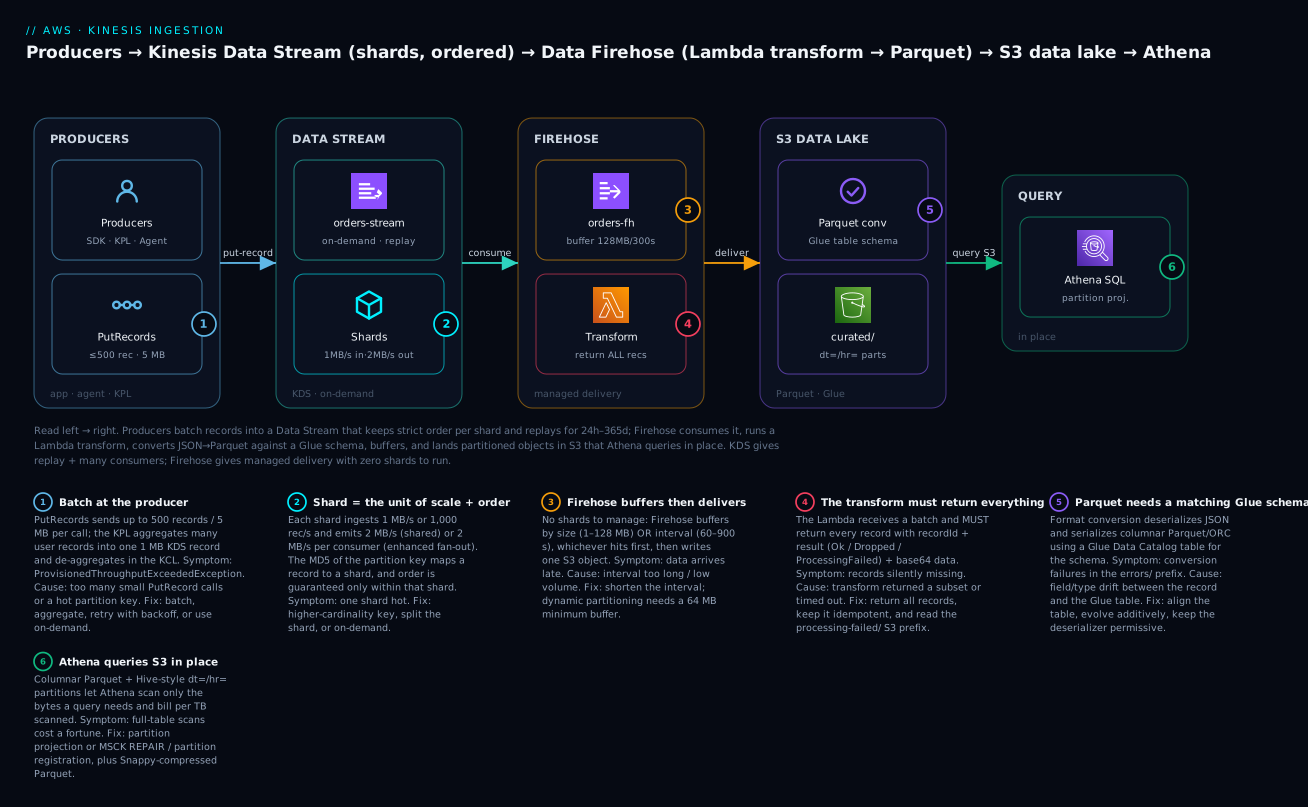
The pipeline reads left to right. Producers — your app via the SDK, the KPL for high volume, or the Kinesis Agent for log files — batch records with PutRecords (badge 1) into a Kinesis Data Stream running in on-demand mode. Each record’s partition key hashes to a shard (badge 2), the unit of both throughput (1 MB/s in, 2 MB/s out) and ordering; the stream retains records for replay so any consumer can rewind. Data Firehose consumes the stream (badge 3), buffers by size or interval, invokes a Lambda transform that must return every record tagged Ok/Dropped/ProcessingFailed (badge 4), then converts JSON to Parquet against a Glue table schema (badge 5) and lands compressed, dt=/hr=-partitioned objects in an S3 data lake. Athena queries that Parquet in place (badge 6), scanning only the partitions and columns a query needs. The key insight the diagram encodes: KDS gives you replay and many consumers; Firehose gives you managed, query-ready delivery — and here they compose into one pipeline.
Real-world scenario
PulseCart, a mid-size retail platform, runs a clickstream pipeline: every page view, add-to-cart and search from ~2 million daily shoppers, peaking at 18,000 events/second on sale days. Three teams need the feed. Personalization needs it in real time (sub-200 ms) to update recommendations. Fraud needs low-latency access to score sessions. Analytics needs every event in the lake for next-day reporting. The original design was a single SQS queue that Personalization drained — which meant Fraud and Analytics could not get the same events without stealing them, so Analytics ran a nightly database export that was always a day stale and missed the sale-day spikes entirely.
They redesigned around KDS on-demand. Producers (the web tier via the KPL, aggregating small events to beat the 1,000 rec/s-per-shard cap) write to one clickstream stream. Personalization consumes via a Lambda ESM with ReportBatchItemFailures and BisectBatchOnFunctionError, so one malformed event no longer wedges a shard. Fraud, which was starving on the shared 2 MB/s, moved to a registered enhanced fan-out consumer — dedicated 2 MB/s and ~70 ms latency, isolated from the others. Analytics stopped running exports entirely: a Firehose now consumes the same stream, runs a Lambda transform that drops bot traffic and enriches geo, converts to Parquet against a Glue table, and lands dt=/hr= partitioned objects in S3 that Athena queries next morning.
The first sale day after cutover, ingest hit 41,000 events/second — more than double the previous peak — and on-demand absorbed it with no paging and no throttling. The one incident: a new “wishlist” event added a wishlistId field the Glue table did not have, so ~0.3% of records failed format conversion. Because S3 backup (FailedDataOnly) was on, those records sat safely in the errors/ prefix; the team added the column to the Glue table (additive, backward-compatible), re-ran a small backfill from the backup prefix, and lost nothing. Post-mortem numbers: Analytics latency went from ~24 hours to ~3 minutes, Athena cost dropped ~70% versus the old raw-JSON exports (Parquet + partition pruning), and Fraud’s p99 read latency fell from ~800 ms (starved shared reads) to ~70 ms (EFO). The lesson they wrote down: one stream, many consumers, and let Firehose build the lake — do not make three teams fight over one queue.
Advantages and disadvantages
| Kinesis Data Streams | Data Firehose | |
|---|---|---|
| Advantages | Replay (24 h–365 d); many independent consumers; strict per-shard ordering; ~70 ms with EFO; on-demand removes hot-shard toil; integrates with Lambda/KCL/Flink | Zero infrastructure; auto-scales; built-in Parquet/ORC conversion; dynamic partitioning; transform + retry + S3 backup; direct to S3/Redshift/OpenSearch/Splunk/Iceberg |
| Disadvantages | You must design keys and size/reshard (unless on-demand); shared 2 MB/s limits fan-out without EFO; at-least-once (dedup yourself); more moving parts | ~60 s+ latency (not sub-second); no replay (delivers then done); Glue-schema-coupled; small-file risk if over-tuned; per-feature costs add up |
When each matters: choose KDS whenever more than one thing needs the data, you might reprocess, or you need ordering and sub-second latency — its cost and key-design work buy you a replayable, multi-consumer log nothing else on this list provides. Choose Firehose when the job is purely “get this stream into a store, query-ready, with no servers” — its lack of replay is irrelevant because a store is the durable copy, and its Parquet/partitioning turns a lake from expensive to cheap. The strongest designs use both: KDS as the durable multi-consumer spine, Firehose hanging off it to build the lake.
Hands-on lab
You will build the full pipeline: producer → KDS (on-demand) → Firehose (Lambda transform → Parquet via a Glue table) → S3 → Athena. Everything here is small and cheap, but ⚠️ KDS, Firehose, Glue, Athena and S3 all cost money — on-demand KDS bills per GB and a stream-hour even when idle, so do the teardown at the end. Region is us-east-1; swap as needed.
Step 0 — Variables and prerequisites
export AWS_REGION=us-east-1
export ACCT=$(aws sts get-caller-identity --query Account --output text)
export BUCKET="pulsecart-lab-lake-${ACCT}"
export STREAM="orders-stream"
export FH="orders-firehose"
export DB="pulsecart_lab"
export TABLE="orders"
aws s3 mb "s3://${BUCKET}" --region "$AWS_REGION"
Step 1 — Create the Data Stream (on-demand)
aws kinesis create-stream \
  --stream-name "$STREAM" \
  --stream-mode-details StreamMode=ON_DEMAND \
  --region "$AWS_REGION"

# Wait until ACTIVE
aws kinesis wait stream-exists --stream-name "$STREAM"
aws kinesis describe-stream-summary --stream-name "$STREAM" \
  --query 'StreamDescriptionSummary.{Mode:StreamModeDetails.StreamMode,Status:StreamStatus,Shards:OpenShardCount}'
Expected output:
{ "Mode": "ON_DEMAND", "Status": "ACTIVE", "Shards": 4 }
On-demand starts with 4 shards (4 MB/s / 4,000 rec/s) and scales automatically.
Step 2 — Create the Glue database and table (the Parquet schema)
Firehose needs a Glue table to know the columns and types for Parquet conversion.
aws glue create-database --database-input "{\"Name\":\"${DB}\"}"

aws glue create-table --database-name "$DB" --table-input '{
  "Name": "orders",
  "StorageDescriptor": {
    "Columns": [
      {"Name":"order_id","Type":"string"},
      {"Name":"customer_id","Type":"string"},
      {"Name":"amount","Type":"double"},
      {"Name":"currency","Type":"string"},
      {"Name":"event_time","Type":"string"}
    ],
    "Location": "s3://'"$BUCKET"'/curated/",
    "InputFormat": "org.apache.hadoop.hive.ql.io.parquet.MapredParquetInputFormat",
    "OutputFormat": "org.apache.hadoop.hive.ql.io.parquet.MapredParquetOutputFormat",
    "SerdeInfo": {"SerializationLibrary": "org.apache.hadoop.hive.ql.io.parquet.serde.ParquetHiveSerDe"}
  },
  "PartitionKeys": [{"Name":"dt","Type":"string"}],
  "TableType": "EXTERNAL_TABLE"
}'
Step 3 — The transform Lambda (returns ALL records)
Create transform.py — it uppercases the currency, drops test orders cleanly, and returns every record tagged:
import base64, json

def handler(event, context):
    out = []
    for r in event["records"]:
        payload = json.loads(base64.b64decode(r["data"]))
        # Drop synthetic test traffic cleanly
        if payload.get("customer_id", "").startswith("test-"):
            out.append({"recordId": r["recordId"], "result": "Dropped"})
            continue
        payload["currency"] = payload.get("currency", "usd").upper()
        # Firehose Parquet conversion wants newline-delimited JSON
        data = (json.dumps(payload) + "\n").encode("utf-8")
        out.append({
            "recordId": r["recordId"],
            "result": "Ok",
            "data": base64.b64encode(data).decode("utf-8"),
        })
    return {"records": out}   # count in == count out
Package and deploy (assumes an execution role lab-fh-transform-role with AWSLambdaBasicExecutionRole):
zip transform.zip transform.py
aws lambda create-function \
  --function-name fh-transform \
  --runtime python3.12 --handler transform.handler \
  --timeout 60 --zip-file fileb://transform.zip \
  --role "arn:aws:iam::${ACCT}:role/lab-fh-transform-role"
Step 4 — Create the Firehose (source = KDS, transform + Parquet → S3)
Firehose needs a role that can read the stream, invoke the Lambda, read the Glue table and write S3 (see Security notes for the policy). Assuming role lab-firehose-role:
export STREAM_ARN=$(aws kinesis describe-stream-summary --stream-name "$STREAM" \
  --query 'StreamDescriptionSummary.StreamARN' --output text)

aws firehose create-delivery-stream \
  --delivery-stream-name "$FH" \
  --delivery-stream-type KinesisStreamAsSource \
  --kinesis-stream-source-configuration "KinesisStreamARN=${STREAM_ARN},RoleARN=arn:aws:iam::${ACCT}:role/lab-firehose-role" \
  --extended-s3-destination-configuration '{
    "RoleARN": "arn:aws:iam::'"$ACCT"':role/lab-firehose-role",
    "BucketARN": "arn:aws:s3:::'"$BUCKET"'",
    "Prefix": "curated/dt=!{timestamp:yyyy-MM-dd}/",
    "ErrorOutputPrefix": "errors/!{firehose:error-output-type}/dt=!{timestamp:yyyy-MM-dd}/",
    "BufferingHints": {"SizeInMBs": 128, "IntervalInSeconds": 60},
    "S3BackupMode": "Disabled",
    "ProcessingConfiguration": {
      "Enabled": true,
      "Processors": [{
        "Type": "Lambda",
        "Parameters": [{"ParameterName":"LambdaArn","ParameterValue":"arn:aws:lambda:'"$AWS_REGION"':'"$ACCT"':function:fh-transform"}]
      }]
    },
    "DataFormatConversionConfiguration": {
      "Enabled": true,
      "InputFormatConfiguration": {"Deserializer": {"OpenXJsonSerDe": {}}},
      "OutputFormatConfiguration": {"Serializer": {"ParquetSerDe": {}}},
      "SchemaConfiguration": {
        "RoleARN": "arn:aws:iam::'"$ACCT"':role/lab-firehose-role",
        "DatabaseName": "'"$DB"'", "TableName": "'"$TABLE"'", "Region": "'"$AWS_REGION"'"
      }
    }
  }'
Step 5 — Produce records
Put a few records, including one test- record to prove the transform drops it:
for i in 1 2 3 4 5; do
  aws kinesis put-record --stream-name "$STREAM" \
    --partition-key "cust-${i}" \
    --data "$(printf '{"order_id":"o%03d","customer_id":"cust-%d","amount":%d.50,"currency":"usd","event_time":"2026-07-14T10:0%d:00Z"}' $i $i $((i*10)) $i | base64)"
done
# a record the transform should DROP:
aws kinesis put-record --stream-name "$STREAM" --partition-key "test" \
  --data "$(echo '{"order_id":"o999","customer_id":"test-bot","amount":0.0,"currency":"usd","event_time":"2026-07-14T10:09:00Z"}' | base64)"
Expected output per call:
{ "ShardId": "shardId-000000000002", "SequenceNumber": "4966...0001" }
Step 6 — Wait for delivery, then verify Parquet in S3
Firehose flushes on the 60 s interval (records are far below 128 MB). Wait ~90 s.
aws s3 ls "s3://${BUCKET}/curated/" --recursive
Expected — a Parquet object under a dt= partition:
2026-07-14 10:11:42 1284 curated/dt=2026-07-14/orders-firehose-1-2026-07-14-10-10-...parquet
Step 7 — Register the partition and query in Athena
aws athena start-query-execution \
  --query-string "ALTER TABLE ${DB}.${TABLE} ADD IF NOT EXISTS PARTITION (dt='2026-07-14') LOCATION 's3://${BUCKET}/curated/dt=2026-07-14/'" \
  --query-execution-context "Database=${DB}" \
  --result-configuration "OutputLocation=s3://${BUCKET}/athena-results/"

aws athena start-query-execution \
  --query-string "SELECT customer_id, amount, currency FROM ${DB}.${TABLE} WHERE dt='2026-07-14' ORDER BY amount DESC" \
  --query-execution-context "Database=${DB}" \
  --result-configuration "OutputLocation=s3://${BUCKET}/athena-results/"
Fetch results with the returned QueryExecutionId via aws athena get-query-results. Expected: 5 rows (the five real orders), currency = USD (uppercased by the transform), and no test-bot row (dropped). That end-to-end proves ingestion, ordering, transform, Parquet conversion and query.
Terraform equivalent (the durable version)
resource "aws_kinesis_stream" "orders" {
  name             = "orders-stream"
  retention_period = 24
  stream_mode_details { stream_mode = "ON_DEMAND" }
}

resource "aws_s3_bucket" "lake" { bucket = "pulsecart-lab-lake-${data.aws_caller_identity.me.account_id}" }

resource "aws_kinesis_firehose_delivery_stream" "orders" {
  name        = "orders-firehose"
  destination = "extended_s3"

  kinesis_source_configuration {
    kinesis_stream_arn = aws_kinesis_stream.orders.arn
    role_arn           = aws_iam_role.firehose.arn
  }

  extended_s3_configuration {
    role_arn            = aws_iam_role.firehose.arn
    bucket_arn          = aws_s3_bucket.lake.arn
    prefix              = "curated/dt=!{timestamp:yyyy-MM-dd}/"
    error_output_prefix = "errors/!{firehose:error-output-type}/dt=!{timestamp:yyyy-MM-dd}/"
    buffering_size      = 128
    buffering_interval  = 60

    processing_configuration {
      enabled = true
      processors {
        type = "Lambda"
        parameters {
          parameter_name  = "LambdaArn"
          parameter_value = "${aws_lambda_function.transform.arn}:$LATEST"
        }
      }
    }

    data_format_conversion_configuration {
      input_format_configuration { deserializer { open_x_json_ser_de {} } }
      output_format_configuration { serializer { parquet_ser_de {} } }
      schema_configuration {
        role_arn      = aws_iam_role.firehose.arn
        database_name = aws_glue_catalog_database.lab.name
        table_name    = aws_glue_catalog_table.orders.name
        region        = var.region
      }
    }
  }
}
Teardown (⚠️ do this — on-demand KDS and Firehose bill while they exist)
aws firehose delete-delivery-stream --delivery-stream-name "$FH"
aws kinesis delete-stream --stream-name "$STREAM" --enforce-consumer-deletion
aws lambda delete-function --function-name fh-transform
aws glue delete-table --database-name "$DB" --name "$TABLE"
aws glue delete-database --name "$DB"
aws s3 rm "s3://${BUCKET}" --recursive
aws s3 rb "s3://${BUCKET}"
Common mistakes & troubleshooting
The failure modes are lag, skew, silent drops and schema drift — never a clean crash. Work the playbook top-down.
| # | Symptom | Root cause | Confirm (exact command / console path) | Fix |
|---|---|---|---|---|
| 1 | ProvisionedThroughputExceededException on writes |
Shard write cap (1 MB/s or 1,000 rec/s) exceeded, or hot key | CloudWatch WriteProvisionedThroughputExceeded > 0; check per-shard IncomingRecords |
Batch with PutRecords; KPL-aggregate; better partition key; add shards or switch to on-demand |
| 2 | One shard hot, others idle | Partition-key skew (a whale key) | CloudWatch per-ShardId IncomingBytes; one shard near 1 MB/s |
Higher-cardinality/composite key; write-shard the whale (key#0..N); split the shard |
| 3 | IteratorAge climbing steadily |
Consumer under-provisioned or slow function | GetRecords.IteratorAgeMilliseconds rising; MillisBehindLatest high |
Raise Lambda batch size / parallelization factor; optimize function; enhanced fan-out; more shards |
| 4 | Records “lost” / never processed | Retention expired before the consumer caught up | Compare max IteratorAge to retention (24 h default) |
Increase retention (IncreaseStreamRetentionPeriod); fix/scale the consumer; alarm on IteratorAge |
| 5 | One shard’s whole batch stuck; IteratorAge climbs on it only |
Poison record + infinite retries block the shard (ordering) | Lambda error metrics on one shard; ESM MaximumRetryAttempts=-1 |
Set finite retries; BisectBatchOnFunctionError=true; on-failure SQS/SNS; ReportBatchItemFailures |
| 6 | Reads throttled with several consumers | Shared 2 MB/s split across classic consumers | ReadProvisionedThroughputExceeded > 0; GetRecords throttles |
Register enhanced fan-out consumers (2 MB/s each); reduce GetRecords frequency |
| 7 | PutRecords “succeeds” but data missing |
Partial failure ignored (FailedRecordCount > 0) |
Inspect the PutRecords response Records[].ErrorCode |
Resend only failed records with exponential backoff + jitter |
| 8 | Firehose not writing to S3 | IAM role lacks s3:PutObject/glue:GetTable, or stream not ACTIVE |
Firehose console → Monitoring; CloudWatch Logs /aws/kinesisfirehose/<name> |
Grant S3 + Glue perms on the Firehose role; wait for stream ACTIVE |
| 9 | Data arrives but minutes late | Buffer interval too long / low volume never hits size | Firehose config BufferingHints; object timestamps |
Lower IntervalInSeconds (min 60); accept small-file trade-off; compact later |
| 10 | Parquet conversion fails; records in errors/ |
Glue table schema mismatch (new field or type drift) | S3 errors/format-conversion-failed/; Firehose error logs |
Align Glue table (add columns, additive); permissive JSON SerDe; backfill from errors/ |
| 11 | Transform silently drops records / batch fails | Lambda returned fewer records than received, or timed out | Firehose processing-failed/; Lambda duration near timeout |
Return every record with Ok/Dropped/ProcessingFailed; raise timeout; keep idempotent |
| 12 | Duplicate records downstream | At-least-once + producer/consumer retries | Duplicate sequence/business keys in the sink | Idempotent writes (dedup on a business key); dedup window in the consumer |
| 13 | Athena returns 0 rows though objects exist | Partition not registered / wrong location | SHOW PARTITIONS db.table; check S3 prefix |
ALTER TABLE ADD PARTITION / MSCK REPAIR; or partition projection |
| 14 | Athena scans TB and costs spike | Raw JSON, no partition pruning, or SELECT * |
Athena “Data scanned” in query stats | Parquet conversion on; partition + prune (WHERE dt=); select only needed columns |
| 15 | Order broken after scaling | Read across shards / didn’t drain parent shard on reshard | Compare sequence order across ShardIds |
Rely on per-key order only; use KCL/Lambda ESM (they respect parent→child) |
Exception & status reference
| Error / status | Where it appears | Likely cause | Fix |
|---|---|---|---|
ProvisionedThroughputExceededException |
PutRecord(s), GetRecords |
Shard cap or hot shard | Batch/aggregate, backoff, more shards, on-demand |
ExpiredIteratorException |
GetRecords |
Shard iterator older than 5 min | Get a fresh iterator; poll more often |
ResourceNotFoundException |
Any API | Wrong stream/consumer name or region | Verify name + region; wait for ACTIVE |
ResourceInUseException |
CreateStream, resharding |
Stream busy (updating/resharding) | Wait until ACTIVE; serialize operations |
LimitExceededException |
Resharding, EFO register | Too many reshards/24 h or >20 EFO consumers | Slow down; request quota increase |
KMSAccessDeniedException |
Encrypted stream ops | Role can’t use the KMS key | Grant kms:Decrypt/GenerateDataKey on the CMK |
AccessDeniedException (Firehose logs) |
Delivery | Firehose role missing S3/Glue perms | Fix the delivery-role policy |
Firehose format-conversion-failed |
S3 errors/ prefix |
Glue schema mismatch / bad JSON | Align Glue table; permissive deserializer |
Firehose processing-failed |
S3 processing-failed/ |
Transform returned failure/timeout | Fix transform contract; raise timeout |
The three nastiest failures, in prose
The poison record that wedges a shard. Because ordering is per shard and a Lambda ESM retries a failing batch before advancing, one record your function can’t parse — with the ESM defaults of infinite retries and bisect off — blocks every record behind it on that shard, forever. IteratorAge climbs on that one shard while the others are flat, and if it crosses your retention window you lose data. The fix is a bundle: finite MaximumRetryAttempts, BisectBatchOnFunctionError to isolate the bad record, an on-failure SQS/SNS destination, and ideally ReportBatchItemFailures so the function returns only the sequence numbers that failed and the good ones advance.
Schema drift in Parquet conversion. Firehose Parquet conversion validates every record against the Glue table. The day a producer adds a field or a number arrives as a string, conversion fails for those records and — if you did not configure error output/backup — they vanish. Always set an ErrorOutputPrefix, keep the JSON deserializer permissive, evolve the Glue schema additively (new columns are backward-compatible; renames and type changes are not), and treat the errors/ prefix as an alarmable recoverable queue, not a graveyard.
The transform that “cleans” data by dropping it. New engineers write a Firehose transform that filters records by simply not returning the ones they don’t want. Firehose counts records in versus out; a mismatch fails the batch. To drop a record you must still return it, tagged result: "Dropped". And because Firehose can retry a transform, any side effect (a DB write, an external call) can happen twice — keep transforms pure and idempotent.
Best practices
- Default to on-demand for new or spiky streams; move to provisioned only after traffic is predictable and the shard-hour math wins.
- Choose the partition key for even spread, not convenience — entity ids over regions/status; write-shard genuine whales; use a random key only when you truly need no ordering.
- Batch and aggregate producers —
PutRecordsoverPutRecord, KPL for small high-rate records — and always handleFailedRecordCount. - Alarm on
IteratorAgeandWrite/ReadProvisionedThroughputExceededbefore you alarm on anything else; lag is the leading indicator of data loss. - Harden Lambda ESM: finite retries, bisect on error, on-failure destination,
ReportBatchItemFailures, and a parallelization factor that matches consumer throughput. - Use enhanced fan-out when you have multiple consumers or need sub-100 ms latency — not reflexively for one consumer (it costs per consumer-shard-hour).
- Set retention above worst-case consumer downtime; long-term retention only for occasional replay (reads > 24 h incur retrieval fees).
- Turn on Firehose S3 backup (
FailedDataOnly) and anErrorOutputPrefixfrom day one — recoverable failures beat silent loss. - Build the lake as Parquet + partitions via Firehose format conversion and dynamic partitioning; prefer larger buffers to avoid the small-files problem.
- Keep Firehose transforms pure, idempotent, and complete — return every record tagged; never drop by omission.
- Compose, don’t choose — KDS for the durable multi-consumer spine, Firehose hanging off it for the lake, is the pattern that ages well.
- Make consumers idempotent — at-least-once means duplicates; dedup on a business key.
Security notes
| Control | KDS | Firehose |
|---|---|---|
| Encryption at rest | SSE with AWS-managed or customer KMS key | S3-SSE / SSE-KMS at the destination; SSE-KMS for Direct PUT source |
| Encryption in transit | TLS to the API | TLS to the destination |
| Producer authz | kinesis:PutRecord(s) on the stream ARN |
firehose:PutRecord(Batch) on the delivery-stream ARN |
| Consumer authz | kinesis:GetRecords, GetShardIterator, DescribeStream, SubscribeToShard (EFO) |
Delivery role reads source, invokes transform, writes destination |
| Private connectivity | Interface VPC endpoint (PrivateLink) for Kinesis | VPC delivery to OpenSearch/Redshift in-VPC |
| Least privilege | Scope actions to the specific stream/consumer ARN | Scope the Firehose role to exactly the bucket prefix, Glue table, Lambda |
A minimal Firehose delivery role policy for the lab (scope tighter in production):
{
  "Version": "2012-10-17",
  "Statement": [
    { "Effect": "Allow",
      "Action": ["kinesis:DescribeStream","kinesis:GetShardIterator","kinesis:GetRecords","kinesis:ListShards"],
      "Resource": "arn:aws:kinesis:us-east-1:ACCT:stream/orders-stream" },
    { "Effect": "Allow",
      "Action": ["s3:AbortMultipartUpload","s3:GetBucketLocation","s3:GetObject","s3:ListBucket","s3:ListBucketMultipartUploads","s3:PutObject"],
      "Resource": ["arn:aws:s3:::pulsecart-lab-lake-ACCT","arn:aws:s3:::pulsecart-lab-lake-ACCT/*"] },
    { "Effect": "Allow", "Action": ["glue:GetTable","glue:GetTableVersion","glue:GetTableVersions"],
      "Resource": "*" },
    { "Effect": "Allow", "Action": ["lambda:InvokeFunction"],
      "Resource": "arn:aws:lambda:us-east-1:ACCT:function:fh-transform:*" }
  ]
}
Key rules: encrypt streams that carry PII with a customer-managed KMS key and grant consumers kms:Decrypt explicitly; put a VPC interface endpoint in front of Kinesis so producers/consumers never traverse the public internet; and scope every producer/consumer/delivery policy to a specific ARN, never kinesis:* on *.
Cost & sizing
Kinesis is not free even when idle — a provisioned shard and an on-demand stream both bill by the hour — so cost awareness is part of the design, not an afterthought. Figures below are representative us-east-1 list prices for illustration; always confirm on the current pricing pages as they change.
| KDS provisioned driver | Representative price | Notes |
|---|---|---|
| Shard-hour | ~$0.015 / shard-hour | ~$10.80/shard/month before data |
| PUT payload units | ~$0.014 / million (25 KB each) | A 60 KB record = 3 units |
| Extended retention (≤7 d) | Extra per shard-hour | On top of base shard-hour |
| Long-term retention (>7 d) | Per GB-month + retrieval | Reads > 24 h charged to retrieve |
| Enhanced fan-out | Per consumer-shard-hour + per GB retrieved | Multiplies with consumers × shards |
| KDS on-demand driver | Representative price | Notes |
|---|---|---|
| Data ingested | Per GB written | Plus a small stream-hour |
| Data retrieved | Per GB read | Fan-out reads add up |
| Stream-hour | Per hour the stream exists | Bills even at zero traffic |
| Firehose driver | Representative price | Notes |
|---|---|---|
| Data ingested | ~$0.029 / GB (first 500 TB/mo, Direct PUT/S3) | Volume tiers lower it |
| Format conversion (Parquet/ORC) | Extra per GB processed | Pays for itself in Athena savings |
| Dynamic partitioning | Extra per GB + per partitioned object | Weigh vs. post-hoc compaction |
| VPC delivery | Extra per hour + per GB | Only for in-VPC destinations |
| Worked example (per month) | Assumption | Cost |
|---|---|---|
| Ingest volume | ~1 TB/month clickstream | — |
| KDS on-demand ingest | ~1,024 GB written | Dominant KDS line |
| Firehose delivery | ~1,024 GB | ~$30 (≈ ₹2,500) at ~$0.029/GB |
| Firehose Parquet conversion | ~1,024 GB | Extra per-GB, offset by Athena savings |
| Athena (Parquet + partitions) | Scan ~50 GB of relevant partitions | ~$0.25 (≈ ₹21) at $5/TB |
| Athena (if raw JSON, no partitions) | Scan ~1,000 GB | ~$5 (≈ ₹420) — 20× more |
Cost levers, in order of impact: Parquet + partition pruning is the biggest Athena saver (10–100× fewer bytes scanned); buffer sizing trades latency for fewer/larger objects (fewer S3 PUTs, better scans); enhanced fan-out multiplies by consumers × shards, so enable it only where you need it; and on-demand vs provisioned flips at steady, predictable load — do the shard-hour math before committing to provisioned. The free tier does not meaningfully cover Kinesis, so the teardown at the end of the lab is not optional.
Interview & exam questions
1. What is a shard, and what are its limits? (SAA-C03/DVA-C02) A shard is the unit of capacity and ordering in a Data Stream: 1 MB/s or 1,000 records/s ingest, and 2 MB/s egress (shared) or 2 MB/s per consumer with enhanced fan-out. Records within a shard are strictly ordered by sequence number; ordering does not hold across shards.
2. How does a partition key relate to shards, and what is a hot shard? The partition key is MD5-hashed into a 128-bit space and each shard owns a slice, so the same key always maps to the same shard. A hot shard is when skewed keys concentrate traffic on one shard, throttling it at 1 MB/s while others idle — fixed with higher-cardinality keys, write sharding, splitting, or on-demand.
3. When would you choose Firehose over Data Streams? When the job is managed delivery to a store (S3/Redshift/OpenSearch/Splunk/Iceberg) with no consumers to write and no need for replay or sub-second latency. Firehose has no shards, buffers, transforms, converts to Parquet, and scales itself — but it delivers then forgets.
4. KDS vs SQS? SQS is a queue: one logical consumer group, messages deleted on acknowledgment, no replay, near-unlimited throughput, ~ms latency. KDS is a log: many independent consumers, replay for 24 h–365 d, per-shard ordering. Choose SQS to decouple work, KDS when multiple consumers need the data or you might reprocess.
5. What is enhanced fan-out and when is it worth it? A registered consumer with a dedicated 2 MB/s per shard delivered via HTTP/2 push (SubscribeToShard), ~70 ms latency, up to 20 per stream. Worth it when multiple consumers starve on the shared 2 MB/s or you need low latency; it costs per consumer-shard-hour, so avoid it for a single consumer.
6. What does IteratorAge tell you? It is the age of the last record a consumer read — the lag metric. A rising IteratorAge means the consumer is falling behind; if it approaches the retention period you will lose data. It is the first alarm to set on any KDS consumer.
7. Explain the Firehose transform contract. Firehose invokes a Lambda per buffered batch; the function must return every input record with its recordId, a result of Ok/Dropped/ProcessingFailed, and base64 data. Returning fewer records than received fails the batch; transforms must be idempotent because they can be retried.
8. What does Parquet conversion need, and how does it fail? It needs a Glue Data Catalog table describing the columns and types; Firehose deserializes JSON and serializes Parquet/ORC against it. It fails on schema drift (unknown field, type mismatch), routing those records to the errors/ prefix — mitigated by additive schema evolution and a permissive deserializer.
9. How do you handle a poison record in a Lambda KDS consumer? Because ordering is per shard, a failing record with default infinite retries blocks the shard. Set finite MaximumRetryAttempts, enable BisectBatchOnFunctionError, add an on-failure destination, and implement ReportBatchItemFailures so only failed sequence numbers retry.
10. On-demand vs provisioned capacity mode? Provisioned means you set and reshard the shard count and pay per shard-hour; on-demand auto-scales to 2× the last 30-day peak and bills per GB. On-demand removes hot-shard toil for spiky/unknown traffic; provisioned is cheaper at steady, predictable load.
11. Where does Amazon MSK fit versus KDS? MSK is managed Apache Kafka — choose it when you need the Kafka ecosystem (Kafka Connect, Streams API, Schema Registry, existing Kafka apps). KDS is simpler and fully serverless (especially on-demand) but is not Kafka-API compatible.
12. How do you build a replayable stream that also lands a Parquet lake? Use KDS as the source (replay + multiple real-time consumers) and attach a Firehose as one consumer that transforms, converts to Parquet against a Glue table, dynamically partitions, and writes S3 — one stream serving real-time consumers and the analytics lake at once.
Quick check
- Your producer gets
ProvisionedThroughputExceededExceptioneven though total traffic is under the stream’s capacity. What is the most likely cause and the quickest fix? - You have three teams consuming one stream and they are throttling each other’s reads. What feature isolates them?
- A Firehose transform Lambda returns only the records it wants to keep and the batch fails. Why, and what is the correct way to drop a record?
- Athena queries over your Firehose-written data scan terabytes and cost a fortune. Name two configuration changes that cut the bill.
- Which single CloudWatch metric best tells you a consumer is falling behind, and what happens if it exceeds the retention period?
Answers
- A hot shard from partition-key skew — traffic is uneven, so one shard is capped while others idle. Quickest fix: switch to on-demand (or use a higher-cardinality/composite key and/or split the shard).
- Enhanced fan-out — register each consumer for a dedicated 2 MB/s per shard via HTTP/2 push, removing contention on the shared 2 MB/s.
- Firehose requires count in == count out; a missing record fails the batch. To drop a record, still return it with
result: "Dropped"(andProcessingFailedfor bad records so they go to the backup prefix). - Enable Parquet format conversion (columnar) and partition the data (Firehose dynamic partitioning +
WHERE dt=pruning), plus select only needed columns — together they cut bytes scanned 10–100×. GetRecords.IteratorAgeMilliseconds(consumer lag). If it exceeds the retention period, unread records expire and are lost before the consumer reads them.
Glossary
| Term | Definition |
|---|---|
| Shard | The atomic unit of a Data Stream: 1 MB/s or 1,000 rec/s in, 2 MB/s out, and the boundary of ordering. |
| Partition key | A string whose MD5 hash maps a record to a shard; same key → same shard → ordered. |
| Sequence number | A unique, strictly increasing ID assigned per record per shard; the ordering token. |
| Shard iterator | A cursor for reading a shard from a given position; expires after 5 minutes. |
| Retention period | How long records remain readable: 24 h default, up to 365 days; the replay window. |
| On-demand mode | Capacity mode where AWS auto-scales shards; billed per GB; removes hot-shard toil. |
| Enhanced fan-out (EFO) | A registered consumer with dedicated 2 MB/s per shard via HTTP/2 push, ~70 ms latency. |
| KPL | Kinesis Producer Library — aggregates and batches records for high throughput. |
| KCL | Kinesis Client Library — consumer framework with DynamoDB-based checkpointing and load balancing. |
| Event source mapping (ESM) | The Lambda integration that polls a stream and invokes your function with batches. |
IteratorAge |
The age of the last record a consumer read — the lag/backpressure metric. |
| Resharding | Splitting or merging shards (or UpdateShardCount) to change provisioned capacity. |
| Data Firehose | Fully managed delivery to S3/Redshift/OpenSearch/Splunk/Iceberg/HTTP; no shards. |
| Buffering hints | Firehose size/interval thresholds; it flushes on whichever is hit first. |
| Format conversion | Firehose JSON→Parquet/ORC using a Glue table for the schema. |
| Dynamic partitioning | Firehose routing records to S3 prefixes derived from their content (jq/Lambda). |
Next steps
- Build the query layer the lake deserves: AWS Data Lake and Analytics Architecture: S3, Glue, Athena, Redshift and Kinesis.
- Compare streaming with queueing and routing: Amazon SQS Hands-On: Standard vs FIFO Queues, Visibility Timeout & DLQs and Amazon EventBridge Hands-On: Event Buses, Rules, Patterns & Pipes.
- Harden the consumers you attach to a stream: AWS Lambda Patterns: Event-Driven Functions That Scale to Zero.
- See where streaming fits the broader design: Event-Driven Architecture on AWS: EventBridge, SQS, SNS, Lambda and Step Functions.
- Next, add stream processing with Managed Service for Apache Flink (windowed aggregations, joins, anomaly detection reading directly from this stream).