Two services that must talk to each other should almost never talk directly. The moment your order API calls your fulfilment worker synchronously, you have welded them together: if the worker is slow, the API is slow; if the worker is down, the order is lost; if a sale sends ten thousand orders a second, the worker either falls over or you over-provision it for a peak that lasts four minutes a year. Amazon SQS (Simple Queue Service) is the shock absorber that removes that weld. The producer drops a message into a queue and moves on; the consumer pulls messages when it is ready, at its pace; and the queue holds the backlog — for up to 14 days — so a slow or crashed consumer costs you latency, not data.
SQS is a fully managed, effectively infinite message queue: no brokers to patch, no disks to size, no cluster to scale. You create a queue, you SendMessage, you ReceiveMessage, you DeleteMessage — that is nearly the whole API surface. But hiding behind that tiny surface are the four concepts that decide whether your system is correct or quietly broken, and this article installs all four by having you build the thing. Standard queues give you near-unlimited throughput but at-least-once delivery — meaning the same message can arrive twice, and messages can arrive out of order. FIFO queues give you strict ordering and exactly-once processing, but cap throughput and demand a message group ID. The visibility timeout is the invisible clock that starts when a consumer receives a message: get it wrong one way and messages are processed twice, wrong the other way and they are stuck. And the dead-letter queue is the quarantine that stops one poison message from blocking your whole pipeline forever.
By the end you will have created a standard queue and a FIFO queue, sent and received and deleted messages on both, demonstrated a message reappearing because you didn’t delete it in time, wired a dead-letter queue with maxReceiveCount=3, watched a poison message get quarantined, and redriven it back — all with the aws sqs CLI and then again as Terraform, everything free-tier. Then, because your first real queue will misbehave in about a dozen classic ways — messages processed twice, messages stuck invisible, a FIFO queue that silently stops delivering, a DLQ that never catches anything, empty receives quietly running up a bill — you get a symptom-to-fix troubleshooting playbook. Read the prose once; keep the tables open when your own queue misbehaves.
What problem this solves
Direct, synchronous coupling between services fails in production in ways that are hard to see in a demo. When the caller waits for the callee, three things break at once: availability (if the downstream is momentarily down, the request is lost — there is nowhere to hold it), elasticity (a burst of work must be absorbed right now by the downstream, so you size it for the peak and pay for idle the rest of the time), and latency isolation (the caller’s p99 becomes the callee’s p99, so one slow dependency drags the whole chain down). Retries make it worse, not better: the caller retries, the overloaded downstream gets more load, and you have built a thundering herd.
A queue decouples the two sides in time. The producer’s job ends when the message is durably stored; the consumer’s job starts whenever it has capacity. A spike becomes a backlog that drains at the consumer’s sustainable rate instead of an outage. A downstream deploy or crash becomes a few minutes of queued messages instead of lost orders. And because SQS stores each message redundantly across multiple Availability Zones, “durably stored” is a real guarantee, not a single-box promise. This pattern — producer → queue → consumer — is the backbone of nearly every event-driven and microservice architecture on AWS.
What breaks without understanding SQS specifically is subtle, because the service is trivially easy to start and easy to get silently wrong. A beginner sends a message, receives it, processes it, and forgets to delete it — so 30 seconds later it comes back and is processed again, and they conclude “SQS is duplicating my messages” when in fact they never acknowledged the first delivery. Or they pick a standard queue for a payment flow, get a rare duplicate under at-least-once delivery, and double-charge a customer. Or they create a FIFO queue, forget the message group ID, and every send fails. Or they attach a DLQ but point the redrive policy at the wrong ARN, so poison messages pile up invisibly. None of these is an SQS failure — each is a missing piece of the mental model. This article’s whole job is to make those pieces boringly obvious.
Here is the entire field on one screen — the pieces you will meet, what each one is, and the classic beginner trap attached to it:
| Piece | What it is | You configure it as | The beginner trap |
|---|---|---|---|
| Queue | A durable, managed buffer of messages | A name (+ .fifo for FIFO) |
Picking standard when you needed order/dedup |
| Message | Up to 256 KB of body + attributes | The --message-body you send |
Assuming ordering on a standard queue |
| Standard vs FIFO | Throughput vs ordering/exactly-once | The FifoQueue attribute |
Expecting no duplicates on standard |
| Visibility timeout | How long a received message stays hidden | Seconds (default 30) | Too short → double-process; too long → stuck |
| Receipt handle | A per-receive token used to delete/extend | Returned by ReceiveMessage |
Reusing a stale handle → it does nothing |
| Delete | Your acknowledgement that work is done | An explicit DeleteMessage call |
Forgetting it → message redelivers |
| Retention | How long an unread message lives | 1 min – 14 days (default 4 d) | Messages “lost” to retention expiry |
| Long polling | Wait for a message instead of returning empty | WaitTimeSeconds 0–20 |
Short polling → empty receives you pay for |
| DLQ + maxReceiveCount | Quarantine after N failed receives | A redrive policy | Wrong ARN → DLQ never catches |
| Message group ID | The ordering unit on a FIFO queue | Required on every FIFO send | Missing it → send rejected |
| Deduplication ID | The 5-min exactly-once key on FIFO | Content-based or explicit | Reused → the send is silently dropped |
Learning objectives
By the end of this article you can:
- Explain the producer → queue → consumer decoupling pattern and why polling (SQS) differs from push (SNS) and from streaming (Kinesis).
- Choose correctly between a standard queue (near-unlimited throughput, at-least-once, best-effort order) and a FIFO queue (strict per-group order, exactly-once within the dedup window, capped throughput) — and defend the choice.
- Configure and reason about the visibility timeout — the in-flight window — including why too-short duplicates work and too-long strands it, how to extend it per message with
ChangeMessageVisibility, and the ≥ 6× function-timeout rule for Lambda consumers. - Set message retention (1 minute – 14 days), delivery delay / delay queues, and per-message timers, and know which of these FIFO does not support.
- Turn on long polling (
WaitTimeSeconds), understand how it cuts empty receives and cost, and read the SQS CloudWatch metrics that tell you the queue’s health. - Wire a dead-letter queue with a redrive policy (
deadLetterTargetArn+maxReceiveCount), quarantine a poison message, and redrive it back to source once fixed. - Send message attributes, respect the 256 KB limit (and use S3 / the extended client for large payloads), and use batch send/receive/delete (up to 10) to cut cost 10×.
- Apply encryption (SSE-SQS / SSE-KMS), scope a queue access policy to the exact principal allowed to send, and respect the in-flight limits (120,000 standard / 20,000 FIFO).
- Run a symptom → cause → confirm → fix troubleshooting playbook for the failures that hit every first queue.
Prerequisites & where this fits
You need an AWS account with permission to create SQS queues and (for the Terraform half) IAM (do this in a personal or dev account, never straight into production). You need the AWS CLI v2 installed and configured (aws configure or aws sso login), and Terraform ≥ 1.5 for Part B. Everything here fits comfortably inside the always-free SQS tier (1 million requests per month), so the running cost is effectively zero. You should be comfortable reading JSON and running shell commands; you do not need prior messaging experience.
Where this sits: SQS is the point-to-point buffer at the heart of the AWS integration and event-driven stack. It pairs constantly with two siblings you should read alongside it — Amazon SNS: Pub/Sub Fan-Out, Subscriptions, Filtering & SNS→SQS Patterns for the push, one-to-many half of the pattern (SNS fans a message out; SQS queues each copy for one consumer group), and Event-Driven Architecture on AWS: EventBridge, SQS, SNS, Lambda and Step Functions for how all the integration services fit together. When SQS feeds a Lambda consumer, the failure modes bleed into function land — AWS Lambda Errors, Timeouts & Cold Starts: The Troubleshooting Playbook covers the consumer side. And when message processing itself is the hard part — poison messages, partial-batch failures, idempotency at scale — the advanced sibling SQS Message Processing Failures: Redrive, DLQs, Poison Messages & Idempotency goes deeper than this hands-on introduction.
A quick map of who owns what, so when something misbehaves you look in the right place first:
| Layer | What lives here | Who “owns” it | What it can cause |
|---|---|---|---|
| Producer | Your app / SNS / S3 / EventBridge | You + the source | Rejected sends (FIFO keys, size, policy) |
| Access policy | Who may SendMessage/ReceiveMessage |
You (queue policy) | AccessDenied on send/receive |
| Queue config | Type, visibility, retention, delay, SSE | You (queue attributes) | Duplicates, stuck messages, “lost” messages |
| Delivery semantics | Standard vs FIFO, at-least-once | AWS + your choice | Duplicate or out-of-order processing |
| Consumer | Poll, process, delete | You | Redelivery (no delete), double-process |
| DLQ / redrive | Quarantine + move-back | You (redrive policy) | Poison messages blocking or vanishing |
| CloudWatch | Depth, age, empty-receive metrics | AWS + you | Blind spots if you don’t alarm on them |
Core concepts
Six ideas make everything later obvious. Read them once; the deep sections just expand each.
A queue is a durable buffer, not a database and not a stream. You put a message in; a consumer takes it out and removes it. There is no random access, no query, no “read message #4173” — you receive whatever the queue hands you, in roughly the order it can. Unlike a Kinesis or Kafka stream (where records are retained and many consumers replay the same log at their own offsets), an SQS message is normally consumed once by one consumer and then deleted. That single difference — consume-and-delete vs retain-and-replay — is the fastest way to know whether you want SQS or a stream.
SQS is pull, not push. Nothing is delivered to your consumer; your consumer polls — it asks the queue “any messages?” and gets up to ten back. This is the opposite of SNS, which pushes to its subscribers. Pull means the consumer controls its own rate (natural back-pressure) and that an idle consumer must keep asking (which is why long polling matters for cost). When people say “SQS + Lambda,” AWS runs a managed poller on your behalf — but under the hood it is still polling.
Delivery is at-least-once (standard) — plan for duplicates. A standard queue guarantees a message is delivered at least once, which means occasionally more than once. This is not a bug you can configure away; it is a property of a massively distributed system. The practical consequence: your consumer must be idempotent — processing the same message twice must be safe (charge a card once even if you see the event twice, using a dedupe key or a conditional write). FIFO queues raise this to exactly-once within a 5-minute deduplication window, which handles retries but is not a licence to skip idempotency for very late duplicates.
Receiving hides a message; it does not remove it. When you ReceiveMessage, the message is not deleted — it becomes in-flight: invisible to other consumers for the visibility timeout. You are expected to process it and then explicitly DeleteMessage using the receipt handle you got back. If you delete it, it is gone. If you don’t (crash, timeout, forget), the visibility timeout expires and the message reappears for someone else to try. This receive-then-delete handshake is the entire correctness model of SQS, and misunderstanding it is the number-one beginner error.
Every message has a clock ticking on it. Two independent timers govern a message’s life. Retention is how long an undelivered message survives in the queue before SQS discards it (1 minute to 14 days). The visibility timeout is how long a received message stays hidden before redelivery. A message “disappearing” is almost always one of these two expiring — retention (nobody consumed it in time) or a visibility mismatch (it was redelivered while you thought you still owned it).
A dead-letter queue is a safety valve, not an error log. If a message can never be processed — malformed, references a deleted record, triggers a bug — it will otherwise be received, fail, reappear, and be received again forever, blocking the queue behind it (especially on FIFO, where a stuck group halts everything after it). A DLQ with a maxReceiveCount breaks that loop: after N failed receives, SQS moves the message out to a separate queue where you can inspect it, alarm on it, fix the cause, and redrive it back. Every production queue should have one.
The vocabulary in one table
Pin every moving part down before the deep dive. The glossary at the end repeats these for lookup; this is the mental model side by side:
| Term | One-line definition | Where you set/see it | Why it matters on your first queue |
|---|---|---|---|
| Queue | The durable message buffer | create-queue |
The unit you create and address by URL |
| Message | Body (≤ 256 KB) + attributes | send-message |
The thing you enqueue and process |
| Standard queue | Unlimited TPS, at-least-once, best-effort order | default type | Fast, cheap, but expect duplicates |
| FIFO queue | Ordered per group, exactly-once, capped TPS | name ends .fifo |
Correctness when order/dedup matters |
| Visibility timeout | In-flight hide window after receive | queue attr / per receive | Wrong value → double-process or stuck |
| Receipt handle | Per-receive token to delete/extend | returned by receive | Stale handle ≠ message ID; delete needs it |
| Message ID | Stable per-message identifier | returned by send | For your own tracing, not for delete |
| Retention | Lifetime of an unread message | MessageRetentionPeriod |
Messages “lost” = retention expired |
| Delay | Hold a message before it’s visible | DelaySeconds / per-message |
Schedule/defer without a cron |
| Long polling | Wait up to N s for a message | WaitTimeSeconds 0–20 |
Cuts empty receives and cost |
| DLQ | Where failed messages are quarantined | redrive policy | Stops poison messages blocking the queue |
| maxReceiveCount | Failed-receive threshold before DLQ | redrive policy | The N in “after 3 tries, quarantine” |
| Message group ID | Ordering unit on FIFO | required on FIFO send | Missing → send rejected |
| Deduplication ID | Exactly-once key (5-min window) on FIFO | content-based or explicit | Reused → send silently dropped |
| In-flight | Received-but-not-deleted messages | metric / limit | 120k (standard) / 20k (FIFO) cap |
Where SQS sits among the messaging services
Beginners constantly confuse SQS, SNS and Kinesis. One table settles it:
| Service | Model | Consumers | Retention | Ordering | Use it when |
|---|---|---|---|---|---|
| SQS | Queue (pull) | One logical consumer per message | 1 min – 14 days | Best-effort / FIFO | Decouple + buffer work for one worker pool |
| SNS | Pub/sub (push) | Many subscribers, each gets a copy | None (delivered or lost) | Best-effort / FIFO | Fan one event out to many endpoints |
| Kinesis Data Streams | Log (pull, replayable) | Many, each at its own offset | 1–365 days | Per-shard order | High-volume streaming, replay, analytics |
| EventBridge | Event bus (push, routed) | Many, by rule/pattern | None (24 h retry) | Best-effort | Route SaaS/AWS events by content |
| Step Functions | Orchestrator | n/a (drives services) | Execution history | Deterministic | Coordinate a multi-step workflow |
The canonical combination is SNS → SQS fan-out: SNS pushes one event to several SQS queues, each owned by a different consumer group, so every group gets its own durable copy to process at its own pace. That pattern is the SNS sibling’s home turf; here we focus on the queue itself.
Standard vs FIFO: the core decision
This is the decision you make first, at create-queue time, and it is effectively permanent — you cannot convert a standard queue to FIFO or vice versa; you create a new queue and migrate. So understand the trade precisely.
The headline comparison
| Dimension | Standard queue | FIFO queue |
|---|---|---|
| Throughput | Nearly unlimited TPS | 300 msg/s (3,000 with batching); more in high-throughput mode |
| Delivery | At-least-once (duplicates possible) | Exactly-once within a 5-min dedup window |
| Ordering | Best-effort (may arrive out of order) | Strict FIFO within a message group |
| Deduplication | None (your consumer must dedupe) | Content-based (SHA-256 of body) or explicit ID |
| Name | Any valid name | Must end in .fifo |
| Message group ID | Not used | Required on every send |
| Price (after free tier) | $0.40 per million requests | $0.50 per million requests |
| DLQ | Must be a standard DLQ | Must be a FIFO DLQ |
| Typical use | High-volume, idempotent work | Order-sensitive, no-duplicates work |
Read the two delivery rows together, because they are the whole reason FIFO exists. A standard queue is built for scale: it spreads your messages across a huge fleet, which is why it can absorb almost any rate — but that same distribution is why a message can occasionally be delivered twice and why strict global ordering is impossible. A FIFO queue trades that scale for guarantees: messages in the same group come out in exactly the order they went in, and a message sent twice within five minutes is accepted once.
Throughput and limits, side by side
| Limit | Standard | FIFO (default) | FIFO (high-throughput mode) |
|---|---|---|---|
| Messages/second (no batching) | Effectively unlimited | 300 | Thousands (region-dependent) |
| Messages/second (batched × 10) | Effectively unlimited | 3,000 | Tens of thousands (region-dependent) |
| In-flight messages cap | 120,000 | 20,000 | 20,000 |
| Ordering scope | none | per message group | per message group |
| Dedup scope | n/a | whole queue (default) | per message group |
| How to enable HT mode | n/a | n/a | DeduplicationScope=messageGroup + FifoThroughputLimit=perMessageGroupId |
High-throughput FIFO is worth knowing about the moment 300 msg/s feels tight: by scoping deduplication to each message group instead of the whole queue, SQS can process many groups in parallel and lift the ceiling into the thousands (the exact numbers vary by Region — check the current SQS quotas page rather than trusting a memorised figure). The catch is that dedup then only applies within a group, which is usually fine because your group ID is already your natural partition key.
Ordering — what “best-effort” and “strict” really mean
| Question | Standard answer | FIFO answer |
|---|---|---|
| Do messages arrive in send order? | Usually, but not guaranteed | Yes, within a group |
| Can two messages be reordered? | Yes (best-effort) | No, within the same group |
| Are different groups ordered relative to each other? | n/a | No — only within a group |
| Does a stuck message block others? | No (others flow past) | Yes — it blocks its group until resolved |
| What is the ordering unit? | none | the message group ID |
The FIFO “gotcha” hides in the last two rows. Ordering is per group, not per queue — so if you put every message in one group ID you serialise your entire consumer and throttle yourself; if you spread messages across many group IDs (e.g. one per customer, per order, per device) you get parallelism and ordering where it matters. And because a group is strictly ordered, a message that can’t be processed blocks everything behind it in that group until it is deleted or moved to the DLQ — which is exactly why a FIFO queue without a DLQ is dangerous.
FIFO message groups and deduplication
Two IDs govern every FIFO send. Get them straight:
| ID | Purpose | Required? | Behaviour |
|---|---|---|---|
| MessageGroupId | The ordering + parallelism unit | Always on a FIFO send | Messages with the same group ID are strictly ordered; different groups run in parallel |
| MessageDeduplicationId | The exactly-once key | Required unless content-based dedup is on | Two sends with the same dedup ID within 5 minutes → the second is accepted but not delivered |
Deduplication comes in two flavours, and choosing wrong causes silent message loss or silent duplicates:
| Dedup mode | How the key is derived | Turn it on with | When to use | Failure if misused |
|---|---|---|---|---|
| Content-based | SHA-256 hash of the message body | ContentBasedDeduplication=true |
Body uniquely identifies the message | Two different logical events with the same body → one is dropped |
| Explicit ID | You pass MessageDeduplicationId |
leave content-based off, set it per send | You control the natural key (e.g. order ID) | Reusing an ID for a genuinely new message → dropped; a fresh ID for a retry → duplicate |
The 5-minute deduplication interval is fixed and often surprises people: if you send the same dedup ID twice 4 minutes apart, the second is swallowed; 6 minutes apart, both go through. So “FIFO didn’t deliver my message” is very often “the dedup ID collided with a recent send,” not a bug.
The decision, distilled
| If you need… | Then choose… | Because |
|---|---|---|
| Maximum throughput, order doesn’t matter | Standard | Unlimited TPS; cheapest |
| Idempotent processing you already handle | Standard | Duplicates are safe; scale freely |
| Strict per-entity ordering (per user/order) | FIFO with that entity as group ID | Ordered within group, parallel across groups |
| No duplicate side effects (payments, ledgers) | FIFO | Exactly-once within the dedup window |
| > 300 msg/s and ordering | FIFO high-throughput mode | Lifts the FIFO TPS ceiling |
| Fan-out to many consumers | SNS → SQS (not one queue) | SQS is one-consumer-per-message |
The honest default: reach for a standard queue and make your consumer idempotent unless you have a concrete ordering or no-duplicate requirement — standard is cheaper, faster, and simpler. Move to FIFO when correctness genuinely depends on order or exactly-once, and accept the throughput and group-ID cost that comes with it.
Visibility timeout: the in-flight window
The visibility timeout is the single most misunderstood setting in SQS, and it is the root cause of both “my messages get processed twice” and “my messages are stuck.” Understand it and half of all SQS bugs evaporate.
How it works
When a consumer calls ReceiveMessage, SQS hands back the message and starts a hidden countdown. For the duration of the visibility timeout, that message is in-flight: still in the queue, but invisible to every other ReceiveMessage call. The consumer is expected to finish its work and call DeleteMessage before the timer expires. Two outcomes:
- You delete in time → the message is permanently removed. Done.
- The timer expires first (you crashed, timed out, or forgot) → the message becomes visible again and will be delivered to some consumer on a later receive, with its ApproximateReceiveCount incremented.
The settings
| Setting | Range | Default | Where set | Notes |
|---|---|---|---|---|
VisibilityTimeout (queue) |
0 s – 43,200 s (12 h) | 30 s | queue attribute | The default for every receive |
VisibilityTimeout (per receive) |
0 s – 43,200 s | queue default | on ReceiveMessage |
Overrides the queue default for that batch |
ChangeMessageVisibility |
0 s – 43,200 s | — | per in-flight message | Extend or shorten a single message live |
| Max total in-flight time | 12 h from first receive | — | hard limit | Extensions can’t push a message past 12 h |
Too short vs too long — the two failure directions
| If the timeout is… | What happens | Symptom you see | Fix |
|---|---|---|---|
| Too short (< processing time) | Message reappears while you’re still working on it; a second consumer grabs it | Duplicate processing; ApproximateReceiveCount climbs; work done twice |
Raise the timeout above your real p99 processing time, or extend it live |
| Too long (>> processing time) | A crashed/hung consumer’s message stays invisible for ages before anyone retries | Slow retries; a “stuck,” high-latency message; backlog that won’t drain | Lower the timeout toward real processing time; add a DLQ for genuinely poison messages |
| Just right (≥ p99 + margin) | Deleted before expiry on success; retried promptly on failure | Healthy queue | Keep it; extend per-message for outliers |
The rule of thumb: set the visibility timeout to a bit more than your consumer’s realistic worst-case processing time — long enough that a healthy consumer always deletes before expiry, short enough that a dead consumer’s message is retried quickly. If your processing time varies wildly, don’t pick a huge fixed timeout; use a modest one and extend the outliers live.
Extending a message you’re still working on
For a long or variable job, don’t over-provision the queue’s visibility timeout — call ChangeMessageVisibility to push this message’s deadline out as you go (a “heartbeat”). This keeps the common case snappy while giving slow messages room.
| Scenario | What to call | Effect |
|---|---|---|
| Job is taking longer than expected | ChangeMessageVisibility with a larger timeout |
Extends the hide window for this message only |
| You want to release a message immediately (e.g. you can’t process it now) | ChangeMessageVisibility with 0 |
Message becomes visible again at once for another consumer |
| Batch of long jobs | ChangeMessageVisibilityBatch (≤ 10) |
Extend up to 10 in one call |
| Handle references an expired message | (error) MessageNotInflight |
The timeout already lapsed; you no longer own it |
The ≥ 6× rule for Lambda consumers
When SQS triggers Lambda through an event-source mapping, AWS’s own guidance is to set the queue’s visibility timeout to at least six times the Lambda function’s timeout. The factor accounts for the batching window plus Lambda’s internal retries on the batch, and it prevents a message from becoming visible again (and being picked up by a second concurrent invocation) while the first invocation is still legitimately working on it.
| Lambda function timeout | Minimum queue visibility timeout (6×) | Why |
|---|---|---|
| 30 s | 180 s | Room for the batching window + retries |
| 60 s | 360 s | Same, scaled |
| 120 s | 720 s | Same, scaled |
| 900 s (15 min max) | 5,400 s (90 min) | Long jobs need a long hide window |
If you ignore this and set the visibility timeout equal to (or below) the function timeout, you get the classic SQS-to-Lambda double-processing bug: the message reappears mid-invocation and a second Lambda picks it up, doing the work twice. The Lambda troubleshooting playbook covers the consumer-side symptoms in depth.
Message lifecycle: retention, delay and timers
Beyond the visibility timeout, two more timers shape a message’s life: how long it can wait to be read, and how long before it becomes readable.
Retention — how long an unread message lives
| Setting | Range | Default | What it controls |
|---|---|---|---|
MessageRetentionPeriod |
60 s (1 min) – 1,209,600 s (14 days) | 345,600 s (4 days) | Lifetime of a message that is never successfully deleted |
Retention is your backstop against a down consumer: with the 4-day default, your workers can be offline for the weekend and no messages are lost. But it is also a silent killer — if a message is never consumed (a poison message with no DLQ, or a consumer that’s been down longer than the retention period), SQS discards it with no notification. “Where did my message go?” with no DLQ and a long-down consumer is almost always retention expiry. Set retention to cover your worst realistic outage, and add a DLQ so poison messages are quarantined before they age out.
Delivery delay and message timers
Sometimes you want a message not to be available immediately — to defer a reminder, throttle a retry, or schedule work. Two mechanisms:
| Mechanism | Scope | Range | Default | FIFO support | Use for |
|---|---|---|---|---|---|
Delay queue (DelaySeconds) |
Whole queue | 0 – 900 s (15 min) | 0 | Yes (queue-level only) | Every message is held N seconds before it’s visible |
Message timer (per-message DelaySeconds) |
Single message | 0 – 900 s | queue default | No (FIFO ignores per-message delay) | Defer one specific message |
Two things to remember. First, the maximum delay is 15 minutes — SQS is not a general-purpose scheduler; for longer or calendar-based delays use EventBridge Scheduler or Step Functions Wait. Second, FIFO queues do not support per-message timers — you can set a queue-level delay on a FIFO queue, but you cannot delay individual messages; attempting per-message delay on FIFO is simply ignored.
The three timers, disambiguated
Because “how long” appears three times in SQS, beginners conflate them. Keep them separate:
| Timer | Applies to | Clock starts | Typical value | Confused with |
|---|---|---|---|---|
| Retention | An undelivered message | When the message is sent | 4 days | “message lost” = this expired |
| Delay | A newly sent message | When the message is sent | 0 (or up to 15 min) | Why a message isn’t visible yet |
| Visibility timeout | A received message | When you ReceiveMessage |
30 s (≥ processing time) | Why a message reappears |
Polling: long vs short
Because SQS is pull-based, how your consumer asks for messages has a real effect on both latency and cost.
The comparison
| Aspect | Short polling (WaitTimeSeconds=0) |
Long polling (WaitTimeSeconds=1–20) |
|---|---|---|
| Behaviour | Samples a subset of SQS servers; returns immediately | Waits up to N seconds for a message across all servers |
| Empty responses | Frequent — returns empty even when messages exist | Rare — only returns empty if truly nothing arrived in N s |
| API requests (cost) | High (constant empty polls) | Low (one call waits up to 20 s) |
| Latency to first message | Near-zero, but may miss messages | Up to N s worst case, usually much less |
| Recommendation | Almost never | Almost always (set 20 s) |
Short polling is a historical default that quietly costs money: an idle consumer looping on short polls issues thousands of ReceiveMessage calls that each return nothing — and empty receives are billable requests. Long polling collapses that into a single call that simply waits, so an idle queue costs almost nothing and a message is returned the instant it arrives.
Turning it on
| Where | Setting | Range | Effect |
|---|---|---|---|
| Queue attribute (default for all receives) | ReceiveMessageWaitTimeSeconds |
0 – 20 s | Every receive long-polls unless overridden |
Per ReceiveMessage call |
WaitTimeSeconds |
0 – 20 s | Overrides the queue default for that call |
Set ReceiveMessageWaitTimeSeconds=20 on the queue and you never think about it again. The only reason to use a lower value is a latency-critical path that can’t tolerate up to a 20-second wait on an empty queue — rare in practice, since a message that is there is returned immediately regardless.
The receive request, fully enumerated
Every ReceiveMessage has a handful of parameters worth knowing:
| Parameter | Range / values | Default | What it does |
|---|---|---|---|
MaxNumberOfMessages |
1 – 10 | 1 | How many messages to return in one call (batch to cut cost) |
WaitTimeSeconds |
0 – 20 | queue default | Long-poll wait |
VisibilityTimeout |
0 – 43,200 | queue default | Override the hide window for this batch |
MessageAttributeNames |
list / All |
none | Which message attributes to return |
MessageSystemAttributeNames |
e.g. ApproximateReceiveCount, SentTimestamp |
none | Return system metadata (receive count is key for DLQ logic) |
ReceiveRequestAttemptId |
token (FIFO only) | — | Idempotency token for a retried receive |
Always request MaxNumberOfMessages=10 and MessageSystemAttributeNames=ApproximateReceiveCount — the first cuts your request count by up to 10×, and the second lets your consumer see how many times a message has already failed (so you can log or side-line it before the DLQ even kicks in).
Dead-letter queues and redrive
A dead-letter queue is an ordinary SQS queue that you designate as the destination for messages a source queue can’t process. It is wired up not on the DLQ itself but via a redrive policy on the source queue.
The redrive policy
| Field | Value | Meaning |
|---|---|---|
deadLetterTargetArn |
ARN of the DLQ | Where failed messages go |
maxReceiveCount |
1 – 1,000 | After a message is received this many times without being deleted, move it to the DLQ |
The mechanic is exact: every time a message is received and not deleted (because processing failed and the visibility timeout lapsed), its ApproximateReceiveCount increments. When that count exceeds maxReceiveCount, the next receive attempt sends the message to the DLQ instead of to your consumer. So maxReceiveCount=3 means “give it three honest tries, then quarantine it.”
| maxReceiveCount | Behaviour | Good for |
|---|---|---|
| 1 | One failure → straight to DLQ | Zero-tolerance, no transient retries |
| 3–5 | A few retries absorb transient errors, then quarantine | Most workloads (the sane default) |
| 10+ | Many retries before quarantine | Flaky downstreams where transient failures dominate |
| (no DLQ) | Infinite retries until retention expiry | Dangerous — poison messages loop or age out |
Type-matching and the redrive allow policy
| Rule | Standard source | FIFO source |
|---|---|---|
| DLQ type must match source | DLQ must be standard | DLQ must be FIFO |
| Same account & Region | Yes | Yes |
| Which sources may use a DLQ | Controlled by RedriveAllowPolicy on the DLQ |
Same |
The redrive allow policy sits on the DLQ and restricts which source queues are allowed to target it — allowAll (default), denyAll, or byQueue with an explicit list of source ARNs. In production you set byQueue so a stray queue can’t dump into your DLQ.
Redrive back to source
A DLQ is a holding pen, not a graveyard. Once you’ve found and fixed the cause (a bug, a since-restored downstream), you redrive the quarantined messages back to the original queue for reprocessing.
| Action | CLI | What it does |
|---|---|---|
| Start a redrive | start-message-move-task --source-arn <dlq-arn> |
Moves messages from the DLQ back to their source (or a --destination-arn) |
| Throttle it | --max-number-of-messages-per-second |
Cap the move rate so you don’t re-flood the consumer |
| Check progress | list-message-move-tasks --source-arn <dlq-arn> |
Status, moved count, failures |
| Cancel | cancel-message-move-task --task-handle <handle> |
Stop an in-progress move |
The console exposes this as the “Start DLQ redrive” button; the CLI/API call is StartMessageMoveTask. Redrive to source is the payoff of having a DLQ: nothing is lost, you just replay after the fix.
Message anatomy: attributes, size, batching and large payloads
The message and its attributes
| Part | Limit / detail | Notes |
|---|---|---|
| Body | 1 byte – 256 KB | UTF-8 text (often JSON); counts toward the 256 KB total |
| Message attributes | Up to 10 | Structured metadata (name, type, value) outside the body |
| Attribute types | String, Number, Binary (+ custom . suffixes) |
Type is transmitted so consumers can parse correctly |
| Message system attributes | e.g. AWSTraceHeader |
For X-Ray tracing; distinct from your own attributes |
| Total size | Body + attributes ≤ 256 KB (262,144 bytes) | Attributes are not free — they eat the budget |
Message attributes let a consumer route or filter without parsing the body — for example an eventType attribute so a worker can continue past messages it doesn’t handle. But remember they count toward the 256 KB ceiling, so they’re for small metadata, not a second payload.
The 256 KB limit and large payloads
| Approach | Max payload | How | Trade-off |
|---|---|---|---|
| Plain message | 256 KB | Body directly in SQS | Simplest; hard ceiling |
| S3 + pointer (extended client) | 2 GB | Store the payload in S3, put the S3 URI in the SQS message | Two round-trips; you manage S3 lifecycle |
| Compress the body | ~256 KB effective ↑ | gzip before send, gunzip on receive | CPU cost; still a ceiling |
| Split into multiple messages | n × 256 KB | Chunk + reassemble | Ordering/assembly complexity |
For anything over 256 KB the idiomatic answer is the SQS Extended Client Library (a wrapper, originally for Java, now available for other SDKs) that transparently offloads the body to S3 and passes only a lightweight pointer through the queue — messages up to 2 GB. You can also do this by hand: PutObject to S3, send the object key as the message, and have the consumer GetObject. Either way, the messaging plane stays small and cheap while the bytes live in S3.
Batch operations — the 10× cost lever
| Batch API | Max entries | Total size cap | Saves |
|---|---|---|---|
SendMessageBatch |
10 | 256 KB combined | Up to 10× fewer send requests |
ReceiveMessage (MaxNumberOfMessages) |
10 | — | Up to 10× fewer receive requests |
DeleteMessageBatch |
10 | — | Up to 10× fewer delete requests |
ChangeMessageVisibilityBatch |
10 | — | Extend up to 10 at once |
Batching is the biggest cost lever in SQS: because you’re billed per request, moving from one-message-at-a-time to batches of 10 cuts your request bill by up to 90%. The catch on send is that the combined batch payload must still fit in 256 KB, and each batch entry needs a distinct Id (duplicate IDs → BatchEntryIdsNotDistinct). On a partial batch failure, the API returns per-entry Successful/Failed lists — you must inspect them and retry only the failures.
Encryption, access policy and limits
Encryption
| Option | Key | Cost | When |
|---|---|---|---|
| SSE-SQS | AWS-owned SQS-managed key | Free | Default for new queues; encryption at rest with zero setup |
| SSE-KMS | Your AWS KMS key (AWS-managed or CMK) | KMS API + key charges | You need key control, rotation policy, or CloudTrail on key use |
| In transit | TLS (HTTPS endpoints) | Free | Always on — SQS endpoints are HTTPS |
| SSE-KMS setting | Range | Default | Effect |
|---|---|---|---|
KmsMasterKeyId |
key ID / ARN / alias | — | Which KMS key encrypts messages |
KmsDataKeyReusePeriodSeconds |
60 – 86,400 s | 300 s | How long SQS reuses a data key before calling KMS again (higher = fewer KMS calls = lower cost, slightly less key rotation) |
SSE-SQS is free and on by default for new queues, so there is no reason to run an unencrypted queue. Reach for SSE-KMS only when you need a customer-managed key for audit or cross-account key policies — and then grant the producer/consumer principals kms:GenerateDataKey and kms:Decrypt on the key, or sends/receives fail with a KMS error.
Access policy — who may send and receive
SQS uses a resource-based policy (like an S3 bucket policy) on the queue. It’s how you let another service or account put messages in without sharing credentials.
| Element | Example | Purpose |
|---|---|---|
Principal |
{"Service": "sns.amazonaws.com"} |
Who is allowed |
Action |
sqs:SendMessage |
What they may do |
Resource |
the queue ARN | Which queue |
Condition |
ArnEquals aws:SourceArn <topic-arn> |
The confused-deputy guard — only that topic/bucket |
The critical row is the condition: when you let sns.amazonaws.com or s3.amazonaws.com send to your queue, always pin aws:SourceArn (and ideally aws:SourceAccount) to the exact topic or bucket. Without it, any SNS topic or S3 bucket in any account could be configured to dump into your queue — the classic confused-deputy hole.
Limits and quotas you’ll actually hit
| Limit | Value | Consequence of hitting it |
|---|---|---|
| Message size | 256 KB | MessageTooLong / BatchRequestTooLong — use S3 |
| In-flight (standard) | 120,000 | OverLimit on receive — you’re not deleting fast enough |
| In-flight (FIFO) | 20,000 | OverLimit — scale consumers / delete faster |
| Retention | 14 days max | Messages age out after this |
| Delay | 15 min max | Not a long scheduler |
| Batch entries | 10 | TooManyEntriesInBatchRequest |
| FIFO throughput (default) | 300 msg/s (3,000 batched) | Throttling — enable high-throughput mode |
| Queue name | 80 chars; FIFO ends .fifo |
InvalidParameterValue |
| Message attributes | 10 per message | Reject beyond 10 |
maxReceiveCount |
1 – 1,000 | Redrive policy validation error |
The core API, at a glance
| Action | What it does | Cost note |
|---|---|---|
CreateQueue / DeleteQueue |
Lifecycle | Delete → wait 60 s before reusing the name |
SendMessage / SendMessageBatch |
Enqueue (1 or ≤ 10) | 1 request per message (or per 64 KB); batch to save |
ReceiveMessage |
Poll ≤ 10 | Empty receives still cost — use long polling |
DeleteMessage / DeleteMessageBatch |
Acknowledge / remove | Needed to stop redelivery |
ChangeMessageVisibility |
Extend/shorten an in-flight message | — |
GetQueueAttributes / SetQueueAttributes |
Read/change config | How you set visibility, retention, redrive, SSE |
PurgeQueue |
Delete all messages | One per 60 s; irreversible |
StartMessageMoveTask |
Redrive DLQ → source | The un-quarantine button |
Architecture at a glance
The diagram below is the exact shape you build in the lab, drawn as a message path you can follow left to right. A producer (your app, or an SNS topic / S3 event fanning work in) calls SendMessage — batching up to ten at a time, and, for a FIFO queue, attaching a message group ID and a deduplication ID. The message lands in the SQS queue (standard for throughput, or a .fifo queue for order and exactly-once). A consumer long-polls a batch; each received message goes in-flight, hidden for the visibility timeout while the consumer works. On success the consumer calls DeleteMessage and the message is gone; on failure it stays hidden until the timeout lapses, then reappears for another try. Once a message has been received more times than maxReceiveCount, SQS moves it out to the dead-letter queue, where you inspect, fix, and redrive it back.
The six numbered badges mark the six places this pipeline breaks if you misconfigure it, and the legend narrates each as concept · symptom · fix — the same map as the troubleshooting playbook, drawn onto the architecture so you can see where each failure lives.
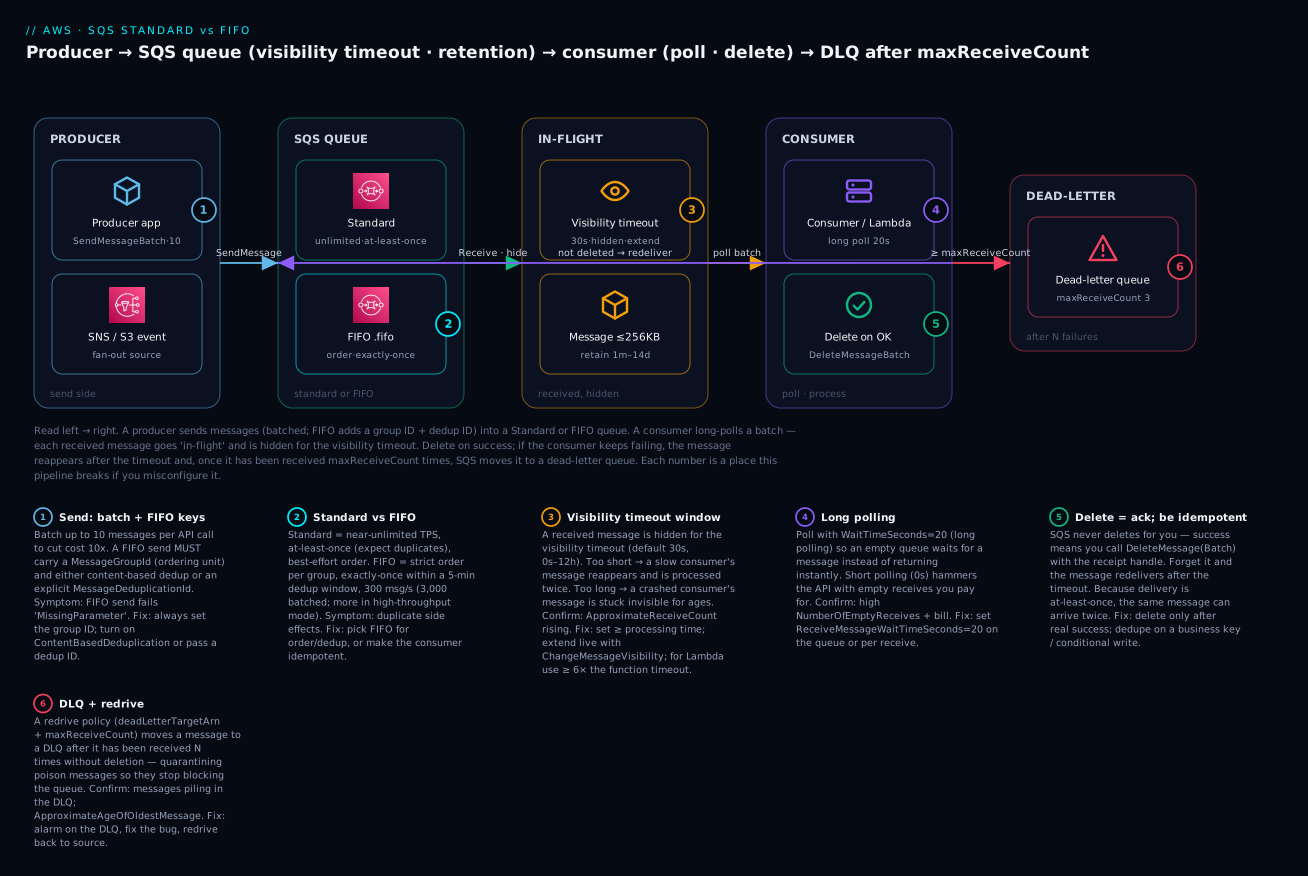
| Badge | Concept / failure class | Lives at | Playbook row |
|---|---|---|---|
| 1 | Send: batch + FIFO group/dedup ID | The producer | rows 5, 6 |
| 2 | Standard vs FIFO semantics | The queue type | rows 1, 7 |
| 3 | Visibility timeout (too short/long) | The in-flight window | rows 2, 3 |
| 4 | Long vs short polling | The consumer’s poll | row 8 |
| 5 | Delete = ack; idempotency | The consumer | rows 1, 4 |
| 6 | DLQ + maxReceiveCount + redrive |
The dead-letter path | rows 9, 10 |
Real-world scenario
KloudCart, a mid-size online grocer in Pune, ran its checkout on a synchronous chain: the order API called an inventory service, which called a payment service, which called a fulfilment service, all in one request. It worked in testing and fell apart on their first big festival sale. When payment slowed under load, the whole checkout slowed; when fulfilment briefly restarted during a deploy, in-flight orders were lost with no record. Their SRE, Meera, was asked to “make checkout resilient,” and SQS was the core of her fix — along with every classic beginner mistake on the way.
She started by decoupling fulfilment behind a standard queue: the order API now just SendMessages an order event and returns instantly, and a fleet of fulfilment workers polls the queue. Checkout latency dropped immediately and a fulfilment restart became a harmless few-minutes backlog. But within a day, support reported duplicate shipments — a handful of customers got two of the same order. The cause was two-fold: standard queues are at-least-once (so occasional duplicates are expected), and her workers’ visibility timeout was 30 seconds while some fulfilment calls took 45, so a slow message reappeared mid-processing and a second worker shipped it too (playbook rows 1 and 2). She fixed both: she raised the visibility timeout to 120 s (comfortably above the p99), added a ChangeMessageVisibility heartbeat for the rare very-slow order, and — the real fix — made the worker idempotent by recording each processed orderId and skipping duplicates. Duplicates stopped.
Next, one malformed order (a corrupt line-item from an upstream bug) began looping: received, failed, reappeared, failed, forever — and because it kept occupying a worker, throughput sagged. She had no DLQ. She created one and set a redrive policy with maxReceiveCount=3; the poison order was quarantined after three tries, a CloudWatch alarm on the DLQ’s ApproximateNumberOfMessagesVisible paged her, she found and fixed the upstream bug, and redrove the message back to the source queue to reprocess cleanly (rows 9, 10). Nothing was lost.
The last problem was the ledger: KloudCart’s finance events (charge, refund, adjustment) for a given customer had to be processed in order and never twice — a standard queue couldn’t promise either. For that one stream she moved to a FIFO queue with MessageGroupId = customerId, so each customer’s events were strictly ordered while different customers ran in parallel, and content-based deduplication caught accidental double-sends within the 5-minute window. Her first FIFO attempt failed every send with MissingParameter because she forgot the group ID (row 5) — a two-line fix once she understood that FIFO requires it. The result: checkout p99 fell from 3.1 s to 240 ms, festival-day order loss went to zero, duplicate shipments stopped, and the finance ledger became provably ordered and exactly-once. Meera’s wiki note was the thesis of this article: “SQS never dropped or duplicated anything I didn’t ask it to. Every bug was me — no delete, a short visibility timeout, no DLQ, or a missing FIFO key.”
Advantages and disadvantages
| Advantages | Disadvantages |
|---|---|
| Fully managed — no brokers, disks or clusters | Pull-based — consumers must poll (managed for Lambda) |
| Effectively infinite scale (standard) | FIFO caps throughput (300/3,000 msg/s default) |
| Durable across multiple AZs | 256 KB message limit (S3 for larger) |
| Decouples producer and consumer in time | At-least-once (standard) needs idempotent consumers |
| Generous always-free tier (1M req/mo) | Max 14-day retention; 15-min delay |
| Simple API — send/receive/delete | No message query/replay (use a stream for that) |
| Built-in DLQ + redrive | Ordering only within a FIFO group, not globally |
| Encryption at rest by default (SSE-SQS) | Visibility-timeout tuning is a real footgun |
When each side matters: SQS’s advantages dominate for decoupling and buffering work between services — absorbing spikes, surviving downstream outages, smoothing bursty load into a steady drain. The disadvantages bite when you need fan-out (one message to many consumer groups — use SNS→SQS), replay / multiple independent readers of the same log (use Kinesis or Kafka), very large payloads (offload to S3), or strict global ordering (FIFO only orders within a group). The honest rule: use SQS whenever one producer needs to hand work to one pool of consumers reliably; layer SNS in front for fan-out and reach for a stream when you need retained, replayable history.
| Choose SQS when… | Reconsider when… |
|---|---|
| One consumer group processes each message | Many groups each need every message (SNS→SQS) |
| You want durable buffering + back-pressure | You need replay / random access (stream) |
| Work is idempotent or you’ll make it so | You can’t tolerate any duplicate and can’t dedupe (FIFO) |
| Payloads are ≤ 256 KB | Payloads are large (S3 + pointer) |
| Order doesn’t matter, or only per-entity | You need strict global ordering (not possible) |
Hands-on lab
You will build the diagram: a standard queue and a FIFO queue, send/receive/delete on both, demonstrate visibility-timeout redelivery, then wire a DLQ with maxReceiveCount=3, quarantine a poison message, and redrive it — first with the aws sqs CLI, then the identical thing as Terraform. Everything is free-tier. Pick a region and stick to it (this lab uses ap-south-1, Mumbai).
⚠️ Cost note: SQS gives you 1,000,000 requests free every month, so this whole lab costs effectively ₹0. The only way to accrue anything is to leave a busy short-polling loop running; we delete every queue at the end.
What you’ll create
| Resource | Purpose | Cost at lab volume |
|---|---|---|
Queue kv-orders |
Standard queue (main path) | Free |
Queue kv-orders.fifo |
FIFO queue (order + dedup demo) | Free |
Queue kv-orders-dlq |
Dead-letter queue | Free |
Redrive policy on kv-orders |
maxReceiveCount=3 → DLQ |
Free |
Part A — the CLI path
Step 1 — Create a standard queue. The simplest possible queue:
aws sqs create-queue \
  --queue-name kv-orders \
  --attributes VisibilityTimeout=30,MessageRetentionPeriod=345600,ReceiveMessageWaitTimeSeconds=20 \
  --region ap-south-1
Expected — the queue URL you’ll use for everything else:
{ "QueueUrl": "https://sqs.ap-south-1.amazonaws.com/111122223333/kv-orders" }
Capture it in a variable:
STD_URL=$(aws sqs get-queue-url --queue-name kv-orders --region ap-south-1 --query QueueUrl --output text)
Step 2 — Create a FIFO queue. The name must end in .fifo, and we turn on content-based deduplication so we don’t have to pass a dedup ID on every send:
aws sqs create-queue \
  --queue-name kv-orders.fifo \
  --attributes FifoQueue=true,ContentBasedDeduplication=true,VisibilityTimeout=30 \
  --region ap-south-1

FIFO_URL=$(aws sqs get-queue-url --queue-name kv-orders.fifo --region ap-south-1 --query QueueUrl --output text)
Expected: a QueueUrl ending kv-orders.fifo. Omit the .fifo suffix and you get InvalidParameterValue: The name of a FIFO queue can only include ... and must end with the .fifo suffix.
Step 3 — Send messages. First to the standard queue:
aws sqs send-message \
  --queue-url "$STD_URL" \
  --message-body '{"orderId":"1001","item":"apples"}' \
  --region ap-south-1
Expected: a MessageId and an MD5OfMessageBody. Now the FIFO queue — note the required --message-group-id:
aws sqs send-message \
  --queue-url "$FIFO_URL" \
  --message-body '{"orderId":"2001","event":"charge"}' \
  --message-group-id "customer-42" \
  --region ap-south-1
Try it without --message-group-id to see the guardrail:
aws sqs send-message --queue-url "$FIFO_URL" --message-body '{"x":1}' --region ap-south-1
# An error occurred (MissingParameter): The request must contain the parameter MessageGroupId.
Step 4 — Receive and delete (the acknowledge handshake). Long-poll a batch and ask for the receive count:
aws sqs receive-message \
  --queue-url "$STD_URL" \
  --max-number-of-messages 10 \
  --wait-time-seconds 20 \
  --message-system-attribute-names ApproximateReceiveCount \
  --region ap-south-1
Expected — one message with a ReceiptHandle (a long opaque token) and "ApproximateReceiveCount": "1". Copy the receipt handle and delete the message to acknowledge it:
RH="AQEB...the-long-receipt-handle..."
aws sqs delete-message --queue-url "$STD_URL" --receipt-handle "$RH" --region ap-south-1
The delete returns nothing (success). The message is now permanently gone — receive again and the queue is empty.
Step 5 — Demonstrate visibility-timeout redelivery. This is the core lesson. Send a message, receive it (which hides it), don’t delete it, and watch it come back. First shorten the visibility timeout so you don’t have to wait 30 s:
aws sqs send-message --queue-url "$STD_URL" \
  --message-body '{"orderId":"1002"}' --region ap-south-1

# Receive with a SHORT 5-second visibility timeout, and do NOT delete:
aws sqs receive-message --queue-url "$STD_URL" \
  --visibility-timeout 5 \
  --message-system-attribute-names ApproximateReceiveCount \
  --region ap-south-1
# → ApproximateReceiveCount: "1"
Wait ~6 seconds (past the 5-second timeout), then receive again:
sleep 6
aws sqs receive-message --queue-url "$STD_URL" \
  --message-system-attribute-names ApproximateReceiveCount \
  --region ap-south-1
# → the SAME message, now ApproximateReceiveCount: "2"
There it is: you never deleted it, so it reappeared — with the receive count incremented. This is exactly the mechanism behind “SQS processed my message twice” (a too-short timeout) and the mechanism a DLQ uses to count failures. Delete it now (fetch a fresh receipt handle from the last receive — receipt handles change on every receive):
RH2="...fresh-handle-from-the-second-receive..."
aws sqs delete-message --queue-url "$STD_URL" --receipt-handle "$RH2" --region ap-south-1
Step 6 — Create a DLQ and attach a redrive policy. Create the dead-letter queue and grab its ARN:
aws sqs create-queue --queue-name kv-orders-dlq --region ap-south-1
DLQ_URL=$(aws sqs get-queue-url --queue-name kv-orders-dlq --region ap-south-1 --query QueueUrl --output text)
DLQ_ARN=$(aws sqs get-queue-attributes --queue-url "$DLQ_URL" \
  --attribute-names QueueArn --region ap-south-1 --query Attributes.QueueArn --output text)
echo "$DLQ_ARN"
# arn:aws:sqs:ap-south-1:111122223333:kv-orders-dlq
The redrive policy value is itself a JSON string, which is fiddly to escape on the command line — write it to a file:
cat > redrive.json <<JSON
{ "RedrivePolicy": "{\"deadLetterTargetArn\":\"${DLQ_ARN}\",\"maxReceiveCount\":\"3\"}" }
JSON

aws sqs set-queue-attributes --queue-url "$STD_URL" \
  --attributes file://redrive.json --region ap-south-1
Verify it stuck:
aws sqs get-queue-attributes --queue-url "$STD_URL" \
  --attribute-names RedrivePolicy --region ap-south-1
# → "RedrivePolicy": "{\"deadLetterTargetArn\":\"...kv-orders-dlq\",\"maxReceiveCount\":\"3\"}"
Step 7 — Quarantine a poison message. Send a “poison” message, then receive-without-delete four times (each with a short visibility timeout so it reappears fast). After the 3rd failed receive, the 4th attempt moves it to the DLQ instead of returning it:
aws sqs send-message --queue-url "$STD_URL" \
  --message-body '{"orderId":"BAD","corrupt":true}' --region ap-south-1

for i in 1 2 3 4; do
  echo "--- receive attempt $i ---"
  aws sqs receive-message --queue-url "$STD_URL" \
    --visibility-timeout 1 \
    --message-system-attribute-names ApproximateReceiveCount \
    --region ap-south-1 --query 'Messages[0].Attributes.ApproximateReceiveCount' --output text
  sleep 2
done
Expected: attempts 1–3 print 1, 2, 3 (the message keeps coming back); by attempt 4 the source queue returns nothing because SQS has moved the message to the DLQ. Confirm it’s in the DLQ:
aws sqs receive-message --queue-url "$DLQ_URL" \
  --message-system-attribute-names ApproximateReceiveCount \
  --region ap-south-1 --query 'Messages[0].Body' --output text
# {"orderId":"BAD","corrupt":true}
Step 8 — Redrive it back to source. Once you’d fixed the root cause, you’d replay the quarantined messages. Start a message-move task from the DLQ back to its source:
aws sqs start-message-move-task --source-arn "$DLQ_ARN" --region ap-south-1
# → { "TaskHandle": "..." }

aws sqs list-message-move-tasks --source-arn "$DLQ_ARN" --region ap-south-1
# → Status: COMPLETED, ApproximateNumberOfMessagesMoved: 1
The message is now back in kv-orders, ready to be processed cleanly.
Step 9 — Verify and tear down. Delete all three queues:
aws sqs delete-queue --queue-url "$STD_URL"  --region ap-south-1
aws sqs delete-queue --queue-url "$FIFO_URL" --region ap-south-1
aws sqs delete-queue --queue-url "$DLQ_URL"  --region ap-south-1
| Teardown step | Command | Why it matters |
|---|---|---|
| Delete standard queue | delete-queue $STD_URL |
Stops all processing/costs |
| Delete FIFO queue | delete-queue $FIFO_URL |
Same |
| Delete DLQ | delete-queue $DLQ_URL |
Delete the DLQ after the source, or fix the redrive policy first |
| Wait 60 s before reusing a name | — | QueueDeletedRecently blocks recreate for 60 s |
Part B — the same thing as Terraform
The CLI is great for learning; Terraform is how you keep it. This main.tf reproduces the whole lab declaratively — both queue types, the DLQ, the redrive policy, a redrive allow policy, and an access policy showing who may send:
terraform {
  required_providers {
    aws = { source = "hashicorp/aws", version = "~> 5.0" }
  }
}

provider "aws" {
  region = "ap-south-1"
}

# 1. The dead-letter queue (created first so the source can reference its ARN)
resource "aws_sqs_queue" "dlq" {
  name                      = "kv-orders-dlq"
  message_retention_seconds = 1209600 # 14 days — keep quarantined messages long enough to inspect
  sqs_managed_sse_enabled   = true
}

# 2. The main standard queue, wired to the DLQ
resource "aws_sqs_queue" "orders" {
  name                       = "kv-orders"
  visibility_timeout_seconds = 120    # comfortably above worst-case processing time
  message_retention_seconds  = 345600 # 4 days
  receive_wait_time_seconds  = 20     # long polling by default
  max_message_size           = 262144 # 256 KB
  delay_seconds              = 0
  sqs_managed_sse_enabled    = true

  redrive_policy = jsonencode({
    deadLetterTargetArn = aws_sqs_queue.dlq.arn
    maxReceiveCount     = 3
  })
}

# 3. Restrict which queues may use the DLQ (redrive ALLOW policy sits on the DLQ)
resource "aws_sqs_queue_redrive_allow_policy" "dlq_allow" {
  queue_url = aws_sqs_queue.dlq.id
  redrive_allow_policy = jsonencode({
    redrivePermission = "byQueue"
    sourceQueueArns   = [aws_sqs_queue.orders.arn]
  })
}

# 4. A FIFO queue with content-based dedup and high-throughput mode
resource "aws_sqs_queue" "orders_fifo" {
  name                        = "kv-orders.fifo"
  fifo_queue                  = true
  content_based_deduplication = true
  deduplication_scope         = "messageGroup"     # required for high throughput
  fifo_throughput_limit       = "perMessageGroupId"
  visibility_timeout_seconds  = 30
  sqs_managed_sse_enabled     = true
}

# 5. Access policy: allow ONLY a specific SNS topic to send (confused-deputy guard)
resource "aws_sqs_queue_policy" "orders_allow_sns" {
  queue_url = aws_sqs_queue.orders.id
  policy = jsonencode({
    Version = "2012-10-17"
    Statement = [{
      Sid       = "AllowOneTopic"
      Effect    = "Allow"
      Principal = { Service = "sns.amazonaws.com" }
      Action    = "sqs:SendMessage"
      Resource  = aws_sqs_queue.orders.arn
      Condition = {
        ArnEquals = { "aws:SourceArn" = "arn:aws:sns:ap-south-1:111122223333:kv-topic" }
      }
    }]
  })
}

output "std_queue_url"  { value = aws_sqs_queue.orders.url }
output "fifo_queue_url" { value = aws_sqs_queue.orders_fifo.url }
output "dlq_arn"        { value = aws_sqs_queue.dlq.arn }
terraform init
terraform apply    # review the plan, type yes
aws sqs send-message --queue-url "$(terraform output -raw std_queue_url)" \
  --message-body '{"orderId":"3001"}' --region ap-south-1
terraform destroy  # clean teardown, one command
| Terraform detail | Why it’s there | If you omit it |
|---|---|---|
redrive_policy = jsonencode({...}) |
Wires source → DLQ with maxReceiveCount |
No quarantine; poison messages loop |
aws_sqs_queue_redrive_allow_policy |
Restricts who may target the DLQ | Any queue could dump into your DLQ |
fifo_queue = true + .fifo name |
Declares a FIFO queue | Terraform/AWS rejects the mismatch |
deduplication_scope + fifo_throughput_limit |
Enables high-throughput FIFO | Capped at 300/3,000 msg/s |
sqs_managed_sse_enabled = true |
Encryption at rest, free | Unencrypted queue |
visibility_timeout_seconds = 120 |
Above worst-case processing | Too-short default → double-processing |
Common mistakes & troubleshooting
This is the section you’ll return to. It is a playbook: match your symptom, run the confirm command, apply the fix. Rows tagged (pointer) are covered in depth by the advanced processing sibling.
| # | Symptom | Root cause | Confirm (exact command / console path) | Fix |
|---|---|---|---|---|
| 1 | Message processed twice | No DeleteMessage, or duplicate under at-least-once, or non-idempotent consumer |
Watch ApproximateReceiveCount climb on receive; check your code deletes on success |
Delete after real success; make the consumer idempotent (dedupe key / conditional write) |
| 2 | Message reappears while still processing | Visibility timeout shorter than processing time | REPORT/logs show processing > timeout; receive count rising mid-job |
Raise VisibilityTimeout above p99; ChangeMessageVisibility heartbeat for outliers |
| 3 | Message “stuck,” invisible for ages | Visibility timeout too long + consumer crashed after receiving | ApproximateNumberOfMessagesNotVisible high while nothing progresses |
Lower the timeout toward real processing time; add a DLQ |
| 4 | Consumer deletes but message comes back | Deleting with a stale receipt handle (from a previous receive) | Delete “succeeds” yet message redelivers; handle predates the last receive | Always delete with the receipt handle from the most recent receive |
| 5 | FIFO send rejected MissingParameter |
No MessageGroupId on a FIFO send |
send-message error names MessageGroupId |
Always pass --message-group-id on FIFO |
| 6 | FIFO message never delivered | Dedup ID collided within the 5-min window (or same body + content-based dedup) | Compare MessageDeduplicationId / body to a recent send |
Use a unique dedup ID per logical message; or wait out the 5-min window |
| 7 | FIFO throughput throttled | Hit 300 msg/s (or one group ID serialising everything) | RequestThrottled; all messages share one group ID |
Spread across many group IDs; enable high-throughput mode; batch |
| 8 | Empty receives costing money | Short polling (WaitTimeSeconds=0) looping on an idle queue |
High NumberOfEmptyReceives; rising request count |
Set ReceiveMessageWaitTimeSeconds=20 (long polling) |
| 9 | DLQ never catches poison messages | Redrive policy missing, wrong deadLetterTargetArn, or type mismatch |
get-queue-attributes --attribute-names RedrivePolicy; check ARN + FIFO/standard match |
Set a correct redrive policy; standard DLQ for standard source, FIFO for FIFO |
| 10 | Messages piling up in the DLQ unnoticed | No alarm on the DLQ | ApproximateNumberOfMessagesVisible on DLQ > 0 |
Alarm on DLQ depth; fix cause; start-message-move-task to redrive |
| 11 | Message “lost” | Retention expired (nobody consumed it in time) with no DLQ | MessageRetentionPeriod; consumer was down longer than retention |
Raise retention to cover outages; add a DLQ so poison messages don’t age out |
| 12 | Send rejected MessageTooLong / BatchRequestTooLong |
Body + attributes > 256 KB (or batch total > 256 KB) | Error names the size limit; check payload bytes | Offload to S3 (extended client / pointer); shrink attributes; smaller batches |
| 13 | AccessDenied on send/receive |
Queue access policy or IAM doesn’t allow the principal/action | get-queue-attributes --attribute-names Policy; check IAM |
Grant sqs:SendMessage/ReceiveMessage; pin aws:SourceArn for SNS/S3 |
| 14 | OverLimit on receive |
In-flight cap hit (120k standard / 20k FIFO) — not deleting fast enough | ApproximateNumberOfMessagesNotVisible near the cap |
Delete faster; scale consumers; shorten visibility timeout |
| 15 | KMS error on send/receive | Principal lacks kms:GenerateDataKey/kms:Decrypt on the SSE-KMS key |
Error names KMS; check the key policy | Grant the producer/consumer KMS permissions, or use SSE-SQS |
| 16 | QueueDeletedRecently on create |
Recreating a queue name within 60 s of deleting it | Error message is explicit | Wait 60 seconds, then create |
The SQS error / status reference
When an API call fails, the error code tells you exactly what to fix:
| Error code | Meaning | Likely cause | Fix |
|---|---|---|---|
AWS.SimpleQueueService.NonExistentQueue |
Queue doesn’t exist | Wrong URL, wrong Region, or deleted | Use the exact QueueUrl in the right Region |
MissingParameter (MessageGroupId) |
Required FIFO param absent | FIFO send with no group ID | Pass MessageGroupId |
InvalidParameterValue |
Bad value | .fifo suffix wrong; out-of-range attribute |
Fix the name/attribute |
AWS.SimpleQueueService.MessageNotInflight |
ChangeMessageVisibility on a non-in-flight message |
Timeout already lapsed; you no longer own it | Re-receive; extend before expiry |
ReceiptHandleIsInvalid |
Bad/stale receipt handle | Reusing an old handle to delete | Use the latest receive’s handle |
OverLimit |
In-flight limit exceeded | 120k/20k in-flight reached | Delete faster; scale consumers |
AWS.SimpleQueueService.BatchEntryIdsNotDistinct |
Duplicate batch entry Ids |
Reused an Id in a batch |
Give each batch entry a unique Id |
AWS.SimpleQueueService.TooManyEntriesInBatchRequest |
> 10 entries in a batch | Batch too big | Max 10 per batch |
AWS.SimpleQueueService.BatchRequestTooLong |
Batch payload > 256 KB | Combined batch too large | Split; offload to S3 |
AWS.SimpleQueueService.QueueDeletedRecently |
Name reused within 60 s | Recreated too fast | Wait 60 s |
KMS.AccessDeniedException |
Can’t use the SSE-KMS key | Missing key permissions | Grant kms:GenerateDataKey/Decrypt |
RequestThrottled / ThrottlingException |
Rate exceeded | FIFO 300 msg/s or API throttle | Batch; high-throughput mode; back off |
The CloudWatch metrics that tell you the truth
You can’t fix what you can’t see. These are the SQS metrics to graph and alarm on (default 5-minute granularity):
| Metric | What it tells you | Alarm when |
|---|---|---|
ApproximateNumberOfMessagesVisible |
Backlog depth (messages waiting) | Rising steadily → consumers can’t keep up |
ApproximateNumberOfMessagesNotVisible |
In-flight (received, not deleted) | Near 120k/20k → in-flight cap risk |
ApproximateNumberOfMessagesDelayed |
Messages still in their delay window | Unexpected delay config |
ApproximateAgeOfOldestMessage |
How long the oldest message has waited | High → stuck/starved processing (a top DLQ alarm) |
NumberOfEmptyReceives |
Receives that returned nothing | High → you’re short-polling; switch to long |
NumberOfMessagesSent/Received/Deleted |
Throughput each way | Sent ≫ Deleted → messages aren’t being acked |
SentMessageSize |
Payload sizes | Near 256 KB → consider S3 offload |
The two alarms every production queue needs: ApproximateAgeOfOldestMessage on the main queue (catches a stalled or starved consumer) and ApproximateNumberOfMessagesVisible on the DLQ > 0 (catches poison messages the moment they’re quarantined).
The three nastiest, explained
“SQS is duplicating my messages” (rows 1, 2) is almost never SQS’s fault. Two distinct things get blamed as “duplication.” The first is real at-least-once delivery on a standard queue — rare, expected, and handled by making your consumer idempotent (record a business key, use a conditional write). The second — far more common for beginners — is a visibility-timeout mismatch: your processing takes longer than the timeout, so the message reappears and a second consumer grabs it while the first is still working. That’s not SQS duplicating; that’s you telling SQS “I’m done owning this” (by letting the timeout lapse) before you actually were. Confirm by watching ApproximateReceiveCount climb during a single logical unit of work; fix by raising the timeout above your p99 and heart-beating the outliers with ChangeMessageVisibility.
“My DLQ never catches anything” (row 9) usually means the redrive policy is subtly wrong. The three failure modes: the policy isn’t set at all (so failures loop forever until retention); the deadLetterTargetArn points at the wrong queue (a typo, or a queue in another Region/account); or there’s a type mismatch — a standard source pointing at a FIFO DLQ, or vice versa, which SQS rejects. Confirm with get-queue-attributes --attribute-names RedrivePolicy and eyeball the ARN and the FIFO/standard match. And remember the count semantics: maxReceiveCount=3 means the message is moved on the receive after the third failed one — so with a very long visibility timeout it can take a long wall-clock time to reach the DLQ even though only three receives happened.
FIFO “stops delivering” (rows 6, 7) trips up everyone new to FIFO, and it’s two different traps wearing the same coat. Trap one is deduplication swallowing sends: because FIFO dedupes on a 5-minute window, re-sending the same content (content-based dedup) or the same MessageDeduplicationId inside that window is accepted but silently not delivered — it looks like the message vanished. Trap two is a blocked group: FIFO guarantees order within a group, so a message that can’t be processed blocks every message behind it in the same group until it’s deleted or moved to the DLQ. If everything is in one group ID, one poison message halts the entire queue. The fixes: use genuinely unique dedup IDs per logical message, spread work across many group IDs (one per entity), and always attach a FIFO DLQ so a poison message is evicted instead of blocking its group forever. The advanced processing sibling goes deep on poison-message handling and partial-batch failures.
Best practices
- Always delete after real success — never before. The delete is your acknowledgement. Delete only when the work is genuinely done, and design so a redelivery (which will happen) is harmless.
- Make consumers idempotent from day one. At-least-once delivery is a property, not a bug. Dedupe on a business key or use conditional writes so processing the same message twice is safe — this single habit prevents most SQS incidents.
- Set the visibility timeout to a bit above your p99 processing time, and heartbeat outliers with
ChangeMessageVisibilityrather than setting one enormous fixed timeout. For Lambda consumers, use ≥ 6× the function timeout. - Give every production queue a DLQ with
maxReceiveCount3–5, and alarm on the DLQ’s depth. A queue without a DLQ lets poison messages loop or silently age out. - Turn on long polling everywhere (
ReceiveMessageWaitTimeSeconds=20). It cuts empty receives, latency and cost with no downside for virtually all workloads. - Batch send, receive and delete (up to 10) wherever you can — it’s the biggest cost lever, cutting your request bill by up to 90%.
- Prefer standard + idempotency; reach for FIFO only when order or exactly-once is a real requirement. FIFO’s throughput cap and group-ID discipline are a real cost.
- On FIFO, choose the group ID as your natural partition key (customer, order, device) so you get ordering where it matters and parallelism across entities — never one global group.
- Keep messages small; offload large payloads to S3 via the extended client or a pointer. The messaging plane should carry references, not megabytes.
- Encrypt at rest (SSE-SQS is free and default) and scope the access policy with
aws:SourceArnso only the intended topic/bucket/service can send — closing the confused-deputy hole. - Set a retention period that covers your worst realistic consumer outage (often the 14-day max for critical queues), so a long downstream outage doesn’t quietly discard work.
- Right-size and monitor: alarm on
ApproximateAgeOfOldestMessage(stalled consumer) and DLQ depth (poison messages), and graph backlog vs. delete rate to spot a consumer falling behind.
Security notes
SQS’s security model is small but load-bearing:
| Control | What to do | Why |
|---|---|---|
| Encryption at rest | Leave SSE-SQS on (default); SSE-KMS with a CMK for audited/cross-account cases | Messages can hold PII/order data; free by default |
| Least-privilege access policy | Grant only SendMessage or ReceiveMessage to each principal, scoped to the queue ARN |
A producer shouldn’t be able to read; a consumer shouldn’t be able to purge |
Pin aws:SourceArn / aws:SourceAccount |
On every SNS/S3/EventBridge send grant | Stops the confused-deputy — a foreign topic/bucket dumping into your queue |
| Separate producer and consumer identities | Distinct IAM roles with distinct queue permissions | Blast-radius containment; clear audit |
| TLS in transit | Use the HTTPS endpoints (default) | Messages are encrypted on the wire |
| KMS key policy | Grant kms:GenerateDataKey+kms:Decrypt to exactly the send/receive roles |
Too broad → anyone can read; too narrow → sends fail |
| VPC endpoint (PrivateLink) | Reach SQS without traversing the public internet | Keep queue traffic on your private network |
| CloudTrail on | Audit SetQueueAttributes, AddPermission, PurgeQueue |
Detect policy tampering and destructive calls |
The two you’ll get wrong first: a queue policy that grants sqs:* to Principal: "*" “just to get it working” (which lets anyone in the account — or worse — send and purge), and forgetting the aws:SourceArn condition when SNS or S3 sends to the queue (leaving it open to any source). Scope both tightly from the start; loosening later is easy, tightening after an incident is not.
Cost & sizing
SQS pricing is refreshingly simple — you pay per request, with a large always-free tier and no per-hour or storage charge for the queue itself.
| Cost driver | How it’s charged | Lever to pull |
|---|---|---|
| Requests | First 1M/month free; then $0.40/M (standard), $0.50/M (FIFO) | Batch (10×); long-poll to kill empty receives |
| Payload chunks | Each 64 KB of a message counts as one request | Keep messages small; a 256 KB message = 4 requests |
| Empty receives | Billed as requests | Long polling (WaitTimeSeconds=20) |
| Data transfer | Standard AWS egress rates apply | Keep producers/consumers in-Region; use VPC endpoints |
| SSE-KMS | KMS API calls + key charges | Raise KmsDataKeyReusePeriodSeconds; or use free SSE-SQS |
A worked example to make it concrete:
| Scenario | Type | Messages/mo | With batching? | Billable requests | Est. cost |
|---|---|---|---|---|---|
| This lab | Standard | ~50 | No | ~150 | ₹0 (free tier) |
| Small app | Standard | 5,000,000 | No (send+recv+delete = 3 req each) | ~15M − 1M free = 14M | ~$5.6 |
| Same app, batched | Standard | 5,000,000 | Yes (÷10) | ~1.5M − 1M free = 0.5M | ~$0.2 |
| FIFO ledger | FIFO | 2,000,000 | Partial | ~5M − 1M free = 4M | ~$2.0 |
| Chatty short-poll | Standard | 100,000 real | No (empty receives) | Millions of empty polls | Wasted $ — switch to long polling |
The two takeaways: batching and long polling are the whole cost story — an unbatched, short-polling consumer can cost 10–100× a batched, long-polling one for the same real work — and payload size matters because each 64 KB chunk is a separate billable request. For sizing, watch backlog depth vs. delete rate: if ApproximateNumberOfMessagesVisible trends up, add consumers (SQS scales infinitely on the queue side; the bottleneck is always your consumer fleet).
Interview & exam questions
1. What is Amazon SQS in one sentence, and what problem does it solve? SQS is a fully managed, durable message queue that decouples producers from consumers in time: the producer sends and moves on, the queue buffers the work across multiple AZs, and the consumer polls and processes at its own pace — turning spikes into backlogs and downstream outages into harmless delays. (CLF-C02)
2. Standard vs FIFO — the core differences? Standard: near-unlimited throughput, at-least-once delivery (duplicates possible), best-effort ordering. FIFO: strict ordering within a message group, exactly-once processing within a 5-minute dedup window, capped at 300 msg/s (3,000 batched, more in high-throughput mode), name must end .fifo, and every send needs a MessageGroupId. (DVA-C02, SAA-C03)
3. Explain the visibility timeout and its two failure directions. When a consumer receives a message it becomes in-flight (invisible) for the visibility timeout; the consumer must delete it before the timer expires or it’s redelivered. Too short → the message reappears mid-processing and is handled twice; too long → a crashed consumer’s message is stuck invisible for ages. Set it above p99 processing time and extend outliers with ChangeMessageVisibility. (DVA-C02)
4. Why must SQS consumers be idempotent? Standard queues are at-least-once, so a message can be delivered more than once (by design, and via visibility-timeout redelivery). Processing must be safe to repeat — via a dedupe key or conditional write — so a duplicate doesn’t double-charge or double-ship. (DVA-C02, SAA-C03)
5. How does a dead-letter queue work? A redrive policy on the source queue names a deadLetterTargetArn and a maxReceiveCount; after a message is received that many times without being deleted, SQS moves it to the DLQ. This quarantines poison messages so they stop looping (or blocking a FIFO group), lets you alarm and inspect, and you can redrive them back to source after fixing the cause. (DVA-C02, SAA-C03)
6. Long polling vs short polling — which and why? Long polling (WaitTimeSeconds 1–20) waits for a message across all servers, cutting empty receives, latency and cost; short polling (0) samples a subset and returns immediately, often empty, and each empty receive is a billable request. Use long polling almost always. (DVA-C02)
7. What’s the maximum message size and how do you exceed it? 256 KB (body + attributes). For larger payloads use the SQS Extended Client Library (or a manual S3 pointer), which stores the body in S3 (up to 2 GB) and passes only a reference through the queue. (DVA-C02)
8. On a FIFO queue, what do MessageGroupId and MessageDeduplicationId do? MessageGroupId is the ordering + parallelism unit — messages in the same group are strictly ordered; different groups run in parallel. MessageDeduplicationId (or content-based dedup) is the exactly-once key: a repeat within 5 minutes is accepted but not delivered. (DVA-C02, SAA-C03)
9. Your SQS-triggered Lambda processes some messages twice. First hypothesis? The queue’s visibility timeout is too low relative to the function timeout — set it to at least 6× the Lambda timeout so a message doesn’t reappear (and get picked up by a second invocation) while the first is still processing. Also verify the consumer deletes on success and is idempotent. (DVA-C02)
10. How is SQS priced, and what’s always free? Per request: 1M requests/month free forever, then $0.40/M (standard) or $0.50/M (FIFO); each 64 KB of payload is a request, and empty receives count. Batching (10×) and long polling are the main cost levers. (CLF-C02)
11. When would you choose SQS over SNS or Kinesis? SQS when one consumer group processes each message with durable buffering and back-pressure. SNS when you need to fan one message out to many subscribers (push). Kinesis/Kafka when you need a retained, replayable log with multiple independent readers at their own offsets. The classic combo is SNS→SQS for durable fan-out. (SAA-C03)
12. A message disappeared from a queue with no DLQ. What happened? Almost certainly retention expiry — an undelivered message is discarded after MessageRetentionPeriod (default 4 days, max 14) with no notification. Either the consumer was down longer than retention or it was a poison message looping until it aged out. Add a DLQ and size retention to cover outages. (DVA-C02)
Quick check
- You receive a message, process it successfully, but forget to call
DeleteMessage. What happens ~30 seconds later, and why? - Your consumer’s processing takes 45 seconds but the visibility timeout is 30 seconds. What bug appears, and what are two fixes?
- On a FIFO queue, what two things must a send include (given content-based dedup is off), and what happens if you omit the group ID?
- You attach a DLQ with
maxReceiveCount=3. After how many failed receives is a message moved to the DLQ, and how do you get it back? - An idle consumer is running up your SQS bill. What is it almost certainly doing, and what’s the one-line fix?
Answers
- The message becomes visible again and is redelivered — because receiving only hides a message for the visibility timeout; the explicit
DeleteMessageis the acknowledgement, and without it SQS assumes processing failed and re-queues it (withApproximateReceiveCountincremented). - Double processing — the message reappears at 30 s while the first consumer is still working, so a second consumer grabs it. Fixes: raise the visibility timeout above the real processing time (e.g. 90–120 s), and/or call
ChangeMessageVisibilityto heartbeat the message while working; and make the consumer idempotent as a backstop. - A
MessageGroupId(the ordering unit) and aMessageDeduplicationId(the exactly-once key). Omit the group ID and the send is rejected withMissingParameter— FIFO requires it on every send. - After the 3rd failed receive, the next receive attempt moves it to the DLQ (it’s moved when the count exceeds
maxReceiveCount). Get it back by fixing the root cause and runningstart-message-move-task(the console’s “DLQ redrive”) to move messages back to the source queue. - Short polling — looping on
ReceiveMessagewithWaitTimeSeconds=0, so it issues constant empty receives that are each billable. One-line fix: setReceiveMessageWaitTimeSeconds=20on the queue (long polling).
Glossary
| Term | Definition |
|---|---|
| Queue | A durable, managed buffer that holds messages between a producer and a consumer. |
| Message | A unit of data (body ≤ 256 KB plus up to 10 attributes) placed in a queue. |
| Standard queue | The default SQS type: near-unlimited throughput, at-least-once delivery, best-effort ordering. |
| FIFO queue | A queue (name ending .fifo) with strict per-group ordering and exactly-once processing within a 5-minute window. |
| Visibility timeout | The window after a message is received during which it is hidden (in-flight) from other consumers. |
| In-flight message | A message that has been received but not yet deleted; capped at 120,000 (standard) / 20,000 (FIFO). |
| Receipt handle | A token returned by each receive, used to delete or change the visibility of that specific delivery. |
| At-least-once delivery | The guarantee that a message is delivered one or more times — so consumers must be idempotent. |
| Exactly-once processing | The FIFO guarantee that a message is processed once within the deduplication window. |
| Message group ID | The FIFO attribute that defines the ordering/parallelism unit; messages in one group are strictly ordered. |
| Deduplication ID | The FIFO key (explicit or content-based) that suppresses duplicate sends within 5 minutes. |
| Retention period | How long an undelivered message lives in the queue (1 minute – 14 days, default 4 days). |
| Delay queue / message timer | A per-queue (or per-message, standard only) hold of up to 15 minutes before a message becomes visible. |
| Long polling | Receiving with WaitTimeSeconds 1–20 so an empty queue waits for a message instead of returning immediately. |
| Dead-letter queue (DLQ) | A separate queue that receives messages a source queue couldn’t process after maxReceiveCount tries. |
| maxReceiveCount | The redrive-policy threshold of failed receives after which a message is moved to the DLQ. |
| Redrive | Moving messages from a DLQ back to their source queue for reprocessing after a fix (StartMessageMoveTask). |
| Redrive allow policy | A policy on the DLQ restricting which source queues may target it. |
Next steps
- Add fan-out in front of the queue. Learn the push, one-to-many half of the pattern — and the canonical SNS→SQS durable fan-out — in Amazon SNS: Pub/Sub Fan-Out, Subscriptions, Filtering & SNS→SQS Patterns.
- Go deep on message-processing failures. Poison messages, partial-batch failures, redrive strategy and idempotency at scale are the subject of SQS Message Processing Failures: Redrive, DLQs, Poison Messages & Idempotency.
- See the whole integration picture. How SQS, SNS, EventBridge, Lambda and Step Functions fit together is laid out in Event-Driven Architecture on AWS: EventBridge, SQS, SNS, Lambda and Step Functions.
- Handle the consumer side. When a Lambda consumes your queue, its errors, timeouts and cold starts matter — work through AWS Lambda Errors, Timeouts & Cold Starts: The Troubleshooting Playbook.