The queue is 40,000 messages deep, the age of the oldest message just crossed three hours, and the on-call channel has two contradictory reports: one team says the same order shipped twice, another says their message “never arrived.” Both are true, and both are SQS behaving exactly as designed — you just have not yet named which of a dozen very specific failure classes each one is. Amazon SQS almost never “loses” a message at random. It duplicates on an at-least-once queue when your visibility timeout is shorter than your consumer’s runtime, it strands messages in-flight when a consumer crashes holding them, it moves a poison message to a dead-letter queue after maxReceiveCount receives, and it silently drops a message when retention expires before anyone processed it. Each of those is a different root cause with a different confirming metric and a different fix, and the entire skill of operating a queue at 3 a.m. is telling them apart fast.
This is the reference you keep open during the incident. It treats SQS as what it actually is — a visibility-timeout state machine wrapped around an at-least-once (standard) or exactly-once-processing (FIFO) delivery contract, with a dead-letter queue as the catch-net and a redrive path back — and it walks every message-processing failure that pages you: duplicate processing (visibility timeout below consumer runtime, no idempotency), stuck / invisible messages (a crashed consumer holding them in-flight until the timeout, and the hard in-flight limit — 120,000 standard, 20,000 FIFO — that returns OverLimit), messages going to the DLQ (maxReceiveCount reached, poison payloads, a consumer that always throws), messages not going to the DLQ (a missing or wrong redrive policy, a DLQ whose retention is shorter than the source, a type or encryption mismatch), the Lambda event-source-mapping traps (without ReportBatchItemFailures one bad record reprocesses the whole batch and duplicates the nine good ones), FIFO stuck (a message group blocked by one un-acked message, and deduplication silently swallowing a resend), redrive from the DLQ back to source, and the quiet killer — silent loss when retention expires before processing.
By the end you will read ApproximateAgeOfOldestMessage and ApproximateNumberOfMessagesNotVisible like an instrument panel, know from a single metric whether you are looking at a backlog, an in-flight leak, or a poison-message loop, and carry a # → symptom → category → root cause → confirm → fix playbook you can run under pressure. Everything is shown in both aws CLI and Terraform, with the real limits and error strings — never a hand-waved number. It maps directly to the integration and messaging domains of SAA-C03, DVA-C02 and SOA-C02.
What problem this solves
A queue decouples a producer from a consumer, and in doing so it hides every failure behind an approximate count and an eventually-consistent state. There is no transaction log you can tail, no single “where is my message” query — a message is either visible (available), not visible (in-flight, received by someone who has not deleted it yet), delayed, or gone (deleted, or expired past retention), and the only windows you have into which state a message is in are a handful of CloudWatch metrics that are themselves approximate. When processing is duplicating, stalling, or dropping, you diagnose it entirely from those metrics plus the queue’s attributes — and if you do not know which number means what, you will “fix” a duplicate that was really a too-short visibility timeout, add consumers to a queue that is stuck on the in-flight cap, or redrive a DLQ whose messages already expired.
What breaks without this knowledge is correctness and money, silently. A team sets a 30-second visibility timeout on a queue whose consumer takes 45 seconds; every message is delivered a second time mid-processing and every order ships twice — the queue depth looks healthy the whole time. Another wires a Lambda to an SQS queue, hits one malformed record in a batch of ten, and — because they never set ReportBatchItemFailures — watches the whole batch reappear and reprocess, so the nine good records run again and again while the one bad record inches toward the DLQ. A third points a redrive policy at a DLQ ARN with a typo, sleeps soundly because “we have a DLQ,” and discovers weeks later that poison messages have been expiring in the source queue at retention the entire time, caught by nothing. None of these are exotic. They are the default behaviour of a queue you have not configured against.
Who hits this: anyone running asynchronous processing past “hello world.” It bites hardest on teams new to at-least-once delivery and the visibility-timeout model, on high-throughput consumers where the in-flight cap and batch semantics are load-bearing, on FIFO users who assume ordering is free and discover one stuck message blocks an entire group, and on anyone who assumed a failed message would “obviously” end up in a dead-letter queue. The fix is almost never “add more consumers and hope.” It is: name the failure class, read the one metric that confirms it, and apply the one attribute or ESM setting that addresses it.
Here is the whole failure field on one screen — the class, where it bites hardest, the exact signal, and the one-line fix — so you can orient before the deep dive:
| Failure class | Bites hardest on | The signal you’ll see | The one-line fix |
|---|---|---|---|
| Duplicate processing | Standard queues | Same side effect twice; ApproximateReceiveCount > 1 |
Visibility ≥ processing time; idempotency key |
| Stuck / invisible | Any queue | NotVisible high, Visible ≈ 0, no progress |
Shorter visibility or heartbeat; delete on success |
| In-flight OverLimit | Slow consumers | OverLimit on ReceiveMessage; NotVisible ≈ 120k/20k |
Delete faster; more consumers; shorter visibility |
| Poison → DLQ | Bad payloads / bugs | DLQ depth climbing; ApproximateReceiveCount ≈ max |
Fix handler; inspect DLQ; redrive after fix |
| Not going to DLQ | Misconfigured redrive | Poison loops forever or expires; DLQ stays empty | Fix redrive policy ARN/type; DLQ retention ≥ source |
| Whole-batch reprocess | Lambda ESM | 9 good records reprocess with the 1 bad | ReportBatchItemFailures + return failed IDs |
| FIFO group block | FIFO queues | One group stalls; AgeOfOldest climbs, others fine |
Delete/handle the head message; DLQ the group |
| FIFO dedup swallow | FIFO producers | “Sent” message never delivered | Unique MessageDeduplicationId per distinct message |
| Silent loss | Any queue | Message gone, DLQ empty, no error | Retention ≥ max age; DLQ before retention; alarms |
| KMS / permission | Encrypted queues | KMS.AccessDeniedException; can’t send/receive |
kms:Decrypt/GenerateDataKey; queue policy |
Learning objectives
By the end of this article you can:
- Read an SQS queue’s four state counts —
ApproximateNumberOfMessagesVisible,NotVisible,Delayed, andApproximateAgeOfOldestMessage— and state instantly whether you have a backlog, an in-flight leak, a stuck consumer, or silent loss. - Diagnose duplicate processing to its real cause (visibility timeout below runtime, a consumer that fails to delete, at-least-once redelivery) and fix it with the right visibility setting, a heartbeat, and an idempotency key.
- Explain the in-flight limit (120,000 standard / 20,000 FIFO), recognise the
OverLimiterror, and clear a queue that has hit the cap. - Configure a redrive policy correctly — right DLQ ARN, matching type,
maxReceiveCount, matching encryption — and enumerate every reason a message fails to reach the DLQ. - Fix a Lambda event-source mapping so one poison record no longer reprocesses the whole batch, using
ReportBatchItemFailures, and setmaximumConcurrency, batch size/window, and the visibility ≥ 6× function-timeout rule. - Unblock a stuck FIFO message group, and stop deduplication from silently swallowing legitimate resends.
- Redrive a DLQ back to its source with
start-message-move-task, and run asymptom → category → root cause → confirm → fixplaybook end to end in a hands-on lab.
Prerequisites & where this fits
You should already be comfortable with the SQS basics: a producer calls SendMessage, a consumer calls ReceiveMessage (which hides the message for the visibility timeout), processes it, and then calls DeleteMessage — and if it never deletes, the message reappears after the timeout. You should know that a standard queue is at-least-once with best-effort ordering and effectively unlimited throughput, while a FIFO queue is exactly-once-processing with strict ordering per message group. You should be able to run aws sqs from a shell, read JSON with --query, and read a Terraform aws provider resource block. The ideas of “retry,” “idempotency,” and “poison message” should be familiar.
This sits in the Integration & Messaging track and is the operational companion to the design-side references. The queue types themselves — standard vs FIFO, ordering, throughput, and when to pick which — are built hands-on in SQS Queues: Standard vs FIFO, Hands-On; the pub/sub sibling that fans one message out to many queues is covered in SNS Topics: Fan-Out & Subscriptions, Hands-On; and the larger pattern that wires buses, queues and functions together is Event-Driven Architecture with EventBridge, SQS & Lambda. Because the most common SQS consumer is a Lambda function, the failure modes here overlap deeply with AWS Lambda Errors, Timeouts & Cold Starts: The Troubleshooting Playbook — this article owns the queue side of that boundary, that one owns the function side.
Before the deep dive, fix the mental model of where each failure lives, so you look in the right place first:
| Layer | What lives here | Failure classes it causes | First place to look |
|---|---|---|---|
| Producer | SendMessage, dedup, message group |
FIFO dedup swallow; wrong group; oversized (>256 KB) | NumberOfMessagesSent; producer logs |
| Queue config | Visibility, retention, redrive policy, encryption | Duplicates; silent loss; DLQ-not-catching | get-queue-attributes |
| In-flight window | Received-but-not-deleted messages | Stuck/invisible; OverLimit; FIFO group block |
ApproximateNumberOfMessagesNotVisible |
| Consumer | ReceiveMessage → process → DeleteMessage |
Duplicates; poison loops; whole-batch reprocess | Consumer logs; ApproximateReceiveCount |
| DLQ + redrive | The catch-net and the replay path | Poison caught (or not); stale DLQ | DLQ depth; redrive-allow-policy |
| Observability | CloudWatch metrics | You can’t confirm anything | CloudWatch Metrics + alarms |
Core concepts
The message lifecycle — the visibility-timeout state machine
Every SQS message moves through a small state machine, and knowing which state a message is in is half of every diagnosis. A message is visible (available to be received), becomes not visible (in-flight) the instant a consumer receives it, and stays that way for the visibility timeout — during which no other consumer can see it — until the consumer either deletes it (done) or the timeout expires (it becomes visible again and will be redelivered). A message can also be delayed (not yet visible, held by a delay queue or per-message timer), and it is permanently gone when deleted or when its retention period expires.
| State | What it means | The metric that counts it | What moves it out |
|---|---|---|---|
| Visible | Available for ReceiveMessage |
ApproximateNumberOfMessagesVisible |
A consumer receives it → not visible |
| Not visible (in-flight) | Received, hidden for the visibility timeout | ApproximateNumberOfMessagesNotVisible |
DeleteMessage (gone), or timeout expiry (→ visible) |
| Delayed | Held before first delivery | ApproximateNumberOfMessagesDelayed |
Delay elapses → visible |
| Gone (deleted) | Consumer confirmed success | — (drops out of all counts) | Terminal |
| Gone (expired) | Retention period elapsed unprocessed | — (silent; count just drops) | Terminal — this is silent loss |
The single most useful signal in all of SQS is ApproximateAgeOfOldestMessage — the age, in seconds, of the oldest message still in the queue. Learn to read the four numbers together:
| You observe | It means | Likely class |
|---|---|---|
Visible high, NotVisible low, AgeOfOldest climbing |
Backlog: consumers can’t keep up | Under-provisioned consumer |
Visible ≈ 0, NotVisible high, no progress |
Messages received but never deleted | Stuck / invisible; crashed consumer |
NotVisible pinned at 120k/20k, OverLimit on receive |
In-flight cap reached | OverLimit |
AgeOfOldest near retention, count dropping |
Messages expiring unprocessed | Silent loss |
DLQ Visible climbing |
Poison messages caught | Poison → DLQ (working) |
Poison loops forever, DLQ Visible = 0 |
Redrive misconfigured | DLQ-not-catching |
Standard vs FIFO — the contract changes the failure modes
The two queue types fail differently because their delivery contracts differ. This table is the one you memorise; nearly every “why did it duplicate / why is it stuck” question is answered by reading the correct row.
| Property | Standard | FIFO |
|---|---|---|
| Delivery | At-least-once (duplicates possible) | Exactly-once processing (dedup within 5 min) |
| Ordering | Best-effort | Strict, per MessageGroupId |
| Throughput | Effectively unlimited | 300 msg/s (3,000 batched); high-throughput mode: much higher |
| In-flight limit | 120,000 | 20,000 |
| Duplicate cause | Redelivery on timeout expiry | Only if you reuse a dedup ID after 5 min, or delete fails |
| Stuck cause | A held message hides only itself | A held message blocks its whole group |
| Name suffix | any | must end .fifo |
| DLQ type required | standard DLQ | FIFO DLQ |
Three consequences fall straight out of this table and cause most incidents: (1) a standard queue will deliver a message twice, so idempotency is not optional; (2) a FIFO queue trades throughput and adds a brand-new failure mode — one stuck message stalls every message behind it in the same group; (3) a message that keeps failing is retried on both types until maxReceiveCount, then moved to a DLQ of the matching type.
The attributes that shape every behaviour
Almost every failure in this article traces back to one of a handful of queue attributes being wrong. Here is the full set, with the defaults, ranges, and the gotcha for each:
| Attribute | Values / range | Default | When to change | Gotcha |
|---|---|---|---|---|
VisibilityTimeout |
0 s – 43,200 s (12 h) | 30 s | Match to processing time (+ margin) | Too low → duplicates; too high → stuck-message stall |
MessageRetentionPeriod |
60 s – 1,209,600 s (14 d) | 4 days | Longer for slow/critical consumers | Expiry = silent loss; DLQ must be ≥ source |
ReceiveMessageWaitTimeSeconds |
0 – 20 s | 0 (short poll) | Set 20 for long polling | Short poll = empty receives + higher cost |
DelaySeconds |
0 – 900 s (15 min) | 0 | Delay all messages | Per-message timer overrides queue delay |
maxReceiveCount (redrive) |
1 – 1,000 | none | Number of tries before DLQ | Too high → poison loops long; too low → transient faults DLQ’d |
RedrivePolicy |
JSON: deadLetterTargetArn + maxReceiveCount |
none | To enable a DLQ | Wrong ARN / type = not caught |
RedriveAllowPolicy (on DLQ) |
allowAll / denyAll / byQueue |
allowAll |
Restrict which sources may use this DLQ | denyAll blocks redrive back |
KmsMasterKeyId (SSE-KMS) |
CMK id/alias | none (or SSE-SQS) | Customer-managed encryption | Consumers need kms:Decrypt |
SqsManagedSseEnabled (SSE-SQS) |
true/false | varies | Free AWS-managed encryption | No per-key control |
ContentBasedDeduplication (FIFO) |
true/false | false | Auto dedup by body hash | Legit repeated bodies get swallowed |
# Read the attributes that explain 90% of incidents
aws sqs get-queue-attributes --queue-url "$Q_URL" --attribute-names \
  VisibilityTimeout MessageRetentionPeriod RedrivePolicy \
  ApproximateNumberOfMessages ApproximateNumberOfMessagesNotVisible \
  ApproximateAgeOfOldestMessage
Duplicate processing: the at-least-once tax
A standard SQS queue guarantees a message is delivered at least once — which means it may be delivered more than once, and your consumer must be built for that. Duplicates are not a bug in SQS; they are the contract. But most “we processed it twice” incidents are not the rare infrastructure duplicate — they are a visibility timeout set shorter than the consumer’s actual runtime, so SQS makes the message visible again and hands it to a second consumer while the first is still working.
| Root cause | What’s actually happening | Confirm | Fix |
|---|---|---|---|
| Visibility < processing time | Message reappears mid-processing; a second consumer grabs it | ApproximateReceiveCount > 1; two consumers logging the same MessageId |
Raise VisibilityTimeout above p99 processing; or extend with a heartbeat |
| Consumer crashes before delete | Work done (side effect fired) but DeleteMessage never ran |
Side effect present, message redelivered | Make the side effect idempotent; delete only after success |
| At-least-once redelivery | SQS’s inherent duplicate (rare, by design) | Occasional dup with no timeout issue | Idempotency key — the only real fix |
| Batch delete partial failure | DeleteMessageBatch failed for some entries; they redeliver |
Check the batch delete Failed[] response |
Retry failed deletes; check per-entry results |
| Producer sent twice | Retry on the producer side without dedup | NumberOfMessagesSent higher than expected |
FIFO with dedup ID, or idempotency downstream |
The durable fix for all five is idempotency: make processing the same message twice have the same effect as processing it once. You do not prevent the duplicate delivery; you make it harmless.
| Idempotency approach | How it works | Best for | Cost / caveat |
|---|---|---|---|
| Conditional write | PutItem with attribute_not_exists(id) in DynamoDB keyed on MessageId or a business key |
Any consumer | One extra write; pick the right key |
| Dedup table with TTL | Record processed IDs; skip if seen; TTL expires old rows | High volume | Table + TTL; window must exceed retention |
| Natural idempotency | The operation is inherently repeatable (SET x=5, not x+=1) |
State overwrites | Not always possible |
| FIFO exactly-once | The queue dedups within a 5-minute window | Ordered, low-throughput | Only 5 min; not a substitute for idempotency |
| Upstream idempotency key | Downstream API dedups on an Idempotency-Key header |
Calling external APIs | Depends on the API supporting it |
The subtle version of this bug is extending visibility instead of raising it. If processing time varies wildly — most messages take 5 seconds but some take 5 minutes — do not set a 5-minute visibility timeout for everything (it makes every stuck message stall for 5 minutes). Instead, set a modest timeout and call ChangeMessageVisibility as a heartbeat while you work, extending the window in small increments. If the consumer dies, the short remaining window expires quickly and the message is retried promptly.
# Set visibility to comfortably exceed p99 processing time
aws sqs set-queue-attributes --queue-url "$Q_URL" \
  --attributes VisibilityTimeout=180

# Heartbeat pattern: extend a specific in-flight message while still working
aws sqs change-message-visibility --queue-url "$Q_URL" \
  --receipt-handle "$RECEIPT" --visibility-timeout 120
Stuck / invisible messages and the in-flight limit
The most confusing SQS state is a queue where ApproximateNumberOfMessagesVisible is near zero, ApproximateNumberOfMessagesNotVisible is large, and nothing is being processed. Every message has been received by some consumer that then crashed, hung, or forgot to delete it — so it sits in-flight, invisible to everyone else, until its visibility timeout expires. With a long visibility timeout (say 12 hours), a batch of messages a dead consumer grabbed is effectively frozen for 12 hours.
| Symptom | Root cause | Confirm | Fix |
|---|---|---|---|
NotVisible high, Visible ≈ 0, no progress |
Consumers received then died holding messages | ApproximateNumberOfMessagesNotVisible high; consumer logs stop |
Shorter visibility or heartbeat; fix the crash; wait out the timeout |
AgeOfOldest climbing, NotVisible churning |
Messages redelivered repeatedly, never deleted | ApproximateReceiveCount climbing on the same IDs |
Delete on success; check the delete path/permissions |
ReceiveMessage returns OverLimit |
In-flight cap (120k/20k) reached | NotVisible ≈ 120,000 (or 20,000 FIFO) |
Delete faster; add consumers; shorten visibility |
| New sends succeed but nothing is received | Cap reached; receives blocked | OverLimit on receive, sends fine |
Drain in-flight; then receives resume |
The hard ceiling here is the in-flight (not-visible) message limit: 120,000 messages for a standard queue and 20,000 for a FIFO queue. Once that many messages are in-flight (received but not yet deleted or timed out), further ReceiveMessage calls return the error OverLimit (AWS.SimpleQueueService.OverLimit). This is not a quota you can raise; it is a signal that your consumers are receiving far faster than they are deleting — usually because processing is slow, the visibility timeout is very long, or a fleet of consumers crashed with messages held.
| In-flight limit | Standard | FIFO |
|---|---|---|
| Max messages in-flight | 120,000 | 20,000 |
| Error when exceeded | OverLimit on ReceiveMessage |
OverLimit on ReceiveMessage |
| Raisable? | No (hard limit) | No (hard limit) |
| Typical trigger | Slow consumers + long visibility | A blocked group holding messages |
| The real fix | Delete faster / shorter visibility / more consumers | Unblock the group; delete the head |
The tools to keep in-flight under control are the visibility timeout, the heartbeat, and a batch of visibility operations for bulk correction:
| Lever | What it does | Use when |
|---|---|---|
Lower VisibilityTimeout |
In-flight messages return sooner if not deleted | Consumers crash often; you want fast retry |
ChangeMessageVisibility (per message) |
Extend one message you’re still processing | Long-tail processing times |
ChangeMessageVisibilityBatch |
Extend/adjust up to 10 at once | Bulk correction |
| Set visibility to 0 on a receipt | Immediately return a message to the queue | Abort processing, retry now |
| More / faster consumers | Raise delete rate below the send rate | Backlog with healthy processing |
Messages going to the DLQ: poison messages and maxReceiveCount
A dead-letter queue (DLQ) is an ordinary SQS queue that a source queue points to via its redrive policy. The mechanism is simple and mechanical: every time a message is received without being deleted, its receive count increments; when that count exceeds maxReceiveCount, SQS moves the message to the DLQ. A DLQ is therefore a quarantine for messages that keep failing — almost always a poison message (a payload your consumer cannot process) or a consumer bug that throws on a specific shape.
| Redrive policy field | Meaning | Range | Gotcha |
|---|---|---|---|
deadLetterTargetArn |
ARN of the DLQ | valid SQS ARN | Wrong ARN / deleted queue = silent no-catch |
maxReceiveCount |
Receives before a message is dead-lettered | 1 – 1,000 | Counts receives, not processing failures |
A message reaches the DLQ only when it is received maxReceiveCount times without being deleted. That distinction matters: the count increments on ReceiveMessage, so a message that is never received (or is received and deleted) never dead-letters. The most common poison categories:
| Poison category | Example | Why it always fails | Where the fix lives |
|---|---|---|---|
| Malformed payload | Truncated JSON, wrong schema | Parser throws every time | Validate on send; version the schema |
| Missing/null field | total is null, code does math on it |
NullPointerException/TypeError each retry |
Defensive parsing; validate |
| Reference to gone data | Points at a deleted S3 object / row | Downstream 404 every time | Skip-and-log; or fix ordering |
| Oversized / encoding | Non-UTF-8 body, bad encoding | Deserialization fails | Producer-side validation |
| Consumer bug | Handler throws on a valid but unusual shape | Deterministic crash | Fix the handler, then redrive |
| Downstream hard-fail | A permanent 403/400 from a dependency |
Never succeeds on retry | Fix perms/contract; redrive |
The right operational posture: a DLQ is not a graveyard, it is an inbox. Alarm on DLQ depth (ApproximateNumberOfMessagesVisible on the DLQ) so a single poison message pages you; inspect the message and its attributes (especially ApproximateReceiveCount and the original send timestamp); fix the root cause; then redrive the DLQ back to the source once the consumer can handle it.
# Create a DLQ, then attach a redrive policy on the source queue (max 5 tries)
DLQ_ARN=$(aws sqs get-queue-attributes --queue-url "$DLQ_URL" \
  --attribute-names QueueArn --query Attributes.QueueArn --output text)
aws sqs set-queue-attributes --queue-url "$SRC_URL" --attributes \
  "{\"RedrivePolicy\":\"{\\\"deadLetterTargetArn\\\":\\\"$DLQ_ARN\\\",\\\"maxReceiveCount\\\":\\\"5\\\"}\"}"
# Terraform: source queue + DLQ + redrive policy + redrive-allow on the DLQ
resource "aws_sqs_queue" "orders_dlq" {
  name                      = "orders-dlq"
  message_retention_seconds = 1209600 # 14 days — longer than the source
}

resource "aws_sqs_queue" "orders" {
  name                       = "orders"
  visibility_timeout_seconds = 180
  message_retention_seconds  = 345600 # 4 days
  redrive_policy = jsonencode({
    deadLetterTargetArn = aws_sqs_queue.orders_dlq.arn
    maxReceiveCount     = 5
  })
}

resource "aws_sqs_queue_redrive_allow_policy" "dlq_allow" {
  queue_url = aws_sqs_queue.orders_dlq.id
  redrive_allow_policy = jsonencode({
    redrivePermission = "byQueue"
    sourceQueueArns   = [aws_sqs_queue.orders.arn]
  })
}
Messages NOT going to the DLQ: the silent-loss traps
The inverse failure is worse because it is invisible: you have a DLQ, you sleep soundly, and messages that should be quarantined are instead looping forever or expiring unnoticed. Every one of these is a configuration mismatch that stops the redrive mechanism from firing.
| Reason the DLQ doesn’t catch | What actually happens | Confirm | Fix |
|---|---|---|---|
| No redrive policy | Poison message retries until retention, then is deleted | get-queue-attributes shows no RedrivePolicy |
Add a RedrivePolicy with the DLQ ARN |
| Wrong / typo DLQ ARN | Redrive points at a non-existent queue | ARN in policy ≠ real DLQ ARN | Correct the ARN |
| Type mismatch | Standard source → FIFO DLQ (or vice-versa) | SetQueueAttributes errors, or never moves |
DLQ type must match source type |
| Different account / region | DLQ not in the same account+region as source | Cross-account/region ARN | DLQ must be same account and region |
maxReceiveCount too high |
Message expires (retention) before hitting the count | Retention < (maxReceiveCount × visibility) | Lower maxReceiveCount; raise retention |
| Consumer deletes on failure | Bug deletes the message even when processing failed | Side effect missing, message gone, DLQ empty | Delete only after confirmed success |
| Lambda swallows the error | Handler catches the exception and returns success | Function Errors = 0 though work failed |
Let it throw, or use ReportBatchItemFailures |
| DLQ retention < source | Message moved to DLQ but expires almost immediately | DLQ MessageRetentionPeriod < source |
DLQ retention ≥ source (set it to 14 days) |
redrive-allow-policy = denyAll |
DLQ refuses to accept from that source | DLQ policy redrivePermission = denyAll |
Set allowAll or byQueue with the source ARN |
Two of these deserve emphasis because they cause silent data loss even with a “working” DLQ.
First, DLQ retention shorter than the source. A message’s expiry is always measured from its original enqueue timestamp, not from when it was moved to the DLQ. If a message spent three days in the source (4-day retention) and is then moved to a DLQ whose retention is one day, it is already older than the DLQ’s retention and gets deleted almost immediately — the DLQ “caught” it and lost it in the same breath. Always set the DLQ’s retention to the maximum (14 days), longer than any source.
Second, the encryption and permission requirements. If the source queue is encrypted with a customer-managed KMS key (SSE-KMS), the same key must be usable for the DLQ path, and every principal that reads the DLQ needs kms:Decrypt (and kms:GenerateDataKey for sends). A DLQ your operators cannot decrypt is a DLQ you cannot inspect. The requirements to get right, all at once:
| DLQ requirement | Rule | Failure if wrong |
|---|---|---|
| Same type | FIFO source → FIFO DLQ; standard → standard | Redrive policy rejected / no move |
| Same account + region | DLQ co-located with source | ARN invalid for redrive |
| Retention ≥ source | DLQ retention (ideally 14 d) ≥ source | Moved messages expire early (silent loss) |
| Encryption compatible | Consumers hold kms:Decrypt on the CMK |
KMS.AccessDeniedException reading DLQ |
redrive-allow-policy |
Allows the source (allowAll/byQueue) |
Redrive back to source blocked |
| Depth alarm | CloudWatch alarm on DLQ Visible > 0 |
Poison sits unnoticed |
Lambda event-source mapping: the whole-batch reprocess trap
When a Lambda function consumes an SQS queue, it does not call ReceiveMessage itself — an AWS-managed event-source mapping (ESM) polls the queue and invokes your function with a batch of up to 10 messages (up to 10,000 for standard queues with a batching window). Here is the trap that duplicates data in production: by default, the ESM treats the entire batch as one unit. If your function throws — even because of one bad message — none of the batch is deleted, so all ten become visible again and the whole batch is redelivered. The nine good messages are reprocessed, and if their side effects are not idempotent, they duplicate.
The fix is partial batch response: set FunctionResponseTypes = ReportBatchItemFailures on the ESM and have your function return the message IDs that failed. SQS then deletes the successes and redelivers only the failures.
| Behaviour | Without ReportBatchItemFailures |
With ReportBatchItemFailures |
|---|---|---|
| One message in a batch of 10 fails | All 10 redelivered and reprocessed | Only the 1 failed message redelivered |
| The 9 good messages | Reprocessed (duplicate side effects) | Deleted, not reprocessed |
| Poison message | Eventually hits maxReceiveCount → DLQ |
Same — only it is retried |
| Return shape | Throw / return anything | {"batchItemFailures":[{"itemIdentifier":"<msgId>"}]} |
Empty batchItemFailures |
n/a | Whole batch treated as success |
There is one dangerous subtlety: if your function returns an empty batchItemFailures list while some messages actually failed, Lambda treats the whole batch as successful and deletes everything — losing the failures. Report accurately, and if the function throws entirely, all messages are retried (safe default).
Every ESM knob that shapes SQS processing, with the value that matters:
| ESM setting | What it does | Default | Set it to… |
|---|---|---|---|
FunctionResponseTypes |
ReportBatchItemFailures for partial batch |
off | on — the single most important SQS ESM setting |
BatchSize |
Messages per invoke | 10 | up to 10,000 (standard, needs a window); FIFO ≤ 10 |
MaximumBatchingWindowInSeconds |
Wait to fill a batch | 0 | 1–20 for larger batches / efficiency |
ScalingConfig.MaximumConcurrency |
Cap concurrent invocations for this ESM | none | 2–1,000 — protect a fragile downstream |
FilterCriteria |
Drop non-matching messages before invoke | none | Filter server-side to cut invocations |
Queue VisibilityTimeout |
Hide window during processing | 30 s | ≥ 6 × function timeout (AWS rule) |
Function Timeout |
Max handler runtime | 3 s | Set below (visibility ÷ 6) |
The visibility ≥ 6× function-timeout rule exists because the ESM may retry and batch: if visibility is too low relative to the function timeout, a message can reappear and be picked up by a second poller while the first is still running — reintroducing the very duplicate you were avoiding.
For scaling, the ESM polls with a small number of concurrent connections and automatically increases them as the backlog grows, up to your function’s concurrency ceiling or the ESM’s maximumConcurrency. When a downstream (a database, a rate-limited API) cannot absorb full fan-out, set maximumConcurrency to cap it — this is cleaner than reserved concurrency because it also lets other functions share the account pool.
# Wire an SQS ESM with partial-batch response and a concurrency cap
aws lambda create-event-source-mapping --function-name order-consumer \
  --event-source-arn "$Q_ARN" --batch-size 10 \
  --function-response-types ReportBatchItemFailures \
  --scaling-config MaximumConcurrency=20
resource "aws_lambda_event_source_mapping" "orders" {
  event_source_arn                   = aws_sqs_queue.orders.arn
  function_name                      = aws_lambda_function.order_consumer.arn
  batch_size                         = 10
  maximum_batching_window_in_seconds = 5
  function_response_types            = ["ReportBatchItemFailures"]
  scaling_config { maximum_concurrency = 20 }
}
# Handler return shape — report ONLY the failures so the rest are deleted
def handler(event, context):
    failures = []
    for record in event["Records"]:
        try:
            process(record)                       # your logic
        except Exception:
            failures.append({"itemIdentifier": record["messageId"]})
    return {"batchItemFailures": failures}
FIFO stuck: group blocks and dedup swallows
FIFO queues buy you strict ordering, and the price is a failure mode standard queues do not have. Ordering is guaranteed per message group (MessageGroupId), and to preserve it, SQS delivers only one un-acked message per group at a time: while a message from group A is in-flight, no other message in group A is delivered until that one is deleted or its visibility timeout expires. So if the head message of a group is a poison message, or a consumer receives it and crashes, the entire group is blocked — every message behind it waits, and ApproximateAgeOfOldestMessage climbs while other groups flow normally.
| FIFO failure | What happens | Confirm | Fix |
|---|---|---|---|
| Group blocked by poison head | One un-processable message halts its whole group | AgeOfOldest climbs; one group stalled, others fine |
DLQ the poison (redrive policy) so the group advances |
| Consumer crashed holding the head | Group frozen until visibility expires | NotVisible for that group; consumer logs stop |
Shorter visibility / heartbeat; fix the crash |
| Dedup swallow | Resend within 5 min with same dedup ID is accepted but not delivered | NumberOfMessagesSent doesn’t rise; producer got a 200 |
Unique MessageDeduplicationId per distinct message |
| Too few groups | All messages in one group → no parallelism, one stall halts everything | Throughput capped; one blocked group = total stall | Spread across many MessageGroupIds |
| In-flight 20k reached | FIFO in-flight cap hit sooner than standard | OverLimit; NotVisible ≈ 20,000 |
Delete faster; unblock groups |
The deduplication swallow is the sneakiest FIFO bug. A FIFO queue deduplicates messages within a 5-minute window by MessageDeduplicationId (or, with ContentBasedDeduplication, by a SHA-256 of the body). If you resend a message with the same dedup ID inside that window — or if content-based dedup is on and two legitimately-identical messages are sent — the second SendMessage succeeds (returns a MessageId, HTTP 200) but the message is not enqueued. The producer believes it sent; the consumer never sees it. The symptom is “we definitely sent it, and it’s gone,” with no error anywhere.
| Dedup setting | Behaviour | When it bites |
|---|---|---|
Explicit MessageDeduplicationId |
You control the dedup key | Reusing an ID for distinct messages → swallow |
ContentBasedDeduplication = true |
Dedup on body hash | Two legitimately-identical bodies → second swallowed |
| 5-minute window | Dedup only within 5 min | Resend after 5 min is delivered (may duplicate) |
| Fix | Unique ID per distinct message | Use a business key + timestamp, not the body |
FIFO DLQs work the same way as standard — but the DLQ must itself be FIFO, and redriving a group preserves its ordering. Because a poison head blocks a group, a redrive policy on a FIFO queue is more important than on a standard one: without it, one bad message halts a group indefinitely (until retention).
Redrive from the DLQ back to the source
Once you have fixed the consumer bug or the poison-message cause, the messages sitting in the DLQ need to go back to the source queue to be reprocessed. This is DLQ redrive. The modern, first-class way is the message move task API (start-message-move-task), which streams messages from the DLQ (source of the move) back to their original source queue — no custom script, throttleable, cancellable.
| Redrive operation | Command | Notes |
|---|---|---|
| Start redrive | aws sqs start-message-move-task --source-arn <DLQ_ARN> |
Destination defaults to the original source queue |
| Redrive to a specific queue | add --destination-arn <ARN> |
Send elsewhere (e.g. a re-processing queue) |
| Throttle the redrive | add --max-number-of-messages-per-second N |
Protect a fragile consumer |
| List / monitor tasks | aws sqs list-message-move-tasks --source-arn <DLQ_ARN> |
Status, moved count, failure reason |
| Cancel | aws sqs cancel-message-move-task --task-handle <HANDLE> |
Stop a running redrive |
The DLQ must permit the redrive: its redrive-allow-policy must allow the destination (source) queue — allowAll, or byQueue with the source ARN listed. If it is denyAll, the task fails.
# Redrive all messages from the DLQ back to their original source, slowly
DLQ_ARN=$(aws sqs get-queue-attributes --queue-url "$DLQ_URL" \
  --attribute-names QueueArn --query Attributes.QueueArn --output text)
aws sqs start-message-move-task --source-arn "$DLQ_ARN" \
  --max-number-of-messages-per-second 50

# Check progress
aws sqs list-message-move-tasks --source-arn "$DLQ_ARN" \
  --query 'Results[0].[Status,ApproximateNumberOfMessagesMoved]'
Before message move tasks existed, redrive was a manual loop — receive from the DLQ, send to the source, delete from the DLQ — and you will still see it in older runbooks. It works, but it is slow, easy to get wrong (a crash mid-loop can duplicate or drop), and has no built-in throttle. Prefer the task API. Whichever you use, fix the root cause first — redriving into a still-broken consumer just refills the DLQ.
| Redrive approach | Pros | Cons |
|---|---|---|
start-message-move-task |
Managed, throttleable, cancellable, no code | Region/account-local; one active task per source |
| Console “DLQ redrive” | One click; good for ad-hoc | Manual; not for automation |
| Manual receive→send→delete loop | Full control; custom transforms | Slow, error-prone, no built-in throttle |
| Redrive to a different queue | Isolate for inspection/replay | Extra queue to manage |
The metrics that confirm each class
You never fix an SQS problem you have not confirmed on a metric first. These are the ones that matter and — crucially — which class each one confirms. All are in the AWS/SQS namespace, dimension QueueName.
| Metric | Confirms | Read it as |
|---|---|---|
ApproximateNumberOfMessagesVisible |
Backlog / DLQ depth | Rising on source = consumers behind; rising on DLQ = poison caught |
ApproximateNumberOfMessagesNotVisible |
In-flight (received, not deleted) | High with no progress = stuck; near 120k/20k = OverLimit imminent |
ApproximateNumberOfMessagesDelayed |
Delayed, not yet available | Unexpectedly high = a delay/timer you forgot |
ApproximateAgeOfOldestMessage |
The key stuck/backlog signal | Climbing = falling behind; near retention = silent loss risk |
NumberOfMessagesSent |
Producer health | Flat when you expect sends = dedup swallow or producer down |
NumberOfMessagesReceived |
Consumer poll activity | Zero with a backlog = consumer stopped / no permission |
NumberOfMessagesDeleted |
Successful processing | Received ≫ Deleted = failing to delete → redeliveries |
NumberOfEmptyReceives |
Short-poll waste | High = switch to long polling (cost + noise) |
SentMessageSize |
Payload size | Near 256 KB = move payloads to S3 (extended client) |
DLQ ApproximateNumberOfMessagesVisible |
Poison caught | > 0 should page you — alarm on this |
# Is it a backlog or a stuck queue? Pull the four state numbers.
aws cloudwatch get-metric-statistics --namespace AWS/SQS \
  --metric-name ApproximateAgeOfOldestMessage \
  --dimensions Name=QueueName,Value=orders \
  --start-time "$(date -u -v-3H +%FT%TZ)" --end-time "$(date -u +%FT%TZ)" \
  --period 300 --statistics Maximum

# Alarm the DLQ so one poison message pages you
aws cloudwatch put-metric-alarm --alarm-name orders-dlq-not-empty \
  --namespace AWS/SQS --metric-name ApproximateNumberOfMessagesVisible \
  --dimensions Name=QueueName,Value=orders-dlq \
  --statistic Maximum --period 60 --evaluation-periods 1 \
  --threshold 0 --comparison-operator GreaterThanThreshold
A fast triage decision table for the first 60 seconds of an incident:
| If you see… | It’s probably… | Do this first |
|---|---|---|
Same side effect twice, ReceiveCount > 1 |
Visibility < runtime | Raise visibility; add idempotency |
NotVisible high, Visible ≈ 0, no progress |
Stuck / crashed consumer | Lower visibility / heartbeat; fix crash |
OverLimit on receive, NotVisible ≈ 120k/20k |
In-flight cap | Delete faster; more consumers |
| DLQ depth climbing | Poison caught (good) | Inspect, fix consumer, redrive |
| Poison loops, DLQ empty | Redrive misconfigured | Check RedrivePolicy ARN + type |
| 9 good records reprocess with 1 bad | No partial-batch response | ReportBatchItemFailures |
| One FIFO group stalls, others fine | Poison head blocks the group | DLQ the head; spread groups |
“Sent it, it’s gone,” NumberOfMessagesSent flat |
FIFO dedup swallow | Unique dedup IDs |
AgeOfOldest near retention, count dropping |
Silent loss | Raise retention; add consumers; alarm |
KMS.AccessDeniedException |
Encryption/permission | Grant kms:Decrypt/GenerateDataKey |
Architecture at a glance
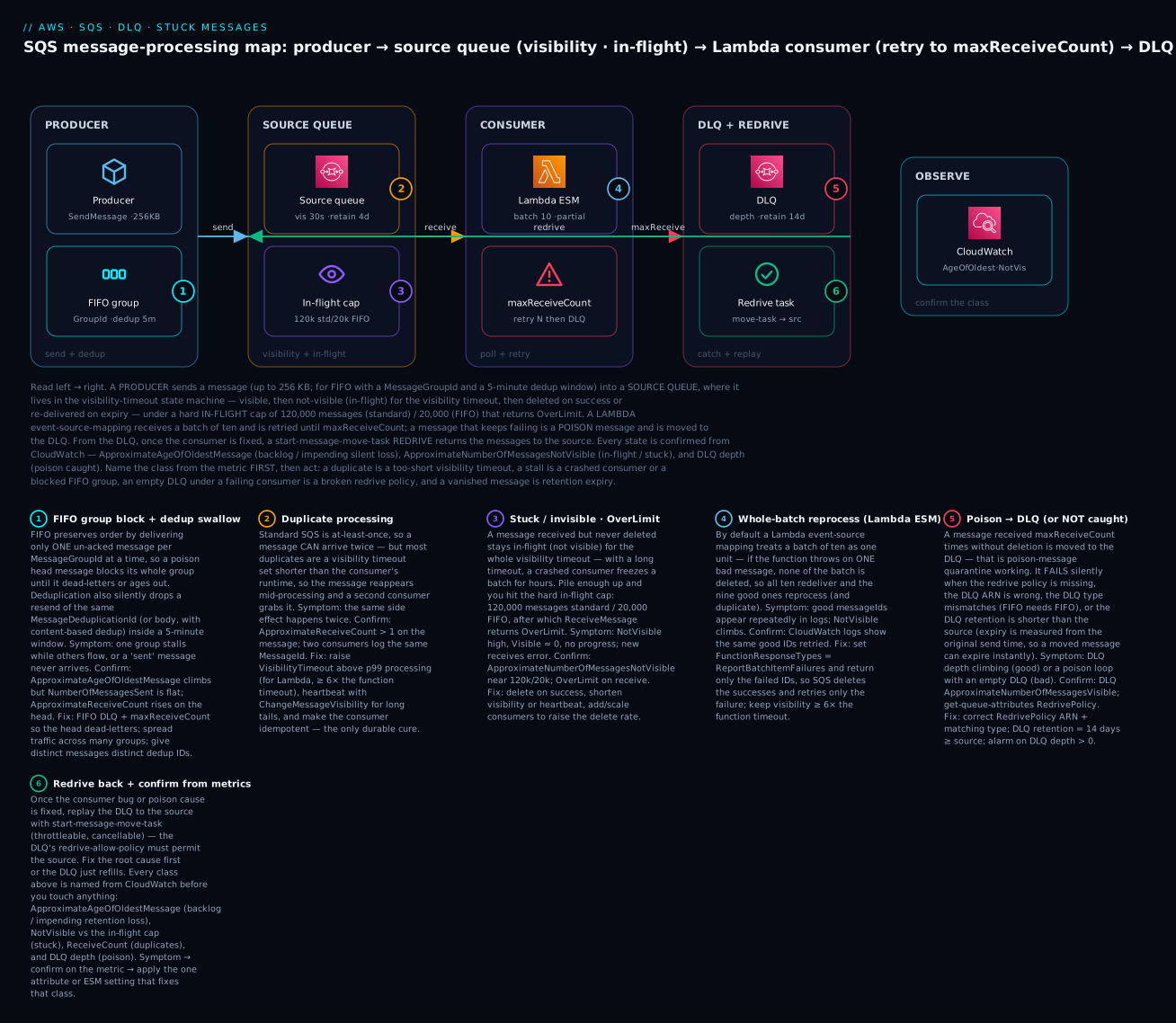
The diagram traces the real path a message takes and pins each failure class to the exact hop where it bites. Read left to right: a producer sends a message (up to 256 KB, and for FIFO with a MessageGroupId and dedup ID) into a source queue, where it lives in the visibility-timeout state machine under the in-flight cap (120,000 standard / 20,000 FIFO); a Lambda consumer (via an event-source mapping) receives it in a batch and is retried until maxReceiveCount; a message that keeps failing is moved to the DLQ, from which — once the bug is fixed — a redrive task moves it back to source; and every state is confirmed from CloudWatch. Six numbered badges mark the six failure classes — duplicate, stuck/in-flight, FIFO group block, whole-batch reprocess, poison-to-DLQ (and not-catching), and redrive — and the legend narrates each as symptom · confirm · fix.
Real-world scenario
ShipRight, a mid-size logistics SaaS on ap-south-1, ran an order-fulfilment pipeline on SQS: a standard orders queue feeding a Lambda consumer that called a warehouse API and wrote to DynamoDB, and a FIFO label-print.fifo queue (grouped by warehouse) driving a label printer that had to print strictly in sequence. Over one peak week all three of the failures in this article showed up, each looking at first like “SQS is broken.”
The duplicate-shipments page came first. Support reported customers getting two shipments for one order. Queue depth looked healthy, so the team almost blamed the warehouse API — until they pulled ApproximateReceiveCount on the messages and saw values of 2 and 3. The consumer’s p99 processing time had crept to 42 seconds after a new validation step, but the queue’s VisibilityTimeout was still the default 30 seconds. Every slow message became visible again mid-processing and a second Lambda invocation grabbed it. The immediate fix was VisibilityTimeout=240 (comfortably above p99) and the ESM’s function timeout capped at 30 s; the durable fix was a conditional PutItem on orderId so a duplicate delivery became a no-op. Duplicates went to zero.
The stuck-and-then-reprocessing incident was subtler. A deploy shipped a bug: on a specific malformed address the handler threw. Because they had never set ReportBatchItemFailures, every batch of ten that contained one bad address failed entirely, so the nine good orders in each batch were reprocessed on every retry — and, because the visibility timeout was now 240 seconds, ApproximateNumberOfMessagesNotVisible ballooned toward the 120,000 in-flight cap as slow retries piled up, and new receives started returning OverLimit. The fix was two-part: add function_response_types = ["ReportBatchItemFailures"] and return only the failed IDs (so the nine good orders were deleted and only the bad one retried), and add a redrive policy with maxReceiveCount = 5 pointing at an orders-dlq (retention 14 days) so the poison address dead-lettered instead of looping. In-flight drained within minutes; the DLQ depth alarm fired with exactly the bad messages.
The FIFO stall was the one nobody saw for six hours. Labels for one warehouse simply stopped printing while every other warehouse was fine. ApproximateAgeOfOldestMessage on label-print.fifo had climbed past five hours, but overall throughput looked normal. The cause: a single label message for warehouse BLR-1 had a null SKU; the consumer threw on it, and because FIFO delivers only one un-acked message per group at a time, that one message blocked the entire BLR-1 group — every label behind it waited. There was no DLQ on the FIFO queue, so it would have blocked until retention. The fix was a FIFO DLQ (label-print-dlq.fifo) with maxReceiveCount = 3, which let the poison message dead-letter after three tries so the group advanced, plus a defensive check on SKU. They redrove the DLQ back after fixing the producer’s validation. The runbook line the team wrote afterward: read ApproximateReceiveCount and AgeOfOldest before you touch anything — the same “it’s broken” is three different fixes.
Advantages and disadvantages
Understanding SQS’s message-processing model is not optional overhead; it is the difference between a queue being a shock absorber and being a silent corruption engine. The same properties that make it durable create the specific traps above.
| Advantages (when you operate it right) | Disadvantages (the traps to manage) |
|---|---|
| Fully managed, effectively unlimited standard throughput | At-least-once means duplicates are guaranteed, not rare |
| Visibility timeout gives automatic retry for free | Too-short visibility duplicates; too-long visibility stalls |
| DLQ + redrive isolates and replays poison messages | A misconfigured redrive silently catches nothing |
| FIFO gives strict ordering + dedup | One poison message blocks a whole FIFO group |
| Decouples producer and consumer; absorbs spikes | Retention expiry is silent data loss with no error |
| Native Lambda integration with partial-batch response | Without ReportBatchItemFailures, one bad record duplicates the batch |
| Approximate metrics for depth, age, in-flight | Metrics are approximate and eventually consistent |
The advantages dominate for spiky, asynchronous, decoupled work — order pipelines, notifications, ETL steps, buffering in front of a fragile downstream. The disadvantages dominate when you treat a queue like a database or assume delivery is exactly-once and in-order for free: any workload that cannot tolerate a duplicate without idempotency, any FIFO workload that crams everything into one message group, and any pipeline without a DLQ and a retention alarm. The skill is configuring the guardrails — visibility sized to runtime, a DLQ with longer retention than the source, partial-batch responses, idempotency, and depth/age alarms — before the incident, not during it.
Hands-on lab
You will reproduce and fix the core SQS failures on a free-tier-friendly account in ap-south-1: build a source queue + DLQ + a Lambda consumer that fails on a poison message, watch the poison message hit the DLQ, add ReportBatchItemFailures to stop the whole batch reprocessing, then redrive the DLQ back to the source. Everything here is within the SQS and Lambda free tiers (a few pennies of CloudWatch at most); teardown is at the end. Run in CloudShell (Bash) where aws is pre-authenticated.
Step 0 — Variables and an execution role.
export AWS_DEFAULT_REGION=ap-south-1
ACCT=$(aws sts get-caller-identity --query Account --output text)
ROLE_ARN=$(aws iam create-role --role-name sqs-lab-role \
  --assume-role-policy-document '{"Version":"2012-10-17","Statement":[{"Effect":"Allow","Principal":{"Service":"lambda.amazonaws.com"},"Action":"sts:AssumeRole"}]}' \
  --query Role.Arn --output text)
aws iam attach-role-policy --role-name sqs-lab-role \
  --policy-arn arn:aws:iam::aws:policy/service-role/AWSLambdaBasicExecutionRole
aws iam attach-role-policy --role-name sqs-lab-role \
  --policy-arn arn:aws:iam::aws:policy/service-role/AWSLambdaSQSQueueExecutionRole
sleep 10   # let the role propagate
Step 1 — Create the DLQ, then the source queue with a redrive policy. The DLQ gets 14-day retention (longer than the source), and the source dead-letters after 3 receives.
DLQ_URL=$(aws sqs create-queue --queue-name lab-dlq \
  --attributes MessageRetentionPeriod=1209600 --query QueueUrl --output text)
DLQ_ARN=$(aws sqs get-queue-attributes --queue-url "$DLQ_URL" \
  --attribute-names QueueArn --query Attributes.QueueArn --output text)

SRC_URL=$(aws sqs create-queue --queue-name lab-src --attributes \
  "{\"VisibilityTimeout\":\"90\",\"MessageRetentionPeriod\":\"345600\",\"RedrivePolicy\":\"{\\\"deadLetterTargetArn\\\":\\\"$DLQ_ARN\\\",\\\"maxReceiveCount\\\":\\\"3\\\"}\"}" \
  --query QueueUrl --output text)
SRC_ARN=$(aws sqs get-queue-attributes --queue-url "$SRC_URL" \
  --attribute-names QueueArn --query Attributes.QueueArn --output text)

# Let the DLQ accept a redrive back from the source
aws sqs set-queue-attributes --queue-url "$DLQ_URL" --attributes \
  "{\"RedriveAllowPolicy\":\"{\\\"redrivePermission\\\":\\\"byQueue\\\",\\\"sourceQueueArns\\\":[\\\"$SRC_ARN\\\"]}\"}"
Expected: three queue URLs and ARNs. Confirm the redrive policy is attached:
aws sqs get-queue-attributes --queue-url "$SRC_URL" \
  --attribute-names RedrivePolicy --query Attributes.RedrivePolicy --output text
# -> {"deadLetterTargetArn":"arn:aws:sqs:ap-south-1:...:lab-dlq","maxReceiveCount":"3"}
Step 2 — Deploy a consumer that throws on a poison message, WITHOUT partial-batch response. This reproduces the whole-batch reprocess.
mkdir -p fn && cat > fn/app.py <<'PY'
def handler(event, context):
    for r in event["Records"]:
        print("processing", r["messageId"], r["body"])
        if "POISON" in r["body"]:
            raise Exception("poison message")   # fails the WHOLE batch
    return {"ok": True}
PY
( cd fn && zip -q ../fn.zip app.py )
aws lambda create-function --function-name lab-consumer \
  --runtime python3.12 --handler app.handler --role "$ROLE_ARN" \
  --zip-file fileb://fn.zip --timeout 10
# Note: visibility (90s) is >= 6 x function timeout (10s)
ESM_UUID=$(aws lambda create-event-source-mapping --function-name lab-consumer \
  --event-source-arn "$SRC_ARN" --batch-size 10 \
  --query UUID --output text)
Send nine good messages and one poison, then watch the DLQ:
for i in $(seq 1 9); do aws sqs send-message --queue-url "$SRC_URL" --message-body "good-$i" >/dev/null; done
aws sqs send-message --queue-url "$SRC_URL" --message-body "POISON" >/dev/null
sleep 120   # let it retry to maxReceiveCount (3)
aws sqs get-queue-attributes --queue-url "$DLQ_URL" \
  --attribute-names ApproximateNumberOfMessages
Expected: the POISON message lands in lab-dlq after 3 receives (ApproximateNumberOfMessages = 1). Crucially, check the function’s CloudWatch logs — you will see the nine good messages processed multiple times, because every batch containing the poison message failed entirely and was redelivered. That is the whole-batch reprocess bug.
Step 3 — Fix it with ReportBatchItemFailures. Change the handler to report only the failed message, and enable partial-batch response on the ESM.
cat > fn/app.py <<'PY'
def handler(event, context):
    failures = []
    for r in event["Records"]:
        print("processing", r["messageId"], r["body"])
        if "POISON" in r["body"]:
            failures.append({"itemIdentifier": r["messageId"]})  # ONLY this one
    return {"batchItemFailures": failures}
PY
( cd fn && zip -q ../fn.zip app.py )
aws lambda update-function-code --function-name lab-consumer --zip-file fileb://fn.zip
aws lambda update-event-source-mapping --uuid "$ESM_UUID" \
  --function-response-types ReportBatchItemFailures
sleep 15
Send another mixed batch and confirm the good ones are processed exactly once:
aws sqs purge-queue --queue-url "$SRC_URL"; sleep 60   # purge takes up to 60s
for i in $(seq 1 9); do aws sqs send-message --queue-url "$SRC_URL" --message-body "good2-$i" >/dev/null; done
aws sqs send-message --queue-url "$SRC_URL" --message-body "POISON2" >/dev/null
sleep 120
aws sqs get-queue-attributes --queue-url "$DLQ_URL" --attribute-names ApproximateNumberOfMessages
Expected: now only the POISON2 message reaches the DLQ, and the logs show each good2-* message processed once — the successes were deleted, and only the failure was retried. That is the difference ReportBatchItemFailures makes.
Step 4 — Fix the consumer and redrive the DLQ back to source. Imagine you have shipped a fix for the poison shape; now replay the dead-lettered messages.
# Redrive everything in the DLQ back to its original source queue
TASK=$(aws sqs start-message-move-task --source-arn "$DLQ_ARN" \
  --query TaskHandle --output text)
sleep 10
aws sqs list-message-move-tasks --source-arn "$DLQ_ARN" \
  --query 'Results[0].[Status,ApproximateNumberOfMessagesMoved]' --output text
Expected: the move task reports COMPLETED (or RUNNING then COMPLETED) and a moved count matching the DLQ depth. The messages are back on lab-src for reprocessing. (In a real incident you would have fixed the handler so they now succeed.)
Validation checklist. You reproduced and fixed the core classes and confirmed each from its own fingerprint:
| Step | Behaviour reproduced | The fingerprint | The fix you applied |
|---|---|---|---|
| 2 | Whole-batch reprocess | 9 good messages processed multiple times in logs | — (the bug) |
| 2 | Poison → DLQ | ApproximateNumberOfMessages = 1 on the DLQ |
Redrive policy, maxReceiveCount = 3 |
| 3 | Partial-batch success | Good messages processed once; only poison retried | ReportBatchItemFailures + return failed IDs |
| 4 | Redrive from DLQ | Move task COMPLETED, messages back on source |
start-message-move-task |
Teardown (⚠️ do this — the queues and Lambda are tiny but real).
aws lambda delete-event-source-mapping --uuid "$ESM_UUID"
aws lambda delete-function --function-name lab-consumer
aws sqs delete-queue --queue-url "$SRC_URL"
aws sqs delete-queue --queue-url "$DLQ_URL"
for p in AWSLambdaBasicExecutionRole AWSLambdaSQSQueueExecutionRole; do
  aws iam detach-role-policy --role-name sqs-lab-role \
    --policy-arn arn:aws:iam::aws:policy/service-role/$p; done
aws iam delete-role --role-name sqs-lab-role
Cost note. Everything here is within the SQS free tier (1M requests/month) and the Lambda free tier; a few CloudWatch metrics may cost pennies. Deleting the resources above stops any lingering cost. Note that purge-queue can be called only once every 60 seconds per queue.
Common mistakes & troubleshooting
This is the playbook — the part you bookmark. First the scannable master table you can read at 3 a.m., then the error/status reference, then the three nastiest failures in full. Every row is a real failure with the exact symptom, the class it belongs to, the root cause, the precise command or metric to confirm, and the fix.
| # | Symptom | Category | Root cause | Confirm (exact cmd / metric) | Fix |
|---|---|---|---|---|---|
| 1 | Same side effect happens twice | Duplicate | Visibility timeout < processing time | ApproximateReceiveCount > 1 on the message |
Raise VisibilityTimeout above p99; idempotency key |
| 2 | Duplicates even with correct visibility | Duplicate | At-least-once redelivery (inherent) | Occasional dup, no timeout issue | Idempotency (conditional write on a business key) |
| 3 | NotVisible high, Visible ≈ 0, no progress |
Stuck / invisible | Consumers received then crashed holding messages | ApproximateNumberOfMessagesNotVisible high, logs stopped |
Lower visibility / heartbeat; fix crash; delete on success |
| 4 | ReceiveMessage returns OverLimit |
In-flight cap | 120k (std) / 20k (FIFO) in-flight reached | NotVisible ≈ 120,000 / 20,000 |
Delete faster; more consumers; shorter visibility |
| 5 | DLQ depth climbing steadily | Poison → DLQ | A payload/bug fails every retry | DLQ ApproximateNumberOfMessagesVisible > 0 |
Inspect DLQ; fix consumer; redrive after fix |
| 6 | Poison loops forever, DLQ empty | DLQ-not-catching | No / wrong RedrivePolicy |
get-queue-attributes shows no or wrong ARN |
Add correct RedrivePolicy; matching type |
| 7 | Message moved to DLQ then vanishes | DLQ-not-catching | DLQ retention < source (expiry by original timestamp) | DLQ MessageRetentionPeriod < source |
DLQ retention = 14 days (≥ source) |
| 8 | 9 good records reprocess with 1 bad | Whole-batch reprocess | No ReportBatchItemFailures on the ESM |
Logs show good messages repeated | Enable partial-batch response; return failed IDs |
| 9 | Lambda ESM never invokes; backlog grows | Permission | Role lacks sqs:ReceiveMessage/DeleteMessage |
ESM State = Disabled; LastProcessingResult |
Add SQS actions to the execution role |
| 10 | One FIFO group stalls; others fine | FIFO group block | Poison head; only 1 un-acked/group delivered | AgeOfOldest climbs; one group’s messages NotVisible |
DLQ the head (redrive policy); spread groups |
| 11 | “Sent it,” but consumer never sees it | FIFO dedup swallow | Reused MessageDeduplicationId within 5 min |
NumberOfMessagesSent flat; producer got a 200 |
Unique dedup ID per distinct message |
| 12 | Message gone, DLQ empty, no error | Silent loss | Retention expired before processing | ApproximateAgeOfOldestMessage was near retention |
Raise retention; add consumers; alarm on age |
| 13 | KMS.AccessDeniedException on send/receive |
KMS / permission | Principal lacks key perms on the CMK | Error names the key ARN | Grant kms:Decrypt + kms:GenerateDataKey; key policy |
| 14 | MessageNotInflight on delete/visibility |
Consumer bug | Receipt handle expired (visibility passed) | Delete after visibility timeout elapsed | Delete within visibility; extend with heartbeat |
| 15 | ReceiptHandleIsInvalid |
Consumer bug | Stale/reused receipt handle | Handle from an old receive | Use the latest receipt handle per receive |
| 16 | Send rejected, message too large | Producer limit | Body > 256 KB | SentMessageSize near/over 256 KB |
SQS Extended Client + S3 for large payloads |
| 17 | FIFO redrive policy rejected | DLQ-not-catching | Standard DLQ on a FIFO source (type mismatch) | SetQueueAttributes error |
Use a FIFO DLQ (.fifo) for a FIFO source |
| 18 | High cost + noisy empty polls | Efficiency | Short polling (WaitTimeSeconds = 0) |
NumberOfEmptyReceives high |
Long polling: ReceiveMessageWaitTimeSeconds = 20 |
| 19 | Backlog grows though consumers run | Under-provisioned | Delete rate < send rate | NumberOfMessagesDeleted ≪ NumberOfMessagesSent |
Scale consumers; batch; raise maximumConcurrency |
| 20 | Downstream DB overwhelmed by consumers | Scale-out stampede | ESM fan-out exceeds downstream capacity | High concurrent invocations | Set ESM maximumConcurrency; RDS Proxy |
Now the error/status reference — the exact strings SQS and its consumers throw, and what each one means:
| Error / string | Where | Meaning | Fix |
|---|---|---|---|
AWS.SimpleQueueService.OverLimit |
ReceiveMessage |
In-flight cap (120k/20k) reached | Delete faster; more consumers; shorter visibility |
AWS.SimpleQueueService.NonExistentQueue |
any | Queue URL/ARN wrong or deleted | Fix the URL/ARN; recreate if needed |
MessageNotInflight |
DeleteMessage / ChangeMessageVisibility |
Visibility already expired; message no longer in-flight | Complete work within visibility; heartbeat |
ReceiptHandleIsInvalid |
delete / visibility | Stale or malformed receipt handle | Use the handle from the latest receive |
KMS.AccessDeniedException |
send / receive | No permission on the SSE-KMS key | kms:Decrypt + kms:GenerateDataKey; key policy |
InvalidParameterValue (dedup) |
SendMessage (FIFO) |
Missing MessageGroupId or dedup config |
Provide group ID; set dedup ID or content-based |
MessageTooLong / 256 KB |
SendMessage |
Body exceeds 262,144 bytes | Extended client + S3 |
PurgeQueueInProgress |
PurgeQueue |
Purge called within 60 s of a prior purge | Wait 60 seconds between purges |
QueueDeletedRecently |
CreateQueue |
Reusing a name within 60 s of deletion | Wait 60 seconds before recreating |
RequestThrottled / FIFO TPS |
SendMessage (FIFO) |
300 msg/s (3,000 batched) exceeded | Batch; enable high-throughput FIFO |
The three that cause the most damage, expanded:
A. The whole-batch reprocess (silent duplication of the good records). A Lambda consumes an SQS queue and one message in a batch of ten is poison. Because the default event-source mapping treats the batch as a unit, the function throwing on the one bad message means none of the batch is deleted, so all ten reappear after the visibility timeout and the whole batch is reprocessed — the nine good messages run again, and if their side effects are not idempotent, they duplicate on every retry until the poison message finally hits maxReceiveCount. Confirm: the function’s CloudWatch logs show the same good messageIds processed repeatedly, and the queue’s ApproximateNumberOfMessagesNotVisible climbs as retries pile up (which, with a long visibility timeout, can march toward the 120,000 in-flight cap and OverLimit). Fix: set FunctionResponseTypes = ReportBatchItemFailures on the ESM and return {"batchItemFailures":[{"itemIdentifier": id}]} for exactly the messages that failed — SQS then deletes the successes and redelivers only the failures. Make the handler idempotent as a belt-and-braces measure, and ensure the queue’s visibility timeout is ≥ 6× the function timeout so a slow retry cannot double-deliver.
B. The FIFO group block (one message halts an entire ordered stream). A FIFO queue stops making progress for one MessageGroupId while every other group flows normally, and nobody notices until ApproximateAgeOfOldestMessage is measured in hours. FIFO preserves order by delivering only one un-acked message per group at a time, so a single poison message at the head of a group — a null field, an unexpected shape — that throws on every retry blocks its whole group; every message behind it waits, up to the retention period, because the queue will not skip ahead and break ordering. Confirm: ApproximateAgeOfOldestMessage climbs steadily while throughput on other groups is fine; inspect the stalled group and you will see the same head message received over and over (ApproximateReceiveCount rising). Fix: attach a FIFO DLQ with a RedrivePolicy and a sane maxReceiveCount (e.g. 3) so the poison head dead-letters after a few tries and the group advances; make the handler defensive on the shapes you actually see; and design for many message groups (e.g. per-entity, not one global group) so a single bad message can never halt the entire stream. Redrive the DLQ back once the producer or consumer is fixed.
C. The silent loss at retention (data gone with no DLQ and no error). Messages simply disappear — no error, no DLQ entry, no trace — because they aged past the retention period before anyone processed them. This happens when the consumer is down or badly under-provisioned and the backlog’s ApproximateAgeOfOldestMessage reaches MessageRetentionPeriod (4 days by default), at which point SQS deletes the messages. It also happens with a “working” DLQ when the DLQ’s retention is shorter than the source’s: because expiry is measured from a message’s original enqueue timestamp, a message that spent days in the source and is then moved to a short-retention DLQ is already past the DLQ’s retention and is deleted almost immediately — caught and lost in one step. Confirm: ApproximateAgeOfOldestMessage trending toward MessageRetentionPeriod on the source, or a DLQ whose MessageRetentionPeriod is less than the source’s, with counts that drop without corresponding deletes. Fix: set retention generously (up to 14 days) for critical queues, set every DLQ’s retention to the maximum and never below the source, alarm on ApproximateAgeOfOldestMessage well before it reaches retention, and make sure a consumer outage pages you long before four days pass.
Best practices
- Size the visibility timeout to your p99 processing time, not the default. Too short duplicates every slow message; too long freezes stuck messages. For a Lambda consumer, keep the queue visibility ≥ 6× the function timeout.
- Make every consumer idempotent. Standard SQS is at-least-once by design; the same message will arrive twice. Key side effects on
MessageIdor a business key with a conditional write. - Always attach a DLQ with a redrive policy, and set its
maxReceiveCountlow enough that poison messages quarantine quickly (3–5), high enough that transient faults get a few retries. - Set every DLQ’s retention to the maximum (14 days) — never below the source. Expiry is measured from the original enqueue time; a short-retention DLQ is silent loss.
- Turn on
ReportBatchItemFailuresfor every Lambda SQS ESM. Without it, one bad record reprocesses (and duplicates) the whole batch. - Use long polling (
ReceiveMessageWaitTimeSeconds = 20) to cut empty receives, latency and cost. - Extend visibility with a heartbeat (
ChangeMessageVisibility) for variable workloads instead of setting one huge timeout that stalls every stuck message. - Design FIFO for many message groups. One global group serializes everything and lets a single poison message halt the entire queue; group by entity so failures are isolated.
- Give distinct FIFO messages distinct
MessageDeduplicationIds (or turn off content-based dedup when legitimate duplicates are expected) so the 5-minute window never swallows a real message. - Alarm on the right metric per class: DLQ depth (
Visible > 0),ApproximateAgeOfOldestMessage(well before retention), andApproximateNumberOfMessagesNotVisible(approaching the in-flight cap) — not just queue depth. - Cap consumer concurrency to protect downstreams. Set the ESM’s
maximumConcurrencyso a queue drain cannot exhaust an RDS connection pool or a rate-limited API. - Fix the root cause before you redrive. Replaying a DLQ into a still-broken consumer just refills it.
Security notes
- Least-privilege queue policies. Grant
sqs:SendMessageto producers andsqs:ReceiveMessage/DeleteMessage/GetQueueAttributes/ChangeMessageVisibilityto consumers on the specific queue ARN — neversqs:*on*. Scope cross-account access with a resource-based queue policy and condition onaws:SourceArn. - Encrypt at rest. Use SSE-SQS (AWS-managed, free) by default, or SSE-KMS with a customer-managed key when you need per-key access control and audit. With SSE-KMS, every producer and consumer principal needs
kms:GenerateDataKey(send) andkms:Decrypt(receive) on the CMK — aKMS.AccessDeniedExceptionis the sign this is missing. - Guard the DLQ specifically. A DLQ often holds full failed payloads (sometimes the most sensitive messages, since they are the ones that broke). Encrypt it, restrict who can read it, and treat it as a data store — an unrestricted DLQ is a data-exfiltration target.
- Use VPC endpoints (
com.amazonaws.<region>.sqs) so traffic from private subnets to SQS never traverses the public internet, and attach an endpoint policy that limits which queues can be reached. - Restrict
redrive-allow-policy. UsebyQueuewith explicit source ARNs on shared DLQs so an unrelated queue cannot redrive (or dump) messages through your DLQ. - Validate payloads on both ends. A poison message is often just bad input; schema-validate on send to keep malformed data out of the queue, and parse defensively on receive so a bad shape dead-letters cleanly instead of crashing the consumer.
Cost & sizing
SQS bills on requests — each SendMessage, ReceiveMessage (each poll, even empty), DeleteMessage, and each ChangeMessageVisibility is an API call, and a 64 KB chunk counts as one request (so a 256 KB message = 4 requests). There is no charge for the queue itself, for storage within retention, or for the DLQ beyond its own requests. The free tier is 1 million requests per month, after which standard queues are inexpensive and FIFO slightly more.
| Cost driver | How it’s billed | Right-size by | Rough figure |
|---|---|---|---|
| Requests (standard) | Per API call, 64 KB = 1 request | Long polling; batch sends/receives (10×) | ~$0.40 per million after free tier |
| Requests (FIFO) | Per API call | Batch; high-throughput mode | ~$0.50 per million |
| Empty receives | Each poll is a request | Long polling (WaitTimeSeconds = 20) |
Short polling can multiply cost |
| Payload > 64 KB | Rounded up per 64 KB | Keep messages small; S3 for large blobs | A 256 KB message = 4 requests |
| KMS (SSE-KMS) | KMS API calls for data keys | Data-key reuse (SQS caches) | SSE-SQS is free; SSE-KMS adds KMS cost |
| Data transfer | Out to internet / cross-region | Keep consumers in-region; VPC endpoints | In-region is free |
Sizing rules of thumb: long polling and batching are the two biggest cost levers — a consumer short-polling an idle queue 24/7 can generate millions of empty-receive requests for nothing, while long polling collapses that to near zero. Batch sends and receives in tens to cut request count by up to 10×. For throughput, a standard queue scales effectively without limit, so “sizing” is really about the consumer fleet (or the ESM’s maximumConcurrency) keeping the delete rate above the send rate. In INR terms, most event-driven workloads (a few million to tens of millions of requests, sub-256 KB) run in the low tens to low hundreds of rupees per month before free tier — the expensive mistakes are short polling and oversized payloads, not the queue itself.
Interview & exam questions
Q1. Why does a standard SQS queue deliver duplicates, and how do you make your consumer safe?
Standard queues are at-least-once by design — the distributed storage and visibility-timeout redelivery mean a message can be delivered more than once. You do not prevent it; you make processing idempotent (e.g. a conditional PutItem on MessageId or a business key), so a second delivery is a harmless no-op. (SAA-C03, DVA-C02)
Q2. A consumer processes each message twice under load. Walk the diagnosis.
Check ApproximateReceiveCount — if it is > 1, the message is being redelivered while still processing, which means the visibility timeout is shorter than the processing time. Raise VisibilityTimeout above p99 (or extend it with ChangeMessageVisibility as a heartbeat) and add idempotency. (DVA-C02)
Q3. What is the in-flight message limit, and what error signals it?
A queue can have at most 120,000 in-flight (received-but-not-deleted) messages for standard and 20,000 for FIFO. Exceeding it makes ReceiveMessage return OverLimit (AWS.SimpleQueueService.OverLimit). It is a hard limit; the fix is deleting faster (more/quicker consumers, shorter visibility), not a quota increase. (SAA-C03, SOA-C02)
Q4. A message never reaches the DLQ even though the consumer keeps failing. Name three causes.
No RedrivePolicy on the source; a wrong/typo deadLetterTargetArn (or a type mismatch — standard source with a FIFO DLQ); or the message expiring at retention before it hits maxReceiveCount. Also: the consumer deleting the message even on failure, or a Lambda swallowing the exception so no failure is recorded. (DVA-C02, SOA-C02)
Q5. Explain the Lambda whole-batch reprocess trap and its fix.
Without ReportBatchItemFailures, a Lambda ESM treats the batch as one unit — if the function throws on one message, none of the batch is deleted, so all of them (including the good ones) are redelivered and reprocessed. Enable ReportBatchItemFailures and return only the failed message IDs so SQS deletes the successes and retries only the failures. (DVA-C02)
Q6. Why can one message stall an entire FIFO queue, and how do you prevent it?
FIFO delivers only one un-acked message per message group at a time to preserve order, so a poison head message blocks its whole group until it is deleted or ages out. Prevent it with a FIFO DLQ + maxReceiveCount so poison heads dead-letter, and by spreading messages across many message groups so one bad message can’t halt everything. (SAA-C03, DVA-C02)
Q7. What is the FIFO deduplication “swallow,” and when does it bite?
FIFO dedups within a 5-minute window by MessageDeduplicationId (or body hash with content-based dedup). A resend with the same dedup ID inside that window returns success but is not enqueued — the message silently vanishes. It bites when you reuse dedup IDs for distinct messages or send legitimately-identical bodies with content-based dedup on. (DVA-C02)
Q8. What’s the relationship between visibility timeout and a Lambda function’s timeout? AWS recommends the queue’s visibility timeout be at least 6× the function timeout, so that batching and retries can’t make a message visible and re-delivered to a second poller while the first invocation is still running — which would duplicate processing. (DVA-C02, SOA-C02)
Q9. How do you replay dead-lettered messages after fixing the bug?
Use a message move task: aws sqs start-message-move-task --source-arn <DLQ_ARN> streams messages back to their original source queue (throttleable with --max-number-of-messages-per-second, cancellable). The DLQ’s redrive-allow-policy must permit the source. Always fix the root cause first, or the DLQ just refills. (SOA-C02, DVA-C02)
Q10. Which metric tells you a queue is heading toward silent data loss, and how do you prevent it?
ApproximateAgeOfOldestMessage — when it approaches MessageRetentionPeriod, messages will expire unprocessed and be deleted with no error. Prevent it by raising retention on critical queues, alarming on the age metric well before retention, and keeping every DLQ’s retention at the maximum (≥ source). (SOA-C02)
Q11. Standard vs FIFO — which for an order-processing pipeline that must not double-charge? Either can work, but the deciding factors are ordering and throughput. If strict per-customer ordering matters and volume is within FIFO limits, FIFO (grouped by customer) gives ordering plus 5-minute dedup; otherwise standard with application-level idempotency handles double-charge protection at higher throughput. Idempotency is required either way. (SAA-C03)
Q12. How does short vs long polling affect correctness and cost?
Short polling (WaitTimeSeconds = 0) samples a subset of servers, can return empty even when messages exist, and bills every poll — driving up cost and empty receives. Long polling (up to 20 s) waits for a message across all servers, cuts empty receives, and lowers cost and latency. It affects cost and efficiency, not delivery guarantees. (DVA-C02, SOA-C02)
Quick check
- Your consumer processes every slow message twice. What single message attribute confirms the cause, and what is the fix?
- A queue shows
ApproximateNumberOfMessagesNotVisiblepinned near 120,000 andReceiveMessagereturns an error. What is the error, and what does it mean? - Poison messages loop forever and your DLQ stays empty. Name two configuration reasons.
- What one Lambda ESM setting stops a single bad message from causing the other nine in its batch to reprocess?
- One
MessageGroupIdin a FIFO queue stops advancing while others are fine. What’s happening, and what’s the fix?
Answers
ApproximateReceiveCount> 1 confirms the message is being redelivered mid-processing because the visibility timeout is shorter than the processing time. RaiseVisibilityTimeoutabove p99 (or heartbeat withChangeMessageVisibility) and make the consumer idempotent.OverLimit(AWS.SimpleQueueService.OverLimit) — the queue has hit the 120,000 in-flight (not-visible) message cap (20,000 for FIFO). Consumers are receiving far faster than they delete. Delete faster, add consumers, or shorten the visibility timeout.- Any two of: no
RedrivePolicyon the source; a wrong/typodeadLetterTargetArn; a type mismatch (standard source, FIFO DLQ);maxReceiveCountso high the message expires at retention first; or the consumer deleting on failure / Lambda swallowing the exception. ReportBatchItemFailures(partial batch response) — return only the failed message IDs inbatchItemFailuresso the successes are deleted and only the failure is retried.- A poison head message is blocking that group — FIFO delivers only one un-acked message per group to preserve order, so everything behind it waits. Fix: attach a FIFO DLQ with a
RedrivePolicyso the head dead-letters aftermaxReceiveCount, and spread traffic across many message groups.
Glossary
| Term | Definition |
|---|---|
| Visibility timeout | The window after a message is received during which it is hidden from other consumers; on expiry (without a delete) it becomes visible again. Default 30 s, max 12 h. |
| In-flight message | A message that has been received but not yet deleted or timed out; counted by ApproximateNumberOfMessagesNotVisible. |
| In-flight limit | The hard cap on in-flight messages — 120,000 (standard) / 20,000 (FIFO); exceeding it returns OverLimit. |
| At-least-once delivery | The standard-queue guarantee that a message is delivered one or more times — duplicates are expected, so consumers must be idempotent. |
| Dead-letter queue (DLQ) | An SQS queue that a source queue’s redrive policy targets; messages that exceed maxReceiveCount are moved there for isolation and inspection. |
| Redrive policy | The source-queue config (deadLetterTargetArn + maxReceiveCount) that sends failing messages to a DLQ. |
| maxReceiveCount | The number of times a message may be received without deletion before it is dead-lettered (1–1,000). |
| Redrive (message move task) | Replaying messages from a DLQ back to the source with start-message-move-task; throttleable and cancellable. |
| Poison message | A message that fails on every processing attempt (bad payload, missing field, or a consumer bug) and eventually dead-letters. |
| Message group (FIFO) | The MessageGroupId that defines an ordered stream; only one un-acked message per group is delivered at a time. |
| Deduplication (FIFO) | Suppression of duplicate sends within a 5-minute window by MessageDeduplicationId or a content hash. |
| Partial batch response | Returning only failed message IDs (ReportBatchItemFailures) from a Lambda so successful records in a batch are deleted. |
| Event-source mapping (ESM) | The Lambda-managed poller that reads batches from SQS and invokes the function. |
| ApproximateAgeOfOldestMessage | The age of the oldest message still in the queue; the key signal for backlog and impending retention-based silent loss. |
| Retention period | How long SQS keeps a message (60 s–14 days, default 4 days), measured from the original enqueue timestamp; expiry is silent loss. |
Next steps
- Build the queue types themselves and see standard vs FIFO behaviour first-hand in SQS Queues: Standard vs FIFO, Hands-On.
- Fan one message out to many queues with the pub/sub sibling in SNS Topics: Fan-Out & Subscriptions, Hands-On.
- Wire buses, queues and functions into a full pattern in Event-Driven Architecture with EventBridge, SQS & Lambda.
- Own the function side of the boundary — cold starts, timeouts, throttles and the poison-record shard block — in AWS Lambda Errors, Timeouts & Cold Starts: The Troubleshooting Playbook.