You have a fact — “an order was placed”, “an EC2 instance changed state”, “a customer churned in Stripe” — and half a dozen things want to know about it: a fraud check, a warehouse job, an email, an analytics sink, an audit log. The naive move is to make the producer call all six. Do that and every new consumer is a code change to the producer, every slow consumer is the producer’s latency problem, and every failed call is a decision the producer has to make. Amazon EventBridge deletes that coupling. The producer publishes the fact once to an event bus; EventBridge matches it against rules, and each rule fans the event out to its targets — reshaping the payload per target, retrying with backoff, and dead-lettering what it can’t deliver. The producer never learns who is listening.
EventBridge is a serverless event router, and it is three products wearing one name. The bus + rules engine is the classic pub/sub-with-content-routing core: an event arrives, an event pattern decides whether a rule cares, and matched events go to Lambda, SQS, SNS, Step Functions, Kinesis, an HTTP API destination, or another account’s bus. EventBridge Scheduler is a separate, purpose-built cron: one-time and recurring schedules, time-zone aware, with flexible windows and a million-plus schedules per account — everything the old “scheduled rule” wanted to be. And EventBridge Pipes is a point-to-point connector with an opinion — source → filter → enrichment → target — that replaces the glue Lambda you used to write between a queue and a workflow.
This article installs the whole mental model by building it. You will stand up a custom bus, write a rule whose event pattern content-matches on source, detail-type and nested detail fields, fan it to two targets (a Lambda and an SQS queue) with an input transformer reshaping the event for each, add a scheduled invocation, and wire a Pipe that polls SQS, filters, and delivers to Lambda — all with aws CLI and Terraform, then tear it down. Because your rule will silently fail to match on the first try (everyone’s does — it is almost always the detail nesting or a missing detail-type), the back half is a symptom-to-fix troubleshooting playbook and a tour of test-event-pattern, the one command that ends most EventBridge debugging in ten seconds.
Here is the whole surface on one screen — every moving part, what it is, and the classic trap attached to it:
| Piece | What it is | You configure it as | The classic trap |
|---|---|---|---|
| Event bus | A named router events are published to | default, a custom bus, or a partner bus |
Putting custom events on default and mixing everyone’s traffic |
| Event | A JSON fact with source, detail-type, detail |
A PutEvents entry (≤256 KB) |
Omitting detail-type so pattern rules never match |
| Rule (pattern) | “Which events do I care about?” | An event pattern JSON | Values not wrapped in arrays; wrong detail nesting |
| Rule (schedule) | “Fire on a clock” | rate(...) or cron(...) |
Scheduling on a custom bus (only default allows it) |
| EventBridge Scheduler | Standalone cron, tz-aware, 1M+ schedules | aws scheduler create-schedule |
Confusing it with scheduled rules; forgetting the invoke role |
| Target | Where a matched event goes | Lambda, SQS, SNS, SFN, Kinesis, API dest… | Forgetting the role (SFN/Kinesis) or resource policy (Lambda/SQS) |
| Input transformer | Reshape the event per target | InputPathsMap + InputTemplate |
Producing invalid JSON → target gets garbage or nothing |
| EventBridge Pipes | source→filter→enrichment→target | aws pipes create-pipe |
Pipe RUNNING but idle: filter excludes everything |
| Archive + replay | Durable record you can re-emit | create-archive / start-replay |
Expecting replay to re-run schedules (it can’t) |
| Schema registry | Discovered/typed event schemas + codegen | Enable discovery on a bus | Leaving discovery on a firehose bus and paying for it |
| DLQ + retry | What happens when delivery fails | DeadLetterConfig + RetryPolicy per target |
No DLQ → failures retried for 24 h then silently dropped |
What problem this solves
Without an event router you are stuck with two bad options. Option one: the producer orchestrates. The order service calls the fraud API, the email API, the warehouse API and the analytics API in sequence. Now the checkout latency is the sum of everyone’s latency, a warehouse outage fails the checkout, and shipping a new consumer means a pull request against the most critical service you own. Option two: point-to-point queues everywhere. You create an SQS queue per consumer and have the producer send to each. Better on coupling, but the producer still enumerates every consumer, still owns the fan-out, and you have no content-based routing — every consumer receives everything and filters in code, paying for messages it throws away.
EventBridge solves the routing problem specifically. The producer publishes one event to one bus and is done. Consumers attach rules that say, in data, “deliver me events where source is com.shop.orders and detail.amount is over 500”. Adding a consumer is a new rule — zero producer changes. Routing on content (not just topic name) means the fraud service subscribes to high-value orders only and never pays to receive the rest. And because EventBridge speaks natively to ~130 AWS services and dozens of SaaS partners, “an S3 object landed” or “a Stripe charge succeeded” becomes a routable event without you writing a poller.
What breaks without this understanding is subtle and expensive. Teams that reach for EventBridge but keep the producer-orchestrates mindset end up with rules that don’t match (because they never printed the real event shape), targets that silently never fire (because they forgot the resource policy or the invoke role), and events that vanish under load (because no target had a DLQ, so EventBridge retried for 24 hours and then dropped them with no trace). Who hits this: every team doing microservices on AWS, every serverless app past its first Lambda, and every ops team wiring “when X happens, do Y” automation. The service almost never fails; the pattern shape, the permission model, and the DLQ are what fail — and all three are boringly fixable once you can see them.
Learning objectives
By the end of this article you can:
- Distinguish the three bus types — the
defaultAWS-service bus, custom application buses, and partner/SaaS buses — and decide what belongs on each. - Write event patterns that match on
source,detail-typeand nesteddetail, using every content filter —prefix,suffix,anything-but, numeric,exists,cidr,equals-ignore-case,wildcardand$or— and debug them withtest-event-pattern. - Choose correctly between a scheduled rule and the newer EventBridge Scheduler, and write both
rate(...)andcron(...)expressions (and know why rules are UTC-only while Scheduler is time-zone aware). - Attach targets (Lambda, SQS, SNS, Step Functions, Kinesis, API destinations, cross-account/region buses), know which need an IAM role vs a resource-based policy, and reshape the event per target with an input transformer.
- Build an EventBridge Pipe — source → filter → enrichment → target — for an SQS/Kinesis/DynamoDB Streams source, and know when a Pipe beats a rule.
- Configure archive + replay for audit and reprocessing, and turn on the schema registry with discovery and codegen bindings.
- Design DLQ + retry so no event is ever silently dropped, and run a symptom → confirm → fix playbook for the dozen failures that hit every EventBridge build.
Prerequisites & where this fits
You need an AWS account where you can create IAM roles, an EventBridge bus, Lambda functions and SQS queues (a personal or dev sandbox — never straight into production). Install the AWS CLI v2 (aws --version ≥ 2.x) and configure it (aws configure or aws sso login), and for the IaC half, Terraform ≥ 1.5 with the aws provider. Everything in the lab costs fractions of a rupee: custom events bill about $1.00 per million published, and the Lambda/SQS traffic stays inside the always-free tiers. You should be comfortable reading JSON and running a shell; you do not need prior EventBridge experience, though a first Lambda helps.
Where this sits: EventBridge is the routing spine of event-driven architecture on AWS. If you are still deciding whether to go event-driven and want the broader picture — outbox, idempotency, ordering, the saga — read the companion AWS Event-Driven Architecture with EventBridge, SQS and Lambda, which uses these primitives inside a full pipeline. This article is the service deep-dive: it goes option-by-option on the bus, the pattern, the target and the Pipe. Its closest wave siblings are Amazon SNS Topics, Fan-out & Subscriptions Hands-On (the simpler pub/sub you will compare against constantly), Amazon SQS Queues: Standard, FIFO, Visibility & DLQs Hands-On (the queue you will put in front of most consumers), and AWS Step Functions: State Machines & Orchestration (the workflow EventBridge most often triggers). If you have never built a Lambda, do Your First AWS Lambda Function first.
A quick map of who owns what, so that when routing misbehaves you look in the right place:
| Concern | Owned by | You touch it via | First place to look when it breaks |
|---|---|---|---|
| “Was the event received?” | The bus | PutEvents result / CloudWatch MatchedEvents |
test-event-pattern, PutEvents FailedEntryCount |
| “Did any rule match?” | The rule’s event pattern | describe-rule, pattern JSON |
Pattern array-wrapping / detail nesting |
| “Was the target invoked?” | Target permission model | Resource policy or invoke role | get-policy (Lambda), rule RoleArn (SFN/Kinesis) |
| “Where did the failure go?” | DeadLetterConfig on the target |
DLQ SQS queue | Target DeadLetterConfig; FailedInvocations metric |
| “Can I reprocess it?” | Archive + replay | create-archive / start-replay |
Archive EventCount; replay state |
Core concepts
EventBridge has a small object model, and getting it precise now saves you every later confusion. An event is a JSON envelope with a fixed set of top-level fields — version, id, source, detail-type, account, time, region, resources and a free-form detail object — of which you set source, detail-type and detail when you call PutEvents; EventBridge stamps the rest. An event bus is a named endpoint that receives events and holds rules. A rule binds a match condition (an event pattern or a schedule) to up to five targets. A target is a resource EventBridge delivers to. That is the entire core: bus holds rules, rules match events, matched events go to targets.
The object model, precisely:
| Object | What it is | Cardinality / limit | Key attributes |
|---|---|---|---|
| Event bus | A router events are published to | Many per account; default always exists |
Name, resource policy, (optional) discovery |
| Event | One JSON fact | ≤256 KB per entry; ≤10 entries per PutEvents |
source, detail-type, detail, time, resources |
| Rule | Match condition → targets | 300 rules/bus (soft, raisable) | Event pattern or schedule; state ENABLED/DISABLED |
| Event pattern | JSON that says which events match | One per pattern rule | Match on any event field; arrays = OR; content filters |
| Target | Where a matched event goes | 5 per rule (hard) | ARN, RoleArn?, InputTransformer?, RetryPolicy, DeadLetterConfig |
| Archive | Durable store of matched events | Many per bus | Optional pattern, retention (days or ∞) |
| Replay | Re-emit archived events | Time-bounded | Source archive, time range, rule filter |
| Schema | A typed description of an event | In a registry | OpenAPI 3 / JSONSchema; codegen bindings |
| Pipe | source→filter→enrich→target | Many per account | Source, filter, enrichment?, target, role |
| Schedule (Scheduler) | A cron/one-time trigger | 1,000,000/account (soft) | Expression, tz, flexible window, target, role |
Two properties shape every design decision. First, delivery is at-least-once and unordered on the bus — an event can be delivered to a target more than once, and two events can arrive out of order; your targets must be idempotent, and if you need order you use Pipes over an ordered source (Kinesis/DynamoDB Streams/FIFO SQS), not the bus. Second, delivery is asynchronous and retried — EventBridge retries a failing target with exponential backoff for up to 24 hours / 185 attempts by default, and only then, if you configured a DLQ, dead-letters it. No DLQ means the event is dropped after retries with only a FailedInvocations metric to show for it.
| Semantic | EventBridge bus behaviour | What it forces you to do |
|---|---|---|
| Delivery | At-least-once | Make targets idempotent (dedupe key) |
| Ordering | Not guaranteed on the bus | Use Pipes + ordered source if order matters |
| Retry | Backoff up to 24 h / 185 attempts (default) | Tune MaximumEventAgeInSeconds / MaximumRetryAttempts |
| On exhaustion | Drop unless DLQ set | Always attach DeadLetterConfig |
| Latency | Typically sub-second, not real-time | Don’t put it on a synchronous request path |
| Payload | ≤256 KB per event | Send a pointer (S3 key), not the blob |
Event buses: default, custom and partner
An event bus is the thing you publish to and attach rules to. Every account gets exactly one default bus per region, and it is special: every AWS service that emits events delivers them here automatically — an EC2 state change, an S3 object created (when enabled), a CodePipeline stage, an ECS task state — and you are not billed for these AWS-sourced events. You create your own custom buses for your applications’ events, one per bounded context or domain (orders, payments, inventory), which keeps rules, permissions and archives cleanly separated. And you associate a partner event bus with a SaaS partner event source (Stripe, Datadog, PagerDuty, Auth0, Shopify, Zendesk and more) so a third party can push events straight into EventBridge without you polling their API.
| Bus type | Who publishes to it | Billed for events? | Typical use | Gotcha |
|---|---|---|---|---|
default |
AWS services (auto) + your PutEvents |
AWS events free; your custom events billed | Reacting to AWS service events; the only bus that allows scheduled rules | Mixing app events here muddies AWS-service traffic |
| Custom | Your apps via PutEvents (+ cross-account) |
Billed per published event | Per-domain application events, clean isolation | Scheduled rules not allowed here |
| Partner | A SaaS partner event source | Billed per event | Ingest Stripe/Datadog/etc. events | Must associate the source before events flow |
Why separate buses at all, when rules already filter? Three reasons: blast radius (a runaway rule or a PutEvents flood on orders never touches payments), permissions (a bus has its own resource policy — you grant payments producers access to the payments bus only), and archive/discovery scope (an archive and schema discovery attach to a bus, so per-domain buses give you per-domain audit trails and schema catalogs). The cost is more buses to manage; the payoff is isolation you will be grateful for during an incident.
The limits and quotas that actually bite:
| Limit | Value | Soft/Hard | Consequence when hit |
|---|---|---|---|
| Event entry size | 256 KB | Hard | PutEvents rejects the entry |
Entries per PutEvents call |
10 | Hard | Batch in tens |
PutEvents throughput |
Region-dependent (e.g. thousands–10,000/s) | Soft | Throttling; use SDK retries, request increase |
| Rules per bus | 300 | Soft | Can’t add rules; request increase |
| Targets per rule | 5 | Hard | Split into multiple rules or fan out via SNS |
| Custom buses per account | 100 | Soft | Request increase |
| Input transformer paths | 100 keys | Hard | Simplify the transform |
| Archive retention | 1 day … indefinite | — | Set per-archive |
When you publish, you control only a few fields — and two of them are the ones your rules will match on, so get them right at the source:
PutEvents field |
Who sets it | Matters for | Note |
|---|---|---|---|
Source |
You | Pattern matching | Reverse-DNS convention, e.g. com.shop.orders |
DetailType |
You | Pattern matching | Human label, e.g. Order Placed; omit it and pattern rules on it never match |
Detail |
You | Pattern matching + payload | A JSON string (not object) in the raw API |
EventBusName |
You | Routing | Defaults to default if omitted — a common “why didn’t my custom bus get it” bug |
Resources |
You (optional) | Correlation, matching | Array of ARNs the event concerns |
Time |
You (optional) | Ordering hints | EventBridge stamps ingestion time regardless |
# Publish one event to a custom bus (Detail is a JSON *string*)
aws events put-events --entries '[{
  "Source": "com.shop.orders",
  "DetailType": "Order Placed",
  "EventBusName": "orders-prod",
  "Detail": "{\"orderId\":\"o-1001\",\"amount\":900,\"country\":\"IN\",\"tier\":\"gold\"}"
}]'
# Success looks like: { "FailedEntryCount": 0, "Entries": [ { "EventId": "..." } ] }
FailedEntryCount > 0 means the ingestion failed (bad JSON, size, throttle) — that is different from “no rule matched”, which PutEvents cannot tell you about. Learn to read the difference early.
Rules and event patterns: matching on content
A rule with an event pattern answers one question: does this event match? The pattern is JSON with the same shape as the event, where each field you name is an array of acceptable values (an array means OR), and a field you omit is a wildcard. Matching is exact and case-sensitive by default, and arrays in the event match if any element matches. The single most common beginner error lives here: values must be wrapped in arrays. {"detail":{"tier":"gold"}} is invalid as a pattern; {"detail":{"tier":["gold"]}} is correct.
The fields you can match on:
| Field | Example value | Notes |
|---|---|---|
source |
["com.shop.orders"] |
Almost always present in a pattern |
detail-type |
["Order Placed"] |
Pair with source to avoid over-matching |
detail.<path> |
{"amount":[{"numeric":[">",500]}]} |
Nest exactly as the event nests |
account |
["111122223333"] |
Useful on cross-account buses |
region |
["ap-south-1"] |
Rare, but valid |
resources |
["arn:aws:ec2:...:instance/i-0abc"] |
Match on affected ARNs |
id / time / version |
— | Rarely matched directly |
A minimal, correct pattern and the events it does and does not match:
{
  "source": ["com.shop.orders"],
  "detail-type": ["Order Placed"],
  "detail": {
    "tier": ["gold", "platinum"],
    "amount": [{ "numeric": [">=", 500] }]
  }
}
| Event | Matches? | Why |
|---|---|---|
source=com.shop.orders, detail-type="Order Placed", tier=gold, amount=900 |
✅ | All conditions hold |
... tier=silver, amount=900 |
❌ | tier not in [gold, platinum] |
... tier=gold, amount=200 |
❌ | amount fails >= 500 |
... detail-type="order placed" (lowercase) |
❌ | Match is case-sensitive |
source=com.shop.orders with detail.tier absent |
❌ | Named field missing = no match |
detail: {"tier":"gold"} (not array) — as a pattern |
n/a | Invalid pattern shape, not an event |
Content filters — the full set
Beyond exact match, EventBridge event patterns support content filters for ranges, prefixes, existence and negation. This is where patterns get powerful (and where JSON shape errors hide). Every one of these:
| Filter | Syntax | Matches | Example use |
|---|---|---|---|
| Exact | ["gold"] |
Value equals | tier is gold |
| OR (list) | ["gold","platinum"] |
Any listed value | premium tiers |
| Prefix | [{"prefix":"ord-"}] |
String starts with | ID namespaces |
| Suffix | [{"suffix":".jpg"}] |
String ends with | file extensions |
| Equals-ignore-case | [{"equals-ignore-case":"gold"}] |
Case-insensitive equal | forgiving matches |
| Anything-but | [{"anything-but":["test","demo"]}] |
Not in the set | exclude test traffic |
| Anything-but prefix | [{"anything-but":{"prefix":"tmp-"}}] |
Not starting with | exclude temp keys |
| Numeric | [{"numeric":[">",500,"<=",1000]}] |
Range comparisons | amount bands |
| Exists | [{"exists":true}] / false |
Field present / absent | require/forbid a field |
| CIDR | [{"cidr":"10.0.0.0/24"}] |
IP in range | source-IP routing |
| Wildcard | [{"wildcard":"*.prod.*"}] |
* glob match |
flexible string match |
| $or across fields | {"$or":[{...},{...}]} |
Either sub-pattern | multi-condition routing |
A pattern combining several — “orders that are gold/platinum, over ₹500, whose orderId starts with ord-, that are not test orders, and either from India or over ₹5000”:
{
  "source": ["com.shop.orders"],
  "detail": {
    "tier": [{ "equals-ignore-case": "gold" }, { "equals-ignore-case": "platinum" }],
    "amount": [{ "numeric": [">", 500] }],
    "orderId": [{ "prefix": "ord-" }],
    "channel": [{ "anything-but": ["test", "demo"] }],
    "$or": [
      { "country": ["IN"] },
      { "amount": [{ "numeric": [">", 5000] }] }
    ]
  }
}
Two rules of thumb save hours. One: the pattern’s nesting must mirror the event’s nesting exactly — if the event has detail.order.amount, the pattern needs {"detail":{"order":{"amount":[...]}}}, not {"detail":{"amount":[...]}}. Two: every leaf value is an array, even single values and even inside content filters. When in doubt, do not guess — feed both to test-event-pattern (covered in troubleshooting) and let EventBridge tell you true or false.
Schedule rules vs EventBridge Scheduler
EventBridge can also fire on a clock, and there are now two ways to do it that people constantly confuse. The old way is a scheduled rule: a rule with a schedule-expression instead of an event pattern. It is simple, but hemmed in — it only runs on the default bus, expressions are UTC only, and it shares the 300-rules-per-bus budget. The new, purpose-built way is EventBridge Scheduler, a separate service (aws scheduler) designed for scale: one-time and recurring schedules, time-zone aware (Asia/Kolkata, with daylight-saving handled), flexible time windows to jitter invocations and avoid a thundering herd, a per-schedule retry policy and DLQ, schedule groups for organisation, and a soft ceiling of 1,000,000+ schedules per account. For anything new, prefer Scheduler; keep scheduled rules only for trivial “every N minutes on the default bus” cases or existing setups.
Schedule expression syntax is shared in spirit but differs in the details:
| Expression | Meaning | Valid in rule? | Valid in Scheduler? |
|---|---|---|---|
rate(1 minute) |
Every minute (singular unit for 1) | ✅ | ✅ |
rate(5 minutes) |
Every 5 minutes | ✅ | ✅ |
rate(2 hours) / rate(1 day) |
Hourly / daily | ✅ | ✅ |
cron(0 12 * * ? *) |
12:00 UTC daily | ✅ (UTC only) | ✅ (+ your tz) |
cron(15 10 ? * MON-FRI *) |
10:15 weekdays | ✅ | ✅ |
at(2026-07-14T13:00:00) |
One-time at a timestamp | ❌ | ✅ |
The EventBridge cron has six fields (minute, hour, day-of-month, month, day-of-week, year) — note the extra year, and that day-of-month and day-of-week are mutually exclusive (one must be ?):
| Field | Values | Wildcards |
|---|---|---|
| Minutes | 0–59 | , - * / |
| Hours | 0–23 | , - * / |
| Day-of-month | 1–31 | , - * / ? L W |
| Month | 1–12 or JAN–DEC | , - * / |
| Day-of-week | 1–7 or SUN–SAT | , - * / ? L # |
| Year | 1970–2199 | , - * / |
The decision table, because this is the most-asked EventBridge question in 2026:
| Need | Scheduled rule | EventBridge Scheduler |
|---|---|---|
| Fire every N minutes/hours | ✅ (default bus only) | ✅ |
| One-time future invocation | ❌ | ✅ (at(...)) |
| Local time zone / DST-aware | ❌ (UTC only) | ✅ |
| Jitter to avoid thundering herd | ❌ | ✅ (flexible time window) |
| Millions of distinct schedules | ❌ (300 rules/bus) | ✅ (1M+ per account) |
| Per-schedule retry + DLQ | Partial (target-level) | ✅ (built in) |
| Target any of 270+ services | Via targets | ✅ (universal targets) |
| Auto-delete after it fires | ❌ | ✅ (ActionAfterCompletion=DELETE) |
# Scheduled RULE (default bus, UTC) — every 5 minutes
aws events put-rule --name lab-tick \
  --schedule-expression 'rate(5 minutes)' --state ENABLED

# EventBridge SCHEDULER — recurring, Asia/Kolkata, jitter up to 15 min, DLQ + role
aws scheduler create-schedule --name lab-nightly \
  --schedule-expression 'cron(30 2 * * ? *)' \
  --schedule-expression-timezone 'Asia/Kolkata' \
  --flexible-time-window '{"Mode":"FLEXIBLE","MaximumWindowInMinutes":15}' \
  --target '{"Arn":"arn:aws:lambda:ap-south-1:111122223333:function:lab-fn",
             "RoleArn":"arn:aws:iam::111122223333:role/lab-scheduler-role"}'
Targets and input transformers
A target is where a matched (or scheduled) event is delivered. EventBridge supports a long catalogue, and the single fact you must internalise is the permission model split: some targets are invoked because you granted events.amazonaws.com permission on the target’s own resource policy (Lambda, SQS, SNS, CloudWatch Logs), while others are invoked because EventBridge assumes an IAM role you provide (RoleArn on the target) — Step Functions, Kinesis, ECS, Systems Manager, API destinations, and cross-region/cross-account buses. Get this wrong and the symptom is identical for both: the rule matches, MatchedEvents ticks up, and nothing arrives. The fix differs entirely.
| Target | Invoke permission | Needs RoleArn? |
Common use |
|---|---|---|---|
| Lambda | Resource-based policy (lambda:InvokeFunction for events.amazonaws.com) |
❌ | Run code on an event |
| SQS | Queue policy allowing events.amazonaws.com SendMessage |
❌ | Buffer to a consumer |
| SNS | Topic policy allowing events.amazonaws.com Publish |
❌ | Fan out further |
| Step Functions | — | ✅ (states:StartExecution) |
Start a workflow |
| Kinesis Data Streams | — | ✅ (kinesis:PutRecord) |
Stream ingest |
| Kinesis Firehose | — | ✅ | Deliver to S3/Redshift |
| ECS task | — | ✅ (ecs:RunTask + passRole) |
Run a container job |
| API destination (HTTP) | — | ✅ (events:InvokeApiDestination) |
Call an external/HTTP API |
| CloudWatch Logs | Resource policy | ❌ | Cheap event archive |
| Systems Manager Run Command / Automation | — | ✅ | Ops automation |
| Event bus (cross-account/region) | Target bus resource policy + RoleArn |
✅ | Hub-and-spoke routing |
| CodeBuild / CodePipeline / Batch / SageMaker Pipeline | — | ✅ | CI/CD & jobs |
API destinations deserve a note: they let a rule call any HTTP endpoint (a partner webhook, an on-prem service) with managed connection auth (API key, Basic, OAuth client-credentials) and a rate limit you set, so EventBridge throttles calls to what the endpoint can take. That is how you route AWS events out to non-AWS systems without a Lambda in the middle.
Input transformers
By default a target receives the entire event. Often that is wrong — a partner webhook wants a flat body, a Slack target wants a {"text": "..."} shape, a Step Function wants just the order ID. An input transformer reshapes the event per target: you declare an InputPathsMap (JSONPath expressions that pull values out of the event into named variables) and an InputTemplate (a template that references <those variables> and produces the payload the target actually gets). There are also reserved variables you can use without declaring them.
| Reserved variable | Resolves to |
|---|---|
<aws.events.rule-arn> |
The matching rule’s ARN |
<aws.events.rule-name> |
The rule’s name |
<aws.events.event.ingestion-time> |
When EventBridge received it |
<aws.events.event> |
The event as an object (no extra escaping) |
<aws.events.event.json> |
The full event as a JSON string |
| Input option | What the target receives | When to use |
|---|---|---|
| Matched event (default) | The whole event JSON | Target understands EventBridge events |
Part of the matched event (InputPath) |
A single JSONPath slice | Target wants just detail |
Constant (Input) |
A fixed JSON literal | Same payload every time |
| Input transformer | A templated reshape from named paths | Per-target custom shape |
# Add a Lambda target with an input transformer reshaping the event
aws events put-targets --rule high-value-orders --event-bus-name orders-prod \
  --targets '[{
    "Id": "notify-fn",
    "Arn": "arn:aws:lambda:ap-south-1:111122223333:function:notify",
    "InputTransformer": {
      "InputPathsMap": { "id": "$.detail.orderId", "amt": "$.detail.amount" },
      "InputTemplate": "{ \"message\": \"Order <id> for <amt> needs review\" }"
    },
    "RetryPolicy": { "MaximumRetryAttempts": 4, "MaximumEventAgeInSeconds": 3600 },
    "DeadLetterConfig": { "Arn": "arn:aws:sqs:ap-south-1:111122223333:eb-dlq" }
  }]'
The transformer’s failure mode is invalid JSON: if your InputTemplate interpolates a string with quotes or a value that isn’t what you assumed, the target receives malformed JSON and either errors or silently mishandles it. Always test the transform against a real event before shipping.
Per-target reliability settings — set these on every target that matters:
| Setting | Default | Range | Purpose |
|---|---|---|---|
MaximumRetryAttempts |
185 | 0–185 | Cap retries before DLQ |
MaximumEventAgeInSeconds |
86,400 (24 h) | 60–86,400 | Give up after this age |
DeadLetterConfig.Arn |
none | an SQS queue | Catch what fails |
EventBridge Pipes: point-to-point with a filter and enrichment
A rule fans one event to many targets. A Pipe does the opposite job: it connects one source to one target, in order, with an optional filter and an optional enrichment step in between — source → filter → enrichment → target. Pipes exist to kill the “glue Lambda” you used to write to move records from a queue or stream into a workflow: poll SQS, drop the messages you don’t care about, call an API to fatten each record, and hand the result to Step Functions — all declarative, no code to run or scale.
| Stage | What it does | Options | Optional? |
|---|---|---|---|
| Source | Polls an event source | SQS, Kinesis, DynamoDB Streams, Amazon MQ, MSK / self-managed Kafka | Required |
| Filter | Drops non-matching records | Same event pattern syntax as rules | Optional |
| Enrichment | Transforms/augments each record | Lambda, Step Functions (Express, sync), API Gateway, API destination | Optional |
| Target | Delivers the result | Any EventBridge target | Required |
The property that makes Pipes different from a rule is ordering: for ordered sources, a Pipe preserves order — per shard for Kinesis and DynamoDB Streams, per message group for FIFO SQS — because it is a poller, not a fan-out router. It also batches (you set a batch size and window), does partial-batch failure reporting, and supports concurrency controls. Use a Pipe when the source is a queue/stream and you want ordered, filtered, optionally-enriched point-to-point delivery; use a rule when a fact needs to fan out to several independent consumers.
| Source | Ordering unit | Batching | Notable knob |
|---|---|---|---|
| SQS (standard) | none | yes | Visibility handled for you |
| SQS FIFO | message group | yes | Order per group |
| Kinesis Data Streams | shard | yes | Starting position, parallelization factor |
| DynamoDB Streams | partition key (shard) | yes | NEW_AND_OLD_IMAGES gives before/after |
| Amazon MQ / MSK / Kafka | partition | yes | Consumer group, auth |
# A Pipe: SQS source -> filter (only "review" events) -> Lambda target
aws pipes create-pipe --name orders-review-pipe \
  --role-arn arn:aws:iam::111122223333:role/lab-pipe-role \
  --source arn:aws:sqs:ap-south-1:111122223333:orders-inbound \
  --source-parameters '{"FilterCriteria":{"Filters":[
     {"Pattern":"{\"body\":{\"action\":[\"review\"]}}"}]},
     "SqsQueueParameters":{"BatchSize":10}}' \
  --target arn:aws:lambda:ap-south-1:111122223333:function:review-fn
Note the filter pattern reaches into body — for an SQS source, the message body is where your data sits, so a Pipe filter matches on {"body":{...}}, not on {"detail":{...}}. That single detail is the most common “my Pipe is running but idle” cause: the filter shape doesn’t match the source’s envelope.
Archive, replay, and the schema registry
Archive + replay
An archive is a durable, EventBridge-managed store of the events that flow through a bus (optionally filtered by a pattern), kept for a retention you choose (a number of days, or indefinitely). A replay re-emits a time-bounded slice of an archive back onto the bus — to all rules or a chosen subset — so you can reprocess after fixing a consumer bug, backfill a new consumer, or satisfy an audit. Replayed events carry a replay-name field so consumers can tell a replay from a live event.
| Setting | Values | Note |
|---|---|---|
| Archive pattern | Optional event pattern | Archive only what you’ll need |
| Retention | 1 day … indefinite | Storage billed per GB-month |
| Replay time range | [start, end] |
Bounded window of the archive |
| Replay destination | The bus, all or specific rules | Target a single consumer for a backfill |
Replay semantics that surprise people:
| Behaviour | Reality |
|---|---|
| Are replayed events re-archived? | No — they don’t loop back into the archive |
| Do schedules fire on replay? | No — replay is for pattern rules, not schedules |
| Order on replay? | Best-effort by original time; not strict ordering |
| Speed? | EventBridge paces the replay; large windows take time |
| Cost? | Replayed events are billed like ingested events |
Schema registry + discovery
The schema registry stores typed descriptions of your events so you can generate code bindings (Java, Python, TypeScript, Go) and stop hand-writing brittle event parsers. There is a built-in aws.events registry with schemas for AWS service events, a discovered-schemas registry populated by schema discovery, and your own custom registries. Turn discovery on for a bus and EventBridge infers a schema from every distinct event shape it sees (OpenAPI 3 / JSONSchema), which you then download as bindings for type-safe handlers in your IDE.
| Concept | What it is | Note |
|---|---|---|
| Registry | A namespace of schemas | aws.events, discovered-schemas, custom |
| Discovery | Auto-infer schemas from traffic | First 5M ingested events/month free, then billed |
| Schema format | OpenAPI 3 / JSONSchema Draft 4 | Versioned |
| Code bindings | Generated types | Java, Python, TS, Go |
| Downside | Discovery costs on a firehose bus | Turn off once schemas are stable |
DLQ, retry, and dead-letter strategy
Delivery to a target can fail — the Lambda throttled, the SQS queue was misconfigured, the API destination returned 500. EventBridge does not drop on the first failure: it retries with exponential backoff for up to MaximumEventAgeInSeconds (24 h default) or MaximumRetryAttempts (185 default), whichever comes first. Only when both limits are exhausted does it dead-letter the event — if and only if you attached a DeadLetterConfig. No DLQ, and the event is gone with only a FailedInvocations CloudWatch metric as evidence. This is the single most expensive EventBridge mistake in production, and the fix is one line of config.
| Failure class | EventBridge behaviour | Where it lands | Your control |
|---|---|---|---|
| Target throttled (429) | Retried with backoff | Target, eventually | Raise target concurrency; DLQ |
| Target 5xx / exception | Retried with backoff | Target, eventually | Fix target; DLQ catches the rest |
| Target 4xx (bad request) | Often not retried | DLQ (if set) | Fix the payload/transform |
| Retries exhausted | Dead-lettered | DLQ if set, else dropped | Always set a DLQ |
| Ingestion failure (bad JSON/size) | Rejected at PutEvents |
Nowhere | Read FailedEntryCount |
| No rule matched | Not an error | Nowhere | test-event-pattern; check MatchedEvents |
The DLQ is an SQS queue, and it needs a resource policy allowing events.amazonaws.com to SendMessage — the same class of permission bug as the SQS target. When events land in a DLQ, inspect the message attributes (EventBridge stamps the rule ARN, target ARN and an error code/message), fix the cause, and re-drive.
EventBridge vs SNS vs SQS
These three get confused constantly because they overlap. The clean way to hold them: SQS is a buffer (one queue, consumers pull, decoupling + durability), SNS is fan-out (one topic, many subscribers, push, attribute filtering), and EventBridge is a router (content-based matching, many AWS/SaaS sources, many target types, plus schema registry, archive/replay and Pipes). You often use all three together — a rule fans to an SNS topic and an SQS queue; a Pipe reads an SQS queue.
| Dimension | EventBridge | SNS | SQS |
|---|---|---|---|
| Model | Content-based router | Pub/sub fan-out | Queue (buffer) |
| Consumers per source | 5 targets/rule, many rules | 12.5M subscriptions/topic | Consumers pull |
| Filtering | Rich event patterns (content) | Message attribute filtering | None (consumer filters) |
| Sources | ~130 AWS services + SaaS partners | Your publishers | Your senders |
| Target/consumer types | Lambda, SQS, SNS, SFN, Kinesis, HTTP… | Lambda, SQS, HTTP, email, SMS | Anything that polls |
| Ordering | Bus: no; Pipes: yes (ordered source) | FIFO topics: yes | FIFO queues: yes |
| Throughput | High (region quota) | Very high | Effectively unlimited (standard) |
| Latency | Sub-second | Milliseconds | Milliseconds |
| Replay / archive | Yes (native) | No | Retain up to 14 days |
| Schema registry | Yes | No | No |
| Price shape | ~$1/M custom events | ~$0.50/M + delivery | ~$0.40/M requests |
| If you need… | Reach for |
|---|---|
| Route on event content to different consumers | EventBridge |
| React to AWS service or SaaS events | EventBridge |
| Replay / audit / schema catalog | EventBridge |
| Ordered, filtered point-to-point from a queue/stream | EventBridge Pipes |
| Simple fan-out to many subscribers, lowest latency | SNS |
| Buffer work for a single consumer group; smooth spikes | SQS |
| Push to email/SMS/mobile push | SNS |
| Durable backlog a consumer drains at its own pace | SQS |
For the fan-out and queue depth of this decision, see the siblings Amazon SNS Topics, Fan-out & Subscriptions Hands-On and Amazon SQS Queues: Standard, FIFO, Visibility & DLQs Hands-On.
Architecture at a glance
The reference build wires every concept above into one order-processing router. Read it left to right. Sources — an order service calling PutEvents and AWS services emitting to the account — deliver onto a custom EventBridge bus (orders-prod). A rule applies an event pattern (match on source, detail-type and nested detail.amount/detail.tier) and fans matched events to three targets: a Lambda (invoked via its resource policy), an SQS queue (buffer for a slow consumer), and Step Functions (invoked via an EventBridge-assumed role — the permission model split made visible). In parallel, EventBridge Scheduler fires time-based invocations (tz-aware cron, flexible window) straight at the targets. Everything that fails delivery after retries drops into a DLQ, and an archive records the stream for replay. The six numbered badges mark the exact hops where builds break: pattern non-match, the Lambda resource policy, the Step Functions role, the missing DLQ, a schedule timezone/expression error, and replay semantics.
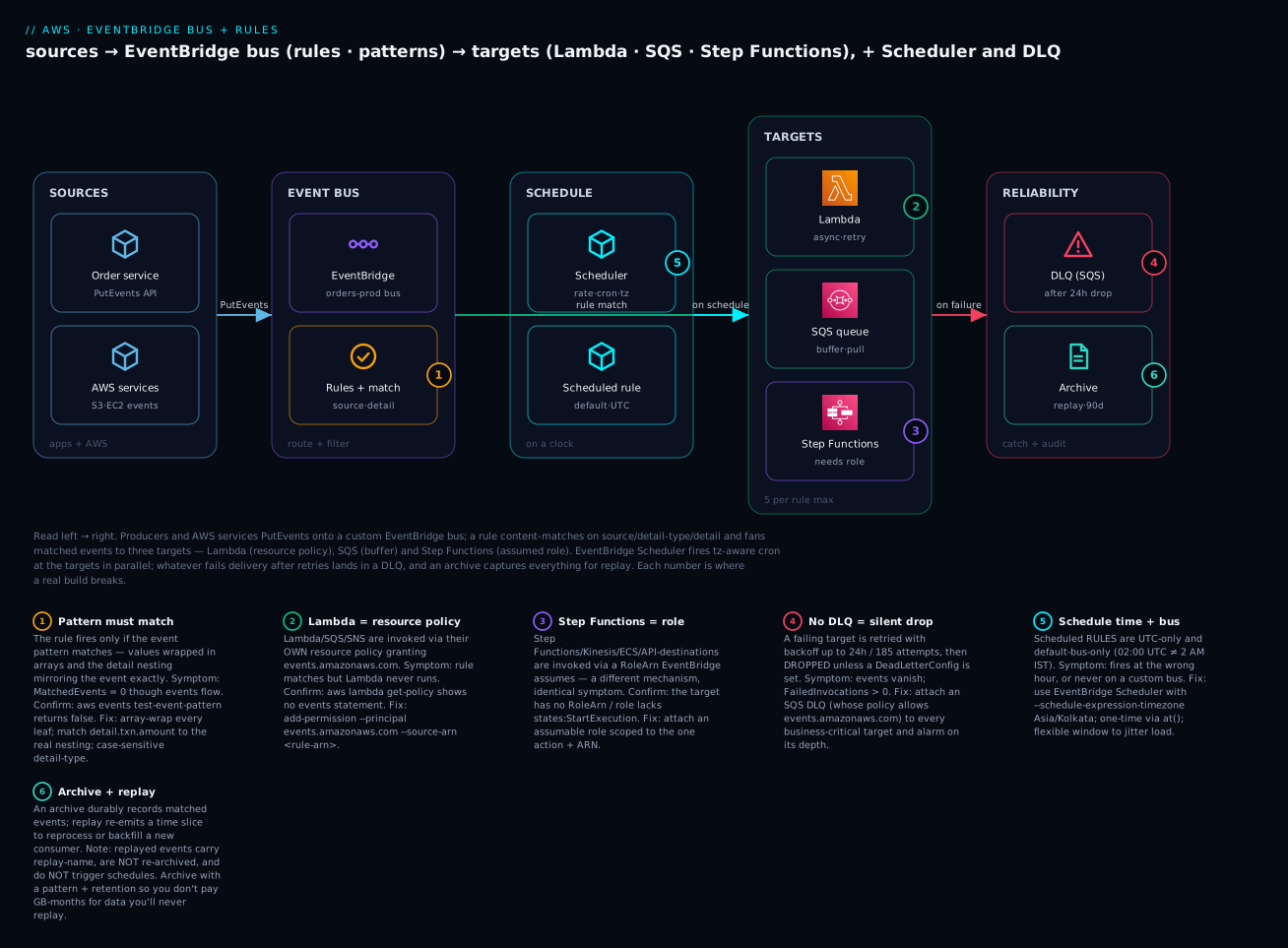
Trace one order through it: checkout calls PutEvents with source=com.shop.orders, detail-type="Order Placed", detail.amount=900, detail.tier="gold"; the bus matches the high-value rule; the input transformer reshapes the event per target; Lambda is invoked (resource policy), SQS receives a buffered copy, and Step Functions starts (role-assumed) — and if the Lambda throws past its retries, that copy lands in the DLQ while the SQS and Step Functions copies proceed independently. Meanwhile the archive has already recorded the raw event, so a week later you can replay every Order Placed from Tuesday into a brand-new analytics consumer without touching the producer.
Real-world scenario: FinninjaPay’s schedule that fired at the wrong hour
FinnijaPay, a Bengaluru fintech running merchant settlements, moved their nightly settlement trigger from a self-managed cron box to AWS and chose a scheduled rule: cron(0 2 * * ? *), “2 AM daily”. For three weeks settlements ran at 7:30 AM IST, not 2 AM — because EventBridge scheduled rules are UTC only, and 02:00 UTC is 07:30 IST. Merchants complained that payouts landed hours late; the on-call spent a night convinced the settlement Lambda was slow, when the trigger had simply fired at the wrong time. The fix was to migrate to EventBridge Scheduler with --schedule-expression-timezone 'Asia/Kolkata', which fired the job at a true 2 AM IST and, as a bonus, let them add a 15-minute flexible window so 400 per-merchant schedules didn’t all fire in the same second and stampede the payments API.
The migration exposed a second, quieter bug. Their high-value-transaction rule — meant to route transactions over ₹1,00,000 to a manual-review Step Function — had never matched a single event. The pattern read {"detail":{"amount":[{"numeric":[">",100000]}]}}, which is correct, but the producer nested the amount one level deeper as detail.txn.amount. The rule’s MatchedEvents metric had sat at zero for two months; no one had watched it because “the code looked right”. They found it in ninety seconds with aws events test-event-pattern, which returned {"Result": false} against a real event and made the nesting mismatch obvious. They fixed the pattern to {"detail":{"txn":{"amount":[...]}}}, and — critically — added a CloudWatch alarm on MatchedEvents < 1 for 1 hour so a silent-non-match could never again hide.
The third fix was a DLQ. The review Step Function occasionally threw on malformed merchant metadata; because the target had no DeadLetterConfig, EventBridge retried for 24 hours and dropped ~30 transactions over the quarter — real payouts that never got reviewed, discovered only during a reconciliation. They attached an SQS DLQ to every target, wrote a tiny redrive runbook, and set an alarm on the DLQ’s ApproximateNumberOfMessagesVisible. Net result: the router itself never changed shape — it was always “bus → rule → targets” — but three lines of configuration (timezone, correct nesting, DLQ) turned a system that silently misfired into one that is boringly correct and, when something does fail, tells you.
Advantages and disadvantages
| Advantages | Disadvantages |
|---|---|
| Producer publishes once; consumers self-subscribe via rules | At-least-once + unordered on the bus — idempotency is mandatory |
| Content-based routing: consumers get only what they match | Pattern shape errors fail silently (no match ≠ an error) |
| Native to ~130 AWS services + SaaS partners — no pollers | Sub-second, not real-time; wrong for synchronous request paths |
| Archive + replay gives durable audit and reprocessing | Two permission models (role vs resource policy) trip everyone |
| Input transformers reshape per target — no glue code | 5 targets/rule and 256 KB/event shape designs |
| Scheduler scales to 1M+ tz-aware schedules with jitter | Scheduled rules are UTC-only, default-bus-only (easy to misuse) |
| Pipes give ordered, filtered point-to-point without a Lambda | Debugging spans buses, rules, DLQs and CloudWatch — many consoles |
| Serverless, pay-per-event, scale-to-zero | Per-event pricing surprises at very high volume — model first |
The disadvantages are the engineering bill for the coupling you removed. The failure mode worth naming: teams adopt the topology (a bus, some rules) but skip the disciplines (watch MatchedEvents, attach a DLQ to every target, make targets idempotent, prefer Scheduler for time). Adopt the three disciplines and EventBridge is close to invisible; skip them and it fails quietly, which is worse than failing loudly.
Hands-on lab: bus → rule (2 targets + transform) → schedule → Pipe
Free-tier friendly. A few hundred events cost fractions of a rupee (custom events ~$1/M; Lambda/SQS inside free tier). You need the AWS CLI v2 configured with permissions for Events, Scheduler, Pipes, Lambda, SQS and IAM. Region below is ap-south-1; adjust freely.
1. Set variables and create the custom bus + archive.
export ACC=$(aws sts get-caller-identity --query Account --output text)
export REG=ap-south-1

aws events create-event-bus --name orders-lab
aws events create-archive --archive-name orders-lab-all \
  --event-source-arn arn:aws:events:$REG:$ACC:event-bus/orders-lab \
  --retention-days 1
# Expect: { "ArchiveArn": "arn:aws:events:...:archive/orders-lab-all", "State": "CREATING" }
2. Create the two targets — an SQS queue and a Lambda — plus a DLQ.
# SQS target + a DLQ for failed EventBridge deliveries
aws sqs create-queue --queue-name orders-lab-q
aws sqs create-queue --queue-name orders-lab-dlq

# A trivial Lambda (Python) as the second target
cat > /tmp/fn.py <<'PY'
def handler(event, context):
    print("EVENT:", event)
    return {"ok": True}
PY
(cd /tmp && zip -q fn.zip fn.py)

# Execution role for the Lambda (basic logging)
aws iam create-role --role-name orders-lab-fn-role \
  --assume-role-policy-document '{"Version":"2012-10-17","Statement":[{"Effect":"Allow","Principal":{"Service":"lambda.amazonaws.com"},"Action":"sts:AssumeRole"}]}'
aws iam attach-role-policy --role-name orders-lab-fn-role \
  --policy-arn arn:aws:iam::aws:policy/service-role/AWSLambdaBasicExecutionRole
sleep 10  # IAM propagation

aws lambda create-function --function-name orders-lab-fn \
  --runtime python3.12 --handler fn.handler \
  --role arn:aws:iam::$ACC:role/orders-lab-fn-role \
  --zip-file fileb:///tmp/fn.zip
3. Grant EventBridge permission to invoke each target. This is the step everyone forgets — the rule will match but nothing arrives without it.
# Lambda: resource-based policy for events.amazonaws.com
aws lambda add-permission --function-name orders-lab-fn \
  --statement-id eb-invoke --action lambda:InvokeFunction \
  --principal events.amazonaws.com \
  --source-arn arn:aws:events:$REG:$ACC:rule/orders-lab/high-value-orders

# SQS: queue policy allowing events.amazonaws.com to SendMessage (target + DLQ)
QARN=arn:aws:sqs:$REG:$ACC:orders-lab-q
aws sqs set-queue-attributes --queue-url $(aws sqs get-queue-url --queue-name orders-lab-q --output text) \
  --attributes "{\"Policy\":\"{\\\"Version\\\":\\\"2012-10-17\\\",\\\"Statement\\\":[{\\\"Effect\\\":\\\"Allow\\\",\\\"Principal\\\":{\\\"Service\\\":\\\"events.amazonaws.com\\\"},\\\"Action\\\":\\\"sqs:SendMessage\\\",\\\"Resource\\\":\\\"$QARN\\\"}]}\"}"
4. Create the rule with an event pattern, then attach both targets — one with an input transformer.
aws events put-rule --name high-value-orders --event-bus-name orders-lab \
  --event-pattern '{
    "source": ["com.shop.orders"],
    "detail-type": ["Order Placed"],
    "detail": { "amount": [{ "numeric": [">=", 500] }] }
  }'

aws events put-targets --rule high-value-orders --event-bus-name orders-lab \
  --targets '[
    { "Id": "to-sqs",
      "Arn": "'"$QARN"'",
      "DeadLetterConfig": { "Arn": "arn:aws:sqs:'"$REG"':'"$ACC"':orders-lab-dlq" } },
    { "Id": "to-lambda",
      "Arn": "arn:aws:lambda:'"$REG"':'"$ACC"':function:orders-lab-fn",
      "InputTransformer": {
        "InputPathsMap": { "id": "$.detail.orderId", "amt": "$.detail.amount" },
        "InputTemplate": "{ \"review\": \"order <id> amount <amt>\" }" } }
  ]'
5. Publish a MATCHING and a NON-matching event, then verify.
# MATCHES (amount >= 500)
aws events put-events --entries '[{
  "Source":"com.shop.orders","DetailType":"Order Placed","EventBusName":"orders-lab",
  "Detail":"{\"orderId\":\"o-1001\",\"amount\":900}"}]'

# DOES NOT MATCH (amount < 500)
aws events put-events --entries '[{
  "Source":"com.shop.orders","DetailType":"Order Placed","EventBusName":"orders-lab",
  "Detail":"{\"orderId\":\"o-1002\",\"amount\":200}"}]'

# Verify SQS got exactly ONE message (the matching one)
aws sqs receive-message --queue-url $(aws sqs get-queue-url --queue-name orders-lab-q --output text)
# Verify the Lambda ran and received the TRANSFORMED payload
aws logs tail /aws/lambda/orders-lab-fn --since 2m --format short
# Expect a log line: EVENT: {'review': 'order o-1001 amount 900'}
| What to check | Command | Expected |
|---|---|---|
| Rule exists & enabled | aws events describe-rule --name high-value-orders --event-bus-name orders-lab |
State: ENABLED |
| Pattern actually matches | aws events test-event-pattern --event-pattern file://p.json --event file://e.json |
{"Result": true} |
| SQS received the match | receive-message |
1 message, o-1001 |
| Non-match excluded | receive-message again |
no o-1002 |
| Lambda got transform | logs tail |
{'review': 'order o-1001 amount 900'} |
6. Add a scheduled invocation with EventBridge Scheduler (tz-aware).
# Role Scheduler assumes to invoke the Lambda
aws iam create-role --role-name orders-lab-sched-role \
  --assume-role-policy-document '{"Version":"2012-10-17","Statement":[{"Effect":"Allow","Principal":{"Service":"scheduler.amazonaws.com"},"Action":"sts:AssumeRole"}]}'
aws iam put-role-policy --role-name orders-lab-sched-role --policy-name invoke \
  --policy-document '{"Version":"2012-10-17","Statement":[{"Effect":"Allow","Action":"lambda:InvokeFunction","Resource":"arn:aws:lambda:'"$REG"':'"$ACC"':function:orders-lab-fn"}]}'
sleep 10

aws scheduler create-schedule --name orders-lab-tick \
  --schedule-expression 'rate(5 minutes)' \
  --schedule-expression-timezone 'Asia/Kolkata' \
  --flexible-time-window '{"Mode":"OFF"}' \
  --target '{"Arn":"arn:aws:lambda:'"$REG"':'"$ACC"':function:orders-lab-fn","RoleArn":"arn:aws:iam::'"$ACC"':role/orders-lab-sched-role"}'
7. Build a Pipe: SQS source → filter → Lambda target.
aws sqs create-queue --queue-name orders-lab-inbound
IN_ARN=arn:aws:sqs:$REG:$ACC:orders-lab-inbound

# Role the Pipe assumes: read the source queue + invoke the target Lambda
aws iam create-role --role-name orders-lab-pipe-role \
  --assume-role-policy-document '{"Version":"2012-10-17","Statement":[{"Effect":"Allow","Principal":{"Service":"pipes.amazonaws.com"},"Action":"sts:AssumeRole"}]}'
aws iam put-role-policy --role-name orders-lab-pipe-role --policy-name pipe \
  --policy-document '{"Version":"2012-10-17","Statement":[
    {"Effect":"Allow","Action":["sqs:ReceiveMessage","sqs:DeleteMessage","sqs:GetQueueAttributes"],"Resource":"'"$IN_ARN"'"},
    {"Effect":"Allow","Action":"lambda:InvokeFunction","Resource":"arn:aws:lambda:'"$REG"':'"$ACC"':function:orders-lab-fn"}]}'
sleep 10

aws pipes create-pipe --name orders-lab-pipe \
  --role-arn arn:aws:iam::$ACC:role/orders-lab-pipe-role \
  --source $IN_ARN \
  --source-parameters '{"FilterCriteria":{"Filters":[{"Pattern":"{\"body\":{\"action\":[\"review\"]}}"}]},"SqsQueueParameters":{"BatchSize":5}}' \
  --target arn:aws:lambda:$REG:$ACC:function:orders-lab-fn

# Send a matching and a non-matching message to the source queue
aws sqs send-message --queue-url $(aws sqs get-queue-url --queue-name orders-lab-inbound --output text) --message-body '{"action":"review","id":"p-1"}'
aws sqs send-message --queue-url $(aws sqs get-queue-url --queue-name orders-lab-inbound --output text) --message-body '{"action":"ignore","id":"p-2"}'
# Only p-1 should reach the Lambda (check logs); p-2 is filtered and deleted
8. (Optional) The same rule + targets in Terraform.
resource "aws_cloudwatch_event_bus" "orders" { name = "orders-lab" }

resource "aws_cloudwatch_event_rule" "high_value" {
  name           = "high-value-orders"
  event_bus_name = aws_cloudwatch_event_bus.orders.name
  event_pattern  = jsonencode({
    source        = ["com.shop.orders"]
    "detail-type" = ["Order Placed"]
    detail        = { amount = [{ numeric = [">=", 500] }] }
  })
}

resource "aws_cloudwatch_event_target" "to_lambda" {
  rule           = aws_cloudwatch_event_rule.high_value.name
  event_bus_name = aws_cloudwatch_event_bus.orders.name
  target_id      = "to-lambda"
  arn            = aws_lambda_function.fn.arn

  input_transformer {
    input_paths    = { id = "$.detail.orderId", amt = "$.detail.amount" }
    input_template = "{ \"review\": \"order <id> amount <amt>\" }"
  }
  retry_policy    { maximum_retry_attempts = 4, maximum_event_age_in_seconds = 3600 }
  dead_letter_config { arn = aws_sqs_queue.dlq.arn }
}

resource "aws_lambda_permission" "eb" {
  statement_id  = "eb-invoke"
  action        = "lambda:InvokeFunction"
  function_name = aws_lambda_function.fn.function_name
  principal     = "events.amazonaws.com"
  source_arn    = aws_cloudwatch_event_rule.high_value.arn
}

resource "aws_scheduler_schedule" "tick" {
  name                         = "orders-lab-tick"
  schedule_expression          = "rate(5 minutes)"
  schedule_expression_timezone = "Asia/Kolkata"
  flexible_time_window { mode = "OFF" }
  target {
    arn      = aws_lambda_function.fn.arn
    role_arn = aws_iam_role.sched.arn
  }
}

resource "aws_pipes_pipe" "pipe" {
  name     = "orders-lab-pipe"
  role_arn = aws_iam_role.pipe.arn
  source   = aws_sqs_queue.inbound.arn
  target   = aws_lambda_function.fn.arn
  source_parameters {
    filter_criteria { filter { pattern = jsonencode({ body = { action = ["review"] } }) } }
    sqs_queue_parameters { batch_size = 5 }
  }
}
9. Teardown (⚠️ do this — schedules and pipes keep invoking).
aws pipes delete-pipe --name orders-lab-pipe
aws scheduler delete-schedule --name orders-lab-tick
aws events remove-targets --rule high-value-orders --event-bus-name orders-lab --ids to-sqs to-lambda
aws events delete-rule --name high-value-orders --event-bus-name orders-lab
aws events delete-archive --archive-name orders-lab-all
aws events delete-event-bus --name orders-lab
aws lambda delete-function --function-name orders-lab-fn
for q in orders-lab-q orders-lab-dlq orders-lab-inbound; do
  aws sqs delete-queue --queue-url $(aws sqs get-queue-url --queue-name $q --output text); done
for r in orders-lab-fn-role orders-lab-sched-role orders-lab-pipe-role; do
  aws iam list-attached-role-policies --role-name $r --query 'AttachedPolicies[].PolicyArn' --output text | xargs -n1 -I{} aws iam detach-role-policy --role-name $r --policy-arn {} 2>/dev/null
  aws iam list-role-policies --role-name $r --query 'PolicyNames' --output text | xargs -n1 -I{} aws iam delete-role-policy --role-name $r --policy-name {} 2>/dev/null
  aws iam delete-role --role-name $r; done
Common mistakes & troubleshooting
This is the section you’ll return to. Match your symptom, run the confirm command, apply the fix. The killer command is aws events test-event-pattern: it takes a pattern and an event and returns {"Result": true|false} — it ends most “why doesn’t my rule match” debugging in one call.
| # | Symptom | Root cause | Confirm (exact command / console path) | Fix |
|---|---|---|---|---|
| 1 | Rule never matches anything | Pattern shape wrong (values not in arrays) | aws events test-event-pattern --event-pattern file://p.json --event file://e.json → false |
Wrap every leaf value in an array |
| 2 | Rule doesn’t match, pattern “looks right” | detail nesting differs from the event (detail.txn.amount vs detail.amount) |
PutEvents a real event; test-event-pattern it |
Mirror the event’s nesting exactly |
| 3 | Rule doesn’t match on detail-type |
Producer omitted DetailType (or wrong case) |
Inspect a raw event; MatchedEvents metric = 0 |
Set DetailType; matching is case-sensitive |
| 4 | Events go to default, not your bus |
EventBusName omitted on PutEvents |
Check the put-events call |
Set EventBusName to your custom bus |
| 5 | Rule matches (MatchedEvents>0) but Lambda never runs |
Missing resource-based policy for events.amazonaws.com |
aws lambda get-policy --function-name <fn> — no events statement |
aws lambda add-permission --principal events.amazonaws.com --source-arn <rule-arn> |
| 6 | Rule matches but SQS/SNS never receives | Queue/topic policy doesn’t allow events.amazonaws.com |
Inspect the SQS/SNS access policy | Add SendMessage/Publish for events.amazonaws.com |
| 7 | Step Functions/Kinesis target never fires | No RoleArn, or role lacks states:StartExecution/kinesis:PutRecord |
describe-rule/target has no RoleArn; simulate the policy |
Attach a role EventBridge can assume with the action |
| 8 | Events silently disappear on target failure | Target has no DeadLetterConfig; dropped after 24 h retries |
CloudWatch FailedInvocations > 0; no DLQ set |
Attach a DLQ; make the target idempotent |
| 9 | Scheduled rule never fires | Schedule on a custom bus (only default allows it), or bad expr |
describe-rule shows the bus; validate rate/cron |
Move to default bus, or use EventBridge Scheduler |
| 10 | Schedule fires at the wrong time | Scheduled rules are UTC only (02:00 UTC ≠ 2 AM IST) |
Compare fire time to UTC | Use Scheduler with --schedule-expression-timezone |
| 11 | Cross-account bus receives nothing | Target bus resource policy missing the source account | describe-event-bus --name <bus> → check Policy |
put-permission/policy allowing source acct PutEvents |
| 12 | Pipe RUNNING but idle | Filter matches nothing (wrong envelope — body vs detail) |
describe-pipe; check FilterCriteria shape |
For SQS source, filter on {"body":{...}} |
| 13 | Pipe stuck / not polling | Pipe role lacks Receive/DeleteMessage, or pipe STOPPED |
describe-pipe → CurrentState; check role |
Fix role perms; start-pipe |
| 14 | Target gets malformed JSON | Input transformer InputTemplate produces invalid JSON |
Compare template vs a real event’s values | Quote/escape correctly; test against a real event |
| 15 | PutEvents returns FailedEntryCount>0 |
Bad Detail JSON, >256 KB, or throttling |
Read Entries[].ErrorCode/ErrorMessage |
Fix JSON/size; add SDK retries for throttle |
| 16 | DLQ itself stays empty though deliveries fail | DLQ queue policy blocks events.amazonaws.com |
Send a test failure; check DLQ policy | Allow events.amazonaws.com SendMessage on the DLQ |
Error / status reference
| Code / message | Where | Meaning | Fix |
|---|---|---|---|
Result: false (test-event-pattern) |
Pattern test | Event doesn’t match the pattern | Fix array-wrap / nesting / case |
FailedEntryCount > 0 |
PutEvents |
Ingestion failed | Read ErrorCode; fix Detail/size |
InvalidEventPatternException |
put-rule |
Malformed pattern JSON | Validate the pattern JSON |
ValidationException (schedule) |
put-rule/Scheduler |
Bad rate/cron/at expression |
Correct the expression |
AccessDeniedException |
Target invoke | Role/resource policy missing | Add the permission (row 5–7) |
ThrottlingException |
PutEvents |
Over the region rate quota | SDK adaptive retries; request increase |
ResourceNotFoundException |
put-targets | Bus/target ARN wrong | Fix the ARN/region/account |
FailedInvocations (metric > 0) |
CloudWatch | Deliveries failing after retries | Check target + attach DLQ |
The three nastiest, explained
Silent non-match (rows 1–3) wastes the most hours because nothing errors. PutEvents succeeds, the bus is fine, the rule exists — but no rule matched, and EventBridge has no way to tell you “I saw an event nobody wanted”. The MatchedEvents CloudWatch metric sitting at zero is your only signal, so alarm on it for any rule that must always match. And before you ship a pattern, prove it with test-event-pattern against a real published event, never a hand-typed one — the difference between detail.amount and detail.txn.amount is invisible until the tool prints false.
“Matches but the target never fires” (rows 5–7) is the permission-model split. There are two completely different mechanisms and the symptom is identical. Lambda, SQS, SNS and CloudWatch Logs are invoked because their own resource policy names events.amazonaws.com — when you add a target in the console, AWS writes that policy silently, so people who wire targets by CLI/Terraform forget it. Step Functions, Kinesis, ECS and API destinations are invoked because EventBridge assumes a role you give the target (RoleArn) — no role, no invoke. Diagnose by target type: resource policy for the first group (get-policy), RoleArn for the second (describe-rule).
No DLQ = a data-loss bug you find months later (row 8). EventBridge retries a failing target for 24 hours and 185 attempts, which feels safe — until both exhaust and the event is dropped with only a FailedInvocations metric as evidence. There is no built-in graveyard. Every target that carries business-meaningful events must have a DeadLetterConfig pointing at an SQS queue (whose policy allows events.amazonaws.com), plus an alarm on that DLQ’s depth. The companion AWS Event-Driven Architecture with EventBridge, SQS and Lambda covers redrive and idempotency once events are safely captured.
Best practices
- Name events well and never omit
source/detail-type. Use reverse-DNSsource(com.shop.orders) and a stabledetail-type(Order Placed) — patterns depend on both, and renaming them later breaks every consumer. - One custom bus per bounded context. Keep
orders,payments,inventoryon separate buses for blast-radius, permissions and per-domain archives; reservedefaultfor AWS-service events. - Prove every pattern with
test-event-patternagainst a real event before shipping, and alarm onMatchedEventsfor rules that must always match. - Attach a DLQ to every business-critical target, set a sane
MaximumEventAgeInSeconds, and alarm on DLQ depth. No silent drops, ever. - Make every target idempotent. At-least-once delivery means duplicates are normal; dedupe on a business key.
- Prefer EventBridge Scheduler over scheduled rules for anything new — time-zone aware, one-time schedules, flexible windows, built-in retry/DLQ, and it scales past the 300-rule cap.
- Reshape with input transformers, not glue Lambdas. If a target needs a different shape, template it; save Lambda for real logic.
- Reach for Pipes when the source is a queue/stream and you need ordered, filtered, optionally-enriched point-to-point delivery — it replaces the poller Lambda.
- Archive what you might need to replay, with a pattern to keep the archive lean, and know that replay won’t re-run schedules or re-archive.
- Version your events (
detail.versionor a schema in the registry) so you can evolve payloads without breaking consumers; use discovery to generate typed bindings, then turn discovery off once stable. - Least-privilege every invoke role and bus policy — scope target roles to the one action and one ARN; scope cross-account bus policies to specific source accounts and (where possible) specific
sourcevalues.
Security notes
EventBridge sits between producers and consumers, so its security is mostly about who can publish, who can be invoked, and what the payload carries. Lock down four surfaces:
| Surface | Risk | Control |
|---|---|---|
| Bus resource policy | Any account puts events / adds rules | Scope events:PutEvents to specific accounts; restrict PutRule/PutTargets to your principals; optionally condition on source |
| Target invoke role (SFN/Kinesis/…) | Over-broad role = lateral movement | One action, one resource ARN; no wildcards |
| Target resource policy (Lambda/SQS/SNS) | Any rule can invoke | Set SourceArn to the exact rule ARN in add-permission |
| Event payload | PII/secrets in detail, visible in archives/logs |
Don’t put secrets in events; send an S3/Secrets pointer; encrypt archives |
| Encryption | Events at rest in archives/discovery | Use a customer-managed KMS key on the bus where supported; grant events.amazonaws.com kms:Decrypt |
| API destinations | Credentials to call external APIs | Store auth in a connection (Secrets Manager-backed); rotate; set a rate limit |
| Cross-account | Spoke account floods hub | Bus policy per source account; monitor MatchedEvents/throttles |
Two rules a senior engineer enforces: never put secrets or full PII in an event detail — it lands in archives, CloudWatch Logs targets and discovery samples where it long outlives the request; send a reference (an S3 key or a Secrets Manager ARN) and let the consumer fetch under its own identity. And always set SourceArn when granting add-permission on a Lambda/SQS target, so only your specific rule can invoke it — an open events.amazonaws.com grant lets any rule in the account trigger your function.
Cost & sizing
EventBridge is cheap and per-use, but the pricing has several independent meters — know which one your workload pulls on.
| Meter | Rough price | Free / note |
|---|---|---|
AWS-service events on default bus |
Free | You pay $0 to react to S3/EC2/etc. |
| Custom / partner / cross-account events | ~$1.00 per million published | Billed in 64 KB chunks (a 100 KB event = 2) |
| EventBridge Scheduler invocations | ~$1.00 per million | ~14M invocations/month free |
| EventBridge Pipes | ~$0.40 per million requests (tiered down) | Enrichment/target costs billed separately |
| API destinations | ~$0.20 per million invocations | Plus the endpoint’s own cost |
| Schema discovery | ~$0.10 per million ingested events | First 5M/month free |
| Archive storage | ~$0.10 per GB-month | Only what you archive |
| Replay | Billed like ingestion (~$1/M) | One-off when you replay |
Sizing intuition: a service doing 10 million custom events/month pays about $10/month for EventBridge itself (₹850-ish) — the targets (Lambda invocations, SQS requests, Step Functions transitions) usually cost more than the routing. Scheduler is effectively free at small scale (14M free invocations covers most cron needs). The line item that surprises people is schema discovery left on a firehose bus: at hundreds of millions of events, the per-million discovery charge adds up — turn discovery off once your schemas are stable. And archive everything with an unbounded pattern and you pay GB-month storage on data you’ll never replay; archive with a pattern, set a retention. For the downstream target costs, size those in their own guides — the router is rarely your biggest bill.
Interview & exam questions
1. What is the difference between an EventBridge rule with an event pattern and one with a schedule?
A pattern rule matches on the content of incoming events and fires when a matching event arrives; a schedule rule fires on a clock (rate/cron) regardless of events. Scheduled rules run only on the default bus and are UTC-only. (SAA-C03, DVA-C02)
2. Why does a rule match (MatchedEvents > 0) but the target never runs?
The permission model. Lambda/SQS/SNS need a resource-based policy allowing events.amazonaws.com; Step Functions/Kinesis/ECS/API destinations need a RoleArn EventBridge assumes. The console adds these silently; CLI/IaC builds must add them explicitly.
3. When would you use EventBridge Scheduler instead of a scheduled rule?
For one-time (at()) schedules, time-zone/DST awareness, flexible windows to jitter load, per-schedule retry/DLQ, or more than the 300-rules-per-bus budget (Scheduler scales to 1M+). Prefer Scheduler for all new time-based triggers.
4. Explain EventBridge Pipes and how they differ from a rule. A Pipe is point-to-point: source → filter → enrichment → target, for SQS/Kinesis/DynamoDB Streams/MQ/Kafka sources, preserving order per shard/group and supporting batching. A rule fans one event to many targets with no ordering. Pipes replace the glue Lambda between a queue/stream and a target.
5. How do you ensure no event is lost when a target keeps failing?
Attach a DeadLetterConfig (an SQS queue) to the target. EventBridge retries with backoff up to MaximumEventAgeInSeconds/MaximumRetryAttempts, then dead-letters; without a DLQ it drops the event after retries.
6. Your event pattern looks correct but never matches. How do you debug it in under a minute?
aws events test-event-pattern --event-pattern file://p.json --event file://e.json. If it returns false, the usual causes are values not wrapped in arrays, wrong detail nesting, or case mismatch on detail-type.
7. Compare EventBridge, SNS and SQS. EventBridge is a content-based router (many AWS/SaaS sources, many target types, archive/replay, schema registry); SNS is pub/sub fan-out with attribute filtering and lowest latency; SQS is a durable buffer a consumer pulls. They compose: a rule can target an SNS topic and an SQS queue.
8. What is an input transformer and when do you need one?
It reshapes the event per target via InputPathsMap (JSONPath extract) + InputTemplate (reshape), so each target gets exactly the payload it expects — e.g. a flat {"message": ...} for a webhook instead of the full EventBridge envelope. It avoids a glue Lambda.
9. How does cross-account event routing work?
The target bus needs a resource policy allowing the source account to PutEvents (or a rule to target it), and the source-side rule targets the other bus with a RoleArn. Common hub-and-spoke: many spoke buses forward to a central bus.
10. What does archive + replay give you, and what are its limits?
A durable record of matched events you can re-emit over a time range to reprocess or backfill a new consumer. Replayed events carry replay-name, aren’t re-archived, don’t trigger schedules, and are billed like ingestion.
11. Why might a Pipe be in RUNNING state but process nothing?
Its filter excludes everything — most often the pattern targets the wrong envelope (for an SQS source, data is under body, so filter on {"body":{...}} not {"detail":{...}}), or the pipe role can’t ReceiveMessage.
12. How do you keep secrets out of the event pipeline?
Never put secrets/PII in detail — it persists in archives, CloudWatch Logs targets and discovery samples. Send a reference (S3 key, Secrets Manager ARN) and let the consumer fetch under its own least-privilege identity; encrypt archives with KMS. (SCS-C02)
Quick check
- Your rule’s
MatchedEventsmetric is 0 despite events flowing. What one command tells you why, and what are the two most likely causes? - A rule matches but your SQS target is empty. Which policy is missing, and on which resource?
- You need a job to run at 2 AM IST, once. Rule or Scheduler, and why?
- What happens to an event whose target fails for 25 hours if no DLQ is configured?
- For an SQS-sourced Pipe, what is the top-level key your filter pattern must match on?
Answers
aws events test-event-pattern(returnstrue/falsefor a pattern+event). Most likely: values not wrapped in arrays, or thedetailnesting doesn’t mirror the real event.- The SQS queue’s resource policy is missing an
Allowforevents.amazonaws.comtosqs:SendMessage. - Scheduler — scheduled rules are UTC-only and don’t do one-time; Scheduler is time-zone aware (
Asia/Kolkata) and supportsat()one-time schedules withActionAfterCompletion=DELETE. - EventBridge retries with backoff until
MaximumEventAgeInSeconds(default 24 h) is exceeded, then drops it — only aFailedInvocationsmetric records it. With a DLQ it would land there. body— the SQS message body, e.g.{"body":{"action":["review"]}}, notdetail.
Glossary
| Term | Definition |
|---|---|
| Event bus | A named router that receives events and holds rules; default, custom, or partner |
| Event | A JSON fact with source, detail-type, detail and stamped metadata |
| Rule | A binding of a match condition (event pattern or schedule) to up to 5 targets |
| Event pattern | JSON mirroring an event’s shape; arrays = OR; supports content filters |
| Content filter | Operators in a pattern: prefix, suffix, anything-but, numeric, exists, cidr, wildcard, equals-ignore-case, $or |
| Target | The resource a matched/scheduled event is delivered to |
| Input transformer | Per-target reshaping via InputPathsMap + InputTemplate |
| Scheduled rule | A rule that fires on rate/cron; default bus, UTC only |
| EventBridge Scheduler | Standalone cron: one-time + recurring, tz-aware, flexible windows, 1M+ schedules |
| EventBridge Pipes | Point-to-point source → filter → enrichment → target for queue/stream sources |
| Enrichment | A Pipe stage (Lambda/SFN Express/API GW/API dest) that augments each record |
| Archive | A durable, EventBridge-managed store of bus events with a retention |
| Replay | Re-emitting a time slice of an archive back onto the bus |
| Schema registry | Catalog of typed event schemas with codegen bindings; fed by discovery |
DLQ (DeadLetterConfig) |
An SQS queue that catches events a target couldn’t accept after retries |
test-event-pattern |
The API/CLI that returns whether a given event matches a given pattern |
Next steps
- Put the router inside a full pipeline — outbox, idempotency, ordering, saga — with AWS Event-Driven Architecture with EventBridge, SQS and Lambda.
- Compare the fan-out primitive you’ll target most: Amazon SNS Topics, Fan-out & Subscriptions Hands-On.
- Master the buffer in front of your consumers: Amazon SQS Queues: Standard, FIFO, Visibility & DLQs Hands-On.
- Orchestrate the workflow EventBridge triggers: AWS Step Functions: State Machines & Orchestration.
- If you’re new to the target runtime, build Your First AWS Lambda Function and the AWS Lambda event-driven patterns that scale it.