You have a business process that is really five or six steps: validate an order, charge a card, reserve inventory, fan out to notify three systems, wait for a human to approve a refund, then write the result. On a whiteboard it is a clean flowchart. In code it becomes a Lambda that calls another Lambda, an SQS queue bolted on for retries, a DynamoDB “where are we?” table, a dead-letter queue nobody watches, and a tangle of try/except that swallows the one error you actually needed to see. Six months later nobody can answer “which orders are stuck, and at which step?” without grepping CloudWatch across five log groups.
AWS Step Functions is the managed answer to that pain. You describe the workflow once as a state machine — a JSON document written in the Amazon States Language (ASL) — and the service becomes the coordinator: it invokes each step, passes data between them, retries transient failures with exponential backoff, catches errors and routes them to a handler, runs steps in parallel or fans them out across a list, waits (for seconds or for a human), and records a complete, per-step execution history you can replay. Your Lambda functions go back to doing one thing each; the orchestration lives in a diagram you can actually read.
This is an advanced, practitioner-grade tour. You will learn the ASL grammar top to bottom, when to pick Standard versus Express workflows and what each guarantees, every state type (Task, Choice, Parallel, Map, Distributed Map, Wait, Pass, Succeed, Fail), how Retry and Catch actually evaluate, the three service-integration patterns (request-response, .sync, .waitForTaskToken), the full input/output pipeline in both JSONPath and the newer JSONata mode, and how to observe and debug executions. Then you will build a real Standard workflow end to end with the aws CLI and Terraform, run it with success and failure inputs, read the history, and work a twelve-row troubleshooting playbook. If you have read AWS Lambda event-driven patterns and event-driven architecture with EventBridge, SQS, and Lambda, this is the piece that ties those choreographed events into an orchestrated, observable whole.
What problem this solves
Event choreography — services reacting to each other’s events through EventBridge and SQS — is loosely coupled and scales beautifully, but it has no single place that knows the state of the whole process. When a five-step saga half-completes, you have a charged card and no reserved inventory, and reconstructing “what happened” means correlating events across buses and queues. Orchestration flips that: one component owns the sequence, the branching, the retries, and the compensation. Step Functions is that component, delivered as a fully managed, serverless service with no coordinator to run or patch.
Without an orchestrator, teams reinvent it badly. The failure modes are always the same: retry logic copy-pasted (and subtly wrong) into every function; a step that silently succeeds-but-does-nothing because an exception was swallowed; no timeout, so a hung downstream call wedges the whole flow for hours; and no audit trail, so compliance asks “prove this refund was approved before it was paid” and you cannot. You also hit the long-running wall: a Lambda caps at 15 minutes, but real processes wait on a batch job, a manual approval, or a partner callback that takes hours or days. You cannot hold a Lambda open for that; you need a coordinator that can wait cheaply.
Who hits this: anyone building order pipelines, ETL and data-processing jobs, media transcoding, ML training/inference pipelines, human-in-the-loop approvals, microservice sagas with compensation, infrastructure automation, and batch fan-out over millions of records. If your architecture has the words “and then,” “in parallel,” “for each,” “retry,” “wait for,” or “if it fails, undo,” you have an orchestration problem, and Step Functions is the AWS-native tool for it.
Learning objectives
By the end of this article you can:
- Write a valid Amazon States Language state machine by hand and read one fluently, field by field.
- Choose Standard or Express, and the right Express sub-mode (synchronous vs asynchronous), from duration, throughput, cost, and delivery-guarantee requirements.
- Use every state type correctly, including inline Map versus Distributed Map for large-scale fan-out from S3.
- Build resilient flows with Retry (interval, backoff rate, max attempts, jitter) and Catch (fallback states, error names).
- Wire service integrations using the three patterns — request-response,
.sync(run-a-job), and.waitForTaskToken(callback) — and know which services support which. - Control data flow with
InputPath,Parameters,ResultSelector,ResultPath, andOutputPath, and switch a workflow to JSONata mode with variables. - Grant the execution role the exact least-privilege permissions each integration needs, and observe runs with execution history, CloudWatch metrics, and X-Ray.
- Diagnose the classic failures —
States.Runtime,States.TaskFailed, permission denials, stuck callbacks, over-fanned Maps, and the 256 KB payload limit — from the execution history.
Prerequisites & where this fits
You should be comfortable with IAM roles and policies, reading and writing JSON, invoking Lambda, and the basics of at least one downstream service (SQS, SNS, DynamoDB, or ECS). You need the AWS CLI v2 configured, Terraform 1.6+ if you want the IaC path, and permission to create IAM roles, Lambda functions, and Step Functions state machines. Nothing here needs anything beyond the free tier except where a ⚠️ note says otherwise.
Where it sits: Step Functions is the orchestration layer of AWS’s application-integration family. It usually sits above compute (Lambda, ECS/Fargate, Batch, EC2) and calls those to do work, and it sits alongside the messaging services — EventBridge routes and starts executions, SQS buffers work between steps, SNS fans out notifications. A common rule of thumb: use EventBridge to decide which workflow runs in response to an event, then use Step Functions to run the steps of that workflow. For the messaging half of that picture, see the companion pieces on EventBridge rules and event buses, and on SQS standard and FIFO queues; this article assumes you know what a rule and a queue are and focuses on the state machine that consumes and coordinates them.
Core concepts
A state machine is a JSON document (ASL) describing a graph of states. An execution is one run of that graph against a specific input; you can have thousands of executions of the same state machine in flight at once, each with its own data. Each state does one thing — invoke a task, make a choice, wait, run branches — and either transitions to a Next state or is a terminal state (End: true, or a Succeed/Fail state). Data flows through as JSON: each state receives an input, may transform it, and emits an output that becomes the next state’s input.
| Term | What it is | Why it matters |
|---|---|---|
| State machine | The ASL definition — the workflow template | Versioned, deployable; up to 1 MB of JSON |
| Execution | One run of a state machine against one input | Has an ARN, a status, and a full history |
| State | One node: a step or a control-flow construct | The unit of retry, catch, timeout, and history |
| Transition | Moving from one state to the next (Next/End) |
The unit Standard workflows are billed on |
| Task | A state that does external work | Where Lambda / service integrations plug in |
| Task token | An opaque string that pauses a task until a callback | Enables human-in-the-loop and async jobs |
| Activity | A poll-based worker registered with Step Functions | Older callback style for self-hosted workers |
| Execution role | The IAM role Step Functions assumes to call services | Every integration needs a permission here |
| Context object | Runtime metadata ($$) — execution id, task token, map index |
Read it to pass identity/token into a task |
| Intrinsic function | Built-in ASL helpers (States.Format, States.Array, …) |
Light data shaping without a Lambda |
Two things trip up newcomers. First, Step Functions is not a compute service — it does not run your code. It calls things that run code (Lambda, ECS tasks, Batch jobs) or that do work (SNS publish, DynamoDB PutItem). A “Task” is a call, not a container. Second, all data is JSON and every state can reshape it. Half of learning Step Functions is learning the input/output pipeline so you stop stuffing a Lambda in just to move a field.
| Top-level ASL field | Required? | Meaning | Notes / limit |
|---|---|---|---|
Comment |
No | Human description | Ignored at runtime |
StartAt |
Yes | Name of the first state | Must match a key in States |
States |
Yes | Map of state name → state object | State names unique per scope, ≤ 80 chars |
Version |
No | ASL version | Defaults to "1.0" |
TimeoutSeconds |
No | Whole-execution timeout | Fails with States.Timeout if exceeded |
QueryLanguage |
No | JSONPath (default) or JSONata |
Set per machine or per state |
Amazon States Language: the grammar
Every state, whatever its type, shares a small set of common fields, then adds type-specific ones. Learn the common set once and the rest is vocabulary.
| Common field | Applies to | Purpose | Default |
|---|---|---|---|
Type |
All | The state type (see next table) | none (required) |
Comment |
All | Inline documentation | none |
Next |
Non-terminal | Name of the next state | none |
End |
Non-terminal | true marks this a terminal state |
false |
InputPath |
Most | JSONPath selecting part of the input | $ (whole input) |
OutputPath |
Most | JSONPath selecting part of the output | $ (whole output) |
Parameters |
Task, Map, Parallel, Pass | Build the input to the work | none |
ResultSelector |
Task, Map, Parallel | Reshape the raw result | none |
ResultPath |
Task, Map, Parallel, Pass | Where to place the result in the input | $ (replace) |
Retry |
Task, Map, Parallel | Retry rules on error | none |
Catch |
Task, Map, Parallel | Fallback states on error | none |
QueryLanguage |
All | Override machine-level language | inherit |
Assign |
Most (JSONata & JSONPath) | Set workflow variables | none |
There are eight state types. Six do control flow or data; two — Task and, at scale, Map — do the actual work.
| State type | Category | One-line job | Can Retry/Catch? |
|---|---|---|---|
| Task | Work | Call a service / Lambda / activity | Yes |
| Choice | Branch | if/else if/else on the data |
No |
| Parallel | Concurrency | Run N fixed branches at once | Yes |
| Map | Concurrency | Run one branch per item in a list | Yes |
| Wait | Delay | Pause for a duration or until a timestamp | No |
| Pass | Data | Inject/transform data, no external call | No |
| Succeed | Terminal | Stop this branch successfully | No |
| Fail | Terminal | Stop with an error name and cause | No |
A minimal but complete two-state machine, in JSONPath mode, looks like this:
{
  "Comment": "Smallest useful workflow",
  "StartAt": "DoWork",
  "States": {
    "DoWork": {
      "Type": "Task",
      "Resource": "arn:aws:states:::lambda:invoke",
      "Parameters": { "FunctionName": "my-func", "Payload.$": "$" },
      "Retry": [
        { "ErrorEquals": ["States.TaskFailed"], "IntervalSeconds": 2,
          "MaxAttempts": 3, "BackoffRate": 2.0 }
      ],
      "Catch": [
        { "ErrorEquals": ["States.ALL"], "Next": "Failed" }
      ],
      "Next": "Done"
    },
    "Done": { "Type": "Succeed" },
    "Failed": { "Type": "Fail", "Error": "WorkFailed", "Cause": "See history" }
  }
}
Note the .$ suffix on Payload.$: in JSONPath mode, a key ending in .$ means “the value is a path or intrinsic function to evaluate,” not a literal string. That one convention explains most “why is my field the literal text $.orderId?” confusion.
Standard vs Express workflows
You choose the workflow type when you create the state machine, and it is immutable — to switch, you create a new machine. The choice drives duration limits, the delivery guarantee, how you observe runs, and the entire pricing model.
| Dimension | Standard | Express |
|---|---|---|
| Max duration | 1 year | 5 minutes |
| Execution model | Exactly-once | At-least-once |
| Start rate | ~2,000 executions/s (soft, raise via quota) | ~100,000 executions/s (soft) |
| State-transition rate | High but metered | Effectively unmetered |
| Pricing basis | Per state transition | Per request + duration (GB-second) |
| Execution history | Full, durable, in console + API | Not in history API; CloudWatch Logs only |
| Idempotency | Guaranteed by the service | You must build it |
| Sub-modes | Async only | Synchronous or asynchronous |
| Redrive / replay | Redrive supported | No redrive |
| Typical use | Long, stateful, auditable orchestration | High-volume, short, event processing |
The delivery-guarantee line is the one that bites in production. Standard is exactly-once: each state transition happens once, the service durably tracks progress, and you can trust that a step ran once. Express is at-least-once: on internal retries a step can run more than once, so any Task with a side effect (a charge, a write, an email) must be idempotent. Use an idempotency key or a conditional write.
Express further splits by how you start it:
| Express sub-mode | How you start it | Returns result? | Guarantee | Use it for |
|---|---|---|---|---|
| Synchronous | StartSyncExecution (or API Gateway integration) |
Yes — waits and returns output | At-most-once from caller’s view | Request/response behind an API |
| Asynchronous | StartExecution |
No — fire and forget | At-least-once | High-volume event ingestion |
A decision table for the type:
| If you need… | Choose | Because |
|---|---|---|
| A run that can last minutes-to-a-year | Standard | Express caps at 5 minutes |
| A full, replayable audit trail | Standard | Express has no execution history |
| Human approval / long callback | Standard | The wait outlives Express’s 5 min |
| Exactly-once side effects for free | Standard | Express is at-least-once |
| 10,000+ short runs per second | Express | Standard’s start rate is lower and pricier |
| Cheapest per-run at high volume | Express | Per-transition pricing punishes chatty Standard flows |
| A synchronous API backend | Express (sync) | Returns the result to the caller |
| An IoT/clickstream processor | Express (async) | Throughput and cost win |
A powerful pattern combines both: a Standard parent orchestrates the long-lived, auditable process and, for a hot inner loop that runs millions of times, starts a nested Express child (arn:aws:states:::states:startExecution.sync). You get exactly-once orchestration at the top and cheap throughput at the bottom.
The state types in depth
Task
A Task is where work happens. Resource names what to call and which pattern to use; the suffix on the ARN (none, .sync, .waitForTaskToken) selects the integration pattern (covered below).
| Task field | Purpose | Default / limit |
|---|---|---|
Resource |
ARN of the integration or Lambda | Required |
Parameters / Arguments |
Build the payload sent to the service | none |
TimeoutSeconds / TimeoutSecondsPath |
Fail the task after N seconds | 60 s for activities; none for many |
HeartbeatSeconds |
Require a heartbeat within N seconds | none |
Retry |
Retry rules (array, ordered) | none |
Catch |
Fallback states (array, ordered) | none |
ResultSelector |
Reshape the raw result | none |
ResultPath |
Where to place the result | $ |
Credentials |
Cross-account role to assume for this task | none |
Always set a TimeoutSeconds on a Task. Without one, a hung integration can leave a Standard execution “running” for a very long time, and a stuck .waitForTaskToken can wait up to a year.
Choice
A Choice state is your if / else if / else. It has an ordered Choices array — the first rule whose condition is true wins — and a Default to fall through to. Omit the Default and an unmatched input fails the execution with States.NoChoiceMatched. That is the single most common Choice bug.
| Comparison family | Operators (each has a …Path variant) |
|---|---|
| String | StringEquals, StringLessThan, StringGreaterThan, StringLessThanEquals, StringGreaterThanEquals, StringMatches (wildcards) |
| Numeric | NumericEquals, NumericLessThan, NumericGreaterThan, NumericLessThanEquals, NumericGreaterThanEquals |
| Boolean | BooleanEquals |
| Timestamp | TimestampEquals, TimestampLessThan, TimestampGreaterThan, TimestampLessThanEquals, TimestampGreaterThanEquals |
| Presence / type | IsPresent, IsNull, IsBoolean, IsNumeric, IsString, IsTimestamp |
| Logical | And, Or, Not (nest rules) |
| Choice rule field | Meaning |
|---|---|
Variable |
JSONPath to the value being tested |
<operator> |
The comparison and its literal (or …Path for a second path) |
And / Or / Not |
Combine nested rules |
Next |
State to go to if this rule matches |
Default (state-level) |
Fallback when no rule matches |
Guard value comparisons with a presence check: test IsPresent: true (and IsNumeric/IsString) before comparing, or a missing field throws States.Runtime instead of taking the branch you expect.
Parallel
A Parallel state runs a fixed set of Branches concurrently; each branch is its own mini state machine. The state’s output is an array with one element per branch, in order. If any branch fails and nothing catches it, the whole Parallel state fails with States.BranchFailed and the other branches are stopped.
| Parallel field | Purpose |
|---|---|
Branches |
Array of sub-workflows (StartAt + States) |
ResultPath |
Where to put the array of branch outputs |
Retry / Catch |
Apply to the Parallel state as a whole |
ResultSelector |
Reshape the combined array |
Use Parallel for a known, small number of independent steps (fraud check and inventory check and tax calc). Use Map when the number of things depends on the input.
Map (inline) and Distributed Map
A Map state runs the same ItemProcessor once per element of an input array. It has two modes, and choosing wrong is a real scaling trap.
| Aspect | Inline Map (Mode: INLINE) |
Distributed Map (Mode: DISTRIBUTED) |
|---|---|---|
| Item source | A JSON array already in state (ItemsPath) |
An array in state or an S3 dataset (ItemReader) |
| Scale | Up to ~40 concurrent iterations | Up to 10,000 concurrent child executions |
| Item count | Bounded by the 256 KB state limit | Millions of items (S3 CSV/JSON/JSONL/manifest/inventory) |
| Each iteration | Runs in the parent execution & history | Runs as a child execution (own history) |
| History impact | Adds to the parent’s 25,000-event cap | Isolated per child — no parent-history blowup |
| Batching | No | ItemBatcher — group items per child |
| Failure tolerance | All-or-nothing (via Catch) | ToleratedFailurePercentage / Count |
| Results | In parent output | Optional ResultWriter to S3 |
| Child type | n/a | Express (fast/cheap) or Standard |
| Map field | Applies to | Purpose |
|---|---|---|
ItemsPath |
Both | JSONPath to the input array |
ItemProcessor |
Both | The per-item sub-workflow (+ ProcessorConfig.Mode) |
MaxConcurrency / MaxConcurrencyPath |
Both | Cap parallel iterations (0 = unbounded) |
ItemSelector |
Both | Build each item’s input (replaces legacy Parameters) |
ItemReader |
Distributed | Read items from S3 (format + resource) |
ItemBatcher |
Distributed | Batch items to reduce child-execution count |
ResultWriter |
Distributed | Write aggregated results to an S3 bucket |
ToleratedFailurePercentage / Count |
Distributed | Allow some item failures before failing the Map |
Reach for Distributed Map the moment you are iterating over more than a few hundred items, over data that lives in S3, or over anything that would bloat the parent execution history. It is the purpose-built tool for “process every object in this bucket / every row in this CSV” at high concurrency.
Wait, Pass, Succeed, Fail
| Wait mode | Field | Behaviour |
|---|---|---|
| Relative | Seconds / SecondsPath |
Pause N seconds |
| Absolute | Timestamp / TimestampPath |
Pause until an ISO-8601 instant |
In Standard workflows a Wait is free of compute cost — the service just holds the execution — so a workflow can cheaply sleep for hours or days (poll a job, back off, wait for a scheduled window).
| State | Key fields | Use |
|---|---|---|
| Pass | Result, Parameters, ResultPath |
Inject constants or reshape data without a call; great for testing a graph |
| Succeed | (none) | End a branch successfully; stops that path |
| Fail | Error, Cause (+ …Path variants) |
End with a named error a Catch upstream can match |
Error handling: Retry and Catch
This is the heart of resilient orchestration. On an error, Step Functions evaluates the state’s Retry array first; if retries are exhausted or none match, it evaluates the Catch array; if neither handles it, the error propagates and (unless caught by an enclosing Parallel/Map) fails the execution.
| Retry field | Meaning | Default |
|---|---|---|
ErrorEquals |
Array of error names this rule handles | required |
IntervalSeconds |
Delay before the first retry | 1 |
MaxAttempts |
Retries after the first failure (0 = don’t) |
3 |
BackoffRate |
Multiplier applied to the interval each attempt | 2.0 |
MaxDelaySeconds |
Cap the computed backoff delay | none |
JitterStrategy |
FULL randomises delay; NONE is deterministic |
NONE |
Retries are evaluated in array order, and each error is matched against the first Retry rule that lists it. Put specific errors first and a broad States.ALL last. With BackoffRate: 2.0 and IntervalSeconds: 2, retries wait 2s, 4s, 8s; add JitterStrategy: FULL so a fleet of executions retrying at once don’t stampede the downstream in lockstep.
| Catch field | Meaning | Default |
|---|---|---|
ErrorEquals |
Array of error names this catcher handles | required |
Next |
State to transition to on catch | required |
ResultPath |
Where to place the error object in the input | $ (replaces input!) |
The ResultPath on a Catch is critical: leave it at the default $ and the error object overwrites your entire input, so your fail-handler loses the order it was working on. Set ResultPath: "$.error" to keep the original input and attach the error under .error.
Error names are strings. Some are predefined by the service; others come from your Lambda (its errorType) or a Fail state’s Error.
| Predefined error name | Fires when |
|---|---|
States.ALL |
Matches any error (use last) |
States.Runtime |
An unrecoverable runtime error (bad path, intrinsic failure) — not retriable |
States.TaskFailed |
A Task reported a failure |
States.Timeout |
Task exceeded TimeoutSeconds or missed a heartbeat |
States.HeartbeatTimeout |
No heartbeat within HeartbeatSeconds |
States.Permissions |
The execution role lacks permission for the call |
States.DataLimitExceeded |
Input/output/state exceeded 256 KB |
States.ResultPathMatchFailure |
ResultPath couldn’t apply to the data |
States.ParameterPathFailure |
A Parameters path couldn’t be resolved |
States.BranchFailed |
A Parallel branch failed |
States.NoChoiceMatched |
A Choice matched nothing and had no Default |
States.IntrinsicFailure |
An intrinsic function threw |
States.ExceedToleratedFailureThreshold |
Distributed Map passed its failure tolerance |
States.ItemReaderFailed |
Distributed Map couldn’t read the S3 dataset |
States.ResultWriterFailed |
Distributed Map couldn’t write results to S3 |
States.QueryEvaluationError |
A JSONata expression failed to evaluate |
A subtlety worth internalising: States.Runtime is not retriable — retrying a malformed ResultPath or a missing field will never succeed, so a Retry on States.ALL that includes it just wastes time. Catch it and route to a handler instead.
Service integrations and the three patterns
A Task’s Resource ARN both names the service and picks the integration pattern via a suffix. The pattern decides when the Task is considered done and what the next state receives.
| Pattern | ARN suffix | Task completes when… | Use for |
|---|---|---|---|
| Request-Response | none (e.g. sns:publish) |
The API call returns | Fire a call, keep going |
Run a Job (.sync) |
.sync / .sync:2 |
The underlying job finishes | ECS task, Glue/EMR/Batch job, nested SM |
| Wait for Callback | .waitForTaskToken |
Someone calls SendTaskSuccess with the token |
Human approval, async partner, activity worker |
Request-response is the default: Step Functions makes the API call and immediately moves on with the response — it does not wait for any downstream work the call kicked off. If you ecs:runTask (no suffix) you get back “task started,” not “task finished.”
.sync (run-a-job) is what you usually want for long jobs: ecs:runTask.sync, glue:startJobRun.sync, batch:submitJob.sync, emr:addStep.sync, states:startExecution.sync. Step Functions polls (via a managed EventBridge rule) and holds the Task until the job reaches a terminal state, then returns its result. This is why .sync tasks need extra IAM permissions — the role must be allowed to create the managed rule and describe the job.
.waitForTaskToken pauses the Task indefinitely. Step Functions injects a $$.Task.Token into the payload; your code, a human, or a partner system carries that token and later calls SendTaskSuccess / SendTaskFailure (or SendTaskHeartbeat). Until then the execution waits — set HeartbeatSeconds and TimeoutSeconds so a lost token doesn’t hang for a year.
"ApproveRefund": {
  "Type": "Task",
  "Resource": "arn:aws:states:::sns:publish.waitForTaskToken",
  "Parameters": {
    "TopicArn": "arn:aws:sns:us-east-1:111122223333:approvals",
    "Message": { "orderId.$": "$.orderId", "taskToken.$": "$$.Task.Token" }
  },
  "TimeoutSeconds": 86400,
  "HeartbeatSeconds": 3600,
  "Next": "Fulfill"
}
Beyond patterns, there are two families of integration:
| Family | ARN shape | Coverage | When to use |
|---|---|---|---|
| Optimized | arn:aws:states:::<svc>:<action> |
~40 curated services, richer params & .sync |
First choice — cleaner, supports run-a-job |
| AWS SDK | arn:aws:states:::aws-sdk:<svc>:<action> |
200+ services, 9,000+ API actions | When there’s no optimized integration |
| Optimized integration | Request-Response | .sync |
.waitForTaskToken |
|---|---|---|---|
Lambda invoke |
Yes | — | Yes |
SNS publish |
Yes | — | Yes |
SQS sendMessage |
Yes | — | Yes |
DynamoDB getItem/putItem |
Yes | — | — |
ECS/Fargate runTask |
Yes | Yes | Yes |
AWS Batch submitJob |
Yes | Yes | — |
Glue startJobRun |
Yes | Yes | — |
EMR addStep |
Yes | Yes | — |
SageMaker createTrainingJob |
Yes | Yes | — |
Step Functions startExecution (nested) |
Yes | Yes | Yes |
API Gateway invoke |
Yes | — | Yes |
EventBridge putEvents |
Yes | — | Yes |
If a service or action isn’t in the optimized list, the AWS SDK integration almost certainly has it — arn:aws:states:::aws-sdk:s3:listObjectsV2, …:aws-sdk:secretsmanager:getSecretValue, and so on — so you rarely need a Lambda just to make a plain AWS API call anymore.
Input and output processing
Between a state’s raw input and the next state’s input, JSONPath-mode Step Functions applies up to five filters, in a fixed order. Knowing the order eliminates most “my data is the wrong shape” bugs.
| # | Field | Applies to | What it does |
|---|---|---|---|
| 1 | InputPath |
The raw input | Select a subset of the input to work with |
| 2 | Parameters |
The selected input | Build the payload for the task (with .$) |
| 3 | ResultSelector |
The task’s raw result | Reshape what the task returned |
| 4 | ResultPath |
Input + selected result | Place the result into the input JSON |
| 5 | OutputPath |
The combined JSON | Select the final output to pass on |
A worked example: the input is { "order": {...}, "meta": {...} }. InputPath: "$.order" narrows to the order. Parameters builds { "FunctionName": "...", "Payload.$": "$" }. The Lambda returns { "Payload": { "score": 0.9 }, "StatusCode": 200 }; ResultSelector: { "score.$": "$.Payload.score" } trims it to { "score": 0.9 }. ResultPath: "$.risk" attaches that under .risk so the order survives. OutputPath: "$" passes it all on. Miss the ResultPath and the Lambda’s response would replace your order.
JSONata mode and variables
In late 2024 Step Functions added JSONata as an alternative query language, and variables. Set "QueryLanguage": "JSONata" on the machine (or a state) and the model simplifies dramatically: instead of the five-field JSONPath pipeline you use Arguments (input to the task) and Output (the state’s output), writing expressions inline as {% ... %}.
| Concern | JSONPath mode | JSONata mode |
|---|---|---|
| Select input | InputPath |
{% $states.input %} in expressions |
| Build task input | Parameters (with .$) |
Arguments |
| Reshape result | ResultSelector |
inline in Output |
| Place result | ResultPath |
not needed — you build Output |
| Final output | OutputPath |
Output |
| Expressions | JSONPath + intrinsics | Full JSONata (filters, maps, math, string fns) |
| Set variables | Assign |
Assign |
Variables solve the old headache of “I need a value from step 1 in step 6 but step 3 reshaped the state.” Use Assign to store a value in a named variable, then reference $myVar anywhere downstream regardless of how the main data has been transformed — no more threading a field through every ResultPath just to keep it alive.
"LoadConfig": {
  "Type": "Pass",
  "QueryLanguage": "JSONata",
  "Assign": { "orderId": "{% $states.input.orderId %}", "region": "us-east-1" },
  "Output": "{% $states.input %}",
  "Next": "Process"
}
For light shaping without a Lambda or JSONata, JSONPath mode ships intrinsic functions:
| Intrinsic | Does |
|---|---|
States.Format(tmpl, …) |
String interpolation |
States.StringToJson(str) |
Parse a JSON string |
States.JsonToString(obj) |
Serialize to a JSON string |
States.Array(a, b, …) |
Build an array |
States.ArrayGetItem(arr, i) |
Index into an array |
States.ArrayLength(arr) |
Length |
States.ArrayPartition(arr, n) |
Chunk an array (batching) |
States.ArrayContains(arr, v) |
Membership test |
States.MathAdd(a, b) |
Integer add |
States.MathRandom(lo, hi) |
Random integer |
States.StringSplit(str, delim) |
Split |
States.UUID() |
Generate a UUID (great idempotency key) |
States.Hash(data, algo) |
Hash a value |
States.JsonMerge(a, b, deep) |
Merge two objects |
And the context object ($$) exposes runtime metadata you often need inside a Task:
| Context path | Value |
|---|---|
$$.Execution.Id |
This execution’s ARN |
$$.Execution.Input |
The original execution input |
$$.Execution.StartTime |
ISO-8601 start time |
$$.State.Name |
Current state’s name |
$$.State.EnteredTime |
When this state was entered |
$$.StateMachine.Id |
The state machine ARN |
$$.Task.Token |
The callback token (.waitForTaskToken only) |
$$.Map.Item.Value |
Current item (inside a Map) |
$$.Map.Item.Index |
Current item’s index |
Observability
Standard executions record a complete execution history — every state entered/exited, every task scheduled/started/succeeded/failed, with input and output at each step. This is the single best debugging asset in the service: open a failed run and you can see the exact state, the exact input it received, and the exact error, without correlating logs.
| History event (representative) | Marks |
|---|---|
ExecutionStarted |
The run began (with input) |
TaskStateEntered / TaskStateExited |
Entering/leaving a Task state |
TaskScheduled / TaskStarted / TaskSucceeded / TaskFailed |
The integration lifecycle |
LambdaFunctionScheduled / …Succeeded / …Failed |
Lambda-specific lifecycle |
ChoiceStateEntered / …Exited |
Choice evaluation |
MapStateEntered / MapIterationStarted |
Map fan-out |
ParallelStateEntered / ParallelStateExited |
Parallel branches |
ExecutionSucceeded / ExecutionFailed / ExecutionAborted / ExecutionTimedOut |
Terminal outcome |
CloudWatch metrics (namespace AWS/States, per state machine) let you alarm on health:
| Metric | Watch for |
|---|---|
ExecutionsStarted |
Baseline volume |
ExecutionsSucceeded |
Success count |
ExecutionsFailed |
Failures — alarm on this |
ExecutionsAborted |
Manual/other stops |
ExecutionsTimedOut |
Hit TimeoutSeconds |
ExecutionThrottled |
You’re over the start-rate quota |
ExecutionTime |
Duration distribution |
ActivitiesScheduled / …TimedOut |
Activity-worker health |
ExpressExecutionBilledDuration |
Express cost driver |
Express workflows have no execution history API — you must enable CloudWatch Logs to see anything. Standard can optionally log to CloudWatch too. Logging has levels, and X-Ray gives you a distributed trace across the whole flow.
| Log level | Emits |
|---|---|
ALL |
Every event (verbose; use in dev) |
ERROR |
Failed/aborted states only |
FATAL |
Only execution-fatal events |
OFF |
Nothing |
Set includeExecutionData: true to log inputs/outputs (careful with PII), and enable X-Ray (tracingConfiguration.enabled = true) to see the Lambda and service calls as a service map with latency per hop.
Architecture at a glance
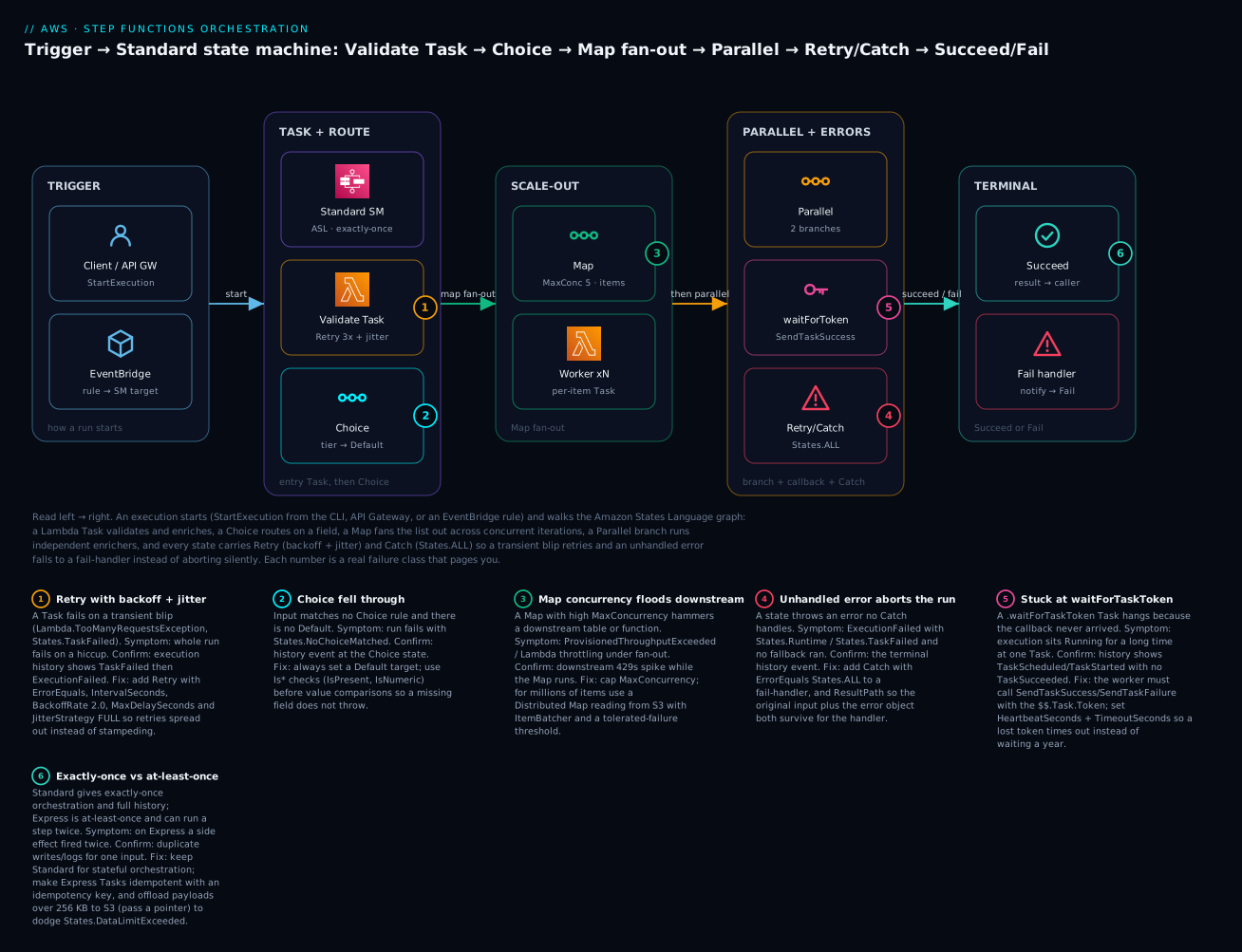
The diagram below is the exact workflow you build in the lab, drawn as the real left-to-right request path. A run starts (blue) from the CLI, from API Gateway, or from an EventBridge rule that targets the state machine. Inside the Standard state machine (purple), the first Task invokes a Validate Lambda wrapped in Retry (backoff + jitter) and Catch, then a Choice routes on the order’s tier with a mandatory Default. The flow fans out through a Map (green) that runs a worker per item under a MaxConcurrency cap, then a Parallel state (amber) runs independent enrichers; a .waitForTaskToken node shows where a human/async callback would pause the run, and a Catch on States.ALL (red) diverts any unhandled error. The run ends (teal) either at a Succeed state that returns the result to the caller or at a fail-handler Lambda that records the failure before a Fail state stops the run with an error name and cause. The six numbered badges mark the failure classes you will actually debug — retry storms, a Choice with no default, an over-fanned Map, an unhandled error, a stuck callback token, and Express’s at-least-once duplicates.
Real-world scenario
Northwind Retail runs order fulfilment for a mid-size e-commerce brand: about 40,000 orders a day, spiking to 250,000 on sale days. Their original pipeline was six Lambdas chained by SNS and SQS, with a DynamoDB “order_state” table each function updated to record progress. It worked until it didn’t: during a flash sale, a payment-provider slowdown caused Lambda-to-Lambda calls to time out and retry uncontrollably, double-charging some customers because the “charge” function wasn’t idempotent and the retries were uncoordinated. Worse, when support asked “which orders are stuck?”, the only answer was a DynamoDB scan filtered on a status field that three functions wrote inconsistently.
They rebuilt on Step Functions. The order pipeline became one Standard state machine: ValidateOrder (Lambda Task, Retry on Lambda.TooManyRequestsException with jitter) → ChargePayment (a .waitForTaskToken Task so the payment service’s async webhook completes the step exactly once) → a Choice on order value routing high-value orders to a .waitForTaskToken manual fraud review → a Map over line items to reserve inventory, capped at MaxConcurrency: 10 to protect the inventory service → a Parallel state firing the receipt email, the warehouse pick-list, and the analytics event at once → Succeed. Every state has a Catch on States.ALL routing to a CompensateAndAlert handler that reverses partial work (release inventory, void the charge) and pages on-call.
The payoff was immediate and measurable. Exactly-once execution killed the double-charge class of bug outright — the .waitForTaskToken charge step cannot run twice. “Which orders are stuck and where?” became a console filter on executions by status, with each stuck run showing the exact state and input. When a downstream service degrades, the Retry-with-jitter backs off instead of stampeding, and the failure tolerance is explicit rather than emergent. For the sale-day analytics fan-out over the full day’s orders (millions of line-item events), they added a nightly Distributed Map that reads the day’s order export from S3, batches 100 items per child, runs an Express child per batch at up to 3,000 concurrency, and writes aggregates back to S3 — a job that used to be a fragile 6-hour EMR script now finishes in 25 minutes with an explicit 0.5% tolerated-failure threshold and a results manifest. Their Step Functions bill for the transactional pipeline runs about ₹9,000–₹14,000/month; the leadership-visible win was that mean-time-to-diagnose a stuck order dropped from hours of log-grepping to a single console click.
Advantages and disadvantages
| Advantages | Disadvantages |
|---|---|
| Visual, auditable workflow — history per step | ASL JSON is verbose; a learning curve |
| Built-in retry, catch, timeout, backoff, jitter | Per-transition pricing punishes chatty Standard flows |
| Exactly-once (Standard) removes a whole bug class | Express is at-least-once — you build idempotency |
| Long-running (up to 1 year) and cheap waits | 256 KB state payload limit forces S3 offload |
| 220+ services via SDK integrations, no glue Lambdas | Vendor lock-in — ASL is AWS-specific |
| Distributed Map scales to millions of items | 25,000-event history cap on huge Standard runs |
| Serverless — no coordinator to run/patch | Debugging complex JSONPath transforms is fiddly |
| Human-in-the-loop via task tokens | Express needs CloudWatch Logs for any visibility |
When do the disadvantages matter? The per-transition cost bites when a Standard workflow has many small, fast steps at high volume — that is exactly the signal to switch that portion to Express or collapse steps. The 256 KB limit bites in data pipelines that try to pass whole documents between states — the fix is always to pass an S3 pointer, never the payload. And the lock-in is real: if multi-cloud portability is a hard requirement, an open orchestrator (Temporal, Airflow) may win despite more operational burden.
Hands-on lab
You will build the workflow from the diagram: a Standard state machine with a Lambda Task (Retry + Catch) → Choice → Map fan-out → Parallel → a fail-handler path. Then run it with a success input and a failure input and read the history. Everything here is free-tier-friendly. ⚠️ Costs are negligible (a few thousand state transitions and a handful of Lambda invokes), but delete the state machine and Lambdas at the end so nothing lingers.
Step 1 — Set variables and create the Lambda execution role
export AWS_REGION=us-east-1
export ACCT=$(aws sts get-caller-identity --query Account --output text)

# Trust policy for Lambda
cat > lambda-trust.json <<'JSON'
{ "Version": "2012-10-17", "Statement": [
  { "Effect": "Allow", "Principal": { "Service": "lambda.amazonaws.com" },
    "Action": "sts:AssumeRole" } ] }
JSON

aws iam create-role --role-name sf-lab-lambda-role \
  --assume-role-policy-document file://lambda-trust.json

aws iam attach-role-policy --role-name sf-lab-lambda-role \
  --policy-arn arn:aws:iam::aws:policy/service-role/AWSLambdaBasicExecutionRole
Step 2 — Create the worker and fail-handler Lambdas
The worker echoes its input and throws when it sees "fail": true, so the failure run exercises Retry and Catch.
mkdir -p fn && cat > fn/worker.py <<'PY'
def lambda_handler(event, context):
    payload = event if isinstance(event, dict) else {}
    if payload.get("fail") is True:
        raise Exception("WorkerError: simulated downstream failure")
    payload["processed"] = True
    return payload
PY
( cd fn && zip -q worker.zip worker.py )

cat > fn/failh.py <<'PY'
def lambda_handler(event, context):
    print("FAIL HANDLER received:", event)
    return {"handled": True, "error": event.get("error", {})}
PY
( cd fn && zip -q failh.zip failh.py )

ROLE_ARN=arn:aws:iam::${ACCT}:role/sf-lab-lambda-role
sleep 10  # let the role propagate

aws lambda create-function --function-name sf-lab-worker \
  --runtime python3.12 --handler worker.lambda_handler \
  --role $ROLE_ARN --zip-file fileb://fn/worker.zip --timeout 10

aws lambda create-function --function-name sf-lab-fail-handler \
  --runtime python3.12 --handler failh.lambda_handler \
  --role $ROLE_ARN --zip-file fileb://fn/failh.zip --timeout 10
Step 3 — Create the state machine execution role
The role must let Step Functions invoke exactly the two functions — least privilege, not lambda:* on *.
cat > sfn-trust.json <<'JSON'
{ "Version": "2012-10-17", "Statement": [
  { "Effect": "Allow", "Principal": { "Service": "states.amazonaws.com" },
    "Action": "sts:AssumeRole" } ] }
JSON

aws iam create-role --role-name sf-lab-sfn-role \
  --assume-role-policy-document file://sfn-trust.json

cat > sfn-perms.json <<JSON
{ "Version": "2012-10-17", "Statement": [
  { "Effect": "Allow", "Action": "lambda:InvokeFunction",
    "Resource": [
      "arn:aws:lambda:${AWS_REGION}:${ACCT}:function:sf-lab-worker",
      "arn:aws:lambda:${AWS_REGION}:${ACCT}:function:sf-lab-fail-handler" ] } ] }
JSON

aws iam put-role-policy --role-name sf-lab-sfn-role \
  --policy-name sf-lab-invoke --policy-document file://sfn-perms.json
Step 4 — Author the ASL definition
Save this as definition.json. It is the full graph: Task (Retry + Catch) → Choice (with Default) → Map (per-item Task) → Parallel (two branches) → Succeed, with a fail-handler path.
{
  "Comment": "Order pipeline lab: validate -> route -> fan-out -> parallel -> handle failure",
  "StartAt": "ValidateOrder",
  "States": {
    "ValidateOrder": {
      "Type": "Task",
      "Resource": "arn:aws:states:::lambda:invoke",
      "Parameters": { "FunctionName": "sf-lab-worker", "Payload.$": "$" },
      "ResultSelector": { "body.$": "$.Payload" },
      "ResultPath": "$.validation",
      "Retry": [
        { "ErrorEquals": ["Lambda.TooManyRequestsException", "States.TaskFailed"],
          "IntervalSeconds": 2, "MaxAttempts": 3, "BackoffRate": 2.0,
          "MaxDelaySeconds": 20, "JitterStrategy": "FULL" }
      ],
      "Catch": [ { "ErrorEquals": ["States.ALL"], "ResultPath": "$.error", "Next": "HandleFailure" } ],
      "Next": "RouteByTier"
    },
    "RouteByTier": {
      "Type": "Choice",
      "Choices": [
        { "Variable": "$.validation.body.tier", "IsPresent": true, "Next": "FanOutItems" }
      ],
      "Default": "FanOutItems"
    },
    "FanOutItems": {
      "Type": "Map",
      "ItemsPath": "$.validation.body.items",
      "MaxConcurrency": 5,
      "ItemProcessor": {
        "ProcessorConfig": { "Mode": "INLINE" },
        "StartAt": "ProcessItem",
        "States": {
          "ProcessItem": {
            "Type": "Task",
            "Resource": "arn:aws:states:::lambda:invoke",
            "Parameters": { "FunctionName": "sf-lab-worker", "Payload.$": "$" },
            "Retry": [ { "ErrorEquals": ["States.TaskFailed"], "IntervalSeconds": 1, "MaxAttempts": 2, "BackoffRate": 2.0 } ],
            "End": true
          }
        }
      },
      "ResultPath": "$.processed",
      "Catch": [ { "ErrorEquals": ["States.ALL"], "ResultPath": "$.error", "Next": "HandleFailure" } ],
      "Next": "EnrichParallel"
    },
    "EnrichParallel": {
      "Type": "Parallel",
      "Branches": [
        { "StartAt": "FraudCheck", "States": {
          "FraudCheck": { "Type": "Task", "Resource": "arn:aws:states:::lambda:invoke",
            "Parameters": { "FunctionName": "sf-lab-worker", "Payload": { "step": "fraud" } }, "End": true } } },
        { "StartAt": "InventoryCheck", "States": {
          "InventoryCheck": { "Type": "Task", "Resource": "arn:aws:states:::lambda:invoke",
            "Parameters": { "FunctionName": "sf-lab-worker", "Payload": { "step": "inventory" } }, "End": true } } }
      ],
      "ResultPath": "$.enrichment",
      "Catch": [ { "ErrorEquals": ["States.ALL"], "ResultPath": "$.error", "Next": "HandleFailure" } ],
      "Next": "Succeeded"
    },
    "Succeeded": { "Type": "Succeed" },
    "HandleFailure": {
      "Type": "Task",
      "Resource": "arn:aws:states:::lambda:invoke",
      "Parameters": { "FunctionName": "sf-lab-fail-handler", "Payload.$": "$" },
      "Next": "FailState"
    },
    "FailState": { "Type": "Fail", "Error": "OrderProcessingFailed", "Cause": "See $.error in the last input" }
  }
}
Step 5 — Create the state machine
SFN_ROLE=arn:aws:iam::${ACCT}:role/sf-lab-sfn-role
sleep 10

aws stepfunctions create-state-machine \
  --name sf-lab-order-pipeline \
  --type STANDARD \
  --role-arn $SFN_ROLE \
  --definition file://definition.json
Expected output — note the ARN:
{
  "stateMachineArn": "arn:aws:states:us-east-1:111122223333:stateMachine:sf-lab-order-pipeline",
  "creationDate": "2026-07-14T10:00:00.000000+00:00"
}
export SM_ARN=arn:aws:states:${AWS_REGION}:${ACCT}:stateMachine:sf-lab-order-pipeline
Step 6 — Run the success path
aws stepfunctions start-execution --state-machine-arn $SM_ARN \
  --name ok-$(date +%s) \
  --input '{"orderId":"A-1001","tier":"premium","items":[{"sku":"X1"},{"sku":"X2"},{"sku":"X3"}]}'
Grab the executionArn from the output, then poll status:
export EXE_OK=<paste executionArn>
aws stepfunctions describe-execution --execution-arn $EXE_OK \
  --query '{status:status, output:output}'
Expected: "status": "SUCCEEDED", with the output carrying validation, processed (an array of three processed items), and enrichment (the two parallel results).
Step 7 — Run the failure path and read the history
Send "fail": true so the first Task throws, retries three times with jitter, then Catch routes to the fail-handler and FailState.
aws stepfunctions start-execution --state-machine-arn $SM_ARN \
  --name bad-$(date +%s) \
  --input '{"orderId":"A-1002","fail":true,"items":[{"sku":"Y1"}]}'

export EXE_BAD=<paste executionArn>
aws stepfunctions describe-execution --execution-arn $EXE_BAD --query 'status'
# -> "FAILED"

# The history is the payoff — see the retries, the catch, and the terminal fail:
aws stepfunctions get-execution-history --execution-arn $EXE_BAD \
  --query 'events[].type' --output text
You will see a sequence including TaskStateEntered, several LambdaFunctionFailed / TaskFailed entries (the retries), then a TaskStateEntered for HandleFailure, and finally ExecutionFailed. That trail — every retry, the exact catch, the terminal error — is what you get for free with Standard and never had with hand-rolled Lambda chaining.
Step 8 — The Terraform equivalent
For real work, define the machine as code. aws_sfn_state_machine takes the ASL in definition; templatefile injects the function ARNs so you don’t hardcode account IDs.
resource "aws_iam_role" "sfn" {
  name = "sf-lab-sfn-role"
  assume_role_policy = jsonencode({
    Version = "2012-10-17"
    Statement = [{ Effect = "Allow", Principal = { Service = "states.amazonaws.com" }, Action = "sts:AssumeRole" }]
  })
}

resource "aws_iam_role_policy" "sfn_invoke" {
  name = "sf-lab-invoke"
  role = aws_iam_role.sfn.id
  policy = jsonencode({
    Version = "2012-10-17"
    Statement = [{
      Effect   = "Allow"
      Action   = "lambda:InvokeFunction"
      Resource = [aws_lambda_function.worker.arn, aws_lambda_function.failh.arn]
    }]
  })
}

resource "aws_cloudwatch_log_group" "sfn" {
  name              = "/aws/vendedlogs/states/sf-lab-order-pipeline"
  retention_in_days = 14
}

resource "aws_sfn_state_machine" "pipeline" {
  name     = "sf-lab-order-pipeline"
  role_arn = aws_iam_role.sfn.arn
  type     = "STANDARD"

  definition = templatefile("${path.module}/definition.json.tftpl", {
    worker_arn = aws_lambda_function.worker.arn
    failh_arn  = aws_lambda_function.failh.arn
  })

  logging_configuration {
    log_destination        = "${aws_cloudwatch_log_group.sfn.arn}:*"
    include_execution_data = true
    level                  = "ERROR"
  }

  tracing_configuration { enabled = true }
}
In the .tftpl, reference ${worker_arn} and ${failh_arn} where the JSON had FunctionName. Switching the whole machine to Express is a one-line change: type = "EXPRESS" (and remember to make Tasks idempotent).
Step 9 — Teardown ⚠️
aws stepfunctions delete-state-machine --state-machine-arn $SM_ARN
aws lambda delete-function --function-name sf-lab-worker
aws lambda delete-function --function-name sf-lab-fail-handler
aws iam delete-role-policy --role-name sf-lab-sfn-role --policy-name sf-lab-invoke
aws iam delete-role --role-name sf-lab-sfn-role
aws iam detach-role-policy --role-name sf-lab-lambda-role \
  --policy-arn arn:aws:iam::aws:policy/service-role/AWSLambdaBasicExecutionRole
aws iam delete-role --role-name sf-lab-lambda-role
| Lab input | Path exercised | Expected status |
|---|---|---|
{"tier":"premium","items":[…3…]} |
Task → Choice → Map(3) → Parallel → Succeed | SUCCEEDED |
{"fail":true,"items":[…1…]} |
Task retries → Catch → HandleFailure → Fail | FAILED |
{"items":[]} (empty list) |
Map over 0 items (no-op) → Parallel → Succeed | SUCCEEDED |
{} (no items) |
ValidateOrder ok; Map ItemsPath missing → catch |
FAILED (States.Runtime) |
Common mistakes & troubleshooting
The execution history is your primary tool: open the failed run, find the state highlighted in red, read its input and the error/cause. Ninety percent of diagnosis is “which state, what input, what error name.” The playbook below maps the failure classes to the confirm step and the fix.
| # | Symptom | Root cause | Confirm (exact command / console path) | Fix |
|---|---|---|---|---|
| 1 | ExecutionFailed with States.TaskFailed |
Lambda/integration threw and nothing caught it | History → the red Task’s TaskFailed event shows error/cause |
Add Catch on States.ALL (and specific errors) routing to a handler; add matching Retry for transient ones |
| 2 | States.Runtime, execution dies immediately, no retry |
Unrecoverable: bad ResultPath, missing field a path referenced, intrinsic error |
History event names States.Runtime with the path; check the state’s input JSON |
Fix the path; guard with IsPresent in a Choice first; States.Runtime is not retriable — Catch it instead |
| 3 | States.Permissions / AccessDeniedException |
Execution role lacks permission for that integration | History TaskFailed cause names the iam action; CloudTrail AccessDenied |
Add the exact action on the exact resource ARN to the state machine role (not the Lambda role) |
| 4 | .sync task fails with an EventBridge/rule permission error |
Role can’t create the managed rule .sync needs |
Cause mentions events:PutRule/PutTargets/DescribeRule |
Grant the role the managed-rule permissions plus the job’s Describe*/Stop* actions |
| 5 | Execution stuck RUNNING for hours at one Task |
.waitForTaskToken — the callback never arrived |
History shows TaskScheduled/TaskStarted, no TaskSucceeded; list-executions --status-filter RUNNING |
Ensure the worker calls SendTaskSuccess/SendTaskFailure with $$.Task.Token; set HeartbeatSeconds + TimeoutSeconds |
| 6 | Downstream service throttles under a Map | MaxConcurrency too high — fan-out floods it |
Downstream ProvisionedThroughputExceeded/429 spikes while Map runs |
Lower MaxConcurrency; batch with ItemBatcher; use Distributed Map with Express children |
| 7 | States.DataLimitExceeded |
A state’s input/output/payload exceeded 256 KB | History event names States.DataLimitExceeded at the state |
Offload the blob to S3, pass a pointer; trim with ResultSelector/OutputPath |
| 8 | States.NoChoiceMatched |
A Choice matched no rule and had no Default |
History at the Choice state | Add a Default; add IsPresent/type checks before value comparisons |
| 9 | Fail-handler gets the error but not the original order | Catch ResultPath defaulted to $, overwriting input |
Handler’s input is just {Error, Cause} |
Set ResultPath: "$.error" on the Catch to preserve input + error |
| 10 | Express step ran twice (duplicate side effect) | Express is at-least-once; internal retry re-ran it | Two writes/logs for one input; CloudWatch Logs | Make the Task idempotent (idempotency key / conditional write); use Standard for exactly-once |
| 11 | Huge Standard run fails around 25,000 events | Execution history limit exceeded | History truncates near 25k events; big inline Map/loop | Move fan-out to Distributed Map (child histories); split into nested workflows; use Express |
| 12 | ExecutionThrottled / StartExecution 400s |
Over the account start-rate / open-execution quota | AWS/States ExecutionThrottled metric; ThrottlingException |
Request a quota increase; add backoff on the caller; use Express for very high volume |
| 13 | Lambda .$ field arrives as literal text $.x |
Forgot the .$ suffix on the key |
Task input shows the literal path string | Rename the key to end in .$ so the value is evaluated as a path |
| 14 | Parallel state fails though one branch “worked” | Any branch failing fails the whole Parallel (States.BranchFailed) |
History shows one branch Failed |
Add Catch/Retry inside the branch, or on the Parallel state |
An error-name quick reference for the confirm step:
| Error name | It means | First move |
|---|---|---|
States.TaskFailed |
The task reported failure | Read the cause; add Retry/Catch |
States.Runtime |
Unrecoverable data/path error | Fix the path; do not retry |
States.Timeout |
Task exceeded its timeout/heartbeat | Raise TimeoutSeconds or fix the hung call |
States.Permissions |
Role missing a permission | Add least-privilege action to the SM role |
States.DataLimitExceeded |
Payload > 256 KB | Offload to S3, pass a pointer |
States.NoChoiceMatched |
Choice fell through | Add Default |
States.BranchFailed |
A Parallel branch failed | Catch inside the branch |
States.ExceedToleratedFailureThreshold |
Distributed Map over tolerance | Fix items or raise tolerance |
States.HeartbeatTimeout |
No heartbeat within window | Send heartbeats; raise HeartbeatSeconds |
Finally, the limits that shape design decisions:
| Quota / limit | Value | Consequence when hit |
|---|---|---|
| State/input/output payload | 256 KB (262,144 bytes) | States.DataLimitExceeded |
| Standard execution history | 25,000 events | Execution fails; use Distributed Map/nesting |
| Standard max duration | 1 year | Execution times out |
| Express max duration | 5 minutes | Execution fails |
| State machine definition size | 1 MB | create-state-machine rejected |
| Inline Map concurrency | ~40 | Iterations queue |
| Distributed Map concurrency | 10,000 child executions | Cap on parallelism |
| Open executions per account/region | 1,000,000 (soft) | New starts throttle |
| Task token lifetime | Up to execution max (1 year) | Stuck task if never sent |
Best practices
- Default to Standard; reach for Express deliberately — only for short, high-volume, idempotent work, and put idempotency keys on every side-effecting Task.
- Never pass big payloads between states. Keep state small; store documents/blobs in S3 and pass the key. Design for the 256 KB limit from day one.
- Always set a
Defaulton every Choice and guard value comparisons withIsPresent/type checks so missing fields don’t throwStates.Runtime. - Wrap every Task in Retry + Catch. Specific retriable errors first (with
MaxDelaySecondsandJitterStrategy: FULL), a broadCatch States.ALLlast, and alwaysResultPath: "$.error"so the handler keeps the input. - Cap
MaxConcurrencyon Maps to the slowest thing downstream, and move any fan-out over a few hundred items — or over S3 data — to Distributed Map. - Use
.syncfor long jobs, not request-response, so the Task actually waits for the job; grant the.syncmanaged-rule permissions up front. - Use
.waitForTaskTokenfor human/async steps and always setHeartbeatSeconds+TimeoutSecondsso a lost token times out. - Prefer AWS SDK integrations over glue Lambdas for plain API calls, and intrinsic functions/JSONata over a Lambda-just-to-move-a-field.
- Grant the execution role least privilege — the exact action on the exact ARN, per integration; never
lambda:*/*. - Enable logging (
ERROR) and X-Ray on every production machine; for Express, logging is your only window. - Name states as verbs and keep them small. Version the ASL in Git; deploy with Terraform/CloudFormation, never by hand-editing in the console.
- Alarm on
ExecutionsFailedandExecutionThrottled, and build aCompensateAndAlertfail-handler that reverses partial work (the saga compensation).
Security notes
The execution role is the security boundary: Step Functions assumes it to make every integration call, so its permissions define the blast radius. Scope each statement to the exact action and the exact resource ARN — lambda:InvokeFunction on two named function ARNs, dynamodb:PutItem on one table, not wildcards. For .sync integrations, remember the role also needs the managed-rule permissions (events:PutRule, events:PutTargets, events:DescribeRule) and the job’s describe/stop actions; scope those too. Use Credentials on a Task to assume a different role for cross-account calls rather than widening the machine’s own role.
Guard the data plane. Execution input and output, and CloudWatch log data, can carry PII — set includeExecutionData: false (or redact) when logging sensitive flows, and encrypt the CloudWatch log group with a KMS key. Step Functions encrypts execution state at rest; you can bring a customer-managed KMS key for the state machine so execution data and the definition are encrypted under a key you control and audit. Control who can start executions with states:StartExecution on the specific state machine ARN — a public API in front of a sync Express workflow is an unauthenticated path straight into your orchestration if you don’t gate it. Prefer resource policies and VPC endpoints (com.amazonaws.<region>.states) so calls to the Step Functions API stay on the AWS network. Finally, treat task tokens as secrets: a token is a bearer credential to complete a step, so deliver it over encrypted channels (SNS/SQS with encryption, not a log line) and expire it with TimeoutSeconds.
Cost & sizing
The two workflow types bill on completely different models — get this wrong and a chatty Standard flow can cost 10x an equivalent Express one (or vice versa for long, sparse flows).
| Cost driver | Standard | Express |
|---|---|---|
| Unit billed | State transitions | Requests + duration (GB-second) |
| Representative rate (us-east-1) | ~$0.025 per 1,000 transitions | ~$1.00 per 1M requests + ~$0.00001667/GB-s |
| Free tier | 4,000 transitions/month (perpetual) | None specific to Express |
| Waits/idle time | Free (no compute) | Billed by duration |
| What makes it expensive | Many steps × many executions | Long duration × high memory |
| Scenario | Type | Rough monthly cost (illustrative) |
|---|---|---|
| 100k orders, 8 transitions each (800k) | Standard | ~$20 (₹1,700) after free tier |
| 10M short events, 100 ms, 64 MB | Express | requests ~$10 + tiny duration ≈ ₹1,000–₹1,500 |
| 1M-item nightly Distributed Map (Express children) | Express children + Standard parent | dominated by child duration; batch to cut it |
| A workflow that waits 3 days then does 2 steps | Standard | ~2 transitions — effectively free |
Right-sizing rules: count your transitions. A Standard workflow’s cost is executions × transitions-per-execution × rate, so collapsing four trivial Pass/Choice steps into one, or moving a hot inner loop to a nested Express child, directly cuts the bill. For Express, cost is requests + (memory × duration), so trimming duration (don’t Wait in Express — it’s billed) and right-sizing memory matter. The classic optimization is the hybrid: Standard parent for the auditable, long, low-volume outer process; Express (or Distributed Map with Express children) for the high-volume inner work. Numbers above are illustrative us-east-1 figures at ~₹83/USD — always confirm current regional pricing before you commit a design.
Interview & exam questions
Q1. When would you choose Express over Standard, and what do you give up? Express suits short (≤5 min), high-throughput, idempotent work — event/stream processing, sync API backends — and is far cheaper at high volume. You give up exactly-once (Express is at-least-once), the durable execution history (you get only CloudWatch Logs), the 1-year duration, and redrive. (DVA-C02, SAA-C03)
Q2. Explain the three service-integration patterns. Request-response returns as soon as the API call responds. .sync (run-a-job) holds the Task until the underlying job (ECS, Glue, Batch, nested SM) finishes. .waitForTaskToken pauses the Task until an external caller invokes SendTaskSuccess/SendTaskFailure with the injected task token — the basis of human-in-the-loop. (DVA-C02, SAP)
Q3. A Task fails once on a throttling error and the whole execution dies. Fix? Add a Retry block on the state listing the retriable error (e.g. Lambda.TooManyRequestsException) with IntervalSeconds, BackoffRate, and JitterStrategy: FULL; add a Catch on States.ALL for the non-transient case routing to a handler. (DVA-C02)
Q4. Inline Map vs Distributed Map? Inline runs iterations inside the parent execution/history, tops out around 40 concurrent, and is bounded by the 256 KB state limit. Distributed Map runs each iteration (or batch) as a child execution, reads up to millions of items from S3, scales to 10,000 concurrent children, supports ItemBatcher/ResultWriter/failure tolerance, and doesn’t bloat the parent history. Use Distributed for large-scale/S3 fan-out. (SAP, DVA-C02)
Q5. What does exactly-once vs at-least-once mean for your code? Standard’s exactly-once means each transition happens once — side effects are safe. Express’s at-least-once means a step can re-run, so every side-effecting Task must be idempotent (idempotency key or conditional write). (DVA-C02)
Q6. An execution is stuck RUNNING for hours. What’s the likely cause and how do you confirm? A .waitForTaskToken Task whose callback never arrived. Confirm in the execution history: TaskScheduled/TaskStarted with no TaskSucceeded. Fix by ensuring the worker sends the token and by setting HeartbeatSeconds/TimeoutSeconds. (SAP)
Q7. Where do IAM permissions for integrations live, and what’s special about .sync? On the state machine execution role, not the Lambda’s role. .sync integrations additionally need permission to manage the EventBridge rule Step Functions uses to detect job completion (events:PutRule/PutTargets/DescribeRule) plus the job’s describe/stop actions. (SCS, DVA-C02)
Q8. How do you pass a payload larger than 256 KB between states? You don’t — the 256 KB state limit is hard. Store the payload in S3 and pass the object key/pointer between states, or trim with ResultSelector/OutputPath. Exceeding it throws States.DataLimitExceeded. (DVA-C02)
Q9. Walk through the JSONPath I/O pipeline. In order: InputPath selects a subset of input; Parameters builds the task payload; the task runs; ResultSelector reshapes the raw result; ResultPath places it into the input JSON; OutputPath selects the final output. (DVA-C02)
Q10. What did JSONata mode add? An alternative query language (QueryLanguage: JSONata) using Arguments/Output instead of the five-field pipeline, full JSONata expressions in {% %}, and variables via Assign ($var) so you can carry a value across states without threading it through every ResultPath. (DVA-C02)
Q11. How do you observe Standard vs Express? Standard has a full, durable execution history in the console/API plus optional CloudWatch Logs and X-Ray. Express has no history API — you must enable CloudWatch Logs (levels ALL/ERROR/FATAL/OFF) and X-Ray to see anything. Both emit AWS/States metrics. (SOA-C02)
Q12. How would you fan out over every object in an S3 bucket and aggregate results? A Distributed Map with an ItemReader over the bucket, ItemBatcher to group objects per child, Express children for throughput, a ToleratedFailurePercentage, and a ResultWriter to write aggregated results back to S3. (SAP)
Quick check
- Which workflow type gives exactly-once execution and a full execution history?
- What happens to a Choice state when no rule matches and there’s no
Default? - Which ARN suffix makes a Task wait for an external callback token?
- What’s the maximum size of a state’s input/output payload?
- On a
Catch, what should you set so the fail-handler keeps the original input?
Answers
- Standard. Express is at-least-once with logs-only visibility.
- It fails with
States.NoChoiceMatched— always set aDefault. .waitForTaskToken— the caller completes it withSendTaskSuccess/SendTaskFailure.- 256 KB (262,144 bytes); larger payloads throw
States.DataLimitExceeded— offload to S3. ResultPath: "$.error"— the default$overwrites the entire input with the error object.
Glossary
| Term | Definition |
|---|---|
| State machine | The ASL JSON document defining a workflow graph |
| Execution | One run of a state machine against one input, with its own ARN and history |
| Amazon States Language (ASL) | The JSON DSL used to define state machines |
| State | One node in the graph — a Task, Choice, Parallel, Map, Wait, Pass, Succeed, or Fail |
| Task | A state that calls a service, Lambda, or activity to do work |
| Standard workflow | Exactly-once, up to 1 year, per-transition pricing, full history |
| Express workflow | At-least-once, up to 5 min, per-request+duration pricing, logs-only |
| Retry | Per-state rules to re-attempt on matching errors with backoff and jitter |
| Catch | Per-state rules routing matching errors to a fallback state |
| Task token | A callback credential injected for .waitForTaskToken, completed via SendTaskSuccess |
.sync (run-a-job) |
Integration pattern where the Task waits for an underlying job to finish |
| Distributed Map | Map mode that runs iterations as child executions over up to millions of S3 items |
| ResultPath | I/O field controlling where a task’s result is placed in the state JSON |
Context object ($$) |
Runtime metadata: execution id, state name, task token, map index |
| Execution role | The IAM role Step Functions assumes to call integrated services |
Next steps
- Pair orchestration with choreography: read AWS Lambda event-driven patterns and event-driven architecture with EventBridge, SQS, and Lambda to decide when to route an event versus run a workflow.
- Tune the Lambdas your Tasks call: Lambda memory, timeout, and concurrency tuning and, when they throw, Lambda errors, timeouts, and cold starts.
- Harden the downstream: DynamoDB tables, keys, and capacity so a Map fan-out doesn’t throttle your table.
- Front a synchronous Express workflow with an API: API Gateway REST and HTTP APIs.
- When a Task hits
States.Permissions, work the IAM policy evaluation and access-denied troubleshooting playbook against the execution role.