This is the capstone of the AWS Zero-to-Hero course. Everything you have learned — the global infrastructure and account model, IAM and the policy-evaluation logic, VPC networking, compute and databases, security, observability and troubleshooting — now converges into one project that proves end-to-end skill: you will build a governed multi-account landing zone and deploy a production 3-tier application onto it, then review the entire result against the six pillars of the AWS Well-Architected Framework. A landing zone is the pre-built, secured, multi-account environment that workloads “land” in — networking, identity, guardrails, logging and cost controls wired up first, so that when a team arrives they inherit security and consistency on day one instead of reinventing it (badly) on every project.
We will work exactly the way a real platform team works: start from a business brief, make explicit design decisions you can defend in a review, then build in staged phases — each phase validated before the next, and each one pointing at a deeper KloudVin lesson for production detail beyond what a single capstone can hold. You will finish with a small but genuinely real environment you can run in your own account, a set of acceptance criteria to prove it works, a Well-Architected review scored pillar by pillar, and a project you can put on your CV and talk through in an interview with total confidence.
Learning objectives
By the end of this capstone you can:
- Translate a business brief into a concrete AWS landing-zone design spanning account structure, identity, network, workload, security, observability, disaster recovery and cost.
- Justify the load-bearing decisions — why multi-account, why a Transit Gateway hub, why ECS Fargate over EC2, why RDS Multi-AZ — the way an architect must in a design review.
- Build the foundation with infrastructure as code: an Organization and OU tree, Control Tower guardrails, IAM Identity Center permission sets, a hub-and-spoke network, and a 3-tier workload of ALB + ECS Fargate + RDS Multi-AZ.
- Layer in security (SCPs, GuardDuty, KMS, Secrets Manager), observability (CloudWatch, CloudTrail, dashboards and alarms), disaster recovery (Multi-AZ, backups) and cost controls (Budgets, tagging).
- Run a structured Well-Architected review of your build across all six pillars and identify the highest-priority remediations.
- Verify the result against explicit acceptance criteria and know exactly which deeper lesson to open for any single area when you build the full thing for real.
Prerequisites
This is the final, Advanced lesson of the AWS Zero-to-Hero course and it assumes the whole course. You should be comfortable with the account and Organizations model, the IAM policy-evaluation logic (explicit deny beats allow beats implicit deny), VPC fundamentals (subnets, route tables, internet and NAT gateways, security groups), the core compute and database services, and driving AWS from the CloudShell/aws CLI. If any of those feel shaky, work the earlier lessons first — this capstone links back to them at each phase rather than re-teaching them. For the hands-on lab you need one AWS account with administrator access and the AWS CLI v2 configured; the full multi-account build is described throughout and modelled in a single account where personal-account limits apply. Everything in the lab stays within or close to the Free Tier if you clean up the same day.
Core concept: what a landing zone is and why six pillars
A landing zone is not a product — it is a governed starting point. The mistake juniors make is to treat “build the app” as the whole job; the architect’s job is to build the environment the app is safe to run in first. Concretely a landing zone gives you four things before any workload exists: a multi-account structure so blast radius and billing are bounded; a central identity plane so humans get short-lived, least-privilege access instead of long-lived keys; guardrails (preventive and detective) that make the wrong thing hard and the right thing automatic; and a shared network, logging and cost baseline so every workload inherits connectivity, an audit trail and cost attribution by default.
The Well-Architected Framework is the lens we review it through. It is AWS’s distilled body of architectural best practice, organised into six pillars. Knowing them cold is both an exam requirement and the language design reviews are conducted in.
| Pillar | Core question it answers | What it looks like in this capstone |
|---|---|---|
| Operational Excellence | Can you run, observe and improve the system? | IaC for everything, CloudWatch dashboards/alarms, CloudTrail, runbooks |
| Security | Is access least-privilege and is data protected? | Multi-account, Identity Center, SCPs, GuardDuty, KMS, Secrets Manager, private subnets |
| Reliability | Does it survive failure and recover? | Multi-AZ RDS, Fargate across AZs behind an ALB, backups, health checks |
| Performance Efficiency | Are resources right-sized and elastic? | Fargate auto scaling, Graviton, right-sized RDS, ALB |
| Cost Optimization | Are you paying only for what you need? | Budgets, tags, Fargate Spot for non-prod, Savings Plans, lifecycle |
| Sustainability | Are you minimising the resources consumed? | Graviton, scaling to demand, Spot, efficient storage tiers |
We design for the pillars as we build, then review against them at the end — the same loop a real Well-Architected Review (WAR) follows.
The brief
Our fictional company is Meridian Retail, a mid-size e-commerce firm moving from a single hand-built AWS account (one engineer clicked it together, the root user has an access key, everything shares one VPC) to a governed multi-account foundation hosting their order-management web application. Leadership wants, in their words:
- “Stop the wild west.” One account for everything is over. Production must be isolated from development, the root user must never be used day to day, and every resource must be owned, tagged and logged.
- “Ship the order app safely.” A standard internet-facing 3-tier web app (load balancer → application → database) that survives the loss of a data centre, keeps the database private, and rolls out new versions without dropping customer traffic.
- “No surprises on the bill or in an audit.” Finance wants spend attributable per team and environment with alerts before a budget blows; Security wants a complete audit trail and automatic threat detection across every account.
Translated into platform language, Meridian needs: a multi-account structure under AWS Organizations with an OU hierarchy; Control Tower to stand up and govern it; IAM Identity Center for federated, least-privilege human access; a hub-and-spoke network with centralised egress via Transit Gateway; a workload of ALB + ECS Fargate + RDS Multi-AZ in private subnets; preventive guardrails (SCPs) and detective controls (GuardDuty, CloudTrail) plus encryption (KMS) and secret management (Secrets Manager); a central observability baseline; DR through Multi-AZ and backups; and cost controls. That is precisely a Well-Architected landing zone with a workload on it.
Design decisions
A landing zone is mostly a set of decisions; the implementation is easy once they are explicit and defensible. Here are the eight that matter, each with the reasoning a reviewer expects and the deeper lesson that owns it.
1. Account structure and OUs
Decision: adopt a multi-account structure governed by AWS Organizations, laid out with the Control Tower reference OU hierarchy rather than a flat set of accounts. Accounts are the strongest isolation and billing boundary AWS offers — far stronger than VPCs or IAM within one account — so we separate by function and environment. A management account holds the Organization and billing and runs no workloads; a Security OU holds the Log Archive and Audit accounts; a Workloads OU splits into Prod and Non-Prod child OUs holding the application accounts.
Root
├── Management account            (Organization, billing — no workloads)
├── Security OU
│   ├── Log Archive account       (immutable central CloudTrail/Config logs)
│   └── Audit account             (security tooling, GuardDuty admin)
├── Infrastructure OU
│   └── Network account           (Transit Gateway, central egress, DNS)
└── Workloads OU
    ├── Prod OU
    │   └── meridian-prod account (the order app — production)
    └── Non-Prod OU
        └── meridian-dev account  (the order app — development)
A guardrail (SCP) attached to the Workloads OU flows to Prod, Non-Prod and every future account beneath them, so new teams inherit governance automatically. The management account is kept clean because anything granted there is hard to constrain — SCPs do not apply to it. Detail: Building a Multi-Account AWS Landing Zone with Control Tower.
2. Identity: IAM Identity Center, not IAM users
Decision: humans never get IAM users or long-lived access keys. IAM Identity Center (the service formerly called AWS SSO) is the single front door: connect the corporate identity provider (Entra ID/Okta) over SAML and SCIM, define permission sets (reusable role templates such as AdministratorAccess, PowerUserAccess, ReadOnlyAccess, Billing), and assign groups to accounts with a permission set. Engineers run aws sso login and get short-lived credentials scoped to exactly the account and role they need.
| Principal | Access model | Used for |
|---|---|---|
| Root user | MFA, locked away, used almost never | Account recovery, a handful of root-only tasks |
| Workforce (humans) | IAM Identity Center + permission sets, short-lived | All day-to-day console/CLI access |
| Workloads (apps) | IAM roles (task roles, instance profiles) | EC2/ECS/Lambda assuming roles, no static keys |
| CI/CD pipelines | IAM roles via OIDC federation | GitHub Actions/CodePipeline, no stored keys |
This kills the two biggest real-world risks at once: leaked long-lived keys and standing admin. Detail: AWS IAM Identity Center at Scale and the foundations in AWS IAM least privilege & permission boundaries.
3. Network: hub-and-spoke with Transit Gateway
Decision: give each workload account its own VPC (the spoke) and connect them through a central Transit Gateway in the Network account (the hub), sharing the TGW across the Organization with Resource Access Manager (RAM). Centralise internet egress in the Network account (one set of NAT gateways and, optionally, a Network Firewall) so all outbound traffic is inspected and logged in one place, and so spokes stay small and disposable. The application VPC uses a standard three-tier subnet layout across two Availability Zones: public subnets for the ALB, private subnets for the Fargate tasks, and isolated private subnets for RDS.
| Subnet tier | AZ-a / AZ-b | Routes to | Holds |
|---|---|---|---|
| Public | 10.20.0.0/24 / 10.20.1.0/24 |
Internet Gateway | ALB, NAT gateways |
| Private (app) | 10.20.10.0/24 / 10.20.11.0/24 |
NAT gateway / TGW | ECS Fargate tasks |
| Isolated (data) | 10.20.20.0/24 / 10.20.21.0/24 |
No internet route | RDS Multi-AZ, no NAT |
The alternative — VPC peering everywhere, or one flat shared VPC — does not scale (peering is not transitive, CIDRs collide, the security boundary erodes). Detail: Multi-Account VPC Connectivity with Transit Gateway.
4. Workload: ALB + ECS Fargate + RDS Multi-AZ
Decision: run the order app as a classic, robust 3-tier architecture. An internet-facing Application Load Balancer in the public subnets terminates TLS (certificate from ACM) and routes HTTP/HTTPS to the application tier. The application tier is ECS on Fargate — serverless containers, no EC2 to patch — spread across both AZs, behind a target group, with service auto scaling on CPU/request count. The data tier is Amazon RDS (PostgreSQL) in Multi-AZ mode: a synchronous standby in the second AZ that takes over automatically on failure.
| Tier | Service | Why this choice | Spread |
|---|---|---|---|
| Presentation / routing | Application Load Balancer | L7 routing, TLS termination, health checks, sticky sessions | Both public subnets |
| Application | ECS Fargate (Graviton) | No servers to patch, scales to demand, per-task IAM role | Both private (app) subnets |
| Data | RDS PostgreSQL Multi-AZ | Managed, automatic failover, backups, point-in-time recovery | Primary + standby across AZs |
Fargate over EC2 removes an entire patching and capacity-planning burden (Operational Excellence + Security); Multi-AZ RDS is the single most important reliability decision for a stateful app. Detail: Production Amazon ECS on Fargate.
5. Security guardrails: SCPs, GuardDuty, KMS, Secrets Manager
Decision: defence in depth, preventive and detective. Service Control Policies at the OU level set the outer boundary of what any principal in those accounts can do — even an account admin cannot exceed them. GuardDuty is enabled organisation-wide from the Audit account for continuous threat detection. KMS customer-managed keys encrypt RDS, EBS, S3 and secrets, with key policies granting least-privilege use. Secrets Manager holds the database credentials with automatic rotation; nothing sensitive is ever baked into a task definition or image.
| Control | Type | Scope | Guards against |
|---|---|---|---|
| SCP: deny leaving Org, deny root actions, region lock | Preventive | Workloads OU | Account takeover, drift, data residency breach |
| SCP: deny disabling CloudTrail/GuardDuty/Config | Preventive | All OUs | Tampering with the audit/detection layer |
| GuardDuty | Detective | Org-wide (Audit account) | Compromised credentials, crypto-mining, recon |
| KMS CMKs | Protective | Per account/service | Plaintext data at rest |
| Secrets Manager + rotation | Protective | Workload accounts | Hard-coded/long-lived DB credentials |
Detail: SCP guardrails & delegated admin, KMS multi-Region keys & envelope encryption, and Secrets Manager automatic rotation.
6. Observability baseline
Decision: you cannot operate what you cannot see. CloudTrail is enabled as an organisation trail writing immutable logs to the Log Archive account, so every API call in every account is recorded centrally and out of reach of a compromised workload account. CloudWatch collects metrics, logs (container logs via the awslogs/Fire Lens driver) and traces; a dashboard shows the golden signals (latency, error rate, request count, saturation) and alarms page on ALB 5xx, Fargate CPU, and RDS connections/free storage. AWS Config records resource configuration for compliance and drift.
| Signal | Source | Where it lands | Alarm on |
|---|---|---|---|
| API audit trail | CloudTrail org trail | Log Archive S3 (immutable) | Root usage, IAM changes |
| App/infra metrics | CloudWatch | Per-account + dashboard | ALB 5xx, target health, CPU |
| Container logs | ECS awslogs driver |
CloudWatch Logs | Error-rate metric filters |
| Resource config/drift | AWS Config | Log Archive account | Non-compliant resources |
Detail builds on the troubleshooting lessons; for cross-account log/metric strategy see the landing-zone and Control Tower lessons.
7. Disaster recovery and resilience
Decision: the workload survives the loss of an Availability Zone with no human action (Multi-AZ RDS failover, Fargate tasks rescheduled in the surviving AZ, ALB removing the dead targets) and survives data loss or corruption through automated backups with point-in-time recovery and a periodic snapshot copied to a second Region for a regional disaster. We state an explicit RTO/RPO so the design is testable.
| Failure | Mechanism | Target |
|---|---|---|
| Single instance/task dies | ECS reschedules, ALB health check removes target | RTO seconds, RPO 0 |
| Availability Zone fails | RDS Multi-AZ failover + tasks already in 2nd AZ | RTO 1–2 min, RPO ~0 |
| Data corruption / bad deploy | RDS point-in-time recovery; ECS rollback | RTO minutes, RPO ≤5 min |
| Region fails | Restore cross-Region snapshot + redeploy IaC | RTO hours, RPO last copied snapshot |
This is the warm-standby-within-a-Region, pilot-light-across-Regions posture appropriate for a mid-size retailer. To go further (active-passive or active-active multi-Region), see Enterprise multi-Region architecture on AWS and AWS DR strategies. Backups org-wide: AWS Backup with Organizations & Vault Lock.
8. Cost controls
Decision: cost is engineered, not discovered on the bill. A mandatory tagging standard (CostCenter, Owner, Environment, Application) is enforced so Cost Explorer can slice spend by team and environment; AWS Budgets sets a monthly budget per account with alerts at 80% and 100% to the owner before the month closes; non-production runs Fargate Spot and is shut down out of hours; steady-state Fargate and RDS are covered by Compute Savings Plans and Reserved Instances once the baseline is known. This answers Meridian’s “no surprises on the bill” directly.
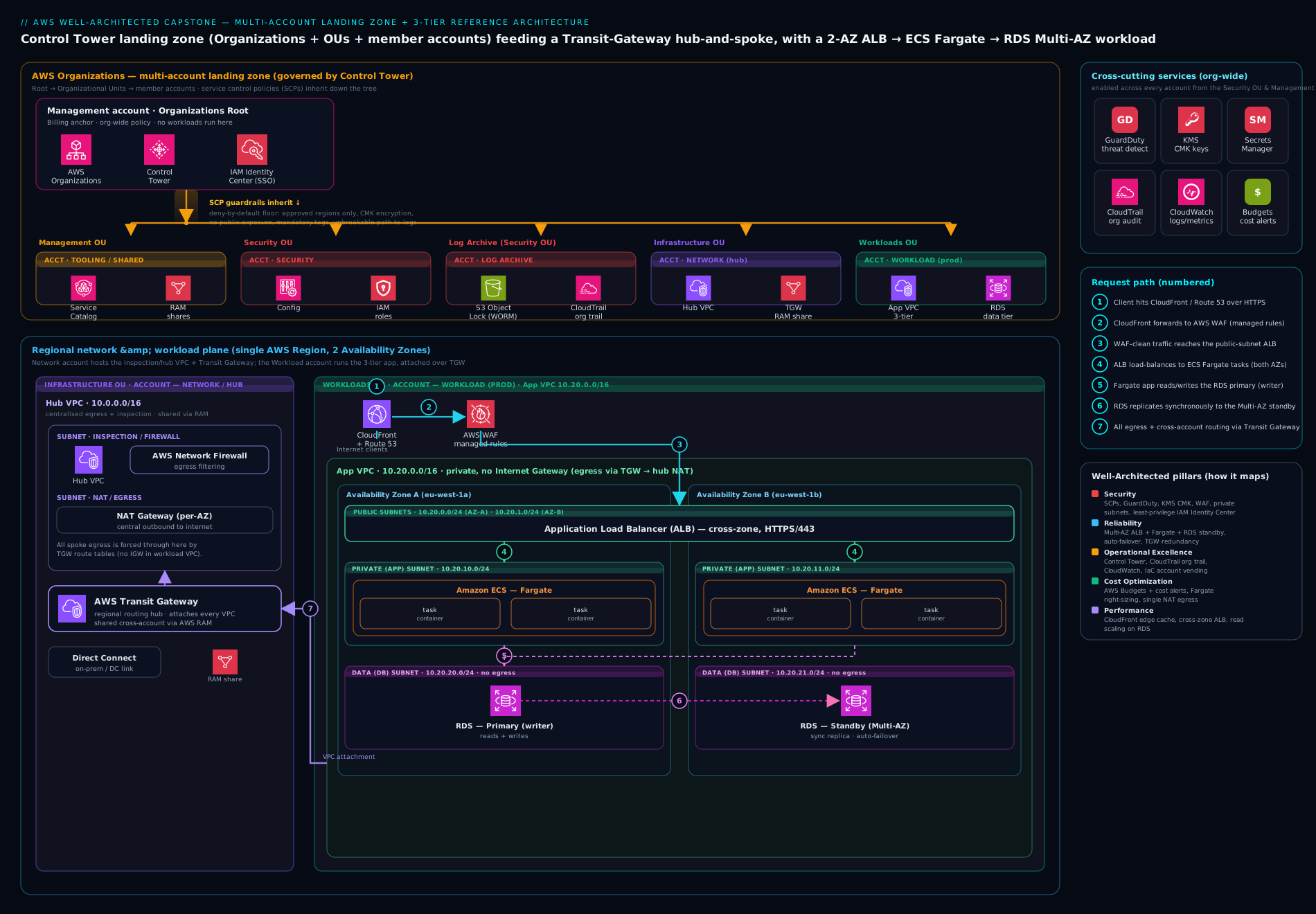
The diagram above is the target state we are building toward: the Organizations OU hierarchy on the left (management, Security, Infrastructure, Workloads) with SCP guardrails inheriting downward; IAM Identity Center as the human front door; the Network account’s Transit Gateway hub peered to the application VPC; and inside that VPC the 3-tier app — ALB in public subnets, ECS Fargate in private subnets, RDS Multi-AZ in isolated subnets — wrapped by GuardDuty, KMS, Secrets Manager, and a CloudWatch/CloudTrail observability plane. Keep it open as a map while you build; each phase below fills in one part of it.
Staged build plan
You do not build a landing zone in one giant deployment — you build it in phases, validating each before the next, and you build it with infrastructure as code so it is reproducible and reviewable. The platform team uses CloudFormation/Terraform; Control Tower itself is largely click-or-blueprint-driven for the initial setup. Here is the plan; each phase names the deeper lesson to open if you need more than the snippet, and the hands-on lab that follows builds a free-tier slice of phases 3, 4 and 6 end to end.
| Phase | What you build | Pillar focus | Reuse lesson |
|---|---|---|---|
| 0. Foundations | Account, CLI, MFA on root, billing alerts | Operational Excellence | Earlier course lessons |
| 1. Account structure | Control Tower, Organization, OUs, accounts | Security, Cost | Control Tower landing zone |
| 2. Identity | Identity Center, permission sets, group assignments | Security | Identity Center at scale |
| 3. Network | VPC, 3-tier subnets, IGW/NAT, Transit Gateway hub | Reliability, Security | Transit Gateway architecture |
| 4. Workload | ALB + ECS Fargate + RDS Multi-AZ | Reliability, Performance | ECS on Fargate |
| 5. Security | SCPs, GuardDuty, KMS, Secrets Manager | Security | SCP guardrails |
| 6. Observability | CloudTrail org trail, CloudWatch dashboard + alarms | Operational Excellence | Troubleshooting lessons |
| 7. DR & cost | Multi-AZ, cross-Region backups, Budgets, tags | Reliability, Cost | AWS Backup |
| 8. Review | Well-Architected review across six pillars | All | Well-Architected reliability |
Representative IaC for the core pieces
You will mix tools in real life: Control Tower (and Account Factory) for account vending, CloudFormation StackSets to push baselines across accounts, and Terraform for the workload. Here are representative snippets for the load-bearing pieces.
An OU and an SCP (CloudFormation, Organizations):
Resources:
  WorkloadsOU:
    Type: AWS::Organizations::OrganizationalUnit
    Properties:
      Name: Workloads
      ParentId: !Ref RootId

  DenyLeaveOrgSCP:
    Type: AWS::Organizations::Policy
    Properties:
      Name: deny-leave-org-and-root
      Type: SERVICE_CONTROL_POLICY
      TargetIds: [!Ref WorkloadsOU]
      Content:
        Version: "2012-10-17"
        Statement:
          - Sid: DenyLeaveOrganization
            Effect: Deny
            Action: organizations:LeaveOrganization
            Resource: "*"
          - Sid: DenyRootUser
            Effect: Deny
            Action: "*"
            Resource: "*"
            Condition:
              StringLike:
                aws:PrincipalArn: "arn:aws:iam::*:root"
The application VPC with 3-tier subnets (Terraform):
module "vpc" {
  source  = "terraform-aws-modules/vpc/aws"
  name    = "meridian-prod"
  cidr    = "10.20.0.0/16"

  azs              = ["eu-west-1a", "eu-west-1b"]
  public_subnets   = ["10.20.0.0/24", "10.20.1.0/24"]   # ALB
  private_subnets  = ["10.20.10.0/24", "10.20.11.0/24"]  # Fargate
  database_subnets = ["10.20.20.0/24", "10.20.21.0/24"]  # RDS (isolated)

  enable_nat_gateway   = true
  single_nat_gateway   = false   # one NAT per AZ for reliability
  enable_dns_hostnames = true
}
An ECS Fargate service behind a target group (Terraform, abridged):
resource "aws_ecs_service" "order_app" {
  name            = "order-app"
  cluster         = aws_ecs_cluster.this.id
  task_definition = aws_ecs_task_definition.order_app.arn
  desired_count   = 2
  launch_type     = "FARGATE"

  network_configuration {
    subnets          = module.vpc.private_subnets       # private only
    security_groups  = [aws_security_group.app.id]
    assign_public_ip = false
  }

  load_balancer {
    target_group_arn = aws_lb_target_group.app.arn
    container_name   = "order-app"
    container_port   = 8080
  }

  deployment_circuit_breaker { enable = true, rollback = true }
}
An RDS Multi-AZ instance, encrypted, private (Terraform):
resource "aws_db_instance" "orders" {
  identifier              = "meridian-orders"
  engine                  = "postgres"
  instance_class          = "db.t4g.micro"   # Graviton
  allocated_storage       = 20
  multi_az                = true              # synchronous standby in 2nd AZ
  db_subnet_group_name    = aws_db_subnet_group.isolated.name
  vpc_security_group_ids  = [aws_security_group.db.id]
  storage_encrypted       = true
  kms_key_id              = aws_kms_key.data.arn
  backup_retention_period = 7
  manage_master_user_password = true         # credentials go to Secrets Manager
  publicly_accessible     = false
}
Hands-on lab — build a free-tier landing-zone slice
You will build a real, working slice of the landing zone and workload using the AWS CLI in CloudShell — no installs. To stay Free-Tier-friendly and avoid needing a multi-account Organization on a personal account, the lab builds the network + workload + cost guardrail (phases 3, 4 and 6) inside a single account; the commands are identical in shape to the per-account version, and the multi-account specifics are exactly as described in the design above. Everything goes into resources you delete at the end.
Note on scope: a real Control Tower landing zone provisions Organization accounts that a personal account may not be enrolled for, so the lab models the structure with one VPC and tags. The networking, Fargate and RDS commands are production-shaped.
1. Set context. Open CloudShell and confirm where you are:
aws sts get-caller-identity --output table
export AWS_REGION=eu-west-1
ACCOUNT_ID=$(aws sts get-caller-identity --query Account --output text)
echo "Working in account: $ACCOUNT_ID, region: $AWS_REGION"
2. Create the 3-tier VPC (phase 3). Create the VPC and one public + one private subnet (the lab uses one AZ’s worth to stay small; production uses two):
VPC_ID=$(aws ec2 create-vpc --cidr-block 10.20.0.0/16 \
  --tag-specifications 'ResourceType=vpc,Tags=[{Key=Name,Value=meridian-lab},{Key=Environment,Value=lab},{Key=CostCenter,Value=retail}]' \
  --query Vpc.VpcId --output text)

PUB_SUBNET=$(aws ec2 create-subnet --vpc-id "$VPC_ID" \
  --cidr-block 10.20.0.0/24 --availability-zone ${AWS_REGION}a \
  --query Subnet.SubnetId --output text)

PRIV_SUBNET=$(aws ec2 create-subnet --vpc-id "$VPC_ID" \
  --cidr-block 10.20.10.0/24 --availability-zone ${AWS_REGION}a \
  --query Subnet.SubnetId --output text)

echo "VPC=$VPC_ID  public=$PUB_SUBNET  private=$PRIV_SUBNET"
3. Add an internet gateway and a public route so the ALB tier can reach the internet:
IGW_ID=$(aws ec2 create-internet-gateway --query InternetGateway.InternetGatewayId --output text)
aws ec2 attach-internet-gateway --internet-gateway-id "$IGW_ID" --vpc-id "$VPC_ID"

RTB_ID=$(aws ec2 create-route-table --vpc-id "$VPC_ID" --query RouteTable.RouteTableId --output text)
aws ec2 create-route --route-table-id "$RTB_ID" \
  --destination-cidr-block 0.0.0.0/0 --gateway-id "$IGW_ID"
aws ec2 associate-route-table --route-table-id "$RTB_ID" --subnet-id "$PUB_SUBNET"
4. Create an ECS Fargate cluster and a tiny task (phase 4). We register a minimal task definition (a public sample container) and run it on Fargate to prove the application tier works:
aws ecs create-cluster --cluster-name meridian-lab \
  --capacity-providers FARGATE FARGATE_SPOT \
  --tags key=Environment,value=lab key=CostCenter,value=retail

# Execution role lets Fargate pull images and write logs
aws iam create-role --role-name meridianTaskExecRole \
  --assume-role-policy-document '{"Version":"2012-10-17","Statement":[{"Effect":"Allow","Principal":{"Service":"ecs-tasks.amazonaws.com"},"Action":"sts:AssumeRole"}]}'
aws iam attach-role-policy --role-name meridianTaskExecRole \
  --policy-arn arn:aws:iam::aws:policy/service-role/AmazonECSTaskExecutionRolePolicy

cat > task.json <<EOF
{
  "family": "order-app",
  "networkMode": "awsvpc",
  "requiresCompatibilities": ["FARGATE"],
  "cpu": "256", "memory": "512",
  "runtimePlatform": { "cpuArchitecture": "ARM64", "operatingSystemFamily": "LINUX" },
  "executionRoleArn": "arn:aws:iam::${ACCOUNT_ID}:role/meridianTaskExecRole",
  "containerDefinitions": [{
    "name": "order-app",
    "image": "public.ecr.aws/nginx/nginx:stable",
    "portMappings": [{ "containerPort": 80 }],
    "essential": true
  }]
}
EOF
aws ecs register-task-definition --cli-input-json file://task.json
5. Create a cost guardrail (phase 6). Set a small monthly Budget with an alert so you are warned before spend climbs:
cat > budget.json <<EOF
{ "BudgetName": "meridian-lab-monthly", "BudgetLimit": { "Amount": "10", "Unit": "USD" },
  "TimeUnit": "MONTHLY", "BudgetType": "COST" }
EOF
cat > notify.json <<EOF
[ { "Notification": { "NotificationType": "ACTUAL", "ComparisonOperator": "GREATER_THAN",
      "Threshold": 80, "ThresholdType": "PERCENTAGE" },
    "Subscribers": [ { "SubscriptionType": "EMAIL", "Address": "you@example.com" } ] } ]
EOF
aws budgets create-budget --account-id "$ACCOUNT_ID" \
  --budget file://budget.json --notifications-with-subscribers file://notify.json
6. Validate. Prove the slice exists and is wired correctly:
# VPC and subnets present and tagged
aws ec2 describe-vpcs --vpc-ids "$VPC_ID" \
  --query "Vpcs[0].{cidr:CidrBlock,tags:Tags}" --output json

# Public subnet has a route to the internet gateway
aws ec2 describe-route-tables --route-table-ids "$RTB_ID" \
  --query "RouteTables[0].Routes[?GatewayId=='$IGW_ID']" --output table

# Cluster is ACTIVE and the task definition registered
aws ecs describe-clusters --clusters meridian-lab \
  --query "clusters[0].{name:clusterName,status:status}" --output table
aws ecs describe-task-definition --task-definition order-app \
  --query "taskDefinition.{family:family,cpu:cpu,arch:runtimePlatform.cpuArchitecture}" --output table

# Budget present
aws budgets describe-budget --account-id "$ACCOUNT_ID" \
  --budget-name meridian-lab-monthly --query "Budget.BudgetName" --output text
Expected: the VPC shows your CIDR and tags, the route table lists a 0.0.0.0/0 route to the IGW, the cluster status is ACTIVE, the task definition reports ARM64, and the budget name prints. You now have, in miniature, the load-bearing pillars: a tiered network, a Graviton Fargate application tier, and a cost guardrail with tagging.
7. Cleanup. Remove everything to stay in Free Tier:
aws budgets delete-budget --account-id "$ACCOUNT_ID" --budget-name meridian-lab-monthly
aws ecs deregister-task-definition --task-definition order-app >/dev/null 2>&1 || true
aws ecs delete-cluster --cluster meridian-lab
aws iam detach-role-policy --role-name meridianTaskExecRole \
  --policy-arn arn:aws:iam::aws:policy/service-role/AmazonECSTaskExecutionRolePolicy
aws iam delete-role --role-name meridianTaskExecRole
aws ec2 associate-route-table --route-table-id "$RTB_ID" --subnet-id "$PUB_SUBNET" >/dev/null 2>&1 || true
aws ec2 delete-route-table --route-table-id "$RTB_ID" 2>/dev/null || true
aws ec2 detach-internet-gateway --internet-gateway-id "$IGW_ID" --vpc-id "$VPC_ID"
aws ec2 delete-internet-gateway --internet-gateway-id "$IGW_ID"
aws ec2 delete-subnet --subnet-id "$PUB_SUBNET"
aws ec2 delete-subnet --subnet-id "$PRIV_SUBNET"
aws ec2 delete-vpc --vpc-id "$VPC_ID"
Cost note: an empty VPC, subnets, an internet gateway, an ECS cluster with no running tasks, a task definition and a Budget are all free; the only thing that would cost money is leaving a NAT gateway, a running Fargate task, an ALB or an RDS instance up — so this lab, cleaned up the same day, stays comfortably in Free-Tier territory. If you extend it to run a task or an ALB/RDS, expect a few cents to a few dollars and delete promptly.
Common mistakes & troubleshooting
| Symptom | Likely cause | Fix |
|---|---|---|
Fargate task stuck in PENDING then fails |
No route to pull the image (private subnet, no NAT/endpoint) or missing execution role | Give the subnet a NAT route or add ECR/S3/CloudWatch VPC endpoints; attach AmazonECSTaskExecutionRolePolicy |
ALB targets show unhealthy |
Health-check path/port wrong, or the task’s security group does not allow the ALB | Point the health check at a real path/port; allow the ALB SG inbound on the container port in the task SG |
| RDS unreachable from the app | DB in isolated subnet with no SG rule from the app tier | Allow the app SG inbound on 5432 in the DB SG; never make RDS publicly accessible |
| “Access Denied” after switching to Identity Center | Permission set too narrow, or an SCP at the OU denies the action | Read the denied action; widen the permission set or check the SCP — an explicit deny in an SCP cannot be overridden by any IAM allow |
| New account ignores your guardrails | SCP attached to the wrong OU, or account sits outside the governed OU | Move the account under the correct OU; SCPs only flow to accounts in the targeted OU subtree (and never to the management account) |
| CloudTrail “stops” for one account | Someone disabled the local trail | Use an organisation trail and an SCP denying cloudtrail:StopLogging so it cannot be turned off |
| Budget alert never arrives | Email subscription not confirmed, or alert threshold above spend | Confirm the SNS/email subscription; lower the threshold to test; remember Budgets data lags a few hours |
| Multi-AZ failover took longer than expected | App holds stale DNS or long-lived DB connections | Use the RDS endpoint (not the IP), set sane connection-pool TTLs; consider RDS Proxy for faster failover |
Best practices
- Decide before you deploy. Write the eight design decisions down and review them with stakeholders. IaC is cheap to change; an undocumented account structure is not.
- Inherit, don’t repeat. Attach SCPs and baselines at the OU level so new accounts are governed automatically — never configure each account by hand.
- Accounts are the boundary. One account per workload-and-environment beats cramming production and development into one account; it is the strongest isolation AWS gives you.
- No long-lived keys, ever. Humans use Identity Center; workloads and pipelines use roles. The root user is locked away with MFA and used almost never.
- Private by default. The database has no internet route; the application tier has no public IP; only the ALB is public. Reach instances through SSM Session Manager, not SSH.
- Everything is code, deployed through a pipeline. The platform team owns the Organization/OUs/SCPs/hub in one repo; app teams own their workload via PR. The portal is for looking, not building.
- Tag from day one.
CostCenter,Owner,Environment,Applicationare what make cost attribution, ownership and cleanup possible. - Make failure routine. Test an AZ failover and a deploy rollback deliberately, in non-prod, before you trust them in production.
Security notes
The landing zone is your security baseline, so treat it that way. Use multi-account isolation as the primary blast-radius control — a compromise in development must not reach production. Front all human access with IAM Identity Center issuing short-lived credentials, grant least-privilege permission sets to groups, and keep the root user behind MFA and effectively unused. Set the outer boundary with SCPs (deny leaving the Org, deny disabling CloudTrail/GuardDuty/Config, deny risky regions) — remember an SCP is a guardrail, not a grant: it can only take permissions away, and an explicit deny anywhere wins. Turn on GuardDuty organisation-wide from the Audit account and CloudTrail as an organisation trail to the immutable Log Archive account so detection and audit cannot be tampered with from a workload account. Encrypt everything at rest with KMS customer-managed keys and in transit with TLS (ACM on the ALB). Keep database credentials in Secrets Manager with rotation — never in a task definition, environment variable or image. Keep the data tier in isolated subnets with security-group rules referencing the application tier’s group, not CIDR ranges. And give CI/CD pipelines OIDC-federated roles, not stored access keys.
Interview & exam questions
Q1. Why multiple AWS accounts instead of one account with multiple VPCs? Accounts are the strongest isolation and billing boundary AWS offers. Separate accounts give you a hard blast-radius boundary (a breach or runaway cost in one cannot touch another), clean per-team/per-environment billing, independent service quotas, and the ability to apply different guardrails (SCPs) per environment. VPCs and IAM within one account share a single failure and trust domain.
Q2. What is the difference between an SCP and an IAM policy? An SCP is an Organizations guardrail attached to an OU/account that sets the maximum permissions available to every principal in those accounts — it can only deny or limit, never grant. An IAM policy grants permissions to a specific principal within an account. The effective permission is the intersection: an action must be allowed by IAM and not denied by any SCP. SCPs do not apply to the management account.
Q3. Walk me through the policy-evaluation order when an action is requested. Explicit deny anywhere (SCP, resource policy, identity policy, permission boundary, session policy) wins outright. Otherwise the action must be explicitly allowed by an identity or resource policy and permitted by every applicable boundary (SCP, permission boundary, session policy). With no explicit allow, the default is an implicit deny. So: explicit deny > explicit allow > implicit deny, with all guardrails intersected.
Q4. Why ECS Fargate over EC2 for the application tier, and what is the trade-off? Fargate removes the EC2 layer — no instances to patch, scale or right-size — which improves Operational Excellence and Security (smaller attack surface, no SSH) and lets you scale to demand per task. The trade-offs are slightly higher per-vCPU cost at steady high utilisation, less control over the host, and no daemonset-style access. For spiky or modest workloads and teams that do not want to run servers, Fargate usually wins; for very large steady fleets, EC2 (or EKS on EC2) can be cheaper.
Q5. How does RDS Multi-AZ work, and how is it different from a read replica? Multi-AZ maintains a synchronous standby in a second AZ; on primary failure RDS fails over automatically by repointing the DNS endpoint, typically in 60–120 seconds, with no data loss (RPO ≈ 0). It is a reliability feature and the standby serves no traffic until failover. A read replica is asynchronous and exists to scale reads (or for cross-Region DR); it can lag and is promoted manually. They solve different problems and are often used together.
Q6. The database is in an isolated subnet. How does the application reach it, and why this way? The DB security group allows inbound on the database port (e.g. 5432) from the application tier’s security group (a security-group reference, not a CIDR). The DB subnet has no route to a NAT or internet gateway, so it cannot reach or be reached from the internet. This is least-privilege networking: only the app tier can talk to the database, and the database is unreachable from outside the VPC even if a rule is misconfigured.
Q7. How do you give humans access without IAM users or access keys?
Connect the corporate IdP to IAM Identity Center over SAML/SCIM, define reusable permission sets, and assign groups to accounts. Engineers authenticate with aws sso login and receive short-lived credentials scoped to the chosen account and role. There are no long-lived keys to leak and no standing admin — access is centrally managed and fully audited in CloudTrail.
Q8. What does a CloudTrail “organisation trail” to a separate Log Archive account buy you?
A single trail capturing API activity across every account, written to an S3 bucket in a dedicated, locked-down Log Archive account that workload-account admins cannot reach. That gives you a complete, centralised, tamper-resistant audit trail; pairing it with an SCP that denies cloudtrail:StopLogging means even a compromised account cannot blind your auditing.
Q9. Map this architecture to the six Well-Architected pillars in one line each. Operational Excellence: IaC + dashboards/alarms + org CloudTrail. Security: multi-account + Identity Center + SCPs + GuardDuty + KMS + private subnets. Reliability: Multi-AZ RDS + Fargate across AZs + ALB health checks + backups. Performance Efficiency: Fargate auto scaling + Graviton + right-sized RDS. Cost Optimization: Budgets + tags + Spot/Savings Plans. Sustainability: Graviton + scale-to-demand + Spot + efficient storage.
Q10. State an RTO/RPO for an AZ failure and a Region failure, and how each is met. AZ failure: RTO ~1–2 minutes, RPO ≈ 0 — met by Multi-AZ RDS automatic failover and Fargate tasks already running in the surviving AZ behind the ALB. Region failure: RTO hours, RPO = last copied snapshot — met by restoring a cross-Region RDS snapshot and redeploying the IaC into the second Region (pilot-light). Going to active-passive or active-active reduces both at higher cost.
Q11. How do you stop costs surprising Finance?
Enforce a tagging standard (CostCenter/Owner/Environment/Application) so Cost Explorer slices spend by team; set per-account AWS Budgets with alerts at 80%/100% before month-end; run non-prod on Fargate Spot and shut it down off-hours; and cover steady-state Fargate/RDS with Savings Plans/Reserved Instances once the baseline is known.
Q12. A new team account is not picking up your guardrails. What is wrong?
Almost always the account is not under the governed OU, or the SCP is attached to the wrong OU. SCPs flow only to accounts inside the targeted OU subtree (and never to the management account). Move the account under the correct OU (e.g. Workloads/Non-Prod), confirm the SCP is attached at or above that OU, and verify Control Tower enrolled the account so its baseline stacks are deployed.
Quick check
- Why is an AWS account a stronger isolation boundary than a VPC or an IAM role within one account?
- Can an IAM policy grant a permission that an SCP denies? Why or why not?
- In the 3-tier design, which tier is public, which is private, and where does the database live?
- What single RDS setting gives you automatic failover to another Availability Zone?
- Why run an organisation CloudTrail into a separate Log Archive account rather than a per-account trail?
Answers
- Because the account is AWS’s hardest boundary — separate accounts have independent permissions (SCPs), quotas, billing and trust, so a compromise or runaway cost in one cannot reach another. A VPC or role within one account still shares that account’s single failure and trust domain.
- No. An SCP sets the maximum permissions for an account; the effective permission is the intersection of IAM allows and SCP limits, and an explicit deny always wins. If an SCP denies an action, no IAM allow can restore it (except in the management account, where SCPs do not apply).
- The ALB sits in the public subnets; the ECS Fargate application tier sits in the private subnets (no public IP); the RDS database lives in isolated subnets with no internet route, reachable only from the app tier’s security group.
- Multi-AZ — it maintains a synchronous standby in a second AZ and fails over automatically by repointing the DB endpoint, with RPO ≈ 0.
- An organisation trail captures every account’s API activity in one immutable, locked-down Log Archive account that workload admins cannot reach or disable — a complete, tamper-resistant audit trail — whereas per-account trails can be disabled locally and scatter the evidence.
Exercise
Extend the capstone with a deliberate resilience test and a Well-Architected gap analysis. First, in a non-production environment, take the 3-tier app you designed and force an AZ failure: reboot the RDS instance with failover (aws rds reboot-db-instance --db-instance-identifier meridian-orders --force-failover) and confirm the application keeps serving while the standby is promoted, noting the actual recovery time. Then run a one-page Well-Architected review: for each of the six pillars, write the single biggest remaining gap in your build and the next remediation (for example — Reliability: “no cross-Region restore tested → schedule a quarterly DR game-day”; Cost: “no Savings Plan yet → buy a 1-year Compute Savings Plan once baseline is stable”). Conclude with the one remediation you would do first and why. Clean up afterward.
Certification mapping
This capstone maps most directly to the AWS Certified Solutions Architect – Associate (SAA-C03) and Professional (SAP-C02) exams, and exercises domains from several others:
- SAA-C03 — Design secure architectures / resilient architectures / high-performing / cost-optimised: the entire build is the exam in miniature — multi-account security, Multi-AZ reliability, ALB + Fargate performance, and Budgets/tagging cost control are core SAA domains.
- SAP-C02 — Design solutions for organizational complexity / new solutions / continuous improvement / migration: the Organizations/OU/SCP structure, Control Tower landing zone, Transit Gateway hub-and-spoke and the Well-Architected review map straight to the Professional exam’s multi-account and governance emphasis.
- SOA-C02 (SysOps) & DOP-C02 (DevOps Pro): the observability baseline (CloudTrail org trail, CloudWatch dashboards/alarms, Config), IaC and deployment circuit breakers reinforce operations and CI/CD objectives.
- SCS-C02 (Security): SCPs, GuardDuty, KMS, Secrets Manager, the policy-evaluation logic and private-subnet data tier are direct Security-specialty content.
- The AWS Well-Architected Framework itself underpins every AWS exam, and the pillar-by-pillar review here is the exact mental model the questions test.
Glossary
- Landing zone — a pre-provisioned, governed multi-account AWS environment (accounts, network, identity, guardrails, logging) that workloads “land” in.
- AWS Organizations — the service for centrally managing multiple AWS accounts, OUs and consolidated billing.
- Organizational Unit (OU) — a container of accounts within an Organization to which policies (SCPs) and baselines are applied and inherited.
- AWS Control Tower — the managed service that sets up and governs a multi-account landing zone on top of Organizations, with guardrails and Account Factory.
- Service Control Policy (SCP) — an Organizations guardrail that sets the maximum permissions for accounts in an OU; it can only restrict, never grant.
- IAM Identity Center — the service (formerly AWS SSO) for federating workforce identities and assigning permission sets across accounts with short-lived credentials.
- Permission set — a reusable collection of IAM policies that Identity Center provisions as a role in a target account.
- Transit Gateway — a regional network hub that connects many VPCs and on-prem networks, enabling hub-and-spoke connectivity at scale.
- 3-tier architecture — presentation/routing (ALB), application (compute), and data (database) tiers separated for scaling and security.
- ECS Fargate — serverless container compute: AWS runs the containers without you managing EC2 hosts.
- RDS Multi-AZ — an RDS deployment with a synchronous standby in another Availability Zone for automatic failover.
- GuardDuty — a managed threat-detection service analysing logs and network activity for malicious behaviour.
- KMS — Key Management Service; managed encryption keys (AWS- or customer-managed) for data at rest.
- Secrets Manager — a service for storing, retrieving and automatically rotating secrets such as database credentials.
- CloudTrail organisation trail — a single trail recording API activity across every account in the Organization to a central, immutable log store.
- Well-Architected Framework — AWS’s set of architectural best practices organised into six pillars used to review and improve workloads.
- RTO / RPO — Recovery Time Objective (how fast you recover) and Recovery Point Objective (how much data you can lose).
Next steps
Congratulations — that is the AWS Zero-to-Hero capstone, and the end of the course. You have designed and built a governed multi-account landing zone with a production 3-tier workload on it and reviewed the whole thing against the six Well-Architected pillars: you can now talk through an end-to-end AWS environment in an interview with real authority.
To take any single pillar of this capstone to full production depth, build on the deeper KloudVin lessons:
- Building a Multi-Account AWS Landing Zone with Control Tower — the account structure and Account Factory in depth.
- SCP guardrails & delegated administration — preventive guardrails done properly.
- AWS IAM Identity Center at Scale — permission sets, ABAC and federation.
- Multi-Account VPC Connectivity with Transit Gateway — the hub-and-spoke network in full.
- Production Amazon ECS on Fargate — task networking, auto scaling and safe deployments.
- KMS multi-Region keys & envelope encryption and Secrets Manager automatic rotation — the encryption and secrets layer.
- AWS Backup with Organizations & Vault Lock, Enterprise multi-Region architecture and AWS DR strategies — taking DR beyond a single Region.
- The six Well-Architected pillar deep-dives — reliability, security, operational excellence, performance efficiency, cost optimization and sustainability — to run a full Well-Architected Review.