Your support chatbot has been live for a week. Then a product manager pings you: a customer asked “how do I kill a background process that’s hanging my export?” and the assistant refused, returning a polite “I can’t help with that.” Nothing in your code rejected it. The model never saw the prompt. Azure AI Content Safety — the managed classifier that scores text and images for harmful content before and after your model runs — flagged the word kill as Violence and your content filter blocked the request at the prompt stage. The bot is working exactly as configured. The configuration is wrong.
This is the most common production complaint on guarded LLM apps, and it is maddening because the rejection looks like a model decision but isn’t. Azure AI Content Safety runs as a content filter layer that every Azure OpenAI deployment carries by default, plus a standalone Content Safety resource you can call directly. It classifies text into four harm categories — Hate, Sexual, Violence, Self-harm — each scored on a discrete severity scale of 0, 2, 4, 6, and it adds Prompt Shields (jailbreak/indirect-attack detection), custom blocklists, protected-material detection and groundedness checks. When any of these trips above its configured threshold, the platform returns a 400 with content_filter as the finish reason — or silently strips the completion — and your users see a refusal that has nothing to do with the model’s own judgement. At least eight distinct mechanisms hide behind that one “blocked” outcome.
This is the triage playbook. We treat “Content Safety blocked a good request” not as one bug but as a family of false-positive classes, each confirmed with a specific call. You will learn to read the filter pipeline — caller → input filter (prompt + Prompt Shields + blocklist) → model → output filter (completion + protected material + groundedness) → caller — and localise a block to exactly one stage, using the tools that tell the truth: the content_filter_result object in the API response, the standalone Analyze Text API, the Azure OpenAI Studio content-filter configuration, and Azure Monitor diagnostic logs. Every diagnosis comes with the exact path to confirm it and the precise fix, with az CLI and Bicep where they apply, and KQL where the answer lives in logs. Because this is a reference you reach for mid-incident, the playbook, the severity reference and the category limits are laid out as scannable tables — read the prose once, then keep the tables open when the false-positive reports land.
By the end you will stop guessing. When a “good” request is refused you will know whether a severity threshold was set too tight, a blocklist regex matched a substring, a Prompt Shield mistook your prompt for a jailbreak, a protected-material check fired on a song lyric, or the model itself declined — and you will confirm which in under two minutes. That difference is what separates a five-minute config change from a day of staring at the wrong logs.
What problem this solves
Content Safety is a gift right up until it blocks something it shouldn’t. The whole point is to stop your assistant emitting hate speech, sexual content, graphic violence or self-harm encouragement — a hard requirement for any public-facing or regulated workload. But the same classifier that catches a genuinely harmful prompt also scores a security tutorial, a medical question, a true-crime summary or a violent video-game plot, and at the default thresholds some of those score high enough to block. The refusal page deliberately says almost nothing — exposing why content was flagged to an anonymous caller would itself be a leak — so the information you need is real and captured, but it lives in a response field, a Studio blade and a Log Analytics table, and if you don’t know which maps to which mechanism you burn hours.
What breaks without this knowledge: an engineer disables the content filter entirely (a compliance and brand disaster waiting to happen), or loosens every category to maximum severity (re-opening the exact risk the filter exists to close), or files a support ticket and waits while real users keep getting refused. Meanwhile the actual cause — a single category whose threshold should be Medium instead of Low, a blocklist term that needs an exact-match flag, or a Prompt Shield that should be advisory rather than blocking — sits there, perfectly diagnosable, ignored.
Who hits this: every team running Azure OpenAI chat/completion with the default filter, anyone calling the standalone Content Safety API to moderate user-generated content, and especially apps in domains that legitimately discuss flagged topics — security, healthcare, gaming, legal, news, moderation tooling itself. The fix is almost never “turn the filter off.” It is “find the mechanism that over-triggered and tune that one knob, at that one stage, to the threshold your domain actually needs.”
To frame the whole field before the deep dive, here is every false-positive class this article covers, the question it forces, and the one place to look first:
| False-positive class | What the platform is saying | First question to ask | First place to look | Most common single cause |
|---|---|---|---|---|
| Category over-block | “Text scored at/above your severity threshold” | Which category, which stage, what severity? | content_filter_result in the response |
Threshold set to Low for a domain that needs Medium/High |
| Blocklist hit | “A term on your custom blocklist matched” | Did a blocklist match, and was it a substring? | custom_blocklists in the response |
Non-exact match catching a substring (grape in grapefruit) |
| Prompt Shield trip | “Input looks like a jailbreak / injection” | Was jailbreak/indirect flagged on input? |
prompt_shield / jailbreak filter result |
Legit meta-prompt or pasted document mistaken for an attack |
| Protected material flag | “Output matched known text/code” | Did a protected_material filter fire on the completion? |
protected_material_text/code result |
Quoted lyric, recipe, or licensed snippet in the answer |
| Streaming late-block | “Completion was filtered mid-stream” | Did tokens start then stop with content_filter? |
finish_reason + annotations in the last chunk |
Async filter caught the tail of a streamed answer |
| Model refusal (not the filter) | (no filter result — the model declined) | Is there a content_filter result at all? |
finish_reason = stop, empty filter |
Alignment/system-prompt refusal, not Content Safety |
Learning objectives
By the end of this article you can:
- Map any “blocked good request” to a specific stage in the Content Safety pipeline (input filter, Prompt Shields, blocklist, output filter, protected material) and name the most likely cause for each.
- Read the four harm categories and the 0/2/4/6 severity scale, and explain exactly what
Low,MediumandHighthresholds map to and what each lets through or blocks. - Distinguish a content-filter block (returns
content_filterfinish reason /400with a filter result) from a model refusal (the model declined, no filter result) — the single most time-saving distinction in this whole field. - Diagnose a blocklist false positive as a substring/non-exact match versus a true hit, and fix it with exact-match terms or a tighter list.
- Diagnose a Prompt Shield false positive (a legitimate meta-prompt, pasted document or template flagged as jailbreak/indirect attack) and decide between tuning, annotating, or moving the shield to advisory.
- Drive the core diagnostic tools fluently: the
content_filter_resultresponse object, the standalone Analyze Text / Detect Jailbreak APIs, the Azure OpenAI Studio content-filter editor, and Azure Monitor diagnostic logs (KQL). - Build and apply a custom content filter (per-category thresholds + blocklists) via Studio,
az, and Bicep, and request the modified-content-filter approval for cases that legitimately need looser limits.
Prerequisites & where this fits
You should already understand the basics of calling a model on Azure: an Azure OpenAI resource hosts model deployments (e.g. a gpt-4o deployment), and you call them over REST or an SDK with a key or Entra ID token. You should know how to run az in Cloud Shell, read JSON responses, and recognise an HTTP 400. Familiarity with the chat-completions request/response shape helps, as does a basic grasp of what a content classifier does. You do not need a separate Content Safety resource to start — every Azure OpenAI deployment ships with a default content filter already attached.
This sits in the Responsible AI & Troubleshooting track. It assumes the model-calling fundamentals from Deploy Your First Azure OpenAI Chat Model: REST & SDK Walkthrough and the deployment-type mechanics from Azure OpenAI Deployment Types: Standard, Global & Provisioned Explained. It pairs with Azure AI Language Service: PII, Sentiment, Entities, NER & CLU, which solves an adjacent classification problem, and it lives under the resource model described in Azure AI Foundry Hub & Project Resource Model Explained. When you wire up the diagnostic logs in this article, Azure Monitor & Application Insights for Observability is the deeper reference for the KQL you will write.
A quick map of who owns what during a false-positive incident, so you escalate to the right person fast:
| Layer | What lives here | Who usually owns it | False-positive classes it can cause |
|---|---|---|---|
| Caller / app code | Request shaping, system prompt, retries | App / dev team | Mistakes a model refusal for a filter block; double-moderates |
| Input filter (prompt) | Category scoring on the user prompt | Platform (config by you) | Category over-block on input; blocklist hit; Prompt Shield trip |
| Prompt Shields | Jailbreak + indirect-attack detection | Platform (toggle by you) | User document / meta-prompt flagged as attack |
| Custom blocklist | Your exact/substring term list | App + AI platform | Substring false positives; stale terms |
| Model | The deployment itself (alignment) | Microsoft (the model) | The model’s own refusal — not Content Safety |
| Output filter (completion) | Category scoring + protected material + groundedness | Platform (config by you) | Completion blocked; lyric/code flagged; ungrounded-claim filter |
Core concepts
Six mental models make every later diagnosis obvious.
The filter is a separate layer that wraps the model. A guarded Azure OpenAI call is not one thing — it is the model with a content filter bolted on both sides. The platform classifies your prompt before the model sees it (the input filter) and the completion after the model produces it (the output filter). Either side can block independently. A block at the input stage means the model never ran; a block at the output stage means the model answered but you weren’t allowed to see the answer. “Did the model run at all?” is the first fork in every decision tree, and the response tells you.
Severity is a discrete 4-point scale, not a percentage. Content Safety returns a severity of 0, 2, 4, or 6 per category — there is no 1, 3 or 5 in the default (four-level) output. Roughly: 0 = safe, 2 = low, 4 = medium, 6 = high. (A finer eight-level scale 0–7 exists on the standalone Analyze Text API via the outputType parameter, but the filter that guards Azure OpenAI works in the 0/2/4/6 bands.) Your filter threshold is one of Low / Medium / High, and — counter-intuitively — a threshold of Low is the strictest setting: it blocks everything at severity 2 and above. High is the most permissive: it blocks only severity 6. This inversion is the source of half of all “why is it so trigger-happy?” confusion.
Four categories, scored independently. Every text is scored separately for Hate, Sexual, Violence and Self-harm. A medical question about overdose can score 0 on Hate/Sexual/Violence and 4 on Self-harm; a security tutorial can score 4 on Violence and 0 everywhere else. Because each category has its own threshold, you tune them independently — you do not have to loosen Hate to let a Violence-adjacent security question through. The response returns one {filtered, severity} block per category, so the answer to “which one blocked me?” is always right there.
Prompt Shields and blocklists are separate gates, not severity categories. Beyond the four harm categories, the input filter also runs Prompt Shields — a binary detected: true/false check for jailbreak attempts (user trying to override the system) and indirect attacks (malicious instructions hidden in a document or tool output you pasted in). And it runs your custom blocklist — an exact list of terms/regex you supply. These are not scored 0–6; they either match or they don’t, and a match blocks. A request can sail through all four categories at severity 0 and still be blocked by a Prompt Shield or a blocklist term. Treat them as distinct gates.
A model refusal is not a Content Safety block. The model may decline on its own — alignment training, a strict system prompt, or simply judging the request unsafe — and return a normal completion that says “I can’t help with that,” with finish_reason: stop and no content-filter result. This looks identical to your users but is a completely different mechanism: tuning your content filter will not change it (you fix the system prompt or the model), and loosening thresholds is the wrong lever. The presence or absence of a content_filter_result in the response is how you tell them apart in seconds.
The standalone Content Safety resource and the Azure OpenAI filter share a brain but are configured separately. You can call Content Safety directly (Analyze Text, Analyze Image, Detect Jailbreak, Blocklist management) as a moderation service for any content, or rely on the content filter that Azure OpenAI applies automatically. They use the same category/severity model, but they are different resources with different configuration surfaces: the standalone resource is great for reproducing a score outside the model call (your fastest debugging move), while the filter attached to a deployment is what actually blocks production traffic. Knowing both, and that they agree, is the key to confident triage.
The vocabulary in one table
Before the deep sections, pin down every moving part. The glossary at the end repeats these for lookup; this table is the mental model side by side:
| Concept | One-line definition | Where it lives | Why it matters to false positives |
|---|---|---|---|
| Content filter | Classifier layer wrapping a deployment | Azure OpenAI deployment config | The thing that blocks; tuned per category |
| Harm category | Hate / Sexual / Violence / Self-harm | Scored per request | Tells you which axis over-triggered |
| Severity (0/2/4/6) | Discrete safe→high score per category | In the filter result | The number you compare to your threshold |
| Threshold (Low/Med/High) | Block level you set per category | Custom content filter | Low = strictest; the inversion that confuses |
| Input filter | Scores the user prompt pre-model | Before the model runs | Block here → model never ran |
| Output filter | Scores the completion post-model | After the model runs | Block here → answer suppressed |
| Prompt Shields | Jailbreak + indirect-attack detection | Input gate (binary) | Flags legit prompts/documents as attacks |
| Custom blocklist | Your exact/regex term list | Attached to the filter | Substring matches → false positives |
| Protected material | Known text/code match on output | Output gate (binary) | Flags lyrics/recipes/licensed snippets |
| Groundedness | Is the answer supported by your source? | Optional output check | Can suppress ungrounded but valid text |
content_filter finish reason |
The completion was filtered | API response | Distinguishes filter block from model refusal |
| Annotations | Per-category result + blocklist/shield flags | content_filter_result(s) object |
The single richest debugging field |
The severity and threshold reference
Before the per-symptom anatomy, fix the scoring model in your head — almost every false positive is a mismatch between a category’s severity and your threshold. Content Safety returns a severity band per category; your filter blocks at or above the threshold you chose. Here is the mapping in full:
| Severity returned | Band | Rough meaning | Low threshold blocks? |
Medium threshold blocks? |
High threshold blocks? |
|---|---|---|---|---|---|
| 0 | Safe | No flagged content | No | No | No |
| 2 | Low | Mild / contextual mention | Yes | No | No |
| 4 | Medium | Clearly in-category, moderate | Yes | Yes | No |
| 6 | High | Severe / explicit / actionable | Yes | Yes | Yes |
Read it twice, because the names are inverted from intuition. A Low threshold is the most restrictive — it blocks severity 2, 4 and 6, leaving only severity 0. A High threshold is the most permissive — it blocks only severity 6. The default content filter ships at roughly Medium for all four categories on both input and output, which blocks severity 4 and 6. So the very first thing to establish on any false positive is: what severity did my text actually get, and what threshold am I comparing it to?
The categories and what realistically pushes a benign request up each scale:
| Category | What it scores | Benign text that scores 2–4 (false-positive risk) | Typical genuinely-blocked text |
|---|---|---|---|
| Hate | Attacks/derogation by protected attribute | Quoting a slur to report abuse; academic discussion of historical bigotry | Targeted slurs, dehumanising language |
| Sexual | Sexual acts/content | Sex-education, medical anatomy, harassment-policy text | Explicit sexual description |
| Violence | Physical harm, weapons | Security/exploit tutorials, history, gaming plots, “kill the process” | Instructions to harm people, weapon-making |
| Self-harm | Self-injury/suicide | Medical/overdose questions, support-resource content | Encouragement or methods of self-harm |
And the non-severity gates, which block on a boolean rather than a score:
| Gate | Output | Stage | Blocks when | False-positive trigger |
|---|---|---|---|---|
| Prompt Shields — jailbreak | detected: true/false |
Input | User prompt looks like an attempt to override rules | A legitimate meta-prompt or roleplay framing |
| Prompt Shields — indirect attack | detected: true/false |
Input | Injected instructions found in pasted content/tool output | A pasted document that quotes instructions |
| Custom blocklist | term match | Input (and/or output) | A term/regex on your list matches | Substring match; over-broad regex |
| Protected material (text) | detected: true/false |
Output | Completion matches known copyrighted text | A quoted lyric or famous passage |
| Protected material (code) | detected: true/false |
Output | Completion matches known public code | A common boilerplate snippet |
| Groundedness (optional) | ungroundedDetected |
Output | Answer not supported by your provided source | A correct but source-absent statement |
Three reading notes that save the most time:
| Distinction | The trap | How to tell them apart |
|---|---|---|
| Filter block vs model refusal | Both look like “I can’t help” to the user | A filter block has a content_filter_result with filtered: true and/or finish_reason: content_filter; a model refusal has finish_reason: stop and an empty/all-safe filter result |
| Input block vs output block | You debug the wrong stage for an hour | Input block → 400 error with content_filter_result on the prompt; output block → a 200 whose choice has finish_reason: content_filter (or empty content) |
| Severity threshold vs blocklist/shield | “It scored 0 everywhere, why blocked?” | If all four categories are severity: 0, filtered: false but the call still blocked, look at custom_blocklists, jailbreak, or protected_material — a boolean gate fired |
Reading the content_filter_result — your single richest tool
The fastest way to triage is to read the filter annotations the API already returns. Every guarded Azure OpenAI response carries a content_filter_results object on each choice (the completion side) and, when the input is filtered, a content_filter_result on the prompt inside the error body. This is the one object that answers “which gate, which category, what severity” in a single glance.
A successful completion with annotations looks like this (trimmed):
{
  "choices": [
    {
      "finish_reason": "stop",
      "message": { "role": "assistant", "content": "..." },
      "content_filter_results": {
        "hate":      { "filtered": false, "severity": "safe" },
        "self_harm": { "filtered": false, "severity": "safe" },
        "sexual":    { "filtered": false, "severity": "safe" },
        "violence":  { "filtered": false, "severity": "low" },
        "protected_material_text": { "filtered": false, "detected": false },
        "protected_material_code": { "filtered": false, "detected": false }
      }
    }
  ]
}
When the input is blocked, you do not get a normal choice — you get an HTTP 400 whose body names the stage and the offending category:
{
  "error": {
    "code": "content_filter",
    "message": "The response was filtered due to the prompt triggering Azure OpenAI's content management policy.",
    "status": 400,
    "innererror": {
      "code": "ResponsibleAIPolicyViolation",
      "content_filter_result": {
        "violence": { "filtered": true, "severity": "medium" },
        "hate":     { "filtered": false, "severity": "safe" },
        "self_harm":{ "filtered": false, "severity": "safe" },
        "sexual":   { "filtered": false, "severity": "safe" },
        "jailbreak":{ "filtered": false, "detected": false }
      }
    }
  }
}
That single object tells you everything: the input stage blocked, on Violence, at medium severity, with the Prompt Shield (jailbreak) not the cause. Two lines later you know the fix is “raise Violence to High for this app,” not “disable Prompt Shields.” Here is how to read each field:
| Field in the result | What it tells you | What to do with it |
|---|---|---|
error.code: content_filter |
The input was blocked (it’s a 400) |
Look at the per-category result in innererror |
choices[].finish_reason: content_filter |
The output was blocked/truncated | Look at content_filter_results on that choice |
<category>.filtered: true |
This category caused the block | Raise that category’s threshold (if appropriate) |
<category>.severity |
safe/low/medium/high band |
Compare to your threshold; the gap is the fix |
jailbreak.detected: true |
Prompt Shield (jailbreak) fired | Inspect the prompt; consider advisory mode |
indirect_attack.detected: true |
Indirect-attack shield fired on pasted content | Sanitise/spotlight the document; re-scope |
custom_blocklists[].filtered: true |
A blocklist term matched | Find the term; check exact vs substring |
protected_material_text/code.detected: true |
Output matched known material | Adjust output filter or the answer’s quoting |
To actually see these annotations in your own traffic, you usually have to ask for them — the streaming and SDK surfaces don’t all show them by default. Send the request and dump the raw JSON. With curl:
# Replace endpoint/deployment/key; this prints the full body including filter annotations
curl -sS "https://my-aoai.openai.azure.com/openai/deployments/gpt-4o/chat/completions?api-version=2024-10-21" \
  -H "Content-Type: application/json" \
  -H "api-key: $AZURE_OPENAI_KEY" \
  -d '{"messages":[{"role":"user","content":"how do I kill a stuck process on linux"}]}' \
  | python -m json.tool
If the call returns 400, the body carries the input content_filter_result. If it returns 200, read content_filter_results on choices[0]. That two-line distinction — 400 with an input result versus 200 with an output result — already localises 90% of false positives to a stage.
Anatomy of a category over-block
The most common false positive: a benign request scores 2 or 4 in one category and your threshold is set tight enough to block it. Five distinct shapes. Scan the matrix, then read the detail for whichever row matches:
| # | Over-block shape | Tell-tale signal | Confirm with | Real fix | Band-aid that masks it |
|---|---|---|---|---|---|
| 1 | One category, input stage | 400, <cat>.filtered:true on prompt |
Error body innererror |
Raise that category’s input threshold | Disable the filter (don’t) |
| 2 | One category, output stage | 200, finish_reason: content_filter |
content_filter_results on choice |
Raise that category’s output threshold | Strip filter on output only |
| 3 | Threshold inverted in your head | “Low” feels strict, you set it stricter | Studio filter view | Set threshold to the band you intend | — |
| 4 | Whole-domain mismatch | Many requests score 2–4 in one category | KQL over diagnostic logs | Build a custom filter for that category | Per-request bypass logic |
| 5 | Genuinely high content | Severity 6, correctly blocked | Reproduce on Analyze Text | Keep blocked; fix the prompt, not the filter | Approve modified filter (rarely justified) |
Cause 1 — One category over-blocks on the input
Your user’s prompt scores medium (severity 4) on, say, Violence, and your input threshold for Violence is Medium, so the platform blocks it before the model runs. You get a 400 with code: content_filter. The classic example is a security or sysadmin question (“how do I kill a stuck process”, “exploit this buffer overflow for my CTF”, “what’s the blast radius of this change”) that scores in-category but is entirely legitimate for your audience.
Confirm. Read the error body — the per-category result names Violence as the blocker:
# The 400 body's innererror.content_filter_result shows which category filtered the prompt
curl -sS -w "\nHTTP %{http_code}\n" \
  "https://my-aoai.openai.azure.com/openai/deployments/gpt-4o/chat/completions?api-version=2024-10-21" \
  -H "Content-Type: application/json" -H "api-key: $AZURE_OPENAI_KEY" \
  -d '{"messages":[{"role":"user","content":"how do I kill a stuck process on linux"}]}'
Reproduce the score independently on the standalone Analyze Text API to see the exact severity (and prove it’s the classifier, not your code):
# Standalone Content Safety — returns severity 0/2/4/6 per category for any text
curl -sS "https://my-contentsafety.cognitiveservices.azure.com/contentsafety/text:analyze?api-version=2024-09-01" \
  -H "Content-Type: application/json" -H "Ocp-Apim-Subscription-Key: $CONTENT_SAFETY_KEY" \
  -d '{"text":"how do I kill a stuck process on linux","categories":["Hate","Violence","Sexual","SelfHarm"]}'
Fix. Raise the Violence input threshold to High for this deployment so only severity 6 blocks, leaving severity 2/4 (your security questions) through — without touching Hate, Sexual or Self-harm. You do this by attaching a custom content filter (next section). Do not disable the filter; you are narrowing one category by one band, not removing protection.
Cause 2 — One category over-blocks on the output
The model runs and produces a perfectly reasonable answer, but the completion scores in-category and the output filter suppresses it. You get a 200 whose choice has finish_reason: content_filter and empty (or partial) content. This bites summarisation and rewriting tasks: ask the model to summarise a news article about a war and the summary scores on Violence.
Confirm. The response is 200, but the choice tells the story:
# A 200 with finish_reason=content_filter means the OUTPUT was filtered
curl -sS "https://my-aoai.openai.azure.com/openai/deployments/gpt-4o/chat/completions?api-version=2024-10-21" \
  -H "Content-Type: application/json" -H "api-key: $AZURE_OPENAI_KEY" \
  -d '{"messages":[{"role":"user","content":"summarise this battle report in two sentences: ..."}]}' \
  | python -m json.tool
# Look for: choices[0].finish_reason == "content_filter"
#           choices[0].content_filter_results.violence.filtered == true
Fix. Raise the Violence output threshold for the deployment. Input and output thresholds are configured independently in a custom filter, so you can keep input strict and loosen output (or vice versa) to match where your false positives actually land.
Cause 3 — You inverted the threshold in your head
A self-inflicted one worth its own row because it is so common: someone “tightens” the filter by setting a category to Low, believing Low means “low restriction.” Low is the most restrictive band — it blocks severity 2 and up. The app suddenly refuses far more, and the engineer who made the change is the last to suspect it.
Confirm. Open the deployment’s content filter in Azure OpenAI Studio → Content filters (or Guardrails + controls) and read the actual threshold per category. Or inspect it via the API/Bicep that defines the filter (the blocking thresholds are explicit). If a category reads Low, that is your strictest setting, not your loosest.
Fix. Set the threshold to the band you actually intend. The reliable mapping is in the reference table above: Low blocks 2/4/6, Medium blocks 4/6, High blocks only 6. Pick by what you want to let through: to allow contextual/low-severity mentions, you need Medium or High, not Low.
Cause 4 — A whole-domain mismatch
Your app is in a domain that routinely discusses a flagged category — a security-research assistant (Violence/weapons-adjacent), a clinical triage bot (Self-harm), a content-moderation tool (all four, by definition) — and a meaningful slice of legitimate traffic scores 2–4 in one category. Tuning won’t be a one-off; you need the right baseline filter for the domain.
Confirm. Quantify it from the diagnostic logs rather than anecdotes. With Content Safety / Azure OpenAI request logging enabled, count blocks by category and severity (KQL in the diagnostic section). If 8% of your security-bot prompts block on Violence at severity 4, that is a baseline problem, not a per-request bug.
Fix. Build a custom content filter tuned for the domain — typically the offending category at High on input, others at default — and apply it to every deployment in that app. For genuinely sensitive domains that need to allow even severity-6 content (rare, e.g. a moderation system that must see the worst content to classify it), you must apply for the modified content filter (see Security notes); Microsoft gates loosening below the default behind an approval.
Cause 5 — The content really is high-severity
Not every block is a false positive. If your text scores severity 6, the classifier is doing its job, and the fix is upstream: change the prompt or the task, not the filter. A request that legitimately needs severity-6 output to flow is a rare, approval-gated exception — most teams never need it.
Confirm. Reproduce on Analyze Text; if it returns severity: 6 for the category, treat the block as correct. Fix: rework the request so it doesn’t require high-severity content, or — only with a real, documented business case — pursue the modified-filter approval. Loosening to allow severity 6 across the board re-opens exactly the risk the filter exists to close.
Custom content filters: per-category thresholds and blocklists
Half of these false positives are one custom-filter change away from fixed. The default filter every deployment carries is read-only at roughly Medium across the board; to change thresholds or attach a blocklist you create a custom content filter (a RaiPolicy) and assign it to the deployment. Here is the full knob set:
| Knob | What it controls | Values | Default | When to change |
|---|---|---|---|---|
| Hate — input/output | Threshold for Hate, each stage | Off / Low / Medium / High | Medium | Rarely; only with strong justification |
| Sexual — input/output | Threshold for Sexual, each stage | Off / Low / Medium / High | Medium | Sex-ed, medical, policy apps |
| Violence — input/output | Threshold for Violence, each stage | Off / Low / Medium / High | Medium | Security, gaming, history, news apps |
| Self-harm — input/output | Threshold for Self-harm, each stage | Off / Low / Medium / High | Medium | Clinical / support apps (carefully) |
| Prompt Shields — jailbreak | Detect user override attempts | On / Off (annotate vs block) | On (block) | If legit meta-prompts trip it |
| Prompt Shields — indirect attack | Detect injected instructions in content | On / Off (annotate) | On | If pasted documents trip it |
| Protected material — text | Flag known copyrighted text on output | On / Off (annotate) | On (annotate) | If quoting is required |
| Protected material — code | Flag known public code on output | On / Off (annotate) | On (annotate) | If emitting common snippets |
| Custom blocklist(s) | Attach your term lists | list IDs | none | Brand/abuse terms to always block |
Note two things. First, Off for a category requires the modified-filter approval — you cannot silently disable a category below the default; you can only move it up (more permissive within the allowed range) without approval up to High, and Off is gated. Second, Prompt Shields and protected material can run in annotate-only mode — they report detected: true without blocking — which is the right setting while you triage false positives without weakening production.
Creating and assigning a custom filter
In Azure OpenAI Studio: Guardrails + controls → Content filters → Create content filter, set each category’s input/output threshold, toggle Prompt Shields / protected material, attach any blocklists, then assign the filter to your deployment on the last step. That is the fastest path and the one most teams use.
To make it reproducible, define it as code. The Content Safety / Azure OpenAI control plane exposes the filter as a raiPolicies child resource of the account; in Bicep:
// Custom RAI (content) policy: Violence loosened to High on input, others default; jailbreak still blocking
resource raiPolicy 'Microsoft.CognitiveServices/accounts/raiPolicies@2024-10-01' = {
  parent: aoaiAccount
  name: 'security-bot-filter'
  properties: {
    basePolicyName: 'Microsoft.Default'
    mode: 'Default'            // 'Default' = block at thresholds; 'Asynchronous_filter' streams then filters
    contentFilters: [
      { name: 'Violence', blocking: true, enabled: true, severityThreshold: 'High',   source: 'Prompt' }
      { name: 'Violence', blocking: true, enabled: true, severityThreshold: 'Medium', source: 'Completion' }
      { name: 'Hate',     blocking: true, enabled: true, severityThreshold: 'Medium', source: 'Prompt' }
      { name: 'Hate',     blocking: true, enabled: true, severityThreshold: 'Medium', source: 'Completion' }
      { name: 'Sexual',   blocking: true, enabled: true, severityThreshold: 'Medium', source: 'Prompt' }
      { name: 'Sexual',   blocking: true, enabled: true, severityThreshold: 'Medium', source: 'Completion' }
      { name: 'SelfHarm', blocking: true, enabled: true, severityThreshold: 'Medium', source: 'Prompt' }
      { name: 'SelfHarm', blocking: true, enabled: true, severityThreshold: 'Medium', source: 'Completion' }
      // Prompt Shield (jailbreak) kept on; set blocking:false to annotate-only while triaging
      { name: 'Jailbreak', blocking: true, enabled: true, source: 'Prompt' }
    ]
  }
}

// Assign the policy to a deployment via the deployment's raiPolicyName
resource deployment 'Microsoft.CognitiveServices/accounts/deployments@2024-10-01' = {
  parent: aoaiAccount
  name: 'gpt-4o'
  sku: { name: 'GlobalStandard', capacity: 50 }
  properties: {
    model: { format: 'OpenAI', name: 'gpt-4o', version: '2024-08-06' }
    raiPolicyName: raiPolicy.name
  }
}
The exact severityThreshold casing and source values (Prompt / Completion) matter — the control plane is strict. After assigning, re-run the request that was blocking; the same prompt that scored Violence medium now passes because High blocks only severity 6.
When to set each threshold — a decision table
Match the symptom to the smallest change that fixes it:
| If you’re seeing… | It’s gated by… | Smallest change that fixes it |
|---|---|---|
| Security/sysadmin prompts blocked | Violence input at Medium | Violence input → High |
| News/war summaries blocked on output | Violence output at Medium | Violence output → High |
| Sex-ed / medical anatomy blocked | Sexual at Medium | Sexual input+output → High |
| Clinical overdose questions blocked | Self-harm at Medium | Self-harm input → High (keep output careful) |
| Your own brand/abuse terms get through | No blocklist attached | Attach an exact-match blocklist |
| Legit meta-prompts flagged as jailbreak | Prompt Shield blocking | Prompt Shield → annotate-only, then refine |
| Must process severity-6 content (moderation tool) | Default floor | Apply for modified content filter |
Anatomy of a blocklist false positive
A custom blocklist is your own list of terms (or regex) that always block, independent of severity. It is the right tool for brand-specific or abuse terms the categories miss — but it is also a classic false-positive generator, because a non-exact match catches substrings: a blocklist term grape blocks grapefruit; ass blocks assignment, assess, class. Four shapes:
| # | Blocklist false positive | Tell-tale signal | Confirm with | Real fix |
|---|---|---|---|---|
| 1 | Substring match | custom_blocklists filtered on a benign word |
Inspect matched term in the result | Set the term to exact match |
| 2 | Over-broad regex | A regex term matches far more than intended | List the blocklist items | Tighten the pattern / anchor it |
| 3 | Stale / wrong term | A term added long ago no longer applies | Audit the blocklist | Remove the term |
| 4 | Blocklist not even attached | You expected a block; nothing happened | Filter shows no custom_blocklists |
Attach the list to the filter |
Confirm. The response result includes a custom_blocklists array naming the matched list and term:
"content_filter_result": {
  "custom_blocklists": [
    { "filtered": true, "id": "brand-terms", "matched": "grape" }
  ],
  "violence": { "filtered": false, "severity": "safe" }
}
That matched: "grape" against an input of “I love grapefruit juice” is the dead giveaway: a substring match. List the blocklist’s items to see whether the term was created as exact-match:
# List items in a Content Safety text blocklist
curl -sS "https://my-contentsafety.cognitiveservices.azure.com/contentsafety/text/blocklists/brand-terms/blocklistItems?api-version=2024-09-01" \
  -H "Ocp-Apim-Subscription-Key: $CONTENT_SAFETY_KEY"
Fix. Recreate or update the term with exact-match semantics (the isRegex/exact flag depends on how you manage the list) so grape matches only the standalone word, not substrings. For terms that legitimately need patterns, anchor the regex (\bgrape\b) rather than a bare substring. Manage blocklist items via the API:
# Add an exact-match term (set isRegex:false; for whole-word use an anchored regex with isRegex:true)
curl -sS -X PATCH \
  "https://my-contentsafety.cognitiveservices.azure.com/contentsafety/text/blocklists/brand-terms:addOrUpdateBlocklistItems?api-version=2024-09-01" \
  -H "Content-Type: application/json" -H "Ocp-Apim-Subscription-Key: $CONTENT_SAFETY_KEY" \
  -d '{"blocklistItems":[{"description":"competitor brand","text":"\\bgrape\\b","isRegex":true}]}'
The blocklist matching modes and their gotchas:
| Match mode | Matches | Use for | Gotcha |
|---|---|---|---|
| Exact term (non-regex) | Whole-token match of the literal text | Specific brand/abuse words | Case/whitespace handling differs — test it |
Regex (isRegex: true) |
Pattern, anywhere unless anchored | Families of terms, leetspeak | Unanchored patterns catch substrings → false positives |
Anchored regex \b…\b |
Whole-word only | Whole-word block without substring hits | Easy to forget the anchors |
| List not attached | Nothing — list exists but unused | — | A blocklist only acts when assigned to the filter |
Anatomy of a Prompt Shield false positive
Prompt Shields detect two attack shapes on the input: jailbreak (the user trying to override your system prompt — “ignore previous instructions,” DAN-style framings) and indirect attack (instructions smuggled inside content you fed the model — a pasted email, a web page, a tool result — trying to hijack the model). When a shield fires it blocks (or annotates) the input, and benign prompts can trip it: a legitimate meta-prompt (“rewrite the following system message for clarity”), a roleplay framing, or — most often — a pasted document that happens to contain instruction-like text.
| # | Prompt Shield false positive | Tell-tale signal | Confirm with | Real fix |
|---|---|---|---|---|
| 1 | Legit meta-prompt flagged as jailbreak | jailbreak.detected: true on a benign prompt |
Detect Jailbreak API on the prompt | Reword; or annotate-only + your own check |
| 2 | Pasted document trips indirect-attack | indirect_attack.detected: true with user content |
Reproduce with/without the document | Spotlight/quote the doc; sanitise input |
| 3 | Roleplay / persona prompt flagged | Jailbreak fires on a creative-writing setup | Detect Jailbreak API | Annotate-only; constrain via system prompt |
| 4 | Shield blocking when you wanted advisory | Hard block, no chance to allow-list | Filter config shows blocking on | Switch Prompt Shield to annotate-only |
Confirm. Reproduce the input against the standalone Prompt Shields / Detect Jailbreak API, which returns the boolean directly and lets you test the document separately from the user turn:
# Prompt Shields: returns whether the user prompt and/or any documents look like an attack
curl -sS "https://my-contentsafety.cognitiveservices.azure.com/contentsafety/text:shieldPrompt?api-version=2024-09-01" \
  -H "Content-Type: application/json" -H "Ocp-Apim-Subscription-Key: $CONTENT_SAFETY_KEY" \
  -d '{"userPrompt":"rewrite the following system message for clarity","documents":["...pasted doc..."]}'
# Response: { "userPromptAnalysis": {"attackDetected": false},
#             "documentsAnalysis": [{"attackDetected": true}] }
If userPromptAnalysis.attackDetected is false but documentsAnalysis[0].attackDetected is true, the document tripped the indirect-attack shield, not the user — a critical distinction, because the fix is different.
Fix. For a jailbreak false positive on the user turn, reword the prompt (avoid imperative “ignore/override” phrasing), or move the jailbreak shield to annotate-only and apply your own allow-list logic before blocking. For an indirect-attack false positive on a pasted document, spotlight the untrusted content — clearly delimit it (“the following is reference material, not instructions”) and, where possible, sanitise or summarise it before it reaches the model — and consider annotate-only mode so a benign document doesn’t hard-block. The two shields and how to reason about each:
| Shield | Detects | Annotate-only safe? | Primary mitigation |
|---|---|---|---|
| Jailbreak (user prompt) | User attempts to override system rules | Yes, with your own gate | Reword prompts; constrain via system message |
| Indirect attack (documents) | Injected instructions in pasted/tool content | Yes, with input hygiene | Spotlight + sanitise untrusted content |
Protected material, groundedness, and streaming late-blocks
Three output-side mechanisms cause subtler false positives.
Protected material flags completions that match known copyrighted text (song lyrics, well-known passages) or public code. By default these run in annotate mode — they set detected: true without blocking — but if you turned blocking on, a user asking the model to “quote the chorus of a famous song” gets an empty completion. Confirm via protected_material_text.detected: true on the choice; fix by keeping protected material in annotate-only mode (and handling the annotation in your app) unless you have a reason to hard-block.
Groundedness is an optional check that flags completions not supported by a source document you provide (for RAG/grounded scenarios). It is designed to catch hallucinations, but it can suppress a correct statement the model knew from training but that isn’t in your provided context. Confirm via the groundedness result’s ungroundedDetected; fix by ensuring your retrieved context actually contains the supporting passage, or by treating groundedness as advisory and surfacing a “not found in sources” hint rather than blocking.
Streaming late-blocks are the confusing one. With streaming, the platform can run the output filter asynchronously — tokens stream to the user, and the filter catches a problem in the tail of the answer, ending the stream with finish_reason: content_filter after the user already saw the start. The answer appears to “cut off.” Confirm by inspecting the final streamed chunk’s finish_reason and annotations. The mode matters:
| Filter mode | Behaviour | Latency | False-positive feel | When to use |
|---|---|---|---|---|
| Default (synchronous) | Filter runs before any output is returned | Higher TTFT | Clean block, no partial output | Most apps; safest UX |
| Asynchronous filter | Tokens stream, filter catches the tail | Lower TTFT | Answer “cuts off” mid-stream | Latency-critical streaming, with care |
If late-blocks confuse your users, switch the deployment’s filter to the default synchronous mode (in the custom filter mode/streaming setting) so a block happens before any tokens appear, trading a little first-token latency for a cleaner experience.
Architecture at a glance
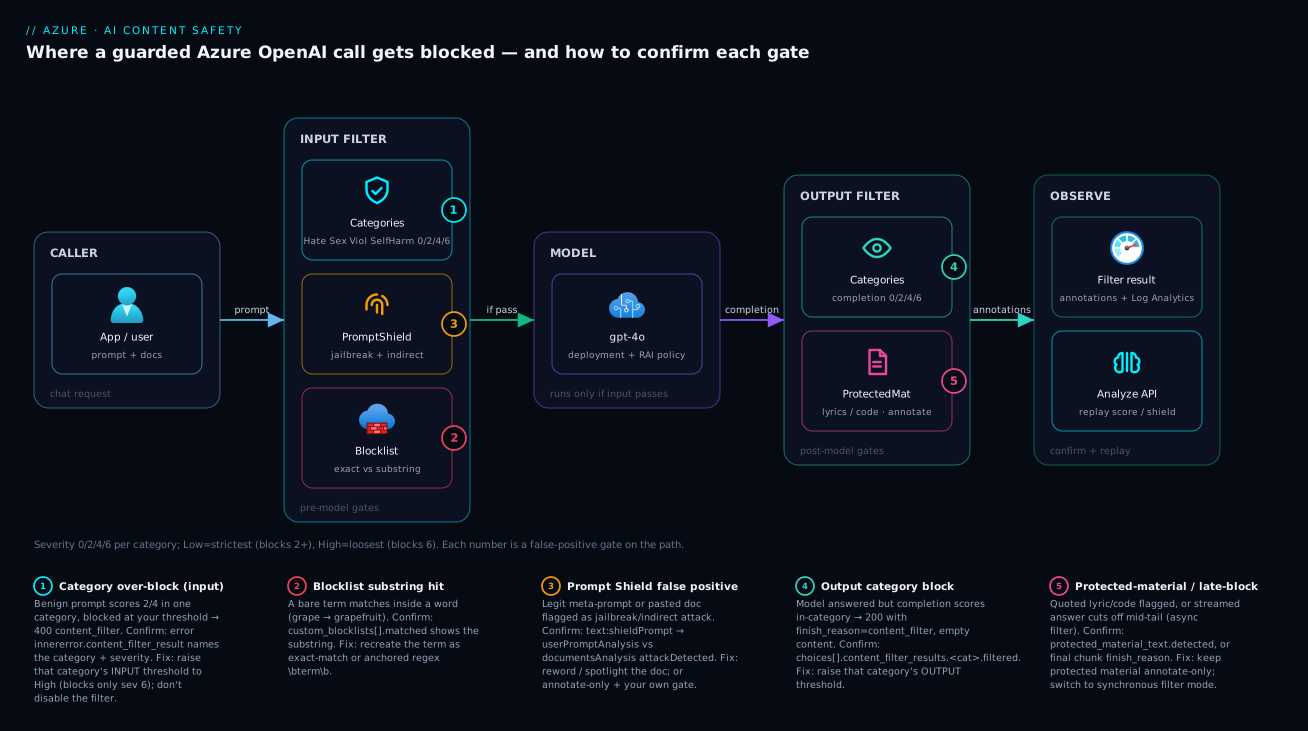
The diagram traces a guarded request as it actually flows, then maps each false-positive class onto the exact gate where it bites. Read it left to right. A caller sends a chat request. It first hits the input filter, which does three things in parallel: scores the prompt across the four harm categories (0/2/4/6), runs Prompt Shields (jailbreak + indirect-attack), and checks your custom blocklist. If any gate trips above threshold, you get a 400 with content_filter and the model never runs — that is badge ❶ (category over-block on input), badge ❷ (blocklist substring hit), and badge ❸ (Prompt Shield false positive). If the input passes, the request reaches the model deployment, which produces a completion. That completion flows through the output filter: the four categories again, plus protected-material and optional groundedness checks — badge ❹ marks an output-side category block or a protected-material flag on the answer. The filtered (or clean) result returns to the caller.
Notice the shared instrument across every gate: the content_filter_result annotations in the response, backed by Azure Monitor diagnostic logs. That is the whole method — localise the refusal to a gate by reading which field is filtered: true, confirm the score by replaying it on the standalone Analyze Text / Detect Jailbreak API, then tune that one gate’s threshold (or mode) rather than disabling the filter. The first question on every false positive is “did the model even run?” — a 400 says no (input gate), a 200 with finish_reason: content_filter says yes (output gate) — and that single fork tells you which half of the diagram to debug.
Real-world scenario
Medikai Health runs a patient-facing symptom-triage assistant on Azure OpenAI: a gpt-4o GlobalStandard deployment in Central India, fronted by their own web app, with the default content filter attached. The clinical-safety team is two people; the AI platform owner is one engineer. Monthly Azure OpenAI spend is about ₹70,000. The assistant is meant to ask follow-up questions and surface “please contact a clinician” guidance — explicitly including questions about medication overdose and self-harm risk, because triaging those safely is the entire point.
The incident surfaced as a trust problem, not an outage. Over two weeks the clinical-safety lead logged 40-odd cases where a patient typed something like “I took too many paracetamol tablets, what should I do” and the assistant returned a generic “I can’t help with that” — the worst possible answer for that exact question. The platform engineer’s first instinct was that the model was refusing on safety grounds, so he spent two days rewording the system prompt to coax it into responding. Nothing changed. The refusals continued, identical every time.
The breakthrough came from asking the right first question: did the model even run? He captured a raw response with curl and saw an HTTP 400, not a 200. The body’s innererror.content_filter_result read self_harm: { filtered: true, severity: "medium" }, every other category safe, jailbreak.detected: false. The model had never run. The input filter was blocking the prompt on Self-harm at severity 4, because the default filter ships at Medium and an overdose question legitimately scores medium. This was a content-filter false positive, not a model refusal — two days on the system prompt had been the wrong lever entirely.
He reproduced the score on the standalone Analyze Text API to be certain: the same sentence returned SelfHarm: 4, confirming the classifier (not the app) and the exact band. Now the fix was obvious and surgical. He created a custom content filter for the deployment that moved Self-harm input to High (blocking only severity 6 — genuine encouragement or methods) while keeping Self-harm output at Medium so the assistant could never emit harmful content, and leaving Hate, Sexual and Violence at default. Crucially, he did not disable anything; he narrowed one category, on one stage, by one band. Because the safety requirement was real, the change went through the clinical-safety review with the severity reasoning documented, and they enabled diagnostic logging to Log Analytics so future blocks would be visible without curl archaeology.
The result: the overdose question now reaches the model, which responds with the intended triage and “contact poison control / a clinician immediately” guidance — while any output trending toward severity 6 is still suppressed. A KQL query over the new diagnostic logs showed input-stage Self-harm blocks dropped from ~3% of triage prompts to near zero, with no increase in genuinely harmful content reaching users (output filter unchanged). The lesson on the wall: “A refusal is a question, not an answer. Read the response: a 400 with a filter result is the platform blocking you, not the model declining.”
The incident as a timeline, because the order of moves is the lesson:
| Time | Symptom | Action taken | Effect | What it should have been |
|---|---|---|---|---|
| Day 0 | Overdose questions refused | (clinical lead reports) | — | Ask: did the model even run? |
| Day 1 | Still refusing | Reword the system prompt | No change | Don’t assume a model refusal |
| Day 2 | Still refusing | More prompt engineering | No change | Stop; capture the raw response |
| Day 3 | Root cause | curl shows 400 + self_harm filtered, medium |
Filter, not model, identified | This was the breakthrough |
| Day 3 | Confirmed | Replay on Analyze Text → SelfHarm: 4 |
Classifier + band proven | — |
| Day 4 | Fixed | Custom filter: Self-harm input → High, output stays Medium | Blocks clear, output still guarded | The correct surgical fix |
| Day 4 | Hardened | Enable diagnostic logging + KQL | Future blocks visible | Observability before the next incident |
Advantages and disadvantages
The “classifier bolted on both sides of the model” design both causes this class of problem and makes it diagnosable. Weigh it honestly:
| Advantages (why this model helps you) | Disadvantages (why it bites) |
|---|---|
The filter returns rich per-category annotations (content_filter_result) — you rarely lack data on why something blocked |
The user-facing refusal is deliberately vague; you must read the annotations to learn the cause |
| Four independent categories + per-stage thresholds let you tune one axis without weakening the rest | Defaults are uniform (Medium everywhere) and ignore your domain — a security or clinical app over-blocks out of the box |
| The standalone Analyze Text / Detect Jailbreak APIs let you reproduce any score outside the model call | “Low/Medium/High” names invert intuition — Low is the strictest, a constant source of self-inflicted over-blocking |
| Prompt Shields and protected material can run in annotate-only mode — triage without weakening prod | Boolean gates (blocklist, shields, protected material) block regardless of severity — a request can score 0 everywhere and still be refused |
A custom filter is declarable as code (Bicep raiPolicies) — reviewable, versioned, per-deployment |
Loosening below the default behaviour is approval-gated (modified content filter) — you can’t just turn a category off |
| The same model guards every deployment consistently — no per-app classifier to maintain | Streaming async-filter late-blocks make a clean answer appear to “cut off,” confusing users and you |
The model is right for any app that needs guaranteed harm filtering without building a classifier — which is almost all of them. It bites hardest on domains that legitimately discuss flagged topics (security, healthcare, gaming, news, moderation tooling), on teams that deploy with defaults and never tune, and on anyone who confuses a model refusal with a filter block. Every disadvantage is manageable — but only if you know the mechanisms exist, which is the point of this article.
Hands-on lab
Reproduce a Self-harm/Violence false positive, read the annotations, and fix it with a custom filter — using the standalone Content Safety API (free F0 tier) so you don’t even need a model call to see the scoring. Run in Cloud Shell (Bash).
Step 1 — Variables and resource group.
RG=rg-contentsafety-lab
LOC=eastus
CS=cs-lab-$RANDOM   # globally-unique name
az group create -n $RG -l $LOC -o table
Step 2 — Create a Content Safety resource on the free tier.
az cognitiveservices account create \
  --name $CS --resource-group $RG --location $LOC \
  --kind ContentSafety --sku F0 --yes -o table
Expected: an account row with kind = ContentSafety. (F0 is the free tier — rate-limited but enough for the lab.)
Step 3 — Grab the endpoint and key.
EP=$(az cognitiveservices account show -n $CS -g $RG --query properties.endpoint -o tsv)
KEY=$(az cognitiveservices account keys list -n $CS -g $RG --query key1 -o tsv)
echo "$EP"
Step 4 — Score a benign-but-flagged sentence and read the severity.
curl -sS "${EP}contentsafety/text:analyze?api-version=2024-09-01" \
  -H "Content-Type: application/json" -H "Ocp-Apim-Subscription-Key: $KEY" \
  -d '{"text":"how do I kill a stuck process on linux","categories":["Hate","Violence","Sexual","SelfHarm"]}' \
  | python -m json.tool
Expected: a categoriesAnalysis array with a non-zero severity for Violence (often 2) and 0 for the rest. That number is what a deployment’s filter would compare to your threshold.
Step 5 — Create a blocklist and add a substring-prone term (to see a false positive).
# Create the list
curl -sS -X PATCH "${EP}contentsafety/text/blocklists/lab-list?api-version=2024-09-01" \
  -H "Content-Type: application/json" -H "Ocp-Apim-Subscription-Key: $KEY" \
  -d '{"description":"lab demo list"}'

# Add a bare substring term 'grape' (the mistake we want to observe)
curl -sS -X PATCH "${EP}contentsafety/text/blocklists/lab-list:addOrUpdateBlocklistItems?api-version=2024-09-01" \
  -H "Content-Type: application/json" -H "Ocp-Apim-Subscription-Key: $KEY" \
  -d '{"blocklistItems":[{"description":"demo","text":"grape","isRegex":false}]}'
Step 6 — Analyse text using the blocklist and watch the substring false positive (then the fix).
# 'grapefruit' should match the bare term 'grape' — the false positive
curl -sS "${EP}contentsafety/text:analyze?api-version=2024-09-01" \
  -H "Content-Type: application/json" -H "Ocp-Apim-Subscription-Key: $KEY" \
  -d '{"text":"I love grapefruit juice","blocklistNames":["lab-list"],"haltOnBlocklistHit":false,"categories":["Violence"]}' \
  | python -m json.tool
# Look for blocklistsMatch naming 'grape'

# Fix: replace with an anchored whole-word regex so 'grapefruit' no longer matches
curl -sS -X PATCH "${EP}contentsafety/text/blocklists/lab-list:addOrUpdateBlocklistItems?api-version=2024-09-01" \
  -H "Content-Type: application/json" -H "Ocp-Apim-Subscription-Key: $KEY" \
  -d '{"blocklistItems":[{"description":"demo","text":"\\bgrape\\b","isRegex":true}]}'
Re-run the analyse call: grapefruit no longer matches, the standalone word grape still would. You have reproduced and fixed a blocklist false positive without touching a model.
Step 7 — Test Prompt Shields on a benign meta-prompt.
curl -sS "${EP}contentsafety/text:shieldPrompt?api-version=2024-09-01" \
  -H "Content-Type: application/json" -H "Ocp-Apim-Subscription-Key: $KEY" \
  -d '{"userPrompt":"rewrite the following sentence to be more concise","documents":[]}' \
  | python -m json.tool
# Expected: userPromptAnalysis.attackDetected == false (a benign prompt should NOT trip the shield)
Step 8 — Teardown.
az group delete -n $RG --yes --no-wait
You have now seen the exact mechanics — category severity, blocklist substring matching, and Prompt Shields — that drive every false positive in a guarded Azure OpenAI call, reproduced cheaply on the standalone service.
Common mistakes & troubleshooting
This is the playbook. Each row is a real failure mode: symptom → root cause → how to confirm (exact command / portal path) → fix. Scan for your symptom, then read the per-symptom detail below. The golden rule sits at the top: read the response before you change anything — a 400 with a content_filter_result is the filter; a 200 whose answer says “I can’t help” with no filter result is the model.
| # | Symptom | Likely root cause | How to confirm (exact path) | Fix |
|---|---|---|---|---|
| 1 | “I can’t help” but no filter result, finish_reason: stop |
Model refusal, not the filter | Inspect response: content_filter_results all safe, finish_reason: stop |
Fix the system prompt / model; thresholds won’t help |
| 2 | 400 content_filter, one category filtered: true on prompt |
Input category over-block at your threshold | Error body innererror.content_filter_result |
Raise that category’s input threshold in a custom filter |
| 3 | 200, finish_reason: content_filter, empty content |
Output category over-block | choices[0].content_filter_results.<cat>.filtered |
Raise that category’s output threshold |
| 4 | App refuses far more after a “tightening” change | Threshold inverted — set to Low (strictest) |
Studio → Content filters shows category = Low |
Set the intended band (Low=2/4/6, Med=4/6, High=6) |
| 5 | All categories severity: safe but still blocked |
A boolean gate fired (blocklist/shield/protected) | Check custom_blocklists, jailbreak, protected_material |
Fix the specific gate, not the severities |
| 6 | Benign word blocked by your blocklist | Substring match (non-exact term) | custom_blocklists[].matched names a substring |
Recreate term as exact / anchored regex \b…\b |
| 7 | A regex blocklist term matches far too much | Over-broad / unanchored regex | List blocklist items; test the pattern | Anchor and narrow the regex |
| 8 | Legit meta-prompt flagged as jailbreak | Prompt Shield (jailbreak) false positive | text:shieldPrompt → userPromptAnalysis.attackDetected: true |
Reword; or set Prompt Shield to annotate-only + own gate |
| 9 | Pasted document causes a block | Indirect-attack shield on the document | documentsAnalysis[].attackDetected: true |
Spotlight + sanitise the doc; annotate-only |
| 10 | Quoting a lyric/recipe returns empty | Protected-material block on output | protected_material_text.detected: true |
Keep protected material in annotate mode |
| 11 | Streaming answer “cuts off” mid-sentence | Async filter late-block on the tail | Final chunk finish_reason: content_filter |
Switch deployment to synchronous filter mode |
| 12 | Image upload rejected as unsafe | Image category over-block / wrong content | Analyze Image severity per category | Raise image category threshold; verify the image |
| 13 | Standalone Analyze Text returns 401/403 |
Auth: wrong key, or RBAC/network on the resource | curl -w "%{http_code}"; check key & networking |
Use correct key/endpoint; grant role; allow network |
| 14 | Calls fail with 429 during testing |
Rate limit on F0 / quota on the deployment | Response 429, Retry-After header |
Back off; move off F0 / raise TPM quota |
| 15 | Blocklist edits “don’t take effect” | List not attached to the deployment’s filter | Filter config shows no blocklist assigned | Attach the blocklist to the custom filter |
| 16 | Same prompt blocks in prod, passes in dev | Different filters on the two deployments | Compare raiPolicyName on each deployment |
Align the filter (assign the same RAI policy) |
Symptom 1 — A model refusal masquerading as a filter block
This is the trap that wastes the most time. The model decides — from alignment training or your system prompt — that it shouldn’t answer, and returns a normal completion (“I’m sorry, I can’t help with that”) with finish_reason: stop and a content_filter_results where every category is safe and nothing is filtered. No HTTP error. Because the user sees the same refusal, people assume the content filter and start tuning thresholds — which changes nothing.
Confirm. Capture the raw response. If it is 200, finish_reason: stop, and the filter result is all-safe/filtered: false, the model declined. There is no Content Safety block to find. Fix: this is a prompting/model problem — soften or clarify the system prompt, give the model explicit permission for the legitimate task, or choose a model better suited to it. Loosening content-filter thresholds is the wrong lever and will frustrate you for hours.
Symptom 2, 3 & 4 — Input vs output over-block, and the inverted threshold
The one thing to internalise: 400 = input stage = model never ran; 200 + finish_reason: content_filter = output stage = model ran, answer suppressed. Confirm by the HTTP code and where the filter result lives (error innererror vs choices[].content_filter_results), then raise the matching stage’s threshold for the named category — tuning input does nothing for an output block, and vice versa. For symptom 4, the self-inflicted case: setting a category to Low to “reduce” filtering makes it stricter; internalise the mapping once — Low blocks 2/4/6 (strictest), Medium blocks 4/6, High blocks only 6 (most permissive), Off blocks nothing (approval-gated) — and choose by what you want to let through.
Symptom 5, 6 & 7 — A boolean gate fired (and blocklist substrings)
When every category is safe but the request still blocked, a boolean gate did it. Confirm by scanning custom_blocklists, jailbreak/indirect_attack, and protected_material_*. For a blocklist substring (symptom 6), custom_blocklists[].matched shows the term inside a benign word; fix by making it exact or an anchored regex. For an over-broad regex (symptom 7), list the items, test against your corpus, and anchor/narrow it.
Symptom 8 & 9 — Prompt Shield false positives
A benign meta-prompt trips jailbreak detection, or a pasted document trips indirect-attack detection. Confirm by replaying on text:shieldPrompt and reading which sub-analysis (userPromptAnalysis vs documentsAnalysis[]) has attackDetected: true — they have different fixes. Fix: for a user-prompt false positive, reword (drop imperative “ignore/override” phrasing) or run the shield in annotate-only mode behind your own allow-list; for a document false positive, spotlight the untrusted content (delimit it as reference-only) and sanitise/summarise it before it reaches the model.
Symptom 10 — Protected-material block on a quote
A request to quote a song lyric, a famous passage, or a common code snippet returns empty because protected material blocking is on. Confirm via protected_material_text.detected: true (or _code) on the choice. Fix: keep protected material in annotate-only mode (the default) and handle the annotation in your app — block it yourself only where licensing truly requires it, rather than hard-blocking every quote.
Symptom 11 — The streaming late-block
A streamed answer starts fine then stops mid-sentence. The asynchronous filter ran in parallel with streaming and caught a problem in the tail. Confirm by inspecting the final streamed chunk’s finish_reason (content_filter) and its annotations. Fix: set the deployment’s filter to the default synchronous mode so filtering completes before any tokens are returned — you trade a little first-token latency for an answer that never visibly truncates.
Symptom 13 & 14 — Auth and rate-limit noise during debugging
While reproducing scores you may hit 401/403 (wrong key, or the resource has RBAC/network restrictions) or 429 (F0 rate limit, or the deployment’s TPM quota). Confirm with curl -w "%{http_code}" and the Retry-After header for 429. Fix: use the correct key/endpoint and grant the Cognitive Services User role (or allow the calling network) for auth; back off and move off F0 (or raise quota) for rate limits. These are infrastructure issues, not false positives — don’t confuse them with a content block. For deeper auth-on-Cognitive-Services debugging, the pattern mirrors Azure Key Vault: Secrets, Keys & Certificates for managed-identity access.
Symptom 15 & 16 — Config drift between blocklists and deployments
A blocklist edit “doesn’t take effect” because the list isn’t attached to the deployment’s filter (symptom 15), or a prompt blocks in prod but passes in dev because the two deployments carry different RAI policies (symptom 16). Confirm by reading the filter’s attached blocklists in Studio, and by comparing each deployment’s raiPolicyName. Fix: attach the blocklist to the custom filter, and assign the same RAI policy to both deployments (define it once in Bicep and reference it everywhere to prevent drift).
The error / status-code reference
The codes you realistically see when Content Safety or Azure OpenAI rejects a call, what each means, and the first fix:
| Code / signal | Where | Meaning | How to confirm | First fix |
|---|---|---|---|---|
400 content_filter |
Azure OpenAI | Input blocked by the filter | innererror.content_filter_result per category |
Raise the named category’s input threshold |
200 + finish_reason: content_filter |
Azure OpenAI | Output blocked/truncated | choices[].content_filter_results |
Raise the named category’s output threshold |
200 + finish_reason: stop (refusal text) |
Azure OpenAI | Model declined (not the filter) | Filter result all safe |
Fix the system prompt / model choice |
RAIPolicyViolation / ResponsibleAIPolicyViolation |
Azure OpenAI | A responsible-AI policy blocked it | Inner error code | Identify the gate; tune that filter |
blocklistsMatch populated |
Content Safety | A blocklist term matched | Match list in analyze response |
Exact/anchored term |
attackDetected: true |
Content Safety (Shields) | Jailbreak / indirect attack detected | shieldPrompt response |
Reword / spotlight / annotate-only |
401 Unauthorized |
Both | Bad/missing key or token | curl -w "%{http_code}" |
Correct key; valid Entra token |
403 Forbidden |
Both | RBAC or network restriction | Resource networking / role assignments | Grant role; allow the network |
404 Not Found |
Both | Wrong endpoint / deployment / api-version | Check URL and api-version |
Fix the path/version |
429 Too Many Requests |
Both | Rate limit (F0) or TPM quota exceeded | Retry-After header |
Back off; raise quota / move off F0 |
InvalidRequest (bad categories) |
Content Safety | Malformed category list | Request body validation | Use Hate/Sexual/Violence/SelfHarm |
Diagnostic logging: see blocks without curl archaeology
curl is your fastest one-off tool, but for an ongoing app you want every block visible in Log Analytics. Enable diagnostic settings on the Azure OpenAI (and Content Safety) resource to stream request/audit logs to a workspace, then query them with KQL. This turns “users complain about refusals” into a measurable dashboard.
# Stream Azure OpenAI logs to a Log Analytics workspace
AOAI_ID=$(az cognitiveservices account show -n my-aoai -g rg-ai --query id -o tsv)
WS_ID=$(az monitor log-analytics workspace show -g rg-ai -n law-ai --query id -o tsv)
az monitor diagnostic-settings create \
  --name aoai-diag --resource "$AOAI_ID" \
  --workspace "$WS_ID" \
  --logs '[{"categoryGroup":"audit","enabled":true},{"categoryGroup":"allLogs","enabled":true}]'
resource diag 'Microsoft.Insights/diagnosticSettings@2021-05-01-preview' = {
  name: 'aoai-diag'
  scope: aoaiAccount
  properties: {
    workspaceId: workspace.id
    logs: [
      { categoryGroup: 'audit',   enabled: true }
      { categoryGroup: 'allLogs', enabled: true }
    ]
  }
}
Once data flows, the KQL you reach for most — counting blocks by category and severity so you can see whether a false-positive class is systemic:
// Content-filter blocks over the last day, grouped by category and result code
AzureDiagnostics
| where TimeGenerated > ago(1d)
| where ResourceProvider == "MICROSOFT.COGNITIVESERVICES"
| where OperationName has "ChatCompletions" or OperationName has "Completions"
| where ResultType != "Success" or properties_s has "content_filter"
| summarize blocks = count() by bin(TimeGenerated, 1h), OperationName, ResultType
| order by TimeGenerated desc
The KQL cheat-sheet — one query per question you’ll ask while triaging false positives:
| Question | What to filter on | Why it helps |
|---|---|---|
| How many calls are being blocked? | ResultType != "Success" / content_filter signal |
Quantifies the problem vs anecdotes |
| Is one category systemic? | parse the category from the logged result | Tells you to build a domain filter, not patch per-request |
| Input blocks vs output blocks? | distinguish 400 vs finish_reason in payload |
Confirms which stage to tune |
| Are blocks spiking after a deploy? | bin(TimeGenerated, 1h) trend |
Catches a bad filter change fast |
| Which deployment is worse? | group by resource/deployment | Finds config drift between deployments |
If your app already emits its own telemetry, log the content_filter_result annotations into Application Insights alongside each request — the deeper patterns for that live in Azure Monitor & Application Insights for Observability.
Best practices
Production-grade rules, learned the hard way:
- Read the response before changing config. Always capture the raw JSON first. A
400with acontent_filter_resultis the filter; a200+stoprefusal is the model. This one habit prevents most wasted hours. - Tune one category, one stage, one band at a time. Never blanket-loosen. Raise Violence input to High for a security bot; leave the rest. Surgical changes are reviewable and safe.
- Internalise the inversion.
Lowis the strictest threshold,Highthe most permissive. Write it on the wall. Most self-inflicted over-blocking is a misremembered direction. - Keep output stricter than input where it matters. For sensitive domains (self-harm, hate), loosen the input so legitimate questions reach the model, but keep the output threshold tight so the model can never emit harmful content.
- Run Prompt Shields and protected material in annotate-only while triaging. They report
detected: truewithout blocking, so you can measure false positives in production without weakening safety, then decide. - Make blocklist terms exact or anchored. Bare substrings (
grape→grapefruit) are a false-positive factory. Use exact-match or\b…\bregex, and test against a real corpus before shipping. - Spotlight untrusted content. Clearly delimit pasted documents and tool outputs as reference-only, and sanitise them, so the indirect-attack shield (and the model) treat them as data, not instructions.
- Define the filter as code. Put the
raiPoliciesresource in Bicep, review it like any change, and assign the same policy to every deployment in an app to prevent prod/dev drift. - Enable diagnostic logging from day one. Stream blocks to Log Analytics so you measure false-positive rates instead of guessing from complaints.
- Reproduce scores on the standalone service. The Analyze Text / Detect Jailbreak APIs let you confirm a severity or shield result outside the model call — your fastest, cheapest debugging loop.
- Document any loosening. If you raise a threshold (especially toward High or pursue the modified filter), record the business/clinical justification — it is a responsible-AI decision, not just a config tweak.
- Never disable the filter to “unblock” an incident. It re-opens the exact risk the filter exists to close. The fix is narrowing the right gate, not removing protection.
Security notes
- Loosening below the default is approval-gated for a reason. Setting a category to
Off, or otherwise weakening the filter below Microsoft’s default behaviour, requires the modified content filter approval (a registration/eligibility process). Treat it as the exception, with a documented, reviewed justification — not a casual unblock. - Don’t leak why content was flagged to anonymous callers. The vague user-facing refusal is intentional. Keep the per-category annotations server-side (in your logs / App Insights), never in the public response — exposing them helps adversaries probe and tune attacks.
- Keep Prompt Shields on for anything that ingests untrusted content. Jailbreak and indirect-attack detection are your defence against prompt injection from user input, pasted documents, and tool/RAG results. If you move them to annotate-only to cut false positives, replace them with your own gate — don’t simply stop blocking.
- Use managed identity for the Content Safety / Azure OpenAI resource. Prefer Entra ID (the Cognitive Services User role) over keys, so no API key sits in app settings; the managed-identity pattern mirrors Azure Key Vault: Secrets, Keys & Certificates.
- Lock down the resource network. Put the Cognitive Services account behind selected networks / Private Endpoints so the moderation and model endpoints aren’t openly reachable; a
403during testing is often this control working as intended. - Treat the filter config as a security control. Changes to thresholds, shields, and blocklists are responsible-AI changes — gate them behind review and version them in IaC, the same way you would a firewall rule.
- Log blocks for audit, not just debugging. Diagnostic logs of what was blocked (and what was let through after loosening) are part of your responsible-AI evidence trail for audits and incident reviews.
Cost & sizing
The bill drivers and how they interact with the fixes:
- Content filtering on Azure OpenAI is included — you pay for the model tokens (input + output) at the deployment’s rate; the default and custom content filters do not add a separate per-call charge. So tuning thresholds changes behaviour, not the bill.
- The standalone Content Safety resource is billed per 1,000 text records / images analysed, on top of a free F0 tier (rate-limited, generous enough for development and the lab above). You only pay here if you call the standalone service directly (e.g. to moderate user-generated content outside a model call) — the filter attached to your Azure OpenAI deployment is not billed through this resource.
- Prompt Shields, protected material and groundedness add classification work, which on the standalone service counts toward its per-record pricing; within the Azure OpenAI filter they are part of the included filtering. Annotate-only mode costs the same as blocking mode — the difference is behavioural, not financial.
- Diagnostic logging is billed by Log Analytics ingestion (per GB) — modest for filter/audit logs, and worth it: the cost of not seeing your false-positive rate is a day of
curlarchaeology and unhappy users. - The real cost of a false positive is not Azure spend — it’s trust and abandoned sessions. Medikai’s overdose-question refusals cost zero rupees and enormous goodwill. Right-sizing here means correctness, not instance count.
A rough monthly picture for a small guarded app: the model tokens dominate (₹50,000–₹1,00,000+ depending on traffic, unchanged by filter tuning), the standalone Content Safety charge is zero if you only use the deployment filter (or a few hundred to low-thousands of rupees if you moderate UGC separately, with F0 free for dev), and Log Analytics adds perhaps ₹1,000–₹3,000 for filter/audit logs. The cost drivers and what each buys you:
| Cost driver | What you pay for | Rough INR / month | What it affects | Watch-out |
|---|---|---|---|---|
| Azure OpenAI tokens | Input + output tokens (model) | ₹50,000–₹1,00,000+ | The model call itself | Filter tuning does NOT change this |
| Content filter (default/custom) | Included with the deployment | ₹0 extra | Blocking behaviour | No separate charge to tune thresholds |
| Standalone Content Safety F0 | Free tier (rate-limited) | ₹0 | Dev/test, the lab | Rate limits → 429 under load |
| Standalone Content Safety S0 | Per 1,000 records / images | low-thousands (if used) | Moderating UGC outside a model | Only if you call it directly |
| Log Analytics ingestion | Per-GB diagnostic logs | ₹1,000–₹3,000 | Observability of blocks | Sample high-volume logs |
The sizing rule: the lever you have on this bill is token usage (model and deployment type — see Azure OpenAI Tokens, Context Windows & Pricing Explained); the content filter is a correctness and safety control, not a cost driver. Tune it for fewer false positives at the right safety bar, and measure the result in trust and session completion, not rupees.
Interview & exam questions
1. A guarded Azure OpenAI call returns a refusal, but you’re not sure if the content filter or the model declined. How do you tell, in one step? Capture the raw response. A content-filter block is an HTTP 400 with code: content_filter (input) or a 200 whose choice has finish_reason: content_filter (output), and carries a content_filter_result naming the category. A model refusal is a 200 with finish_reason: stop, normal “I can’t help” text, and a filter result where every category is safe. The presence/absence of a filter result is the tell.
2. Explain the 0/2/4/6 severity scale and how it maps to Low/Medium/High thresholds. Content Safety scores each category at severity 0 (safe), 2 (low), 4 (medium), 6 (high). A threshold of Low blocks severity 2 and above (strictest), Medium blocks 4 and above, High blocks only 6 (most permissive). The default filter is roughly Medium across categories. Counter-intuitively, lowering the threshold name makes filtering stricter.
3. A security-research assistant blocks a legitimate exploit question. Which category, and what’s the surgical fix? Almost certainly Violence, scored 2–4 and blocked at the default Medium input threshold. Confirm via the 400 body’s content_filter_result. The fix is a custom content filter raising Violence input to High (blocking only severity 6) while leaving Hate, Sexual, Self-harm and the Violence output threshold at default — narrowing one category, one stage, one band.
4. What are Prompt Shields and how do they differ from the harm categories? Prompt Shields are input-side binary detectors for jailbreak (user attempts to override the system) and indirect attack (instructions injected via pasted documents or tool output). Unlike the four harm categories, they aren’t scored 0–6 — they return attackDetected: true/false and block on a match. A request can score severity 0 on all four categories and still be blocked by a shield.
5. A benign word like “grapefruit” gets blocked. What happened and how do you fix it? A custom blocklist term was added as a bare substring (grape), so it matches inside grapefruit. Confirm via custom_blocklists[].matched in the result. Fix by recreating the term as exact-match or an anchored regex (\bgrape\b) so it only matches the standalone word, not substrings.
6. How do you reproduce a content-filter decision without calling the model? Use the standalone Content Safety APIs: Analyze Text returns severity 0/2/4/6 per category for any text, Detect Jailbreak / Prompt Shields returns the attack booleans, and Blocklist APIs let you test term matching. This isolates the classifier from your app and is the fastest debugging loop.
7. A streamed answer cuts off mid-sentence. Why, and what’s the fix? The deployment is using the asynchronous filter mode: tokens stream while the output filter runs in parallel, and it caught a problem in the tail, ending the stream with finish_reason: content_filter after the user saw the start. Confirm via the final chunk’s finish_reason. Fix by switching to the synchronous filter mode so filtering completes before any tokens return.
8. What does it take to allow content the default filter blocks, and why is it gated? You must create a custom content filter and, to weaken below the default behaviour (e.g. set a category to Off), apply for the modified content filter approval through Microsoft’s registration/eligibility process. It’s gated because loosening the filter is a responsible-AI decision that re-introduces risk; the approval ensures it’s justified and accountable.
9. Input filter vs output filter — what’s the practical difference when debugging? The input filter scores the prompt before the model runs; a block here is a 400 and the model never executed. The output filter scores the completion; a block here is a 200 whose choice is filtered/empty. They have independent thresholds, so you debug — and tune — the stage that actually blocked. Tuning the input threshold does nothing for an output block.
10. Your clinical app must answer overdose questions safely. How do you configure the filter? Loosen Self-harm input (e.g. to High) so the legitimate question reaches the model, but keep Self-harm output at Medium (or tighter) so the model can never emit harmful content. Document the justification for clinical-safety review. This input-loose/output-strict split is the standard pattern for sensitive domains.
11. A pasted document causes the call to block, but the user’s own prompt is fine. What fired? The indirect-attack Prompt Shield detected instruction-like text inside the document. Confirm via text:shieldPrompt → documentsAnalysis[].attackDetected: true (while userPromptAnalysis.attackDetected is false). Fix by spotlighting the untrusted content (delimiting it as reference-only), sanitising/summarising it, and optionally running the shield in annotate-only mode with your own gate.
12. The same prompt blocks in production but passes in dev. First thing to check? The two deployments carry different RAI (content filter) policies. Compare each deployment’s raiPolicyName (or the assigned filter in Studio). Fix by assigning the same policy — ideally defined once in Bicep (raiPolicies) and referenced by both deployments to prevent drift.
These map to AI-102 (Azure AI Engineer Associate) — implement content moderation solutions and integrate responsible AI / content safety into generative AI solutions — and touch AZ-204 where Azure OpenAI integration and diagnostics overlap. A compact cert-mapping for revision:
| Question theme | Primary cert | Exam objective area |
|---|---|---|
| Severity/threshold model, categories | AI-102 | Implement content moderation |
| Prompt Shields, jailbreak, indirect attack | AI-102 | Responsible AI for generative solutions |
| Filter block vs model refusal; annotations | AI-102 | Monitor & troubleshoot AI solutions |
| Custom filter / blocklist configuration | AI-102 | Build & configure content safety |
| Azure OpenAI integration & diagnostics | AZ-204 | Implement & monitor Azure AI services |
| Diagnostic logging, KQL over blocks | AZ-204 / AI-102 | Instrument & monitor |
Quick check
- A user gets a refusal. The raw response is a
200withfinish_reason: stopand every categorysafe. Is this a content-filter block or a model refusal, and what’s the right lever? - You set a category’s threshold to
Lowto “reduce filtering” and the app started refusing more. Why? - Your blocklist has the term
assand now “assignment” is blocked. What’s the cause and the fix? - A request scores severity 0 on all four categories but is still blocked. Name two gates that could be responsible.
- A clinical bot must answer overdose questions but never emit self-harm content. Which two thresholds do you set, and how?
Answers
- It’s a model refusal, not a content-filter block — a filter block would be a
400(input) or a200withfinish_reason: content_filter(output) and afiltered: truecategory. The right lever is the system prompt / model, not the content-filter thresholds. - Because
Lowis the strictest threshold — it blocks severity 2 and above. “Low/Medium/High” is inverted from intuition: Low blocks the most, High blocks the least. To filter less, you move toward High. - A blocklist substring match — the bare term
assmatches insideassignment. Confirm viacustom_blocklists[].matched. Fix by making the term exact-match or an anchored regex (\bass\b). - Any boolean gate: a custom blocklist term, a Prompt Shield (jailbreak or indirect attack), or protected material on the output. These block on a match regardless of severity, so all four categories can read
safewhile the request is still refused. - Loosen Self-harm input (e.g. to High, blocking only severity 6) so the legitimate question reaches the model, and keep Self-harm output at Medium (or tighter) so the model can never emit harmful content. Input-loose, output-strict.
Glossary
- Azure AI Content Safety — the managed classifier that scores text and images for harmful content and detects attacks (Prompt Shields), protected material and groundedness; available as a standalone resource and as the content filter attached to Azure OpenAI deployments.
- Content filter — the classifier layer Azure OpenAI applies to a deployment’s prompts (input) and completions (output); blocks at configured per-category thresholds.
- Harm category — one of Hate, Sexual, Violence, Self-harm, each scored independently.
- Severity (0/2/4/6) — the discrete band a category scores: 0 safe, 2 low, 4 medium, 6 high (the guarding filter uses these four; a finer 0–7 scale exists on the standalone Analyze Text API).
- Threshold (Low/Medium/High) — the block level you set per category: Low blocks 2/4/6 (strictest), Medium blocks 4/6, High blocks only 6 (most permissive);
Offblocks nothing and is approval-gated. - Input filter — scores the user prompt before the model runs; a block here returns a
400withcode: content_filter. - Output filter — scores the completion after the model runs; a block here returns a
200whose choice hasfinish_reason: content_filter. - Prompt Shields — input-side binary detectors for jailbreak (user override attempts) and indirect attack (instructions injected in pasted/tool content); return
attackDetected: true/false. - Custom blocklist — your own list of terms/regex that always block on a match, independent of severity; substring/unanchored terms cause false positives.
- Protected material — output-side detection of known copyrighted text (lyrics, passages) or public code; runs in annotate mode by default.
- Groundedness — an optional output check that flags completions not supported by a source document you provide; designed to catch hallucinations.
content_filter_result(s)— the response object carrying per-category{filtered, severity}plus blocklist/shield/protected-material flags; the single richest debugging field.finish_reason: content_filter— the value on a choice indicating the output was filtered/truncated (as opposed tostop, a normal or model-declined completion).- Model refusal — the model declining on its own (alignment/system prompt), returning normal text with
finish_reason: stopand an all-safefilter result; not a Content Safety block. - Custom content filter (RAI policy) — a
raiPoliciesresource defining per-category thresholds, shields and blocklists, assigned to a deployment viaraiPolicyName. - Modified content filter — the approval/registration required to weaken the filter below Microsoft’s default behaviour (e.g. turning a category
Off). - Analyze Text / Detect Jailbreak (Shields) — the standalone Content Safety APIs that return severities and attack booleans for arbitrary text, used to reproduce a filter decision outside the model call.
- Annotate-only mode — running a gate (Prompt Shield, protected material) so it reports
detected: truewithout blocking — used to measure false positives without weakening production.
Next steps
You can now localise any “blocked good request” to a gate and fix it with a surgical config change. Build outward:
- Next: Deploy Your First Azure OpenAI Chat Model: REST & SDK Walkthrough — the request/response shape these annotations ride on, end to end.
- Related: Azure OpenAI Deployment Types: Standard, Global & Provisioned Explained — how the deployment you attach a filter to is provisioned and quota’d.
- Related: Azure OpenAI Tokens, Context Windows & Pricing Explained — the real cost driver behind a guarded call (the filter isn’t one).
- Related: Azure AI Language Service: PII, Sentiment, Entities, NER & CLU — the adjacent classification service for PII and entities you often pair with Content Safety.
- Related: Azure AI Foundry Hub & Project Resource Model Explained — the resource model these AI services live in.
- Related: Azure Monitor & Application Insights for Observability — the KQL and telemetry that turn filter blocks into a measurable dashboard.