The demo was flawless. You spoke into your laptop, the live transcription appeared word for word, and everyone nodded. Then you wired Azure AI Speech — the speech-to-text service that turns audio into text using Microsoft’s acoustic and language models — into the real pipeline: call-centre recordings from a telephony system, meeting audio, voice notes from a mobile app. And the Word Error Rate (WER) went from 4% to 35%. Names come out wrong, numbers are mangled, whole sentences are missing, and when two people talk the transcript blends them into one confused speaker. Nothing in your code changed. The model didn’t get worse. The audio did.
This is the most common production problem with speech-to-text, and it is maddening because the service rarely errors. It returns a 200 OK with confident-looking text that happens to be wrong. The accuracy you lost is almost never the model’s fault — it is hiding in the audio format (a wrong sample rate, a stereo file the recognizer reads as one channel, a WAV header that lies about the encoding), in the acoustic conditions (background noise, far-field mics, codec compression from the telephony hop), or in a vocabulary mismatch (your product names and acronyms were never in the model’s training data, and you never told it about them). The fix is almost never “use a better model” — it is “find the layer corrupting the signal or the context, and make it tell the truth.”
This is that playbook. We treat poor transcription not as one bug but as a few symptom classes — garbled words, dropped audio, wrong language, merged speakers, low confidence on domain terms — each with a fan-out of root causes you confirm with specific commands. You will learn to read the pipeline end to end (source audio → format/codec → ingestion API → recognition model → phrase-list/Custom Speech context → diarization → result) and to localise a failure to exactly one stage using the tools that tell the truth: ffprobe for what the audio actually is, the detailed output format for per-word confidence, the Fast and Batch transcription APIs at scale, and Speech SDK events for real-time debugging. Every diagnosis comes with the exact way to confirm it and the precise fix in az CLI, REST, and Python. The playbook, formats, limits and error codes are laid out as scannable tables — read the prose once, then keep the tables open while you debug.
What problem this solves
Speech-to-text looks like a black box that either works or doesn’t. In reality it is a chain of assumptions, and every link can silently degrade the result. The service assumes your audio matches a sample rate and encoding it supports; a single speaker per channel unless you ask for diarization; words that resemble general-domain speech. Break any assumption and you do not get a stack trace — you get plausible, wrong text, far harder to debug than a crash because the failure is quiet.
What breaks without this knowledge: a team ships a call-centre analytics feature, sees 30% WER, and concludes “Azure Speech isn’t accurate enough.” They evaluate a competitor (same result, because the audio is the problem), or pour money into Custom Speech training (which helps vocabulary but does nothing for an 8 kHz file upsampled badly, or a stereo recording fed as mono). The actual cause — telephony resampled 8→16 kHz through a lossy transcode, diarization left off so two agents merge, or a phrase list that would have fixed every product name in an afternoon — sits there, perfectly diagnosable, ignored.
Who hits this: anyone moving speech-to-text from a clean microphone demo to real-world audio. It bites hardest on telephony and call-centre workloads (narrowband 8 kHz, codec compression, two speakers on a mixed channel), multi-speaker meetings (diarization and overlap), noisy or far-field capture, and domain-heavy vocabularies (medical, legal, finance, product names, acronyms). The cure starts with measuring honestly: turn on word-level confidence, run ffprobe on a failing sample, and let the data point at the broken link.
The symptom classes this article covers, the question each forces, and the first place to look:
| Symptom class | What you observe | First question to ask | First place to look | Most common single cause |
|---|---|---|---|---|
| Garbled / wrong words | Plausible text, many errors | Is the audio the format the API expects? | ffprobe on the file |
Wrong sample rate, lossy codec, or noise |
| Dropped / truncated audio | Whole segments missing | Did the recognizer get all the audio? | Audio duration vs transcript coverage | Header/length lie, silence-trim, timeout |
| Wrong language | Output in the wrong language | Did auto-detect pick the right locale? | The recognizedLanguage field |
Auto-detect with too-wide candidate set |
| Merged / wrong speakers | “Speaker 1” said everything | Was diarization on, and is audio mono? | Diarization flag + channel count | Diarization off, or stereo flattened |
| Low confidence on domain terms | Product names / acronyms wrong | Does the model know your vocabulary? | Per-word Confidence on those terms |
No phrase list / no Custom Speech model |
Learning objectives
By the end of this article you can:
- Map any poor-transcription complaint to a specific stage in the speech pipeline and name the most likely root cause for each.
- Diagnose an audio-format failure — wrong sample rate, mono/stereo confusion, a compressed codec, or a malformed WAV header — and confirm exactly what the file is with
ffprobe, then transcode it correctly withffmpeg. - Read per-word confidence by switching the output to the
Detailedformat, and use it to separate a vocabulary problem (specific terms wrong) from an acoustic problem (everything degraded). - Decide between a phrase list (fast, in-request bias) and Custom Speech (trained model) for domain vocabulary, and apply each correctly within its real limits.
- Fix diarization gaps — speakers merged, swapped, or over-counted — by choosing the right channel layout and the right API (conversation transcription vs batch diarization).
- Handle language identification correctly: when to pin a single locale, when to use continuous vs at-start detection, and why a wide candidate list hurts accuracy.
- Drive the core diagnostic tools fluently:
ffprobe/ffmpeg, theDetailedandSimpleoutput formats, Fast transcription, Batch transcription, and the Speech SDK events — and pick the right one for a real-time vs file-based workload.
Prerequisites & where this fits
You should already have an Azure AI Speech resource (a kind of Azure AI Services / Cognitive Services resource) with its key and region, and know how to call it from either the Speech SDK (Python/C#/JS) or REST. You should be comfortable running az in Cloud Shell, reading JSON, and have ffmpeg/ffprobe available locally (they are the single most useful tools in this whole playbook). Familiarity with basic audio concepts — sample rate, bit depth, channels, codecs — helps; we define each as we go.
This sits in the AI/ML — Speech & Audio track, on the Observability/Troubleshooting side. For the text side of an AI pipeline, Debugging Azure AI Content Safety false positives and Fixing low-confidence fields in Azure Document Intelligence follow the same “confirm the input before blaming the model” method. If your transcripts feed a chat model, deploying your first Azure OpenAI chat model is downstream; when you store audio for batch transcription, Azure Blob access tiers explained decides what you pay to keep the source.
A quick map of who confirms what during an accuracy incident, so you look in the right place fast:
| Stage | What lives here | Who usually owns it | Failure classes it can cause |
|---|---|---|---|
| Source capture | Mic, telephony, recorder settings | App / device team | Noise, far-field, low sample rate |
| Format / codec | Container, encoding, channels | App / data team | Wrong rate, mono/stereo, lossy codec |
| Ingestion API | REST endpoint or SDK push/pull stream | App team | Truncation, timeout, unsupported format |
| Recognition model | Base or custom acoustic + language model | Microsoft (+ you, if custom) | Domain-term errors, accent mismatch |
| Bias / context | Phrase list, Custom Speech, locale | App team | Vocabulary misses, wrong language |
| Diarization | Speaker separation logic | Service (+ your channel choice) | Merged / swapped / over-counted speakers |
Core concepts
Five mental models make every later diagnosis obvious.
The service returns confident text, not correctness. Azure AI Speech almost never errors on bad audio — it returns its best guess with a RecognitionStatus of Success. A wrong sample rate does not throw; it produces worse text. The absence of an error means nothing about accuracy. The first thing you turn on is detailed output with per-word confidence — the only in-response signal for where it is struggling.
Audio has four properties that must match the model. Every stream is defined by its sample rate (telephony 8 kHz, wideband 16 kHz), bit depth (16-bit PCM is the norm), channel count (mono = 1, stereo = 2), and codec/encoding (raw PCM, or compressed like MP3/Opus/A-law). Azure’s models are trained primarily for 16 kHz, 16-bit, mono PCM; they also accept 8 kHz and several compressed formats, but the wrong rate or an unexpected channel layout degrades accuracy quietly. The recognizer does not refuse a stereo file — it may just take channel 0 and ignore the other speaker.
Bias is how you inject your context. The base model knows general speech, not your product names, drug names, ticket IDs, or that “K-V-in” is a brand. You bias it two ways: a phrase list (words sent with the request — zero training, instant, capacity-limited), or Custom Speech (train a model on your audio+transcripts — powerful, but a project, not a flag). Phrase lists fix “can’t spell my product”; Custom Speech fixes “can’t understand my accent/jargon/audio.”
Diarization answers “who spoke,” not “what was said.” Recognition gives words; diarization attributes each word to a speaker (Speaker 1, Speaker 2). It is a separate capability you enable, and its accuracy depends heavily on the audio. The cleanest input is one speaker per channel — then you skip diarization and transcribe each channel. When speakers share a channel, diarization separates them by voice, and overlap, similar voices and short turns all hurt it.
Language identification is a guess you can constrain. Without a locale, Language Identification (LID) picks one from a candidate list, at the start or continuously. The wider the list and the more similar the languages, the more often it guesses wrong — and a wrong locale means a wrong model and garbage. If you know the language, pin it (en-IN): the single highest-leverage accuracy setting for a known-language workload.
The vocabulary in one table
Before the deep sections, pin down every moving part (the glossary repeats these for lookup; this is the mental model side by side):
| Concept | One-line definition | Where it lives | Why it matters to accuracy |
|---|---|---|---|
| Sample rate / bit depth | Samples/second (8/16 kHz), 16-bit | The audio file/stream | Wrong rate degrades recognition quietly |
| Channels | Mono (1) vs stereo (2) | The audio file/stream | Stereo flattened → a speaker is lost |
| Codec / encoding | PCM, MP3, Opus, A-law, µ-law | The container/stream | Lossy codecs cut the high frequencies |
| WER | Word Error Rate (your accuracy metric) | Your evaluation | The number you are actually trying to move |
| Detailed output | Result with per-word confidence + N-best | format=detailed / SDK |
The only in-response accuracy signal |
| Phrase list | In-request vocabulary bias | Sent with the request | Fixes domain-term spelling instantly |
| Custom Speech | A trained acoustic/language model | Speech Studio / API | Fixes accent, jargon, audio conditions |
| Diarization | Attributing words to speakers | A flag you enable | Off → all speakers merge into one |
| LID | Language Identification (auto-detect) | languageId config |
Wrong guess → wrong model → garbage |
The audio format reference
The lookup table you scan first — the formats Azure AI Speech accepts and the accuracy note for each. The headline points: 16 kHz mono PCM is the gold standard, compressed formats are accepted but lossy, and 8 kHz telephony should be transcribed at 8 kHz, not upsampled.
| Format / encoding | Sample rate(s) | Channels | Typical source | Accuracy note |
|---|---|---|---|---|
| PCM WAV (16-bit) | 16 kHz | Mono | Microphone, wideband capture | Gold standard — train target; use this if you can |
| PCM WAV (16-bit) | 8 kHz | Mono | Telephony / call recordings | Fine — keep at 8 kHz; do not fake-upsample to 16 kHz |
| PCM WAV (16-bit) | 16 kHz | Stereo | Two-party call (one speaker/channel) | Ideal for per-channel transcription; do NOT flatten |
| MP3 | various | Mono/stereo | Podcasts, archived audio | Accepted (compressed input) — lossy, slightly worse |
| Opus / OGG | various | Mono/stereo | WebRTC, browser capture | Accepted — efficient but lossy |
| FLAC | various | Mono/stereo | Lossless archives | Accepted — lossless, no codec penalty |
| A-law / µ-law | 8 kHz | Mono | PSTN / telephony codecs | Accepted — narrowband by nature; expect telephony-grade WER |
| AMR / AMR-WB | 8 / 16 kHz | Mono | Mobile voice | Accepted — heavily compressed; quality-limited |
| ALAW/MULAW in WAV | 8 kHz | Mono | SIP recordings | Confirm the WAV codec tag, not just the .wav extension |
Three traps hide here: a .wav extension says nothing about the codec (it can hold A-law/µ-law/ADPCM, not PCM — ffprobe shows the truth via codec_name); upsampling an 8 kHz source to 16 kHz adds no information; and flattening a stereo call to mono merges two speakers. The single most useful first command finds out what the file actually is:
# Ground truth: codec, sample rate, channels, bit depth, duration
ffprobe -v error -show_entries stream=codec_name,sample_rate,channels,bits_per_sample,duration \
  -of default=noprint_wrappers=1 sample.wav
# Example output you want for the gold standard:
#   codec_name=pcm_s16le
#   sample_rate=16000
#   channels=1
#   bits_per_sample=16
If codec_name is pcm_alaw/pcm_mulaw, sample_rate is 8000, or channels is 2 when you expected 1, you have found a likely cause before touching the model.
Anatomy of garbled or wrong words
The headline symptom: a 200 OK, text that reads like real sentences, but full of errors. Five distinct causes — wrong sample rate, lossy codec, background noise, domain-vocabulary mismatch, wrong language/accent. The full symptom→confirm→fix grid for all five lives in the troubleshooting playbook near the end; the sections below give the detail and a specialized reference table for each.
Cause 1 — Wrong sample rate or a bad resample
The model expects a clean 16 kHz (or 8 kHz) signal. If your file is at an odd rate, or was resampled badly upstream (a naïve 8→16 kHz upsample, or a 44.1→16 kHz downsample with no anti-aliasing), the spectral content the acoustic model relies on is distorted and recognition degrades across the board — the classic “underwater” sound.
Confirm. An unexpected ffprobe sample_rate (22050, 11025, 44100 fed straight in), or a telephony source reporting 16000, points at a bad resample. Fix. Transcode with a quality resampler — for wideband, 16 kHz mono 16-bit PCM:
# Clean transcode to the gold-standard format (high-quality resampler)
ffmpeg -i input.any -ac 1 -ar 16000 -sample_fmt s16 -af "aresample=resampler=soxr" out_16k_mono.wav
For genuine telephony, keep the source rate rather than inventing detail:
# Telephony: stay at 8 kHz mono PCM — don't manufacture frequencies that aren't there
ffmpeg -i call.wav -ac 1 -ar 8000 -sample_fmt s16 call_8k_mono.wav
The rule: match the recognizer to the true bandwidth of the source. Upsampling 8→16 kHz does not recover the high frequencies a phone call never carried; it just makes a bigger file. How the common rates map to sources:
| Source sample rate | Where it comes from | Transcribe at | Why |
|---|---|---|---|
| 8 kHz | PSTN, SIP, mobile calls | 8 kHz | Narrowband by physics; upsampling adds nothing |
| 16 kHz | Headsets, VoIP wideband, most mics | 16 kHz | The model’s primary training target |
| 44.1 / 48 kHz | Studio, video, music capture | 16 kHz (downsample) | Speech models gain nothing above 16 kHz; downsample cleanly |
| 11.025 / 22.05 kHz | Legacy / odd encoders | 16 kHz (resample) | Non-standard; resample with a proper filter |
Cause 2 — A lossy codec or a low-bitrate path
Even at the right sample rate, the codec matters. A heavily compressed MP3 at 32 kbps, a low-bitrate Opus stream, or PSTN A-law/µ-law strip the high-frequency detail that distinguishes consonants (s/f/th) and digits. The symptom is targeted: words mostly right, but sibilants, plosives and numbers mangled.
Confirm. ffprobe the codec and bitrate:
ffprobe -v error -show_entries stream=codec_name,bit_rate,sample_rate -of default=noprint_wrappers=1 input.mp3
# codec_name=mp3 ; bit_rate=32000  ← very low; expect lossy artefacts
Fix. Fix it at the source — record/export at a higher bitrate or in PCM/FLAC where you control the pipeline (transcoding an already-compressed file to PCM does not recover lost information). For telephony you cannot improve, accept telephony-grade WER as the floor and invest in a phrase list and, if justified, a telephony-trained Custom Speech model. The codecs you will meet and their accuracy posture:
| Codec | Lossy? | Typical bitrate | Accuracy posture | Fix lever |
|---|---|---|---|---|
| PCM (s16le) | No | ~256 kbps @16k | Best; use where you control capture | Keep it PCM |
| FLAC | No (lossless) | variable | As good as PCM, smaller | Fine as-is |
| MP3 (high) | Yes | ≥128 kbps | Slight penalty | Acceptable; prefer PCM at source |
| MP3 (low) | Yes | ≤48 kbps | Noticeable errors on consonants/digits | Re-export higher; phrase list |
| Opus | Yes | 16–64 kbps | Good for size; some loss | Higher bitrate if you control it |
| A-law / µ-law | Yes | 64 kbps @8k | Telephony floor | Phrase list + telephony Custom Speech |
Cause 3 — Background noise and far-field capture
Noise, room echo and distance from the microphone are an acoustic problem the base model was not trained for at your noise level. The fingerprint: accuracy degrades only in the noisy spans — a quiet intro transcribes well, then a noisy stretch falls apart — whereas a format problem degrades everything uniformly.
Confirm. Read per-word confidence over time (detailed format below) — confidence collapses where the noise rises. Patchy degradation is acoustic; uniform is format/codec. Fix. The durable fix is upstream: better mics, closer capture, push-to-talk, or noise suppression before recognition; where you cannot change capture, Custom Speech trained on noisy audio improves robustness. A phrase list will not fix noise — it biases vocabulary, not signal quality. The acoustic factors and their levers:
| Acoustic factor | Effect on WER | Confirm | Best lever |
|---|---|---|---|
| Background noise (traffic, HVAC) | High in noisy spans | Confidence dips with noise | Noise suppression; closer mic; Custom Speech |
| Far-field / distance | Reverberant, weak signal | Low SNR throughout | Closer/array mic; beamforming |
| Cross-talk / overlap | Words dropped or merged | Multiple voices at once | Per-channel capture; diarization tuning |
| Music / hold tones | Spurious words | Non-speech transcribed | Trim non-speech; voice activity gating |
| Clipping (too loud) | Distorted consonants | Waveform peaks flat-topped | Re-capture with gain control |
Cause 4 — Domain vocabulary mismatch
The most fixable cause, and the one teams most often misattribute to “the model is bad.” General speech is fine, but your domain terms — product names, drug names, acronyms, ticket IDs — come out as the nearest common-English word (“Kloud Vin” → “cloud bin”, “EBITDA” → “a bit duh”). The signal is unmistakable: ordinary words right, specific terms wrong, the same terms wrong every time.
Confirm. Read per-word confidence in detailed output — domain terms score far lower than surrounding words (detailed format has its own section below):
# Fast transcription with word-level detail; inspect confidence on your domain terms
curl -s -X POST \
  "https://<region>.api.cognitive.microsoft.com/speechtotext/transcriptions:transcribe?api-version=2024-11-15" \
  -H "Ocp-Apim-Subscription-Key: $SPEECH_KEY" \
  -F "audio=@sample.wav" \
  -F 'definition={"locales":["en-IN"],"profanityFilterMode":"None"}' | jq '.combinedPhrases[].text'
Fix. Start with a phrase list (instant, no training); escalate to Custom Speech only if it is not enough or the audio also needs help (both get their own sections below). Which terms a phrase list reliably fixes versus what needs a trained model:
| Vocabulary problem | Phrase list fixes it? | Custom Speech needed? |
|---|---|---|
| Product/brand names spelled wrong | Yes, usually | Only if many + pronounced oddly |
| Acronyms read as words | Often (add the spoken form) | If acoustically ambiguous |
| Numbers / IDs in a fixed pattern | Partly (pattern phrases help) | For strict formats |
| Heavy accent on common words | No (it’s acoustic, not vocab) | Yes — train on that accent |
| Industry jargon at scale (1000s of terms) | Limited by capacity | Yes — language-model adaptation |
Cause 5 — Wrong language or dialect
Wrong language entirely means Language Identification guessed wrong (dedicated section below). Subtler: the right language but the wrong dialect — en-US for strong Indian- or British-English costs accuracy on accent-specific pronunciations and vocabulary, which is why Azure ships many English locales (en-US, en-GB, en-IN, en-AU, …).
Confirm. Read the recognizedLanguage field — if it disagrees with reality, LID is the cause; if the language is right but accent-heavy words are wrong, you picked the wrong dialect. Fix. Pin the locale, matching the dialect to your speakers (en-IN for Indian English); with multiple languages, constrain LID to the smallest realistic set. The cheapest accuracy win there is — a single string.
# Pin the locale explicitly — the single highest-leverage setting for known-language audio
import azure.cognitiveservices.speech as speechsdk
speech_config = speechsdk.SpeechConfig(subscription=KEY, region=REGION)
speech_config.speech_recognition_language = "en-IN"   # not en-US, for Indian English
Reading the truth: detailed output and per-word confidence
Everything above depends on one move: stop reading the simple transcript and turn on detailed output. The default Simple format gives one string — no confidence, no alternatives. The Detailed format gives, per phrase, an N-best list (alternative hypotheses), a Confidence score, and Words with per-word confidence and timestamps — your single in-response signal for where the model is struggling.
Request detailed output with word-level timing:
import azure.cognitiveservices.speech as speechsdk

speech_config = speechsdk.SpeechConfig(subscription=KEY, region=REGION)
speech_config.speech_recognition_language = "en-IN"
speech_config.output_format = speechsdk.OutputFormat.Detailed          # N-best + confidence
speech_config.request_word_level_timestamps()                          # per-word timing

audio_config = speechsdk.audio.AudioConfig(filename="sample.wav")
recognizer = speechsdk.SpeechRecognizer(speech_config=speech_config, audio_config=audio_config)
result = recognizer.recognize_once()

import json
detail = json.loads(result.json)              # NBest[].Confidence, NBest[].Words[].{Word,Confidence,Offset,Duration}
for w in detail["NBest"][0]["Words"]:
    print(f'{w["Word"]:<20} conf={w["Confidence"]:.2f}')
Now you diagnose by reading numbers, not guessing. The pattern is the diagnosis: uniformly low across the file means an acoustic/format problem everywhere (check rate, codec, noise); low only on specific terms is a vocabulary gap (phrase list); low only in certain time spans is patchy acoustic degradation (noise/overlap there); uniformly high but still wrong means the model is confidently wrong on your vocabulary (phrase list, then Custom Speech).
The N-best list is the most underused diagnostic here: if the correct word sits at position 2 or 3 in NBest, a phrase list will very likely promote it to position 1 — the fix is bias, not retraining. The fields you read are NBest[].Display (formatted text), NBest[].Lexical (raw words, to compare against a phrase-list term), NBest[].Confidence, and NBest[].Words[].Confidence/Offset/Duration (per-word confidence and timing in 100-ns ticks). And RecognitionStatus of NoMatch is not an error — it means no recognizable speech.
Biasing the model: phrase lists vs Custom Speech
Once detailed output shows the problem is vocabulary, you have two tools — pick the cheapest that works.
Phrase lists — instant, in-request bias
A phrase list is a set of words or short phrases you send with the recognition request to nudge the recognizer toward those exact strings — no training, immediate effect, perfect for product names, command keywords and a bounded set of domain terms. It does not learn your acoustics and is capacity-bounded: a thumb on the scale, not a new model.
# Phrase list (a.k.a. "phrase hints") — zero training, applied per request
phrase_list = speechsdk.PhraseListGrammar.from_recognizer(recognizer)
for term in ["KloudVin", "EBITDA", "Bhubaneswar", "vCore", "P1v3", "Cosmos DB"]:
    phrase_list.addPhrase(term)
result = recognizer.recognize_once()
For Fast/Batch transcription over REST you supply phrases in the request definition. A phrase list takes seconds to set up, needs no training data and costs nothing extra; it biases toward the listed strings and promotes them in the N-best. What it does not fix: accents, audio quality, thousands of terms, or sentence grammar. The discipline that makes it work: keep the list small and relevant to the audio in front of you — it is capacity-bounded, and a bloated list of unrelated terms dilutes the bias and causes false positives (the recognizer starts hearing your rare term where it was not said). Add the terms detailed output flagged, not your entire glossary.
Custom Speech — a trained model for accent, jargon, and conditions
When a phrase list is not enough — heavy accents, large vocabularies, distinctive audio (telephony, noisy floor, a specific recording chain) — you train Custom Speech by providing data the platform adapts onto a base model. The adaptation types differ:
| Custom Speech data type | What you provide | What it improves | When to use |
|---|---|---|---|
| Plain-text (related text) | Sentences using your vocabulary | Language model — recognizes your terms/phrasing | Lots of jargon, product names, phrasing patterns |
| Structured text (patterns) | Templates for IDs, classes, lists | Recognition of patterned entities | Fixed formats (order IDs, part numbers) |
| Pronunciation | Term → how it’s said | Acoustic mapping of odd pronunciations | Brand names, acronyms said unusually |
| Audio + human-labeled transcripts | Real audio with verified transcripts | Acoustic model — accents, noise, channel | Distinctive accents/audio; the strongest lever |
| Audio only (no transcript) | Representative audio | Evaluation/limited adaptation | Measuring WER on your real audio |
The workflow lives in Speech Studio (or the REST API): create a project, upload datasets, train, evaluate WER on a held-out test set, and deploy to a custom endpoint you call instead of the base one. The non-negotiable step is evaluation — ship only if it beats the base model on audio it never saw.
# Calling a deployed Custom Speech endpoint: set the endpoint id on the config
speech_config = speechsdk.SpeechConfig(subscription=KEY, region=REGION)
speech_config.endpoint_id = "<your-custom-endpoint-id>"     # routes to your trained model
speech_config.speech_recognition_language = "en-IN"
Phrase list versus Custom Speech, the decision in one grid. The rule is phrase list first, always — it is free and instant; reach for Custom Speech only when detailed output shows the problem is acoustic or the vocabulary is too large for a phrase list to carry.
| Dimension | Phrase list | Custom Speech |
|---|---|---|
| Effort | Minutes | A project (data + train + eval) |
| Fixes vocabulary | Yes (bounded) | Yes (at scale) |
| Fixes accent / audio | No | Yes (with audio data) |
| Data needed | None | Text and/or labeled audio |
| Latency to value | Instant | Hours to days |
| Cost | None extra | Training + hosted endpoint |
| Start here when… | Specific terms are wrong | Phrase list isn’t enough / acoustics are the problem |
Diarization: who spoke, and why they merge
Recognition tells you what was said; diarization tells you who said it. The single most important fact: its quality is dominated by your audio layout, not a magic flag.
One speaker per channel beats diarization
If your audio has one speaker on each channel — common in call recordings (agent left, customer right) — you do not need diarization at all: transcribe each channel independently for perfect attribution by construction. The cardinal sin is flattening that stereo file to mono, which mixes both voices into one channel and forces the recognizer to pick one or blend them. Check the channel count first:
# If channels=2 and it's a two-party call, transcribe per-channel — don't mix down
ffprobe -v error -show_entries stream=channels -of csv=p=0 call.wav      # → 2

# Split a stereo call into two mono files, one per speaker
ffmpeg -i call.wav -map_channel 0.0.0 agent.wav -map_channel 0.0.1 customer.wav
When speakers share a channel
When people share the same channel (a meeting on one mic, a mixed recording), the service separates them by voice. Batch transcription does diarization for files; conversation transcription is the real-time path. Enable it in the request and each phrase is tagged with a speaker. What hurts it: similar voices, heavy overlap, very short turns (“yep”, “right”), and not knowing the speaker count in advance.
# Batch transcription: enable diarization for a single-channel multi-speaker file (REST body sketch)
# properties.diarizationEnabled = true ; the result includes a per-phrase "speaker" field
cat > body.json <<'JSON'
{
  "contentUrls": ["https://<storage>.blob.core.windows.net/audio/meeting.wav?<SAS>"],
  "locale": "en-IN",
  "displayName": "meeting-diarization",
  "properties": { "diarizationEnabled": true, "wordLevelTimestampsEnabled": true }
}
JSON
curl -s -X POST "https://<region>.api.cognitive.microsoft.com/speechtotext/v3.2/transcriptions" \
  -H "Ocp-Apim-Subscription-Key: $SPEECH_KEY" -H "Content-Type: application/json" \
  -d @body.json
The diarization failure modes, the fingerprint of each, and the fix:
| Diarization symptom | Fingerprint | Likely cause | Fix |
|---|---|---|---|
| All text on “Speaker 1” | One speaker for the whole file | Diarization off, or audio is mono-mixed | Enable diarization; or transcribe per-channel |
| Two real speakers merged | Turns from both under one label | Similar voices / heavy overlap | Per-channel capture; reduce overlap; cleaner audio |
| One speaker split into many | Same person labeled 1,3,5 | Voice variation / noise / long silences | Cleaner audio; let the service estimate count |
| Speakers swapped mid-call | Labels flip after a gap | Channel/voice drift | Per-channel layout removes the ambiguity |
| Over-counted speakers | More labels than people | Background voices / TV / noise | Trim non-speech; reduce ambient voices |
The decision worth memorizing: stereo with one speaker per channel → per-channel transcription (perfect attribution, no diarization); multiple people on one shared file → batch transcription + diarization; a live multi-speaker meeting → conversation transcription; a single speaker → plain recognition.
Language identification done right
If you do not pin a locale, Language Identification picks one in two modes: at-start (detect once from the beginning) or continuous (re-detect through the audio, for multilingual content). Both take a candidate list, and its width is the whole game — two well-separated languages are reliable; ten similar ones invite mistakes, and every mistake is a wrong model producing wrong text.
# Auto-detect from a SMALL, realistic candidate set — not "every language we might see"
auto_detect = speechsdk.languageconfig.AutoDetectSourceLanguageConfig(
    languages=["en-IN", "hi-IN"]          # keep this list as short as honestly possible
)
recognizer = speechsdk.SpeechRecognizer(
    speech_config=speech_config,
    audio_config=audio_config,
    auto_detect_source_language_config=auto_detect,
)
result = recognizer.recognize_once()
detected = result.properties.get(
    speechsdk.PropertyId.SpeechServiceConnection_AutoDetectSourceLanguageResult)
When to pin versus detect:
| Scenario | Setting | Why |
|---|---|---|
| One known language | Pin the locale (en-IN) |
No detection error possible; best accuracy |
| Known small set, one language per file | LID at-start, 2–4 candidates | Detect once, then commit |
| Genuinely code-switching audio | LID continuous | Language changes mid-stream |
| Unknown, could be anything | LID with the smallest honest list | Wide lists guess wrong; never list “everything” |
The trap: treating LID as free insurance by listing many languages “just in case.” Each added candidate raises the chance of a wrong pick on ambiguous, accented or short audio. If 95% of your audio is one language, pin it and handle the 5% separately.
Real-time vs file: picking the right API
Three ingestion paths exist, and the wrong one causes its own problems (chunking, timeouts, missing diarization). Match the API to the job — Fast transcription for single-file diagnostics, Batch from Blob for volume with per-channel control, real-time SDK for live audio:
| API | Mode | Best for | Diarization | Key limit to know |
|---|---|---|---|---|
| Real-time (SDK / WebSocket) | Streaming, low latency | Live captions, voice UI | Conversation transcription path | ~ per-utterance; long audio needs continuous recognition |
| Fast transcription (REST) | Synchronous, file in/out | Quick file transcription, diagnostics | Yes (per request) | File-size/duration bounded per call |
| Batch transcription (REST) | Async, files in Blob | Volume, archives, per-channel control | Yes (per channel + speaker) | Async — poll for completion; storage-backed |
For live scenarios, the SDK with continuous recognition handles long audio without cutting off after the first utterance. A frequent bug is calling recognize_once() on a long file and getting only the first sentence — it returns after a single utterance, so anything beyond a short clip needs continuous recognition with event handlers:
# Continuous recognition for long audio — recognize_once would stop after the first utterance
done = False
def stop(evt):
    nonlocal_done()  # set a flag and call recognizer.stop_continuous_recognition()
recognizer.recognized.connect(lambda evt: print(evt.result.text))
recognizer.session_stopped.connect(stop)
recognizer.canceled.connect(stop)
recognizer.start_continuous_recognition()
# ... wait until 'done' ...
recognizer.stop_continuous_recognition()
Architecture at a glance
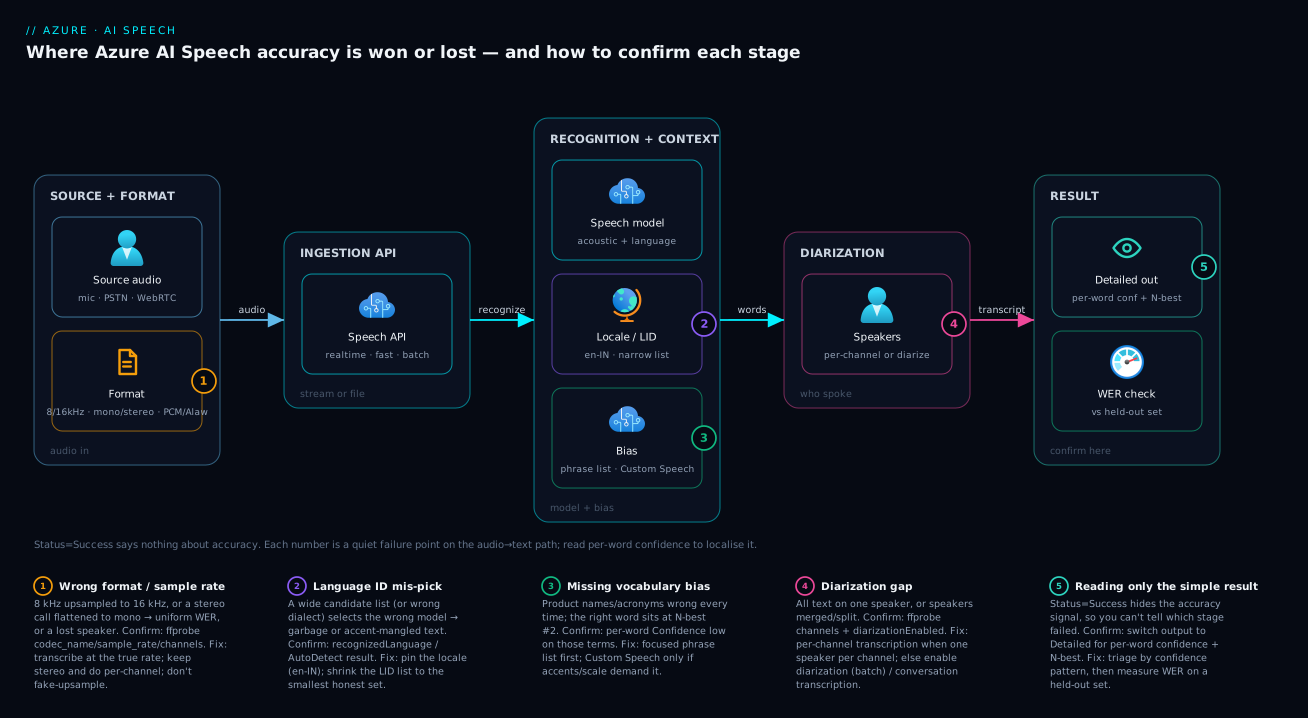
The diagram traces audio as it flows, then maps each accuracy failure onto the stage where it bites. Read it left to right. Source audio (microphone, telephony recording, or browser stream) enters with a specific format — sample rate, channels, codec — the first place accuracy is won or lost. It crosses an ingestion API (real-time SDK, Fast, or Batch from Blob). The recognition model then produces text, shaped by two context inputs: the locale / Language ID that selects the right model, and the bias you supply (phrase list or a deployed Custom Speech endpoint). If speakers share a channel, diarization attributes words to speakers. Finally the result comes back — and only if you requested the detailed format does it carry the per-word confidence you need to debug everything upstream.
The numbered failure points sit where they bite: wrong sample rate or a flattened stereo file at the format stage (1); a wide Language-ID list mis-selecting the model (2); missing vocabulary bias leaving domain terms wrong (3); diarization off or mono-mixed audio merging speakers (4). Every diagnosis routes back through the detailed result (5), the one instrument that tells you which earlier stage to fix.
Real-world scenario
Saaranya Health runs a tele-consultation platform out of Central India. Doctors and patients talk over a PSTN bridge; the calls are recorded and transcribed so clinicians get a searchable note. The team wired up Azure AI Speech, tested it on a few clean headset recordings (4% WER, delighted), and shipped. Within a week the clinical team revolted: real call transcripts were running 31% WER, drug names were consistently wrong (“metformin” → “met four men”), and every transcript showed a single speaker even though each note clearly had a doctor and a patient. The platform team’s first instinct: “the model isn’t good enough for medical audio,” and a proposal to evaluate a competitor landed on the manager’s desk.
The breakthrough was running ffprobe on three failing recordings instead of arguing about models. Two findings jumped out. First, the recordings were pcm_alaw, 8000 Hz, but the team had been upsampling them to 16 kHz with a naïve filter before sending — manufacturing high frequencies that were never there and smearing the spectrum. Second, the telephony bridge mixed both parties onto a single mono channel, and diarization had never been enabled — so of course every transcript was one speaker. Both were pipeline problems visible in ten seconds of ffprobe. Detailed output confirmed the rest: ordinary words scored 0.9+, drug names 0.3–0.5, and the correct drug name often sat at N-best position 2 — the model could hear it, it just was not biased toward the medical term. A phrase-list problem, not a retraining problem.
The fix landed in three moves, cheapest first (the timeline below has the full sequence). Stopping the bad upsample — transcribing the A-law calls at native 8 kHz mono — alone dropped WER from 31% to ~22%. A phrase list of the formulary then promoted the N-best #2 drug names to #1, cutting drug-name errors by ~80% and pulling WER to ~12%. Since the bridge could not record per-channel, batch transcription with diarization split the mixed channel into doctor and patient turns — imperfect on overlap, but good enough to read who said what. Only then did they evaluate Custom Speech: a language model on de-identified transcripts plus a pronunciation list for the trickiest drug names, measured on a held-out set and shipped because it beat the baseline by a few more points. Accuracy went from 31% WER to ~7%, the competitor eval was cancelled, and the lesson went on the wall: “Run ffprobe before you blame the model. The audio is wrong far more often than the model is.”
The incident as a timeline, because the order of moves is the lesson:
| Step | Symptom | Action taken | Effect | What it should have been |
|---|---|---|---|---|
| Day 0 | 4% WER in demo | Ship on clean headset audio | Looks great | Test on REAL telephony first |
| Day 5 | 31% WER in prod | Propose competitor eval | Wasted week looming | Run ffprobe on a failing file |
| Day 5 | Single speaker, drug names wrong | ffprobe: A-law 8 kHz, upsampled; mono mix |
Two pipeline bugs found | This is the breakthrough |
| Day 5 | — | Turn on detailed output | Drug names at N-best #2 → bias problem | Read confidence early |
| Day 5 | 31% → 22% | Stop the bad upsample; transcribe at 8 kHz | Resample distortion gone | Correct first fix |
| Day 6 | 22% → 12% | Add a formulary phrase list | Drug-name errors −80% | Phrase list before training |
| Day 7 | Speakers separated | Batch transcription + diarization | Doctor/patient turns split | Per-channel if the bridge allowed |
| +1 week | 12% → 7% | Custom Speech (LM + pronunciation), evaluated | Beat baseline; shipped | Train only after the cheap wins |
Advantages and disadvantages
The managed speech-to-text model — base models you call with a key, plus optional bias and training — both causes this class of problem and gives you the levers to fix it. Weigh it honestly:
| Advantages (why this model helps you) | Disadvantages (why it bites) |
|---|---|
| A strong base model works out of the box for clean, common-language audio — no training to start | It returns confident text for bad audio with no error; accuracy loss is silent and easy to miss |
| Detailed output exposes per-word confidence and N-best — a real in-response diagnostic | The default Simple format hides all of it; you must opt in to see anything |
| Phrase lists fix domain vocabulary instantly, with zero training and no extra cost | Phrase lists are capacity-bounded and do nothing for accents or audio quality |
| Custom Speech adapts to your accents, jargon and audio conditions when you need it | Custom Speech is a project — data, training, evaluation, a hosted endpoint, ongoing cost |
| Diarization and per-channel transcription give accurate speaker attribution | Get the channel layout wrong (mono mix) and speakers merge no matter what flag you set |
| Many locales/dialects let you match the speaker precisely | Auto-detect with a wide candidate list mis-picks the language and ruins the output |
| Multiple ingestion APIs (real-time / fast / batch) fit different workloads | Use the wrong one (e.g. recognize_once for long audio) and you silently lose data |
The model is right for teams that want speech-to-text without building acoustic models from scratch; the built-in bias/training/diarization controls cover most real workloads. It bites hardest on telephony and noisy capture (where the audio is the limit), multi-speaker mixed channels (where layout dominates diarization), and domain-heavy vocabularies fed with defaults. Every disadvantage is manageable — but only if you measure with detailed output instead of eyeballing the simple transcript, which is the entire point of this article.
Hands-on lab
Reproduce a low-accuracy transcription caused by a wrong sample rate and a missing phrase list, see it in the per-word confidence, and fix it — free-tier-friendly (the Speech free tier gives a monthly allotment of hours; delete at the end). Run in Cloud Shell (Bash) with Python, or locally with ffmpeg/ffprobe installed.
Step 1 — Variables and an AI Speech resource.
RG=rg-speech-lab
LOC=centralindia
NAME=speech-lab-$RANDOM
az group create -n $RG -l $LOC -o table
az cognitiveservices account create -n $NAME -g $RG -l $LOC \
  --kind SpeechServices --sku F0 --yes -o table        # F0 = free tier
Expected: an account row with kind = SpeechServices. (If the free F0 is already used in the subscription, use --sku S0.)
Step 2 — Grab the key and endpoint.
SPEECH_KEY=$(az cognitiveservices account keys list -n $NAME -g $RG --query key1 -o tsv)
REGION=$LOC
echo "key length: ${#SPEECH_KEY}  region: $REGION"
Step 3 — Inspect a sample with ffprobe (ground truth). Use any short speech clip, or record one:
ffprobe -v error -show_entries stream=codec_name,sample_rate,channels,bits_per_sample \
  -of default=noprint_wrappers=1 sample.wav
Step 4 — Reproduce the bug. Downsample to 8 kHz, then naïvely “upsample” back to 16 kHz to mimic the classic distortion:
ffmpeg -i sample.wav -ar 8000 -ac 1 step1_8k.wav
ffmpeg -i step1_8k.wav -ar 16000 -ac 1 bad_upsampled.wav   # manufactured detail = distortion
Step 5 — Transcribe the bad file with detailed output and read confidence.
import azure.cognitiveservices.speech as speechsdk, json, os
cfg = speechsdk.SpeechConfig(subscription=os.environ["SPEECH_KEY"], region=os.environ["REGION"])
cfg.speech_recognition_language = "en-IN"
cfg.output_format = speechsdk.OutputFormat.Detailed
cfg.request_word_level_timestamps()
audio = speechsdk.audio.AudioConfig(filename="bad_upsampled.wav")
r = speechsdk.SpeechRecognizer(speech_config=cfg, audio_config=audio).recognize_once()
d = json.loads(r.json)
print("text:", d["NBest"][0]["Display"])
for w in d["NBest"][0]["Words"]:
    print(f'  {w["Word"]:<18} {w["Confidence"]:.2f}')
Expected: noticeably lower per-word confidence and more errors than the clean file.
Step 6 — Fix it: transcribe the clean 16 kHz file with a phrase list.
cfg2 = speechsdk.SpeechConfig(subscription=os.environ["SPEECH_KEY"], region=os.environ["REGION"])
cfg2.speech_recognition_language = "en-IN"
cfg2.output_format = speechsdk.OutputFormat.Detailed
audio2 = speechsdk.audio.AudioConfig(filename="sample.wav")     # the original, clean file
rec = speechsdk.SpeechRecognizer(speech_config=cfg2, audio_config=audio2)
pl = speechsdk.PhraseListGrammar.from_recognizer(rec)
for term in ["KloudVin", "Bhubaneswar", "Cosmos DB"]:           # your real domain terms
    pl.addPhrase(term)
print(rec.recognize_once().text)
Expected: higher confidence and the domain terms spelled correctly. The two variables you changed — clean rate and a phrase list — are the lesson.
Step 7 — Teardown.
az group delete -n $RG --yes --no-wait
Common mistakes & troubleshooting
This is the centrepiece — the symptom → root cause → confirm (exact command/path) → fix playbook, spanning the basic format mistakes through the advanced diarization and Custom Speech failures. Scan for your symptom, confirm it, then apply the fix.
| # | Symptom | Root cause | Confirm (exact command / portal path) | Fix |
|---|---|---|---|---|
| 1 | Plausible text, ~30% WER, all words slightly off | Wrong sample rate / bad resample | ffprobe -show_entries stream=sample_rate sample.wav |
Transcode to true rate (8 or 16 kHz) with aresample=resampler=soxr |
| 2 | Consonants and digits mangled | Lossy codec / low bitrate | ffprobe -show_entries stream=codec_name,bit_rate |
Re-capture at higher bitrate / PCM at source; accept telephony floor |
| 3 | One speaker said everything | Diarization off, or mono-mixed audio | ffprobe -show_entries stream=channels (→1) + check diarizationEnabled |
Enable diarization; or transcribe stereo per-channel |
| 4 | Only product names / acronyms wrong | No vocabulary bias | Detailed output: per-word Confidence low on those terms |
Add a focused phrase list; escalate to Custom Speech if needed |
| 5 | Output in the wrong language | LID mis-picked the locale | recognizedLanguage / AutoDetect result field |
Pin the locale; shrink the LID candidate list |
| 6 | Right language, accent words wrong | Wrong dialect (en-US for Indian English) |
Listen; compare locales | Use the matching dialect (en-IN, en-GB, …) |
| 7 | Only the first sentence transcribed | recognize_once on long audio |
Code uses recognize_once() for a long file |
Use start_continuous_recognition() with event handlers |
| 8 | RecognitionStatus = NoMatch |
No recognizable speech in the audio | Inspect result.reason / RecognitionStatus |
Check it’s speech, not silence/music; verify the right channel |
| 9 | InitialSilenceTimeout |
Long leading silence before speech | Detailed status; listen to the start | Trim leading silence; raise the silence timeout |
| 10 | .wav file but accuracy is telephony-grade |
WAV contains A-law/µ-law, not PCM | ffprobe codec_name shows pcm_alaw/pcm_mulaw |
It IS telephony; keep 8 kHz, add phrase list, consider Custom Speech |
| 11 | Stereo call, second speaker missing | Recognizer read only channel 0 | ffprobe channels (→2) but single transcript |
Split channels (-map_channel) and transcribe each |
| 12 | Custom Speech model worse than base | Trained on too little / unrepresentative data | Compare WER on the same held-out test set | Add representative labeled audio; re-evaluate before deploy |
| 13 | Diarization splits one person into many | Voice variation / noise / long silences | Per-phrase speaker flips for the same voice |
Cleaner audio; let the service estimate speaker count |
| 14 | Numbers/dates formatted oddly | Display vs lexical / no normalization rules | Compare NBest[].Display vs Lexical |
Use display form; structured-text Custom Speech for strict formats |
| 15 | 401 / 403 on the request | Wrong key, region, or endpoint | az cognitiveservices account keys list; check region in URL |
Use the correct key + the resource’s region/endpoint |
| 16 | 429 Too Many Requests | Throttled (rate/concurrency limit) | Response headers; tier limits | Back off / retry; raise tier; use batch for volume |
| 17 | Phrase list “ignored” | List too large / term never spoken | Term still wrong with list applied | Trim the list to relevant terms; verify the audio says it |
| 18 | Batch transcription never finishes | Polling wrong / SAS expired / file unreachable | GET the transcription status; test the Blob SAS URL |
Fix SAS expiry/permissions; poll the status endpoint correctly |
The error / status reference
The codes and statuses you actually see, what each means, and the fix. The trap: most accuracy problems return Success — a status of success is not a correctness of success.
| Code / status | Where it appears | Meaning | How to confirm | Fix |
|---|---|---|---|---|
Success |
RecognitionStatus |
Recognition ran (says nothing about accuracy) | It’s in the response | Use detailed output to judge real accuracy |
NoMatch |
RecognitionStatus |
No speech could be recognized | result.no_match_details |
Verify it’s speech; check the channel; reduce noise |
InitialSilenceTimeout |
RecognitionStatus |
Silence at the start exceeded the timeout | Listen to the head of the file | Trim leading silence; raise initial-silence timeout |
BabbleTimeout |
RecognitionStatus |
Too much noise/no clear speech early | Listen; check SNR | Improve capture; noise suppression |
Canceled / CancellationReason.Error |
SDK event | Connection/auth/format error | cancellation_details.error_details |
Read the detail string; fix key/region/format |
401 Unauthorized |
HTTP | Bad or missing key | Re-list the key | Correct Ocp-Apim-Subscription-Key |
403 Forbidden |
HTTP | Key valid but not for this op/region/resource | Check region + resource kind | Use the matching region/endpoint and resource |
400 Bad Request |
HTTP | Malformed request / unsupported format | Inspect the error body | Fix the audio format or request definition |
415 Unsupported Media Type |
HTTP (REST) | Content-Type / codec not accepted | Check the Content-Type and codec |
Send a supported encoding/header |
429 Too Many Requests |
HTTP | Rate/concurrency limit hit | Response headers; tier limits | Back off + retry; raise tier; use batch |
500 / 503 |
HTTP | Service-side error / transient | Retry with backoff | Retry; if persistent, open a support case |
The two distinctions that resolve most incidents
Uniform degradation vs targeted errors. When the whole transcript is mildly wrong, look at the signal: ffprobe, check the rate/codec, re-transcode — it is almost always format/codec/noise, and phrase hints on a distorted signal waste an afternoon. When ordinary words are right but the same domain terms are wrong every time, it is vocabulary: confidence dips on those terms, the right word often sits at N-best #2, and a focused phrase list fixes it (train Custom Speech only if that is insufficient or the terms are acoustically ambiguous).
“All one speaker” is usually not diarization. Two-thirds of these complaints are a mono mix or a disabled flag — check channels first and transcribe a stereo two-party call per-channel; if it is genuinely one shared channel, enable diarization (batch) or conversation transcription (real-time). A close cousin, “only the first sentence came back,” is recognize_once() returning after one utterance; switch to continuous recognition (or Fast/Batch) for anything longer than a short clip.
Best practices
- Run
ffprobeon a failing sample before anything else. Codec, sample rate, channels, bit depth — ten seconds of ground truth beats an hour of guessing. - Match the recognizer to the true source bandwidth. Telephony at 8 kHz, wideband at 16 kHz. Never naïvely upsample 8→16 kHz; it adds distortion, not detail.
- Always request detailed output in any pipeline you might debug. Per-word confidence and N-best are the only in-response accuracy signals; the simple format hides them.
- Pin the locale and match the dialect to your speakers. A single correct locale string (
en-INfor Indian English,en-GBfor British) is the highest-leverage accuracy setting; reserve Language ID for genuinely mixed-language audio with a small candidate list. - Phrase list first, Custom Speech second. Bias the exact terms detailed output flagged; only train a model when accents/audio/large vocabularies demand it.
- Keep phrase lists small and relevant. Add the terms in front of you, not your whole glossary; bloated lists dilute the bias and cause false positives.
- Prefer one speaker per channel over diarization. Record/transcribe per-channel where you can; reach for diarization only when speakers genuinely share a channel.
- Use continuous recognition for long audio.
recognize_onceis for single utterances; long files need continuous recognition or batch/fast transcription. - Evaluate Custom Speech on a held-out set before deploying. Train, measure WER on unseen audio, ship only if it beats the base model.
- Treat configuration as code. Locale, output format, endpoint id and phrase terms belong in reviewed config/Bicep, not scattered in code.
- Measure WER continuously, not once. Keep a small labeled regression set and track WER over time so a pipeline change (a new codec from a vendor) does not silently regress you.
Security notes
Speech audio is frequently sensitive — calls contain names, health details, payment data, PII — so the security posture is part of getting this right.
- Authenticate with managed identity / Entra ID where possible instead of long-lived keys — the Speech resource supports Microsoft Entra token auth. See managed identity system vs user-assigned patterns for the identity type.
- Keep keys out of code and logs. Store the Speech key in Azure Key Vault and reference it. See Azure Key Vault secrets, keys & certificates for the pattern.
- Lock the network path for batch. Audio sits in Blob Storage — use private endpoints and SAS with the minimum scope and shortest expiry; an over-broad, long-lived SAS in a request body is a real leak. Azure Private Endpoint vs Service Endpoint covers the isolation choice.
- Mind data residency. Pick a region that satisfies your compliance boundary; the resource’s region is where requests are processed.
- De-identify training data for Custom Speech. If you train on real call audio/transcripts, remove or mask PII (names, IDs, card numbers) first — training data persists in your custom model project.
- Use
RBACleast privilege on the Speech resource. GrantCognitive Services User/Speech roles narrowly; do not hand out owner/contributor for day-to-day transcription. - Apply profanity handling deliberately. The profanity filter mode (mask/remove/raw) is a policy choice; pick it consciously rather than relying on the default for regulated transcripts.
Cost & sizing
Speech-to-text is billed primarily by audio hours processed, at different rates for standard transcription versus Custom Speech (which adds model training and a hosted custom endpoint cost on top). The free F0 tier gives a monthly allotment of hours; production runs on S0 (pay-as-you-go).
| Cost driver | What it is | How to control it |
|---|---|---|
| Audio hours transcribed | The main meter — per hour of audio | Trim silence/non-speech; transcribe only what you need |
| Standard vs custom rate | Custom-model transcription costs more per hour | Use base model unless Custom Speech clearly wins on WER |
| Custom Speech training | Compute to train a model | Train when justified; re-train sparingly, not on every tweak |
| Hosted custom endpoint | Keeping a custom model deployed | Deploy only models in active use; retire unused endpoints |
| Storage for batch audio | Blob holding source files | Lifecycle to Cool/Archive; delete after transcription |
| Real-time connection time | Streaming sessions | Close idle sessions; don’t hold connections open |
Right-sizing, free-tier aware: prototype on F0 (base model, Fast transcription) for the free monthly hours; run production volume on S0 with Batch transcription from Blob; serve live captions on S0 with the real-time SDK and continuous recognition; and add a Custom Speech custom endpoint only when domain WER justifies the model and hosting premium.
The cost mistake to avoid: deploying a Custom Speech endpoint “just in case” and leaving it running — you pay to host it whether or not it beats the base model. Deploy only models that win on a held-out WER test, and retire endpoints you are not using; the right-sizing mindset in Azure Advisor cost recommendations applies to idle endpoints just as it does to idle VMs.
Interview & exam questions
A mix you will meet in Azure AI / data interviews and adjacent to the AI-102 (Azure AI Engineer) certification.
1. A clean microphone demo gets 4% WER but real call-centre audio gets 30%. Where do you look first, and why? The audio, not the model — run ffprobe to check sample rate, codec and channels. Call audio is usually 8 kHz A-law/µ-law and often mono-mixed; a wrong resample or a flattened stereo file degrades accuracy before the model runs. Confirm format before considering Custom Speech.
2. When do you use a phrase list versus Custom Speech? A phrase list biases recognition toward a bounded set of terms with zero training and instant effect — use it for product names, keywords and a focused vocabulary. Custom Speech trains a model to handle accents, large vocabularies and distinctive audio conditions — use it only when a phrase list is insufficient. Always try the phrase list first.
3. What sample rate should you transcribe telephony audio at, and why not upsample it to 16 kHz? At its native 8 kHz. Telephony is narrowband by physics; upsampling to 16 kHz manufactures high-frequency content that was never captured, adding distortion and file size without information. Match the recognizer to the true source bandwidth.
4. A two-party call transcribes as a single speaker. What’s the most likely cause and the best fix? The audio is a mono mix (or diarization is off). If it is stereo with one speaker per channel, split channels and transcribe each for perfect attribution. If it is genuinely one shared channel, enable diarization (batch) or use conversation transcription (real-time).
5. How do you tell a vocabulary problem from an acoustic problem? Read per-word confidence in detailed output. Low confidence on specific terms while ordinary words score high is a vocabulary gap (phrase list). Uniformly low confidence across the file is acoustic/format (fix the rate, codec or noise). The N-best list helps too: the right word at position 2 means bias will fix it.
6. Your code returns only the first sentence of a long recording. Why? It almost certainly calls recognize_once(), which returns after a single utterance. Use start_continuous_recognition() with recognized/session_stopped/canceled handlers, or use Fast/Batch transcription for files.
7. What does a RecognitionStatus of Success actually guarantee? Only that recognition ran and produced a result — nothing about accuracy. Bad audio returns Success with wrong text. Judge accuracy from detailed output (confidence, N-best) and a WER measurement, not from the status.
8. You enabled Language Identification with ten candidate languages and accuracy dropped. Why? A wide candidate list raises the chance of a wrong language pick on ambiguous, short or accented audio, and a wrong language means a wrong model and garbage text. Pin the locale if you know it, or constrain LID to the smallest honest candidate set.
9. Your Custom Speech model performs worse than the base model. What went wrong? The training data was unrepresentative or too small, or evaluation was skipped. Train on data that mirrors real production audio and always measure WER on a held-out test set the model never saw; deploy only if it beats the base model on that set.
10. How do you keep speech transcription costs down at scale, and which API fits high-volume stored recordings? Trim silence/non-speech, use the base model unless Custom Speech clearly wins on WER, retire unused custom endpoints (they cost to host), and lifecycle batch source audio in Blob to Cool/Archive. For thousands of stored recordings with speaker separation, use Batch transcription from Blob — async, scalable, with per-channel and diarization support.
Quick check
- You suspect a failing speech file. What is the very first command you run, and what three properties are you checking?
- True or false: a
RecognitionStatusofSuccessmeans the transcript is accurate. - A stereo two-party call transcribes as one speaker. What is the better fix than enabling diarization?
- Per-word confidence is high but a specific product name is wrong. Phrase list or Custom Speech — and why?
- Why should telephony audio be transcribed at 8 kHz rather than upsampled to 16 kHz?
Answers
ffprobeon the file — checking sample rate, channel count, and codec (and ideally bit depth). It is ground truth about what the audio actually is.- False.
Successonly means recognition ran; bad audio returnsSuccesswith wrong text. Judge accuracy from detailed output and WER. - If it is stereo with one speaker per channel, split the channels and transcribe each for perfect attribution — better than asking diarization to separate a mono mix.
- Phrase list — high confidence with a wrong specific term means the model heard it but is not biased toward your vocabulary; a phrase list nudges it to the right string instantly, no training.
- Telephony is narrowband (8 kHz) by physics; upsampling manufactures high frequencies that were never captured, adding distortion and size without information. Match the recognizer to the true bandwidth.
Glossary
- Word Error Rate (WER): The standard accuracy metric for transcription — the proportion of words wrong (substitutions + insertions + deletions). Lower is better; the number you are trying to move.
- Sample rate: Audio samples captured per second. Telephony is 8 kHz; wideband speech is 16 kHz, the model’s primary training target.
- Bit depth: Bits per audio sample (16-bit PCM is standard). Non-16-bit PCM can be misread by the pipeline.
- Channels: Mono (1) or stereo (2). Flattening a two-party stereo call to mono merges both speakers.
- Codec / encoding: How audio is compressed/stored — PCM (uncompressed, e.g.
pcm_s16le; the cleanest input), MP3/Opus/AMR (lossy), A-law/µ-law (telephony). Lossy codecs strip high-frequency detail. - Detailed output: A result format returning per-word confidence, timestamps and an N-best list — the only in-response accuracy signal.
- N-best list: The recognizer’s ranked alternative hypotheses. The correct word at position 2 means a phrase list will likely fix it.
- Phrase list: A set of words/phrases sent with the request to bias recognition toward them — instant, no training, capacity-bounded.
- Custom Speech: A model you train on your audio/text to adapt acoustics and vocabulary — for accents, jargon and distinctive audio conditions.
- Diarization: Attributing each recognized word to a speaker (
Speaker 1,Speaker 2). A separate capability you enable; quality depends on audio layout. - Language Identification (LID): Auto-detecting the spoken language from a candidate list, at-start or continuously. A wide list increases wrong picks.
- Locale: A language+region code (
en-IN,hi-IN). Pinning the correct locale is the highest-leverage accuracy setting for known-language audio. - Fast vs Batch transcription: Fast is a synchronous REST API that transcribes one file immediately with word timings (ideal for diagnostics); Batch is an async REST API that transcribes Blob-stored files at scale with per-channel and diarization support.
- Continuous recognition: SDK mode that transcribes long audio across many utterances, versus
recognize_oncewhich returns after one utterance.
Next steps
- If your transcripts feed a chat or summarization model, continue with Deploy your first Azure OpenAI chat model.
- For debugging the text-filtering side of an AI pipeline with the same “confirm the input” method, read Debugging Azure AI Content Safety false positives.
- For the document equivalent of low-confidence outputs, see Fixing low-confidence fields in Azure Document Intelligence.
- To secure the key your Speech resource uses, apply Azure Key Vault secrets, keys & certificates.
- To cost-optimize the Blob storage holding your batch audio, use Azure Blob access tiers explained.