Every NoSQL database eventually asks the same uncomfortable question: something changed — now what? An order flips to Paid, an IoT reading lands, a user updates a profile. You need a second system to react — rebuild a search index, push a notification, update a rollup, mirror the row into a warehouse. The naïve answer is to poll: query every few seconds asking “anything new since last time?” That query scans, burns request units on every tick whether or not anything changed, misses fast updates between polls, and double-processes on overlap. The Azure Cosmos DB change feed deletes that entire category of pain. It is a persistent, ordered log of every insert and update to a container, exposed per logical partition, that consumers read at their own pace — in order, with the database remembering where each consumer left off.
This article is a step-by-step guide to turning that log into a working event-driven pipeline with Azure Functions. The Functions Cosmos DB trigger is the easiest on-ramp: write a function, point it at a container, and the platform hands you batches of changed documents as they happen — no polling loop, no cursor management, no scaling code. Underneath sits the change feed processor, the library that does the hard parts: distributing partitions across instances, checkpointing progress into a lease container, and resuming after a crash without losing or replaying work. You will learn both — the trigger for speed, the processor mechanics for when you need to understand why something stalled at 02:00.
By the end you will have built a real pipeline: writes land in an orders container, a change-feed-triggered function projects each order into an orders-by-customer materialized view, and you will have done it three ways — portal, az CLI, and Bicep. Along the way you meet the things that bite: the lease container nobody gave enough throughput, the StartFromBeginning flag that reprocessed three months of history on a Friday deploy, the difference between latest-version and all-versions-and-deletes mode, and why deletes don’t show up by default. Option matrices, limit tables and decision grids sit beside every az and Bicep block.
What problem this solves
You have data landing in Cosmos DB and you need something else to happen because it landed. A write hits the orders container, and now a search index must update, a lifetime-value rollup must increment, a fraud check must run, and a copy must flow to analytics. The write is one operation; the reactions are four more systems, and they must not slow the write, must not miss any change, and must survive their own restarts.
Without the change feed, teams reach for three bad patterns. Polling — a timer query every N seconds — burns RU/s continuously (a query that returns nothing still costs RUs), misses updates that happen and revert between polls, and forces you to invent a high-water-mark cursor. Dual writes — the app writes to Cosmos and to the index/queue in one code path — couples the two systems: if the second write fails you have torn state and a custom reconciliation job, and you’ve made the original write slower. Database triggers — Cosmos DB has JavaScript triggers, but they run inside the request, synchronously, on the same RU budget, and cannot call other Azure services; they are for validation, not fan-out.
The change feed removes all three. It is a pull-based, durable log the database maintains for free as a side effect of writes (you pay only to read it, and the processor reads efficiently). Consumers are decoupled from writers: the write completes at full speed and the reaction happens asynchronously, with the database tracking each consumer’s position. Add a consumer next year and it can replay from the beginning without touching the producer. Who hits the need: anyone doing event sourcing, CQRS, materialized views, real-time analytics / ETL, search-index sync, cache invalidation, notifications, or cross-store replication on Cosmos DB. If your sentence contains “when a document changes, also…”, this is the mechanism.
To frame the field, here is each pattern, the pain without the change feed, and what the change feed gives you instead:
| Reaction pattern | Naïve approach | What breaks | Change feed approach |
|---|---|---|---|
| Materialized view / read model | Re-query and rebuild on a timer | Stale between ticks; full scans cost RUs | Function projects each change into a view container |
| Search index sync | Dual-write to Cosmos + index | Torn state if index write fails | Change feed → function → index upsert, retried |
| Real-time rollups / counters | Periodic aggregation query | Heavy scans; lag spikes | Increment a per-key aggregate per change |
| Cross-store ETL / warehouse | Nightly export job | Hours of latency; full re-export | Stream changes continuously to the sink |
| Notifications / fan-out | App publishes inline on write | Couples write to delivery; slows write | Function reacts off the log, publishes async |
| Cold-start reprocessing | Bespoke backfill script | One-off, error-prone, no resume | Replay from beginning with a fresh lease |
Learning objectives
By the end of this article you can:
- Explain what the change feed is — a persistent, per-partition, ordered log of inserts and updates — and exactly which operations it does and does not capture by default.
- Choose between latest-version mode and all-versions-and-deletes mode and know what each costs and exposes (including how to capture deletes and intermediate updates).
- Build a working event-driven pipeline with the Azure Functions Cosmos DB trigger, configuring the monitored container, the lease container, batch size and start position.
- Reason about the change feed processor internals — leases, checkpoints, partition-to-instance distribution, and how work resumes after a crash — well enough to debug a stalled consumer.
- Provision the whole thing three ways: in the portal, with the
az cosmosdbCLI, and in Bicep, with the right throughput on the lease container. - Diagnose the classic failure modes: leases starved of RU/s,
StartFromBeginningreprocessing history, poison documents stalling a partition, idempotency bugs causing double-effects, and a consumer that silently falls behind. - Right-size and cost the pipeline — what drives the bill on the monitored and lease containers, and where the Functions Consumption vs the Cosmos-DB-throughput cost lands.
Prerequisites & where this fits
You should already understand Cosmos DB basics: a container holds items (JSON documents), a partition key distributes them across physical partitions, and throughput is provisioned in request units per second (RU/s) — either manually or autoscale, and either standard or serverless. If you are still choosing an API, the change feed is fully supported on the API for NoSQL (the focus here) and the Cassandra and Gremlin and Table APIs to varying degrees; see Choosing a Cosmos DB API: NoSQL vs MongoDB vs Cassandra vs Gremlin vs Table Decoded for the trade-offs. You should be comfortable running az in Cloud Shell and reading JSON output.
On the compute side, this builds directly on Azure Functions. If triggers and bindings are new, read Azure Functions Triggers and Bindings for Beginners: Connecting Code to Events Without Boilerplate first — the change feed is just one more trigger. For the broader serverless picture, Azure Functions and Serverless Patterns: Event-Driven Compute frames where this fits. The Cosmos-specific input/output binding mechanics are covered hands-on in Wiring Azure Functions to Storage Queues and Cosmos DB: A Hands-On Input/Output Binding Tutorial, which pairs naturally with the output side of this pipeline.
This sits in the Data & Event-Driven track. The change feed is one of several Azure messaging/eventing primitives, and picking the right one matters — a quick map of where it sits relative to its neighbours:
| Mechanism | Source of events | Ordering | Retention | Best when |
|---|---|---|---|---|
| Cosmos DB change feed | Cosmos container writes | Per logical partition | As long as the data lives (latest-version) | You react to data changes in Cosmos |
| Event Hubs | Any producer (high-throughput stream) | Per partition | Configurable (hours–days+) | Telemetry/log streams at massive scale |
| Event Grid | Azure resource & custom events | None (at-least-once) | ~24 h retry | Reactive routing of discrete events |
| Service Bus | App-published messages | FIFO (sessions) | Until consumed (+ DLQ) | Enterprise messaging, transactions, DLQ |
| Storage queues | App-published messages | Best-effort | Until consumed | Simple, cheap decoupling |
For the neighbours: Event Hubs Fundamentals: Partitions, Consumer Groups, Checkpoints and Offsets for Beginners shares the partition/checkpoint mental model almost one-for-one (it helps enormously here), Event Grid System Topics Explained: Reacting to Storage, Resource and Subscription Events covers discrete-event routing, and Service Bus Queues vs Topics: Choosing Point-to-Point or Publish-Subscribe Without Regret covers the messaging side.
Core concepts
Five mental models make every later decision obvious.
The change feed is a log, not a query. When you write or update an item, Cosmos DB records that change in an ordered, durable log kept per logical partition (per physical partition under the hood). Reading it is a pull: a consumer says “give me everything after this position” and the database returns changes in the order they were applied within each partition. There is no global order across partitions — ordering is guaranteed only within a partition key. This is the same model as Event Hubs partitions; the intuition transfers directly.
By default you see the latest version, and never deletes. In the default latest-version mode (formerly “incremental”), the feed shows the current state of each changed item. Update a document five times between two reads and you see it once, with the final value — intermediates are coalesced. And a delete is invisible — the item is simply gone, no tombstone. To capture every intermediate update and deletes, opt into all-versions-and-deletes mode (formerly “full-fidelity”), with its own requirements and costs. Picking the wrong mode is the most common design mistake: people assume they’ll see deletes, and they don’t.
Someone has to remember where each consumer is — the lease container. The feed is stateless about who read what. The change feed processor (the library the trigger uses) writes checkpoints — “consumer X processed partition P up to position Q” — into a separate Cosmos container you provide, the lease container. Each lease also acts as a lock, assigning one physical partition’s feed to exactly one instance at a time, so two instances never process the same partition concurrently. The lease container is real infrastructure: it costs RU/s, needs partition key /id, and starving it is a top-three production failure.
A checkpoint is the contract between “done” and “lost”. A change is processed only once its position is checkpointed into the lease, which the trigger does after your function returns successfully for a batch. This gives at-least-once delivery: if the function throws or the instance dies after processing but before checkpointing, the batch is redelivered. So processing must be idempotent — re-running it on the same document must not double the effect (don’t blindly += amount; upsert by a deterministic key). There is no “exactly once”; there is “at least once plus idempotency”.
Scale is partitions divided by instances. The processor distributes the container’s physical partitions across instances via leases — each instance grabs a subset and reads those partitions. Add instances and leases rebalance; remove one and survivors pick up its leases after they expire. The unit of parallelism is the physical partition: you can never have more concurrent consumers doing useful work than physical partitions. A single-partition container processes single-file no matter how many instances run.
The vocabulary in one table
Before the deep sections, pin down every moving part. The glossary at the end repeats these for lookup; this table is the model side by side:
| Concept | One-line definition | Where it lives | Why it matters |
|---|---|---|---|
| Change feed | Ordered log of inserts/updates per partition | The monitored container | The thing you read |
| Monitored container | The source container whose changes you consume | Your Cosmos account | Where writes happen |
| Lease container | Holds checkpoints + partition locks | A separate Cosmos container | Tracks progress; needs RU/s |
| Checkpoint | “Processed up to here” marker | A lease document | Defines done vs redelivered |
| Lease | A lock+cursor for one partition range | Lease container item | One owner per partition |
| Processor | Library that distributes + checkpoints | In your function host | Does the hard parts |
| Latest-version mode | Final state only; no deletes | Read mode | Default; cheapest |
| All-versions-and-deletes | Every version + deletes (tombstones) | Read mode | Needed for deletes/audit |
StartFromBeginning |
Read from the container’s start | Trigger setting | Replays history if true |
| Idempotency | Same input → same effect on retry | Your code | Required (at-least-once) |
| Physical partition | Unit of storage + parallelism | The container | Caps consumer concurrency |
| Feed range | A range of partition key hashes | Internal | What a lease owns |
Change feed modes: latest-version vs all-versions-and-deletes
The single most important design decision is which read mode you consume the feed in, because it determines what you can even see. The two modes are not interchangeable, and you choose at read time (and for all-versions mode, you must also configure the container’s retention).
Latest-version mode (the default)
This is what the trigger uses out of the box and what 90% of pipelines want. You get the current item for anything inserted or updated, coalesced to one entry per item per read, ordered within each partition. You do not see deletes, and you do not see intermediate updates superseded before you read. No retention to configure — the feed is always available for as long as the items exist, because it reflects current state.
All-versions-and-deletes mode
When you need an audit trail, event sourcing with every version, or to react to deletes, switch to all-versions-and-deletes mode. The feed now yields a change record per operation — every create, every update (not coalesced), and every delete as a tombstone, with TTL-based deletes flagged distinctly from explicit ones. The catch: it reads from a continuous backup retention window, so it only returns changes within that period (you must enable continuous backup, and the window bounds how far back you can read), and it produces more records, so it costs more RU/s to consume.
Choose with this matrix:
| Dimension | Latest-version mode | All-versions-and-deletes mode |
|---|---|---|
| Former name | Incremental | Full-fidelity |
| Sees inserts | Yes | Yes |
| Sees updates | Yes (final value, coalesced) | Yes (every intermediate version) |
| Sees deletes | No | Yes (tombstone) |
| Distinguishes TTL vs explicit delete | n/a | Yes |
| Retention bound | None (current state always available) | Continuous-backup window |
| Requires continuous backup | No | Yes |
| RU cost to read | Lower | Higher (more records) |
| Functions trigger support | Yes (default) | Yes (set the trigger mode) |
| Typical use | Views, sync, rollups | Audit, event sourcing, delete handling |
The decision rule in one table:
| If you need to… | Use this mode | Because |
|---|---|---|
| Rebuild a read model from current state | Latest-version | Coalesced final state is exactly right |
| React to a document being deleted | All-versions-and-deletes | Latest-version hides deletes entirely |
| Capture every intermediate edit for audit | All-versions-and-deletes | Latest-version coalesces them away |
| Stream to a warehouse, only-current matters | Latest-version | Cheaper; you don’t need history |
| Replay an arbitrary point in time | All-versions-and-deletes + continuous backup | Retention window enables it |
A field note that saves a day: if your requirement is “soft delete” (mark a flag, don’t actually delete), latest-version mode is fine — the flag flip is an update, which you see. Only switch to all-versions mode for genuine hard deletes or full version history. The expensive mode is rarely the one you need.
The Functions Cosmos DB trigger, option by option
The Azure Functions Cosmos DB trigger is the change feed processor wrapped in a binding. Declare it once and the host runs the processor — leasing, checkpointing, scaling — invoking your function with a batch of changed documents. Here is every setting that matters, its default, and when you touch it.
The core binding properties (in function.json, or as attributes/decorators in code):
| Property | What it controls | Default | When to change |
|---|---|---|---|
connection (connectionStringSetting) |
App-setting name holding the Cosmos connection | required | Always — point at your account |
databaseName |
Monitored database | required | Always |
containerName (collectionName) |
Monitored container | required | Always |
leaseConnection |
App setting for the lease account | falls back to connection |
Lease container in a different account |
leaseDatabaseName |
Database holding the lease container | same DB | Keep leases in a dedicated DB |
leaseContainerName (leaseCollectionName) |
The lease container name | leases |
Multiple triggers → unique per consumer |
createLeaseContainerIfNotExists |
Auto-create the lease container | false |
Handy in dev; provision explicitly in prod |
leasesContainerThroughput |
RU/s when auto-creating leases | n/a | Set when auto-creating in prod |
leaseContainerPrefix |
Prefix on lease docs (multiple consumers, one container) | none | Share one lease container across consumers |
startFromBeginning |
Read from the container’s start on first run | false |
True only for an intentional full backfill |
startFromTime |
Read from a specific UTC instant on first run | none | Backfill from a point, not the whole history |
maxItemsPerInvocation |
Cap documents per function call | unbounded* | Bound batch size for memory/throughput |
feedPollDelay |
Delay (ms) between polls when idle | 5000 | Lower for latency, higher to cut idle RUs |
leaseAcquireInterval |
How often to check for new leases to take | 13000 ms | Rarely |
leaseExpirationInterval |
When an unrenewed lease is up for grabs | 60000 ms | Tune failover speed vs flapping |
leaseRenewInterval |
How often the owner renews its lease | 17000 ms | Rarely |
preferredLocations |
Region preference for multi-region reads | account default | Pin reads to a region |
startFromBeginning + leaseContainerPrefix |
Reset a consumer by new prefix | — | Force a clean replay without deleting leases |
* Bound it anyway — an unbounded batch can OOM the host on a large backfill.
A crucial note on startFromBeginning / startFromTime: these only apply on the first run when no lease exists. Once leases are written, the processor always resumes from the checkpoint and ignores the flags. You cannot “re-backfill” by flipping startFromBeginning to true on an existing deployment — you must give it a fresh lease (new leaseContainerPrefix or empty lease container). This trips up everyone exactly once.
The trigger’s runtime behaviour you should internalise:
| Behaviour | What happens | Implication |
|---|---|---|
| Batch delivery | Your function gets a List<T> / array of docs |
Process the batch; don’t assume one item |
| Checkpoint timing | After the function returns successfully | Throw → whole batch redelivered |
| Delivery guarantee | At-least-once | Make processing idempotent |
| Ordering | Within a partition only | No global order across keys |
| Scaling | One instance per partition (max useful) | Concurrency capped by partition count |
| Poison handling | None built in | A doc that always throws stalls its partition |
| Empty feed | Polls every feedPollDelay |
Idle still costs a little RU on the lease |
Inside the change feed processor: leases, checkpoints, and distribution
Even when you use the trigger and never instantiate the processor yourself, its mechanics are what let you debug a stalled or lagging consumer. The processor has four jobs.
Lease management. On startup it enumerates the container’s feed ranges (each maps to a physical partition) and ensures one lease document per range. Each lease holds the owner instance id, the continuation token (the checkpoint), and a timestamp. An instance acquires a lease by writing its id and renews it on leaseRenewInterval. If an owner dies it stops renewing, and after leaseExpirationInterval another instance sees the stale timestamp and steals the lease, resuming from the last checkpoint — failover with zero coordination service.
Checkpointing. As the processor reads a batch it advances an in-memory continuation token; after your handler succeeds it writes that token back into the lease — the checkpoint — and the next read starts after it. Die before checkpointing and the next owner re-reads from the old checkpoint and redelivers: at-least-once.
Load balancing. Periodically (leaseAcquireInterval) it compares leases it owns against the total and the number of active owners, rebalancing toward an even split — scale 1→4 instances and ~N leases redistribute to ~N/4 each. Brief overlap during handoff (the old owner may process slightly past the new owner’s resume point) is yet another reason idempotency matters.
Reading efficiently. Instead of a scanning query per poll, the processor issues a change-feed read with the continuation token and a max-item bound, getting a batch plus a new token; an empty result returns a fresh token at minimal RU — dramatically cheaper than polling.
The lease container itself has hard requirements — get these wrong and nothing works:
| Lease container requirement | Value | Why | What breaks if wrong |
|---|---|---|---|
| Partition key path | /id |
Processor stores one lease per id | Wrong key → processor errors / can’t write leases |
| Throughput | Enough for lease writes (start ~400 RU/s) | Renew + checkpoint are writes | 429s → leases not renewed → flapping/stalls |
| Same account or reachable | Reachable from the host | Processor must write to it | Connection failure → no processing |
| Not shared without a prefix | Unique container or leaseContainerPrefix |
Two consumers collide on lease docs | Consumers fight over leases |
| TTL | No TTL on lease docs | TTL would delete checkpoints | Lost checkpoints → reprocessing |
A diagnostic you will run often: each lease document tells the whole story — which instance owns it, the continuation token (how far it has read), and the timestamp (whether it is being renewed). Reading the lease docs directly is the fastest way to see which partition is stuck and on whom.
Architecture at a glance
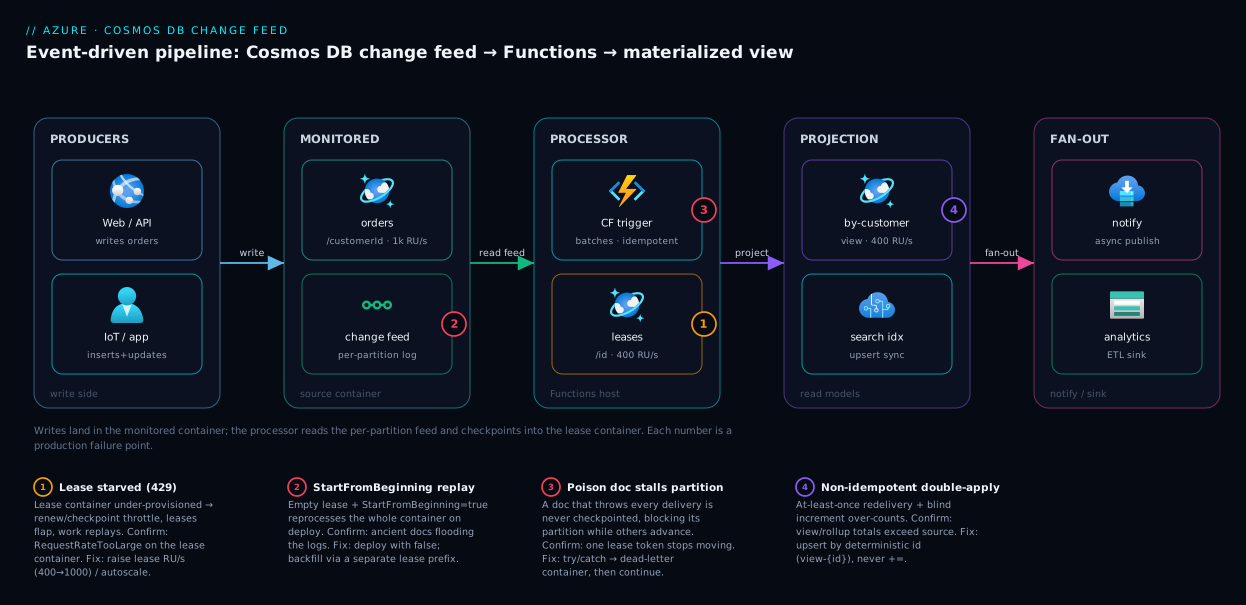
The pipeline reads left to right as one decoupled flow. On the left, producers — a web app, an API, an IoT path — write order documents into the monitored orders container (API for NoSQL, partitioned on /customerId, autoscale RU/s). Every insert and update lands in that container’s change feed, the per-partition ordered log the database maintains automatically. In the middle sits the change feed processor, hosted in an Azure Functions app via the Cosmos DB trigger: it reads the feed in batches and persists its position into the lease container — a small, separate Cosmos container (partition key /id, ~400 RU/s) holding one lease per physical partition, each both a checkpoint and a single-owner lock that distributes work across instances.
On the right, your function code reacts to each batch. Here it projects each order into the orders-by-customer materialized view (a read-optimised container), and the same pattern fans out to a search index, a notification via Service Bus or Event Grid, or an analytics sink. The numbered badges mark the four places this breaks in production: a starved lease container (1), a StartFromBeginning replay storm (2), a poison document stalling one partition (3), and a non-idempotent handler double-applying on redelivery (4) — exactly the hops where state changes hands: writes to feed, feed to processor, processor to lease, handler to sink.
Real-world scenario
Saffron Carts, a mid-size Indian e-commerce platform, runs its order system on Cosmos DB for NoSQL: an orders container partitioned on /customerId, ~40 GB across 6 physical partitions, autoscale to 8,000 RU/s, in Central India. The account page needs “all my orders, newest first” and ops needs a live revenue-by-region rollup. Both originally ran as cross-partition queries against orders: the account page fanned out across all 6 partitions per load (~25 RU each), and the rollup was a 5-minute timer Function whose giant aggregation spiked RU and sometimes 429-throttled the live orders container during checkout peaks. Monthly Cosmos spend was around ₹52,000.
The team rebuilt both as change-feed pipelines. One Functions app with the Cosmos DB trigger on orders projects each order into two views: orders-by-customer (on /customerId, so the account page is a single-partition query, ~3 RU) and a per-region aggregate. They provisioned a dedicated leases container at 400 RU/s, kept the trigger in latest-version mode, and deliberately set startFromBeginning: false so the existing 40 GB was not reprocessed at cutover — instead running a one-time backfill via a throwaway deployment with leaseContainerPrefix: backfill- and startFromBeginning: true, then deleting it.
The first deploy went badly for ninety minutes. The leases container had been created via createLeaseContainerIfNotExists with no throughput specified, defaulting low; under the backfill’s write rate, lease renewals and checkpoints started throwing 429. The backfill progressed in bursts then stalled, and App Insights showed RequestRateTooLarge on the lease account. Owners couldn’t renew, leases expired, instances stole them, and documents were reprocessed — the rollup over-counted revenue ~8% before anyone caught the double-apply. Two coupled bugs: a starved lease container and a non-idempotent rollup (total += order.amount instead of recompute-and-upsert).
The fix landed in two parts. Immediately: bump leases to 1,000 RU/s for the backfill (back to 400 for steady state), stopping the 429s and lease flapping. Within the week: make the rollup idempotent — instead of incrementing a running total, write one small contribution doc per order id and recompute the region total from those, so redelivery is a harmless upsert, not a double-count. They reset the corrupted rollup by deleting the aggregate docs and replaying once from a clean prefix.
Steady state was a clear win. The account page dropped from ~150 RU/load to ~3 RU; the live rollup stopped scanning orders (the change feed read is cheap and incremental); and the checkout-time 429 spikes vanished with the heavy aggregation gone. Cosmos spend fell to ~₹44,000/month even after adding two view containers and the lease container, because the eliminated scans and timer-aggregation more than paid for the new infrastructure. The lesson on the wall: “The lease container is real infrastructure. Provision it, and assume every change will be delivered twice.”
The incident as a timeline, because the order of moves is the lesson:
| Time | Symptom | Action taken | Effect | What it should have been |
|---|---|---|---|---|
| T+0 | Backfill stalls in bursts | (deploy done) | — | Pre-provision lease RU/s |
| T+15 | RequestRateTooLarge on lease account |
Inspect App Insights | 429 on lease writes found | Lease container created without RU/s |
| T+30 | Rollup over-counts ~8% | Compare totals | Double-apply confirmed | Handler was not idempotent |
| T+45 | Leases flapping between instances | Read lease docs | Owners can’t renew → steal | Caused by the 429s |
| T+50 | — | Bump leases to 1,000 RU/s | 429s stop, leases stabilise | Should have started here |
| T+1 wk | Permanent fix | Idempotent rollup + replay clean | Correct totals, steady state | Idempotency from day one |
Advantages and disadvantages
The change feed is the right tool for most “react to data changes” needs on Cosmos DB, but it is not free of sharp edges. The explicit trade-off:
| Advantages | Disadvantages |
|---|---|
| Decouples producers from consumers (write at full speed) | At-least-once only — you must build idempotency |
| Durable, ordered log per partition; no missed changes | No global ordering across partition keys |
| Cheap incremental reads vs polling scans | Lease container is extra infra (RU/s, ops) |
| Built-in scaling/checkpointing via the processor | No deletes in default mode (need full-fidelity) |
| Replay from beginning for new consumers | startFromBeginning only applies on first run |
| First-class Functions trigger (zero plumbing) | Poison documents stall a partition with no built-in DLQ |
| Add consumers years later without touching producers | Concurrency capped by physical partition count |
| Works with serverless or provisioned throughput | Full-fidelity mode needs continuous backup + costs more |
When each matters: decoupling and replay dominate for read-model/CQRS and analytics, where producers must not be slowed and new consumers appear over time. The at-least-once / idempotency disadvantage matters most for anything that accumulates (counters, balances, billing) — get it wrong and you silently corrupt data, as Saffron Carts did. The no-deletes default bites cache invalidation and cleanup; if you must react to deletes, budget for full-fidelity mode early. The partition-count concurrency cap matters only at high throughput on few partitions — most pipelines never feel it, but a hot single-partition container processes single-file regardless of instance count.
Hands-on lab
This is the centerpiece. You will build the pipeline end to end — an orders container, a leases container, an orders-by-customer view, and a Functions app whose change-feed trigger projects each order into the view — three ways (portal, az CLI, Bicep), then validate with a real write and read, and tear it down. It is free-tier-friendly: Cosmos DB offers a free tier (one per subscription, ~1,000 RU/s and 25 GB) and Functions Consumption has a free grant.
Prerequisites for the lab
| Requirement | How to get it | Check |
|---|---|---|
| Azure subscription | Free account works | az account show |
| Azure CLI ≥ 2.50 | Pre-installed in Cloud Shell | az version |
| Functions Core Tools v4 | npm i -g azure-functions-core-tools@4 |
func --version |
| .NET 8 SDK (for the function) | Cloud Shell has it | dotnet --version |
| A resource group | Created in step 1 | az group show |
Set reusable variables first (Cloud Shell, bash):
RG=rg-changefeed-lab
LOC=centralindia
ACCT=cosmos-cf-$RANDOM        # globally unique
DB=shopdb
SRC=orders                    # monitored container
VIEW=orders-by-customer       # materialized view
LEASES=leases                 # lease container
FUNCAPP=func-cf-$RANDOM       # globally unique
STORAGE=stcf$RANDOM           # Functions requires a storage account
echo "Account: $ACCT  Function app: $FUNCAPP"
Path A — Portal (click-through)
Do this once to build the mental model, then prefer the CLI/Bicep for anything repeatable.
- Create the resource group. Portal → Resource groups → Create → name
rg-changefeed-lab, region Central India → Review + create. Expected: the group appears in your list. - Create the Cosmos DB account. Create a resource → Azure Cosmos DB → Azure Cosmos DB for NoSQL → Create. Set the account name, the resource group, region Central India, capacity mode Provisioned throughput, and tick Apply Free Tier Discount if available. Review + create. Expected: deployment takes 5–10 minutes; the account shows Online.
- Create the database and monitored container. Open the account → Data Explorer → New Container. Database id
shopdb(create new), container idorders, partition key/customerId, throughput Autoscale, Max 1000 RU/s. OK. Expected:shopdb > ordersappears in the tree. - Create the view container. New Container → use existing database
shopdb, container idorders-by-customer, partition key/customerId, Manual 400 RU/s. Expected: the second container appears. - Create the lease container. New Container → database
shopdb, container idleases, partition key/id(this exact path matters), Manual 400 RU/s. Expected: three containers now exist undershopdb. Do not set a TTL on this container. - Create the Function App. Create a resource → Function App → Consumption plan, runtime stack .NET 8 (isolated), region Central India, a new storage account. Review + create. Expected: the Function App shows Running after a few minutes.
- Add the Cosmos connection setting. In the Function App → Settings → Environment variables → add
CosmosDbConnection= the account’s primary connection string (copy it from the Cosmos account → Keys). Apply. Expected: the setting is listed. - Create the change-feed-triggered function. You cannot author a compiled .NET-isolated function in the portal editor, so for Path A use an in-portal JavaScript function: Function App → Create function → template Azure Cosmos DB trigger. Set connection =
CosmosDbConnection, databaseshopdb, containerorders, lease containerleases, Create lease container if not exists = No (made in step 5). Create. Expected: the function appears with afunction.jsonbinding. - Trigger a change and watch it fire. Data Explorer →
orders→ New Item, paste a document (see validation section), Save. Open the function → Monitor / Logs. Expected: within seconds the function logs “1 changes” and the order id.
The portal is fine for understanding the wiring, but the lease container, partition keys and idempotent logic are far easier to get right in code. Continue with Path B for the real build.
Path B — az CLI (repeatable)
This provisions everything scriptably. Run after setting the variables above.
- Create the resource group.
az group create --name $RG --location $LOC
Expected: JSON with "provisioningState": "Succeeded".
- Create the Cosmos DB account (NoSQL, free tier if available):
az cosmosdb create \
  --name $ACCT --resource-group $RG \
  --locations regionName=$LOC failoverPriority=0 isZoneRedundant=False \
  --default-consistency-level Session \
  --enable-free-tier true
Expected: runs 3–8 minutes; ends with the account JSON. If your subscription already used its free tier, drop --enable-free-tier true.
- Create the database:
az cosmosdb sql database create \
  --account-name $ACCT --resource-group $RG --name $DB
Expected: "Succeeded".
- Create the monitored
orderscontainer (autoscale, max 1000 RU/s):
az cosmosdb sql container create \
  --account-name $ACCT --resource-group $RG --database-name $DB \
  --name $SRC --partition-key-path "/customerId" \
  --max-throughput 1000
Expected: container JSON; --max-throughput enables autoscale.
- Create the
orders-by-customerview container (manual 400 RU/s):
az cosmosdb sql container create \
  --account-name $ACCT --resource-group $RG --database-name $DB \
  --name $VIEW --partition-key-path "/customerId" \
  --throughput 400
Expected: container JSON.
- Create the
leasescontainer — partition key/id, manual 400 RU/s, no TTL:
az cosmosdb sql container create \
  --account-name $ACCT --resource-group $RG --database-name $DB \
  --name $LEASES --partition-key-path "/id" \
  --throughput 400
Expected: container JSON. The /id partition key is mandatory for the processor.
- Create the storage account and Function App (Consumption, .NET 8 isolated):
az storage account create --name $STORAGE --resource-group $RG \
  --location $LOC --sku Standard_LRS

az functionapp create --name $FUNCAPP --resource-group $RG \
  --storage-account $STORAGE --consumption-plan-location $LOC \
  --runtime dotnet-isolated --functions-version 4 --os-type Linux
Expected: both return JSON; the Function App state becomes Running.
- Wire the Cosmos connection string into the app settings:
CONN=$(az cosmosdb keys list --name $ACCT --resource-group $RG \
  --type connection-strings \
  --query "connectionStrings[0].connectionString" -o tsv)

az functionapp config appsettings set --name $FUNCAPP --resource-group $RG \
  --settings "CosmosDbConnection=$CONN"
Expected: the settings list now includes CosmosDbConnection.
- Author the function locally. Scaffold a .NET-isolated project and a Cosmos-trigger function:
mkdir cf-fn && cd cf-fn
func init . --worker-runtime dotnet-isolated --target-framework net8.0
func new --name ProjectOrders --template "CosmosDBTrigger"
dotnet add package Microsoft.Azure.Functions.Worker.Extensions.CosmosDB
Expected: a ProjectOrders.cs and project files appear.
- Replace the function body with a change-feed trigger that projects each order into the view via an output binding — written to be idempotent (upsert by deterministic id):
using Microsoft.Azure.Functions.Worker;
using Microsoft.Extensions.Logging;

public class ProjectOrders
{
    private readonly ILogger _log;
    public ProjectOrders(ILoggerFactory f) => _log = f.CreateLogger<ProjectOrders>();

    [Function(nameof(ProjectOrders))]
    [CosmosDBOutput(
        databaseName: "shopdb",
        containerName: "orders-by-customer",
        Connection = "CosmosDbConnection")]
    public object Run(
        [CosmosDBTrigger(
            databaseName: "shopdb",
            containerName: "orders",
            Connection = "CosmosDbConnection",
            LeaseContainerName = "leases",
            CreateLeaseContainerIfNotExists = false,
            StartFromBeginning = false,
            MaxItemsPerInvocation = 100)]
        IReadOnlyList<Order> changes)
    {
        var views = new List<object>();
        foreach (var o in changes)
        {
            _log.LogInformation("Projecting order {id} for {cust}", o.id, o.customerId);
            // Deterministic id => redelivery is a harmless upsert (idempotent)
            views.Add(new {
                id = $"view-{o.id}",
                customerId = o.customerId,
                orderId = o.id,
                amount = o.amount,
                status = o.status,
                updatedUtc = DateTime.UtcNow
            });
        }
        return views;   // batch upsert into the view container
    }
}

public class Order
{
    public string id { get; set; } = "";
    public string customerId { get; set; } = "";
    public decimal amount { get; set; }
    public string status { get; set; } = "";
}
Expected: dotnet build succeeds. Note StartFromBeginning = false (no history replay) and the deterministic view-{id} (idempotency).
- Deploy the function:
func azure functionapp publish $FUNCAPP
Expected: “Deployment successful” and ProjectOrders listed as a deployed function.
Path C — Bicep (declarative, production)
For repeatable, reviewable infrastructure, declare the data plane in Bicep. This creates the account, database and all three containers with the correct keys and throughput. (Deploy the function code separately with func publish as in step 20.)
@description('Cosmos account name (globally unique)')
param accountName string
param location string = resourceGroup().location

resource account 'Microsoft.DocumentDB/databaseAccounts@2024-05-15' = {
  name: accountName
  location: location
  kind: 'GlobalDocumentDB'
  properties: {
    databaseAccountOfferType: 'Standard'
    enableFreeTier: true
    consistencyPolicy: { defaultConsistencyLevel: 'Session' }
    locations: [ { locationName: location, failoverPriority: 0 } ]
  }
}

resource db 'Microsoft.DocumentDB/databaseAccounts/sqlDatabases@2024-05-15' = {
  parent: account
  name: 'shopdb'
  properties: { resource: { id: 'shopdb' } }
}

// Monitored container — autoscale to 1000 RU/s
resource orders 'Microsoft.DocumentDB/databaseAccounts/sqlDatabases/containers@2024-05-15' = {
  parent: db
  name: 'orders'
  properties: {
    resource: {
      id: 'orders'
      partitionKey: { paths: [ '/customerId' ], kind: 'Hash' }
    }
    options: { autoscaleSettings: { maxThroughput: 1000 } }
  }
}

// Materialized view — manual 400 RU/s
resource view 'Microsoft.DocumentDB/databaseAccounts/sqlDatabases/containers@2024-05-15' = {
  parent: db
  name: 'orders-by-customer'
  properties: {
    resource: {
      id: 'orders-by-customer'
      partitionKey: { paths: [ '/customerId' ], kind: 'Hash' }
    }
    options: { throughput: 400 }
  }
}

// Lease container — partition key /id, manual 400 RU/s, NO ttl
resource leases 'Microsoft.DocumentDB/databaseAccounts/sqlDatabases/containers@2024-05-15' = {
  parent: db
  name: 'leases'
  properties: {
    resource: {
      id: 'leases'
      partitionKey: { paths: [ '/id' ], kind: 'Hash' }
    }
    options: { throughput: 400 }
  }
}
- Deploy the Bicep:
az deployment group create --resource-group $RG \
  --template-file main.bicep \
  --parameters accountName=$ACCT
Expected: "provisioningState": "Succeeded" and all three containers created with the keys/throughput above.
Validate the pipeline
- Write a test order into
orders(CLI):
az cosmosdb sql container create-item 2>/dev/null # (not a real cmd — use Data Explorer or SDK)
The CLI has no generic “create item” verb, so insert via Data Explorer (Path A, step 9) or the SDK. Paste this into orders:
{ "id": "ord-1001", "customerId": "cust-77", "amount": 2499.00, "status": "Paid" }
Expected: the item saves; orders now holds one document.
- Confirm the function fired. Stream the Function App logs:
az webapp log tail --name $FUNCAPP --resource-group $RG
# or: func azure functionapp logstream $FUNCAPP
Expected: a line like Projecting order ord-1001 for cust-77 within ~5 seconds.
- Confirm the view was written. In Data Explorer, open
orders-by-customerand run a query:
SELECT * FROM c WHERE c.customerId = "cust-77"
Expected: one document id = "view-ord-1001" with orderId = "ord-1001", amount = 2499. The pipeline works end to end.
-
Test idempotency / update. Edit
ord-1001inorders, changestatustoShipped, save. Expected: the function fires again; the sameview-ord-1001document is upserted (not duplicated) withstatus = "Shipped". This proves the deterministic-id idempotency. -
Inspect the leases. Open the
leasescontainer in Data Explorer. Expected: lease documents (one per physical partition plus an info doc) showing an owner and a continuation token — this is the checkpoint state made visible.
Teardown
- Delete everything in one shot (the resource group holds it all):
az group delete --name $RG --yes --no-wait
Expected: the group and all resources (Cosmos account, containers, Function App, storage) are removed. Confirm with az group exists --name $RG returning false after a few minutes. Deleting the resource group is the only reliable way to stop all RU/s and storage charges.
A teardown checklist, because leftover Cosmos throughput is the silent cost:
| Resource | Why it costs if left | Remove via |
|---|---|---|
orders (autoscale 1000) |
Provisioned RU/s billed hourly | RG delete |
orders-by-customer (400) |
Provisioned RU/s billed hourly | RG delete |
leases (400) |
Provisioned RU/s billed hourly | RG delete |
| Cosmos account | Free tier only covers one; second one bills | RG delete |
| Function App (Consumption) | Tiny when idle, but storage persists | RG delete |
| Storage account | Small standing charge | RG delete |
Common mistakes & troubleshooting
These are the failure modes that actually page you. Each is symptom → root cause → how to confirm → fix.
| # | Symptom | Root cause | Confirm | Fix |
|---|---|---|---|---|
| 1 | Function reprocesses ALL history on deploy | StartFromBeginning = true (or empty lease) |
Logs show old/ancient docs flooding in | Set false; use a prefix only for intentional backfill |
| 2 | Processing stalls in bursts; 429 on lease account | Lease container starved of RU/s | App Insights RequestRateTooLarge on lease container |
Raise lease RU/s (e.g. 400→1000); use autoscale |
| 3 | Deletes never reach the consumer | Latest-version mode hides deletes | No change record for deleted items | Switch to all-versions-and-deletes + continuous backup |
| 4 | Counter / total is wrong (over-counts) | Non-idempotent handler + at-least-once redelivery | Totals exceed source on retries | Upsert by deterministic id; don’t blind-increment |
| 5 | One partition stops; others fine | Poison document throws every delivery | One lease’s token stops advancing | Try/catch + route bad doc to a DLQ container; then skip |
| 6 | Two function apps fight, double-process | Shared lease container without unique prefix | Leases flip owners rapidly | Give each consumer its own container or leaseContainerPrefix |
| 7 | Lag grows; consumer falls behind producer | Too few partitions or slow handler | Estimator shows growing remaining work | Speed up handler; scale out; split hot partition |
| 8 | Function never fires at all | Wrong DB/container name, bad connection, or wrong lease PK | No invocations; host startup errors | Verify names, CosmosDbConnection, lease PK = /id |
| 9 | Checkpoints lost; reprocessing after a while | TTL set on the lease container | Lease docs disappear/expire | Remove TTL from the lease container |
| 10 | “Backfill” flag ignored on redeploy | StartFromBeginning only applies with no lease |
Flipping it changes nothing | New leaseContainerPrefix or empty lease container to replay |
| 11 | Updates seen, but only the final value | Latest-version coalesces intermediate edits | Rapid edits arrive as one change | Use all-versions-and-deletes mode for every version |
| 12 | High RU on the source container at idle | feedPollDelay too aggressive + many partitions |
RU baseline non-trivial when idle | Increase feedPollDelay; consolidate triggers |
The three that cost the most time, in detail:
StartFromBeginning reprocessing history (#1). The flag is read only when no lease exists. A fresh deploy into an empty lease container with the flag true streams the entire container from item zero — on a 40 GB container that is millions of invocations, a real bill, and duplicate downstream effects. Deploy production consumers with startFromBeginning: false (the default) so they pick up only new changes from cutover; do historical backfill deliberately, with a separate, disposable consumer on its own lease prefix.
Starved lease container (#2). Renewing a lease and writing a checkpoint are writes against the lease container’s RU/s. Under load — a backfill, or many partitions checkpointing — an under-provisioned lease container throws 429, owners fail to renew, leases expire, and instances steal them from one another, which both stalls progress and amplifies reprocessing. Confirm via Cosmos metrics showing RequestRateTooLarge on the lease container specifically. Fix by giving it enough RU/s (autoscale absorbs backfill spikes), then watch the 429 rate fall to zero.
Poison documents (#5). A document that throws on every delivery (a null field, a parse failure, an oversized payload) is redelivered forever, never checkpointed, blocking that partition while others keep moving — one customer-segment goes silent while the rest flow. There is no built-in dead-letter queue. The pattern: wrap per-document processing in try/catch, and on a non-retryable error write the offending document plus the exception to a dead-letter container and continue so the batch checkpoints. Triage it out of band.
Best practices
- Always provision the lease container explicitly with its own throughput — never rely on
createLeaseContainerIfNotExistsdefaults in production. Use autoscale so backfills don’t starve it. - Assume at-least-once. Make every handler idempotent — upsert by a deterministic id, never blind-increment — and test it by deliberately reprocessing a document.
- Deploy with
startFromBeginning: false. Do historical backfills as a separate, disposable consumer with its ownleaseContainerPrefix, then delete it. - One lease container (or prefix) per consumer so a second pipeline on the same source never fights over leases.
- Set
maxItemsPerInvocationto bound batch size — unbounded batches OOM the host on backfills. - Handle poison documents with try/catch + a dead-letter container; never let one bad document stall a partition forever.
- Never put a TTL on the lease container — it would delete checkpoints and silently cause reprocessing.
- Monitor lag with the change-feed estimator (the SDK estimator /
EstimatedLagmetric) so you alert before the consumer falls behind. - Choose the mode deliberately: latest-version for read models and sync; all-versions-and-deletes only when you truly need deletes or full history.
- Partition view containers for the read, not the write —
orders-by-customeron/customerIdmakes the account page a single-partition query. - Co-locate the Functions app, monitored account and lease container in the same region to minimise latency and cross-region RU/egress.
- Tag and budget the pipeline so the lease + view RU/s show up in cost reports — they’re easy to forget.
Security notes
The change feed inherits Cosmos DB’s security model, and the Functions side adds identity choices. Treat the connection between them as the thing to lock down.
- Prefer managed identity over keys. The trigger can authenticate with a managed identity (configure an identity-based connection and grant the function’s identity Cosmos data-plane RBAC) instead of an account key — removing a long-lived secret from app settings. See Managed Identities Demystified: System vs User-Assigned and When to Use Each for choosing the type.
- Use data-plane RBAC, least privilege. Grant the built-in Data Contributor role scoped to just the containers needed (read on monitored, read-write on lease and view) rather than the all-powerful primary key.
- If you must use keys, store them in Key Vault. Reference the connection string via a Key Vault reference rather than the raw secret, and rotate with the secondary key for zero-downtime rotation. See Azure Key Vault: Secrets, Keys and Certificates Done Right.
- Lock the network. Put Cosmos behind a private endpoint, disable public access, and VNet-integrate the Functions app so it reaches Cosmos privately; add IP firewall rules where private endpoints aren’t possible.
- Scope the lease blast radius. A compromised identity that can write leases can stall or replay the pipeline — keep the function’s write scope to exactly the lease + view containers.
- Mind data in the view. A view often denormalises sensitive fields into a new container — apply the same classification, encryption-at-rest, and access controls there; don’t widen access by copying restricted data into a less-protected container.
- Audit with all-versions mode when required. For regulated workloads needing proof of who-changed-what, all-versions-and-deletes plus continuous backup gives a change history you can feed into an audit store.
Cost & sizing
The bill has three independent parts: the monitored container’s throughput (paid anyway for the source data), the lease container’s throughput (new, often forgotten), and the Functions execution cost. The change feed read consumes RU on the monitored container, but far less than equivalent polling.
What drives each cost:
| Cost driver | Lives on | What inflates it | How to control |
|---|---|---|---|
| Source RU/s | Monitored container | Write rate + change-feed reads | Autoscale; right-size base RU/s |
| Change-feed read RU | Monitored container | Frequent polls; all-versions mode | Tune feedPollDelay; use latest-version |
| Lease RU/s | Lease container | Many partitions; frequent checkpoints; backfills | Autoscale lease container (e.g. 400–1000) |
| View/sink RU/s | View container(s) | Projection write rate | Right-size; batch upserts |
| Function executions | Functions plan | Invocation count + duration + memory | Consumption free grant; bound batch size |
| Storage | All containers | Data volume (GB-month) | TTL on views if ephemeral; archive old data |
Rough figures (Central India, indicative — always check the pricing page):
| Component | Sizing | Indicative monthly |
|---|---|---|
| Cosmos free tier | First 1,000 RU/s + 25 GB | ₹0 (one per subscription) |
leases @ 400 RU/s (manual) |
Steady state | ~₹1,900 (or free if under the tier) |
orders-by-customer @ 400 RU/s |
Steady state | ~₹1,900 |
| Functions Consumption | Light pipeline, within free grant | ~₹0–500 |
| Functions Consumption | Heavy (millions of exec/day) | scales with GB-seconds |
| All-versions mode premium | Same workload, full-fidelity | Noticeably higher read RU + backup cost |
Sizing guidance: start the lease container at 400 RU/s for a handful of partitions; switch it to autoscale (e.g. 1,000 max) before any large backfill so it absorbs the spike, then scales back down. Right-size the monitored container for write load plus a small change-feed-read overhead — the read is incremental and cheap in latest-version mode. On Functions, the Consumption free grant covers most light pipelines; bound maxItemsPerInvocation to keep GB-seconds predictable. For cost governance, Azure Monitor and Application Insights: Full-Stack Observability watches RU consumption and change-feed lag together.
Interview & exam questions
Q1. What is the Cosmos DB change feed, in one sentence? A persistent, ordered log of inserts and updates to a container, exposed per logical partition, that consumers read at their own pace with the database tracking each consumer’s position. It is pull-based and decouples readers from writers. (Relevant to DP-420.)
Q2. Does the change feed include deletes? Not in the default latest-version mode — deletes are invisible there. To capture deletes (as tombstones) and every intermediate update, use all-versions-and-deletes mode, which requires continuous backup and reads within its retention window.
Q3. What is the lease container and why is it needed? A separate Cosmos container the change feed processor uses to store checkpoints (how far each partition has been processed) and leases (one owner per partition). It provides resumability after a crash and distributes partitions across consumer instances. It needs partition key /id and its own RU/s.
Q4. What delivery guarantee does the Functions Cosmos trigger give, and what does that imply for your code? At-least-once: a batch is checkpointed only after the function returns successfully, so a crash before checkpointing causes redelivery. Your processing must be idempotent — reprocessing the same document must not double the effect.
Q5. When does StartFromBeginning take effect? Only on the first run when no lease exists. Once leases are written, the processor always resumes from the checkpoint and ignores the flag. To replay, you must give it a fresh lease (new leaseContainerPrefix or an empty lease container).
Q6. How does the change feed scale, and what caps concurrency? The processor distributes the container’s physical partitions across instances via leases; adding instances rebalances leases. The hard cap on useful concurrency is the number of physical partitions — a single-partition container processes single-file regardless of instance count.
Q7. Why might one consumer stall while others keep processing? A poison document that throws on every delivery is redelivered forever and never checkpointed, blocking its partition while other partitions advance. There is no built-in dead-letter queue; you must catch and route bad documents aside.
Q8. Your rollup over-counts revenue. What are the two likely coupled causes? A non-idempotent handler (blind increment) combined with at-least-once redelivery (often amplified by a starved lease container causing lease flapping and reprocessing). Fix idempotency (deterministic upsert) and provision the lease container.
Q9. Latest-version vs all-versions-and-deletes — name two differences. Latest-version coalesces updates to the final value and hides deletes, with no retention requirement; all-versions-and-deletes yields every intermediate version and delete tombstones but requires continuous backup and reads only within the retention window (and costs more RU).
Q10. How is the change feed different from Event Hubs for streaming? The change feed sources events directly from Cosmos container writes (no separate producer) and is ordered per logical partition; Event Hubs is a general high-throughput stream any producer writes to. Use the change feed when the events are Cosmos data changes. (Compare in Event Hubs Fundamentals: Partitions, Consumer Groups, Checkpoints and Offsets for Beginners.)
Q11. Why prefer managed identity for the trigger over the account key? It removes a long-lived secret from app settings, supports rotation-free auth, and lets you grant least-privilege data-plane RBAC scoped to specific containers, rather than handing the function the all-powerful primary key.
Q12. You need to reprocess the last 3 days only, not the whole history. How? Use startFromTime set to the UTC instant 3 days ago on a consumer with a fresh lease (new prefix or empty lease container). startFromBeginning would replay everything; an existing lease would ignore both and resume from the checkpoint.
Quick check
- In the default change feed mode, do you receive an event when a document is deleted? Why or why not?
- What is stored in the lease container, and what partition key must it use?
- The Functions Cosmos trigger gives at-least-once delivery. What property must your handler have, and why?
- You flip
startFromBeginningtotrueon an already-running consumer and redeploy. What happens, and how do you actually force a replay? - One partition’s data stops flowing to your consumer while the rest keep working. Name the most likely cause and the fix.
Answers
- No. The default latest-version mode reflects current state and coalesces to the final value; a deleted item simply no longer exists, with no tombstone. To see deletes, use all-versions-and-deletes mode (which needs continuous backup).
- Checkpoints (how far each partition has been processed) and leases (one owner per partition, acting as a lock). The lease container’s partition key must be
/id, and it must not have a TTL. - It must be idempotent — reprocessing the same document must produce the same result, not a doubled effect. Because at-least-once means a crash after processing but before checkpointing causes the batch to be redelivered.
- Nothing changes —
startFromBeginningis read only when no lease exists, so an existing consumer ignores it and resumes from its checkpoint. To replay, give it a fresh lease: a newleaseContainerPrefixor an empty/new lease container. - A poison document throwing on every delivery: it is never checkpointed, so its partition is blocked while others advance. Fix by catching the error, routing the bad document to a dead-letter container, and continuing so the batch checkpoints.
Glossary
| Term | Definition |
|---|---|
| Change feed | Persistent, ordered log of inserts and updates to a Cosmos container, exposed per logical partition and read by pull. |
| Monitored container | The source container whose change feed a consumer reads. |
| Lease container | A separate container holding checkpoints and partition leases for the change feed processor; partition key /id. |
| Checkpoint | The stored position (“processed up to here”) for a partition, written into its lease after successful processing. |
| Lease | A document that both records a partition’s checkpoint and locks that partition to a single processing instance. |
| Change feed processor | The library that distributes partitions across instances, reads the feed, and checkpoints — used by the Functions trigger. |
| Latest-version mode | Default read mode; returns the final state of changed items, coalesced, with no deletes. (Formerly “incremental”.) |
| All-versions-and-deletes mode | Read mode returning every intermediate version and delete tombstones; requires continuous backup. (Formerly “full-fidelity”.) |
StartFromBeginning |
Trigger setting to read from the container’s start; takes effect only on the first run when no lease exists. |
| Idempotency | The property that reprocessing the same input yields the same effect — required because delivery is at-least-once. |
| At-least-once | A delivery guarantee where a change may be delivered more than once (on retry/crash), never zero times. |
| Physical partition | A unit of storage and the unit of parallelism for the change feed; caps how many consumers can work concurrently. |
| Feed range | A range of partition-key hash values that one lease owns; maps to a physical partition. |
| Materialized view | A second container holding a read-optimised projection of the source, kept current by the change feed. |
| Continuation token | The cursor returned by a change-feed read, persisted as the checkpoint to resume from. |
Next steps
- Wire the output side properly with Wiring Azure Functions to Storage Queues and Cosmos DB: A Hands-On Input/Output Binding Tutorial — the input/output binding mechanics behind the view-write step.
- Solidify the trigger model with Azure Functions Triggers and Bindings for Beginners: Connecting Code to Events Without Boilerplate and the broader Azure Functions and Serverless Patterns: Event-Driven Compute.
- Compare the change feed with the streaming neighbour it most resembles in Event Hubs Fundamentals: Partitions, Consumer Groups, Checkpoints and Offsets for Beginners, and the discrete-event router Event Grid System Topics Explained: Reacting to Storage, Resource and Subscription Events.
- Pick the right Cosmos API for your workload before you commit with Choosing a Cosmos DB API: NoSQL vs MongoDB vs Cassandra vs Gremlin vs Table Decoded.
- Secure the connection with Managed Identities Demystified: System vs User-Assigned and When to Use Each and Azure Key Vault: Secrets, Keys and Certificates Done Right.