You have an Azure Event Hubs namespace humming along — telemetry, clickstream, IoT readings, change events — and your real-time consumers read it happily. Then the data team asks the question that breaks the party: “Can we also have all of that in the data lake, as files, forever, so we can run batch jobs and train models on it?” The naive answer is to write a consumer that reads the hub and dumps batches to storage. You will then spend the next month rediscovering, the hard way, everything that Event Hubs Capture already solves: batching, file rollover, partition fan-out, back-pressure, exactly-the-right schema, idempotent retries, and zero servers to run. Capture is the built-in feature that does exactly this — it tees every event flowing through a hub into Azure Data Lake Storage Gen2 (or Blob) as time/size-windowed files, automatically, with no code and no compute you manage.
This guide is a hands-on implementation walkthrough. You will turn Capture on three ways — the portal, the az CLI, and Bicep — point it at an ADLS Gen2 container, decode the cryptic file-name format string, and validate that files actually land. The catch most people trip on is format: Capture writes Apache Avro and only Avro. If your lakehouse standard is Apache Parquet (and for analytics it usually should be — columnar, compressed, predicate-pushdown-friendly), Capture alone won’t give it to you. So the second half shows the two real paths to Parquet — Azure Stream Analytics with a Parquet output (the no-code-compute path) and a scheduled converter — and exactly when each is worth it. Throughout, the prose explains the why and the tables enumerate every setting, limit, error and SKU so you can scan them mid-build.
By the end you will be able to stand up a durable, hands-off pipeline from event to lake, reason about whether Avro-as-landed or Parquet-as-curated fits your downstream, size the throughput and storage cost in INR, and debug the handful of failure modes — wrong identity role, container that doesn’t exist, capture window too small, empty files filling the lake — that turn a five-minute setup into a half-day. No event is ever lost to a consumer crash again, because the platform owns the write.
What problem this solves
Streaming and batch are two different consumption patterns over the same events, and Event Hubs is built for the streaming half. Real-time consumers read from a partition at an offset and move on; they do not keep history, and the hub itself only retains events for a configured retention period (1–7 days on Standard, up to 90 on Premium/Dedicated). After that window, the events are gone. The data lake is the opposite contract: cheap, immutable, indefinite, file-shaped storage that batch engines — Synapse, Databricks, Spark, Data Factory — read at their leisure, hours or weeks later. The problem is the bridge between them.
Hand-rolling that bridge is a deceptive amount of work. A custom consumer must read every partition in parallel and keep up with peak ingress; batch events so it doesn’t create millions of tiny files; roll files over on a time and size boundary; checkpoint so a crash doesn’t double-write or skip; handle storage throttling and retries idempotently; and run on compute you provision, patch, scale and pay for around the clock. Get any of it wrong and you get data loss, duplicate records, a lake full of 4 KB files that murders query performance, or a 3 a.m. page because the consumer fell behind. This is undifferentiated heavy lifting — every team that needs “events, but also as files” rebuilds the same machine.
Who hits this: anyone who needs both real-time and historical/batch access to an event stream. IoT platforms archiving sensor data for ML training. Fintech keeping an immutable audit trail of every transaction event. Product analytics teams replaying clickstream into the warehouse. Compliance teams who must retain raw events for years. Event Hubs Capture removes the entire bridge: you flip it on, name a destination, and the platform writes durable, windowed files at zero per-message cost beyond a flat per-throughput-unit Capture fee — no consumer, no checkpoint store, no servers. The remaining decisions are the ones this guide is about: format, window, layout and identity.
Learning objectives
By the end of this article you can:
- Explain what Event Hubs Capture does, what it guarantees, and the three things it does not do (transform, deduplicate, write Parquet).
- Enable Capture on an existing hub via the portal,
azCLI, and Bicep, pointing it at an ADLS Gen2 container with the correct identity and RBAC. - Decode and customise the capture file-name format string and the time/size window so files land where and how your batch engine expects.
- Decide between landing as Avro (Capture-native) and curating as Parquet, and stand up the Parquet path with Azure Stream Analytics.
- Read the Avro envelope Capture writes (Body, Properties, SystemProperties) and unpack the event payload inside it.
- Diagnose the common failures — missing role assignment, non-existent container,
no-emit-emptyflooding the lake with empty files, capture lag — using the exactazcommand or portal blade that confirms each. - Size the throughput units / processing units, capture interval and storage tier for your ingress, with rough INR/USD figures and the free-tier reality.
Prerequisites & where this fits
You should already understand Event Hubs basics: a namespace is the billing and networking boundary; inside it one or more event hubs (topics) each have a fixed number of partitions; producers send events and consumers read per-partition by offset within a consumer group. If partitions, consumer groups and offsets are fuzzy, read Event Hubs Fundamentals: Partitions, Consumer Groups, Checkpoints and Offsets for Beginners first — Capture maps one output file stream per partition, so partition count directly shapes your lake layout. You should be comfortable running az in Cloud Shell, reading JSON output, and you need an ADLS Gen2 storage account (a storage account with hierarchical namespace enabled). If storage accounts are new, Azure Storage Account Fundamentals: Blobs, Files, Queues and Tables covers the base, and Designing a Medallion Lakehouse on Data Lake Gen2: Bronze, Silver and Gold Zone Layout covers where Capture output sits in a lake.
This sits in the Data / ingestion track. Capture is the landing step — it produces the raw “bronze” layer of a lakehouse. Upstream of it is event production and partitioning; downstream is the transform-and-curate work (Avro → Parquet, schema flattening, dedupe) done by Synapse, Databricks or Data Factory. It pairs tightly with Build Your First Data Factory Pipeline: Copy Data from Blob Storage into Azure SQL for the batch processing that consumes Capture files, and with Azure Storage Redundancy Decoded: LRS vs ZRS vs GRS vs RA-GRS and How to Choose for how durable that landing zone should be.
Here is the landscape in one table — who owns what, and what each layer is responsible for in a Capture pipeline:
| Layer | What lives here | Who usually owns it | Its job in the pipeline |
|---|---|---|---|
| Producers | Apps/devices sending events | App / device teams | Emit events, choose a partition key |
| Event Hub | Partitions, retention, throughput | Platform / data eng | Buffer the stream; the source of Capture |
| Capture | Window, format, destination, identity | Data eng | Tee events → files, hands-off |
| ADLS Gen2 container | The landed Avro/Parquet files | Data eng / storage | Durable, queryable raw zone |
| Curation (ASA / Spark / ADF) | Avro→Parquet, flatten, dedupe | Data eng | Turn raw into analytics-ready |
| Consumers (Synapse/Databricks) | Batch queries, ML, BI | Analytics / DS | Read the lake, not the hub |
Core concepts
A handful of mental models make every later step obvious.
Capture is a per-partition tee, not a consumer you manage. Internally, Capture reads each partition of the hub and, on a rolling window, flushes the accumulated events to one file in your destination. It runs on Microsoft’s infrastructure — there is no consumer group you create, no checkpoint store, no compute you provision or scale. It does not compete with your real-time consumers for the partition (it is not “a reader” in the consumer-group sense); it is a platform feature attached to the hub. One consequence that surprises people: because it writes per partition, a hub with 8 partitions produces 8 parallel file streams, and the file path includes the partition number.
The window is “whichever comes first” — time OR size. You set a capture interval (time, 60–900 s, default 300) and a capture size (10–500 MB, default 314,572,800 bytes ≈ 300 MB). Capture closes the current file the instant either threshold is hit. High-throughput hubs trip the size limit first (frequent ~300 MB files); low-throughput hubs trip the time limit first (a file every N minutes regardless of how little arrived). This “first to trip” rule determines your file count, file size, and how much junk you accumulate.
Capture writes Avro, full stop. The output format is Apache Avro — a row-based, schema-embedded, splittable binary format — and there is no setting to make Capture itself emit Parquet, JSON or CSV. Each Avro file wraps your events in a fixed envelope schema (more on that below). If your downstream wants Parquet (columnar, far better for analytical scans), you convert after Capture, or you bypass Capture for that path and use Stream Analytics, which can write Parquet directly. Treat “Capture = Avro landing” and “Parquet = a curation step” as two distinct facts.
The destination is a container + a path template, and identity is separate. Capture writes into one container in a storage account, under a path you control via a file-name format string with substitution tokens ({Namespace}, {EventHub}, {PartitionId}, {Year}/{Month}/{Day}/{Hour}/{Minute}/{Second}). Authentication to that storage account is not baked in via a connection string in modern setups — you grant the namespace’s managed identity (system- or user-assigned) the Storage Blob Data Contributor role on the account. Forget the role and Capture silently fails to write, which is the number-one setup error.
Empty windows are a choice. On a slow hub, most time windows contain zero events. By default Capture still writes a (small) Avro file for those empty windows — so a quiet partition produces one file every 5 minutes, 288 files a day, almost all empty. The skipEmptyArchives / “Do not emit empty files” option suppresses these. Knowing this flag exists saves you from a lake drowning in empty files and a downstream that chokes on them.
The vocabulary in one table
Pin down every moving part before the deep sections; the glossary at the end repeats these for lookup.
| Concept | One-line definition | Where it lives | Why it matters |
|---|---|---|---|
| Namespace | Billing/network boundary holding hubs | Resource group | Holds the identity Capture uses |
| Event hub | One topic with N partitions | In a namespace | The source of the captured stream |
| Partition | Ordered shard of the hub | In a hub | One Capture file stream each |
| Capture | Built-in tee → files | Hub setting | The whole feature |
| Capture interval | Time window (60–900 s) | Capture config | Trips a file on time |
| Capture size | Size window (10–500 MB) | Capture config | Trips a file on bytes |
| File-name format | Path template with tokens | Capture config | Where/how files are named |
| Avro | Row-based, schema-embedded format | The output files | Capture’s only output format |
skipEmptyArchives |
Suppress empty-window files | Capture config | Stops empty-file flooding |
| ADLS Gen2 | Storage with hierarchical namespace | Storage account | The recommended destination |
| Managed identity | The namespace’s Entra identity | On the namespace | How Capture authenticates to storage |
| Throughput unit (TU) | 1 MB/s in, 2 MB/s out (Standard) | Namespace | Caps ingress and Capture throughput |
How Capture writes: window, format and the file path
This is where most setup mistakes hide, so we go option by option.
The capture window — interval and size
Capture closes a file when either the time interval or the size threshold is reached, whichever comes first. The two knobs:
| Setting | What it does | Default | Range | When to change |
|---|---|---|---|---|
| Capture interval (window) | Max seconds before a file is flushed | 300 s | 60–900 s | Lower for fresher data (more, smaller files); raise to batch bigger |
| Capture size | Max bytes before a file is flushed | ~300 MB (314572800) | 10 MB–500 MB | Lower for smaller files; raise to reduce file count on hot hubs |
The interaction is the whole game. At 5 MB/s, the size limit (~300 MB) trips roughly every 60 seconds — a fresh ~300 MB file each minute, and the time setting never fires. At 50 KB/s, the time limit (300 s) trips first — one small file every 5 minutes. Pick the window for how your batch engine reads: bigger files (raise size and interval) mean fewer, larger reads, better for Spark/Synapse throughput; smaller files (lower interval) mean fresher data but more file overhead. Millions of tiny files are the classic lakehouse performance killer, so bias toward the larger end unless you need low latency.
The file-name format string
The destination path is a template you set with substitution tokens. The default format is:
{Namespace}/{EventHub}/{PartitionId}/{Year}/{Month}/{Day}/{Hour}/{Minute}/{Second}
…which produces paths like evhns-shop/orders/3/2026/06/24/14/30/00.avro. The tokens you can use, and the rules that bite:
| Token | Expands to | Example | Notes |
|---|---|---|---|
{Namespace} |
Namespace name | evhns-shop |
— |
{EventHub} |
Hub name | orders |
— |
{PartitionId} |
Partition number | 3 |
Mandatory in the format |
{Year} |
4-digit year (UTC) | 2026 |
Capture timestamps are UTC |
{Month} |
2-digit month | 06 |
— |
{Day} |
2-digit day | 24 |
— |
{Hour} |
2-digit hour (00–23) | 14 |
— |
{Minute} |
2-digit minute | 30 |
— |
{Second} |
2-digit second | 00 |
— |
The hard rules: the format must include {PartitionId} and must include at least one date token (so files from different windows don’t collide). You can re-order and re-nest the tokens — e.g. put the date before the partition for a date-partitioned lake layout ({Year}/{Month}/{Day}/{EventHub}/{PartitionId}/...), which many query engines prefer because partition-pruning on date is cheaper. If the resulting blob path already exists, Capture appends to it rather than overwriting, so re-running never destroys data. The .avro extension is added automatically.
Common layout choices and when to pick each:
| Layout goal | File-name format | Why |
|---|---|---|
| Default (hub-first) | {Namespace}/{EventHub}/{PartitionId}/{Year}/{Month}/{Day}/{Hour}/{Minute}/{Second} |
Simple; groups by hub then partition |
| Date-partitioned for query pruning | {EventHub}/{Year}/{Month}/{Day}/{PartitionId}/{Hour}{Minute}{Second} |
Engines prune by Year/Month/Day folders fast |
| Flat per-hour buckets | {EventHub}/{PartitionId}/{Year}-{Month}-{Day}/{Hour}/{Minute}{Second} |
Hourly folders; easy lifecycle rules |
| Multi-tenant by namespace | {Namespace}/{EventHub}/{Year}/{Month}/{Day}/{PartitionId}/{Hour}{Minute}{Second} |
Namespace at the root for isolation |
Empty files and the skipEmptyArchives flag
By default, every window writes a file even when zero events arrived in it — a tiny Avro file with just the envelope and no records. On a low-traffic hub this floods the lake: 8 partitions × one file per 5 minutes = ~2,300 empty files a day. The fix is the “Do not emit empty files when no events occur during the Capture time window” option — skipEmptyArchives: true in the API/Bicep. With it on, an empty window writes nothing.
| Behaviour | skipEmptyArchives |
What lands for an empty window | When you want it |
|---|---|---|---|
| Emit empty files (default) | false |
A small envelope-only .avro |
You need a “heartbeat” proving the window ran |
| Skip empty files | true |
Nothing | Almost always — keeps the lake clean |
For nearly every analytics use case, set skipEmptyArchives: true. The only reason to keep empty files is if a downstream job expects a file every window as a liveness signal — rare, and better solved with monitoring than with junk files.
Destination: ADLS Gen2 vs Blob, and the identity that writes
Capture can target either a Blob storage container or an ADLS Gen2 container (a storage account with hierarchical namespace enabled). For a lakehouse, choose ADLS Gen2 — it gives you real directories (so the date-partitioned path is a folder tree, not a flat key prefix), POSIX-style ACLs, and is the native input for Synapse and Databricks. Plain Blob works and is marginally cheaper, but you lose the directory semantics that make a date-partitioned lake efficient.
| Destination | Hierarchical namespace | Best for | Trade-off |
|---|---|---|---|
| ADLS Gen2 | Enabled | Lakehouse, Synapse/Databricks input | Slightly higher cost; the right default for analytics |
| Blob (block) | Disabled | Simple archive, cheapest storage | Flat namespace; weaker for partition-pruned queries |
The bigger decision is how Capture authenticates to that account. There are two models:
| Auth model | How it works | Setup | Recommendation |
|---|---|---|---|
| Managed identity (RBAC) | Namespace’s system/user-assigned identity holds Storage Blob Data Contributor on the account | Enable identity → assign role | Strongly preferred — no secrets, rotatable, auditable |
| Connection string / SAS (legacy) | Capture uses an account key/SAS | Embed credential | Avoid — secret sprawl, manual rotation |
Use the managed identity path. Enable a system-assigned identity on the namespace (one click / one flag), then grant that identity Storage Blob Data Contributor scoped to the storage account (or the specific container). This single role is what lets Capture create and append blobs. Forgetting this assignment is the most common reason “Capture is on but no files appear” — the configuration saves fine, but every write is denied. The role’s GUID, for Bicep, is ba92f5b4-2d11-453d-a403-e96b0029c9fe (Storage Blob Data Contributor).
A note on networking: if the storage account has its firewall set to “selected networks,” you must allow the namespace to reach it — either via the “trusted Microsoft services” exception or a private endpoint with the right routing. A locked-down account with no exception blocks Capture exactly like a missing role does, and the symptom is identical (no files), so check both.
Avro vs Parquet: what Capture gives you and what you actually want
Capture lands Avro. Your analytics layer often wants Parquet. Understanding the difference tells you whether you can stop at Capture or need a curation step.
| Dimension | Avro (what Capture writes) | Parquet (what analytics often wants) |
|---|---|---|
| Layout | Row-based | Columnar |
| Schema | Embedded in every file | Embedded; richer column stats |
| Best for | Streaming, record-by-record, schema evolution | Analytical scans, column subsets, aggregation |
| Compression | Good (deflate/snappy) | Excellent on columnar data |
| Predicate pushdown | Limited | Strong (row-group + column stats) |
| Splittable | Yes | Yes |
| Capture support | Native | Not from Capture |
| Read cost for “SELECT 3 of 40 columns” | Reads whole rows | Reads only those columns |
The practical guidance: land raw events as Avro via Capture (compute-free, durable, schema-faithful — a perfect immutable bronze layer), then curate to Parquet for the silver/gold layers your BI and ML query. Avro is the better landing format because it is row-based and schema-embedded — it survives drift and is cheap to append. Parquet is the better query format because a typical analytical query touches a few columns of many rows, and columnar storage reads only those. Forcing Parquet at the landing stage is the wrong fight; convert once, downstream, where you also flatten the envelope and dedupe.
The Avro envelope Capture writes
Capture does not write your raw event bytes as the file. It wraps each event in a fixed envelope schema with these fields:
| Field | Type | Contents |
|---|---|---|
SequenceNumber |
long | The event’s per-partition sequence number |
Offset |
string | The event’s byte offset in the partition |
EnqueuedTimeUtc |
string | When the event was enqueued (UTC) |
SystemProperties |
map | Partition key, and any system-set props |
Properties |
map | Your application properties (custom headers) |
Body |
bytes | Your actual event payload, as raw bytes |
The crucial part: your real payload (the JSON, the protobuf, whatever your producer sent) lives in Body as a byte array. So when you read a Capture file in Spark/Synapse, you read the envelope first, then decode Body as whatever you originally sent (e.g. parse the bytes as UTF-8 JSON). A frequent “the data looks wrong” moment is reading the Avro and seeing Body as base64/bytes — that is correct; you must decode it. The curation step that turns Avro into Parquet is also where you typically unwrap Body into proper columns.
The Parquet path: Stream Analytics
If Parquet-from-the-start matters (you want the lake to be Parquet with no separate conversion job), the supported route is Azure Stream Analytics (ASA): a managed stream-processing job that reads the event hub as an input and writes an ADLS Gen2 / Blob output in Parquet (or JSON/CSV) format. This is instead of (or alongside) Capture for that path — ASA is its own consumer, billed by Streaming Units (SU), and it can also transform, filter and flatten on the way, which Capture cannot.
| Approach | Output format | Compute you run | Can transform? | Cost model | Use when |
|---|---|---|---|---|---|
| Capture | Avro only | None (platform) | No | Per-TU Capture fee | Durable raw landing; cheapest hands-off |
| Stream Analytics → Parquet | Parquet/JSON/CSV | ASA job (SU) | Yes (SQL-like) | Per-SU hourly | Want Parquet + light transform in one step |
| Capture (Avro) + batch convert | Parquet (curated) | Spark/ADF on a schedule | Yes (in the job) | Storage + batch compute | Keep raw Avro and get curated Parquet |
| Databricks/Spark structured streaming | Anything | Cluster you run | Yes (full) | Cluster hours | Complex transforms, full control |
The honest trade-off: Capture + batch convert is usually the best of both — you keep an immutable, free, schema-faithful Avro bronze layer and produce Parquet silver on a schedule, re-derivable if your transform logic changes. ASA → Parquet is the cleanest single-step path when you only need Parquet plus light transformation and no servers, but it costs per-SU continuously and gives no raw Avro safety net unless you also run Capture. The lab’s optional step uses ASA because it is the quickest way to see Parquet land; for production, decide on whether you value the raw Avro bronze (almost always yes).
Architecture at a glance
Read the diagram left to right as the event’s journey. Producers — apps, devices, services — send events into an Event Hub inside a namespace; the hub holds them across its partitions (the diagram shows a 4-partition hub) for the retention window, where real-time consumers also read them. Attached to the hub, Capture runs on the platform with no compute of yours: on each rolling window (300 s or ~300 MB, whichever trips first) it flushes the accumulated events of every partition to Avro files in an ADLS Gen2 container, authenticating with the namespace’s managed identity which holds Storage Blob Data Contributor. The files land under your file-name format path — date-partitioned folders, one stream per partition — forming the immutable raw “bronze” zone.
From there the path forks into curation. The batch curation branch (Synapse/Databricks/Data Factory) reads the raw Avro on a schedule, unwraps the Body payload, and writes Parquet to a silver zone for BI and ML to query. The alternative Stream Analytics branch (dashed) reads the same hub as its own consumer and writes Parquet directly, skipping Avro for that path. The numbered badges mark the four places setup actually breaks: the identity/role on the write, the destination container existing, the empty-file flood on quiet windows, and capture lag when throughput outruns the TUs. The legend narrates each as symptom, the exact check, and the fix.
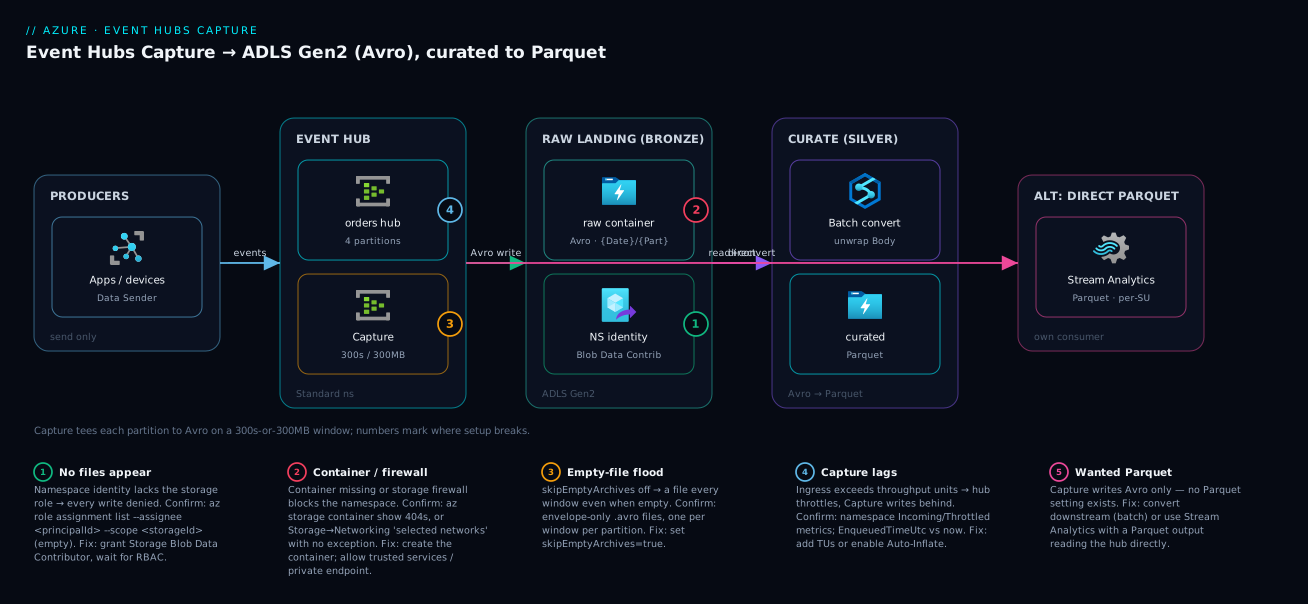
Real-world scenario
Voltway Mobility runs a fleet of 40,000 e-scooters that each emit a telemetry event every 10 seconds — GPS, battery, lock state — into an Event Hub named telemetry on a Standard namespace in Central India, sized at 6 throughput units, averaging ~4 MB/s ingress with evening peaks near 9 MB/s. Real-time consumers drive the live ops map. The data-science team needed the same telemetry as files to train battery-degradation and demand-prediction models, and compliance wanted every raw event retained for 3 years. Their first attempt was a custom .NET consumer writing JSON batches to Blob; within a month it had fallen behind twice during peaks, double-written events after a pod crash, and produced a Blob container with 14 million tiny files that made every Spark read crawl.
They ripped it out and turned on Capture instead. The hub had 16 partitions, so they set a file-name format that put date first for query pruning (telemetry/{Year}/{Month}/{Day}/{PartitionId}/{Hour}{Minute}{Second}), a 300 MB size window and 300 s interval, skipEmptyArchives: true, and pointed it at an ADLS Gen2 container raw. The namespace’s system-assigned identity got Storage Blob Data Contributor on the storage account. At ~4 MB/s across 16 partitions, the size limit tripped on the hot partitions roughly every 75 seconds, producing steady ~300 MB Avro files — a few thousand a day instead of 14 million, and zero falling behind because the platform owns the write and scales with the namespace.
The first surprise was the Avro envelope. The DS team opened a file expecting their telemetry JSON and saw a Body field of opaque bytes — ten minutes of confusion, then the realisation that their JSON payload was inside Body as bytes to decode. They built a nightly Databricks job that read the day’s Avro, decoded Body to JSON, flattened it into typed columns, deduplicated on (deviceId, eventTimestamp), and wrote Parquet partitioned by date into a curated container. That Parquet silver is what the models and BI query; the raw Avro bronze stays immutable for compliance and for re-deriving silver if the transform changes.
The second surprise was cost-shaped, in a good way. Capture turned out to be a flat per-TU fee (well under ₹10,000/month at 6 TUs) plus storage, not the big line item they’d feared; the Databricks conversion runs 40 minutes a night on a small cluster. Total pipeline cost landed around ₹22,000/month all-in — a fraction of the engineering time the custom consumer had burned, with no on-call pages. The lead’s write-up: “Don’t build a consumer to make files. Capture lands Avro for free; spend your effort on the Parquet curation, not the plumbing.” The one mistake to avoid: they left skipEmptyArchives off on a low-traffic test hub and generated 200,000 empty files in a week before noticing — a one-flag fix, but a memorable one.
Advantages and disadvantages
The Capture model — a platform-run tee writing Avro to your lake — has sharp edges in both directions.
| Advantages | Disadvantages |
|---|---|
| Zero compute to run — no consumer, checkpoint store, or servers to scale or patch | Avro only — no native Parquet/JSON/CSV; you convert downstream for analytics |
| No data loss — the platform owns the write and keeps up with the namespace’s throughput | No transform/dedupe/filter — it’s a raw tee; curation is a separate job |
| Per-partition parallelism built in — scales with partition count automatically | Per-partition file fan-out — many partitions × small windows = many files to manage |
| Idempotent + append-only — re-runs never overwrite or destroy data | Envelope wrapping — your payload is in Body as bytes; reading needs a decode step |
| Flat, predictable cost — per-TU Capture fee, not per-message | Empty-file flooding if skipEmptyArchives is left off on quiet hubs |
| Identity-based auth — managed identity + RBAC, no secrets | Storage-account-region coupling & firewall gotchas — must allow the namespace to write |
| Schema-faithful landing — Avro embeds schema, survives drift | Window granularity is coarse — min 60 s; not for sub-second freshness |
When each matters: choose Capture (and accept Avro) whenever you need a durable, hands-off, lossless raw landing of events as files — IoT archival, audit trails, replay sources, ML training corpora. Its disadvantages are mostly deferred work, not blockers: you will write a curation job to get Parquet and to unwrap the envelope, and you must set the empty-file flag and the storage role correctly. If you need Parquet immediately with light transformation and no separate raw layer, that argues for Stream Analytics instead. If you need complex, stateful transforms at ingestion, that argues for Databricks structured streaming. For the common case — “keep everything, cheaply, then curate” — Capture is the right tool and its row-based Avro is a feature, not a bug.
Hands-on lab
You will enable Capture on a real hub, point it at an ADLS Gen2 container with managed-identity auth, validate that Avro files land, and (optionally) stand up a Stream Analytics job that writes Parquet. Everything here uses the cheapest viable SKUs and deletes at the end. Run in Cloud Shell (Bash). Note: the Event Hubs Standard tier (required for Capture; Basic does not support Capture) is not free — but a short-lived namespace costs only a few rupees, and we tear it down.
Part A — Provision (CLI)
Step 1 — Variables and resource group.
RG=rg-ehcapture-lab
LOC=centralindia
NS=evhns-cap-$RANDOM          # globally-unique namespace name
HUB=orders
STG=stehcap$RANDOM            # 3–24 lowercase alphanumerics, globally unique
CONTAINER=raw
az group create -n $RG -l $LOC -o table
Expected: a table row showing the resource group Succeeded.
Step 2 — Create an ADLS Gen2 storage account and a container. The --hns true flag (hierarchical namespace) is what makes it ADLS Gen2.
az storage account create -n $STG -g $RG -l $LOC \
  --sku Standard_LRS --kind StorageV2 --hns true -o table

az storage container create --account-name $STG --name $CONTAINER \
  --auth-mode login -o table
Expected: the account shows "isHnsEnabled": true (verify with az storage account show -n $STG -g $RG --query isHnsEnabled), and "created": true for the container.
Step 3 — Create a Standard Event Hubs namespace with a system-assigned identity. Standard is required for Capture; we attach the identity now so we can grant it the storage role.
az eventhubs namespace create -n $NS -g $RG -l $LOC \
  --sku Standard --mi-system-assigned -o table
Expected: namespace Active. Capture the identity’s principal ID for the role assignment:
PRINCIPAL=$(az eventhubs namespace show -n $NS -g $RG \
  --query identity.principalId -o tsv)
echo "Namespace identity principalId: $PRINCIPAL"
Step 4 — Grant the namespace identity write access to the storage account. This is the step everyone forgets. Assign Storage Blob Data Contributor scoped to the account.
STG_ID=$(az storage account show -n $STG -g $RG --query id -o tsv)
az role assignment create \
  --assignee-object-id "$PRINCIPAL" --assignee-principal-type ServicePrincipal \
  --role "Storage Blob Data Contributor" \
  --scope "$STG_ID" -o table
Expected: a role-assignment row. RBAC can take a minute or two to propagate — if Capture later shows no files, this propagation delay or a missing assignment is the first suspect.
Step 5 — Create the hub WITH Capture enabled, targeting the container. This single command creates the hub and turns Capture on with a date-partitioned format, the empty-file skip, and a 300 s / 300 MB window.
az eventhubs eventhub create -n $HUB -g $RG --namespace-name $NS \
  --partition-count 4 --message-retention 1 \
  --enable-capture true \
  --capture-interval 300 \
  --capture-size-limit 314572800 \
  --skip-empty-archives true \
  --destination-name EventHubArchive.AzureBlockBlob \
  --storage-account "$STG_ID" \
  --blob-container "$CONTAINER" \
  --archive-name-format '{EventHub}/{Year}/{Month}/{Day}/{PartitionId}/{Hour}{Minute}{Second}' \
  -o table
Expected: a hub row. Confirm Capture is on and reading back the settings:
az eventhubs eventhub show -n $HUB -g $RG --namespace-name $NS \
  --query "captureDescription.{enabled:enabled, interval:intervalInSeconds, sizeLimit:sizeLimitInBytes, skipEmpty:skipEmptyArchives, format:destination.properties.archiveNameFormat}" -o json
You should see enabled: true, interval: 300, sizeLimit: 314572800, skipEmpty: true, and your format string.
Part B — Send events and validate
Step 6 — Send test events. Capture flushes on the window, so we send a burst, then wait for the interval. Get a connection string with send rights (for the lab; production uses identity-based producers):
SEND_CS=$(az eventhubs namespace authorization-rule keys list \
  -g $RG --namespace-name $NS -n RootManageSharedAccessKey \
  --query primaryConnectionString -o tsv)
Use a tiny Python sender (Cloud Shell has Python and pip):
pip install azure-eventhub --quiet
cat > send.py <<'PY'
import os, json, asyncio
from azure.eventhub.aio import EventHubProducerClient
from azure.eventhub import EventData

async def main():
    p = EventHubProducerClient.from_connection_string(
        os.environ["SEND_CS"], eventhub_name="orders")
    async with p:
        batch = await p.create_batch()
        for i in range(500):
            batch.add(EventData(json.dumps({"orderId": i, "amount": i*1.5}).encode()))
        await p.send_batch(batch)
    print("sent 500 events")

asyncio.run(main())
PY
SEND_CS="$SEND_CS" python send.py
Expected: sent 500 events.
Step 7 — Wait for the window, then list the captured files. Because we sent far less than 300 MB, the time window governs — wait ~5–6 minutes for the 300 s interval to flush.
# After ~5-6 minutes, list what Capture wrote
az storage fs file list -f $CONTAINER --account-name $STG \
  --auth-mode login --query "[].name" -o tsv
Expected: one or more paths like orders/2026/06/24/0/143000.avro (the exact partition/time vary). If you see nothing after 6+ minutes, jump to the troubleshooting section — the usual cause is the role assignment from Step 4.
Step 8 — Download and inspect one Avro file. Confirm the envelope and that your payload is in Body.
ONE=$(az storage fs file list -f $CONTAINER --account-name $STG \
  --auth-mode login --query "[0].name" -o tsv)
az storage fs file download -f $CONTAINER -p "$ONE" \
  --account-name $STG --auth-mode login -d ./sample.avro

# Read it with the avro tooling
pip install fastavro --quiet
python - <<'PY'
import fastavro
with open("sample.avro","rb") as f:
    for rec in fastavro.reader(f):
        print("keys:", list(rec.keys()))
        print("Body (decoded):", rec["Body"].decode() if rec["Body"] else None)
        break
PY
Expected: keys: ['SequenceNumber', 'Offset', 'EnqueuedTimeUtc', 'SystemProperties', 'Properties', 'Body'], and the decoded Body shows your {"orderId": 0, "amount": 0.0} JSON. This proves the envelope-and-decode behaviour — your payload is in Body as bytes.
Validation checklist. You enabled Capture on a real hub, authenticated with a managed identity (no secrets), landed Avro files in ADLS Gen2 under a date-partitioned path, and confirmed the payload lives in Body. The steps mapped to what each proves:
| Step | What you did | What it proves |
|---|---|---|
| 2 | Created --hns true account |
ADLS Gen2 = hierarchical namespace |
| 4 | Assigned Storage Blob Data Contributor | Capture authenticates via identity + RBAC |
| 5 | Created hub with Capture on | Capture config tokens + window are real |
| 7 | Listed landed files | The window-flush behaviour works end to end |
| 8 | Decoded Body |
Your payload is wrapped in the Avro envelope |
Part C — (Optional) Parquet via Stream Analytics
To see Parquet land, add a Stream Analytics job that reads the hub and writes Parquet to a second container. It bills per-SU while running — keep it brief and stop it as soon as you’ve validated.
Step 9 — Create a Parquet container and an ASA job.
az storage container create --account-name $STG --name curated --auth-mode login -o table

az stream-analytics job create -g $RG -n asa-cap-lab \
  --location $LOC \
  --output-error-policy Drop --out-of-order-policy Drop \
  --order-max-delay 5 --arrival-max-delay 16 -o table
Step 10 — Add the input (hub), output (Parquet), and transformation. The output’s --datasource sets format: Parquet; the query just passes events through.
# Input: the event hub (using the namespace key for the lab)
az stream-analytics input create -g $RG --job-name asa-cap-lab -n ehinput \
  --type Stream \
  --datasource "{\"type\":\"Microsoft.ServiceBus/EventHub\",\"properties\":{\"serviceBusNamespace\":\"$NS\",\"eventHubName\":\"$HUB\",\"sharedAccessPolicyName\":\"RootManageSharedAccessKey\",\"sharedAccessPolicyKey\":\"$(az eventhubs namespace authorization-rule keys list -g $RG --namespace-name $NS -n RootManageSharedAccessKey --query primaryKey -o tsv)\"}}" \
  --serialization '{"type":"Json","properties":{"encoding":"UTF8"}}'

# Output: ADLS Gen2 in Parquet
STG_KEY=$(az storage account keys list -n $STG -g $RG --query "[0].value" -o tsv)
az stream-analytics output create -g $RG --job-name asa-cap-lab -n pqoutput \
  --datasource "{\"type\":\"Microsoft.Storage/Blob\",\"properties\":{\"storageAccounts\":[{\"accountName\":\"$STG\",\"accountKey\":\"$STG_KEY\"}],\"container\":\"curated\",\"pathPattern\":\"orders/{date}\",\"dateFormat\":\"yyyy/MM/dd\"}}" \
  --serialization '{"type":"Parquet","properties":{}}'

# Transformation query (pass-through)
az stream-analytics transformation create -g $RG --job-name asa-cap-lab -n Transformation \
  --streaming-units 3 \
  --transformation-query "SELECT * INTO pqoutput FROM ehinput"
Step 11 — Start the job, send more events, confirm Parquet.
az stream-analytics job start -g $RG -n asa-cap-lab --output-start-mode JobStartTime
SEND_CS="$SEND_CS" python send.py   # send another 500
# Wait ~2-3 minutes, then list Parquet
az storage fs file list -f curated --account-name $STG --auth-mode login --query "[].name" -o tsv
Expected: paths under curated/orders/2026/06/24/... ending in .parquet. Stop the job immediately to halt SU billing:
az stream-analytics job stop -g $RG -n asa-cap-lab
Teardown
Delete the whole resource group — this stops every charge (namespace, storage, ASA):
az group delete -n $RG --yes --no-wait
Cost note. The Standard namespace and ASA job are the only meaningful charges; an hour of this lab is well under ₹100, and deleting the resource group stops everything. ADLS Gen2 storage for a few test files is negligible.
Doing it in Bicep
For production, declare Capture as code. This template provisions the storage account, namespace (system identity), the role assignment that authorises Capture, and the hub with Capture configured — all idempotent.
@description('Location for all resources')
param location string = resourceGroup().location
param namespaceName string
param storageAccountName string
param containerName string = 'raw'
param hubName string = 'orders'

resource stg 'Microsoft.Storage/storageAccounts@2023-05-01' = {
  name: storageAccountName
  location: location
  sku: { name: 'Standard_LRS' }
  kind: 'StorageV2'
  properties: {
    isHnsEnabled: true            // ADLS Gen2
    minimumTlsVersion: 'TLS1_2'
    allowBlobPublicAccess: false
  }
}

resource blobSvc 'Microsoft.Storage/storageAccounts/blobServices@2023-05-01' = {
  parent: stg
  name: 'default'
}

resource container 'Microsoft.Storage/storageAccounts/blobServices/containers@2023-05-01' = {
  parent: blobSvc
  name: containerName
}

resource ns 'Microsoft.EventHub/namespaces@2024-01-01' = {
  name: namespaceName
  location: location
  sku: { name: 'Standard', tier: 'Standard', capacity: 1 }  // capacity = throughput units
  identity: { type: 'SystemAssigned' }
}

// Storage Blob Data Contributor for the namespace identity — the line everyone forgets
resource roleAssign 'Microsoft.Authorization/roleAssignments@2022-04-01' = {
  name: guid(stg.id, ns.id, 'blob-data-contributor')
  scope: stg
  properties: {
    roleDefinitionId: subscriptionResourceId('Microsoft.Authorization/roleDefinitions',
      'ba92f5b4-2d11-453d-a403-e96b0029c9fe')  // Storage Blob Data Contributor
    principalId: ns.identity.principalId
    principalType: 'ServicePrincipal'
  }
}

resource hub 'Microsoft.EventHub/namespaces/eventhubs@2024-01-01' = {
  parent: ns
  name: hubName
  properties: {
    partitionCount: 4
    messageRetentionInDays: 1
    captureDescription: {
      enabled: true
      encoding: 'Avro'              // the only valid value
      intervalInSeconds: 300        // 60–900
      sizeLimitInBytes: 314572800   // ~300 MB (10 MB–500 MB)
      skipEmptyArchives: true       // suppress empty-window files
      destination: {
        name: 'EventHubArchive.AzureBlockBlob'
        properties: {
          storageAccountResourceId: stg.id
          blobContainer: containerName
          archiveNameFormat: '{EventHub}/{Year}/{Month}/{Day}/{PartitionId}/{Hour}{Minute}{Second}'
        }
      }
    }
  }
  dependsOn: [ roleAssign, container ]   // role + container must exist before Capture writes
}
Deploy and validate:
az deployment group create -g $RG \
  --template-file capture.bicep \
  --parameters namespaceName=$NS storageAccountName=$STG
The dependsOn matters: Capture must not be created before the container exists and the role is assigned, or the first writes are denied.
Common mistakes & troubleshooting
The failure modes are few but each has a precise tell. Scan the table, then read the detail for your row.
| # | Symptom | Root cause | Confirm (exact cmd / portal path) | Fix |
|---|---|---|---|---|
| 1 | Capture is “on” but no files appear | Namespace identity lacks Storage Blob Data Contributor | az role assignment list --assignee <principalId> --scope <storageId> returns empty |
Assign the role; wait for RBAC propagation |
| 2 | No files; role is assigned | Storage firewall blocks the namespace | Storage → Networking shows “selected networks”, no exception | Allow trusted Microsoft services / private endpoint |
| 3 | Save fails: “container not found” | The container doesn’t exist yet | az storage container show -n <c> --account-name <s> 404s |
Create the container before enabling Capture |
| 4 | Lake floods with tiny empty files | skipEmptyArchives left false on a quiet hub |
Files are envelope-only, one per window per partition | Set --skip-empty-archives true |
| 5 | Files land but far behind real time | Ingress exceeds throughput units; Capture lags with it | Namespace metrics: Incoming/Throttled; EnqueuedTime vs now | Add TUs / enable auto-inflate; or fewer events |
| 6 | “Capture option is greyed out / unsupported” | Namespace is Basic tier | az eventhubs namespace show --query sku.tier = Basic |
Use Standard+ (Basic has no Capture) |
| 7 | Data “looks corrupted” — Body is bytes/base64 |
That’s the Avro envelope; payload is in Body |
Read a file: Body is bytes, decode it |
Decode Body as your original format (e.g. UTF-8 JSON) |
| 8 | Too many files, each tiny, queries slow | Small size window + many partitions + low interval | Count files per hour; each well under the size limit | Raise size/interval; consider fewer partitions |
| 9 | Files in the wrong place / colliding | Bad archiveNameFormat (missing date or {PartitionId}) |
Read back captureDescription...archiveNameFormat |
Include {PartitionId} + a date token |
| 10 | Parquet expected, only Avro lands | Capture only writes Avro; no Parquet setting exists | encoding is Avro and unchangeable |
Convert downstream, or use Stream Analytics |
1. Capture on, no files — the role. By far the most common. The config saves cleanly, but every blob write is denied because the namespace’s managed identity has no data-plane permission. Confirm: az role assignment list --assignee "$PRINCIPAL" --scope "$STG_ID" -o table — if it’s empty, that’s it. Fix: az role assignment create --assignee-object-id "$PRINCIPAL" --assignee-principal-type ServicePrincipal --role "Storage Blob Data Contributor" --scope "$STG_ID", then wait 1–5 minutes for RBAC to propagate before expecting files.
2. No files, role present — the firewall. If the storage account is locked to “selected networks,” the namespace can’t reach it. Storage → Networking shows the rule. Fix: add the namespace’s subnet/private endpoint, or enable “Allow Azure services on the trusted services list to access this storage account.” The symptom is identical to a missing role, so always check both.
3. Container not found. Capture does not create the container; it must pre-exist. Create it (az storage container create ... --auth-mode login) before or alongside enabling Capture, and in Bicep make the hub dependsOn the container.
4. Empty-file flood. With skipEmptyArchives: false (the default), every window writes a file even when no events arrived. On a quiet hub that is hundreds to thousands of empty files a day per partition. Confirm by opening a few — they have the envelope but zero records. Fix: set --skip-empty-archives true (or skipEmptyArchives: true in Bicep). If you already have a flood, a storage lifecycle rule can clean up old empties, but stop the source first.
5. Capture lags behind real time. Capture keeps up with the namespace’s provisioned throughput, but if your ingress exceeds the TUs, the hub throttles producers and Capture necessarily writes behind. Confirm via namespace metrics — Incoming Bytes, Throttled Requests, and compare a recent file’s EnqueuedTimeUtc to now. Fix: add throughput units (or enable Auto-Inflate to raise the TU ceiling automatically), or reduce ingress. Capture is not the bottleneck; the TU cap is.
6. Capture unsupported — Basic tier. Basic namespaces do not support Capture; the option is absent/greyed. Confirm: az eventhubs namespace show -n $NS -g $RG --query sku.tier returns Basic. Fix: use Standard, Premium, or Dedicated. (You cannot in-place upgrade Basic→Standard; you create a Standard namespace.)
7. Body looks like garbage. Reading the Avro and seeing Body as bytes/base64 is correct — Capture wraps your event in the envelope and your real payload is the Body byte array. Decode it as whatever you produced (e.g. rec["Body"].decode() for UTF-8 JSON). This is not corruption; it is the documented envelope.
8. Too many files. Many partitions multiplied by a small size window and a short interval yields a large file count, which slows analytical reads (the small-file problem). Confirm by counting files per hour and noting they’re each far below the size limit. Fix: raise the size limit and interval so files get bigger; if a hub is over-partitioned for its throughput, fewer partitions also means fewer streams.
9. Wrong/colliding paths. If the archiveNameFormat omits {PartitionId} or any date token, files from different partitions/windows can collide or be denied (the format is validated). Read it back: ... --query "captureDescription.destination.properties.archiveNameFormat". Fix: ensure the format includes {PartitionId} and at least one date token.
10. Only Avro, wanted Parquet. There is no setting to make Capture emit Parquet — encoding is Avro and that’s the only value. Fix the expectation: land Avro and convert downstream (Spark/ADF), or use Stream Analytics with a Parquet output for that path.
Best practices
- Always land as Avro via Capture, curate to Parquet downstream. Avro is the right bronze format (row-based, schema-embedded, append-friendly); Parquet is the right query format. Don’t fight Capture’s Avro — convert once, in a curation job.
- Set
skipEmptyArchives: trueon every hub. Empty-file flooding is pure junk that slows downstream reads and inflates file counts. There is almost never a reason to keep empty-window files. - Use a managed identity, never a connection string. Grant the namespace’s identity Storage Blob Data Contributor scoped as tightly as practical (account or container). No secrets to rotate, full audit trail.
- Put a date token early in the file-name format (
{Year}/{Month}/{Day}/...) so query engines prune by date folder — it makes “last 7 days” queries cheap. - Bias the window toward larger files. Raise the size/interval unless you need low latency; thousands of ~300 MB files read far faster than millions of 4 KB ones.
- Right-size partitions to throughput, not to “more is better.” Each partition is a Capture file stream; over-partitioning multiplies small files. Size partitions for your ingress and consumer parallelism.
- Enable Auto-Inflate (Standard) so Capture never lags from TU starvation. Let the namespace raise the TU ceiling automatically under load rather than throttling and falling behind.
- Decode
Bodyin your curation job and flatten the envelope into typed columns — that’s the natural place to also dedupe (on a business key) and write Parquet. - Keep the raw Avro immutable and retained for compliance and re-derivation; never transform in place. The silver Parquet is disposable and re-buildable from bronze.
- Use ADLS Gen2 (hierarchical namespace), not flat Blob, for the destination — real directories make date-partitioned layouts and Synapse/Databricks input efficient.
- Monitor capture lag and storage write failures — alert on
EnqueuedTime-to-now drift and on storage 403s, so a broken role or firewall change surfaces immediately, not at the next batch run.
Security notes
- Identity over secrets. Capture should authenticate to storage via the namespace’s managed identity holding Storage Blob Data Contributor — not an account key or SAS embedded in config. Scope the role to the storage account or, better, the specific container.
- Lock the storage account’s network. Put the destination behind a firewall (“selected networks”) with a private endpoint or the trusted-services exception so only the namespace (and your curation compute) can reach it — the lake is your raw data of record.
- Encrypt and govern the lake. ADLS Gen2 is encrypted at rest by default; for sensitive event data, consider customer-managed keys and POSIX ACLs so only the curation identities can read raw bronze.
- Don’t over-grant the producers. Producers need only send rights on the hub (a scoped SAS or RBAC
Azure Event Hubs Data Sender), never management or storage access. Keep produce, capture and consume identities separate. - Treat raw events as potentially sensitive. Telemetry and clickstream often contain PII; apply retention/lifecycle policies, restrict who can read the
rawcontainer, and mask/redact during curation, not in the bronze layer. - Audit the role and firewall as code. Manage the role assignment and storage network rules in Bicep/Terraform and review changes in PRs — a quiet change to either silently breaks Capture or, worse, opens the lake.
The security controls that also keep Capture working — secure and functional pull the same way here:
| Control | Mechanism | Secures against | Also prevents |
|---|---|---|---|
| Managed identity + RBAC | identity + Storage Blob Data Contributor |
Key/SAS leakage | Secret-rotation breaking Capture writes |
| Storage firewall + trusted services | Storage networking rules | Public access to raw data | Mis-scoped firewall blocking Capture (when allow-listed right) |
| Scoped producer rights | Azure Event Hubs Data Sender |
Producers over-permissioned | Accidental management actions from app creds |
| Lake ACLs / CMK | ADLS Gen2 ACLs, customer-managed keys | Unauthorised raw-data reads | Broad reader access to sensitive bronze |
Cost & sizing
What drives the bill, and how to size it:
- Event Hubs tier + throughput units / processing units dominate the streaming cost. On Standard you pay per throughput unit (each ≈ 1 MB/s ingress, 2 MB/s egress) plus a per-million-events ingress charge. Capture itself adds a flat per-TU hourly fee — it is not per-message, so its marginal cost is predictable and small relative to running your own consumer fleet. Premium/Dedicated price by processing units / capacity units instead and include Capture.
- Storage is cheap and tier-able. Avro lands in your ADLS Gen2 account at standard blob rates; move older bronze to Cool/Cold/Archive tiers with lifecycle rules to cut long-term cost — see Blob Access Tiers Explained: Hot, Cool, Cold and Archive Cost Trade-offs in Practice. Write/transaction costs scale with file count — another reason to favour larger files.
- Curation compute is its own line. A nightly Spark/Databricks or Data Factory job to produce Parquet costs cluster/activity time; a small cluster for tens of minutes a night is modest. Stream Analytics (if you take the Parquet-direct path) bills per Streaming Unit hour continuously while the job runs — size SUs to throughput and remember it runs 24×7.
- The free-tier reality: Event Hubs has no meaningful always-free tier for Capture (Basic doesn’t support it, Standard is paid), but a short namespace for testing is rupees, not thousands. Storage has a small free grant; ASA does not.
A rough monthly picture for a mid-size telemetry hub (~4 MB/s, 6 TUs, Standard, Central India):
| Cost driver | What you pay for | Rough INR / month | Notes |
|---|---|---|---|
| Standard namespace, 6 TUs | Throughput units (1 MB/s each) | ~₹10,000–14,000 | Plus per-million-events ingress |
| Capture fee | Flat per-TU Capture charge | ~₹5,000–8,000 | Per-TU, not per-message |
| ADLS Gen2 storage | Avro bronze, growing | ~₹2,000–6,000 | Tier old data to Cool/Archive |
| Curation (Databricks nightly) | Small cluster ~40 min/night | ~₹3,000–6,000 | Produces Parquet silver |
| (Optional) Stream Analytics | Per-SU hour, 24×7 | ~₹15,000+ at 3 SU | Only if taking the ASA Parquet path |
The headline: a Capture-based pipeline (namespace + Capture + storage + a nightly curation job) lands in the low tens of thousands of rupees for a real telemetry workload, and the avoided cost — no consumer fleet to build, run, scale, page on — is usually larger than the bill. The most expensive mistake is leaving a high-SU Stream Analytics job running 24×7 when a nightly batch convert would do; the second is over-provisioning TUs you don’t need (use Auto-Inflate to scale up only under load).
Interview & exam questions
1. What does Event Hubs Capture do, and what compute do you run for it? Capture automatically writes the events flowing through a hub to Blob/ADLS Gen2 as windowed Avro files, per partition, on a time-or-size window — with no compute you run or manage. It is a platform feature attached to the hub, not a consumer group you operate. Maps to DP-203 (Data Engineering).
2. What format does Capture write, and how do you get Parquet? Capture writes Apache Avro only — there is no Parquet/JSON/CSV setting. To get Parquet, you either convert the Avro downstream (Spark/Data Factory) or use Azure Stream Analytics with a Parquet output reading the hub directly. Avro is row-based (good landing); Parquet is columnar (good for queries).
3. How does Capture decide when to write a file? It closes the current file when either the time interval (60–900 s, default 300) or the size limit (10–500 MB, default ~300 MB) is reached — whichever trips first. Hot hubs hit size first (frequent ~300 MB files); quiet hubs hit time first (a file every N minutes).
4. A user enabled Capture but no files appear. What’s the most likely cause and how do you confirm? The namespace’s managed identity lacks Storage Blob Data Contributor on the destination account (or the storage firewall blocks the namespace). Confirm with az role assignment list --assignee <principalId> --scope <storageId> (empty = the cause) and check storage Networking. Fix the role/firewall.
5. How is your event payload represented in a Capture Avro file? Capture wraps each event in a fixed envelope — SequenceNumber, Offset, EnqueuedTimeUtc, SystemProperties, Properties, and Body. Your actual payload is the Body byte array; reading it requires decoding Body as whatever you originally sent (e.g. UTF-8 JSON). Seeing Body as bytes is correct, not corruption.
6. Why might a low-traffic hub flood the lake with files, and how do you stop it? With skipEmptyArchives: false (default), Capture writes a file every window even when no events arrived, so a quiet hub produces many empty envelope-only files. Set skipEmptyArchives: true (“do not emit empty files”) to suppress them.
7. Which Event Hubs tier is required for Capture? Standard, Premium, or Dedicated. Basic does not support Capture. On Standard, Capture is a flat per-throughput-unit add-on fee; Premium/Dedicated include it and price by processing/capacity units.
8. What must the file-name format string contain, and why? It must include {PartitionId} and at least one date token ({Year}/{Month}/{Day}/etc.) so files from different partitions and windows don’t collide. You can re-order tokens — putting the date first enables efficient partition pruning by query engines.
9. Capture is keeping up at rest but falls behind under load. Why? Capture keeps pace with the namespace’s provisioned throughput; if ingress exceeds the throughput units, the hub throttles and Capture necessarily writes behind. The fix is to add TUs or enable Auto-Inflate — Capture isn’t the bottleneck, the TU cap is.
10. When would you choose Stream Analytics over Capture, or both? Choose ASA → Parquet when you want Parquet directly with light transformation and accept per-SU cost and no raw Avro layer. Choose Capture for a cheap, hands-off, lossless raw Avro landing. Often you run Capture for bronze and a batch convert (or ASA) for Parquet silver — keeping the immutable raw layer.
11. How does Capture authenticate to storage in a modern, secure setup? Via the namespace’s managed identity (system- or user-assigned) granted Storage Blob Data Contributor on the destination — no connection strings or SAS. This is rotatable, secret-free, and auditable. Touches DP-203 and AZ-500 (secure data).
12. Does re-running or overlapping Capture risk overwriting data? No — Capture is append-only and idempotent to a given blob path: if a target blob exists it appends rather than overwrites, so re-runs and retries never destroy landed data. This is part of why it’s safer than a hand-rolled consumer.
These map to DP-203 (Azure Data Engineer Associate) — ingest and process data, design a storage layer — primarily, with the identity/security angle touching AZ-500. A compact cert-mapping:
| Question theme | Primary cert | Objective area |
|---|---|---|
| Capture mechanics, Avro/Parquet, windows | DP-203 | Design & implement data ingestion |
| File layout, partition pruning | DP-203 | Design a data storage structure |
| Managed identity + RBAC to storage | AZ-500 / DP-203 | Secure data; manage identities |
| Stream Analytics Parquet output | DP-203 | Implement stream processing |
Quick check
- What is the only file format Event Hubs Capture writes, and what do you do if your lakehouse standard is Parquet?
- Capture closes a file when which condition is met — and what are the default values?
- You enabled Capture but no files appear in the container. Name the two most likely causes and the command/blade to confirm each.
- After reading a captured Avro file, your event payload shows up as bytes. Which field is it in, and is this a bug?
- A quiet hub is generating thousands of tiny empty files a day. Which single setting fixes it?
Answers
- Apache Avro only — there is no Parquet setting on Capture. To get Parquet, convert the Avro downstream (Spark/Data Factory) or use Azure Stream Analytics with a Parquet output reading the hub directly. Avro is the row-based landing format; Parquet is the columnar query format.
- Capture closes a file when either the time interval (default 300 s, range 60–900) or the size limit (default ~300 MB, range 10–500 MB) is reached — whichever trips first.
- (a) The namespace’s managed identity lacks Storage Blob Data Contributor — confirm with
az role assignment list --assignee <principalId> --scope <storageId>(empty = the cause). (b) The storage firewall blocks the namespace — check Storage → Networking. Fix the role or add a trusted-services/private-endpoint exception. - It’s in the
Bodyfield, as a byte array — and no, this is not a bug. Capture wraps every event in an envelope (SequenceNumber,Offset,EnqueuedTimeUtc,SystemProperties,Properties,Body); your payload is theBodybytes and you decode it as whatever you sent (e.g. UTF-8 JSON). - Set
skipEmptyArchives: true(“Do not emit empty files when no events occur during the Capture time window”). By default Capture writes a file every window even when empty.
Glossary
- Event Hubs Capture — the built-in feature that automatically writes a hub’s events to Blob/ADLS Gen2 as windowed Avro files, per partition, with no compute you manage.
- Namespace — the Event Hubs billing/networking boundary containing one or more hubs; it holds the managed identity Capture uses.
- Event hub — a single topic with a fixed number of partitions; the source stream Capture tees.
- Partition — an ordered shard of a hub; Capture writes one independent file stream per partition.
- Capture interval (window) — the maximum time (60–900 s, default 300) before Capture flushes the current file.
- Capture size limit — the maximum bytes (10–500 MB, default ~300 MB) before Capture flushes the current file; whichever of time/size trips first wins.
- File-name (archive) format — the path template with substitution tokens (
{Namespace},{EventHub},{PartitionId},{Year}…{Second}) controlling where/how files are named; must include{PartitionId}and a date token. skipEmptyArchives— the “do not emit empty files” option; whentrue, empty windows write nothing.- Apache Avro — the row-based, schema-embedded binary format Capture writes; ideal for landing/streaming, survives schema drift.
- Apache Parquet — a columnar, compressed format ideal for analytical queries; not produced by Capture — you curate to it.
- Avro envelope — the fixed wrapper schema (
SequenceNumber,Offset,EnqueuedTimeUtc,SystemProperties,Properties,Body) around each captured event; the payload is inBodyas bytes. - ADLS Gen2 — a storage account with hierarchical namespace enabled, giving real directories; the recommended Capture destination for a lakehouse.
- Throughput unit (TU) — the Standard-tier capacity unit (≈1 MB/s ingress, 2 MB/s egress); ingress beyond the TU cap throttles and makes Capture lag.
- Auto-Inflate — the Standard feature that automatically raises the TU ceiling under load so the hub (and Capture) don’t fall behind.
- Storage Blob Data Contributor — the RBAC data-plane role (
ba92f5b4-2d11-453d-a403-e96b0029c9fe) the namespace identity needs to write Capture files. - Stream Analytics (ASA) — a managed stream-processing service that can read a hub and write Parquet (or JSON/CSV) directly, with transformation, billed per Streaming Unit.
- Bronze / silver layer — the medallion lakehouse pattern: raw landed data (bronze, here the Avro) vs cleaned/curated data (silver, here the Parquet).
Next steps
You can now land events durably as Avro and curate them to Parquet. Build outward:
- Next: Designing a Medallion Lakehouse on Data Lake Gen2: Bronze, Silver and Gold Zone Layout — structure the bronze/silver/gold zones your Capture output feeds.
- Related: Event Hubs Fundamentals: Partitions, Consumer Groups, Checkpoints and Offsets for Beginners — partitions and offsets shape your Capture layout.
- Related: Build Your First Data Factory Pipeline: Copy Data from Blob Storage into Azure SQL — the batch processing that consumes Capture files.
- Related: Stream Analytics Falling Behind: Watermark Delay, Late-Arriving Events and SU% Backpressure — operate the ASA Parquet path when it lags.
- Related: Blob Access Tiers Explained: Hot, Cool, Cold and Archive Cost Trade-offs in Practice — tier your growing Avro bronze to control storage cost.
- Related: Managed Identities Demystified: System vs User-Assigned and When to Use Each — the identity model that authorises Capture to write.