Most Azure exam failures are not knowledge failures — they are readiness failures. People who have done the work still walk out short because they never practised the question format, never mapped their revision to the official objective weightings, and never learned to read the qualifier word (“most cost-effective”, “least administrative effort”) that quietly flips the right answer. This lesson fixes that. It is a complete, free exam-prep kit: the objective checklists with weightings, a bank of realistic scenario questions with fully explained answers — including why each wrong option is wrong — the authentic question types you will actually face, a one-page cheat sheet per exam, the tips that move scores, a study-plan template, and flashcards for last-mile recall.
It is the final lesson of the Azure Zero-to-Hero course. The companion lesson, Interview & Certification Prep, trains you to talk through open-ended design questions; this one trains you to pass the test — the timed, multiple-choice, case-study reality of a Pearson VUE exam. Use them together: the interview lesson builds judgement, this kit builds exam reflexes.
Learning objectives
By the end of this lesson you can:
- Recite the objective domains and their weightings for AZ-900, AZ-104 and AZ-305, and use them to prioritise revision.
- Recognise and handle every authentic Azure question type — single-answer, multi-response, hotspot, drag-and-drop, build-list, and case studies.
- Work a bank of scenario practice questions, choosing the right answer and articulating why each distractor fails.
- Use a one-page cheat sheet per exam to cram the highest-yield facts the night before.
- Follow a repeatable learn → lab → drill → mock → cram study plan, and self-assess with flashcards.
- Apply exam-day tactics — pacing, the review-flag, eliminate-don’t-agonise, and the qualifier-word trap.
Prerequisites & where this fits
This is Lesson 17 — the capstone of Module 10 (Resilience, Cost & Capstone) and the very end of the Azure Zero-to-Hero path. It assumes you have worked through the course (or have equivalent hands-on Azure experience) — it is a readiness layer, not a teaching-from-scratch layer. Where a question reveals a gap, the explanations point you back to the lesson that owns the topic. You need only a free Azure account to keep practising in, a quiet 20–30 minutes to read, and ideally a printed copy of the cheat sheets for the final week.
How Microsoft exams actually work
Before any content, internalise the rules of the game — getting these wrong costs marks no amount of knowledge can recover.
- Pass score is 700 out of 1000. This is a scaled score, not a percentage: it does not mean “70% correct”. Questions are weighted, some are unscored trial items, and the scaling smooths difficulty across exam versions. Practically, aim to be consistently above ~80% on Microsoft’s official practice assessment before you book — that gives headroom over the scaled 700.
- You will not be told which questions are unscored. Microsoft seeds new trial questions that don’t count. Answer everything as if it counts; never burn time deciding whether a question “looks real”.
- Question count and time vary (typically 40–60 questions in 100–120 minutes for the associate/expert exams; AZ-900 is shorter). You always have enough time if you don’t stall — budget roughly 1.5–2 minutes per question and flag anything slower.
- Case studies appear and lock. When an exam opens with a case study, you usually cannot return to that section once you leave it. Read the requirements tab fully and answer all its questions before moving on.
- Some sections disable review. A handful of exams place a small “you cannot go back” block at the start — answer those deliberately the first time.
- Exams are role-based and refreshed continuously. Microsoft updates the live exam against the published Skills measured outline without renumbering it. Always download the current outline for your exam date — weightings drift by a few points over time. The figures below reflect the outlines current as of mid-2026.
Retirement watch (mid-2026): AZ-204 (Azure Developer Associate) retires in July 2026 and is being consolidated into the developer learning paths — if you are mid-prep for AZ-204, check Microsoft Learn for its successor before booking. AZ-900, AZ-104 and AZ-305 are stable. Specialty exams shift occasionally (the data exams in particular have renumbered in the past), so confirm the code on the official page before paying.
The exam ladder at a glance
This kit covers the main trunk in depth and touches the specialties. The diagram below is the map: follow the trunk AZ-900 → AZ-104 → AZ-305, with specialty exams branching off the AZ-104 level.
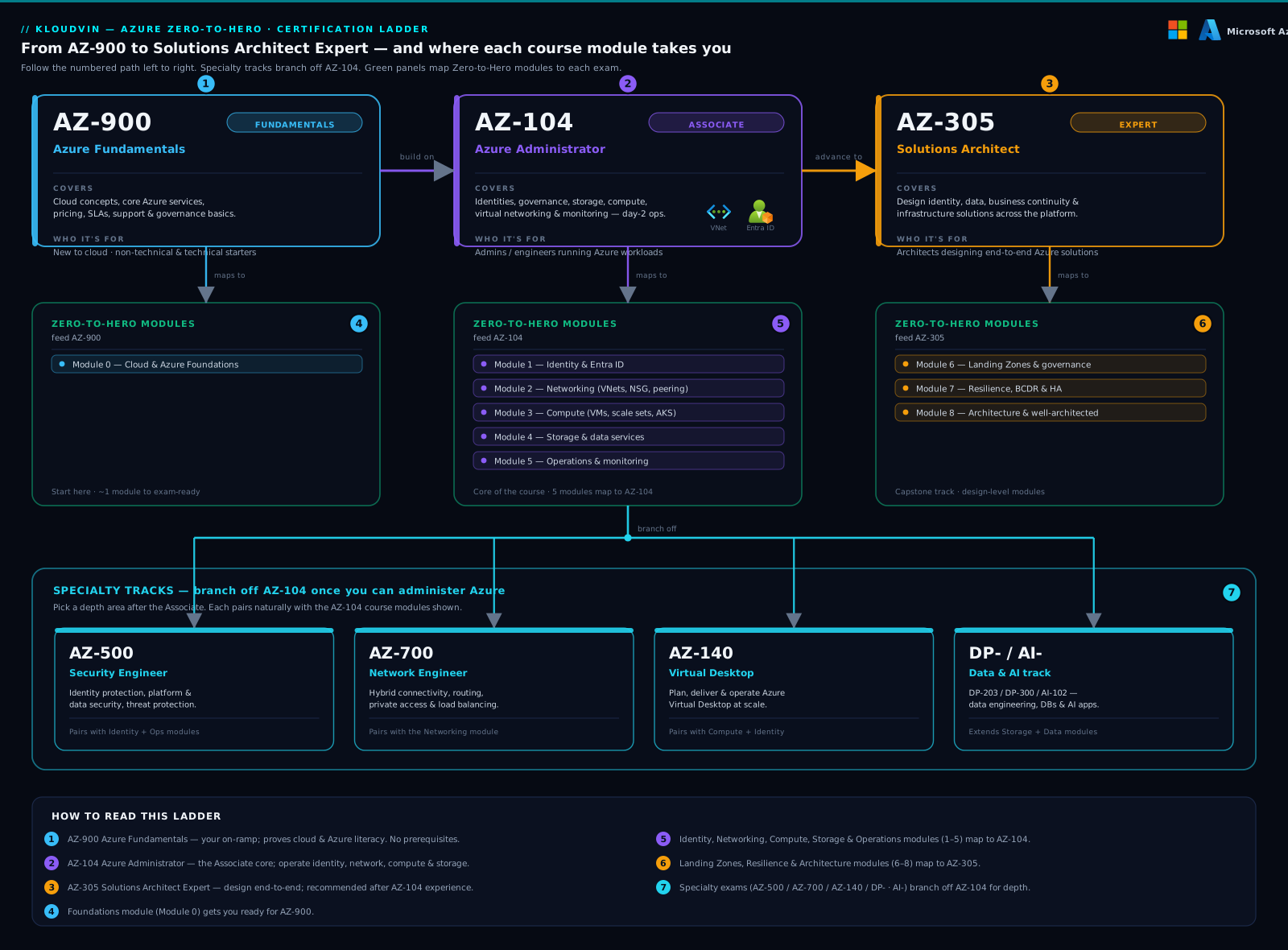
The trunk is a progression: each rung assumes the operational knowledge of the one below, even where it isn’t a formal prerequisite. AZ-900 proves literacy, AZ-104 proves you can operate Azure, AZ-305 proves you can design it. The specialties (AZ-500 security, AZ-700 networking, the data/AI track) are deeper, not higher — pick the one your day job pulls you toward.
| Exam | Certification | Level | Pass | Format highlights |
|---|---|---|---|---|
| AZ-900 | Azure Fundamentals | Foundational | 700/1000 | No case studies; mostly single/multi-answer; concept recall. |
| AZ-104 | Azure Administrator Associate | Associate | 700/1000 | Hotspot, drag-drop, case studies; heavy “how do I do X”. |
| AZ-305 | Azure Solutions Architect Expert | Expert | 700/1000 | Case-study heavy; “design/recommend given constraints”. |
| AZ-204 | Azure Developer Associate (retires Jul 2026) | Associate | 700/1000 | Code-adjacent; SDK/CLI; build-list ordering. |
| AZ-500 | Azure Security Engineer | Associate | 700/1000 | Hotspot/case studies on identity, platform, data security. |
| AZ-700 | Azure Network Engineer | Associate | 700/1000 | Routing/connectivity hotspots; private-access scenarios. |
Objective-domain checklists with weightings
Targeted revision beats re-reading. For each exam, the table gives the official domains and their weighting band (use it to allocate study time), followed by a tick-list of the highest-yield facts within that domain. Print these and RAG-rate every line — red (don’t know), amber (shaky), green (solid) — then spend your time on reds.
AZ-900 — Azure Fundamentals
| Domain | Weighting | You must be able to… |
|---|---|---|
| Cloud concepts | 25–30% | Define IaaS/PaaS/SaaS and who manages what; CapEx vs OpEx and consumption pricing; elasticity/scalability/HA/agility; public/private/hybrid models; the shared-responsibility split. |
| Azure architecture & services | 35–40% | The account model (tenant → management group → subscription → resource group → resource); regions, region pairs, availability zones; core compute (VMs, App Service, Functions, AKS, ACI), networking (VNet, VPN/ExpressRoute), storage tiers/redundancy, databases (Azure SQL, Cosmos DB); ARM/IaC; Cloud Shell/CLI/PowerShell. |
| Management & governance | 30–35% | Cost tools (Pricing/TCO calculators, Cost Management, budgets, tags); Azure Policy, resource locks, Blueprints; governance via management groups; monitoring (Azure Monitor, Service Health, Advisor); SLAs and service lifecycle. |
Checklist highlights: ☐ pick a region by residency, latency, service availability, price, pairs ☐ resource lock types (CanNotDelete vs ReadOnly) ☐ support plans (Basic/Developer/Standard/Professional Direct) ☐ composite SLA maths for chained services ☐ storage redundancy (LRS/ZRS/GRS/GZRS) at a concept level.
AZ-104 — Azure Administrator
| Domain | Weighting | You must be able to… |
|---|---|---|
| Identities & governance | 20–25% | Entra ID users/groups (assigned vs dynamic), bulk ops, RBAC (built-in roles, custom roles, scope), Azure Policy (definitions/initiatives/effects, remediation), management groups, resource locks and tags, subscription/cost governance. |
| Storage | 15–20% | Storage accounts (kinds, redundancy LRS/ZRS/GRS/RA-GRS/GZRS), access tiers (hot/cool/cold/archive), SAS vs keys vs Entra, lifecycle management, blob versioning/soft delete, Azure Files + File Sync, AzCopy/Storage Explorer, firewall + private endpoints. |
| Compute | 20–25% | VMs (sizing, availability sets/zones/VMSS, disks, extensions, custom data), images & Compute Gallery, App Service plans/slots, containers (ACI, Container Apps, AKS basics), Bicep/ARM deployment. |
| Virtual networking | 15–20% | VNets/subnets, NSGs/ASGs, peering (non-transitive), UDR/route tables, Azure DNS + Private DNS, public IP/Load Balancer/Application Gateway basics, VPN Gateway/ExpressRoute concepts, Network Watcher, Bastion. |
| Monitor & maintain | 10–15% | Azure Monitor (metrics, logs, Log Analytics + KQL), alerts + action groups, Network Watcher diagnostics, Backup/ASR, Update Manager. |
Checklist highlights: ☐ effective NSG rules and rule priority ☐ why peering is non-transitive (hub-spoke isolation) ☐ deallocate vs stop billing difference ☐ availability set 99.95% vs zones 99.99% ☐ GRS read access requires RA-GRS ☐ SAS scope and revocation.
AZ-305 — Azure Solutions Architect Expert
| Domain | Weighting | You must be able to… |
|---|---|---|
| Identity, governance & monitoring | 25–30% | Design Entra ID/B2B/B2C, Conditional Access, PIM, RBAC at scale, management-group/Policy governance, landing zones (CAF), logging/monitoring strategy, cost governance. |
| Data storage | 20–25% | Choose between relational (Azure SQL, PostgreSQL/MySQL Flexible) and non-relational (Cosmos DB, Table, Blob); Cosmos consistency levels and partitioning; data integration (Data Factory/Synapse/Fabric); encryption/CMK; archival. |
| Business continuity | 15–20% | Design for RTO/RPO: zones vs region pairs, Backup, Site Recovery, geo-replication (SQL active geo, Cosmos multi-region writes, GZRS storage), failover patterns. |
| Infrastructure | 25–30% | Choose compute (VM/VMSS, App Service, Functions, AKS, Container Apps, Batch), messaging (Service Bus, Event Grid, Event Hubs, Storage Queues), networking topology (hub-spoke, Virtual WAN, Front Door, App Gateway, Private Link), and IaC strategy. |
Checklist highlights: ☐ Cosmos consistency ladder (strong → bounded staleness → session → consistent-prefix → eventual) ☐ Service Bus vs Event Grid vs Event Hubs (commands vs events vs streams) ☐ Front Door vs App Gateway vs Traffic Manager vs Load Balancer (global L7 vs regional L7 vs DNS vs regional L4) ☐ active-active vs active-passive DR and the RTO/RPO each yields ☐ managed identity over secrets, everywhere.
Touch points — AZ-204, AZ-500, AZ-700
| Exam | Top three things over-tested |
|---|---|
| AZ-204 (retires Jul 2026) | Compute choice (Functions triggers/bindings, App Service, Container Apps); Cosmos SDK + consistency + partitioning; secure config via Key Vault + managed identity, plus App Configuration, Service Bus/Event Grid, and Blob SDK. |
| AZ-500 | Conditional Access + PIM + Identity Protection; Defender for Cloud (secure score, plans) and Sentinel (analytics rules, KQL hunting); data security — Key Vault, CMK, encryption, Storage/SQL protection. |
| AZ-700 | Hybrid connectivity (VPN active-active, ExpressRoute peerings/FastPath); routing (UDR, BGP, forced tunnelling); private access (Private Link/Endpoint + Private DNS) and load balancing choice. |
Authentic question types — and how to beat each
You lose marks to unfamiliar formats even when you know the content. Here is every type Microsoft uses, with a worked tactic.
| Type | What it looks like | Tactic |
|---|---|---|
| Single-answer multiple choice | Stem + 4 options, pick one. | Eliminate the two clearly wrong, then decide on the qualifier word. |
| Multi-response | “Select two/three” — partial credit is not given. | Count the required selections; an over- or under-selection is wrong. Verify each chosen option independently. |
| Hotspot | A screenshot or table with drop-downs; choose the value for each. | Each row scores independently — answer the rows you’re sure of first; never leave a drop-down blank. |
| Drag-and-drop | Drag items from a left list to targets on the right; items may be reused or not. | Read whether items are single-use. Place certainties first; use elimination for the rest. |
| Build-list / ordering | Arrange steps in the correct sequence. | Anchor the obvious first and last steps, then order the middle by dependency. |
| Case study | A multi-tab business scenario with 5–7 linked questions. | Read the requirements/constraints tab first; note every hard constraint (cost, RTO, “least privilege”); answer all questions before leaving — you can’t return. |
| Active-screen / lab-style | (Some exams) perform a config in a simulated portal. | Know the exact blade path; do precisely what’s asked, nothing extra. |
| Yes/No series | The same scenario, several “Does this meet the goal? Yes/No” statements. | Evaluate each statement independently — earlier answers don’t constrain later ones. |
A hotspot described in text below looks like this: “For each setting, select the correct value from the drop-down.”
Setting Options Storage redundancy for an EU app needing region-failover read access LRS · ZRS · RA-GRS · GZRS Minimum role to assign RBAC to others without full ownership Contributor · User Access Administrator · Reader · Owner A drag-and-drop / build-list described in text looks like this: “Order the steps to grant a Function access to Key Vault without storing credentials.”
- Enable a system-assigned managed identity on the Function.
- Grant that identity the Key Vault Secrets User role on the vault.
- Reference the secret via the Key Vault SDK / app-setting reference at runtime.
The practice-question bank (with explained answers)
Work each question before reading the explanation. For every item: the correct answer, why it’s right, and why each distractor is wrong — distractor analysis is where exam skill is actually built. Questions are grouped by exam and tagged by domain.
AZ-900 — Fundamentals
Q1 (Cloud concepts). A company wants to move email to a fully managed service where Microsoft handles the application, runtime, OS and hardware, and the company only manages users and data. Which service model is this? A) IaaS B) PaaS C) SaaS D) On-premises
Answer: C — SaaS. The provider manages everything up to and including the application; the customer manages only their data and user access (e.g. Microsoft 365). Why the distractors fail: A (IaaS) would still leave the OS and runtime to the customer (e.g. a VM) — too much management. B (PaaS) hands you a platform to deploy your app (e.g. App Service) — there’s no app to build here. D (On-premises) is the opposite of managed. Topic: What is Azure?
Q2 (Architecture). You must keep data resident in the EU for compliance. Which Azure concept defines the data-residency boundary? A) Availability zone B) Region pair C) Geography D) Resource group
Answer: C — Geography. A geography (e.g. Europe) is the data-residency/compliance boundary containing one or more regions. Why the distractors fail: A an availability zone is a datacentre group within a region — far too granular for residency. B a region pair links two regions for replication/sequential updates, but the boundary concept is the geography (pairs always sit inside the same geography, which is why they help residency — but the term asked for is geography). D a resource group is a logical management container, not a physical/residency boundary. Topic: What is Azure?
Q3 (Governance, multi-response). Which two tools help you forecast and control spend before and during consumption? (Choose two.) A) Pricing/TCO Calculator B) Azure Advisor (security) C) Cost Management + Budgets D) Azure Policy
Answer: A and C. The Pricing/TCO Calculator estimates cost before you deploy; Cost Management + Budgets tracks and alerts during consumption. Why the distractors fail: B Advisor’s cost pillar gives savings recommendations, but “Advisor (security)” is the security pillar — wrong pillar, so it doesn’t fit the cost goal. D Azure Policy governs configuration/compliance, not spend forecasting (it can deny expensive SKUs, but that’s enforcement, not forecast/track). Topic: What is Azure?
Q4 (Architecture). A single VM is deployed with no availability set or zone. What SLA does Microsoft offer, and how do you raise it to 99.99%? A) 99.9% single VM (Premium/Ultra disks); deploy across availability zones for 99.99% B) 99.95% single VM; add an availability set for 99.99% C) 100% single VM; no change needed D) 99.9% single VM; an availability set gives 99.99%
Answer: A. A single VM using premium/ultra managed disks carries a 99.9% SLA; spreading instances across availability zones raises it to 99.99%. Why the distractors fail: B 99.95% is the availability-set figure, not single-VM. C Azure offers no 100% VM SLA. D mixes it up — an availability set yields 99.95%, not 99.99%; only zones reach 99.99%. This single-VM/set/zone SLA ladder is one of the most over-tested facts on AZ-900 and AZ-104.
AZ-104 — Administrator
Q5 (Networking). Two spoke VNets are each peered to a hub VNet, but not to each other. A VM in Spoke A cannot reach a VM in Spoke B. Why, and what is the least-effort fix that keeps central inspection? A) Peering is non-transitive; route Spoke-A→Spoke-B traffic through the hub via UDR + a hub NVA/Azure Firewall B) Peering is broken; delete and recreate all peerings C) NSGs block it; remove all NSGs D) Add a direct Spoke-A↔Spoke-B peering and call it done
Answer: A. VNet peering is non-transitive — A↔hub and B↔hub do not imply A↔B. The least-effort fix that preserves central inspection is a user-defined route sending inter-spoke traffic through the hub’s Azure Firewall/NVA. Why the distractors fail: B peering isn’t broken; recreating changes nothing about transitivity. C removing NSGs is reckless and still wouldn’t create a route. D a direct peering would connect them, but it bypasses the hub firewall, defeating central inspection — so it fails the stated requirement. Topic: Private Endpoints & DNS at scale and the networking module.
Q6 (Compute, billing). A VM is stopped from inside the guest OS but still shows “Stopped” (not “Stopped (deallocated)”) in the portal. What is the billing impact? A) No compute charge — the VM is off B) You are still billed for compute because the VM is allocated; you must deallocate to stop compute charges C) Storage stops being billed D) You’re billed double
Answer: B. Stopping from inside the guest leaves the VM allocated — Azure still reserves the compute, so you keep paying for it. Only “Stopped (deallocated)” (stop from the portal/CLI) releases the compute and halts compute billing. Why the distractors fail: A “off” in-guest ≠ deallocated. C disks/storage are billed regardless of power state, even when deallocated. D there’s no double-billing. This deallocate-vs-stop trap appears constantly. Topic: Azure VM deep dive.
Q7 (Storage, hotspot-style). An EU app must survive a regional outage and be able to read the secondary copy during failover, at the lowest qualifying redundancy. Which option? A) LRS B) ZRS C) GRS D) RA-GRS
Answer: D — RA-GRS. Geo-redundant storage replicates to the paired region; the read-access variant (RA-GRS) lets you read the secondary before Microsoft initiates failover. Why the distractors fail: A LRS = single datacentre, no regional protection. B ZRS = three zones in one region — survives a zone, not a region, failure. C GRS replicates cross-region but the secondary is not readable until failover — so it fails the “read during failover” requirement; RA-GRS is the minimum that satisfies both constraints. Topic: the storage module.
Q8 (Identity/RBAC, multi-response). You need a user to assign roles to others on a resource group but not manage the resources themselves. Which role, and what’s the trap? (Choose the best single role.) A) Owner B) Contributor C) User Access Administrator D) Reader
Answer: C — User Access Administrator. It grants manage-access rights (assign RBAC) without the broad resource-management rights of Owner. Why the distractors fail: A Owner can assign roles but also has full resource control — violates “not manage the resources” (least privilege). B Contributor can manage resources but explicitly cannot assign RBAC — the exact inverse of what’s needed (a classic trap pairing). D Reader can do neither. Topic: Entra RBAC governance.
Q9 (Monitor). You must query sign-in failures across the estate and build an alert. Which tool + language? A) Metrics Explorer with PromQL B) Log Analytics with KQL, alert via an action group C) Network Watcher D) Service Health only
Answer: B. Log-based queries (sign-in logs, etc.) live in Log Analytics and are written in KQL; alerts fire to an action group. Why the distractors fail: A Azure uses KQL, not PromQL for Log Analytics (PromQL is for Azure Monitor managed Prometheus/metrics, not sign-in logs); Metrics Explorer is for numeric metrics, not log records. C Network Watcher diagnoses networking, not identity. D Service Health reports Azure platform incidents, not your sign-in failures. Topic: Azure Monitor pipeline.
AZ-305 — Solutions Architect
Q10 (Messaging design). A retail system needs to react to discrete events (“order placed”) with many independent subscribers, push-style, with built-in retry and dead-lettering — not command processing or high-throughput telemetry. Which service? A) Azure Service Bus B) Azure Event Grid C) Azure Event Hubs D) Storage Queue
Answer: B — Event Grid. Event Grid is the event-routing service: lightweight discrete events, many subscribers, push delivery, retry + dead-letter. Why the distractors fail: A Service Bus is for commands/work with ordering, sessions, transactions — heavier than event fan-out, pull-based. C Event Hubs is a high-throughput telemetry/stream ingestor (millions of events, partitions, consumer groups) — overkill and stream-shaped, not discrete-event-shaped. D Storage Queue is a simple pull queue with no fan-out/filtering. The events vs commands vs streams distinction is the single most over-tested AZ-305 messaging trap. Topic: the messaging/architecture module.
Q11 (Data, Cosmos consistency). A globally distributed app needs reads to never see writes out of order and to lag the latest write by a bounded amount, balancing consistency and latency. Which Cosmos DB consistency level? A) Strong B) Bounded staleness C) Session D) Eventual
Answer: B — Bounded staleness. It guarantees reads lag writes by at most K versions or T seconds and preserves global order — the classic “consistent but bounded across regions” choice. Why the distractors fail: A Strong gives linearizability but forbids multi-region writes and adds the most latency — more than asked. C Session guarantees consistency only within a client session, not the global ordering the stem requires. D Eventual gives no ordering or staleness bound at all. Topic: Cosmos DB partition & RU design.
Q12 (Global routing). A SaaS app needs global HTTP(S) entry with path-based routing, WAF, TLS offload and automatic failover across regions, at the lowest operational effort. Which front door? A) Azure Load Balancer B) Application Gateway C) Traffic Manager D) Azure Front Door
Answer: D — Azure Front Door. It is the global L7 edge: anycast entry, path/host routing, integrated WAF, TLS offload, and health-based failover across regions in one managed service. Why the distractors fail: A Load Balancer is regional L4 — no HTTP routing/WAF. B Application Gateway is regional L7 with WAF, but it’s per-region — you’d bolt on Traffic Manager for global, which is more effort than Front Door. C Traffic Manager is DNS-based global routing only — no L7 path routing, no WAF, and DNS-TTL failover is slower. Topic: the networking/architecture module.
Q13 (BCDR, case-study style). An app must tolerate a full region loss with RPO near zero and RTO in minutes, for a stateful SQL-backed workload. Which design is strongest? A) Single region, zone-redundant, GZRS storage B) Two regions, active-active, SQL active geo-replication + a global front door for failover C) Nightly backup restored to a second region on disaster D) Region pair with Site Recovery, manual failover
Answer: B. Active-active across two regions with SQL active geo-replication (continuous, async, seconds of lag) plus a global front door gives near-zero RPO and minutes RTO (often automatic). Why the distractors fail: A zone redundancy survives a zone, not a region — fails the “full region loss” constraint. C nightly backup means up to 24h RPO and hours of RTO — far outside target. D Site Recovery with manual failover meets region loss but RTO is longer and RPO depends on replication frequency — weaker than active geo-replication for a SQL workload needing near-zero RPO. Topic: Backup & Site Recovery and Site Recovery runbooks.
Touch — AZ-204 / AZ-500 / AZ-700
Q14 (AZ-500, identity). You must require MFA for admins only when signing in from outside the corporate network, with no change for trusted locations. Which control? A) Per-user MFA for everyone B) Conditional Access policy: scope = admin roles, condition = location ≠ trusted, grant = require MFA C) Security defaults D) PIM only
Answer: B. Conditional Access evaluates signals (user/role, location, device, risk) and applies a grant (require MFA) — exactly the targeted, location-aware control asked for. Why the distractors fail: A per-user MFA hits everyone everywhere — too broad, no location logic. C security defaults are all-or-nothing tenant-wide and can’t be scoped to “admins from untrusted locations”. D PIM handles just-in-time role elevation, not sign-in MFA conditions (they pair well, but PIM alone doesn’t meet this). Topic: identity/security module.
Q15 (AZ-700, routing). After associating a UDR with 0.0.0.0/0 → Azure Firewall to force all egress through inspection, VMs lose internet access. The firewall has no allow rule yet. What happened and the fix? A) Peering broke; recreate it B) Forced tunnelling now routes all egress to the firewall, which denies by default — add the required allow rules (and ensure the firewall has outbound/SNAT) C) The UDR is invalid; delete it D) NSGs are blocking; open all ports
Answer: B. A 0.0.0.0/0 UDR to the firewall is forced tunnelling — all egress now traverses the firewall, which denies by default. The fix is to add application/network allow rules on the firewall (it already provides SNAT). Why the distractors fail: A peering is unrelated to a default-route UDR. C the UDR is doing exactly its job — deleting it removes the inspection you wanted. D opening all NSG ports doesn’t help: traffic still hits a firewall with no allow rule, and “open all” is a security anti-pattern. Topic: networking module.
One-page cheat sheets
Cram these the night before. Each is the highest-yield, most-confused material for that exam in a single screen.
AZ-900 cheat sheet
- Service models: IaaS (you manage OS↑) · PaaS (you manage app/data) · SaaS (you manage data/users). Shared responsibility: identity & data are always partly yours.
- Hierarchy: Tenant → Management Group → Subscription → Resource Group → Resource.
- Geography = residency boundary · Region = datacentres · Region pair = replication + sequential updates · Availability Zone = isolated DC within a region.
- SLA ladder: single VM 99.9% → availability set 99.95% → zones 99.99%. Composite SLA = multiply chained components.
- Redundancy: LRS (1 DC) · ZRS (3 zones) · GRS (cross-region, no read) · RA-GRS (cross-region + read) · GZRS (zones + cross-region).
- Cost: TCO/Pricing Calculator (before) · Cost Management + Budgets (during) · tags for allocation · CapEx→OpEx.
- Governance: Azure Policy (compliance) · locks (CanNotDelete/ReadOnly) · RBAC (resources) vs Entra roles (directory).
- Support: Basic (free) · Developer · Standard · Professional Direct.
AZ-104 cheat sheet
- RBAC traps: Contributor = manage resources, not assign roles · User Access Administrator = assign roles, not manage · Owner = both.
- Peering is non-transitive → hub-spoke isolation; route inter-spoke via UDR + hub firewall.
- NSG: lowest priority number wins; default rules allow VNet-in/out + LB; deny-all inbound from internet by default.
- VM power: Stopped = still billed (allocated) · Stopped (deallocated) = compute free, disks still billed.
- Availability: set = FD (rack/power) + UD (reboot groups), 99.95% · zones = 99.99%.
- Storage: access tiers hot/cool/cold/archive (archive = offline, rehydrate first) · SAS scoped+revocable vs account keys (avoid) vs Entra (best).
- Monitoring: metrics (numbers) vs logs/KQL (records) · alerts → action groups · Network Watcher for connectivity.
- Backup: Recovery Services vault; soft-delete on by default; ASR for VM replication/failover.
AZ-305 cheat sheet
- Messaging: Service Bus = commands/work (order, sessions, transactions) · Event Grid = discrete events (fan-out, push, DLQ) · Event Hubs = streams/telemetry (partitions, consumer groups).
- Global routing: Front Door = global L7 + WAF · App Gateway = regional L7 + WAF · Traffic Manager = DNS global · Load Balancer = regional L4.
- Cosmos consistency: Strong → Bounded staleness → Session → Consistent prefix → Eventual (strong = no multi-region write).
- Data choice: relational (Azure SQL / PostgreSQL Flexible) vs document (Cosmos) vs analytical (Synapse/Fabric); CMK for compliance.
- BCDR: zones (zone loss) < region pair/Backup < active geo-replication / multi-region writes (near-zero RPO). Match RTO/RPO to the cheapest design that meets them.
- Governance: management groups + Policy initiatives + landing zone (CAF) + PIM + Conditional Access; managed identity over secrets everywhere.
- Compute choice: AKS (orchestration) · Container Apps (serverless containers) · Functions (event-driven code) · App Service (web apps) · VMSS (lift-and-shift scale).
Exam tips — commonly confused services & what’s over-tested
These are the patterns examiners reach for again and again.
- Qualifier words flip the answer. “Most cost-effective”, “least administrative effort”, “highest availability”, “least privilege” — the technically correct but expensive/complex option is usually the trap. Underline the qualifier in your head before choosing.
- Eliminate, don’t agonise. Most items have two clearly wrong options. Kill them first, then decide the last two on the strongest constraint in the stem.
- The classic confused pairs: Service Bus vs Event Grid vs Event Hubs · Front Door vs App Gateway vs Traffic Manager vs Load Balancer · NSG vs Azure Firewall vs WAF · availability set vs availability zone · GRS vs RA-GRS · Contributor vs User Access Administrator vs Owner · ExpressRoute vs VPN Gateway · Blob tiers (cool vs cold vs archive) · managed identity (system vs user-assigned).
- Managed identity is almost always the “secure” answer when a question asks how to access a resource “without storing credentials”.
- Least privilege wins any “which role” question — pick the narrowest role that still works.
- “Minimise effort / fully managed” steers you toward PaaS/serverless over IaaS.
- Use the review-flag. Answer everything, flag the uncertain, return at the end — never sink ten minutes into one item.
- Case studies first and locking — answer all their questions before leaving the section.
- Trust Microsoft’s official practice assessment as your readiness gauge; treat third-party dumps as a policy risk and often-stale, not a shortcut.
Study-plan template (learn → lab → drill → mock → cram)
A repeatable 6–8 week cycle per exam. Adapt the weeks to your time, but keep the order.
| Phase | When | What you do | Output |
|---|---|---|---|
| Learn | Weeks 1–2 | Download the current Skills measured outline; RAG-rate every line against the topic-to-lesson map. Read the course lessons for your reds. | A red/amber/green objective tracker. |
| Lab | Weeks 2–4 | Do the hands-on labs for every red — build it, don’t just read it. Hands-on memory outlasts crammed memory and prepares you for active-screen/case items. | A free-tier sandbox you’ve actually used. |
| Drill | Weeks 4–6 | Work this question bank + Microsoft’s official practice assessment. For every miss, return to the source lesson and redo the lab. | Consistently >80% on practice. |
| Mock | Week 6–7 | Sit a full-length, timed mock cold (the Exercise below is a mini version). Practise pacing, the review-flag, and case-study discipline. | A timed run at pass level with time to spare. |
| Cram | Final 2–3 days | Drill the cheat sheet and flashcards; skim your two weakest domains; rest the day before. | Recall of the high-yield, confused facts. |
Booking logic: book the exam only once you’re reliably above ~80% on the practice assessment — a fixed date focuses the cram, but a premature date wastes the fee.
Flashcards — quick recall
Cover the answer, say it aloud, then check. Last-mile recall for the most-tested facts.
- Single VM / availability set / zones SLA? → 99.9% / 99.95% / 99.99%.
- Fault domain vs update domain? → FD = separate rack/power/network (hardware-fault isolation); UD = group rebooted together during planned maintenance.
- Why is VNet peering non-transitive? → A↔hub + B↔hub does not give A↔B; route via hub.
- Stopped vs Stopped (deallocated)? → Stopped = still billed for compute; deallocated = compute free (disks still billed).
- Contributor vs User Access Administrator? → Contributor manages resources but can’t assign roles; UAA assigns roles but can’t manage resources.
- GRS vs RA-GRS? → Both replicate cross-region; only RA-GRS lets you read the secondary before failover.
- Service Bus / Event Grid / Event Hubs? → commands-work / discrete-events-fan-out / high-throughput-streams.
- Front Door / App Gateway / Traffic Manager / Load Balancer? → global L7+WAF / regional L7+WAF / DNS global / regional L4.
- Cosmos consistency order? → Strong → Bounded staleness → Session → Consistent prefix → Eventual.
- Strong consistency limitation? → no multi-region writes; highest latency.
- Geography vs region vs zone? → residency boundary / set of datacentres / isolated DC within a region.
- Storage access tiers? → hot (frequent) / cool (≥30d) / cold (≥90d) / archive (offline, rehydrate first).
- Most secure way to access Azure resources from compute? → managed identity (no stored secret).
- Azure Policy vs RBAC? → Policy controls what configuration is allowed; RBAC controls who can do what.
- Pass score? → 700/1000, scaled (not a raw percentage).
Hands-on lab — set up your free practice loop
The single best exam-prep asset Microsoft gives you is its free official practice assessment, plus a sandbox to verify facts. This lab sets that loop up and verifies one of the most-tested facts (the VM billing state) so the flashcard becomes muscle memory.
1. Open the official practice assessment. On Microsoft Learn, go to your exam’s page (search “AZ-104 exam”) and open “Practice assessment” — it is free, browser-based, and mirrors the live question style. Bookmark it; this is your drill + mock tool.
2. Spin up a tiny VM in Cloud Shell to verify the billing-state fact. In the Azure Portal, open Cloud Shell (Bash) and run:
az group create --name rg-examlab --location westeurope

az vm create \
  --resource-group rg-examlab \
  --name vm-examlab \
  --image Ubuntu2204 \
  --size Standard_B1s \
  --admin-username azureuser \
  --generate-ssh-keys
Expected: JSON with "provisioningState": "Succeeded" and a powerState of VM running.
3. Observe “stopped” vs “deallocated” — the AZ-104 trap. Stop without deallocating, then check state:
# az vm stop performs a graceful guest shutdown but leaves the VM ALLOCATED (still billed for compute)
az vm stop --resource-group rg-examlab --name vm-examlab
az vm get-instance-view -g rg-examlab -n vm-examlab \
  --query "instanceView.statuses[?starts_with(code,'PowerState')].displayStatus" -o tsv
# Expected: VM stopped   (allocated — compute still billed)
To then see the deallocated state — where compute billing actually stops — release the allocation:
# Deallocate = releases compute, stops compute billing
az vm deallocate --resource-group rg-examlab --name vm-examlab
az vm get-instance-view -g rg-examlab -n vm-examlab \
  --query "instanceView.statuses[?starts_with(code,'PowerState')].displayStatus" -o tsv
# Expected: VM deallocated
Validation: the displayed power state moves from VM running → VM stopped (still allocated/billed for compute) → VM deallocated (compute released). Seeing the deallocated state with your own eyes cements the flashcard: only deallocated stops compute charges.
Cleanup (do this — it stops all charges):
az group delete --name rg-examlab --yes --no-wait
Cost note: a Standard_B1s running for a few minutes costs a few rupees at most, and ₹0 if you stay within free-tier VM hours; deallocating stops compute charges immediately, and deleting the resource group removes the residual disk charge. The practice assessment itself is completely free.
Common mistakes & troubleshooting
| Symptom | Cause | Fix |
|---|---|---|
| Score below 700 despite “knowing the material” | Read for facts, never drilled the format (hotspot, case study). | Drill the practice assessment until format is automatic; do timed mocks. |
| Run out of time, leave questions blank | Stalled on hard items early; didn’t pace. | Budget ~1.5–2 min/question; flag and move on; there is no penalty for guessing. |
| Lost marks on the first case study | Left the case-study section to “come back” — it locked. | Answer all case-study questions before leaving; case studies are non-returnable. |
| Picked the “correct but expensive” option | Missed the qualifier word (“most cost-effective”, “least effort”). | Underline the qualifier before answering; the trap is the technically-right-but-pricey choice. |
| Confused Service Bus / Event Grid / Event Hubs (or Front Door / App Gateway / etc.) | Memorised names, not shapes. | Use the cheat-sheet one-liners; learn the use-case shape, not the label. |
| Studied from a dump and saw unfamiliar questions | Dumps are stale and against policy; the live exam refreshes. | Use Microsoft’s official practice assessment and current Skills-measured outline. |
| Booked too early, failed, paid twice | No readiness gate before booking. | Book only after >80% on the practice assessment, cold. |
| Prepared for AZ-204 and found it withdrawn | AZ-204 retires Jul 2026. | Check Microsoft Learn for its successor path before booking. |
Best practices
- Map to the official outline, not a course syllabus. The Skills-measured PDF is the source of truth; everything else is a teaching aid.
- Labs over videos. Building the thing trains you for the exam and the job in one pass — and exam case/active-screen items reward it.
- Drill mistakes, not strengths. Re-doing what you already know feels productive and isn’t. Spend your hours on reds.
- Simulate exam conditions at least once: full length, timed, no notes, with the review-flag discipline.
- Keep the cheat sheet to one page. If it grows, you’re listing facts, not the confused facts that actually trip people.
- Rest before exam day. A clear head beats one more re-read; cramming overnight trades recall for fatigue.
Security notes
Exam prep has its own integrity rules — and they overlap with good engineering instincts:
- Brain-dump sites are an exam-policy violation and can void your certification. They are also a security smell: relying on memorised answers instead of understanding leaves you unable to make the secure choice in a real incident.
- In the labs, practise the secure pattern you’ll be tested on: managed identities over stored secrets, least-privilege RBAC, and not committing keys. The exam over-tests “without storing credentials” precisely because it’s the production-correct answer.
- Protect your own exam account. Microsoft Learn and Pearson VUE accounts hold your certification record — secure them with MFA; a lost credential record is a real headache to recover.
- Never put real tenant data in a practice sandbox. Use throwaway resource groups (like
rg-examlab) and delete them — a practice lab is not a place for production secrets.
Interview & exam questions
These are the highest-frequency items across both the exams and the interview loop — and, importantly, how each tends to be tested. Answer before reading.
Q1. Fault domain vs update domain — and how is it tested? → FD = VMs sharing a rack/power/network (isolates hardware faults); UD = VMs rebooted together during planned maintenance. Exams test it as a definition-match (hotspot drop-downs) or buried inside an availability-set SLA question — the trap is swapping the two definitions.
Q2. Availability set vs zone — which does a scenario want? → Set (99.95%, one datacentre, rack/maintenance faults) vs zone (99.99%, separate datacentres, datacentre-loss). When a stem says “survive a datacentre failure” or “highest availability within a region”, the answer is zones; only a budget/legacy qualifier points to a set.
Q3. Why is VNet peering non-transitive, and the least-effort connect? → A↔hub + B↔hub ≠ A↔B. The exam-correct fix that keeps inspection is a UDR through the hub firewall, never a direct spoke peering (the tempting distractor that bypasses inspection).
Q4. Service Bus vs Event Grid vs Event Hubs — the keyword tells. → Look for the noun: “command/order/work item” → Service Bus; “event/notification, many subscribers” → Event Grid; “telemetry/stream/millions per second” → Event Hubs. Mismatching the shape is the most common AZ-305 messaging miss.
Q5. Front Door vs App Gateway vs Traffic Manager vs Load Balancer? → “Global + HTTP + WAF” → Front Door; “regional + HTTP + WAF” → App Gateway; “DNS routing only” → Traffic Manager; “regional L4/TCP” → Load Balancer. The “lowest effort for global L7” qualifier almost always means Front Door over App-Gateway-plus-Traffic-Manager.
Q6. GRS vs RA-GRS — the deciding word. → Both replicate cross-region; the word “read the secondary before failover” forces RA-GRS. If the stem only needs DR copies, plain GRS is the cheaper correct answer — read the requirement, don’t reflexively pick RA-GRS.
Q7. Contributor vs Owner vs User Access Administrator? → “Assign roles but not manage resources” → User Access Administrator; “manage resources but not assign roles” → Contributor; both → Owner. These three are deliberately paired as distractors — least privilege picks the narrowest.
Q8. “Access X without storing credentials” — the auto-answer. → Managed identity + the narrowest data-plane role (e.g. Key Vault Secrets User). Any option mentioning a connection string, key in app settings, or service principal secret is the distractor.
Q9. Zones vs a second region — and the RPO trap. → Zones for in-region HA (the production default); a second region for DR/residency/active-active. When the stem demands “near-zero RPO across a region loss”, zone-redundancy is the trap — you need cross-region geo-replication (SQL active geo / Cosmos multi-region writes).
Q10. What changed for AZ-204 in 2026? → AZ-204 retires in July 2026; its content is consolidating into the developer paths. If you’re booking a developer exam, confirm the successor on Microsoft Learn first — and remember the pass score is unchanged at 700/1000 scaled.
Quick check
- What is the pass score, and is it a raw percentage?
- Which Cosmos DB consistency level forbids multi-region writes?
- A storage account must let the app read the secondary copy before Microsoft fails over to it — which redundancy?
- Which role can assign RBAC to others but cannot manage the resources themselves?
- What happens to a case-study section once you leave it, and what’s the tactic?
Answers
- 700 out of 1000, and it is a scaled score, not a raw percentage. Aim for ~80% on the official practice assessment to clear it comfortably.
- Strong consistency — it provides linearizability but does not allow multi-region writes and adds the highest latency. Bounded staleness is the “consistent but bounded” alternative that does.
- RA-GRS (read-access geo-redundant storage). Plain GRS replicates cross-region but the secondary is not readable until failover; RA-GRS adds read access.
- User Access Administrator — it grants the ability to assign roles without the broad resource control of Owner. Contributor is the inverse (manages resources, can’t assign roles).
- It usually locks — you cannot return. Read the requirements tab fully and answer all of its questions before leaving the section.
Exercise
Run a 30-minute timed mini-mock. This rehearses pacing, format, and the review-flag under pressure.
- Pick 15 questions for your target exam — use this lesson’s bank plus a slice of Microsoft’s official practice assessment.
- Set a timer for 30 minutes (≈2 minutes/question). Answer everything; flag anything you’re unsure of and keep moving — do not stall.
- With any remaining time, revisit only the flagged questions.
- Score yourself, then for every miss, write the one-line reason it was wrong (wrong service shape? missed qualifier? format confusion?) and the source lesson to revise.
- Self-assess against the rubric, then redo your weakest domain’s labs once more.
| Signal | Weak (1) | Strong (3) |
|---|---|---|
| Pacing | Stalled; left items blank | Finished with time to revisit flags |
| Used the review-flag | Agonised in place | Flagged, moved on, returned |
| Read the qualifier | Picked correct-but-expensive | Matched answer to “cheapest/least-effort/least-privilege” |
| Service shapes | Confused (e.g.) Event Grid vs Service Bus | Distinguished by use-case shape |
| Mistake review | Re-read passively | Logged the reason + source lesson per miss |
Score below 2 on any row and the cause is named for you — go drill that specific reflex. Do this mini-mock twice in the final week and the format stops costing you marks.
Certification mapping
This lesson is meta — it prepares you for the exams rather than teaching one objective — and it directly serves every rung:
- AZ-900: the cloud-concepts/architecture/governance checklist and cheat sheet cover the three domains; the SLA-ladder, redundancy, and shared-responsibility flashcards target the most-tested facts.
- AZ-104: the per-domain checklist (identity, storage, compute, networking, monitor) with weightings is a ready-made objective tracker; the practice bank and traps (peering, deallocate, RBAC pairs, RA-GRS) mirror the live exam, including hotspot/drag-drop/case-study handling.
- AZ-305: the design questions (messaging, Cosmos consistency, global routing, BCDR) and the qualifier-word discipline mirror exactly how AZ-305’s case-study items are scored — recommend a solution given constraints.
- AZ-204 (retires Jul 2026) / AZ-500 / AZ-700: the touch-point checklists and questions give a deepening on-ramp once you’ve cleared the trunk.
Use the topic-to-lesson map in the Interview & Certification Prep lesson as your master objective tracker across all of them.
Glossary
- Skills measured: Microsoft’s official published outline of what an exam tests — the source of truth for revision, refreshed continuously.
- Practice assessment: Microsoft’s free, official mock exam that mirrors live question style; your readiness gauge.
- Scaled score: the 0–1000 score (pass = 700) computed from weighted, partly-trial questions — not a raw percentage correct.
- Objective domain: a weighted section of an exam (e.g. “Storage 15–20%”); used to prioritise study time.
- Distractor: a deliberately plausible wrong option; analysing why each fails is the core exam skill.
- Hotspot: a question type with drop-downs, each scored independently.
- Drag-and-drop / build-list: match or order items into targets/sequence.
- Case study: a set of linked questions sharing one business scenario; commonly non-returnable once left.
- Qualifier word: the constraint in a stem (“most cost-effective”, “least effort”, “least privilege”) that determines the correct option.
- Fault domain (FD): VMs sharing a rack/power/network — isolates hardware faults.
- Update domain (UD): VMs rebooted together during planned maintenance — isolates maintenance impact.
- Brain dump: unauthorised copied exam questions — a policy violation that can void certification.
Next steps
You’ve reached the end of the Azure Zero-to-Hero course — congratulations. The remaining step is the real one: book an exam, or walk into an interview. To keep the kit sharp and the judgement fresh:
- Pair this with the companion Interview & Certification Prep lesson — its scenario question bank and five-beat answer structure train the spoken design judgement that AZ-305 case studies reward.
- Keep practising in a free sandbox using the labs across the course; hands-on memory is what survives the exam and the job.
- Revisit the three domains examiners probe hardest at depth: Backup & Site Recovery for BCDR, FinOps on Azure for cost, and Designing a Landing Zone with the CAF for the governance backbone behind half the AZ-305 case studies.
Download the current Skills-measured outline for your target exam today, RAG-rate it, and book the date that turns this kit into a credential.