A temperature sensor on a packaging line emits a reading every 200 milliseconds. Streaming all of it to the cloud is wasteful — you pay for ingestion, you pay for egress, and the link to your factory is a flaky 4G modem that drops for ninety seconds at a time. What you actually want is a small computer on the line that buffers those readings, runs an anomaly model locally, and forwards only the interesting ones to Azure IoT Hub — and keeps working when the modem is down. That computer, running the Azure IoT Edge runtime, turns a Raspberry Pi or an industrial gateway into a managed extension of your cloud. You author your logic as containerized modules, describe how they wire together in a deployment manifest, and IoT Hub pushes that manifest down so the device pulls the images and runs them — exactly the git push-and-it-runs experience of App Service, but at the edge, offline-tolerant, and on hardware you can hold in your hand.
This article is the implementation guide. We treat IoT Edge as three things you must understand to ship it: the runtime (the two system modules — edgeAgent and edgeHub — that the platform always runs, plus your custom modules), the routes (the JSON rules inside edgeHub that move messages from module to module and module to cloud, with a local store-and-forward queue so nothing is lost during an outage), and the transparent gateway pattern (where leaf devices that have no Edge runtime of their own connect to IoT Hub through a parent edge device, presenting their own identities while the gateway proxies the AMQP/MQTT traffic and bridges the TLS chain). By the end you will have deployed a real two-module pipeline to a device and pointed a downstream device at it, in both the portal and az CLI, and you will know exactly which log to read when a module shows failed instead of running.
By the end you will stop treating the edge device as a black box you SSH into and restart. You will read its state the way the platform sees it: iotedge list for what is running, iotedge logs edgeHub for why a message did not reach the cloud, the module twin for desired-versus-reported config, and the deployment manifest for the single source of truth the device is trying to converge to. Knowing which to open when a colleague says “the edge box isn’t sending data” separates a ten-minute fix from an afternoon of guessing.
What problem this solves
The cloud is far away and the network between you and it is the least reliable part of the system. Sending every raw event to IoT Hub means you pay per message, you pay for the bandwidth, you add round-trip latency to any decision, and — the killer — you stop working entirely when the link drops. For a connected building, a wind turbine, a retail freezer fleet, or a factory cell, “stop working when the WAN is down” is not acceptable. The control loop has to keep running locally.
IoT Edge solves this by moving compute, storage, and message routing to the device while keeping the management plane in the cloud. You still define everything centrally — which modules run, with which settings, on which devices — but the execution happens locally and survives disconnection. When the link is down, edgeHub buffers outbound messages to local disk (store-and-forward) and replays them on reconnect; your filtering and inference modules keep processing in the meantime. When the link is up, the device reports its state back so you can see, fleet-wide, which devices are healthy.
Without this you hand-roll the hard parts: an offline buffer that does not lose data, a per-device configuration system, a secure way to pull container images to thousands of devices, an identity per downstream sensor, and a TLS path from a constrained device that cannot speak directly to IoT Hub. Who hits this: anyone doing industrial IoT, connected products, smart buildings, or any deployment where devices are numerous, intermittently connected, or sit behind a gateway. The pain is sharpest for teams who started by streaming everything to the cloud, watched the bill and the dropped-message count climb, and realized the answer was “do less at the edge, send less to the cloud” — exactly what IoT Edge is built for.
To frame the field before the deep dive, here is what lives where, and why each piece matters when something breaks:
| Layer | What lives here | Where it runs | Why it matters when data stops flowing |
|---|---|---|---|
| IoT Hub | Device registry, cloud endpoint, deployment store | Azure (cloud) | Holds the desired manifest; the cloud side of every route’s $upstream |
| edgeAgent | Pulls + starts/stops modules to match the manifest | On the device (system module) | If it is unhealthy the device never converges to your config |
| edgeHub | Local message broker + routes + store-and-forward | On the device (system module) | Owns routing and the offline queue; where lost messages hide |
| Custom modules | Your filter / inference / protocol-translation code | On the device (containers) | The actual workload; failed here is your bug |
| Moby/container engine | Runs the containers, pulls images | On the device | Image-pull and runtime failures surface here first |
| Downstream (leaf) device | A sensor with no Edge runtime | Behind the gateway | Reaches IoT Hub only through the parent; cert/identity issues bite here |
Learning objectives
By the end of this article you can:
- Explain the IoT Edge runtime: what edgeAgent and edgeHub do, why they always run, and how they differ from your custom modules.
- Author a deployment manifest (
deployment.json) by hand and understand every top-level section:modules,routes,systemModules,registryCredentials,createOptions, and the store-and-forwardstoreAndForwardConfiguration. - Deploy a multi-module pipeline to a device with both the Azure portal and
az iot edge set-modules, and verify it withiotedge listand the module twins. - Write routes that move messages between modules and to
$upstream, using the route query syntax and message properties to filter. - Stand up the transparent gateway pattern: configure the parent edge device’s certificate chain, set its hostname, register a downstream device, and connect a leaf application through it.
- Choose the right module restart policy, startup order, and image-pull approach, and reason about the per-module trade-offs.
- Drive the core diagnostics fluently:
iotedge check,iotedge logs,iotedge list,az iot hub module-twin show, and the edgeHub message metrics. - Right-size the host (CPU/RAM/disk for the offline queue) and estimate the IoT Hub cost of a fleet by message volume and tier.
Prerequisites & where this fits
You should already understand containers — what a Docker image is, what a registry holds, and roughly what docker run does — because every IoT Edge module is a container. You should be able to run az in Cloud Shell and read JSON output. Helpful but not required: familiarity with MQTT/AMQP as messaging protocols, and the idea of a device twin (a JSON document in IoT Hub mirroring a device’s desired and reported state). You will need an Azure subscription; everything in the lab fits the IoT Hub free tier (F1), and the edge device can be a small Linux VM you create as part of the lab.
This sits in the IoT / Edge track and assumes the container fundamentals you would get from From Docker to AKS: Containerize, Push to ACR, and Deploy Your First App in Under an Hour. Your module images live in a registry, so Securing Azure Container Registry: Private Endpoints, ACR Tasks, Content Trust, and Geo-Replication is directly upstream — the edge device must authenticate to ACR to pull them. For comparing where edge compute fits against other container runtimes, AKS vs Container Apps vs Container Instances: Picking the Right Azure Container Runtime frames the cloud-side options. And because IoT Edge is itself an Azure Arc-adjacent “manage from the cloud, run anywhere” pattern, that article gives you the mental model for control-plane-vs-data-plane that recurs here.
A quick map of who owns what during an incident, so you escalate to the right place fast:
| Concern | Confirmed where | Usually owned by | Failure classes it causes |
|---|---|---|---|
| Manifest / desired config | IoT Hub deployment + module twin | Platform / DevOps | Wrong image tag, bad route, missing setting |
| Image pull | iotedge logs edgeAgent |
Platform + registry team | unauthorized, image not found, slow pull |
| Module crash | iotedge logs <module> |
App / dev team | Bad code, missing env var, OOM |
| Routing / offline queue | iotedge logs edgeHub |
Platform | Messages buffered, dropped, or mis-routed |
| Device connectivity | iotedge check |
Network / device team | DNS, ports 443/5671/8883 blocked |
| Downstream cert chain | parent device certs + leaf SDK error | Security + device team | TLS handshake failure on leaf devices |
Core concepts
Five mental models make every later step obvious.
The runtime is two modules the platform always runs, plus yours. Installing IoT Edge gives you a host service (aziot-edged, the security daemon) and two system modules: edgeAgent and edgeHub. edgeAgent is the on-device control loop — it reads the desired manifest from IoT Hub and starts, stops, pulls, and restarts modules to match it. edgeHub is the on-device message broker — it implements MQTT/AMQP locally, applies your routes, and provides the store-and-forward queue. Your custom modules (the filter, the model, the protocol bridge) are ordinary containers the agent runs that talk to edgeHub. You never write edgeAgent or edgeHub; you configure them through the manifest.
The deployment manifest is the single source of truth. Everything the device should run is in one JSON document — the deployment manifest (deployment.json): each module’s image, its createOptions (Docker run settings — ports, mounts, env), its restart policy, and the routes wiring modules together and to the cloud. You apply it to one device (a single-device deployment) or to a tag-selected group (an at-scale deployment). The device’s job, forever, is to converge its actual state to this desired state. To ask “what is this device supposed to be doing?”, read its manifest, not the box.
Routes are edgeHub’s wiring, and they store-and-forward. A route is a rule of the form FROM <source> [WHERE <condition>] INTO <sink>. The source is a module’s output (/messages/modules/<name>/outputs/<output>) or all module messages; the sink is another module’s input or the cloud ($upstream). edgeHub evaluates routes for every message and copies it to each matching sink. Crucially, messages destined for $upstream (or for a module that is temporarily down) are persisted to a local store and replayed — so an outage does not lose data, up to a configurable time-to-live. This is the feature that makes the edge offline-tolerant rather than merely remote.
Modules are containers, and the contract is the same as any container. Each module is a registry image run with createOptions that are literally Docker HostConfig/Config fields (port bindings, mounts, environment, restart). The device pulls the image, so it needs network to the registry and credentials if that registry is private. A module that crashes is restarted per its restart policy; one that never becomes healthy shows failed or backoff. The same container disciplines apply: small images, the right base for the device’s CPU architecture (arm32v7/arm64v8/amd64), and no secrets baked into the image.
The transparent gateway lets devices that cannot reach IoT Hub reach it anyway. Constrained or legacy downstream (leaf) devices — a PLC, a BACnet sensor, a device with no internet route — connect to a parent IoT Edge device instead of to IoT Hub directly. In the transparent gateway pattern, the leaf device keeps its own IoT Hub identity; the gateway’s edgeHub simply proxies its MQTT/AMQP traffic upstream, transparently. The leaf must trust the gateway’s TLS certificate (or a CA in its chain), and the gateway must be told it is a gateway via a hostname and an edge CA certificate. (Two other patterns exist — protocol translation, where a custom module speaks a non-IoT protocol and presents a single identity, and identity translation — but transparent is the one to learn first and the one most deployments use.)
The vocabulary in one table
Before the deep sections, pin down every moving part. The glossary repeats these for lookup; this table is the model side by side:
| Concept | One-line definition | Where it lives | Why it matters |
|---|---|---|---|
| IoT Hub | Cloud device registry + bidirectional endpoint | Azure | Holds manifests; cloud side of $upstream |
| IoT Edge runtime | Security daemon + edgeAgent + edgeHub | On the device | The managed platform layer you build on |
| edgeAgent | Reconciles device to the desired manifest | System module | Pulls/starts/restarts modules |
| edgeHub | Local broker + routes + offline queue | System module | Routing and store-and-forward |
| Custom module | Your containerized workload | Container on device | The actual logic; your bugs live here |
| Deployment manifest | JSON describing all modules + routes | IoT Hub → pushed to device | The single source of truth |
| Module twin | Desired + reported config for one module | IoT Hub + device | Per-module settings and live status |
| Route | FROM … WHERE … INTO … message rule |
Inside edgeHub | Wires modules and cloud together |
$upstream |
The route sink meaning “to IoT Hub” | Route syntax | How messages leave the device |
createOptions |
Docker run settings for a module | Manifest per module | Ports, mounts, env, restart |
| Transparent gateway | Parent edge proxying leaf devices | Device role | Lets leaf devices reach IoT Hub |
| Downstream (leaf) device | A device with no Edge runtime | Behind the gateway | Connects via the parent |
| Edge CA certificate | The CA the gateway issues server certs from | On the gateway | Anchors the leaf’s TLS trust |
The runtime: edgeAgent, edgeHub, and your modules
The runtime is the part people skip and then debug at 2 a.m. Understand it once and most failures become obvious.
edgeAgent — the on-device reconciler
edgeAgent runs first and runs forever. On boot it connects to IoT Hub, fetches the device’s desired manifest from its own module twin, and then makes reality match: it logs into registries, pulls images, creates and starts containers, and applies restart policies. It reports back the running state (which modules are running, failed, stopped, their exit codes and restart counts) so you can see device health centrally. If edgeAgent itself cannot start — bad credentials in its config, no network, a corrupt manifest — nothing else runs, because it is the thing that runs everything else. Its image is pinned in the manifest’s systemModules.edgeAgent, normally mcr.microsoft.com/azureiotedge-agent:1.4 (the current long-term-support train).
The settings you actually touch on edgeAgent:
| Setting | Where | What it controls | Typical value | Gotcha |
|---|---|---|---|---|
image |
systemModules.edgeAgent.settings |
The agent version | mcr.microsoft.com/azureiotedge-agent:1.4 |
Pin a tag; :latest drifts across the fleet |
registryCredentials |
runtime.settings |
Logins for private registries | ACR name + user/password or token | A wrong credential here = every custom image fails to pull |
createOptions |
systemModules.edgeAgent.settings |
Agent container run options | usually {} |
Rarely changed; keep minimal |
| Restart of agent | implicit | Always restarted by the daemon | n/a | You cannot “stop” the agent via manifest |
edgeHub — the local broker and offline queue
edgeHub is where messages live. It exposes the MQTT (8883) and AMQP (5671) broker that your modules and downstream devices connect to, evaluates your routes for every message, and — the part that earns its keep — persists messages that cannot be delivered yet (cloud unreachable, or a target module down) and replays them later. Its behaviour is tuned by storeAndForwardConfiguration (the queue’s time-to-live) and a set of env/desired-property knobs. Its image is mcr.microsoft.com/azureiotedge-hub:1.4.
| Setting | Where | What it controls | Default | When to change |
|---|---|---|---|---|
storeAndForwardConfiguration.timeToLiveSecs |
$edgeHub desired props |
How long undelivered messages are kept | 7200 (2 h) |
Raise for long offline windows; bounded by disk |
routes |
$edgeHub desired props |
The routing rules | none | Always — this is your wiring |
schemaVersion |
$edgeHub desired props |
Manifest schema | 1.1 (current) |
Use 1.1 for startup-order + named outputs |
mqttBroker (optional) |
$edgeHub desired props |
Local MQTT broker topics | off | Enable for module-to-module pub/sub topics |
RuntimeLogLevel (env) |
$edgeHub.env |
Hub log verbosity | info |
debug while diagnosing routing |
OptimizeForPerformance (env) |
$edgeHub.env |
Memory vs throughput | true |
Set false on tiny devices (<1 GB RAM) |
A reading note that saves hours: OptimizeForPerformance=true is the default and it pre-allocates memory. On a 512 MB–1 GB device, edgeHub can OOM-loop with this on. Setting it to false is the single most common fix for “edgeHub keeps restarting on my Raspberry Pi.”
Custom modules — your containers
A custom module is declared under modules, with the image, a type of docker, a status of running (or stopped), a restart policy, a startup order, and settings.createOptions. Everything else about it is your code. The fields you set per module:
| Field | Values | Default | What it does | When to set |
|---|---|---|---|---|
status |
running | stopped |
running |
Whether the agent starts it | stopped to stage a module without running it |
restartPolicy |
always | on-failure | on-unhealthy | never |
always |
When the agent restarts it | on-failure for batch jobs that should exit |
startupOrder |
integer (lower = earlier) | 4294967295 |
Boot order relative to others | Start a dependency (e.g. a broker) before consumers |
imagePullPolicy |
on-create | never |
on-create |
Whether to pull on (re)create | never for air-gapped, pre-loaded images |
settings.image |
registry/image:tag | — | The container image | Always |
settings.createOptions |
JSON (Docker HostConfig/Config) | {} |
Ports, mounts, env, etc. | Whenever the module needs host access |
env |
name/value map | none | Environment variables | Module configuration |
The restartPolicy values map to real behaviour, and picking wrong gives you either a zombie that never recovers or a crash-loop that hammers the CPU:
| Policy | Restarts on clean exit (0)? | Restarts on crash (≠0)? | Use it for |
|---|---|---|---|
always |
Yes | Yes | Long-running services (most modules) |
on-failure |
No | Yes | Jobs that should finish, but retry on error |
on-unhealthy |
Only if Docker health check fails | Yes | Modules with a HEALTHCHECK defined |
never |
No | No | One-shot tasks; manual lifecycle |
The deployment manifest, section by section
The manifest is one JSON object with a modulesContent root that splits into two desired-property bags — $edgeAgent (what runs) and $edgeHub (how messages move). Get this shape in your head and you can author or debug any of them; the full, copy-pasteable version is in the lab’s Step 6.
{
  "modulesContent": {
    "$edgeAgent": { "properties.desired": {
      "schemaVersion": "1.1",
      "runtime": { "settings": { "registryCredentials": { "<name>": { "address": "...", "username": "...", "password": "..." } } } },
      "systemModules": { "edgeAgent": { "settings": { "image": "...azureiotedge-agent:1.4" } },
                          "edgeHub":   { "settings": { "image": "...azureiotedge-hub:1.4", "createOptions": "<ports 5671/8883/443>" } } },
      "modules": { "<yourModule>": { "status": "running", "restartPolicy": "always", "startupOrder": 20,
                                     "settings": { "image": "...", "createOptions": "..." }, "env": { } } }
    } },
    "$edgeHub": { "properties.desired": {
      "schemaVersion": "1.1",
      "routes": { "<name>": "FROM <source> [WHERE <cond>] INTO <sink>" },
      "storeAndForwardConfiguration": { "timeToLiveSecs": 7200 }
    } }
  }
}
$edgeAgent — runtime, system modules, your modules
The $edgeAgent desired properties describe what runs. runtime.settings.registryCredentials is the most operationally important sub-section: one entry per private registry, keyed by an arbitrary name, with the address and a username/password (use an ACR token scoped to pull, never the admin account). systemModules pins edgeAgent and edgeHub images. modules is your list. Note the edgeHub createOptions above binds the broker ports on the host — that is required so downstream devices (and your modules) can connect.
The createOptions string is the field people fight with: it is a JSON string, not a JSON object, so quotes must be escaped, and its contents are Docker Config/HostConfig keys. The fields you reach for most:
createOptions key |
Purpose | Example fragment |
|---|---|---|
HostConfig.PortBindings |
Publish a container port on the host | "PortBindings":{"8080/tcp":[{"HostPort":"8080"}]} |
HostConfig.Binds |
Bind-mount a host path | "Binds":["/var/data:/app/data"] |
HostConfig.Mounts |
Named volume mount | "Mounts":[{"Type":"volume","Source":"buf","Target":"/buf"}] |
HostConfig.Privileged |
Give the container device access | "Privileged":true (avoid unless needed) |
HostConfig.Devices |
Pass a specific device node | "Devices":[{"PathOnHost":"/dev/ttyS0",...}] |
ExposedPorts |
Declare a port (with PortBindings) | "ExposedPorts":{"8080/tcp":{}} |
Env (also via env) |
Environment variables | "Env":["LOG=debug"] |
HostConfig.LogConfig |
Cap log size (important on small disks) | "LogConfig":{"Type":"json-file","Config":{"max-size":"10m","max-file":"3"}} |
A practical rule: always set LogConfig to cap container logs. The number-one cause of a wedged edge device is the disk filling with unbounded JSON logs, which then stops edgeHub’s store-and-forward and the daemon both.
$edgeHub — routes and store-and-forward
The $edgeHub desired properties describe how messages move. routes is a name → route-string map. storeAndForwardConfiguration.timeToLiveSecs sets how long undelivered messages survive — the offline budget. There is no separate “max size” knob; the limit is your disk, which is why log-capping and disk sizing matter.
Routes: moving messages between modules and to the cloud
A route is FROM <source> [WHERE <condition>] INTO <sink>. edgeHub evaluates every route against every message and delivers a copy to each matching sink. The pieces:
| Part | Syntax | Meaning |
|---|---|---|
| Source — a module output | /messages/modules/<mod>/outputs/<output> |
Messages a module sends on a named output |
| Source — all module messages | /messages/modules/* or /messages/* |
Everything (use sparingly) |
| Condition | WHERE <expr> on message properties/body |
Filter, e.g. WHERE temperature > 25 |
| Sink — another module | BrokeredEndpoint("/modules/<mod>/inputs/<input>") |
Deliver to a module input |
| Sink — the cloud | $upstream |
Send to IoT Hub |
Examples that cover the common shapes:
// 1) Sensor output → filter module input
FROM /messages/modules/tempSensor/outputs/temperatureOutput
INTO BrokeredEndpoint("/modules/filterModule/inputs/input1")

// 2) Filter output → cloud
FROM /messages/modules/filterModule/outputs/output1 INTO $upstream

// 3) Only alerts (a message property) → cloud, drop the rest
FROM /messages/modules/filterModule/outputs/output1
WHERE $body.alert = true INTO $upstream

// 4) Everything from every module straight to the cloud (firehose — usually wrong)
FROM /messages/* INTO $upstream
Three reading notes that prevent silent data loss:
- A message with no matching route is dropped. If your sensor sends data and nothing reaches the cloud, the first suspect is a route name/output mismatch — the source path must match the exact output name the module code uses.
$upstreamis the only cloud sink. There is no per-route IoT Hub endpoint name at the edge route level; message routing to specific IoT Hub built-in/custom endpoints happens in IoT Hub, downstream of$upstream.WHEREfilters on the message, not the twin. Conditions read system properties ($connectionDeviceId,$messageId), application properties (set by the module), and$body.<field>for JSON bodies — a powerful way to drop noise at the edge.
The condition language is small but exact. The operators you will actually use:
| Operator / function | Example | Notes |
|---|---|---|
| Comparison | temperature >= 25 |
On app properties or $body fields |
| Equality | $body.alert = true |
Single =, not == |
| Logical | temp > 25 AND zone = 'A' |
AND / OR / NOT |
| String fns | STARTS_WITH(deviceId,'line-') |
Also ENDS_WITH, CONTAINS |
| System property | $connectionModuleId = 'filterModule' |
Identify the sender |
| Existence | as_number(temperature) > 25 |
Cast string props before numeric compare |
The transparent gateway pattern, end to end
A transparent gateway is an IoT Edge device that lets downstream (leaf) devices — which have no Edge runtime — reach IoT Hub through it. The leaf keeps its own IoT Hub identity and behaves as if it were talking to the cloud; the gateway’s edgeHub proxies the connection upstream. This is how you bring a fleet of dumb sensors, a PLC, or a legacy device that cannot run containers into IoT Hub through a single managed device on the local network.
Three things must be true for it to work:
- The gateway has a hostname the leaf can resolve and reach. You set
hostnamein the gateway’sconfig.tomlto a name (or IP) the leaf devices use to connect. edgeHub presents a TLS server certificate for that name. - The gateway has an edge CA certificate, and the leaf trusts its chain. edgeHub’s server certificate is issued by the device’s edge CA. The leaf device must trust the root CA at the top of that chain (you install the root cert on the leaf). For production you issue these from your own PKI; for a lab you generate a test CA with the IoT Edge cert tooling.
- The leaf’s connection string points at the gateway. The leaf uses its own device connection string but adds
GatewayHostName=<gateway hostname>, and connects over MQTT (8883) or AMQP (5671) to the gateway instead of to IoT Hub.
The certificate chain is the part that trips everyone, so map it explicitly:
| Cert | Lives on | Issued by | Purpose | Lab vs production |
|---|---|---|---|---|
| Root CA | Leaf device (trust store) + gateway | You (or your PKI) | Anchor of trust the leaf validates against | Lab: test root from cert tool; prod: your CA |
| Edge CA (intermediate) | Gateway (config.toml) |
Root CA | Issues edgeHub’s server cert at runtime | Lab: test CA; prod: PKI-issued intermediate |
| edgeHub server cert | Gateway (auto-generated) | Edge CA | TLS cert presented to leaf devices for hostname |
Auto-issued by the daemon, auto-renewed |
| Leaf identity | IoT Hub registry + leaf device | IoT Hub | The leaf’s own device identity (SAS or X.509) | Same in both |
The ports the gateway must allow inbound from the LAN and outbound to Azure:
| Direction | Port | Protocol | Why |
|---|---|---|---|
| Leaf → gateway | 8883 | MQTT over TLS | Leaf devices using MQTT |
| Leaf → gateway | 5671 | AMQP over TLS | Leaf devices using AMQP |
| Leaf → gateway | 443 | MQTT/AMQP over WebSockets | Leaf devices behind restrictive firewalls |
| Gateway → IoT Hub | 8883 / 5671 / 443 | MQTT / AMQP / WS over TLS | The gateway’s own upstream link |
| Gateway → registry | 443 | HTTPS | Pulling module images |
A subtlety worth stating: the gateway is transparent, meaning the leaf’s messages arrive at IoT Hub attributed to the leaf’s identity, not the gateway’s. The gateway is a relay, not a re-identifier. If you instead want one identity for many sensors, that is the protocol-translation pattern (a custom module talks the sensor’s protocol and sends as itself) — a different design with different trade-offs.
Architecture at a glance
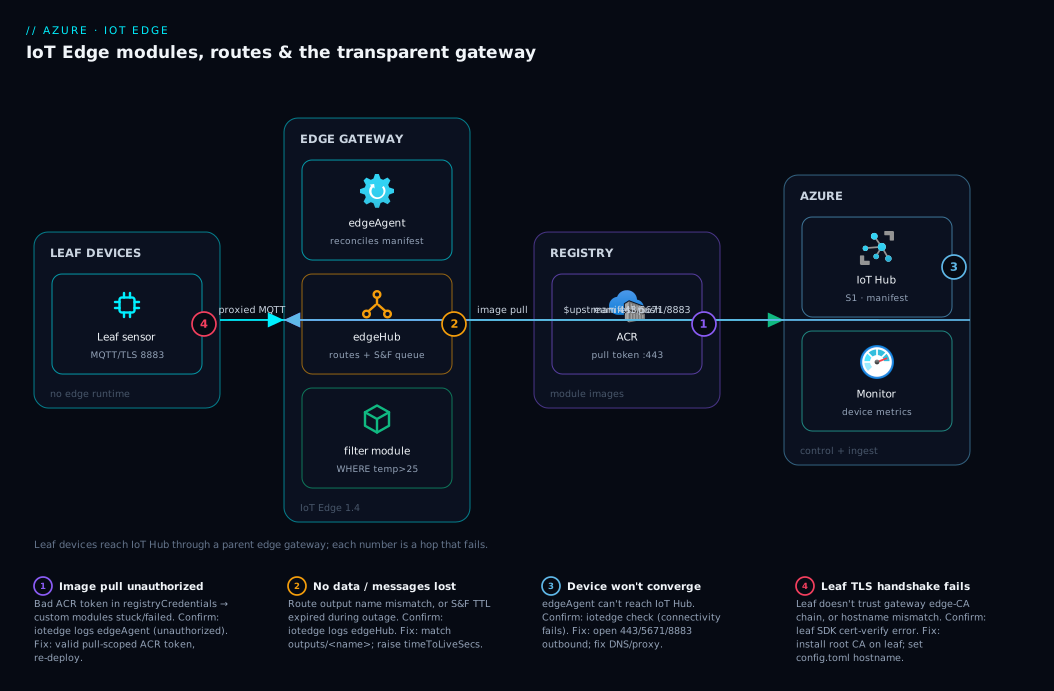
Read the diagram left to right as the life of a reading. A leaf device on the plant LAN — a sensor with no Edge runtime — opens an MQTT/TLS connection on 8883 to the parent IoT Edge gateway, validating the gateway’s server certificate against the root CA you pre-installed. The gateway’s edgeHub accepts that connection (it presents a cert issued by its edge CA) and, because the leaf carries its own IoT Hub identity, transparently proxies the traffic. On the same device, a simulated/real sensor module emits readings into edgeHub, which applies your routes: the sensor’s output is delivered to the filter module’s input, the filter drops everything below threshold, and its output is routed to $upstream. Anything bound for the cloud while the WAN is down is written to edgeHub’s store-and-forward queue on local disk and replayed on reconnect.
From the gateway, two flows leave for Azure over 443/5671/8883 — the proxied leaf telemetry and the gateway’s own filtered telemetry — both landing in IoT Hub, which is also the control plane that pushed the deployment manifest down to edgeAgent. edgeAgent authenticates to Azure Container Registry to pull the module image, and device state/metrics flow to Azure Monitor. The numbered badges mark the four hops that fail most: the registry pull, the routing/offline queue, the upstream link, and the leaf TLS handshake.
Real-world scenario
NordFreeze, a (fictional) Nordic cold-chain operator, runs 1,400 refrigerated display cabinets across 90 supermarkets. Each store has one industrial gateway PC; each cabinet has a cheap BACnet temperature/door sensor that cannot run containers and has no internet route of its own. The original design streamed every reading — one per cabinet per five seconds — straight to IoT Hub over the store’s shared broadband. Two problems surfaced within a month. The IoT Hub bill: ~15 cabinets × 90 stores × 17,280 messages/day ≈ 23 million messages/day, blowing past the S1 daily quota and forcing them toward S2 units they did not need. And every time a store’s broadband flapped (common on rural ADSL), readings were simply lost — and the food-safety team could not prove the chain held, a compliance problem, not just an engineering one.
They re-architected around IoT Edge. The store gateway PC became a transparent gateway running three modules: a BACnet reader (a community protocol module that polls the cabinets and emits readings into edgeHub), a filter/aggregation module (drops readings within the safe band, emits one summarized message per cabinet per minute, and raises an immediate alert=true message the instant a cabinet crosses the threshold or a door stays open), and a small local dashboard module the store manager opens on the gateway’s screen. The cabinets were registered as downstream devices and pointed at the gateway with GatewayHostName; the team installed their corporate root CA on each gateway’s edge CA so the leaf TLS chained correctly. Routes sent normal aggregates and alerts to $upstream, and storeAndForwardConfiguration.timeToLiveSecs was raised to 86,400 (24 hours) so a full day of broadband outage lost nothing.
The result: outbound volume to IoT Hub fell by roughly 95% (from 17,280 to ~1,440 aggregates plus the occasional alert per cabinet per day), dropping them from straining S2 to comfortably within a single S1 unit. Alerts that used to wait in a five-second stream now fired locally in well under a second, because the filter ran on the gateway, not in the cloud. And the day a regional ISP outage took 11 stores offline for six hours, every reading replayed from the edge queue on reconnect — the compliance log had no gaps. The one rollout incident was instructive: on the oldest store PCs (1 GB RAM) edgeHub crash-looped until they set OptimizeForPerformance=false; on 8 GB boxes it never mattered. That single env var was the difference between “works on the bench” and “works in store 0043.”
Advantages and disadvantages
IoT Edge buys you local compute, offline tolerance, and central management — at the cost of operating a fleet of devices that are harder to reach than cloud resources. The trade-off, side by side:
| Advantages | Disadvantages |
|---|---|
| Runs offline; store-and-forward replays on reconnect | You now operate physical/edge devices (harder to access than cloud) |
| Cuts cloud message volume and egress via edge filtering | Module images must match device CPU arch (arm/amd64) |
| Low-latency local decisions (control loops stay on-site) | Debugging is on-device (iotedge logs), not a cloud blade |
| Central, declarative management (one manifest, many devices) | Cert lifecycle for gateways adds real operational burden |
| Reuses container skills and registries you already have | Limited host resources cap how much you can run locally |
| Transparent gateway brings non-IoT/legacy devices into IoT Hub | Network/firewall must allow 443/5671/8883 outbound |
| Same security model (per-device identity, X.509, MI for ACR) | More moving parts than streaming straight to the cloud |
When each side matters: choose IoT Edge when devices are numerous, intermittently connected, latency-sensitive, or sit behind a gateway — the offline and filtering wins dominate. Lean toward streaming directly to IoT Hub (no Edge) when devices are few, reliably connected, and you genuinely need all the raw data centrally with no local processing — then the extra operational surface of Edge is not worth it. The transparent-gateway burden (certificates, hostname, LAN ports) is justified the moment you have leaf devices that cannot reach IoT Hub directly; if every device can talk to the cloud on its own, skip the gateway.
Hands-on lab
This is the centerpiece: you will deploy a real two-module pipeline (a simulated temperature sensor → a filter module → the cloud) to a fresh IoT Edge device, verify it end to end, then add the transparent-gateway configuration and connect a downstream device. You will do it in the portal and the az CLI, with a Bicep version for the cloud resources. Everything fits the IoT Hub free tier. Budget about 45–60 minutes.
Step 0 — Prerequisites and environment
You need an Azure subscription, the az CLI (or Cloud Shell), and the azure-iot extension. Install/refresh the extension and set variables:
# Add the IoT extension (idempotent) and log in if running locally
az extension add --name azure-iot --upgrade
az login   # skip in Cloud Shell

# Variables reused throughout the lab
RG=rg-iotedge-lab
LOC=westeurope
HUB=iothub-edgelab-$RANDOM      # must be globally unique
DEVICE=edge-gw-01               # our edge gateway device id
LEAF=leaf-sensor-01             # the downstream device id
Expected output: az extension add completes silently (or reports already installed); az login prints your subscriptions.
Step 1 — Create the resource group and IoT Hub (free tier)
CLI:
az group create --name $RG --location $LOC

# F1 = free tier: 1 unit, 8,000 messages/day, one per subscription
az iot hub create --name $HUB --resource-group $RG --location $LOC --sku F1 --partition-count 2
Expected output: JSON for the group, then for the hub with "provisioningState": "Succeeded". If you already have a free hub in the subscription, switch --sku F1 to --sku S1 (paid, but pennies for a lab).
Portal alternative: Create a resource → IoT Hub → pick the resource group and region → Management tab → set Pricing and scale tier to Free (F1) → Review + create.
The hub-level knobs you set at creation (and the ones that matter for edge):
| Setting | Lab value | Notes |
|---|---|---|
| Tier (SKU) | F1 (or S1) |
F1: 8,000 msgs/day; only one F1 per subscription |
| Partitions | 2 | Fixed at create; 2–4 fine for a lab; cannot shrink later |
| Region | near your device | Latency to $upstream |
| Defender for IoT | off (lab) | On in production for device threat detection |
Step 2 — Register the IoT Edge device identity
An edge device identity differs from a normal device identity by the --edge-enabled flag, which tells IoT Hub it will run the runtime and host modules.
CLI:
az iot hub device-identity create \
  --hub-name $HUB --device-id $DEVICE --edge-enabled

# Grab the device connection string — the edge runtime needs it to enrol
az iot hub device-identity connection-string show \
  --hub-name $HUB --device-id $DEVICE --query connectionString -o tsv
Expected output: device JSON with "capabilities": { "iotEdge": true }, then a connection string of the form HostName=...;DeviceId=edge-gw-01;SharedAccessKey=.... Copy it — you will paste it onto the device in Step 4.
Portal alternative: IoT Hub → Devices → Add Device → tick IoT Edge Device → name it edge-gw-01 → Save → open it → copy the Primary Connection String.
Step 3 — Provision the edge host (a small Linux VM)
For a repeatable lab, use an Ubuntu VM as the “device.” A B1ms (1 vCPU, 2 GB) is the practical floor — 1 GB technically works but invites the edgeHub OOM you would then have to fix.
az vm create \
  --resource-group $RG --name vm-edge-gw-01 \
  --image Ubuntu2204 --size Standard_B1ms \
  --admin-username azureuser --generate-ssh-keys \
  --public-ip-sku Standard

# Capture the public IP for later SSH + as the gateway hostname
EDGE_IP=$(az vm show -d -g $RG -n vm-edge-gw-01 --query publicIps -o tsv)
echo "Edge device public IP: $EDGE_IP"
Expected output: VM JSON, then a public IP. SSH in: ssh azureuser@$EDGE_IP.
Step 4 — Install the IoT Edge runtime on the device
On the device (your SSH session), install the Microsoft package feed, the container engine (Moby), and the IoT Edge runtime, then point it at your device connection string.
# --- run these ON the device (ssh azureuser@$EDGE_IP) ---
# 1) Add Microsoft's package repository for Ubuntu 22.04
wget https://packages.microsoft.com/config/ubuntu/22.04/packages-microsoft-prod.deb -O packages-microsoft-prod.deb
sudo dpkg -i packages-microsoft-prod.deb && rm packages-microsoft-prod.deb
sudo apt-get update

# 2) Install the Moby engine (container runtime) and the IoT Edge runtime
sudo apt-get install -y moby-engine
sudo apt-get install -y aziot-edge

# 3) Provision with the device connection string from Step 2 (manual symmetric-key)
sudo iotedge config mp --connection-string 'PASTE_DEVICE_CONNECTION_STRING_HERE'
sudo iotedge config apply
Expected output: iotedge config apply prints that it is restarting the service. After ~60 seconds, check health:
sudo iotedge system status      # expect: aziot-edged: active (running) + sub-services running
sudo iotedge list               # expect: edgeAgent running (edgeHub appears after first deployment)
The provisioning methods, so you pick the right one beyond the lab:
| Method | Flag / config | Use for | Trade-off |
|---|---|---|---|
| Manual, symmetric key | connection string | Labs, a handful of devices | You handle the secret per device |
| Manual, X.509 | device cert + key | Stronger auth, few devices | Cert management per device |
| DPS, symmetric key (group) | DPS scope + enrolment group key | Many devices, zero-touch | Set up DPS once; scales to thousands |
| DPS, X.509 (group) | DPS scope + CA enrolment | Production fleets | Best security + scale; most setup |
| DPS, TPM | DPS + TPM attestation | Hardware-rooted identity | Needs TPM-equipped hardware |
For a real fleet you would use Device Provisioning Service (DPS) with an enrolment group so devices self-register — but manual is correct for learning.
Step 5 — Build and push a custom filter module to ACR
The filter module is a tiny container that reads messages, drops those below a temperature threshold, and forwards the rest. Create an ACR and (for the lab) use the simulated-temperature-sensor image from MCR as the source, plus a filter module image. The fastest path is to let ACR build it.
# Create a Basic ACR (unique name)
ACR=acredgelab$RANDOM
az acr create --resource-group $RG --name $ACR --sku Basic

# Create an ACR pull token for the device (least privilege; not the admin account)
az acr token create --registry $ACR --name edgepull \
  --scope-map _repositories_pull --query 'credentials.passwords[0].value' -o tsv
# Save the printed password; the token *name* is "edgepull"
For the module image itself, the canonical IoT Edge “filter module” is generated by the project template. To keep the lab self-contained, you can build the official C# filter sample (it reads input1, compares against TemperatureThreshold, and writes to output1):
# Build directly in ACR from the Microsoft sample (no local Docker needed)
az acr build --registry $ACR --image filtermodule:1.0 \
  https://github.com/Azure-Samples/azureiotedge-filter-module.git#main
Expected output: ACR streams the build log and ends with Successfully tagged ...filtermodule:1.0 and a pushed digest.
If you cannot reach that sample, any container that reads from edgeHub input
input1and writes tooutput1works; the threshold is read from theTemperatureThresholdenv var.
Step 6 — Author the deployment manifest
Create deployment.json locally. It declares the simulated sensor, your filter module, and the two routes. Replace <ACR>, <TOKEN_PW> with your values (token name is edgepull):
{
  "modulesContent": {
    "$edgeAgent": {
      "properties.desired": {
        "schemaVersion": "1.1",
        "runtime": { "type": "docker", "settings": {
          "minDockerVersion": "v1.25",
          "registryCredentials": {
            "edgelabacr": { "address": "<ACR>.azurecr.io", "username": "edgepull", "password": "<TOKEN_PW>" }
          } } },
        "systemModules": {
          "edgeAgent": { "type": "docker", "settings": { "image": "mcr.microsoft.com/azureiotedge-agent:1.4", "createOptions": "{}" } },
          "edgeHub": { "type": "docker", "status": "running", "restartPolicy": "always",
            "settings": { "image": "mcr.microsoft.com/azureiotedge-hub:1.4",
              "createOptions": "{\"HostConfig\":{\"PortBindings\":{\"5671/tcp\":[{\"HostPort\":\"5671\"}],\"8883/tcp\":[{\"HostPort\":\"8883\"}],\"443/tcp\":[{\"HostPort\":\"443\"}]}}}" },
            "env": { "OptimizeForPerformance": { "value": "false" } } }
        },
        "modules": {
          "tempSensor": {
            "type": "docker", "status": "running", "restartPolicy": "always", "startupOrder": 10,
            "settings": { "image": "mcr.microsoft.com/azureiotedge-simulated-temperature-sensor:1.0", "createOptions": "{}" }
          },
          "filterModule": {
            "type": "docker", "status": "running", "restartPolicy": "always", "startupOrder": 20,
            "settings": { "image": "<ACR>.azurecr.io/filtermodule:1.0",
              "createOptions": "{\"HostConfig\":{\"LogConfig\":{\"Type\":\"json-file\",\"Config\":{\"max-size\":\"10m\",\"max-file\":\"3\"}}}}" },
            "env": { "TemperatureThreshold": { "value": "25" } }
          }
        }
      }
    },
    "$edgeHub": {
      "properties.desired": {
        "schemaVersion": "1.1",
        "routes": {
          "sensorToFilter": "FROM /messages/modules/tempSensor/outputs/temperatureOutput INTO BrokeredEndpoint(\"/modules/filterModule/inputs/input1\")",
          "filterToUpstream": "FROM /messages/modules/filterModule/outputs/output1 INTO $upstream"
        },
        "storeAndForwardConfiguration": { "timeToLiveSecs": 7200 }
      }
    }
  }
}
Note three deliberate choices: OptimizeForPerformance=false (small device), a LogConfig cap on the filter (disk safety), and startupOrder so the sensor comes up before the filter.
Step 7 — Deploy the manifest to the device
CLI:
az iot edge set-modules \
  --hub-name $HUB --device-id $DEVICE \
  --content deployment.json
Expected output: a JSON array of the modules now in the deployment. Within ~1–2 minutes the device pulls the images and starts the modules.
Portal alternative: IoT Hub → Devices → edge-gw-01 → Set Modules → + Add → IoT Edge Module for filterModule (image <ACR>.azurecr.io/filtermodule:1.0, env TemperatureThreshold=25) → add the simulated sensor similarly → Routes tab → paste the two routes → Container Registry Credentials → add the ACR token → Review + create.
Step 8 — Verify on the device
On the device:
sudo iotedge list
# Expect 4 modules eventually all "running":
# edgeAgent, edgeHub, tempSensor, filterModule

# Watch the filter module process messages
sudo iotedge logs filterModule -f
# Expect lines showing it forwarding messages above the threshold

# If anything is "failed" or "backoff", run the built-in checker
sudo iotedge check
Expected output: all four modules running; the filter log shows it forwarding. iotedge check runs ~30 configuration and connectivity tests and prints ✓/‼/✗ for each.
The states a module can report, and what each means:
| State | Meaning | What to do |
|---|---|---|
running |
Container up and healthy | Nothing — good |
backoff |
Agent is waiting before a restart attempt | Read iotedge logs <module>; usually a crash on start |
failed |
Container exited non-zero | Same — find the exit cause in logs |
stopped |
Intentionally stopped (status: stopped) |
Expected if you set it; else check manifest |
unhealthy |
Docker HEALTHCHECK failing |
Inspect the health check + app health |
Step 9 — Confirm messages reach the cloud
From your CLI/Cloud Shell (not the device), watch IoT Hub’s built-in endpoint receive the filtered telemetry:
az iot hub monitor-events --hub-name $HUB --device-id $DEVICE --timeout 30
Expected output: JSON telemetry events arriving from edge-gw-01 (the messages your filter forwarded). If you see nothing, jump to the troubleshooting playbook — the usual cause is a route output-name mismatch or the filter dropping everything because the threshold is too high.
Step 10 — Add the transparent gateway configuration
Now make edge-gw-01 a transparent gateway so a downstream device can connect through it. For a lab, generate test certificates with the IoT Edge cert tooling, then set the gateway’s hostname and edge CA.
On the device, generate a test root CA and an edge CA cert (the iotedge tooling ships a helper; alternatively use the documented step/OpenSSL scripts):
# --- on the device ---
# Create a test CA chain (root + edge CA). Output: certs the gateway and leaf will use.
# (Microsoft provides test-cert scripts; the result is azure-iot-test-only.root.ca.cert.pem
#  and an edge CA cert+key.)
sudo mkdir -p /etc/aziot/certs /etc/aziot/secrets

# Then edit the runtime config to declare this device a gateway:
sudo nano /etc/aziot/config.toml
In config.toml, set the hostname (use the VM’s public IP or a resolvable DNS name) and point the edge CA at your generated cert/key:
# /etc/aziot/config.toml (excerpt)
hostname = "EDGE_IP_OR_DNS"     # leaf devices connect to this name

[edge_ca]
cert = "file:///etc/aziot/certs/edge-ca.cert.pem"
pk   = "file:///etc/aziot/secrets/edge-ca.key.pem"
Apply the config and confirm edgeHub re-issues its server cert for the new hostname:
sudo iotedge config apply
sudo iotedge system logs        # confirm edgeHub restarted cleanly with the new hostname
Expected output: the daemon restarts the modules; edgeHub now presents a server certificate for EDGE_IP_OR_DNS issued by your edge CA.
The config.toml keys that matter for a gateway:
| Key | Section | Purpose | Lab value |
|---|---|---|---|
hostname |
top level | Name leaf devices connect to | VM public IP or DNS |
cert |
[edge_ca] |
Edge CA certificate file | your edge-ca.cert.pem |
pk |
[edge_ca] |
Edge CA private key | your edge-ca.key.pem |
trust_bundle_cert |
top level (optional) | Extra CAs the device trusts | root CA if needed |
[provisioning] |
provisioning | Device identity source | from Step 4 |
Step 11 — Register a downstream device and connect it
Register the leaf identity and tell it that edge-gw-01 is its parent.
CLI:
# Register a normal (non-edge) device identity for the leaf
az iot hub device-identity create --hub-name $HUB --device-id $LEAF

# Set the edge device as its parent (scopes the leaf to the gateway)
az iot hub device-identity parent set \
  --hub-name $HUB --device-id $LEAF --parent-device-id $DEVICE

# Get the leaf connection string; you will append GatewayHostName when connecting
az iot hub device-identity connection-string show \
  --hub-name $HUB --device-id $LEAF --query connectionString -o tsv
Expected output: the leaf device JSON, a confirmation of the parent relationship, and a connection string. To connect a real leaf app, you (1) install the root CA cert in the leaf’s trust store, and (2) use the connection string with ;GatewayHostName=EDGE_IP_OR_DNS appended, connecting over MQTT (8883) to the gateway. A quick way to prove the path with the IoT SDK sample:
# On the leaf machine (or a second VM), with the root CA installed and the SDK sample:
#   connection string = "<LEAF_CONN_STRING>;GatewayHostName=EDGE_IP_OR_DNS"
# the sample sends telemetry to IoT Hub *through* the gateway.
Expected output: az iot hub monitor-events --hub-name $HUB --device-id $LEAF shows messages arriving — attributed to leaf-sensor-01, proving the gateway proxied them transparently.
Step 12 — Teardown
Delete everything in one shot to stop any charges:
az group delete --name $RG --yes --no-wait
The free IoT Hub does not bill, but the VM and ACR do; deleting the resource group removes the hub, the VM, the ACR, the disks, and the public IP together.
The Bicep version (cloud resources)
For repeatable cloud-side provisioning (hub + ACR; the device install stays a script), this Bicep stands up the hub and registry and an ACR pull token is created separately (token creation is a data-plane op, so keep that in the CLI step):
@description('Location for all resources')
param location string = resourceGroup().location

@description('Globally-unique IoT Hub name')
param hubName string

@description('Globally-unique ACR name')
param acrName string

resource hub 'Microsoft.Devices/IotHubs@2023-06-30' = {
  name: hubName
  location: location
  sku: {
    name: 'F1'   // free tier: one per subscription; use 'S1' if F1 is taken
    capacity: 1
  }
  properties: {
    eventHubEndpoints: {
      events: { retentionTimeInDays: 1, partitionCount: 2 }
    }
    // messagingEndpoints / routing left at defaults for the lab
  }
}

resource acr 'Microsoft.ContainerRegistry/registries@2023-07-01' = {
  name: acrName
  location: location
  sku: { name: 'Basic' }
  properties: {
    adminUserEnabled: false  // use scoped tokens, not admin, for device pulls
  }
}

output hubResourceId string = hub.id
output acrLoginServer string = acr.properties.loginServer
Deploy it:
az deployment group create --resource-group $RG \
  --template-file iotedge.bicep \
  --parameters hubName=$HUB acrName=$ACR
Expected output: a successful deployment with hubResourceId and acrLoginServer outputs. The device registration (--edge-enabled), the ACR token, and the manifest deployment remain CLI steps because they are data-plane operations against the hub/registry, not control-plane resource definitions.
Common mistakes & troubleshooting
These are the failures you will actually hit, with the exact place to confirm each and the real fix. Scan the playbook, then read the detail for your row.
| # | Symptom | Root cause | Confirm (exact command) | Fix |
|---|---|---|---|---|
| 1 | All custom modules stuck pulling / failed |
Bad ACR credentials in the manifest | sudo iotedge logs edgeAgent → unauthorized |
Fix registryCredentials; use a valid ACR token |
| 2 | edgeHub restart-loops on a small device | OptimizeForPerformance=true OOMs |
sudo iotedge logs edgeHub → OOM/restart |
Set OptimizeForPerformance=false env |
| 3 | Sensor runs but no data in the cloud | Route output name mismatch | sudo iotedge logs edgeHub (no route hits) |
Match outputs/<name> to the module’s real output |
| 4 | Module pulls but failed immediately |
Wrong CPU arch image (amd64 on arm) | sudo iotedge logs <module> → exec format error |
Build/pull the arm64v8/arm32v7 image |
| 5 | Device never converges; no modules | edgeAgent can’t reach IoT Hub | sudo iotedge check (connectivity tests fail) |
Open 443/5671/8883 outbound; fix DNS/proxy |
| 6 | Leaf device TLS handshake fails | Leaf doesn’t trust gateway’s CA chain | Leaf SDK error: cert verify failed | Install the root CA on the leaf trust store |
| 7 | Leaf connects but is rejected | hostname mismatch / not set as gateway |
sudo iotedge system logs (cert SAN ≠ host) |
Set hostname in config.toml = name leaf uses |
| 8 | Messages lost after a long outage | TTL too short for the offline window | edgeHub queue dropped expired messages | Raise storeAndForwardConfiguration.timeToLiveSecs |
| 9 | Disk full; daemon wedged | Unbounded container logs | df -h on the device; huge json.log |
Add LogConfig max-size/max-file to modules |
| 10 | iotedge commands say not provisioned |
config apply not run / bad conn string |
sudo iotedge system status |
Re-run iotedge config mp + iotedge config apply |
| 11 | Deployment shows but device ignores it | Targeting wrong device / not edge-enabled | az iot hub device-identity show … iotEdge |
Recreate identity with --edge-enabled |
| 12 | Module env changes don’t take effect | Edited image but not the twin/manifest | az iot hub module-twin show (old desired) |
Re-apply the manifest; bump nothing else needed |
Detail on the three that waste the most time
Image-pull unauthorized (row 1). sudo iotedge logs edgeAgent shows unauthorized: authentication required against your ACR login server. The cause is almost always a stale or wrong ACR token in registryCredentials, or pointing at admin when admin is disabled. Fix by minting a fresh token scoped to pull on the specific repo and re-applying the manifest — never the admin account.
No data despite a running sensor (row 3). The sensor emits, the filter runs, but monitor-events shows nothing. The cause is a route source that doesn’t match the real output name — the manifest routes from temperatureOutput but the module writes to a different output, so edgeHub matches nothing and drops every message. Confirm by temporarily adding a firehose route FROM /messages/* INTO $upstream: if the firehose delivers but the specific route doesn’t, the source path is wrong. Fix the outputs/<name> to match exactly.
Leaf TLS handshake failure (row 6). The leaf opens 8883 to the gateway and the handshake fails with certificate verify failed / unable to get local issuer in the leaf SDK. The gateway presents a server cert issued by its edge CA; the leaf must trust the root CA at the top of that chain. Fix by installing the root CA into the leaf’s trust store and ensuring the gateway hostname matches the name the leaf connects to (the cert SAN must cover it).
Best practices
- Pin every image tag (
:1.4,:1.0), never:latest, so the fleet runs identical versions and a re-pull can’t silently change behaviour. - Use ACR tokens scoped to pull, not the admin account, in
registryCredentials— least privilege per device. - Cap container logs with
LogConfig(max-size/max-file) on every module; a full disk wedges the whole device. - Set
OptimizeForPerformance=falseon devices under ~1 GB RAM to stop edgeHub OOM-looping. - Filter and aggregate at the edge — send summaries and alerts, not the raw firehose; it cuts cost and latency in one move.
- Size
timeToLiveSecsto your worst realistic offline window, then verify the disk can hold that many messages. - Use
startupOrderso dependencies (a broker, a protocol module) come up before their consumers. - Prefer DPS with enrolment groups for any fleet beyond a handful of devices — manual provisioning does not scale.
- Run
iotedge checkas your first diagnostic on any unhealthy device; it catches the common config/connectivity faults in one pass. - Keep modules single-purpose and small (correct base image for the device arch) so pulls are fast and failures are isolated.
- Manage gateway certificates from real PKI with automated renewal; expired edge CA certs silently break every leaf device at once.
- Tag devices and deploy at scale with target conditions rather than per-device manifests, so config is consistent and auditable.
Security notes
IoT Edge inherits IoT Hub’s identity model and adds device-local concerns. The essentials:
- Per-device identity, always. Each edge device and each leaf device has its own IoT Hub identity (SAS key or, better, X.509). Never share a connection string across devices — revoking one then means re-keying all of them.
- Registry access via scoped tokens or managed identity. Put a pull-scoped ACR token in
registryCredentials, never the admin account. Where the host supports it, an Azure managed identity for ACR pull removes the static secret entirely. - Protect the device config and secrets.
config.toml, the edge CA private key, and connection strings live on the device — restrict file permissions, use the secrets directory, and consider disk encryption on physically exposed devices. - Gateway certificate hygiene. The edge CA issues edgeHub’s server cert; an expired edge CA breaks every downstream device simultaneously. Automate renewal and monitor expiry. Issue from your own PKI in production, not the test scripts.
- Lock down the broker ports. 8883/5671/443 should be reachable only from the intended LAN clients (leaf devices), not the open internet — use the host firewall / NSG. See Azure Virtual Network, Subnets and NSGs: Networking Fundamentals for the subnet/NSG controls.
- Least-privilege modules. Avoid
Privileged: trueand broad device passthrough unless a module truly needs hardware; a compromised privileged module owns the host. - Defender for IoT adds device-side threat detection (anomalous processes, connections) and is worth enabling on production fleets.
Cost & sizing
What drives the bill and how to size the host:
| Cost driver | What it is | How to control it |
|---|---|---|
| IoT Hub messages | Billed per 4 KB block per message, by tier | Filter/aggregate at the edge; right-size the tier |
| IoT Hub tier units | F1 (free) / S1 / S2 / S3 daily quotas | Stay within a tier by sending less; scale units only when needed |
| ACR | Registry storage + builds | Basic SKU; prune old tags; build once, deploy many |
| Edge device | Your hardware or a cloud VM | Size for edgeHub + your modules + the offline queue |
| Egress | Data leaving the device to Azure | Smaller messages, fewer messages |
IoT Hub tiers and their message quotas (the number that dictates your cost):
| Tier | Messages/day per unit | Notes |
|---|---|---|
| F1 (Free) | 8,000 | One per subscription; perfect for this lab |
| B1 / B2 / B3 (Basic) | 400,000 / 6,000,000 / 300,000,000 | No cloud-to-device methods/twins for edge scenarios — use Standard for Edge |
| S1 | 400,000 | Smallest Standard tier; full features incl. Edge |
| S2 | 6,000,000 | Mid fleet |
| S3 | 300,000,000 | Large fleet |
A reading note: IoT Edge requires a Standard (S) tier in production because edge deployment and device twins use features the Basic tier omits; F1 (free) is Standard-class and fine for learning, but you cannot run an Edge fleet on a Basic (B) tier. Rough INR framing: a single S1 unit (≈ ₹2,000–2,500/month for 400k messages/day) plus a Basic ACR (≈ ₹400–450/month) covers a few dozen filtered-telemetry edge devices comfortably — and the point of edge filtering is to stay in S1 rather than buy S2 units, the NordFreeze saving above.
Host sizing rule of thumb:
| Workload | Min RAM | Min disk | Notes |
|---|---|---|---|
| Runtime only (edgeAgent + edgeHub) | 512 MB–1 GB | a few GB | Set OptimizeForPerformance=false at the low end |
| Runtime + 2–3 light modules | 2 GB | 8 GB+ | The lab’s B1ms target |
| Runtime + offline queue (long TTL) | 2–4 GB | size for TTL × msg rate × size | Disk holds the store-and-forward queue |
| Runtime + heavy module (ML inference) | 4 GB+ / GPU | model-dependent | Match the module’s needs; arch-correct image |
Interview & exam questions
Q1. What are edgeAgent and edgeHub, and why are they always present? edgeAgent is the on-device reconciler — it reads the desired deployment manifest from IoT Hub and starts/stops/pulls modules to match it, reporting state back. edgeHub is the local message broker that implements routes and store-and-forward. They are the IoT Edge runtime; without them the device cannot receive deployments or move messages. (AZ-220 territory.)
Q2. What is a deployment manifest and what are its two main desired-property sections?
It is the single JSON document describing everything a device should run. $edgeAgent desired properties list the runtime, registry credentials, and modules; $edgeHub desired properties define the routes and store-and-forward config. The device continuously converges its actual state to this manifest.
Q3. Write a route that sends only messages where temperature > 30 to the cloud.
FROM /messages/modules/<mod>/outputs/<out> WHERE temperature > 30 INTO $upstream. The WHERE clause filters on application/system properties or $body fields; $upstream is the cloud sink. Non-matching messages are simply not routed there.
Q4. A custom module is failed with exec format error. What happened?
The image’s CPU architecture doesn’t match the device — e.g. an amd64 image on an arm64 Raspberry Pi. Build or pull the architecture-correct image (arm64v8/arm32v7/amd64). This is a pure packaging issue, not a code bug.
Q5. What is the transparent gateway pattern and when do you use it? A parent IoT Edge device that proxies downstream (leaf) devices’ MQTT/AMQP traffic to IoT Hub while each leaf keeps its own identity. Use it when leaf devices cannot reach IoT Hub directly (no runtime, constrained, no internet route) but can reach a local gateway.
Q6. What three things must be configured for a transparent gateway to accept leaf devices?
A hostname the leaf can resolve and that the gateway’s server cert covers; an edge CA certificate (and the leaf trusting its root CA); and the leaf using its connection string with GatewayHostName=<hostname> over 8883/5671/443.
Q7. Why does store-and-forward matter, and what bounds it?
edgeHub persists messages that can’t be delivered (cloud down or target module down) and replays them on recovery, so an outage doesn’t lose data. It is bounded by timeToLiveSecs (time) and the device disk (space) — there is no separate size cap, so size the disk for your worst offline window.
Q8. Your edge device runs the runtime but no custom modules ever start. First check?
Read iotedge logs edgeAgent and run iotedge check. The usual causes are bad registry credentials (image pull unauthorized) or no connectivity to IoT Hub (443/5671/8883 blocked). edgeAgent is the thing that runs everything, so its health gates the rest.
Q9. Which IoT Hub tier do you need for IoT Edge in production, and why not Basic? A Standard (S) tier. The Basic (B) tier omits features IoT Edge relies on (module deployment, twins/methods for the edge scenario). The Free (F1) tier is Standard-class and fine for development, but a production fleet needs S1 or higher.
Q10. How would you provision 5,000 edge devices without touching each one? Use the Device Provisioning Service (DPS) with an enrolment group (symmetric-key or X.509 CA). Devices attest to DPS at first boot and are auto-assigned to a hub and given an identity — zero-touch — instead of pasting a connection string per device.
Q11. What is the difference between the transparent gateway and the protocol-translation pattern? Transparent: the gateway relays leaf traffic and each leaf keeps its own IoT Hub identity. Protocol translation: a custom module on the gateway speaks the device’s non-IoT protocol (e.g. Modbus) and sends to IoT Hub as a single identity. Transparent preserves per-device identity; protocol translation collapses it.
Q12. How do you cut IoT Hub costs for a chatty fleet without losing critical data?
Filter and aggregate at the edge: route only summaries and threshold-crossing alerts to $upstream, dropping in-band readings with a WHERE clause. This can cut message volume by an order of magnitude (NordFreeze: ~95%), keeping you in a smaller tier while alerts still fire locally in sub-second time.
Quick check
- Which system module owns routing and the offline store-and-forward queue?
- In a route, what does the sink
$upstreammean? - What single env var commonly fixes edgeHub restart-looping on a small device?
- In the transparent gateway pattern, whose identity do leaf messages carry when they reach IoT Hub?
- You deploy a manifest but the device runs no custom modules and
iotedge logs edgeAgentshowsunauthorized. What’s wrong and where’s the fix?
Answers
- edgeHub — it is the local broker, applies routes, and persists undelivered messages for replay.
- It routes the message to IoT Hub (the cloud) — the only cloud sink available in edge routes.
OptimizeForPerformance=falsein edgeHub’s env, which stops it pre-allocating memory and OOM-looping.- The leaf device’s own identity — the gateway is transparent and relays, it does not re-identify the traffic.
- The ACR registry credentials in the manifest are wrong/expired, so image pulls fail; fix
registryCredentialswith a valid pull-scoped ACR token and re-deploy.
Glossary
- Azure IoT Edge — a runtime that runs containerized modules on a device, managed from IoT Hub, with offline tolerance.
- IoT Hub — the cloud service holding device identities, deployment manifests, and the bidirectional endpoint devices connect to.
- edgeAgent — the system module that reconciles a device to its desired deployment manifest (pull/start/stop/restart modules).
- edgeHub — the system module providing the local message broker, route evaluation, and store-and-forward queue.
- Custom module — a containerized workload you write (filter, inference, protocol bridge) that runs on the device.
- Deployment manifest — the JSON (
deployment.json,modulesContent) describing all modules, settings, and routes for a device or group. - Module twin — the per-module desired/reported configuration document mirrored between IoT Hub and the device.
- Route — an edgeHub rule
FROM <source> [WHERE <cond>] INTO <sink>that copies messages between modules and to the cloud. $upstream— the route sink that sends a message to IoT Hub.createOptions— a JSON string of DockerConfig/HostConfigsettings (ports, mounts, env, logging) for a module.- Store-and-forward — edgeHub persisting undelivered messages locally and replaying them on reconnect, bounded by TTL and disk.
- Restart policy —
always/on-failure/on-unhealthy/never; when edgeAgent restarts a module. - Transparent gateway — an edge device that proxies downstream devices’ traffic to IoT Hub while each keeps its own identity.
- Downstream (leaf) device — a device with no Edge runtime that connects to IoT Hub through a parent gateway.
- Edge CA certificate — the CA on a gateway that issues edgeHub’s server certificate; the leaf must trust its root.
- DPS (Device Provisioning Service) — the service that auto-provisions devices to IoT Hub at scale via enrolment groups.
Next steps
- Secure the registry your modules come from with Securing Azure Container Registry: Private Endpoints, ACR Tasks, Content Trust, and Geo-Replication.
- Remove static registry secrets using Managed Identities Demystified: System vs User-Assigned and When to Use Each.
- Compare edge compute with cloud container runtimes in AKS vs Container Apps vs Container Instances: Picking the Right Azure Container Runtime.
- Watch device and module health centrally with Azure Monitor and Application Insights: Full-Stack Observability.
- Understand the broader “manage from the cloud, run anywhere” model in Azure Arc Explained: One Control Plane for Servers, Kubernetes & Data Across Any Cloud.