Quick take: Secrets in config files and certificates on disk are liabilities you cannot audit and cannot rotate. Azure Key Vault moves them into a managed, access-controlled, logged service where every retrieval is an identity-checked, recorded event and rotation becomes a single operation instead of a fleet-wide change.
A development team I reviewed stored a production database password directly in their App Service application settings, in plaintext, copied into a .env file on three developer laptops and pasted into a runbook. When a contractor rolled off, nobody could answer the only two questions that matter: who has seen this password, and where else does it live? Rotating it meant hunting through a dozen apps and hoping they’d found them all. The fix was not a policy memo — it was Key Vault. The password moved into a vault, the apps authenticated with a managed identity instead of a stored credential, every read was logged to Azure Monitor, and the next rotation was one az keyvault secret set followed by a config refresh. The contractor’s access evaporated the moment their identity was removed. That is the entire value proposition, and this article is how you get there without the three or four mistakes that turn Key Vault from a safety net into a 3am outage.
Key Vault holds three kinds of object — secrets (arbitrary strings: connection strings, API keys, passwords), keys (cryptographic keys used for encryption, signing and wrapping, optionally HSM-backed), and certificates (X.509 certs with a managed lifecycle and auto-renewal) — behind two distinct authorization surfaces (a control plane that manages the vault itself and a data plane that reads the objects inside it), reachable either over the public endpoint or locked behind a Private Endpoint. Get the mental model of those layers right and Key Vault is boringly reliable. Get it wrong — a managed identity that was never enabled, a data-plane role you forgot to assign, a firewall that blocks your own app, a certificate nobody wired for rotation — and you get the failure modes this article enumerates exhaustively, each with the exact az command or portal blade that confirms it and the precise fix.
By the end you will treat secrets, keys and certificates as governed assets rather than files. You will know when to use RBAC over the legacy access-policy model, why soft-delete and purge protection are non-negotiable, how Key Vault references let App Service and Functions pull secrets with zero credentials in config, when a workload needs an HSM (and whether Standard, Premium, or Managed HSM is the right home), and how to make certificates renew themselves so a 2am TLS expiry never happens again. Because this is a reference you will return to mid-incident, the options, limits, error codes, roles and tiers are all laid out as scannable tables — read the prose once, then keep the tables open.
What problem this solves
Applications need secrets, keys and certificates to function, but the places teams instinctively put them are all liabilities. A connection string in appsettings.json is in source control and on every laptop that cloned the repo. An API key in an environment variable is visible to anyone with the portal or a shell on the box. A .pfx certificate on disk is a file that can be copied, has no rotation story, and silently expires. None of these can answer “who accessed this and when,” none can be rotated without touching every consumer, and all of them widen the blast radius of a single leak to your entire estate.
What breaks without Key Vault is not abstract. A leaked credential in a public Git history is among the most common breach vectors there is — and once it is in history, rotating is the only remedy, because the old value is permanent. Hard-coded secrets mean rotation is a coordinated, error-prone deployment instead of a config change, so teams simply don’t rotate, and a five-year-old database password is “fine until it isn’t.” Certificates that live on disk expire without warning and take production TLS down at the worst possible moment. And without a central audit trail, a security review cannot prove who touched what, which fails most compliance regimes outright.
Who hits this: essentially every team running anything on Azure. It bites hardest where secrets multiply — microservice estates with dozens of connection strings, apps with third-party API keys, anything terminating TLS on a custom domain, and any workload under a compliance regime (PCI-DSS, HIPAA, ISO 27001, SOC 2) that mandates key custody, rotation, and access logging. Key Vault is the Azure-native answer to all of it, and the cost of getting it slightly wrong is exactly the kind of failure that pages you. The whole field, framed before the deep dive:
| Pain in production | What it looks like | Root liability | What Key Vault changes |
|---|---|---|---|
| Secret in config / source control | Password in appsettings.json, in Git history |
Plaintext, copyable, permanent in history | Secret lives in the vault; config holds a reference, not the value |
| No idea who saw a credential | Contractor leaves, nobody can audit access | No access log | Every read is a logged, identity-attributed event |
| Rotation is a deployment | Changing a DB password touches 12 apps | Value duplicated everywhere | Rotate once in the vault; consumers re-read |
| Certificate expired at 2am | TLS down, frantic manual renewal | Cert on disk, no lifecycle | Managed cert with auto-renewal + expiry events |
| Encryption key on the app box | Key file alongside the data it protects | Key and data co-located | Key in the vault (or HSM); app calls wrap/unwrap |
| Compliance audit fails | Cannot prove key custody / rotation | No central control or trail | Centralized custody, RBAC, soft-delete, audit logs |
Learning objectives
By the end of this article you can:
- Distinguish secrets, keys and certificates precisely — what each is for, its size and shape limits, and which one a given asset belongs in.
- Separate the control plane (managing the vault) from the data plane (reading objects inside it), and pick the right authorization model — Azure RBAC versus the legacy access-policy model — for each.
- Wire an app to read secrets with zero credentials using a managed identity and Key Vault references, and explain exactly why a missing identity or unassigned role crash-loops the app.
- Enable and reason about soft-delete and purge protection, recover a deleted vault or object, and explain why these are mandatory and irreversible.
- Lock a vault down with the firewall and Private Endpoint, keep traffic off the public internet, and avoid blocking your own callers.
- Choose between Standard, Premium (HSM-backed keys), and Managed HSM, and know when FIPS 140-2 Level 2/3 custody actually matters.
- Configure certificate issuance and auto-rotation (integrated CA and self-signed), and set up secret/key rotation with rotation policies and Event Grid.
- Read the throttling and 403 reference, diagnose a Key Vault failure to a specific cause, and fix it with the exact
az/portal path.
Prerequisites & where this fits
You should be comfortable with the Azure Resource Manager model — subscriptions, resource groups, and that everything is a resource with an ID (the Azure Resource Hierarchy Explained covers this). You should understand Microsoft Entra ID (formerly Azure AD) at the level of “identities get tokens and tokens are checked against permissions,” and ideally have met managed identities before. Running az in Cloud Shell, reading JSON output, and basic TLS/certificate concepts (a cert has a private key, a chain, and an expiry) will all help. Nothing here requires cryptography expertise — Key Vault’s job is to make you not need it.
This sits at the heart of the Security & Identity track and is upstream of almost everything else. Apps pull secrets from it (Azure Functions and Serverless Patterns and App Service both use Key Vault references), gateways pull TLS certs from it (Application Gateway v2 WAF: End-to-End TLS, mTLS, and Custom Rule Tuning), container registries and storage use customer-managed keys housed in it, and App Configuration references it for secret-typed settings (Azure App Configuration in Production). When you lock it behind a Private Endpoint you are applying the same pattern as Azure Private Link and Private DNS: Keeping PaaS Off the Public Internet. A quick map of who owns what during an incident, so you call the right person:
| Layer | What lives here | Who usually owns it | Failure classes it can cause |
|---|---|---|---|
| Caller identity | Managed identity, app registration | App / dev team | Empty KV reference, app crash-loop |
| Entra ID | Token issuance, RBAC assignments | Identity team | Token denied; no role assigned (403) |
| Vault control plane | SKU, firewall, soft-delete, RBAC mode | Platform / security | Misconfigured network, wrong auth model |
| Vault data plane | Secrets/keys/certs read/write | App + security | 403 on get; throttling (429) |
| Network path | Private Endpoint, DNS, firewall ACLs | Network team | ForbiddenByFirewall; DNS resolves public |
| Backing CA / HSM | Certificate issuer, HSM key custody | Security / PKI | Cert won’t issue; key not exportable |
Core concepts
Five mental models make every later decision obvious.
A vault is a boundary, not a database. A Key Vault is a named, regional resource (https://<name>.vault.azure.net) that holds three object types and enforces who can do what to them. It is a security and governance boundary first — you separate vaults by environment and sensitivity, not by convenience. The vault name is globally unique because it becomes a public DNS name, even when you later restrict it to a Private Endpoint.
Control plane and data plane are different doors with different keys. The control plane (Azure Resource Manager) governs the vault as a resource: create/delete it, set its firewall, change its SKU, configure soft-delete, assign data-plane roles. You authorize it with Azure RBAC roles like Key Vault Contributor, scoped at subscription/RG/vault. The data plane governs the objects inside: get a secret, sign with a key, import a cert. You authorize it either with Azure RBAC data-action roles (e.g. Key Vault Secrets User) or with the legacy per-vault access-policy list — and you pick exactly one model per vault. The single most common Key Vault mistake is confusing these: a Key Vault Contributor can manage the vault but cannot read a secret unless they also hold a data-plane role. Management access is not data access.
Identity is the currency; managed identity is the way you pay. Every data-plane call must present a valid Entra ID token proving an identity, which the vault checks against its authorization model. For apps, the right identity is a managed identity — an Entra identity Azure manages for the resource, with no secret you store anywhere. The app asks the platform for a token, the platform returns one, the app calls the vault. This is the whole point: the credential to access your secrets is itself not a stored secret. No managed identity means no token means the call fails — which is exactly why a forgotten identity makes an app crash-loop with empty secret values.
Soft-delete and purge protection make deletion survivable. Soft-delete (mandatory and always on for new vaults) means a deleted vault or object enters a recoverable state for a retention period (7–90 days, default 90) instead of vanishing. Purge protection (optional but recommended, and irreversible once enabled) means that during the retention window, nobody — not even an owner, not even an attacker with full rights — can permanently purge the resource early. Together they defend against accidental delete and malicious “delete everything” attacks. The cost is that a soft-deleted vault name is reserved until it’s purged or recovered, which trips up redeployments.
Versions are immutable; rotation creates a new version. Every secret, key and certificate is versioned. Updating a secret doesn’t overwrite — it adds a new version and marks it current; old versions remain (until you disable/delete them). You can reference a specific version (pinned) or the current version (auto-following). This is what makes rotation safe: you create version 2, consumers that reference “current” pick it up, and version 1 is still there if you need to roll back. Reference the unversioned URI to follow rotation; reference the versioned URI to pin.
The vocabulary in one table
Before the deep sections, pin down every moving part. The glossary at the end repeats these for lookup; this table is the model side by side:
| Concept | One-line definition | Where it lives | Why it matters |
|---|---|---|---|
| Vault | A regional container for secrets/keys/certs | Subscription / resource group | The security boundary; one per env/sensitivity |
| Secret | An arbitrary string value (≤25 KB) | Inside a vault | Connection strings, passwords, API keys |
| Key | A cryptographic key (RSA/EC), optionally HSM | Inside a vault | Encrypt/decrypt, sign/verify, wrap/unwrap |
| Certificate | An X.509 cert with managed lifecycle | Inside a vault (key + secret pair) | TLS, mTLS, code signing; auto-renewal |
| Control plane | Managing the vault resource | Azure Resource Manager | Create/delete/firewall/SKU; RBAC-governed |
| Data plane | Reading/writing objects inside | *.vault.azure.net |
Get/set/sign; RBAC or access policy |
| Access policy | Legacy per-vault permission list | On the vault | One of two auth models (the old one) |
| Azure RBAC (data) | Role-based data-plane access | Entra + scope | The recommended auth model |
| Managed identity | Secret-free Entra identity for a resource | On the app/VM/etc. | How apps authenticate with no stored creds |
| KV reference | @Microsoft.KeyVault(...) in a setting |
App setting / App Config | App pulls a secret with zero creds in config |
| Soft-delete | Recoverable deletion window | Vault property | 7–90 day grace; mandatory now |
| Purge protection | Block early permanent deletion | Vault property | Irreversible; defends against malicious purge |
| HSM | Hardware Security Module key custody | Premium / Managed HSM | Keys never leave certified hardware |
| Rotation policy | Auto-renew schedule for a secret/cert | On the object | Hands-off rotation; expiry events |
Secrets, keys and certificates — choosing the right object
The first decision on every asset is which object type it belongs in. Putting a TLS certificate in as a raw secret, or storing a password as a “key,” works just badly enough to cause pain later. Here is the definitive comparison:
| Dimension | Secret | Key | Certificate |
|---|---|---|---|
| What it is | Arbitrary string/bytes | Cryptographic key (RSA, EC) | X.509 cert + its key |
| Typical use | Connection strings, passwords, API keys | Encrypt/decrypt, sign/verify, wrap/unwrap (CMK) | TLS/mTLS, code signing |
| You can read the value? | Yes — get returns the string |
No — key material never leaves; you call operations | Public cert yes; private key only if exportable |
| Size / shape limit | ≤ 25 KB value | RSA 2048/3072/4096; EC P-256/384/521 | Bound by underlying key + secret limits |
| HSM-backed option | No | Yes (Premium / Managed HSM) | Via its key (Premium) |
| Versioned | Yes | Yes | Yes |
| Auto-rotation | Rotation policy (preview/GA varies) | Manual or scripted | Yes — integrated CA auto-renew |
| Backing storage | Single object | Single object | Stored as a key + a secret under the hood |
| Cert exposed as 3 objects | n/a | n/a | Certificate, Key, and Secret (the PFX/PEM) entries |
Three reading notes that prevent the most common modelling mistakes:
| If you have… | Put it in as a… | Not a… | Because |
|---|---|---|---|
| A database connection string | Secret | Key | It’s a string you read back; keys don’t return material |
| An RSA key to encrypt blobs (CMK) | Key | Secret | You want sign/wrap operations, not the raw bytes |
| A TLS cert for a custom domain | Certificate | Secret (raw PFX) | The certificate object gives lifecycle + auto-renew |
| A symmetric password/passphrase | Secret | Key | Key Vault keys are asymmetric (RSA/EC); symmetric → secret or Managed HSM |
| An SSH private key | Secret | Key | It’s opaque bytes you retrieve, not a KV crypto key |
Secrets in depth
A secret is a versioned name→value pair where the value is any string up to 25 KB, plus optional attributes: enabled (a disabled secret can’t be read), activation date (nbf — not usable before), expiry date (exp — not usable after), content-type tag, and arbitrary metadata tags. Crucially, Key Vault does not enforce expiry by refusing to serve an expired secret in the way you might expect — it returns it but the exp attribute is advisory; you enforce it via rotation and monitoring. Set one and read it back:
# Create/update a secret (this becomes a new version, marked current)
az keyvault secret set --vault-name kv-shop-prod --name DbConnString \
  --value "Server=tcp:sql-shop.database.windows.net;Database=orders;..." \
  --expires "2026-12-31T00:00:00Z" --content-type "text/plain"

# Read the current version (the value comes back in plaintext to an authorized caller)
az keyvault secret show --vault-name kv-shop-prod --name DbConnString --query value -o tsv
In Bicep you generally create the vault declaratively and set secret values out-of-band (you don’t want plaintext secrets in templates), but you can declare a secret resource whose value comes from a secure parameter:
@secure()
param dbConnString string

resource kv 'Microsoft.KeyVault/vaults@2023-07-01' existing = { name: 'kv-shop-prod' }

resource secret 'Microsoft.KeyVault/vaults/secrets@2023-07-01' = {
  parent: kv
  name: 'DbConnString'
  properties: {
    value: dbConnString          // pass via secure pipeline variable, never literal
    contentType: 'text/plain'
    attributes: { enabled: true, exp: 1798675200 } // unix epoch
  }
}
The full secret attribute set and how to reason about each:
| Attribute | What it does | Default | When to set it | Gotcha |
|---|---|---|---|---|
enabled |
Whether the secret can be read | true |
Disable to revoke without deleting | A disabled current version → consumers fail |
exp (expires) |
Advisory expiry timestamp | none | Force a rotation deadline | KV still returns it; you must monitor/rotate |
nbf (not-before) |
Not usable before this time | none | Stage a future value | Reads before nbf fail |
contentType |
Free-text hint (e.g. mime) | none | Label PFX vs text vs JSON | Purely informational |
| Tags | Key/value metadata | none | Ownership, env, rotation owner | Tags are not secret — no values in them |
recoveryLevel |
Soft-delete/purge posture (read-only) | inherits vault | — | Reflects vault soft-delete + purge settings |
| Value size | The string itself | n/a | — | Hard cap 25 KB; larger → use Blob + CMK |
Keys in depth
A key is cryptographic material you never see. You don’t get the bytes; you ask the vault to perform an operation with it — encrypt/decrypt, wrap/unwrap (key-wrapping for envelope encryption), sign/verify. This is the model behind customer-managed keys (CMK) for Storage, SQL TDE, Disk Encryption and Container Registry: the service holds your data, your key stays in Key Vault, and the service calls wrap/unwrap. Keys come in RSA (2048/3072/4096) and EC (P-256/P-384/P-521, and the secp256k1 variant), each optionally HSM-backed (the -HSM key types) on Premium or Managed HSM.
# Create an RSA 3072 key, software-protected (Standard) — add --protection hsm for Premium
az keyvault key create --vault-name kv-shop-prod --name cmk-storage \
  --kty RSA --size 3072 --ops wrapKey unwrapKey

# Use it to wrap (encrypt) a small payload — the bytes never leave the vault unencrypted
az keyvault key encrypt --vault-name kv-shop-prod --name cmk-storage \
  --algorithm RSA-OAEP-256 --value "$(echo -n 'data-key' | base64)" --data-type base64
The key option matrix — type, size, protection, allowed operations:
| Setting | Values | Default | When to change | Trade-off / limit |
|---|---|---|---|---|
Key type (kty) |
RSA, RSA-HSM, EC, EC-HSM, oct-HSM | RSA | EC for smaller/faster sigs; HSM for custody | oct (symmetric) only on Managed HSM |
| RSA size | 2048, 3072, 4096 | 2048 | 3072+ for stronger/longer-lived keys | Larger = slower ops |
| EC curve | P-256, P-384, P-521, P-256K | P-256 | P-384/521 for higher assurance | secp256k1 niche (blockchain) |
| Protection | software, HSM | software (Standard) | HSM for FIPS / compliance | HSM keys can’t be exported in cleartext |
Operations (ops) |
encrypt, decrypt, sign, verify, wrap, unwrap | all | Least privilege per key | Granting all when you need wrap only |
| Exportable | true/false (release policy) | false | Only with secure-key-release + attestation | Most keys must be non-exportable |
| Rotation policy | auto/manual | manual | Schedule key rotation | New version; CMK consumers must follow |
The cryptographic operations a key supports, and what each is for:
| Operation | What it does | Typical caller | Algorithm examples |
|---|---|---|---|
encrypt / decrypt |
Protect small payloads directly | App doing envelope encryption | RSA-OAEP-256 |
wrap / unwrap |
Wrap a data-encryption key (CMK) | Storage / SQL TDE / Disk | RSA-OAEP-256, AES-KW (Managed HSM) |
sign / verify |
Produce/check a digital signature | Token/code/document signing | RS256, PS256, ES256 |
getKey (public part) |
Read the public key only | Verifiers, JWKS publishers | Public material only; private never leaves |
| (import) | Bring an existing key in | Migration / BYOK | RSA/EC, optionally --byok HSM |
Certificates in depth
A certificate is the richest object: it bundles an X.509 cert, its private key (stored as a Key Vault key), and the exportable form (stored as a Key Vault secret — the PFX/PEM). That is why a single certificate shows up as three addressable objects: a certificate, a key, and a secret with the same name. Key Vault manages the lifecycle: issuance from an integrated CA (DigiCert, GlobalSign) or a self-signed/internal CA policy, and automatic renewal before expiry. This is the feature that makes “certificate expired at 2am” a solved problem.
# Create a self-signed cert with a policy (real workloads point issuerName at an integrated CA)
az keyvault certificate create --vault-name kv-shop-prod --name tls-shop \
  --policy "$(az keyvault certificate get-default-policy)"

# Inspect renewal/lifecycle and the three backing objects' URIs
az keyvault certificate show --vault-name kv-shop-prod --name tls-shop \
  --query "{sub:policy.x509CertificateProperties.subject, sid:sid, kid:kid}" -o json
The certificate policy controls issuance and renewal — the settings that matter:
| Policy setting | What it controls | Typical value | When to change | Gotcha |
|---|---|---|---|---|
issuerName |
Who signs the cert | Self, DigiCert, GlobalSign |
Public TLS → integrated CA | Self certs aren’t publicly trusted |
| Subject / SANs | CN and Subject Alternative Names | CN=shop.example.com + SANs |
Multi-domain certs | Missing SAN → browser errors |
| Key type/size | Backing key | RSA 2048/3072, EC P-256 | Stronger key or EC | Must match what your endpoint accepts |
| Validity (months) | Cert lifetime | 12 (public CAs cap ~13 months) | Shorter for higher rotation | CA may override to its max |
exportable |
Whether the PFX can be exported | true (software), false (HSM) | Non-exportable for HSM custody | Non-exportable → App Service can’t import PFX |
Auto-renewal (renewBeforeExpiry/lifetime action) |
Renew N days/% before expiry | 30 days / 80% lifetime | Always set for managed certs | Self-signed renews; integrated CA needs CA wired |
| Renewal type | AutoRenew vs EmailContacts |
AutoRenew | Hands-off vs notify-only | EmailContacts only warns; doesn’t renew |
How a certificate maps to its three backing objects (the source of much confusion):
| Object exposed | URI form | Contains | Use it for |
|---|---|---|---|
| Certificate | /certificates/<name> |
Public cert + policy + metadata | Lifecycle, thumbprint, renewal status |
| Key | /keys/<name> |
The private key (operations only) | Sign/decrypt without exporting the key |
| Secret | /secrets/<name> |
The full PFX/PEM (if exportable) | Importing into App Service / App Gateway |
The two authorization models — RBAC vs access policies
This is where most teams either get it right and never think about it again, or get it wrong and fight 403s for a week. Every vault uses exactly one data-plane authorization model: modern Azure RBAC or legacy access policies. You set it at vault creation with enableRbacAuthorization and changing it later is disruptive.
Access policies (the original model) are a per-vault list: “this principal may do these operations on secrets, these on keys, these on certs.” They are flat (no inheritance), capped at 1024 entries per vault, not visible to Azure RBAC tooling, and grant operation permissions (get/list/set/delete) per object type. Azure RBAC instead uses standard role assignments — built-in roles like Key Vault Secrets User assigned at management-group/subscription/RG/vault/object scope — giving you inheritance, central governance through az role assignment, PIM/just-in-time eligibility, and a single consistent model across Azure. For anything new, use RBAC.
| Dimension | Azure RBAC (recommended) | Access policies (legacy) |
|---|---|---|
| Granularity | Built-in/custom roles, down to individual object scope | Per-object-type operation flags |
| Inheritance | Yes — MG → sub → RG → vault → object | No — flat list on the vault |
| Scale limit | Azure RBAC limits (very high) | 1024 access policy entries / vault |
| Central management | az role assignment, Policy, PIM |
Per-vault, bespoke |
| Just-in-time (PIM) | Yes (eligible assignments) | No |
| Separation of duties | Control vs data roles are distinct | Mixed in one place |
| Visibility | Standard “Access control (IAM)” | Separate “Access policies” blade |
| Default for new vaults | Increasingly the recommended default | Still the portal default in places |
The data-plane RBAC roles you actually use — assign the narrowest that fits:
| Role | Grants (data plane) | Give it to | Don’t give it to |
|---|---|---|---|
| Key Vault Secrets User | Read secret values | App managed identities | Humans who only need to manage the vault |
| Key Vault Secrets Officer | Full secret CRUD | Secret administrators / pipelines | Read-only apps |
| Key Vault Crypto User | Use keys (encrypt/sign/wrap) | Services doing crypto ops (CMK) | Apps that only read secrets |
| Key Vault Crypto Officer | Full key CRUD | Key administrators | App identities |
| Key Vault Certificates Officer | Full certificate CRUD | Cert administrators / automation | Read-only consumers |
| Key Vault Reader | Read metadata (not values) | Auditors, dashboards | Anyone needing values |
| Key Vault Crypto Service Encryption User | Wrap/unwrap for service CMK | Storage/SQL/etc. service principal | Interactive users |
Control-plane roles — note they grant nothing on the data inside:
| Control-plane role | Grants | Critical caveat |
|---|---|---|
| Key Vault Contributor | Manage the vault (firewall, SKU, policies) | Cannot read secrets — needs a data role too |
| Owner / Contributor (subscription) | Everything at control plane | Same caveat: not automatically a data reader |
| Reader | View the vault resource | No data-plane access at all |
Assign a data-plane role to an app’s managed identity — the canonical pattern:
# Get the app's managed identity principal, then grant Secrets User at the vault scope
PRINCIPAL=$(az webapp identity show -n app-shop-prod -g rg-shop-prod --query principalId -o tsv)
VAULT_ID=$(az keyvault show -n kv-shop-prod -g rg-shop-prod --query id -o tsv)
az role assignment create --assignee "$PRINCIPAL" \
  --role "Key Vault Secrets User" --scope "$VAULT_ID"
// Vault in RBAC mode + a Secrets User assignment for an app's identity
resource kv 'Microsoft.KeyVault/vaults@2023-07-01' = {
  name: 'kv-shop-prod'
  location: location
  properties: {
    sku: { family: 'A', name: 'standard' }
    tenantId: subscription().tenantId
    enableRbacAuthorization: true        // RBAC model, not access policies
    enableSoftDelete: true
    softDeleteRetentionInDays: 90
    enablePurgeProtection: true
    publicNetworkAccess: 'Disabled'      // pair with a Private Endpoint
  }
}

resource secretsUser 'Microsoft.Authorization/roleAssignments@2022-04-01' = {
  name: guid(kv.id, appPrincipalId, 'Key Vault Secrets User')
  scope: kv
  properties: {
    // 4633e6cd-... is the role definition ID for Key Vault Secrets User
    roleDefinitionId: subscriptionResourceId('Microsoft.Authorization/roleDefinitions', '4633e6cd-...')
    principalId: appPrincipalId
    principalType: 'ServicePrincipal'
  }
}
The legacy access-policy equivalent, for the vaults you inherit that still use it:
# Only works on a vault with enableRbacAuthorization = false
az keyvault set-policy --name kv-legacy --object-id "$PRINCIPAL" \
  --secret-permissions get list
When to pick which model — the decision table:
| If… | Use | Why |
|---|---|---|
| New vault, modern estate | Azure RBAC | Central governance, inheritance, PIM |
| You need just-in-time elevation | Azure RBAC | Access policies have no PIM |
| You need >1024 distinct grantees | Azure RBAC | Access policies cap at 1024 |
| You’re maintaining a vault already on access policies | Keep access policies (or plan a migration window) | Switching models is disruptive mid-flight |
| You want per-secret (object-level) scope | Azure RBAC | Assign roles at the individual object scope |
Managed identity and Key Vault references — secrets with zero credentials
The payoff of all this is that an app reads its secrets without storing any credential at all. Two pieces make it work: a managed identity on the app (so it can get an Entra token), and a Key Vault reference in a setting (so the value is pulled from the vault at runtime rather than stored in config).
A Key Vault reference is a special app-setting (App Service/Functions) or App Configuration value of the form @Microsoft.KeyVault(SecretUri=https://kv-shop-prod.vault.azure.net/secrets/DbConnString/). At startup (and on a refresh interval) the platform resolves it using the app’s managed identity and injects the resolved value as the environment variable your code reads. Your code sees a normal connection string; the value never sits in config.
# 1) Give the app a system-assigned managed identity
az webapp identity assign -n app-shop-prod -g rg-shop-prod

# 2) Grant that identity read access to secrets (RBAC)
PRINCIPAL=$(az webapp identity show -n app-shop-prod -g rg-shop-prod --query principalId -o tsv)
az role assignment create --assignee "$PRINCIPAL" --role "Key Vault Secrets User" \
  --scope "$(az keyvault show -n kv-shop-prod -g rg-shop-prod --query id -o tsv)"

# 3) Point an app setting at the secret via a KV reference
az webapp config appsettings set -n app-shop-prod -g rg-shop-prod --settings \
  "DbConnString=@Microsoft.KeyVault(SecretUri=https://kv-shop-prod.vault.azure.net/secrets/DbConnString/)"
resource site 'Microsoft.Web/sites@2023-12-01' = {
  name: 'app-shop-prod'
  location: location
  identity: { type: 'SystemAssigned' }   // the identity that resolves the reference
  properties: {
    serverFarmId: plan.id
    siteConfig: {
      appSettings: [
        {
          name: 'DbConnString'
          // unversioned URI → follows rotation automatically
          value: '@Microsoft.KeyVault(SecretUri=https://kv-shop-prod${environment().suffixes.keyvaultDns}/secrets/DbConnString/)'
        }
      ]
    }
  }
}
The two reference URI styles and their behaviour:
| Reference form | Example tail | Behaviour | Use when |
|---|---|---|---|
| Unversioned | /secrets/DbConnString/ |
Follows the current version (picks up rotation) | You want rotation to flow without redeploy |
| Versioned | /secrets/DbConnString/<ver> |
Pinned to that exact version | You need a deterministic, audited value |
Why a Key Vault reference fails — the exact prerequisites, each a failure mode if missing:
| Prerequisite | If missing… | Confirm | Fix |
|---|---|---|---|
| Managed identity enabled | Reference resolves to empty; app crash-loops | az webapp identity show |
az webapp identity assign |
| Data-plane role assigned | 403 on resolve; value empty | az role assignment list --assignee <principal> --scope <vaultId> |
Assign Key Vault Secrets User |
| Vault firewall allows the app | ForbiddenByFirewall; empty value | az keyvault show --query properties.networkAcls |
Allow trusted services / Private Endpoint |
| Secret exists & enabled | Reference resolves to nothing | az keyvault secret show ... |
Create/enable the secret; fix the URI |
Correct SecretUri |
Silent failure / wrong value | Compare URI to az keyvault secret show --query id |
Fix host/object/version in the URI |
| App Configuration reference (if via App Config) | Setting unresolved | App Config “Key Vault reference” status | Grant App Config’s identity Secrets User too |
A subtle one: when references are cached, a rotation may not be picked up until the app restarts or the platform refresh fires. The status of every reference is visible in the portal Environment variables blade (each shows resolved/error), which is the first place to look when a secret-backed setting “isn’t taking.”
Soft-delete, purge protection and recovery
These two features turn deletion from a catastrophe into an inconvenience — and one of them is irreversible, so understand it before you flip it.
Soft-delete is now always on for vaults (you cannot disable it on new vaults). When you delete a vault or an object, it is retained in a deleted but recoverable state for the retention period (configurable 7–90 days; default 90). During that window you can recover it. After the window — or if someone purges it deliberately — it’s gone. Purge protection closes the deliberate-purge hole: when enabled, no one can purge the vault or its objects before the retention period elapses, not even with full permissions. This is the control that defeats “attacker with Owner deletes and purges everything.” The catch: purge protection is irreversible — once on, you cannot turn it off for the life of the vault, and the retention period becomes a hard floor.
# Inspect the deletion posture
az keyvault show -n kv-shop-prod -g rg-shop-prod \
  --query "{softDelete:properties.enableSoftDelete, retention:properties.softDeleteRetentionInDays, purge:properties.enablePurgeProtection}" -o json

# Recover a soft-deleted secret (within the retention window)
az keyvault secret recover --vault-name kv-shop-prod --name DbConnString

# List and recover a soft-deleted *vault*
az keyvault list-deleted --query "[].{name:name, scheduledPurge:properties.scheduledPurgeDate}" -o table
az keyvault recover --name kv-shop-prod
The two settings, their effects, and the trade-offs:
| Setting | Values | Default (new vaults) | Effect | Irreversible? |
|---|---|---|---|---|
| Soft-delete | on (forced) | on | Deleted objects recoverable for the retention window | n/a (always on) |
| Retention period | 7–90 days | 90 | How long recovery is possible | Can’t shorten below current with purge protection on |
| Purge protection | on / off | recommended on | Blocks early permanent purge by anyone | Yes — cannot be disabled once on |
Recovery scenarios and the exact operation:
| You deleted… | State | Recover with | Caveat |
|---|---|---|---|
| A secret/key/cert | Soft-deleted | az keyvault secret recover (etc.) |
Within retention; needs recover permission |
| The whole vault | Soft-deleted | az keyvault recover -n <name> |
Name reserved until recovered/purged |
| And purged it (no purge protection) | Gone | — | Unrecoverable; this is what PP prevents |
| And purge protection was on | Cannot purge early | Wait out retention or recover | The “delete everything” attack fails here |
The redeployment gotcha worth its own table — soft-delete reserves the name:
| Symptom | Cause | Confirm | Fix |
|---|---|---|---|
VaultAlreadyExists on create, but you don’t see it |
A same-named vault is soft-deleted, holding the name | az keyvault list-deleted |
Recover it, or purge it (if PP off and retention permits), or pick a new name |
| Bicep/Terraform deploy fails recreating a vault | Prior delete left a soft-deleted vault | Same as above | Use az keyvault recover then let IaC adopt it |
Network isolation — the firewall and Private Endpoint
By default a vault is reachable on its public endpoint (still requiring auth). For sensitive data that’s not enough — you want the vault unreachable from the internet at all. Two layers do this: the vault firewall (IP/VNet allow-lists with a default-deny) and, the strong form, a Private Endpoint that gives the vault a private IP inside your VNet and removes the public path entirely (the same model as Azure Private Endpoint vs Service Endpoint: Secure PaaS Access).
The trap is locking the vault down and then blocking your own callers — including App Service Key Vault references and Azure services that need access. Two escape hatches matter: Allow trusted Microsoft services (lets certain first-party services through the firewall) and correct Private DNS so the vault’s hostname resolves to the private IP for your callers.
# Default-deny, then allow a specific VNet subnet and trusted services
az keyvault update -n kv-shop-prod -g rg-shop-prod \
  --default-action Deny --bypass AzureServices

az keyvault network-rule add -n kv-shop-prod -g rg-shop-prod \
  --vnet-name vnet-shop --subnet snet-app

# The strong form: disable public access and add a Private Endpoint
az keyvault update -n kv-shop-prod -g rg-shop-prod --public-network-access Disabled
az network private-endpoint create -n pe-kv-shop -g rg-shop-prod \
  --vnet-name vnet-shop --subnet snet-pe \
  --private-connection-resource-id "$(az keyvault show -n kv-shop-prod -g rg-shop-prod --query id -o tsv)" \
  --group-id vault --connection-name kv-conn
resource kv 'Microsoft.KeyVault/vaults@2023-07-01' = {
  name: 'kv-shop-prod'
  location: location
  properties: {
    sku: { family: 'A', name: 'standard' }
    tenantId: subscription().tenantId
    enableRbacAuthorization: true
    publicNetworkAccess: 'Disabled'
    networkAcls: {
      defaultAction: 'Deny'
      bypass: 'AzureServices'           // let trusted first-party services through
      virtualNetworkRules: [ { id: appSubnetId } ]
      ipRules: []
    }
  }
}
The network controls, what each does, and the failure it causes when wrong:
| Control | Setting | Effect | Failure if misconfigured |
|---|---|---|---|
| Default action | Deny / Allow |
Default-deny is the secure posture | Deny with no rules → you lock yourself out |
| IP rules | CIDR allow-list | Permit specific public IPs | Office IP changes → 403 ForbiddenByFirewall |
| VNet rules (service endpoint) | Subnet allow-list | Permit a subnet | Wrong subnet → caller blocked |
| Bypass | AzureServices / None |
Let trusted services through | None → App Service KV refs may break |
| Public network access | Enabled / Disabled |
Remove the public path entirely | Disabled without PE/DNS → nothing can reach it |
| Private Endpoint | + Private DNS zone | Private IP, internet path gone | Missing DNS → hostname resolves public → blocked |
Decision table — how locked-down should this vault be?
| Workload | Recommended network posture | Why |
|---|---|---|
| Dev/sandbox vault | Public + firewall (your IPs) or trusted services | Convenience; low sensitivity |
| Standard production app | Private Endpoint + public disabled | Secrets off the internet entirely |
| Regulated (PCI/HIPAA) | Private Endpoint + PP + RBAC + Managed HSM keys | Compliance mandates isolation + custody |
| Vault used by many Azure PaaS | Firewall + bypass AzureServices | First-party services need a path |
HSM, Premium and Managed HSM — when hardware custody matters
For most secrets, the Standard SKU (software-protected keys) is correct and cheaper. You step up to hardware-backed key custody when compliance or risk demands that key material never exist in software. Three homes exist: Standard (software keys), Premium (a vault SKU adding HSM-protected keys on shared, FIPS 140-2 Level 2 validated HSMs), and Managed HSM (a dedicated, single-tenant pool of FIPS 140-2 Level 3 HSMs with its own RBAC and higher throughput). The decision is about assurance level and isolation, not features you can’t otherwise get.
| Dimension | Standard | Premium | Managed HSM |
|---|---|---|---|
| Key protection | Software | HSM (shared) | HSM (dedicated, single-tenant) |
| FIPS 140-2 level | n/a (software) | Level 2 | Level 3 |
| Tenancy | Multi-tenant | Multi-tenant | Single-tenant pool |
| Secrets & certs | Yes | Yes | Keys-focused (no secrets/certs object types) |
| Throughput | Standard vault limits | Standard vault limits | Much higher, dedicated |
| Cost model | Per-operation, low | Per-operation + HSM key surcharge | Fixed hourly per HSM pool (significant) |
| RBAC | Azure RBAC / access policy | Azure RBAC / access policy | Local HSM RBAC + Azure RBAC |
| Use when | Most secrets/keys | HSM keys, modest scale | Strict compliance, high crypto throughput, BYOK |
When to choose each — the decision table:
| Requirement | Choose | Why |
|---|---|---|
| Connection strings, API keys, TLS certs | Standard | Software protection is fine and cheap |
| CMK with FIPS 140-2 Level 2 | Premium | HSM-backed keys without dedicated-pool cost |
| FIPS 140-2 Level 3 / single-tenant custody | Managed HSM | Dedicated HSMs, strongest assurance |
| Very high crypto ops/sec | Managed HSM | Dedicated throughput, not shared limits |
| BYOK / strict key-ceremony import | Managed HSM (or Premium) | Secure key import / HSM-to-HSM |
| Tight budget, no compliance mandate | Standard | Avoid the HSM surcharge entirely |
A common misread: you do not need Premium just to store secrets securely — Standard already encrypts everything at rest. Premium/Managed HSM is specifically about where the key material lives and what it’s certified to. Pay for it when an auditor asks “is this key in a FIPS-validated HSM,” not before.
Rotation — secrets, keys and certificate auto-renewal
Rotation is the feature that justifies the whole exercise, and the one most teams under-implement. There are three flavours, increasing in automation: manual (you set a new version on a schedule), policy-driven secret rotation (a rotation policy plus an Event Grid + Function that updates the backing service too), and certificate auto-renewal (the vault renews the cert itself before expiry).
Certificates are the easy win: set a lifetime action and the vault renews automatically — self-signed certs renew outright; integrated-CA certs renew through the wired CA. Secrets are harder because rotating a database password means also changing it in the database — Key Vault can store a new version, but something must update the backing system. The standard pattern: a rotation policy on the secret raises a NearExpiry event via Event Grid, which triggers a Function that rotates the credential in the backing service and writes the new value back as a new secret version. Consumers using the unversioned reference pick it up.
# Certificate auto-renewal: renew when 30 days remain (lifetime action on the policy)
az keyvault certificate create --vault-name kv-shop-prod --name tls-shop --policy '{
  "issuerParameters": {"name": "Self"},
  "x509CertificateProperties": {"subject": "CN=shop.example.com", "validityInMonths": 12},
  "lifetimeActions": [{"trigger": {"daysBeforeExpiry": 30}, "action": {"actionType": "AutoRenew"}}],
  "keyProperties": {"exportable": true, "keyType": "RSA", "keySize": 3072, "reuseKey": false}
}'

# Secret rotation policy: rotate 30 days before a 90-day expiry, and emit events
az keyvault secret set-attributes --vault-name kv-shop-prod --name DbPassword \
  --expires "$(date -u -d '+90 days' +%Y-%m-%dT%H:%M:%SZ)"
Wire the expiry event to automation via Event Grid:
# Subscribe a Function to Key Vault near-expiry / rotation events
az eventgrid event-subscription create --name kv-rotation \
  --source-resource-id "$(az keyvault show -n kv-shop-prod -g rg-shop-prod --query id -o tsv)" \
  --endpoint-type azurefunction \
  --endpoint "$(az functionapp function show -g rg-shop-prod -n fn-rotate --function-name Rotate --query id -o tsv)" \
  --included-event-types Microsoft.KeyVault.SecretNearExpiry Microsoft.KeyVault.CertificateNearExpiry
The rotation approaches compared:
| Approach | Automation | Updates backing service? | Effort | Best for |
|---|---|---|---|---|
Manual secret set |
None | No (you do it) | Low setup, high ongoing toil | Rarely-rotated, low-risk secrets |
| Secret rotation policy + Event Grid + Function | High | Yes (your function) | Medium (build the function) | DB passwords, signing keys, API keys |
| Certificate auto-renewal (self-signed) | Full | n/a (cert renews itself) | Trivial (policy lifetime action) | Internal/self-signed TLS |
| Certificate auto-renewal (integrated CA) | Full | n/a | Medium (wire the CA issuer) | Public TLS on custom domains |
The Key Vault events you can subscribe to (the rotation triggers):
| Event type | Fires when | Typical handler action |
|---|---|---|
Microsoft.KeyVault.SecretNearExpiry |
A secret approaches exp |
Rotate the credential, write new version |
Microsoft.KeyVault.SecretExpired |
A secret has expired | Alert / emergency rotate |
Microsoft.KeyVault.CertificateNearExpiry |
A cert approaches expiry | Renew (or verify auto-renew fired) |
Microsoft.KeyVault.CertificateNewVersionCreated |
A new cert version exists | Re-import to App Service / App Gateway |
Microsoft.KeyVault.KeyNearExpiry |
A key approaches expiry | Rotate CMK; notify consumers |
Microsoft.KeyVault.SecretNewVersionCreated |
A new secret version exists | Refresh caches / restart consumers |
A reality check on consumers: a new version existing doesn’t mean every consumer is using it. App Service Key Vault references refresh on an interval or restart; App Gateway/Front Door need the cert re-imported (or, with managed-identity integration, re-synced). The CertificateNewVersionCreated event is your hook to push the new cert where it’s needed.
The throttling, limits and 403 reference
Key Vault is a shared, throttled service, and almost every production surprise is one of three things: a 403 (you’re not allowed, or the firewall blocked you), a 429 (you exceeded the transaction limit), or a missing object. Scan this first when something fails.
The error/status-code reference — the lookup table you keep open:
| Code | Meaning | Likely cause | How to confirm | Fix |
|---|---|---|---|---|
| 401 Unauthorized | No/invalid token | Identity not sending a valid Entra token | Caller has no managed identity / wrong audience | Enable identity; request https://vault.azure.net audience |
| 403 Forbidden (AccessDenied) | Authenticated but not authorized | No data-plane role / access policy | az role assignment list --scope <vaultId>; access-policy blade |
Assign Key Vault Secrets User (or policy) |
| 403 ForbiddenByFirewall | Network ACL blocked the caller | Firewall default-deny, caller not allow-listed | az keyvault show --query properties.networkAcls |
Allow IP/subnet; bypass AzureServices; Private Endpoint |
| 403 ForbiddenByRbac | RBAC model, no role at this scope | Role missing or wrong scope | IAM blade on the vault/object | Assign role at the right scope |
| 404 SecretNotFound | Object/version doesn’t exist | Wrong name, deleted, or wrong vault | az keyvault secret show; list-deleted |
Fix name/URI; recover if soft-deleted |
| 409 Conflict | Object in a conflicting state | Soft-deleted name reused; concurrent op | az keyvault list-deleted |
Recover/purge; serialize operations |
| 429 Too Many Requests | Transaction limit exceeded | Burst beyond the per-vault cap | ServiceApiResult metric; Retry-After header |
Cache in-process; exponential backoff; split vaults |
| 500/503 Service error | Transient backend issue | Rare platform blip | Retry with backoff; Service Health | Retry; if persistent, support |
| Disabled secret read | Returns failure | enabled=false on the version |
az keyvault secret show --query attributes.enabled |
Enable it or roll to a good version |
Expired (exp) advisory |
Value still returned | exp is advisory, not enforced on read |
Check attributes.exp |
Rotate; monitor expiry proactively |
The transaction limits that drive throttling — real numbers (subscription-wide, per vault region, and subject to change, so always verify current docs):
| Operation class | Approx. limit | Scope | Notes |
|---|---|---|---|
| Secret GET (and other “fast” transactions) | ~25,000 / 10 s | Per vault | The cap you hit by not caching |
| HSM-key operations (RSA 2048+) | lower (hundreds–low-thousands / 10 s) | Per vault | HSM crypto is slower; budget accordingly |
| Certificate operations | lower than secret GETs | Per vault | Issuance/renewal are heavier |
| Managed HSM crypto ops | much higher than vault | Per HSM pool | Dedicated throughput is the point of MHSM |
| Backup/restore, full key ops | much lower | Per vault | Bulk ops can self-throttle |
The three reading notes that save the most time:
| Distinction | The trap | How to tell them apart |
|---|---|---|
| 403 AccessDenied vs ForbiddenByFirewall | Both are “403” but fixes are opposite | The error body names it: AccessDenied = grant a role; ForbiddenByFirewall = network ACL |
| RBAC vault vs access-policy vault | Assigning a role on an access-policy vault does nothing | enableRbacAuthorization true → use roles; false → use set-policy |
| 429 from your app vs from the platform | Looks like a Key Vault outage | Non-zero throttle metric + Retry-After → you’re over the cap; cache, don’t blame the service |
Architecture at a glance
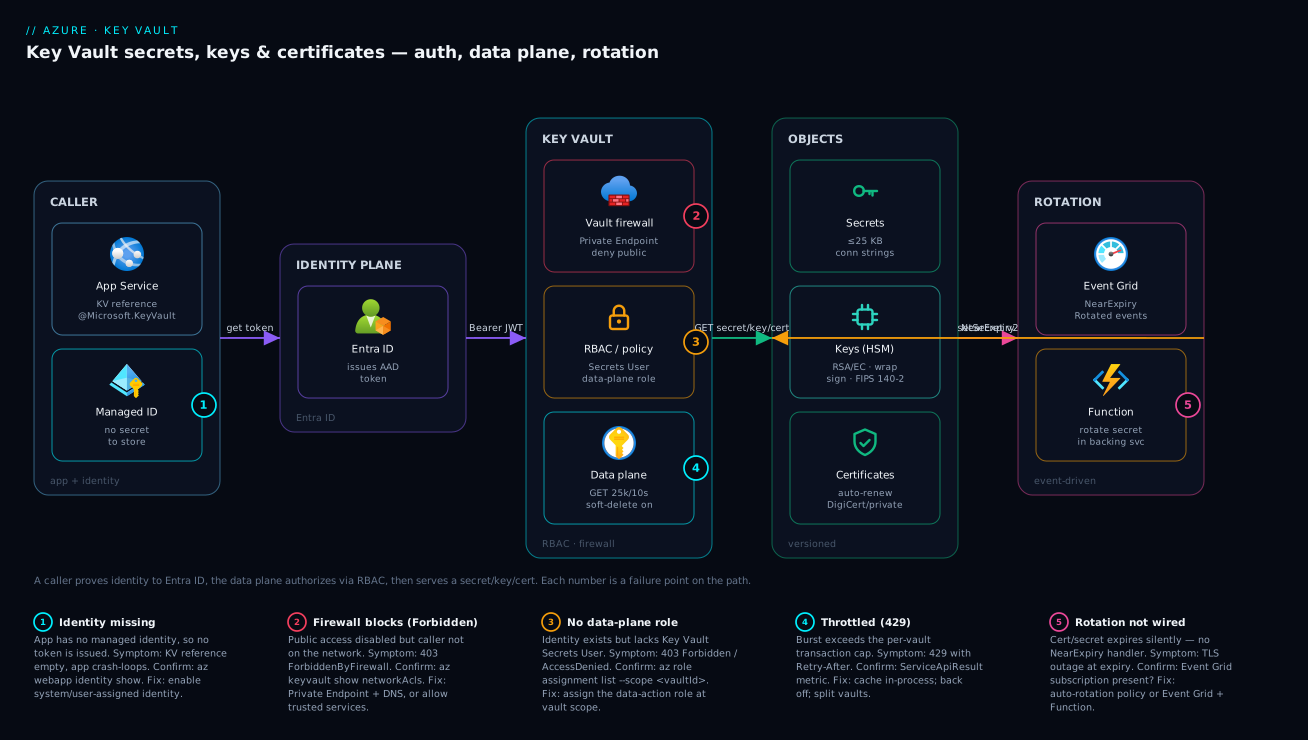
The diagram traces a secret read exactly as it happens on the wire, then maps the failure classes onto the hops where they bite. Read it left to right. On the far left, an App Service app holds a managed identity (badge 1 — if that identity is missing, no token is ever issued and the whole path is dead). The app asks the platform for a token; the request reaches Entra ID, which issues a short-lived Bearer JWT scoped to https://vault.azure.net. The app presents that token to the Key Vault data plane — but first it must clear two gates: the vault firewall (badge 2 — if public access is disabled and the caller isn’t on the Private Endpoint or an allow-listed network, it’s ForbiddenByFirewall) and the RBAC/access-policy check (badge 3 — the identity needs Key Vault Secrets User at the vault scope, or it’s AccessDenied). Only then does the data plane (badge 4 — and watch the ~25,000-GET-per-10s cap; bursts return 429) reach into the backing objects: the secret, the HSM-backed key, or the certificate.
The right edge shows the lifecycle that keeps it all current: Event Grid raises a NearExpiry event, a Function rotates the credential in its backing service and writes a new version back into the vault (badge 5 — if rotation was never wired, a cert simply expires and TLS goes down). Notice that every successful read converges on the same three facts you confirm during an incident: does the caller have an identity, can it pass the firewall, and does it hold a data-plane role? That ordering — identity, then network, then authorization, then throttle — is the whole diagnostic method. The first question on any Key Vault failure is “is this a 401 (no identity), a 403-firewall (network), a 403-RBAC (no role), or a 429 (throttle)?” — and the diagram tells you which hop owns each.
Real-world scenario
Medivault Health runs a patient-portal API on Azure App Service (Linux, .NET 8) on a P1v3 plan in Central India, with Azure SQL behind it, all under HIPAA-style controls. The platform team is five engineers; the original design stored the SQL connection string and a third-party lab-results API key as plaintext App Service settings, and terminated TLS with a .pfx an engineer renewed by hand each year. Monthly spend was about ₹42,000. Three separate incidents in one quarter forced a redesign, and the redesign was Key Vault, done properly.
The first incident was a near-miss audit finding: the plaintext connection string in app settings, visible to anyone with portal access, failed the access-control review outright. The auditor’s question — “prove who has read this credential and when” — had no answer. The team moved both the connection string and the lab API key into a vault, kv-medivault-prod in RBAC mode with purge protection on, and switched the app to system-assigned managed identity + Key Vault references. The connection string in app settings became @Microsoft.KeyVault(SecretUri=.../secrets/SqlConn/). Reads were now logged, attributable, and rotatable.
The rollout broke in a way that taught the core lesson. On first deploy, the app crash-looped — the SQL connection string resolved to empty. The reflex was to suspect the vault, the network, the secret. The actual cause: the app had a managed identity, and the identity had been created, but the Key Vault Secrets User role assignment had been applied at the resource-group scope on a vault that had been moved to a different RG, so the role didn’t apply at the vault’s actual scope. az role assignment list --assignee <principal> --scope <vaultId> returned nothing for the vault. Re-assigning the role at the vault scope fixed it instantly. The lesson on the wall: a Key Vault reference failing empty is almost always identity-or-role, not the secret.
The second incident was the certificate. The hand-renewed .pfx lapsed because the engineer who tracked it was on leave; the portal threw cert-expiry warnings nobody was watching, and the custom domain went to a browser TLS error for forty minutes during business hours. The fix was to move the certificate into the vault as a managed certificate with auto-renewal (AutoRenew 30 days before expiry), wired to an integrated CA, and to subscribe Event Grid CertificateNearExpiry and CertificateNewVersionCreated events to a Function that re-imported the new cert to the front-end and posted to the team’s Teams channel. The 2am-expiry class of incident was now structurally impossible.
The third was throttling. Under a reporting spike, the API — which read four secrets on every request with no caching — hit the per-vault GET cap and started getting 429s, which surfaced as request failures. Diagnose via the ServiceApiResult metric showed throttled transactions climbing exactly with load. The fix was not a bigger SKU: it was caching the resolved secrets in-process (refreshed every few minutes, plus on SecretNewVersionCreated) so a request did zero Key Vault calls in the hot path. Transaction volume fell ~98%, the 429s vanished, and the architecture was cheaper because Key Vault operations are billed per transaction. Final state: kv-medivault-prod with RBAC, purge protection, a Private Endpoint (public access disabled), managed-identity references, auto-renewing certs, event-driven rotation, and in-process caching. Spend was flat at ₹42,000; the audit passed; the pager went quiet. The incident timeline, because the order of moves is the lesson:
| When | Symptom | Action taken | Effect | What it should have been |
|---|---|---|---|---|
| Q1 audit | Plaintext secret fails review | Move secrets to vault + MI references | Logged, attributable, rotatable | Never store plaintext in the first place |
| First deploy | App crash-loops, SqlConn empty | Suspect vault/network | Wasted an hour | Check identity + role at vault scope first |
| +20 min | Still empty | az role assignment list --scope <vaultId> = none |
Root cause: role at wrong scope | Assign data roles at vault scope |
| Cert lapse | TLS error 40 min, business hours | Emergency manual renew | Outage over, root cause remains | Managed cert + auto-renew + events |
| +1 week | Cert hardened | Auto-renew + Event Grid → Function | 2am-expiry class eliminated | Should have been day-one design |
| Reporting spike | 429s, request failures | Suspect Key Vault outage | Misdirected | Read ServiceApiResult; it’s your throttle |
| +2 days | Throttling fixed | Cache secrets in-process | −98% transactions, 429s gone, cheaper | Never read secrets per-request uncached |
Advantages and disadvantages
Centralizing secrets, keys and certificates in a managed, throttled, access-controlled service is overwhelmingly the right call — but it introduces a runtime dependency and a few sharp edges you must design around. Weigh it honestly:
| Advantages (why this model helps) | Disadvantages (why it bites) |
|---|---|
| Secrets leave config and source control; an app holds a reference, not the value | Adds a runtime dependency — the vault must be reachable and authorized at startup |
| Every read is logged and identity-attributed — audits become answerable | Misconfigured identity/role makes the app crash-loop with empty values (looks like a random failure) |
| Managed identity means no stored credential to access your secrets | The firewall can block your own callers if you lock down without a path/DNS |
| Rotation becomes a single operation; certs auto-renew | Certificate consumers (App Gateway/Front Door) may need a re-import after renewal |
| Soft-delete + purge protection defend against accidental and malicious deletion | Purge protection is irreversible, and soft-delete reserves the name (redeploy gotcha) |
| HSM/Managed HSM offer FIPS-validated custody when compliance demands it | A shared, throttled service — uncached per-request reads hit 429 under load |
| RBAC gives central governance, inheritance, and PIM | Two auth models (RBAC vs access policies) confuse teams; control access ≠ data access |
| One vault per env/sensitivity cleanly scopes blast radius | Per-transaction billing means chatty access costs money as well as throttles |
The model is right for essentially every workload that handles secrets — which is all of them. It bites hardest on teams who lock down a vault without testing their own callers’ path, who read secrets per-request without caching, who forget that Key Vault Contributor is not a data reader, and who never wire rotation and then get paged by an expiry. Every disadvantage is manageable — caching defeats throttling, vault-scope role assignment defeats the crash-loop, a Private Endpoint with DNS defeats the lockout — but only if you know they exist, which is the entire point of this article.
Hands-on lab
Stand up a vault, store a secret, grant an app’s managed identity read access, wire a Key Vault reference, and confirm an unauthorized caller is denied — all free-tier-friendly (a vault costs per transaction, effectively pennies; delete at the end). Run in Cloud Shell (Bash).
Step 1 — Variables and resource group.
RG=rg-kv-lab
LOC=centralindia
KV=kv-lab-$RANDOM          # globally-unique vault name
APP=app-kv-lab-$RANDOM     # globally-unique app name
az group create -n $RG -l $LOC -o table
Step 2 — Create a vault in RBAC mode with soft-delete (and purge protection off, so you can delete it cleanly).
az keyvault create -n $KV -g $RG -l $LOC \
  --enable-rbac-authorization true \
  --retention-days 7 \
  --sku standard -o table
Expected: a vault row; enableRbacAuthorization true. (We leave purge protection off only because this is a throwaway lab — in production, turn it on.)
Step 3 — Grant yourself a data role, then store a secret. Because the vault is RBAC, even as the creator you need a data role to write a secret:
ME=$(az ad signed-in-user show --query id -o tsv)
az role assignment create --assignee "$ME" --role "Key Vault Secrets Officer" \
  --scope "$(az keyvault show -n $KV -g $RG --query id -o tsv)"

# Give RBAC ~30s to propagate, then set a secret
az keyvault secret set --vault-name $KV --name DemoSecret --value "hello-from-kv" -o table
Expected: the secret object, id ending /secrets/DemoSecret/<version>. If you get 403, the role hasn’t propagated — wait and retry. (This is the “control access ≠ data access” lesson, live.)
Step 4 — Create an app with a managed identity.
az appservice plan create -n plan-kv-lab -g $RG --is-linux --sku B1 -o table
az webapp create -n $APP -g $RG -p plan-kv-lab --runtime "DOTNETCORE:8.0" -o table
az webapp identity assign -n $APP -g $RG -o table
Step 5 — Grant the app’s identity read-only access and wire a Key Vault reference.
PRINCIPAL=$(az webapp identity show -n $APP -g $RG --query principalId -o tsv)
az role assignment create --assignee "$PRINCIPAL" --role "Key Vault Secrets User" \
  --scope "$(az keyvault show -n $KV -g $RG --query id -o tsv)"

SECRET_URI=$(az keyvault secret show --vault-name $KV --name DemoSecret --query id -o tsv)
# Strip the version to follow rotation (unversioned reference)
BASE_URI=$(echo "$SECRET_URI" | sed 's#/[^/]*$#/#')
az webapp config appsettings set -n $APP -g $RG \
  --settings "DemoSecret=@Microsoft.KeyVault(SecretUri=$BASE_URI)" -o table
Step 6 — Confirm the reference resolved (not empty). In the portal: the app’s Environment variables blade shows DemoSecret with a green “resolved” status (an error icon means identity/role/firewall — exactly the failure table above). Via CLI you can verify the setting is the reference:
az webapp config appsettings list -n $APP -g $RG \
  --query "[?name=='DemoSecret'].{name:name, value:value}" -o table
Step 7 — Prove unauthorized access is denied. Remove the app’s role and confirm a read would now fail (the reference would resolve empty on next refresh):
az role assignment delete --assignee "$PRINCIPAL" --role "Key Vault Secrets User" \
  --scope "$(az keyvault show -n $KV -g $RG --query id -o tsv)"
# Re-add it so the app keeps working (or leave removed to observe the crash-loop)
az role assignment create --assignee "$PRINCIPAL" --role "Key Vault Secrets User" \
  --scope "$(az keyvault show -n $KV -g $RG --query id -o tsv)"
Validation checklist. You created an RBAC vault, learned that creating it doesn’t grant data access, stored and read a secret, gave an app a credential-free identity, wired a Key Vault reference, and saw that removing the role is what breaks it. The steps mapped to what each proves:
| Step | What you did | What it proves | Real-world analogue |
|---|---|---|---|
| 2 | RBAC vault, soft-delete | The secure default posture | Every production vault |
| 3 | Assign a data role to yourself | Control access ≠ data access | The #1 “why 403” confusion |
| 5 | MI + Secrets User + KV reference | Secrets with zero stored creds | The canonical app pattern |
| 6 | Check the reference resolved | The reference-status diagnostic | First look when a setting “won’t take” |
| 7 | Remove the role | Role-or-identity is what breaks references | The empty-value crash-loop, live |
Cleanup (avoid lingering charges and free the vault name).
az group delete -n $RG --yes --no-wait
# Because soft-delete reserves the name, purge it if you want the name back immediately:
az keyvault purge -n $KV  # only works with purge protection OFF (as in this lab)
Cost note. A B1 plan is a few rupees per hour and Key Vault transactions are fractions of a paisa each — an hour of this lab is well under ₹50, and deleting the resource group stops everything. Remember az keyvault purge is required to fully release the name (soft-delete keeps it reserved otherwise).
Common mistakes & troubleshooting
This is the playbook — the part you bookmark. First as a scannable table you can read mid-incident, then the entries that bite hardest with full confirm-command detail.
| # | Symptom | Root cause | Confirm (exact cmd / portal path) | Fix |
|---|---|---|---|---|
| 1 | App crash-loops; secret-backed setting resolves empty | App has no managed identity | az webapp identity show -n <app> -g <rg> (empty) |
az webapp identity assign; then grant the role |
| 2 | 403 AccessDenied reading a secret, identity exists | No data-plane role assigned (or wrong scope) | az role assignment list --assignee <principal> --scope <vaultId> |
Assign Key Vault Secrets User at the vault scope |
| 3 | 403 ForbiddenByFirewall from your own app | Firewall default-deny, caller not allow-listed; or public disabled, no PE | az keyvault show --query properties.networkAcls; publicNetworkAccess |
Allow subnet / bypass AzureServices / add Private Endpoint + DNS |
| 4 | “Key Vault Contributor” still can’t read secrets | Confusing control plane with data plane | IAM blade: they have Contributor, no data role | Add a data-plane role (Secrets User/Officer) |
| 5 | Assigning an access policy “does nothing” | Vault is in RBAC mode (enableRbacAuthorization) |
az keyvault show --query properties.enableRbacAuthorization |
Use az role assignment (not set-policy) on RBAC vaults |
| 6 | Intermittent failures / 429 under load | Throttling — reading secrets per-request, uncached | ServiceApiResult metric throttled > 0; Retry-After header |
Cache in-process; exponential backoff; split vaults |
| 7 | Rotated secret not picked up by the app | KV reference cached, or versioned URI pinned | App restarts pick it up; check URI has a version | Use unversioned URI; restart/refresh; handle NewVersionCreated |
| 8 | TLS broke when the cert “renewed” | App Gateway/Front Door still serving old cert | Compare served thumbprint to vault current version | Re-import cert (or MI-sync) on CertificateNewVersionCreated |
| 9 | Certificate silently expired | No auto-renewal lifetime action wired | az keyvault certificate show --query policy.lifetimeActions |
Add AutoRenew lifetime action; subscribe NearExpiry events |
| 10 | VaultAlreadyExists / can’t recreate a vault |
A same-named vault is soft-deleted (name reserved) | az keyvault list-deleted |
az keyvault recover, or purge (if PP off), or rename |
| 11 | Can’t disable purge protection | Purge protection is irreversible | az keyvault show --query properties.enablePurgeProtection = true |
Cannot disable; wait out retention or recreate the vault |
| 12 | Read returns success but value is wrong/empty | Secret disabled, expired (advisory), or wrong version | az keyvault secret show --query "{en:attributes.enabled, exp:attributes.exp}" |
Enable / roll forward / fix the URI |
| 13 | App Configuration KV reference unresolved | App Config’s identity lacks Secrets User | App Config “Key Vault reference” error status | Grant App Config’s managed identity Secrets User on the vault |
| 14 | Crypto op fails on a key (encrypt/sign) | Key lacks that operation in key_ops, or wrong algorithm |
az keyvault key show --query key.keyOps |
Grant the op / pick a supported algorithm; Crypto User role |
The expanded form, with full reasoning for the entries that bite hardest:
1. App crash-loops and a secret-backed setting resolves to empty.
Root cause: The app has no managed identity, so no Entra token is issued and the Key Vault reference resolves to nothing.
Confirm: az webapp identity show -n <app> -g <rg> returns empty/null; the portal Environment variables blade shows the reference with a red error.
Fix: az webapp identity assign (system-assigned) or attach a user-assigned identity, then grant it the data role (mistake #2 is the very next step people forget).
2. 403 AccessDenied reading a secret even though the identity exists.
Root cause: The identity has no data-plane role, or the role was assigned at the wrong scope (e.g. an RG that no longer contains the vault, as in the Medivault story).
Confirm: az role assignment list --assignee <principal> --scope $(az keyvault show -n <kv> -g <rg> --query id -o tsv) returns nothing.
Fix: az role assignment create --assignee <principal> --role "Key Vault Secrets User" --scope <vaultId> — assign at the vault scope (or object scope for finer control).
3. 403 ForbiddenByFirewall from your own application.
Root cause: The vault firewall is default-deny and the caller isn’t allow-listed, or public access is disabled with no Private Endpoint/DNS for the caller.
Confirm: az keyvault show -n <kv> -g <rg> --query "{acls:properties.networkAcls, pna:properties.publicNetworkAccess}"; the error body says ForbiddenByFirewall (not AccessDenied).
Fix: Add the caller’s subnet/IP, set bypass AzureServices for first-party callers, or (the strong form) add a Private Endpoint with a Private DNS zone so the hostname resolves privately.
4. Someone with Key Vault Contributor still can’t read a secret. Root cause: Control plane ≠ data plane. Contributor manages the vault but grants no access to the objects inside. Confirm: IAM blade shows Contributor but no Secrets/Crypto/Certificates data role. Fix: Assign the appropriate data-plane role. Management access never implies data access — by design.
5. Adding an access policy has no effect.
Root cause: The vault is in Azure RBAC mode (enableRbacAuthorization = true), so the access-policy list is ignored.
Confirm: az keyvault show --query properties.enableRbacAuthorization returns true.
Fix: Use az role assignment create instead of az keyvault set-policy. (Pick one model per vault and stick to it.)
6. Intermittent failures and 429s under load.
Root cause: Throttling — the app reads secrets on every request without caching and exceeds the per-vault transaction cap.
Confirm: The ServiceApiResult metric shows throttled results climbing with load; responses carry a Retry-After header.
Fix: Cache the resolved secrets in-process (refresh on an interval and on SecretNewVersionCreated); add exponential backoff; for genuinely high volume, split across vaults. A bigger SKU does not fix this.
7. A rotated secret isn’t picked up.
Root cause: The Key Vault reference is cached, or you referenced a versioned URI that pins an old version.
Confirm: The reference URI ends in a version GUID; restarting the app picks up the new value.
Fix: Use the unversioned URI to follow rotation; restart/refresh the consumer; handle SecretNewVersionCreated to refresh caches deliberately.
8. TLS broke right after a certificate “renewed.”
Root cause: The renewal created a new version in the vault, but the consumer (Application Gateway, Front Door) is still serving the old cert because it wasn’t re-imported/synced.
Confirm: Compare the thumbprint the endpoint serves against the vault’s current certificate version.
Fix: Re-import the cert to the consumer (or rely on managed-identity cert integration), triggered by the CertificateNewVersionCreated event.
9. A certificate silently expired.
Root cause: No auto-renewal lifetime action was configured (or it was EmailContacts, which only warns).
Confirm: az keyvault certificate show --query policy.lifetimeActions shows no AutoRenew trigger.
Fix: Add an AutoRenew lifetime action (e.g. 30 days before expiry) and subscribe CertificateNearExpiry/CertificateNewVersionCreated events so renewal is verified and propagated.
10. You can’t recreate a vault — VaultAlreadyExists.
Root cause: A previously-deleted, same-named vault is soft-deleted and still holding the globally-unique name.
Confirm: az keyvault list-deleted shows it with a scheduledPurgeDate.
Fix: az keyvault recover -n <name> to bring it back (and let IaC adopt it), or az keyvault purge if purge protection is off and policy allows, or choose a different name.
11. You can’t turn off purge protection.
Root cause: Purge protection is irreversible by design.
Confirm: az keyvault show --query properties.enablePurgeProtection is true.
Fix: There is none for the existing vault — wait out retention for soft-deleted objects, or stand up a new vault if you genuinely need a no-PP vault (rare; PP is the safer default).
Best practices
- Use Azure RBAC, not access policies, on every new vault. RBAC gives inheritance, central governance, PIM, and object-level scope; access policies are flat, capped at 1024, and invisible to the rest of Azure RBAC tooling.
- Enable soft-delete (it’s forced) and purge protection. Purge protection is the control that defeats a malicious “delete and purge everything.” Accept that it’s irreversible — that’s the point.
- Authenticate apps with managed identity + Key Vault references. No stored credential should ever exist to reach your secrets. Verify the reference resolves (Environment variables blade) after every deploy.
- Assign data-plane roles at the vault (or object) scope, narrowly. Key Vault Secrets User for read-only apps; never hand an app Secrets Officer. Remember Contributor reads nothing.
- Separate vaults by environment and sensitivity. Prod and non-prod in different vaults (and ideally subscriptions); a blast-radius boundary, not a convenience grouping.
- Cache resolved secrets in-process. Reading a secret per request will throttle you (429) and cost per-transaction. Refresh on an interval and on
SecretNewVersionCreated. - Lock the network down — Private Endpoint + public access disabled for production. Then test your own callers’ path and DNS, so you don’t 403 yourself. Set bypass AzureServices where first-party services need access.
- Wire rotation, don’t hope. Certificate
AutoRenewlifetime actions for certs; Event GridNearExpiry→ Function for secrets/keys that must change in a backing service. An unwired expiry is a scheduled outage. - Reference the unversioned URI to follow rotation; pin a version only when you need determinism. And remember consumers like App Gateway need a re-import on new cert versions.
- Choose the SKU by custody requirement, not reflex. Standard for most; Premium for FIPS 140-2 L2 HSM keys; Managed HSM for L3/single-tenant/high-throughput. Don’t pay the HSM surcharge without a mandate.
- Manage vault config and role assignments as code (Bicep), reviewed in PRs. A wrong scope or a missing identity is a boot-time landmine; catch it in review, not at 3am.
- Alert on the leading indicators: throttled transactions, certificate/secret near-expiry, unauthorized (403) spikes, and availability — not just “app down.”
The alerts worth wiring before the next incident — leading indicators, not the lagging “app down”:
| Alert on | Signal / metric | Threshold (starting point) | Why it’s leading |
|---|---|---|---|
| Throttling | ServiceApiResult (throttled) |
> 0 sustained 5 min | First sign of uncached per-request reads before 429s cascade |
| Cert near-expiry | CertificateNearExpiry event / days-to-expiry |
< 30 days | Catches a renewal that didn’t fire before TLS breaks |
| Secret near-expiry | SecretNearExpiry event |
< 14 days | Rotate before consumers fail on a stale credential |
| Unauthorized access | 403 result count | spike above baseline | Misconfig or an actual access attempt |
| Availability | Vault availability metric | < 99.9% | Platform issue vs your config — rule it in/out fast |
| Saturation toward cap | Total transactions / 10 s | approaching the GET cap | You’re about to throttle; add caching now |
Security notes
- Managed identity over any stored secret. The app’s system- or user-assigned managed identity with Key Vault references means connection strings and keys never sit in plaintext config. Grant least privilege —
Key Vault Secrets User, not a broad or officer role. - Purge protection + soft-delete as a deletion-resistance control. They are a security feature, not just an ops convenience: together they defeat both fat-finger deletion and a credentialed attacker trying to wipe your keys.
- Network-isolate sensitive vaults. A Private Endpoint with public access disabled keeps the vault off the internet entirely; pair it with correct Private DNS. For PaaS callers that can’t use a PE, scope the firewall tightly and use bypass AzureServices deliberately, not blanket-allow.
- HSM custody where compliance demands it. Premium (FIPS 140-2 L2) or Managed HSM (L3, single-tenant) when an auditor requires key material to live in certified hardware. Make CMK keys non-exportable.
- Audit everything, and watch it. Enable Key Vault diagnostic logs to a Log Analytics workspace; every
SecretGet,KeyOperationand policy change is recorded. Pair with Azure Monitor and Application Insights: Full-Stack Observability and alert on 403 spikes and unexpected callers. - Govern vault creation centrally. Use Azure Policy and Governance at Scale: Enforce the Rules Automatically to require soft-delete + purge protection, deny public network access, and enforce RBAC mode on every vault by default.
- Least privilege on the control plane too. Key Vault Contributor is powerful (firewall, SKU, policies) — restrict it; and remember it grants no data access, so don’t over-grant it trying to “let someone read a secret.”
- Rotate keys and credentials on a schedule, and treat a leaked credential as permanently compromised — rotate, don’t hope it wasn’t seen. Soft-delete protects the value; rotation protects against exposure.
The security knobs that also prevent incidents — secure and resilient pull the same direction here:
| Control | Setting / mechanism | Secures against | Also prevents |
|---|---|---|---|
| Managed identity + KV references | identity + @Microsoft.KeyVault(...) |
Plaintext secrets in config | Hand-rolled credentials drifting/leaking |
| Azure RBAC, least privilege | Key Vault Secrets User at vault scope |
Over-broad access to secrets | Officer-role mistakes; lateral movement |
| Soft-delete + purge protection | enableSoftDelete, enablePurgeProtection |
Malicious/accidental deletion | Painful unrecoverable loss; redeploy-after-delete |
| Private Endpoint + public disabled | publicNetworkAccess: 'Disabled' + PE |
Internet-exposed secrets | Some firewall lockout classes (with DNS done right) |
| Diagnostic logs to Log Analytics | Vault diagnostic settings | Unauditable access | Slow incident triage |
| HSM / Managed HSM | Premium / Managed HSM | Key material in software | Failed compliance audits |
| Policy: enforce vault standards | Azure Policy (deny/audit) | Drifting, insecure vaults | One team’s mistake becoming estate-wide |
Cost & sizing
The bill drivers and how they interact with the design:
- Operations are billed per transaction. Standard vault secret/key operations are fractions of a paisa each, so the cost lever is volume — an app reading four secrets per request at high RPS racks up both a bill and throttling. In-process caching is the single biggest cost (and 429) reducer. There is no per-vault hourly charge on Standard.
- HSM keys carry a surcharge. Premium HSM-protected keys are billed per key per month (plus operations); Managed HSM is a fixed hourly charge per HSM pool (substantial — think enterprise-scale, not per-app). Don’t reach for HSM without a compliance mandate.
- Certificates incur a per-renewal/operation cost (and the integrated-CA cost is the CA’s, separate from Key Vault). Auto-renewal volume is low, so this is rarely material.
- Private Endpoint adds a small hourly + per-GB charge — cheap insurance to keep a sensitive vault off the internet, and almost always worth it for production.
- Logging (diagnostic logs to Log Analytics) is billed per GB ingested — worth it for audit, but Key Vault log volume is modest unless you read secrets uncached at high volume (another reason to cache).
A rough monthly picture: a typical app’s Key Vault footprint (a Standard vault, a handful of secrets, a managed cert, sane caching) is often ₹0–200/month — operations are that cheap when you cache. Add a Private Endpoint (~₹600–900/month) for production isolation. Premium adds per-HSM-key charges; Managed HSM is a different order of magnitude (hourly per pool — for estates with real compliance throughput, not single apps). Medivault’s vault cost stayed in the low hundreds of rupees even after Private Endpoint, because caching cut transactions ~98%. The cost drivers and what each buys you:
| Cost driver | What you pay for | Rough INR / month | What it fixes / enables | Watch-out |
|---|---|---|---|---|
| Standard vault operations | Per-transaction secret/key/cert ops | ~₹0–200 (with caching) | The base service | Uncached per-request reads → bill + 429 |
| Private Endpoint | Hourly + per-GB | ~₹600–900 | Vault off the public internet | Needs VNet + Private DNS |
| Premium HSM keys | Per HSM-key/month + ops | varies per key | FIPS 140-2 L2 custody | Surcharge per key; only with a mandate |
| Managed HSM | Fixed hourly per HSM pool | high (enterprise) | L3, single-tenant, high throughput | Not for a single app’s secrets |
| Diagnostic logs | Per-GB ingested to Log Analytics | ~₹100–500 | Audit trail / alerting | Volume tracks (uncached) read volume |
| Certificate renewals | Per renewal/op (+ CA cost separately) | low | Auto-renewing TLS | Integrated-CA cost is the CA’s |
The sizing rule in one line: right-size by transaction volume and custody requirement, not by SKU reflex. Cache to kill volume; choose Standard unless an auditor names a FIPS level; add a Private Endpoint for production; reserve Managed HSM for genuine enterprise crypto throughput.
Interview & exam questions
1. What is the difference between the control plane and the data plane in Key Vault, and why does it trip people up? The control plane (Azure Resource Manager) manages the vault as a resource — create/delete, firewall, SKU, configure RBAC mode — governed by roles like Key Vault Contributor. The data plane governs the objects inside — get a secret, sign with a key — governed by data roles like Key Vault Secrets User or access policies. It trips people up because Contributor can manage the vault but cannot read a secret; management access is not data access.
2. An app’s Key Vault reference resolves to an empty value and the app crash-loops. What are the two most likely causes? Either the app has no managed identity (so no token is issued — check az webapp identity show), or the identity exists but has no data-plane role (or it’s assigned at the wrong scope — check az role assignment list --scope <vaultId>). Fix by enabling the identity and assigning Key Vault Secrets User at the vault scope.
3. When would you choose Azure RBAC over the access-policy model? Essentially always for new vaults: RBAC gives inheritance (MG→sub→RG→vault→object), central governance via az role assignment, just-in-time elevation through PIM, and object-level scope. Access policies are a flat per-vault list capped at 1024 entries with no PIM. Each vault uses exactly one model, set via enableRbacAuthorization.
4. What do soft-delete and purge protection do, and what’s the catch with purge protection? Soft-delete (always on now) keeps a deleted vault/object recoverable for a 7–90 day retention window. Purge protection blocks anyone from permanently purging during that window — defeating a malicious “delete and purge everything.” The catch: purge protection is irreversible once enabled, and it makes the retention period a hard floor.
5. Why does a TLS certificate appear as three objects in Key Vault? A certificate object bundles the X.509 cert, its private key (stored as a Key Vault key), and the exportable PFX/PEM (stored as a Key Vault secret) — so the same name is addressable as a certificate, a key, and a secret. You use the certificate object for lifecycle/renewal, the key for operations without exporting, and the secret to import the full PFX into App Service or Application Gateway.
6. An app intermittently gets 429 from Key Vault under load. What’s happening and how do you fix it? Key Vault is a throttled, shared service with a per-vault transaction cap (~25,000 fast transactions / 10 s). An app reading secrets per request without caching exceeds it under load and gets 429 with a Retry-After. The fix is in-process caching (refresh on an interval and on SecretNewVersionCreated) plus exponential backoff — not a bigger SKU.
7. You can’t recreate a vault — VaultAlreadyExists — but you don’t see it in the portal. Why? A previously-deleted, same-named vault is soft-deleted and still reserving the globally-unique name. Confirm with az keyvault list-deleted. Recover it (az keyvault recover) and let IaC adopt it, purge it (if purge protection is off and policy permits), or pick a new name.
8. What’s the difference between Standard, Premium, and Managed HSM? Standard stores software-protected keys (and is fine for most secrets/certs). Premium adds HSM-protected keys on shared FIPS 140-2 Level 2 HSMs. Managed HSM is a single-tenant pool of FIPS 140-2 Level 3 HSMs with its own RBAC and much higher throughput, billed at a fixed hourly rate per pool. Choose by required assurance level and isolation, not by feature envy.
9. How do you make a database password rotate automatically with Key Vault? A rotation policy sets an expiry; a SecretNearExpiry event via Event Grid triggers a Function that rotates the credential in the database and writes the new value back as a new secret version. Consumers using the unversioned reference pick up the new version (on restart/refresh). Key Vault alone can’t change the backing system — the Function does that half.
10. You locked a vault to a Private Endpoint and now your own app gets 403. What went wrong? Either the firewall is default-deny without the caller’s network allowed, public access is disabled without a working Private Endpoint + Private DNS for the caller, or you didn’t set bypass AzureServices for a first-party caller. The 403 body says ForbiddenByFirewall (network), distinct from AccessDenied (missing role). Fix the network path/DNS or allow-list, don’t touch the role.
11. What’s the difference between referencing a versioned and an unversioned secret URI? An unversioned URI (/secrets/Name/) follows the current version, so rotation flows through without changing the reference. A versioned URI pins an exact version — deterministic and audited, but it won’t pick up rotation. Use unversioned to auto-follow rotation, versioned when you need a fixed, reviewed value.
12. Why is Key Vault Contributor insufficient to let someone read a secret, and what would you assign instead? Contributor is a control-plane role — it manages the vault but grants no data-plane access to the objects inside, by design (separation of duties). To read secret values you assign a data-plane role: Key Vault Secrets User (read) or Secrets Officer (CRUD), at the vault or object scope.
These map to AZ-500 (Security Engineer) — manage Key Vault, secrets, keys, certificates, RBAC, network restrictions — and AZ-204 (Developer Associate) — secure app configuration data using Key Vault and managed identities. The networking angle (Private Endpoint, firewall) touches AZ-700, and governance (Policy enforcing vault standards) touches AZ-305. A compact cert-mapping for revision:
| Question theme | Primary cert | Exam objective area |
|---|---|---|
| Control vs data plane, RBAC vs policies | AZ-500 | Manage Key Vault access |
| Managed identity + KV references | AZ-204 / AZ-500 | Secure app config; managed identities |
| Soft-delete, purge protection, recovery | AZ-500 | Configure Key Vault security |
| HSM / Managed HSM, FIPS levels | AZ-500 | Key management & custody |
| Private Endpoint / firewall | AZ-700 / AZ-500 | Secure PaaS connectivity |
| Rotation, certificates, Event Grid | AZ-204 / AZ-500 | Implement secure secret rotation |
| Policy enforcing vault standards | AZ-305 | Design governance |
Quick check
- Someone has Key Vault Contributor on a vault but gets 403 reading a secret. Why, and what do you assign instead?
- An app’s Key Vault reference resolves to an empty value and the app crash-loops. Name the two things to check, in order.
- True or false: a bigger vault SKU is the correct fix for 429 throttling errors under load.
- You enabled purge protection last week and now want to disable it. Can you, and why or why not?
- A custom-domain TLS certificate stored in Key Vault expired despite being “managed.” What was almost certainly not configured?
Answers
- Key Vault Contributor is a control-plane role — it manages the vault (firewall, SKU, policies) but grants no data-plane access to the objects inside, by design. Assign a data-plane role instead: Key Vault Secrets User (read) or Secrets Officer (CRUD), at the vault or object scope.
- First, does the app have a managed identity (
az webapp identity show— if empty, no token is issued;az webapp identity assign). Second, does that identity have a data-plane role at the vault’s actual scope (az role assignment list --assignee <principal> --scope <vaultId>— if empty, assign Key Vault Secrets User at the vault scope). It’s almost always identity-or-role, not the secret. - False. 429 is throttling against a per-vault transaction cap; a bigger SKU doesn’t raise it. The fix is in-process caching (read the secret once, refresh on an interval and on
SecretNewVersionCreated) plus exponential backoff. Managed HSM has higher throughput, but the real fix is to stop reading secrets per request. - No. Purge protection is irreversible by design — once enabled it cannot be turned off for the life of the vault, and the retention period becomes a hard floor. If you genuinely need a no-PP vault you must create a new one (rare; PP is the safer default).
- Auto-renewal — an
AutoRenewlifetime action on the certificate policy (e.g. renew 30 days before expiry), and ideally a subscription toCertificateNearExpiry/CertificateNewVersionCreatedevents. A policy set toEmailContactsonly warns and doesn’t renew; “stored in Key Vault” is not the same as “set to renew itself.”
Glossary
- Key Vault — a regional, named Azure resource (
https://<name>.vault.azure.net) that stores and access-controls secrets, keys and certificates. - Secret — a versioned name→value pair holding any string up to 25 KB (connection strings, passwords, API keys); the value is readable by an authorized caller.
- Key — cryptographic material (RSA/EC, optionally HSM-backed) you never read directly; you invoke operations (encrypt/decrypt, sign/verify, wrap/unwrap) on it.
- Certificate — an X.509 cert with a managed lifecycle (issuance + auto-renewal), stored under the hood as a key + a secret, so it’s addressable as three objects.
- Control plane — Azure Resource Manager operations that manage the vault resource (create/delete, firewall, SKU, RBAC mode); governed by RBAC roles like Key Vault Contributor.
- Data plane — operations on the objects inside the vault (get/set/sign); governed by data-plane RBAC roles or access policies, over
*.vault.azure.net. - Access policy — the legacy per-vault permission list (flat, capped at 1024 entries) granting per-object-type operations; one of two auth models.
- Azure RBAC (data plane) — the recommended auth model using role assignments (e.g. Key Vault Secrets User) with inheritance, central governance, and PIM.
- Managed identity — a secret-free Entra identity Azure manages for a resource, letting it obtain tokens and authenticate to Key Vault with no stored credential.
- Key Vault reference — an app setting/App Config value of the form
@Microsoft.KeyVault(SecretUri=…)that the platform resolves at runtime using the app’s managed identity. - Soft-delete — a recoverable-deletion state (7–90 day retention; always on) for deleted vaults/objects, allowing recovery within the window.
- Purge protection — an irreversible setting that blocks anyone from permanently purging a vault/object before the retention period elapses.
- Private Endpoint — a private IP for the vault inside your VNet that removes the public path; pair with Private DNS so the hostname resolves privately.
- Vault firewall (network ACLs) — IP/VNet allow-lists with a default-deny and an optional bypass for trusted Azure services.
- HSM (Hardware Security Module) — certified hardware where key material lives and never leaves in cleartext; Premium (FIPS 140-2 L2) or Managed HSM (L3, single-tenant).
- CMK (customer-managed key) — your key in Key Vault used by a service (Storage/SQL/Disk/ACR) via wrap/unwrap to encrypt its data, so you control the key.
- Rotation policy — a schedule/lifetime action that triggers renewal (cert auto-renew) or near-expiry events (secret/key) for hands-off rotation.
- Event Grid (Key Vault events) — the eventing source for
SecretNearExpiry,CertificateNewVersionCreated, etc., used to drive rotation automation. - Throttling (429) — a Too Many Requests response when transactions exceed the per-vault cap (~25,000 fast ops/10s); fixed with caching and backoff.
Next steps
You can now treat secrets, keys and certificates as governed assets and avoid the four failures that page you. Build outward:
- Next: Azure App Configuration in Production: Dynamic Refresh, Feature Flags, Key Vault References, and Snapshots — manage settings alongside Key Vault references so config and secrets are governed together.
- Related: Application Gateway v2 WAF: End-to-End TLS, mTLS, and Custom Rule Tuning — pull TLS/mTLS certificates straight from Key Vault and keep end-to-end encryption clean.
- Related: Azure Private Link and Private DNS: Keeping PaaS Off the Public Internet — the Private Endpoint + DNS pattern that takes your vault off the internet without locking yourself out.
- Related: Azure Monitor and Application Insights: Full-Stack Observability — wire diagnostic logs and alerts so 403 spikes, throttling and near-expiry never go unnoticed.
- Related: Azure Policy and Governance at Scale: Enforce the Rules Automatically — enforce soft-delete, purge protection, RBAC mode and no-public-access on every vault by default.
- Related: Troubleshooting Azure App Service: 502/503 Errors, Cold Starts & Restart Loops — where a failed Key Vault reference shows up as a mysterious restart loop.