Your app was fine in the demo. Then real traffic arrived, and now every few seconds a call to your Azure OpenAI chat deployment comes back 429 Too Many Requests with a terse JSON body and a Retry-After: 23 header. Some requests sail through; others bounce. The model didn’t change, the prompt didn’t change, your code didn’t change — the rate changed. This is the most common production failure on Azure OpenAI, and it is maddening because a 429 is not an error in your code or the model’s output. It is the platform’s flow-control valve telling you, politely, that you are asking faster than your quota allows, and to slow down and try again.
A 429 has two distinct triggers, and conflating them is why teams stay stuck. Azure OpenAI meters every Standard and Global Standard deployment on two simultaneous limits: TPM (tokens per minute) — the tokens (prompt + completion) you may process in a rolling window — and RPM (requests per minute) — how many calls you may make regardless of size. Hit either ceiling and you get a 429. A flood of tiny prompts exhausts RPM while TPM sits idle; a handful of huge RAG calls exhausts TPM while RPM sits idle. The fix for one is not the fix for the other, so the first job in any incident is to learn which limit you hit — and the platform tells you, in headers most people never read.
This is the diagnostic playbook for that. You will learn the quota math (how TPM is assigned, how RPM is derived from it, why raising one moves the other), how to read the Retry-After and x-ratelimit-* headers for live headroom, and how to build retry logic that honours the server’s Retry-After instead of guessing — because naive fixed-interval retries make a storm worse. We cover the deployment types (Standard, Global Standard, Data Zone, Provisioned PTU), plus spillover, batching and caching, each with the exact az CLI, portal path or KQL to confirm it and the precise fix.
By the end you will stop guessing. When 429s spike you will know within ninety seconds whether you blew the token budget or the request budget, whether a bursty client is starving everyone, whether you need more quota (and whether it is even available in your region), or whether the real fix is backoff, batching, a second deployment, or a jump to Provisioned Throughput — the difference between a five-minute mitigation and a day lost to scaling the wrong dial.
What problem this solves
Azure OpenAI sells capacity in an abstract unit — tokens per minute — and enforces it invisibly until you cross the line, then returns a 429 with almost no human-readable context. The status code deliberately tells you little; the useful information lives in HTTP headers and Azure Monitor metrics, and if you do not know which header maps to which limit you will burn an afternoon scaling quota that was never the bottleneck.
What breaks without this knowledge: an engineer sees 429s and immediately requests a TPM quota increase (a multi-day approval) when the real problem was a retry loop hammering RPM, or a missing max_tokens letting the model reserve far more budget than each call uses. Or they retry immediately on every 429, turning a brief throttle into a self-inflicted denial-of-service. Or they discover, mid-incident, that the region has no spare quota and the increase will take days, when a Global Standard deployment would have absorbed the burst immediately.
Who hits this: essentially everyone running Azure OpenAI under real load. It bites hardest on chat and RAG apps (large prompts eat TPM fast), batch jobs firing thousands of small calls (RPM-bound), apps with no client-side throttling (retry storms), multi-tenant platforms where one tenant starves the rest, and anyone who provisioned a small default quota and never checked it against projected traffic. The fix is rarely “ask for more tokens” — it is “find which budget you blew, honour the backoff, stop wasting tokens, and put capacity where the traffic is.”
To frame the field before the deep dive, here is every way a 429 reaches you, the first place to look, and the most common single cause:
| 429 trigger | First place to look | Most common single cause |
|---|---|---|
| TPM exceeded | x-ratelimit-remaining-tokens header |
Big RAG prompts + no max_tokens cap |
| RPM exceeded | x-ratelimit-remaining-requests header |
Batch loop / aggressive retries |
| Retry storm (self-inflicted) | App logs: retry cadence vs Retry-After |
Fixed-interval / no-backoff retry |
| No spare quota in region | az cognitiveservices ... deployment show |
Default/low TPM never raised |
| Subscription quota exhausted | Quotas blade / usage list |
Many deployments share one regional pool |
| PTU demand saturation | azure-openai-ptu-utilization metric |
PTU sized below peak concurrency |
Learning objectives
By the end of this article you can:
- Explain the two-limit model (TPM and RPM) and determine from response headers alone which one a given 429 hit.
- Do the quota math: how TPM is assigned, how RPM is derived at the fixed 6 RPM per 1,000 TPM ratio, and how the platform estimates token cost before a call to decide whether to admit it.
- Read and act on the rate-limit headers —
Retry-After,x-ratelimit-remaining-tokens,x-ratelimit-remaining-requests— to see live headroom and the exact wait the server wants. - Build retry logic that honours
Retry-Afterwith backoff and jitter, and explain why immediate or fixed-interval retries amplify a storm. - Choose between Standard, Global Standard, Data Zone Standard and Provisioned (PTU) based on whether your problem is burst absorption, latency, residency, or guaranteed throughput.
- Cut token consumption at the source —
max_tokenscaps, prompt trimming, caching, the Batch API — and decide when to add capacity versus efficiency. - Drive the diagnostic tools fluently: the response headers,
az cognitiveservices account deployment show, the Quotas blade, and the Azure Monitor token-usage, 429 and PTU-utilisation metrics.
Prerequisites & where this fits
You should already understand the basics: an Azure OpenAI resource (a kind of Azure AI Services / Cognitive Services account) hosts one or more model deployments — a named instance of a base model like gpt-4o or gpt-4o-mini that you call by deployment name. You call it over REST or the SDKs (Python/JS/.NET) with an API key or Microsoft Entra ID token, and requests and responses are measured in tokens (~4 characters or ~0.75 words each in English). Familiarity with HTTP status codes and basic retry concepts helps.
If tokens and pricing are still fuzzy, read Azure OpenAI tokens, context windows & pricing model explained first — the quota math assumes you know prompt + completion both count. The deployment-type choices are covered in Azure OpenAI deployment types: Standard, Global & Provisioned explained, the natural companion; and Deploy your first Azure OpenAI chat model (REST + SDK) gets you a deployment to load-test.
This sits in the AI/ML Observability & Reliability track and pairs with Azure Monitor & Application Insights for observability, where the token-usage and 429 metrics live. RAG workloads — the largest prompts and fastest TPM burn — are covered in Azure OpenAI “on your data”: RAG grounding & citations.
A quick map of who owns what during a 429 incident, so you call the right person fast:
| Layer | What lives here | Who usually owns it | 429 classes it can cause |
|---|---|---|---|
| Client app / SDK | Retry policy, max_tokens, concurrency |
App / dev team | Retry storms, RPM burn from tiny calls |
| Deployment config | Assigned TPM, model, deployment type | AI platform owner | TPM/RPM ceiling hit at assigned quota |
| Resource / region | Total regional token pool, model availability | Cloud platform / FinOps | Subscription-quota exhaustion, no spare quota |
| Provisioned capacity | PTU count, spillover config | AI platform + finance | PTU saturation under peak concurrency |
| Front door (APIM, gateway) | Per-tenant throttling, load balancing | Network / platform | Fair-use throttle (your own 429s, by design) |
Core concepts
Five mental models make every diagnosis obvious:
A 429 is flow control, not a failure. Unlike a 500 (the platform broke) or a 400 (your request was malformed), a 429 Too Many Requests means the request was valid but exceeded your assigned rate. The correct response is to wait and retry, not fix code or escalate — and the platform tells you how long to wait, in the Retry-After header. Treating 429 as fatal is the common over-reaction; “retry forever, immediately” is the under-reaction. The right behaviour is in between: back off, respect the header, retry a bounded number of times.
There are two limits, enforced at once. Every Standard-family deployment carries a TPM ceiling and an RPM ceiling, and you are throttled the instant you cross either. They are not independent dials — you assign TPM, and RPM is derived from it. This is the most important fact in the article: a 429 is ambiguous until you know which budget it charged against, and the two have opposite fixes.
The platform estimates your token cost before the call. It cannot know your completion length in advance, so at admission it estimates the cost — prompt tokens plus a reservation based on max_tokens (or the model’s default if you omit it). If that estimate would overflow the rolling TPM window, you get a 429 before the model even runs. This is why omitting max_tokens causes spurious 429s: the platform reserves a large default per call, so far fewer calls “fit” than your actual usage warrants.
Quota is assigned per deployment but drawn from a regional pool. Each deployment gets an assigned TPM from a per-region, per-model-family subscription quota. You can 429 because this deployment is at its assigned TPM, or because the region’s total quota for that family is exhausted across all your deployments. The first is fixed by raising this deployment’s TPM (if regional headroom exists); the second needs a quota-increase request or a different region.
Deployment type changes the capacity model entirely. Standard and Global Standard are pay-per-token with TPM/RPM throttling — you share a pool and 429 when you exceed your slice. Provisioned (PTU) is reserved capacity: you buy Provisioned Throughput Units, get guaranteed throughput, and are throttled only when your own units saturate. Choosing the type is choosing your throttling model: burstable-but-shared, or reserved-but-fixed.
The vocabulary in one table
Before the deep sections, pin down every moving part. The glossary at the end repeats these for lookup; this table is the mental model side by side:
| Concept | One-line definition | Where it lives | Why it matters to 429 |
|---|---|---|---|
| Token | ~4 chars of text; prompt + completion both count | Request + response | The unit TPM meters; big prompts burn it fast |
| TPM | Tokens per minute you may process | Deployment quota | One of the two limits; exceed → 429 |
| RPM | Requests per minute you may make | Derived from TPM | The other limit; tiny calls exhaust it |
| Quota | Regional, per-model-family token budget | Subscription / region | Caps total TPM you can assign |
Retry-After |
Seconds the server wants you to wait | 429 response header | The correct backoff value to honour |
x-ratelimit-remaining-tokens |
Tokens left in the current window | Response header | Live TPM headroom |
x-ratelimit-remaining-requests |
Requests left in the current window | Response header | Live RPM headroom |
max_tokens |
Cap on completion length per call | Request body | Bounds the token reservation; prevents spurious 429 |
| Standard / Global Standard | Pay-per-token, shared-pool deployment | Deployment type | TPM/RPM throttling applies |
| PTU | Provisioned Throughput Unit (reserved capacity) | Provisioned deployment | No shared-pool 429; saturate-your-own only |
| Spillover | Overflow PTU traffic to a Standard deployment | PTU + Standard pair | Absorbs bursts above provisioned capacity |
| Batch API | Async, 24-h, cheaper, separate quota | Batch deployment | Moves bulk work off your live TPM |
The 429 and its headers: reading the truth
Before the quota math, learn to read the response — it already tells you almost everything. A throttled call returns HTTP 429 with a small JSON body and, crucially, headers that name the limit you hit and the headroom you have left.
A typical 429 body:
{
  "error": {
    "code": "429",
    "message": "Requests to the ChatCompletions_Create Operation under Azure OpenAI API version 2024-10-21 have exceeded call rate limit of your current OpenAI S0 pricing tier. Please retry after 23 seconds. Please contact Azure support service if you would like to further increase the default rate limit."
  }
}
The message itself says “retry after 23 seconds” — and the same value appears in the header. The headers are the machine-readable contract:
| Header | What it tells you | Present on | How to use it |
|---|---|---|---|
Retry-After |
Seconds to wait before retrying | 429 responses | The exact backoff to honour — wait at least this long |
x-ratelimit-limit-tokens |
Your TPM ceiling for this deployment | Most responses | Confirms assigned TPM without a portal trip |
x-ratelimit-remaining-tokens |
Tokens left in the current window | Most responses | If near 0 when you 429 → it was a TPM hit |
x-ratelimit-limit-requests |
Your RPM ceiling for this deployment | Most responses | Confirms derived RPM |
x-ratelimit-remaining-requests |
Requests left in the current window | Most responses | If near 0 when you 429 → it was an RPM hit |
x-ms-region |
The region that actually served (Global) | Global deployments | Confirms where a Global call landed |
apim-request-id / x-request-id |
Correlation ID for this call | All responses | Quote it in a support ticket |
The diagnostic move is decisive. When a 429 arrives, read both remaining headers from the last successful response (or the 429 itself): if remaining-requests hit zero first you are RPM-bound (too many calls — batch, throttle concurrency, fix the retry policy); if remaining-tokens hit zero first you are TPM-bound (too many tokens — trim prompts, cap max_tokens, raise TPM, cache). If both are near zero you have sustained high load (add quota or go PTU); if neither is present and 429s repeat immediately, suspect regional-quota exhaustion or a deployment still warming. That one observation routes you to the correct half of every fix below.
Capture these headers in any language. In Python with the OpenAI SDK, use the raw-response accessor:
from openai import AzureOpenAI

client = AzureOpenAI(
    api_version="2024-10-21",
    azure_endpoint="https://aoai-shop-prod.openai.azure.com",
    api_key="<key>",  # prefer Entra ID / managed identity in prod
)

raw = client.chat.completions.with_raw_response.create(
    model="gpt-4o-mini",            # your DEPLOYMENT name, not the base model id
    max_tokens=400,                  # cap the completion → smaller token reservation
    messages=[{"role": "user", "content": "Summarise this ticket: ..."}],
)
print("remaining tokens:", raw.headers.get("x-ratelimit-remaining-tokens"))
print("remaining requests:", raw.headers.get("x-ratelimit-remaining-requests"))
completion = raw.parse()
Log those two remaining values on every call (or sample them) and a 429 is never a mystery — you see which was trending to zero before the throttle.
The quota math: how TPM, RPM and the token estimate fit together
This is the section that ends the guesswork. Three numbers govern every 429, tied by fixed rules.
TPM is what you assign; RPM is derived
You do not set RPM. You assign TPM, and Azure OpenAI derives the RPM from it at a fixed ratio of 6 RPM per 1,000 TPM: 60,000 TPM gets 360 RPM; 10,000 TPM gets 60 RPM; 1,000 TPM gets just 6 RPM. This coupling is why a “request limit” problem is sometimes solved by raising the token limit — more TPM buys proportionally more RPM. The ratio in practice, with an illustrative (not contractual) sense of what each tier supports:
| Assigned TPM | Derived RPM (6 / 1,000 TPM) | Roughly supports |
|---|---|---|
| 1,000 | 6 | demo only — RPM-starved instantly |
| 10,000 | 60 | ~1 small call/sec, a few medium calls/min |
| 30,000 | 180 | ~3 small calls/sec, ~10–20 RAG calls/min |
| 60,000 | 360 | ~6 small calls/sec, ~20–40 RAG calls/min |
| 100,000 | 600 | ~10 small calls/sec, ~40–60 RAG calls/min |
The shape is the lesson: at low TPM you are RPM-starved long before tokens matter; at high TPM with big prompts you are TPM-starved first.
The pre-call token estimate (why max_tokens matters so much)
Azure OpenAI admits or rejects a call before running the model, using an estimate of its token cost: roughly prompt tokens + the completion reservation, where the reservation is your max_tokens value — or, if you omit it, a large model default. It checks that estimate against your remaining TPM in the rolling 60-second window; if it would overflow, you get a 429 even though the actual completion might have been tiny.
The consequence is counter-intuitive: two apps with identical real token usage can have wildly different 429 rates purely because one caps max_tokens and the other does not — the uncapped app reserves the large default per call, fills its TPM window with reservations, and 429s long before its real usage justifies it.
| Scenario | Prompt tokens | max_tokens set? |
Per-call TPM reservation | Calls that “fit” in 60k TPM/min |
|---|---|---|---|---|
| Capped, lean | 500 | Yes, 300 | ~800 | ~75 |
| Capped, generous | 500 | Yes, 2,000 | ~2,500 | ~24 |
| Uncapped | 500 | No | ~500 + large default (e.g. 4k–16k) | ~3–10 |
| Big RAG, capped | 6,000 | Yes, 800 | ~6,800 | ~8 |
The lesson: always set max_tokens to the smallest value you tolerate. It is the cheapest 429 fix there is — a one-line change that can multiply effective throughput.
Quota: per-deployment assignment from a regional pool
Each deployment’s assigned TPM is drawn from a per-subscription, per-region, per-model-family quota. New subscriptions get default quotas that are often small, and the total across all deployments of that family in that region is capped by the regional quota. Two failure modes follow:
| Quota failure | What you observe | How to confirm | Fix |
|---|---|---|---|
| Deployment at its assigned TPM | 429s on one deployment; others fine | az ... deployment show → capacity vs usage |
Raise this deployment’s TPM (if regional headroom exists) |
| Regional/model quota exhausted | Cannot raise TPM or create a deployment; “quota exceeded” | Quotas blade (assigned ≈ limit) | Request a quota increase, or use another region / Global |
| Default quota too low for launch | Even modest load 429s from day one | Quotas blade shows tiny default | Request increase early; it is not instant |
Confirm a deployment’s assigned capacity and current usage from the CLI:
# Show a deployment's assigned capacity (in thousands of TPM) and model
az cognitiveservices account deployment show \
  --name aoai-shop-prod --resource-group rg-shop-prod \
  --deployment-name gpt-4o-mini \
  --query "{model:properties.model.name, sku:sku.name, capacity:sku.capacity}" -o table
And the regional usage-vs-limit (the subscription quota) for the account’s location:
# List quota usage for the region — assigned vs limit per model family
az cognitiveservices usage list --location centralindia \
  --query "[?contains(name.value, 'OpenAI')].{name:name.value, used:currentValue, limit:limit}" -o table
When you create or update a deployment, the capacity you set is the TPM in units of 1,000 (--sku-capacity 60 = 60,000 TPM). Setting it via Bicep makes the quota assignment reviewable as code:
resource deployment 'Microsoft.CognitiveServices/accounts/deployments@2024-10-01' = {
  parent: aoaiAccount
  name: 'gpt-4o-mini'
  sku: {
    name: 'GlobalStandard'   // or 'Standard'
    capacity: 60             // 60 => 60,000 TPM; RPM derived at 6/1000 => 360 RPM
  }
  properties: {
    model: {
      format: 'OpenAI'
      name: 'gpt-4o-mini'
      version: '2024-07-18'
    }
    raiPolicyName: 'Microsoft.DefaultV2'
  }
}
# Same via CLI — bump assigned capacity to 60k TPM
az cognitiveservices account deployment create \
  --name aoai-shop-prod --resource-group rg-shop-prod \
  --deployment-name gpt-4o-mini \
  --model-name gpt-4o-mini --model-version "2024-07-18" --model-format OpenAI \
  --sku-name GlobalStandard --sku-capacity 60
Raising --sku-capacity only works if the region has unassigned quota left; otherwise the command fails with a quota error and you need a quota-increase request (from the Quotas blade or the Azure OpenAI request form) — which is not instant, so size early.
Deployment types and what each does to your limits
The 429 you get — and whether you can get one at all — depends on the deployment type. Pick the one matching your problem: burst, latency, residency, or guaranteed throughput.
| Deployment type | Capacity model | 429 behaviour | Best for | Trade-off |
|---|---|---|---|---|
| Standard (regional) | Pay-per-token, regional shared pool | TPM/RPM throttling; data stays in region | Single-region apps with data-residency needs | Smaller shared pool → 429s earlier under burst |
| Global Standard | Pay-per-token, global shared pool | TPM/RPM throttling but a far larger pool; request may process in any region | Highest throughput, best price, burst absorption | Data may process outside your region |
| Data Zone Standard | Pay-per-token, multi-region within a data boundary (e.g. EU, US) | Throttling with a larger-than-regional pool, residency within the zone | Need more headroom than regional but a residency boundary | Slightly less headroom than fully Global |
| Provisioned (PTU) | Reserved units; guaranteed throughput | 429 only when your PTUs saturate; predictable latency | Steady high volume, latency-sensitive, SLA-bound | Pay for reserved capacity even when idle |
| Batch | Async, 24-h turnaround, separate quota | Separate enqueued-tokens quota; ~50% cheaper | Bulk/offline enrichment, embeddings at scale | Not for real-time; results within 24 h |
Standard vs Global vs PTU, briefly
For bursty 429s (fine at baseline, throttled during spikes), the cheapest structural fix is usually Global Standard — a much larger pool, often cheaper per token, processing in whichever region has capacity. The cost is data-residency: a Global request may be processed outside your resource’s region (data is not stored, but processed elsewhere). With a residency requirement, Data Zone Standard keeps processing within a boundary (EU/US) while still giving more headroom than one region.
For constant 429s — sustained demand beyond any reasonable shared-pool slice, or a need for predictable latency — the answer is Provisioned Throughput: buy PTUs (reserved capacity), within which throughput and latency are guaranteed and shared-pool 429s do not apply; you throttle only past your own capacity. The trade is cost — PTUs bill for reserved capacity (hourly, or far cheaper via monthly/annual reservations) whether used or not, paying off only at steady high utilisation. You need not go all-or-nothing: spillover overflows a provisioned deployment’s excess to a paired Standard deployment, so PTU handles the steady base and bursts spill to pay-per-token — the pattern for “mostly steady with occasional spikes.”
| If your 429 pattern is… | It’s probably… | Best deployment move |
|---|---|---|
| Spiky, fine at baseline | Burst exceeding a small regional slice | Global Standard (bigger pool) |
| Constant at all hours | Sustained demand > shared-pool slice | Provisioned (PTU) |
| Steady base + occasional spikes | Right-sized base, unhandled bursts | PTU + spillover to Standard |
| Bulk/offline, not real-time | Live quota wasted on batch work | Batch API (separate quota) |
| Need residency + more headroom | Region too small, can’t go Global | Data Zone Standard |
Retry and backoff that actually works
Getting a 429 is normal; how you retry decides whether the incident self-heals or spirals. The cardinal rule: honour the server’s Retry-After and add exponential backoff with jitter. The anti-patterns are immediate retry (hammers the same wall), fixed-interval retry (synchronises clients into a thundering herd), and unbounded retry (never lets the queue drain).
| Retry strategy | What it does | 429 outcome | Verdict |
|---|---|---|---|
| Immediate retry | Re-fires the instant a 429 returns | Another request against the exhausted limit → storm | Never |
| Fixed interval (e.g. every 1 s) | Retries on a constant clock | All clients sync up → thundering herd | Poor |
| Exponential backoff (no jitter) | Doubles the wait each attempt | Better, but clients still sync on the same curve | OK |
| Exponential backoff + jitter | Doubles the wait, randomised | Spreads retries; queue drains smoothly | Good |
Honour Retry-After + backoff + jitter, bounded |
Waits at least the server’s value, then backs off, capped attempts | Respects the platform; predictable recovery | Best |
The decision logic for a single call: on a 429, read Retry-After; wait at least that long plus a small random jitter; retry; if it 429s again, double the wait (capped at, say, 60 s); stop after a bounded number of attempts (e.g. 5) and surface a clean error rather than retrying forever.
A correct implementation in Python (honouring Retry-After, exponential backoff, jitter, bounded attempts):
import random, time
from openai import AzureOpenAI, RateLimitError

client = AzureOpenAI(api_version="2024-10-21",
                     azure_endpoint="https://aoai-shop-prod.openai.azure.com",
                     api_key="<key>")

def chat_with_backoff(messages, max_attempts=5):
    for attempt in range(max_attempts):
        try:
            return client.chat.completions.create(
                model="gpt-4o-mini", max_tokens=400, messages=messages)
        except RateLimitError as e:
            # Prefer the server's Retry-After; fall back to exponential backoff.
            retry_after = None
            if e.response is not None:
                retry_after = e.response.headers.get("retry-after")
            wait = float(retry_after) if retry_after else min(2 ** attempt, 60)
            wait += random.uniform(0, 1)          # jitter spreads the herd
            if attempt == max_attempts - 1:
                raise                              # bounded: give up cleanly
            time.sleep(wait)
The OpenAI Python SDK already retries on 429 a couple of times by default and honours Retry-After; the snippet above makes the policy explicit and bounded so you control the cap, jitter and failure surface. For .NET, the Azure.AI.OpenAI client uses the standard Azure SDK retry pipeline, which honours Retry-After automatically — but still set a max-retry and a circuit-breaker so a sustained outage fails fast instead of stacking retries.
Two backoff gotchas bite even careful teams: retrying a streaming call from scratch re-sends the whole prompt (more tokens, more TPM burn), so bound stream retries tightly; and retries multiply under concurrency (10 concurrent 429s become 10 simultaneous retries into the same wall), so add a concurrency limiter upstream. The deeper point: backoff handles transient throttling gracefully, but if you 429 constantly retries cannot save you — you are over-demand for your quota, and the fix is more capacity (quota, Global, PTU) or less demand (caching, batching, smaller prompts), not a cleverer retry loop.
Cutting token demand at the source
Before buying more capacity, stop wasting what you have — every token you do not send is TPM you do not consume.
| Technique | What it saves | Effort | When it shines |
|---|---|---|---|
Set a tight max_tokens |
Shrinks the per-call reservation → far more calls fit | Trivial | Always — biggest cheap win |
| Trim the prompt / context | Fewer prompt tokens per call | Low–Medium | Long system prompts, fat RAG context |
| Cache identical responses | Skips the call entirely for repeats | Medium | FAQ-style or deterministic prompts |
| Use a smaller model | gpt-4o-mini vs gpt-4o — cheaper, higher limits |
Low | Tasks that don’t need the flagship |
| Batch API for bulk work | Moves offline work off your live TPM | Medium | Embeddings, enrichment, nightly jobs |
| Tighten RAG retrieval (fewer/shorter chunks) | Cuts the largest token contributor | Medium | RAG apps burning TPM on context |
A response cache (e.g. Redis) in front of deterministic or repeated prompts removes load entirely — a cache hit is zero tokens and zero RPM; see Azure Cache for Redis basics & caching patterns. For bulk work — embeddings for a corpus, classifying a backlog — the Batch API has a separate quota at roughly half the price, so it saves money and keeps your live TPM free.
Architecture at a glance
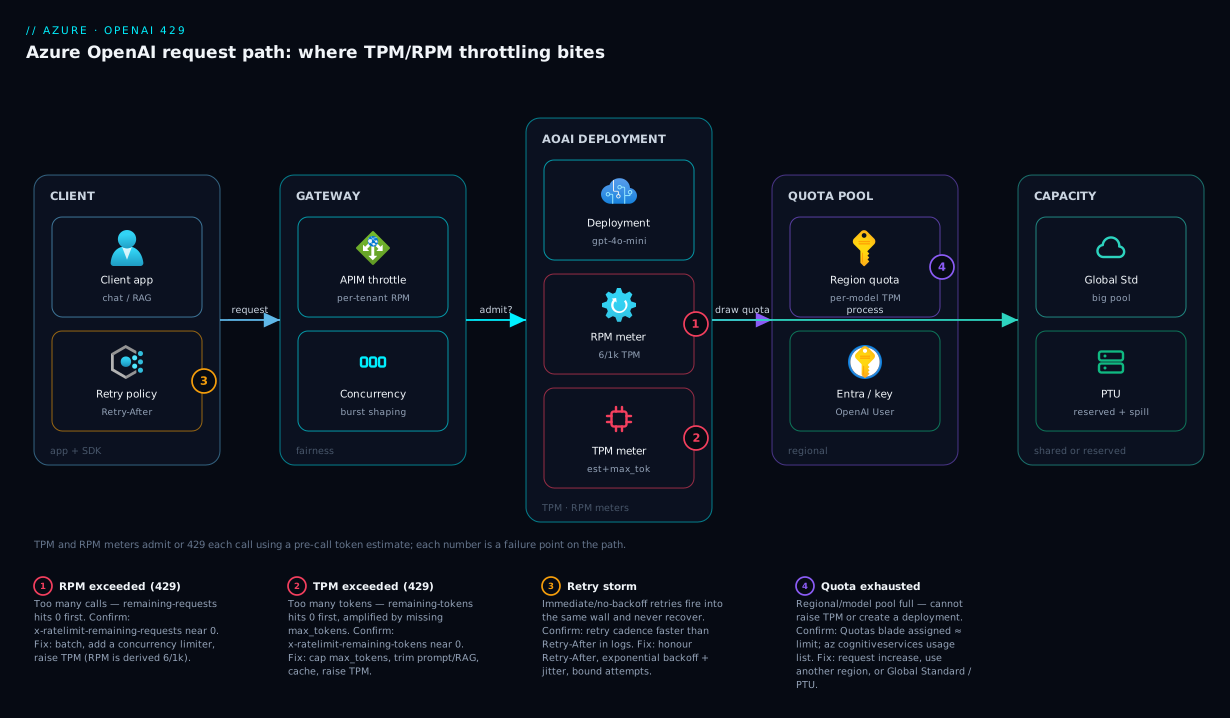
The diagram traces a request as it flows toward an Azure OpenAI deployment and marks where each 429 class bites. Read it left to right. A client app issues a chat/RAG call; before it reaches the model, a sensible architecture passes it through a gateway / throttle layer (often Azure API Management or a custom concurrency limiter) that enforces per-tenant fairness and queues bursts so one client cannot starve the rest. The call then hits the Azure OpenAI resource and its model deployment, where the TPM and RPM meters decide — using the pre-call token estimate — whether to admit or 429 it. Those meters draw from the regional quota pool; when exhausted you get the 429 with a Retry-After to honour.
Notice the two capacity paths on the right: a Standard / Global Standard deployment shares a large pool and absorbs bursts up to your slice, then throttles; a Provisioned (PTU) deployment reserves capacity for guaranteed throughput, with spillover routing overflow to a paired Standard deployment instead of failing. The numbered badges mark the four places a 429 originates — RPM and TPM exhaustion at the meter, a retry storm from the client, and regional-quota exhaustion in the pool — each mapped in the legend to its confirming header and fix. The whole method is in the picture: localise the 429 to a badge, read the header, apply the fix.
Real-world scenario
Finlytics runs a customer-support copilot on Azure OpenAI: a RAG chat app over their knowledge base, on a gpt-4o Standard deployment in Central India assigned 30,000 TPM (so 180 RPM derived). At launch, traffic was light and smooth. The platform team is three engineers; monthly Azure OpenAI spend was about ₹22,000.
The incident began the morning a large customer went live and support volume tripled. From 09:40 the app threw errors to users — the UI showed “the assistant is unavailable” — and logs were full of 429 Too Many Requests. The on-call engineer’s first reflex was to file a TPM quota-increase request (a multi-day approval) and “wait it out.” Meanwhile the app kept failing, because the second reflex was worse: the client retried 429s immediately, so every throttle spawned a fresh request against the same exhausted limit. The deployment was under self-inflicted DoS, and remaining headroom never recovered.
The breakthrough came from reading the headers. The engineer added x-ratelimit-remaining-tokens and x-ratelimit-remaining-requests to the structured logs and replayed traffic. The picture was unambiguous: remaining-tokens was hitting zero, remaining-requests was healthy — a TPM problem, not an RPM one, so the quota request was not the urgent fix. Two TPM amplifiers stood out: the RAG layer stuffed the top 12 chunks (≈ 9,000 prompt tokens) into every prompt, and the chat calls set no max_tokens, so the platform reserved gpt-4o’s large default per call. Between fat prompts and huge reservations, 30k TPM was exhausted by a few dozen calls a minute — far below real demand.
The fixes landed in three waves. Immediately: add backoff that honours Retry-After with jitter and a 5-attempt cap, stopping the retry storm so the queue drained — user error rate dropped sharply within minutes, before any capacity change. That morning: set max_tokens=600 (cutting the reservation by an order of magnitude) and trim RAG retrieval from 12 chunks to the top 4 reranked (≈ 3,000 prompt tokens), roughly quadrupling the real traffic that fit in 30k TPM. That week: because baseline demand had genuinely grown, they migrated to Global Standard for a larger burst pool (and lower per-token cost) and added a Redis cache for repeated FAQ answers, removing ~25% of calls entirely.
The next spike — larger than the one that caused the outage — passed without a single user-facing error, and the quota increase (finally approved) was no longer needed. Spend settled at ₹19,500, lower than before, thanks to gpt-4o-mini on the cheaper RAG paths and the cache. The lesson on the wall: “A 429 is a question — which budget did you blow? Read the headers before you scale anything.”
The incident as a timeline, because the order of moves is the lesson:
| Time | Symptom | Action | Effect | What it should have been |
|---|---|---|---|---|
| 09:40 | 429s, users see failures | File a TPM quota increase | Multi-day; no relief now | Ask: TPM or RPM? Read headers |
| 09:45 | 429s worsen | (client retries immediately) | Self-inflicted storm; never recovers | Add backoff first |
| 10:10 | Still failing | Log remaining-tokens / remaining-requests |
Tokens → 0, requests healthy = TPM | This was the breakthrough |
| 10:25 | Root cause clear | Add Retry-After backoff + jitter, 5-attempt cap |
Storm stops; queue drains | Correct first move |
| 10:40 | Mitigating | max_tokens=600 + RAG 12→4 chunks |
~4× more real traffic fits in 30k TPM | The real same-day fix |
| +3 days | Fixed | Migrate to Global Standard + Redis cache | Bursts absorbed; ~25% calls cached | Capacity where demand is |
Advantages and disadvantages
The TPM/RPM shared-quota model both causes this class of problem and makes it tractable. Weigh it honestly:
| Advantages (why this model helps you) | Disadvantages (why it bites) |
|---|---|
| Pay-per-token: you pay only for what you process, no reserved-capacity bill | A shared pool means bursts can exceed your slice and 429 with no warning |
Response headers expose live headroom (remaining-tokens/-requests) — you are never blind |
Most teams never read those headers, so 429s feel random |
Retry-After makes correct backoff trivial — the server tells you the wait |
Naive retries amplify the problem into a self-inflicted storm |
| Quota is adjustable and Global/Data-Zone variants add huge headroom on demand | Default quotas are often tiny; increases are not instant — you must size early |
| Deployment types (Standard/Global/PTU/Batch) let you match capacity to the workload | Choosing wrong (e.g. Standard for sustained high volume) guarantees chronic 429s |
max_tokens and prompt trimming multiply effective throughput for free |
Omitting max_tokens silently reserves a large default and 429s you early |
| PTU offers guaranteed throughput + predictable latency when you need it | PTU bills for reserved capacity whether or not you use it — only pays off at steady load |
The model is right for apps that want elastic, pay-per-use access to frontier models and can tolerate occasional, well-handled throttling. It bites hardest on workloads that are bursty without backoff, token-wasteful, or sustained-high-volume on a small Standard slice. Every disadvantage is manageable — read the headers, honour Retry-After, cap tokens, put capacity where the traffic is.
Hands-on lab
Reproduce a 429 deliberately by squeezing a deployment to a tiny TPM, watch the headers tell you which limit you hit, then fix it with backoff and a max_tokens cap. Free-tier-friendly in spirit (you pay only per token for a few small calls; delete at the end). Run in Cloud Shell (Bash) plus a small Python script.
Step 1 — Variables and a resource (skip if you already have one).
RG=rg-aoai-lab
LOC=swedencentral            # pick a region with model availability + spare quota
ACC=aoai-lab-$RANDOM         # globally-unique resource name
az group create -n $RG -l $LOC -o table
az cognitiveservices account create -n $ACC -g $RG -l $LOC \
  --kind OpenAI --sku S0 --custom-domain $ACC -o table
Step 2 — Deploy a model with an intentionally tiny TPM (1k) to force throttling fast.
# capacity 1 => 1,000 TPM => 6 RPM derived. Deliberately small so we 429 quickly.
az cognitiveservices account deployment create -n $ACC -g $RG \
  --deployment-name gpt-4o-mini \
  --model-name gpt-4o-mini --model-version "2024-07-18" --model-format OpenAI \
  --sku-name Standard --sku-capacity 1
Expected: a deployment with sku.capacity = 1. Confirm:
az cognitiveservices account deployment show -n $ACC -g $RG \
  --deployment-name gpt-4o-mini --query "{sku:sku.name, capacity:sku.capacity}" -o table
Step 3 — Grab the endpoint and key.
ENDPOINT=$(az cognitiveservices account show -n $ACC -g $RG --query properties.endpoint -o tsv)
KEY=$(az cognitiveservices account keys list -n $ACC -g $RG --query key1 -o tsv)
echo "$ENDPOINT"
Step 4 — Fire a burst with NO max_tokens and watch the headers. Save as burst.py, set AZURE_OPENAI_ENDPOINT/AZURE_OPENAI_KEY, and run it:
import os, time
from openai import AzureOpenAI, RateLimitError

client = AzureOpenAI(api_version="2024-10-21",
                     azure_endpoint=os.environ["AZURE_OPENAI_ENDPOINT"],
                     api_key=os.environ["AZURE_OPENAI_KEY"])

for i in range(12):
    try:
        r = client.chat.completions.with_raw_response.create(
            model="gpt-4o-mini",                 # no max_tokens => large reservation
            messages=[{"role": "user", "content": "Write a short paragraph about Azure."}])
        print(i, "OK  rem-tokens:", r.headers.get("x-ratelimit-remaining-tokens"),
                 "rem-requests:", r.headers.get("x-ratelimit-remaining-requests"))
    except RateLimitError as e:
        ra = e.response.headers.get("retry-after") if e.response else None
        print(i, "429  Retry-After:", ra)
    time.sleep(0.2)
Expected: the first call or two succeed and x-ratelimit-remaining-tokens drops fast (the uncapped reservation is large against 1,000 TPM); within a few iterations you get 429 with a Retry-After. Note which remaining header was near zero — it will be remaining-tokens (a TPM hit), because the uncapped reservation dominates.
Step 5 — Fix it: add a max_tokens cap and honour Retry-After. Re-run with max_tokens=64 and backoff, and watch far more calls succeed before any throttle:
import os, time, random
from openai import AzureOpenAI, RateLimitError

client = AzureOpenAI(api_version="2024-10-21",
                     azure_endpoint=os.environ["AZURE_OPENAI_ENDPOINT"],
                     api_key=os.environ["AZURE_OPENAI_KEY"])

def call(i, attempts=4):
    for a in range(attempts):
        try:
            return client.chat.completions.create(
                model="gpt-4o-mini", max_tokens=64,         # tiny reservation
                messages=[{"role": "user", "content": "One sentence about Azure."}])
        except RateLimitError as e:
            ra = e.response.headers.get("retry-after") if e.response else None
            wait = (float(ra) if ra else min(2 ** a, 30)) + random.uniform(0, 0.5)
            print(i, f"429 -> sleeping {wait:.1f}s")
            if a == attempts - 1: raise
            time.sleep(wait)

for i in range(12):
    call(i); print(i, "OK")
Expected: with the small max_tokens reservation, many more calls fit before a 429; the few that throttle now wait the server-prescribed time and succeed, instead of failing the user.
Step 6 — Teardown. Delete the deployment (and the whole RG if it was lab-only):
az cognitiveservices account deployment delete -n $ACC -g $RG --deployment-name gpt-4o-mini
az group delete -n $RG --yes --no-wait
The lab makes the two lessons physical: uncapped max_tokens exhausts TPM far below real usage, and honouring Retry-After turns a hard failure into a brief, recoverable wait.
Common mistakes & troubleshooting
This is the playbook — the centrepiece. Each row is a real 429 failure mode: symptom, root cause, the exact way to confirm it, and the fix. It spans basic mistakes (no max_tokens, bad retries) and advanced ones (subscription-quota exhaustion, PTU saturation, multi-tenant starvation).
| # | Symptom | Root cause | Confirm (exact command / portal path) | Fix |
|---|---|---|---|---|
| 1 | 429s under any real load; remaining-tokens hits 0 first |
TPM exceeded — large prompts/completions | Log x-ratelimit-remaining-tokens; near 0 at the 429 |
Cap max_tokens, trim prompt/RAG, raise TPM, cache |
| 2 | 429s from many tiny calls; remaining-requests hits 0 first |
RPM exceeded — call volume, not size | Log x-ratelimit-remaining-requests; near 0 at the 429 |
Batch, add concurrency limiter, raise TPM (RPM is derived) |
| 3 | 429s never clear; error rate keeps climbing | Retry storm — immediate/no-backoff retries | Compare app retry cadence to Retry-After in logs |
Honour Retry-After; exponential backoff + jitter; bound attempts |
| 4 | 429s far below expected usage; few calls “fit” | No max_tokens → large default reservation per call |
Inspect request body; max_tokens absent |
Set a tight max_tokens (smallest you tolerate) |
| 5 | Can’t raise TPM; “quota exceeded” on update/create | Regional/model quota exhausted | Quotas blade (assigned ≈ limit); az cognitiveservices usage list |
Request a quota increase; use another region or Global |
| 6 | Brand-new deployment 429s immediately at modest load | Default quota too low for launch traffic | Quotas blade shows tiny default TPM | Request increase early (not instant); raise --sku-capacity |
| 7 | One tenant’s traffic 429s everyone | Multi-tenant starvation — no per-caller throttle | Correlate 429 spikes to one caller/key in logs | Per-tenant rate limit (APIM); separate deployments/keys |
| 8 | Constant 429s at all hours, not bursty | Sustained demand > shared-pool slice | Token-usage metric pinned at ceiling 24/7 | Move to PTU (or Global Standard for more headroom) |
| 9 | PTU deployment returns 429 under peak | PTU saturation — provisioned units undersized | azure-openai-ptu-utilization metric at ~100% |
Add PTUs, or configure spillover to Standard |
| 10 | 429s only during spikes; baseline fine | Burst exceeds regional slice | Token metric spikes to ceiling only at peaks | Global Standard (bigger pool); or PTU + spillover |
| 11 | Bulk/embeddings job 429s and starves the live app | Batch work on the live deployment | Job runs against the interactive deployment | Move to the Batch API (separate quota, ~50% cheaper) |
| 12 | 429s after enabling streaming + retries | Retried streaming calls resend the whole prompt | Token usage spikes per retried stream | Bound stream retries; non-streaming for retry-heavy paths |
| 13 | 429s with remaining headers absent / immediate repeats |
Deployment still provisioning, or wrong deployment name | az ... deployment show (state); verify name = model arg |
Wait for ready state; use the deployment name, not base model id |
| 14 | Embeddings calls 429 while chat is fine | Embeddings deployment has its own (small) quota | Check the embeddings deployment’s assigned TPM separately | Raise the embeddings deployment TPM; batch embeddings |
| 15 | Intermittent 429s right after a quota bump | New capacity not picked up / change still propagating | az ... deployment show capacity vs what you set |
Confirm capacity applied; allow brief propagation |
| 16 | 429 count high in metrics but users unaffected | Backoff is working — transient throttles absorbed | 429 metric > 0 but user error rate ~0 | No action; this is healthy. Alert on user errors, not raw 429 |
The error-code reference
429 is the headline, but adjacent codes confuse triage. Know what is and is not a rate-limit problem:
| Code | Meaning on Azure OpenAI | Likely cause | How to confirm | Is it a 429/quota issue? |
|---|---|---|---|---|
| 429 Too Many Requests | Rate/quota exceeded (TPM or RPM) | Over your assigned limit; or retry storm | Retry-After + remaining-* headers |
Yes — the whole article |
| 429 (insufficient_quota) | No quota to even admit | Regional/subscription quota exhausted | Quotas blade; usage list |
Yes — but it’s capacity, not rate |
| 400 content too long | Prompt + completion exceed context window | Oversized prompt for the model | Error message names the token limit | No — shrink prompt / raise model |
| 400 content filter | Response blocked by content safety | Prompt/response hit a filter | finish_reason: content_filter |
No — adjust content or RAI policy |
| 401 / 403 | Auth failed / forbidden | Bad key, wrong endpoint, RBAC/network rule | Verify key/endpoint; check access | No — auth/network, see Key Vault/MI |
| 404 deployment not found | Wrong deployment name or not ready | Used base model id, or still provisioning | az ... deployment show |
No — fix the name / wait |
| 408 / 504 timeout | Slow upstream or client timeout | Very large generation; network | Compare duration to client timeout | No — usually latency, not quota |
| 500 / 503 | Transient platform error | Service-side blip | Retry with backoff; check status | No — but retry like a 429 (backoff) |
Three reading notes that save the most time:
| Distinction | The trap | How to tell them apart |
|---|---|---|
| 429 (rate) vs 429 (no quota) | Both say 429, opposite fixes | Rate carries a short Retry-After and recovers; no-quota persists until you raise quota (Quotas blade: assigned ≈ limit) |
| 429 vs 400 (context length) | “Too big” feels like a limit | 400 names a token/context limit and never has Retry-After; a per-request size issue, not a rate one |
| High 429 metric vs real impact | Alerting on raw 429s pages you needlessly | With correct backoff, transient 429s are absorbed; alert on user-facing error rate, not raw 429 count |
Per-symptom detail on the three you will hit most
TPM exceeded (rows 1, 4). Signature: x-ratelimit-remaining-tokens trending to zero while remaining-requests stays healthy. Amplifiers: fat prompts (long system prompts, too many RAG chunks) and a missing max_tokens. Confirm by logging both remaining headers; fix by capping max_tokens and trimming context first, then raise TPM only if demand still exceeds the slice.
RPM exceeded (row 2). Signature: remaining-requests hits zero while remaining-tokens is fine — classic for batch loops and chatty agents firing many small calls. You can buy more RPM by raising TPM (RPM is derived), but the cheaper fix is usually to batch, add a concurrency limiter, or move bulk work to the Batch API.
Retry storm (row 3). Signature: a 429 rate that climbs instead of recovering, with logs showing retries firing faster than Retry-After asks. Self-inflicted — every immediate retry is another request against the exhausted limit. Confirm by overlaying retry timestamps on Retry-After; fix by honouring Retry-After, backoff with jitter, and bounded attempts.
Best practices
- Always set
max_tokensto the smallest value you tolerate — it shrinks the per-call reservation and is the cheapest way to fit more traffic in the same TPM. - Log
x-ratelimit-remaining-tokensandx-ratelimit-remaining-requests(at least sampled) on every call, so a 429 is never ambiguous — you see which budget was draining. - Honour
Retry-Afterin your retry logic, add exponential backoff with jitter, and bound the attempts. Never retry immediately; never retry forever. - Put a concurrency limiter or queue upstream of the client so bursts are shaped before they hit the deployment, preventing both RPM exhaustion and retry multiplication.
- Right-size the deployment type to the pattern: Standard for residency-bound single-region, Global Standard for burst absorption, PTU for sustained high volume, Batch for offline bulk.
- Use a smaller model where it suffices (
gpt-4o-miniovergpt-4o): cheaper per token and typically higher limits, so it throttles less. - Cache deterministic / repeated responses so cache hits cost zero tokens and zero RPM — the highest-leverage demand reduction for FAQ-style traffic.
- Separate batch/enrichment from interactive traffic via the Batch API’s separate quota, so a nightly job never starves your live users.
- Throttle per tenant in multi-tenant platforms (API Management policies or separate deployments/keys) so one noisy tenant cannot consume the shared quota.
- Request quota increases early, before launch load arrives — they are not instant. Track assigned-vs-limit in the Quotas blade as a planning metric.
- Alert on user-facing error rate, not raw 429 count. With correct backoff, transient 429s are absorbed and healthy; paging on every 429 trains the team to ignore the pager.
- Treat quota and deployment capacity as code (Bicep) so TPM assignments are reviewed, versioned and reproducible.
Security notes
- Prefer Microsoft Entra ID (managed identity) over API keys. Assign the app’s identity the Cognitive Services OpenAI User role at the resource scope; keys are long-lived secrets that leak. See Managed identity: system- vs user-assigned patterns.
- If you must use keys, store them in Key Vault and reference them — never in source, plaintext app settings, or client-side code. The retry/quota logic does not change; only the credential source does.
- Throttling is also a DoS control. A per-tenant rate limit at the gateway protects your shared quota from a compromised or runaway client — a 429 you impose deliberately is cheaper than an outage.
- Lock down the network path with Private Endpoints / firewall rules so only your app, not the public internet, can reach the deployment.
- Do not log full prompts/completions when capturing rate-limit headers — log the headers and a correlation ID, not the content, to avoid leaking customer data into log stores.
- Scope keys and identities per app/tenant so you can attribute quota consumption (and a retry storm) to a caller and revoke just that one without taking everyone down.
Cost & sizing
The bill on Standard/Global is pay-per-token — charged for prompt + completion tokens at the model’s per-1K rate, with no charge for the TPM ceiling (TPM is a rate limit, not a reservation). So the 429 fixes that cut tokens — max_tokens, prompt trimming, caching, smaller models — also cut cost; efficiency and reliability pull the same direction.
| Lever | What drives the cost | How to right-size | Rough figure (illustrative) |
|---|---|---|---|
| Tokens processed (Standard/Global) | Prompt + completion tokens × model rate | Cap max_tokens; trim context; cache; smaller model |
gpt-4o-mini is a fraction of gpt-4o per 1K tokens |
| Model choice | Flagship vs mini per-token rate | Use mini wherever quality allows | Often 10×+ cheaper for routine tasks |
| Batch API | Same tokens, async | Move bulk work here | ~50% of the synchronous per-token price |
| PTU (provisioned) | Reserved units, billed hourly | Size to steady base, not peak; reserve monthly/annually | Hourly PTU is pricey; reservations cut it sharply |
| Cache hit rate | Calls avoided entirely | Cache deterministic/repeated prompts | Each hit = ₹0 tokens, ₹0 RPM |
| Quota (TPM) | Free — it’s a rate limit, not a reservation | Assign enough for peak; raising it costs nothing per se | You pay for tokens used, not TPM assigned |
Sizing rules of thumb: for bursty or variable workloads, stay pay-per-token (Standard/Global) and assign generous TPM (it is free) for burst headroom. For steady, high-volume, latency-sensitive workloads, model PTUs at a monthly/annual reservation against your token spend; above a sustained utilisation threshold, reserved PTU is both cheaper and more reliable. Pair capacity planning with demand reduction first — there is no free-tier for Azure OpenAI, so every wasted token is real money, and a tight max_tokens plus a cache often saves more than any quota change. For account-wide guardrails, Azure Cost Management: budgets & alerts in the first 30 days sets up the alerts.
Interview & exam questions
1. What does a 429 from Azure OpenAI mean, and what are the two limits behind it?
A 429 (Too Many Requests) means a valid request exceeded your assigned rate. Azure OpenAI enforces two simultaneous limits on Standard-family deployments: TPM (tokens/minute, prompt + completion) and RPM (requests/minute). Exceeding either returns a 429. (Maps to AI-102.)
2. How is RPM determined for a deployment? You do not set RPM directly — you assign TPM, and RPM is derived at 6 RPM per 1,000 TPM (so 60,000 TPM yields 360 RPM). Raising TPM proportionally raises RPM, which is why a request-rate problem can sometimes be solved by adding token quota.
3. Why does omitting max_tokens cause more 429s?
The platform estimates a call’s token cost before running the model, reserving prompt tokens plus a completion budget equal to max_tokens (or a large default if omitted). Without max_tokens it reserves the large default per call, so fewer calls fit in your TPM window and you 429 far below real usage. Capping max_tokens lets more genuine traffic through.
4. How do you tell whether a 429 was a TPM or an RPM hit?
Read the response headers: if x-ratelimit-remaining-tokens was trending to zero, it was TPM; if x-ratelimit-remaining-requests was, it was RPM. They have opposite fixes, so this single observation routes the whole diagnosis.
5. What is the correct way to retry a 429, and why?
Honour the Retry-After header (wait at least that long), add exponential backoff with jitter, and bound the attempts. Immediate or fixed-interval retries fire fresh requests against the exhausted limit and synchronise clients into a thundering herd, amplifying the storm instead of draining the queue.
6. When would you choose Global Standard over regional Standard? When you need burst absorption or higher throughput and can tolerate processing outside your resource’s region. Global Standard draws from a much larger shared pool (often cheaper per token); regional Standard keeps processing in-region for data-residency but has a smaller pool that 429s earlier under burst.
7. What problem does Provisioned Throughput (PTU) solve, and what’s the trade-off? PTU gives reserved capacity with guaranteed throughput and predictable latency — no shared-pool 429s, only saturating your own units. The trade-off is cost: you pay for reserved capacity whether or not you use it, so it pays off only at steady high utilisation. Spillover can overflow bursts to a Standard deployment.
8. Your deployment is at its assigned TPM but you still can’t raise it. Why? The regional/subscription quota for that model family is likely exhausted across all your deployments — assigned ≈ limit in the Quotas blade. You need a quota-increase request (not instant), a different region, or a Global deployment drawing from a larger pool.
9. How does the Batch API help with 429s? The Batch API runs requests asynchronously (up to 24-hour turnaround) against a separate quota at roughly half the per-token price. Moving bulk work (embeddings, enrichment) there keeps it off your live deployment’s TPM, so interactive traffic stops being starved by background jobs.
10. Why might you alert on user-facing error rate instead of raw 429 count? With correct backoff, transient 429s are absorbed automatically — a non-zero 429 metric is often healthy. Paging on every 429 generates noise and trains the team to ignore alerts; alerting on user-facing errors (requests that failed after retries) surfaces only real impact.
11. How do you reduce token consumption without losing functionality?
Cap max_tokens, trim prompts and RAG context (fewer/shorter chunks), cache deterministic or repeated responses, and use a smaller model (gpt-4o-mini) where quality allows. Each cuts both 429 risk and cost, since the bill is per token.
12. What’s the difference between a 429 and a 400 “context length” error?
A 429 is a rate problem — you exceeded TPM/RPM and should back off and retry (it carries Retry-After). A 400 context-length error is a size problem with one request — prompt plus completion exceeds the model’s context window — and retrying unchanged will fail again; shrink the prompt or use a larger-context model.
Quick check
- A deployment is assigned 50,000 TPM. What is its derived RPM?
- You get a 429 and
x-ratelimit-remaining-requestswas at 0 whileremaining-tokenswas healthy. Which limit did you hit, and name one fix. - Why does omitting
max_tokensmake 429s more likely even if your real completions are short? - Two requests both return 429 with
Retry-After: 12. What is the correct retry behaviour? - Your workload is steady, high-volume and latency-sensitive, and you 429 constantly. Which deployment type fits, and what’s the cost trade-off?
Answers
- 300 RPM (6 RPM per 1,000 TPM × 50 = 300).
- RPM — too many requests. Fix: batch the calls, add a concurrency limiter, or raise TPM (RPM is derived from it).
- The platform reserves a completion budget equal to
max_tokens(or a large default if omitted) before running the model; the big default reservation fills your TPM window, so fewer calls fit and you 429 below real usage. - Honour
Retry-After: wait at least 12 seconds (plus a little jitter), then retry; on repeat, back off exponentially and stop after a bounded number of attempts — never retry immediately or in lockstep. - Provisioned Throughput (PTU) for guaranteed throughput and predictable latency; the trade-off is you pay for reserved capacity whether or not it’s used, so it only pays off at steady high utilisation (a monthly/annual reservation lowers the rate).
Glossary
- 429 Too Many Requests — HTTP status meaning a valid request exceeded your assigned rate; the correct response is to back off and retry, honouring
Retry-After. - Token — the unit Azure OpenAI meters, ~4 characters or 0.75 words of English; both prompt and completion tokens count toward TPM.
- TPM (tokens per minute) — the per-deployment limit on tokens processed in a rolling minute; one of the two limits that trigger a 429.
- RPM (requests per minute) — the per-deployment limit on call count; derived from TPM at 6 RPM per 1,000 TPM, not set independently.
- Quota — the per-subscription, per-region, per-model-family token budget from which deployment TPM is assigned; exhausting it blocks raising TPM or creating deployments.
Retry-After— response header on a 429 giving the seconds to wait before retrying; the correct backoff value to honour.x-ratelimit-remaining-tokens/-requests— response headers reporting live headroom in the current window; whichever is near zero at a 429 names the limit you hit.max_tokens— request parameter capping completion length; bounds the pre-call token reservation, so a tight value prevents spurious TPM-based 429s.- Pre-call token estimate — the platform’s estimate of a call’s token cost (prompt + reservation) used to admit or reject it before the model runs.
- Standard deployment — pay-per-token, regional shared-pool deployment subject to TPM/RPM throttling; keeps processing in-region.
- Global Standard — pay-per-token deployment drawing from a global pool for much larger burst headroom; may process outside the resource’s region.
- Data Zone Standard — pay-per-token deployment with more headroom than regional while keeping processing within a residency boundary (e.g. EU, US).
- PTU (Provisioned Throughput Unit) — reserved model capacity giving guaranteed throughput and predictable latency; throttles only when your own provisioned capacity saturates.
- Spillover — routing overflow traffic from a provisioned (PTU) deployment to a paired Standard deployment instead of returning 429.
- Batch API — asynchronous, up-to-24-hour, roughly half-price processing against a separate quota, used to move bulk work off live TPM.
Next steps
- Pin down the unit everything meters in Azure OpenAI tokens, context windows & pricing model explained.
- Choose the capacity model with Azure OpenAI deployment types: Standard, Global & Provisioned explained.
- Wire up the token-usage, 429 and PTU metrics in Azure Monitor & Application Insights for observability.
- Cut TPM at its biggest source by tuning retrieval in Azure OpenAI “on your data”: RAG grounding & citations.
- Remove repeat calls with the patterns in Azure Cache for Redis basics & caching patterns.