Six months into a new subscription, your Azure bill is ₹9,40,000 a month and climbing, finance wants it split by business unit, and you discover that 38% of resources carry no usable tags at all. Some have env: prod, some have Environment: Production, some have environment: PROD, and Cost Management treats all three as different columns. This is the moment every team learns the hard truth about Azure resource tags: they are trivially easy to apply and brutally hard to apply consistently at scale — and a tag schema that isn’t enforced from day one decays into noise that no cost report can use.
This article is the implementation guide for getting it right. Tags are key–value metadata you stamp on Azure resources, resource groups and subscriptions — up to 50 per resource — and they are the single mechanism that lets Cost Management, Azure Policy, automation and audit all slice your estate by the dimensions you choose: cost centre, environment, owner, application, data classification. The difference between a tagging strategy and a tagging mess is governance: a documented schema, Azure Policy that requires, defaults and appends tags so they can’t drift, remediation tasks that backfill the resources you already deployed, and Cost Management views and exports wired to the exact tag keys your finance team filters on. If you have read the Azure Tagging Strategy 101 primer, this is the next level: less “what is a tag” and more “make 4,000 resources obey one schema and keep them obeying it.”
By the end you will have stood up an enforced tag schema end to end — in the portal, with the az CLI, and as reusable Bicep/Policy — that denies untagged deployments, inherits governance tags from the resource group so app teams never type them, backfills the historical estate with a remediation task, and surfaces the result as a saved Cost Analysis view and a scheduled export finance can open. You will also know the limits that bite — which resources don’t inherit tags, why a deny can lock you out of a deploy, the 24–48h cost-data lag — and the exact command to confirm each. This is the playbook a senior architect runs in the first governance sprint of any Azure landing zone.
What problem this solves
Tags look free and obvious, so teams skip the strategy and apply them ad hoc. The bill comes due — literally — at month-end when finance asks for a breakdown by team and you cannot produce one, because the tags are inconsistent, missing on the costliest resources, or applied to resource groups but not the resources that incur charges. Cost Management groups by the exact tag key string, case-and-spelling-sensitive, so CostCenter, costcenter and Cost-Center fragment your spend into three useless columns plus a large “untagged” bucket that is invariably your biggest line item.
What breaks without an enforced strategy: showback and chargeback become guesswork; you cannot set per-team budgets because you cannot scope spend to a team; governance that keys off tags (lifecycle automation, security baselines per environment) has nothing reliable to match on; and orphan cleanup stalls because nobody knows who owns the vm-test-04 that has run for 90 days. The “untagged 30%” is not cosmetic — it is the part of the bill nobody can defend in the cost review, and it grows every sprint until enforcement stops it.
Who hits this hardest: any organisation past a single team. It bites worst where deployments come from many sources — portal click-ops, multiple CI/CD pipelines, Terraform, ad-hoc az scripts — because each can omit or misspell tags differently. It bites again at audit time, when “which resources hold regulated data?” must be answered from metadata that was never made mandatory. The fix is not a product you buy: it is a small, deliberate schema plus Azure Policy for enforcement and remediation for catch-up — both of which this article builds.
To frame the whole problem before the build, here is what each failure mode costs you and which control in this article closes it:
| Failure mode | What it looks like in production | Why it happens | The control that fixes it |
|---|---|---|---|
| Inconsistent keys/values | Env, env, environment as 3 cost columns |
No allowed-values enforcement | Policy deny with allowedValues |
| Missing tags on costly resources | 30%+ of spend in “untagged” | Tags optional at deploy time | Policy deny / audit on required keys |
| Tags on RG but not resources | RG tagged, the VM inside isn’t | Resources don’t inherit by default | modify inherit-tag policy + remediation |
| Historical estate untagged | New deploys clean, old ones bare | Policy applies going forward only | Remediation task on existing resources |
| Finance can’t slice the bill | No “by team” view exists | Cost Analysis not configured for the keys | Saved Cost Analysis view + scheduled export |
| Owner unknown for an orphan | vm-test-04 running 90 days, no owner |
No owner tag mandated |
Required owner tag, audited continuously |
Learning objectives
By the end of this article you can:
- Design a two-tier tag schema that separates governance tags (org-mandated, inherited) from application tags (team-owned), and justify each key’s cardinality and purpose.
- Apply tags four ways — portal,
az tag/az resource tag, Bicep, and bulk — and explain when each is right, including the merge-vs-replace trap. - Author Azure Policy to require tags (
deny/audit), default missing tags (modify/append), and inherit tags from the resource group or subscription, with the correctroleDefinitionIdsformodify. - Run a remediation task to backfill tags on the historical estate, and read its results to confirm coverage.
- Configure Cost Management to allocate spend by your tag keys: a saved Cost Analysis view, tag inheritance in cost data, and a scheduled export to storage that finance can open.
- Diagnose the common breakages — a
denypolicy blocking a legitimate deploy, tags that “vanish” after a Bicep redeploy, inherited tags not appearing, and the cost-data lag — with the exact confirm-and-fix path. - Right-size the effort and cost: what tagging itself costs (nothing), what enforcement governance costs (nothing), and what the exports and storage cost.
Prerequisites & where this fits
You should be comfortable with the Azure Resource Manager (ARM) object model: resources live in resource groups, which live in subscriptions, which can be grouped under management groups — the Azure resource hierarchy in one line. You should be able to run az in Cloud Shell, read JSON output, and deploy a small Bicep file (if not, start with Deploy Your First Bicep File From Scratch). Basic familiarity with Azure Policy effects helps but is built up here; the deep version is Azure Policy Effects Explained: Deny, Audit, Modify, DeployIfNotExists.
This sits in the Governance & FinOps track. It is the operational follow-on to the schema-design primer Azure Tagging Strategy 101: that article decides what the keys are; this one enforces and operationalises them. It feeds directly into cost control — once spend is sliced by tag you can set per-team Cost Management budgets and alerts and run the broader FinOps at scale practice. At enterprise scale, tag policies are assigned at the management-group hierarchy so every subscription inherits them, which is how an enterprise-scale landing zone ships tagging governance by default.
Where it does not belong: tags are not a security boundary, not a substitute for RBAC or resource locks, and not a place for secrets. They are metadata for organising and allocating — which is exactly the job this article makes them do reliably.
Core concepts
Five ideas make every later step obvious.
A tag is a key–value pair, and the key string is the join column. Tag names are case-insensitive to set (env overwrites Env) but Cost Management and the resource graph display and group by the stored casing — so the moment two casings coexist, your reports fragment. Treat the key like a database join key: pick one canonical spelling and casing, and enforce it. The hard limits that shape the schema:
| Limit | Value | Why it matters |
|---|---|---|
| Tags per resource / RG / subscription | 50 | Don’t burn the budget on vanity keys; 6–8 governance + app keys |
| Tag key length | 512 chars | Keys are short anyway; no real constraint |
| Tag value length | 256 chars (128 for storage accounts) | Keep values to codes/aliases, never blobs |
| Case sensitivity | Insensitive to set, sensitive to display/group | Two casings = fragmented cost columns |
| Types that don’t store tags | A few classic/abstract types | Coverage is never 100%; complement with cost-data inheritance |
| Reserved prefixes | azd-, hidden-, Microsoft.* |
Tooling-owned; don’t collide |
Tags do not inherit by default — the single most expensive misconception. A VM in an RG tagged costCenter: CC-1001 shows no costCenter of its own unless you put it there. Cost Management can apply RG/subscription tags to child-resource costs for reporting (cost-data inheritance), and Azure Policy can physically push tags down with a modify effect — but absent one of those, the parent’s tags are invisible to the child and to per-resource cost grouping.
Azure Policy is how tags stop drifting. Policy effects do four jobs for tags: audit (flag, change nothing), deny (block a write missing a required tag), modify (add/replace a tag on write and backfill via remediation), and append (add if absent — legacy). Built-in tag definitions cover the common cases — require a tag, require a value, inherit from the RG/subscription, add if missing — so you rarely author raw JSON.
modify changes behaviour for new operations; remediation fixes the past. A modify policy that inherits costCenter from the RG only fires on create/update after assignment — your existing 4,000 resources stay bare until you run a remediation task, which applies the modify operations to non-compliant resources in bulk. Remediation needs the assignment to have a managed identity with the role in its roleDefinitionIds (Tag Contributor or Contributor), or it cannot write the tags.
Cost allocation is a reporting layer on top of the tags. Once resources carry consistent tags, Cost Management groups actual usage charges by any tag key — made real with a saved view in Cost Analysis, optional cost-data tag inheritance (RG/subscription tags decorate child costs even where the resource is untagged), and a scheduled export to storage for finance’s BI tool. Expect a 24–48 hour lag, and remember tags applied today colour today-onward costs — they are not retroactive on already-billed usage.
The vocabulary in one table
Pin down every moving part before the build; the glossary repeats these for lookup.
| Concept | One-line definition | Where it lives | Why it matters here |
|---|---|---|---|
| Tag | Key–value label on a resource | Resource / RG / subscription | The unit you allocate cost by |
| Tag key | The name half (costCenter) |
Stored on the resource | The grouping column in Cost Analysis |
| Allowed values | Permitted values for a key | Policy parameter | Stops free-text drift |
| Azure Policy | Rules evaluated on resources | Definition + assignment | Enforces / defaults / inherits tags |
deny effect |
Blocks a non-compliant write | Policy definition | Makes a tag mandatory at deploy |
modify effect |
Adds/replaces a tag on write | Policy definition | Defaults + inherits; supports remediation |
| Remediation task | Bulk-applies modify to existing |
Policy assignment | Backfills the historical estate |
| Managed identity (policy) | Identity the assignment writes as | On the assignment | Required for modify/remediation |
| Tag inheritance (cost) | RG/sub tags decorate child costs | Cost Management setting | Reports without per-resource tags |
| Saved view | A reusable Cost Analysis query | Cost Management | Finance’s “by team” report |
| Export | Scheduled cost data to storage | Cost Management | Feeds BI / chargeback |
Designing the schema: two tiers, the right cardinality
Before enforcing anything, decide what you enforce. The mistake is one undifferentiated list of “tags everyone must apply.” Split them into two tiers by who owns the value. Governance tags are organisation-mandated, low-cardinality, and ideally inherited so app teams never type them (costCenter, env, owner, dataClassification); application tags are team-owned and describe the workload (app, component, version). You enforce governance tags hard (deny/inherit) and encourage application tags (audit) so teams aren’t blocked on their own metadata.
Cardinality discipline matters because every tag value becomes a potential report dimension: a key with thousands of free-text values (a description, or owner as raw email with typos) is noise; a known small set (env ∈ {prod, nonprod, dev, test}) is a clean pivot. Constrain governance-tag values to an allowed list; leave application tags free-text but audited. A concrete, production-grade starter schema — adjust names, but pick canonical camelCase and never deviate:
| Tag key | Tier | Example values | Cardinality | Enforcement | Purpose |
|---|---|---|---|---|---|
costCenter |
Governance | CC-1001, CC-2207 |
Low (per finance code) | Deny + inherit | Chargeback / showback split |
env |
Governance | prod, nonprod, dev, test |
Very low (4) | Deny + allowedValues | Cost + policy scoping |
owner |
Governance | payments-team@corp.com |
Medium | Deny (audit value) | Accountability for orphans |
dataClassification |
Governance | public, internal, confidential |
Very low (3) | Audit → Deny later | Security / compliance |
app |
Application | checkout, ledger |
Low–medium | Audit | Group spend by workload |
component |
Application | api, web, worker, db |
Low | Optional | Sub-workload breakdown |
version |
Application | 2025.06, v3 |
Medium | Optional | Release tracking |
managedBy |
Application | terraform, bicep, manual |
Very low | Audit | Spot click-ops drift |
One design rule saves the most pain: don’t rely on a tag that the resource name already encodes. If the name contains prod, the env tag still has to exist independently, because Cost Management groups by tags, not by parsing names. (Reserved prefixes and casing limits are in the Core-concepts table above.)
Naming and casing: agree on one form, forever
The practical casing rule: choose camelCase for keys (costCenter), a fixed case for values (lowercase short codes like prod, or an exact finance format like CC-1001), document both, and let Policy allowedValues reject anything else. The table below is the one-pager you publish to every team:
| Element | Convention | Good | Bad (and why) |
|---|---|---|---|
| Tag key | camelCase, no spaces |
costCenter |
Cost Center (space), cost_center (snake) |
| Env value | lowercase short code | prod |
Production, PROD (case drift) |
| Cost centre | exact finance format | CC-1001 |
1001, cc1001 (won’t match finance) |
| Owner | team alias or DL | payments@corp.com |
a personal name (leaver risk) |
| Boolean-ish | explicit value | confidential |
true/yes (ambiguous) |
Applying tags: four mechanisms and the merge-vs-replace trap
There are four ways to put tags on a resource, and the one detail that causes silent data loss is merge vs replace.
Portal — open a resource or resource group → Tags blade → add rows → Apply. Good for one-off fixes and bulk-tagging a selection; it always merges and won’t wipe existing tags.
az CLI — az tag update has explicit --operation merge|replace|delete (the older az resource tag replaces the whole set). This is where people lose tags:
# MERGE: add/overwrite these keys, keep all others (safe, idiomatic)
az tag update \
  --resource-id $(az group show -n rg-checkout-prod --query id -o tsv) \
  --operation merge \
  --tags costCenter=CC-1001 env=prod owner=payments@corp.com

# REPLACE: the resource ends with EXACTLY these tags — every other tag is DELETED
az tag update --resource-id <id> --operation replace --tags env=prod
# (The older `az resource tag --tags` form also replaces the whole set — prefer `az tag update`.)
Bicep / ARM — declare tags on the resource. Critical gotcha: a deployment sets that resource’s tags to exactly what the template says, so omitting tags can strip tags applied out-of-band (by a portal user or a modify policy) on the next redeploy. Make the template the source of truth:
@description('Governance tags applied to every resource in this deployment.')
param tags object = {
  costCenter: 'CC-1001'
  env: 'prod'
  owner: 'payments@corp.com'
}

resource sa 'Microsoft.Storage/storageAccounts@2023-05-01' = {
  name: 'stcheckoutprod001'
  location: resourceGroup().location
  sku: { name: 'Standard_LRS' }
  kind: 'StorageV2'
  tags: tags            // omit this and a redeploy wipes the account's tags
}
Bulk / programmatic — for thousands of resources, don’t hand-loop az (slow, rate-limited, not idempotent); let Policy modify + remediation do it declaratively, which the lab covers.
The merge-vs-replace behaviour, side by side, so you never guess:
| Mechanism | Default behaviour | Wipes other tags? | Best for | Watch-out |
|---|---|---|---|---|
| Portal Tags blade | Merge | No | One-off, small selections | Manual, not repeatable |
az tag update --operation merge |
Merge | No | Scripted add/update | Must specify merge explicitly |
az tag update --operation replace |
Replace | Yes | Resetting to a known set | Deletes everything not listed |
az resource tag --tags |
Replace (whole set) | Yes | Quick set on one resource | Surprises people expecting merge |
Bicep tags: (present) |
Sets to template value | Yes (if key omitted) | IaC source-of-truth | Omitting tags strips on redeploy |
Policy modify (inherit/add) |
Adds/overwrites that one key | No (only its keys) | Governance defaults at scale | Needs identity + remediation for old |
Enforcing the schema with Azure Policy
Enforcement is the difference between a strategy and a wish. Azure ships built-in tag policy definitions; you assign them with parameters rather than writing JSON. The four jobs map to four built-ins (names as they appear in the portal/az):
| Goal | Built-in policy (display name) | Effect | Backfills old? |
|---|---|---|---|
| Make a tag mandatory | Require a tag on resources | deny |
No (going forward) |
| Restrict a tag’s values | Allowed values via custom or Require a tag and its value | deny |
No |
| Default a missing tag | Add or replace a tag on resources | modify |
Yes (remediation) |
| Inherit from resource group | Inherit a tag from the resource group | modify |
Yes (remediation) |
| Inherit from subscription | Inherit a tag from the subscription | modify |
Yes (remediation) |
| Flag missing without blocking | Require a tag (as audit) / custom |
audit |
No |
The four effects differ on exactly the dimensions that trip people up — when they fire, whether they need an identity, and whether they fix the past:
| Effect | Fires on | Blocks deploy? | Writes a tag? | Needs identity + role? | Backfills via remediation? |
|---|---|---|---|---|---|
audit |
Evaluation + create/update | No | No | No | No |
deny |
Create and update | Yes | No | No | No |
modify |
Create/update (+ remediation) | No | Yes | Yes (Tag Contributor) | Yes |
append |
Create/update | No | Yes (if absent) | No | No (legacy) |
A few non-obvious truths govern how these behave:
denyevaluates on create and update. It will block an update to an existing untagged resource until you add the tag — a surprise when you try to change an unrelated property mid-incident. Stagedenycarefully (auditfirst, then flip).modifyneeds a managed identity and a role. The assignment must have a system-assigned identity granted Tag Contributor (or Contributor) on the scope, declared via the policy’sroleDefinitionIds. Without it,modifyand remediation silently fail to write.- “Inherit from the resource group” only applies to resources inside a tagged RG — it does not tag the RG itself. Tag the RG (or use “inherit from subscription”) so there is something to inherit.
Require a tag (deny)
Assign the require-tag built-in for each mandatory governance key, referencing its well-known definition GUID:
# Assign "Require a tag on resources" (deny) for costCenter at a resource group scope
RG_ID=$(az group show -n rg-checkout-prod --query id -o tsv)

az policy assignment create \
  --name "require-tag-costcenter" \
  --display-name "Require costCenter tag" \
  --scope "$RG_ID" \
  --policy "871b6d14-10aa-478d-b590-94f262ecfa99" \
  --params '{ "tagName": { "value": "costCenter" } }'
// Require a tag (deny) — built-in definition GUID 871b6d14-10aa-478d-b590-94f262ecfa99
resource requireCostCenter 'Microsoft.Authorization/policyAssignments@2024-04-01' = {
  name: 'require-tag-costcenter'
  scope: resourceGroup()
  properties: {
    displayName: 'Require costCenter tag'
    policyDefinitionId: tenantResourceId(
      'Microsoft.Authorization/policyDefinitions',
      '871b6d14-10aa-478d-b590-94f262ecfa99')
    parameters: { tagName: { value: 'costCenter' } }
  }
}
For allowed values on a key like env, use the Require a tag and its value built-in per allowed value, or author a small custom policy whose rule denies when the value is notIn your list — the custom route is cleaner for a 4-value enum.
Inherit a tag from the resource group (modify + remediation)
This is the keystone for governance tags: tag the RG once, and every resource inside inherits costCenter/env automatically — new ones at create time, existing ones via remediation. Because it is modify, the assignment needs an identity and a role:
# Assign "Inherit a tag from the resource group" (modify) for costCenter,
# with a system-assigned identity and Tag Contributor so it can write tags + remediate.
RG_ID=$(az group show -n rg-checkout-prod --query id -o tsv)

az policy assignment create \
  --name "inherit-costcenter-from-rg" \
  --display-name "Inherit costCenter from RG" \
  --scope "$RG_ID" \
  --policy "cd3aa116-8754-49c9-a813-ad46512ece54" \
  --params '{ "tagName": { "value": "costCenter" } }' \
  --mi-system-assigned \
  --location eastus \
  --role "Tag Contributor"
// Inherit a tag from the resource group (modify) — built-in cd3aa116-8754-49c9-a813-ad46512ece54
resource inheritCostCenter 'Microsoft.Authorization/policyAssignments@2024-04-01' = {
  name: 'inherit-costcenter-from-rg'
  scope: resourceGroup()
  location: location                 // required when identity is present
  identity: { type: 'SystemAssigned' }
  properties: {
    displayName: 'Inherit costCenter from RG'
    policyDefinitionId: tenantResourceId(
      'Microsoft.Authorization/policyDefinitions',
      'cd3aa116-8754-49c9-a813-ad46512ece54')
    parameters: { tagName: { value: 'costCenter' } }
  }
}

// Grant the assignment's identity Tag Contributor so modify/remediation can write tags
resource raTagContributor 'Microsoft.Authorization/roleAssignments@2022-04-01' = {
  name: guid(resourceGroup().id, inheritCostCenter.id, 'TagContributor')
  scope: resourceGroup()
  properties: {
    principalId: inheritCostCenter.identity.principalId
    principalType: 'ServicePrincipal'
    // Tag Contributor role definition ID
    roleDefinitionId: subscriptionResourceId(
      'Microsoft.Authorization/roleDefinitions',
      '4a9ae827-6dc8-4573-8ac7-8239d42aa03f')
  }
}
The role-assignment timing matters: the identity is created with the assignment, so the grant references inheritCostCenter.identity.principalId and Bicep orders it after. Without the identity or the role, the policy reports compliance states but never writes a tag.
To set a fixed default rather than inherit — e.g. stamp managedBy: manual outside IaC, or default dataClassification: internal — use Add or replace a tag on resources (modify, same identity/role requirement); choose the add-if-absent variant so you don’t clobber a value a team set deliberately.
The assignment scope decides reach — management group to blanket every subscription, subscription for one environment, resource group for one team. The trade-off and blast radius:
| Assignment scope | Reach | Typical use | Risk if deny |
|---|---|---|---|
| Management group | All child subscriptions | Org-wide governance baseline | Largest blast radius; stage carefully |
| Subscription | Every RG/resource in it | Per-environment enforcement | Blocks all deploys missing the tag |
| Resource group | Resources in that RG | One team / one app | Scoped, safest to start |
Exclusions (notScopes) |
Carve-outs from above | Exempt a shared/platform RG | Forgotten exclusions hide gaps |
Backfilling the estate: remediation tasks
Assigning a modify policy changes the future; your existing resources stay non-compliant until you remediate. A remediation task takes a policy assignment, finds resources that are non-compliant against its modify operations, and applies the change in bulk using the assignment’s managed identity.
The sequence is always: (1) assign the modify policy with an identity and role, (2) trigger an evaluation so compliance state populates (a fresh assignment can take ~30 minutes otherwise), (3) create a remediation task, (4) read its progress.
# 1) Trigger an on-demand compliance scan at the resource group (optional, speeds things up)
az policy state trigger-scan --resource-group rg-checkout-prod

# 2) Create a remediation task for the inherit-costCenter assignment
az policy remediation create \
  --name "remediate-inherit-costcenter" \
  --resource-group rg-checkout-prod \
  --policy-assignment "inherit-costcenter-from-rg"

# 3) Watch it complete — deploymentStatus shows succeeded/failed counts
az policy remediation show \
  --name "remediate-inherit-costcenter" \
  --resource-group rg-checkout-prod \
  --query "{state:provisioningState, success:deploymentStatus.successfulDeployments, failed:deploymentStatus.failedDeployments}" \
  -o json
Reading the result is the validation step: provisioningState: Succeeded with a non-zero successfulDeployments means tags were written. Remediation is idempotent — already-compliant resources are skipped — so you can re-run it after fixing a role to pick up stragglers. Common outcomes and what each means:
| Remediation symptom | Likely cause | How to confirm | Fix |
|---|---|---|---|
failedDeployments high, successful 0 |
Identity missing the role | az role assignment list --assignee <principalId> |
Grant Tag Contributor at scope |
Task Succeeded, some resources still bare |
Type doesn’t accept that tag | Check resource type in compliance details | Accept; not all types store tags |
| Nothing to remediate (0 resources) | Compliance scan hasn’t run | az policy state list shows Unknown |
az policy state trigger-scan, retry |
| Inherited tag missing on new resource | RG itself has no tag to inherit | az group show --query tags |
Tag the RG (or inherit from subscription) |
| Tag written then disappears later | IaC redeploy omits tags |
Diff template vs live tags | Add tags to the template (source of truth) |
Cost allocation: turning tags into a bill split
Tags are only worth the governance effort if they reach the bill. Cost Management groups actual usage charges by any tag key; three things make that usable:
1. A saved Cost Analysis view. In Cost Management → Cost analysis, set Group by → Tag → costCenter, optionally filter env = prod, and Save as Spend by Cost Centre — finance opens or pins it. Tag-based grouping shows only resources that carry the tag; the “untagged” bucket is everything enforcement hasn’t caught yet — the number to drive to zero.
2. Cost-data tag inheritance. Separate from the physical policy inheritance above, a Cost Management setting (Manage → Configuration → Tag inheritance, at billing/subscription scope) decorates child-resource costs with their resource-group and subscription tags for reporting, even when the resource itself isn’t tagged. It is a reporting convenience — it writes no tags and doesn’t help Policy — but it closes reporting gaps quickly while remediation catches up. Precedence: a resource’s own tag wins over an inherited one.
3. A scheduled export. For BI and chargeback, schedule an export of cost data (daily month-to-date or monthly) to a storage account as CSV/Parquet; finance’s tooling reads it and you never hand-build a spreadsheet again.
# Create a daily cost export to a storage container (month-to-date actual cost)
az costmanagement export create \
  --name "daily-cost-export" \
  --type ActualCost \
  --scope "/subscriptions/$(az account show --query id -o tsv)" \
  --storage-account-id $(az storage account show -n stcostexports001 -g rg-finops --query id -o tsv) \
  --storage-container "cost-exports" \
  --storage-directory "daily" \
  --recurrence Daily \
  --recurrence-period from="2026-06-24T00:00:00Z" to="2027-06-24T00:00:00Z" \
  --timeframe MonthToDate
The three cost-allocation mechanisms compared, so you pick the right one (often all three):
| Mechanism | What it does | Retroactive? | Best for | Limit / gotcha |
|---|---|---|---|---|
| Saved Cost Analysis view | Interactive group-by-tag in portal | Shows past usage | Day-to-day review, dashboards | Only resources carrying the tag |
| Cost-data tag inheritance | Decorates child costs with RG/sub tags | Forward; not historical | Reporting before remediation done | Reporting only; writes no tags |
| Scheduled export | Drops cost CSV/Parquet to storage | From schedule start | BI, chargeback, finance pipelines | ~24–48h data lag; storage cost |
The cardinal timing rule, restated because it trips everyone: tag before the spend — a tag applied today colours today-onward costs, so last month’s “untagged” bucket will not shrink retroactively when you backfill now.
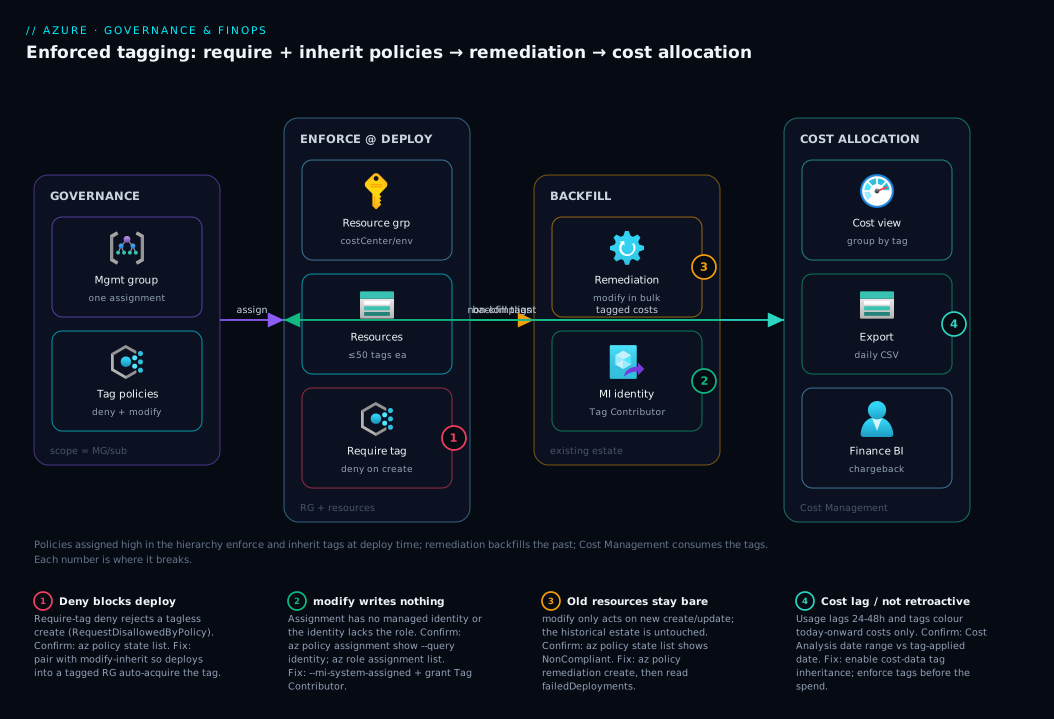
Architecture at a glance
Follow the path left to right. Governance lives at the top of the hierarchy: tag policies assigned at a management group (or subscription) give every subscription beneath the same require/inherit rules — one assignment, org-wide reach. Those policies act at deployment time on the resource group and its resources: a deny-require-tag policy refuses any write missing costCenter/env/owner, while a modify-inherit policy stamps the governance tags from the RG down onto each resource so app teams never have to. For everything that pre-dates the policy, a remediation task — running as the assignment’s managed identity with Tag Contributor — backfills the same tags in bulk.
Once resources carry consistent tags, the cost-allocation zone consumes them: Cost Management groups real usage charges by costCenter/env into a saved Cost Analysis view, optionally decorates untagged child costs with their resource-group tags via cost-data inheritance, and a scheduled export drops daily cost CSV/Parquet into a storage account that finance’s BI tool reads for chargeback. The numbered badges mark the four places this breaks in practice: a too-broad deny blocking a legitimate deploy, the missing managed identity that makes modify silently no-op, the historical estate that stays bare until remediation runs, and the 24–48h lag plus non-retroactive nature of tag-based cost data.
Real-world scenario
Lumio Retail (a fictional but representative D2C company) ran a single production subscription that had grown to ~3,200 resources across 14 teams over two years. The monthly Azure bill had reached ₹11,80,000, and the CFO’s quarterly question — “split this by business unit” — had no answer. The platform team’s first export showed the problem starkly: 41% of spend landed in an “untagged” bucket, and of the tagged remainder, env appeared as prod, Prod, PROD and production across four cost columns. Per-team budgets were impossible; a forgotten Standard_E8s_v5 analytics cluster had been running for 70 days at ₹62,000/month with no owner tag, and nobody would claim it.
They ran a one-week governance sprint exactly as this article lays out. Day 1–2: agreed a camelCase schema with four governance keys and constrained env to four lowercase values; published the one-pager. Then tagged every resource group (90 of them) with costCenter/env via scripted az tag update --operation merge from a Resource Graph export — RGs were the cheap, high-leverage place to set the source of truth. Day 3: assigned at the subscription the inherit-from-RG modify policies (with a system-assigned identity granted Tag Contributor) and the require-tag deny policy in audit mode first, to size the gap without blocking deploys. Day 4: ran a trigger-scan, then remediation tasks — which wrote tags onto 2,900 resources in ~40 minutes; the 300 stragglers were three tag-rejecting resource types plus a few still-untagged RGs (fixed and re-remediated).
Day 5: flipped the require-tag policies from audit to deny after warning the CI/CD owners (two pipelines missing owner were fixed that morning). They built a saved Cost Analysis view grouped by costCenter, enabled cost-data tag inheritance so the last stragglers still rolled up, and scheduled a daily export for finance’s Power BI. The “untagged” bucket fell from 41% to under 4% within the data lag. The orphaned analytics cluster surfaced the moment owner became visible — an ended data-science PoC; deleting it saved ₹62,000/month, more than the whole sprint cost. The lasting win was structural: because the policies live at the subscription and inherit from RGs, every new team’s resource group gets compliant tags automatically, and the “by business unit” report is now a view the CFO opens unaided.
Advantages and disadvantages
Enforced tagging is high-leverage but not free of friction. The honest trade-off:
| Advantages | Disadvantages |
|---|---|
| Bill splits cleanly by team/env/app | deny policies can block legitimate deploys until tags added |
| Per-team budgets and chargeback become possible | Requires upfront schema agreement across teams |
| Orphaned/unowned resources surface immediately | Tags are not a security boundary (anyone with write can change) |
| Governance/lifecycle automation can key off tags | Inheritance and remediation need managed identity + role setup |
| Inheritance means app teams barely think about it | Cost data lags 24–48h and isn’t retroactive on past usage |
| One management-group assignment covers all subs | Some resource types reject tags; coverage is never 100% |
The advantages dominate the moment you have more than one team or anyone asking who spent what. The disadvantages bite mainly during rollout: the deny-blocks-a-deploy friction is real but temporary (stage with audit first), and the identity/role setup is one-time. The non-retroactive point is the one to communicate to finance — backfilling tags fixes future reports, not last quarter’s. And the “not a security boundary” caveat means you still need resource locks and RBAC; tags organise, they do not defend.
Hands-on lab
This is the centerpiece: stand up an enforced, inherited, remediated, cost-allocated tag schema end to end — in the portal, the az CLI, and Bicep/Policy. It is free-tier-friendly (the only chargeable thing is a tiny Standard_LRS storage account, a few rupees). Plan ~30–40 minutes; everything is torn down at the end.
Prerequisites: an Azure subscription where you have Owner or Contributor + User Access Administrator (you assign policies and grant the policy identity a role), the az CLI ≥ 2.50 (az version), and Cloud Shell or a logged-in terminal (az login). Set defaults to save typing:
az account set --subscription "<your-subscription-id>"
LOC=eastus
RG=rg-tag-lab
SUB_ID=$(az account show --query id -o tsv)
Every command the lab uses, as a one-glance reference:
| Task | Command | Key flag |
|---|---|---|
| Tag a resource (merge) | az tag update |
--operation merge |
| Assign require-tag (deny) | az policy assignment create |
--policy <require GUID> |
| Preview without blocking | az policy assignment create/update |
--enforcement-mode DoNotEnforce |
| Assign inherit (modify) + identity | az policy assignment create |
--mi-system-assigned --role "Tag Contributor" |
| Force a compliance scan | az policy state trigger-scan |
--resource-group |
| Read compliance state | az policy state list |
--query complianceState |
| Backfill existing resources | az policy remediation create |
--policy-assignment |
| Read remediation result | az policy remediation show |
deploymentStatus.* |
| Schedule a cost export | az costmanagement export create |
--recurrence Daily |
Step 1 — Create a lab resource group and a resource to tag
az group create --name "$RG" --location "$LOC" \
  --tags costCenter=CC-9001 env=dev owner=lab@corp.com
Now create a storage account without tags — it will be our “untagged historical resource” that remediation later fixes:
SA=stlabtag$RANDOM
az storage account create --name "$SA" --resource-group "$RG" \
  --location "$LOC" --sku Standard_LRS --kind StorageV2
Expected output: the RG shows your three tags; the storage account shows "tags": {} or none.
Validate:
az group show -n "$RG" --query tags -o json
az storage account show -n "$SA" -g "$RG" --query tags -o json   # expect {} / null
This proves the core concept: the RG is tagged, but the resource inside inherited nothing.
Step 2 — Apply a tag by hand (portal and CLI)
Portal: open the storage account → Tags (left nav) → add app = labstore, Apply. Refresh — the tag persists and existing tags are untouched (merge semantics).
CLI (merge — the safe form):
SA_ID=$(az storage account show -n "$SA" -g "$RG" --query id -o tsv)
az tag update --resource-id "$SA_ID" --operation merge \
  --tags app=labstore managedBy=manual
Validate the merge kept app from the portal and added the new keys:
az storage account show -n "$SA" -g "$RG" --query tags -o json
# expect: { "app": "labstore", "managedBy": "manual" }
Now see the replace trap deliberately, then restore via merge:
# REPLACE wipes everything not listed — app & managedBy disappear
az tag update --resource-id "$SA_ID" --operation replace --tags env=dev
az storage account show -n "$SA" -g "$RG" --query tags -o json   # only { "env": "dev" }
az tag update --resource-id "$SA_ID" --operation merge --tags app=labstore managedBy=manual
Lesson learned on disk: replace is destructive; default to merge in every script.
Step 3 — Assign a require-tag policy in audit, then deny
Start with audit so you measure the gap without blocking yourself:
RG_ID=$(az group show -n "$RG" --query id -o tsv)

# Custom audit policy: flag resources missing 'costCenter' (kept simple & scoped)
az policy assignment create \
  --name "audit-tag-costcenter" \
  --display-name "Audit missing costCenter" \
  --scope "$RG_ID" \
  --policy "871b6d14-10aa-478d-b590-94f262ecfa99" \
  --params '{ "tagName": { "value": "costCenter" } }' \
  --enforcement-mode DoNotEnforce
--enforcement-mode DoNotEnforce makes even a deny policy report only — the safe way to preview impact. Scan and read compliance:
az policy state trigger-scan --resource-group "$RG"
az policy state list --resource-group "$RG" \
  --query "[?policyAssignmentName=='audit-tag-costcenter'].{res:resourceId, state:complianceState}" -o table
Expected: the storage account shows NonCompliant (it has no costCenter). Now flip to real enforcement and watch a deploy get blocked:
az policy assignment update --name "audit-tag-costcenter" --scope "$RG_ID" \
  --enforcement-mode Default     # now the deny effect is live

# This create SHOULD be denied — it lacks costCenter
az storage account create --name "stdenytest$RANDOM" --resource-group "$RG" \
  --location "$LOC" --sku Standard_LRS --kind StorageV2
Expected output: a RequestDisallowedByPolicy error naming require-tag/costCenter. That is enforcement working. (Leave the policy live; the next step makes resources auto-comply so deploys succeed.)
Step 4 — Inherit the tag from the RG (modify) with an identity
Assign the inherit-from-RG modify policy, give it a system-assigned identity, and grant that identity Tag Contributor so it can write and remediate:
az policy assignment create \
  --name "inherit-costcenter" \
  --display-name "Inherit costCenter from RG" \
  --scope "$RG_ID" \
  --policy "cd3aa116-8754-49c9-a813-ad46512ece54" \
  --params '{ "tagName": { "value": "costCenter" } }' \
  --mi-system-assigned \
  --location "$LOC" \
  --role "Tag Contributor" \
  --identity-scope "$RG_ID"
Validate the identity and role landed:
PID=$(az policy assignment show --name "inherit-costcenter" --scope "$RG_ID" \
  --query identity.principalId -o tsv)
echo "Policy identity: $PID"
az role assignment list --assignee "$PID" --scope "$RG_ID" \
  --query "[].roleDefinitionName" -o tsv   # expect: Tag Contributor
If $PID is empty or no role lists, modify will silently no-op — this validation is the single most important check in the lab.
Step 5 — Remediate the historical estate
The policy now tags new resources, but our Step-1 storage account is still bare. Backfill it:
az policy state trigger-scan --resource-group "$RG"

az policy remediation create \
  --name "remediate-costcenter" \
  --resource-group "$RG" \
  --policy-assignment "inherit-costcenter"

# Poll until Succeeded
az policy remediation show --name "remediate-costcenter" --resource-group "$RG" \
  --query "{state:provisioningState, ok:deploymentStatus.successfulDeployments, fail:deploymentStatus.failedDeployments}" -o json
Expected: state: Succeeded, ok: 1 (the storage account). Validate the tag was physically written:
az storage account show -n "$SA" -g "$RG" --query "tags.costCenter" -o tsv
# expect: CC-9001  (inherited from the RG, written by remediation)
That CC-9001 on a resource you never tagged directly — written by policy, from the RG, in bulk — is the whole governance loop proven on disk.
Step 6 — Allocate cost: a saved view and an export
Cost data for a brand-new lab will be sparse (and lags 24–48h), but you wire the mechanics so they’re proven.
Saved view (portal): Cost Management → Cost analysis → subscription scope → Group by → Tag → costCenter → Save as Lab Spend by Cost Centre. Tagged resources roll up under CC-9001 once usage rates.
Scheduled export (CLI): create an export to storage (reuse $SA to avoid another resource):
az costmanagement export create \
  --name "lab-daily-export" \
  --type ActualCost \
  --scope "/subscriptions/$SUB_ID" \
  --storage-account-id "$SA_ID" \
  --storage-container "cost-exports" \
  --storage-directory "daily" \
  --recurrence Daily \
  --recurrence-period from="2026-06-24T00:00:00Z" to="2026-12-31T00:00:00Z" \
  --timeframe MonthToDate
Validate the export exists and will run:
az costmanagement export show --name "lab-daily-export" \
  --scope "/subscriptions/$SUB_ID" \
  --query "{name:name, status:schedule.status, next:schedule.recurrencePeriod.from}" -o json
Expected: the export shows Active. After the next run (and the data lag), a CSV appears under cost-exports/daily/ containing a Tags column with costCenter.
Step 7 — Teardown
Remove everything so nothing lingers on the bill:
# Delete the export, policy assignments, then the resource group (which removes resources, tags, and the storage)
az costmanagement export delete --name "lab-daily-export" \
  --scope "/subscriptions/$SUB_ID" --yes 2>/dev/null

az policy assignment delete --name "inherit-costcenter" --scope "$RG_ID"
az policy assignment delete --name "audit-tag-costcenter" --scope "$RG_ID"

# (Role assignment on the policy identity is removed automatically with the RG scope)
az group delete --name "$RG" --yes --no-wait
Validate teardown:
az group exists --name "$RG" # expect: false (after deletion completes)
You have now exercised the entire lifecycle this article’s governance model is built on — apply, enforce, inherit, remediate, allocate, tear down.
Common mistakes & troubleshooting
The failure modes below are the ones that actually cost teams hours — symptom, root cause, exact confirm path, fix.
| # | Symptom | Root cause | Confirm (exact command / portal path) | Fix |
|---|---|---|---|---|
| 1 | Inconsistent casing splits the bill | env set as prod and Prod over time |
Cost Analysis group-by-env shows 2+ columns |
allowedValues policy; remediate to canonical |
| 2 | A legit deploy is blocked | deny-require-tag with no auto-default |
Error RequestDisallowedByPolicy; az policy state list |
Add modify-inherit so deploys auto-comply, or add the tag |
| 3 | modify/inherit writes nothing |
Assignment has no identity or no role | az policy assignment show --query identity; az role assignment list --assignee <pid> |
--mi-system-assigned + grant Tag Contributor |
| 4 | Resource shows no inherited tag | The RG itself isn’t tagged | az group show -g <rg> --query tags |
Tag the RG (or inherit from subscription) |
| 5 | Tags vanish after IaC redeploy | Bicep/ARM template omits tags |
Diff az resource show --query tags before/after deploy |
Make template the source of truth; include tags: |
| 6 | Old resources stay untagged | modify applies forward only |
az policy state list shows NonCompliant |
Create a remediation task |
| 7 | Remediation fails on many | Identity missing role at scope | deploymentStatus.failedDeployments > 0 |
Grant role, re-run remediation (idempotent) |
| 8 | Cost still shows big “untagged” | Tags applied after usage rated | Cost Analysis date range vs tag-applied date | Tags colour future costs; enable cost tag inheritance for now |
| 9 | Export file has no Tags column | Wrong export type/old schema | Inspect CSV header in the container | Recreate export (ActualCost), verify schema |
| 10 | “Inherit from RG” tags a few types not at all | Some resource types don’t store tags | Compliance details list the type | Accept; complement with cost-data inheritance |
| 11 | Policy shows compliant but no tag present | Looking at the wrong assignment/scope | az policy state list --resource <id> |
Check the right assignment; trigger-scan |
| 12 | Replace wiped a team’s tags | az tag update --operation replace used in a script |
az monitor activity-log shows the write |
Switch script to --operation merge |
Two of these deserve the extra sentence. #2 (deny blocks a deploy) is the most common rollout shock — the clean pattern is deny + modify together, so deploys into a tagged RG inherit the tag and succeed while truly tagless attempts are blocked; never ship deny alone. #8 (untagged bucket won’t shrink) is a correct behaviour mistaken for a bug: cost data isn’t re-rated when you add tags later, so last month’s bucket stays as-is.
Best practices
- Decide the schema first, in writing. A one-page doc of keys, allowed values, casing and ownership beats any tool. Publish it; link it from the landing-zone repo.
- Two tiers, enforced differently. Governance tags:
deny+ inherit. Application tags:audit/optional. Never block a team on their own metadata. - Tag the resource group, inherit downward. Set governance tags once on the RG and let a
modify-inherit policy push them to resources. It is the lowest-effort, highest-coverage move. - Always pair
denywithmodify. Mandatory and auto-defaulted means compliant deploys succeed and tagless ones fail — withoutmodify,denyjust frustrates your own pipelines. - Stage enforcement: audit → deny. Assign with
--enforcement-mode DoNotEnforcefirst, measure the gap, fix pipelines, then flip toDefault. - Constrain values with
allowedValues. Free-textenvwill drift toProd/PROD; a 4-value enum keeps Cost Analysis to one clean column. - Remediate after every new
modifyassignment. Policy changes the future; remediation fixes the present. Trigger a scan, run the task, readfailedDeployments. - Make IaC the source of truth for tags. Put
tags:on every resource (or a sharedparam tags object) so a redeploy never strips out-of-band tags. - Assign org-wide at the management group. One MG assignment covers every current and future subscription beneath it — how landing zones ship tagging by default.
- Drive the “untagged” bucket to a target. Treat it as a cost-review KPI (e.g. <5%); it is the part of the bill nobody can defend.
- Use
managedByto catch click-ops. AmanagedBy: manualdefault on anything not from IaC surfaces drift you’d otherwise miss. - Don’t over-tag. Every key is a maintenance burden and a report dimension; 6–8 well-chosen keys beat 20 vanity ones.
Security notes
- Tags are not a security control. Anyone with write access (
Microsoft.Resources/tags/write) can read and modify a resource’s tags. Never store secrets, credentials or PII in a tag value — they are visible in the portal, CLI, exports and activity logs. - Least privilege for tag writes. Grant Tag Contributor (write tags only, not the resource) to people and the policy identity instead of broad Contributor, at the narrowest scope that covers the assignment.
- Tags signal security, they don’t enforce it.
dataClassification: confidentialis useful to drive a separate policy (e.g. require private endpoints onconfidentialresources) and to audit, but the tag itself protects nothing — the enforcing control does. - Audit tag changes. Tag writes appear in the Activity Log (
Microsoft.Resources/tags/write); send it to a Log Analytics workspace to detect someone re-tagging resources to dodge cost allocation or policy scoping. - Don’t leak topology in tag values. Internal hostnames, IPs or account identifiers in tags are visible wherever tags are — keep values to opaque codes and aliases, not infrastructure detail.
- Protect the export sink. The cost export storage account contains your whole spend profile by team — secure it with RBAC, private access, and (ideally) a private endpoint; it is sensitive even though it holds no secrets.
Cost & sizing
The reassuring part: tags cost nothing, Azure Policy costs nothing (assignments, evaluations and remediation are free), and Cost Management / Cost Analysis is free at the subscription/RG scope. The only line items the strategy adds are downstream: cost export storage (a few MB–GB of CSV/Parquet, single-digit to low-tens of rupees — use Standard_LRS), Log Analytics ingestion if you route tag-change activity logs there for audit (per-GB, small but non-zero — see FinOps at scale for ingestion control), and very large exports at the billing/EA scope, which can incur a small charge in some agreement types.
The real “cost” is engineering time — the one-week sprint in the scenario — and the return is the spend you can finally see and cut (Lumio’s single orphaned cluster paid for the whole exercise). Sizing the effort, not the bill:
| Item | What it costs | Rough INR / month | Notes |
|---|---|---|---|
| Tags | Nothing | ₹0 | Up to 50/resource, free |
| Azure Policy (assign/eval/remediate) | Nothing | ₹0 | No charge for governance |
| Cost Analysis + saved views | Nothing | ₹0 | Free at sub/RG scope |
| Cost export storage | Storage GB | ~₹5–50 | Few MB–GB CSV/Parquet |
| Activity-log audit (optional) | LA ingestion | ~₹50–500 | Only if you route tag-change logs |
| Engineering effort (one-time) | A governance sprint | n/a | The actual investment |
To right-size: start free (tags + policy + a saved view), add an export only when finance needs a feed, and add audit only if tag tampering is a real risk. The dominant economic lever isn’t any of these costs — it’s the waste the tags reveal, typically multiples of the entire tagging apparatus.
Interview & exam questions
1. Why do tags applied to a resource group not show up on the resources inside it? Azure tags do not inherit by default — a tag on an RG or subscription is metadata on that object only. To make child resources carry it, use an Azure Policy modify “inherit a tag from the resource group” effect (which physically writes the tag) or Cost Management’s cost-data tag inheritance (which decorates child costs for reporting only). Without one of those, per-resource cost grouping ignores it.
2. What’s the difference between the deny, audit, modify and append policy effects for tags? audit flags non-compliance but changes nothing; deny blocks a create/update lacking the tag; modify adds/replaces a tag on create/update and backfills existing resources via remediation; append adds a tag if absent but is legacy. Governance tags typically pair deny (mandatory) with modify (auto-default).
3. You assign a modify inherit-tag policy but no tags ever get written. Most likely cause? The assignment has no managed identity or the identity lacks the role (Tag Contributor) at scope. modify writes as the assignment’s identity, so without --mi-system-assigned and a role grant it silently reports states while writing nothing. Confirm with az policy assignment show --query identity and az role assignment list.
4. After assigning a modify policy, your existing resources are still untagged. Why, and what do you do? modify only acts on create/update after assignment — not resources at rest. Create a remediation task (az policy remediation create) to apply the modify operations in bulk; trigger a compliance scan first if state is still Unknown.
5. A team’s deploy is suddenly blocked with RequestDisallowedByPolicy. How do you unblock them and keep governance? A deny-require-tag policy is rejecting the tagless deploy. The fix is to also assign a modify-inherit (or add-default) policy so deploys into a tagged RG auto-acquire the tag and succeed while truly tagless attempts still fail; as an immediate unblock, add the tag to their template. Never run deny alone in an estate that can’t satisfy it.
6. Why does Cost Management still show a large “untagged” bucket after you backfilled tags last week? Cost data is not retroactive — usage is rated daily, and a tag applied today colours today-onward costs only, so last month’s bucket stays as-is. To close current gaps while remediation catches up, enable cost-data tag inheritance; for the future, enforce tags before the spend.
7. What limits should you know on Azure tags? Up to 50 per resource; key ≤ 512 chars, value ≤ 256 (≤128 for storage); names are case-insensitive to set but case-sensitive to display/group; and a few classic/abstract types don’t store tags at all. The casing point is why casing discipline and an allowed-values policy matter for clean cost reports.
8. How do you allocate cost by team across a whole organisation, not just one subscription? Assign the tag policies (require + inherit) at the management group so every current and future subscription inherits them; tag resource groups with the cost dimension; remediate; then use Cost Management at the billing/MG scope with a saved view grouped by the tag, plus a scheduled export for chargeback. The MG-level assignment is what makes it org-wide and automatic for new subscriptions.
9. What’s the merge-vs-replace trap with az tag update, and why does it matter in scripts? --operation replace sets tags to exactly what you pass, deleting every other tag; --operation merge updates only the listed keys and preserves the rest. A script meant to add one tag but using replace silently wipes a team’s other tags. Default to merge; reserve replace for a deliberate reset.
10. Can tags be used as a security boundary? No — anyone with write permission can read and change a resource’s tags, so they must never hold secrets or PII and cannot gate access. They can signal posture (e.g. dataClassification: confidential) to drive a separate enforcing policy, but the protection comes from RBAC and that policy, not the tag.
These map most directly to AZ-104 (implement and manage Azure governance) and FinOps Certified Practitioner (cost allocation, showback/chargeback); the policy-authoring depth touches AZ-305 governance design:
| Question theme | Primary cert | Objective area |
|---|---|---|
| Tag limits, apply mechanisms | AZ-104 | Manage resources & tags |
| Policy effects (deny/modify), remediation | AZ-104 / AZ-305 | Implement governance; design governance |
| Inheritance, MG-scope assignment | AZ-305 | Design a governance solution |
| Cost allocation, views, exports | FinOps Practitioner | Allocation, showback/chargeback |
| Casing/allowed-values for clean reports | FinOps Practitioner | Data quality for reporting |
Quick check
- Your VM shows no
costCentertag even though its resource group hascostCenter: CC-1001. Why, and name two ways to make the VM carry it. - You assigned an “inherit a tag from the resource group”
modifypolicy a day ago, but no resource has the tag. What two things do you check first? - True or false: applying tags to your estate today will shrink last month’s “untagged” cost bucket once the data refreshes.
- A teammate’s
azscript was meant to add oneapptag but every other tag on the resource disappeared. What did the script almost certainly do? - You must make
costCentermandatory on all new deploys without breaking your CI/CD pipelines that deploy into already-tagged resource groups. Which two policies do you assign together, and why?
Answers
- Azure tags don’t inherit by default, so a resource-group tag isn’t on the resources inside it. Make the VM carry it via (a) an Azure Policy
modify“inherit from the resource group” effect plus a remediation task, or (b) setting it directly (az tag update --operation merge/ Biceptags:). Cost-data inheritance is a third option, but for reporting only. - Check the assignment has a managed identity (
az policy assignment show --query identity.principalId) and the identity has Tag Contributor at scope (az role assignment list --assignee <pid>). Without both,modifywrites nothing. Then ensure a scan ran and you created a remediation task. - False. Cost data is not retroactive — tags colour today-onward costs only; last month’s bucket is unchanged. Enable cost-data inheritance for current reporting, and enforce tags before spend.
- It used
az tag update --operation replace(which sets tags to exactly what was passed and deletes everything else). The fix is--operation merge. - Assign “Require a tag” (
deny) and “Inherit a tag from the resource group” (modify) forcostCentertogether:denymakes it mandatory,modify-inherit makes deploys into a tagged RG auto-acquire it — so compliant pipelines succeed while tagless deploys are blocked.
Glossary
- Tag — a key–value metadata label on an Azure resource, resource group or subscription (up to 50 per object); the unit of cost allocation and governance.
- Tag key / value — the name and data halves of a tag (
costCenter/CC-1001); the key is the grouping column in Cost Analysis. Key ≤ 512 chars, value ≤ 256 (≤128 for storage). - Governance tag — an org-mandated, low-cardinality, usually-inherited tag (
costCenter,env,owner,dataClassification) that drives cost and compliance. - Application tag — a team-owned tag describing the workload (
app,component,version); encouraged/audited rather than denied. - Azure Policy — the service that evaluates rules against resources and can audit, deny, or modify them; the enforcement engine for tags.
denyeffect — blocks a create/update operation that violates the policy (e.g. missing a required tag).modifyeffect — adds, replaces or removes a tag during create/update and supports remediation of existing resources; requires a managed identity + role. (Prefer it over the legacyappend, which lacks remediation.)- Remediation task — a bulk job that applies a
modifypolicy’s operations to existing non-compliant resources, running as the assignment’s managed identity. - Managed identity (policy) — the identity a policy assignment uses to write changes; for tags it needs Tag Contributor (or Contributor).
- Tag Contributor — a built-in RBAC role granting tag read/write without rights over the resource itself; least-privilege for tag automation.
- Allowed values — a policy constraint restricting a tag to a fixed set (e.g.
env ∈ {prod, nonprod, dev, test}), preventing free-text drift. - Inherit a tag — a built-in
modifypolicy that copies a tag from the resource group or subscription onto child resources. - Cost Management / Cost Analysis — the free Azure tooling that reports usage charges; can group by tag key into saved views.
- Cost-data tag inheritance — a Cost Management setting that decorates child-resource costs with their RG/subscription tags for reporting (writes no tags).
- Cost export — a scheduled drop of cost data (CSV/Parquet) to a storage account for BI and chargeback; subject to a 24–48h data lag.
- Showback / chargeback — reporting spend back to teams (showback) versus billing it to them (chargeback); both depend on accurate cost tags.
Next steps
You can now enforce, inherit, backfill and allocate tags end to end:
- Start here if you skipped it: Azure Tagging Strategy 101: A Naming and Tag Schema for Cost Allocation — the schema-design fundamentals this guide enforces.
- Next: Azure Cost Management Budgets & Alerts — now that spend is sliced by tag, set per-team budgets with email/action-group alerts.
- Related: Azure Policy Effects Explained: Deny, Audit, Modify, DeployIfNotExists — go deeper on the effects that power tag enforcement and remediation.
- Related: FinOps at Scale with Azure Cost Management — the broader practice: anomaly detection, showback/chargeback, and ingestion control.
- Related: Azure Management Groups: Hierarchy Design Fundamentals — assign tag policies once at the MG so every subscription inherits governance.
- Related: Azure Resource Locks: Prevent Accidental Deletion — the protection layer tags do not provide.