A pay-as-you-go D4s_v5 virtual machine in a busy region might cost you around ₹14,000–₹16,000 a month if you leave it running. The exact same VM bought as an Azure Spot Virtual Machine can cost a fraction of that — frequently 70–90% less — for compute that is physically identical, on the same hardware, in the same datacenter. There is no smaller CPU, no slower disk, no second-class network. The only difference is a single promise you give up: Azure can take the VM back, with little warning, whenever it needs the capacity for a full-price customer. That one trade is the entire story of spot, and once you understand it you can cut the bill on the right workloads dramatically without touching anything else.
Azure Spot Virtual Machines let you run on Azure’s unused compute capacity — the cores sitting idle in a datacenter at any given moment — at a steep, variable discount. Because that spare capacity is exactly what Azure wants to sell at full price the instant demand rises, your spot VM lives on borrowed time. When the region runs low on a VM size, or the spot price moves past the cap you set, Azure evicts your VM: it either deallocates it (stops it, keeps the disk) or deletes it outright, depending on the eviction policy you chose. You get a short heads-up — typically about 30 seconds of notice through scheduled events — and then it’s gone. Spot is therefore not “cheap VMs”; it is “interruptible VMs,” and the whole skill is matching interruptible compute to work that can tolerate interruption.
By the end of this article you will have a crisp mental model of how spot capacity, eviction, pricing and the -1 max-price flag all fit together; you will know the difference between the Deallocate and Delete eviction policies and when each is right; you will be able to read a savings/eviction trade-off and decide whether a given workload — a batch job, a CI runner, a dev box, a stateless web tier, a Kubernetes node pool — belongs on spot or on pay-as-you-go; and you will have created, priced and intentionally evicted a spot VM yourself with az CLI and Bicep. This is a concept-first article: we lead with the mental models and the decision grids, walk an architecture, then finish with a short hands-on lab and a troubleshooting section.
What problem this solves
Cloud compute bills are dominated by VMs that run far below the price the workload could tolerate. A nightly batch render, a fleet of CI/CD build agents, a load-test rig spun up for an afternoon, a dev/test environment, a stateless worker tier chewing through a queue — none of these care if an individual machine vanishes for a few minutes, as long as the work eventually completes. Yet teams routinely pay full pay-as-you-go rates for all of them, because that is the default and “it just works.” Spot exists to close that gap: pay a fraction of the price for capacity you were over-paying for, in exchange for accepting interruptions the workload was already resilient to.
What goes wrong without this knowledge cuts both ways. On one side, teams never adopt spot and quietly overspend by 5–10× on exactly the workloads that should be interruptible — a CFO-visible amount once you have hundreds of build agents or a large analytics fleet. On the other side, teams adopt spot carelessly: they put a stateful database, a primary domain controller, or a long-running stateful job on a spot VM with the Delete policy, get evicted at 3 a.m., lose the machine and its temp disk, and conclude “spot is unreliable.” Spot is perfectly reliable at being interruptible; the failure is putting non-interruptible work on it.
Who hits this: anyone running batch, CI, big-data, rendering, ML training, scale-out web/worker tiers, or large dev/test estates — which is to say most teams of any size. The people who benefit most are the cost-conscious: a startup watching its runway, a platform team with a fleet of Kubernetes nodes, an analytics group running Spark or HPC. Spot is one of the highest-leverage cost levers Azure offers, and unlike a Reserved Instance or savings plan commitment, it requires zero upfront commitment — you can turn it on for a single VM today.
Learning objectives
By the end you can:
- Explain in one sentence what Azure Spot VMs are and the single guarantee you trade away to get the discount.
- Describe how Azure’s spare-capacity model produces spot pricing, and why the discount and eviction risk vary by region and VM size.
- Distinguish the two eviction types (capacity-based vs price-based) and the two eviction policies (Deallocate vs Delete), and pick the right policy for a workload.
- Read and set a max price (
-1to follow the market vs a fixed cap) and predict how it changes eviction behaviour. - Use the Spot eviction-rate signal and scheduled events (the ~30-second eviction notice) to make a workload react gracefully.
- Decide whether a given workload belongs on spot, using a clear decision table of interruptibility, statefulness and SLA.
- Create, price and evict a spot VM with both
azCLI and Bicep, and understand a Spot scale set / AKS spot node pool at a high level. - Estimate spot savings in INR/USD and avoid the common traps that make spot look unreliable.
Prerequisites & where this fits
You should be comfortable with the basics of an Azure Virtual Machine: that a VM is a rented compute instance defined by a VM size (an SKU like B2s, D4s_v5, F8s_v2) which fixes its vCPUs, memory and supported disk/network, that it lives in a resource group in a region, and that you pay per second it is allocated. You should be able to run az in Cloud Shell, read JSON output, and recognise a Bicep resource block. Knowing what a Virtual Machine Scale Set (VMSS) is — a managed group of identical VMs — helps for the scale-out sections but is not required.
This sits at the entry of the Compute cost-optimization track. It is upstream of the broader Azure FinOps and Cost Management discipline (spot is one tactic inside that bigger picture) and pairs naturally with AKS Node Pools Demystified: System vs User vs Spot, Taints, Labels, which applies these same spot concepts to Kubernetes worker nodes. Because eviction risk is fundamentally a capacity question, a working understanding of Azure Regions and Availability Zones makes the “spread to lower your risk” advice concrete. If you are choosing where a workload should run at all, AKS vs Container Apps vs Container Instances is the decision one level up.
Here is the one-screen map of where spot sits among Azure’s compute purchase options, so you can see what it is not:
| Purchase option | What you commit | Discount vs PAYG | Can Azure reclaim it? | Best for |
|---|---|---|---|---|
| Pay-as-you-go (on-demand) | Nothing | 0% (baseline) | No | Steady-state, must-not-vanish workloads |
| Spot VM | Nothing | ~60–90% off | Yes — anytime, ~30s notice | Interruptible: batch, CI, dev, stateless |
| Reserved Instance (1/3-yr) | 1- or 3-year term, specific size/region | ~40–60% off | No | Predictable, always-on baseline |
| Savings plan (1/3-yr) | $/hour spend for 1/3 years | ~40–65% off | No | Steady compute spend, flexible across sizes |
| Azure Hybrid Benefit | Existing Windows/SQL licences | Stacks on top | No | Bring-your-own-licence on Windows/SQL |
The key insight from that table: spot is the only option that gives a deep discount with no commitment — and the only one where Azure can take the machine back. Reservations and savings plans reduce the rate; spot reduces the rate and the reliability. They are complementary: you reserve your steady baseline and run your burst/interruptible work on spot.
Core concepts
Five mental models make every later decision obvious.
Spot is spare capacity, not a special VM. Azure runs enormous datacenters sized for peak demand, so at any moment there is idle hardware. Rather than let it sit dark, Azure sells that surplus at a discount as spot. Your spot D4s_v5 is the identical CPU, memory, disk and NIC as a pay-as-you-go D4s_v5 — same performance, same features. The discount is not for lesser hardware; it is rent on capacity that has a senior tenant. The instant a full-price customer wants that capacity, they get it and you are evicted. So spot availability mirrors how full a region is for a given size: plentiful and cheap when there is slack, scarce and eviction-prone when the region is hot.
Eviction is the price of the discount, and it comes two ways. Azure reclaims your spot VM for one of two reasons. Capacity eviction: the region no longer has enough spare capacity of that size — a pay-as-you-go customer needs it, so Azure takes yours back. Price eviction: the variable spot price for that size rises above the maximum price you set, so your VM is evicted because you are no longer willing to pay the going rate. If you set max price to -1 (the common choice), you only ever face capacity eviction — you always accept the current spot price, so price never evicts you. Either way, when eviction fires you get a short notice (about 30 seconds) via a scheduled event, then the VM goes.
The eviction policy decides what survives. When the VM is evicted, what happens to it is your choice, set at creation as the eviction policy. Deallocate stops the VM but keeps it as a deallocated resource — the OS disk and data disks persist, the private IP config is retained, and you can start it again later when capacity returns; you stop paying for compute but keep paying for the disks. Delete removes the VM resource entirely on eviction (used heavily by scale sets and AKS, which simply recreate fresh instances). The local temp disk (/dev/sdb, the D://mnt resource disk) is always lost on eviction under both policies — never keep anything you need there.
Max price is a willingness-to-pay ceiling, not a budget cap. The max price you set is the most you are willing to pay per hour for that VM. If the spot price stays below it, you pay the (lower) current spot price — not your cap. If the spot price rises above it, you are evicted (price eviction). Setting -1 means “I’ll pay up to the standard pay-as-you-go price” — you follow the market and only get capacity-evicted, which is what most people want. Setting a fixed number (say $0.05/hr) caps your cost but adds price-eviction risk whenever the market moves above it. Max price does not make spot cost more — it only controls when price-based eviction kicks in.
Spot is for stateless, restartable, deadline-flexible work. The golden rule: a workload belongs on spot if losing any individual machine at any moment is merely an inconvenience the system absorbs — the job retries, the queue re-delivers, another node picks up the slack, the user reconnects. It does not belong on spot if losing the machine loses data or breaks a guarantee: primary databases, stateful singletons, anything holding the only copy of in-flight state, anything under a hard uptime SLA. Frame every candidate as: “If Azure deleted this VM right now, what breaks?” If the answer is “nothing important — it just restarts,” it is a spot candidate.
The vocabulary in one table
Pin down every moving part before the deep sections (the glossary at the end repeats these for lookup):
| Term | One-line definition | Why it matters |
|---|---|---|
| Spot VM | A VM running on Azure’s spare capacity at a discount | The deep discount, with eviction risk |
| Spare capacity | Idle datacenter hardware Azure sells cheaply | Availability and price both flow from it |
| Eviction | Azure reclaiming your spot VM | The event you must design around |
| Capacity eviction | Eviction because the region ran out of that size | The unavoidable kind; spreading reduces it |
| Price eviction | Eviction because spot price > your max price | Avoid entirely by setting max price -1 |
| Eviction policy | What happens on eviction: Deallocate or Delete | Decides whether disks/the VM survive |
| Deallocate policy | Stop the VM, keep disks, restart later | Stateful-ish spot; you keep paying for disks |
| Delete policy | Destroy the VM on eviction | Scale sets / AKS; recreate fresh |
| Max price | Most you’ll pay per hour (-1 = market) |
Controls price eviction only |
| Eviction rate | Azure’s estimate of how often a size is evicted | Pick low-eviction sizes/regions |
| Scheduled event | The ~30s eviction notice via metadata | Your hook to drain/checkpoint gracefully |
| Spot scale set | A VMSS whose instances are spot | Fleet-scale spot with auto-recreate |
How Azure spot pricing works
The number-one beginner confusion is the price. Spot pricing is variable but it is not a frantic, second-by-second auction. Azure sets the spot price for each VM size, in each region, based on long-run supply and demand for that size’s spare capacity; it changes gradually, not on every tick, and Azure caps how much spot can cost relative to pay-as-you-go. You can see the current spot price and a price history before you ever deploy, so spot is far more predictable than the word “variable” suggests.
What you actually pay
You pay the current spot price for the size/region at the time, for every second the VM is allocated — not your max price, and not the pay-as-you-go rate. The max price only ever gates whether you keep running; it never sets the amount billed. Two VMs of the same size in the same region pay the same spot price regardless of their individual max-price settings — one with -1 and one with a high fixed cap both pay today’s spot price; they differ only in when a price rise would evict them.
| If your max price is… | And the current spot price is… | You pay… | Are you evicted on price? |
|---|---|---|---|
-1 (market / up to PAYG) |
anything ≤ PAYG | the current spot price | Never (price) — only capacity |
$0.10/hr (fixed) |
$0.04/hr |
$0.04/hr (the lower spot price) |
No |
$0.10/hr (fixed) |
$0.12/hr |
— (you’re evicted) | Yes — price exceeded your cap |
$0.10/hr (fixed) |
$0.10/hr exactly |
$0.10/hr |
No (at the cap, still running) |
The practical takeaway: unless you have a hard reason to cap cost and accept extra eviction, set max price to -1. You then face only capacity evictions, you always pay the (low) market spot price, and you never get the nasty surprise of a fleet evicted en masse because the price ticked one cent over a fixed cap during a demand spike.
Reading price and eviction-rate before you deploy
Azure exposes, per size and region, both the current spot price and a spot eviction-rate band (a coarse estimate like 0–5%, 5–10%, 10–15%, 15–20%, 20%+ eviction per month). Use both: the price tells you the saving, the eviction rate tells you the risk. A size that is 88% cheaper but in the 20%+ eviction band may churn too hard for a long job; a size 70% cheaper in the 0–5% band may be the better real-world choice. You can pull spot prices programmatically:
# Current Linux spot price for a size in a region (Retail Prices API, no auth needed)
curl -s "https://prices.azure.com/api/retail/prices?\$filter=serviceName eq 'Virtual Machines' and armRegionName eq 'eastus' and armSkuName eq 'Standard_D4s_v5' and priceType eq 'Consumption'" \
  | python3 -c "import sys,json;[print(i['meterName'], i['unitPrice']) for i in json.load(sys.stdin)['Items'] if 'Spot' in i['meterName']]"
In the portal, the VM-creation blade and the Spot advisor view both surface the live spot price and the eviction-rate band side by side with the pay-as-you-go price, so you can compare savings against risk in one glance before committing.
| Signal | Where to read it | What it tells you | How to use it |
|---|---|---|---|
| Current spot price | Create-VM blade, Retail Prices API | Today’s per-hour cost | Compute the saving vs PAYG |
| Eviction-rate band | Create-VM blade, Spot advisor | Rough % evicted/month | Prefer low bands for longer jobs |
| PAYG price | Pricing calculator, Retail Prices API | The baseline you’re discounting from | The number max-price -1 tracks |
| Price history | Portal spot price chart | Stability of the price over time | Spot churny vs stable sizes |
| Capacity (implicit) | Eviction-rate band proxies it | How full the region is for that size | Spread across sizes/regions/zones |
Eviction: types, policies and the 30-second warning
Eviction is the heart of spot, so it deserves its own clear breakdown. There are two reasons you get evicted and two outcomes you choose between, and they are independent axes.
The two reasons (eviction types)
| Eviction type | Why it fires | Can you prevent it? | Effect of max price -1 |
|---|---|---|---|
| Capacity | Region ran out of spare capacity for that size | Not directly — reduce risk by spreading | Still possible (capacity is unrelated to price) |
| Price | Spot price rose above your max price | Yes — set max price to -1 |
Eliminated — you always accept market price |
Capacity eviction is the one you cannot fully escape — it is the fundamental nature of spot. You reduce its likelihood by choosing sizes/regions/zones with low eviction-rate bands and by spreading a fleet across several sizes so a shortage of one does not take everything. Price eviction is entirely within your control: choose -1 and it never happens.
The two outcomes (eviction policy)
The eviction policy, set at VM creation, decides what becomes of the machine when it is evicted:
| Eviction policy | On eviction the VM is… | OS & data disks | Restartable later? | You keep paying for… | Typical use |
|---|---|---|---|---|---|
| Deallocate | Stopped (deallocated) | Kept | Yes — az vm start when capacity returns |
The disks (storage) | Single spot dev box, stateful-ish jobs |
| Delete | Deleted entirely | Deleted (unless detached/managed separately) | No — it’s gone | Nothing | Scale sets, AKS spot pools, pure batch |
Under Deallocate, the VM becomes a stopped resource you can power back on once Azure has capacity again; its disks and IP configuration survive, but it occupies your quota and you keep paying for the persistent disks. Under Delete, the VM resource is removed — ideal for fleets that simply launch a replacement, and the default mental model for Spot scale sets and AKS spot node pools. In both cases the local temp/resource disk is wiped — treat it as scratch only.
The eviction notice: ~30 seconds via scheduled events
Eviction is not silent. Azure delivers a Scheduled Event of type Preempt through the Instance Metadata Service (IMDS) before it pulls the VM, giving you roughly 30 seconds to react — finish or checkpoint the current unit of work, ack the in-flight queue message back for redelivery, deregister from the load balancer, flush logs. Your app polls a local, non-routable metadata endpoint to catch it:
# Inside the spot VM: poll IMDS for a scheduled 'Preempt' (eviction) event
curl -s -H "Metadata:true" \
  "http://169.254.169.254/metadata/scheduledevents?api-version=2020-07-01" \
  | python3 -c "import sys,json;[print(e['EventType'], e.get('NotBefore')) for e in json.load(sys.stdin)['Events']]"
# A line 'Preempt ...' means: this VM is about to be evicted — drain now.
A well-built spot workload runs a small agent (or sidecar) that watches for Preempt and triggers a graceful drain. Thirty seconds is enough to stop pulling new work and let in-flight work finish or be re-queued — it is not enough to, say, finish a 10-minute compute step, which is exactly why spot work must be checkpointed or idempotent so that an interrupted unit simply runs again elsewhere.
| Mechanism | Endpoint / signal | Lead time | What to do in the window |
|---|---|---|---|
Scheduled event Preempt |
IMDS /scheduledevents |
~30 s | Drain: stop intake, requeue, checkpoint, flush |
Terminate scheduled event |
IMDS /scheduledevents (VMSS) |
configurable (e.g. up to 15 min) | Longer graceful shutdown for scale-set instances |
| Load-balancer health probe | Your /healthz going unhealthy |
seconds | LB stops sending new requests to the draining node |
| Queue visibility timeout | Service Bus / Storage Queue | message-defined | Un-acked message reappears for another worker |
Where spot fits (and where it never does)
The single most valuable skill with spot is triage: looking at a workload and instantly knowing whether it is a spot candidate. The test is always the same — “If Azure deleted this machine right now, what breaks?” Everything follows from that.
The decision table
| If the workload is… | Statefulness | Interruption tolerance | Spot verdict | Policy |
|---|---|---|---|---|
| Batch / rendering / ETL job | Stateless (checkpointed) | High — retries another node | Yes, strongly | Delete |
| CI/CD build & test agents | Stateless | High — re-run the job | Yes, strongly | Delete |
| Stateless web/API behind a balancer | Stateless | High — other instances serve | Yes (a fraction of the fleet) | Delete |
| Dev / test box (personal) | Mildly stateful (work on disk) | Medium — annoying but ok | Yes, with Deallocate | Deallocate |
| Big-data / Spark / HPC worker nodes | Stateless workers | High — framework reschedules | Yes | Delete |
| Kubernetes worker nodes (extra capacity) | Stateless pods | High — pods reschedule | Yes, as a spot node pool | Delete |
| Primary SQL / database | Stateful — holds data | None — loses data | Never | — |
| Domain controller / stateful singleton | Stateful | None — breaks the service | Never | — |
| Anything under a hard uptime SLA | Any | None allowed | Never | — |
| Licensing-restricted workload | Any | n/a | Check licence terms first | — |
The pattern is unmistakable: stateless + interruptible + no hard SLA → spot. Add even a little statefulness and you either move to the Deallocate policy (so the disk survives, e.g. a personal dev box) or you keep it off spot entirely (a real database). For a web tier, the elegant pattern is mixed: run a guaranteed baseline of instances on pay-as-you-go (or reserved) and add a spot fraction on top for burst — if the spot instances evict, the baseline still serves and you have merely lost some surge capacity.
Quick gut-checks
| Question | If “yes” → | If “no” → |
|---|---|---|
| Can the work simply re-run if a node dies? | Spot-friendly | Probably not spot |
| Is the only state on a durable store (DB, blob, queue), not the VM? | Spot-friendly | Not spot, or use Deallocate |
| Is there a baseline of non-spot capacity to absorb evictions? | Spot for the surge | Be cautious with 100% spot |
| Does a contract/SLA forbid interruption? | Not spot | Spot is on the table |
| Is the saving large enough to be worth the eviction handling? | Worth it | Maybe keep it simple on PAYG |
Architecture at a glance
The reference architecture for production spot is almost never a single spot VM — it is a mixed fleet that turns “machines can vanish” into a non-event. Picture traffic flowing left to right. A public Standard Load Balancer (or Application Gateway) fronts the workload and only forwards to instances whose health probe is green. Behind it sits a Virtual Machine Scale Set running in two flavours: a small pay-as-you-go baseline that is guaranteed to stay up, and a larger spot tier (eviction policy Delete, max price -1) that supplies cheap burst capacity. When Azure needs the capacity back, it sends each affected spot instance a Preempt scheduled event (~30s) through IMDS; a tiny drain agent on the instance catches it, fails the health probe so the load balancer stops routing to it, requeues any in-flight message, and exits — the scale set then recreates or rebalances instances as capacity allows. State never lives on the VMs: workers pull units from a Service Bus queue and write results to Blob Storage / a database, so an evicted worker loses nothing but a half-done message that another worker picks up on redelivery.
The numbered hotspots on the diagram are the failure-and-control points worth memorising: where the eviction notice lands (the spot tier), where price-eviction would bite if you set a fixed cap instead of -1, where the load balancer’s probe drains a dying node, and where the queue’s visibility timeout guarantees no work is lost. Read those four and you understand operationally how a spot fleet stays available despite constant churn.
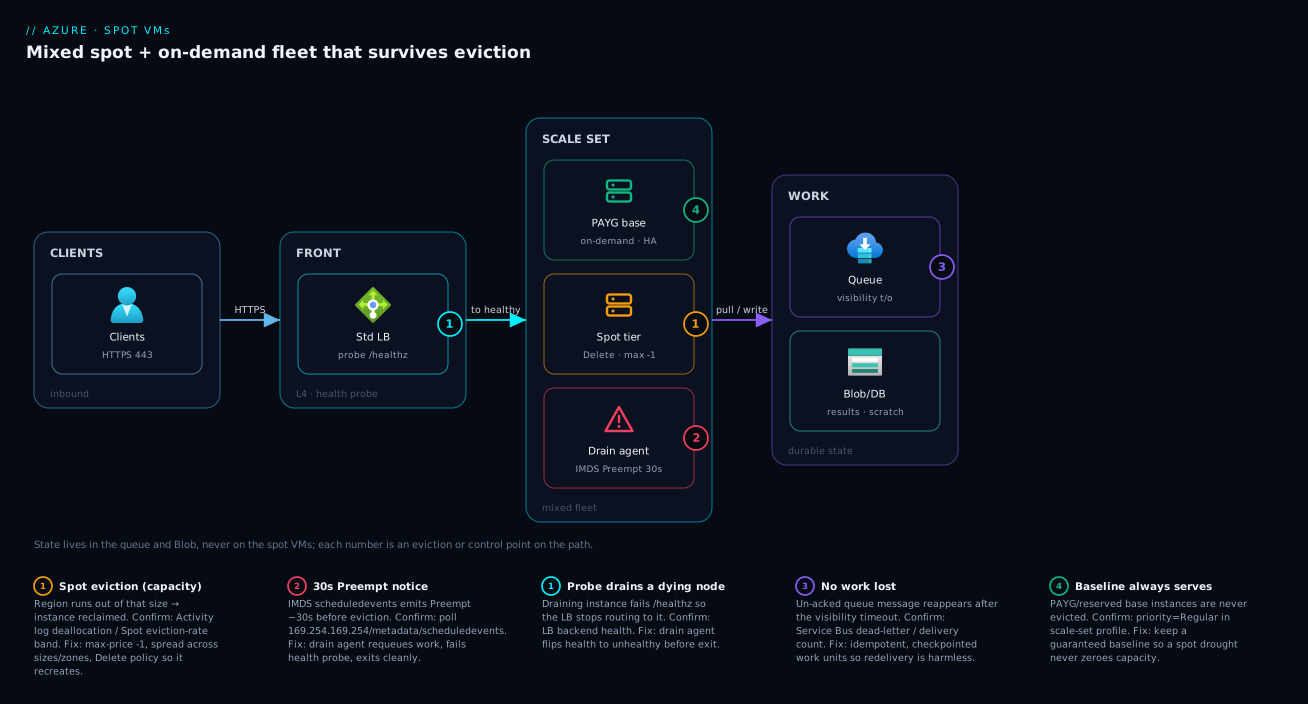
The lesson the picture encodes: durability lives in the queue and the storage tier, never in the spot VMs. Once state is external and the fleet self-heals on the ~30-second notice, an eviction is just a node quietly leaving and another taking its place — which is exactly what lets you run the bulk of the fleet at a 60–90% discount.
Real-world scenario
PixelForge, a fictional but representative animation studio in Pune, renders frames for short films. Their render farm was 60 pay-as-you-go F16s_v2 VMs (compute-optimized, great for CPU-bound rendering) running ~14 hours a night, costing roughly ₹19 lakh a month. Renders are embarrassingly parallel: each VM pulls a frame job from a queue, renders it, uploads the result to Blob Storage, and pulls the next. Losing a VM mid-frame loses at most one in-flight frame, which is simply re-queued. In other words, the entire farm was a textbook spot candidate that nobody had moved.
The platform engineer migrated the farm to a Spot Virtual Machine Scale Set: eviction policy Delete, max price -1 (market only, no price evictions), spread across three F-series sizes (F16s_v2, F8s_v2, F32s_v2) so a capacity shortage in one size wouldn’t idle the whole farm, in a region whose spot eviction-rate band for those sizes sat in 5–10%. Each instance ran a drain agent polling IMDS: on a Preempt event it finished the current frame if it had time, otherwise abandoned it back to the queue (whose visibility timeout re-delivered it within seconds), then exited cleanly. Result jobs were idempotent — re-rendering a frame produced the same output, so duplicates from an interrupted-then-redelivered job were harmless.
The first week exposed two early mistakes. First, they had set a fixed max price to “be safe,” and a regional demand spike pushed the spot price over it one evening, price-evicting two-thirds of the farm at once — exactly the mass-eviction trap. Switching to -1 removed price evictions entirely; thereafter only gentle, spread-out capacity evictions occurred. Second, an early build wrote intermediate textures to the temp disk and lost them on eviction; moving scratch to a small Blob container fixed it (the temp disk is always wiped on eviction).
After tuning, evictions ran at a handful of instances per hour — invisible to throughput because the queue simply redistributed those frames. Nightly render wall-clock time was unchanged. The bill fell from ~₹19 lakh to about ₹3.4 lakh a month — an ~82% saving — on identical hardware. The only engineering cost was the drain agent (a ~60-line script) and the discipline of keeping all state in the queue and Blob, not on the VMs. PixelForge kept a small pay-as-you-go baseline of 4 instances purely so that even in a total spot drought, some frames always progressed — the mixed-fleet pattern from the architecture above.
Advantages and disadvantages
| Advantages | Disadvantages |
|---|---|
| Deep discount — typically 60–90% off pay-as-you-go | Can be evicted anytime with only ~30s notice |
| Zero commitment — no 1/3-year term, turn on per-VM today | Not suitable for stateful or SLA-bound workloads |
| Identical hardware/performance to on-demand | Capacity is not guaranteed — a region may have none |
| Works at fleet scale via scale sets / AKS spot pools | Requires app-side drain + checkpoint logic to be safe |
Price-eviction risk is fully avoidable (-1) |
Temp/resource disk is always lost on eviction |
| Stacks with stateless, queue-driven, idempotent designs | Mass eviction possible if you misuse a fixed max price |
| Excellent for batch, CI, dev/test, big-data, render, ML | No SLA on the spot instances themselves |
When the advantages dominate: any workload that is already (or easily made) stateless, restartable and deadline-flexible — that is where spot is close to free money, often cutting that slice of the bill by 80%+. When the disadvantages dominate: stateful systems, singletons, and SLA-bound front doors, where a 30-second-notice disappearance is unacceptable. The middle ground — a personal dev box or a job with some local state — is handled by the Deallocate policy (keep the disk, restart later) rather than by avoiding spot altogether. The art is not “spot vs not”; it is carving the estate into the interruptible part (spot) and the must-stay part (PAYG/reserved), often within the very same application via a mixed fleet.
Hands-on lab
You will create a single Linux spot VM with the Deallocate policy and market max price (-1), inspect its spot configuration, simulate the eviction notice, and tear it down. This uses the smallest sizes and frees everything at the end, keeping cost to a few rupees.
1. Set variables and create a resource group.
RG=rg-spot-lab
LOC=eastus
VM=vm-spot-demo
az group create --name $RG --location $LOC
2. Create a spot VM with --priority Spot, --eviction-policy Deallocate, and --max-price -1 (follow the market — only capacity evictions):
az vm create \
  --resource-group $RG --name $VM \
  --image Ubuntu2204 --size Standard_B2s \
  --priority Spot \
  --eviction-policy Deallocate \
  --max-price -1 \
  --admin-username azureuser --generate-ssh-keys \
  --public-ip-sku Standard
If you see OverconstrainedAllocationRequest or AllocationFailed, that region/size has no spare spot capacity right now — pick another size (Standard_B1s, Standard_D2s_v5) or region and retry. That error is spot working as designed: no spare capacity, no VM.
3. Confirm it really is a spot VM and read its policy and cap:
az vm show --resource-group $RG --name $VM \
  --query "{priority:priority, evictionPolicy:evictionPolicy, maxPrice:billingProfile.maxPrice}" -o table
# Expected:  Priority=Spot  EvictionPolicy=Deallocate  MaxPrice=-1
4. Read the spot price you’re actually paying for this size/region via the Retail Prices API (run from Cloud Shell):
curl -s "https://prices.azure.com/api/retail/prices?\$filter=serviceName eq 'Virtual Machines' and armRegionName eq '$LOC' and armSkuName eq 'Standard_B2s' and priceType eq 'Consumption'" \
  | python3 -c "import sys,json;[print(i['meterName'],i['unitPrice']) for i in json.load(sys.stdin)['Items']]"
# Compare the 'Spot' meter's unitPrice to the standard one — that ratio is your saving.
5. Simulate the eviction signal from inside the VM (SSH in first). There may be no real event yet, so this shows you the exact poll your drain agent would run:
ssh azureuser@$(az vm show -d -g $RG -n $VM --query publicIps -o tsv)
# On the VM:
curl -s -H "Metadata:true" \
  "http://169.254.169.254/metadata/scheduledevents?api-version=2020-07-01"
# An empty "Events":[] is normal. A 'Preempt' entry would mean: ~30s to drain.
exit
6. Simulate an eviction outcome by deallocating the VM yourself — this mirrors what a capacity eviction does under the Deallocate policy (compute stops, disks remain, restartable):
az vm deallocate --resource-group $RG --name $VM
az vm show -d -g $RG -n $VM --query powerState -o tsv   # "VM deallocated"
az vm start --resource-group $RG --name $VM             # bring it back when "capacity returns"
7. (Optional) Bicep equivalent — the same spot VM as infrastructure-as-code (key block shown):
resource vm 'Microsoft.Compute/virtualMachines@2024-03-01' = {
  name: 'vm-spot-demo'
  location: resourceGroup().location
  properties: {
    priority: 'Spot'
    evictionPolicy: 'Deallocate'        // or 'Delete' for fleets
    billingProfile: { maxPrice: -1 }    // -1 = market price; never price-evicted
    hardwareProfile: { vmSize: 'Standard_B2s' }
    // ... osProfile, storageProfile, networkProfile as usual ...
  }
}
8. Tear everything down so nothing keeps billing (disks survive deallocation, so delete the group):
az group delete --name $RG --yes --no-wait
You have now created, priced, inspected, “evicted” and recovered a spot VM end to end. Swap --priority Spot for the default and the VM is an ordinary pay-as-you-go machine — that single flag is the whole difference.
Common mistakes & troubleshooting
Spot rewards a few specific habits and punishes their absence. Each row below is a real failure mode: the symptom, the root cause, how to confirm it, and the fix.
| # | Symptom | Root cause | Confirm with | Fix |
|---|---|---|---|---|
| 1 | OverconstrainedAllocationRequest on create |
No spare spot capacity for that size/region now | The error itself; try another size/region | Choose a low-eviction size/region; spread across sizes |
| 2 | Whole fleet evicted at once | Fixed max price undercut a demand spike (price eviction) | Activity log shows price-based deallocations together | Set --max-price -1; only capacity evicts, gently |
| 3 | Data gone after eviction | Wrote it to the temp/resource disk (always wiped) | Missing files on D: / /mnt after restart |
Put state on managed/data disks, Blob, or a DB |
| 4 | “Spot is unreliable” for a database | Stateful workload on spot — wrong fit | It’s a DB/singleton on priority: Spot |
Move stateful work to PAYG/reserved; spot is for stateless |
| 5 | VM evicted and never came back | Eviction policy Delete on a single, important VM | evictionPolicy: Delete in az vm show |
Use Deallocate for single VMs you want to restart |
| 6 | No graceful shutdown; work lost mid-flight | App never reads the scheduled event | App has no IMDS /scheduledevents poll |
Add a drain agent that reacts to Preempt in ~30s |
| 7 | Spot “didn’t save anything” | Compared max price, not the spot price billed | Retail Prices API: spot meter vs standard meter | You pay the spot price, not the cap — recheck the meters |
| 8 | Constant churn ruins a long job | Picked a high eviction-rate size for a long task | Eviction-rate band was 20%+ in the create blade | Pick a low-eviction-band size; checkpoint frequently |
| 9 | Can’t start a deallocated spot VM | Capacity not available to resume right now | az vm start fails with allocation error |
Retry later, or switch size/zone; capacity is not guaranteed |
| 10 | Quota error creating spot fleet | Spot has its own regional vCPU quota | az vm list-usage shows the Spot quota line |
Request a Spot vCPU quota increase for the region |
A few of these deserve emphasis. #2 (mass eviction from a fixed cap) is the single most damaging beginner mistake and is entirely avoidable with -1. #3 (temp disk loss) and #6 (no drain handler) are the two that make people think spot is flaky when it is doing exactly what it promised. And #10 surprises people: Spot vCPU quota is separate from your standard regional vCPU quota — check and raise it before a large rollout:
# Spot quota shows up as a separate usage line (often '...Spot vCPUs')
az vm list-usage --location eastus -o table | grep -i spot
Best practices
- Default
--max-price -1. Follow the market, pay the low spot price, and suffer only capacity evictions — never the mass price-eviction trap. Use a fixed cap only with a deliberate cost-ceiling reason and eyes open to extra eviction. - Keep all durable state off the VM. Put work in a queue (Service Bus / Storage Queue) and results in Blob/managed disks/DB. The VM and its temp disk are scratch; design so any instance can vanish without losing data.
- Make units of work idempotent and checkpointed. An interrupted job that simply re-runs (or resumes from a checkpoint) turns eviction into a non-event.
- Run a drain agent that watches IMDS
scheduledevents. React toPreemptwithin the ~30-second window: stop intake, requeue in-flight work, fail the health probe, exit cleanly. - Spread the fleet across multiple sizes, zones and (where sensible) regions. A capacity shortage in one size/zone then can’t idle the whole fleet — diversification is the main lever on capacity-eviction risk.
- Run a mixed fleet for anything user-facing. A guaranteed PAYG/reserved baseline plus a spot burst tier gives cheap scale without betting availability on spot.
- Choose sizes by eviction-rate band, not just price. For longer jobs, a slightly smaller discount in a 0–5% band beats a deeper discount in a 20%+ band.
- Pick the eviction policy to match the resource. Delete for fleets/scale sets/AKS (recreate fresh); Deallocate for single VMs/dev boxes you want to power back on.
- Watch and raise Spot vCPU quota ahead of a large rollout — it is tracked separately from standard vCPU quota.
- Use Spot scale sets / AKS spot node pools rather than hand-managing many single spot VMs; they auto-recreate evicted instances and integrate with autoscale.
- Tag spot resources and track the realised saving in cost reports so the win is visible and the FinOps story is concrete.
Security notes
Spot VMs are security-identical to pay-as-you-go VMs — the discount changes nothing about the security model — but their interruptibility adds a few specific considerations:
- Least privilege still applies in full. Give the VM a user-assigned managed identity with only the RBAC it needs (e.g. read a queue, write a Blob container). Never bake credentials into images or the temp disk; an evicted-and-recreated instance must obtain identity at boot, not carry secrets.
- Secrets come from Key Vault at runtime, not from disk. Because the VM (and its temp disk) can be deleted at any moment, fetch secrets from Azure Key Vault via managed identity each boot rather than persisting them locally — the same pattern you’d use anywhere, but eviction makes “no secrets on the box” a hard rule.
- Encryption is unchanged. Managed OS/data disks are encrypted at rest by default; the persistent disks of a Deallocated spot VM are protected exactly as any other disk. Only the ephemeral temp disk is wiped on eviction — which is a feature for scratch data, but never put secrets or PII there expecting it to be cleaned/managed.
- Network isolation is identical. Apply the same NSGs, subnets and private endpoints you would to any VM (see Azure Virtual Network, Subnets and NSGs). A spot instance behind a load balancer should fail its health probe on drain so it leaves rotation cleanly — a security-adjacent hygiene point as much as an availability one.
- Audit and lifecycle. Because spot instances churn, lean on scale sets so instance creation/deletion is logged and consistent rather than ad-hoc; ensure deprovisioning (e.g. deregistration from any service registry) happens in the drain path so a vanished instance doesn’t leave stale, exploitable references.
Cost & sizing
The whole point of spot is the bill, so make the saving explicit and right-size deliberately.
What drives the cost. You pay the current spot price per second the VM is allocated — nothing while it is evicted/deallocated (compute), though under Deallocate you keep paying for persistent disks and any reserved public IP. The discount depends on size, region and current demand; expect roughly 60–90% off pay-as-you-go, varying over time. Bigger discounts usually correlate with higher eviction-rate bands (more spare capacity is offered cheaply precisely because demand is variable), so cost and risk trade off.
| Cost driver | On spot | Notes |
|---|---|---|
| Compute (per second allocated) | The current spot price | The ~60–90% saving; zero while evicted |
| Persistent OS/data disks | Full price | You pay even while a Deallocated VM is stopped |
| Temp/resource disk | Included with the size | Wiped on eviction — scratch only |
| Outbound data, public IP, LB | Full price | Same as any VM; not discounted by spot |
| Spot vCPU quota | Separate quota | Free, but must be requested before large fleets |
A worked estimate (illustrative; check live prices for your region):
| Scenario | PAYG est. (₹/mo) | Spot est. at ~80% off (₹/mo) | Saving |
|---|---|---|---|
1× D4s_v5 running 24×7 |
~₹15,000 | ~₹3,000 | ~₹12,000 |
20× F8s_v2 CI agents, 12h/day |
~₹6,30,000 | ~₹1,26,000 | ~₹5,04,000 |
60× F16s_v2 render farm, 14h/night |
~₹19,00,000 | ~₹3,40,000 | ~₹15,60,000 |
Right-sizing on spot follows two rules beyond normal sizing. First, prefer a spread of sizes in the same family over a single size, so capacity eviction of one size doesn’t idle the fleet — three medium sizes are more eviction-resilient than one large size. Second, match job length to eviction band: short, frequently-checkpointed units thrive even in churny 20%+ bands; multi-hour un-checkpointed units want a 0–5% band or they waste work. There is no free tier for spot specifically, but the smallest sizes (B1s, B2s) keep lab costs to single-digit rupees, and the saving on real fleets is the largest single compute lever Azure offers short of a multi-year reservation — without the multi-year commitment.
Interview & exam questions
1. In one sentence, what is an Azure Spot VM and what do you trade for the discount? A VM that runs on Azure’s spare datacenter capacity at a steep discount (typically 60–90% off PAYG); in exchange you accept that Azure can evict it at any time with only ~30 seconds’ notice, so it suits only interruptible workloads.
2. What are the two reasons (types) a spot VM gets evicted?
Capacity eviction — the region runs out of spare capacity for that size and a full-price customer needs it; and price eviction — the current spot price rises above your configured max price. Setting max price to -1 eliminates price eviction.
3. What does setting --max-price -1 do, and what do you actually pay?
It means “follow the market — I’ll pay up to the standard PAYG price,” so you are never price-evicted (only capacity-evicted). You pay the current spot price, not the cap and not PAYG; the cap only governs when price eviction fires.
4. Compare the Deallocate and Delete eviction policies.
Deallocate stops the VM but keeps it (and its OS/data disks) so you can az vm start it later when capacity returns — good for single VMs/dev boxes. Delete destroys the VM on eviction — good for scale sets and AKS spot pools that just recreate instances. The temp disk is lost either way.
5. Which of these belong on spot: a primary SQL database, a CI build agent, a stateless web tier behind a balancer? Why? The CI agent (re-run the job) and the stateless web tier (a fraction of the fleet; others serve) are good spot fits. The primary SQL database is never a spot fit — it is stateful and would lose data on eviction.
6. How much warning do you get before eviction, and how does an app receive it?
About 30 seconds, delivered as a Preempt scheduled event via the Instance Metadata Service (http://169.254.169.254/metadata/scheduledevents). Apps poll that endpoint and drain (requeue work, fail health probe, exit) within the window.
7. Why might an entire spot fleet get evicted at once, and how do you prevent it?
A fixed max price that the market spot price rises above evicts every instance below that cap simultaneously (mass price eviction). Prevent it by setting max price to -1 so only gradual capacity evictions occur.
8. Is spot hardware slower or less capable than pay-as-you-go? No. A spot VM is the identical size, performance, disk and network as its PAYG equivalent — same physical capacity. The only difference is that Azure can reclaim it; you are renting capacity that has a senior tenant.
9. What happens to data on the temp/resource disk when a spot VM is evicted? It is always lost, under both Deallocate and Delete policies. Treat the temp disk as scratch only; keep durable state on managed disks, Blob Storage, or a database.
10. How do spot concepts apply to Kubernetes on Azure? You add a spot node pool to an AKS cluster (with a taint so only tolerating pods schedule there). Pods on evicted nodes are rescheduled by Kubernetes onto other nodes — the same “stateless, interruptible, self-healing” model, managed by the scheduler. See AKS Node Pools Demystified.
11. How is spot different from a Reserved Instance or savings plan? Reservations/savings plans lower the rate in exchange for a 1- or 3-year commitment, and the capacity is guaranteed (never reclaimed). Spot lowers the rate with no commitment but the capacity is not guaranteed (can be evicted). They are complementary: reserve the baseline, spot the burst.
12. Name two ways to reduce capacity-eviction risk. Spread the fleet across multiple VM sizes, availability zones and/or regions so a shortage in one doesn’t idle everything; and choose sizes in a low eviction-rate band (e.g. 0–5%) rather than chasing the deepest discount in a high-churn size.
These map most directly to AZ-104 (Azure Administrator) and AZ-305 (Solutions Architect) cost-optimization and compute objectives, and the FinOps framing appears in the Azure Well-Architected Cost Optimization pillar.
Quick check
- True or false: a spot
D4s_v5is a smaller/slower VM than a pay-as-you-goD4s_v5. - You set
--max-price -1. Which eviction type can you still face, and which is now impossible? - Your single dev VM must survive eviction so you can power it back on later — which eviction policy do you choose?
- Roughly how long is the eviction notice, and through what mechanism does your app receive it?
- Name one workload that should never run on spot and say why in a few words.
Answers
- False. It is the identical size and performance; the only difference is that Azure can reclaim it.
- You can still face capacity eviction (region runs out of that size); price eviction is now impossible because you always accept the market price.
- Deallocate — it stops the VM and keeps the disks so you can
az vm startit when capacity returns. (Delete would destroy it.) - About 30 seconds, delivered as a
Preemptscheduled event via the Instance Metadata Service (/metadata/scheduledevents). - A primary database (or any stateful singleton / hard-SLA service) — eviction would lose data or break an availability guarantee.
Glossary
- Azure Spot Virtual Machine — a VM running on Azure’s spare/unused capacity at a deep discount, which Azure can evict at any time.
- Spare capacity — idle datacenter compute that Azure sells cheaply as spot; its availability and price both flow from how full a region is.
- Eviction — Azure reclaiming a spot VM, either by stopping (Deallocate) or destroying (Delete) it, after a ~30-second notice.
- Capacity eviction — eviction because the region ran out of spare capacity for that VM size; not directly preventable, only reducible by spreading.
- Price eviction — eviction because the spot price rose above your max price; eliminated by setting max price to
-1. - Eviction policy — your choice at VM creation of what happens on eviction: Deallocate (keep the VM and disks, restartable) or Delete (destroy it).
- Max price — the most you’ll pay per hour for the VM;
-1means “up to PAYG / follow the market.” It gates price eviction only, never the amount billed. - Spot price — the current variable per-hour rate you actually pay for a size in a region; far more stable than “variable” implies.
- Eviction-rate band — Azure’s coarse estimate (e.g. 0–5%, 20%+) of how often a size/region is evicted per month; use it to weigh risk against discount.
- Scheduled event (
Preempt) — the ~30-second eviction warning delivered via the Instance Metadata Service that lets an app drain gracefully. - Instance Metadata Service (IMDS) — the non-routable
169.254.169.254endpoint a VM polls for metadata and scheduled events, including eviction notices. - Temp / resource disk — the local ephemeral disk (
D://mnt) that is always wiped on eviction; scratch only. - Spot scale set — a Virtual Machine Scale Set whose instances are spot, which auto-recreates evicted instances at fleet scale.
- Spot node pool (AKS) — a Kubernetes node pool of spot VMs (with a taint) onto which only interruption-tolerant pods are scheduled.
- Mixed fleet — a deployment combining a guaranteed PAYG/reserved baseline with a discounted spot burst tier for cheap, resilient scale.
Next steps
- Apply spot to Kubernetes: AKS Node Pools Demystified: System vs User vs Spot, Taints, Labels — the same eviction model as a managed spot node pool.
- Put spot inside a cost strategy: Azure FinOps and Cost Management: Controlling Cloud Spend at Scale — where spot sits among reservations, savings plans and right-sizing.
- Lower your eviction risk with capacity knowledge: Azure Regions and Availability Zones: Designing for Resilience — why spreading across zones/regions reduces capacity eviction.
- Choose the runtime first: AKS vs Container Apps vs Container Instances: Picking the Right Azure Container Runtime — the compute decision that sits one level above spot.
- Fetch secrets safely on ephemeral nodes: Azure Key Vault: Secrets, Keys and Certificates — the runtime-secrets pattern spot’s churn makes mandatory.