The pipeline goes red on the last step: Deployment failed. Correlation ID: 6f2a…. One line. No stack trace, no obvious file, just a GUID and a vague verb. You re-run it — same failure. You open the portal, find a long list of green resources and one red one, click in, and get a JSON blob whose top-level message says At least one resource deployment operation failed. — which tells you nothing new. This is the most common friction point in infrastructure-as-code on Azure, frustrating for one specific reason: Azure Resource Manager (ARM) — the control plane every az, Bicep, Terraform, portal and SDK call goes through — reports failures as a nested tree of operations, and the message at the top is almost never the one that matters. The real error is buried two or three levels down, attached to the one resource provider that rejected your request.
This is the diagnostic playbook for reading that tree. We treat a failed deployment not as one error but as a layered failure: ARM validates the template shape first (a syntax/schema layer), then evaluates it against the live environment (preflight), then submits each resource to its resource provider (the Microsoft.Compute, Microsoft.Network, Microsoft.Storage services that actually create things) — and any layer can fail with a completely different class of error. You will learn to localise a failure to one layer and one resource, using the tools that tell the truth: az deployment group show, the deployment operations list, the Activity Log with its correlation ID, az deployment ... what-if, and the provider status messages. Every diagnosis comes with the exact command or portal path to confirm it and the precise fix, with az CLI and Bicep where it applies. Because this is a mid-incident reference, the playbook, error codes, modes and limits are all laid out as scannable tables.
By the end you will stop re-running and praying. When a deployment fails you will know within two minutes whether you face a template that never parsed, a policy that denied the request, a colliding name, a quota you blew through, an out-of-order dependency, or a provider that simply rejected your payload — and the one command that proves which.
What problem this solves
ARM gives you declarative deployments: describe desired state in a template, submit it, and Azure makes reality match. That abstraction is a gift until it breaks — then the declarative model works against you, reporting what failed but rarely why in the same place, because one template can touch a dozen resource providers, each with its own error vocabulary. The top-level DeploymentFailed message is deliberately generic; the actionable detail lives in a child operation you have to go find.
What breaks without this skill: an engineer re-runs the pipeline (sometimes it “passes” because a transient throttle cleared, teaching the wrong lesson), comments out the failing resource to get green, or escalates with a screenshot of the unhelpful top message. Meanwhile the actual cause — a RequestDisallowedByPolicy, a globally-taken storage name, a QuotaExceeded on a VM family, or a ResourceNotFound from out-of-order deployment — sits in the operation tree, perfectly diagnosable, unread.
Who hits this: everyone who deploys IaC on Azure — Bicep and ARM JSON authors directly, and Terraform users too, because azurerm calls the same control plane and surfaces the same provider errors. It bites hardest on first deployments to a new subscription (policy and quota surprises), templates with cross-resource references (ordering races), anything with globally-unique names (storage, Key Vault, ACR), and CI/CD where the failure is one log line. The fix is almost never “re-run” — it’s “open the tree, find the red leaf, read its code and message, act on that.”
Every failure layer this article covers, the question it forces, and where to look first:
| Failure layer | What ARM is telling you | First question to ask | First place to look | Most common single cause |
|---|---|---|---|---|
| Template validation | “Your template isn’t valid JSON/Bicep” | Did it even parse and compile? | az bicep build / CLI parse error |
Bad expression, missing param, bad reference |
| Preflight (validation) | “Valid shape, but it won’t work here” | Would this succeed against the live env? | az deployment ... validate / what-if |
Quota, name taken, policy, bad SKU/region |
| Resource provider | “A provider rejected one resource” | Which resource, and what did its provider say? | az deployment group show → operations |
Provider-specific: quota, conflict, bad value |
| Dependency / ordering | “A resource needed something not ready” | Did things deploy in the right order? | Operation timestamps + resourceNotFound |
Missing dependsOn / implicit reference |
| Authorization | “You/the SP can’t do this” | Does the identity have the role at this scope? | Activity Log → AuthorizationFailed |
Missing RBAC on the deploying principal |
Learning objectives
By the end of this article you can:
- Read an ARM deployment operation tree and localise a failure to the exact resource and layer that rejected the request, instead of staring at the generic top-level message.
- Decode the common ARM error codes —
InvalidTemplate,DeploymentFailed,ResourceDeploymentFailure,Conflict,RequestDisallowedByPolicy,QuotaExceeded,AuthorizationFailed,ResourceNotFound,SkuNotAvailableand more — and name the fix for each. - Use the Activity Log and the correlation ID to trace every operation that belonged to one deployment, including the child provider calls a pipeline log hides.
- Run
az deployment ... validateandwhat-ifto catch preflight failures (quota, policy, naming, SKU) before a partial deployment lands. - Distinguish a template-shape failure (parse/schema/expression) from a deployment-time failure (a provider said no) and reach for the right tool for each.
- Diagnose dependency-ordering failures (
ResourceNotFound, race conditions) and fix them with explicitdependsOnor proper symbolic references. - Understand deployment mode (Incremental vs Complete), the difference between a failed deployment and a rolled-back one, and why Complete mode can delete resources you didn’t expect.
- Wire a
what-if/validategate into CI so deployment failures are caught at PR time, not at apply time.
Prerequisites & where this fits
You should understand ARM basics: a deployment is a request to create/update resources from a template, scoped to a resource group, subscription, management group or tenant; a template (ARM JSON or Bicep, which compiles to ARM JSON) declares the resources; a resource provider (like Microsoft.Compute) fulfils each. You should be comfortable running az in Cloud Shell, reading JSON, and authoring a basic Bicep file. New to Bicep? Deploy your first Bicep file from scratch is the starting point, and Bicep vs ARM vs Terraform: choosing IaC on Azure frames where each tool sits.
This sits in the Observability & Troubleshooting track for IaC. It pairs tightly with Bicep what-if and preflight validation as a CI gate — preflight is the most effective way to turn a deployment failure into a PR comment. Many errors here are governance errors, so Azure Policy effects explained: Deny, Audit, Modify, DeployIfNotExists is the layer that emits RequestDisallowedByPolicy, and authorization failures map onto Azure RBAC fundamentals.
Who owns each layer during a failed deployment, so you call the right person fast:
| Layer | What lives here | Who usually owns it | Failure classes it causes |
|---|---|---|---|
| Template (Bicep/JSON) | Syntax, schema, expressions, params | App / IaC author | InvalidTemplate, BCPxxxx compile errors |
| Deployment engine (ARM) | Ordering, mode, preflight, the tree | Platform / ARM (Microsoft) | DeploymentFailed, ResourceNotFound, ordering |
| Resource provider | Actual create/update of one resource | Microsoft (per service) | QuotaExceeded, Conflict, SkuNotAvailable |
| Governance (Policy) | Deny/Modify rules on the scope | Cloud governance team | RequestDisallowedByPolicy |
| Identity / RBAC | Permissions of the deploying principal | Identity / platform | AuthorizationFailed, LinkedAuthorizationFailed |
| Quota / capacity | Per-region, per-family limits | Platform + Microsoft support | QuotaExceeded, SkuNotAvailable, AllocationFailed |
Core concepts
Five mental models make every later diagnosis obvious.
A deployment is a tree, and the message at the top is the summary, not the cause. Submit a template and ARM creates one deployment object whose status rolls up many child deployment operations — one per resource (and nested deployment). If any leaf fails, the root reports Failed with a generic At least one resource deployment operation failed. The real error — a code and message from one resource provider — is attached to the failing leaf. Reading the tree, not the root, is the entire skill: az deployment group show gives the root; az deployment operation group list gives the leaves.
There are two failure regimes: shape and reality. Before ARM submits anything, it checks the template’s shape — valid JSON/Bicep, matching schemas, evaluable expressions. Failures here are InvalidTemplate (or a Bicep BCPxxxx) and happen before any resource is touched, so nothing is half-created. Then ARM checks against reality — preflight — and submits each resource; failures here (QuotaExceeded, Conflict, RequestDisallowedByPolicy) can leave a partial deployment, because some resources may have succeeded before one failed. The regime tells you whether you have a mess to clean up.
The resource provider is the one that actually says no. ARM is a router. Conflict, QuotaExceeded, SkuNotAvailable don’t come from ARM — they come from Microsoft.Network or Microsoft.Compute, wrapped and bubbled up. That’s why the detail lives in a nested statusMessage.error, and why the same top-level DeploymentFailed can mean a dozen things. Read a leaf and you read the provider’s words.
Order is inferred, and inference is fallible. ARM deploys in parallel where it can and serialises where one resource references another (implicit) or you declared dependsOn (explicit). Reference B from A by a hard-coded string and ARM doesn’t know A needs B — it runs them in parallel, and A fails with ResourceNotFound because B isn’t there yet, intermittently. Correct references make the ordering deterministic.
The correlation ID is the thread that ties it together. Every deployment — and every operation it spawns, including the provider-side calls a pipeline never logs — shares one correlation ID. When the pipeline gives you nothing but Correlation ID: 6f2a…, that GUID is your key into the Activity Log: filter by it and you see every event for the deployment, with the provider error attached. It’s the difference between “the pipeline failed” and “the Microsoft.Network/virtualNetworks write at 14:32 was denied by policy deny-public-ip.”
The vocabulary in one table
Before the deep sections, pin down every moving part — the mental model side by side (the glossary repeats these for lookup):
| Concept | One-line definition | Where it lives | Why it matters to a failure |
|---|---|---|---|
| Deployment | One request to apply a template | Resource group / sub / MG / tenant | The root that reports Failed |
| Deployment operation | The create/update of one resource in a deployment | Under the deployment | The leaf that carries the real error |
| Resource provider | The service that fulfils a resource type | Microsoft.* namespace |
Emits the provider-specific error |
| Template | ARM JSON / Bicep describing desired state | Repo / inline | A bad shape → InvalidTemplate |
| Preflight (validation) | Pre-submit check against the live env | ARM, before create | Catches quota/name/policy early |
| Deployment mode | Incremental vs Complete | On the deployment | Complete can delete unlisted resources |
| Correlation ID | GUID shared by all ops of one deployment | Activity Log | Ties pipeline failure to provider error |
dependsOn |
Explicit ordering between resources | Template | Wrong/missing → ResourceNotFound race |
| Activity Log | Control-plane audit of all operations | Subscription / RG | Where the buried error is visible |
what-if |
Predicted change set before deploy | az deployment ... what-if |
Surfaces preflight failures pre-apply |
| Rollback on error | Re-deploy a last-known-good on failure | Optional deployment flag | Turns a failed deploy into a restored one |
The ARM error-code reference
The lookup table you scan first: every error code you realistically see from a failed ARM deployment, what it means, the likely cause, how to confirm it, the first fix. The non-obvious ones are the difference between InvalidTemplate (shape, no resources touched) and ResourceDeploymentFailure (a provider rejected a real create), and the family of authorization codes.
| Code | Meaning | Likely cause | How to confirm | First fix |
|---|---|---|---|---|
| InvalidTemplate | Template shape/schema/expression is invalid | Bad function, undeclared param, type mismatch, bad reference() |
CLI error text names the line/expression; az bicep build |
Fix the expression/param; recompile |
| DeploymentFailed | One or more child operations failed (generic root) | Anything below — read the leaves | az deployment operation group list |
Open the failing operation’s error |
| ResourceDeploymentFailure | A specific resource’s provider call failed | Provider rejected the payload | Same — the leaf’s statusMessage.error |
Act on the provider’s message |
| Conflict | Resource state conflicts (exists / in-use / busy) | Name taken, immutable prop changed, concurrent op | Leaf message; az resource show on the target |
Use a new name; don’t change immutable props |
| RequestDisallowedByPolicy | An Azure Policy Deny blocked the request | A governance Deny rule matched the resource | Activity Log error names the policyAssignment |
Comply, or get an exemption |
| QuotaExceeded | A subscription/region quota would be exceeded | Cores/IPs/SKU count over the limit | Error names the quota; az vm list-usage |
Request a quota increase or pick another region/size |
| SkuNotAvailable | The requested SKU isn’t offered here/now | SKU not in that region/zone, or capacity-restricted | az vm list-skus --location ... --zone |
Choose an available SKU/region/zone |
| AllocationFailed | Region/cluster couldn’t allocate the capacity | Transient capacity shortage for that size/zone | Retry; check az vm list-skus restrictions |
Retry, change size/zone, or use a flexible set |
| AuthorizationFailed | The principal lacks the required action | Deploying SP/user missing RBAC at the scope | Error names the action + scope | Grant the role at the right scope |
| LinkedAuthorizationFailed | Lacks permission on a referenced resource | Cross-resource link needs rights on the other one | Error names the linked resource + action | Grant access to the referenced resource |
| ResourceNotFound | A referenced resource doesn’t exist (yet) | Missing dependency, wrong name/ID, ordering race | Leaf names the missing resource ID | Fix the reference / add dependsOn |
| InvalidResourceReference | A reference()/resourceId points at nothing valid |
Typo’d name, wrong API version, wrong scope | Inspect the expression; az resource show |
Use a symbolic reference / correct ID |
| ParentResourceNotFound | The parent of a child resource is missing | Child deployed before/without its parent | Check the parent’s deployment status | Deploy/declare the parent; nest correctly |
| ReservedResourceName | The name uses a forbidden word/pattern | e.g. reserved words, bad characters/length | Naming rules for that resource type | Rename per the type’s rules |
| MissingRegistrationForLocation / NoRegisteredProviderFound | The resource provider isn’t registered | New subscription, provider never registered | az provider show -n Microsoft.X |
az provider register -n Microsoft.X |
| DeploymentQuotaExceeded | Too many deployments in the RG history (800) | Long-lived RG with many deployments | az deployment group list count |
Prune old deployment history |
| InvalidContentLink / template link 404 | A linked/nested template URL can’t be fetched | Bad/expired SAS, private URL, wrong path | Try the URL; check the SAS expiry | Re-issue the link/SAS; make it reachable |
Three reading notes that save the most time:
| Distinction | The trap | How to tell them apart |
|---|---|---|
InvalidTemplate vs ResourceDeploymentFailure |
Only one leaves a mess | InvalidTemplate is before any resource is created (nothing to clean up); ResourceDeploymentFailure means some resources may already exist |
Root DeploymentFailed vs the real error |
Hours wasted on the generic root message | The root is a summary; the real code/message is on a failing operation — always list operations |
| Policy Deny vs RBAC denial | Both look like “you can’t do this” | RequestDisallowedByPolicy names a policyAssignment; AuthorizationFailed names an RBAC action the principal lacks |
Anatomy of a failed deployment — reading the tree
The single most important move is to stop reading the root and list the operations — the same five steps every time.
Step 1 — get the deployment’s root status. Confirms it failed and gives you the timestamp and (sometimes) a hint:
# Root status of the latest deployment in a resource group
az deployment group show \
  --resource-group rg-app-prod --name main \
  --query "{state:properties.provisioningState, ts:properties.timestamp, error:properties.error}" -o json
Step 2 — list the operations and find the failing leaf. Where the real error lives — filter to the ones that failed:
# Every operation in the deployment; the failing one carries the provider error
az deployment operation group list \
  --resource-group rg-app-prod --name main \
  --query "[?properties.provisioningState=='Failed'].{resource:properties.targetResource.resourceName, type:properties.targetResource.resourceType, code:properties.statusMessage.error.code, msg:properties.statusMessage.error.message}" \
  -o jsonc
That statusMessage.error.code and .message are the words the resource provider actually said. Everything after this is acting on that, not on the root.
Step 3 — follow the correlation ID into the Activity Log when the leaf is terse. Some errors (policy denials especially) carry their detail in the Activity Log rather than the operation message:
# Pull the correlation ID from the deployment, then list every activity-log event for it
CID=$(az deployment group show -g rg-app-prod -n main --query properties.correlationId -o tsv)
az monitor activity-log list --correlation-id "$CID" \
  --query "[].{time:eventTimestamp, op:operationName.localizedValue, status:status.value, sub:subStatus.value, msg:properties.statusMessage}" \
  -o jsonc
Step 4 — read the provider’s full status message. Activity-log entries often embed a JSON statusMessage whose nested error.details[] is the most specific text Azure gives you — where a policy assignment name or a quota number lives.
Step 5 — confirm against the live resource for a conflict/exists case. When the code is Conflict, check what’s actually there:
az resource show --ids "/subscriptions/<sub>/resourceGroups/rg-app-prod/providers/Microsoft.Storage/storageAccounts/stappprod" \
  --query "{name:name, state:properties.provisioningState}" -o json
In short: step 1 confirms it failed, step 2 almost always hands you the real error, step 3 (the correlation ID) is for when the leaf is too terse, step 4 (error.details[]) is where a policy name or quota number lives, step 5 (az resource show) confirms the live state for a Conflict. In the portal, Resource group → Deployments → Operation details expands the failing row to the provider error, and Monitor → Activity Log filtered by correlation ID gives the same thread.
Anatomy of the template-shape failures (InvalidTemplate / Bicep compile)
These fail before any resource is created — the cheapest failures to have, because nothing is half-built. They split into Bicep compile errors (caught locally with az bicep build) and ARM InvalidTemplate errors (caught at submit): the five classes are a BCPxxxx compile error, an undeclared/unbound parameter, a bad expression/function, a type/schema mismatch, and a circular dependency.
Cause 1 — a Bicep compile error you never built locally
Bicep compiles to ARM JSON; a BCPxxxx error means it never produced valid JSON. Compile before you deploy so the error shows up in your editor, not the pipeline:
# Compile only — surfaces BCPxxxx errors without touching Azure
az bicep build --file main.bicep
Common ones: BCP028 (duplicate symbol), BCP057 (name not in scope), BCP062 (referenced declaration not found). There’s no Azure-side fix — these are pure authoring errors caught for free if you build in CI.
Cause 3 — a bad template expression evaluated at submit
If the shape is valid Bicep but an expression can’t resolve (a malformed resourceId(), a reference() with wrong arguments, a bad interpolation), ARM rejects it as InvalidTemplate naming the expression. Correct it — and prefer Bicep symbolic references (storageAccount.id) over hand-built resourceId() strings, which removes a class of typos:
// Wrong: hand-built resourceId is easy to typo and breaks ordering inference
// properties: { storageId: resourceId('Microsoft.Storage/storageAccounts', 'stappprod') }

// Right: symbolic reference — compiler validates it AND infers the dependency
resource sa 'Microsoft.Storage/storageAccounts@2023-05-01' = { name: 'stappprod', /* ... */ }
resource fn 'Microsoft.Web/sites@2023-12-01' = {
  name: 'fn-app'
  properties: { /* ... */ storageId: sa.id }   // sa.id is validated and creates the dependency
}
The discipline that kills the whole shape-failure class: build Bicep in CI (catches BCPxxxx and circular dependencies), review a params file (catches undeclared parameters), and prefer symbolic references (catches bad expressions at compile time). A validate/what-if step catches the rest — schema and API-version mismatches — at preflight.
Anatomy of the deployment-time failures (a provider said no)
These can leave a partial deployment, because they happen during create/update after some resources already succeeded — and they are the bulk of real incidents. The six classes, each with its confirm-command below: Policy Deny, name conflict, quota, SKU/capacity, authorization, unregistered provider.
Cause 1 — Azure Policy denied the request (RequestDisallowedByPolicy)
The most surprising failure on a governed subscription: your template is perfect, but a Policy Deny rejects the resource — a banned public IP, a disallowed region, a missing tag, a storage account without supportsHttpsTrafficOnly. The code is RequestDisallowedByPolicy and it names the policy assignment that blocked you, in the Activity Log. Pull the correlation ID and read it:
CID=$(az deployment group show -g rg-app-prod -n main --query properties.correlationId -o tsv)
az monitor activity-log list --correlation-id "$CID" \
  --query "[?contains(to_string(properties), 'Policy')].properties.statusMessage" -o tsv
# The JSON names policyAssignmentName, policyDefinitionId and the disallowed reason
Fix. Comply (add the tag, switch region, enable HTTPS-only) — almost always right, because the policy exists for a reason. If the resource genuinely needs an exception, request a scoped policy exemption rather than weakening the policy. See Azure Policy effects explained: Deny, Audit, Modify, DeployIfNotExists for which effects block (only Deny and a failed DeployIfNotExists/Modify; Audit never blocks).
The policy effects and whether each fails your deployment:
| Effect | Blocks the deployment? | What you see | What to do |
|---|---|---|---|
| Deny | Yes | RequestDisallowedByPolicy |
Comply or get an exemption |
| DeployIfNotExists | Only if its remediation deploy fails | Nested deployment error | Fix the remediation template / its identity’s RBAC |
| Modify | Rarely (if it can’t apply) | Modify failure on the resource | Ensure the Modify identity has rights |
| Audit / AuditIfNotExists | No | A non-compliant mark only | Fix later; it won’t fail the deploy |
| Append | No (mutates the request) | Silent property addition | Be aware your resource gains properties |
| Disabled | No | Nothing | — |
Cause 2 — a name conflict or an immutable-property change (Conflict)
Conflict has two flavours people confuse. Flavour A: the name is already taken — for globally-unique types (Storage account, Key Vault, ACR, App Service hostname, Cosmos DB) “taken” can mean by another tenant, which is why stappprod fails even though you’ve never used it. Flavour B: you tried to change an immutable property on an existing resource (a subnet’s address space while in use, a VM’s OS disk) — the provider refuses because it can’t change in place.
Confirm. For a name clash, test availability before assuming (for an immutable-property conflict, the leaf names the property and az resource show shows the value you’re overwriting):
# Storage account global name availability (true = free to use)
az storage account check-name --name stappprod --query "{available:nameAvailable, reason:reason}" -o json
Fix. For name clashes, make the name deterministically unique — a uniqueString() suffix is stable per resource group but globally unlikely to collide. For immutable-property conflicts, don’t mutate in place — leave it or replace it:
param location string = resourceGroup().location
// Stable per-RG, globally unique — avoids the "name taken" Conflict
resource sa 'Microsoft.Storage/storageAccounts@2023-05-01' = {
  name: 'st${uniqueString(resourceGroup().id)}'
  location: location
  sku: { name: 'Standard_LRS' }
  kind: 'StorageV2'
  properties: { supportsHttpsTrafficOnly: true, minimumTlsVersion: 'TLS1_2' }
}
The globally-unique types you must name carefully:
| Resource type | Name scope | Length / charset gotcha | Make it unique with |
|---|---|---|---|
| Storage account | Global | 3–24, lowercase + digits only, no hyphens | st${uniqueString(resourceGroup().id)} (trim to 24) |
| Key Vault | Global | 3–24, alphanumeric + hyphens, start letter | kv-${uniqueString(...)} |
| Container Registry (ACR) | Global | 5–50, alphanumeric only | acr${uniqueString(...)} |
| App Service (default host) | Global (*.azurewebsites.net) |
DNS-safe | include an env/suffix token |
| Cosmos DB account | Global | 3–44, lowercase + digits + hyphens | cosmos-${uniqueString(...)} |
| Public IP DNS label | Per-region | DNS-safe, region-unique | suffix with the RG hash |
Cause 3 — quota exceeded (QuotaExceeded)
Subscriptions have quotas per region per family: total regional vCPUs, per-family vCPUs (Standard_Dsv5), public IPs, NAT gateways. Deploy past the limit and the provider returns QuotaExceeded naming the quota and the requested-vs-allowed numbers — the classic “works in dev, fails in the new prod subscription” failure. Read usage against the region’s limit:
# Compute (vCPU) usage vs limit in a region — look for currentValue near limit
az vm list-usage --location centralindia \
  --query "[?currentValue >= limit].{name:localName, used:currentValue, limit:limit}" -o table

# Network quotas (public IPs, etc.)
az network list-usages --location centralindia \
  --query "[?currentValue >= limit].{name:name.localizedValue, used:currentValue, limit:limit}" -o table
Fix. Reduce the footprint or request a quota increase — full mechanics in Azure subscription quotas and limits: increase requests. The common quotas that fail deployments:
| Quota | Typical default scope | Symptom | How to confirm |
|---|---|---|---|
| Total regional vCPUs | Per region | QuotaExceeded on VM/VMSS create |
az vm list-usage --location |
Per-family vCPUs (e.g. Dsv5) |
Per family per region | Fails only for that family | az vm list-usage (per-family rows) |
| Public IP addresses (Standard) | Per region | Fails the public IP resource | az network list-usages --location |
| Storage accounts per subscription | Per region (250) | Fails new storage account | az storage account list count |
| NAT gateways / load balancers | Per region | Fails the network resource | az network list-usages |
| Deployments per RG (history) | 800 per RG | DeploymentQuotaExceeded |
az deployment group list count |
Cause 4 — SKU not available or capacity allocation failed
SkuNotAvailable means the SKU isn’t offered in that region/zone (or is restricted for your subscription). AllocationFailed is different — the SKU is offered, but the cluster couldn’t allocate it right now (a transient shortage, common for large/GPU SKUs). Confirm what’s available, with zones and restrictions:
# What VM sizes are available in a region, and any restrictions/zones
az vm list-skus --location centralindia --resource-type virtualMachines \
  --query "[?name=='Standard_D4s_v5'].{name:name, zones:locationInfo[0].zones, restrictions:restrictions}" -o jsonc
A non-empty restrictions array means the SKU is blocked (often NotAvailableForSubscription). Fixes by code: SkuNotAvailable → choose an available SKU/region/zone; AllocationFailed → retry or change size/zone (capacity fluctuates), or use a flexible VMSS; OverconstrainedAllocationRequest (too many constraints — zone + size + proximity) → relax one constraint or split the request.
Cause 5 — authorization failed (AuthorizationFailed)
The deploying principal — your user, but more often a CI service principal or managed identity — lacks the RBAC action the operation needs at that scope. The error names the action (e.g. Microsoft.Network/virtualNetworks/write) and scope. A subtlety is LinkedAuthorizationFailed: you can create A, but A references B and you lack rights on B. Confirm the assignments, then grant the least-privilege role at the right scope:
# What roles does the deploying SP/MI have at the resource-group scope?
az role assignment list --assignee <appId-or-objectId> \
  --scope /subscriptions/<sub>/resourceGroups/rg-app-prod -o table
For a pipeline using OIDC, GitHub Actions to Azure with OIDC federated credentials wires the identity; the RBAC model is in Azure RBAC fundamentals. The codes, distinguished:
| Code | Means | Where the gap is | Fix |
|---|---|---|---|
AuthorizationFailed |
Principal lacks the action at the scope | On the resource being created | Grant a role covering the action |
LinkedAuthorizationFailed |
Lacks rights on a referenced resource | On the other (linked) resource | Grant access to the linked resource |
InvalidAuthenticationToken |
Token expired/invalid | The login session/SP secret | Re-authenticate; rotate the SP credential |
RoleAssignmentExists |
The role assignment already exists | Re-creating an existing assignment | Use a deterministic guid() name; make idempotent |
Dependency ordering and the ResourceNotFound race
The most intermittent class of failure. ARM parallelises independent resources and serialises dependent ones — but only knows about a dependency if you express it. Express it wrong and you get a race: sometimes the order is right, sometimes it fails with ResourceNotFound or ParentResourceNotFound. Flaky deployments that “pass on retry” are almost always this. The failing leaf names a resource ID that “doesn’t exist”, and timestamps show the dependent resource started before its dependency:
az deployment operation group list -g rg-app-prod -n main \
  --query "[].{resource:properties.targetResource.resourceName, state:properties.provisioningState, start:properties.timestamp}" \
  -o table
Fix. Use symbolic references wherever one resource needs another — vnet.id, subnet.id — because the compiler turns a reference into an implicit dependsOn, making the order deterministic. Reach for an explicit dependsOn only for a runtime dependency the compiler can’t see (e.g. a role assignment that must exist before a resource uses it but isn’t referenced):
resource vnet 'Microsoft.Network/virtualNetworks@2023-11-01' = {
  name: 'vnet-app'
  location: location
  properties: { addressSpace: { addressPrefixes: ['10.20.0.0/16'] } }
}
resource subnet 'Microsoft.Network/virtualNetworks/subnets@2023-11-01' = {
  parent: vnet                      // parent → deterministic ordering
  name: 'snet-app'
  properties: { addressPrefix: '10.20.1.0/24' }
}
resource nic 'Microsoft.Network/networkInterfaces@2023-11-01' = {
  name: 'nic-app'
  location: location
  properties: {
    ipConfigurations: [{
      name: 'ipconfig1'
      properties: { subnet: { id: subnet.id } }   // reference → implicit dependsOn
    }]
  }
  // dependsOn: [ roleAssignment ]   // only for a non-referenced runtime dependency
}
The ordering failures and the right tool for each:
| Symptom | Code | Cause | Fix |
|---|---|---|---|
| Child fails, parent not ready | ParentResourceNotFound |
Child declared without parent/nesting |
Use parent: or proper nesting |
| References a resource that “doesn’t exist” | ResourceNotFound |
Hand-built ID instead of symbolic ref | Use the symbolic .id |
| Passes sometimes, fails sometimes | ResourceNotFound (intermittent) |
True race; no expressed dependency | Add the reference or dependsOn |
| Two resources deadlock | CircularDependency (build-time) |
A references B references A | Break the cycle; extract a module |
| Runtime need not visible to compiler | ResourceNotFound at use-time |
E.g. RBAC must exist before use | Explicit dependsOn on the role assignment |
Deployment modes, scope and rollback
Three mechanics that change what a failure means. Get them wrong and a “failed” deployment does more damage than the bug.
Deployment mode — Incremental vs Complete. Incremental (default) adds/updates your template’s resources and leaves everything else alone. Complete makes the group match the template exactly — so it deletes resources in the group that aren’t in your template. A Complete deployment missing a resource you forgot to include will delete it: the single most dangerous footgun in ARM. Always know which mode you’re in:
# Incremental (safe default) vs Complete (deletes unlisted resources in the RG)
az deployment group create -g rg-app-prod -n main -f main.bicep --mode Incremental
# az deployment group create -g rg-app-prod -n main -f main.bicep --mode Complete  # DANGER: prunes
Deployment scope. Resource-group deployments are the common case, but you can also deploy at subscription, management group and tenant scope. The error tree is identical; only the verb changes:
| Scope | Command | Deploys things like | Common failure here |
|---|---|---|---|
| Resource group | az deployment group create |
VMs, networks, apps | Most provider errors |
| Subscription | az deployment sub create |
RGs, sub-level policy, budgets | Scope/permission, RG-name conflict |
| Management group | az deployment mg create |
Policy, role assignments, sub placement | AuthorizationFailed at MG scope |
| Tenant | az deployment tenant create |
MGs, tenant-wide assignments | Rarely used; high-privilege only |
Rollback on error. By default a failed deployment leaves whatever succeeded in place (a partial deployment). Opt into rollback-on-error and on failure ARM re-deploys the last successful deployment (or a --rollback-on-error <name> you pin) to restore known-good state — use it when a partial state is worse than rolling back:
# On failure, redeploy the last successful deployment instead of leaving a partial state
az deployment group create -g rg-app-prod -n main -f main.bicep \
  --rollback-on-error
Architecture at a glance
The diagram traces a deployment request as it flows through Azure Resource Manager, mapping each failure class onto the stage where it bites. Read it left to right. A client — your az/Bicep CLI, a Terraform azurerm apply, the portal, or a CI runner — submits a template to the ARM control plane. ARM first runs validation and preflight: it parses and schema-checks the template (a bad shape fails here as InvalidTemplate, badge 1, before any resource exists) and checks it against the live environment. Before or during that check, Azure Policy can reject the request outright with RequestDisallowedByPolicy (badge 2) — a governance Deny, not a code bug.
Once admitted, ARM fans each resource out to its resource provider — Microsoft.Compute, Microsoft.Network, Microsoft.Storage — in dependency order. This is where most real failures land: a provider returns QuotaExceeded or Conflict (badge 3) when a limit or name collides, and a mis-expressed dependency produces a ResourceNotFound race (badge 4) when a resource is created before the thing it references. Every one is written to the Activity Log under a single correlation ID (badge 5), the thread you pull when the pipeline gives you nothing but a GUID. The whole method is on the page: localise the failure to a stage, read the provider’s words there, confirm via the tree or the correlation ID, fix the layer that said no.
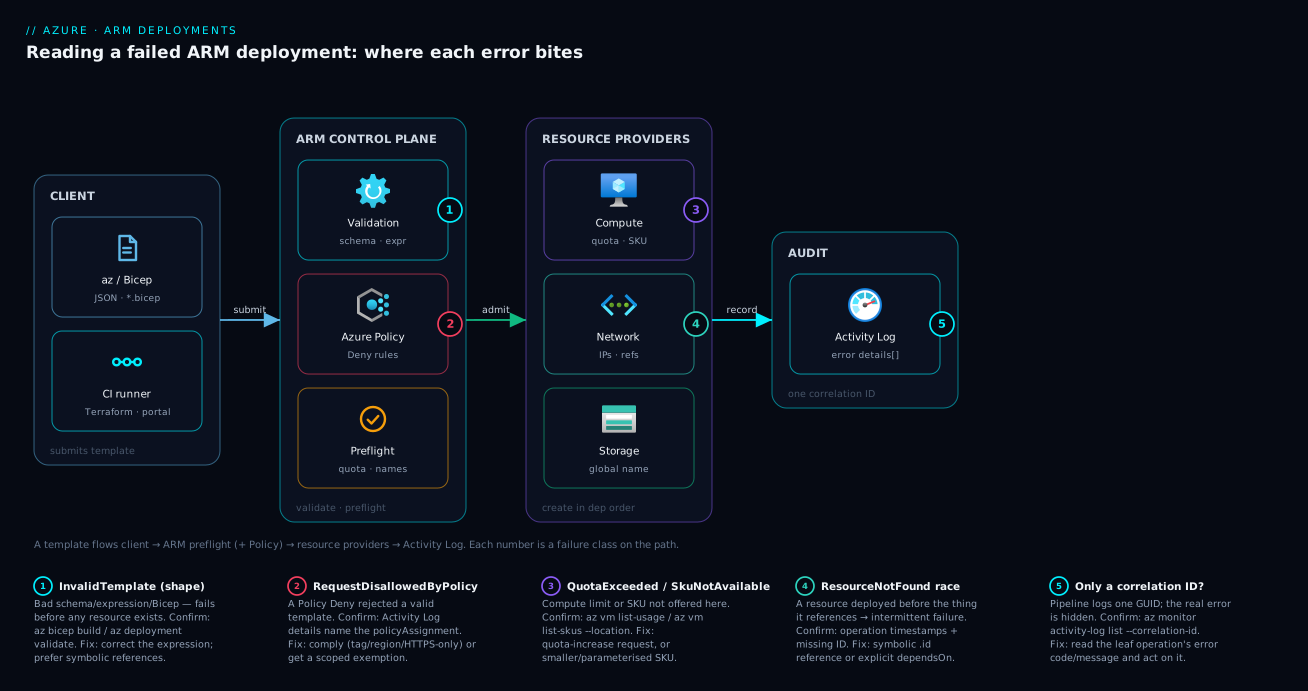
Real-world scenario
Northwind Logistics runs a nightly Bicep deployment that stands up a per-customer environment — resource group, VNet, a Standard_D4s_v5 VM scale set, a storage account and a Key Vault — via a GitHub Actions workflow using an OIDC-federated service principal with Contributor on the subscription. It had run clean for months. Then, onboarding their biggest customer into a brand-new prod subscription in Central India, the workflow went red at 02:10: Deployment failed. Correlation ID: 6f2a8c1e….
The on-call engineer re-ran it — same failure. The GitHub log showed only At least one resource deployment operation failed., so they went to the tree. az deployment operation group list showed three failing leaves, not one — the breakthrough, because the three errors were unrelated and at three different layers. The VM scale set read QuotaExceeded (Standard_Dsv5 vCPUs: requested 16, limit 10 in the new subscription); the storage account read Conflict (stnorthwindprod taken as a global name); the Key Vault read RequestDisallowedByPolicy.
They worked each leaf against its own confirm-command. az vm list-usage --location centralindia showed the Dsv5 family capped at 10 vCPUs in the fresh subscription (defaults are lower than a seasoned subscription’s raised limits). az storage account check-name --name stnorthwindprod returned available: false — a global collision, not a permissions issue. And pulling the correlation ID into the Activity Log surfaced the policy detail: assignment deny-keyvault-public-network blocked the Key Vault because the template left publicNetworkAccess at its default Enabled, under a stricter management-group policy than dev.
Each fix was small and on the right layer. Quota: a quota-increase request for Dsv5 to 32 vCPUs (approved within the hour), with the already-parameterised SKU shipped as Standard_D2s_v5 to land the environment that night. Name: switch to st${uniqueString(resourceGroup().id)}. Policy: publicNetworkAccess: 'Disabled' plus a private endpoint — complying rather than fighting. The rerun went green. The lasting change was a CI gate: what-if plus az deployment group validate on every PR, against a subscription carrying the same policy assignments, so quota, naming and policy failures now surface as a PR comment instead of a 02:10 page. The lesson on the wall: “A failed deployment is never one error until you’ve listed the operations. Read the leaves.”
The incident as a timeline, because the order of moves is the lesson:
| Time | Symptom | Action taken | Effect | What it should have been |
|---|---|---|---|---|
| 02:10 | DeploymentFailed + correlation ID |
(alert fires) | — | List the operations immediately |
| 02:12 | Same on re-run | Re-run the workflow | No change | Don’t re-run blind |
| 02:18 | Generic message in CI log | az deployment operation group list |
Found three failing leaves | The breakthrough |
| 02:25 | Three distinct codes | Confirm each: quota / name / policy | Three layers identified | — |
| 02:40 | Root causes known | Param SKU down, uniqueString name, publicNetworkAccess: Disabled |
Deploy goes green | Correct fixes, on the right layer |
| +1 day | Hardening | Add what-if + validate PR gate |
Failures now caught at PR time | The durable fix is the gate |
Advantages and disadvantages
The declarative, tree-structured ARM model both causes this class of friction and makes it diagnosable. Weigh it honestly:
| Advantages (why this model helps you) | Disadvantages (why it bites) |
|---|---|
| Every operation is recorded with a code, message and correlation ID — you rarely lack data | The top-level message is generic; the real error is two levels down |
Preflight (validate/what-if) catches quota/naming/policy/SKU failures before anything is created |
Skip preflight and you find those only mid-deploy, leaving a partial state |
| Declarative templates are repeatable and reviewable as code | One template fans out to many providers — one failure, many error languages |
| Symbolic references make order deterministic and catch typos at compile time | Hand-built resourceId() strings hide dependencies → intermittent ResourceNotFound |
| Rollback-on-error can restore known-good state automatically | The default leaves a partial deployment; Complete mode can delete resources |
| Policy enforces governance at deploy time, before bad infra exists | Policy denials surprise authors whose template is otherwise perfect |
One control plane backs az, Bicep, Terraform, portal and SDK |
Terraform/portal wrap the ARM error in another layer of abstraction |
Every disadvantage is manageable — preflight gates, symbolic references, deterministic names, Incremental mode, reading the tree — but only if you know they exist, which is the point of this article.
Hands-on lab
Reproduce a classic deployment failure, read it in the operation tree, and fix it — free-tier-friendly (an empty storage account and what-if cost nothing). Run in Cloud Shell (Bash).
Step 1 — Variables and resource group.
RG=rg-arm-lab
LOC=centralindia
az group create -n $RG -l $LOC -o table
Step 2 — Author a template with a deliberate name clash. Create lab.bicep:
param location string = resourceGroup().location

// BUG A: a hard-coded global storage name almost certainly taken
resource sa 'Microsoft.Storage/storageAccounts@2023-05-01' = {
  name: 'storageaccount'                 // 12 chars, valid shape, but globally taken
  location: location
  sku: { name: 'Standard_LRS' }
  kind: 'StorageV2'
  properties: { supportsHttpsTrafficOnly: true, minimumTlsVersion: 'TLS1_2' }
}
Step 3 — Preflight with what-if and validate BEFORE deploying — catch what you can without touching reality:
az deployment group what-if -g $RG -n lab -f lab.bicep
az deployment group validate -g $RG -n lab -f lab.bicep \
  --query "{state:properties.provisioningState, error:error}" -o jsonc
validate may already flag the name; if not, the deploy will.
Step 4 — Deploy and watch it fail, then read the tree.
az deployment group create -g $RG -n lab -f lab.bicep -o none || true
# Read the LEAF, not the root:
az deployment operation group list -g $RG -n lab \
  --query "[?properties.provisioningState=='Failed'].{resource:properties.targetResource.resourceName, code:properties.statusMessage.error.code, msg:properties.statusMessage.error.message}" \
  -o jsonc
Expected: a Conflict on the storage account. Confirm the global clash:
az storage account check-name --name storageaccount --query "{available:nameAvailable, reason:reason}" -o json
Step 5 — Fix the name to be deterministically unique and redeploy. Edit lab.bicep:
resource sa 'Microsoft.Storage/storageAccounts@2023-05-01' = {
  name: 'st${uniqueString(resourceGroup().id)}'   // globally unique, stable per RG
  location: location
  sku: { name: 'Standard_LRS' }
  kind: 'StorageV2'
  properties: { supportsHttpsTrafficOnly: true, minimumTlsVersion: 'TLS1_2' }
}
az deployment group create -g $RG -n lab -f lab.bicep \
  --query "{state:properties.provisioningState}" -o json
Expected: provisioningState: Succeeded.
Step 6 — Trace it via the correlation ID (the pipeline-debug muscle).
CID=$(az deployment group show -g $RG -n lab --query properties.correlationId -o tsv)
az monitor activity-log list --correlation-id "$CID" \
  --query "[].{time:eventTimestamp, op:operationName.localizedValue, status:status.value}" -o table
Validation checklist. You ran preflight, reproduced a real Conflict, read it from the operation tree (not the root), confirmed the global clash, fixed it with uniqueString(), and traced every operation by correlation ID — the exact muscle you use on a red pipeline. The lab steps mapped to what each proves:
| Step | What you did | What it proves | Real-world analogue |
|---|---|---|---|
| 3 | what-if + validate first |
Preflight catches failures pre-apply | The CI gate that stops 02:10 pages |
| 4 | Read the failing leaf | The real error is in the operations, not the root | The 2-minute diagnosis |
| 4 | check-name |
A Conflict can be a global clash |
Storage/KV/ACR naming reality |
| 5 | uniqueString() name |
The deterministic-unique fix | Every production naming scheme |
| 6 | Correlation-ID trace | One GUID unlocks every event | Debugging a pipeline that logs one line |
Cleanup (avoid lingering charges).
az group delete -n $RG --yes --no-wait
Cost note. An empty Standard_LRS storage account plus a few what-if/validate calls is effectively free — the whole lab is well under ₹10, and deleting the resource group removes everything.
Common mistakes & troubleshooting
This is the playbook — the part you bookmark. A scannable table for 02:14, spanning basic failures (a name taken, a typo’d expression) and advanced ones (a policy Deny, an ordering race, a Complete-mode pruning), with the deepest lessons called out below.
| # | Symptom | Root cause | Confirm (exact cmd / portal path) | Fix |
|---|---|---|---|---|
| 1 | At least one resource deployment operation failed. and nothing else |
Reading the root, not the leaves | az deployment operation group list -g <rg> -n <dep> --query "[?properties.provisioningState=='Failed']" |
Read the failing leaf’s code/message; act on that |
| 2 | Pipeline shows only Correlation ID: <guid> |
The provider/policy error isn’t in the pipeline log | az monitor activity-log list --correlation-id <guid> |
Read the activity-log statusMessage.error.details[] |
| 3 | InvalidTemplate referencing an expression |
Bad function/resourceId()/reference() |
CLI error text; az bicep build -f main.bicep |
Fix the expression; prefer symbolic references |
| 4 | BCP028/BCP057/BCP062 etc. |
Bicep authoring error, never compiled locally | az bicep build -f main.bicep |
Fix the flagged line; build in CI |
| 5 | Conflict on a storage/KV/ACR name |
Name is globally taken (maybe another tenant) | az storage account check-name --name <n> |
uniqueString()-suffixed name |
| 6 | Conflict changing an existing resource |
Tried to mutate an immutable property | Leaf message names the property; az resource show |
Don’t mutate; replace deliberately |
| 7 | RequestDisallowedByPolicy |
An Azure Policy Deny matched the resource | Activity Log error names the policyAssignment |
Comply with the policy, or get an exemption |
| 8 | QuotaExceeded (cores/IPs/count) |
Subscription/region quota hit | az vm list-usage --location <r> / az network list-usages |
Quota-increase request or smaller footprint |
| 9 | SkuNotAvailable |
SKU not offered/restricted here | az vm list-skus --location <r> --query "[?name=='<sku>'].restrictions" |
Different SKU/region/zone |
| 10 | AllocationFailed |
Transient capacity shortage for that size/zone | Retry; check az vm list-skus restrictions |
Retry; change size/zone; flexible VMSS |
| 11 | AuthorizationFailed |
Deploying principal lacks the RBAC action | Error names action+scope; az role assignment list --assignee <id> |
Grant the role at the right scope |
| 12 | LinkedAuthorizationFailed |
Lacks rights on a referenced resource | Error names the linked resource | Grant access to the linked resource |
| 13 | ResourceNotFound, intermittent (“passes on retry”) |
Dependency race — order not expressed | Operation timestamps; the named missing ID | Symbolic reference or explicit dependsOn |
| 14 | ParentResourceNotFound |
Child resource declared without its parent | Check the parent’s deployment status | Use parent:/proper nesting |
| 15 | NoRegisteredProviderFound / location not registered |
Resource provider not registered in the sub | az provider show -n Microsoft.X --query registrationState |
az provider register -n Microsoft.X |
| 16 | RoleAssignmentExists on redeploy |
Non-idempotent role-assignment name | The leaf names the assignment | Name it with a deterministic guid() |
| 17 | DeploymentQuotaExceeded |
>800 deployments in the RG history | az deployment group list -g <rg> --query "length(@)" |
Prune old deployment history |
| 18 | Resources deleted after a deploy | Complete mode pruned anything not in the template | Check --mode; Activity Log delete events |
Use Incremental; never Complete unless intended |
| 19 | InvalidContentLink / nested template 404 |
Bad/expired SAS, wrong path, or unreachable template URL | Open the templateLink.uri; check SAS expiry |
Re-issue the link/SAS or use a Bicep module |
One lesson sits above the rest. Entry 1 is the meta-mistake behind half of all “I’m stuck” reports — the root error.message is a summary incapable of telling you the cause; internalise “list the operations, read the leaf” and most other entries become routine. The runner-up for damage is entry 18: a partial template run in --mode Complete deletes resources not in the template, so stay on Incremental unless the template is the reviewed source of truth for the group.
Best practices
- Always read the operation tree before anything else.
az deployment operation group list ... --query "[?properties.provisioningState=='Failed']"is your first command on every failure. The root message is a summary; never act on it alone. - Run
what-ifandvalidatein CI on every PR, against a subscription carrying the same policy assignments as production — preflight turns quota/naming/policy/SKU failures into PR comments, not 02:10 pages. See Bicep what-if and preflight validation as a CI gate. - Use Incremental mode by default; treat Complete mode as a loaded gun. Only use Complete when the template is the reviewed source of truth for the whole group — and preview with
what-iffirst to see deletions. - Prefer symbolic references over hand-built
resourceId()strings — they validate at compile time and make order deterministic, eliminating the intermittentResourceNotFoundrace. - Make globally-unique names deterministically unique —
name: 'st${uniqueString(resourceGroup().id)}'is stable per environment and globally unlikely to collide. - Name role assignments with a deterministic
guid()so a redeploy is idempotent and doesn’t fail withRoleAssignmentExists. - Register resource providers at subscription bootstrap, not at first-deploy time, so a fresh subscription never hits
NoRegisteredProviderFound. - Keep deployment names meaningful and unique (e.g. include a build ID) so the tree and Activity Log are easy to correlate.
- Prune deployment history in long-lived resource groups before you approach the 800-per-RG limit (
DeploymentQuotaExceeded). - Parameterise SKUs and regions so a
QuotaExceeded/SkuNotAvailableis worked around immediately with a smaller SKU while a quota increase is approved. - Grant the deploying principal least-privilege RBAC at the right scope and verify it before the first run, so
AuthorizationFailednever surprises you. - Treat a partial deployment as state to reconcile — some resources may exist, so fix-and-redeploy (Incremental converges) or use
--rollback-on-errorwhen a partial state is worse than rolling back.
Security notes
The deploying identity is the crown jewel of an IaC pipeline — most authorization failures are least privilege working correctly, so fix them by granting the narrow role, not Owner. Use a service principal with OIDC federation (no stored secret) or a managed identity for CI — see GitHub Actions to Azure with OIDC federated credentials and Managed identity: system-assigned vs user-assigned patterns — and scope the role to the resource group or subscription you deploy to, not the tenant.
RequestDisallowedByPolicy failures are a security feature working — a Deny policy stopped non-compliant infrastructure before it existed. Comply (HTTPS-only, disable public network access, add the tag); if a genuine exception is needed, use a scoped, time-boxed policy exemption with an owner. Never disable a Deny policy to unblock a deployment.
Treat the Activity Log as the audit trail it is — who deployed what, when, with which identity. Finally, never embed secrets in template parameters or outputs: deployment outputs are stored in the history in plaintext, so use Key Vault references in parameters so the secret value never lands in ARM’s history.
Cost & sizing
The deployment operations themselves — validate, what-if, create, reading the tree and the Activity Log — are free; ARM is a control plane and you pay only for the resources it creates. The cost story is entirely about the failures you avoid and the resources you accidentally create or delete.
| Cost driver | Why it costs | How to control it |
|---|---|---|
| Partial deployment left after a failure | Half-created resources still bill | Read the tree, finish or roll back; no orphans |
| Complete-mode accidental deletion | Re-creating deleted resources (and lost data) | Incremental default; what-if shows deletions |
Over-large SKU to dodge AllocationFailed |
A bigger size than needed, just to allocate | Right-size; retry or change zone instead |
| Quota-increase lead time | A blocked deploy delays delivery | Request increases ahead of need; parameterise SKUs |
| Deployment history bloat | Causes DeploymentQuotaExceeded friction |
Prune history in long-lived RGs |
There’s no free-tier limit for ARM itself — the lab here costs under ₹10. The expensive failures are the ones that create infrastructure (a partial VM deployment) or destroy it (Complete mode), which is why reading the tree and previewing with what-if pays for itself the first time it catches a deletion.
Interview & exam questions
Q1. A deployment fails with At least one resource deployment operation failed. What is your very first command, and why?
List the deployment operations filtered to the failed ones (az deployment operation group list ... --query "[?properties.provisioningState=='Failed']"). The root message is only a summary; the real provider error — its code and message — is on the failing child operation, so you read the leaf, not the root.
Q2. What’s the difference between InvalidTemplate and ResourceDeploymentFailure?
InvalidTemplate is a shape failure (bad JSON/Bicep, schema or expression) caught before any resource is created, so nothing is half-built. ResourceDeploymentFailure means a specific provider rejected a real create/update, which can leave a partial deployment to reconcile.
Q3. You see RequestDisallowedByPolicy. Is your template wrong? How do you find the cause and fix it?
Your template is probably valid; an Azure Policy Deny rejected the request. Pull the correlation ID and read the Activity Log, which names the policyAssignment and the disallowed reason. Fix by complying (enable HTTPS-only, switch region, add the tag) or requesting a scoped exemption — not by weakening the policy.
Q4. A storage account deployment fails with Conflict even though you’ve never created that account. Why?
Storage account names are globally unique across all of Azure, so it’s taken by another subscription or tenant. Confirm with az storage account check-name; fix by making the name deterministically unique, e.g. st${uniqueString(resourceGroup().id)}.
Q5. What is the correlation ID and when is it indispensable? A GUID shared by a deployment and every operation it spawns, including provider- and policy-side calls. It’s indispensable when a pipeline logs nothing but the GUID — filtering the Activity Log by it surfaces every event for the deployment, including the buried error the pipeline never printed.
Q6. Explain Incremental vs Complete deployment mode and the risk of Complete. Incremental (default) adds/updates the template’s resources and leaves the rest of the group alone. Complete makes the group equal the template, so any resource in the group but missing from the template is deleted. The risk is running a partial template in Complete mode and deleting resources you forgot to include.
Q7. A deployment passes on retry sometimes and fails with ResourceNotFound other times. Diagnose it.
A dependency race: ARM deployed a resource before the thing it references, because the dependency wasn’t expressed — usually you referenced a resource by a hand-built string instead of a symbolic reference. Fix with the symbolic .id (Bicep infers the order) or an explicit dependsOn for a non-referenced runtime dependency.
Q8. How do what-if and validate differ, and why gate CI with them?
validate checks the shape and runs preflight (catching many quota/policy/naming/SKU failures) without creating resources; what-if additionally shows the predicted change set, including deletions, in readable form. Gating CI with both turns deployment-time failures into PR comments and reveals Complete-mode deletions before apply.
Q9. You get QuotaExceeded deploying a VM scale set in a new subscription. What are your options?
Confirm with az vm list-usage --location <region> to see which quota (regional or per-family vCPUs) is hit. Then request a quota increase for that family/region, or reduce the footprint immediately with a smaller SKU or fewer instances (which is why SKUs should be parameterised).
Q10. SkuNotAvailable vs AllocationFailed — what’s the distinction and the fix for each?
SkuNotAvailable means the SKU isn’t offered or is restricted in that region/zone — choose an available SKU/region/zone (az vm list-skus). AllocationFailed means it is offered but there’s no capacity right now — retry, change zone/size, or use a flexible orchestration that lets Azure pick capacity.
Q11. A redeploy of a working template now fails with RoleAssignmentExists. How do you make it idempotent?
The assignment’s name isn’t deterministic, so the redeploy tries to create a “new” one that already exists. Name it with a deterministic guid() (e.g. guid(resourceId, principalId, roleDefinitionId)) so the same logical assignment yields the same name and the operation becomes idempotent.
Q12. (Cert context) Which exams touch this and what’s the takeaway? AZ-104 (Administrator) and AZ-400 (DevOps) cover ARM/Bicep deployments and troubleshooting; AZ-305 touches IaC governance. The takeaway they reward: deployments fail in layers (template shape, preflight, provider, policy, RBAC), and the discipline is to read the operation tree and Activity Log rather than the generic top-level message.
Quick check
- A deployment’s root message says
At least one resource deployment operation failed.— what do you run next? - A storage account create fails with
Conflictand you’ve never used that name. What’s the cause and the fix? - Which deployment mode can delete resources, and what triggers the deletion?
- You have only a
Correlation IDfrom a red pipeline. How do you find the real error? - A deploy fails intermittently with
ResourceNotFound. What’s the root cause class and the fix?
Answers
- List the deployment operations and read the failing leaf —
az deployment operation group list -g <rg> -n <dep> --query "[?properties.provisioningState=='Failed']". The root is only a summary; the provider’s realcode/messageis on the child operation. - The name is globally taken (storage names are unique across all of Azure, possibly another tenant). Confirm with
az storage account check-name; fix with a deterministically-unique name likest${uniqueString(resourceGroup().id)}. - Complete mode. It makes the resource group equal the template, so any resource in the group but not in the template is deleted. (Incremental, the default, never deletes unlisted resources.)
- Filter the Activity Log by the correlation ID —
az monitor activity-log list --correlation-id <guid>— which surfaces every operation for that deployment, including the provider/policy error the pipeline didn’t print. - A dependency race — ARM deployed a resource before the thing it referenced because the dependency wasn’t expressed (usually a hand-built
resourceId()string). Fix with a symbolic reference (.id) or an explicitdependsOn.
Glossary
- Azure Resource Manager (ARM) — the control-plane service that receives every deployment/management request and routes it to resource providers; the source of the deployment tree and error codes.
- Deployment — a single request to create/update resources from a template at a given scope; the root object whose status rolls up its operations.
- Deployment operation — the create/update of one resource within a deployment; the leaf that carries the provider’s real error
codeandmessage. - Resource provider — the service (
Microsoft.Compute,Microsoft.Network, …) that actually fulfils a resource type and emits provider-specific errors likeQuotaExceededorConflict. - Template — ARM JSON or Bicep describing desired state; a bad shape fails as
InvalidTemplate(or a BicepBCPxxxx). - Preflight (validation) — ARM’s pre-submit check of a template against the live environment; surfaced via
az deployment ... validate. - what-if — a preflight that returns the predicted change set (creates, modifies, deletes) before you deploy;
az deployment ... what-if. - Deployment mode — Incremental (default; add/update only) vs Complete (makes the RG equal the template, deleting unlisted resources).
- Correlation ID — a GUID shared by a deployment and all its operations; the key to finding every event in the Activity Log.
- Activity Log — the control-plane audit trail of all operations on a subscription/RG, where buried provider and policy errors are visible.
dependsOn— an explicit ordering declaration between resources; needed only for dependencies a symbolic reference can’t express.- Symbolic reference — referring to another resource by its Bicep symbol (
sa.id), which validates at compile time and infers the deployment order. - Rollback on error — an option to re-deploy the last successful deployment on failure, restoring known-good state instead of leaving a partial one.
Next steps
- Bicep what-if and preflight validation as a CI gate — turn these failures into PR comments before they reach apply.
- Deploy your first Bicep file from scratch — the authoring fundamentals upstream of every deployment.
- Azure Policy effects explained: Deny, Audit, Modify, DeployIfNotExists — which policy effects block a deployment and how
RequestDisallowedByPolicyis produced. - Azure subscription quotas and limits: increase requests — the mechanics behind
QuotaExceededand how to raise a limit. - GitHub Actions to Azure with OIDC federated credentials — a passwordless deploying identity with the right RBAC so
AuthorizationFailednever surprises your pipeline.