Six months into a project someone always asks the question that should have been answered on day one: “why are we writing infrastructure this way?” By then you have 4,000 lines of ARM JSON nobody can read, or a Terraform state file one engineer is terrified to touch, or a pile of Bicep modules that work beautifully on Azure and not at all for the AWS account marketing just spun up. The tool you pick for Infrastructure as Code is a one-way door for most teams — migrating 200 resources from one tool to another is a quarter of work nobody budgets for — so the choice deserves more than “the last place I worked used Terraform.”
This article is the decision framework. The three real contenders for provisioning Azure are ARM templates (the native JSON the Azure Resource Manager actually executes), Bicep (Microsoft’s domain-specific language that transpiles to that JSON), and Terraform (HashiCorp’s cloud-agnostic tool that talks to Azure through a provider and keeps its own state file). They are not three flavours of the same thing. They differ in the one place that matters most — who remembers what you deployed — and that single difference (ARM/Bicep read live Azure as the source of truth; Terraform trusts a state file it owns) cascades into how each handles drift, deletion, secrets, multi-cloud, and the 2 a.m. “why did it try to destroy the database” moment. Get that mental model right and the rest of the decision is mechanical.
By the end you will stop arguing about syntax (which is the least important axis) and start choosing on the axes that bite in production: state ownership, deletion semantics, day-zero support for brand-new Azure features, blast radius of a bad plan, and what your team can actually operate at 2 a.m. You will be able to defend “Bicep for the Azure-only platform team, Terraform for the multi-cloud landing zone, and never raw ARM by hand again” with reasons, not vibes — and know the handful of cases where that rule flips.
What problem this solves
Clicking resources into existence through the Azure portal does not scale and does not survive. The person who built the environment leaves, nobody knows which of the 1,400 resources are load-bearing, the staging environment drifted from production three releases ago, and recreating the whole thing for disaster recovery is a guess. Infrastructure as Code fixes this by making the deployment a file you commit, review, diff and replay — the environment becomes reproducible, auditable and peer-reviewed like any other code.
But “use IaC” is not a decision; “use which IaC” is. Pick wrong and you trade one pain for a subtler one. Choose raw ARM JSON and every engineer pays a readability tax forever — 600 lines to express what Bicep says in 80, with no real functions and brutal error messages. Choose Terraform for a shop that only touches Azure and has nobody to own the state backend, and you have signed up to operate a stateful distributed system (the state file, its locking, its drift) for a benefit (multi-cloud) you will never use. Choose Bicep and then win a contract that needs AWS and GCP, and you are now running two IaC tools and two skill sets. None of these is “wrong” — each is wrong for the wrong context.
Who hits this: every team past the proof-of-concept stage. Platform teams standardising landing zones, app teams shipping a web app plus a database plus a Key Vault, consultancies who inherit whatever the client already chose. The cost of a bad choice is rarely a crash — it is months of slow friction: reviews nobody can do because the language is unreadable, a state file that becomes a single point of fear, or a re-platforming bill when the tool can’t follow the business to a second cloud. This article exists so you pay that cost on paper, once, before you write the first resource.
The whole field in one frame — the three tools, what each is, and the one fact about each that drives everything else:
| Tool | What it actually is | Source of truth for “what’s deployed” | Language | Multi-cloud | The one fact that decides everything |
|---|---|---|---|---|---|
| ARM templates | Native JSON the Resource Manager executes | Live Azure (no separate state) | JSON | Azure only | It’s the substrate; Bicep compiles to it |
| Bicep | Azure DSL that transpiles to ARM JSON | Live Azure (no separate state) | Bicep DSL | Azure only | Day-zero Azure support, no state to babysit |
| Terraform | Cloud-agnostic provisioner via providers | A state file Terraform owns | HCL | Yes (AWS, GCP, 3000+) | The state file is power and liability |
Learning objectives
By the end of this article you can:
- Explain the stateful vs stateless split — why Terraform keeps a state file and ARM/Bicep do not — and trace how that single fact drives drift detection, deletion, and concurrency behaviour.
- Read and write the same resource in all three languages and judge readability, not on taste, but on review speed and error quality.
- Reason about deletion semantics: why an ARM/Bicep Complete-mode deployment and a
terraform destroyare different kinds of dangerous, and how each can wipe a resource you didn’t mean to touch. - Pick the right tool per situation using a weighted scoring matrix across state, multi-cloud, day-zero support, ecosystem, team skills and blast radius — and articulate the trade-off out loud.
- Set up a minimal, safe pipeline for each tool —
what-if/planas a CI gate, OIDC auth with no stored secrets, and a remote state backend for Terraform — and name the failure mode each guards against. - Diagnose the common production failures: Terraform state lock/drift, ARM Complete-mode deletions, Bicep transpile mismatches, and provider/version pinning blow-ups.
- Decide when a hybrid (Bicep for Azure platform, Terraform for the multi-cloud edges) beats picking one, and when that hybrid is just two problems.
Prerequisites & where this fits
You should already be comfortable deploying something to Azure by hand and reading JSON. You should know what a resource group, a subscription and an App Service plan are, be able to run az in Cloud Shell, and have committed code to Git with a pull request. You do not need to have written IaC before — this article is the on-ramp — but if you have never authored a single template, skim Deploy Your First Bicep File From Scratch first so the syntax in the examples reads as familiar rather than foreign.
This sits at the front of the DevOps / platform-engineering track: it is the decision you make before you go deep on any one tool. Downstream of this choice live the tool-specific deep-dives — Bicep Modules, Loops & Conditions and Azure Verified Modules for Bicep on the Bicep path; Terraform on Azure: Remote State in Blob Storage and Importing Brownfield Azure Resources into Terraform on the Terraform path. Whichever you pick, you will wire it to CI with passwordless auth — see GitHub Actions to Azure with OIDC — and gate merges with a preview, which for Bicep is covered in Bicep What-If as a CI Gate.
Where the choice sits relative to the platform it provisions:
| Layer | What it governs | Tool-agnostic? | Why it matters to the IaC choice |
|---|---|---|---|
| Azure Resource Manager (ARM) | The control-plane API every tool calls | Yes — all three end here | Bicep/ARM are it; Terraform calls it via a provider |
| Subscription / resource group | Deployment scope and blast-radius boundary | Yes | Scope determines what a bad deploy can reach |
| Identity (the deploying principal) | What the tool is allowed to create/delete | Yes | RBAC on the principal is your real safety net |
| Policy (guardrails) | What’s allowed regardless of the template | Yes | Azure Policy catches what IaC review misses |
| The IaC tool | How you express desired state | This is the choice | Picks your state model, language, blast radius |
Core concepts
Five mental models make every later comparison obvious. Internalise these and the tool choice stops being about syntax.
Azure Resource Manager is the floor; everything stands on it. Every create, update and delete in Azure goes through one control-plane API: the Azure Resource Manager (ARM). The portal calls it. The az CLI calls it. ARM templates are its native input format. Bicep compiles into that format. Terraform’s azurerm provider translates HCL into calls against it. So no tool is “closer to the metal” in a way that grants magic powers — they are three front ends onto the same API. What differs is the abstraction layer on top and, critically, where each tool stores its memory of what it built.
Stateful vs stateless is the master fork. ARM and Bicep are stateless from your side: there is no file that records what you deployed. When you redeploy, the Resource Manager compares your template against the live resources in Azure and reconciles. The cloud itself is the source of truth. Terraform is stateful: it keeps a state file (terraform.tfstate) — a JSON map of every resource it manages and its last-known attributes. When you run terraform plan, it diffs your .tf files against that state file, not directly against live Azure (it refreshes state from Azure first, but the file is the ledger). This one difference is the root of nearly every behavioural divergence below: drift handling, deletion, locking, and the failure modes that wake you up.
Declarative desired-state, with one asterisk. All three are declarative: you describe the end state you want (“an App Service plan of SKU P1v3, a web app on it, a Key Vault with these access settings”), not the imperative steps to get there. The tool computes the difference and makes the changes. The asterisk: ARM/Bicep reconcile against live Azure every run, so a resource someone changed in the portal gets quietly corrected back on your next deploy (or left, in Incremental mode, if your template doesn’t mention it). Terraform reconciles against its state, so a portal change shows up as drift in the plan — Terraform notices the human edit and proposes to undo it. Same declarative idea, opposite relationship with out-of-band changes.
Deletion is where IaC bites hardest. Creating resources is forgiving; removing them is where you lose data. ARM/Bicep have two deployment modes: Incremental (the default and the only sane choice — adds/updates what’s in the template, ignores anything not mentioned) and Complete (deletes any resource in the target scope that is not in the template — a foot-gun that has wiped production storage accounts). Terraform deletes when you remove a resource block and apply, or run terraform destroy; because it tracks state, removing a block from your .tf and applying tells Terraform to destroy that resource. Three different paths to “oops, the database is gone,” each guarded differently. Knowing which path your tool uses is non-negotiable.
The transpile relationship: Bicep is ARM, compiled. Bicep is not a competitor to ARM in the way Terraform is — it is a nicer language for the same target. bicep build main.bicep produces an ARM JSON template; az deployment group create can take the .bicep directly (it transpiles under the hood). Anything ARM can express, Bicep can — and because Microsoft ships Bicep with Azure, new resource types and properties usually work in Bicep on the day they ship. Terraform’s azurerm provider, by contrast, is a separate codebase that must add support for each new Azure feature, so there is often a lag (the AzAPI provider exists precisely to close that gap by calling ARM directly). This is why “day-zero Azure support” is a real Bicep advantage and a real Terraform watch-item.
The five models as concrete behaviour — what each tool actually does in the same situation:
| Situation | ARM / Bicep does… | Terraform does… | Why the difference |
|---|---|---|---|
| You redeploy unchanged config | Reconciles template against live Azure | Diffs config against the state file | Stateless vs stateful source of truth |
| Someone edits a resource in the portal | Silently corrects it back on next deploy | Reports it as drift in plan, offers to revert |
No ledger vs a ledger that remembers |
| A resource isn’t in your config | Incremental leaves it; Complete deletes it | Block removed + apply destroys it | Mode semantics vs state-driven deletes |
| Azure ships a new feature today | Usually usable immediately (targets the API) | May lag until azurerm adds it (azapi bridges) |
Native API vs separate provider codebase |
| Two engineers deploy at once | ARM serialises the deployment | Corrupts state unless locked (Blob lease) | No shared file vs a shared state file |
The vocabulary in one table
Pin down every moving part before the deep sections. The glossary repeats these for lookup; this is the mental model side by side:
| Term | One-line definition | Lives where | Why it matters to the choice |
|---|---|---|---|
| ARM | Azure’s control-plane API and its native JSON format | Azure platform | The substrate all three tools call |
| Bicep | Azure DSL that transpiles to ARM JSON | .bicep files → ARM |
Readable + day-zero, Azure-only |
| Terraform | Cloud-agnostic provisioner via providers | .tf files + state |
Multi-cloud, owns a state file |
| HCL | HashiCorp Configuration Language (Terraform’s syntax) | .tf files |
The language you write Terraform in |
| Provider | A plugin mapping HCL to a cloud’s API (azurerm) |
Terraform | The lag layer for new Azure features |
| State file | Terraform’s ledger of what it manages | Backend (e.g. Blob) | Power and liability; must be remote + locked |
| Drift | Live infra diverging from declared infra | Everywhere | Terraform reports it; ARM/Bicep correct it |
| Incremental mode | ARM/Bicep: add/update, ignore unlisted | Deployment setting | The safe default |
| Complete mode | ARM/Bicep: delete anything not in template | Deployment setting | The foot-gun |
plan / what-if |
Preview of changes before applying | CI gate | Your single most important safety control |
| Module / registry | Reusable, versioned IaC building block | AVM / Terraform Registry | Determines how DRY you can be |
| Drift / destroy | Terraform removing a resource | On block removal / destroy |
Terraform’s deletion path |
The state question — the one that decides everything
If you remember one thing from this article, make it this section. The deepest, most consequential difference between Terraform and ARM/Bicep is state ownership, and almost every other difference is downstream of it.
Stateless (ARM / Bicep): the cloud is the ledger
ARM and Bicep keep no local record of what you deployed. The Resource Manager records a deployment history per resource group (you can list past deployments), but there is no state file you own, lock or corrupt. Each run, ARM reads the live resources, compares them to your template, and reconciles. Practical consequences:
- No state to lose or corrupt. There is no
terraform.tfstateto delete, commit, or have two engineers clobber — the single largest class of Terraform incidents simply doesn’t exist here. - Out-of-band changes get corrected silently. Someone bumps the App Service SKU in the portal; your next Incremental deploy that still says
P1v3quietly sets it back. No “drift report” — just reconciliation against the cloud as truth. - No
importceremony. With no state to populate, a template that references an existing resource just updates it. (Terraform mustimporta brownfield resource into state before it manages it.) - The trade-off: “what does IaC own?” is fuzzy. Without a state file, the managed-by-IaC vs clicked-in-by-a-human boundary blurs; tagging and discipline replace the explicit ledger.
Stateful (Terraform): the file is the ledger
Terraform’s terraform.tfstate is a JSON document mapping each resource in your config to its real Azure resource ID and last-known attributes. terraform plan refreshes state from Azure, then diffs config-vs-state to produce a change set. This buys real power and real liability:
- Explicit drift detection. Because Terraform knows what it deployed,
planshows the SKU someone changed in the portal and proposes to revert it — an audit of human meddling ARM/Bicep never surface. - Precise dependency graph and deletes. State lets Terraform build an exact resource graph, tear down in order, and delete exactly the resource you removed from config.
- The state file is a single point of fear. Lose it and Terraform forgets it owns 200 resources (next apply tries to recreate them); corrupt it (concurrent applies) and you get wedged state; commit it to Git and you’ve leaked plaintext secrets. Hence remote, locked, encrypted state is mandatory — see Terraform on Azure: Remote State in Blob Storage.
- Concurrency needs a lock. Two
applyruns against the same state corrupt it; the Azure Blob backend uses a lease so the second run waits or fails fast.
The standing operational jobs Terraform’s state creates — the work you sign up for that ARM/Bicep simply don’t have:
| State-driven job | What it involves | What goes wrong if you skip it | Frequency |
|---|---|---|---|
| Remote backend | Move state off laptops to Blob + container | Local state lost with a laptop; team can’t share | Once (setup) |
| State locking | Blob lease so two applies can’t collide | Concurrent apply corrupts/wedges state | Every apply |
| Backups / versioning | Blob versioning or snapshots of state | Lost state = Terraform forgets ownership | Ongoing |
| Access control on state | Restrict who reads the state container | State leak exposes plaintext secrets | Ongoing |
import for brownfield |
Bring existing resources into state | Apply tries to create what already exists | Per adoption |
| Provider upgrades | Bump azurerm, read breaking changes |
Stuck on old features, or surprise diffs | Per release |
| Drift reconciliation | Decide whether to revert plan-reported drift | Config and reality silently diverge | Per plan |
The state model, compared head to head — read this twice:
| Dimension | ARM / Bicep (stateless) | Terraform (stateful) |
|---|---|---|
| Source of truth | Live Azure resources | The terraform.tfstate file |
| Drift handling | Silently reconciled on next deploy | Detected and shown in plan |
| Existing-resource adoption | Just deploy a template that references it | Must terraform import into state first |
| Risk of losing the ledger | None (no ledger) | High — lost state ≈ forgets ownership |
| Concurrent runs | ARM serialises per deployment | Must lock state (Blob lease) or corrupt |
| Secrets in the ledger | Not stored locally | Stored plaintext in state — protect it |
| “What do I manage?” | Fuzzy (tag-based discipline) | Exact (the state file lists it) |
| Operational burden | Low (nothing to operate) | Real (backend, locking, drift, upgrades) |
The honest summary: Terraform’s state is a feature you pay for. If you need drift detection and a precise managed-resource boundary across many clouds, it earns its keep. If you only touch Azure and want the platform to be the source of truth, statelessness is one fewer distributed system to operate.
Language & authoring experience
Syntax is the axis everyone argues about and the one that matters least — but readability is real, because the bottleneck in IaC is review, and you can’t review what you can’t read. Here is the same resource (an App Service plan plus a web app) in all three, so you judge on evidence, not reputation.
ARM JSON — the substrate, by hand
{
  "$schema": "https://schema.management.azure.com/schemas/2019-04-01/deploymentTemplate.json#",
  "contentVersion": "1.0.0.0",
  "parameters": {
    "location": { "type": "string", "defaultValue": "[resourceGroup().location]" },
    "appName":  { "type": "string" }
  },
  "resources": [
    {
      "type": "Microsoft.Web/serverfarms",
      "apiVersion": "2023-12-01",
      "name": "[concat('plan-', parameters('appName'))]",
      "location": "[parameters('location')]",
      "sku": { "name": "P1v3", "tier": "PremiumV3" }
    },
    {
      "type": "Microsoft.Web/sites",
      "apiVersion": "2023-12-01",
      "name": "[parameters('appName')]",
      "location": "[parameters('location')]",
      "dependsOn": [ "[resourceId('Microsoft.Web/serverfarms', concat('plan-', parameters('appName')))]" ],
      "properties": {
        "serverFarmId": "[resourceId('Microsoft.Web/serverfarms', concat('plan-', parameters('appName')))]",
        "httpsOnly": true
      }
    }
  ]
}
Note the pain: string-concatenation expressions in [...], explicit dependsOn, resourceId() boilerplate repeated, no real abstraction. It works, it’s native, and almost nobody should write it by hand anymore — it is the compile target, not the source language.
Bicep — the same thing, readable
param location string = resourceGroup().location
param appName string

resource plan 'Microsoft.Web/serverfarms@2023-12-01' = {
  name: 'plan-${appName}'
  location: location
  sku: { name: 'P1v3', tier: 'PremiumV3' }
}

resource site 'Microsoft.Web/sites@2023-12-01' = {
  name: appName
  location: location
  properties: {
    serverFarmId: plan.id   // implicit dependency — no dependsOn needed
    httpsOnly: true
  }
}
Same deployment, a third of the characters. The dependency is implicit (plan.id tells Bicep the order), string interpolation is native ('plan-${appName}'), and there’s no schema boilerplate. bicep build turns this back into the ARM JSON above — so you get the readability and the native target.
Terraform — HCL with a provider
terraform {
  required_providers {
    azurerm = { source = "hashicorp/azurerm", version = "~> 4.0" }
  }
}
provider "azurerm" { features {} }

variable "app_name" { type = string }
variable "location" { type = string, default = "centralindia" }

resource "azurerm_service_plan" "plan" {
  name                = "plan-${var.app_name}"
  resource_group_name = azurerm_resource_group.rg.name
  location            = var.location
  os_type             = "Linux"
  sku_name            = "P1v3"
}

resource "azurerm_linux_web_app" "site" {
  name                = var.app_name
  resource_group_name = azurerm_resource_group.rg.name
  location            = var.location
  service_plan_id     = azurerm_service_plan.plan.id   # implicit dependency
  https_only          = true
  site_config {}
}
Note the naming divergence: Terraform’s resource is azurerm_linux_web_app, not Microsoft.Web/sites, and the SKU is sku_name on a azurerm_service_plan. Terraform’s provider abstracts Azure’s types into its own schema — which is why a feature exists in Azure before it exists in azurerm, and why you sometimes learn the provider’s opinion of a resource rather than Azure’s. HCL also has first-class for_each, count, modules and a rich functions library that ARM lacks.
The authoring axes, scored:
| Axis | ARM JSON | Bicep | Terraform (HCL) |
|---|---|---|---|
| Verbosity (lines for same infra) | Worst (3×) | Best (1×) | Good (1.3×) |
| Readability in review | Poor | Excellent | Very good |
| Implicit dependencies | No (dependsOn) |
Yes | Yes |
| Loops / conditions | Copy-paste-y | for / if |
for_each / count |
| Functions / expressions | Limited | Good | Rich (stdlib) |
| Modules | Linked templates (clunky) | First-class | First-class |
| Resource naming | Native Azure types | Native Azure types | Provider’s own schema |
| Error-message quality | Cryptic | Good (compile-time) | Good (plan-time) |
| Editor support (VS Code) | Basic | Excellent (Bicep ext) | Excellent (TF ext) |
| Learning curve from zero | Steep | Gentle | Gentle-moderate |
The verdict on language alone: never hand-write ARM (it’s a compile target). Bicep and Terraform are both pleasant; Bicep edges readability for pure-Azure, Terraform edges expressiveness (its function library and for_each ergonomics) and is the only one you reuse across clouds.
Day-zero support, ecosystem & modules
Two practical axes decide a lot of real projects: can the tool deploy the Azure feature that shipped this morning, and how good is the library of reusable building blocks.
Day-zero feature support
When Microsoft ships a new resource type or property, Bicep and ARM can usually use it immediately — they target the Resource Manager API directly, and the API is what changed. Terraform’s azurerm provider is a separate project that must add a mapping, so there is a lag (days to months). HashiCorp’s answer is the azapi provider, which calls the ARM REST API directly — reaching a brand-new feature before azurerm catches up, at the cost of writing the raw API shape yourself.
| Concern | ARM / Bicep | Terraform azurerm |
Terraform azapi |
|---|---|---|---|
| New resource type, day 1 | Usually works immediately | Often lags until provider release | Works (calls ARM directly) |
| New property on existing type | Usually immediate | May lag a provider version | Works (raw schema) |
Preview/2024-xx-xx-preview APIs |
Settable via apiVersion | Sometimes unsupported | Supported (you set apiVersion) |
| Ergonomics | Native, typed | Native, typed | Verbose, schema-by-hand |
| When you reach for it | Default for pure-Azure | Default Terraform path | Gap-filler for new features |
This is not a knock on Terraform — for most resources azurerm is current and excellent. But if your team lives on Azure’s bleeding edge (preview SKUs, new AI services the week they GA), the day-zero gap is a recurring friction Bicep doesn’t have.
Modules & the ecosystem
Reusable, versioned building blocks are how you stay DRY. Bicep has Azure Verified Modules (AVM) — Microsoft-curated, tested, versioned modules on the public registry (br/public:avm/res/...) plus a private ACR registry — encoding well-architected defaults (see Azure Verified Modules for Bicep). Terraform has the Terraform Registry — a vast, older ecosystem (Azure verified/partner modules plus thousands of community ones), broader but with variable quality, so pin versions and read the source.
| Ecosystem dimension | Bicep (AVM + ACR registry) | Terraform (Registry) |
|---|---|---|
| Curated first-party modules | Yes — AVM, Microsoft-maintained | Azure verified modules + partner |
| Breadth of community modules | Growing, Azure-only | Very large, all clouds |
| Versioning / pinning | br/public:...:<version> |
version = "x.y.z" constraints |
| Private registry | ACR (br: reference) |
TF Cloud / private registries |
| Quality consistency | High (verified) | Variable (verify the source) |
| Cross-cloud reuse | No (Azure only) | Yes |
| Where to go deep | AVM article above | TF registry docs |
The takeaway: if you want opinionated, tested, Azure-perfect modules with a vendor behind them, AVM is excellent. If you want the largest possible library and cross-cloud reuse, Terraform’s registry wins on breadth — with the caveat that breadth includes a lot of unmaintained modules, so you vet what you pin.
Migration & interop between the tools
You are rarely on a greenfield; you usually inherit one tool and consider another. The realistic conversion paths:
| From → To | Mechanism | How clean is it | Watch out for |
|---|---|---|---|
| ARM JSON → Bicep | bicep decompile main.json |
Good starting point, needs tidy-up | Generated names/params are ugly; refactor |
| Bicep → ARM JSON | bicep build main.bicep |
Exact (it’s the compile target) | One-way in practice; author in Bicep |
| Portal/brownfield → Terraform | terraform import then write HCL |
Tedious, resource-by-resource | Must hand-author the matching config |
| Portal/brownfield → Bicep | az resource show → reference in template |
Just deploy a template that references it | No import; tag what IaC now owns |
| Terraform → Bicep (or back) | Re-author by hand | No automated path | Plan a real migration; don’t do it casually |
| New Azure feature in Terraform | azapi resource until azurerm adds it |
Works now, verbose | Migrate to azurerm once supported |
Deletion, drift & blast radius
This is the section that prevents the worst incidents. Every IaC tool can destroy a resource you cared about; they just do it via different doors. Know your door.
ARM / Bicep deployment modes
ARM and Bicep deploy in one of two modes, set at deployment time:
- Incremental (default) — the Resource Manager adds and updates the resources in your template and leaves everything else alone. A resource that exists in the resource group but is not in your template is untouched. This is the safe, normal mode.
- Complete — the Resource Manager makes the resource group match the template exactly, which means it deletes any resource in scope that is not in the template. Forget to include the storage account someone added out-of-band, deploy in Complete mode, and it’s gone. Complete mode has wiped production resources; use it deliberately, never by reflex.
# Incremental is the default; this is explicit and safe
az deployment group create -g rg-shop-prod -f main.bicep --mode Incremental

# Preview FIRST — what-if shows creates/updates/DELETES before you commit
az deployment group what-if -g rg-shop-prod -f main.bicep --mode Complete
Always run what-if before any Complete-mode deploy — it prints a colour-coded diff including a Delete section that is your last warning. Treat what-if as a mandatory CI gate, exactly as in Bicep What-If as a CI Gate.
Terraform deletion paths
Terraform deletes when the desired state shrinks:
- Remove a resource block and
apply— Terraform sees the resource in state but not in config and plans to destroy it. This is the everyday path, andplanshows it as- destroy. terraform destroy— tears down everything in the state (or a targeted subset). Catastrophic if pointed at the wrong workspace/state.- A forced replacement — changing an immutable property (e.g. a resource’s location or a name some providers can’t update in place) makes Terraform plan a destroy-then-create (
-/+), which can mean data loss on stateful resources even though you only meant to tweak a setting.
# ALWAYS plan first — read every "- destroy" and every "-/+ replace" line
terraform plan -out tfplan
terraform apply tfplan          # apply the exact reviewed plan, no surprises

# protect the irreplaceable
# lifecycle { prevent_destroy = true }   # on the SQL/Storage resource block
The deletion-risk map — same outcome (a resource you wanted is gone), different trigger and different guard:
| Tool | How an unwanted delete happens | The warning you get | The guard rail |
|---|---|---|---|
| Bicep/ARM | Complete mode deletes an unlisted resource | what-if Delete section |
Use Incremental; gate Complete with what-if |
| Bicep/ARM | Removing a resource from the template (Complete) | what-if diff |
Same; plus resource locks |
| Terraform | Remove a block + apply | plan shows - destroy |
Read the plan; prevent_destroy |
| Terraform | terraform destroy on wrong workspace |
The destroy summary | Workspace discipline; protect prod state |
| Terraform | Immutable-property change forces replace | plan shows -/+ |
create_before_destroy; review carefully |
| Any | Wrong subscription/RG targeted | Tool’s plan/what-if header | Pin scope; least-privilege RBAC |
Two cross-cutting guards belong on every IaC pipeline: what-if/plan as a required, human-read CI gate (no apply without a reviewed preview), and CanNotDelete resource locks on the truly irreplaceable. A CanNotDelete lock stops any delete — including a Complete-mode ARM deploy and a terraform destroy — at the platform level, your last line of defence when the review fails. See Azure Resource Locks.
A weighted decision framework
Stop choosing on vibes. Score the three tools against the axes that actually matter to your context, weight them by what you care about, and let the matrix talk. Here is a reference scoring (5 = best) across the decision axes — adjust the weights to your situation:
| Decision axis | Weight (set yours) | ARM | Bicep | Terraform | Why it scores that way |
|---|---|---|---|---|---|
| Azure-only readability | high for Azure shops | 2 | 5 | 4 | Bicep is purpose-built; ARM is the compile target |
| Day-zero Azure feature support | high if bleeding-edge | 5 | 5 | 3 | ARM/Bicep target the API; provider lags |
| Multi-cloud reach | decisive if multi-cloud | 1 | 1 | 5 | Only Terraform spans AWS/GCP/others |
| State operational burden (lower=better) | high for small teams | 5 | 5 | 2 | No state to operate vs a backend to run |
| Drift detection | high for compliance | 2 | 2 | 5 | Terraform’s state surfaces drift explicitly |
| Ecosystem / module breadth | medium | 2 | 4 | 5 | TF registry is vast; AVM is curated |
| Blast-radius safety defaults | high for prod | 3 | 4 | 4 | Incremental default + what-if vs plan |
| Team skills available | depends on you | varies | varies | varies | Score by who you actually have |
| Hiring pool | medium | small | growing | large | Terraform skills are widely available |
| CI/CD integration | high | 4 | 5 | 5 | All good; OIDC + native previews |
Read it as a guide, not gospel — your weights change the winner. The patterns that emerge for most teams:
| If your situation is… | Lean toward | Because |
|---|---|---|
| Azure-only platform/app team | Bicep | Best readability, day-zero, no state to operate |
| Multi-cloud (Azure + AWS/GCP) | Terraform | The only tool that spans clouds with one skill set |
| Heavy compliance / drift control | Terraform | Explicit drift detection from state |
| Tiny team, no platform engineers | Bicep | One less distributed system (state) to run |
| Existing large Terraform estate | Terraform | Don’t run two tools without a reason |
| You must use a preview API today | Bicep (or azapi) |
No provider lag on new features |
| You inherited raw ARM | Migrate to Bicep | bicep decompile gives a readable starting point |
| A few Azure-specific edges in a TF estate | Hybrid (TF + a Bicep deployment) | Use each where it’s strongest — carefully |
Architecture at a glance
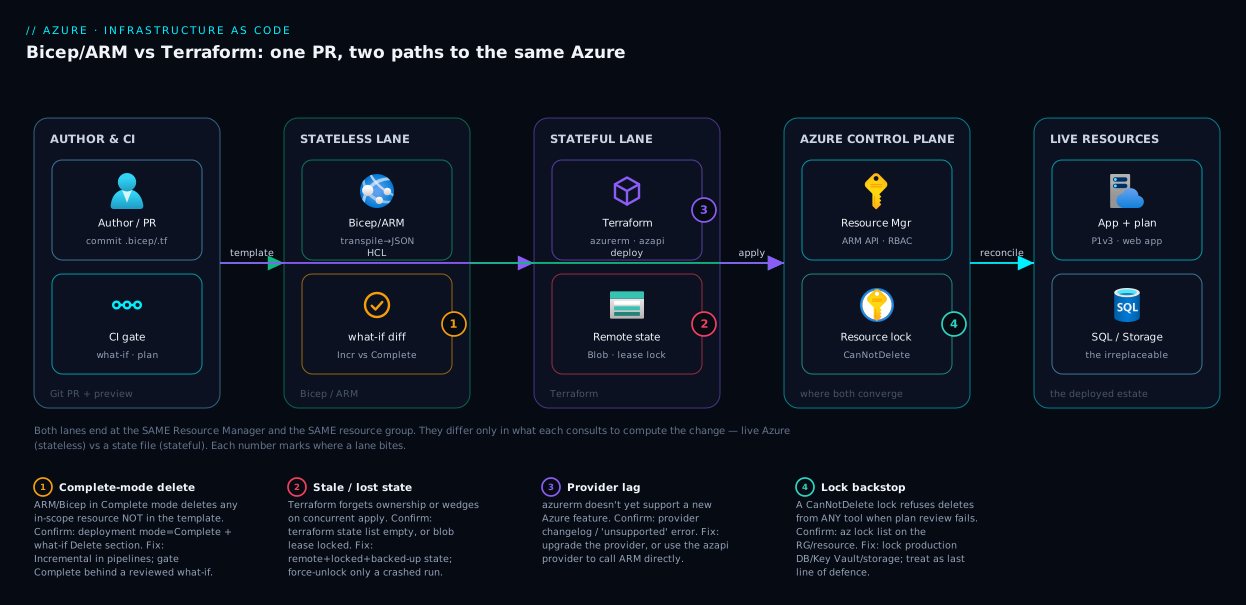
The diagram below makes the master fork visual: trace a single change from a pull request all the way to live Azure, and watch the two paths diverge at exactly one point — what each pipeline consults to decide the change set. On the left, an author commits a change and opens a PR; CI runs the preview step. The middle is the fork. The Bicep/ARM path (top) sends the template to the Azure Resource Manager, which compares it against the live resources in the subscription — there is no state file in this lane, the cloud is the ledger, and what-if reads the live diff. The Terraform path (bottom) consults its remote state file in Blob Storage (leased for locking), refreshes that state from Azure, and computes plan against the file. Both lanes then converge on the same control-plane API and the same resource group, applying creates, updates and the dangerous deletes.
Follow the numbered badges to see where each lane can bite: a Complete-mode ARM deploy that deletes an unlisted resource, a stale or corrupt Terraform state, a provider/version mismatch that blocks a new feature, and the resource lock that is your platform-level backstop on both lanes. The legend narrates each as what goes wrong · how to confirm · how to fix. The point of the picture is the convergence: both tools end at the same Azure Resource Manager and the same resources — they differ only in what they trust to compute the change, and that is the whole decision.
Real-world scenario
Northwind Retail runs a mid-size e-commerce platform: an App Service web front end, an Azure SQL database, a Key Vault, a storage account for product images, and Front Door at the edge — all in Azure, all in centralindia and a paired DR region. A four-person platform team supports a dozen app squads. They started, as many do, with the environment clicked together by hand and a half-finished pile of ARM JSON one departed contractor left behind. Reviews were impossible; staging had drifted from production; the DR region was a manual rebuild nobody trusted.
They evaluated all three tools properly. The pull toward Terraform was strong — it’s the resume default and the team had Terraform experience. But two facts dominated the weighted matrix. First, Northwind is Azure-only and the leadership had no multi-cloud ambition; Terraform’s headline benefit scored zero for them. Second, the four-person team had nobody to own a state backend — they did not want to operate state locking, drift reconciliation and provider upgrades as a standing job. Terraform’s state, the very feature that makes it powerful, was pure operational tax in their context. They chose Bicep, with AVM modules for the storage account, Key Vault and SQL, and wired what-if as a required CI gate with OIDC auth and no stored secrets.
Then the incident that proved the choice. During a refactor, an engineer restructured the templates and — testing locally — ran a deployment in Complete mode against the staging resource group to “clean it up,” not realising staging still contained a manually-created storage account holding three weeks of QA test fixtures. Complete mode deleted it. The recovery was clean precisely because of two defences the framework had baked in: the production resource group carried a CanNotDelete resource lock on its storage and SQL (so the same mistake against prod would have been refused by the platform), and the team’s standing rule was Incremental-only in pipelines, with Complete mode allowed solely behind a reviewed what-if. The post-incident fix was three lines: remove Complete mode from every pipeline, add CanNotDelete locks to staging’s stateful resources too, and make the what-if Delete section a hard PR blocker — a reviewer must explicitly approve any line that says Delete.
A year on, Northwind deploys both regions from the same Bicep with a region parameter, staging and production no longer drift (every change flows through the template, and out-of-band portal edits get reconciled away on the next deploy), and the DR rebuild is a single parameterised deployment they actually test quarterly. Had they been multi-cloud, or had a platform team large enough to operate state as a first-class concern, the matrix would have pointed at Terraform — and that would have been equally correct. The lesson is not “Bicep wins”; it’s that the weights decide, and Northwind’s weights (Azure-only, small team, no appetite for state ops) pointed unambiguously at the stateless tool.
Advantages and disadvantages
Each tool’s honest trade-offs, side by side, before the prose:
| Advantages | Disadvantages | |
|---|---|---|
| ARM JSON | Native; nothing to install on the platform; day-zero feature support; no transpile step | Brutally verbose; poor readability; cryptic errors; no one should hand-write it |
| Bicep | Clean readable syntax; day-zero Azure support; no state to operate; AVM modules; compiles to ARM; first-party | Azure-only; no built-in drift report; younger ecosystem than Terraform; can’t span clouds |
| Terraform | Multi-cloud, one skill set; explicit drift detection; huge module registry; large hiring pool; precise dependency graph | State file is a liability (loss/corruption/secrets); provider lag on new Azure features; operational burden (backend, locking, upgrades) |
Where each advantage actually matters. Bicep’s “no state to operate” is decisive for small teams and Azure-only shops — it removes a whole category of incidents (lost/corrupt/leaked state) and a standing job; its day-zero support matters most on Azure’s bleeding edge, where the provider lag is recurring friction. Terraform’s multi-cloud reach is decisive only when you genuinely deploy to more than one cloud — otherwise you pay its state tax for a benefit you never collect — and its explicit drift detection earns its keep in compliance-heavy shops that must prove live infra matches declared infra. ARM’s one remaining edge (being native) is one Bicep delivers for you, so “raw ARM by hand” survives only in legacy estates.
The disadvantages flip the same way: Bicep’s Azure-only nature is a non-issue until the business buys a company on AWS, then it’s a wall; Terraform’s state liability is the source of most of its real-world incidents; and everyone’s deletion foot-gun is mitigated identically — preview, review, lock the irreplaceable.
Hands-on lab
Deploy the same tiny stack (a storage account in a fresh resource group) with both Bicep and Terraform, run each tool’s preview, and watch the behaviours diverge. Everything here is free-tier-friendly (a Standard LRS storage account costs pennies; you tear it down at the end). You need the Azure CLI logged in (az login) and Terraform installed.
Step 1 — set up and pick a unique name. Storage account names are globally unique and 3–24 lowercase alphanumerics.
az group create -n rg-iac-lab -l centralindia
SA="stiaclab$RANDOM"          # globally-unique-ish
echo "Using storage account: $SA"
Step 2 — author the Bicep. Save as main.bicep:
param location string = resourceGroup().location
param saName string

resource sa 'Microsoft.Storage/storageAccounts@2023-05-01' = {
  name: saName
  location: location
  kind: 'StorageV2'
  sku: { name: 'Standard_LRS' }
  properties: { minimumTlsVersion: 'TLS1_2', allowBlobPublicAccess: false }
}

output saId string = sa.id
Step 3 — preview with what-if, then deploy. The preview prints a colour-coded diff before any change:
az deployment group what-if -g rg-iac-lab -f main.bicep -p saName=$SA
# Expect a green "+ Create" for the storage account. Now deploy:
az deployment group create -g rg-iac-lab -f main.bicep -p saName=$SA --mode Incremental
Expected output: a Succeeded provisioning state and the resource ID echoed as saId. There is no state file anywhere on your machine — the cloud is the record.
Step 4 — observe statelessness. Change the SKU in the portal (or via CLI) to simulate a human edit, then redeploy the unchanged Bicep and watch it reconcile back:
az storage account update -n $SA -g rg-iac-lab --sku Standard_GRS   # human "drift"
az deployment group what-if -g rg-iac-lab -f main.bicep -p saName=$SA
# what-if now shows a "~ Modify" pulling the SKU BACK to Standard_LRS — the cloud is the truth.
Step 5 — the same stack in Terraform. In a separate folder, save main.tf:
terraform {
  required_providers { azurerm = { source = "hashicorp/azurerm", version = "~> 4.0" } }
}
provider "azurerm" { features {} }

variable "sa_name" { type = string }

resource "azurerm_resource_group" "rg" {
  name     = "rg-iac-lab-tf"
  location = "centralindia"
}
resource "azurerm_storage_account" "sa" {
  name                            = var.sa_name
  resource_group_name             = azurerm_resource_group.rg.name
  location                        = azurerm_resource_group.rg.location
  account_tier                    = "Standard"
  account_replication_type        = "LRS"
  min_tls_version                 = "TLS1_2"
  allow_nested_items_to_be_public = false
}
Step 6 — init, plan, apply, and find the state.
terraform init                       # downloads the azurerm provider
terraform plan -out tfplan           # shows "+ create"; reads/creates LOCAL state
terraform apply tfplan
ls -la terraform.tfstate             # <-- the ledger now exists on disk (protect it!)
Open terraform.tfstate and note it contains the resource’s attributes — this is the file you must never lose or commit. In production you’d move it to a remote, locked backend per Terraform on Azure: Remote State in Blob Storage.
Step 7 — observe drift detection. Make the same portal/CLI edit and re-plan:
az storage account update -n $SA_TF -g rg-iac-lab-tf --sku Standard_GRS  # if you set $SA_TF
terraform plan
# Terraform REPORTS the drift explicitly: it noticed the out-of-band change
# and proposes to revert it — the behaviour ARM/Bicep do silently.
Step 8 — tear everything down. Both paths, clean:
az group delete -n rg-iac-lab --yes --no-wait          # removes the Bicep-deployed RG
terraform destroy -auto-approve                        # removes the Terraform-managed RG
What you just saw, distilled: the Bicep path had no state file and silently reconciled the portal edit; the Terraform path created a state file and explicitly reported the drift. That is the master fork, in eight steps.
Common mistakes & troubleshooting
The real failure modes, each as symptom → root cause → how to confirm → fix. These are the ones that cost hours.
| # | Symptom | Root cause | Confirm with | Fix |
|---|---|---|---|---|
| 1 | Deploy deleted a resource nobody touched | ARM/Bicep ran in Complete mode; resource wasn’t in the template | Deployment history shows mode=Complete; what-if Delete section |
Switch pipelines to Incremental; gate Complete behind reviewed what-if |
| 2 | Error: state blob is already locked |
Another apply/CI run holds the Blob lease |
az storage blob show lease state on the state blob |
Wait for it; if a run crashed, terraform force-unlock <id> (carefully) |
| 3 | apply wants to recreate 200 resources |
State file lost/empty — Terraform forgot it owns them | terraform state list returns nothing |
Restore state from backend/backup; never run apply against empty state in prod |
| 4 | New Azure feature “unsupported” in Terraform | azurerm provider lags the API |
Provider changelog / GitHub issue for the type | Upgrade provider, or use the azapi provider for that resource |
| 5 | Bicep deploys but a property is ignored | Wrong apiVersion predates the property |
az provider show API versions for the type |
Bump the resource’s @apiVersion to one that supports it |
| 6 | Secrets visible in terraform.tfstate |
State stores attributes (incl. some secrets) in plaintext | grep the state file for the secret |
Use a remote backend with encryption; never commit state; restrict access |
| 7 | what-if shows huge spurious diff |
Property the template omits has a server-set default | Compare template vs az resource show |
Set the property explicitly, or accept the no-op diff |
| 8 | Terraform -/+ replace on a small edit |
Changed an immutable property (name/location) | plan shows -/+ destroy and then create |
Avoid the change, or create_before_destroy; never on stateful resources blindly |
| 9 | Two engineers’ deploys clobber each other | Terraform state with no remote lock (local state) | State on a laptop, not a backend | Move to remote backend with locking immediately |
| 10 | Inherited ARM JSON, can’t review it | Hand-written ARM is unreadable | The 600-line file itself | bicep decompile main.json → readable Bicep starting point |
| 11 | OIDC pipeline auth fails (401/403) | Federated credential / RBAC misconfigured | Pipeline log; the principal’s role assignments | Fix the federated credential and grant the right role (see auth article) |
| 12 | Bicep transpile output differs from expectation | A function/expression evaluated at deploy, not build | bicep build then read the JSON |
Verify with what-if; remember Bicep is the source, ARM the target |
A few of these deserve a sentence of nuance. #1 (Complete mode) is the single most destructive Bicep/ARM mistake and is entirely preventable: Incremental is the default; you only get Complete mode if someone typed it. #3 (lost state) is Terraform’s equivalent catastrophe — which is the whole reason remote, backed-up state is mandatory. #6 (secrets in state) surprises people: Terraform stores resource attributes in state, and some of those are secrets (a generated password, a connection string), so the state file is a credential and must be treated as one. And #10 (bicep decompile) is the friendly off-ramp from legacy ARM — it won’t produce perfect Bicep, but it gives you a readable, refactorable starting point instead of hand-translating JSON.
Best practices
Production-grade rules that apply regardless of which tool you pick:
- Never hand-write ARM JSON. It is a compile target. Author in Bicep (which produces it) or Terraform; reach for raw ARM only for the rare deeply-nested case neither expresses, and even then prefer Bicep’s escape hatches.
- Make a preview a required, human-read CI gate. No
apply/deploy without a reviewedterraform planoraz deployment ... what-if. A reviewer must explicitly approve any line that destroys or replaces a resource. - Default to Incremental; quarantine Complete mode. For Bicep/ARM, Incremental everywhere; allow Complete only behind a reviewed what-if with the
Deletesection read aloud. - Lock the irreplaceable at the platform level. Put
CanNotDeleteresource locks on production databases, Key Vaults and stateful storage — they refuse deletes from any tool, your backstop when plan review fails. - For Terraform, state is sacred: remote, locked, encrypted, backed up. Never local state in a team; never state in Git; restrict who can read the state (it holds secrets). Use the Blob backend with leasing for locks.
- Pin every version. Pin Bicep module versions (
...:1.2.3), Terraform provider versions (~> 4.0) and module versions. Unpinned dependencies turn a quiet Tuesday into a surprise breaking change. - Authenticate with OIDC, store no secrets. Use federated credentials so the pipeline gets a short-lived token; no service-principal secret in a variable. See GitHub Actions to Azure with OIDC.
- Right-size the blast radius with scope and RBAC. Deploy to the narrowest scope that works (resource group over subscription), and give the deploying principal the least role that lets it do its job — the RBAC on that principal is your real safety net.
- Modularise, but verify what you pin. Use AVM (Bicep) or vetted registry modules (Terraform) for common building blocks; read the source of any third-party module before you depend on it.
- One tool per estate, unless you have a real reason. Don’t run Bicep and Terraform side by side without a deliberate boundary — two tools is two skill sets, two pipelines, two failure modes.
- Tag everything as managed-by-IaC. Especially for stateless ARM/Bicep, a
managedBy=biceptag restores the “what does IaC own?” boundary that Terraform’s state gives you for free. - Test DR by actually redeploying. The whole point of IaC is reproducibility; prove it by rebuilding a region from the template on a schedule, not by hoping.
Security notes
IaC is a privileged automation path — the principal running it can create and destroy your estate — so secure it as critical infrastructure. Three points carry the most nuance beyond the matrix below:
- Protect Terraform state as a credential. State stores some resource attributes (generated passwords, connection strings) in plaintext, so read access to the state container equals read access to those secrets — keep it encrypted, access-restricted and never in Git. Pair the deploying identity with Managed Identities or OIDC where supported.
- Keep real secrets out of templates entirely. Don’t bake passwords/keys into Bicep params or
.tffiles; reference Key Vault at deploy time (BicepgetSecret()/ Terraform data source) so the secret lives in the vault, not the repo — see Azure Key Vault: Secrets, Keys & Certificates. - Review IaC like security-sensitive code, with a policy backstop. A careless PR can open a firewall, grant a role, or expose an endpoint, so the
what-if/plandiff is part of the threat surface; Azure Policydenythen catches what review misses regardless of the template.
The security controls mapped to where each tool needs them, and the risk if you skip it:
| Control | Bicep / ARM | Terraform | Risk if skipped |
|---|---|---|---|
| Least-privilege deploying principal | Scope role to RG, not Owner/sub | Same | Bad PR can wreck the whole subscription |
| Passwordless auth (OIDC) | Federated cred on the runner | Same | Leaked SPN secret = standing breach path |
| Secrets out of source | Key Vault getSecret() reference |
azurerm_key_vault_secret data source |
Passwords committed to Git history |
| Protect the ledger | N/A (no state) | Encrypt + lock + restrict state | State leak = secrets leak (plaintext) |
| Platform deny guardrail | Azure Policy deny |
Azure Policy deny |
Non-compliant resource ships anyway |
| Deletion backstop | CanNotDelete lock |
CanNotDelete lock |
One bad apply destroys prod data |
| Peer review of the diff | what-if in PR | plan in PR | Privilege/firewall change merges unseen |
Cost & sizing
The tools themselves are essentially free; the cost is operational and in what they deploy.
- Tool licensing. Bicep and ARM are free and first-party. Terraform’s CLI is free and open-source; Terraform Cloud/Enterprise (managed state, runs, governance) is a paid but optional product — the Azure Blob backend gives you remote, locked state for the cost of a storage account (rupees a month). The real Terraform “cost” is the engineering time to operate state, backends and provider upgrades.
- What the IaC deploys is the actual bill, not the tool. A
P1v3plan costs the same whether Bicep or Terraform made it; cost discipline lives in what you put in the template (right-sized SKUs, autoscale bounds), and IaC helps by making over-provisioning visible in a diff and reproducible to tear down. - Free-tier reality for the lab. A
Standard_LRSstorage account and an empty resource group cost effectively nothing at rest; the App Service examples onP1v3are not free (~₹9,000–₹12,000/month for a Premium v3 instance), so for pure learning useB1(~₹1,000/month) orF1(free, no Always On). Tear down labs withaz group delete/terraform destroythe moment you’re done.
Rough comparison of where money and effort go:
| Cost dimension | ARM | Bicep | Terraform |
|---|---|---|---|
| Tool license | Free | Free | Free (CLI); paid Cloud optional |
| State backend | None | None | ~₹ a few/month (Blob) |
| Operational effort | Low (no state) | Low (no state) | Higher (state, locking, upgrades) |
| Deployed-resource cost | Identical across all three (it’s the same Azure) | ||
| Hidden cost | Unreadability → slow reviews | Minimal | State incidents if mismanaged |
The honest sizing rule: none of these tools will save or cost you meaningful money directly — the savings come from reproducibility (test DR cheaply, tear down dev nightly) and the costs come from operational mistakes (a lost state file, a Complete-mode delete). Optimise for operational safety and review speed, not tool price.
Interview & exam questions
Q&A you’ll meet in interviews and on the AZ-104, AZ-400 and AZ-305 exams.
1. What is the single biggest architectural difference between Terraform and ARM/Bicep? State ownership. Terraform keeps a state file it owns and diffs config against; ARM/Bicep are stateless and reconcile against live Azure (the cloud is the source of truth). This drives drift handling, deletion, concurrency and failure modes.
2. Is Bicep a competitor to ARM? No — Bicep transpiles to ARM JSON and targets the same Resource Manager API. It’s a more readable source language for the native compile target. Anything ARM expresses, Bicep can.
3. What is the difference between Incremental and Complete deployment mode? Incremental (default) adds/updates resources in the template and ignores anything not listed. Complete makes the resource group match the template exactly, deleting any in-scope resource not in the template — a foot-gun that has wiped production.
4. How does Terraform detect drift and ARM/Bicep do not?
Terraform refreshes its state from Azure and shows out-of-band changes in plan, proposing to revert them. ARM/Bicep have no state to compare against, so they silently reconcile the template against live resources without a drift report.
5. Why might a brand-new Azure feature not work in Terraform but work in Bicep?
Bicep/ARM target the Resource Manager API directly, so new features usually work day-zero. Terraform’s azurerm provider is a separate codebase that must add support, causing a lag; the azapi provider closes the gap by calling ARM directly.
6. Where does Terraform store secrets, and why is that a risk? In the state file, in plaintext (some resource attributes are secrets — generated passwords, connection strings). So state must be remote, encrypted, access-restricted and never committed; read access to state ≈ read access to those secrets.
7. When would you choose Terraform over Bicep? When you’re multi-cloud (one skill set across Azure/AWS/GCP), need explicit drift detection for compliance, have a large existing Terraform estate, or want the breadth of the Terraform Registry — and have the team to operate state.
8. When would you choose Bicep over Terraform? Azure-only shops, small teams with no appetite to operate a state backend, projects needing day-zero support for new Azure features, and anyone wanting the most readable Azure-native syntax with curated AVM modules.
9. What two guard rails protect against accidental deletion regardless of tool?
A required, human-read preview (what-if/plan) gating every apply, and CanNotDelete resource locks on irreplaceable resources, which refuse deletes platform-side from any tool.
10. How do you authenticate an IaC pipeline to Azure without storing secrets? OIDC federated credentials: the pipeline exchanges a short-lived token instead of a stored service-principal secret. Pair with a least-privilege role on the deploying principal.
11. You inherited 800 lines of hand-written ARM JSON. First move?
bicep decompile it into a readable Bicep starting point, then refactor — don’t hand-translate, and don’t keep authoring raw ARM.
12. What’s a -/+ in a Terraform plan and why is it dangerous?
A destroy-then-create replacement, triggered by changing an immutable property (name/location). On stateful resources it can mean data loss from a change you thought was a small edit — read every -/+ line and use create_before_destroy or avoid the change.
Quick check
- Which tool keeps a state file, and what is the chief risk that file introduces?
- True or false: Bicep and ARM detect and report drift the same way Terraform does.
- What does a Complete-mode ARM/Bicep deployment do that Incremental does not?
- Name the one IaC tool that lets you provision Azure, AWS and GCP with a single language.
- You’re on a two-person Azure-only team with no platform engineers. Which tool does the framework lean toward, and why?
Answers
- Terraform. The state file is the chief risk: losing it makes Terraform forget it owns resources (next apply tries to recreate them), corrupting it (concurrent applies) wedges state, and it stores some secrets in plaintext — so it must be remote, locked, encrypted and never committed.
- False. Terraform reports drift explicitly from its state and proposes reverts; ARM/Bicep have no state and silently reconcile the template against live Azure with no drift report.
- Complete mode deletes any in-scope resource that is not in the template, making the resource group match the template exactly. Incremental only adds/updates listed resources and ignores the rest. Always preview Complete mode with
what-if. - Terraform — via its cloud-specific providers, one HCL skill set spans Azure, AWS, GCP and 3,000-plus providers.
- Bicep. It has no state backend to operate (removing a whole category of incidents and a standing job), gives day-zero Azure support and the most readable Azure-native syntax — the multi-cloud benefit of Terraform scores zero for an Azure-only team.
Glossary
- ARM (Azure Resource Manager) — Azure’s control-plane API and its native JSON template format; every IaC tool ultimately calls it.
- Bicep — Microsoft’s domain-specific language that transpiles to ARM JSON; readable, Azure-native, day-zero feature support.
- Terraform — HashiCorp’s cloud-agnostic IaC tool that provisions via providers and keeps its own state file.
- HCL (HashiCorp Configuration Language) — the declarative syntax you write Terraform in.
- Provider — a Terraform plugin mapping HCL to a specific cloud’s API (e.g.
azurerm,azapi); the layer that can lag new Azure features. - State file (
terraform.tfstate) — Terraform’s JSON ledger of every resource it manages and its last-known attributes; the source of truth Terraform diffs against. - Drift — divergence between declared infrastructure and live infrastructure; Terraform reports it, ARM/Bicep reconcile it away.
- Incremental mode — ARM/Bicep deployment mode that adds/updates resources in the template and ignores anything not listed (the safe default).
- Complete mode — ARM/Bicep deployment mode that deletes any in-scope resource not in the template (the deletion foot-gun).
what-if— the Azure deployment preview that prints a colour-coded diff (including deletes) before applying; the Bicep/ARM safety gate.plan— Terraform’s preview of the change set computed from config-vs-state beforeapply.azapiprovider — a Terraform provider that calls the ARM REST API directly, used to reach Azure featuresazurermhasn’t added yet.- AVM (Azure Verified Modules) — Microsoft-curated, tested, versioned Bicep (and Terraform) modules encoding well-architected defaults.
- Resource lock — an Azure platform control (
CanNotDelete/ReadOnly) that prevents deletion or modification regardless of the IaC tool. - Transpile — Bicep’s compile step (
bicep build) that emits the equivalent ARM JSON.
Next steps
- Author your first template end to end on the Bicep path with Deploy Your First Bicep File From Scratch, then go DRY with Bicep Modules, Loops & Conditions.
- Set up Terraform safely from the start with Terraform on Azure: Remote State in Blob Storage and adopt existing infra via Importing Brownfield Azure Resources into Terraform.
- Make a preview a hard gate with Bicep What-If as a CI Gate, and wire passwordless pipeline auth via GitHub Actions to Azure with OIDC.
- Add platform-level guard rails around whichever tool you chose with Azure Policy Effects Decoded and Azure Resource Locks.
- Lean into curated building blocks with Azure Verified Modules for Bicep.