You have a dashboard that ten thousand people watch at once, and a price ticks. Or a multiplayer board where forty players need the same move within a heartbeat. Or a build pipeline whose log should stream live into every open browser tab. The naive answer — “open a WebSocket server, hold the connections, loop over them and write” — works on your laptop and dies in production the first time a deploy recycles the box and drops every socket, or the first time the connection count outgrows a single VM’s file-descriptor budget. Holding millions of long-lived, stateful TCP connections is a genuinely hard systems problem, and it is almost never the problem your business actually wants to solve. Azure Web PubSub is the managed service that owns that problem for you: it is a fully managed WebSocket gateway that holds the persistent client connections, and gives your backend a simple “publish to this group” API to fan one message out to thousands or millions of clients at once.
The shift in thinking is the whole article. Your server stops being the socket endpoint and becomes a publisher. Clients connect to Web PubSub directly — not to your app — over a standard WebSocket your browser already speaks. Your backend talks to Web PubSub over plain HTTP (REST or an SDK) to say “send this payload to everyone in group room-42,” and the service handles the fan-out: tracking who is connected, which groups they joined, and writing the frame to every matching socket. When a client sends a message up, Web PubSub invokes your backend over HTTP through an event handler — so even the inbound path is request/response from your code’s point of view. You get real-time without owning a single long-lived connection.
By the end you will hold a precise mental model of the four moving parts — the connection, the hub, the group, and the event handler — and you will know exactly how a message travels from one publisher to a million sockets and back. You will be able to choose between Web PubSub and SignalR, between the JSON and MQTT subprotocols, and between the Free, Standard and Premium tiers; size units to a connection and message budget; wire a negotiate endpoint that mints short-lived client tokens; and read the handful of failure modes that actually bite in production. This is a concept-and-architecture article: lead with the model, then the decision grids, then a hands-on lab you can run on the free tier.
What problem this solves
The pain is specific and it is always the same: long-lived connection state does not survive the things you do to a normal stateless web app. A REST API scales by adding identical instances behind a load balancer; any instance can serve any request because nothing is held between requests. A WebSocket app cannot do that naively. The connection lives on one instance. If you scale out, instance B has no idea about the socket held by instance A, so “broadcast to everyone” means every instance must know about every connection — which means a backplane (Redis, a service bus) you now operate, tune and pay for. Deploy a new version and every instance recycles, dropping every socket; clients reconnect in a thundering herd that hammers the new instances at exactly the worst moment. Hit the per-VM limit on open file descriptors or ephemeral ports and connections start failing for reasons that have nothing to do with your code.
What breaks without a managed gateway: teams either cap their real-time ambitions (polling every few seconds instead, which is wasteful and laggy), or they build a bespoke socket tier with a Redis backplane, sticky sessions, custom reconnect logic and a scaling story they have to babysit forever. Sticky sessions in particular fight everything else you want — they break clean rolling deploys, skew load, and turn a single hot room into a single hot instance. The connection-holding problem is load-bearing infrastructure that is entirely undifferentiated from your product.
Who hits this: anyone building live dashboards, collaborative editors, chat, multiplayer games, live-ops notifications, IoT command-and-control, or streaming progress (CI logs, long jobs, AI token streaming). It bites hardest the moment you go from “works in the demo with five users” to “needs to hold tens of thousands of concurrent connections across a rolling deploy without dropping anyone.” Web PubSub draws a clean line: the service owns connection lifecycle, fan-out and scale; your code owns what to send and who is allowed to receive it.
| Without a managed gateway | With Azure Web PubSub |
|---|---|
| Your app instances hold the sockets | The service holds the sockets; your app is stateless |
| Broadcast needs a Redis/Service Bus backplane you run | Broadcast is one HTTP call to “send to group” |
| Deploys drop every connection; thundering-herd reconnect | Connections survive your backend deploys entirely |
| Sticky sessions break rolling deploys and skew load | No stickiness; any backend instance can publish |
| Scale ceiling = one VM’s FD/port budget | Scale by adding units; documented per-unit caps |
| You write reconnect, backplane, presence logic | Reconnect, groups and presence are built in |
Learning objectives
By the end of this article you can:
- Explain the Web PubSub mental model — your backend is a publisher, not the socket endpoint — and trace a message from one publisher to a million clients and back up through an event handler.
- Describe precisely what a connection, hub, group and event handler are, how they relate, and which fan-out primitive (broadcast, group, user, single-connection) to reach for.
- Walk the negotiate → connect → join → publish flow and explain why clients connect with a short-lived access token minted by your
negotiateendpoint, never with the connection string. - Choose between Azure Web PubSub and Azure SignalR Service, and between the JSON (PubSub) and MQTT subprotocols, using concrete decision tables.
- Wire event handlers so client-sent messages and system events (
connect,connected,disconnected) reach your backend over HTTP, including the CloudEvents abuse-protection handshake. - Pick a tier (Free / Standard / Premium) and size units against a real concurrent-connection and messages-per-second budget, with rough INR/USD figures.
- Diagnose the common failures — 401 on negotiate,
1008close codes, abuse-protection 4xx on the handler, missing fan-out, autoscale lag — using the exact setting or command that confirms each.
Prerequisites & where this fits
You should be comfortable with HTTP and the idea of a WebSocket as a single TCP connection that stays open and carries frames in both directions after an HTTP upgrade handshake. You should know what a JWT/access token is and why a short-lived, narrowly-scoped token is safer to hand a browser than a long-lived secret. Familiarity with running az in Cloud Shell, reading JSON output, and deploying a small Azure Functions app or App Service helps, because the backend half of every Web PubSub design is ordinary stateless HTTP code. No prior real-time experience is assumed — that is the point of the service.
This sits in the messaging and real-time track. It is a sibling to the brokered-messaging services: where Azure Service Bus queues vs topics move commands and events between backend services with durability and ordering, and Azure Event Hubs partitions and consumer groups ingest high-volume telemetry streams, and Azure Event Grid system topics route discrete reactive events — Web PubSub is the one whose job is the last hop to a live browser or device. It complements rather than replaces them: a common pattern is Event Hubs or Service Bus on the backend feeding a small publisher that fans the result out to clients via Web PubSub. For push to mobile apps that are not currently connected, you want Azure Notification Hubs cross-platform push instead; Web PubSub is for clients with a live connection right now.
The backend that publishes is usually Azure Functions with triggers and bindings (there is a first-class Web PubSub trigger and output binding) or an App Service web app. Identity for server-to-service calls leans on managed identity, system- vs user-assigned, so your publisher never holds the connection string. Here is the one-screen map of where each service sits relative to the live client:
| Concern | Right service | Why not Web PubSub |
|---|---|---|
| Live fan-out to connected browsers/devices | Web PubSub | — (this is its job) |
| Real-time with .NET/SignalR client & hub model | SignalR Service | Web PubSub is protocol-native, not hub-RPC |
| Durable command/event between backend services | Service Bus | Not a backend broker; no queues/sessions |
| High-volume telemetry ingestion + replay | Event Hubs | Not an ingestion log; no partitions/offsets |
| Discrete reactive events (blob created, etc.) | Event Grid | Not an event router for resource events |
| Push to apps that are offline / backgrounded | Notification Hubs | Needs a live connection; no APNs/FCM |
Core concepts
Five mental models make every later decision obvious. Internalise these and the rest of the article is detail.
Your backend publishes; it does not hold sockets. This is the inversion that makes everything scale. In a hand-rolled design your process is the WebSocket server and the connection lives in your memory. With Web PubSub the connection lives in the service, and your backend is just an HTTP client that says “publish payload X to audience Y.” Because your backend holds no connection state, it is a plain stateless app — scale it, deploy it, recycle it, none of that touches a single live socket. The service is the stateful tier; your code stays stateless.
A connection is one client’s live WebSocket, identified two ways. When a client connects it gets a connection ID (unique to that socket, gone when it closes). If the access token carried a user ID, the connection is also tagged with that user — and one user may have many connections (phone + laptop + a second tab). This is why Web PubSub has both send to a connection (one socket) and send to a user (every socket that user has open). A connection is ephemeral and per-socket; a user ID is yours to assign and spans devices.
A hub is the namespace; a group is the routing key. A hub is a top-level isolation boundary — like a logical application or feature (“chat”, “telemetry”, “game”). Connections, events and permissions are all scoped to a hub; messages never cross hubs. Within a hub, a group is a named, dynamic set of connections — the routing primitive for fan-out. “Send to group room-42” reaches exactly the connections that joined room-42, and nobody else. Groups are created implicitly when the first connection joins and vanish when the last leaves; there is no pre-provisioning. A connection can be in many groups at once. Hub = isolation; group = subscription.
Fan-out is a choice of audience, made server-side. Every publish names an audience, and the service does the rest: broadcast (every connection in the hub), group (every connection in a named group), user (every connection of a user ID), or connection (one specific socket). You also choose whether the message is JSON, text or binary, and the subprotocol the client negotiated decides what the client can do on its own. The fan-out is computed inside the service against its live connection registry — your one HTTP call becomes N socket writes.
The inbound path is an HTTP webhook, not a socket your code reads. When a client sends a message upstream, or when a system event fires (a client connects or disconnects), Web PubSub turns that into an HTTP CloudEvents request to your configured event handler URL. So even though the client speaks WebSocket, your code only ever sees request/response HTTP. This is what keeps your backend stateless and lets a serverless function handle the upstream. Two event categories exist: system events (connect, connected, disconnected) and user events (custom message events a client emits). The connect event is special — it is synchronous and blocking, your one chance to authorize the connection and assign roles/groups before it is accepted.
The vocabulary in one table
Pin every moving part down before the deep sections; the glossary repeats these for lookup.
| Term | One-line definition | Lifetime / scope | Why it matters |
|---|---|---|---|
| Web PubSub resource | The managed service instance (a namespace + hostname) | Per region, per resource group | The billing + scaling boundary (units live here) |
| Hub | Logical isolation boundary for an app/feature | Configured per resource | Messages and events never cross hubs |
| Connection | One client’s live WebSocket | Until the socket closes | The unit you fan messages out to |
| Connection ID | Unique ID for one socket | Same as the connection | Target a single client (send to connection) |
| User ID | Your identifier carried in the token | Spans a user’s connections | Target all of a user’s devices/tabs |
| Group | Named, dynamic set of connections | While ≥1 member; auto-created/removed | The fan-out routing key |
| Subprotocol | What the client negotiated (json/MQTT/none) | Per connection | Decides client-side publish/join ability |
| Event handler | Your HTTP webhook for upstream events | Per hub | Where client messages + system events land |
| Access token | Short-lived JWT the client connects with | Minutes (you set TTL) | Never hand a client the connection string |
| Negotiate endpoint | Your API that mints the token + URL | Your backend | The auth gate every client passes through |
| Unit | The scale increment (capacity block) | Per resource | Drives connection/message ceilings + cost |
| Permission / role | What a connection may do (join/publish a group) | Per connection, set at connect | Server-authoritative client capability |
The two client models: simple vs PubSub subprotocol
There is a fork at connection time that confuses newcomers, so fix it now. A client can connect in one of two modes, decided by whether it requests a subprotocol in the WebSocket handshake:
- Simple WebSocket client (no subprotocol). The connection is a dumb pipe. Anything the client sends is delivered to your event handler as a
messageuser event; anything the service sends arrives as raw frames. The client cannot join groups or publish to groups on its own — all routing is server-side. This is the most secure default and the right choice when the browser should only receive, or only send to your backend. - PubSub subprotocol client (
json.webpubsub.azure.v1). The connection understands a small protocol. Now the client itself can ask to join a group, leave a group, or publish directly to a group — if its permissions allow it. This enables true peer fan-out (client A publishes toroom-42and every other member receives it without a backend round-trip), at the cost of trusting clients more, which is why permissions matter.
The MQTT subprotocols (mqtt, used by IoT-style clients) are a third family with their own topic-based semantics. The decision table:
| Client mode | Subprotocol header | Client can join/publish groups? | Use when |
|---|---|---|---|
| Simple | (none) | No — server routes everything | Receive-only dashboards; client→backend only |
| PubSub (JSON) | json.webpubsub.azure.v1 |
Yes, if permitted | Browser chat/collab with peer fan-out |
| MQTT | mqtt (3.1.1 / 5.0) |
Topic-based pub/sub | IoT devices, MQTT-native clients |
| Reliable PubSub | json.reliable.webpubsub.azure.v1 |
Yes, if permitted | Need delivery acks + reconnect recovery |
The connection lifecycle: negotiate, connect, fan-out
Everything starts with a client getting permission to connect, and that permission flow is the single most important thing to get right.
Negotiate — minting a short-lived client token
A browser must never hold the Web PubSub connection string or any long-lived key — embedding a secret in client-side JavaScript is an instant credential leak. Instead the client calls your backend (a negotiate endpoint you own and protect with your normal app auth), and your backend uses the SDK or REST to mint a client access token: a short-lived JWT scoped to a specific hub, optionally carrying a user ID, a set of roles (which groups it may join/publish), and an explicit group list to auto-join. Your endpoint returns the full wss://... URL with that token embedded, and the client connects to it directly.
The token TTL is yours to set (commonly 1–60 minutes). The connection, once established, is not killed when the token expires — the token only gates the initial handshake. For long-lived sessions the client SDK can call negotiate again to refresh before reconnecting. The crucial security property: the token says who the client is and what it may do, decided entirely by your trusted backend, so a malicious client cannot grant itself broadcast rights.
What your negotiate logic decides goes into the token as these claims — this is the complete server-controlled surface:
| Token input | Effect on the connection | Decided by | Omit when |
|---|---|---|---|
| Hub | Which hub the client may connect to | Always (in the URL) | — (required) |
| User ID | Tags the connection; enables “send to user” | Your auth (the logged-in user) | Anonymous receive-only clients |
| Roles | Group-scoped join/publish capability | Entitlement check per room/tenant | Receive-only (simple) clients |
| Groups | Auto-join these groups at connect | Known subscriptions at connect time | Client joins dynamically later |
| TTL (expiresAfter) | How long the token is valid to connect | Your session policy | Never omit — keep it short |
# Mint a client access token with the CLI (handy for testing).
# In production your negotiate endpoint does this via SDK/REST.
az webpubsub client start-token \
  --name pubsub-live-prod \
  --resource-group rg-realtime-prod \
  --hub-name chat \
  --user-id "user-7f3a" \
  --roles "webpubsub.joinLeaveGroup.room-42" "webpubsub.sendToGroup.room-42"
// The resource itself; the token is minted at runtime by your backend.
resource pubsub 'Microsoft.SignalRService/webPubSub@2024-03-01' = {
  name: 'pubsub-live-prod'
  location: location
  sku: {
    name: 'Standard_S1'   // Standard tier, 1 unit (see Cost & sizing)
    capacity: 1
  }
  identity: { type: 'SystemAssigned' }  // for managed-identity publishing
  properties: {
    publicNetworkAccess: 'Enabled'
    disableLocalAuth: false  // set true to force AAD-only (no keys)
  }
}
The connect handshake and the blocking connect event
When the client opens the WebSocket, Web PubSub can be configured to fire a synchronous connect system event to your event handler before accepting the socket. This is your authorization gate at the connection boundary: your handler inspects the token’s claims, and responds either to accept (optionally rewriting the user ID, assigning roles, or auto-joining groups in the response) or to reject with a 401/403. Because it is blocking, a slow handler here delays every connection — keep it fast. If you do not configure a connect handler, the connection is accepted based purely on the token, which is fine for most apps.
After acceptance, two non-blocking events follow: connected (fire-and-forget, good for logging or recording presence) and, when the socket closes, disconnected (good for cleaning up presence). The full sequence:
| Step | Who acts | What happens | Blocking? | Your hook |
|---|---|---|---|---|
| 1. Negotiate | Client → your API | Get wss:// URL + access token |
Sync (your code) | negotiate endpoint |
| 2. Open socket | Client → Web PubSub | WebSocket upgrade with token | — | — |
3. connect event |
Web PubSub → handler | Authorize; assign user/roles/groups | Yes (blocking) | connect handler |
| 4. Accept/reject | Handler → Web PubSub | 2xx accepts; 401/403 rejects | — | response body |
5. connected event |
Web PubSub → handler | Socket is live; record presence | No | connected handler |
| 6. Join group | Client or server | Connection added to group(s) | No | client SDK / REST |
| 7. Publish/fan-out | Server or peer | Message written to audience sockets | No | REST/SDK or peer |
8. disconnected event |
Web PubSub → handler | Socket closed; clean up | No | disconnected handler |
Publishing and the fan-out primitives
Once connections are live and grouped, your backend publishes. Each call names an audience and a payload type. This is the core API surface you will use daily:
# Broadcast to every connection in the hub
az webpubsub send-to-all \
  --name pubsub-live-prod --resource-group rg-realtime-prod \
  --hub-name chat --payload '{"type":"announce","text":"Maintenance at 02:00"}'
// Server SDK (.NET) — the four audience primitives.
var client = new WebPubSubServiceClient(connectionString, "chat");

await client.SendToAllAsync(BinaryData.FromString(json));           // broadcast
await client.SendToGroupAsync("room-42", BinaryData.FromString(json)); // group
await client.SendToUserAsync("user-7f3a", BinaryData.FromString(json)); // all of a user's sockets
await client.SendToConnectionAsync(connId, BinaryData.FromString(json)); // one socket
The audience-selection matrix, with the real reach and the typical use:
| Primitive | Reaches | Excludes possible? | Typical use |
|---|---|---|---|
| Broadcast (send to all) | Every connection in the hub | Yes (exclude a connection ID) | System-wide announcements, global ticker |
| Group (send to group) | Every connection in a named group | Yes (exclude self on peer publish) | Chat room, game table, per-tenant feed |
| User (send to user) | Every connection tagged with that user ID | — | Cross-device notification (“you have mail”) |
| Connection (send to connection) | One specific socket | — | Reply to one client; per-socket handshake |
| Add/remove from group | Moves connections in/out of a group | — | Subscribe/unsubscribe, room change |
| Close connection | Terminates a socket (with a reason) | — | Force-logout, ban, evict on auth change |
Hubs, groups and permissions in depth
The routing model is small but precise, and the mistakes come from assuming it behaves like something it is not.
Hubs are hard isolation, configured per resource
A hub is not just a label — it is the unit that an event handler, permissions and the client URL all bind to. A connection is always to one hub (wss://<host>/client/hubs/<hub>), and there is no cross-hub messaging: a broadcast in hub chat never reaches hub telemetry. You configure event handlers per hub, so different features can route to different backends. Treat a hub like a bounded context. You do not pre-create hubs as objects to scale; you simply use a hub name in the URL and configure handlers for the names you care about.
A common design question is one hub or many. Use separate hubs when features have genuinely different upstream handlers, permission models, or message shapes (chat vs IoT telemetry). Use one hub with many groups when it is the same feature partitioned by tenant or room — groups, not hubs, are your scale-out routing key. Hubs are coarse and few; groups are fine and effectively unlimited.
| Question | One hub, many groups | Many hubs |
|---|---|---|
| Same feature, partitioned by room/tenant | ✅ Yes — groups are the partition | ❌ Overkill |
| Different upstream event handler per feature | ❌ Can’t — handler is per hub | ✅ Yes |
| Different permission/role model per feature | ❌ Harder | ✅ Cleaner |
| Thousands of partitions (rooms) | ✅ Groups scale to this | ❌ Don’t make thousands of hubs |
| Hard blast-radius isolation between features | ❌ Same hub | ✅ Hubs don’t cross |
Groups are dynamic, implicit, and the fan-out key
A group has no schema and no provisioning step. The first joinGroup creates it; the last leaveGroup (or disconnect) removes it. A connection can belong to many groups; a group can hold many connections. The service maintains this membership in its own state, which is exactly why fan-out scales — “send to group room-42” is an index lookup inside the service, not a scan your code performs. Groups can be joined two ways: by your server (you add a connection ID to a group via REST/SDK — fully authoritative), or by the client itself (only if it negotiated the PubSub subprotocol and its token granted the joinLeaveGroup role for that group).
There is no built-in enumeration of “all groups” or a count of groups — groups are routing keys, not first-class queryable objects. If you need presence (“who is in room-42”) you maintain it yourself: track joins/leaves in the connected/disconnected events or your join logic, and store it in your own datastore (Redis, Cosmos DB). This is the single most common false expectation — the service routes to groups but does not hand you a directory of them.
Permissions and roles: server-authoritative client capability
When a client uses the PubSub subprotocol, what it may do is governed by roles baked into its access token at negotiate time. The roles are coarse and group-scoped:
| Role (in token) | Grants the client | Default if absent |
|---|---|---|
webpubsub.joinLeaveGroup |
Join/leave any group itself | Cannot join any group on its own |
webpubsub.joinLeaveGroup.<group> |
Join/leave that specific group | — |
webpubsub.sendToGroup |
Publish to any group it is in | Cannot peer-publish |
webpubsub.sendToGroup.<group> |
Publish to that specific group | — |
| (no roles) | Receive only; send goes to your handler | Most locked-down |
The design rule is least privilege: grant a client joinLeaveGroup.room-42 and sendToGroup.room-42 only for the rooms it is entitled to, decided by your negotiate logic after it authenticates with your app. A client can never escalate beyond what its token allows, and the token came from your trusted backend — so a hostile browser cannot publish to a room it was not granted, nor join a private group. Server-side sends (your backend’s REST/SDK calls) bypass these roles entirely; roles only constrain the client’s own actions.
Event handlers: the upstream and system-event path
The event handler is where Web PubSub talks to your backend, and getting its contract right is the difference between a working app and a silently dropped message stream.
CloudEvents over HTTP, with abuse protection
Web PubSub delivers events as HTTP POST requests in the CloudEvents 1.0 format (HTTP binding), with the event type, source, connection ID and user ID in headers (ce-type, ce-source, ce-connectionId, ce-userId, etc.) and the payload in the body. Before it will send any event to a new handler URL, it performs an abuse-protection handshake: it sends an HTTP OPTIONS request with a WebHook-Request-Origin header, and your endpoint must echo it back in WebHook-Allowed-Origin (the official SDKs and Functions extension do this automatically). If your endpoint does not pass this handshake, Web PubSub refuses to deliver events and you see nothing arriving — a classic silent failure.
| Event category | Event type(s) | Blocking? | Can mutate the connection? | Typical handler job |
|---|---|---|---|---|
| System — connect | connect |
Yes | Yes (set user/roles/groups, reject) | Authorize at the door |
| System — connected | connected |
No | No | Record presence, log |
| System — disconnected | disconnected |
No | No | Clean up presence |
| User — message | message (your name) |
Configurable | Reply to caller; broadcast | Handle client→server payloads |
| Abuse protection | OPTIONS preflight |
— | — | Echo origin to validate URL |
The synchronous connect event is your auth boundary
The connect event is worth a second pass because it is the most powerful and most misused. It fires before the socket is accepted and it is synchronous — Web PubSub waits for your 2xx (or rejection). In the response you can: set or override the user ID, grant roles, and list groups to auto-join, all server-decided. This is the cleanest place to enforce authorization, because it runs once at connection time on your trusted backend, not on every message. The trade-off is latency: every connection waits for this round-trip, so the handler must be fast and highly available — if it is slow or down, new connections stall (existing ones are unaffected). For apps that authorize entirely via the negotiate token, you can skip a connect handler and let the token alone gate the connection.
The Azure Functions binding makes this trivial
You rarely hand-write the CloudEvents parsing. The Web PubSub trigger and output binding for Azure Functions handles the abuse-protection OPTIONS, parses the event, and gives you typed inputs; an output binding lets you publish back. This is the canonical serverless backend for Web PubSub.
// Azure Functions (isolated) — handle a client 'message' event and broadcast it.
[Function("OnMessage")]
[WebPubSubOutput(Hub = "chat")]
public SendToAllAction OnMessage(
    [WebPubSubTrigger("chat", WebPubSubEventType.User, "message")] UserEventRequest req)
{
    var text = req.Data.ToString();
    return new SendToAllAction
    {
        Data = BinaryData.FromString($"{{\"from\":\"{req.ConnectionContext.UserId}\",\"text\":{text}}}"),
        DataType = WebPubSubDataType.Json
    };
}
# Register the event handler URL on a hub (event handler -> your Functions app).
az webpubsub hub create \
  --name pubsub-live-prod --resource-group rg-realtime-prod \
  --hub-name chat \
  --event-handler url-template="https://fn-chat-prod.azurewebsites.net/runtime/webhooks/webpubsub?code={SystemKey}" \
                  user-event-pattern="*" \
                  system-event="connected" system-event="disconnected"
Choosing the right service and protocol
Two decisions trip people up before they write a line of code: Web PubSub vs SignalR, and which subprotocol.
Web PubSub vs SignalR Service
Both are managed real-time fan-out services from the same Azure family, and they overlap heavily. The honest distinction is about programming model and client reach, not capability:
| Dimension | Azure Web PubSub | Azure SignalR Service |
|---|---|---|
| Programming model | Protocol-native (raw WebSocket / MQTT) | SignalR hub/RPC (Hub methods, strongly-typed) |
| Best client fit | Any WebSocket client, any language, browsers, IoT | .NET + official SignalR clients (JS/.NET/Java) |
| Subprotocols | JSON PubSub, MQTT, reliable variants | SignalR protocol (JSON/MessagePack) |
| Client→client fan-out | Native (groups via subprotocol) | Via hub methods/groups |
| Transport fallback (no WS) | WebSocket-first; less fallback machinery | Long-polling/SSE fallback built in |
| Server framework coupling | None — REST/SDK from anything | Tightest with ASP.NET Core SignalR |
| Pick it when | You want open WebSocket/MQTT, polyglot, IoT | You already use SignalR / want RPC ergonomics |
The short version: already invested in ASP.NET Core SignalR, or you want the strongly-typed hub-method RPC ergonomics → SignalR Service. Want a protocol-native, language-agnostic WebSocket/MQTT gateway you can drive from any backend and any client (including IoT and non-.NET stacks) → Web PubSub. Neither is “better”; they are different ergonomics over the same scaling backbone.
JSON PubSub vs MQTT vs simple
The subprotocol decision was introduced earlier; here is the trade-off framed for choosing:
| If the client is… | Use subprotocol | Because |
|---|---|---|
| A browser that only displays updates | none (simple) | No client-side routing needed; most secure |
| A browser doing chat/collab with peer fan-out | json.webpubsub.azure.v1 |
Client joins/publishes to groups directly |
| A browser that must survive flaky networks with recovery | json.reliable.webpubsub.azure.v1 |
Adds acks + reconnect message recovery |
| An IoT device or MQTT-native client | mqtt |
Topic-based pub/sub, QoS, the MQTT ecosystem |
A subtlety worth pricing in: reliable subprotocols add delivery acknowledgements and the ability to recover missed messages on reconnect, but they require the client to participate in the ack protocol and they consume more resources per connection. Reach for reliable only when at-least-once delivery to the client genuinely matters (financial ticks where a dropped frame is a correctness bug), not by default.
To close the selection, here is the one-line “which service + how to wire it” cheat sheet across the common real-time shapes:
| Workload shape | Service | Client mode | Fan-out primitive |
|---|---|---|---|
| Receive-only live dashboard | Web PubSub | Simple (no subprotocol) | Server → group/broadcast |
| Browser chat / collaboration | Web PubSub | PubSub (JSON) | Peer + server → group |
| .NET app already on SignalR | SignalR Service | SignalR client | Hub methods → group |
| IoT device command/control | Web PubSub | MQTT | Server → group/connection |
| Financial ticks, no dropped frames | Web PubSub | Reliable PubSub | Server → group, with acks |
| Cross-device user notification | Web PubSub | Any | Server → user |
Architecture at a glance
Follow the path of a single price update from your backend to ten thousand live dashboards, then the path of one client’s chat message back up. On the left, a browser first calls your negotiate endpoint (an Azure Function or App Service route protected by your normal auth); your backend authenticates the user and mints a short-lived client access token scoped to the dashboard hub, returning a wss://<resource>.webpubsub.azure.com/client/hubs/dashboard?access_token=... URL. The browser opens a WebSocket directly to the Web PubSub resource with that token — your backend is now out of the data path. Web PubSub fires a blocking connect event to your handler, which confirms the user may watch room-42 and auto-joins that group; the socket is accepted and a connected event records presence.
Now the fan-out. A market feed lands on your publisher (a stateless Function fed by Event Hubs or a timer). The publisher makes one HTTP call — send to group room-42 — to the Web PubSub resource. Inside the service, that single call is expanded against the live connection registry into a frame written to every socket that joined room-42: the fan-out happens in the service, not your code, so one publish becomes ten thousand socket writes with no backplane you operate. When a user types in chat, their socket carries the message up to Web PubSub, which turns it into a CloudEvents HTTP POST to your event handler; your handler validates it and calls send to group to echo it to the room. The numbered badges below mark the points where this path breaks in production — a 401 at negotiate, a 1008 policy close, a silent abuse-protection failure on the handler, a missing-fan-out misconfiguration, and unit/connection-cap saturation.
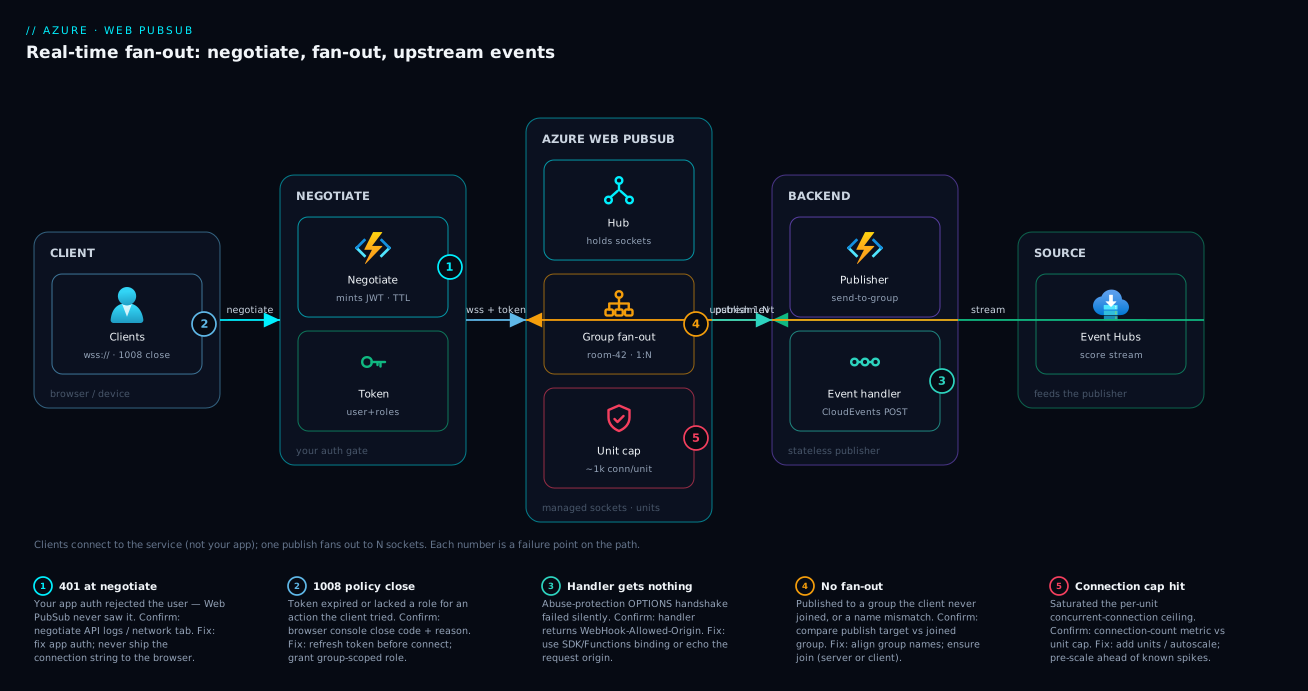
The shape to remember: clients connect to the service, not to you; your backend touches the service only over HTTP (publish out, receive events in); and the stateful connection tier is entirely Microsoft’s to scale.
Real-world scenario
LiveLeague is a fictional sports-scores startup. Their product is a web and mobile dashboard showing live match scores, commentary and an in-app chat per match. At launch they hand-rolled a WebSocket tier on three App Service instances with a Redis backplane to fan broadcasts across instances. It worked for the pre-season friendlies — a few hundred concurrent viewers. Then a marquee match drew 180,000 concurrent connections in twenty minutes, and three things broke at once: the Redis backplane became the bottleneck (every instance publishing every score to Redis, every instance reading it back), a routine deploy mid-match dropped every socket and the reconnect storm knocked the new instances over, and SNAT/port pressure on the instances started refusing new connections. The incident review concluded the socket tier was undifferentiated infrastructure they should not be operating.
They moved to Azure Web PubSub on the Standard tier. The redesign: one hub live, one group per match (match-<id>). The dashboard calls a negotiate Function that authenticates the viewer and mints a token granting joinLeaveGroup.match-<id> plus sendToGroup.match-<id> only for the match they opened. Scores arrive from the data provider into Event Hubs; a tiny stateless score publisher Function reads the stream and calls send to group match-<id> once per score event — the service fans that single call out to every viewer of that match. Chat uses the PubSub subprotocol so viewers publish to the match group directly (peer fan-out), with a message event handler that runs a profanity filter and re-broadcasts the cleaned text. Presence (“12,431 watching”) is maintained from the connected/disconnected events into Redis.
The results were the unglamorous kind that matter. Concurrent connections scaled past 180k by adding units (autoscale on connection count), with the per-unit ceilings documented so capacity planning was arithmetic, not guesswork. Crucially, the next mid-match deploy of the publisher dropped zero client connections — because clients are connected to Web PubSub, not to the publisher, recycling the backend is invisible to viewers. The Redis backplane for fan-out was deleted entirely (Redis stayed only for presence, a tiny load). The one operational surprise: autoscaling lags a sudden spike, so for known big matches they pre-scale units fifteen minutes ahead via a scheduled job rather than relying on reactive autoscale — a one-line lesson that prevented the only near-miss of the season. Their on-call now owns what to publish and who may receive it, and Microsoft owns holding 180,000 sockets through a deploy. That division of labour is the entire value of the service.
Advantages and disadvantages
| Advantages | Disadvantages |
|---|---|
| Service holds the sockets — your backend is stateless | You give up some control over the connection tier |
| One publish call fans out to N clients; no backplane to run | A managed dependency in the hot path of every live update |
| Connections survive your backend deploys/recycles | Per-message + per-connection cost can add up at huge scale |
| Groups give unlimited fine-grained routing keys | No built-in group/presence directory — you maintain presence |
| Protocol-native: any WebSocket/MQTT client, any language | Raw protocol means more wiring than SignalR’s typed RPC |
| Built-in token auth, roles, abuse protection | Event handler must be highly available (blocking connect) |
| Scales by units with documented per-unit ceilings | Autoscale lags sudden spikes — pre-scale for known events |
| First-class Azure Functions trigger/output binding | Regional resource; multi-region needs your own fan-out design |
When the advantages dominate: any time you need real-time fan-out to many connected clients and do not want to operate a socket tier — which is the overwhelming majority of dashboards, chat, collaboration and live-ops cases. When the disadvantages bite: ultra-cost-sensitive workloads at enormous message volume (where the per-message price compounds and a self-hosted tier might pencil out), workloads that need exotic transport control, or single-region-only deployments where you must hand-build multi-region client fan-out. For most teams the math favours the managed service heavily, because the cost you are really comparing against is an SRE owning a Redis-backed socket fleet forever.
Hands-on lab
This lab stands up a Web PubSub resource on the Free tier and proves end-to-end fan-out with the built-in subprotocol client — no backend code required to see it work, then a one-file publisher. Everything fits the free tier (20 concurrent connections, 20,000 messages/day) and tears down to zero cost.
1. Create the resource (Free tier).
RG=rg-wps-lab
LOC=centralindia
NAME=wps-lab-$RANDOM

az group create --name $RG --location $LOC

az webpubsub create \
  --name $NAME --resource-group $RG --location $LOC \
  --sku Free_F1
Expected: JSON with "provisioningState": "Succeeded" and a hostName like wps-lab-12345.webpubsub.azure.com.
2. Mint a client token and connect two test clients. The CLI can both mint a token and spin up an interactive subprotocol client, so you can watch fan-out in two terminals.
# Terminal A — connect as user "alice" with rights to join/publish group "lab"
az webpubsub client connect \
  --name $NAME --resource-group $RG --hub-name playground \
  --user-id alice \
  --roles "webpubsub.joinLeaveGroup.lab" "webpubsub.sendToGroup.lab"
# Terminal B — connect as "bob" with the same rights (run in a second shell)
az webpubsub client connect \
  --name $NAME --resource-group $RG --hub-name playground \
  --user-id bob \
  --roles "webpubsub.joinLeaveGroup.lab" "webpubsub.sendToGroup.lab"
In each interactive client, join the group and send a message (the client prints a prompt; type the JSON protocol frames):
{"type":"joinGroup","group":"lab"}
{"type":"sendToGroup","group":"lab","dataType":"text","data":"hello from this client"}
Expected: a message sent from Terminal A appears in Terminal B and vice-versa — that is peer fan-out through a group, with zero backend code.
3. Fan out from the server side. Now broadcast from your backend’s position using the CLI (this is what your publisher Function would do):
az webpubsub send-to-group \
  --name $NAME --resource-group $RG --hub-name playground \
  --group lab \
  --payload '{"type":"system","text":"server broadcast to the room"}'
Expected: both interactive clients receive the server payload. You have now exercised both peer fan-out (step 2) and server fan-out (step 3) over the same group.
4. (Optional) See the upstream event path. Run a quick local handler with a tunnel to observe the CloudEvents POST. Use the Functions Web PubSub extension or a small endpoint that echoes the abuse-protection OPTIONS; register it:
az webpubsub hub create \
  --name $NAME --resource-group $RG --hub-name playground \
  --event-handler url-template="https://<your-tunnel>/api/eventhandler" \
                  user-event-pattern="*" \
                  system-event="connected" system-event="disconnected"
Expected: connecting a client now POSTs a connected CloudEvent to your handler; sending a message POSTs a message event. If you see nothing, your handler failed the OPTIONS abuse-protection handshake.
5. Teardown.
az group delete --name $RG --yes --no-wait
This deletes the resource and the (free) charges stop. If you only want to drop the hub config, use az webpubsub hub delete instead.
Common mistakes & troubleshooting
Eight failure modes account for nearly every Web PubSub support thread. Each row is symptom → root cause → how to confirm → fix.
| # | Symptom | Root cause | Confirm with | Fix |
|---|---|---|---|---|
| 1 | Client gets 401 from your negotiate API |
Your app auth rejected the user (not a Web PubSub error) | Your API logs / browser network tab status | Fix your app’s auth; negotiate is your endpoint |
| 2 | WebSocket closes with code 1008 |
Token expired or lacked the role for an action the client attempted | Browser console close code + reason; token TTL | Refresh token before connect; grant the needed role |
| 3 | Events never reach your handler | Abuse-protection OPTIONS handshake failing |
Check handler returns WebHook-Allowed-Origin; resource event-handler logs |
Use the SDK/Functions extension (handles it) or echo origin |
| 4 | Client connects but receives nothing | Publishing to the wrong group, or client never joined it | Compare publish target vs the group the client joined | Align group names; ensure join happened (server or client) |
| 5 | Peer client can’t join/publish a group | Token has no joinLeaveGroup/sendToGroup role |
Decode the JWT; check negotiate role grants |
Add the group-scoped role in negotiate |
| 6 | New connections stall under load | Blocking connect handler is slow or rate-limited |
Handler latency/availability metrics | Make handler fast/HA, or drop it and gate via token |
| 7 | Connections refused near a round number | Hit the unit concurrent-connection ceiling | Connection-count metric vs unit cap | Add units / enable autoscale; pre-scale for spikes |
| 8 | Messages dropped during a spike | Autoscale lagged the surge; per-unit message cap hit | Message-count + outbound-traffic metrics | Pre-scale units ahead of known events; reliable subprotocol if delivery is critical |
A few reading notes that save the most time. First, distinguish your errors from the service’s: a 401 on negotiate is your API rejecting auth — Web PubSub never saw it. Second, the 1008 close code almost always means “token/permission,” not “network”: read the close reason. Third, the silent-handler failure (row 3) is the single most common “nothing works and there’s no error” case — if the SDK or Functions extension is wired correctly it is impossible, which is why hand-rolled handlers cause it. Fourth, the close codes you will actually see:
| Close code | Meaning | Usual cause | Fix |
|---|---|---|---|
1000 |
Normal closure | Client or server closed cleanly | None |
1001 |
Going away | Endpoint shutting down / navigating | Reconnect |
1006 |
Abnormal (no close frame) | Network drop, proxy timeout | Reconnect with backoff |
1008 |
Policy violation | Token expired/invalid, missing role | Refresh token; grant role |
1011 |
Server error | Transient service-side issue | Reconnect with backoff |
Best practices
- Never put the connection string in client code. Always mint a short-lived access token from a server-side
negotiateendpoint; the token carries the user ID and only the roles that user is entitled to. - Grant group-scoped roles, not blanket ones. Prefer
sendToGroup.room-42oversendToGroupso a client can only publish to rooms it was authorized for — least privilege at the token. - Use one hub with many groups for partitioning a single feature by tenant/room; reserve separate hubs for genuinely separate features with different handlers or permission models.
- Keep the publisher stateless and decoupled. Feed it from Event Hubs/Service Bus and let it issue
send-to-groupcalls; this lets you deploy and scale the publisher without touching live connections. - Make the
connectevent handler fast and highly available, or skip it and authorize purely via the negotiate token — a slow blocking handler stalls every new connection. - Maintain presence yourself from
connected/disconnectedevents into Redis or Cosmos DB; there is no built-in group directory or member count. - Use the official SDKs or the Functions binding for event handlers so the CloudEvents parsing and abuse-protection handshake are handled correctly — hand-rolled handlers are the top cause of silent event loss.
- Pre-scale units ahead of known spikes (launches, big matches, sales) instead of relying solely on reactive autoscale, which lags sudden surges.
- Choose the simple (no-subprotocol) client by default; only enable the PubSub subprotocol when clients genuinely need to join/publish groups themselves, and only the reliable subprotocol when client delivery acks are a correctness requirement.
- Exclude the sender on peer broadcasts (pass the sender’s connection ID to exclude) so a client does not receive an echo of its own message unless you want it to.
- Set sensible token TTLs and refresh proactively — long enough to avoid churn, short enough that a leaked token expires quickly; refresh before reconnecting rather than after a
1008. - Treat Web PubSub as a regional resource and design multi-region fan-out explicitly (independent resources + your own routing) if you need cross-region resilience.
Security notes
- Authentication into the service is by access key (connection string), Microsoft Entra ID (AAD), or the client access token. For server-to-service publishing prefer a managed identity with the appropriate role over a static key, and set
disableLocalAuth: trueto force AAD-only and turn off keys entirely. - Client tokens are the only credential a browser ever holds, and they are short-lived and scoped. The token’s roles are the client’s complete capability — there is no way for a client to exceed them — so authorization reduces to “what roles does
negotiategrant,” which lives in your trusted backend. - The
connectevent is your strongest authorization gate: it runs once at connection time on your server, can reject the connection, and can override the user ID and roles. Use it when token-time decisions are not enough (e.g. you must check live entitlement state). - Network isolation is available via Private Endpoints so client and server traffic stays on your VNet and the service is not reachable over the public internet; pair with
publicNetworkAccess: 'Disabled'. See Azure Private Endpoint vs Service Endpoint for the connectivity model. - Event handler authenticity matters because anyone who can POST to your handler URL could spoof events. Validate requests: use the system key in the URL (as the Functions extension does), restrict the handler to the service’s egress, and verify the CloudEvents
ce-source/signature where applicable. - Encryption in transit is TLS for both the client WebSocket (
wss://) and the server REST/handler calls (HTTPS); do not allow plaintextws://. - Store the connection string in Key Vault, not in app settings or source — see Azure Key Vault for secrets, keys and certificates — and reference it via managed identity so it never sits in a config file.
Cost & sizing
Web PubSub bills primarily on two axes: the tier (Free / Standard / Premium) and the number of units you run, with outbound messages metered. Units are the capacity block: each unit raises the ceiling on concurrent connections and included messages. The model is “pick a tier, run N units, pay per unit-day plus message overage.”
| Tier | Concurrent connections (per unit) | Included messages (per unit/day) | Autoscale | Use for |
|---|---|---|---|---|
| Free (F1) | ~20 | ~20,000/day total | No | Dev, labs, demos |
| Standard (S1) | ~1,000 per unit | ~1,000,000 per unit/day | Manual / scheduled | Production fan-out |
| Premium (P1) | ~1,000 per unit | ~1,000,000 per unit/day | Autoscale + zone redundancy | High-scale, SLA-sensitive, bursty |
The exact per-unit connection and message figures and the rupee/dollar unit price are set by the current Azure pricing page and region; treat the numbers above as the documented shape (Free ≈ 20 connections; each Standard/Premium unit ≈ 1,000 connections and ≈ 1M messages/day) and confirm live pricing before you commit. The mechanism — connections and messages scale with units — is what to design against.
Sizing is arithmetic once you know the two numbers that drive it: peak concurrent connections and peak outbound messages per second (remember fan-out multiplies: one publish to a 10,000-member group is 10,000 outbound messages). Worked examples:
| Workload | Peak connections | Outbound msgs/sec (after fan-out) | Tier + units | Note |
|---|---|---|---|---|
| Internal ops dashboard | ~800 | ~800 (1 broadcast/sec) | Standard, 1 unit | Comfortably inside one unit |
| SaaS collab, 50 tenants | ~9,000 | bursty, per-tenant groups | Standard, 10 units | Groups keep fan-out tenant-scoped |
| Live sports, big match | ~180,000 | very high during goals | Premium, ~180+ units, autoscale | Pre-scale; autoscale lags spikes |
| IoT command/control | ~50,000 devices | low, targeted sends | Standard/Premium, ~50 units | MQTT; mostly downstream commands |
Cost levers worth knowing: fan-out is the message multiplier — broadcasting to huge groups frequently is what runs up the message bill, so push only what changed and to the narrowest audience; right-size units to peak, not average, but use Premium autoscale (or scheduled pre-scaling) so you are not paying peak capacity 24×7; and the Free tier is genuinely free for development, so there is no reason to develop against a paid resource. For a small production dashboard, one Standard unit is the floor and is inexpensive; the bill only becomes interesting at six-figure connection counts with high-frequency broadcasts, where the message axis dominates and disciplined publishing (narrow audiences, only-on-change) is the main saving.
Interview & exam questions
1. What problem does Azure Web PubSub solve that a load-balanced REST app cannot? REST scales statelessly because no state is held between requests; WebSocket connections are long-lived and pinned to one instance, so broadcasting across a scaled-out fleet needs a backplane and survives neither rolling deploys nor per-VM connection limits. Web PubSub holds the connections in a managed tier so your backend stays stateless and fan-out is one HTTP call.
2. Why must a browser never use the connection string, and what does it use instead? The connection string is a long-lived secret; embedding it in client JavaScript leaks full access. The browser instead calls your server-side negotiate endpoint, which mints a short-lived access token scoped to a hub with specific user ID and roles, and connects with that.
3. Explain the difference between a hub and a group. A hub is a hard isolation boundary (an app/feature); messages and event handlers are scoped to it and never cross hubs. A group is a dynamic, named set of connections within a hub — the routing key for fan-out. Hubs are coarse and few; groups are fine-grained and effectively unlimited.
4. What are the four fan-out audiences? Broadcast (all connections in the hub), group (all connections in a named group), user (all connections of a user ID, spanning devices), and connection (one specific socket).
5. What is special about the connect event versus connected? connect is synchronous and blocking — it fires before the socket is accepted, and your handler can authorize, reject, or assign user ID/roles/groups. connected is fire-and-forget after acceptance, used for presence/logging. A slow connect handler stalls every new connection.
6. When would you choose SignalR Service over Web PubSub? When you are already invested in ASP.NET Core SignalR or want its strongly-typed hub-method RPC and built-in transport fallback. Web PubSub is the protocol-native (raw WebSocket/MQTT), language-agnostic choice for polyglot or IoT clients.
7. What does the PubSub subprotocol enable, and what is the risk? It lets the client itself join/leave and publish to groups (peer fan-out) without a backend round-trip — but only within the roles its token grants. The risk is trusting clients more, mitigated by granting only narrow, group-scoped roles at negotiate time.
8. A handler receives no events at all and there’s no error. What’s the most likely cause? The abuse-protection handshake failed: Web PubSub sent an OPTIONS preflight and your endpoint did not echo the origin in WebHook-Allowed-Origin, so the service refuses to deliver events. Use the SDK/Functions extension, which handles it.
9. How do you do presence (“who is in this room”)? Web PubSub has no built-in group directory. You maintain presence yourself by tracking joins/leaves in the connected/disconnected (and join) events and storing membership in your own datastore (Redis, Cosmos DB).
10. What does a unit control, and how do you scale? A unit is the capacity block: each unit raises the concurrent-connection and included-message ceilings (≈1,000 connections / ≈1M messages per day per Standard/Premium unit). You scale by adding units (manually, scheduled, or via Premium autoscale); pre-scale ahead of known spikes because autoscale lags surges.
11. A WebSocket closes with code 1008. What does that mean and how do you fix it? 1008 is a policy violation — almost always an expired/invalid token or a client action that exceeded its granted roles. Read the close reason; fix by refreshing the token before connecting and granting the needed group-scoped role.
12. How does Web PubSub relate to Service Bus or Event Hubs in an architecture? They are complementary: Service Bus/Event Hubs move events between backend services (durable, ordered, high-volume); Web PubSub is the last hop to the live client. A typical pattern is a stream on Event Hubs feeding a stateless publisher that fans the result out to clients via Web PubSub.
Quick check
- Where does a client’s WebSocket actually connect — to your backend, or to the Web PubSub resource?
- Which fan-out primitive reaches every device a single user has open?
- Which event is synchronous and blocking, and what can its handler do?
- What must your event-handler endpoint return to pass the abuse-protection handshake?
- Your client connects fine but receives nothing on a broadcast you sent to group
room-5. Name the two most likely causes.
Answers
- To the Web PubSub resource directly (using the token your
negotiateendpoint minted). Your backend is out of the data path; it only publishes over HTTP and receives events. - Send to user — it targets every connection tagged with that user ID, across phone, laptop and extra tabs.
- The
connectevent. Its handler can authorize/reject the connection and assign the user ID, roles and auto-join groups before the socket is accepted. - The
WebHook-Allowed-Originheader echoing theWebHook-Request-Originvalue from the service’sOPTIONSpreflight (the SDK/Functions extension does this for you). - The client never joined
room-5(no server-side or client-side join happened), or you published to a different group name than the client is in. Align the group names and confirm the join.
Glossary
- Azure Web PubSub — a fully managed service that holds client WebSocket (and MQTT) connections and fans server-published messages out to them at scale.
- Connection — one client’s live WebSocket, identified by a connection ID and optionally tagged with a user ID; ephemeral, gone when the socket closes.
- Connection ID — the unique identifier of a single socket; the target for “send to connection.”
- User ID — your identifier carried in the access token; spans all of one user’s connections; the target for “send to user.”
- Hub — a top-level isolation boundary (an app/feature); connections, events and handlers are scoped to it; messages never cross hubs.
- Group — a dynamic, named set of connections within a hub; the routing key for fan-out; created on first join, removed on last leave.
- Subprotocol — what the client negotiated in the handshake (
json.webpubsub.azure.v1, a reliable variant,mqtt, or none); decides whether the client can join/publish groups itself. - Event handler — your HTTP webhook (per hub) that receives upstream client messages and system events as CloudEvents.
- CloudEvents — the standardized HTTP event format Web PubSub uses to deliver events to your handler.
connectevent — the synchronous, blocking system event that fires before a socket is accepted; your authorization gate that can reject or assign user/roles/groups.- Access token — the short-lived JWT a client connects with, minted by your server-side negotiate endpoint, carrying user ID and roles.
- Negotiate endpoint — your server API that authenticates the user and returns the
wss://URL plus access token. - Role / permission — coarse, group-scoped capabilities (
joinLeaveGroup,sendToGroup) baked into the client token; the client’s complete capability ceiling. - Unit — the scale/capacity block of a Web PubSub resource; each unit raises the concurrent-connection and included-message ceilings and is the main cost driver.
- Fan-out — expanding one server publish into a write to every connection in the chosen audience, computed inside the service.
Next steps
- For the brokered backend that often feeds a Web PubSub publisher, read Azure Event Hubs partitions, consumer groups and offsets and Azure Service Bus queues vs topics.
- To build the stateless publisher and event handler, see Azure Functions triggers and bindings explained — there is a first-class Web PubSub trigger and output binding.
- For push to apps that are not currently connected (mobile background), compare with Azure Notification Hubs cross-platform push fundamentals.
- To lock down server-to-service publishing without keys, apply managed identity, system- vs user-assigned patterns and store secrets per Azure Key Vault for secrets, keys and certificates.
- To keep client/server traffic off the public internet, study Azure Private Endpoint vs Service Endpoint.