For thirty years the Linux storage story was two boxes stacked on each other: a volume manager (LVM) that carved disks into resizable chunks, and a filesystem (ext4, xfs) that turned one chunk into files. They never talked. ext4 never knew there was a mirror underneath with a good second copy to read when the first went bad — it trusted the disk to hand back the same bytes it was given. So when a cosmic ray, a firmware bug, or a marginal SATA cable flipped a bit on the platter, ext4 passed that corrupted block straight to your application and never noticed. “Silent data corruption” is the most-studied failure mode in large storage fleets, and it is invisible to the traditional stack.
Copy-on-write (CoW) filesystems collapse those two boxes into one and add a third thing neither had: integrity. ZFS, Btrfs, and (more loosely) Stratis fuse the volume manager and the filesystem, so the layer that lays out files also owns the disks, the redundancy, and a checksum of every block — which is what makes a snapshot instant and free, a bad disk repair itself on the next read, compression a mount-time toggle, and replicating a filesystem across a continent a single piped command. It also adds new ways to hurt yourself: RAM appetite, on-disk fragmentation, and “the pool is 100% full and I cannot even delete a file” outages that do not exist on ext4.
This is an expert lesson and it earns the tier: by the end you will have built a ZFS mirror, corrupted a disk on purpose and watched it self-heal, snapshotted, cloned, rolled back, and replicated with zfs send — then done the equivalent on Btrfs with snapper, met Stratis, and built the judgement to pick the right filesystem per workload. Everything runs on a throwaway VM using loopback files. ⚠️ Several commands destroy data (zpool create, mkfs.btrfs, dd onto a device, zfs rollback) — flagged, and the lab confines them to scratch files.
Why this matters
Three situations, all of which land on a senior engineer’s desk sooner or later, and all of which the traditional stack answers badly:
- “The backup restored fine but the database is corrupt.” You
rsync’d/var/lib/postgresqloff a live server; the restored pages are torn — half from before a checkpoint, half after — because a plain filesystem has no way to freeze a coherent point in time. A CoW snapshot is atomic by construction: the exact block tree at one instant, so a snapshot-based backup is always internally consistent. - “
smartctlsays the disk is healthy, but this one file is garbage.” A block rotted; SMART is clean because the drive returned data — just the wrong data — without an error. ext4/xfs checksum their metadata but not your data, so they hand you the rot silently. ZFS and Btrfs checksum every data block and, on a redundant pool, repair it from the good copy transparently — you never see the bad bytes. - “We can’t test the upgrade — rollback takes four hours.” On ext4 your only undo is a full restore. On a CoW root you snapshot before the upgrade, and if it breaks you roll back in seconds — or boot the previous snapshot from the GRUB menu without touching the running system. This one capability, safe reversible change, is why Fedora and openSUSE now ship Btrfs roots by default.
The mental model to hold for the whole lesson: a CoW filesystem is a volume manager, a RAID engine, a checksumming integrity layer, and a filesystem fused into one thing that never overwrites a live block. Every feature — snapshots, self-healing, compression, send/receive — falls straight out of that one design decision. Get the CoW idea right and the rest is vocabulary.
Copy-on-write: the idea that changes everything
A traditional filesystem does update-in-place: to change 4 KB mid-file, ext4 overwrites the block holding those bytes. Fast and fragile — power loss mid-write leaves half the old block and half the new (a torn write), papered over only by a journal (itself extra writes). And once overwritten, the old bytes are gone — there is no cheap way to remember what was there a second ago.
A copy-on-write filesystem never overwrites live data. To change that same 4 KB it does this:
- Write the modified block to free space somewhere else on the pool. The original block is untouched.
- Because the block moved, the pointer to it (in its parent metadata block) is now wrong — so write a new parent block, also to free space, pointing at the new data block.
- That parent’s parent is now wrong too, so walk the change all the way up the tree to the root (the uberblock in ZFS, the tree root in Btrfs).
- Atomically flip the single on-disk pointer to the new root. Until that flip, the entire old tree is still valid; after it, the entire new tree is valid. There is no in-between state.
That “walk to the root and flip one pointer” is the whole trick, and everything else is a consequence:
- Snapshots are free. A snapshot is just “don’t free the old root, keep it.” No data is copied. Creating one is O(1) — milliseconds on a petabyte.
- Crashes cannot tear a write. You always come up on either the old root or the new one, never a mixture. CoW filesystems need no
fsckin the ext4 sense; there is no inconsistent state to repair. - Checksums come for free. Since every pointer is rewritten on every change anyway, storing a checksum of the child inside the parent pointer costs nothing extra — and gives you a Merkle tree over the whole pool.
Here is what that buys you and what it costs, side by side:
| Capability | How CoW delivers it | The cost you pay for it |
|---|---|---|
| Atomic snapshots | Keep an old tree root instead of freeing it | Old blocks pinned until the snapshot is deleted → space creep |
| Self-healing integrity | Checksum stored in each parent block pointer (Merkle tree) | A few % CPU on read/write; more metadata |
| Instant clones | A writable snapshot sharing blocks with its origin | Shared blocks make “how much space will I free?” non-obvious |
| Cheap replication | Serialise the block delta between two snapshots | Streams are pool-format specific, not portable files |
| Transparent compression | Compress each block before it lands in free space | CPU per block (usually a net win — less I/O) |
| Never a torn write | Only the root pointer flips, atomically | Fragmentation: new blocks scatter across free space |
No fsck needed |
There is never an inconsistent on-disk state | You must scrub instead to find latent bit-rot |
The two costs that bite hardest are fragmentation and RAM. Every write goes to new free space, so a busy pool fragments — and, critically, it needs free space to do anything, including deleting files (a delete is itself a CoW metadata write). Past ~80% full, write performance falls off a cliff; at 100% you can wedge so hard you cannot free space to recover. ZFS is additionally memory-hungry because its ARC read cache lives in RAM. We return to both repeatedly.
CoW versus the traditional stack, layer by layer
The clearest way to internalise CoW is to see what it absorbs. Here is the classic stack against the CoW stack, layer for layer:
| Job | Traditional stack | ZFS | Btrfs | Stratis |
|---|---|---|---|---|
| Group physical disks | mdadm RAID | vdevs in a zpool | multi-device btrfs | device-mapper (no RAID) |
| Pool capacity / resize | LVM VG + PV | the zpool | the filesystem itself | Stratis pool |
| Carve logical volumes | LVM LV | datasets | subvolumes | Stratis filesystems |
| Lay down files | ext4 / xfs | ZFS (built-in) | Btrfs (built-in) | XFS on thin LVM |
| Data checksums | none (metadata only) | every block | every block | none (XFS metadata only) |
| Self-heal from redundancy | no | yes | yes (raid1 profiles) | no |
| Snapshots | LVM CoW snapshot (clunky) | native, instant | native, instant | thin snapshots |
| Compression | none (or VDO layer) | native | native | none |
| Replication | rsync / dd | zfs send | btrfs send | none built-in |
| In mainline kernel | yes | no (CDDL) | yes | yes (userspace mgr) |
Read any column top to bottom and the philosophy shows. The traditional stack is five independent tools you compose — each seam a place bugs hide. ZFS and Btrfs are one integrated thing that owns every layer and can reason across them: the filesystem heals a block because it is the RAID layer and knows a second copy exists. Stratis is Red Hat’s middle path — keep battle-tested XFS out of the integrity business, but wrap thin-provisioned device-mapper and XFS in a management daemon for pools, thin filesystems, and snapshots, with none of the ZFS-licensing or Btrfs-maturity debate.
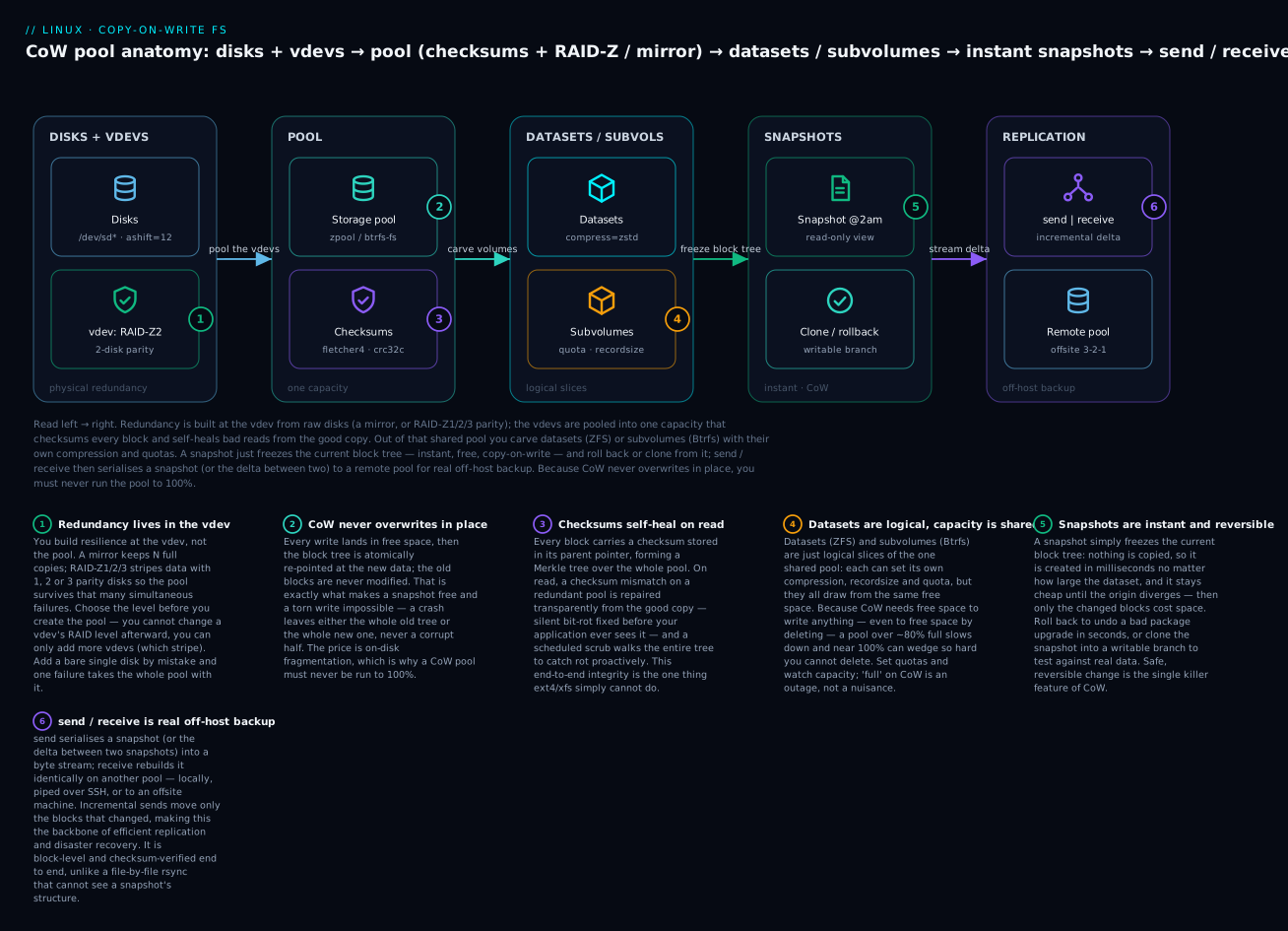
Trace it once and every command below finds its home: redundancy is decided at the vdev (leftmost) and never changes; the pool is the one shared capacity that checksums everything; datasets/subvolumes are logical slices with their own knobs; snapshots are frozen block trees you roll back or clone; send/receive streams the delta off-box. The one thing to burn in: capacity is shared, so a runaway log in one dataset can fill the pool and stall every other — which is why quotas and capacity monitoring are not optional on CoW.
Installing the three stacks
Because ZFS is out of the mainline kernel (the CDDL/GPL licensing clash, covered later), it installs differently from the in-tree options. Both distro families:
| Stack | Debian / Ubuntu (apt) | RHEL / Rocky / Fedora (dnf) | Notes |
|---|---|---|---|
| ZFS | apt install zfsutils-linux (Ubuntu ships the module) |
Enable the OpenZFS repo, then dnf install zfs; load with modprobe zfs |
RHEL builds a DKMS/kmod module out of tree; check zfs version |
| Btrfs | apt install btrfs-progs (kernel module already in-tree) |
dnf install btrfs-progs |
Fedora/openSUSE default root; module always present |
| Btrfs + rollback | apt install snapper grub-btrfs |
dnf install snapper snapper-plugins grub-btrfs (openSUSE preinstalled) |
Adds pre/post snapshots + GRUB boot-to-snapshot |
| Stratis | apt install stratisd stratis-cli |
dnf install stratisd stratis-cli |
Enable the daemon: systemctl enable --now stratisd |
⚠️ On RHEL, ZFS is a third-party out-of-tree module: a kernel update can leave you without ZFS until the module rebuilds (DKMS usually handles it, but pin your kernel on storage boxes). This real operational cost is why Red Hat shops often choose Stratis or Btrfs instead.
ZFS on Linux (OpenZFS)
ZFS came out of Sun’s Solaris in 2005 and lives on Linux as OpenZFS — the same codebase behind FreeBSD and TrueNAS. It is the most feature-complete storage system you can run on Linux, and opinionated: it wants whole disks and RAM, and rewards you with integrity nothing else matches. The vocabulary is two small trees — pool → vdev → device (storage) and pool → dataset → snapshot (logical) — and once they click, the commands read like English.
Pools and vdevs: how ZFS lays out disks
A zpool is the top-level unit of storage. A pool is built from one or more vdevs (virtual devices), and a vdev is built from one or more physical devices. The crucial, non-obvious, and irreversible rule:
Redundancy lives in the vdev. The pool stripes across its vdevs with no redundancy between them.
So a pool of two RAID-Z2 vdevs survives up to two failures per vdev, but if any single vdev dies entirely, the whole pool is lost. Adding a vdev grows the pool; you cannot remove a RAID-Z vdev, and you cannot change a vdev’s redundancy level after creation. Get this right at zpool create time or live with it.
The vdev types you actually use:
| vdev type | Redundancy | Command fragment | Use it for |
|---|---|---|---|
| single disk | none | zpool create tank sdb |
Scratch, lab, never production data |
mirror |
N-way (survives N−1 loss) | zpool create tank mirror sdb sdc |
Databases, low-latency, easy expansion |
raidz1 |
single parity (survives 1) | zpool create tank raidz1 sdb sdc sdd |
3–5 disk arrays, capacity-friendly |
raidz2 |
double parity (survives 2) | zpool create tank raidz2 sdb...sdg |
The safe default for 6–12 disk NAS |
raidz3 |
triple parity (survives 3) | zpool create tank raidz3 ... |
Very wide arrays, long rebuilds |
draid |
distributed parity + spare | zpool create tank draid2:4d:1s ... |
Large arrays needing fast rebuild |
| special vdevs | — | cache, log, special, spare |
Performance/metadata tiers (below) |
A minimal, correct production create for a four-disk NAS with 4 KB-sector drives:
# ashift=12 forces 4 KiB blocks — REQUIRED for modern (Advanced Format) disks;
# getting it wrong (ashift=9) wrecks performance and cannot be fixed later.
sudo zpool create -o ashift=12 \
     -O compression=zstd -O atime=off -O xattr=sa \
     tank raidz2 /dev/disk/by-id/wwn-0x5000... \
                 /dev/disk/by-id/wwn-0x5000... \
                 /dev/disk/by-id/wwn-0x5000... \
                 /dev/disk/by-id/wwn-0x5000...
Two habits to burn in. First, use /dev/disk/by-id/ names, not /dev/sdb — like fstab, sdb is probe-order and unstable, and a pool referencing stale names is a bad time. Second, -o (lowercase) sets pool properties like ashift; -O (uppercase) sets dataset defaults like compression inherited by every dataset — a case distinction that trips up everyone once.
Inspect what you built:
zpool status tank
#   pool: tank
#  state: ONLINE
#   scan: none requested
# config:
#         NAME        STATE     READ WRITE CKSUM
#         tank        ONLINE       0     0     0
#           raidz2-0  ONLINE       0     0     0
#             wwn-... ONLINE       0     0     0   (x4 disks)
# errors: No known data errors

zpool list          # capacity, fragmentation, health at a glance
# NAME  SIZE  ALLOC  FREE  FRAG  CAP  DEDUP  HEALTH
# tank  7.25T   118G 7.13T    0%   1%  1.00x  ONLINE
The CKSUM column in zpool status is the one to watch: any non-zero number there means ZFS caught (and, if redundant, repaired) a corrupt block. The FRAG and CAP columns in zpool list are your early-warning system — keep CAP under ~80%.
The core pool-management commands:
| Command | What it does | Notes |
|---|---|---|
zpool create -o ashift=12 NAME vdev... |
⚠️ Build a pool | Destroys the member disks |
zpool status [-v] NAME |
Health, vdev tree, errors | -v lists corrupted files |
zpool list |
Capacity, FRAG, CAP, health | Watch CAP < 80% |
zpool iostat -v 2 |
Live per-vdev throughput/IOPS | Diagnose a slow disk |
zpool add NAME vdev... |
⚠️ Add a vdev (grows pool) | Striped in — cannot be removed if raidz |
zpool attach NAME dev newdev |
Add a mirror to a device | Turn single → mirror, or 2-way → 3-way |
zpool detach NAME dev |
Remove a mirror member | |
zpool replace NAME old new |
⚠️ Swap a failed disk | Resilvers onto the new disk |
zpool scrub NAME |
Verify every block’s checksum | Schedule monthly (below) |
zpool export / import NAME |
Cleanly detach / re-attach a pool | Move a pool between hosts |
zpool offline / online NAME dev |
Take a disk out of service / back | Maintenance |
⚠️ The most dangerous mistake here is zpool add tank sde (a bare disk) when you meant zpool attach — you have just added a single-disk, no-redundancy vdev to a redundant pool, and now one disk failure kills everything. Always zpool add -n (dry run) first, and always match the redundancy of existing vdevs.
Datasets and properties
Where LVM gives you logical volumes, ZFS gives you datasets — richer: a filesystem and a set of inherited properties (compression, quota, recordsize, mountpoint) and the unit of snapshots. Datasets nest and inherit their parent’s properties unless overridden, so you set policy once at the top and it flows down.
# Create a hierarchy; children inherit compression=zstd from the pool root.
sudo zfs create tank/projects
sudo zfs create tank/projects/media
sudo zfs create -o recordsize=1M tank/projects/media/video   # big sequential files
sudo zfs create -o recordsize=16k -o logbias=throughput tank/db  # a database dataset

# Datasets auto-mount at /<pool>/<path> unless you set mountpoint.
zfs list
# NAME                        USED  AVAIL  REFER  MOUNTPOINT
# tank                        118G  7.00T   140K  /tank
# tank/db                     1.2G  7.00T   1.2G  /tank/db
# tank/projects               96G   7.00T   140K  /tank/projects
# tank/projects/media         96G   7.00T   140K  /tank/projects/media
# tank/projects/media/video   96G   7.00T    96G  /tank/projects/media/video
The properties you will actually set, and why:
| Property | Typical value | What it controls |
|---|---|---|
compression |
zstd (or lz4) |
Transparent per-block compression; on by default is the right call |
recordsize |
128k (default), 1M, 16k |
Max logical block size — tune to the workload (below) |
atime |
off |
Stop writing an access-time update on every read → big win |
quota |
500G |
Hard cap on a dataset and its children and snapshots |
refquota |
500G |
Cap on the dataset’s own data, excluding snapshots |
reservation |
100G |
Guarantee space for a dataset (so others can’t starve it) |
refreservation |
100G |
Guarantee for own data excluding snapshots |
mountpoint |
/srv/data, none, legacy |
Where it mounts; legacy hands control to /etc/fstab |
xattr |
sa |
Store xattrs in the inode (faster than dir) |
dedup |
off |
⚠️ Block-level dedup — needs ~5 GB RAM/TB; leave off |
sync |
standard |
disabled risks data loss on crash — never on real data |
readonly |
on/off |
Mount a dataset read-only |
snapdir |
hidden/visible |
Whether .zfs/snapshot/ shows up in ls |
Read and set them with zfs get / zfs set:
zfs get compression,compressratio,recordsize,atime tank/db
# NAME     PROPERTY       VALUE     SOURCE
# tank/db  compression    zstd      inherited from tank
# tank/db  compressratio  2.14x     -
# tank/db  recordsize     16K       local
# tank/db  atime          off       inherited from tank

sudo zfs set quota=500G tank/projects       # cap the whole subtree
sudo zfs set compression=zstd-3 tank/db     # a specific zstd level
zfs get -r quota tank                        # -r = recursive
recordsize is the one tuning knob that matters most, because a mismatch causes read/write amplification. The rule: match the record size to how the application does I/O.
| Workload | recordsize | Why |
|---|---|---|
| General files, home dirs | 128k (default) |
Good all-rounder |
| Large media / backups / archives | 1M |
Fewer, bigger blocks → less metadata, better throughput |
| PostgreSQL (8 KB pages) | 16k or 8k |
Avoid read-modify-write on 128 KB for an 8 KB page change |
| MySQL/InnoDB (16 KB pages) | 16k |
Match the page size exactly |
| VM images (zvol or file) | 16k–64k |
Balance random I/O against metadata overhead |
compression deserves its own note because the algorithm choice is real:
| Algorithm | Ratio | CPU cost | When |
|---|---|---|---|
lz4 |
modest | very low | The safe universal default; has “early abort” on incompressible data |
zstd (=zstd-3) |
high | low–moderate | Best general choice on modern CPUs; tunable zstd-1…zstd-19 |
gzip (gzip-1..9) |
high | high | Archives where CPU is free and space is precious |
zle |
tiny | trivial | Only zeroes; niche |
off |
1.0x | none | Only for already-compressed data you know won’t shrink |
Turn compression on and leave it on: on anything but pre-compressed media it is a net performance win, because fewer bytes hit the disk and CPUs are far faster than disks.
Snapshots, clones, and rollback
A ZFS snapshot is a read-only, instant, space-free frozen view of a dataset at one instant. This is the feature you will use daily.
# Create a snapshot — the @ separates dataset from snapshot name.
sudo zfs snapshot tank/db@before-upgrade
# Recursive: snapshot a dataset and all children atomically.
sudo zfs snapshot -r tank/projects@nightly-2026-07-09

zfs list -t snapshot
# NAME                            USED  AVAIL  REFER  MOUNTPOINT
# tank/db@before-upgrade            0B      -   1.2G  -
# (USED is 0 until the origin diverges — snapshots are free at birth)

# Browse a snapshot without mounting anything — it's just there:
ls /tank/db/.zfs/snapshot/before-upgrade/

# Recover one file from the snapshot:
cp /tank/db/.zfs/snapshot/before-upgrade/config.yml /tank/db/config.yml

# Roll the WHOLE dataset back to the snapshot (undo everything since):
sudo zfs rollback tank/db@before-upgrade
# ⚠️ Destroys all changes AND any snapshots newer than this one.
# Use -r to also destroy newer snapshots that would block the rollback.
A clone is a writable snapshot — a new dataset sharing all its blocks with the origin snapshot, consuming space only for what you change. This is how you spin up a throwaway copy of a 2 TB database in a second:
sudo zfs snapshot tank/db@now
sudo zfs clone tank/db@now tank/db-test     # instant, near-zero space
# tank/db-test is a full read/write filesystem; diverges block-by-block.

# A clone depends on its origin snapshot (you can't delete the snapshot while
# a clone exists). To sever that tie and make the clone independent:
sudo zfs promote tank/db-test
| Command | What it does |
|---|---|
zfs snapshot ds@name |
Instant read-only snapshot |
zfs snapshot -r ds@name |
Recursive (dataset + children, atomic) |
zfs list -t snapshot [-r ds] |
List snapshots (and their USED space) |
zfs rollback [-r] ds@name |
⚠️ Revert dataset to snapshot (loses newer data + snaps) |
zfs clone ds@snap newds |
Writable copy sharing the snapshot’s blocks |
zfs promote newds |
Detach a clone from its origin snapshot |
zfs diff ds@snap [ds] |
What changed between snapshot and now |
zfs destroy ds@name |
Delete a snapshot (frees only its unique blocks) |
zfs hold tag ds@name |
Pin a snapshot against accidental destroy |
The .zfs/snapshot/ directory is a quiet superpower: users can recover their own deleted files from /home/.zfs/snapshot/*/ with no admin involvement — the “previous versions” feature, for free.
zfs send / receive: replication done right
zfs send serialises a snapshot into a byte stream on stdout; zfs receive rebuilds it, block-identical, from stdin. Because it works on the pool’s own block structure, an incremental send moves only the blocks that changed between two snapshots — not changed files, changed blocks — far more efficiently than rsync (which must stat and read every file), and checksum-verified end to end.
# Full send to a second local pool:
sudo zfs snapshot tank/db@s1
sudo zfs send tank/db@s1 | sudo zfs receive backup/db

# Incremental: send ONLY the delta between s1 and s2 (tiny, fast):
sudo zfs snapshot tank/db@s2
sudo zfs send -i tank/db@s1 tank/db@s2 | sudo zfs receive backup/db

# Over the network to an offsite host, resumable, with progress:
sudo zfs send -i @s1 tank/db@s2 \
  | pv \
  | ssh backup-host "sudo zfs receive -s backup/db"
| Send/receive flag | Effect |
|---|---|
send ds@snap |
Full stream of one snapshot |
send -i A ds@B |
Incremental: only the delta from snapshot A to B |
send -I A ds@B |
Incremental including all intermediate snapshots |
send -R ds@snap |
Replication stream: dataset + children + properties + snaps |
send -w ds@snap |
Raw send (keeps encryption/compression, no re-encrypt) |
receive -s ... |
Resumable — survives a broken pipe (send -t <token> to resume) |
receive -F ds |
⚠️ Force-rollback the target to match (discards target changes) |
This is the backbone of serious ZFS backup: snapshot on a schedule, send -i the deltas to another pool (syncoid/sanoid and zrepl automate exactly this), and restores take only as long as sending them back. It complements — does not replace — a file-level tool; for the wider strategy see Backup & recovery: tar, rsync, restic & bare-metal.
Scrub and self-healing: the feature you can’t get elsewhere
Every ZFS block stores a checksum in its parent pointer (default fletcher4; sha256/blake3 for the paranoid). On read, ZFS verifies the block; if it fails and the pool is redundant, ZFS pulls the good copy from the mirror or rebuilds it from parity, returns correct data, and rewrites the bad block — all transparently. This is self-healing, and it is why ZFS on a mirror or RAID-Z is immune to the silent corruption that destroys data on ext4.
To catch rot before you read a cold file, you scrub: ZFS walks every allocated block in the pool, verifies its checksum, and repairs what it can.
sudo zpool scrub tank            # start a scrub (runs in the background, throttled)
zpool status -v tank
#   scan: scrub in progress since Thu Jul  9 02:00:03 2026
#         412G scanned at 1.02G/s, 118G issued at 302M/s, 7.13T total
#         0B repaired, 5.62% done, 06:31:12 to go

# After it completes, a clean pool reads:
#   scan: scrub repaired 0B in 02:14:52 with 0 errors on Thu Jul  9 04:15:00 2026

# Non-zero CKSUM here means ZFS found and (if redundant) fixed corruption:
#         NAME        STATE     READ WRITE CKSUM
#         tank        ONLINE       0     0     0
#           mirror-0  ONLINE       0     0     0
#             sdb     ONLINE       0     0    17   <- 17 blocks repaired from sdc
#             sdc     ONLINE       0     0     0
⚠️ On a non-redundant pool (single disk, or a stripe), ZFS can detect corruption via the checksum but cannot repair it — zpool status -v will name the exact corrupt files and your only recovery is to restore them from backup. Checksums without redundancy tell you the truth; they do not fix it. That is the whole argument for at least a mirror.
Scrub on a schedule — monthly for consumer disks, more often for critical data. Modern OpenZFS ships a systemd timer:
sudo systemctl enable --now zfs-scrub-monthly@tank.timer # monthly scrub of tank
ARC, L2ARC, ZIL and SLOG
ZFS caching has four names people conflate. Getting them straight prevents a lot of bad advice:
| Name | What it is | Where | Helps | Gotcha |
|---|---|---|---|---|
| ARC | Adaptive Replacement Cache — the main read cache | RAM | All reads | Uses up to 50% of RAM by default (tune zfs_arc_max) |
| L2ARC | Second-level ARC, an overflow read cache | SSD (cache vdev) |
Read-heavy sets bigger than RAM | Costs RAM for its headers — useless without enough RAM first |
| ZIL | ZFS Intent Log — where synchronous writes are logged | On-pool by default | Crash-safety of sync writes (NFS, databases) | Not a write cache; async writes never touch it |
| SLOG | Separate LOG device — moves the ZIL to a fast disk | fast SSD/NVRAM (log vdev) |
Sync-write latency only | ⚠️ Must be power-loss-protected; mirror it |
Two misconceptions worth killing. First, a SLOG is not a write cache — it accelerates only synchronous writes (an app calling fsync, like a database or NFS server), and only their latency; async workloads gain nothing. Second, L2ARC is not free — every cached block needs a RAM header, so adding it to a RAM-starved box makes things worse. The spending order is always: max RAM (ARC) first, then L2ARC, then a mirrored, power-loss-protected SLOG only for a proven sync-write bottleneck.
# Add a mirrored SLOG and a read cache to an existing pool:
sudo zpool add tank log mirror /dev/nvme0n1 /dev/nvme1n1   # sync-write log
sudo zpool add tank cache /dev/nvme2n1                       # L2ARC read cache
# Cap ARC at 8 GiB (put in /etc/modprobe.d/zfs.conf, then rebuild initramfs):
# options zfs zfs_arc_max=8589934592
arc_summary | head -20     # inspect ARC hit ratio and size
The CDDL licence: why ZFS isn’t in the kernel
ZFS is superb, so newcomers ask why it is not just in Linux like Btrfs. The answer is legal, not technical. ZFS is under Sun’s CDDL (Common Development and Distribution License); the kernel is GPLv2, and the two are widely held incompatible for distributing a combined, linked work — so OpenZFS cannot be merged into the mainline tree and shipped as one binary. Instead it ships as a separately built module (DKMS or a prebuilt kmod), distributed independently of the kernel. Canonical ships it with Ubuntu on its own legal analysis; Red Hat, more conservative, neither ships nor supports it.
The practical fallout you must plan around:
- ZFS is out of tree, so a kernel upgrade can break it until the module rebuilds. Use DKMS and, on production storage, pin/stage kernel updates.
- Some distros make it deliberately awkward (no ZFS root installer, no signed Secure-Boot module). Btrfs, being in-tree, never has this problem.
- It is not a reason to avoid ZFS — TrueNAS, Proxmox, and countless petabyte fleets run it — but it is why “just use the default” on RHEL points at XFS/Stratis, not ZFS.
Btrfs (the in-tree CoW filesystem)
Btrfs (“butter/better FS”) has been in the mainline kernel since 2009, which means zero module hassle, Secure Boot just works, and it is the default root filesystem on Fedora Workstation and openSUSE. It makes different trade-offs from ZFS: lighter on RAM, simpler to grow and shrink, more flexible about mixing disk sizes — but with a weaker multi-device story (its RAID5/6 is famously unsafe) and a free-space accounting model that confuses everyone at first.
The mental shift from ZFS: in Btrfs, the filesystem is the pool. There is no separate zpool layer — you mkfs.btrfs across several devices and that filesystem spans them. And where ZFS has datasets, Btrfs has subvolumes.
Subvolumes and mount options
A subvolume is an independently snapshottable, independently mountable tree within one Btrfs filesystem — not a partition, and not a quota by default; subvolumes share the filesystem’s free space (the same shared-capacity rule as ZFS). The Fedora/openSUSE convention names the root subvolume @ and home @home, so OS and user data snapshot independently.
# One-device filesystem, then subvolumes inside it:
sudo mkfs.btrfs -L data /dev/sdb
sudo mount /dev/sdb /mnt/btr
sudo btrfs subvolume create /mnt/btr/@data
sudo btrfs subvolume create /mnt/btr/@logs
sudo btrfs subvolume list /mnt/btr
# ID 256 gen 9 top level 5 path @data
# ID 257 gen 9 top level 5 path @logs

# Mount a specific subvolume as if it were its own filesystem, with compression:
sudo mount -o subvol=@data,compress=zstd:3,noatime /dev/sdb /srv/data
The mount options that matter on Btrfs (they go in /etc/fstab, and different subvolumes of the same device can use different ones):
| Mount option | Effect |
|---|---|
subvol=@name / subvolid=N |
Which subvolume to mount as the root of this mount |
compress=zstd[:level] |
Transparent compression (zstd, lzo, zlib); skips incompressible blocks |
compress-force=zstd |
Compress everything, even data that heuristics call incompressible |
noatime / relatime |
Stop / reduce access-time write amplification |
ssd |
SSD-friendly allocation (auto-detected, but can force) |
nodatacow |
⚠️ Disable CoW for this mount — also disables checksums |
autodefrag |
Auto-defragment small random writes (good for databases/desktops) |
degraded |
Allow mounting a multi-device FS with a disk missing (recovery) |
⚠️ nodatacow (or chattr +C on a directory) is the escape hatch for files that a CoW filesystem fragments badly — VM images, database files, big append-mostly logs. But it comes at a real price: it also turns off checksums and self-healing for those files, and it disables compression. Use it deliberately on the specific directory that needs it (set it on an empty directory before writing files), not globally.
Snapshots and snapper rollback
A Btrfs snapshot is itself a subvolume — a CoW copy of another subvolume. Read-write by default; add -r for read-only (which is what you want for backups and for a known-good rollback target).
# Read-only snapshot of a subvolume (instant, shares all blocks):
sudo btrfs subvolume snapshot -r /srv/data /srv/.snapshots/data-2026-07-09

# Writable snapshot (a clone you can diverge):
sudo btrfs subvolume snapshot /srv/data /srv/data-test

# Send a read-only snapshot to another Btrfs filesystem (like zfs send):
sudo btrfs send /srv/.snapshots/data-2026-07-09 | sudo btrfs receive /mnt/backup/
# Incremental — only the delta since a parent snapshot:
sudo btrfs send -p /srv/.snapshots/data-old /srv/.snapshots/data-new \
  | sudo btrfs receive /mnt/backup/
Rolling back on Btrfs differs from ZFS and catches people out. There is no in-place zfs rollback; the idiomatic Btrfs rollback is to swap which subvolume mounts as root — make a snapshot the new @ and reboot. Doing that by hand is fiddly, which is why snapper exists: it automates snapshots (including before and after every package transaction) and orchestrates rollback:
| snapper command | What it does |
|---|---|
snapper -c root create-config / |
Set up snapper for the root subvolume |
snapper -c root create -d "before X" |
Manual snapshot with a description |
snapper -c root list |
List snapshots (number, type pre/post, date) |
snapper -c root status N..M |
What changed between snapshots N and M |
snapper -c root undochange N..M |
Revert specific files to snapshot N |
snapper -c root rollback N |
Make snapshot N the new default root (reboot to apply) |
snapper -c root delete N |
Delete a snapshot |
On openSUSE this is wired up out of the box: every zypper operation makes a pre and post snapshot, so a broken update is undone with snapper rollback (or by picking the snapshot in GRUB) in seconds. On Fedora, add snapper + snapper-plugins + grub-btrfs for the same. This is the “safe upgrades” workflow we return to at the end.
Btrfs RAID and the write hole
Btrfs does its own multi-device redundancy, and — importantly — it sets the profile separately for data and metadata. You almost always want metadata more redundant than data.
# Two-disk mirror for both data and metadata:
sudo mkfs.btrfs -L pool -d raid1 -m raid1 /dev/sdb /dev/sdc
# Add a disk to a live filesystem, then rebalance to spread data onto it:
sudo btrfs device add /dev/sdd /srv/pool
sudo btrfs balance start -dconvert=raid1 -mconvert=raid1 /srv/pool
The Btrfs RAID profiles, and the one you must not use:
| Profile | Copies / parity | Min devices | Safe? | Notes |
|---|---|---|---|---|
single |
1 | 1 | data at risk | No redundancy |
dup |
2 copies on same device | 1 | metadata default | Survives bad blocks, not disk loss |
raid0 |
striped, no redundancy | 2 | performance only | One disk lost = all lost |
raid1 |
2 copies on different disks | 2 | yes | The safe default; mixes disk sizes well |
raid1c3 / raid1c4 |
3 / 4 copies | 3 / 4 | yes | Extra-safe metadata for wide arrays |
raid10 |
striped mirrors | 4 | yes | Speed + redundancy |
raid5 |
single parity | 2+ | ⚠️ no | Write hole — not for important data |
raid6 |
double parity | 3+ | ⚠️ no | Same write-hole class of bug |
⚠️ Do not use Btrfs raid5/raid6 for data you care about. They suffer the classic RAID write hole — a partial-stripe write interrupted by a crash can leave data and parity inconsistent — and Btrfs’s implementation has had extra scrub/parity bugs the upstream docs still warn about. If you need parity with Btrfs, keep metadata on raid1c3, or put Btrfs on mdadm RAID, or just use ZFS RAID-Z, which is immune to the write hole (next section).
The everyday Btrfs commands:
| Command | What it does |
|---|---|
mkfs.btrfs -d raid1 -m raid1 dev... |
⚠️ Create a (multi-device) filesystem |
btrfs filesystem show |
List Btrfs filesystems and their devices |
btrfs filesystem usage /mnt |
Real capacity accounting (use this, not df) |
btrfs filesystem df /mnt |
Space by data/metadata/system block group |
btrfs subvolume create/list/delete /mnt/x |
Manage subvolumes |
btrfs subvolume snapshot [-r] src dst |
Snapshot (read-only with -r) |
btrfs scrub start/status /mnt |
Verify + self-heal checksums |
btrfs balance start [-dconvert=...] /mnt |
Rebalance / change RAID profile / reclaim |
btrfs device add/remove/replace ... /mnt |
Grow, shrink, or swap a disk online |
btrfs filesystem resize +10G /mnt |
Grow or shrink the filesystem online |
btrfs device stats /mnt |
Per-device error counters (read/write/csum) |
btrfs quota enable /mnt + btrfs qgroup ... |
Subvolume quotas (qgroups) |
Two Btrfs gotchas that cause the most confusion. First, df lies on Btrfs — shared blocks, CoW, and separate data/metadata pools defeat it; use btrfs filesystem usage. Second, Btrfs can report ENOSPC while df shows free space because the metadata block group filled though data space remains; fix with btrfs balance, prevent by not running it to the brim.
Stratis (Red Hat’s approach)
Stratis is Red Hat’s answer to “ZFS-like pooled, thin-provisioned, snapshottable storage on RHEL, without ZFS’s licence or Btrfs’s history.” Rather than write a new CoW filesystem, it is a management layer: a daemon (stratisd) and CLI (stratis) that assemble trusted kernel tech — device-mapper thin provisioning + XFS — into pools and filesystems that feel like ZFS to operate.
The consequence is the key thing about Stratis: it is not a copy-on-write integrity filesystem. XFS checksums its own metadata but not your data, and Stratis adds no data checksums or self-healing. Its snapshots come from device-mapper thin provisioning (which is block-layer CoW), so you get instant snapshots and thin growth — but not ZFS/Btrfs silent-corruption repair. Stratis also provides no RAID itself; you layer it on mdadm.
# Enable the daemon, create a pool from whole disks, carve a filesystem:
sudo systemctl enable --now stratisd
sudo stratis pool create pool1 /dev/sdb /dev/sdc
sudo stratis filesystem create pool1 data

# Stratis filesystems appear under /dev/stratis/<pool>/<fs>:
sudo mkdir /srv/stratis-data
sudo mount /dev/stratis/pool1/data /srv/stratis-data
# fstab needs x-systemd.requires=stratisd.service and the UUID (see below).

# Instant thin snapshot (a new, independently mountable filesystem):
sudo stratis filesystem snapshot pool1 data data-snap-2026-07-09

# Grow the pool by adding a disk (thin filesystems grow into it automatically):
sudo stratis pool add-data pool1 /dev/sdd
# Add an SSD read/write cache tier in front of slow disks:
sudo stratis pool add-cache pool1 /dev/nvme0n1
| stratis command | What it does |
|---|---|
stratis pool create NAME dev... |
⚠️ Create a thin pool from block devices |
stratis pool list |
Pools with size, used, and properties |
stratis pool add-data NAME dev |
Grow the pool with another disk |
stratis pool add-cache NAME dev |
Add an SSD cache tier |
stratis filesystem create POOL FS |
Create a thin XFS filesystem |
stratis filesystem list |
Filesystems, used size, and device path |
stratis filesystem snapshot POOL FS SNAP |
Instant thin snapshot (a full filesystem) |
stratis filesystem rename / destroy ... |
Manage filesystems |
stratis key set ... + pool create --key-desc |
Pool encryption (LUKS-backed) |
⚠️ A Stratis fstab line must tell systemd to wait for stratisd, or the boot mounts race the daemon and drop to emergency mode. Use x-systemd.requires=stratisd.service on the mount, and mount by the Stratis UUID:
# /etc/fstab
UUID=<stratis-fs-uuid> /srv/stratis-data xfs defaults,x-systemd.requires=stratisd.service 0 0
Where Stratis fits: a RHEL shop wanting flexible pooled storage with snapshots and thin provisioning, cleanly managed and fully supported, without adopting ZFS (licence/out-of-tree) or Btrfs (Red Hat deprecated it years ago). What it does not give you is data-integrity self-healing — for that on RHEL you are back to ZFS-out-of-tree or mdadm RAID under Stratis.
RAID and redundancy across the three
Redundancy is where these filesystems differ most, and the choice is irreversible on ZFS, so it is worth a dedicated comparison. The headline: ZFS RAID-Z has no write hole; Btrfs parity RAID does; Stratis has no RAID of its own.
Why RAID-Z escapes the write hole: classic RAID5 does read-modify-write on a stripe, so a crash between the data and parity writes leaves them inconsistent (the “hole”). RAID-Z instead writes full, variable-width stripes inside the single atomic CoW transaction — every write is a complete new stripe committed with the pointer flip, so data and parity never disagree on disk. That integration is only possible because ZFS owns both the filesystem and RAID layers.
| Level | Mechanism | Survives | Usable space (n disks) | Rebuild cost | Where |
|---|---|---|---|---|---|
| mirror (2-way) | full copies | 1 disk | 50% (n/2) | low (copy one disk) | ZFS, Btrfs raid1 |
| mirror (3-way) | full copies | 2 disks | 33% | low | ZFS, Btrfs raid1c3 |
| RAID-Z1 | single parity, full-stripe CoW | 1 disk | (n−1)/n | high (read all) | ZFS |
| RAID-Z2 | double parity | 2 disks | (n−2)/n | high | ZFS |
| RAID-Z3 | triple parity | 3 disks | (n−3)/n | high | ZFS |
| Btrfs raid1 | 2 copies on 2 devices | 1 disk | 50% | low | Btrfs (safe) |
| Btrfs raid10 | striped mirrors | 1 per mirror | 50% | low | Btrfs (safe) |
| Btrfs raid5/6 | single/double parity | 1 / 2 disks | (n−1)/n, (n−2)/n | high | ⚠️ Btrfs (write hole — avoid) |
| mdadm + XFS/Stratis | traditional parity/mirror | depends | depends | high | Stratis (layered) |
Practical guidance that survives real disks: for a small array (3–5 disks) use mirrors (easy to expand, fast rebuild) or RAID-Z1; for a larger NAS (6–12 disks) default to RAID-Z2 — modern multi-TB drives rebuild slowly enough that a second failure mid-rebuild is a real risk RAID-Z2 survives. Mirrors give the best IOPS and rebuild fastest (databases, VMs); RAID-Z gives the best capacity-per-disk (bulk, archive). Note too that RAID-Z expansion (adding a disk to an existing vdev) finally landed in OpenZFS 2.3, though existing data keeps its old parity ratio until rewritten — so plan width up front where you can.
Choosing: ZFS vs Btrfs vs Stratis vs ext4/xfs+LVM
You now know all four stacks. The honest answer is that most systems should still use ext4 or xfs — CoW is a power tool, not a default, and a boring web server does not need it. Reach for CoW when you specifically want its features: integrity, snapshots/rollback, cheap replication, or compression at scale. The full comparison:
| Dimension | ext4/xfs + LVM | ZFS | Btrfs | Stratis |
|---|---|---|---|---|
| In mainline kernel | yes | no (CDDL, DKMS) | yes | yes (userspace mgr) |
| Data checksums / self-heal | no | yes | yes (raid1) | no |
| Snapshots | LVM (clunky, sized) | instant, native | instant, native | thin, native |
| Compression | no (VDO add-on) | native | native | no |
| Replication (block delta) | no | zfs send | btrfs send | no |
| Grow filesystem | yes (xfs/ext4) | yes (add vdev) | yes (online) | yes (thin) |
| Shrink filesystem | ext4 only, offline | no | yes (online) | via XFS (no) |
| RAID built-in | no (use mdadm) | RAID-Z1/2/3, mirror | raid1/10 safe, 5/6 unsafe | no (use mdadm) |
| Parity write-hole-safe | n/a | yes (no hole) | ⚠️ no (raid5/6) | n/a |
| RAM appetite | low | high (ARC) | low–moderate | low |
| Enterprise support (RHEL) | full | none | deprecated | full |
| Maturity for its parity RAID | n/a | very high | low (5/6) | n/a |
| Best-known deployments | everywhere | TrueNAS, Proxmox | Fedora/openSUSE root | RHEL storage |
And the same information reorganised the way you will actually use it — by workload:
| Use case | First choice | Why | Avoid |
|---|---|---|---|
| NAS / storage server / archive | ZFS (RAID-Z2) | Integrity, self-heal, scrubs, snapshots, send backup — the whole point |
Btrfs raid5/6 |
| Root FS with rollback (laptop, workstation) | Btrfs + snapper | In-tree, Secure-Boot-clean, boot-to-snapshot, distro-default | — |
| Database server | ext4/xfs (or ZFS w/ tuned recordsize) |
Predictable latency; CoW fragments DB files — if ZFS, match recordsize + consider logbias |
Default CoW on DB files without tuning |
| VM / container host | ZFS (zvols) or LVM-thin | Snapshots + clones for instant VM copies; recordsize/volblocksize tuned |
Btrfs unless nodatacow on images |
| RHEL shop wanting pooled thin storage | Stratis | Supported, simple, thin + snapshots, no ZFS licence issue | ZFS (unsupported on RHEL) |
| Simple server / cloud VM / anything boring | ext4 or xfs (+LVM if you want flexible resize) | No RAM cost, no fragmentation, no surprises — the right default | Over-engineering with CoW you won’t use |
| Backup target / offsite replica | ZFS | zfs recv of incremental sends is the most efficient off-host backup there is |
— |
One rule to carry out: use ext4/xfs by default; ZFS when integrity and replication matter and you can feed it RAM; Btrfs for in-tree snapshot/rollback on a root; Stratis on RHEL for pooled thin storage with vendor support. For the traditional flexible-resize path ext4/xfs pairs with, see LVM: logical volume management; for where these sit in the whole disk-to-mountpoint stack, see Storage: disks, partitions, filesystems & fstab.
Boot from snapshot: the killer feature for safe upgrades
The single most compelling reason to put CoW on your root is this workflow: snapshot before a risky change, and if it breaks, boot the previous snapshot from the boot menu without touching the running system — turning “rollback takes four hours” into a two-minute reboot. Two mature implementations:
| Approach | Filesystem | How it works | Distro fit |
|---|---|---|---|
| snapper + grub-btrfs | Btrfs | snapper snapshots root pre/post every package transaction; grub-btrfs regenerates GRUB with a “boot to snapshot” submenu; you boot a read-only snapshot, verify, then snapper rollback to make it permanent |
openSUSE (default), Fedora (add packages) |
| ZFSBootMenu | ZFS | A small boot environment lets you pick any boot environment (a ZFS root dataset/snapshot) at boot; select the previous one, boot it, promote it if good | ZFS-on-root (any distro) |
The Btrfs + snapper flow in practice, on a system already set up (openSUSE does this for you):
# A normal update automatically brackets itself in pre/post snapshots:
sudo zypper up            # (or `dnf up` with the snapper dnf plugin)
# ...the update breaks the boot. At the GRUB menu, choose:
#   "Start bootloader from a read-only snapshot"  ->  pick the pre-update one.
# You're now booted, read-only, on the known-good tree. Make it permanent:
sudo snapper rollback     # sets the good snapshot as the new default root
sudo reboot               # back to a working system, upgrade cleanly undone
The ZFS equivalent uses boot environments — separate root datasets you can boot between:
# Before a big upgrade, clone the current root env to a new one:
sudo zfs snapshot rpool/ROOT/default@pre-upgrade
sudo zfs clone rpool/ROOT/default@pre-upgrade rpool/ROOT/pre-upgrade
# Do the upgrade on 'default'. If it breaks, ZFSBootMenu lets you pick
# 'pre-upgrade' at boot, boot it, and promote it to the new default.
This is why Fedora, openSUSE, and the ZFS-on-root crowd treat CoW roots as non-negotiable on frequently-updated machines. It is the payoff of everything above: snapshots are instant and free, so bracketing every change in one costs nothing, and rollback is a reboot instead of a restore.
Operational cautions
CoW filesystems fail in ways ext4 does not, and every one of these has ended someone’s weekend. Internalise the table; the prose after it covers the three that bite hardest.
| Caution | Why it bites | The habit that prevents it |
|---|---|---|
| ⚠️ Never fill a CoW pool to 100% | CoW needs free space to write anything — including deletes; near-full wedges | Alert at 80% CAP; set quotas; keep headroom |
| Snapshot sprawl eats the pool | Old snapshots pin old blocks; a forgotten snapshot silently consumes TBs | Automate retention (sanoid / snapper timeline limits) |
| Scrub on a schedule | Latent bit-rot is only found by reading blocks; unread = undetected | Monthly zpool scrub / btrfs scrub timers |
| A non-redundant pool can’t self-heal | Single-disk ZFS/Btrfs detects rot but can’t repair it | At least a mirror for data you care about |
df misreports on Btrfs / CoW |
Shared blocks + separate metadata pools defeat classic accounting | btrfs filesystem usage, zfs list -o space |
| ⚠️ Btrfs raid5/6 write hole | Crash during partial-stripe write corrupts parity | Use raid1/10, or ZFS RAID-Z, or mdadm underneath |
| ZFS RAM starvation | Too little RAM (esp. with dedup/L2ARC) tanks performance | Size RAM first; leave dedup=off; cap zfs_arc_max |
| ZFS after a kernel update | Out-of-tree module may not rebuild → no pool import | DKMS + staged kernel updates on storage hosts |
Every row above is a policy you set once, not a fire you fight later. The two people learn the hard way: snapshots are free to make but not to keep — each pins the blocks live at its creation, so without retention (hourly-24, daily-30) a pool silently fills with data no file references; and a checksum only protects a block when something reads it, so a cold archive rots undetected until a scheduled scrub reads it. Set retention and a scrub timer on day one.
Hands-on lab
This lab builds a real ZFS mirror and Btrfs raid1, corrupts a disk on purpose, and watches both self-heal — all on loopback image files, so nothing on your machine is at risk. Run it on any Linux VM or container with CAP_SYS_ADMIN. ⚠️ Every destructive command targets only scratch files under /var/tmp/lab-*; the final step cleans them up.
Prerequisites. Install the tools (pick your family): sudo apt install -y zfsutils-linux btrfs-progs or sudo dnf install -y zfs btrfs-progs (ZFS on RHEL needs the OpenZFS repo first). Confirm: zfs version and mkfs.btrfs --version.
Part A — ZFS: mirror, dataset, snapshot, self-heal, send/receive
Step 1 — Make two “disks” and a mirror pool.
truncate -s 1G /var/tmp/lab-z1.img /var/tmp/lab-z2.img
sudo zpool create -o ashift=12 -O compression=zstd -O atime=off \
     labz mirror /var/tmp/lab-z1.img /var/tmp/lab-z2.img
zpool status labz
You should see a mirror-0 vdev with both images ONLINE and all-zero READ/WRITE/CKSUM. What just happened: you built a redundant pool from two files — the same commands work on real disks.
Step 2 — Carve a compressed dataset and write data.
sudo zfs create labz/docs
sudo chown "$USER" /labz/docs
# Write something highly compressible so we can see compression work:
yes "the quick brown fox jumps over the lazy dog" | head -n 200000 > /labz/docs/big.txt
zfs get compressratio,used,logicalused labz/docs
compressratio should be well above 1.00x (zstd crushes repetitive text). What just happened: the dataset compressed your data transparently — the app wrote plain text, the disk holds far less.
Step 3 — Snapshot, change, and roll back.
sudo zfs snapshot labz/docs@v1              # instant point-in-time
echo "ACCIDENTAL EDIT" >> /labz/docs/big.txt
tail -n1 /labz/docs/big.txt                 # shows the bad edit
sudo zfs rollback labz/docs@v1              # undo everything since @v1
tail -n1 /labz/docs/big.txt                 # the bad edit is gone
What just happened: the snapshot froze the block tree; rollback re-pointed the dataset at it. Instant, no data copied.
Step 4 — Corrupt one mirror half and watch ZFS heal it. ⚠️ This deliberately writes garbage into one backing image; it is safe only because it is a scratch file.
sudo zpool export labz                      # flush + detach so we can scribble on disk
# Overwrite 64 MiB in the middle of ONE mirror member with random bytes:
sudo dd if=/dev/urandom of=/var/tmp/lab-z1.img bs=1M seek=200 count=64 conv=notrunc
sudo zpool import -d /var/tmp labz          # bring the pool back
sudo zpool scrub labz                       # verify every block's checksum
sleep 5; zpool status -v labz
You should see non-zero CKSUM on lab-z1.img and scrub repaired 64M ... with 0 errors. What just happened: ZFS caught the corrupted blocks by checksum, rebuilt them from the good mirror half, and repaired the bad copy — silent corruption fixed automatically. The feature ext4 cannot give you.
Step 5 — Replicate to a second pool with send/receive.
truncate -s 1G /var/tmp/lab-z3.img
sudo zpool create -o ashift=12 labbackup /var/tmp/lab-z3.img
sudo zfs snapshot labz/docs@ship
sudo zfs send labz/docs@ship | sudo zfs receive labbackup/docs
zfs list -r labbackup
labbackup/docs now holds a byte-identical copy. What just happened: send serialised the snapshot’s blocks; receive rebuilt them on another pool — the core of off-host backup.
Part B — Btrfs: raid1, subvolume, snapshot, self-heal
Step 6 — Build a Btrfs raid1 across two loop devices.
truncate -s 1G /var/tmp/lab-b1.img /var/tmp/lab-b2.img
L1=$(sudo losetup -f --show /var/tmp/lab-b1.img)
L2=$(sudo losetup -f --show /var/tmp/lab-b2.img)
sudo mkfs.btrfs -L labb -d raid1 -m raid1 "$L1" "$L2"
sudo mkdir -p /mnt/labb && sudo mount -o compress=zstd "$L1" /mnt/labb
sudo btrfs filesystem usage /mnt/labb
What just happened: one Btrfs filesystem now spans two devices with two copies of every data and metadata block.
Step 7 — Subvolume, snapshot, self-heal.
sudo btrfs subvolume create /mnt/labb/@data
sudo cp /etc/os-release /mnt/labb/@data/
sudo btrfs subvolume snapshot -r /mnt/labb/@data /mnt/labb/snap-1   # read-only snapshot
# Corrupt one device, then let scrub repair from the raid1 copy: ⚠️ scratch only
sudo umount /mnt/labb
sudo dd if=/dev/urandom of=/var/tmp/lab-b1.img bs=1M seek=300 count=32 conv=notrunc
sudo mount -o compress=zstd "$L1" /mnt/labb
sudo btrfs scrub start -B /mnt/labb          # -B = foreground, wait for it
sudo btrfs device stats /mnt/labb            # non-zero corruption_errs, now repaired
btrfs scrub reports corrected errors and device stats shows the counter for the damaged device. What just happened: Btrfs found the bad blocks by checksum and rebuilt them from the raid1 mirror — the same self-healing as ZFS, in the mainline kernel.
Step 8 — Clean up (removes everything the lab created)
sudo zpool destroy labz 2>/dev/null; sudo zpool destroy labbackup 2>/dev/null
sudo umount /mnt/labb 2>/dev/null
sudo losetup -d "$L1" "$L2" 2>/dev/null
sudo rm -f /var/tmp/lab-z1.img /var/tmp/lab-z2.img /var/tmp/lab-z3.img \
           /var/tmp/lab-b1.img /var/tmp/lab-b2.img
sudo rmdir /mnt/labb 2>/dev/null
What just happened: both pools destroyed, loop devices detached, scratch files removed — your machine is back exactly as it was. You have now done, by hand, every core operation these filesystems exist for.
Common mistakes and troubleshooting
| Symptom | Likely cause | Fix |
|---|---|---|
cannot create 'tank': no such pool after reboot |
Pool not imported (out-of-tree ZFS module didn’t load, or import didn’t run) | sudo zpool import tank; enable zfs-import.target; check modprobe zfs |
| ZFS gone after a kernel update | DKMS module didn’t rebuild for the new kernel | Boot the old kernel, dkms autoinstall, reinstall zfs-dkms; stage kernel updates |
Btrfs mount fails: open_ctree failed after crash |
Log-tree or metadata damage | mount -o ro,rescue=usebackuproot; back up; last resort btrfs check --repair (⚠️ risky) |
No space left on device but df shows free space (Btrfs) |
Metadata block-group exhausted, or unallocated space fragmented | btrfs balance start -dusage=50 /mnt to reclaim; add a device |
| Pool/filesystem full and you cannot delete files | CoW needs free space even to delete | Delete a snapshot to free blocks; truncate a large file; grow the pool; never let it hit 100% |
zpool status: DEGRADED, one disk UNAVAIL |
A disk died or dropped off the bus | zpool replace tank <old> <new>; let it resilver; check cabling/SMART |
| Snapshots consuming huge space, pool filling | Snapshot sprawl — old snaps pinning old blocks | zfs list -t snapshot -o name,used -s used; delete old ones; automate retention |
| Stratis mount drops to emergency mode at boot | fstab mounted before stratisd started |
Add x-systemd.requires=stratisd.service to the fstab options |
| ZFS box slow, high disk I/O, low cache hits | ARC starved / too little RAM (or dedup on) | Add RAM; dedup=off; check arc_summary; consider L2ARC only after RAM |
| Database on ZFS/Btrfs is slow and fragmented | Record/CoW mismatch; CoW fragmenting DB files | ZFS: set recordsize to the DB page; Btrfs: nodatacow (or autodefrag) on the DB dir |
The three nastiest, in prose. The 100%-full lockup turns a capacity oversight into an outage: on CoW there may not be enough free space to record even a file’s deletion, so rm fails with No space left on device — escape by deleting a snapshot or truncate -s 0 on a big file, and prevent with alarms at 80% and quotas. The Btrfs “full but df shows free” paradox: data and metadata block groups are allocated separately, so a full metadata pool gives ENOSPC while df shows data free — btrfs balance start -dusage=NN reclaims it. The out-of-tree ZFS module: a kernel-bumping dnf update can boot a system that cannot import its pools until DKMS rebuilds — keep the previous kernel bootable and stage kernel updates on storage servers.
Cheat-sheet
ZFS — pools & datasets
| Command | Does |
|---|---|
zpool create -o ashift=12 -O compression=zstd NAME raidz2 dev... |
⚠️ Create a pool |
zpool status -v / zpool list |
Health + errors / capacity + FRAG |
zpool scrub NAME |
Verify + self-heal all blocks |
zpool replace NAME old new |
⚠️ Swap a failed disk (resilver) |
zpool add / attach / detach |
Add vdev / add-remove mirror member |
zfs create -o recordsize=1M pool/ds |
Create a dataset with a property |
zfs set compression=zstd quota=500G pool/ds |
Set properties |
zfs get all pool/ds |
Show every property + source |
zfs snapshot pool/ds@snap |
Instant snapshot |
zfs rollback pool/ds@snap |
⚠️ Revert to snapshot |
zfs clone / promote |
Writable copy / detach it |
zfs send [-i A] ds@B | zfs receive tgt |
Replicate (incremental) |
Btrfs — one filesystem, many subvolumes
| Command | Does |
|---|---|
mkfs.btrfs -d raid1 -m raid1 dev... |
⚠️ Create (multi-device) |
btrfs filesystem usage /mnt |
Real space accounting (not df) |
btrfs subvolume create/list/delete |
Manage subvolumes |
btrfs subvolume snapshot -r src dst |
Read-only snapshot |
btrfs send [-p par] snap | btrfs receive dir |
Replicate (incremental) |
btrfs scrub start -B /mnt |
Verify + self-heal |
btrfs balance start -dusage=50 /mnt |
Reclaim / rebalance |
btrfs device add/remove/replace |
Grow/shrink/swap online |
snapper -c root create / list / rollback N |
Snapshot workflow + rollback |
mount -o subvol=@,compress=zstd,noatime |
Mount a subvolume compressed |
Stratis — pooled thin XFS
| Command | Does |
|---|---|
stratis pool create NAME dev... |
⚠️ Create thin pool |
stratis filesystem create POOL FS |
Create thin XFS filesystem |
stratis filesystem snapshot POOL FS SNAP |
Instant thin snapshot |
stratis pool add-data / add-cache POOL dev |
Grow / add SSD cache |
mount /dev/stratis/POOL/FS (+ x-systemd.requires=stratisd.service) |
Mount (fstab must wait for stratisd) |
Interview and exam questions
Q: Explain copy-on-write in one paragraph, and name three features that fall out of it. A: On a change, the filesystem writes the modified block to free space, rewrites its parent pointer up to the root, and atomically flips the root pointer — the original is never touched. Because old blocks are never overwritten you get (1) instant, free snapshots (keep an old root); (2) crash-consistency without fsck (you boot the old or new tree, never a torn mix); and (3) cheap end-to-end checksums (the parent is rewritten anyway, so the child’s checksum rides along free) — a Merkle tree that enables self-healing.
Q: Why can ZFS and Btrfs repair silent corruption when ext4 cannot? A: They checksum every data block (not just metadata) and, being fused with the RAID layer, know a redundant copy exists — so on a bad read they fetch the good copy from mirror/parity, return correct data, and rewrite the bad block. ext4 checksums only metadata (optionally) and has no idea a second copy exists, so it hands corruption straight to the application.
Q: What is a vdev, and why is choosing its redundancy level a one-way door?
A: A vdev is a group of disks with a redundancy level (mirror, RAID-Z1/2/3); a pool stripes across its vdevs with no redundancy between them. You cannot change a vdev’s redundancy level or remove a RAID-Z vdev after creation, so the layout is effectively permanent — and losing any single vdev loses the whole pool. Get width and level right at zpool create.
Q: Why does RAID-Z not suffer the RAID5 write hole? A: Classic RAID5 does read-modify-write on a stripe, so a crash between the data and parity writes leaves them inconsistent. RAID-Z writes full, variable-width stripes inside ZFS’s single atomic CoW transaction — every write is a complete new stripe committed with the pointer flip — so data and parity are never inconsistent on disk. Btrfs raid5/6 lacks that integration and does suffer the write hole (avoid it).
Q: A ZFS pool is 100% full and rm fails with “No space left on device.” Why, and how do you recover?
A: On CoW, deleting a file is itself a metadata write, which needs free space — at 100% there is none. Recover by freeing space without a large write: delete a snapshot, truncate -s 0 a big file, or add a vdev/disk. Prevent with capacity alerts at ~80% and per-dataset quotas.
Q: When would you set nodatacow on Btrfs, and what do you give up?
A: For files a CoW filesystem fragments badly — VM images, database files, big random-write logs. You give up checksums, self-healing, and compression for those files, so scope it to the specific directory (set chattr +C on the empty dir before writing) rather than globally.
Q: Contrast ZFS ARC, L2ARC, ZIL and SLOG.
A: ARC is the RAM read cache (the main one). L2ARC is an SSD overflow read cache (cache vdev) that itself costs RAM for headers — pointless without enough RAM first. ZIL is the on-pool intent log that makes synchronous writes crash-safe. SLOG is a separate fast device (log vdev) holding the ZIL to cut sync-write latency — it is not a general write cache, must be power-loss-protected, and should be mirrored.
Q: Why isn’t ZFS in the mainline Linux kernel, and what’s the operational consequence? A: ZFS is under the CDDL, held incompatible with the kernel’s GPLv2 for distributing a combined work, so it ships as a separately built (DKMS/kmod) module rather than in-tree. Operationally that means a kernel update can leave the module unbuilt — no pool import until it rebuilds — so use DKMS and stage kernel updates on storage hosts; Btrfs, being in-tree, has no such issue.
Q: How does snapshot-based rollback make OS upgrades safe, and how do the ZFS and Btrfs approaches differ?
A: You snapshot the root before the change; if it breaks you boot the pre-change snapshot and make it permanent — a reboot instead of a restore. Btrfs uses snapper (auto pre/post snapshots) + grub-btrfs to boot a read-only snapshot, then snapper rollback. ZFS uses boot environments (separate root datasets) selectable in ZFSBootMenu. Both make bracketing every change in a snapshot essentially free.
Q: (Design) You’re building an 8-disk NAS for family photos and backups. What layout and policies?
A: One raidz2 vdev of 8 disks (survives 2 failures — important given long rebuilds on big drives), ashift=12, compression=zstd, atime=off. Datasets per data class with quotas so no one dataset fills the pool. A monthly zpool scrub timer, capacity alert at 80%, snapshot retention (e.g. daily-30/weekly-8), and zfs send -i incrementals to an offsite pool for the 3-2-1 rule.
Q: (LFCS/RHCSA-style) On RHEL, create a Stratis pool on /dev/sdb, a filesystem data, mount it persistently, and snapshot it.
A:
sudo systemctl enable --now stratisd
sudo stratis pool create pool1 /dev/sdb
sudo stratis filesystem create pool1 data
UUID=$(sudo stratis filesystem list | awk '/pool1.*data/{print $NF}')  # or blkid
echo "UUID=$UUID /srv/data xfs defaults,x-systemd.requires=stratisd.service 0 0" | sudo tee -a /etc/fstab
sudo mkdir -p /srv/data && sudo mount -a
sudo stratis filesystem snapshot pool1 data data-snap
Key takeaways
- Copy-on-write never overwrites a live block — it writes new blocks and atomically flips the tree root. Instant snapshots, crash-consistency without fsck, and free end-to-end checksums all fall directly out of that one design decision.
- Checksums plus redundancy equal self-healing — ZFS and Btrfs catch and repair silent bit-rot from the good copy on read (and proactively on scrub); ext4/xfs cannot. But without redundancy they can only detect, not fix — use at least a mirror for data you care about.
- Redundancy is chosen at the vdev and is (mostly) permanent. Mirrors rebuild fast and suit databases/VMs; RAID-Z2 is the safe NAS default; RAID-Z has no write hole, while Btrfs raid5/6 does — avoid it.
- ZFS is the integrity/replication powerhouse (RAID-Z, ARC,
zfs send, scrubs) but wants RAM and is out-of-tree (CDDL). Btrfs is the in-tree snapshot/rollback default for roots (Fedora/openSUSE,snapper). Stratis gives RHEL pooled thin XFS with snapshots — but no data checksums or self-heal. - Most systems should still use ext4/xfs. Reach for CoW when you specifically want integrity, snapshots/rollback, compression at scale, or block-level replication — not by default.
- Boot-from-snapshot is the killer feature: bracket every upgrade in a snapshot (snapper+grub-btrfs, or ZFS boot environments) and rollback becomes a reboot, not a four-hour restore.
- Never run a CoW pool to 100% — you can become unable even to delete. Alert at 80%, set quotas, tame snapshot sprawl with retention, and scrub on a schedule so integrity covers cold data too.
- Tune for the workload:
recordsize/subvolume +compression=zstdare the big levers; match record size to database page size, usenodatacow/autodefragfor DB and VM files, and always mountatime=off/noatime.