Somewhere between “I installed a web framework and it runs on localhost:8000” and “the public internet can reach my site over HTTPS without me getting paged at 2am” sits a whole layer most tutorials skip: the production web tier. It is the layer that terminates TLS so your app never touches a private key, that redirects every plaintext request to HTTPS, that hides your fragile application server behind a fast, hardened C program built to eat hostile traffic, and that stays up when someone points a scraper at your login page.
On Linux that layer is almost always nginx (sometimes Apache/httpd) acting as a reverse proxy in front of an application server — gunicorn, uwsgi, php-fpm, or a Node process — with Let’s Encrypt providing free, auto-renewing certificates and systemd wrapping the whole thing in a sandbox. Get this right once and it runs for years. Get it wrong and you leak your app on 0.0.0.0, serve a login form over cleartext HTTP, wake up to an expired certificate, or hand an attacker the whole box because nginx could write /etc.
This lesson builds that tier from first principles and hands you the real config files — not fragments, whole working blocks — for every piece: the nginx config model, reverse proxying with correct X-Forwarded-* headers and WebSocket upgrades, TLS done to a modern standard, certbot and its renewal timer, systemd unit hardening tied to SELinux and the firewall, rate limiting and performance tuning, socket-vs-TCP app integration, and observability. By the end you will have stood up nginx → gunicorn over a unix socket, on HTTPS, rate-limited, gzipped, and sandboxed, and you will know which hop is lying when it returns a 502.
Why this matters
Your application framework ships a development server and tells you, in bold, never use it in production. That warning is real. Django’s runserver, Flask’s built-in server, Rails’ webrick, Node’s bare http.createServer — they are single-threaded or lightly concurrent, they do not terminate TLS well, they do not survive a slow-client attack, and they were written to make development pleasant, not to face the internet. The production answer is universal across every stack: put a real web server in front, and let it reverse-proxy to your app.
That front server does the jobs your app should not: it terminates TLS in one place (one certificate, one cipher policy, one HSTS header for the whole fleet), it serves static files without waking a Python worker, it buffers slow clients so your expensive app workers are never tied up dribbling bytes to a phone on 3G, it rate-limits abuse at the cheap edge instead of the costly upstream, and it presents a single hardened attack surface on ports 80 and 443 while your app hides on loopback. This is not optional ceremony; it is the shape of essentially every web system in production, from a one-box side project to a fleet behind a load balancer.
Beginners hit this the moment they try to “deploy.” The app runs locally but the internet can’t reach it; they bind it to 0.0.0.0:8000 and now it is reachable — and also completely exposed, on the wrong port, over HTTP, with the dev server’s debug pages one misconfiguration away from leaking secrets. The fix is to stop exposing the app at all and put nginx in front. Everything in this lesson flows from that one decision.
The mental model to carry through: nginx is a reverse proxy and a TLS terminator; your app is a private upstream it talks to over loopback or a socket; systemd is the supervisor that keeps nginx alive and boxed in; Let’s Encrypt is the certificate authority that makes HTTPS free and automatic. Hold those four roles clearly and every config file below is obvious.
The anatomy of a production web tier
Before touching a config file, get the map right. A request from a browser to your app crosses several hops, and the Linux box you are configuring sits at a specific one. Reading a request left to right:
client → DNS → edge/CDN/load-balancer → reverse proxy (nginx) → app/upstream → data store
Not every tier has every hop — a small deployment may be just nginx and an app on one box — but the roles are always the same, and knowing which hop owns which failure is how you debug fast. Here is the whole tier, what each layer does, who typically owns it, and the failures it causes:
| Layer | What it does | Where it runs | Typical failures it causes |
|---|---|---|---|
| Client | Browser/app; DNS resolve, TLS handshake, retries | End user’s device | Stale DNS cache, old TLS, mixed-content warnings |
| DNS | Maps example.com → IP (A/AAAA), CNAME, CAA |
Registrar / DNS provider | NXDOMAIN, wrong record, TTL too long during cutover |
| Edge / CDN / LB | TLS offload, caching, WAF, spreads load, DDoS absorb | Cloud LB / CDN (optional) | 502 from bad backend health, wrong X-Forwarded-* |
| Reverse proxy (nginx) | TLS terminate, redirect, rate-limit, serve static, proxy to app | Your Linux box | 502/504, cert expiry, wrong port, SELinux/perm denials |
| App / upstream | Your code: gunicorn, php-fpm, uwsgi, Node | Same box or a private subnet | Worker crash, slow query, socket permission, OOM |
| Data store | Postgres/MySQL/Redis the app queries | DB host (often separate) | Connection limit, slow query surfaces as 504 upstream |
The bolded row is the subject of this lesson: the Linux box running nginx as a reverse proxy. In a minimal deployment it also runs the app; in a larger one the app moves to its own hosts and nginx proxies across the network, or a cloud load balancer sits in front of several nginx boxes. The nginx configuration is nearly identical in all three shapes — what changes is only whether proxy_pass targets unix:/run/app.sock, 127.0.0.1:8000, or http://app-subnet:8000.
Two design rules define a good web tier and everything below serves them:
Terminate TLS once, at the edge of your trust boundary. The certificate, the cipher list, the HSTS policy — one place owns them. Behind that point, traffic can be plain HTTP on loopback because it never leaves the box (or travels a trusted private network). Terminating TLS in every app is a maintenance nightmare and a private-key sprawl risk.
The app is never directly reachable from the internet. It binds 127.0.0.1 or a unix socket. The only public listeners are nginx on 80 and 443. This single rule turns “my Flask debug page leaked the SECRET_KEY” from a catastrophe into an impossibility — the debug page is not reachable.
For the layers below nginx — the database the app queries — tuning and connection limits are their own deep topic covered in the hosting databases: Postgres/MySQL tuning lesson; a slow query there surfaces up here as a 504 at the proxy, so the two lessons meet at the timeout.
nginx: install, the config model, and serving static
nginx (pronounced “engine-x”) is an event-driven web server and reverse proxy. Its whole architecture is one master process (runs as root, reads config, binds ports 80/443, owns the certs) that spawns several worker processes (run as an unprivileged user, handle every connection). Workers are event-driven — one worker juggles thousands of connections with an epoll loop rather than a thread per connection — which is why nginx handles slow clients and high concurrency on modest hardware.
Install and enable it. The package name and default identities differ by family:
# Debian / Ubuntu
sudo apt update && sudo apt install -y nginx
# RHEL / Fedora / Rocky / Alma
sudo dnf install -y nginx

# both families: enable at boot and start now
sudo systemctl enable --now nginx
systemctl status nginx --no-pager
The distro defaults you must know before editing anything:
| Thing | Debian / Ubuntu | RHEL / Fedora / Rocky |
|---|---|---|
| Package | nginx |
nginx |
| Service unit | nginx.service |
nginx.service |
| Worker user | www-data |
nginx |
| Main config | /etc/nginx/nginx.conf |
/etc/nginx/nginx.conf |
| Site config dir | /etc/nginx/sites-available + sites-enabled (symlinks) |
/etc/nginx/conf.d/*.conf |
| Default doc root | /var/www/html |
/usr/share/nginx/html |
| Logs | /var/log/nginx/{access,error}.log |
/var/log/nginx/{access,error}.log |
That sites-available/sites-enabled split is a Debian convention, not an nginx feature: you write a config in sites-available/ and enable it by symlinking it into sites-enabled/, which lets you disable a site without deleting its config. RHEL skips it and drops everything in conf.d/. Both work because nginx.conf ends with an include that pulls them in.
The config model: contexts nest
nginx configuration is a tree of contexts (blocks). A directive is only legal inside certain contexts. Learn the nesting and the file stops looking like noise:
| Context | Scope | Holds directives like |
|---|---|---|
| main (top of file) | Global process settings | user, worker_processes, pid, include |
events { } |
Connection processing | worker_connections, use epoll |
http { } |
All HTTP handling | log_format, gzip, upstream, include sites |
server { } |
One virtual host | listen, server_name, ssl_certificate, root |
location { } |
One URL path within a server | proxy_pass, try_files, root, expires |
stream { } |
Raw TCP/UDP proxy (not HTTP) | server, proxy_pass (L4) |
A stripped /etc/nginx/nginx.conf shows the skeleton — everything else lives in included files:
# /etc/nginx/nginx.conf — the top-level frame
user  www-data;                       # worker user (nginx on RHEL)
worker_processes  auto;               # one worker per CPU core
pid  /run/nginx.pid;

events {
    worker_connections  1024;         # max simultaneous connections PER worker
}

http {
    include       /etc/nginx/mime.types;
    default_type  application/octet-stream;
    sendfile      on;                 # kernel-space file sending, no user-space copy
    keepalive_timeout  65;

    log_format  main  '$remote_addr - $remote_user [$time_local] "$request" '
                      '$status $body_bytes_sent "$http_referer" "$http_user_agent"';
    access_log  /var/log/nginx/access.log  main;
    error_log   /var/log/nginx/error.log   warn;

    include /etc/nginx/conf.d/*.conf;         # RHEL puts sites here
    include /etc/nginx/sites-enabled/*;       # Debian puts sites here
}
You almost never edit nginx.conf itself. You add one file per site under conf.d/ (or sites-available/). Here is the simplest real site — serving static files:
# /etc/nginx/conf.d/static-site.conf  (or sites-available/static-site)
server {
    listen 80;
    listen [::]:80;                      # IPv6 too
    server_name example.com www.example.com;

    root  /var/www/example;              # doc root on disk
    index index.html;

    location / {
        try_files $uri $uri/ =404;       # serve the file, or dir, or 404 — never proxy
    }

    location /assets/ {
        expires 30d;                     # let browsers cache static assets
        add_header Cache-Control "public, immutable";
    }
}
The edit-test-reload loop you will run a thousand times
Never reload nginx without testing first. A syntax error in a reload can, in the worst case, take the site down. The discipline is three commands:
sudo nginx -t                 # parse + validate config; prints the exact file:line of any error
sudo systemctl reload nginx   # graceful reload: workers finish in-flight requests, then swap config
# equivalent low-level form:
sudo nginx -s reload          # sends SIGHUP to the master
nginx -t is your seatbelt. It catches missing semicolons, unknown directives, and files it can’t read before they hit production. reload is graceful — it never drops a connection — whereas restart kills and re-spawns (a brief blip). The signals nginx understands directly:
| Command | Signal | Effect |
|---|---|---|
nginx -t |
— | Test config, report errors, change nothing |
nginx -s reload |
SIGHUP | Re-read config, start new workers, drain old ones |
nginx -s reopen |
SIGUSR1 | Reopen log files (use after log rotation) |
nginx -s quit |
SIGQUIT | Graceful shutdown (finish in-flight requests) |
nginx -s stop |
SIGTERM | Fast shutdown (drop connections) |
systemctl reload nginx |
SIGHUP | Same as -s reload, via the unit |
location matching: the rule that trips everyone
Within a server, nginx picks exactly one location to handle a request, and the selection order is not top-to-bottom. It is by modifier priority:
| Modifier | Example | Meaning | Priority |
|---|---|---|---|
= |
location = /health |
Exact match | 1 (highest — wins immediately) |
^~ |
location ^~ /assets/ |
Prefix match, stop regex search | 2 |
~ |
location ~ \.php$ |
Regex, case-sensitive | 3 (first match in file order) |
~* |
location ~* \.(jpg|png)$ |
Regex, case-insensitive | 3 |
| (none) | location / |
Prefix match | 4 (longest prefix wins) |
The rule: nginx tests exact (=) first, then remembers the longest matching prefix; if that prefix used ^~ it stops there, otherwise it tries regex locations in file order and the first regex that matches wins; if no regex matches, it falls back to the remembered prefix. The classic bug is expecting location / to catch a request that a regex location ~ \.php$ actually grabbed. When in doubt, use = for exact paths like /healthz and ^~ for static prefixes to short-circuit the regex hunt.
nginx as a reverse proxy
This is the heart of the lesson. A reverse proxy accepts a client’s request, forwards it to an upstream server, and relays the response back — so the client only ever talks to nginx, never to your app. The minimal form is a single proxy_pass:
server {
    listen 80;
    server_name app.example.com;

    location / {
        proxy_pass http://127.0.0.1:8000;   # forward everything to the app on loopback
    }
}
That works, but it is naive — the app now sees every request as coming from 127.0.0.1 over plain HTTP, with no idea who the real client is. A correct proxy block restores the truth and controls buffering and timeouts. Here is the production shape, and below it the full request path it implements:
# an upstream is a named pool of backends — even one is worth naming
upstream app_backend {
    server 127.0.0.1:8000;          # or: server unix:/run/app.sock;
    keepalive 32;                   # reuse connections to the app (needs http/1.1 below)
}

server {
    listen 80;
    server_name app.example.com;

    location / {
        proxy_pass http://app_backend;

        # --- restore the client's identity for the app ---
        proxy_set_header Host              $host;
        proxy_set_header X-Real-IP         $remote_addr;
        proxy_set_header X-Forwarded-For   $proxy_add_x_forwarded_for;
        proxy_set_header X-Forwarded-Proto $scheme;

        # --- keepalive to the upstream ---
        proxy_http_version 1.1;
        proxy_set_header Connection "";      # clear "close" so keepalive works

        # --- timeouts: fail fast, don't hang forever ---
        proxy_connect_timeout 5s;
        proxy_send_timeout    60s;
        proxy_read_timeout    60s;
    }
}
The X-Forwarded-* headers are not decoration — they are the contract between proxy and app. Behind a proxy, $remote_addr from the app’s view is always the proxy. nginx rewrites reality with these headers, and your app framework must be told to trust them:
| Header set by nginx | Value | What the app does with it |
|---|---|---|
Host |
$host |
Build correct absolute URLs, route by domain |
X-Real-IP |
$remote_addr |
The single real client IP |
X-Forwarded-For |
$proxy_add_x_forwarded_for |
Full client→proxy chain (appends, doesn’t replace) |
X-Forwarded-Proto |
$scheme (http/https) |
Know the request was HTTPS at the edge |
X-Forwarded-Host |
$host |
Original Host if you rewrite it |
⚠️ These headers are client-spoofable if you trust them blindly. Only trust X-Forwarded-* from your proxy. In Django set SECURE_PROXY_SSL_HEADER; in gunicorn set --forwarded-allow-ips; in Node/Express set app.set('trust proxy', 'loopback'). Trust the header from the whole internet and an attacker forges their source IP past your rate limits and geo-blocks.
Where this sits in the whole request path — and the six things nginx does to every request between the client and your app — is the diagram to burn into memory:
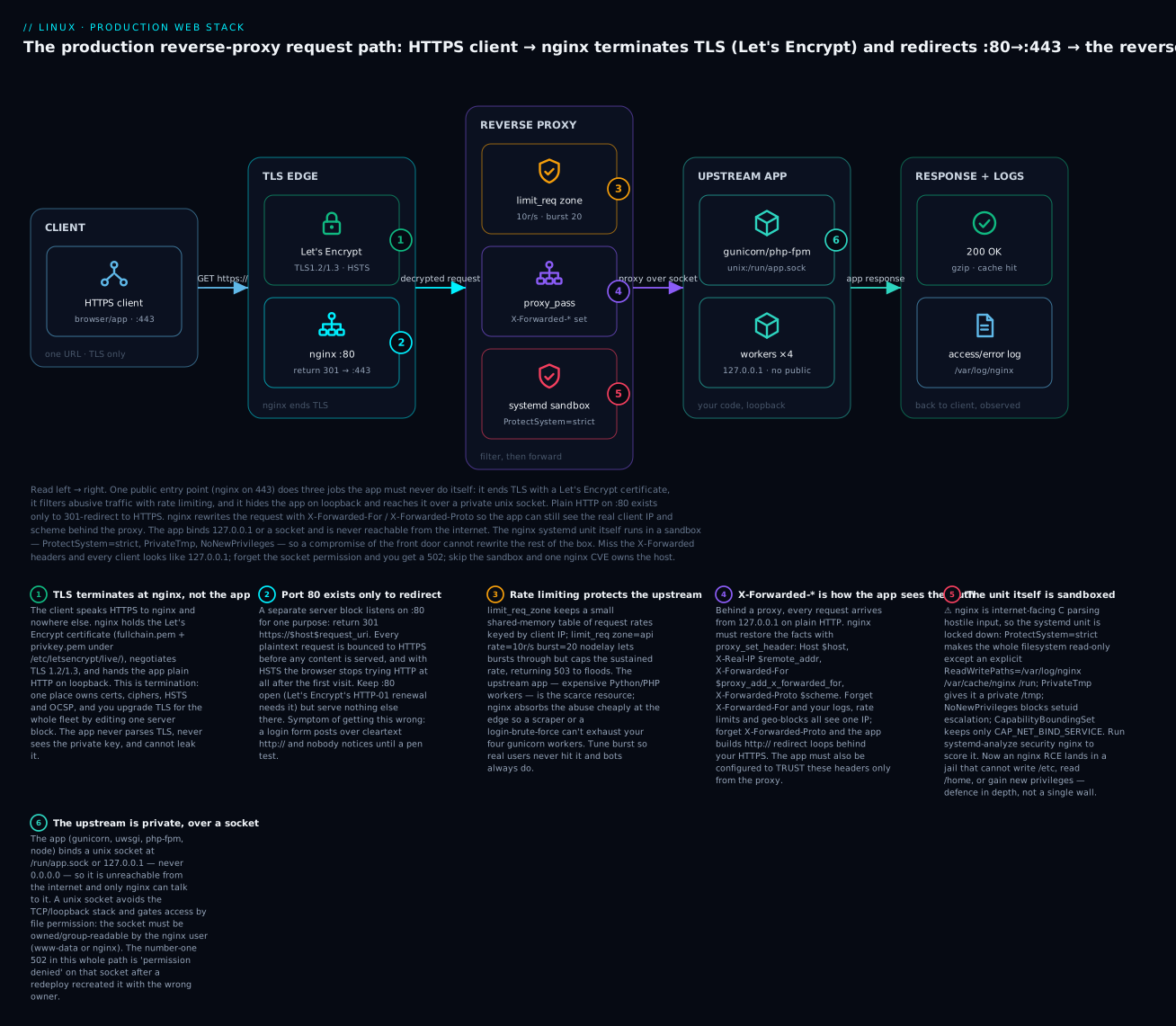
Reading it left to right: the client only ever speaks HTTPS to nginx (badge 1 — TLS terminates here); plain port 80 exists solely to 301-redirect to 443 (badge 2); the reverse-proxy stage rate-limits floods (badge 3) and rewrites X-Forwarded-* so the app sees the real client (badge 4); the nginx unit runs inside a systemd sandbox so a compromise can’t own the box (badge 5); and the app hides on a private unix socket, unreachable from the internet (badge 6). Every section below is one of these badges in detail.
Load balancing across several app instances
An upstream with more than one server is a load balancer. nginx spreads requests by a chosen method, with per-server health parameters:
upstream app_backend {
    least_conn;                                    # method (see table)
    server 10.0.0.11:8000  weight=2 max_fails=3 fail_timeout=30s;
    server 10.0.0.12:8000  max_fails=3 fail_timeout=30s;
    server 10.0.0.13:8000  backup;                 # only used if others are down
    keepalive 32;
}
The balancing methods and their use cases:
| Method | Directive | Picks the backend by | Use when |
|---|---|---|---|
| Round-robin | (default) | Next in rotation | Stateless apps, equal servers |
| Weighted RR | weight=N |
Rotation scaled by weight | Uneven server sizes |
| Least connections | least_conn; |
Fewest active connections | Long/variable request times |
| IP hash | ip_hash; |
Hash of client IP | Sticky sessions without shared state |
| Generic hash | hash $request_uri; |
Hash of any key | Cache affinity by URL |
| Random | random two least_conn; |
Random of two, then least-conn | Large fleets, cheap fairness |
The per-server params matter as much as the method: max_fails=3 fail_timeout=30s means “after 3 failed attempts in 30s, take this server out of rotation for 30s”; backup holds a server in reserve; down marks one administratively out. This passive health checking is free in open-source nginx (active health checks are an nginx Plus feature).
WebSocket upgrade
WebSockets start as an HTTP request that asks to “upgrade” the connection to a persistent bidirectional stream. nginx will not pass the Upgrade/Connection headers through by default — you must forward them explicitly, or your WebSocket handshakes silently fail with a 400:
location /ws/ {
    proxy_pass http://app_backend;
    proxy_http_version 1.1;                       # required for upgrade
    proxy_set_header Upgrade    $http_upgrade;
    proxy_set_header Connection "upgrade";
    proxy_read_timeout 3600s;                      # WS connections are long-lived
}
Buffering and timeouts: the two dials behind most proxy pain
nginx buffers the upstream’s response by default: it reads the whole response from your app as fast as the app can produce it, frees the app worker, then dribbles the bytes out to a slow client at the client’s pace. This is a feature — it protects your expensive app workers from slow clients — but it surprises people streaming large responses or Server-Sent Events, where you want proxy_buffering off;. The dials:
| Directive | Default | What it controls |
|---|---|---|
proxy_buffering |
on |
Buffer the whole upstream response before/while sending to client |
proxy_buffer_size |
4k/8k | Size of the buffer for the response headers |
proxy_buffers |
8 4k/8k |
Number × size of buffers for the response body |
proxy_connect_timeout |
60s | Max time to establish the upstream connection |
proxy_send_timeout |
60s | Max gap while sending the request to upstream |
proxy_read_timeout |
60s | Max gap while reading the response — the usual 504 cause |
proxy_next_upstream |
error timeout | Which failures cause a retry on the next upstream server |
proxy_read_timeout is the one you tune most: if your app legitimately takes 90 seconds for a report, the default 60s returns 504 Gateway Timeout even though the app is working. Raise it for that location — but not globally, or you lose the fast-fail protection everywhere else.
When the fault is between nginx and the upstream, nginx synthesises the status code — so knowing which code means what localises the failure to a single hop before you read a single log line:
| Code | What nginx is saying | Typical cause |
|---|---|---|
| 502 Bad Gateway | “I reached the upstream but got a broken/refused answer” | App crashed, wrong port, socket permission, SELinux |
| 503 Service Unavailable | “No upstream available to serve this” | All backends down/failed, or limit_req throttled |
| 504 Gateway Timeout | “The upstream connected but didn’t answer in time” | Slow app / slow DB query vs proxy_read_timeout |
| 499 Client Closed Request | “The client gave up before the upstream answered” | Impatient client or too-slow upstream (nginx-specific code) |
Apache/httpd: the alternative
nginx is the default choice, but you will meet Apache HTTP Server (the package is apache2 on Debian, httpd on RHEL) on a huge installed base — especially anything PHP or anything using .htaccess. It does the same jobs with different syntax and a different concurrency model.
Apache’s config is directive-based inside <VirtualHost> blocks. The reverse-proxy equivalent of the nginx block above:
# /etc/apache2/sites-available/app.conf   (a2ensite app; systemctl reload apache2)
# needs: a2enmod proxy proxy_http headers
<VirtualHost *:80>
    ServerName app.example.com

    ProxyPreserveHost On
    ProxyPass        "/" "http://127.0.0.1:8000/"
    ProxyPassReverse "/" "http://127.0.0.1:8000/"

    RequestHeader set X-Forwarded-Proto "http"
    ErrorLog  ${APACHE_LOG_DIR}/app-error.log
    CustomLog ${APACHE_LOG_DIR}/app-access.log combined
</VirtualHost>
Apache’s own distro defaults differ the same way nginx’s do — know them before editing:
| Thing | Debian / Ubuntu | RHEL / Fedora / Rocky |
|---|---|---|
| Package | apache2 |
httpd |
| Service unit | apache2.service |
httpd.service |
| Worker user | www-data |
apache |
| Main config | /etc/apache2/apache2.conf |
/etc/httpd/conf/httpd.conf |
| Vhost dir | sites-available + sites-enabled |
/etc/httpd/conf.d/*.conf |
| Enable a site | a2ensite name |
(drop .conf in conf.d/) |
| Enable a module | a2enmod proxy |
LoadModule in conf.modules.d/ |
| Doc root default | /var/www/html |
/var/www/html |
The head-to-head that decides which to run:
| Aspect | nginx | Apache (httpd) |
|---|---|---|
| Concurrency model | Event loop, few workers, C10K-friendly | Prefork/worker/event MPM; historically thread/process-per-connection |
| Static file serving | Extremely fast, low memory | Fast, heavier per connection |
| Reverse proxy | First-class (proxy_pass, upstream) |
Via mod_proxy / mod_proxy_http |
| Per-directory override | None (by design — config is central) | .htaccess (per-dir, read every request) |
| Dynamic content | Always proxied to an app server | Can embed via mod_php, or proxy to php-fpm |
| Config style | Blocks + directives, include |
Directives + <VirtualHost>, a2enmod/a2ensite |
| Module loading | Compiled/loaded at build/start | LoadModule, a2enmod at runtime |
| Memory under load | Flat, predictable | Grows with connection count (prefork) |
| Best fit today | Reverse proxy, static, high concurrency, TLS edge | Legacy PHP apps, .htaccess-dependent apps, shared hosting |
The one Apache feature nginx deliberately lacks is .htaccess — per-directory config files that Apache reads on every request if AllowOverride permits. It is convenient for shared hosting (each tenant tweaks their own dir without touching the main config) but it is a performance tax (a stat + parse per request per directory) and a frequent source of “why is this rule not applying” confusion. nginx’s stance is that config belongs in one central, tested place — which is faster and, for a single-tenant app, simpler. If you are migrating a PHP app that leans on .htaccess rewrites, you translate those RewriteRules into nginx location/rewrite/try_files blocks once, centrally.
Pick nginx for a new reverse-proxy/TLS-edge deployment. Keep or pick Apache when a legacy app requires .htaccess or mod_php, or when your team’s muscle memory is entirely Apache and the app is modest. The TLS, systemd-hardening and firewall sections below apply to both — only the server-config syntax differs.
TLS done right: Let’s Encrypt, certbot & a strong config
HTTPS is non-negotiable for anything public: browsers mark HTTP pages “Not secure,” HTTP/2 effectively requires TLS, and any form posting a password over cleartext is a breach waiting to happen. The blocker used to be cost and manual renewal. Let’s Encrypt removed both — free, automated, 90-day certificates — and certbot is the client that gets and renews them.
Getting a certificate with certbot
Install certbot and, for nginx, its nginx plugin:
# Debian / Ubuntu
sudo apt install -y certbot python3-certbot-nginx
# RHEL / Fedora / Rocky (via EPEL)
sudo dnf install -y certbot python3-certbot-nginx
# Or the vendor-recommended snap (any distro):
sudo snap install --classic certbot && sudo ln -s /snap/bin/certbot /usr/bin/certbot
certbot proves you control the domain by solving an ACME challenge. The three you will use, and when:
| Challenge / mode | Command | How it proves control | Use when |
|---|---|---|---|
| nginx plugin | certbot --nginx -d example.com -d www.example.com |
certbot edits nginx config, serves the token, then writes the TLS config for you | Simplest; nginx is running and certbot may edit it |
| webroot (HTTP-01) | certbot certonly --webroot -w /var/www/example -d example.com |
Drops a file under /.well-known/acme-challenge/, LE fetches it over :80 |
You want certbot to touch files only, not your config |
| standalone (HTTP-01) | certbot certonly --standalone -d example.com |
certbot runs its own temporary server on :80 | No web server running yet (must free port 80) |
| DNS-01 | certbot certonly --manual --preferred-challenges dns -d '*.example.com' |
Add a _acme-challenge TXT record |
Wildcards (*.example.com) and hosts not publicly reachable on :80 |
The nginx plugin is the fast path: sudo certbot --nginx -d example.com -d www.example.com obtains the cert, then rewrites your server block to listen on 443 with the cert, adds a 301 redirect from 80, and reloads. For wildcard certificates (*.example.com) HTTP-01 cannot work — you cannot prove control of infinite subdomains by serving files — so you must use DNS-01, ideally with a DNS-provider plugin (e.g. python3-certbot-dns-cloudflare) so renewal is fully automatic instead of manual TXT-record edits.
Certificates land in a predictable place; point nginx at these paths:
/etc/letsencrypt/live/example.com/fullchain.pem   # cert + intermediate chain  → ssl_certificate
/etc/letsencrypt/live/example.com/privkey.pem      # private key                → ssl_certificate_key
Auto-renewal: the systemd timer
Let’s Encrypt certs live 90 days and certbot renews them when ~30 days remain. You never do this by hand — the package installs a systemd timer that runs certbot renew twice a day. Renewal is idempotent: it only acts on certs near expiry.
# is the renewal timer active?  (name is certbot.timer, or snap.certbot.renew.timer for the snap)
systemctl list-timers | grep -i certbot
sudo systemctl status certbot.timer --no-pager

# ALWAYS test renewal without touching the real cert first:
sudo certbot renew --dry-run
The mechanics of timers — OnCalendar, Persistent=true, how a timer maps to a .service — are covered in depth in the systemd units, services, targets & journald lesson; here the point is simply that renewal is a scheduled job you must verify runs, because a silently-broken timer is how certificates expire on a Sunday. After renewal, nginx must reload to pick up the new cert. certbot handles this with a deploy hook:
# reload nginx automatically after any successful renewal
sudo certbot renew --deploy-hook "systemctl reload nginx"
# or drop a script into the hooks dir (runs after every renewal):
#   /etc/letsencrypt/renewal-hooks/deploy/reload-nginx.sh   (chmod +x)
A strong TLS server block
Getting a cert is half the job; configuring TLS well is the other half. A modern, A-grade config — TLS 1.2/1.3 only, strong ciphers, HSTS, session resumption, and the HTTP→HTTPS redirect:
# HTTP :80 — redirect everything to HTTPS (and let ACME renew over :80)
server {
    listen 80;
    listen [::]:80;
    server_name example.com www.example.com;

    location /.well-known/acme-challenge/ { root /var/www/example; }  # renewal path
    location / { return 301 https://$host$request_uri; }               # everything else → HTTPS
}

# HTTPS :443 — the real site
server {
    listen 443 ssl;
    listen [::]:443 ssl;
    http2 on;
    server_name example.com www.example.com;

    ssl_certificate     /etc/letsencrypt/live/example.com/fullchain.pem;
    ssl_certificate_key /etc/letsencrypt/live/example.com/privkey.pem;

    # protocols + ciphers (Mozilla "intermediate" profile)
    ssl_protocols       TLSv1.2 TLSv1.3;
    ssl_ciphers         ECDHE-ECDSA-AES128-GCM-SHA256:ECDHE-RSA-AES128-GCM-SHA256:ECDHE-ECDSA-AES256-GCM-SHA384:ECDHE-RSA-AES256-GCM-SHA384:ECDHE-ECDSA-CHACHA20-POLY1305:ECDHE-RSA-CHACHA20-POLY1305;
    ssl_prefer_server_ciphers off;      # let modern clients pick (best for TLS 1.3)

    # session resumption (fewer full handshakes)
    ssl_session_cache   shared:SSL:10m;
    ssl_session_timeout 1d;
    ssl_session_tickets off;

    # OCSP stapling (see note below)
    ssl_stapling        on;
    ssl_stapling_verify on;

    # HSTS — force HTTPS for 2 years, incl. subdomains (add 'preload' only when sure)
    add_header Strict-Transport-Security "max-age=63072000; includeSubDomains" always;

    root /var/www/example;
    # ... your location / proxy blocks ...
}
The knobs that matter, and why:
| Directive | Recommended value | Why |
|---|---|---|
ssl_protocols |
TLSv1.2 TLSv1.3 |
TLS 1.0/1.1 are deprecated and fail PCI/scanners |
ssl_ciphers |
Mozilla intermediate list | Forward-secret (ECDHE), AEAD (GCM/CHACHA20) only |
ssl_prefer_server_ciphers |
off |
TLS 1.3 clients pick best; server-forcing is legacy |
add_header Strict-Transport-Security |
max-age=63072000; includeSubDomains |
Browser refuses HTTP after first visit |
ssl_stapling |
on |
Server staples revocation proof — faster, more private |
ssl_session_cache |
shared:SSL:10m |
Resume sessions, skip full handshakes |
http2 |
on |
Multiplexing; requires TLS in practice |
return 301 https://... |
on :80 | No content served over cleartext |
Two current caveats worth knowing. First, http2 on; is the modern directive (nginx ≥ 1.25.1); older configs wrote listen 443 ssl http2;. Second, OCSP stapling is in flux: Let’s Encrypt announced it is winding down OCSP in favour of short-lived certs and CRLs, so on very recent certs stapling may become a no-op — keep the directives (they degrade gracefully) but don’t be alarmed when stapling reports “no response” as the CA retires the endpoints.
Test it — don’t assume
After reloading, verify from the outside:
| Test | Command / tool | Checks |
|---|---|---|
| Handshake + chain | openssl s_client -connect example.com:443 -servername example.com |
Cert chain, protocol, cipher; Verify return code: 0 (ok) |
| Expiry date | echo | openssl s_client -connect example.com:443 2>/dev/null | openssl x509 -noout -dates |
notBefore/notAfter |
| Full grade | SSL Labs (browser) | A/A+ grade, protocol + cipher audit |
| Local deep scan | testssl.sh example.com |
Every protocol, cipher, vuln (Heartbleed, etc.) |
| Cipher enumeration | nmap --script ssl-enum-ciphers -p 443 example.com |
Which ciphers the server actually offers |
The -servername flag on openssl s_client sends SNI — without it, a server hosting many certs hands you the default one and you’ll misdiagnose “wrong certificate.” Always pass it.
Hardening the service: user, systemd sandbox, SELinux & firewall
nginx is internet-facing C code parsing hostile input. Assume it will one day have a bug. Hardening is about ensuring that when it does, the blast radius is a jail, not the whole box. Four layers, from process identity outward.
1. Run workers as an unprivileged user
The master starts as root only to bind ports 80/443 (privileged) and read the private key, then immediately drops the workers to www-data/nginx. That is already the default (user www-data;). The point of the remaining layers is to shrink even the master’s power and box in the workers.
2. systemd unit hardening — the sandbox
systemd can wrap any service in a kernel-enforced sandbox with a few directives. You do not edit the packaged unit; you add an override with systemctl edit nginx, which writes /etc/systemd/system/nginx.service.d/override.conf:
# systemctl edit nginx   →   /etc/systemd/system/nginx.service.d/override.conf
[Service]
# --- filesystem ---
ProtectSystem=strict                 # whole FS read-only...
ReadWritePaths=/var/log/nginx /var/cache/nginx /var/lib/nginx /run
ProtectHome=true                     # /home, /root, /run/user invisible
PrivateTmp=true                      # private /tmp, /var/tmp

# --- privileges ---
NoNewPrivileges=true                 # setuid binaries can't escalate
CapabilityBoundingSet=CAP_NET_BIND_SERVICE CAP_SETUID CAP_SETGID CAP_CHOWN
AmbientCapabilities=CAP_NET_BIND_SERVICE

# --- kernel + namespaces ---
ProtectKernelTunables=true           # /proc/sys, /sys read-only
ProtectKernelModules=true            # no module load/unload
ProtectControlGroups=true
RestrictAddressFamilies=AF_INET AF_INET6 AF_UNIX
RestrictNamespaces=true
SystemCallFilter=@system-service     # allowlist syscalls
SystemCallArchitectures=native

# --- limits ---
LimitNOFILE=65535                    # file-descriptor ceiling (see perf section)
Apply and score it:
sudo systemctl daemon-reload && sudo systemctl restart nginx
systemd-analyze security nginx        # 0=locked-down … 10=exposed; watch it drop
The directives that carry the most weight:
| Directive | Effect | Why it matters for a web server |
|---|---|---|
ProtectSystem=strict |
Entire FS read-only except ReadWritePaths |
An RCE can’t rewrite /etc, drop a cron job, or plant a binary |
ReadWritePaths= |
Whitelist the few dirs nginx must write | Logs + cache only; nothing else is writable |
ProtectHome=true |
/home, /root invisible |
A traversal bug can’t read users’ SSH keys |
PrivateTmp=true |
Private, empty /tmp |
No tmp-file race, no leaking to other services |
NoNewPrivileges=true |
Block privilege escalation via setuid | A dropped worker can’t regain root |
CapabilityBoundingSet= |
Cap the capabilities the master may hold | Keep only CAP_NET_BIND_SERVICE; drop the rest |
SystemCallFilter=@system-service |
Allowlist syscalls | A shellcode syscall (e.g. ptrace, mount) is refused |
RestrictAddressFamilies= |
Only IPv4/6 + unix sockets | No raw/packet sockets for a compromised worker |
⚠️ ProtectSystem=strict will break nginx immediately if you forget a path it writes — the classic miss is the cache dir or the PID file, which fail with a permission error at start. Add exactly what it needs to ReadWritePaths and no more. If you want to also serve a non-standard doc root that nginx must read, it stays readable (strict only blocks writes). This is the same toolkit covered generally in the systemd lesson linked above — here we apply it to a real internet-facing service.
3. SELinux booleans (RHEL family)
On RHEL/Fedora/Rocky with SELinux enforcing, nginx runs in the httpd_t domain and is boxed by policy — which is great until it blocks something you actually need. The single most common surprise: SELinux forbids the web server from making outbound network connections by default, which is exactly what a reverse proxy does. The result is a 502 with a permission denial in the audit log and a perfectly correct nginx config. The fix is a boolean:
# allow nginx/httpd to open outbound connections (reverse proxy, FastCGI to a remote host)
sudo setsebool -P httpd_can_network_connect on
The booleans and contexts you will reach for:
| Symptom | SELinux fix | What it does |
|---|---|---|
| Reverse proxy → 502, AVC denial | setsebool -P httpd_can_network_connect on |
Let httpd/nginx make outbound TCP |
| Proxy to a DB port | setsebool -P httpd_can_network_connect_db on |
Narrower: DB ports only |
Serve from /srv/www (non-standard root) |
semanage fcontext -a -t httpd_sys_content_t "/srv/www(/.*)?" && restorecon -Rv /srv/www |
Label files so httpd_t may read them |
| Listen on a non-standard port (8443) | semanage port -a -t http_port_t -p tcp 8443 |
Let nginx bind a port policy doesn’t know |
| Find why something was denied | ausearch -m avc -ts recent / sealert -a /var/log/audit/audit.log |
Read + explain the AVC denial |
The mandatory-access-control model behind these booleans — types, domains, transitions, and the AppArmor alternative on the Debian side — is the subject of the SELinux/AppArmor mandatory access control lesson; when a config that is obviously correct still returns 403 or 502 on a RHEL box, SELinux is the first suspect, and ausearch -m avc -ts recent is the first command.
4. Firewall: expose only 80 and 443
The box should accept inbound traffic on exactly two ports (plus SSH for you). Everything else — including your app’s 8000, which must stay on loopback — is closed:
# firewalld (RHEL/Fedora)
sudo firewall-cmd --permanent --add-service=http --add-service=https
sudo firewall-cmd --reload

# ufw (Ubuntu)
sudo ufw allow 'Nginx Full'        # opens 80 + 443; or: ufw allow 80,443/tcp

# nftables (raw)
sudo nft add rule inet filter input tcp dport {80,443} accept
Note the app port is deliberately absent — binding the app to 127.0.0.1:8000 means the firewall never even needs a rule for it, because it is not reachable off-box. The full firewall model — zones, firewalld vs nftables vs legacy iptables, and how the packet path works — is the firewalls: firewalld, nftables & iptables lesson; for the web tier the rule is simply “80 and 443 in, nothing else.”
Resilience & performance
A production edge does more than proxy — it protects the upstream and squeezes the wire. The high-value knobs:
Rate limiting and connection limits
Rate limiting is your cheapest defence against brute-force, scraping and accidental floods. It lives in two directives: a _zone (shared memory holding per-key counters, defined in http {}) and the limit_req that applies it (in a server/location):
http {
    # 10 MB zone keyed by client IP, allowing 10 requests/second sustained
    limit_req_zone  $binary_remote_addr  zone=api:10m  rate=10r/s;
    # cap concurrent connections per IP
    limit_conn_zone $binary_remote_addr  zone=conn:10m;
}

server {
    location /login {
        limit_req  zone=api  burst=20  nodelay;   # allow short bursts, then throttle
        limit_conn conn 10;                         # max 10 simultaneous conns/IP
        proxy_pass http://app_backend;
    }
}
burst=20 nodelay is the important nuance: it lets a legitimate user’s quick burst (a page loading 15 assets) through immediately, while a sustained flood above 10r/s gets 503. Without nodelay, bursts are queued and delayed rather than served fast then throttled. The rate-limiting directives:
| Directive | Where | Purpose |
|---|---|---|
limit_req_zone |
http |
Define a rate zone keyed on a variable |
limit_req |
server/location |
Apply a rate limit + burst + nodelay |
limit_conn_zone |
http |
Define a concurrent-connection zone |
limit_conn |
server/location |
Cap simultaneous connections per key |
limit_req_status |
http/server |
Status code returned when throttled (default 503) |
Compression, keepalive and static caching
| Feature | Config | Effect |
|---|---|---|
| gzip | gzip on; gzip_types text/css application/json application/javascript; gzip_comp_level 5; |
60–80% smaller text responses |
| brotli | brotli on; brotli_types ...; (needs ngx_brotli module) |
Better ratio than gzip; not built-in |
| Client keepalive | keepalive_timeout 65; |
Reuse client connections, skip handshakes |
| Upstream keepalive | upstream {... keepalive 32; } + proxy_http_version 1.1; |
Reuse connections to the app |
| Static cache headers | location /static/ { expires 30d; add_header Cache-Control "public, immutable"; } |
Browsers cache; fewer requests |
| Proxy cache | proxy_cache_path /var/cache/nginx levels=1:2 keys_zone=c:10m max_size=1g; proxy_cache c; |
nginx caches upstream responses |
| sendfile / tcp_nopush | sendfile on; tcp_nopush on; |
Zero-copy file send, full packets |
gzip is built in and free; brotli compresses better but requires the ngx_brotli module, which is not compiled into stock nginx — you either install a distro package that includes it or build the dynamic module. For text-heavy sites the extra 15–20% is worth it; for an API returning small JSON, gzip is plenty.
Worker and file-descriptor tuning
nginx’s throughput ceiling is worker_processes × worker_connections, and each connection costs file descriptors (one for the client, often one for the upstream). The defaults are conservative:
| Directive | Where | Recommended | Meaning |
|---|---|---|---|
worker_processes |
main | auto |
One worker per CPU core |
worker_connections |
events |
1024–4096 |
Max connections per worker |
worker_rlimit_nofile |
main | ≥ 2× worker_connections |
FD ceiling nginx sets for itself |
LimitNOFILE |
systemd unit | 65535 |
FD ceiling the supervisor grants the process |
keepalive_requests |
http |
1000 |
Requests per kept-alive connection |
The trap: worker_connections 8192; is meaningless if the process can only open 1024 file descriptors. The FD ceiling is set in two places and both must agree — worker_rlimit_nofile inside nginx and LimitNOFILE in the systemd unit (systemd’s limit wins if lower). Under load you hit “too many open files” in error.log, connections start failing, and the fix is to raise both and reload. This is the single most common performance cliff for a busy proxy.
A health-check endpoint
Give load balancers and monitors a cheap endpoint that proves nginx is up without waking the app:
location = /healthz {
    access_log off;                 # don't log every probe
    return 200 "ok\n";
    add_header Content-Type text/plain;
}
Use = /healthz (exact match) so it short-circuits instantly and never gets caught by a proxy location /. A deeper check that also verifies the app is reachable would proxy_pass to an app health route instead.
App integration: gunicorn, php-fpm, node — socket vs TCP
The upstream nginx proxies to is your application server. How it binds — a unix socket or a TCP port on loopback — is a real decision with security and performance consequences.
Unix socket (unix:/run/app.sock): the app and nginx are on the same host; the socket is a filesystem object, so access is gated by file permissions, and it skips the TCP/IP stack entirely (lower latency, no loopback overhead). The socket must be readable and writable by the nginx user — the number-one 502 after a redeploy is a socket recreated with the wrong owner or mode.
TCP on loopback (127.0.0.1:8000): simpler, works when the app is on a different host (just change the IP), and easier to probe with curl. Slightly more overhead and no file-permission gate — anything on the box that can reach loopback can reach the app, so you rely on the firewall/binding, not file mode.
| Aspect | Unix socket | TCP loopback |
|---|---|---|
| Scope | Same host only | Same host, or across hosts |
| Access control | File permissions (owner/group/mode) | Bind address + firewall |
| Overhead | Lowest (no IP stack) | Slightly higher |
| Debuggability | curl --unix-socket /run/app.sock |
curl http://127.0.0.1:8000 |
| Common failure | 502 “permission denied” on socket | App bound 0.0.0.0 and exposed |
| Best for | Single-box app + nginx | Multi-host, or quick local testing |
The wiring for each stack — the app command and the matching nginx block:
| App server | Bind command | nginx directive |
|---|---|---|
| gunicorn (Python/WSGI) | gunicorn --workers 4 --bind unix:/run/gunicorn.sock app:app |
proxy_pass http://unix:/run/gunicorn.sock; |
| uwsgi (Python) | uwsgi --socket /run/uwsgi.sock --module app:app |
uwsgi_pass unix:/run/uwsgi.sock; + include uwsgi_params; |
| php-fpm (PHP) | listens on /run/php/php8.2-fpm.sock (pool config) |
fastcgi_pass unix:/run/php/php8.2-fpm.sock; + include fastcgi_params; |
| Node (Express/etc.) | app.listen(3000, '127.0.0.1') |
proxy_pass http://127.0.0.1:3000; |
A full PHP location block (the pattern for any FastCGI app) shows the extra params FastCGI needs versus a plain HTTP proxy:
location ~ \.php$ {
    include fastcgi_params;
    fastcgi_pass  unix:/run/php/php8.2-fpm.sock;
    fastcgi_param SCRIPT_FILENAME $document_root$fastcgi_script_name;
    fastcgi_index index.php;
}
Let nginx serve static, never the app
The single biggest performance win in a web app is to serve static and media files directly from nginx and never let the request reach your Python/PHP workers. Your app workers are precious (there are four of them); nginx serves a CSS file in microseconds without waking one:
location /static/ { alias /srv/app/static/; expires 30d; access_log off; }
location /media/  { alias /srv/app/media/;  expires 7d; }
location /        { proxy_pass http://app_backend; }   # only dynamic requests reach the app
alias maps the URL prefix to a disk path; root would append the whole URL to the path — a common mix-up that yields 404s. Use alias when the URL prefix and directory name differ, root when they match.
Observability: logs, log format, goaccess & stub_status
When the pager goes off, logs are the truth. nginx writes two:
- access log — one line per request. The default
combinedformat has the essentials, but a production format adds timing so you can see which requests are slow and where the time went:
log_format detailed '$remote_addr - $remote_user [$time_local] "$request" '
                    '$status $body_bytes_sent rt=$request_time '
                    'uct=$upstream_connect_time uht=$upstream_header_time urt=$upstream_response_time '
                    '"$http_referer" "$http_user_agent"';
access_log /var/log/nginx/access.log detailed;
The variables that earn their place in a proxy log:
| Variable | Meaning |
|---|---|
$status |
HTTP status returned to the client |
$request_time |
Total time nginx spent on the request (client-visible) |
$upstream_response_time |
Time the upstream app took — isolates slow app vs slow client |
$upstream_connect_time |
Time to connect to the upstream (spikes = upstream saturated) |
$upstream_addr |
Which backend served it (debugging load balancing) |
$body_bytes_sent |
Response size (spot huge/tiny anomalies) |
The $request_time vs $upstream_response_time split is diagnostic gold: if request time is high but upstream time is low, the client is slow (or you’re not buffering); if both are high, the app is slow — go look at the database.
- error log — nginx’s own problems (upstream failures, permission denials, config warnings). This is where “connect() failed (111: Connection refused)” and “too many open files” appear.
tail -f /var/log/nginx/error.logduring an incident.
Two tools turn logs into insight:
| Tool | Command | Gives you |
|---|---|---|
| stub_status | location = /nginx_status { stub_status; allow 127.0.0.1; deny all; } |
Live counters: active connections, accepts, handled, requests, reading/writing/waiting |
| goaccess | goaccess /var/log/nginx/access.log --log-format=COMBINED |
Real-time terminal/HTML dashboard: top URLs, status codes, bandwidth, visitors |
stub_status is the pulse — a few integers you can scrape into Prometheus; goaccess is the autopsy — point it at the access log and get an instant dashboard of your top URLs, error rates and traffic sources without shipping logs anywhere. Lock stub_status to localhost (allow 127.0.0.1; deny all;) so you don’t leak internal metrics.
Hands-on lab
Build the whole stack on one Ubuntu or Rocky VM (or WSL/container with systemd): nginx terminating TLS-style config, reverse-proxying to a gunicorn app over a unix socket, rate-limited, with a hardened systemd unit. Where a real domain and public cert are needed, we note the exact command and use a self-signed cert so the lab runs fully offline.
Step 1 — install nginx and a tiny app.
sudo apt update && sudo apt install -y nginx python3-pip python3-venv    # or: dnf install nginx python3-pip
python3 -m venv ~/appenv && ~/appenv/bin/pip install flask gunicorn
mkdir -p ~/app && cat > ~/app/wsgi.py <<'PY'
from flask import Flask, request
app = Flask(__name__)
@app.get("/")
def home(): return f"Hello from the app. You are {request.headers.get('X-Forwarded-For','?')}\n"
@app.get("/healthz")
def health(): return "ok\n"
PY
What just happened: a minimal Flask app that echoes the X-Forwarded-For header — so you can see whether nginx forwarded the real client IP.
Step 2 — run gunicorn on a unix socket, under systemd.
sudo tee /etc/systemd/system/myapp.service >/dev/null <<'UNIT'
[Unit]
Description=Demo gunicorn app
After=network.target

[Service]
User=www-data
WorkingDirectory=/home/%i/app
RuntimeDirectory=myapp
ExecStart=/home/YOURUSER/appenv/bin/gunicorn --workers 2 --bind unix:/run/myapp/app.sock wsgi:app
Restart=on-failure

[Install]
WantedBy=multi-user.target
UNIT
sudo sed -i "s/YOURUSER/$USER/; s/%i/$USER/" /etc/systemd/system/myapp.service
sudo systemctl daemon-reload && sudo systemctl enable --now myapp
ls -l /run/myapp/app.sock          # socket exists, owned by www-data
What just happened: gunicorn runs as www-data and binds a unix socket under /run/myapp/ (created by RuntimeDirectory). The app is not listening on any TCP port — it is unreachable except through the socket.
Step 3 — a self-signed cert (stand-in for Let’s Encrypt).
sudo mkdir -p /etc/nginx/ssl
sudo openssl req -x509 -newkey rsa:2048 -nodes -days 30 \
  -keyout /etc/nginx/ssl/lab.key -out /etc/nginx/ssl/lab.crt \
  -subj "/CN=lab.local"
What just happened: a throwaway cert so the TLS block works offline. ⚠️ In production you never do this — you run sudo certbot --nginx -d yourdomain.com and get a real, browser-trusted cert. The nginx TLS directives are identical either way; only the cert paths change.
Step 4 — the nginx site: TLS, redirect, proxy, rate limit, headers.
sudo tee /etc/nginx/conf.d/myapp.conf >/dev/null <<'NGINX'
limit_req_zone $binary_remote_addr zone=lab:10m rate=5r/s;
upstream app { server unix:/run/myapp/app.sock; }

server {                                   # :80 → redirect to HTTPS
    listen 80; server_name lab.local;
    location / { return 301 https://$host$request_uri; }
}
server {                                   # :443 → the site
    listen 443 ssl; http2 on; server_name lab.local;
    ssl_certificate     /etc/nginx/ssl/lab.crt;
    ssl_certificate_key /etc/nginx/ssl/lab.key;
    ssl_protocols TLSv1.2 TLSv1.3;
    add_header Strict-Transport-Security "max-age=63072000; includeSubDomains" always;

    location = /healthz { proxy_pass http://app; access_log off; }
    location / {
        limit_req zone=lab burst=10 nodelay;
        proxy_pass http://app;
        proxy_set_header Host $host;
        proxy_set_header X-Real-IP $remote_addr;
        proxy_set_header X-Forwarded-For $proxy_add_x_forwarded_for;
        proxy_set_header X-Forwarded-Proto $scheme;
    }
}
NGINX
sudo nginx -t && sudo systemctl reload nginx
What just happened: one file wires the whole edge — 80 redirects to 443, 443 terminates TLS, / proxies to the app over the socket with correct forwarded headers and a 5r/s rate limit. nginx -t proved it valid before reload.
Step 5 — prove it end to end.
curl -kI  http://lab.local  --resolve lab.local:80:127.0.0.1     # expect 301 → https
curl -k   https://lab.local --resolve lab.local:443:127.0.0.1    # expect the app's hello + your IP
curl -k   https://lab.local/healthz --resolve lab.local:443:127.0.0.1   # expect: ok
What just happened: -k accepts the self-signed cert; --resolve fakes DNS for lab.local. The first call shows the HTTP→HTTPS redirect; the second shows the app response with X-Forwarded-For populated — proof the header plumbing works.
Step 6 — trip the rate limit on purpose.
for i in $(seq 1 30); do
  curl -k -s -o /dev/null -w "%{http_code} " https://lab.local --resolve lab.local:443:127.0.0.1
done; echo
What just happened: firing 30 requests fast, you see a run of 200s then 503s as limit_req throttles you above 5r/s. That is your login page surviving a brute-force.
Step 7 — harden the nginx unit and score it.
sudo systemctl edit nginx    # paste the [Service] override from the hardening section
sudo systemctl daemon-reload && sudo systemctl restart nginx
systemd-analyze security nginx | tail -5     # exposure score should drop toward "OK"
curl -k https://lab.local --resolve lab.local:443:127.0.0.1   # still serving — sandbox didn't break it
What just happened: the same nginx now runs inside a ProtectSystem=strict sandbox and still serves traffic. You have the full production shape: TLS edge → rate-limited reverse proxy → private-socket app → hardened supervisor.
Cleanup: sudo systemctl disable --now nginx myapp; sudo rm /etc/nginx/conf.d/myapp.conf /etc/systemd/system/myapp.service; sudo systemctl daemon-reload.
Common mistakes and troubleshooting
The web tier fails in a small number of very recognisable ways. Learn to read the pair of symptom (what the client sees) and evidence (what the error log says), and diagnosis is fast:
| Symptom | Likely cause | Confirm with | Fix |
|---|---|---|---|
| 502 Bad Gateway | App down, or nginx can’t reach the socket/port | error.log: connect() failed (111: Connection refused) or (13: Permission denied) |
Start the app; fix socket owner/mode; open the loopback port |
| 502 on RHEL, config looks perfect | SELinux blocks outbound connect | ausearch -m avc -ts recent shows name_connect denial |
setsebool -P httpd_can_network_connect on |
| 504 Gateway Timeout | Upstream slower than proxy_read_timeout |
$upstream_response_time near/over 60s |
Speed up the app/query; raise proxy_read_timeout for that location |
| Cert renewal fails | Port 80 blocked, or webroot path wrong | certbot renew --dry-run error; :80 not reachable |
Open 80 for ACME; fix -w webroot; check the renewal timer is active |
| 403 Forbidden | Doc-root perms, missing index, or SELinux label | error.log: Permission denied / directory index forbidden |
Fix perms; add index; restorecon / set httpd_sys_content_t |
| “too many open files” | FD ceiling too low for the load | error.log: worker ... too many open files |
Raise worker_rlimit_nofile and LimitNOFILE, reload |
| App sees every client as 127.0.0.1 | Missing/untrusted X-Forwarded-For |
App logs show one IP for everyone | Set the header in nginx; configure the app to trust it |
| Redirect loop (ERR_TOO_MANY_REDIRECTS) | App builds http:// URLs behind HTTPS proxy |
App redirects to http, nginx bounces back to https |
Send X-Forwarded-Proto $scheme and tell the app to honour it |
| Default “Welcome to nginx” page | Your site config isn’t enabled/matched | nginx -T doesn’t show your server block |
Enable the site (symlink/conf.d), correct server_name, reload |
nginx -t fails after edit |
Syntax error (missing ;, bad path) |
nginx -t prints file:line |
Fix the exact line it names; test again before reload |
Three gotchas deserve prose because they cost the most hours:
The socket-permission 502. You deploy, gunicorn recreates its socket, and suddenly every request is 502 with (13: Permission denied) in the error log. The socket exists — but it is owned by the app’s user with a mode nginx (www-data/nginx) cannot access. The robust fixes are: run the app under the same group as nginx and set the socket mode to 660 with a matching umask, or use systemd’s RuntimeDirectory= with correct ownership. The reason this bites after a deploy is that the socket is recreated on every app restart — a permission that was right yesterday is wrong today because a redeploy changed the app’s umask. Always check ls -l on the socket when you see a permission-denied 502.
The SELinux 502 that makes you doubt your sanity. On RHEL, you write a flawless reverse-proxy config, nginx -t passes, the app is up and healthy, and every request still returns 502. Nothing in the nginx error log explains it beyond a generic connect failure. The cause is that SELinux, enforcing by default, does not permit the web server to make outbound network connections — the exact thing a reverse proxy does — until you flip httpd_can_network_connect. The tell is in the audit log, not the nginx log: ausearch -m avc -ts recent shows a name_connect denial against httpd_t. One setsebool -P httpd_can_network_connect on fixes it permanently. This single boolean is responsible for an enormous share of “nginx reverse proxy 502 on RHEL/CentOS” support threads.
The 504 that is really the database. A 504 at nginx feels like an nginx problem, but nginx is only reporting that the upstream did not answer in time. Nine times in ten the upstream is blocked on a slow database query. The $upstream_response_time in your access log confirms it — if that number is 30+ seconds, the app is waiting on something downstream, and raising proxy_read_timeout only papers over it. The real fix is upstream: index the query, add a connection pool, or cache — the province of database tuning, not the proxy. Read the two numbers together ($request_time and $upstream_response_time) and you instantly know whether to look at nginx, the app, or the database.
Cheat-sheet
Everything you will reach for, in one place.
| Task | Command / directive |
|---|---|
| Test config | nginx -t |
| Show full effective config | nginx -T |
| Graceful reload | systemctl reload nginx / nginx -s reload |
| Reopen logs after rotation | nginx -s reopen |
| Install (Debian / RHEL) | apt install nginx / dnf install nginx |
| Doc root default | /var/www/html (Deb) · /usr/share/nginx/html (RHEL) |
| Worker user default | www-data (Deb) · nginx (RHEL) |
| Get a cert (nginx plugin) | certbot --nginx -d example.com -d www.example.com |
| Get a wildcard cert | certbot certonly --manual --preferred-challenges dns -d '*.example.com' |
| Test renewal | certbot renew --dry-run |
| Renewal timer status | systemctl list-timers | grep certbot |
| Reverse proxy | proxy_pass http://127.0.0.1:8000; |
| Proxy to socket | proxy_pass http://unix:/run/app.sock; |
| Forward client identity | proxy_set_header X-Forwarded-For $proxy_add_x_forwarded_for; |
| Forward scheme | proxy_set_header X-Forwarded-Proto $scheme; |
| WebSocket upgrade | proxy_set_header Upgrade $http_upgrade; proxy_set_header Connection "upgrade"; |
| HTTP → HTTPS | return 301 https://$host$request_uri; |
| HSTS | add_header Strict-Transport-Security "max-age=63072000; includeSubDomains" always; |
| Modern protocols | ssl_protocols TLSv1.2 TLSv1.3; |
| Rate limit (zone) | limit_req_zone $binary_remote_addr zone=api:10m rate=10r/s; |
| Rate limit (apply) | limit_req zone=api burst=20 nodelay; |
| gzip | gzip on; gzip_types application/json text/css; |
| Serve static directly | location /static/ { alias /srv/app/static/; expires 30d; } |
| Health endpoint | location = /healthz { return 200 "ok\n"; } |
| Live status | location = /nginx_status { stub_status; allow 127.0.0.1; deny all; } |
| Log dashboard | goaccess /var/log/nginx/access.log --log-format=COMBINED |
| Test TLS | openssl s_client -connect example.com:443 -servername example.com |
| SELinux outbound (RHEL) | setsebool -P httpd_can_network_connect on |
| Read SELinux denial | ausearch -m avc -ts recent |
| Open firewall (firewalld) | firewall-cmd --permanent --add-service={http,https}; firewall-cmd --reload |
| Harden the unit | systemctl edit nginx → ProtectSystem=strict, PrivateTmp=true, NoNewPrivileges=true |
| Score the unit | systemd-analyze security nginx |
| Raise FD limit | worker_rlimit_nofile 65535; + LimitNOFILE=65535 |
| Tail errors live | tail -f /var/log/nginx/error.log |
Interview and exam questions
Q: What is a reverse proxy, and why put one in front of your application server? A: A reverse proxy accepts client requests and forwards them to a backend, relaying the response — so clients only ever talk to the proxy. You put nginx in front of an app to terminate TLS in one place, serve static files without waking app workers, buffer slow clients so they don’t tie up expensive workers, rate-limit abuse at the cheap edge, and hide the app on loopback so it is never directly exposed. The app’s own dev server should never face the internet.
Q: A reverse-proxy config returns 502 on RHEL but is byte-for-byte correct. First thing you check?
A: SELinux. Enforcing by default, it forbids the web server (httpd_t) from making outbound network connections — exactly what a reverse proxy does. Confirm with ausearch -m avc -ts recent (a name_connect denial) and fix with setsebool -P httpd_can_network_connect on. The denial is in the audit log, not the nginx error log, which is why it’s baffling.
Q: Difference between 502 and 504 from nginx?
A: 502 Bad Gateway means nginx reached the upstream but got a broken or refused answer (app down, wrong port, socket permission denied). 504 Gateway Timeout means nginx connected but the upstream didn’t respond within proxy_read_timeout (default 60s) — usually a slow app or slow database query. 502 = “bad/no answer”; 504 = “no answer in time.”
Q: Why must you set X-Forwarded-For and X-Forwarded-Proto, and what’s the risk of trusting them blindly?
A: Behind a proxy the app sees 127.0.0.1 over HTTP for every request. X-Forwarded-For carries the real client IP; X-Forwarded-Proto tells the app the edge was HTTPS (preventing http:// redirect loops). The risk: these headers are client-settable, so the app must trust them only from the proxy’s IP (e.g. gunicorn --forwarded-allow-ips, Django SECURE_PROXY_SSL_HEADER), or an attacker forges their source IP past rate limits and geo-blocks.
Q: How does Let’s Encrypt auto-renewal work, and how do you verify it?
A: Certs last 90 days; certbot’s package installs a systemd timer (certbot.timer) that runs certbot renew twice daily, which renews any cert within ~30 days of expiry and does nothing otherwise. Verify with systemctl list-timers | grep certbot and, critically, certbot renew --dry-run. Add --deploy-hook "systemctl reload nginx" so nginx picks up the new cert. A silently-dead timer is how certs expire on a weekend.
Q: You need a certificate for *.example.com. Which ACME challenge, and why?
A: DNS-01. HTTP-01 (webroot/standalone) proves control by serving a file over port 80 for a specific hostname — you cannot do that for infinite subdomains. DNS-01 proves control by publishing a _acme-challenge TXT record, which covers the wildcard. Use a DNS-provider plugin (e.g. certbot-dns-cloudflare) so renewal stays automatic instead of manual TXT edits.
Q: What does ProtectSystem=strict do to an nginx unit, and what breaks if you misconfigure it?
A: It makes the entire filesystem read-only for the process except paths you list in ReadWritePaths. For nginx you must whitelist /var/log/nginx, the cache dir, and the runtime/PID dir, or nginx fails to start with a permission error. The payoff: an nginx RCE can’t rewrite /etc, plant a cron job, or drop a binary — the compromise is jailed. Score the result with systemd-analyze security nginx.
Q: Socket vs TCP for the upstream — trade-offs?
A: A unix socket (unix:/run/app.sock) works only same-host, is gated by file permissions, and skips the IP stack for lower latency. TCP loopback (127.0.0.1:8000) works across hosts, is easier to curl, but has no file-permission gate. The classic socket failure is a 502 “permission denied” after a redeploy recreated the socket with the wrong owner; the classic TCP failure is binding 0.0.0.0 and exposing the app.
Q: How is nginx’s location chosen? Give the priority order.
A: Not top-to-bottom. Exact (=) wins immediately; otherwise nginx notes the longest matching prefix — if it used ^~ it stops there, else it tries regex locations (~/~*) in file order and the first match wins; failing all regex, it falls back to the longest prefix. Use = /healthz for exact paths and ^~ /static/ to short-circuit the regex search.
Q: (RHCSA/LFCS-style) Deploy a static site on RHEL served by nginx at /srv/www, on the firewall, with SELinux enforcing. Steps?
A: dnf install nginx; put files in /srv/www; set the SELinux context: semanage fcontext -a -t httpd_sys_content_t "/srv/www(/.*)?" && restorecon -Rv /srv/www; point root /srv/www; in a server block; nginx -t && systemctl enable --now nginx; open the firewall: firewall-cmd --permanent --add-service={http,https} && firewall-cmd --reload. Without the SELinux relabel you get 403; without the firewall the port is filtered.
Q: (Practical) error.log shows “too many open files” under load. Diagnose and fix.
A: nginx hit its file-descriptor ceiling — each connection costs FDs. Raise it in both places that cap it: worker_rlimit_nofile 65535; in nginx’s main context and LimitNOFILE=65535 in the systemd unit (systemd’s limit wins if lower). systemctl daemon-reload, restart nginx. Also sanity-check that worker_connections isn’t set higher than the FD limit allows.
Q: Why serve /static/ from nginx instead of proxying it to the app?
A: App workers are scarce and expensive (a handful of processes); nginx serves a file from disk in microseconds without waking one. Proxying static assets to gunicorn/php-fpm wastes a worker per CSS file and cripples throughput. Map location /static/ { alias /srv/app/static/; expires 30d; } so only dynamic requests reach the app.
Key takeaways
- The production web tier is nginx (a reverse proxy + TLS terminator) in front of a private app. The app binds loopback or a unix socket and is never internet-reachable; nginx on 80/443 is the only public surface.
- Terminate TLS once at nginx with a Let’s Encrypt certificate, force HTTP→HTTPS with
return 301, add HSTS, and pinssl_protocols TLSv1.2 TLSv1.3. Verify renewal withcertbot renew --dry-run, not hope. - Restore the client’s identity across the proxy with
X-Forwarded-For/X-Forwarded-Proto, and configure the app to trust those headers only from nginx — or you break IP logging, rate limits, and create redirect loops. - 502 = bad/no upstream answer; 504 = upstream too slow. On RHEL the first 502 suspect is SELinux (
httpd_can_network_connect); after a deploy it’s the socket’s permissions; read$upstream_response_timeto know whether the app or the database is the real culprit. - Harden the unit, not just the config.
systemctl edit nginxwithProtectSystem=strict,PrivateTmp,NoNewPrivileges, a tightCapabilityBoundingSet, andLimitNOFILE; thensystemd-analyze security nginxto prove the sandbox — so an nginx bug lands in a jail. - Protect the upstream and squeeze the wire:
limit_reqat the edge, gzip on, keepalive to the app, static served directly by nginx, and file-descriptor limits raised in both nginx and systemd. - Logs are the truth: a detailed
log_formatwith$request_timeand$upstream_response_time,stub_statusfor live counters, andgoaccessfor an instant dashboard — so when the pager fires you already know which hop is lying.