There is a moment in every growing environment where local accounts stop working. It is not dramatic. You add the twelfth server, you useradd alice on it like you did on the other eleven, you copy her SSH key, and it works — and then three weeks later alice leaves the company, and you realise her account exists in twelve places, her sudo rights exist in twelve sudoers files, and the intern who is supposed to disable her can reach maybe nine of them. That gap between “I disabled the account” and “the account is actually disabled everywhere” is where breaches live.
This lesson is about closing that gap permanently. Centralized identity means an account is defined once, in a directory, and every host in the fleet asks that directory “who is this, and are they allowed?” at login time. Disable the account in one place and it is disabled everywhere, within a cache lifetime. Change someone’s group and their sudo rights change on every server at once. Onboard a new hire and they can log into all 300 machines they are entitled to without you touching a single /etc/passwd.
The Linux stack that delivers this is four cooperating pieces: NSS and PAM (the plug-in points already built into every host), LDAP (the directory that stores accounts), Kerberos (the ticket system that authenticates without shipping passwords around), and SSSD (the modern client daemon that ties them together and — crucially — caches everything so logins survive when the directory is unreachable). Active Directory is simply Microsoft’s bundle of LDAP + Kerberos + DNS, and a Linux host joins it with essentially one command. FreeIPA is the Linux-native equivalent. We will build the whole picture from first principles, with real config, a working lab you can run on one VM, and the troubleshooting table you will actually reach for at 2 a.m.
This lesson builds directly on two earlier ones. It assumes you understand the PAM stack — auth/account/password/session and control flags and the local users, groups and permissions model. We will recap the parts that matter, but if PAM control flags are a blur, read that lesson first.
Why this matters
Local accounts are perfect for exactly one machine. The instant you have two, you have a synchronisation problem, and every additional host makes it worse — linearly for the accounts, and combinatorially for the mistakes. Here is the shape of the pain, and what central identity replaces it with:
Problem with local /etc/passwd per host |
What breaks in practice | Central identity fixes it by |
|---|---|---|
| One account per box | UIDs drift — alice is 1004 here, 1009 there; NFS files show the wrong owner | One uidNumber defined once, identical everywhere |
| Password set per box | Users pick a different password per server, or you reuse one everywhere | One credential verified at the KDC / directory |
| Deprovisioning is manual | Leaver’s account lingers on the machines you forgot | Disable once in the directory → denied fleet-wide |
sudo rights per box |
12 sudoers files drift out of sync |
One sudoRole / group grants rights everywhere |
| No central audit | “Who can log into prod?” has no single answer | Query the directory: one authoritative list |
| Onboarding is O(hosts) | New hire needs an account created on every server | Add once; every host resolves them on demand |
| Password policy per box | pam_pwquality tuned differently everywhere |
Policy enforced centrally (AD GPO / IPA policy) |
Notice that every row is a consistency problem, and consistency is exactly what a single source of truth provides. The directory becomes that source of truth; the hosts become stateless consumers of it. A freshly reimaged server, the moment it is joined, knows every user in the company without you copying a single file to it.
The cost of this power is a new failure mode: if the directory is the only place accounts live, what happens when a host cannot reach the directory? A laptop on a plane, a branch office with a dead WAN link, a maintenance window on the domain controllers — in the naïve design, nobody can log in, including you. Solving that cleanly, with an offline cache, is the single reason SSSD exists and replaced the older nss_ldap/pam_ldap libraries that simply hung or denied when the server went away. Keep that failure mode in mind; it drives most of the design decisions below.
The NSS + PAM foundation: where central identity plugs in
Before any directory enters the picture, understand the two questions a Linux host asks about a user, because they are answered by two completely different subsystems and central identity has to satisfy both.
| Question | Example | Answered by | Command that exercises it |
|---|---|---|---|
| Identity — “who is this, what are their attributes?” | uid 10000 → name, home, shell, groups | NSS (Name Service Switch) | id alice, getent passwd alice |
| Authentication — “can they prove they are who they claim?” | “is this the right password / ticket?” | PAM (Pluggable Authentication Modules) | login, sudo, su, sshd |
This split trips up beginners constantly, so make it concrete: getent passwd alice can succeed (NSS resolves her) while su - alice fails (PAM refuses the password), and vice versa. When central identity is half-configured you land in exactly one of those broken states, and knowing which subsystem owns which question tells you which file to fix.
NSS and /etc/nsswitch.conf
The Name Service Switch decides where the C library looks to answer identity queries. Its config is /etc/nsswitch.conf, one line per database, listing sources in order:
# /etc/nsswitch.conf (excerpt) — sources are tried left to right
passwd:     files sss
group:      files sss
shadow:     files sss
hosts:      files dns
sudoers:    files sss
netgroup:   sss
Read passwd: files sss as: “to resolve a user, first consult the local files (/etc/passwd), then consult sss (the SSSD daemon).” Local users like root still come from files and stay fast; anyone not found locally falls through to SSSD, which asks the directory. This is the seam central identity plugs into — you are not replacing local accounts, you are adding a source after them.
nsswitch.conf database |
What it resolves | Central-identity source you add |
|---|---|---|
passwd |
user accounts (name↔uid, home, shell) | sss |
group |
groups and membership | sss |
shadow |
password hashes / aging metadata | sss |
sudoers |
sudo rules (when SSSD supplies them) |
sss |
netgroup |
NIS-style host/user groupings | sss |
hosts |
hostnames → IPs (not identity) | dns / files |
automount |
autofs maps from the directory | sss |
The order is a policy decision with teeth: files sss means a local root or a break-glass admin in /etc/passwd always wins and always works, even if SSSD is down — which is exactly why you keep one. Never remove local root.
PAM and the auth handoff
PAM is the framework that programs like login, sshd, sudo and su call to authenticate a user — they never check a password themselves, they hand the job to libpam, which runs the stack in /etc/pam.d/<service>. Central identity plugs in here as a module, pam_sss.so, added to the auth, account, password and session groups:
# /etc/pam.d/system-auth (RHEL, excerpt) — pam_sss.so is the plug-in
auth        sufficient    pam_sss.so forward_pass
account     [default=bad success=ok user_unknown=ignore] pam_sss.so
password    sufficient    pam_sss.so use_authtok
session     optional      pam_sss.so
session     optional      pam_oddjob_mkhomedir.so   # create home on first login
You rarely hand-edit this. On RHEL/Fedora, authselect select sssd writes the correct stack; on Debian/Ubuntu, pam-auth-update does. The control flags (sufficient, [default=bad …]) behave exactly as covered in the PAM lesson — pam_sss.so in the auth group being sufficient means “if SSSD authenticates them, we are done; if not, fall through to the next module (usually local pam_unix).” The full path a login takes through this stack — auth → account → password → session, with SSSD as the broker behind pam_sss.so — is the same one the diagram in the next section traces end to end.
The one-line summary to carry forward: NSS answers who, PAM answers can they prove it, and central identity must satisfy both — one sss in nsswitch.conf and one pam_sss.so in the PAM stack. Miss either and you get a half-broken host.
LDAP: the directory model
LDAP — the Lightweight Directory Access Protocol — is both a protocol and a data model for a hierarchical database optimised for reads. It is where accounts physically live. You do not need to become an LDAP administrator to run SSSD, but you must be able to read the model, because every SSSD setting like ldap_search_base or ldap_user_object_class refers directly to it.
The tree, entries, and the DN
An LDAP directory is a tree. Every node is an entry, and every entry has a globally unique name called its Distinguished Name (DN) — the path from the entry up to the root, read right to left, like a reversed filesystem path. The company’s DNS domain is conventionally mapped to the top of the tree using dc (domain component):
dc=corp,dc=example                         ← the base / root of the tree
├── ou=People                              ← an organizationalUnit (a folder)
│   ├── uid=alice,ou=People,dc=corp,dc=example      ← a user entry (its DN)
│   └── uid=bob,ou=People,dc=corp,dc=example
└── ou=Groups
    └── cn=engineering,ou=Groups,dc=corp,dc=example  ← a group entry
Every entry is a bag of attributes (name: value pairs) and declares one or more objectClasses that dictate which attributes it MUST and MAY have. The DN is built from RDN (relative DN) components:
| DN component | Stands for | Role in the tree | Example |
|---|---|---|---|
dc |
domain component | Builds the base from the DNS name | dc=corp,dc=example |
o |
organization | Alternative top level (X.500 style) | o=Acme,c=US |
ou |
organizational unit | A container / “folder” | ou=People, ou=Groups |
cn |
common name | Naming attribute for groups, people | cn=engineering |
uid |
user id | Naming attribute for POSIX users | uid=alice |
c |
country | Top-level in X.500 schemes | c=US |
The objectClasses that make an entry a POSIX account
For a Linux host to treat an LDAP entry as a usable account, the entry must carry the POSIX schema — the same fields that live in /etc/passwd and /etc/group. These come from the posixAccount and posixGroup objectClasses (RFC 2307). This is the single most important table in the LDAP section, because these attribute names appear verbatim in SSSD’s ldap_user_* mapping options:
| objectClass | Purpose | MUST attributes | Key MAY attributes | Maps to |
|---|---|---|---|---|
posixAccount |
A Unix login account | cn, uid, uidNumber, gidNumber, homeDirectory |
loginShell, gecos, userPassword, description |
/etc/passwd fields |
posixGroup |
A Unix group | cn, gidNumber |
memberUid, userPassword, description |
/etc/group |
shadowAccount |
Password-aging metadata | uid |
shadowLastChange, shadowMax, shadowExpire |
/etc/shadow |
inetOrgPerson |
A rich “person” entry (structural) | cn, sn |
mail, givenName, displayName, telephoneNumber |
directory / GAL |
organizationalUnit |
A container | ou |
description |
a “folder” |
groupOfNames |
Group by DN membership | cn, member |
description |
DN-based groups (AD-style) |
The individual POSIX attributes you will see over and over:
| Attribute | Meaning | /etc/passwd or /etc/group equivalent |
|---|---|---|
uid |
login name | field 1 (alice) |
uidNumber |
numeric user ID | field 3 (10000) |
gidNumber |
primary numeric group ID | field 4 |
homeDirectory |
home path | field 6 (/home/alice) |
loginShell |
login shell | field 7 (/bin/bash) |
gecos |
full name / comment | field 5 |
cn |
common name | display name |
memberUid |
a member’s uid (on posixGroup) |
/etc/group member list |
userPassword |
password (hashed; never read by SSSD for auth) | /etc/shadow hash |
Two things bite people here. First, userPassword is not how SSSD authenticates — SSSD does a real LDAP bind as the user (or uses Kerberos), it does not read and compare the hash itself, so you do not need read access to userPassword. Second, the group-membership model has two competing schemas: RFC 2307 uses memberUid: alice (the bare login name) on the group, while groupOfNames/AD use member: uid=alice,ou=People,… (the full DN). SSSD handles both, but you must tell it which via ldap_schema — mismatch it and groups resolve empty.
OpenLDAP vs 389 Directory Server vs AD vs FreeIPA
You will meet several directory servers speaking the same LDAP protocol. As an SSSD client you mostly do not care which — but you must recognise them:
| Server | Origin / ecosystem | Where you see it | Notes for the Linux client |
|---|---|---|---|
OpenLDAP (slapd) |
Community, C, mdb backend |
Classic Unix shops, appliances | Bare directory; you bolt on Kerberos/TLS yourself |
| 389 Directory Server | Red Hat, the engine inside FreeIPA | RHEL identity stacks | Feature-rich, replication, the DS under IPA |
| Active Directory | Microsoft | The overwhelming majority of enterprises | LDAP + Kerberos + DNS bundled; join with realmd |
| FreeIPA (IdM) | Red Hat / upstream of RHEL IdM | Linux-native “AD equivalent” | 389-DS + MIT Kerberos + DNS + CA + HBAC + sudo |
For the client, the practical differences are the auth method (plain LDAP bind vs Kerberos), the schema (RFC 2307 vs AD’s own), and how membership is stored. SSSD abstracts all of this behind the id_provider you choose (ldap, ad, or ipa).
Browsing with ldapsearch
ldapsearch is your read-only window into the directory and the first tool you reach for when “SSSD can’t find the user.” It is worth memorising its core flags:
# Anonymous-ish simple bind over StartTLS, clean output, find one user
ldapsearch -x -ZZ -H ldap://dc1.corp.example \
  -D "cn=readonly,ou=Service,dc=corp,dc=example" -W \
  -b "dc=corp,dc=example" -LLL \
  "(uid=alice)" uid uidNumber gidNumber homeDirectory loginShell
dn: uid=alice,ou=People,dc=corp,dc=example
uid: alice
uidNumber: 10000
gidNumber: 10000
homeDirectory: /home/alice
loginShell: /bin/bash
ldapsearch flag |
What it does | Why you use it |
|---|---|---|
-x |
Simple bind (username+password), not SASL | Simplest to reason about; pair with TLS |
-H <uri> |
Server URI (ldap://, ldaps://, ldapi://) |
Modern replacement for -h/-p |
-D <binddn> |
Bind as this DN | The account you authenticate as |
-W |
Prompt for the bind password | Keeps the secret off the command line/history |
-w <pw> / -y <file> |
Password inline / from file | Scripting (prefer -y, never -w in history) |
-b <basedn> |
Search base — where to start in the tree | Scopes the query; = SSSD’s ldap_search_base |
-s <scope> |
base/one/sub |
How deep to search (sub = whole subtree) |
-Z / -ZZ |
StartTLS (-ZZ = fail if TLS can’t start) |
Encrypt on port 389; always use -ZZ |
-LLL |
Strip comments/version from output | Readable, parseable results |
(uid=alice) |
The LDAP filter | The query itself |
TLS/StartTLS — never bind in plaintext
A simple bind sends the DN and password to the server. Over an unencrypted connection, that password crosses the network in cleartext — a tcpdump on any hop reads it. This is not a theoretical risk; it is the classic LDAP finding on every pen-test. There are two ways to encrypt:
| Mode | Port | How it works | SSSD setting |
|---|---|---|---|
| LDAPS | 636 | TLS from the first byte (like HTTPS) | ldap_uri = ldaps://dc1.corp.example |
| StartTLS | 389 | Connects plaintext, then upgrades to TLS | ldap_id_use_start_tls = true |
ldapi:// |
socket | Unix socket, local only | ldap_uri = ldapi:/// (local admin) |
| Plaintext bind | 389 | ⚠️ password in cleartext | never — no legitimate use |
⚠️ Never configure a plaintext simple bind against a remote server. Either use ldaps:// (port 636), or ldap:// with ldap_id_use_start_tls = true, and always validate the server certificate (ldap_tls_reqcert = demand with ldap_tls_cacert pointing at the CA). Setting ldap_tls_reqcert = never “to make it work” disables the very protection you turned TLS on for — it is the second-most-common insecure identity misconfiguration after plaintext binds.
Kerberos: tickets, not passwords
LDAP answers “who is this.” Kerberos answers “prove it” — and it does so without your password ever crossing the network to the services you use, and without those services ever seeing it. This is the mechanism behind single sign-on: authenticate once, then reach many services without retyping anything. Active Directory is a Kerberos realm (plus LDAP plus DNS), so understanding Kerberos is understanding how AD auth actually works.
The ticket model
Kerberos is built on a trusted third party, the KDC (Key Distribution Center), which every principal shares a secret with. The flow, simplified:
- You run
kinit alice(or log in). Your machine asks the KDC’s Authentication Service for a Ticket-Granting Ticket (TGT), proving knowledge of alice’s key. The password is used locally to decrypt the reply; it is not sent to the KDC. - You now hold a TGT (
klistshows it), valid for a lifetime (typically 10 hours). This is your “SSO session.” - To reach a service — say
host/web1.corp.example— your machine presents the TGT to the KDC’s Ticket-Granting Service and receives a service ticket for that specific service. - You present the service ticket to the service. It validates it using its own key (from its keytab) — again, no password involved, and no call back to the KDC.
The vocabulary you must know cold:
| Term | What it is |
|---|---|
| Realm | A Kerberos administrative domain, written UPPERCASE by convention: CORP.EXAMPLE |
| Principal | An identity in the realm: alice@CORP.EXAMPLE (user) or host/web1.corp.example@CORP.EXAMPLE (service) |
| KDC | Key Distribution Center — issues tickets; AD’s DC is one |
| TGT | Ticket-Granting Ticket — your session token, used to get service tickets |
| TGS | Ticket-Granting Service — the KDC function that issues service tickets |
| Service ticket | A ticket for one specific service (HTTP/…, host/…, cifs/…) |
| SPN | Service Principal Name — the name a service is known by (HTTP/web1.corp.example) |
| Keytab | A file of a principal’s long-term keys, so a service/host authenticates without a human password (/etc/krb5.keytab) |
| KVNO | Key Version Number — bumps when a key/password changes; stale keytabs mismatch |
The Kerberos command table
These are the client commands you will actually type. Know them:
| Command | What it does | Example |
|---|---|---|
kinit |
Get a TGT (authenticate) | kinit alice@CORP.EXAMPLE |
klist |
List cached tickets | klist |
klist -e |
Show encryption types of tickets | diagnosing enctype mismatches |
klist -k -t /etc/krb5.keytab |
List principals/timestamps in a keytab | verify a host’s keytab |
kdestroy |
Discard cached tickets (log out of SSO) | kdestroy |
kpasswd |
Change your Kerberos password | kpasswd alice |
kvno <spn> |
Fetch a service ticket / show its KVNO | kvno host/web1.corp.example |
ktutil |
Interactively edit keytabs | add/remove keys |
kinit -k -t <keytab> <princ> |
Get a TGT using a keytab (no password) | service/cron auth |
kswitch |
Switch between ticket caches | multiple identities |
A minimal end-to-end check:
kinit alice@CORP.EXAMPLE            # prompts for password, gets a TGT
# Password for alice@CORP.EXAMPLE:

klist                               # confirm you hold a ticket
# Ticket cache: KEYRING:persistent:10000:10000
# Default principal: alice@CORP.EXAMPLE
#
# Valid starting     Expires            Service principal
# 07/09/26 09:14:02  07/09/26 19:14:02  krbtgt/CORP.EXAMPLE@CORP.EXAMPLE

kdestroy                            # throw the ticket away
/etc/krb5.conf
The client’s Kerberos config. SSSD and realm join write this for you, but you must be able to read it:
[libdefaults]
    default_realm = CORP.EXAMPLE
    dns_lookup_realm = true
    dns_lookup_kdc = true          # find KDCs via DNS SRV records
    rdns = false
    ticket_lifetime = 24h
    renew_lifetime = 7d
    clockskew = 300                # 5 minutes — the hard limit (see below)

[realms]
    CORP.EXAMPLE = {
        kdc = dc1.corp.example
        kdc = dc2.corp.example
        admin_server = dc1.corp.example
    }

[domain_realm]
    .corp.example = CORP.EXAMPLE    # map DNS domain → Kerberos realm
    corp.example  = CORP.EXAMPLE
krb5.conf section |
Purpose | Key settings |
|---|---|---|
[libdefaults] |
Global client defaults | default_realm, dns_lookup_kdc, ticket_lifetime, clockskew |
[realms] |
Per-realm KDC locations | kdc, admin_server, kpasswd_server |
[domain_realm] |
Map DNS names → realms | .corp.example = CORP.EXAMPLE |
[capaths] |
Cross-realm trust paths | multi-forest trusts |
[logging] |
Where krb5 libs log | default = FILE:/var/log/krb5libs.log |
Clock skew — the silent killer
⚠️ Every Kerberos ticket is timestamped, and the KDC rejects any request whose clock differs from its own by more than clockskew (default 300 seconds / 5 minutes). This is a deliberate anti-replay measure, and it is the number-one “it worked yesterday” identity outage. The symptom is a login that fails with Clock skew too great while plain LDAP lookups still work — because LDAP has no such requirement. The fix is not clever: run chrony (or ntpd) on every client and every KDC/DC, pointed at the same time source.
chronyc tracking          # is this host's clock disciplined?
# Reference ID    : C0A80001 (ntp.corp.example)
# System time     : 0.000021 seconds fast of NTP time   ← good, well under 5 min
timedatectl                # confirm NTP is active and synchronised
# System clock synchronized: yes
#               NTP service: active
SSO via GSSAPI
Once you hold a TGT, GSSAPI is the API that lets applications use it for single sign-on. The everyday example is SSH: enable GSSAPIAuthentication yes on client and server (covered in the OpenSSH keys, config and hardening lesson), and after one kinit you can ssh web1.corp.example with no password and no key — SSH obtains a host/… service ticket transparently. The same mechanism authenticates you to Kerberized NFS, HTTP (SPNEGO), and databases. This is what people mean when they say “AD single sign-on on Linux”: it is Kerberos + GSSAPI, brokered by SSSD.
SSSD: the daemon that ties it together
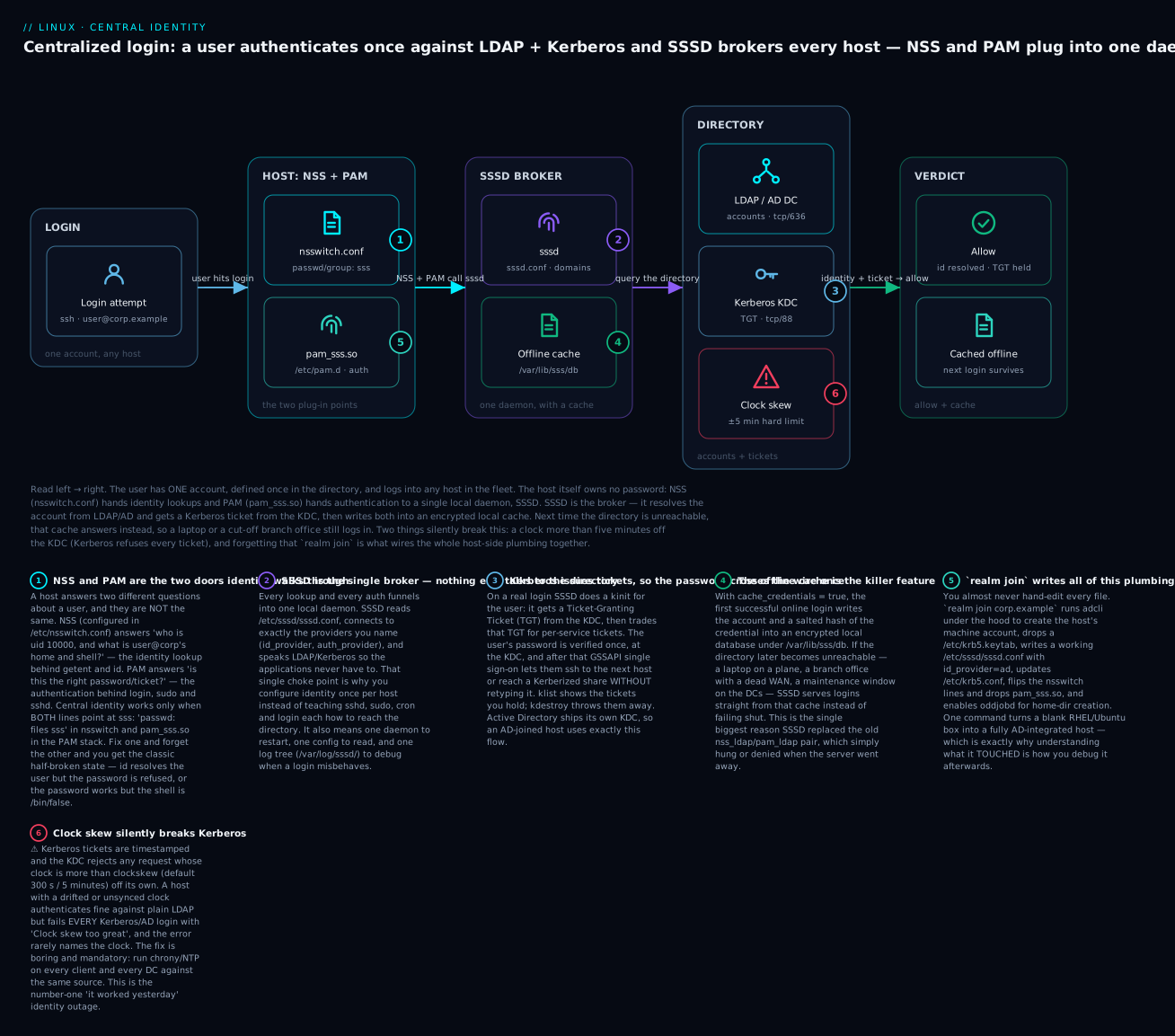
Everything so far — NSS, PAM, LDAP, Kerberos — is glued together on the client by one daemon: SSSD, the System Security Services Daemon. SSSD is the broker. Applications talk to NSS and PAM; NSS and PAM talk to SSSD; SSSD talks to the directory and the KDC, and caches the results. Nothing else on the host needs to know how to reach LDAP or Kerberos.
Here is the whole flow end to end. A user logs into any host; the host’s NSS and PAM hand off to SSSD; SSSD resolves the account from LDAP/AD, gets a Kerberos ticket from the KDC, caches both in an encrypted local store, and returns allow — with the two things that silently break it (clock skew and the realm join plumbing) called out.
/etc/sssd/sssd.conf and the provider model
SSSD’s config is /etc/sssd/sssd.conf. It has a global [sssd] section and one [domain/NAME] section per identity source. The single most important idea is the provider model: for each function, you name where SSSD gets it.
# /etc/sssd/sssd.conf  — MUST be chmod 0600, root:root, or sssd refuses to start
[sssd]
config_file_version = 2
services = nss, pam, ssh, sudo
domains = corp.example

[domain/corp.example]
id_provider = ldap
auth_provider = krb5
chpass_provider = krb5
access_provider = ldap

ldap_uri = ldaps://dc1.corp.example
ldap_search_base = dc=corp,dc=example
ldap_id_use_start_tls = false          # already TLS via ldaps://
ldap_tls_cacert = /etc/pki/tls/certs/corp-ca.pem
ldap_tls_reqcert = demand

krb5_realm = CORP.EXAMPLE
krb5_server = dc1.corp.example, dc2.corp.example

cache_credentials = true               # ← the offline-login killer feature
enumerate = false
override_homedir = /home/%u
default_shell = /bin/bash
| Provider (key) | Answers | Legal values |
|---|---|---|
id_provider |
Where identities come from (NSS) | ldap, ad, ipa, proxy, files |
auth_provider |
How to authenticate (PAM auth) | krb5, ldap, ad, ipa, proxy, defaults to id_provider |
access_provider |
Who is allowed to log in | ldap, ad, ipa, simple, permit, deny |
chpass_provider |
How to change passwords | krb5, ldap, ad, ipa, none |
sudo_provider |
Where sudo rules come from |
ldap, ad, ipa, none |
selinux_provider |
SELinux user maps | ipa, none |
autofs_provider |
automount maps | ldap, ad, ipa, none |
The elegance is that these are independent. A common pattern is id_provider = ldap (accounts from OpenLDAP) with auth_provider = krb5 (passwords verified by a separate MIT KDC). When you join AD, you set them all to ad and SSSD’s AD provider fills in sane defaults for the rest. The other domain options you will touch most:
| Option | What it controls | Typical value |
|---|---|---|
cache_credentials |
Cache creds for offline login | true |
enumerate |
Let getent passwd list all users |
false (⚠️ heavy on big directories) |
ldap_id_mapping |
Algorithmically map AD SIDs→uid | true for AD (see id-mapping section) |
use_fully_qualified_names |
Require user@domain form |
true (multi-domain safe) |
override_homedir |
Force a home path template | /home/%u or /home/%d/%u |
default_shell |
Shell when directory has none | /bin/bash |
fallback_homedir |
Home when directory lacks one | /home/%u |
ldap_user_object_class |
Which objectClass is a user | posixAccount / user |
dyndns_update |
Register host DNS in AD | true on AD joins |
The offline cache — the killer feature
With cache_credentials = true, the first successful online login writes the account plus a salted hash of the credential into an encrypted database under /var/lib/sss/db/. When the directory is later unreachable, SSSD serves logins from that cache instead of failing shut. This is the entire reason SSSD displaced nss_ldap/pam_ldap. It is what lets a laptop authenticate its owner on a plane, and a branch office keep working through a WAN outage. The cache respects an expiry (offline_credentials_expiration, in days; 0 = never) so a disabled account cannot log in offline forever.
The responder services
The services = line enables SSSD’s front-end responders — the sub-daemons that answer each subsystem:
| Responder | Serves | Backing config |
|---|---|---|
nss |
getent, id (identity) |
nsswitch.conf sss source |
pam |
login/sudo/sshd (auth) |
pam_sss.so in PAM stack |
sudo |
sudo rules from the directory |
nsswitch.conf sudoers: sss |
ssh |
Serves user/host SSH keys from dir | sss_ssh_authorizedkeys |
ifp |
InfoPipe D-Bus API | sssctl, monitoring |
pac |
AD PAC (group SIDs) handling | trusts |
autofs |
automount maps | automount: sss |
Enumeration, cache control, and troubleshooting
Enumeration (enumerate = true) makes getent passwd return every user in the directory. It sounds convenient and it is a trap: against an AD forest with 50,000 users it hammers the DCs and bloats the cache. Leave it false; look users up by name (getent passwd alice@corp.example), which always works regardless.
When the directory changes and the host still shows stale data, you invalidate the cache:
| Command | What it does |
|---|---|
sss_cache -E |
Expire all cached entries (next lookup refetches) |
sss_cache -u alice |
Expire one user |
sss_cache -g engineering |
Expire one group |
sssctl cache-expire -E |
Newer equivalent of sss_cache -E |
sssctl user-checks alice@corp.example |
Show NSS+PAM+cache view of a user (best single debug) |
sssctl domain-list / domain-status <d> |
Domains and whether they are online |
sssctl config-check |
Validate sssd.conf for errors before restart |
⚠️ Expiring the cache is not the same as clearing it. If accounts genuinely changed identity (uid remap) and you need a hard reset, stop SSSD and delete the cache files:
sudo systemctl stop sssd
sudo rm -f /var/lib/sss/db/*        # ⚠️ wipes the offline cache; users can't log in offline until they re-auth online
sudo systemctl start sssd
For diagnosis, raise the log level and read the per-service logs:
# Temporarily raise debug level without editing the file (SSSD ≥ 1.13)
sudo sssctl debug-level 8
# or set  debug_level = 8  under [sssd], [nss], [pam], and the [domain/…] section
sudo systemctl restart sssd
sudo ls /var/log/sssd/
# sssd.log  sssd_nss.log  sssd_pam.log  sssd_corp.example.log
sudo journalctl -u sssd -f          # watch the daemon live
Joining Active Directory: realmd + adcli
Now the payoff. The overwhelming majority of enterprises run Active Directory, and AD is exactly LDAP + Kerberos + DNS in one product. Joining a Linux host to it — so AD users can log in — is essentially one command, because realmd orchestrates everything. There are two paths; this is the mainstream one.
Prerequisites (the boring 20% that causes 80% of failures)
Before realm join will work, three things must be true. Skip them and you will burn an hour:
- DNS must resolve the domain and its SRV records. The host must use the AD DNS servers (or ones that forward to them), because Kerberos and realmd find the DCs via
_ldap._tcpand_kerberos._tcpSRV records. Test withrealm discover corp.exampleanddig -t SRV _ldap._tcp.corp.example. - Clocks must be within 5 minutes of the DC — the clock-skew rule from the Kerberos section. Run
chrony. - Install the packages. They differ by family:
| Purpose | Debian/Ubuntu (apt) |
RHEL/Fedora/Rocky (dnf) |
|---|---|---|
| Join + discovery | realmd adcli |
realmd adcli |
| SSSD + tools | sssd sssd-tools |
sssd sssd-tools |
| NSS/PAM modules | libnss-sss libpam-sss |
(in sssd) |
| Samba helpers | samba-common-bin |
samba-common-tools |
| Kerberos client | krb5-user |
krb5-workstation |
| Home-dir on login | oddjob oddjob-mkhomedir |
oddjob oddjob-mkhomedir |
| PAM/NSS profile tool | libpam-runtime (pam-auth-update) |
authselect |
# Debian/Ubuntu
sudo apt install -y realmd adcli sssd sssd-tools libnss-sss libpam-sss \
     samba-common-bin krb5-user oddjob oddjob-mkhomedir packagekit
# RHEL/Fedora/Rocky
sudo dnf install -y realmd adcli sssd sssd-tools samba-common-tools \
     krb5-workstation oddjob oddjob-mkhomedir authselect
The realmd command table
realmd is a thin, high-level orchestrator over adcli, sssd, and Kerberos. Its whole vocabulary:
| Command | What it does |
|---|---|
realm discover corp.example |
Probe the domain via DNS/LDAP; print what a join would configure |
realm join -U Administrator corp.example |
Create the machine account and configure everything (interactive password) |
realm join --computer-ou='OU=Linux,…' … |
Place the computer object in a specific OU |
realm list |
Show joined realms and current login policy |
realm permit alice@corp.example |
Allow a specific user to log in |
realm permit -g 'Linux Admins' |
Allow a whole group |
realm permit --all |
Allow every domain user (⚠️ broad) |
realm deny --all |
Deny everyone (then permit selectively) |
realm leave corp.example |
Unjoin: remove the machine account and config |
The join, step by step
# 1. Discover — no changes made; shows required packages and what will be set
realm discover corp.example
# corp.example
#   type: kerberos
#   realm-name: CORP.EXAMPLE
#   configured: no
#   server-software: active-directory
#   client-software: sssd
#   required-package: sssd
#   required-package: adcli
#   ...

# 2. Join — creates the host's machine account in AD, writes all local config
sudo realm join -U Administrator corp.example
# Password for Administrator:
#  * Successfully enrolled machine in realm

# 3. Verify
realm list
# corp.example
#   type: kerberos
#   realm-name: CORP.EXAMPLE
#   ...
#   login-formats: %U@corp.example
#   login-policy: allow-realm-logins
That single realm join is doing a great deal under the hood. Knowing exactly which files it touched is how you debug the host afterwards:
realm join configures |
What it writes / does | Why |
|---|---|---|
| AD machine account | Creates HOST$ computer object in AD (via adcli) |
The host’s own Kerberos identity |
/etc/krb5.keytab |
The host’s keys | Host authenticates without a human password |
/etc/sssd/sssd.conf |
id_provider = ad, realm, domain, mapping |
The working SSSD config |
/etc/krb5.conf |
default_realm, KDC discovery |
Kerberos client config |
/etc/nsswitch.conf |
Adds sss to passwd/group/… |
NSS plug-in |
| PAM stack | Adds pam_sss.so (via authselect/pam-auth-update) |
Auth plug-in |
oddjobd |
Enables it (with --automatic-id-mapping) |
Create home dirs on first login |
| DNS | Registers the host’s A record (dyndns_update) |
Host is reachable by name |
The other path: FreeIPA / ipa-client-install
If your directory is FreeIPA (or RHEL IdM) rather than AD, the equivalent join is ipa-client-install. It does the same category of work — machine account, keytab, sssd.conf with id_provider = ipa, krb5.conf, NSS/PAM — but it also enrolls the host into IPA’s integrated services (certificate auto-enrollment via certmonger, HBAC, sudo):
sudo ipa-client-install --domain=ipa.example --server=ipa1.ipa.example \
     --principal=admin --mkhomedir --enable-dns-updates
# ... discovers IPA, obtains a keytab, writes sssd.conf with id_provider = ipa ...
Both paths converge on the same runtime picture: NSS + PAM → SSSD → directory + KDC. Only the id_provider (ad vs ipa) and the back-end services differ.
Managing AD-joined behavior
A successful join is the start, not the end. Out of the box, realm join typically permits everyone or no one, creates no home directories the way you want, and maps IDs algorithmically. Tuning this is where real deployments live.
Who may log in: realm permit / deny and access control
By default a fresh join may allow all domain users (login-policy: allow-realm-logins) — rarely what you want on a specific server. Lock it down:
sudo realm deny --all                              # deny everyone first
sudo realm permit -g 'Linux Admins@corp.example'   # then allow one group
sudo realm permit alice@corp.example bob@corp.example
realm list                                         # confirm the policy
Behind the scenes this drives SSSD’s access_provider. You can also express access directly in sssd.conf:
access_provider |
How access is decided | Config |
|---|---|---|
simple |
Static allow/deny lists | simple_allow_groups = linux-admins |
ad |
Honour AD GPO logon rights | ad_gpo_access_control = enforcing |
ldap |
An LDAP filter must match | ldap_access_filter = memberOf=cn=… |
permit |
Everyone allowed | (testing only) |
deny |
No one allowed | (lockdown) |
AD GPO access control
When access_provider = ad, SSSD can enforce the same “Allow log on locally / through Remote Desktop” GPO rights that Windows uses. This is powerful and a notorious foot-gun:
ad_gpo_access_control |
Behaviour |
|---|---|
enforcing |
Honour GPO logon rights; deny if not granted (default on modern SSSD) |
permissive |
Evaluate and log what it would deny, but allow — perfect for testing |
disabled |
Ignore GPO logon rights entirely |
⚠️ The classic outage: you join a host, access_provider = ad defaults to enforcing, and because no GPO grants “Allow log on locally” to your Linux admins, everyone is locked out — including the account you were about to test with. Set ad_gpo_access_control = permissive while you validate, watch /var/log/sssd/ for the would-be denials, grant the right GPO, then switch to enforcing.
Home directories on first login
AD/LDAP stores a homeDirectory path, but the directory does not exist on a freshly joined host until you create it. Two moving parts create it on first login:
| Mechanism | What it is | How to enable |
|---|---|---|
pam_mkhomedir.so |
PAM session module that makes the home dir | Debian: sudo pam-auth-update → enable “mkhomedir” |
pam_oddjob_mkhomedir.so |
Same, but via the privileged oddjobd D-Bus helper |
RHEL: authselect select sssd with-mkhomedir + systemctl enable --now oddjobd |
override_homedir |
Force the path regardless of the directory value | sssd.conf: override_homedir = /home/%u |
# RHEL/Fedora — the modern, correct incantation
sudo authselect select sssd with-mkhomedir --force
sudo systemctl enable --now oddjobd
# Debian/Ubuntu
sudo pam-auth-update --enable mkhomedir
⚠️ Symptom of forgetting this: the user authenticates fine but lands in / with Could not chdir to home directory /home/alice@corp.example: No such file or directory. That is the missing-mkhomedir signature, not an auth failure.
ID mapping: ldap_id_mapping and POSIX attributes
Windows identifies users by SID (a long string), not by a POSIX uidNumber. Linux needs an integer uid. There are two ways to bridge this, and choosing wrong causes files owned by “nobody” across NFS:
| Mode | ldap_id_mapping |
How uid/gid is derived | Use when |
|---|---|---|---|
| Algorithmic | true (realmd default) |
SSSD hashes the SID→uid deterministically | Pure AD, no POSIX attrs; must be identical config fleet-wide |
| POSIX attributes | false |
Read uidNumber/gidNumber from AD (IDMU / RFC 2307) |
You manage explicit uids in AD, or share NFS with legacy Unix |
⚠️ The trap: algorithmic mapping is deterministic only if every host uses the same range and the same ldap_idmap_* settings. Mix ldap_id_mapping = true on host A with false (POSIX attrs) on host B and the same AD user gets different uids on the two hosts — so files alice creates over NFS on A show as some random uid on B. Pick one strategy and apply it uniformly. When AD carries real uidNumber attributes (Identity Management for Unix), set ldap_id_mapping = false and let them win.
sudo rules from AD/LDAP
Central identity should include central authorization. SSSD can pull sudo rules from the directory so a group’s privileges live in one place. Two steps:
# 1. Tell NSS that sudoers can come from sss
grep sudoers /etc/nsswitch.conf || echo 'sudoers: files sss' | sudo tee -a /etc/nsswitch.conf
# 2. Enable the sudo provider in sssd.conf
[sssd]
services = nss, pam, sudo
[domain/corp.example]
sudo_provider = ad          # or ldap / ipa
Rules are stored as sudoRole entries (the sudo LDAP schema), typically under ou=SUDOers:
sudoRole attribute |
Meaning | Example |
|---|---|---|
cn |
Rule name | cn=admins |
sudoUser |
Who it applies to | %linux-admins (a group) |
sudoHost |
Which hosts | ALL or web1 |
sudoCommand |
What they may run | ALL or /usr/bin/systemctl |
sudoOption |
Options | !authenticate, runas=root |
FreeIPA models this natively (ipa sudorule-add), which is far more pleasant than hand-crafting sudoRole LDIF in raw LDAP.
Testing an AD-joined host
After a join, prove every layer works, bottom to top:
| Test | Command | Confirms |
|---|---|---|
| Identity (NSS) | id alice@corp.example |
uid/gid/groups resolve |
| Identity (getent) | getent passwd alice@corp.example |
NSS sss source works |
| Kerberos | kinit alice@CORP.EXAMPLE then klist |
KDC issues a TGT |
| Groups | groups alice@corp.example |
group membership resolves |
| Local switch | su - alice@corp.example |
PAM auth + home dir + shell |
| Remote login | ssh alice@corp.example@web1 |
end-to-end, incl. mkhomedir |
| SSSD view | sssctl user-checks alice@corp.example |
the full NSS+PAM+cache picture |
id alice@corp.example
# uid=1631400500(alice@corp.example) gid=1631400500(...) groups=...,1631400513(linux-admins@corp.example)
If id resolves but su - fails → PAM/Kerberos problem (clock, keytab, access). If id itself fails → NSS/LDAP problem (search base, TLS, sss not in nsswitch.conf). That single split points you at the right half of the stack every time.
FreeIPA: the Linux-native Active Directory
Active Directory is superb — for Windows. On a majority-Linux estate, FreeIPA (upstream of Red Hat IdM) gives you the same benefits built the Linux way, out of open components, with first-class POSIX support and no reliance on Windows servers. It is worth knowing even if you run AD, because IPA can trust AD and manage the Linux-specific policy (HBAC, sudo, SELinux maps) that AD models awkwardly.
FreeIPA is an integrated bundle — you install a server, not seven services:
| FreeIPA component | Role | AD equivalent |
|---|---|---|
| 389 Directory Server | The LDAP directory (accounts, groups) | AD’s LDAP |
| MIT Kerberos KDC | Ticket authority | AD’s KDC |
| BIND (integrated DNS) | DNS + SRV records for discovery | AD-integrated DNS |
| Dogtag / certmonger | Certificate Authority, auto-enrollment | AD Certificate Services |
| HBAC | Host-Based Access Control (who logs in where) | GPO logon rights |
| sudo rules | Native central sudo |
sudoRole in LDAP |
SSSD ipa provider |
The client integration | SSSD ad provider |
The workflow mirrors AD’s, in Linux idiom:
# On the server (one-time): stand up the whole stack
sudo ipa-server-install --domain=ipa.example --realm=IPA.EXAMPLE --setup-dns
# On each client: enroll
sudo ipa-client-install --mkhomedir
# Administer with the `ipa` CLI (talks LDAP+Kerberos for you)
ipa user-add alice --first=Alice --last=Ng --shell=/bin/bash
ipa group-add-member linux-admins --users=alice
ipa sudorule-add admins --hostcat=all
ipa hbacrule-add allow-admins        # who may log into which hosts
Where each fits:
| Standalone LDAP + Kerberos | FreeIPA / IdM | Active Directory | |
|---|---|---|---|
| Setup effort | High — wire each piece yourself | One ipa-server-install |
Windows-native |
| POSIX accounts | Native (RFC 2307) | Native, first-class | Bolt-on (IDMU) or algorithmic |
| Integrated DNS/CA | No | Yes | Yes |
Central sudo/HBAC |
Manual LDIF | Built-in, CLI-managed | GPO + sudoRole |
| Linux client provider | id_provider = ldap+krb5 |
id_provider = ipa |
id_provider = ad |
| Best when | Appliances, minimal footprint | Majority-Linux estate | Windows-centric enterprise |
| Windows clients | No | Via AD trust | Native |
The pragmatic modern architecture in a mixed shop is an IPA–AD trust: AD remains the source of truth for people, IPA manages Linux hosts and Linux-specific policy, and the two trust each other so an AD user logs into a Linux host governed by IPA HBAC rules. That is beyond this lesson, but the components above are exactly the pieces that make it possible.
Hands-on lab
This lab is fully self-contained: you will run a real LDAP directory in a container, point SSSD at it, log in as a directory user, and then — the payoff — pull the network out from under it and watch the offline cache keep the login working. You need one Linux VM (or WSL2) with sudo and either podman or docker. It uses plain LDAP over localhost for reproducibility; the ⚠️ notes flag exactly where production would differ.
⚠️ Do this on a throwaway VM or container host, not a machine whose logins you care about — you are editing nsswitch.conf, PAM, and sssd.conf.
Step 1 — Run a directory server
# Start OpenLDAP with a seeded base (dc=example,dc=org), admin password "admin"
podman run -d --name lab-ldap -p 389:389 -p 636:636 \
  -e LDAP_ORGANISATION="Lab" -e LDAP_DOMAIN="example.org" \
  -e LDAP_ADMIN_PASSWORD="admin" docker.io/osixia/openldap:1.5.0
podman ps
What just happened: you now have a real LDAP server on localhost:389 with base dc=example,dc=org and a directory manager cn=admin,dc=example,dc=org. (Use docker in place of podman identically.)
Step 2 — Seed a POSIX user and group
sudo apt install -y ldap-utils || sudo dnf install -y openldap-clients
cat > /tmp/lab.ldif <<'EOF'
dn: ou=People,dc=example,dc=org
objectClass: organizationalUnit
ou: People

dn: ou=Groups,dc=example,dc=org
objectClass: organizationalUnit
ou: Groups

dn: cn=labusers,ou=Groups,dc=example,dc=org
objectClass: posixGroup
cn: labusers
gidNumber: 20001

dn: uid=labuser,ou=People,dc=example,dc=org
objectClass: inetOrgPerson
objectClass: posixAccount
objectClass: shadowAccount
cn: Lab User
sn: User
uid: labuser
uidNumber: 20001
gidNumber: 20001
homeDirectory: /home/labuser
loginShell: /bin/bash
EOF

ldapadd -x -H ldap://127.0.0.1 -D "cn=admin,dc=example,dc=org" -w admin -f /tmp/lab.ldif
# adding new entry "ou=People,dc=example,dc=org"  ... (4 entries)

# Set labuser's password (a real bind credential)
ldappasswd -x -H ldap://127.0.0.1 -D "cn=admin,dc=example,dc=org" -w admin \
  -s "LabPass123" "uid=labuser,ou=People,dc=example,dc=org"
What just happened: you created a posixAccount (uid 20001) and a posixGroup, exactly the objectClasses from the LDAP table, then set the user’s password with ldappasswd.
Step 3 — Confirm with ldapsearch
ldapsearch -x -H ldap://127.0.0.1 -b "dc=example,dc=org" -LLL "(uid=labuser)" \
  uid uidNumber gidNumber homeDirectory loginShell
# dn: uid=labuser,ou=People,dc=example,dc=org
# uid: labuser
# uidNumber: 20001
# gidNumber: 20001
# homeDirectory: /home/labuser
# loginShell: /bin/bash
What just happened: you queried the directory as a client. This is precisely what SSSD will do — same base, same filter.
Step 4 — Install and configure SSSD
sudo apt install -y sssd sssd-tools libnss-sss libpam-sss oddjob oddjob-mkhomedir \
  || sudo dnf install -y sssd sssd-tools oddjob oddjob-mkhomedir authselect

sudo tee /etc/sssd/sssd.conf >/dev/null <<'EOF'
[sssd]
config_file_version = 2
services = nss, pam
domains = LAB

[domain/LAB]
id_provider = ldap
auth_provider = ldap
ldap_uri = ldap://127.0.0.1
ldap_search_base = dc=example,dc=org
ldap_default_bind_dn = cn=admin,dc=example,dc=org
ldap_default_authtok = admin
# ⚠️ LAB ONLY: no TLS, and admin creds in the file. In production use
#   ldaps://, ldap_tls_reqcert=demand, a read-only bind DN, and chmod-600 secrets.
cache_credentials = true
enumerate = true
override_homedir = /home/%u
default_shell = /bin/bash
EOF

sudo chmod 600 /etc/sssd/sssd.conf     # SSSD refuses to start otherwise
What just happened: SSSD now knows one domain, id_provider/auth_provider = ldap, with cache_credentials = true (the feature we will test) and enumerate = true (fine for a tiny lab directory).
Step 5 — Wire NSS + PAM to SSSD
# RHEL/Fedora: authselect writes both nsswitch and PAM correctly
sudo authselect select sssd with-mkhomedir --force 2>/dev/null

# Debian/Ubuntu: enable the sss NSS source and mkhomedir PAM module
sudo pam-auth-update --enable mkhomedir 2>/dev/null
grep -q 'passwd:.*sss' /etc/nsswitch.conf || \
  sudo sed -ri 's/^(passwd:.*)/\1 sss/; s/^(group:.*)/\1 sss/; s/^(shadow:.*)/\1 sss/' /etc/nsswitch.conf

sudo systemctl enable --now oddjobd
sudo systemctl restart sssd
What just happened: nsswitch.conf now lists sss after files, pam_sss.so is in the PAM stack, and oddjobd is ready to make home directories.
Step 6 — Resolve the directory user
getent passwd labuser
# labuser:*:20001:20001:Lab User:/home/labuser:/bin/bash
id labuser
# uid=20001(labuser) gid=20001(labuser) groups=20001(labuser),20001(labusers)
What just happened: NSS fell through files and asked SSSD, which asked LDAP. The account resolves on this host without existing in /etc/passwd. That is central identity.
Step 7 — Log in as the directory user
su - labuser        # enter LabPass123 when prompted
# Creating home directory for labuser.
# labuser@host:~$ whoami
# labuser
# labuser@host:~$ exit
What just happened: PAM’s auth group ran pam_sss.so, SSSD did an LDAP bind as uid=labuser,… with the password, it succeeded, and pam_oddjob_mkhomedir created /home/labuser. Because cache_credentials = true, SSSD just cached a hash of that credential.
Step 8 — The payoff: offline login
podman stop lab-ldap        # the directory is now UNREACHABLE
sssctl domain-status LAB    # SSSD notices it is offline
# Online status: Offline

su - labuser                # enter LabPass123 again
# labuser@host:~$ whoami
# labuser
What just happened: the directory is down, yet labuser still logged in — SSSD served the identity and verified the credential from its offline cache. This is the single feature that makes centralized identity survivable on laptops and branch offices. Restart the container (podman start lab-ldap) and SSSD transparently goes back online.
Step 9 — Tear down
sudo systemctl stop sssd
sudo rm -f /var/lib/sss/db/* /var/lib/sss/mc/*   # wipe the cache
sudo rm -f /etc/sssd/sssd.conf
podman rm -f lab-ldap
# On RHEL: sudo authselect select minimal  (or restore your prior profile)
What just happened: you removed the SSSD config and cache and stopped the container. The host is back to local-only accounts.
Common mistakes and troubleshooting
Identity failures are intimidating because the error rarely names the real cause — “permission denied” could be DNS, a clock, a keytab, a search base, or a missing home dir. This table is the map from symptom to cause to fix; the prose after it covers the three that waste the most time.
| Symptom | Likely cause | Fix |
|---|---|---|
Clock skew too great on login; LDAP still works |
Host clock >5 min off the KDC/DC | chronyc makestep; run chrony on all hosts + DCs against one source |
User resolves (id works) but password rejected |
auth_provider/keytab/Kerberos wrong; or wrong password |
kinit user@REALM to isolate; check /etc/krb5.keytab with klist -k |
id user@domain returns “no such user” |
sss missing from nsswitch.conf, or wrong ldap_search_base |
Add sss to passwd/group; verify base with ldapsearch |
Login OK but lands in /, “Could not chdir to home” |
mkhomedir not enabled / oddjobd off |
authselect … with-mkhomedir or pam-auth-update; systemctl enable --now oddjobd |
| Same AD user has different uids on two hosts | Inconsistent ldap_id_mapping (true vs false) |
Standardise mapping strategy + ranges fleet-wide; clear cache |
| Everyone locked out right after AD join | ad_gpo_access_control = enforcing, no GPO grants logon |
Set permissive, grant the “Allow log on locally” GPO, then enforcing |
realm join fails at discovery |
DNS can’t resolve SRV records; wrong resolver | Point host at AD DNS; dig -t SRV _ldap._tcp.corp.example |
| Stale account data after a directory change | SSSD cache not expired | sss_cache -E (or sssctl cache-expire -E) |
SSSD couldn't load the configuration on start |
sssd.conf not 0600 root:root, or syntax error |
chmod 600; sssctl config-check |
| Groups resolve empty though membership exists | Wrong ldap_schema (rfc2307 vs rfc2307bis) |
Match schema to the directory’s membership model |
| TLS bind fails: “Can’t contact LDAP server” | Cert not trusted / reqcert mismatch / wrong port |
Set ldap_tls_cacert; use ldaps:// (636) or StartTLS on 389 |
getent passwd lists nothing but named lookups work |
enumerate = false (this is normal!) |
Look up by name; do not enable enumerate on big directories |
Gotcha 1 — DNS is the hidden dependency
More AD-join failures trace back to DNS than to anything else. Kerberos and realmd locate domain controllers through SRV records (_ldap._tcp.corp.example, _kerberos._tcp.corp.example), and if the host’s resolver cannot see them, realm discover returns nothing and kinit fails with Cannot find KDC. Before touching SSSD, prove DNS: dig -t SRV _ldap._tcp.corp.example must return your DCs. Point the host at the AD DNS servers (or a resolver that forwards the AD zones) — the networking fundamentals lesson covers setting resolvers with nmcli and testing DNS. This one prerequisite, quietly unmet, produces a dozen different downstream error messages.
Gotcha 2 — the clock, again and forever
It bears repeating because it is that common: any Kerberos or AD login fails hard if the host clock drifts more than five minutes from the KDC. The tell is that plain LDAP identity lookups (getent, id) keep working while every authentication fails, because LDAP has no timestamp requirement and Kerberos does. If auth breaks fleet-wide “for no reason,” check chronyc tracking before anything else. NTP is not optional infrastructure for Kerberos; it is a hard dependency.
Gotcha 3 — id-mapping drift corrupts shared files
The subtlest failure is silent. When one host uses algorithmic mapping (ldap_id_mapping = true) and another reads POSIX attributes (false), the same AD user is uid 1631400500 on the first host and uid 10000 on the second. Everything looks fine until they share storage: files alice creates over NFS on host A show up owned by some stranger’s uid — or nobody — on host B. The fix is discipline, not cleverness: decide one strategy for the whole fleet (algorithmic or POSIX attributes), pin the same ldap_idmap_range_* settings everywhere, and if you migrate, clear the SSSD cache (sss_cache -E) so old mappings do not linger.
Cheat-sheet
Bookmark this. LDAP and Kerberos first:
| Command | What it does |
|---|---|
ldapsearch -x -ZZ -H ldap://dc -b <base> -LLL "(uid=x)" |
Search over StartTLS, clean output |
ldapsearch -x -H ldaps://dc -b <base> "(objectClass=posixAccount)" |
List POSIX accounts (LDAPS) |
ldapadd -x -D <binddn> -W -f file.ldif |
Add entries from an LDIF |
ldappasswd -x -D <binddn> -W -s NEW <userdn> |
Set a user’s password |
kinit user@REALM |
Get a TGT (authenticate) |
klist / klist -e |
List tickets / with enctypes |
klist -k -t /etc/krb5.keytab |
Inspect a keytab |
kdestroy |
Discard tickets |
kvno host/fqdn |
Fetch/check a service ticket version |
chronyc tracking |
Verify clock sync (Kerberos prereq) |
SSSD, realmd, and testing:
| Command | What it does |
|---|---|
realm discover DOMAIN |
Probe a domain (no changes) |
realm join -U admin DOMAIN |
Join AD; configures everything |
realm list |
Show joined realms + login policy |
realm permit -g 'Group' / realm deny --all |
Manage who may log in |
realm leave DOMAIN |
Unjoin |
ipa-client-install --mkhomedir |
Enroll into FreeIPA |
sssctl user-checks user@dom |
Full NSS+PAM+cache view of a user |
sssctl domain-status DOM |
Is the domain online? |
sssctl config-check |
Validate sssd.conf |
sss_cache -E / sssctl cache-expire -E |
Expire the cache |
systemctl restart sssd |
Reload after config changes |
id user@dom / getent passwd user@dom |
Test identity resolution |
su - user@dom |
Test auth + home dir + shell |
journalctl -u sssd -f |
Watch SSSD live |
Key files:
| File | Role |
|---|---|
/etc/nsswitch.conf |
NSS sources (passwd: files sss) |
/etc/pam.d/* |
PAM stacks (pam_sss.so) |
/etc/sssd/sssd.conf |
SSSD config (must be 0600 root:root) |
/etc/krb5.conf |
Kerberos client config |
/etc/krb5.keytab |
The host’s Kerberos keys |
/var/lib/sss/db/ |
The offline cache |
/var/log/sssd/ |
Per-service SSSD logs |
Interview and exam questions
Q: What is the difference between NSS and PAM, and why does central identity need both?
A: NSS (/etc/nsswitch.conf) answers identity questions — who is uid 10000, what is alice’s home and shell — behind getent/id. PAM answers authentication — is this the right password/ticket — behind login/sudo/sshd. Central identity must add sss to nsswitch.conf (so the directory’s users resolve) and pam_sss.so to the PAM stack (so their passwords verify). Fix only one and you get a half-broken host: the user resolves but can’t authenticate, or authenticates into a broken shell.
Q: Your users can getent passwd alice@corp but su - alice@corp is rejected. Where do you look first?
A: NSS works, so it is an authentication problem, not identity. Isolate with kinit alice@CORP — if that fails too it is Kerberos (clock skew, KDC reachability, keytab); if kinit works but su doesn’t, look at the PAM stack / access_provider. Check chronyc tracking for clock skew and /var/log/sssd/sssd_pam.log.
Q: What is a TGT, and why is it better than sending a password to each service?
A: A Ticket-Granting Ticket is a session token from the KDC obtained at login (kinit). You trade it for per-service tickets without re-entering your password, and services validate those tickets with their own keytab keys — so your password is verified once, at the KDC, and never travels to or is seen by the services. That is the basis of Kerberos single sign-on via GSSAPI.
Q: Why must clocks be synchronised for Kerberos, and what is the default tolerance?
A: Tickets are timestamped to prevent replay; the KDC rejects requests whose clock differs from its own by more than clockskew (default 300 s / 5 minutes). A drifted clock fails every Kerberos/AD login with “Clock skew too great” even though LDAP identity lookups still work. Fix: run chrony/NTP on all clients and KDCs against a common source.
Q: What does cache_credentials = true buy you, and what is the risk?
A: It lets SSSD cache a hash of a successfully verified credential so the user can log in offline when the directory is unreachable — essential for laptops and branch offices. The risk is that a credential remains usable offline until the cache expires (offline_credentials_expiration), so a disabled account could still log in offline within that window; set a sane expiry.
Q: Explain the two ldap_id_mapping strategies for AD and when to use each.
A: true (algorithmic) deterministically hashes each AD SID into a uid/gid — no POSIX attributes needed, but every host must use identical ranges/config or the same user gets different uids. false reads explicit uidNumber/gidNumber from AD (Identity Management for Unix / RFC 2307) — use it when AD carries real POSIX attributes or you share NFS with legacy Unix. The cardinal rule is consistency across the fleet.
Q: A user logs in but lands in / with “Could not chdir to home directory.” What is wrong?
A: The home directory does not exist and nothing is creating it on first login. Enable mkhomedir: on RHEL authselect select sssd with-mkhomedir plus systemctl enable --now oddjobd; on Debian pam-auth-update --enable mkhomedir. This is a session-stage problem, not an auth failure.
Q: What does realm join actually configure on the host? (name at least four)
A: It creates the host’s machine account in AD; writes /etc/krb5.keytab; writes /etc/sssd/sssd.conf with id_provider = ad; updates /etc/krb5.conf; adds sss to /etc/nsswitch.conf; adds pam_sss.so to the PAM stack (via authselect/pam-auth-update); and enables oddjobd for home creation. Understanding this list is how you debug an AD-joined host.
Q: Why should you never do a plaintext LDAP simple bind, and what are the two ways to encrypt?
A: A simple bind sends the DN and password; over an unencrypted socket the password is readable by anyone sniffing the wire. Encrypt with LDAPS (TLS from the first byte, port 636) or StartTLS (upgrade an ldap:// connection on 389 via ldap_id_use_start_tls = true), and always validate the server cert (ldap_tls_reqcert = demand) — never never.
Q: (RHCSA-style task) Join this host to corp.example and permit only the sysadmins group to log in. List the commands.
A: Ensure DNS+time are correct, then sudo dnf install -y realmd sssd adcli krb5-workstation oddjob-mkhomedir authselect; sudo realm join -U Administrator corp.example; sudo realm deny --all; sudo realm permit -g 'sysadmins@corp.example'; enable home dirs with sudo authselect select sssd with-mkhomedir && sudo systemctl enable --now oddjobd; verify with id someuser@corp.example and realm list.
Q: (LFCS-style task) SSSD shows stale group membership after you changed a group in LDAP. How do you force a refresh without a reboot?
A: Expire the cache: sudo sss_cache -g groupname (or sudo sss_cache -E for everything, or sssctl cache-expire -E). The next lookup refetches from the directory. A systemctl restart sssd also works but is heavier and drops the online/offline state.
Q: What is FreeIPA and how does it compare to Active Directory for a Linux estate?
A: FreeIPA (RHEL IdM) is an integrated Linux identity server bundling 389-DS (LDAP), MIT Kerberos, DNS, a Dogtag CA, HBAC, and central sudo, with first-class POSIX support. It is the Linux-native equivalent of AD: ipa-client-install enrolls hosts (id_provider = ipa). In mixed shops the common design is an IPA–AD trust — AD owns people, IPA owns Linux hosts and Linux-specific policy (HBAC/sudo/SELinux maps).
Key takeaways
- Central identity replaces per-host
/etc/passwdwith one source of truth — one account, one uid, one place to disable, fleet-wide policy — and the whole stack exists to make that survivable, including offline. - NSS answers who, PAM answers can they prove it. Central identity must add
ssstonsswitch.confandpam_sss.soto the PAM stack; miss either and the host is half-broken. - LDAP stores accounts (the
posixAccount/posixGroupobjectClasses hold the/etc/passwdfields); Kerberos authenticates them with tickets so passwords are verified once at the KDC and never sent to services — the basis of GSSAPI single sign-on. - SSSD is the single broker and its offline cache (
cache_credentials = true) is the killer feature that lets logins survive when the directory is unreachable. - Joining Active Directory is one command (
realm join, drivingadcli) that configures sssd.conf, krb5, the keytab, NSS, PAM and home-dir creation — and knowing what it touched is how you debug it. - Three things silently break identity: DNS that can’t resolve SRV records, clocks more than five minutes off the KDC (“Clock skew too great”), and inconsistent id-mapping across the fleet.
- Always encrypt —
ldaps://or StartTLS with a validated CA, never a plaintext simple bind and neverreqcert = never. - FreeIPA is the Linux-native AD: an integrated LDAP + Kerberos + DNS + CA + HBAC + sudo bundle (
id_provider = ipa), ideal for majority-Linux estates and the anchor for an AD trust in mixed ones.