Ask a room of engineers “what’s the hardest thing to run well on Linux?” and the honest answer is almost always a database. A stateless web app can be restarted, scaled sideways, and mostly ignored by the kernel. A database is the opposite: it holds the one thing you cannot rebuild, it wants to own most of your RAM, it hammers the disk with a very particular mix of sequential and random I/O, and it interacts with parts of the kernel — the memory manager, the I/O scheduler, the OOM killer, the file-descriptor limits — that most applications never touch. Get the Linux side wrong and the fastest query engine in the world will crawl, stall in mysterious latency spikes, or get shot dead by the kernel at 3 a.m.
This lesson is deliberately not about SQL. It is about the host — the Linux/OS craft of running PostgreSQL or MySQL/MariaDB so that the database engine gets exactly what it needs from the machine underneath it. We install from the right repositories, lay the storage out the way a DBA expects, tune the memory and kernel knobs that matter (and skip the cargo-cult ones that don’t), put a connection pooler in front so the box doesn’t fall over under load, and finish with backups that actually restore. Everything runs on a throwaway VM, a cloud instance, or a container — type along.
Why this matters
A database is a resource amplifier. Where a typical service might use a few hundred MB of RAM and open a handful of files, a production database wants to cache tens or hundreds of gigabytes in a buffer pool, keep thousands of files and sockets open at once, and turn every commit into a synchronous write to disk. It pushes each of the four machine resources — CPU, memory, disk, network — closer to its limit, in a pattern nothing else on the box matches. Here is the shape of that demand:
| Resource | A typical web app | A busy database | Why the difference bites on Linux |
|---|---|---|---|
| Memory | Tens–hundreds of MB, mostly heap | A buffer pool of 25–75% of RAM, kept warm | The engine competes with the OS page cache; THP and the OOM killer become real threats |
| Disk I/O | Occasional log writes | Constant random reads + a relentless sequential fsync stream (the WAL/redo log) | Mixing the two on one disk, or wrong mount/scheduler settings, cripples latency |
| Open files | A few dozen FDs | Thousands of files + sockets | The default ulimit -n 1024 and systemd’s limits become a hard ceiling |
| Processes/threads | One process, a few threads | One backend process (PG) or thread (MySQL) per connection | Thousands of connections = thousands of expensive contexts → needs a pooler |
| Durability | Best-effort | Every commit fsync’d; a torn write can corrupt | fsync behaviour, write barriers, and consistent snapshots suddenly matter |
Beginners hosting their first database make the same handful of mistakes, and they are all Linux mistakes, not SQL ones. They leave Transparent Huge Pages on and chase phantom “disk” latency for weeks. They put the data directory on the root filesystem next to /var/log and wonder why a log flood corrupts nothing but slows everything. They set a giant shared_buffers and get OOM-killed. They open the port to the world with the default auth. They “back up” with a filesystem copy of a running database and discover at restore time that it is corrupt. Every one of these is preventable with OS knowledge you already half-have from earlier lessons.
The mental model to hold for the whole lesson: the database engine is a tenant, and Linux is the landlord. Your job as the landlord is to give the tenant a dedicated room (storage), the right amount of heat and light (memory and kernel tuning), a doorman so it isn’t mobbed (the connection pooler), and a fire escape (backups). Do that and the tenant — Postgres or MySQL — runs beautifully. This lesson is the landlord’s checklist.
Installing PostgreSQL and MySQL/MariaDB the right way
The first decision is where the packages come from, and it matters more than beginners expect. Every distro ships a database in its default repos, but that version is frozen at the distro’s release and is often a major version or two behind. For a long-lived database you usually want the vendor repository instead — the PostgreSQL Global Development Group (PGDG) apt/yum repos, or the official MySQL APT/Yum repos from Oracle — which give you current major versions and let you control when you upgrade.
| Source | You get | Pros | Cons | Use when |
|---|---|---|---|---|
Distro default (apt/dnf) |
Whatever the distro froze (e.g. PG 15, MariaDB 10.x) | Zero setup; security-patched by the distro; SELinux/AppArmor profiles ready | Often an old major version; you upgrade only when the distro does | Quick labs, small internal apps, “whatever’s fine” |
| Vendor repo (PGDG / MySQL APT-Yum / MariaDB repo) | The current major versions, side-by-side installable | Latest features & fixes; pick and pin the major version; vendor owns the schedule | You add and trust a third-party repo; must manage the upgrade yourself | Production, or when you need a specific/newer major version |
A crucial point that trips people up: on Debian and Ubuntu, the package named mysql-server may not exist or may pull MariaDB — Debian ships MariaDB as its default “MySQL,” and Ubuntu ships real MySQL. MariaDB is a drop-in-ish fork of MySQL; the ops story below is nearly identical, but know which one you actually installed (mysql --version tells you). Below, “MySQL” covers both unless a difference is called out.
The Postgres-vs-MySQL Linux-ops cheat sheet
Before any commands, internalise how the two engines differ as Linux services — this single table is the map for everything that follows:
| Linux-ops fact | PostgreSQL | MySQL / MariaDB |
|---|---|---|
| Default package | postgresql / PGDG postgresql-16 |
mysql-server (Ubuntu) · mariadb-server (Debian/RHEL) · MySQL repo mysql-community-server |
Data directory (PGDATA / datadir) |
/var/lib/pgsql/data (RHEL) · /var/lib/postgresql/16/main (Debian) |
/var/lib/mysql (both) |
| Main config file | postgresql.conf (inside PGDATA on RHEL; /etc/postgresql/16/main/ on Debian) |
/etc/my.cnf + /etc/my.cnf.d/ (RHEL) · /etc/mysql/my.cnf + mysql.conf.d/ (Debian) |
| Host-auth config | pg_hba.conf |
privilege tables + mysql.user (auth is in the DB, not a file) |
| systemd service | postgresql / postgresql-16 |
mysqld (MySQL) · mariadb (MariaDB) |
| Default TCP port | 5432 | 3306 |
| Runs connections as | One OS process per connection (postmaster forks a backend) | One thread per connection (single mysqld process) |
| Superuser | OS user postgres (peer auth) |
root@localhost (password or unix_socket/auth_socket) |
| First-boot init | initdb (manual on RHEL; auto on Debian) |
auto on first start; then mysql_secure_installation |
| CLI client | psql |
mysql / mariadb |
| Write-ahead log | WAL in pg_wal/ |
redo log (ib_logfile* / #innodb_redo) + binlog |
Installing PostgreSQL
On RHEL/Fedora/Rocky, the appstream module gives you a quick install; PGDG gives you a newer, versioned one that does not auto-initialise — you run initdb yourself:
# --- RHEL / Rocky / Alma via PGDG (recommended for a specific major version) ---
sudo dnf install -y https://download.postgresql.org/pub/repos/yum/reporpms/EL-9-x86_64/pgdg-redhat-repo-latest.noarch.rpm
sudo dnf -qy module disable postgresql          # let PGDG win over the appstream module
sudo dnf install -y postgresql16-server postgresql16-contrib

# PGDG installs but does NOT create the cluster — you must initdb once:
sudo /usr/pgsql-16/bin/postgresql-16-setup initdb
sudo systemctl enable --now postgresql-16
# --- Debian / Ubuntu via PGDG ---
sudo apt install -y curl ca-certificates
sudo install -d /usr/share/postgresql-common/pgdg
sudo curl -o /usr/share/postgresql-common/pgdg/apt.postgresql.org.asc \
     https://www.postgresql.org/media/keys/ACCC4CF8.asc
echo "deb [signed-by=/usr/share/postgresql-common/pgdg/apt.postgresql.org.asc] \
http://apt.postgresql.org/pub/repos/apt $(lsb_release -cs)-pgdg main" \
     | sudo tee /etc/apt/sources.list.d/pgdg.list
sudo apt update && sudo apt install -y postgresql-16
# Debian AUTO-runs initdb and starts a cluster called 'main' — nothing else to do.
The Debian world wraps Postgres in a cluster abstraction — one Debian host can run several versions/instances side by side, each a “cluster,” managed with pg_lsclusters, pg_createcluster, and pg_ctlcluster. The single postgresql systemd service is a shim that starts every enabled cluster. This is the biggest day-one difference between the two package families:
| Init/management task | RHEL (PGDG) | Debian/Ubuntu |
|---|---|---|
| Initialise the data dir | postgresql-16-setup initdb (manual) |
happens automatically on install |
| Where config lives | inside PGDATA (/var/lib/pgsql/16/data) |
/etc/postgresql/16/main/ (separate from data) |
| Start/stop one instance | systemctl start postgresql-16 |
pg_ctlcluster 16 main start or systemctl start postgresql@16-main |
| List instances | systemctl status postgresql-16 |
pg_lsclusters |
| Become the DB superuser | sudo -iu postgres psql |
sudo -iu postgres psql |
First contact with the running database uses peer authentication — the OS user postgres maps to the DB superuser postgres, no password needed locally:
# Become the postgres OS user and open a superuser SQL prompt
sudo -iu postgres psql
# psql (16.3)
# postgres=# SELECT version();
# postgres=# \l          -- list databases
# postgres=# \q          -- quit

# Set a password for the postgres role (needed for TCP/password auth later)
sudo -iu postgres psql -c "ALTER USER postgres PASSWORD 'ChangeMe_strong';"
Installing MySQL / MariaDB
MySQL’s first boot is different in one important way: the root account is secured interactively (or via a generated temporary password), not with peer auth. MariaDB, by contrast, defaults to unix_socket auth for root (so sudo mysql just works with no password).
# --- Debian/Ubuntu: distro default (Debian => MariaDB, Ubuntu => MySQL) ---
sudo apt update && sudo apt install -y mariadb-server        # Debian default
# or on Ubuntu:  sudo apt install -y mysql-server
sudo systemctl enable --now mariadb                          # or 'mysql'

# --- RHEL/Rocky: appstream MySQL or MariaDB ---
sudo dnf install -y mysql-server        # or: mariadb-server
sudo systemctl enable --now mysqld      # or: mariadb
For Oracle MySQL from the vendor repo (current 8.x on any distro), add the MySQL APT/Yum repo first:
# RHEL/Rocky — official MySQL Yum repo, then the server
sudo dnf install -y https://dev.mysql.com/get/mysql84-community-release-el9-1.noarch.rpm
sudo dnf install -y mysql-community-server
sudo systemctl enable --now mysqld
# MySQL 8 generates a random root password into the error log on first boot:
sudo grep 'temporary password' /var/log/mysqld.log
# 2026-07-09T03:11:20Z [Note] A temporary password is generated for root@localhost: k!7Qp...
Then run the hardening wizard — the single most important post-install step, which sets/rotates the root password, removes anonymous users, disables remote root login, and drops the demo test database:
# Interactive hardening — answer Y to remove anon users, disallow remote root, drop test db
sudo mysql_secure_installation

# First SQL prompt afterwards:
sudo mysql                                   # MariaDB (unix_socket) — no password
mysql -u root -p                             # MySQL 8 — the password you just set
# mysql> SELECT VERSION();
# mysql> SHOW DATABASES;
⚠️ Never skip mysql_secure_installation on an internet-reachable host. A fresh MySQL with anonymous users and a blank/known root password is compromised within minutes of exposure — this is one of the most-scanned attack surfaces on the internet.
Finally, know the files and directories you will be living in — these paths are where every later section does its work:
| What | PostgreSQL | MySQL / MariaDB |
|---|---|---|
| Data directory | /var/lib/pgsql/16/data · /var/lib/postgresql/16/main |
/var/lib/mysql |
| WAL / redo log | pg_wal/ inside the data dir |
ib_logfile0/1 or #innodb_redo/ in datadir |
| Main config | postgresql.conf |
my.cnf / mysqld.cnf |
| Auth/host config | pg_hba.conf, pg_ident.conf |
(in the DB; plus mysqld.cnf for bind-address) |
| Logs | log/ in data dir, or journald |
/var/log/mysql/error.log · /var/log/mysqld.log |
| Unix socket | /var/run/postgresql/.s.PGSQL.5432 |
/var/run/mysqld/mysqld.sock |
| systemd unit | postgresql-16.service |
mysqld.service / mariadb.service |
Storage layout for databases
If you change one thing on a database host, change the storage. A database’s I/O is not like an application’s: it is a mix of random reads (fetching data pages not in the buffer pool) and a relentless, latency-critical sequential write stream — the write-ahead log (PostgreSQL’s WAL, MySQL’s redo log), which every commit must fsync before the transaction is acknowledged. Serve both of those from one shared root filesystem and they fight; separate and tune them and the database transforms.
Give the database its own volume
The data directory belongs on a dedicated filesystem, carved from LVM so you can grow it and snapshot it, never on the root filesystem. Three reasons: (1) a runaway table or WAL cannot fill / and crash the whole OS; (2) you can pick DB-appropriate mount options without affecting the rest of the system; (3) LVM gives you online resize and consistent snapshots for backups. The LVM in Depth lesson covers the volume mechanics; here is the DB-shaped version:
# Create a volume group and a logical volume for the data directory (adjust device)
sudo pvcreate /dev/nvme1n1
sudo vgcreate vg_db /dev/nvme1n1
sudo lvcreate -L 200G -n lv_pgdata vg_db          # data
sudo lvcreate -L 40G  -n lv_pgwal  vg_db          # WAL on its OWN LV (ideally its own PV/disk)

# Format xfs and mount with DB-friendly options
sudo mkfs.xfs /dev/vg_db/lv_pgdata
sudo mkfs.xfs /dev/vg_db/lv_pgwal
sudo mkdir -p /var/lib/pgsql/16/data /var/lib/pgsql/16/wal
# /etc/fstab (use UUIDs from `blkid` in real life):
# /dev/vg_db/lv_pgdata  /var/lib/pgsql/16/data  xfs  noatime,nodiratime  0 0
# /dev/vg_db/lv_pgwal   /var/lib/pgsql/16/wal   xfs  noatime,nodiratime  0 0
⚠️ mkfs destroys everything on the target device — triple-check you are formatting the empty new disk (lsblk, blkid) and not a disk with data.
xfs vs ext4 for databases
Both are excellent, journaled, production-grade filesystems. For databases the community lean is toward xfs — it was built for large files and high parallelism and is the default on RHEL — but ext4 is completely fine and is the Debian/Ubuntu default. The differences that matter for a DB:
| Concern | xfs | ext4 |
|---|---|---|
| Parallelism | Excellent — allocation groups let many CPUs write concurrently | Good, slightly less parallel under heavy multi-writer load |
| Large files / volumes | Designed for it; scales to huge filesystems | Fine to 1 EiB but historically tuned for general use |
| Default on | RHEL/Rocky/Fedora | Debian/Ubuntu |
| Shrink | Cannot shrink (grow only) | Can shrink (offline) |
| DB reputation | The common DBA default (Oracle, Postgres, MySQL guides) | Perfectly good; some prefer its maturity/tooling |
| Key mkfs knob | usually leave defaults | consider -O ^has_journal only for throwaway/replica data (loses journal safety) |
The honest summary: either is fine; pick xfs on RHEL and ext4 on Debian unless you have a reason not to. What matters far more than xfs-vs-ext4 is the layout and the mount options.
Mount options and the barrier myth
Mount options are where you buy real, safe performance. The workhorse is noatime: by default Linux writes an access-time update to a file’s metadata on every read, which on a database — millions of page reads — is pure write amplification for a timestamp nobody uses.
| Mount option | Effect on a DB volume | Verdict |
|---|---|---|
noatime |
Never update access time → eliminates metadata writes on reads | Yes — the standard DB mount option |
nodiratime |
Same, for directories (implied by noatime) |
Harmless to add |
nobarrier / barrier=0 |
Disables write barriers that enforce ordering to disk | ⚠️ No — unsafe unless you have a battery/flash-backed RAID cache; risks corruption on power loss |
discard |
Inline TRIM on SSDs | Prefer a periodic fstrim.timer over inline discard (steadier latency) |
data=writeback (ext4) |
Loosens journaling ordering | ⚠️ Risky for a DB; leave the default data=ordered |
⚠️ The classic dangerous “tuning tip” is nobarrier. Write barriers are what guarantee the WAL/redo log actually reaches stable storage in order; disabling them can make writes look faster while quietly risking corruption on a power failure. Only ever disable barriers if a hardware RAID controller has a battery- or flash-backed write cache that makes the guarantee for you. On cloud disks and plain SSDs, leave barriers on.
Separate data from the log — the layout that matters most
The highest-impact storage decision is putting the write-ahead/redo log on a different volume from the data files. The WAL is a sequential, fsync-heavy stream; the data files see random I/O. On one shared disk the sequential log writes get stuck behind random data reads and commit latency suffers. On separate volumes each gets a disk seeking in its own natural pattern. Here is the canonical layout:
| What lives here | PostgreSQL | MySQL/InnoDB | Volume / device | Why |
|---|---|---|---|---|
| Data files | base/ (the data dir) |
.ibd tablespaces in datadir |
Dedicated volume, fast random I/O (NVMe) | The bulk; random reads served from buffer pool + disk |
| Write-ahead / redo log | pg_wal/ (symlink out, or initdb -X) |
redo log / binlog | Separate volume/disk, low-latency sequential | Every commit fsyncs here; keep it off the random-I/O path |
| Temp / sort spill | base/pgsql_tmp, temp_tablespaces |
tmpdir |
Fast scratch volume (can be ephemeral) | Big sorts/hashes spill here; isolates burst I/O |
| Logs (text) | log/ or journald |
/var/log/mysql/ |
OS volume | Human logs; not latency-critical |
| Backups / archive | WAL archive dir | binlog archive / backup dir | Different disk, ideally off-host | A backup on the same disk dies with it |
For PostgreSQL you point WAL at its own volume at init time (initdb --waldir=/…/wal) or by moving pg_wal/ and replacing it with a symlink while the server is stopped. For MySQL you set innodb_log_group_home_dir and datadir on different mounts, and put the binlog (log_bin) on its own path too. The Storage lesson covers the mkfs/fstab mechanics; the DB-specific rule is simply: log on its own spindle.
RAID and the CoW-filesystem caution
If you use RAID, the level matters for a database’s write-heavy, latency-sensitive profile:
| RAID level | Read | Write | Redundancy | DB verdict |
|---|---|---|---|---|
| RAID 10 (mirrored stripes) | Excellent | Excellent | Survives ≥1 disk (often more) | The DBA default — best write latency + redundancy |
| RAID 1 (mirror) | Good | Good | Survives 1 disk | Fine for small DBs / the WAL volume |
| RAID 5/6 (parity) | Good | Poor (read-modify-write penalty) | Survives 1–2 disks | ⚠️ Avoid for hot data — the write penalty hurts commit latency |
| RAID 0 (stripe) | Excellent | Excellent | None | Only for scratch/temp you can lose |
⚠️ A separate trap: copy-on-write filesystems (Btrfs, ZFS) under a database need deliberate tuning or they thrash. A CoW filesystem never overwrites a page in place, so a database that rewrites the same pages constantly (and does its own journaling in the WAL) fights the filesystem’s own CoW journaling — you get write amplification and fragmentation. If you must run a DB on ZFS, set recordsize=8k (Postgres) or 16k (InnoDB) to match the page size, disable the FS’s own atomicity duplication where the DB already provides it (e.g. full_page_writes=off on ZFS with matched recordsize is a considered choice, not a default), and give ZFS an ARC limit so it doesn’t fight the buffer pool. On Btrfs, mark the data dir chattr +C (nodatacow) before the files are created. The safe default for a first database is a plain xfs/ext4 on RAID 10, not a CoW filesystem.
The memory story: buffers vs page cache, THP & HugePages
Memory is where databases and Linux have their most interesting relationship, and where the most damage gets done. A database wants to cache its hot data in its own memory — PostgreSQL’s shared_buffers, MySQL’s innodb_buffer_pool — so it can serve reads without a syscall. Linux also caches file contents, in the page cache. The interaction between those two caches, and how the kernel manages the large shared-memory region the DB allocates, is the whole game.
Buffer pool vs OS page cache — who caches what
The two engines take opposite philosophies, and it changes how you size them:
| PostgreSQL | MySQL / InnoDB | |
|---|---|---|
| Primary cache | shared_buffers — but relies heavily on the OS page cache too |
innodb_buffer_pool_size — tries to cache everything itself |
| Typical sizing | ~25% of RAM for shared_buffers; tell it about the rest via effective_cache_size (~50–75%) |
50–75% of RAM (up to ~80% on a dedicated box) |
| Double buffering? | Deliberate — Postgres leans on the page cache as a second tier | Avoid it — set innodb_flush_method=O_DIRECT so InnoDB bypasses the page cache and doesn’t cache pages twice |
effective_cache_size |
A hint (not an allocation) of total cache the planner can assume | n/a |
That difference explains a common surprise: giving PostgreSQL 80% of RAM for shared_buffers usually makes it slower, because it starves the OS page cache it also depends on and doubles memory pressure. InnoDB is the opposite — with O_DIRECT it wants most of RAM because it is the only cache. Size accordingly:
| Sizing knob | Rule of thumb (dedicated DB host) | Note |
|---|---|---|
PG shared_buffers |
25% of RAM (rarely helps past ~40%) | Larger needs HugePages to stay efficient |
PG effective_cache_size |
50–75% of RAM | A planner hint, allocates nothing |
InnoDB innodb_buffer_pool_size |
50–75% of RAM (≈70–80% on dedicated) | The main memory knob for MySQL |
InnoDB innodb_buffer_pool_instances |
1 per ~1 GB of pool, up to 8–16 | Reduces internal contention on big pools |
PG work_mem |
Small (4–64 MB) — it is per operation | Multiplies by connections × sorts/hashes; a top OOM cause |
⚠️ work_mem is a landmine. It is allocated per sort/hash node, per connection, so a work_mem of 256 MB with 200 connections each running a few sorts can try to allocate tens of gigabytes and trigger the OOM killer. Keep work_mem modest and raise it per-session for the rare heavy query.
Transparent Huge Pages — the classic “disable it” rule
This is the single most important OS setting on a database host, and it is counter-intuitive. Transparent Huge Pages (THP) is a kernel feature that automatically promotes ordinary 4 KB pages into 2 MB “huge” pages and defragments memory in the background to create them. For most workloads that is a small win. For a database with a large buffer pool it is a latency disaster: the background defragmentation (khugepaged) stalls the very memory the engine is actively reading, producing periodic multi-hundred-millisecond to multi-second stalls that look exactly like a disk problem but aren’t. Every major database vendor — PostgreSQL, MySQL/InnoDB, MongoDB, Oracle, Redis — documents “disable THP.”
Check the current state, then disable it persistently (the /sys echo is lost on reboot):
# What is THP doing right now? The active mode is in [brackets].
cat /sys/kernel/mm/transparent_hugepage/enabled
# always [madvise] never          <- 'always' would be the dangerous one
cat /sys/kernel/mm/transparent_hugepage/defrag

# Live disable (temporary — gone on reboot):
echo never | sudo tee /sys/kernel/mm/transparent_hugepage/enabled
echo never | sudo tee /sys/kernel/mm/transparent_hugepage/defrag
| Way to disable THP | How | Persistent? | Best for |
|---|---|---|---|
| Kernel command line | Add transparent_hugepage=never to GRUB_CMDLINE_LINUX, grub2-mkconfig, reboot |
Yes | The recommended, boot-guaranteed method |
tuned profile |
A profile with [vm] transparent_hugepages=never |
Yes | Hosts already managed by tuned |
| systemd unit | A oneshot service that echoes never to /sys at boot |
Yes | When you can’t touch GRUB |
/sys echo |
echo never > /sys/kernel/mm/transparent_hugepage/enabled |
No | Testing only |
# The persistent, recommended method — kernel command line
sudo sed -i 's/GRUB_CMDLINE_LINUX="/GRUB_CMDLINE_LINUX="transparent_hugepage=never /' /etc/default/grub
sudo grub2-mkconfig -o /boot/grub2/grub.cfg      # RHEL; Debian: sudo update-grub
# reboot, then confirm:
cat /sys/kernel/mm/transparent_hugepage/enabled
# always madvise [never]
Note the distinction between THP (transparent, automatic, bad for DBs) and explicit HugePages (which you reserve deliberately, good for DBs) — same underlying large-page hardware, opposite management philosophy. You disable the first and (optionally) enable the second.
Explicit HugePages — locking the buffer pool into big pages
Once THP is off, you can deliberately reserve HugePages for the database’s shared memory. Explicit HugePages are pre-allocated 2 MB pages that the kernel cannot swap or split, so the engine’s buffer pool is pinned in RAM and served with fewer, larger TLB entries (less CPU overhead walking page tables). PostgreSQL and MySQL both support it.
# --- PostgreSQL: let PG tell you exactly how many huge pages it needs (PG15+) ---
sudo -u postgres /usr/pgsql-16/bin/postgres -D /var/lib/pgsql/16/data \
     -C shared_memory_size_in_huge_pages
# 3250                                   <- reserve at least this many

# Reserve them (persist in sysctl.d) and require them in postgresql.conf
echo 'vm.nr_hugepages = 3300' | sudo tee /etc/sysctl.d/30-postgres-hugepages.conf
sudo sysctl --system
# postgresql.conf:  huge_pages = try     (default; use 'on' to REQUIRE them)
sudo systemctl restart postgresql-16

# Verify the kernel reserved them and PG is using them
grep -i huge /proc/meminfo
# HugePages_Total:    3300
# HugePages_Free:       50
# HugePages_Rsvd:       48          <- reserved by postgres = it's using them
# Hugepagesize:       2048 kB
For MySQL/InnoDB, you additionally have to let the mysql group lock memory:
# my.cnf:  large-pages=ON
# Kernel: reserve pages AND allow the mysql group to use hugetlb shared memory
echo 'vm.nr_hugepages = 12000' | sudo tee /etc/sysctl.d/30-mysql-hugepages.conf
echo "vm.hugetlb_shm_group = $(id -g mysql)" | sudo tee -a /etc/sysctl.d/30-mysql-hugepages.conf
sudo sysctl --system
# And raise memlock so mysqld may lock the pages (systemd override):
#   [Service]
#   LimitMEMLOCK=infinity
| HugePages step | PostgreSQL | MySQL/InnoDB |
|---|---|---|
| Compute count | postgres -C shared_memory_size_in_huge_pages |
pool size ÷ 2 MB + overhead |
| Reserve | vm.nr_hugepages in /etc/sysctl.d/ |
same |
| Enable in DB | huge_pages = try / on |
large-pages = ON |
| Extra permission | (none) | vm.hugetlb_shm_group, LimitMEMLOCK=infinity |
| Verify | grep Huge /proc/meminfo (HugePages_Rsvd) |
same |
⚠️ If you set PostgreSQL huge_pages = on (require) and reserve too few pages, the server refuses to start. Use try (the default) until you’ve confirmed the count, or size vm.nr_hugepages slightly above what -C reports.
swappiness, overcommit, and protecting the DB from the OOM killer
Three memory-management sysctls decide whether your database survives a memory spike. The general mechanics of swap, vm.swappiness, and the OOM killer are covered in depth in the Performance Analysis & Tuning lesson; here is the database-specific stance:
vm.swappiness = 1— you never want the kernel to page out the buffer pool to make room for file cache. Setting swappiness to 1 (not 0 — 1 keeps a last-resort escape valve) tells Linux to drop reclaimable cache long before it swaps the database’s anonymous memory. A swapped buffer pool means every “cache hit” becomes a disk read; it is catastrophic for latency.vm.overcommit_memory = 2— PostgreSQL’s own documentation recommends turning off memory overcommit so a large allocation fails cleanly (the backend gets an error) instead of succeeding and later triggering the OOM killer, which sendsSIGKILLto the postmaster and takes the entire database down. Withovercommit_memory=2you also setvm.overcommit_ratio(orovercommit_kbytes) to define the commit limit. The trade-off: you must provision enough RAM+swap headroom, or legitimate allocations fail.oom_score_adj— as a second line of defence, lower the OOM score of the main DB process so the kernel picks a different victim if it ever does invoke the killer. systemd exposes this asOOMScoreAdjust=.
# Database memory sysctls (persist them)
cat <<'EOF' | sudo tee /etc/sysctl.d/30-db-memory.conf
vm.swappiness = 1
vm.overcommit_memory = 2
vm.overcommit_ratio = 80
EOF
sudo sysctl --system

# Protect the postmaster from the OOM killer via systemd
sudo systemctl edit postgresql-16
#   [Service]
#   OOMScoreAdjust=-600
sudo systemctl daemon-reload && sudo systemctl restart postgresql-16

# Prove the running process got the protection (source of truth = /proc)
cat /proc/$(head -1 /var/lib/pgsql/16/data/postmaster.pid)/oom_score_adj
# -600
⚠️ vm.overcommit_memory=2 is the correct PostgreSQL recommendation but is not universally right — some cloud/container setups deliberately leave overcommit at the default and instead cap memory with a cgroup (MemoryMax= in the unit). Whatever you choose, the goal is identical: a memory spike must never let the OOM killer SIGKILL the database. Choose overcommit-off or a cgroup limit, size the buffer pool + work_mem to fit with headroom, and lower the OOM score as a backstop.
Kernel & OS tuning for databases
With storage and memory handled, the remaining Linux knobs are kernel parameters (sysctl), resource limits (ulimit/systemd), and the I/O path. This is the section the diagram summarises — the full “database host tuning stack,” from the dedicated storage volume at the bottom up through the tuned kernel, the engine’s buffers, the pooler, and the clients, with backups branching off the storage:
The stack reads bottom-to-top: a dedicated xfs/LVM volume (data split from the WAL, NVMe scheduler set to none) carries the durable I/O; the kernel above it is tuned specifically for a database (THP off, HugePages reserved, swappiness=1, raised limits); that lets the engine’s buffer pool stay pinned in RAM; a connection pooler fronts it so thousands of clients collapse onto a few backends; and consistent snapshot/dump backups branch off the storage. The six badges mark the decisions that make or break a DB host.
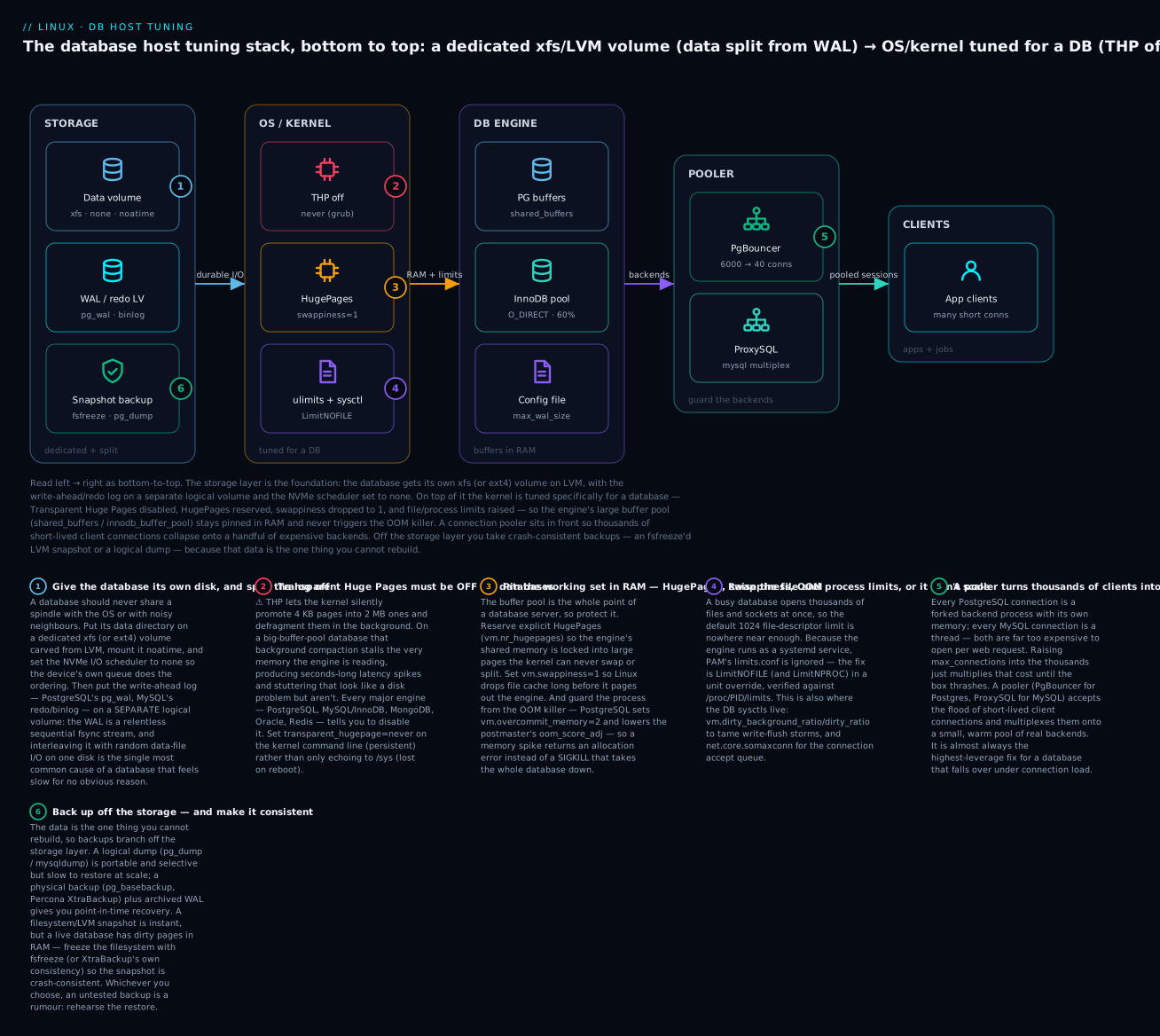
The sysctl knobs that actually matter for a DB
Not every sysctl on a forum “tuning list” helps; several are legacy. Here are the ones that genuinely matter for PostgreSQL or MySQL, with the modern truth about each:
| sysctl | Typical DB value | What it does | Notes |
|---|---|---|---|
vm.swappiness |
1 | Bias to drop cache vs swap anon memory | Keep the buffer pool out of swap |
vm.overcommit_memory |
2 (Postgres) | Fail big allocations cleanly instead of OOM-killing | Set overcommit_ratio too; or use a cgroup limit instead |
vm.dirty_background_ratio |
5 (or dirty_background_bytes) |
% dirty pages before background flush starts | Lower = smoother, avoids flush storms |
vm.dirty_ratio |
10 (or dirty_bytes) |
% dirty pages before writers block and flush synchronously | Lower for steady latency on big-RAM boxes |
vm.nr_hugepages |
(computed) | Reserve explicit HugePages for the buffer pool | Pair with huge_pages/large-pages |
kernel.shmmax / kernel.shmall |
large | Max SysV shared-memory segment / total pages | Mostly legacy — modern PG uses mmap; raise only for old PG (<9.3) or other SysV users |
fs.file-max |
large (RAM-derived) | System-wide open-FD ceiling | Usually already huge; rarely the bottleneck |
fs.aio-max-nr |
1048576 | Max outstanding async I/O requests | ⚠️ InnoDB native AIO can exhaust the default 65536 with many instances |
net.core.somaxconn |
1024+ | Listen/accept queue depth | Raise for high connection-rate servers |
net.ipv4.tcp_max_syn_backlog |
4096+ | Half-open connection queue | Raise under connection storms |
⚠️ The shmmax/shmall knobs are the biggest cargo-cult item. They were essential for PostgreSQL before 9.3, which used a huge System V shared-memory segment sized from shared_buffers; if shmmax was too small, PG wouldn’t start. Modern PostgreSQL uses POSIX mmap shared memory and needs only a tiny SysV segment, so shmmax almost never matters anymore. MySQL/InnoDB doesn’t use SysV shared memory for the buffer pool at all. Don’t blindly copy 2010-era shmmax lines onto a 2026 host — tune dirty_ratio, swappiness, overcommit, and aio-max-nr instead.
The dirty ratio pair deserves a word because it directly shapes commit latency. vm.dirty_ratio is the percentage of RAM that can hold dirty (modified-but-not-yet-written) pages before a process doing a write is forced to block and flush synchronously; vm.dirty_background_ratio is the lower threshold where the kernel starts flushing in the background. On a 256 GB box the default 20%/10% means up to ~50 GB of dirty pages can accumulate and then dump to disk in one stall — a “flush storm” that freezes the database. Lowering them (or using the absolute dirty_bytes/dirty_background_bytes forms) smooths writes into a steady trickle instead of periodic floods. The general treatment is in the Performance & Tuning lesson; for databases, lower and smoother wins.
ulimits and systemd limits — the “too many connections / open files” fix
A database opens a lot of file descriptors — one or more per table file, plus one per client socket — so the default soft limit of 1024 open files is nowhere near enough and produces the infamous Too many open files (EMFILE) error, or a cap on how many connections you can accept. There are several layers, and the classic failure is fixing the wrong one:
| Layer | Where | Applies to | For a database |
|---|---|---|---|
ulimit -n |
Shell builtin | Current shell + children | Only affects a DB you start by hand in that shell |
/etc/security/limits.conf |
PAM | Login sessions (SSH, console) | ⚠️ Ignored by systemd services — this is the #1 trap |
systemd LimitNOFILE= |
Unit [Service] |
The DB service | The correct fix for a packaged database |
systemd LimitNPROC= |
Unit [Service] |
Max processes/threads | Matters for PG (process-per-conn) and MySQL threads |
systemd LimitMEMLOCK= |
Unit [Service] |
Lockable memory | Needed for HugePages/mlock |
fs.nr_open |
sysctl | Per-process FD ceiling | Raise before pushing LimitNOFILE past ~1M |
MySQL open_files_limit |
my.cnf |
mysqld’s own FD budget | MySQL also has its own setting, capped by LimitNOFILE |
Because PostgreSQL and MySQL are systemd services, the fix lives in a unit override, never in limits.conf:
# The correct way to raise a database's limits — a systemd drop-in
sudo systemctl edit postgresql-16          # or: mysqld / mariadb
# add:
#   [Service]
#   LimitNOFILE=65535
#   LimitNPROC=8192
#   LimitMEMLOCK=infinity
sudo systemctl daemon-reload && sudo systemctl restart postgresql-16

# ALWAYS verify the LIVE limit the running process actually got — trust /proc, not config:
cat /proc/$(head -1 /var/lib/pgsql/16/data/postmaster.pid)/limits | grep -E 'open files|processes'
# Max open files            65535   65535   files
# Max processes             8192    8192    processes
⚠️ Editing /etc/security/limits.conf and restarting the database does nothing — systemd never consults PAM’s limits.conf. Engineers lose hours to this. Burn it in: daemons → LimitNOFILE= in the unit; verify against /proc/PID/limits. For MySQL, remember the two layers: LimitNOFILE in the unit sets the OS ceiling, and open_files_limit in my.cnf sets how much of it mysqld uses — set the unit limit ≥ the my.cnf value.
The I/O scheduler and readahead
The I/O scheduler decides the order requests hit the device. On fast SSD/NVMe the device’s own controller reorders better than the kernel can, so the right choice is the lightweight one:
| Storage | Scheduler | Why |
|---|---|---|
| NVMe SSD | none |
The device’s parallel queue is smarter; least overhead |
| SATA/SAS SSD | mq-deadline |
Bounds latency; a safe default for flash |
| Spinning HDD | mq-deadline (or bfq) |
Deadline avoids starvation on seeky disks |
# See and set the scheduler (active is in [brackets]); NOT persistent via /sys
cat /sys/block/nvme0n1/queue/scheduler
# [none] mq-deadline kyber bfq
echo none | sudo tee /sys/block/nvme0n1/queue/scheduler

# Persist with a udev rule so it survives reboot:
# /etc/udev/rules.d/60-ioscheduler.rules
#   ACTION=="add|change", KERNEL=="nvme[0-9]*", ATTR{queue/scheduler}="none"
#   ACTION=="add|change", KERNEL=="sd[a-z]",   ATTR{queue/scheduler}="mq-deadline"
Readahead is the second block-layer knob. The kernel prefetches sequential blocks on a read; for a database’s random data-file I/O that prefetch is often wasted bandwidth, while for the sequential WAL and backup reads it helps. Many DBAs lower readahead on the random-I/O data volume:
# Show / set readahead in 512-byte sectors (256 = 128 KiB)
sudo blockdev --getra /dev/vg_db/lv_pgdata      # e.g. 256
sudo blockdev --setra 256 /dev/vg_db/lv_pgdata  # persist via udev/tuned like the scheduler
The pragmatic shortcut for all of the above: apply the tuned throughput-performance profile, which already sets a sensible scheduler, CPU governor, and VM knobs, then hand-tune only the DB-specific items (THP off, HugePages, swappiness, limits) on top. tuned is covered in the performance lesson.
Connections: why a pooler matters on Linux
Here is a failure mode every database operator eventually meets: the app scales up, opens more and more database connections, and one day the database simply falls over — not because the queries are hard, but because connections themselves are expensive on Linux. Understanding why is pure OS knowledge.
PostgreSQL forks a full OS process for every connection. Each backend has its own memory (several MB of private + shared mappings), its own file descriptors, and its own slot in the kernel’s process table; the postmaster fork()s it at connect time. A thousand connections is a thousand processes. MySQL uses a thread per connection — cheaper than a process, but still a stack, a scheduler entity, and per-thread buffers. In both cases, the cost is paid per connection whether or not it is doing anything, and thousands of mostly-idle connections drown the box in context switches and memory before any real work happens.
The naive fix — raising max_connections into the thousands — makes it worse: it just multiplies the per-connection cost. The correct fix is a connection pooler in front of the database that accepts the flood of short-lived client connections and multiplexes them onto a small, warm pool of real backends.
| PgBouncer (PostgreSQL) | ProxySQL (MySQL) | |
|---|---|---|
| What it does | Lightweight connection pooler | Pooler + query router + read/write split |
| Multiplexing | Many clients → few server connections | Many clients → few backend connections |
| Pooling modes | session, transaction, statement |
connection multiplexing per backend |
| Common mode | transaction (highest density) | multiplexed, per-hostgroup |
| Runs as | A tiny single process (very low overhead) | A service with query rules |
| Key knobs | max_client_conn, default_pool_size, pool_mode |
mysql-max_connections, backend max_connections |
PgBouncer’s transaction pooling is the workhorse: a server connection is handed to a client only for the duration of a transaction, then returned to the pool, so hundreds of idle clients share a handful of backends. The trade-off is that session-scoped features (session-level SET, advisory locks, some prepared-statement patterns) don’t survive across transactions — know that before you flip it on.
# Install and point PgBouncer at Postgres (Debian; RHEL: dnf install pgbouncer)
sudo apt install -y pgbouncer
# /etc/pgbouncer/pgbouncer.ini
#   [databases]
#   appdb = host=127.0.0.1 port=5432 dbname=appdb
#   [pgbouncer]
#   listen_addr = 127.0.0.1
#   listen_port = 6432
#   auth_type = scram-sha-256
#   auth_file = /etc/pgbouncer/userlist.txt
#   pool_mode = transaction
#   max_client_conn = 6000        # accept up to 6000 CLIENT connections
#   default_pool_size = 40        # ...multiplexed onto 40 SERVER connections per user/db
sudo systemctl enable --now pgbouncer
psql "host=127.0.0.1 port=6432 dbname=appdb user=appuser"   # apps connect HERE, not 5432
The sizing rule flows from the hardware, not from hope:
| Sizing target | Guidance |
|---|---|
| Backend pool size | Start near (CPU cores × 2–4) active connections — the number the DB can actually run at once |
max_connections (the DB) |
Keep modest (100–300) with a pooler in front; it caps concurrent backends, not clients |
max_client_conn (pooler) |
Large (thousands) — this is where the app’s connection sprawl terminates |
| Golden rule | The database should run few busy connections; the pooler absorbs the many idle ones |
The counter-intuitive truth: a database is usually faster with 40 busy backends than with 4000 mostly-idle ones, because the 40 fit in cache, cause fewer context switches, and don’t exhaust memory. A pooler is the highest-leverage single change for a database buckling under connection load.
The DB config knobs that interact with the OS
You don’t need to be a DBA to set the handful of engine parameters that directly touch the OS resources you just tuned. These are the knobs where the database and Linux meet.
PostgreSQL
postgresql.conf knob |
Sensible start (dedicated host) | What it controls (OS interaction) |
|---|---|---|
shared_buffers |
25% of RAM | The DB’s own page cache (shared memory / HugePages) |
effective_cache_size |
50–75% of RAM | Planner’s assumption of total cache (page cache + buffers) |
work_mem |
4–64 MB | Per-operation sort/hash memory — multiplies, an OOM risk |
maintenance_work_mem |
256 MB–1 GB | Memory for VACUUM/index builds |
max_wal_size |
4–16 GB | WAL allowed between checkpoints — bigger = fewer, larger flushes |
checkpoint_completion_target |
0.9 | Spread checkpoint writes over the interval (smooths I/O) |
wal_compression |
on | Trades CPU for less WAL write volume |
max_connections |
100–300 (+ pooler) | Backend processes; each costs memory + a slot |
huge_pages |
try / on | Use the explicit HugePages you reserved |
MySQL / InnoDB
my.cnf knob |
Sensible start (dedicated host) | What it controls (OS interaction) |
|---|---|---|
innodb_buffer_pool_size |
50–75% of RAM | InnoDB’s cache of data+indexes — the main memory knob |
innodb_buffer_pool_instances |
pool_GB (up to 8–16) | Splits the pool to cut internal lock contention |
innodb_flush_method |
O_DIRECT |
Bypass the OS page cache → no double buffering |
innodb_log_file_size / innodb_redo_log_capacity |
1–4 GB / 8.0.30+ auto | Redo log size — bigger absorbs write bursts, longer recovery |
innodb_flush_log_at_trx_commit |
1 (ACID) | fsync policy per commit — durability vs speed (below) |
innodb_io_capacity / _max |
match device IOPS | How aggressively InnoDB flushes dirty pages |
open_files_limit |
≤ LimitNOFILE |
mysqld’s FD budget within the OS limit |
large-pages |
ON (if using HugePages) | Use reserved HugePages for the pool |
Durability: the knobs that trade safety for speed
Every database lets you trade durability (surviving a crash without losing committed transactions) for write speed, and both do it through how aggressively they fsync. Understand these before you touch them, because the wrong setting silently converts a crash into data loss:
| Durability knob | Value | Meaning | Risk |
|---|---|---|---|
PG fsync |
on (default) |
fsync WAL to disk | ⚠️ off = corruption on crash — never in production |
PG synchronous_commit |
on (default) |
Wait for WAL flush before ack | off = lose the last few ms of commits on crash, but no corruption |
PG full_page_writes |
on (default) |
Write full pages after checkpoint (torn-page safety) | Leave on unless the FS guarantees atomic writes |
InnoDB innodb_flush_log_at_trx_commit |
1 | Flush+fsync redo every commit (full ACID) | The safe default |
| " | 2 | Write to OS cache each commit, fsync ~1×/sec | Lose ~1 s only on OS/power crash, not mysqld crash |
| " | 0 | Write+fsync ~1×/sec | Lose ~1 s on mysqld crash too — fastest, least safe |
InnoDB sync_binlog |
1 | fsync binlog every commit | Lower = faster, risk losing binlog events on crash |
The safe defaults are fsync=on/synchronous_commit=on and innodb_flush_log_at_trx_commit=1/sync_binlog=1. Relax synchronous_commit=off or innodb_flush_log_at_trx_commit=2 only when you have explicitly decided that losing the last second of transactions in a crash is acceptable for that workload (e.g. a cache-like table, an analytics staging DB). ⚠️ Never set PostgreSQL fsync=off on data you care about — it does not just risk the last transaction, it risks corrupting the whole database on any crash.
Backups on Linux
A database backup is different from a file backup in one decisive way: the database is always changing, with dirty pages in RAM and half-written transactions, so a naïve cp -r of a running data directory copies an inconsistent, unrestorable mess. Every real DB backup strategy is about capturing a consistent point-in-time image. There are two families — logical and physical — and you usually want both. This ties directly into the general Backup & Recovery lesson; here is the database layer.
| Logical backup | Physical backup | |
|---|---|---|
| What it is | A dump of the logical contents — SQL statements or a portable archive | A byte-level copy of the data files + logs |
| Tools | pg_dump/pg_dumpall, mysqldump |
pg_basebackup, Percona XtraBackup/mariabackup, LVM snapshot |
| Restore speed | Slow at scale (replays SQL, rebuilds indexes) | Fast (copy files back, replay logs) |
| Granularity | A single table/DB; portable across versions/arch | Whole instance; version/arch-bound |
| Size | Small, compressible | Large (full data size) |
| Enables PITR? | No (a point-in-time snapshot only) | Yes, with archived WAL/binlog |
| Best for | Migrations, per-object restore, long-term archive | Fast full-instance recovery, replicas, PITR |
Logical backups — dump pipelines
Logical dumps are portable and selective, and they shine in a shell pipeline. For PostgreSQL, prefer the custom format (-Fc), which is compressed and lets pg_restore do selective, parallel restores:
# --- PostgreSQL: one database, custom compressed format (best for restore flexibility)
sudo -u postgres pg_dump -Fc -d appdb -f /backup/appdb-$(date +%F).dump
# Roles/tablespaces (global objects) are NOT in pg_dump — capture them separately:
sudo -u postgres pg_dumpall --globals-only > /backup/globals-$(date +%F).sql
# Restore into a fresh DB (parallel with -j):
sudo -u postgres createdb appdb_restored
sudo -u postgres pg_restore -j4 -d appdb_restored /backup/appdb-2026-07-09.dump
# --- MySQL: consistent InnoDB dump WITHOUT locking the whole server
mysqldump --single-transaction --routines --triggers --events \
          --source-data=2 appdb | gzip > /backup/appdb-$(date +%F).sql.gz
# Restore:
gunzip < /backup/appdb-2026-07-09.sql.gz | mysql appdb
⚠️ --single-transaction is what makes a mysqldump of InnoDB consistent without a global read lock — it dumps inside one repeatable-read transaction. Omit it and a busy database’s dump can be internally inconsistent (or it falls back to locking every table). For MyISAM tables (which ignore transactions) you still need --lock-all-tables; another reason to use InnoDB.
Physical backups and consistent snapshots
Physical backups copy the data files directly and restore far faster at scale. PostgreSQL ships pg_basebackup; MySQL relies on Percona XtraBackup (or mariabackup) for a hot (non-locking) physical backup of InnoDB:
# --- PostgreSQL: a physical base backup (also the basis for PITR & replicas)
sudo -u postgres pg_basebackup -D /backup/base-$(date +%F) -Ft -z -Xs -P
#   -Ft tar, -z gzip, -Xs stream the WAL needed for consistency, -P progress

# --- MySQL: Percona XtraBackup — hot physical backup, then prepare it for restore
sudo xtrabackup --backup --target-dir=/backup/xtra-$(date +%F)
sudo xtrabackup --prepare --target-dir=/backup/xtra-2026-07-09   # make it consistent
# Restore: stop mysqld, --copy-back, fix ownership, start.
The most Linux-native physical backup is an LVM (or filesystem) snapshot — instant and cheap. But a live database has dirty pages in memory and in-flight writes, so a raw snapshot can be crash-consistent at best and corrupt at worst. The fix is fsfreeze: freeze the filesystem to flush and quiesce it, take the snapshot in the frozen instant, then thaw. This is the exact technique the Backup & Recovery lesson covers for consistent snapshots — here applied to a database volume:
# Consistent LVM snapshot of a database volume using fsfreeze
sudo fsfreeze -f /var/lib/pgsql/16/data                 # freeze: flush + block writes
sudo lvcreate -L 20G -s -n pgdata_snap /dev/vg_db/lv_pgdata   # instant CoW snapshot
sudo fsfreeze -u /var/lib/pgsql/16/data                 # thaw — total frozen time = ms
# Now back up the snapshot at leisure (it's a frozen point-in-time image):
sudo mount -o ro /dev/vg_db/pgdata_snap /mnt/snap
sudo tar czf /backup/pgdata-snap.tar.gz -C /mnt/snap .
sudo umount /mnt/snap && sudo lvremove -y /dev/vg_db/pgdata_snap
⚠️ Two subtleties: (1) if your data and WAL are on separate volumes (as recommended), a single-volume snapshot is not self-consistent — either snapshot both atomically, or use the engine’s own low-level backup API (pg_backup_start()/pg_backup_stop() for Postgres) which makes any file-level copy consistent. (2) For PostgreSQL, fsfreeze on the data dir plus full_page_writes=on gives a crash-consistent image that recovers on startup; for MySQL/InnoDB, prefer XtraBackup over raw snapshots unless you FLUSH TABLES WITH READ LOCK first.
Point-in-time recovery (PITR) — the concept
A base backup captures the database as of some moment; WAL/binlog archiving captures every change since, so you can replay forward to any point — a specific second, or “just before that bad DELETE.” That is point-in-time recovery, and it is why physical backups plus archived logs are the gold standard:
| PITR piece | PostgreSQL | MySQL |
|---|---|---|
| Base image | pg_basebackup |
XtraBackup full backup |
| Continuous log | WAL archived via archive_command (archive_mode=on) |
binary log (log_bin) |
| Replay to a point | restore_command + recovery_target_time (recovery.signal) |
mysqlbinlog --stop-datetime … | mysql |
| Recovery granularity | Any transaction / timestamp / named restore point | Any binlog position / timestamp |
# PostgreSQL WAL archiving (in postgresql.conf) — the basis for PITR
#   archive_mode = on
#   archive_command = 'test ! -f /archive/%f && cp %p /archive/%f'   # ship each WAL segment
#   wal_level = replica
# Restore: extract the base backup, drop a restore_command + recovery target, start.
The rule that outranks all tuning: test the restore
⚠️ An untested backup is a rumour. The graveyard of engineering is full of teams whose nightly dump ran green for two years and failed at the one moment it mattered — wrong permissions, a missing globals dump, an archive that was never actually written, a snapshot that wasn’t consistent. Schedule a restore drill: periodically restore the latest backup onto a scratch host and run a query against it. Combine with the 3-2-1 rule from the backup lesson — 3 copies, 2 media, 1 off-site — and you have a database you can actually recover, not just back up.
Security and remote access
By default both engines listen only on localhost, which is safe but useless if the app runs elsewhere. Opening them up is where hosts get compromised, so do it deliberately in the right order: bind → authenticate → encrypt → firewall → SELinux.
| Layer | PostgreSQL | MySQL |
|---|---|---|
| Where it listens | listen_addresses in postgresql.conf ('localhost' → '*' or specific IPs) |
bind-address in my.cnf (127.0.0.1 → 0.0.0.0 or an IP) |
| Who may connect | pg_hba.conf (host, DB, user, method) |
CREATE USER 'u'@'host' — the host is part of the identity |
| Auth method | scram-sha-256 (use this; not md5/trust) |
caching_sha2_password (MySQL 8 default) |
| Encryption | ssl = on + hostssl lines; verify with \conninfo |
require_secure_transport=ON; REQUIRE SSL on the user |
| Port (firewall) | 5432 | 3306 |
pg_hba.conf is PostgreSQL’s host-based access control, evaluated top-to-bottom, first match wins — the order of lines is the policy:
# TYPE  DATABASE  USER   ADDRESS          METHOD
local   all       all                     peer               # unix socket, OS-user mapping
hostssl appdb     appuser 10.0.0.0/24     scram-sha-256      # TLS-only, from the app subnet
host    all       all    0.0.0.0/0        reject             # deny everything else explicitly
⚠️ Never leave a trust line (which skips authentication entirely) reachable from anything but a unix socket in a lab. A host all all 0.0.0.0/0 trust line is a fully open database. After editing pg_hba.conf, reload with SELECT pg_reload_conf(); or systemctl reload postgresql-16.
Then the two OS-level guards that beginners forget on RHEL-family hosts:
# Firewall: open the port only to where it's needed (firewalld)
sudo firewall-cmd --permanent --add-service=postgresql   # or --add-port=5432/tcp
sudo firewall-cmd --reload

# SELinux: if you MOVE the data dir or use a NON-default port, SELinux will block it
sudo semanage port -a -t postgresql_port_t -p tcp 5433          # allow a custom port
sudo semanage fcontext -a -t postgresql_db_t "/var/lib/pgsql/16/data(/.*)?"
sudo restorecon -Rv /var/lib/pgsql/16/data                      # apply the label
⚠️ The most common “the database won’t start after I moved the data directory” cause on RHEL is SELinux: the new path lacks the postgresql_db_t (or mysqld_db_t) label, so the confined service is denied access. The symptom is a permission-denied in the log with getenforce returning Enforcing; the fix is semanage fcontext + restorecon, not chmod 777. SELinux mechanics are in the mandatory-access-control lesson; for databases, remember: move the data dir or change the port → relabel/allow it in SELinux.
Monitoring the OS side
Finally, watch the boundary where the database meets the OS — the numbers that tell you a host problem from a query problem. Pair the Linux tools with the engine’s own views:
| Signal | Linux side | PostgreSQL | MySQL/InnoDB |
|---|---|---|---|
| Disk latency / queue | iostat -xz 1 (await, aqu-sz) |
pg_stat_bgwriter (checkpoints) |
SHOW ENGINE INNODB STATUS (I/O, pending) |
| Memory / cache | free -h, /proc/meminfo (HugePages_*) |
pg_buffercache ext. |
Innodb_buffer_pool_* in SHOW GLOBAL STATUS |
| Connections | ss -tanp | grep :5432 |
pg_stat_activity |
SHOW PROCESSLIST, Threads_connected |
| Slow work | pidstat, perf top |
pg_stat_statements, log_min_duration_statement |
slow query log, performance_schema |
| Checkpoints / flushing | vmstat (bo, wa) |
log_checkpoints = on |
Innodb_buffer_pool_pages_dirty |
| WAL / redo growth | du -sh pg_wal/ |
pg_stat_archiver, pg_ls_waldir() |
binlog size, SHOW BINARY LOGS |
# The two "what is the database doing to my disk" reads, side by side
iostat -xz 1 3                                   # await/aqu-sz on the data + WAL volumes
sudo -u postgres psql -c "SELECT state, count(*) FROM pg_stat_activity GROUP BY state;"
# active | 12   idle | 148   idle in transaction | 3      <- 'idle in transaction' = a leak to hunt
idle in transaction connections deserve a special mention: they hold locks and pin old row versions (bloating the database) while doing nothing. A pile of them is usually an application bug (a transaction left open), and it is exactly the kind of problem that looks like a database issue but is really a client one — catch it in pg_stat_activity.
Hands-on lab
A self-contained lab you can run on a throwaway Linux VM or cloud instance with a spare disk. You will install PostgreSQL, give it a tuned host (dedicated volume, THP off, sysctl, limits), size its memory, front it with a pooler, and take a backup you then restore. ⚠️ Run this on a throwaway box — some steps format a disk and change kernel settings.
Step 0 — Install PostgreSQL and note your resources.
# Debian/Ubuntu
sudo apt update && sudo apt install -y postgresql lvm2 sysstat
# RHEL/Rocky: sudo dnf install -y postgresql-server lvm2 sysstat && sudo postgresql-setup --initdb
sudo systemctl enable --now postgresql
nproc; free -h; lsblk
What just happened: you have a running database and know your core count, RAM, and disks — the inputs to every tuning decision below.
Step 1 — Give the database its own xfs volume (optional if you have a spare disk).
# ⚠️ DESTROYS the target disk — use an empty spare (e.g. /dev/vdb), confirm with lsblk!
sudo pvcreate /dev/vdb && sudo vgcreate vg_db /dev/vdb
sudo lvcreate -L 5G -n lv_pgdata vg_db
sudo mkfs.xfs /dev/vg_db/lv_pgdata
sudo blkid /dev/vg_db/lv_pgdata     # note the UUID for fstab
What just happened: a dedicated LVM volume for database data — resizable and snapshot-able, isolated from the root filesystem.
Step 2 — Disable Transparent Huge Pages (the #1 DB kernel fix).
cat /sys/kernel/mm/transparent_hugepage/enabled       # see current: 'always [madvise] never'
echo never | sudo tee /sys/kernel/mm/transparent_hugepage/enabled   # live
echo never | sudo tee /sys/kernel/mm/transparent_hugepage/defrag
# Persist it: add transparent_hugepage=never to GRUB_CMDLINE_LINUX and update grub (then reboot).
What just happened: you turned off the background page compaction that causes mysterious DB latency spikes. In production you’d persist it on the kernel command line.
Step 3 — Apply the database sysctls.
cat <<'EOF' | sudo tee /etc/sysctl.d/30-db-lab.conf
vm.swappiness = 1
vm.dirty_background_ratio = 5
vm.dirty_ratio = 10
net.core.somaxconn = 1024
EOF
sudo sysctl --system
sysctl vm.swappiness vm.dirty_ratio     # verify they took
What just happened: the buffer pool is protected from swap, and write-flushing is smoothed so checkpoints don’t stall in a flush storm.
Step 4 — Raise the service’s file limit the systemd way.
sudo systemctl edit postgresql          # add: [Service]\n LimitNOFILE=65535
sudo systemctl daemon-reload && sudo systemctl restart postgresql
# Verify the LIVE limit (trust /proc, not config):
PGPID=$(systemctl show -p MainPID --value postgresql)
grep 'open files' /proc/$PGPID/limits
# Max open files            65535    65535    files
What just happened: you fixed “too many open files” the only way that works for a daemon — a unit override, verified against /proc/PID/limits, not limits.conf.
Step 5 — Size shared_buffers to 25% of RAM.
RAM_MB=$(awk '/MemTotal/{print int($2/1024)}' /proc/meminfo)
SB_MB=$((RAM_MB / 4))
sudo -u postgres psql -c "ALTER SYSTEM SET shared_buffers = '${SB_MB}MB';"
sudo -u postgres psql -c "ALTER SYSTEM SET effective_cache_size = '$((RAM_MB*3/4))MB';"
sudo systemctl restart postgresql
sudo -u postgres psql -c "SHOW shared_buffers;"
What just happened: the engine now caches ~25% of RAM itself and knows (via effective_cache_size) how much the OS page cache adds — the standard Postgres memory split.
Step 6 — Front it with a pooler.
sudo apt install -y pgbouncer     # RHEL: sudo dnf install -y pgbouncer
# Minimal /etc/pgbouncer/pgbouncer.ini: pool_mode=transaction, listen_port=6432,
#   max_client_conn=1000, default_pool_size=20, [databases] postgres=host=127.0.0.1 port=5432
sudo systemctl enable --now pgbouncer
ss -tlnp | grep 6432              # pooler listening
What just happened: clients now connect to port 6432; PgBouncer multiplexes up to 1000 of them onto 20 real backends — the fix for connection-count overload.
Step 7 — Back up and restore (prove it round-trips).
sudo -u postgres createdb labdb
sudo -u postgres psql -d labdb -c "CREATE TABLE t(id int); INSERT INTO t SELECT generate_series(1,1000);"
sudo -u postgres pg_dump -Fc -d labdb -f /tmp/labdb.dump          # logical backup
sudo -u postgres dropdb labdb                                     # simulate loss
sudo -u postgres createdb labdb_restored
sudo -u postgres pg_restore -d labdb_restored /tmp/labdb.dump     # restore
sudo -u postgres psql -d labdb_restored -c "SELECT count(*) FROM t;"   # -> 1000
What just happened: you completed the whole loop — dump, simulated loss, restore, and verified the row count. An untested backup is a rumour; this one you tested.
Step 8 — Clean up.
sudo -u postgres dropdb labdb_restored
sudo systemctl disable --now pgbouncer
sudo rm -f /etc/sysctl.d/30-db-lab.conf && sudo sysctl --system
# If you made the LVM volume: sudo umount ...; sudo lvremove -y /dev/vg_db/lv_pgdata; etc.
What just happened: the box is back to baseline, and you have driven install → storage → THP → sysctl → limits → memory → pooler → backup/restore end to end.
Common mistakes and troubleshooting
| Symptom | Cause | Fix |
|---|---|---|
| Database won’t start after moving data dir (RHEL) | SELinux: new path lacks postgresql_db_t/mysqld_db_t label |
semanage fcontext + restorecon -Rv on the new path (not chmod 777) |
| won’t start, log says “could not bind” / port in use | Another instance or process on 5432/3306 | `ss -tlnp |
won’t start after setting huge_pages = on |
Reserved too few HugePages | Raise vm.nr_hugepages above -C shared_memory_size_in_huge_pages, or use try |
Process vanished, others slow, dmesg shows OOM |
Buffer pool + work_mem × connections exceeded RAM; overcommit on |
Right-size memory; vm.overcommit_memory=2 or cgroup limit; lower oom_score_adj |
| Random multi-second latency spikes, disk looks fine | Transparent Huge Pages enabled | Disable THP (transparent_hugepage=never) persistently |
Slow writes / commits, high await on data disk |
WAL/redo on the same disk as data; or wrong I/O scheduler | Move WAL to its own volume; set scheduler none/mq-deadline |
| App logs “too many connections” | max_connections hit; or no pooler; connection sprawl |
Add PgBouncer/ProxySQL; keep DB max_connections modest |
| App logs “too many open files” | FD limit too low; limits.conf edited (ignored by systemd) |
LimitNOFILE= in the unit; verify /proc/PID/limits |
Disk full, pg_wal/ or binlog huge |
Failing archive_command; stale replication slot; binlog not purged |
Fix/clear the archive; drop the dead slot; set binlog expiry |
| Restore from snapshot is corrupt | Snapshot of a live DB without freezing/consistency | Use fsfreeze, pg_basebackup, or XtraBackup — never a raw live copy |
| Remote clients can’t connect | listen_addresses/bind-address localhost; pg_hba; firewall; SELinux port |
Open the bind, add the pg_hba line, open the firewall, allow the SELinux port |
Three gotchas cost the most time and deserve extra words:
1. Transparent Huge Pages disguised as a disk problem. The signature is maddening: p99 latency spikes by seconds, seemingly at random, while iostat shows the disk barely working. Teams replace SSDs, tune queries, and rewrite code chasing a “storage” issue that is actually khugepaged compacting memory under the buffer pool. The first thing to check on any database latency mystery is cat /sys/kernel/mm/transparent_hugepage/enabled — if it isn’t [never], fix that before anything else.
2. The OOM killer eating the whole database. When RAM runs out, the kernel’s OOM killer SIGKILLs a process — and because the database is the biggest memory user, it is the natural target. One kill takes the entire database down, not one query. The root cause is almost always memory over-committed by the DB itself: a shared_buffers/innodb_buffer_pool_size set too large, plus work_mem multiplied across hundreds of connections. The fix is arithmetic (buffers + peak work_mem × connections + OS + headroom ≤ RAM), reinforced by vm.overcommit_memory=2 (so allocations fail cleanly) or a cgroup MemoryMax=, and a lowered oom_score_adj as a backstop. Protecting the process is a seatbelt; sizing memory to fit is the brakes.
3. Disk full from WAL/binlog that won’t recycle. A database can fill its own disk not with data but with write-ahead logs it can’t remove. In PostgreSQL, an archive_command that keeps failing means WAL segments pile up in pg_wal/ (the server won’t delete unarchived WAL); a replication slot for a replica that has gone away holds WAL forever. In MySQL, binlogs accumulate until binlog_expire_logs_seconds purges them or you PURGE BINARY LOGS. The disk fills, the database stops accepting writes, and it looks like a storage problem — but the fix is to repair the archive command, drop the orphaned slot, or set binlog expiry. Monitor du -sh pg_wal/ and alert before the volume is full, because a full WAL volume is a hard outage.
Cheat-sheet
| Task | PostgreSQL | MySQL / MariaDB |
|---|---|---|
| Data dir | /var/lib/pgsql/16/data · …/postgresql/16/main |
/var/lib/mysql |
| Main config | postgresql.conf |
/etc/my.cnf, mysqld.cnf |
| Service | systemctl … postgresql-16 |
systemctl … mysqld / mariadb |
| Default port | 5432 | 3306 |
| Superuser shell | sudo -iu postgres psql |
sudo mysql / mysql -u root -p |
| Init | postgresql-16-setup initdb |
auto + mysql_secure_installation |
| Memory cache | shared_buffers (25% RAM) |
innodb_buffer_pool_size (50–75%) |
| Cache hint | effective_cache_size (50–75%) |
— |
| Bypass page cache | — | innodb_flush_method=O_DIRECT |
| Commit durability | synchronous_commit, fsync |
innodb_flush_log_at_trx_commit |
| WAL/redo size | max_wal_size |
innodb_redo_log_capacity |
| Logical backup | pg_dump -Fc / pg_dumpall |
mysqldump --single-transaction |
| Physical backup | pg_basebackup -Xs |
XtraBackup / mariabackup |
| PITR log | WAL + archive_command |
binary log (log_bin) |
| Connections view | pg_stat_activity |
SHOW PROCESSLIST |
| Engine status | pg_stat_bgwriter |
SHOW ENGINE INNODB STATUS |
| Pooler | PgBouncer (transaction mode) |
ProxySQL |
| Host auth | pg_hba.conf |
CREATE USER 'u'@'host' |
| OS knob | Command / file | DB value |
|---|---|---|
| Disable THP | kernel cmdline transparent_hugepage=never |
never |
| HugePages | vm.nr_hugepages in /etc/sysctl.d/ |
(computed) |
| Swappiness | vm.swappiness |
1 |
| Overcommit | vm.overcommit_memory (+_ratio) |
2 (Postgres) |
| Dirty flush | vm.dirty_ratio / dirty_background_ratio |
10 / 5 |
| InnoDB AIO | fs.aio-max-nr |
1048576 |
| Open files (daemon) | LimitNOFILE= (systemctl edit) |
65535+ |
| Verify live limit | cat /proc/PID/limits |
— |
| I/O scheduler | /sys/block/DEV/queue/scheduler (udev) |
none / mq-deadline |
| Mount options | /etc/fstab |
noatime (keep barriers on) |
| Consistent snapshot | fsfreeze -f DIR → snap → fsfreeze -u |
— |
Interview and exam questions
Q: Why does a database stress a Linux host harder than a typical application? A: It wants a large slice of RAM as its own buffer pool (competing with the OS page cache), it drives a demanding mix of random reads and a relentless sequential fsync stream (the WAL/redo log), it opens thousands of files and sockets, and it holds the one thing you can’t rebuild. That combination lights up parts of the kernel — memory manager, OOM killer, I/O scheduler, FD limits — that stateless apps never touch.
Q: Why must Transparent Huge Pages be disabled for databases, and how do you do it persistently?
A: THP’s background compaction (khugepaged) stalls the memory the engine is actively reading, causing seconds-long latency spikes that masquerade as disk problems. Every major engine recommends disabling it. Persistently: add transparent_hugepage=never to GRUB_CMDLINE_LINUX, regenerate GRUB, reboot — not just an echo to /sys, which is lost on reboot.
Q: What’s the difference between THP and explicit HugePages, and why is one bad and the other good for a DB?
A: Same 2 MB large-page hardware, opposite management. THP is automatic and background-defragmented — the defrag is what hurts. Explicit HugePages are pre-reserved (vm.nr_hugepages) and cannot be swapped or split, so the buffer pool is pinned in RAM with fewer TLB entries. You disable THP and optionally enable explicit HugePages (huge_pages=try / large-pages).
Q: How should you size shared_buffers (Postgres) vs innodb_buffer_pool_size (MySQL), and why differently?
A: Postgres ~25% of RAM because it deliberately leans on the OS page cache as a second tier (told via effective_cache_size); going much higher starves the page cache and doubles memory pressure. InnoDB with innodb_flush_method=O_DIRECT bypasses the page cache and is the only cache, so it wants 50–75% of RAM.
Q: A service keeps logging “Too many open files.” You raised nofile in /etc/security/limits.conf and nothing changed. Why?
A: systemd services don’t consult PAM’s limits.conf. Set LimitNOFILE= in a unit override (systemctl edit), daemon-reload, restart, and verify the live limit with cat /proc/PID/limits. For MySQL also raise open_files_limit in my.cnf (capped by LimitNOFILE).
Q: Why put the WAL/redo log on a separate volume from the data files? A: The WAL is a latency-critical sequential fsync stream that every commit waits on; the data files see random I/O. On a shared disk the log writes queue behind random reads and commit latency suffers. Separate volumes let each disk work in its natural pattern, dramatically improving write latency.
Q: How do you take a consistent backup of a running database with an LVM snapshot?
A: A raw snapshot of a live DB can be inconsistent. Use fsfreeze -f to flush and quiesce the filesystem, lvcreate -s to snapshot in the frozen instant, then fsfreeze -u — total freeze is milliseconds. Caveat: if data and WAL are on separate volumes, snapshot both atomically or use the engine’s backup API (pg_backup_start/stop) / XtraBackup instead.
Q: What is a connection pooler and why does it matter specifically on Linux? A: PostgreSQL forks an OS process per connection and MySQL uses a thread per connection — both cost memory and scheduler time whether idle or not, so thousands of connections drown the box. A pooler (PgBouncer, ProxySQL) multiplexes many short-lived client connections onto a small warm pool of real backends. A DB is usually faster with 40 busy backends than 4000 idle ones.
Q: Explain innodb_flush_log_at_trx_commit values 1, 2, and 0.
A: 1 (default, full ACID) flushes and fsyncs the redo log every commit. 2 writes to the OS cache every commit and fsyncs ~once a second — you lose ~1 s only on an OS/power crash, not a mysqld crash. 0 writes+fsyncs ~once a second — you can also lose ~1 s on a mysqld crash. Lower = faster, less durable.
Q: The database process was killed and the whole DB went down. What happened and how do you prevent it?
A: The OOM killer SIGKILLed it because it was the biggest memory user when RAM ran out — usually from an over-large buffer pool plus work_mem × many connections. Prevent it by sizing memory to fit with headroom, using vm.overcommit_memory=2 (allocations fail cleanly) or a cgroup MemoryMax=, and lowering oom_score_adj as a backstop.
Q (RHCSA-style): PostgreSQL won’t start after you moved its data directory to /data/pgsql. getenforce says Enforcing. Fix it.
A:
sudo semanage fcontext -a -t postgresql_db_t "/data/pgsql(/.*)?"
sudo restorecon -Rv /data/pgsql
sudo systemctl start postgresql-16
The new path lacked the postgresql_db_t SELinux label; relabel it (never chmod 777).
Q (task): Persistently raise a MySQL service’s open-file limit to 65535 and verify. A:
sudo systemctl edit mysqld     # [Service]\n LimitNOFILE=65535
sudo systemctl daemon-reload && sudo systemctl restart mysqld
cat /proc/$(systemctl show -p MainPID --value mysqld)/limits | grep 'open files'
Key takeaways
- The OS is the database’s landlord. A database stresses memory, disk I/O, and the kernel harder than anything else on the box; running one well is mostly Linux craft — storage layout, memory tuning, limits, and backups — not SQL.
- Storage first: dedicated volume, split the log. Put the data directory on its own xfs/ext4 volume on LVM, mount
noatime(keep write barriers on), and put the WAL/redo log on a separate volume. This single layout change is the biggest performance win available. - Disable THP; size memory to fit. Transparent Huge Pages cause phantom latency spikes — turn them off persistently. Size
shared_buffersto ~25% of RAM (Postgres leans on the page cache) or the InnoDB pool to 50–75% (withO_DIRECT), keepwork_memsmall, and never let the sum exceed RAM. - Protect the process from the OOM killer.
vm.swappiness=1keeps the buffer pool out of swap;vm.overcommit_memory=2(or a cgroup limit) makes allocations fail cleanly instead of triggering aSIGKILLthat takes the whole DB down; a loweredoom_score_adjis the backstop. - Fix limits the systemd way. Databases need thousands of file descriptors;
limits.confis ignored by systemd, so raiseLimitNOFILE/LimitNPROC/LimitMEMLOCKin a unit override and verify against/proc/PID/limits. - A pooler is the highest-leverage scaling fix. Connections are expensive (a process in PG, a thread in MySQL); PgBouncer/ProxySQL multiplex thousands of clients onto a few busy backends. Keep the DB’s
max_connectionsmodest. - Back up two ways, and test the restore. Logical dumps (
pg_dump/mysqldump --single-transaction) for portability, physical (pg_basebackup/XtraBackup + archived WAL/binlog) for fast recovery and PITR,fsfreezefor consistent snapshots — and rehearse the restore, because an untested backup is a rumour.