If you take one idea away from this lesson, take this: patching is not a command you run, it is a pipeline you operate. apt upgrade and dnf upgrade are three seconds of typing; the discipline around them — deciding what to take, proving it in staging, keeping a way back, applying it to a thousand hosts without dropping traffic, and confirming afterwards that the CVE is actually gone and nothing broke — is the job. Anyone can install updates. Keeping a fleet both secure and up while you do it is what separates a sysadmin from someone who occasionally causes an outage on purpose.
The whole subject lives in a single tension. Security says patch fast — every unpatched CVE is a door someone can walk through, and disclosure clocks are measured in hours, not months. Stability says don’t touch prod — every change is a chance to break something that was working, and a bad kernel across the fleet at 3 a.m. is a worse day than the CVE would have been. Patching is the practice of resolving that tension repeatedly, safely, and on a schedule, so that neither the attacker nor your own change management gets to run the business.
This lesson assumes you already know how apt and dnf install a single package — if the transaction model (metadata refresh, dependency resolution, the local package database) is fuzzy, read Installing Software: apt, dnf/yum, rpm/dpkg first, because everything here builds on it. Here we go up a level: from installing a package to operating the fleet’s update lifecycle.
Why this matters: the CVE clock is already running
Somewhere right now a researcher is filing a vulnerability. The moment it becomes a CVE (Common Vulnerabilities and Exposures — a globally unique ID like CVE-2024-3094) and the vendor ships a fix, a clock starts: attackers scan the internet for unpatched hosts within hours of public disclosure, and automated exploit kits follow within days. The gap between “fix available” and “fix applied on your box” is your exposure window, and closing it is the entire point.
But a patch is also a change, and changes break things. A new kernel can fail to boot on your exact hardware. A minor OpenSSL bump can subtly alter TLS behaviour a fragile app depended on. A glibc update can expose latent bugs. The naive reactions — “patch everything the instant it drops” and “never patch, it’s too risky” — are both how you get owned or outaged. The professional answer is a repeatable process that patches quickly because it is safe: security-scoped changes, tested in staging, applied in waves, snapshot-protected, and verified.
Hold the two forces side by side, because every decision in this lesson is a trade between them:
| The pull | What it argues | Left unchecked it causes | The reconciliation |
|---|---|---|---|
| Security — patch fast | Every unpatched CVE is an open door; disclosure-to-exploit is measured in hours | Reckless fleet-wide changes, self-inflicted outages (“we broke prod patching it”) | Scope to security-only, prove in staging, roll out in waves |
| Stability — don’t touch prod | Every change can break what works; a bad fleet-wide patch is worse than the CVE | Drift into unpatched, EOL, exploitable, audit-failing | Snapshot + canary + verify make fast patching safe, not reckless |
Neither pole is right on its own. The process below is how you get the speed of the first with the safety of the second. To operate it you have to understand the supply chain your updates come down. A fix travels a well-defined path before it reaches you:
| Stage | What happens | Who owns it | What you see |
|---|---|---|---|
| Discovery | A bug with security impact is found (research, fuzzing, an incident) | Researcher / vendor | Nothing yet — often under embargo |
| CVE assignment | A CNA (CVE Numbering Authority) issues CVE-YYYY-NNNNN |
MITRE / vendor CNA | The public identifier |
| Scoring | Severity rated: CVSS 0–10, plus vendor ratings (Red Hat: Low/Moderate/Important/Critical) | NVD, vendor | A number that drives your urgency |
| Fix + errata | Vendor backports the fix and publishes an advisory/erratum | Distro security team | RHSA (Red Hat), USN (Ubuntu), DSA/DLA (Debian) |
| Repository push | The fixed package lands in the security repo | Distro release engineering | It appears in apt/dnf metadata |
| You apply it | You assess, test, roll out, verify | You | This lesson |
Two facts about that table govern everything downstream. First, distros backport security fixes rather than rebasing to the newest upstream version — RHEL 9’s openssl-3.0.7-2.el9_3 may carry a fix from a much newer upstream release while keeping the 3.0.7 version string, which is why “my version looks old” does not mean “I’m vulnerable” (rpm -q --changelog proves what’s actually fixed). Second, the errata feed is a service with an expiry date: the day your release goes End-of-Life, that feed stops, and every CVE disclosed afterward stays open forever. Half of this lesson is about applying the feed; the other half is about staying on a release that still has one.
The update mechanics, refreshed
You cannot orchestrate what you don’t understand at the single-host level, so a fast recap of the two families — assuming systemd throughout, and calling out where the behaviour genuinely differs.
Every update is two distinct operations that beginners fatally conflate: refresh the metadata (learn what versions exist upstream) and apply the upgrade (install newer versions locally). On Debian/Ubuntu these are two separate commands; on RHEL/Fedora they are folded together but the two phases still happen.
| Task | Debian / Ubuntu (apt) | RHEL / Fedora / Rocky / Alma (dnf) |
|---|---|---|
| Refresh repo metadata | apt update |
(implicit; force with dnf makecache) |
| List what would upgrade | apt list --upgradable |
dnf check-update (exit code 100 if updates exist) |
| Upgrade, no package removals | apt upgrade |
dnf upgrade (alias: dnf update) |
| Upgrade, allow removals to satisfy deps | apt full-upgrade (dist-upgrade) |
dnf upgrade already does this |
| Upgrade a single package | apt install --only-upgrade nginx |
dnf upgrade nginx |
| Simulate only (no changes) | apt -s upgrade / --dry-run |
dnf upgrade --assumeno |
| Download but don’t install | apt upgrade -d |
dnf upgrade --downloadonly |
| See what a package’s update fixes | apt changelog nginx |
dnf changelog nginx or rpm -q --changelog nginx |
⚠️ The single most dangerous beginner mistake here is running apt upgrade without a preceding apt update and concluding “no updates” — you were reading stale metadata. On automation, always refresh first. The mirror image on EL is trusting a long-lived box’s cache; dnf expires metadata on its own timer (metadata_expire, default 48h) but for a patch run you make it explicit.
A note on exit codes, because your automation depends on them: dnf check-update returns 100 when updates are available, 0 when the system is current, and 1 on error. A shell if that treats non-zero as failure will misread “updates available” as “the command failed” — script it as dnf check-update; [ $? -eq 100 ] && echo "patches pending".
Security-only updates: patch the CVE, defer the churn
Here is the lever that resolves the security-vs-stability tension: you do not have to take every update to be safe — you can take only the ones that close a vulnerability. Security-only patching applies the errata that matter for exposure and leaves feature/version churn for a planned maintenance window. Smaller change set, smaller blast radius, faster to certify.
On RHEL / Rocky / Alma: dnf --security and updateinfo
dnf carries a rich errata (updateinfo) database. Interrogate it before you touch anything:
# What security errata are pending, by advisory and severity?
sudo dnf updateinfo list --security
# Example output:
# RHSA-2024:3234 Important/Sec.  openssl-3.0.7-27.el9_3.x86_64
# RHSA-2024:3310 Critical/Sec.   kernel-5.14.0-362.24.1.el9_3.x86_64

# A one-line summary of everything waiting
sudo dnf updateinfo summary
#   Updates Information Summary: available
#       3 Security notice(s)
#           1 Critical Security notice(s)
#           2 Important Security notice(s)
#      11 Bugfix notice(s)

# Everything about one advisory or CVE
sudo dnf updateinfo info CVE-2024-3234
Then apply only the security fixes — optionally filtered by severity or a specific CVE:
sudo dnf upgrade --security                 # all security errata
sudo dnf upgrade --sec-severity=Critical    # only Critical
sudo dnf upgrade --cve CVE-2024-3234        # one specific CVE
sudo dnf upgrade --advisory RHSA-2024:3310  # one specific advisory
⚠️ Availability caveat: the updateinfo metadata is what makes --security work. RHEL always ships it; the rebuilds (Rocky, Alma) now publish it too, but on some third-party or older mirrors it may be missing, in which case --security silently matches nothing and you get a false sense of safety. Verify with dnf updateinfo summary returning real counts before you trust it.
On Ubuntu / Debian: unattended-upgrades scoped to -security
Ubuntu splits updates into pockets: -security (the security team’s fixes) and -updates (everything else). unattended-upgrades can be scoped to apply only the security pocket automatically — the standard “keep it patched, leave features alone” posture.
sudo apt install unattended-upgrades
# Interactively enable it (writes /etc/apt/apt.conf.d/20auto-upgrades):
sudo dpkg-reconfigure -plow unattended-upgrades
The two files that matter:
# /etc/apt/apt.conf.d/20auto-upgrades  — the on/off switch
APT::Periodic::Update-Package-Lists "1";   # apt update daily
APT::Periodic::Unattended-Upgrade "1";     # apply allowed upgrades daily
# /etc/apt/apt.conf.d/50unattended-upgrades  — WHAT is allowed
Unattended-Upgrade::Allowed-Origins {
    "${distro_id}:${distro_codename}-security";        // security ONLY
    "${distro_id}ESMApps:${distro_codename}-apps-security";
    "${distro_id}ESM:${distro_codename}-infra-security";
//  "${distro_id}:${distro_codename}-updates";         // leave commented = no feature churn
};
Unattended-Upgrade::Automatic-Reboot "false";           // see reboot orchestration below
Unattended-Upgrade::Automatic-Reboot-Time "02:00";
The directives worth knowing in 50unattended-upgrades:
Directive (Unattended-Upgrade::…) |
Effect |
|---|---|
Allowed-Origins / Origins-Pattern |
Which repos/pockets are eligible — scope to -security for security-only |
Automatic-Reboot |
Reboot automatically if a package needs it ("true"/"false") |
Automatic-Reboot-Time |
When to reboot if the above is true (e.g. "02:00") |
Package-Blacklist |
Never auto-upgrade these — pin fragile/critical packages by name |
Remove-Unused-Kernel-Packages |
Auto-clean old kernels ⚠️ leave the previous one in place |
Mail / MailReport |
Where reports go; MailReport "on-change" / "only-on-error" |
MinimalSteps |
Apply in smaller dpkg steps so an interruption is recoverable |
Always dry-run before you trust it on a fleet — this shows exactly which packages it would take:
sudo unattended-upgrade --dry-run --debug
On RHEL: dnf-automatic for the same job
sudo dnf install dnf-automatic
Edit /etc/dnf/automatic.conf:
| Key | Values | Effect |
|---|---|---|
upgrade_type |
default | security |
security = the equivalent of --security |
download_updates |
yes | no |
Pre-fetch packages |
apply_updates |
yes | no |
no = download+notify only (safer default) |
emit_via |
stdio | email | motd |
Where the report goes |
# Then enable the timer:
sudo systemctl enable --now dnf-automatic.timer
systemctl list-timers dnf-automatic.timer
The automation matrix at a glance — this is the table to bookmark for “how do I make this box self-patch security fixes”:
| Goal | Debian/Ubuntu | RHEL/Rocky/Alma |
|---|---|---|
| List pending security updates | apt list --upgradable (then eyeball -security) |
dnf updateinfo list --security |
| Apply security only, once | unattended-upgrade -d |
dnf upgrade --security |
| Auto-apply security daily | unattended-upgrades + 20auto-upgrades |
dnf-automatic + upgrade_type=security |
| Download only, notify, don’t apply | apt upgrade -d / Unattended-Upgrade::Download-Only |
apply_updates=no in automatic.conf |
| Auto-reboot after if needed | Automatic-Reboot "true" + time |
Not built in — orchestrate separately |
| Filter by severity | Not native (pocket-based) | --sec-severity=Critical |
| Filter by single CVE | pro fix CVE-… (Pro) |
dnf upgrade --cve CVE-… |
When is auto-apply appropriate? On stateless, horizontally-scaled, easily-replaced hosts (web front ends behind a load balancer, cattle) automatic security patching is a net win — the risk of an unpatched CVE outweighs the small risk of a bad patch on one replaceable node. On stateful singletons (the one database primary, a licence server, anything a human would cry over) you patch manually and deliberately, never on a timer. Match the automation to the blast radius.
Knowing what changed — and what still needs restarting
Applying a patch is only half the job. Two questions immediately follow, and getting them wrong is how “patched” and “actually protected” diverge: what did this change, and is the new code actually running yet?
What did the patch change?
# Debian/Ubuntu — the maintainer changelog, incl. the CVEs closed
apt changelog openssl

# RHEL family — from the installed RPM's metadata
rpm -q --changelog openssl | head -30
dnf changelog openssl            # dnf4 plugin, same data
For a security audit you want the reverse mapping too — which CVE does the pending update fix? — which is exactly what dnf updateinfo info CVE-… and Ubuntu’s pro fix CVE-… (Ubuntu Pro) give you.
Is the new code running? The “patched but still vulnerable” trap
This is the gotcha that catches even experienced admins. When you upgrade openssl, the new library file lands on disk — but every already-running process that mapped the old library keeps using the old, vulnerable code until it is restarted. The package database says “patched”; the running system is still exposed. The kernel is the extreme case: a new kernel is installed but you keep running the old one until you reboot.
Linux gives you tools to detect this precisely:
| Tool | Distro | What it answers | Key invocation |
|---|---|---|---|
needrestart |
Debian/Ubuntu (+others) | Which services run outdated libs; does the kernel need a reboot | sudo needrestart |
needs-restarting |
RHEL (dnf-utils) |
Which processes/services need restart | needs-restarting -s |
needs-restarting -r |
RHEL | Does the box need a full reboot? (kernel/glibc/systemd) | needs-restarting -r; echo $? |
dnf needs-restarting |
RHEL (dnf plugin) | Same, as a dnf subcommand | sudo dnf needs-restarting -r |
checkrestart |
Debian (debian-goodies) |
Processes using deleted lib files (older tool) | sudo checkrestart |
/var/run/reboot-required |
Debian/Ubuntu | File exists ⇒ a package flagged reboot needed | test -f /var/run/reboot-required |
The one exit code to memorise: needs-restarting -r returns 1 if a reboot is required, 0 if not. That single boolean is what fleet automation keys off to decide whether a host joins the reboot wave.
# RHEL: after patching, does this host need a reboot?
needs-restarting -r
echo $?          # 1 = reboot needed (new kernel/glibc), 0 = fine

# Ubuntu: same question, two ways
test -f /var/run/reboot-required && echo "REBOOT NEEDED"
cat /var/run/reboot-required.pkgs   # which packages asked for it
On Ubuntu 22.04+, needrestart runs automatically after every apt operation and will interactively prompt to restart affected services — helpful interactively, but a hang risk in automation, which is why CI/CD pipelines set NEEDRESTART_MODE=a (auto) or l (list-only) to keep it non-interactive. Restarting a service picks up a patched library without a reboot; only a kernel/glibc/systemd-class change forces the full reboot that the rest of this lesson orchestrates.
Release lifecycle & EOL: the clock you’re already on
Every box you run is on a countdown you may not have noticed. A distro release has support phases, and once it exits them the security errata feed goes dark. Running End-of-Life is not “slightly behind” — it is knowingly, permanently exploitable, and it fails PCI-DSS, HIPAA, SOC 2, and CIS benchmarks the moment an auditor looks.
The support windows for the mainstream distros (approximate — always confirm exact dates against the vendor lifecycle page, but the shapes are stable):
| Distro | Standard support | Extended (paid/add-on) | Cadence | Notes |
|---|---|---|---|---|
| Ubuntu LTS | 5 years | +5 yrs ESM via Ubuntu Pro (10 total) | LTS every 2 yrs (Apr, even years) | Pro free for personal use, ≤5 machines |
| Ubuntu interim | 9 months | — | Every 6 months | Never run these on servers |
| RHEL | ~5 yrs Full + ~5 yrs Maintenance (10 total) | ELS add-on (~2–4 more); EUS for select minors (~24 mo on a fixed minor) | Major every ~3 yrs | Backported fixes; subscription required |
| CentOS Stream | ~5 yrs (tied to the RHEL major) | — | Rolling minor, upstream of RHEL | Replaced CentOS Linux |
| Debian stable | ~3 yrs | ~2 yrs community LTS, then ELTS (Freexian) | ~2 yrs between releases | ~5 yrs total before ELTS |
| Amazon Linux 2 / 2023 | 5 yrs (AL2023) | — | AL2023 every 2 yrs | AWS-tuned |
| SLES | 10 yrs (13 with LTSS) | LTSS add-on | Major + service packs | kGraft livepatching |
The RHEL phases specifically, because the vocabulary trips people up:
| Phase | What you still get | What you don’t |
|---|---|---|
| Full Support | New features, hardware enablement, all bug + security fixes | — |
| Maintenance Support | Critical/Important security fixes, selected urgent bugs | New features, most non-critical bugfixes |
| EUS (Extended Update Support) | Stay on a fixed minor (e.g. 9.4) and still get backported security fixes for ~24 months | Ability to skip forward while it lasts |
| ELS (Extended Life-cycle Support) | Critical security fixes after Maintenance ends | Almost everything else — it’s life support |
| EOL | Nothing | Every CVE from here is yours to own |
Concrete anchors (2026): RHEL 7 left Maintenance on 2024-06-30 (ELS runs to 2028); CentOS Linux 8 died early on 2021-12-31 (a genuine trap for anyone who missed the CentOS Stream pivot); RHEL 8 Maintenance ends 2029-05-31; RHEL 9 runs to 2032; Ubuntu 20.04 left standard support in 2025 (ESM to 2030); 22.04 standard to 2027, ESM to 2032; Debian 11 is in LTS, Debian 12 (bookworm) is current stable.
The EOL risk, made concrete: no errata means a disclosed sudo, openssh, or kernel CVE on that host never gets a fix from the vendor — you would have to backport it yourself or accept the exposure. Your three legitimate exits are: upgrade the major version, buy extended support (Ubuntu Pro/ESM or RHEL ELS) to keep the feed alive a few more years, or isolate the host (air-gap, tight firewalling) if it genuinely cannot move — with a documented risk acceptance. Doing nothing is a decision to be breached later.
Major-version upgrades: the scary ones
Applying errata within a release is routine. Jumping a major version — Ubuntu 22.04→24.04, RHEL 8→9 — is a different animal: package sets change, defaults change, config formats change, and there is no built-in undo. These are the upgrades that most need a snapshot and a rehearsal.
Ubuntu: do-release-upgrade
# Fully patch the CURRENT release first — never upgrade a stale system
sudo apt update && sudo apt full-upgrade && sudo reboot

# Then, from a screen/tmux session (so a dropped SSH doesn't kill it):
sudo do-release-upgrade
Behaviour is governed by /etc/update-manager/release-upgrades:
Prompt= |
Meaning |
|---|---|
lts |
Only offer the next LTS (the server default) |
normal |
Offer the next release of any kind |
never |
Never auto-offer (you run it explicitly) |
do-release-upgrade rewrites your sources.list to the new codename, downloads the new package set, and — the part that bites people — hits dpkg conffile prompts when a package ships a new default for a config file you’ve edited (Y = take maintainer’s version, N = keep yours, D = show the diff). Answer these deliberately; blindly accepting maintainer versions can wipe your customisations, blindly keeping yours can leave a service misconfigured for the new version.
RHEL 8→9: leapp
Red Hat’s in-place major upgrade tool is leapp. It runs in two phases — an analysis you must pass, then the upgrade — with a reboot into a special upgrade environment in between.
sudo dnf install leapp-upgrade
# 1. Analyse — changes NOTHING, produces a report
sudo leapp preupgrade
# Read the report and resolve every 'inhibitor':
less /var/log/leapp/leapp-report.txt
The leapp report classifies findings, and the distinction is the whole game:
| Finding class | Meaning | Blocks upgrade? |
|---|---|---|
| Inhibitor | A hard blocker (unsupported config, missing repo, incompatible driver) | Yes — leapp upgrade refuses until fixed |
| High | Serious risk you should address | No, but ignore at your peril |
| Info / Warning | FYI, manual follow-up may be needed | No |
# 2. Once preupgrade is clean, run the real thing:
sudo leapp upgrade
sudo reboot          # boots into the upgrade initramfs, runs the transaction, reboots again
# 3. After it comes up on EL9, verify:
cat /etc/redhat-release
uname -r
⚠️ leapp has no rollback. If it fails halfway or the result is broken, your only way back is the snapshot you took first (or a full restore). This is non-negotiable for major upgrades — take the snapshot, and rehearse the entire leapp run on a clone of the host before you touch production. The same applies to do-release-upgrade.
The two tools, side by side:
| Aspect | do-release-upgrade (Ubuntu) |
leapp (RHEL 8→9) |
|---|---|---|
| Model | In-place, interactive | In-place, two-phase (analyse → upgrade) |
| Pre-check | Downloads, then prompts as it goes | leapp preupgrade report with inhibitors to clear first |
| Config conflicts | dpkg conffile prompts (Y/N/D) |
Report findings + answerfile |
| Reboot | One reboot at the end | Reboot into an upgrade initramfs, then a second reboot |
| Built-in rollback | None — snapshot only | None — snapshot only |
| Run it from | tmux/screen (survive an SSH drop) |
Console or persistent session |
| Report / log | On-screen + /var/log/dist-upgrade/ |
/var/log/leapp/leapp-report.txt |
A pre-flight checklist for any major-version upgrade:
| Step | Why |
|---|---|
| Fully patch the current release first | Upgrades assume a current starting point |
| Snapshot / full backup ⚠️ | Your only rollback — there is no undo |
Run the analysis (leapp preupgrade) on a clone |
Find inhibitors without risking prod |
| Note every third-party repo & pinned package | These are the usual inhibitors |
Check disk free on /, /boot, /var |
Upgrades need working room; /boot fills fast |
| Schedule a maintenance window | This is not a live operation |
| Have the rollback runbook open | Know the exact restore command before you start |
Live kernel patching: security without the reboot
Here is the technology that most directly attacks the security-vs-stability tension for the kernel specifically. A kernel CVE normally means “reboot every host”, which means downtime, draining, and orchestration. Live kernel patching loads the fix into the running kernel — no reboot, no downtime — by redirecting the vulnerable functions (via the kernel’s ftrace/livepatch machinery) to patched versions.
The three implementations you’ll meet:
| Feature | kpatch (RHEL/EL) | Canonical Livepatch (Ubuntu) | kGraft (SUSE) |
|---|---|---|---|
| Ships with | RHEL, Rocky, Alma, Oracle | Ubuntu (via Ubuntu Pro) | SLES |
| How you get it | kpatch-patch-* RPMs |
canonical-livepatch / pro enable livepatch |
zypper livepatch pkgs |
| Cost | RHEL subscription add-on | Free for personal (≤5 machines), paid at scale | LTSS subscription |
| Scope | Selected Important/Critical kernel CVEs | Selected High/Critical kernel CVEs | Selected critical CVEs |
| List active patches | kpatch list |
canonical-livepatch status |
klp -v patches |
| Auto-apply | dnf kpatch auto (kpatch-dnf plugin) |
Automatic once enabled | Automatic |
| Underlying tech | livepatch + ftrace |
Same kernel livepatch API |
Same, kGraft-originated |
# --- RHEL: apply the live patch for the RUNNING kernel ---
sudo dnf install "kpatch-patch-$(uname -r | tr '.' '_' | cut -d- -f1)"*  2>/dev/null \
  || sudo dnf install kpatch  # then enable auto:
sudo dnf install kpatch-dnf && sudo dnf kpatch auto
kpatch list
# Loaded patch modules:
# kpatch_5_14_0_362_24_1_el9_3_1_0 [enabled]
# Installed patch modules:
# kpatch_5_14_0_362_24_1_el9_3_1_0 (5.14.0-362.24.1.el9_3.x86_64)
# --- Ubuntu: enable Livepatch via Ubuntu Pro ---
sudo pro attach <your-token>      # free token from ubuntu.com/pro
sudo pro enable livepatch
canonical-livepatch status
# kernel: 5.15.0-91.101-generic
# ...
# fixes: CVE-2024-1086, CVE-2023-6817 ... (livepatched, no reboot)
What live patching can and cannot do — read this twice
Live patching is a time-buyer, not a reboot-abolisher, and treating it as the latter is a real operational mistake.
| It CAN | It CANNOT |
|---|---|
| Patch function-level kernel code fixes (most CVE-class flaws) | Change on-disk kernel data structures / layout |
| Close a Critical kernel CVE fleet-wide in minutes, no downtime | Patch userspace — glibc, OpenSSL, systemd, your app |
| Stack multiple cumulative patches on one running kernel | Move you onto a genuinely new kernel version |
| Buy weeks/months until a convenient reboot window | Fix a CVE for which no livepatch was published |
| Keep uptime-sensitive hosts (DBs) patched between windows | Replace the eventual reboot to run the new kernel |
⚠️ You still must reboot eventually, for concrete reasons: to actually boot the fully-updated kernel (live patches are layered on the old running one), to pick up any CVE not shipped as a livepatch, to apply userspace fixes (glibc/openssl/systemd — live patching never touches these), and because the livepatch backlog for a given kernel has a finite support window. The correct mental model: live patching lets you choose when to reboot instead of being forced to reboot now. That scheduling freedom is enormously valuable — but the reboot is deferred, not deleted. (Oracle Linux’s Ksplice is the outlier that can also live-patch key userspace libraries like glibc and openssl — worth knowing exists, but not the norm.)
Reboot orchestration at fleet scale
Sooner or later a kernel or glibc update forces reboots, and doing that across a fleet without dropping traffic is where patching becomes real engineering. One box is trivial: sudo reboot. A thousand boxes serving live traffic is a rollout, and a rollout has a shape.
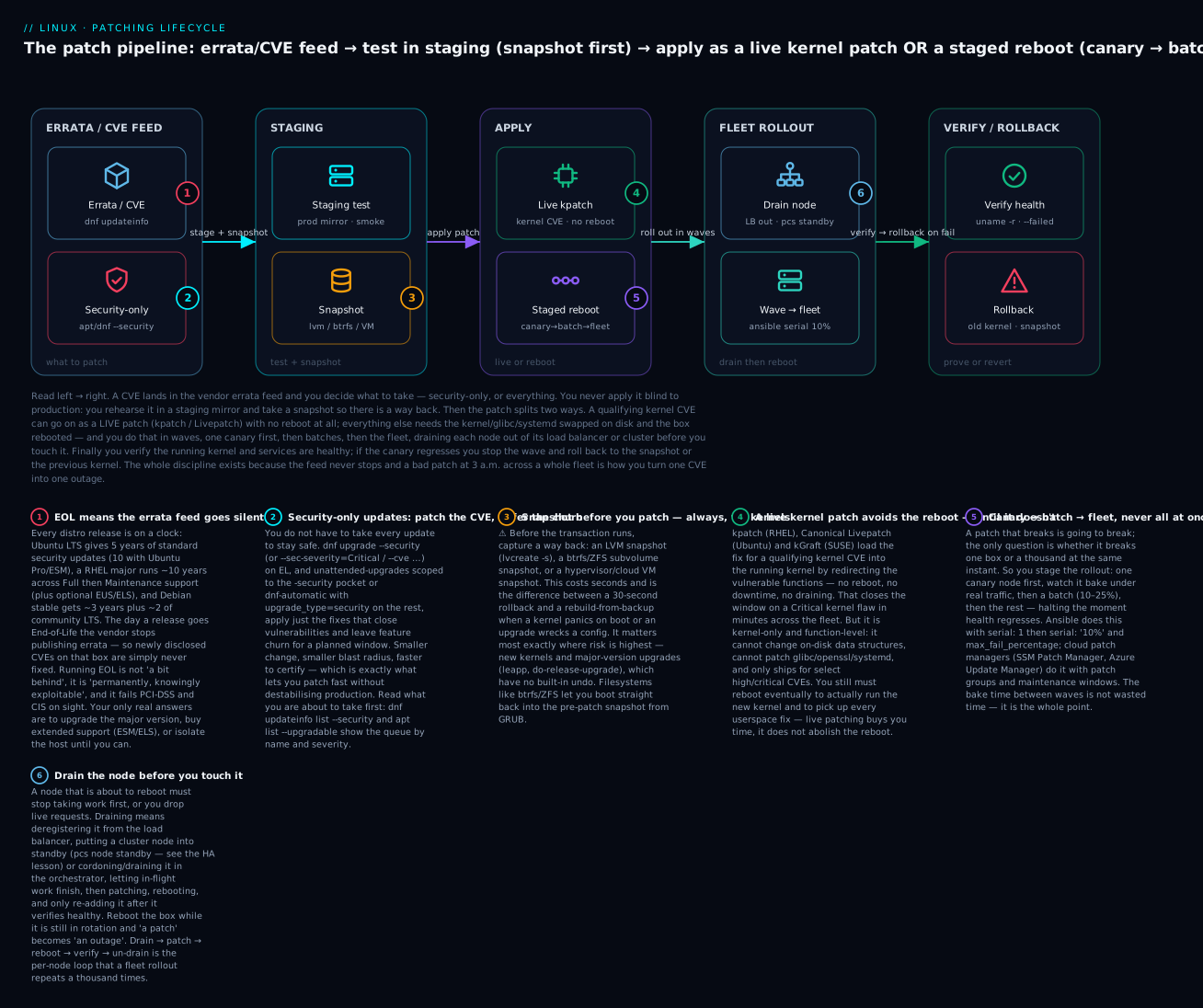
The core discipline is staged: never reboot everything at once. Prove the patch on a canary, expand to a batch, then the fleet — halting the instant health regresses. And per node, always drain first: take the node out of rotation, let in-flight work finish, patch, reboot, verify, then re-add it. This is the pipeline the diagram below traces end to end — from the errata feed through staging and the live-patch-or-reboot fork to fleet rollout and verification, with rollback waiting if the canary goes bad.
Detecting which hosts need a reboot
The rollout starts by asking every host the boolean from earlier — do you need a reboot? — and acting only on the ones that say yes:
# Ubuntu fleet check
test -f /var/run/reboot-required && echo "$(hostname): reboot needed"

# RHEL fleet check (drives automation off the exit code)
needs-restarting -r >/dev/null 2>&1 || echo "$(hostname): reboot needed"
The rollout strategies
| Strategy | How it works | Best for | Risk profile |
|---|---|---|---|
| Big bang | Patch + reboot everything at once | Nothing in prod (dev only) | A bad patch = total outage |
| Canary | 1 node first, bake under real traffic, then proceed | Every prod rollout, as phase 1 | Catches most regressions on 1 box |
| Rolling / batch | N% at a time (10→25→…), health-gated between waves | Stateless fleets behind a LB | Bounded blast radius per wave |
| Blue/green | Patch the idle colour, cut traffic over, keep old ready | Zero-downtime, easy rollback | Needs 2× capacity |
| Maintenance window | All-at-once inside agreed downtime | Stateful singletons, batch systems | Acceptable because it’s scheduled |
The canary → batch → fleet progression is the default for anything that matters: reboot one node, watch its health and the fleet’s error rate for a real bake period (not 30 seconds — long enough for a memory leak or a slow-burn regression to show), then a small batch, then widen. The bake time between waves is the entire point — remove it and you’ve reinvented big-bang with extra steps.
Draining a node — tie to high availability
Rebooting a node that’s still taking traffic drops live requests. Drain it first. How you drain depends on what fronts the node — and this is where patching meets the HA stack (see High Availability: Pacemaker, Corosync & keepalived for the cluster side):
| Front-end | Drain command | Un-drain |
|---|---|---|
| HAProxy / nginx LB | Set server down / weight 0, or deregister |
Re-enable / re-register |
| Pacemaker cluster | pcs node standby <node> |
pcs node unstandby <node> |
| Kubernetes | kubectl cordon then kubectl drain --ignore-daemonsets |
kubectl uncordon |
| AWS target group | aws elbv2 deregister-targets … (honours drain timeout) |
register-targets |
| systemd (graceful) | systemctl stop app.service, wait for connections to close |
systemctl start |
The per-node loop the whole fleet rollout repeats: drain → wait for in-flight work → patch → reboot → verify healthy → un-drain → move to next. Skip the “verify healthy before un-drain” step and you’ll happily send traffic back to a node that came up broken.
Doing it with Ansible
Ansible’s serial keyword is staged rollout, and max_fail_percentage is the health gate that stops a bad wave:
- hosts: webfleet
  serial:
    - 1          # canary: exactly one host first
    - "10%"      # then 10% batches
    - "25%"
  max_fail_percentage: 0    # any failure in a wave halts the whole play
  become: true
  tasks:
    - name: Drain from load balancer
      ansible.builtin.uri: { url: "http://lb/api/drain/{{ inventory_hostname }}", method: POST }
      delegate_to: localhost

    - name: Apply security updates (RHEL)
      ansible.builtin.dnf: { name: "*", state: latest, security: true }
      when: ansible_os_family == "RedHat"

    - name: Apply security updates (Debian)
      ansible.builtin.apt: { upgrade: dist, update_cache: true }
      when: ansible_os_family == "Debian"

    - name: Reboot only if required
      ansible.builtin.reboot: { reboot_timeout: 600 }
      when: >
        (ansible_os_family == "RedHat" and
         reboot_check.rc == 1) or
        (ansible_os_family == "Debian" and
         reboot_file.stat.exists)

    - name: Smoke-test before returning to rotation
      ansible.builtin.uri: { url: "http://{{ inventory_hostname }}:8080/health", status_code: 200 }
      register: health
      retries: 12
      delay: 5
      until: health.status == 200

    - name: Un-drain (only reached if health passed)
      ansible.builtin.uri: { url: "http://lb/api/enable/{{ inventory_hostname }}", method: POST }
      delegate_to: localhost
The Ansible keywords that turn a plain play into a staged, health-gated rollout:
| Keyword | Controls | Typical value |
|---|---|---|
serial |
Wave size — the canary→batch→fleet ramp | serial: [1, "10%", "25%"] |
max_fail_percentage |
Abort the play if more than N% of a wave fails | max_fail_percentage: 0 |
any_errors_fatal |
Stop the whole play on the first host error | any_errors_fatal: true |
throttle |
Cap concurrent hosts within a wave | throttle: 5 |
ansible.builtin.reboot |
Reboot and block until the host returns | reboot_timeout: 600 |
delegate_to: localhost |
Run the drain/un-drain API call from the controller | around the reboot |
pre_tasks / post_tasks |
Drain before the wave, un-drain after | wrap the update |
The pattern is the whole lesson in one play: canary via serial: 1, health-gated waves via serial: "10%" + max_fail_percentage, reboot only if required, drain and un-drain around it, and a smoke test that must pass before traffic returns. See Fleet Management: cloud-init, Ansible & golden images for building the inventory and golden images this runs against.
Doing it with cloud patch managers
At cloud scale you often hand the mechanics to a managed service that bakes in patch baselines, groups, and maintenance windows:
| Service | Cloud | How it stages | Key concepts |
|---|---|---|---|
| SSM Patch Manager | AWS | Patch groups + maintenance windows; AWS-RunPatchBaseline |
Patch baseline (approve rules, auto-approve after N days), patch groups by tag |
| Azure Update Manager | Azure | Assessment + scheduled deployments; maintenance configurations | Dynamic scoping, pre/post scripts, per-ring schedules |
| VM Manager OS patch | GCP | gcloud compute os-config patch-jobs execute |
Patch jobs, rollout with disruption budget |
| Landscape | Ubuntu/on-prem | Profiles + scheduled upgrades | Canonical’s fleet manager |
| Satellite / Katello | RHEL/on-prem | Content views promoted dev→test→prod | Frozen errata snapshots per environment |
These give you approval rules (“auto-approve Critical after 3 days of soak”), tag-based patch groups that become your canary/batch/fleet rings, and maintenance windows so the reboots happen when you said they would — the same canary→batch→fleet discipline, expressed in the provider’s console.
Testing & safety: stage, snapshot, and keep a way back
Everything above assumes you can recover when a patch goes wrong — and patches do go wrong. The safety net has three strands: test somewhere that isn’t prod, snapshot before you change anything, and keep at least two independent ways back.
Test in staging. A staging environment that mirrors production — same distro, same kernel, same major package versions, ideally same hardware/instance type — lets a bad patch fail where it costs nothing. This is the cheapest insurance in the entire practice; the canary is staging’s understudy, not its replacement.
Snapshot before patching. ⚠️ Before any kernel update or major-version upgrade, take a snapshot. Seconds now, versus a rebuild-from-backup later.
| Snapshot method | Command | Rollback | Notes |
|---|---|---|---|
| LVM | lvcreate -s -n root_pre -L 5G /dev/vg/root |
lvconvert --merge (on reboot) |
Needs free VG space; snapshot fills if churn is high |
| btrfs | btrfs subvolume snapshot -r / /.snap/pre |
Set default subvol, reboot | Instant, CoW; pairs with snapper + grub-btrfs |
| ZFS | zfs snapshot rpool/ROOT@pre |
zfs rollback rpool/ROOT@pre |
Boot environments; near-free snapshots |
| VM / hypervisor | Console / virsh snapshot-create-as |
Revert to snapshot | Captures the whole machine incl. /boot |
| Cloud disk | aws ec2 create-snapshot / Azure disk snapshot |
Restore/attach | Off-box, survives host loss |
On btrfs and ZFS the rollback is spectacular: with snapper + grub-btrfs (the openSUSE default) a pre-patch snapshot appears as a bootable entry in GRUB, so a kernel that panics is a reboot-and-pick-the-old-snapshot away. ZFS boot environments do the same via tools like zfsbootmenu. (For the filesystem mechanics, see ZFS, Btrfs & Stratis.)
Keep the previous kernel in GRUB. Never let auto-cleanup remove every old kernel. RHEL keeps the last few (installonly_limit=3 in /etc/dnf/dnf.conf); Ubuntu retains the current and previous. If a new kernel won’t boot, hold Shift/Esc at boot, open Advanced options, and select the previous kernel — an instant, zero-tooling rollback for the single most common patch failure.
# See installed kernels (don't remove the running or previous one!)
rpm -q kernel                              # RHEL
dpkg -l 'linux-image-*' | grep '^ii'       # Debian/Ubuntu
uname -r                                    # the one you're on now
A snapshot + full backup are different tools. A snapshot is a fast local rollback for “this patch broke the box”; it does not survive disk death or a destroyed host. For that you need real backups — see Backup & Recovery: tar, rsync, restic & bare-metal. Belt and braces before a major upgrade.
Write the rollback down. A rollback you invent at 3 a.m. under pressure is a rollback you get wrong. The runbook states, in order: how to boot the previous kernel, how to dnf downgrade / apt install pkg=oldversion a specific package, how to merge/restore the snapshot, the health checks that say “we’re recovered”, and who to call. Rehearse it.
# Downgrade a single package that a patch broke
sudo dnf downgrade nginx                       # RHEL: to the previous version
sudo apt install nginx=1.24.0-1ubuntu1         # Debian/Ubuntu: pin exact old version
Pinning, holding & controlled repositories
Sometimes stability demands that a package not move: a kernel a driver is certified against, a database version a vendor supports, an app pinned by a compliance baseline. Holding (Debian/Ubuntu) and version-locking (RHEL) freeze it while everything else updates.
| Action | Debian / Ubuntu | RHEL / Rocky / Alma |
|---|---|---|
| Freeze a package | sudo apt-mark hold nginx |
sudo dnf versionlock add nginx |
| Unfreeze | sudo apt-mark unhold nginx |
sudo dnf versionlock delete nginx |
| List frozen | apt-mark showhold |
dnf versionlock list |
| Exclude from all updates | Pin-Priority in /etc/apt/preferences.d/ |
exclude=nginx* in dnf.conf or --exclude |
| Install a specific version | apt install nginx=1.24.0-1 |
dnf install nginx-1.24.0 |
dnf versionlock needs its plugin (python3-dnf-plugin-versionlock). APT pinning via /etc/apt/preferences.d/ is more powerful (it can pin to a release/origin, not just a version) but easy to get subtly wrong — always verify the effect with apt-cache policy nginx.
⚠️ The pinning trap: freezing a security-relevant package (kernel, openssl, openssh, sudo) means its CVEs go unpatched for as long as the hold stands. Every hold is a small, deliberate security debt — document why it exists, who owns it, and when it will be lifted, and audit apt-mark showhold / dnf versionlock list regularly so a “temporary” pin doesn’t quietly become a permanent hole.
Controlled and air-gapped patching: mirrors and content lifecycles
Enterprises rarely let every host pull from the public internet on its own schedule — that’s unpredictable and impossible when the host is air-gapped. Instead they run an internal mirror and, better, a content lifecycle that freezes a known-good snapshot of errata and promotes it through environments.
| Tool | Ecosystem | What it gives you |
|---|---|---|
| Satellite / Foreman + Katello | RHEL | Content Views + lifecycle environments (dev→test→prod); promote a frozen errata snapshot; host patch management |
| Uyuni / SUSE Manager | SUSE/multi | Successor to Spacewalk; channels, staged patching, config |
| Spacewalk | Legacy | The ancestor of the above (now retired) |
reposync + createrepo_c |
RHEL | Pull a repo to a local mirror; serve over HTTP for air-gapped hosts |
apt-mirror / debmirror / aptly |
Debian/Ubuntu | Local Debian mirror; aptly adds versioned snapshots |
| Pulp | Multi | The content engine under Katello; mirror + version any repo |
| Landscape | Ubuntu | Canonical’s fleet patch + profile manager |
# RHEL: build a local mirror for an air-gapped network
sudo dnf reposync --repoid=baseos --download-metadata -p /srv/mirror/
sudo createrepo_c /srv/mirror/baseos/
# Air-gapped hosts point a .repo at http://mirror.internal/baseos/
The killer feature of a content lifecycle (Satellite Content Views, aptly snapshots) is repeatability: every host in a rollout wave installs the exact same package set from a frozen point-in-time snapshot, so “it worked on the canary” actually predicts the fleet. Promote that same snapshot dev→test→prod and your test really did test what prod will get — the antidote to “the mirror moved under me between waves”.
Verification: prove the patch landed and nothing broke
The rollout isn’t done when the reboot finishes — it’s done when you’ve proven the fix is live and the host is healthy. Skipping verification is how a “successful” patch run quietly leaves half the fleet still vulnerable, or degraded.
| Check | Command | Pass looks like |
|---|---|---|
| Running the new kernel | uname -r |
Matches the version you installed |
| No further reboot pending | needs-restarting -r; echo $? |
Exit 0 |
| System reached a good state | systemctl is-system-running |
running (not degraded) |
| No failed units | systemctl --failed |
Empty list |
| No new boot errors | journalctl -p err -b |
Nothing alarming since boot |
| The CVE is actually closed | dnf updateinfo list --security / pro fix CVE-… |
Nothing pending / “not affected” |
| App is serving | curl -fsS http://localhost:8080/health |
200 |
# A minimal post-patch health gate you can drop into automation
uname -r
needs-restarting -r && echo "reboot still pending!" || echo "kernel current"
systemctl is-system-running        # want: running
systemctl --failed --no-legend     # want: (empty)
The verification that most often gets skipped is the security one: after patching, dnf updateinfo list --security (or pro fix CVE-… on Ubuntu) should show the target CVE gone. That closes the loop between “I ran the patch” and “the vulnerability is actually fixed” — which, remember, is the entire reason you started. Feed these checks back into your monitoring so a host that reboots degraded pages you instead of silently rejoining the fleet.
Hands-on lab
Do this on two disposable VMs or containers — one Ubuntu (22.04/24.04), one Rocky/Alma 9 — or whichever single family you have. Everything is safe on a throwaway host; the ⚠️ steps are marked. Root or sudo throughout.
Step 1 — See what’s pending, and scope it to security.
# Ubuntu
sudo apt update
apt list --upgradable
# Rocky/Alma
sudo dnf check-update; echo "exit=$? (100 means updates available)"
sudo dnf updateinfo list --security
What just happened: you refreshed metadata and separated “everything available” from “just the security errata” — the first decision in the pipeline.
Step 2 — Read what one update actually changes.
sudo apt changelog openssl        # Ubuntu
rpm -q --changelog openssl | head -20   # Rocky/Alma
What just happened: you saw the CVEs a package’s update closes — the evidence that “old-looking version” ≠ “vulnerable”.
Step 3 — Configure security-only auto-patching.
# Ubuntu
sudo apt install -y unattended-upgrades
sudo unattended-upgrade --dry-run --debug 2>&1 | grep -i 'allowed origins\|packages that'
# Rocky/Alma
sudo dnf install -y dnf-automatic
sudo sed -i 's/^upgrade_type.*/upgrade_type = security/' /etc/dnf/automatic.conf
sudo systemctl enable --now dnf-automatic.timer
systemctl list-timers dnf-automatic.timer
What just happened: the box will now pull security fixes on its own — the self-patching posture for replaceable hosts.
Step 4 — Detect whether a reboot is required.
# Ubuntu
test -f /var/run/reboot-required && echo "REBOOT NEEDED" || echo "no reboot needed"
# Rocky/Alma
needs-restarting -r; echo "exit=$? (1=reboot needed, 0=fine)"
needs-restarting -s | head    # which services want a restart (no reboot)
What just happened: you asked the exact boolean a fleet rollout keys off, and saw the difference between “restart a service” and “reboot the box”.
Step 5 — Hold a package, prove it, release it.
# Ubuntu
sudo apt-mark hold openssh-server && apt-mark showhold
sudo apt-mark unhold openssh-server
# Rocky/Alma
sudo dnf install -y python3-dnf-plugin-versionlock
sudo dnf versionlock add openssh-server && dnf versionlock list
sudo dnf versionlock delete openssh-server
What just happened: you froze and un-froze a package — and saw why holding a security-relevant one is a documented debt, not a set-and-forget.
Step 6 — ⚠️ Snapshot, then patch, then verify (LVM example).
# Only if root is on LVM with free VG space — otherwise use your VM's snapshot button.
sudo lvs   # confirm the LV name and that the VG has free extents
sudo lvcreate -s -n root_prepatch -L 2G /dev/mapper/vg-root   # ⚠️ snapshot first
sudo dnf upgrade --security -y    # or: sudo apt full-upgrade -y
# Verify:
uname -r; systemctl is-system-running; systemctl --failed
# If all good, drop the snapshot; if broken, you'd lvconvert --merge and reboot.
sudo lvremove -y /dev/vg/root_prepatch
What just happened: you performed the safe-patch loop in miniature — a way back exists before the change, and you verified health after.
Step 7 — Model a staged rollout with Ansible (dry-run).
# Save as patch.yml (needs an inventory group 'lab' with your two VMs)
cat > patch.yml <<'YAML'
- hosts: lab
  serial: [1, "50%"]
  max_fail_percentage: 0
  become: true
  tasks:
    - name: reboot check (RHEL)
      command: needs-restarting -r
      register: nr
      failed_when: false
      changed_when: false
YAML
ansible-playbook -i inventory patch.yml --check
What just happened: serial: [1, "50%"] ran one canary host first, then the rest — the canary→batch→fleet shape, in --check mode so nothing changed.
Step 8 — Verify the security loop is closed.
sudo dnf updateinfo list --security   # should be empty after Step 6
# Ubuntu with Pro: sudo pro fix CVE-2024-3234
What just happened: you confirmed the target errata is gone — the difference between “I ran a patch” and “the vulnerability is fixed”.
Common mistakes and troubleshooting
| Symptom | Cause | Fix |
|---|---|---|
| Patched OpenSSL, scanner still flags the CVE | Running processes still map the old library | needrestart / needs-restarting -s, then restart the services (or reboot for kernel/glibc) |
dnf upgrade --security says “Nothing to do” but CVEs exist |
Repo lacks updateinfo metadata (some mirrors/rebuilds) |
Confirm with dnf updateinfo summary; use a repo that ships errata (RHEL, current Rocky/Alma) |
New kernel installed but uname -r shows the old one |
You haven’t rebooted; live patch ≠ new kernel | Reboot into the new kernel; verify with uname -r and needs-restarting -r → 0 |
| Box won’t boot after a kernel update | Bad kernel / initramfs / driver mismatch | GRUB → Advanced options → previous kernel; then investigate; boot-from-snapshot on btrfs/ZFS |
/boot full, kernel update fails |
Old kernels not cleaned up | dnf remove $(dnf repoquery --installonly --latest-limit=-2) (RHEL); apt autoremove --purge (keep current+prev) |
apt upgrade held a package back (“kept back”) |
New deps need install/removal that upgrade won’t do |
apt full-upgrade (understand what it removes first) |
leapp upgrade refuses to run |
Unresolved inhibitors in the preupgrade report | Read /var/log/leapp/leapp-report.txt, fix each inhibitor, re-run leapp preupgrade |
do-release-upgrade over SSH died mid-way |
SSH dropped; the upgrade process died with the session | Always run inside tmux/screen; recover from snapshot if broken |
| unattended-upgrades rebooted prod at random | Automatic-Reboot "true" with no window |
Set "false" or a strict Automatic-Reboot-Time; orchestrate reboots separately |
| Node dropped live requests during patch | Rebooted without draining | Drain first (LB deregister / pcs standby / kubectl drain), verify healthy before un-drain |
| Whole wave rebooted at once, brief outage | No serial / max_fail_percentage gate |
Add serial: [1,"10%"] + max_fail_percentage; bake between waves |
| CVE reappears after next patch run | A version-lock/hold pinned the vulnerable version | Audit dnf versionlock list / apt-mark showhold; lift the hold or backport |
The three that bite hardest, in prose:
“Patched but not restarted.” The most insidious of all, because every dashboard says green. You upgraded glibc or openssl, the package DB records the fix, the vulnerability scanner (reading the package version) even goes quiet — but the running nginx/sshd/database still has the old library mapped into memory and is still exploitable. Only a service restart (for a library) or a reboot (for the kernel/glibc/systemd) makes the fix live. Build needrestart/needs-restarting -s into your post-patch checks so this is caught mechanically, not by luck.
The unbootable kernel. A kernel update that panics or hangs on your specific hardware/driver combo is the classic 2 a.m. call — and it’s the one with the easiest fix if you prepared: the previous kernel is still in GRUB’s Advanced options (never let cleanup remove it), and on btrfs/ZFS a pre-patch snapshot is a bootable GRUB entry. The failure mode is only catastrophic when someone “cleaned up old kernels to free space” and removed the escape hatch, or patched a headless box with no console access and no way to select a boot entry. Keep the previous kernel; keep console/serial access.
The /boot partition filling up. /boot is often a small dedicated partition, and each kernel is tens of MB. Let three or four accumulate on a stingy /boot and the next kernel update fails half-installed — a genuinely nasty state. Keep kernel retention sane (installonly_limit), size /boot at ≥1 GB on new builds, and check df -h /boot as a pre-patch step.
Cheat-sheet
| Task | Command |
|---|---|
| Refresh metadata | apt update · dnf makecache |
| List upgradable | apt list --upgradable · dnf check-update (exit 100) |
| Pending security errata | apt list --upgradable (eyeball) · dnf updateinfo list --security |
| Security summary | — · dnf updateinfo summary |
| Apply security only | unattended-upgrade -d · dnf upgrade --security |
| By severity / CVE | — · dnf upgrade --sec-severity=Critical / --cve CVE-… |
| Auto-patch (security) | unattended-upgrades + 20auto-upgrades · dnf-automatic upgrade_type=security |
| What a pkg update fixes | apt changelog PKG · rpm -q --changelog PKG |
| Services running old libs | needrestart · needs-restarting -s |
| Reboot required? | test -f /var/run/reboot-required · needs-restarting -r; echo $? (1=yes) |
| Freeze a package | apt-mark hold PKG · dnf versionlock add PKG |
| List frozen | apt-mark showhold · dnf versionlock list |
| Install exact version | apt install PKG=VER · dnf install PKG-VER |
| Downgrade | apt install PKG=OLDVER · dnf downgrade PKG |
| Live kernel patch status | canonical-livepatch status · kpatch list |
| Enable live patching | pro enable livepatch · dnf install kpatch-dnf && dnf kpatch auto |
| Major upgrade | do-release-upgrade (in tmux!) · leapp preupgrade then leapp upgrade |
| Installed kernels | dpkg -l 'linux-image-*' · rpm -q kernel |
| Running kernel | uname -r |
| LVM snapshot | lvcreate -s -n snap -L 5G /dev/vg/lv |
| btrfs / ZFS snapshot | btrfs subvolume snapshot -r / /.snap/pre · zfs snapshot pool/root@pre |
| Post-patch health | systemctl is-system-running · systemctl --failed · journalctl -p err -b |
| Ansible staged rollout | serial: [1, "10%"] + max_fail_percentage: 0 |
| Local mirror (air-gap) | dnf reposync … && createrepo_c · apt-mirror / debmirror |
Interview and exam questions
Q: Why is apt update not the same as apt upgrade?
A: apt update only refreshes local metadata — it downloads the current package lists from your configured repos so apt knows what versions exist. It installs nothing. apt upgrade applies upgrades using whatever metadata is currently cached. Run upgrade without a fresh update and you may be acting on stale information and miss (or misjudge) available fixes. On RHEL the two are folded into dnf upgrade, but the metadata still expires on a timer (metadata_expire).
Q: What’s the difference between apt upgrade and apt full-upgrade?
A: apt upgrade upgrades installed packages but will never remove a package to satisfy a dependency — if an upgrade would require a removal, it holds that package “back”. apt full-upgrade (formerly dist-upgrade) is allowed to add and remove packages to resolve dependencies. Use full-upgrade when packages are “kept back”, but inspect what it will remove first.
Q: You patched OpenSSL but the vulnerability scanner still flags the host. Why, and how do you confirm the fix is live?
A: The upgraded library is on disk, but every already-running process that loaded the old libssl still has the vulnerable code mapped in memory. The fix isn’t live until those processes restart. Confirm with needrestart (Debian/Ubuntu) or needs-restarting -s (RHEL) to list services running outdated libraries, then restart them — or reboot for a kernel/glibc/systemd-class change.
Q: How do you apply only security updates on RHEL, and on Ubuntu?
A: RHEL: dnf upgrade --security (optionally --sec-severity=Critical or --cve CVE-…), driven by the updateinfo errata metadata. Ubuntu: scope unattended-upgrades to the ${distro_codename}-security origin in /etc/apt/apt.conf.d/50unattended-upgrades, leaving the -updates pocket commented out, so only security-pocket fixes are applied.
Q: What does needs-restarting -r return and why does it matter for automation?
A: It returns exit code 1 if the system needs a full reboot (a kernel, glibc, systemd, or similar core update landed) and 0 if not. It’s the single boolean fleet automation uses to decide which hosts join a reboot wave — you reboot only the hosts that answer “yes”, instead of blindly rebooting everything.
Q: What is live kernel patching, and what can’t it do? A: Technologies like kpatch (RHEL), Canonical Livepatch (Ubuntu) and kGraft (SUSE) load a fix for a qualifying kernel CVE into the running kernel by redirecting the vulnerable functions — no reboot, no downtime. They cannot change on-disk kernel data structures, cannot patch userspace (glibc, OpenSSL, systemd), only cover selected high/critical CVEs, and don’t move you to a new kernel version. You must still reboot eventually to run the updated kernel and apply userspace fixes — live patching defers the reboot, it doesn’t remove it.
Q: Your Ubuntu 20.04 fleet is approaching EOL. What are your options?
A: Three: (1) upgrade the major version to a supported LTS via do-release-upgrade (tested, snapshotted); (2) buy time with Ubuntu Pro / ESM, which extends security maintenance to 10 years total; or (3) isolate hosts that genuinely can’t move (air-gap/firewall) with a documented risk acceptance. Doing nothing means newly disclosed CVEs are never fixed and you fail compliance.
Q: Walk through safely upgrading RHEL 8 to RHEL 9 in place.
A: Fully patch RHEL 8 first; take a snapshot/backup (leapp has no rollback); dnf install leapp-upgrade; run leapp preupgrade and resolve every inhibitor in /var/log/leapp/leapp-report.txt; rehearse on a clone; then leapp upgrade and reboot (it boots an upgrade initramfs, runs the transaction, reboots again); finally verify with cat /etc/redhat-release and uname -r, and check services.
Q: Describe a safe fleet reboot rollout for a kernel CVE.
A: Detect which hosts need a reboot (needs-restarting -r / /var/run/reboot-required). Roll out staged: one canary node first, drained out of its load balancer/cluster, patched, rebooted, and verified healthy over a real bake period; then batches (10–25%), health-gated between waves; then the rest — halting on any regression. Each node follows drain → patch → reboot → verify → un-drain. In Ansible that’s serial: [1, "10%"] with max_fail_percentage: 0.
Q: (LFCS/RHCSA-style) Configure dnf-automatic to download and apply only security updates daily, then verify the timer is active.
A:
sudo dnf install -y dnf-automatic
sudo sed -i 's/^upgrade_type.*/upgrade_type = security/;s/^apply_updates.*/apply_updates = yes/' \
     /etc/dnf/automatic.conf
sudo systemctl enable --now dnf-automatic.timer
systemctl list-timers dnf-automatic.timer   # confirm it's scheduled
Q: (Practical) A package hold has been leaving a CVE unpatched. How do you find and fix it?
A: List holds — apt-mark showhold (Debian/Ubuntu) or dnf versionlock list (RHEL). If the held package is the vulnerable one, either lift the hold (apt-mark unhold PKG / dnf versionlock delete PKG) and patch, or — if the hold exists for a genuine compatibility reason — backport the fix or accept the risk explicitly. Then audit holds regularly so a “temporary” pin doesn’t become a permanent hole.
Q: Why snapshot before patching, and how does btrfs/ZFS make rollback better?
A: A snapshot is a fast, local way back if a patch breaks the box — seconds to take, versus a rebuild-from-backup. It matters most for kernel and major-version upgrades, which have no built-in undo. On btrfs (with snapper + grub-btrfs) or ZFS boot environments, the pre-patch snapshot appears as a bootable GRUB entry, so recovering from a kernel that won’t boot is just “reboot and pick the previous snapshot”.
Key takeaways
- Patching is a pipeline, not a command: decide what (security-only vs everything), prove it in staging, keep a way back, roll out in waves, and verify the CVE is actually gone. The typing is trivial; the discipline is the job.
- Security-only updates resolve the fast-vs-stable tension.
dnf upgrade --securityandunattended-upgradesscoped to the-securitypocket (ordnf-automaticwithupgrade_type=security) patch what’s dangerous and defer feature churn — small change, small blast radius. - “Installed” ≠ “running the fix”. Upgraded libraries don’t protect already-running processes until they restart; a new kernel doesn’t run until you reboot.
needrestart/needs-restarting -rtell you the truth; wire them into your checks. - Every release is on an EOL clock, and EOL means the errata feed goes silent. Know your Ubuntu LTS/ESM and RHEL Full/Maintenance/EUS/ELS windows; upgrade, buy extended support, or isolate — never drift into unsupported by accident.
- Live kernel patching buys time, not immunity from reboots. kpatch/Livepatch close a kernel CVE with no downtime, but they’re kernel-only, function-level, and selective — you still reboot to run the new kernel and to fix userspace.
- Reboots at scale are canary → batch → fleet, with each node drained first. Bake time between waves is the whole point; Ansible
serial+max_fail_percentageand cloud patch managers give you the health gates. Drain → patch → reboot → verify → un-drain, a thousand times. - ⚠️ Snapshot before kernel and major-version upgrades — they have no undo. Keep the previous kernel in GRUB, prefer btrfs/ZFS bootable snapshots, and write the rollback runbook before you need it at 3 a.m.