Someone runs SELECT * FROM cloudtrail_logs in the Athena console, waits four minutes, gets their answer, and moves on. At the end of the month the finance team asks why the analytics line item is ₹2.4 lakh, and the answer is that single innocent query — repeated by a dashboard every fifteen minutes — scanned 1.2 TB of gzipped JSON every time, and Amazon Athena bills $5 for every terabyte it reads from S3. Nobody wrote a bad query. They wrote a query against a badly organized lake. Same SQL, same data, a lake shaped correctly, and that query scans 1.3 GB instead of 1.2 TB and costs a fraction of a rupee.
That factor — 10x to 100x, sometimes more — is the entire subject of this article. Amazon Athena is serverless Trino/Presto SQL that runs directly on files in Amazon S3; there is no cluster to size, you pay only for the bytes each query scans. The AWS Glue Data Catalog is the metastore that tells Athena what those files are: which databases, tables, columns, types, and — critically — partitions exist. The gap between a cheap lake and an expensive one is almost never the query engine. It is three decisions about the data: is it partitioned so a WHERE clause can skip whole prefixes, is it stored columnar (Parquet/ORC) so a query reads only the columns it names, and is it compressed so there are fewer bytes to read at all. Get those right and Athena feels like magic; get them wrong and it feels like a tax.
This article teaches the full serverless-analytics stack over an S3 data lake, end to end. You will learn how the Glue Data Catalog models databases and tables and how crawlers infer schema into it; how Hive-style partitioning (key=value prefixes) and partition projection eliminate the crawler entirely; why Parquet plus Snappy slashes both scan volume and cost; how CTAS and INSERT INTO transform raw data into that optimized shape; the exact per-TB-scanned cost model and how partition-pruning, columnar layout, and compression stack multiplicatively against it; how workgroups isolate queries and cap data scanned; and where Glue ETL and Lake Formation fit. Then you will build all of it — land raw data, crawl it, query it, convert it to partitioned Parquet, measure the bytes-scanned drop, and lock it down with a workgroup limit and partition projection — in a copy-pasteable aws CLI and Terraform lab, followed by a troubleshooting playbook for the errors this stack actually throws.
What problem this solves
The pain is not that querying S3 is impossible — it is that the naive way is slow and expensive and the bill scales with your carelessness, not your value. Everything below is a production symptom teams hit within weeks of pointing Athena at a growing lake.
| Symptom in production | Root cause (a data-layout decision) | What the Athena + Glue lake does instead |
|---|---|---|
| One dashboard query costs ₹500 and scans 1.2 TB | No partitions; every query reads the whole table | Partition pruning — a WHERE dt='2026-07-14' reads one day’s prefix, not 90 |
SELECT country, count(*) reads all 40 columns |
Row format (CSV/JSON) can’t skip columns | Columnar Parquet reads only the 2 columns named — column projection |
| Bill doubles when raw log volume doubles | Uncompressed or gzip-per-file, read in full every time | Snappy Parquet stores ~5-10x smaller and skips row-groups via stats |
| A new day’s data “isn’t in Athena yet” | Partitions must be registered in the catalog | MSCK REPAIR, ALTER TABLE ADD PARTITION, or partition projection (zero maintenance) |
| Crawlers cost money and lag behind fresh data | Scheduled crawler re-scans S3 to find partitions | Partition projection computes partitions from a template — no crawler, no lag |
An analyst’s SELECT * runs the account out of budget |
No guardrail on how much a query may scan | Workgroup per-query data limit kills the query at a byte threshold |
| “0 records returned” on data you can see in S3 | Schema/format mismatch (JSON vs CSV, nested, SerDe) | Correct classifier + SerDe + partition location, verified by Query.DataScannedInBytes |
| Analytics query locks up the OLTP database | You ran reporting against the production RDS/DynamoDB | Land a copy in S3, query with Athena — zero load on the source |
Who hits this: every team that discovers “just query it in Athena” before they discover how Athena bills. Data engineers, platform teams running centralized data lake and analytics architectures, security teams querying CloudTrail and VPC Flow Logs, and FinOps teams querying the Cost and Usage Report all live in Athena. The ones with predictable, low bills did three boring things — partition, columnarize, compress — before they wrote their tenth query.
Learning objectives
By the end of this article you will be able to:
- Explain the serverless-analytics stack — how Athena (query), the Glue Data Catalog (metastore), and S3 (storage) divide the work, and where Redshift and EMR fit instead.
- Catalog data three ways — run a Glue crawler, write DDL by hand, or use partition projection — and choose correctly for a given ingest pattern.
- Partition a lake with Hive-style
key=valueprefixes, register partitions withMSCK REPAIR/ALTER TABLE ADD PARTITION, and eliminate that maintenance with partition projection. - Convert raw JSON/CSV to partitioned, compressed Parquet with CTAS and
INSERT INTO, and measure the exact drop in bytes scanned. - Reason about the per-TB-scanned cost model and quantify how pruning × columnar × compression multiply into a 10-100x reduction.
- Isolate and cap queries with workgroups — per-query and per-workgroup data limits, result location, and encryption.
- Operate Glue — crawlers, classifiers, ETL jobs, DynamicFrames, job bookmarks for incremental loads, and Data Quality — and know when a Spark job beats CTAS.
- Diagnose the real failures —
HIVE_BAD_DATA,HIVE_PARTITION_SCHEMA_MISMATCH, missing partitions, permission-denied across S3 + Glue + Lake Formation, and the small-files problem.
Prerequisites & where this fits
You should be comfortable with S3 buckets, prefixes, and IAM policies, and be able to read basic SQL. You do not need prior Athena, Glue, or Spark experience — this article builds all of it. Familiarity with how S3 stores objects under key prefixes is the single most useful piece of background, because partitioning is nothing but a naming convention on those prefixes.
| You should already know… | Why it matters here |
|---|---|
| S3 buckets, object keys, and prefixes | A “partition” is literally an S3 prefix like dt=2026-07-14/; the catalog just points at it |
Basic SQL (SELECT, WHERE, GROUP BY, JOIN) |
Athena is ANSI SQL via Trino; the skill transfers directly |
| IAM roles, policies, and resource ARNs | Athena needs S3 + Glue permissions; Glue jobs assume a role; Lake Formation adds a layer |
| S3 storage classes and lifecycle | Raw and curated lake zones use different classes; see S3 Storage Classes & Lifecycle |
| How data lands in S3 (batch or stream) | Firehose/Kinesis often writes the raw zone; see Kinesis Data Streams & Firehose Hands-On |
| Column vs row storage (conceptually) | The whole cost argument rests on why columnar beats row for analytics |
Where it fits in the bigger picture: this is the query and catalog tier of a data lake. Upstream, data lands in S3 from Firehose, DMS, application logs, or CloudTrail. The Glue Data Catalog is the shared metastore — the same tables are readable by Athena, Redshift Spectrum, EMR, and Glue ETL, so you define schema once. Downstream, Athena feeds BI tools (QuickSight, Tableau via JDBC/ODBC) and ad-hoc analysis. On the certification map this is core to DAS-C01 (Data Analytics Specialty) and appears on SAA-C03 wherever the exam asks you to choose a serverless query engine or design a cost-efficient analytics layer.
Core concepts
The mental model is a clean separation of three concerns. S3 stores the bytes, the Glue Data Catalog stores the schema and partition metadata, and Athena is a stateless query engine that reads the catalog to plan and then reads S3 to execute. Nothing is a server you own; all three scale independently and bill independently.
| Layer | Service | What it holds / does | Bills on |
|---|---|---|---|
| Storage | Amazon S3 | The raw + curated data files (JSON, CSV, Parquet, ORC) | GB-months stored + requests |
| Metastore | AWS Glue Data Catalog | Databases, tables, columns, types, SerDe, partition list | Objects stored + requests (1M each free/mo) |
| Query | Amazon Athena | Parses SQL, plans against catalog, scans S3, returns results | Data scanned from S3 ($5/TB) |
| Transform | Glue ETL / Athena CTAS | Reshape raw → curated (Parquet, partitioned) | Glue DPU-hours / Athena data scanned |
| Governance | Lake Formation | Fine-grained table/column/row grants over catalog | No charge for permissions |
Athena is Trino/Presto, not a database
Athena runs no storage of its own. Athena engine version 3 is built on Trino (the open-source successor to PrestoSQL; engine v2 was Presto 0.217). Every query is a fresh distributed scan — there are no indexes, no buffer pool, no vacuum. That is why the only levers you have on performance and cost are the shape of the files. Understanding this kills a whole class of wrong instincts (“add an index,” “it’ll be cached next time”) that carry over from RDS or PostgreSQL and simply do not exist here.
| Athena property | Value / behavior | Practical consequence |
|---|---|---|
| Engine | Trino (v3) / Presto (v2) | ANSI SQL, rich functions, UNNEST for nested data |
| State | Stateless, serverless | No indexes, no caching between queries (except result reuse) |
| Concurrency | Per-account query quotas (DML/DDL) | Many concurrent queries; long ones may queue |
| DML query timeout | 30 min default (raiseable via quota) | Long scans on unpartitioned data time out |
| Pricing | $5.00 per TB scanned, 10 MB minimum, rounded up to 10 MB | Cost is a direct function of bytes read from S3 |
| Result reuse | Optional per-workgroup, up to a max age | Identical query returns cached result, scans 0 bytes |
| DDL / partition ops | Free (scan 0 bytes) | MSCK REPAIR, CREATE TABLE, ADD PARTITION cost nothing |
| Failed queries | Not billed | Cancelled queries billed for bytes scanned so far |
The Glue Data Catalog objects
The catalog is a hierarchy: a Catalog (per account/region) contains Databases, which contain Tables, which have columns, a SerDe (serializer/deserializer that tells the engine how to read the file format), a location (the S3 prefix), and a list of partitions (each a key=value combination mapped to its own S3 prefix).
| Catalog object | What it is | Key attributes | Who reads it |
|---|---|---|---|
| Database | A namespace for tables | Name, description, location URI | Athena, Redshift, EMR, Glue |
| Table | Schema over an S3 prefix | Columns, types, SerDe, InputFormat, Location, partition keys |
Athena / Spectrum / EMR |
| Partition | One key=value combo → one S3 prefix |
Partition values, its own Location, its own SerDe |
Athena query planner |
| SerDe | Row (de)serializer | Class (JSON/OpenCSV/Parquet), properties | The engine at read time |
| Classifier | Format detector for crawlers | Grok/JSON/CSV/XML pattern | Glue crawler |
| Connection | Credentials to a data source | JDBC/JDBC-like endpoint + secret | Glue crawler / ETL |
Athena vs the other query engines
Athena is not the only way to query the lake; it is the right default for ad-hoc, serverless, pay-per-query SQL. Know the neighbors so you can defend the choice.
| Engine | Model | Best for | Not great for |
|---|---|---|---|
| Athena | Serverless, per-TB-scanned | Ad-hoc SQL, log analysis, occasional queries | Sub-second dashboards, heavy concurrency at scale |
| Redshift Spectrum | Redshift cluster reads S3 via catalog | Joining lake data with warehouse tables | Pure serverless (needs a cluster / Serverless RPUs) |
| Redshift (native) | Provisioned/serverless MPP warehouse | High-concurrency BI, complex joins, materialized views | Truly ad-hoc one-off scans on cold data |
| EMR (Spark/Hive/Presto) | Managed cluster you size | Large ETL, ML feature pipelines, custom Spark | Anyone who does not want to run a cluster |
| Glue ETL | Serverless Spark jobs | Scheduled transforms, DynamicFrames, bookmarks | Interactive querying (it is a job runner, not a REPL) |
| Athena for Apache Spark | Serverless Spark notebooks in Athena | PySpark analysis without managing EMR | SQL-only users (use plain Athena SQL) |
The AWS Glue Data Catalog and crawlers
Before Athena can query a file it must exist as a table in the catalog. You populate the catalog three ways: a crawler (Glue infers schema by sampling files), hand-written DDL (you CREATE EXTERNAL TABLE with exact columns), or partition projection (a table whose partitions are computed, not stored). Each has a place.
Crawlers
A Glue crawler connects to an S3 path (or JDBC source), samples objects, runs classifiers to detect the format, infers columns and types, and writes/updates a table in the catalog — including discovering partitions from key=value prefixes. You can schedule it (cron) so new data and new partitions are picked up automatically.
| Crawler setting | Options | Default | When to change | Gotcha |
|---|---|---|---|---|
| Data source | S3 path(s), JDBC, DynamoDB, Delta, Iceberg | S3 | Point at the raw or curated prefix | Multiple paths → one crawler, many tables |
| Classifiers | Built-in + custom (grok/JSON/CSV/XML) | Built-in | Odd log format or custom delimiter | Custom classifier order matters; first match wins |
| Table grouping | Create single schema for similar folders | Off | Many partitions with same schema | Prevents “one table per folder” explosion |
| Schema change policy | Update / add-only / ignore; delete / deprecate / ignore | Update + deprecate | Protect a hand-tuned schema | Crawler can overwrite your types |
| Recrawl behavior | Crawl all / crawl new folders only | Crawl all | Big lake, only new partitions matter | “New folders only” is far cheaper |
| Schedule | On-demand / cron | On-demand | Continuous ingest | Crawl lag = data invisible until next run |
| IAM role | Role with S3 read + Glue write | — | Always | Missing s3:GetObject → empty/failed table |
| Output database | Target Glue database | — | Always | Table name derived from folder name |
Built-in classifiers
Crawlers ship with classifiers for the common formats; they run in a fixed order and the first to match with 100% certainty wins. When your data is a nonstandard log or delimiter, you add a custom classifier (grok pattern, JSON path, XML tag, or CSV spec) that runs before the built-ins.
| Classifier | Detects | Notes |
|---|---|---|
| Parquet | .parquet, magic bytes |
Reads embedded schema — most reliable |
| ORC | ORC files | Embedded schema |
| Avro | Avro container | Embedded schema |
| JSON | JSON objects / arrays | One object per line (JSONL) works best; pretty-printed multi-line breaks |
| CSV / OpenCSV | Delimited text | Header detection is heuristic — can guess wrong |
| Grok (custom) | Log lines (Apache, syslog, ELB) | You supply the grok pattern |
| XML (custom) | XML with a row tag | You name the row-level element |
Crawler vs manual DDL vs partition projection
This is the decision that most affects your operational cost and freshness. Do not default to a crawler out of habit.
| Approach | How partitions are known | Freshness | Cost | Best for |
|---|---|---|---|---|
| Crawler (scheduled) | Crawler scans S3, writes partition list | As fresh as the schedule | DPU-hours per crawl | Unknown/evolving schema, discovery |
Manual DDL + MSCK REPAIR |
You run MSCK to scan for new prefixes |
Manual / on demand | Free DDL, but MSCK slow on huge lakes |
Stable schema, Hive layout |
Manual DDL + ADD PARTITION |
You register each partition explicitly | Immediate for that partition | Free | Non-Hive layout, precise control |
| Partition projection | Computed from a template at query time | Always current, zero lag | Free, no crawler | Predictable partition keys (dates, IDs) |
The senior move for time-series lakes is almost always partition projection: no crawler to schedule, no MSCK to run, no lag, no per-crawl cost, and no “the 2 a.m. data isn’t queryable until the 6 a.m. crawl” incident.
Partitioning and partition projection
Partitioning is the highest-leverage cost lever in the entire stack. A partitioned table stores data under key=value prefixes, and when a query filters on a partition key, Athena reads only the matching prefixes — this is partition pruning. A table partitioned by date over 90 days lets a single-day query skip 89/90ths of the data before reading a byte.
Hive-style layout
The convention Athena and Glue understand is Hive-style: the S3 key encodes each partition column as column=value.
s3://lake-curated/events/
  dt=2026-07-12/region=ap-south-1/part-0000.snappy.parquet
  dt=2026-07-13/region=ap-south-1/part-0000.snappy.parquet
  dt=2026-07-14/region=us-east-1/part-0000.snappy.parquet
dt and region become partition columns — they are not stored inside the files, they are derived from the path, which is why filtering on them is free of scan cost.
| Partition strategy | Example key | Cardinality guidance | Trade-off |
|---|---|---|---|
| By date | dt=2026-07-14 |
~365/yr — ideal | The universal default for logs/events |
| By date + hour | dt=.../hour=13 |
8,760/yr | Finer pruning, more partitions to manage |
| By region / tenant | region=ap-south-1 |
Low-to-medium | Good if queries usually filter it |
| By high-cardinality id | user_id=... |
Millions — avoid | Too many tiny partitions; metadata explosion |
| Composite | dt=.../region=... |
Product of both | Prune on either or both; keep total sane |
The anti-pattern is over-partitioning. Tens of thousands of partitions with a few KB each create a metadata and small-files problem that costs more (in per-file overhead and planning time) than it saves. Aim for partitions whose files are ~128 MB to 1 GB each.
Registering partitions: MSCK REPAIR vs ADD PARTITION
If you use a crawler or projection, skip this. If you manage a Hive-layout table by hand, Athena will not see a new partition until you register it.
-- Scan the table's S3 location for any key=value prefixes and add them all.
-- Convenient, but slow on tables with thousands of partitions.
MSCK REPAIR TABLE events;

-- Register one partition precisely (fast, works for NON-Hive layouts too,
-- because you supply the exact LOCATION).
ALTER TABLE events ADD IF NOT EXISTS
  PARTITION (dt='2026-07-14', region='us-east-1')
  LOCATION 's3://lake-curated/events/dt=2026-07-14/region=us-east-1/';
| Mechanism | Speed | Layout required | Use when |
|---|---|---|---|
MSCK REPAIR TABLE |
Slow (scans whole prefix) | Hive key=value only |
Backfilling many partitions at once |
ALTER TABLE ADD PARTITION |
Fast (one partition) | Any (you give LOCATION) | Adding today’s partition; non-Hive paths |
Glue batch-create-partition (CLI/SDK) |
Fast, scriptable | Any | Automating from an ingest pipeline |
| Crawler | Medium (DPU cost) | Any | Discovery / evolving schema |
| Partition projection | Instant, no registration | Predictable values | Anything time/ID-keyed |
Partition projection — no crawler, no MSCK, no lag
Partition projection tells Athena to compute the set of partitions from a template stored in the table properties, instead of reading them from the catalog. There is nothing to register — Athena generates the candidate prefixes that match your WHERE filter and reads only those. It is the modern default for predictable keys.
CREATE EXTERNAL TABLE events_projected (
  event_id string, event_name string, user_id string, payload string
)
PARTITIONED BY (dt string, region string)
STORED AS PARQUET
LOCATION 's3://lake-curated/events/'
TBLPROPERTIES (
  'projection.enabled' = 'true',
  'projection.dt.type' = 'date',
  'projection.dt.range' = '2026-01-01,NOW',
  'projection.dt.format' = 'yyyy-MM-dd',
  'projection.dt.interval' = '1',
  'projection.dt.interval.unit' = 'DAYS',
  'projection.region.type' = 'enum',
  'projection.region.values' = 'ap-south-1,us-east-1,eu-west-1',
  'storage.location.template' = 's3://lake-curated/events/dt=${dt}/region=${region}/'
);
| Projection type | For | Key properties | Example |
|---|---|---|---|
date |
Time keys | range, format, interval, interval.unit |
2026-01-01,NOW |
integer |
Numeric IDs / hours | range, optional digits |
0,23 (hours), digits=2 |
enum |
Small fixed set | values |
ap-south-1,us-east-1 |
injected |
High-cardinality, always filtered | none (value must be in WHERE) |
tenant_id supplied per query |
The one rule with injected projection: the query must provide the value in a WHERE predicate, because Athena has no range to enumerate — it injects your literal into the template. That is exactly what you want for a high-cardinality tenant/customer id: no partition metadata at all, yet perfect pruning.
Columnar formats and compression
Partitioning decides which files Athena opens. Columnar format decides how much of each file it must read. This is the second multiplier, and it stacks on top of pruning.
Why Parquet beats CSV/JSON for analytics
A CSV or JSON file is row-oriented: to read the country column you must read every byte of every row, because the columns are interleaved. Apache Parquet (and ORC) is column-oriented: values for each column are stored together in row groups with per-column statistics (min/max) and dictionary/run-length encoding. Athena reads only the columns your SELECT names (column projection) and skips entire row groups whose min/max cannot match your WHERE (predicate pushdown).
| Format | Orientation | Compresses | Splittable | Athena reads | Verdict for analytics |
|---|---|---|---|---|---|
| CSV | Row | External (gzip) | gzip: no; bzip2: yes | All columns, all rows in scope | Fine for ingest, bad to query |
| JSON (JSONL) | Row | External (gzip) | gzip: no | All columns, all rows | Worst to query; verbose keys |
| Parquet | Column | Built-in (Snappy/zstd/gzip) | Yes | Only named columns + matching row groups | Best default |
| ORC | Column | Built-in (Zlib/Snappy) | Yes | Only named columns + stripes | Excellent; Hive/EMR heritage |
| Avro | Row | Built-in (deflate/Snappy) | Yes | All columns (row format) | Great for streaming/schema-evolution, not scanning |
Compression codecs
Compression cuts the raw bytes on S3, and Athena bills on bytes read, so it is a direct cost lever — but only splittable codecs let Athena parallelize a single large file.
| Codec | Ratio | Speed | Splittable | Use for |
|---|---|---|---|---|
| Snappy | Moderate | Very fast | Yes (inside Parquet/ORC) | Default for Parquet — balanced |
| zstd | High | Fast | Yes (inside Parquet) | Best ratio when storage/scan cost dominates |
| gzip | High | Slow | No (as raw text) | Raw CSV/JSON at rest; NOT for query speed |
| bzip2 | Very high | Very slow | Yes | Rarely — too slow |
| LZO / LZ4 | Low-moderate | Very fast | Varies | Niche |
The stacked effect on bytes scanned
Here is the whole argument in one table — an illustrative 1.2 TB/day-over-90-days JSON lake, and a single-day, two-column aggregation query.
| Optimization applied | Bytes scanned (one day, 2 columns) | Cost @ $5/TB | Reduction vs baseline |
|---|---|---|---|
| Raw JSON, no partitions | ~1.2 TB (whole lake) | ~$6.00 | 1x (baseline) |
+ Partition by dt (prune to 1 day) |
~13.3 GB | ~$0.067 | ~90x |
| + Convert to Parquet (columnar + Snappy) | ~1.3 GB (compression) | ~$0.0065 | ~920x |
| + Column projection (read 2 of 30 cols) | ~90 MB | ~$0.00045 | ~13,000x |
| + Predicate pushdown (row-group skip) | ~40 MB (10 MB min applies to tiny) | ~$0.0002 | ~30,000x |
Real workloads rarely hit five figures, but 10-100x from the first two steps alone is routine, and the first two steps are almost free to implement. That is why “partition and convert to Parquet” is the first thing a competent data engineer does to any lake.
Transforming data: CTAS, INSERT INTO, and Glue ETL
Raw data lands as JSON/CSV; you query it once to explore, then you transform it into partitioned Parquet so every future query is cheap. Athena can do this transform itself with CTAS and INSERT INTO; Glue ETL does it for larger or scheduled pipelines.
CTAS — CREATE TABLE AS SELECT
CTAS runs a SELECT and writes the results to S3 as a new table in your chosen format, compression, and partitioning — in one statement. It is the fastest path from raw to curated.
CREATE TABLE analytics.events_parquet
WITH (
  format = 'PARQUET',
  write_compression = 'SNAPPY',
  external_location = 's3://lake-curated/events_parquet/',
  partitioned_by = ARRAY['dt']
) AS
SELECT event_id, event_name, user_id, payload, dt
FROM analytics.events_raw
WHERE dt >= '2026-07-01';
CTAS option (WITH) |
Values | Notes |
|---|---|---|
format |
PARQUET, ORC, AVRO, JSON, TEXTFILE |
Parquet is the default choice |
write_compression |
SNAPPY, GZIP, ZSTD (Parquet/ORC) |
Snappy balanced; zstd for smallest |
external_location |
S3 prefix (must be empty) | Where the new data lands |
partitioned_by |
ARRAY['dt', ...] |
Partition columns must be LAST in the SELECT |
bucketed_by / bucket_count |
Column(s) + N | Distributes within a partition; good for joins |
field_delimiter |
For text formats | Only for CSV/TEXT output |
The 100-partition limit: a single CTAS or INSERT INTO can write at most 100 partitions. To backfill more, loop INSERT INTO in batches (e.g. one month of days at a time) or use bucketing. This limit surprises everyone the first time they convert a year of daily data in one statement.
INSERT INTO — incremental appends
Once the curated table exists, INSERT INTO appends new data — this is how you add each day going forward.
INSERT INTO analytics.events_parquet
SELECT event_id, event_name, user_id, payload, dt
FROM analytics.events_raw
WHERE dt = '2026-07-14';
| Operation | Creates table? | Writes data? | Partition cap | Use for |
|---|---|---|---|---|
| CTAS | Yes | Yes | 100 per statement | Initial conversion / snapshot |
| INSERT INTO | No (must exist) | Yes (appends) | 100 per statement | Daily/incremental appends |
| CREATE VIEW | Logical only | No | n/a | Saved query, no storage, no cost to define |
| Glue ETL job | Via catalog | Yes | No Athena cap | Large/scheduled transforms, joins, dedup |
Glue ETL — Spark jobs, DynamicFrames, bookmarks
When the transform is bigger than CTAS comfortably handles, is scheduled, needs joins/dedup/quality checks, or must read non-S3 sources, use a Glue ETL job — serverless Apache Spark. You author it in Glue Studio (visual), as PySpark/Scala, or notebooks.
| Glue concept | What it is | Why it matters |
|---|---|---|
| DynamicFrame | Glue’s schema-flexible wrapper over a Spark DataFrame | Handles messy/evolving schemas, ResolveChoice for type conflicts |
| Job bookmark | Persisted state of what’s already processed | Incremental runs skip already-read data — no reprocessing |
| Glue Studio | Visual ETL builder | Drag source→transform→target, generates the code |
| Trigger / Workflow | Schedule or event chains jobs + crawlers | Orchestrate crawl → transform → catalog |
| Glue Data Quality | Rule-based quality checks (DQDL) | Assert completeness/uniqueness before publishing |
| Worker type / DPU | The compute unit you allocate | Sizes cost and parallelism (below) |
| Worker type | vCPU / memory | DPU | Use for |
|---|---|---|---|
| G.1X | 4 vCPU / 16 GB | 1 | Standard ETL (default) |
| G.2X | 8 vCPU / 32 GB | 2 | Memory-heavy transforms, ML prep |
| G.4X | 16 vCPU / 64 GB | 4 | Large joins/shuffles |
| G.8X | 32 vCPU / 128 GB | 8 | Very large batch |
| G.025X | 2 vCPU / 4 GB | 0.25 | Streaming (low volume) |
Job bookmarks are the feature people miss: enable them and a nightly job reads only the objects that arrived since the last run, so you are not re-reading (and re-paying for) the entire history every night. Disable/pause them and every run reprocesses everything.
The Athena cost model and workgroups
Athena’s bill is deceptively simple and therefore easy to blow up: $5.00 per TB of data scanned from S3, rounded up to the nearest 10 MB, with a 10 MB minimum per query. There is no charge for the query engine, the compute, or the time — only bytes read. Everything in the preceding sections exists to make that number small.
| You ARE billed for | You are NOT billed for |
|---|---|
Bytes scanned by SELECT / CTAS / INSERT INTO |
DDL: CREATE/ALTER/DROP/MSCK REPAIR (0 bytes) |
| Bytes scanned by a cancelled query (up to cancel) | Failed queries |
| The 10 MB minimum on tiny queries | Query result reuse (cache hit scans 0 bytes) |
| Data scanned across a federated connector’s Lambda* | Successful queries served from result reuse |
*Federated queries also incur the Lambda connector’s own invocation/duration cost.
The levers, quantified
| Lever | Mechanism | Typical reduction |
|---|---|---|
| Partition pruning | WHERE on partition key skips prefixes |
10-365x (depends on partition count) |
| Columnar (Parquet/ORC) | Read only named columns | 2-20x (depends on column count) |
| Compression (Snappy/zstd) | Fewer bytes on S3 | 3-10x |
| Predicate pushdown | Skip row groups by min/max stats | Variable, sometimes large |
SELECT only needed columns |
Never SELECT * for analytics |
Multiplies the columnar win |
LIMIT (with care) |
Stops early on some plans | Not reliable for aggregations |
| Result reuse (workgroup) | Serve identical query from cache | 100% on a repeat |
| Bucketing | Prune within a partition on join key | Improves large joins |
Workgroups
A workgroup is Athena’s unit of isolation, control, and cost governance. Every query runs in exactly one workgroup, and the workgroup dictates the result location, encryption, engine version, and — the killer feature — data-scanned limits that cancel runaway queries.
| Workgroup setting | What it controls | Why you set it |
|---|---|---|
| Result location | S3 prefix for query results | Required; separate per team/env |
| Per-query data limit | Max bytes one query may scan before it’s cancelled | Kill a SELECT *-on-1TB before it bills |
| Per-workgroup data limit | Aggregate bytes/period, triggers alarm/action | FinOps guardrail per team |
| Enforce workgroup config | Client cannot override result location/encryption | Stop analysts writing results anywhere |
| Result encryption | SSE-S3 / SSE-KMS / CSE-KMS on results | Compliance |
| Engine version | Pin Athena engine (v2/v3) | Control upgrades |
| Result reuse | Reuse recent identical results, max age | Cut cost on repeated dashboards |
| CloudWatch metrics | Publish per-query bytes/time metrics | Monitor and alarm on spend |
| Requester pays | Read requester-pays buckets | Cross-account lakes |
The per-query data limit is the single control that prevents a $5,000 surprise. Set it (say, 100 GB) on an analyst workgroup and any query that would scan more is cancelled automatically before the bytes — and the bill — land.
Federated queries and log analysis
Athena can also query beyond S3 via federated queries — a Lambda data source connector translates Athena SQL to another store (DynamoDB, RDS/JDBC, Redshift, CloudWatch Logs, DocumentDB, and more). And Athena is the standard tool for querying AWS’s own log formats.
| Federated connector | Queries | Common use |
|---|---|---|
| DynamoDB | A DynamoDB table | Join OLTP items with lake data |
| JDBC (MySQL/Postgres/etc.) | Relational DBs | Reference/dimension tables |
| Redshift | A Redshift cluster | Blend warehouse + lake |
| CloudWatch Logs | Log groups | SQL over logs without export |
| DocumentDB / Elasticsearch/OpenSearch | Those stores | Unified SQL layer |
| AWS log source | Format | How to catalog | Note |
|---|---|---|---|
| CloudTrail | JSON (nested records[]) |
Provided SerDe / partition projection by date | Query API activity; see CloudTrail audit & compliance |
| VPC Flow Logs | Space/CSV or Parquet | Crawler or DDL; partition by date | Network forensics; see VPC Flow Logs troubleshooting |
| Cost & Usage Report (CUR) | Parquet (recommended) | Crawler creates the table | FinOps deep-dive queries |
| ALB / S3 access logs | Space-delimited text | Grok classifier or documented DDL | Request-level analysis |
Lake Formation — fine-grained governance (overview)
IAM plus S3 bucket policies grant access at the bucket/prefix level — all or nothing on a table. AWS Lake Formation adds fine-grained access on top of the Glue Data Catalog: you can grant SELECT on specific columns, filter rows (data cell filters), and manage it all with LF-Tags (tag-based access control) instead of enumerating every table. This section is a pointer — Lake Formation is a topic of its own — but you must know it exists and where it sits.
| Grant granularity | Example | Enforced by |
|---|---|---|
| Table | SELECT on events |
Lake Formation |
| Column | SELECT on events except pii_email |
Lake Formation (column masking) |
| Row | Only rows where region='ap-south-1' |
LF data cell filter |
| Cell | Column + row combined | LF data cell filter |
| Tag-based | Grant on LF-Tag: sensitivity=low |
LF-Tags (TBAC) |
| Layer | Grants | Granularity | When it’s enough |
|---|---|---|---|
| S3 bucket policy | Object access | Bucket / prefix | Coarse lake isolation |
| IAM policy | Glue + Athena + S3 API | Resource ARNs | Single-team lake |
| Lake Formation | Catalog SELECT/ALTER/DROP + column/row | Column / row / cell | Multi-team, PII, shared lake |
When Lake Formation manages a database, it becomes the source of truth — an IAM principal with s3:GetObject may still be denied by Lake Formation, which is a classic “permission denied even though my IAM looks right” cause covered in the playbook below.
Architecture at a glance
The lake is a left-to-right pipeline. Raw data lands in an S3 raw zone as JSON/CSV with no partitions. A Glue crawler (or hand-written DDL) infers its schema into the Glue Data Catalog, the shared metastore. You run a CTAS in Athena to rewrite that data into a curated zone as Snappy-compressed, date-partitioned Parquet, and re-catalog it. From then on, every analyst query hits Athena, which reads the catalog to prune partitions and project columns, scans only the matching Parquet in the curated zone, and writes results to a per-workgroup results bucket. A workgroup caps how much any query may scan, and Lake Formation decides which columns and rows each identity may see.
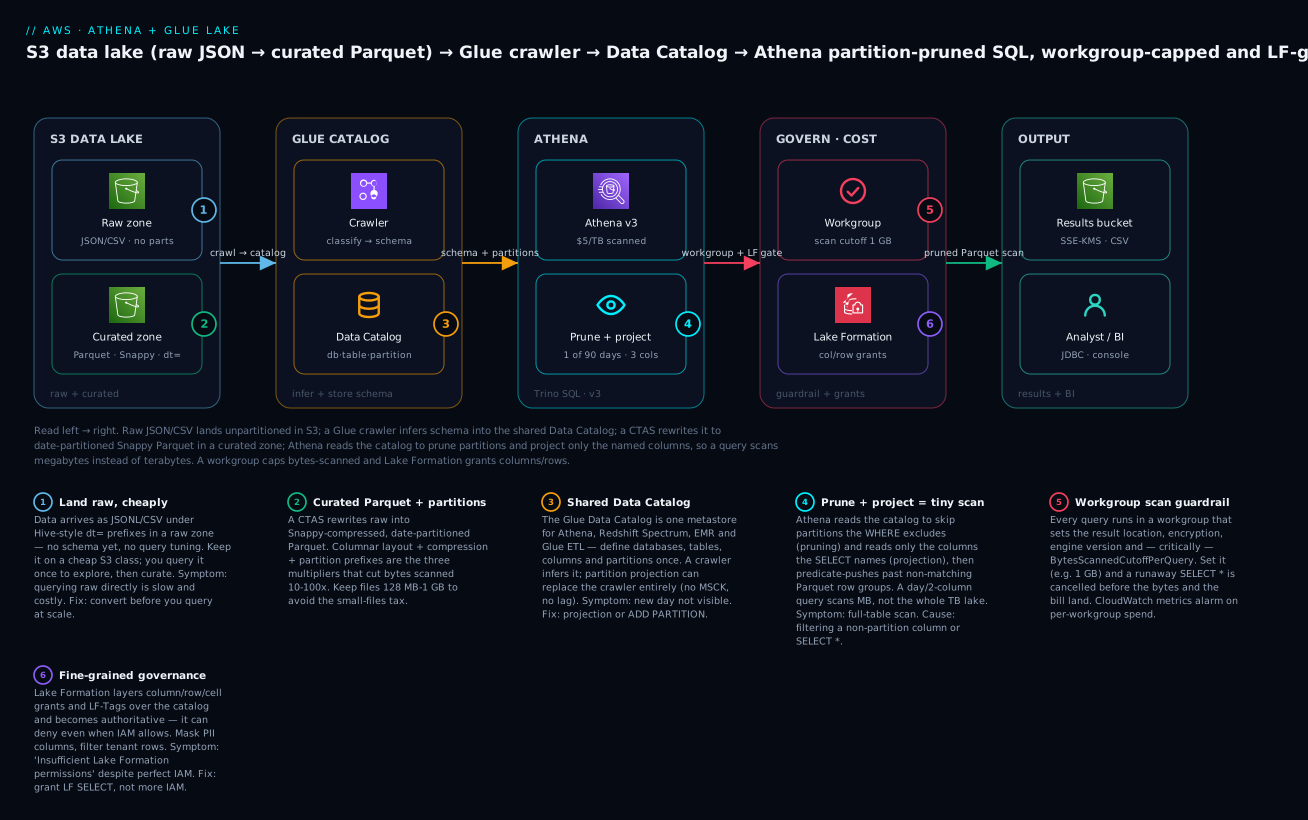
The badges mark the six leverage points: land-then-curate, Parquet-plus-partitions, the shared catalog, pruning-plus-columnar, the workgroup guardrail, and fine-grained governance. Follow the arrows and you are following both the data flow and the cost model.
Real-world scenario
Meridian Retail’s security-analytics team ran a CloudTrail lake for a 40-account AWS Organization. Every account delivered CloudTrail JSON to one S3 bucket — about 1.1 TB per day, 90 days retained, roughly 99 TB of gzipped JSON. They had pointed Athena at it with a single crawler-generated table over the whole prefix, no partitions. A SOC dashboard ran a “failed console logins in the last 24h” query every 15 minutes.
The math was brutal. Each dashboard refresh scanned the whole ~99 TB table because there was no partition to prune on — Athena had no way to know “last 24h” lived in one prefix. At $5/TB that was ~$495 per query, 96 times a day, before a single human ran an ad-hoc investigation. The monthly Athena bill crossed $180,000, and queries took 8-12 minutes each, so the “real-time” SOC dashboard was always at least a refresh behind. Finance escalated; the team was told to fix it or turn it off.
The remediation was textbook, and they did it in a day. First, they created a partition-projected external table over the CloudTrail data keyed by account_id, region, and dt (date) — CloudTrail’s delivered S3 layout already encodes those in the path, so projection needed no crawler and no MSCK. Now “last 24h” pruned to a single dt across the relevant accounts. That alone dropped a dashboard query from ~99 TB to about 12 GB — a ~99% cut — and query time from minutes to seconds.
Second, they set up a nightly Glue ETL job (with job bookmarks) that rewrote each day’s raw CloudTrail JSON into Snappy Parquet in a curated zone, partitioned identically, projecting the ~20 fields the SOC actually queried out of CloudTrail’s ~50. The dashboard was repointed at the curated table. Bytes scanned per refresh fell from ~12 GB to about 200 MB thanks to columnar layout and column projection — another ~60x. They enabled workgroup result reuse with a 10-minute max age, so the 15-minute dashboard mostly served cached results scanning 0 bytes.
The combined effect: dashboard cost went from ~$495/query to effectively fractions of a rupee, the monthly Athena bill dropped from ~$180,000 to under $900, and query latency went from ~10 minutes to sub-second. They added a workgroup per-query limit of 500 GB so no future ad-hoc SELECT * could ever recreate the original bill, and a CloudWatch alarm on per-workgroup bytes scanned. Nothing about the data changed — only its partitioning, format, and a guardrail. That is the entire discipline in one story.
Advantages and disadvantages
| Advantages | Disadvantages |
|---|---|
| Zero infrastructure — serverless, no cluster to size or patch | Cost scales with carelessness; one SELECT * can be very expensive |
| Pay only for bytes scanned — cheap when data is well-shaped | Not built for sub-second, high-concurrency dashboards (that’s Redshift/QuickSight SPICE) |
| Standard ANSI SQL (Trino) — low learning curve | No indexes, no updates in place (immutable files; use Iceberg for upserts) |
| Shared Glue Catalog — define schema once, use in Athena/Redshift/EMR | Schema-on-read fragility — a bad file surfaces as a query-time error |
| Queries data in place — no ETL required to start exploring | Optimal performance requires ETL (partition + Parquet) anyway |
| Scales to petabytes with no capacity planning | Per-query timeouts and partition/quota limits on huge unshaped lakes |
| Integrates with Lake Formation for fine-grained security | Governance across S3 + IAM + Glue + LF is genuinely complex |
When each matters: choose Athena for ad-hoc, exploratory, and periodic analytics over a lake, for log/security forensics, and as the query layer of a data lake you already have. Reach for Redshift when you need consistent low latency under many concurrent BI users, and for Glue ETL/EMR when the transform is heavy or continuous. Most mature stacks use all three — Athena to explore and to run the transforms, Glue to schedule them, and Redshift for the served dashboards.
Hands-on lab
You will land sample data in S3, catalog it with a Glue crawler, query it in Athena, convert it to partitioned Parquet with CTAS, measure the bytes-scanned drop, add a workgroup scan limit, and set up partition projection — then tear it all down. Everything is free-tier-friendly; the only charge is Athena data scanned (pennies here) and Glue crawler DPU-time (a few cents). ⚠️ Athena and Glue are not free — the amounts are tiny at this scale but not zero.
Step 0 — Prerequisites and variables
You need the AWS CLI v2 configured with a profile that can use S3, Glue, and Athena. Pick a region and unique bucket names.
export AWS_REGION=ap-south-1
export ACCOUNT_ID=$(aws sts get-caller-identity --query Account --output text)
export LAKE_BUCKET="kv-lake-${ACCOUNT_ID}"
export RESULTS_BUCKET="kv-athena-results-${ACCOUNT_ID}"
export GLUE_DB="kv_lakedb"
export WORKGROUP="kv-analytics"
echo "Lake: s3://$LAKE_BUCKET  Results: s3://$RESULTS_BUCKET  DB: $GLUE_DB"
Step 1 — Create the buckets
aws s3api create-bucket --bucket "$LAKE_BUCKET" \
  --region "$AWS_REGION" \
  --create-bucket-configuration LocationConstraint="$AWS_REGION"

aws s3api create-bucket --bucket "$RESULTS_BUCKET" \
  --region "$AWS_REGION" \
  --create-bucket-configuration LocationConstraint="$AWS_REGION"

# Block public access on both (least privilege)
for b in "$LAKE_BUCKET" "$RESULTS_BUCKET"; do
  aws s3api put-public-access-block --bucket "$b" \
    --public-access-block-configuration \
    BlockPublicAcls=true,IgnorePublicAcls=true,BlockPublicPolicy=true,RestrictPublicBuckets=true
done
Expected: no errors. (In us-east-1 omit the LocationConstraint block — that region rejects it.)
Step 2 — Land sample raw data (JSONL, partitioned by date)
Create two days of newline-delimited JSON events under Hive-style dt= prefixes.
cat > /tmp/2026-07-13.json <<'EOF'
{"event_id":"e1","event_name":"login","user_id":"u10","region":"ap-south-1","amount":0}
{"event_id":"e2","event_name":"purchase","user_id":"u11","region":"ap-south-1","amount":4999}
{"event_id":"e3","event_name":"login","user_id":"u12","region":"us-east-1","amount":0}
EOF
cat > /tmp/2026-07-14.json <<'EOF'
{"event_id":"e4","event_name":"purchase","user_id":"u10","region":"ap-south-1","amount":1299}
{"event_id":"e5","event_name":"refund","user_id":"u11","region":"us-east-1","amount":-500}
{"event_id":"e6","event_name":"purchase","user_id":"u13","region":"eu-west-1","amount":8999}
EOF

aws s3 cp /tmp/2026-07-13.json "s3://$LAKE_BUCKET/raw/events/dt=2026-07-13/2026-07-13.json"
aws s3 cp /tmp/2026-07-14.json "s3://$LAKE_BUCKET/raw/events/dt=2026-07-14/2026-07-14.json"
Step 3 — Create the Glue database
aws glue create-database \
  --database-input "{\"Name\":\"$GLUE_DB\",\"Description\":\"KloudVin lab lake\"}"

aws glue get-database --name "$GLUE_DB" --query 'Database.Name' --output text
Expected output: kv_lakedb.
Step 4 — Create an IAM role for the crawler and run it
cat > /tmp/glue-trust.json <<'EOF'
{ "Version":"2012-10-17","Statement":[{"Effect":"Allow",
  "Principal":{"Service":"glue.amazonaws.com"},"Action":"sts:AssumeRole"}]}
EOF

aws iam create-role --role-name kv-glue-crawler-role \
  --assume-role-policy-document file:///tmp/glue-trust.json

aws iam attach-role-policy --role-name kv-glue-crawler-role \
  --policy-arn arn:aws:iam::aws:policy/service-role/AWSGlueServiceRole

# Allow the role to read the lake bucket
aws iam put-role-policy --role-name kv-glue-crawler-role \
  --policy-name kv-lake-read \
  --policy-document "{\"Version\":\"2012-10-17\",\"Statement\":[{\"Effect\":\"Allow\",\"Action\":[\"s3:GetObject\",\"s3:ListBucket\"],\"Resource\":[\"arn:aws:s3:::$LAKE_BUCKET\",\"arn:aws:s3:::$LAKE_BUCKET/*\"]}]}"

export CRAWLER_ROLE_ARN="arn:aws:iam::${ACCOUNT_ID}:role/kv-glue-crawler-role"

aws glue create-crawler --name kv-events-crawler \
  --role "$CRAWLER_ROLE_ARN" \
  --database-name "$GLUE_DB" \
  --targets "{\"S3Targets\":[{\"Path\":\"s3://$LAKE_BUCKET/raw/events/\"}]}"

aws glue start-crawler --name kv-events-crawler
# Wait for it to finish (crawlers take ~1-2 min)
aws glue get-crawler --name kv-events-crawler --query 'Crawler.State' --output text
Poll until State is READY again. Then confirm the table and that it discovered the dt partition:
aws glue get-table --database-name "$GLUE_DB" --name events \
  --query 'Table.{cols:StorageDescriptor.Columns[].Name, parts:PartitionKeys[].Name}'
Expected: columns include event_id, event_name, user_id, region, amount and partition key dt.
Step 5 — Create an Athena workgroup with a scan limit and result location
aws athena create-work-group --name "$WORKGROUP" \
  --configuration "{\"ResultConfiguration\":{\"OutputLocation\":\"s3://$RESULTS_BUCKET/wg/\"},\"EnforceWorkGroupConfiguration\":true,\"PublishCloudWatchMetricsEnabled\":true,\"BytesScannedCutoffPerQuery\":1073741824}"
BytesScannedCutoffPerQuery is 1 GB here — any query scanning more is cancelled. (The minimum accepted value is 10 MB.)
Step 6 — Query the RAW table and record bytes scanned
Run a helper to execute a query in the workgroup and print the bytes scanned.
run_query () {
  local SQL="$1"
  local QID=$(aws athena start-query-execution \
    --work-group "$WORKGROUP" \
    --query-execution-context "Database=$GLUE_DB" \
    --query-string "$SQL" --query 'QueryExecutionId' --output text)
  # poll
  while true; do
    ST=$(aws athena get-query-execution --query-execution-id "$QID" \
      --query 'QueryExecution.Status.State' --output text)
    [[ "$ST" == "SUCCEEDED" || "$ST" == "FAILED" || "$ST" == "CANCELLED" ]] && break
    sleep 2
  done
  aws athena get-query-execution --query-execution-id "$QID" \
    --query 'QueryExecution.Statistics.{scannedBytes:DataScannedInBytes,ms:EngineExecutionTimeInMillis}' \
    --output table
  echo "State: $ST  (QID $QID)"
}

# Register the crawler-found partitions are already in the catalog; query one day:
run_query "SELECT region, count(*) c, sum(amount) rev
           FROM events WHERE dt='2026-07-14' GROUP BY region"
Expected: State: SUCCEEDED and a small scannedBytes (only the dt=2026-07-14 object — pruning already works because the crawler cataloged the partition). Note the number.
Step 7 — CTAS to partitioned Snappy Parquet, then re-query
run_query "CREATE TABLE events_parquet
  WITH (format='PARQUET', write_compression='SNAPPY',
        external_location='s3://$LAKE_BUCKET/curated/events_parquet/',
        partitioned_by=ARRAY['dt']) AS
  SELECT event_id, event_name, user_id, region, amount, dt FROM events"

# Re-run the SAME analytical query against Parquet, reading only 3 columns
run_query "SELECT region, count(*) c, sum(amount) rev
           FROM events_parquet WHERE dt='2026-07-14' GROUP BY region"
At this tiny scale both queries hit the 10 MB minimum, so the raw bill and Parquet bill look similar — but note that the Parquet query reads only region and amount from a compressed columnar file. The verification table below shows what the same comparison looks like at real volume.
| Query | Table | Format | Partition pruned? | Columns read | Relative bytes at scale |
|---|---|---|---|---|---|
| Step 6 | events |
JSONL | Yes (1 day) | All (row format) | Baseline |
| Step 7 | events_parquet |
Snappy Parquet | Yes (1 day) | 3 of 6 (columnar) | ~5-20x less |
Step 8 — Add a partition-projected table (no crawler)
Create a second table over the same Parquet that needs no crawler and no MSCK — partitions are computed.
run_query "CREATE EXTERNAL TABLE events_proj (
    event_id string, event_name string, user_id string, region string, amount bigint)
  PARTITIONED BY (dt string)
  STORED AS PARQUET
  LOCATION 's3://$LAKE_BUCKET/curated/events_parquet/'
  TBLPROPERTIES (
    'projection.enabled'='true',
    'projection.dt.type'='date',
    'projection.dt.range'='2026-01-01,NOW',
    'projection.dt.format'='yyyy-MM-dd',
    'storage.location.template'='s3://$LAKE_BUCKET/curated/events_parquet/dt=\${dt}/')"

run_query "SELECT count(*) FROM events_proj WHERE dt='2026-07-14'"
Expected: SUCCEEDED, returns the count for that day — with zero partition maintenance. A future dt=2026-07-15/ prefix becomes queryable the instant data lands, no crawler run required.
Step 9 — Prove the workgroup guardrail
Confirm the limit actually cancels an over-budget query by setting a tiny cutoff on a throwaway workgroup.
aws athena create-work-group --name kv-tiny \
  --configuration "{\"ResultConfiguration\":{\"OutputLocation\":\"s3://$RESULTS_BUCKET/tiny/\"},\"BytesScannedCutoffPerQuery\":10485760}"
# 10 MB cutoff; any real scan trips it. On a large table this returns:
# "Query exhausted resources at this scale factor" / cancelled by cutoff.
Step 10 — Terraform equivalent (declare the lake as code)
The same catalog + workgroup + projection table in Terraform:
resource "aws_glue_catalog_database" "lake" {
  name = "kv_lakedb"
}

resource "aws_athena_workgroup" "analytics" {
  name = "kv-analytics"
  configuration {
    enforce_workgroup_configuration    = true
    publish_cloudwatch_metrics_enabled = true
    bytes_scanned_cutoff_per_query     = 1073741824 # 1 GB
    result_configuration {
      output_location = "s3://kv-athena-results-${data.aws_caller_identity.me.account_id}/wg/"
      encryption_configuration { encryption_option = "SSE_S3" }
    }
  }
}

resource "aws_glue_catalog_table" "events_proj" {
  name          = "events_proj"
  database_name = aws_glue_catalog_database.lake.name
  table_type    = "EXTERNAL_TABLE"
  parameters = {
    "classification"                 = "parquet"
    "projection.enabled"             = "true"
    "projection.dt.type"             = "date"
    "projection.dt.range"            = "2026-01-01,NOW"
    "projection.dt.format"           = "yyyy-MM-dd"
    "storage.location.template"      = "s3://kv-lake-${data.aws_caller_identity.me.account_id}/curated/events_parquet/dt=$${dt}/"
  }
  partition_keys { name = "dt" type = "string" }
  storage_descriptor {
    location      = "s3://kv-lake-${data.aws_caller_identity.me.account_id}/curated/events_parquet/"
    input_format  = "org.apache.hadoop.hive.ql.io.parquet.MapredParquetInputFormat"
    output_format = "org.apache.hadoop.hive.ql.io.parquet.MapredParquetOutputFormat"
    ser_de_info {
      serialization_library = "org.apache.hadoop.hive.ql.io.parquet.serde.ParquetHiveSerDe"
    }
    columns { name = "event_id"   type = "string" }
    columns { name = "event_name" type = "string" }
    columns { name = "user_id"    type = "string" }
    columns { name = "region"     type = "string" }
    columns { name = "amount"     type = "bigint" }
  }
}

data "aws_caller_identity" "me" {}
Note the doubled $${dt} — Terraform escapes ${...} interpolation, so $${dt} renders the literal ${dt} that projection needs.
Step 11 — Teardown ⚠️
# Drop Athena/Glue tables (DDL is free)
run_query "DROP TABLE IF EXISTS events_parquet"
aws glue delete-table --database-name "$GLUE_DB" --name events_proj 2>/dev/null
aws glue delete-table --database-name "$GLUE_DB" --name events 2>/dev/null
aws glue delete-crawler --name kv-events-crawler
aws glue delete-database --name "$GLUE_DB"
aws athena delete-work-group --work-group "$WORKGROUP" --recursive-delete-option
aws athena delete-work-group --work-group kv-tiny --recursive-delete-option

# Empty and delete buckets (this deletes the data + results)
aws s3 rm "s3://$LAKE_BUCKET" --recursive
aws s3 rm "s3://$RESULTS_BUCKET" --recursive
aws s3api delete-bucket --bucket "$LAKE_BUCKET"
aws s3api delete-bucket --bucket "$RESULTS_BUCKET"

# IAM
aws iam delete-role-policy --role-name kv-glue-crawler-role --policy-name kv-lake-read
aws iam detach-role-policy --role-name kv-glue-crawler-role \
  --policy-arn arn:aws:iam::aws:policy/service-role/AWSGlueServiceRole
aws iam delete-role --role-name kv-glue-crawler-role
Everything above (buckets, catalog, workgroups, role) is now removed. The only charges you incurred were a fraction of a cent of Athena scan and Glue crawler DPU-seconds.
Common mistakes & troubleshooting
This stack fails at read time (schema-on-read) and in permissions across four services. The playbook below is the field-tested map from symptom to fix.
| # | Symptom | Root cause | Confirm (exact command / console path) | Fix |
|---|---|---|---|---|
| 1 | Query scans the whole table, huge cost | No partition key, or WHERE doesn’t filter one |
Check DataScannedInBytes in get-query-execution; compare to table size |
Partition the table; filter on the partition column; convert to Parquet |
| 2 | SELECT * bill is enormous |
Reading every column of a row format | Query stats show all bytes scanned | SELECT only needed columns; store as Parquet/ORC |
| 3 | New day’s data “not in Athena” | Partition not registered in catalog | SHOW PARTITIONS events; — missing dt=... |
MSCK REPAIR TABLE, ALTER TABLE ADD PARTITION, or switch to projection |
| 4 | HIVE_PARTITION_SCHEMA_MISMATCH |
A partition’s schema differs from the table’s | Compare get-partition SerDe/cols to table |
Re-crawl, or ALTER TABLE ... PARTITION ... SET to align; avoid crawler overwriting types |
| 5 | HIVE_BAD_DATA: Error parsing field |
A value doesn’t match the declared type | Isolate the file/row; SELECT the bad column with try_cast |
Fix source data; declare the column string and cast in query; add classifier |
| 6 | HIVE_CURSOR_ERROR mid-query |
Corrupt/truncated file, or file changed during query | Find the split’s S3 object in the error; aws s3 cp and inspect |
Remove/replace the bad object; don’t overwrite files while querying |
| 7 | HIVE_CANNOT_OPEN_SPLIT ... Access Denied |
Athena role lacks s3:GetObject on a prefix |
aws s3 ls the path with the caller’s creds |
Grant S3 read to the query identity; check bucket policy + SCP |
| 8 | “0 records returned” but files exist | Wrong SerDe / JSON vs CSV / wrong LOCATION |
SHOW CREATE TABLE; compare SerDe to actual format |
Recreate table with correct SerDe/format; point LOCATION at the right prefix |
| 9 | Nested JSON columns come back null | Schema flat, data nested | Inspect a raw object with aws s3 cp - - |
Declare struct<...>/array<...>; UNNEST in the query |
| 10 | Permission denied though IAM looks correct | Lake Formation governs the DB and hasn’t granted you | Lake Formation console → Data permissions | Grant LF SELECT (and register the S3 location) to the principal |
| 11 | Insufficient permissions to execute the query (results) |
No write access to the workgroup result bucket | Check workgroup OutputLocation + your s3:PutObject |
Grant s3:PutObject/GetObject on the results prefix |
| 12 | Query cancelled: “bytes scanned cutoff” | Workgroup BytesScannedCutoffPerQuery tripped |
get-work-group shows the limit |
Narrow the query (partition/columns) or raise the limit deliberately |
| 13 | Query is slow and expensive on “small” data | Small-files problem — thousands of tiny objects | aws s3 ls --recursive | wc -l on the prefix |
Compact via CTAS/Glue into ~128 MB-1 GB Parquet files |
| 14 | Query exhausted resources at this scale factor |
Huge scan / massive GROUP BY/ORDER BY/JOIN spill |
Query stats + plan | Reduce data (partition/columns); pre-aggregate with CTAS; add bucketing |
| 15 | Crawler created 500 tables, one per folder | Table grouping off; folders look like distinct schemas | Glue → Tables list | Enable “create a single schema”; or use one manual table + projection |
| 16 | S3 SlowDown / 503 during big scans |
Too many requests to one prefix (small files) | S3 request metrics | Fewer, larger files; spread across prefixes; retry with backoff |
Athena error reference
| Error string | Meaning | Likely cause | Fix |
|---|---|---|---|
HIVE_BAD_DATA |
Value can’t be parsed as its declared type | Type mismatch, corrupt row, mixed formats | Fix data, use string+try_cast, correct classifier |
HIVE_CURSOR_ERROR |
Can’t read a file split | Corrupt/truncated file, bad gzip, mutated during query | Remove/replace object; stop overwriting live data |
HIVE_CANNOT_OPEN_SPLIT |
Can’t open an S3 object | Access Denied, missing object, wrong region | Fix S3 perms/path; ensure same-region bucket |
HIVE_PARTITION_SCHEMA_MISMATCH |
Partition schema ≠ table schema | Crawler changed types; mixed formats across partitions | Align partition SerDe/columns; re-crawl consistently |
HIVE_METASTORE_ERROR |
Catalog problem | Corrupt/invalid table definition | Recreate table; check Glue table JSON |
SYNTAX_ERROR |
SQL parse/analysis error | Trino dialect (reserved word, quoting) | Quote identifiers with "; strings with ' |
GENERIC_INTERNAL_ERROR |
Engine-side error | Often bad schema or unsupported type | Simplify query; check column types; retry |
Access Denied (S3) |
S3 authz failure | Missing GetObject/ListBucket, SCP, bucket policy |
Grant least-privilege S3 read to the query role |
Insufficient Lake Formation permission(s) |
LF denies the action | Table governed by LF without a grant | Grant LF SELECT/DESCRIBE on the resource |
Query exhausted resources at this scale factor |
Ran out of memory/resources | Massive sort/join/aggregate or scan | Reduce data scanned; pre-aggregate; bucket |
The three nastiest failures, in prose
“It’s denied but my IAM is perfect.” The single most confusing failure in this stack is Lake Formation silently overriding IAM. Once a database is managed by Lake Formation, an IAM principal with full s3:GetObject and glue:GetTable can still get Insufficient Lake Formation permissions because LF is now the authoritative layer. The confirmation is not in IAM at all — it is in Lake Formation → Data permissions, where the principal simply isn’t listed for that table. The fix is to grant LF SELECT (and, if the S3 location was registered with LF, ensure the data location permission exists too). Teams lose hours checking and re-checking IAM policies that were never the problem.
The small-files tax. A stream that writes a 4 KB Parquet file every few seconds produces hundreds of thousands of tiny objects a day. Athena must issue an S3 GET per file and plan a split per file; the per-object overhead dwarfs the actual data, so a “small” dataset scans slowly, occasionally trips S3 503 SlowDown, and can cost more than a well-compacted lake ten times its size. Confirm with aws s3 ls --recursive | wc -l. The fix is compaction: a scheduled CTAS or Glue job that rewrites many tiny files into a few 128 MB-1 GB Parquet files per partition. This is not optional at scale — it is the difference between a lake that stays fast and one that degrades weekly.
Schema drift through the crawler. A crawler with the default “update” schema-change policy will happily change your column types when it samples a new file that looks different — turning a bigint into a string, or splitting a table because one day’s files had an extra field. The next query then throws HIVE_PARTITION_SCHEMA_MISMATCH. The durable fix is to stop letting the crawler own a stable schema: either set its schema-change policy to “add new columns only / ignore,” or move to hand-written DDL + partition projection so the schema is code you control, not something inferred nightly.
Best practices
| # | Practice | Why |
|---|---|---|
| 1 | Partition every table by the column you filter most (usually dt) |
Pruning is the biggest cost lever — 10-365x |
| 2 | Store curated data as Snappy Parquet, not JSON/CSV | Columnar + compression stacks another 5-20x |
| 3 | Never SELECT * for analytics — name your columns |
Column projection only helps if you project |
| 4 | Use partition projection for predictable keys | No crawler cost, no MSCK, zero freshness lag |
| 5 | Keep files 128 MB-1 GB; compact small files | Avoids the small-files tax and S3 throttling |
| 6 | Separate raw and curated zones (+ storage classes) | Query curated; keep raw cheap; see S3 storage classes |
| 7 | Put a BytesScannedCutoffPerQuery on every workgroup |
Caps the blast radius of a runaway query |
| 8 | One workgroup per team/env with its own result bucket | Isolation, cost attribution, encryption enforcement |
| 9 | Enable result reuse for repeating dashboards | Repeat queries scan 0 bytes |
| 10 | Use CTAS/INSERT INTO to build curated tables in-place |
No cluster needed for most transforms |
| 11 | Enable Glue job bookmarks for incremental ETL | Never reprocess (and re-pay for) history |
| 12 | Alarm on per-workgroup bytes scanned in CloudWatch | Catch cost regressions the day they start |
| 13 | Manage schema as code (DDL/Terraform), not crawler-inferred, once stable | Stops schema drift and SCHEMA_MISMATCH errors |
| 14 | Consider Iceberg tables if you need updates/deletes/time-travel | Athena supports Iceberg for mutable lakes |
Security notes
Security spans four planes — S3 (the bytes), IAM (the API calls), Glue/Athena (the catalog and queries), and Lake Formation (fine-grained grants). Lock all four.
| Control | How | Why |
|---|---|---|
| Encrypt data at rest | S3 SSE-S3 or SSE-KMS on lake + results buckets | Compliance; KMS gives per-key audit + revocation |
| Encrypt query results | Workgroup result encryption (SSE-S3/SSE-KMS/CSE-KMS) | Results contain the same sensitive data |
| Enforce workgroup config | EnforceWorkGroupConfiguration=true |
Analysts can’t redirect results or skip encryption |
| Least-privilege S3 | Grant GetObject/ListBucket on exact prefixes only |
Query role shouldn’t read the whole account’s S3 |
| Least-privilege Glue | glue:GetTable/GetPartitions on named DB/table |
Scope catalog reads |
| Fine-grained access | Lake Formation column/row/cell grants + LF-Tags | Hide PII columns; per-tenant row filters |
| Network isolation | S3 Gateway/Interface endpoints; VPC for Glue jobs | Keep lake traffic off the public internet |
| Audit | CloudTrail on Athena/Glue APIs; workgroup CloudWatch metrics | Who queried what, how much scanned |
| Block public access | PublicAccessBlock on all lake buckets |
A public lake is a breach |
| Cross-account sharing | Lake Formation cross-account grants / RAM | Share catalog without copying data |
Two rules that matter most: encrypt the results bucket (people forget the results contain exactly the sensitive rows the query returned), and use Lake Formation for column-level masking of PII rather than trusting every analyst with SELECT * on a table that has an email or card_number column.
Cost & sizing
Athena has no free tier — you pay $5/TB scanned from the first byte. Glue’s Data Catalog does have a free tier. The whole cost game is minimizing bytes scanned (partition + Parquet + compression) and not paying for compute you don’t need.
| Cost driver | Rate (approx, varies by region) | Notes |
|---|---|---|
| Athena data scanned | $5.00 / TB, 10 MB min/query, rounded to 10 MB | The main lever; DDL is free |
| Athena for Apache Spark | Per DPU-hour | Only if you use Spark notebooks |
| Glue Data Catalog storage | First 1M objects free, then ~$1 / 100k objects / mo | Objects = tables + partitions |
| Glue Data Catalog requests | First 1M requests free, then ~$1 / million | GetPartitions etc. |
| Glue crawler | ~$0.44 / DPU-hour, per-second, 10-min minimum | Prefer projection to avoid this |
| Glue ETL (Spark) | ~$0.44 / DPU-hour, per-second, 1-min minimum | Sized by worker type × DPU |
| S3 storage | Per GB-month by class | Raw in IA/Glacier; curated in Standard |
| S3 requests | Per 1,000 GET/PUT | Small-files problem inflates this |
| KMS | Per 10k requests + key/mo | If SSE-KMS on lake/results |
Rough INR figures (illustrative, ~₹85/$)
| Scenario | Bytes scanned/query | Athena $/query | Athena ₹/query |
|---|---|---|---|
| Unpartitioned JSON, 1 TB table | 1 TB | $5.00 | ~₹425 |
| Partitioned JSON, 1 of 30 days | ~33 GB | ~$0.17 | ~₹14 |
| Partitioned Parquet, 3 of 30 cols | ~1 GB | ~$0.005 | ~₹0.43 |
| Same, result reuse hit | 0 bytes | $0.00 | ₹0 |
The lesson in one line: the same question over the same data costs ₹425 or ₹0.43 depending entirely on how the lake is shaped. Sizing Athena is not about capacity — there is none to size — it is about data hygiene.
Interview & exam questions
Q: How does Athena bill, and what are the three levers to reduce it? Athena charges $5 per TB scanned from S3 (10 MB minimum, rounded up). The levers are partitioning (prune to relevant prefixes), columnar format like Parquet/ORC (read only named columns), and compression (fewer bytes). They multiply. (DAS-C01, SAA-C03)
Q: What is the Glue Data Catalog and who uses it? A managed Hive-compatible metastore holding databases, tables, schemas, and partitions. It is shared — Athena, Redshift Spectrum, EMR, and Glue ETL all read the same table definitions, so you define schema once. (DAS-C01)
Q: Crawler vs partition projection — when do you use each? A crawler discovers schema/partitions by sampling S3 (good for unknown/evolving data) but costs DPU-time and lags its schedule. Partition projection computes partitions from a template in table properties — no crawler, no MSCK, no lag — ideal for predictable keys like dates. (DAS-C01)
Q: A query is scanning the whole table despite a WHERE clause. Why? The WHERE filters a non-partition column, so pruning can’t apply — Athena must read everything and filter after. Partition on the filtered column (or the query must filter the existing partition key). (DAS-C01, SAA-C03)
Q: Why is Parquet cheaper to query than CSV? Parquet is columnar: Athena reads only the columns the query names (column projection) and skips row groups whose min/max stats can’t match the predicate (pushdown), and it’s compressed. CSV is row-oriented, so every column of every in-scope row is read. (DAS-C01)
Q: What does a workgroup give you? Query isolation plus governance: a result location, encryption, engine version, and — critically — per-query and per-workgroup data-scanned limits that cancel runaway queries, plus CloudWatch metrics for cost monitoring. (DAS-C01, SOA-C02)
Q: What is the 100-partition limit and how do you work around it? A single CTAS or INSERT INTO writes at most 100 partitions. To convert more, run INSERT INTO in batches (e.g. per month) or use bucketing. (DAS-C01)
Q: New partitions aren’t showing up in Athena — what are your options? MSCK REPAIR TABLE (scans for Hive-layout prefixes), ALTER TABLE ADD PARTITION (register one, any layout), Glue batch-create-partition, a crawler, or switch to partition projection to eliminate registration entirely. (DAS-C01)
Q: What are job bookmarks in Glue? Persisted state tracking what a job has already processed, so incremental runs skip previously read data instead of reprocessing the whole history — essential for cost-efficient nightly ETL. (DAS-C01)
Q: How does Lake Formation differ from IAM/S3 permissions? IAM/S3 grant coarse bucket/prefix access; Lake Formation adds fine-grained catalog permissions — column, row, and cell level, plus tag-based access — and becomes authoritative for governed databases (it can deny even when IAM allows). (DAS-C01, SCS-C02)
Q: When would you choose Redshift over Athena? For consistent low-latency, high-concurrency BI dashboards and complex repeated joins where a provisioned/serverless MPP warehouse with sort keys and materialized views outperforms per-query scans on cold S3. Athena wins for ad-hoc and occasional analytics. (DAS-C01, SAA-C03)
Q: What is HIVE_PARTITION_SCHEMA_MISMATCH and its usual cause? A partition’s schema differs from the table’s — commonly a crawler changed column types after sampling a differently-shaped file, or partitions have mixed formats. Fix by aligning schemas or moving to controlled DDL. (DAS-C01)
Quick check
- A dashboard query filters
WHERE country='IN'but scans the whole table every time. The table is partitioned bydt. Why, and what’s the fix? - You convert 400 days of daily JSON to Parquet with one CTAS and it fails. What limit did you hit, and how do you complete the conversion?
- Which costs money to run:
MSCK REPAIR TABLE,SELECT count(*),CREATE TABLE ... AS SELECT,ALTER TABLE ADD PARTITION? - Your IAM policy grants full S3 and Glue read, but a query returns “Insufficient Lake Formation permissions.” Where do you look and what do you do?
- Name the single workgroup setting that would have prevented a $5,000 accidental full-table scan.
Answers
- Pruning only applies to the partition key (
dt), notcountry. Thecountryfilter is evaluated after reading data, so nothing is skipped. Fix: also partition by (or project on)country, or ensure queries filterdt; better, store Parquet so at least column projection helps. - The 100-partition-per-statement limit for CTAS/
INSERT INTO. Complete it by runningINSERT INTOin batches of ≤100 partitions (e.g. month by month), or bucket the data. - Only
SELECT count(*)andCREATE TABLE ... AS SELECTscan data and cost money (CTAS pays for theSELECT’s scan).MSCK REPAIRandALTER TABLE ADD PARTITIONare DDL — free. - Look in Lake Formation → Data permissions, not IAM — LF is authoritative for governed databases. Grant the principal LF
SELECT/DESCRIBEon the table (and ensure the S3 data-location permission if the location is registered). BytesScannedCutoffPerQuery(the per-query data-scanned limit) — it cancels the query at the byte threshold before the scan (and the bill) completes.
Glossary
| Term | Definition |
|---|---|
| Amazon Athena | Serverless interactive query service running Trino/Presto SQL directly on S3, billed per TB scanned. |
| AWS Glue Data Catalog | Managed Hive-compatible metastore of databases, tables, schemas, and partitions, shared across analytics services. |
| Data lake | Central S3 repository of raw + curated data queried in place, without loading into a database first. |
| Crawler | A Glue component that samples S3/JDBC data, infers schema and partitions, and writes tables to the catalog. |
| Classifier | A format detector (built-in or custom grok/JSON/CSV/XML) a crawler uses to recognize data. |
| Partition | A key=value S3 prefix (e.g. dt=2026-07-14) mapped to a catalog entry, enabling scan-free pruning. |
| Partition pruning | Skipping partitions that a query’s WHERE clause excludes, so they are never read. |
| Partition projection | Computing partitions from a template in table properties — no crawler, no registration, no lag. |
| Hive-style layout | The column=value prefix convention Athena/Glue understand for partitions. |
| Parquet / ORC | Columnar, compressed, splittable file formats that enable column projection and predicate pushdown. |
| Column projection | Reading only the columns a query names, possible only with columnar formats. |
| Predicate pushdown | Skipping row groups whose min/max statistics can’t satisfy a WHERE predicate. |
| CTAS | CREATE TABLE AS SELECT — writes query results to S3 as a new table in a chosen format/partitioning. |
| Workgroup | Athena’s unit of isolation and governance: result location, encryption, engine version, and data-scanned limits. |
| SerDe | Serializer/Deserializer telling the engine how to read a file format (JSON, OpenCSV, Parquet). |
| Glue ETL / DynamicFrame | Serverless Spark jobs; a DynamicFrame is Glue’s schema-flexible wrapper over a Spark DataFrame. |
| Job bookmark | Persisted state of processed data so Glue jobs run incrementally without reprocessing history. |
| Lake Formation | Fine-grained (column/row/cell) access control and LF-Tags layered over the Glue Data Catalog. |
| DPU | Data Processing Unit — Glue’s compute-billing unit (1 DPU = 4 vCPU + 16 GB). |
Next steps
- Design the full storage-and-ingest layer around this query tier with Data Lake & Analytics Architecture on AWS.
- Tier your raw and curated zones cost-effectively with S3 Storage Classes & Lifecycle.
- Feed the lake in real time using Kinesis Data Streams & Firehose Hands-On, which lands partitioned data straight into S3.
- Put Athena to work on security data with VPC Flow Logs Network Troubleshooting and CloudTrail, Config Audit & Compliance.