The auditor’s question is never “was this resource created correctly?” — it is “is it still correct, right now, and how would you know if it drifted?” A volume created encrypted can be replaced by an unencrypted one six months later; a bucket locked down on Monday can be opened for a demo on Friday and forgotten; an IAM policy tightened in review can be loosened in an incident and never tightened back. Preventive controls — IAM, SCPs, resource policies — stop the first bad action, but they cannot tell you what your estate looks like today or prove it stayed that way. That is the gap AWS Config fills. Config is the service that continuously records the configuration of every supported resource in your account, remembers how each one changed over time, and re-checks all of them against rules you write — so “is it still right?” has a real, timestamped, queryable answer instead of a hopeful one.
This article is the deep reference for running Config in production, from a single account to a whole organization. We treat it as a five-stage machine — record → deliver → evaluate → remediate → aggregate — and go through each stage option by option: the configuration recorder and its recording group, the delivery channel to S3 and SNS, configuration items and the resource relationships that make the inventory a graph rather than a list, AWS-managed rules versus custom rules (Lambda-backed and the newer CloudFormation Guard policy rules), config-change versus periodic triggers, conformance packs as versioned rule bundles, remediation through SSM Automation runbooks (manual and automatic), and aggregators that roll multi-account, multi-region data into one pane via AWS Organizations. Because this is a document you open mid-incident and mid-audit, the settings, triggers, rule states, limits, IAM and KMS gotchas, cost drivers and the failure playbook are all laid out as tables you can scan — read the prose once, keep the tables open when the QSA is in the room.
By the end you will stop trusting a green dashboard and start proving it. You will know why a recorder that never started makes every rule report nothing (which looks exactly like COMPLIANT), why recording global resources in every region quietly triples your bill, why a rule sits forever in EVALUATING, why auto-remediation either never fires or fires in a loop, and how to turn all of this on with aws configservice and Terraform in a way that survives an org-wide rollout. The mechanism is simple; getting every setting right so the evidence holds up is the craft.
What problem this solves
Config solves three problems that prevention alone cannot: inventory (what resources exist, across accounts and regions, with their real configuration), drift detection (has any resource stopped matching policy since it was created), and evidence (a timestamped history you can hand an auditor). Without it, your “current state” lives in people’s heads and half-stale spreadsheets, your compliance posture is a point-in-time screenshot that rots the moment it is taken, and your only answer to “prove nothing was public in Q2” is “we’re pretty sure.”
What breaks without it, concretely: a Terraform module default flips and three hundred new EBS volumes ship unencrypted — invisible until the audit, because nothing re-checked them after creation. An engineer opens an S3 bucket for a one-off data share and it is found by a security researcher instead of by you. A new member account is onboarded in a hurry and its Config recorder is never started, so for three months every compliance rule returns empty — and empty renders green on the dashboard, so nobody notices the blind spot until it is a finding. Each of these is a board-level incident when discovered the wrong way, and each is trivially catchable with a recorder that cannot be opted out of and rules that re-evaluate reality on a schedule.
Who hits this: everyone past a handful of resources, and hardest of all the teams who confuse “we turned Config on once” with “every account is recording, every rule is scoped correctly, and someone acts on NON_COMPLIANT.” It is the substrate every framework — PCI-DSS, SOC 2, HIPAA, ISO 27001, FedRAMP, CIS — assumes you already have, and the engine underneath Security Hub controls, Control Tower detective guardrails, and conformance packs. To frame the whole field before the deep dive, here is what Config does, what it does not do, and where each responsibility actually lives:
| Capability | Does Config do it? | How | Where the answer lives | Common wrong assumption |
|---|---|---|---|---|
| Inventory of resources | Yes | Configuration items per resource | Config console / advanced query | “The tag editor is my inventory” |
| Configuration history / timeline | Yes | CI per change, kept in S3 | Resource timeline; S3 history files | “CloudTrail already has this” (it has the API call, not the state) |
| Who made the change | Partially | CI links to the CloudTrail event | CloudTrail (Config references it) | “Config tells me who” (it points to CloudTrail) |
| Continuous compliance checks | Yes | Config rules (managed + custom) | Rule compliance; aggregator | “IAM/SCP already enforces this” (those are preventive) |
| Auto-fix a violation | Yes | Remediation via SSM Automation | Remediation execution status | “Config fixes it by itself” (only if you wire remediation) |
| Multi-account roll-up | Yes | Aggregator (Organizations) | Aggregator dashboard / queries | “I’ll just log into each account” |
| Real-time blocking | No | Config is detective, not preventive | — | “Config will stop the bad action” (it detects after the fact) |
| Alerting / ticketing | Indirectly | SNS + EventBridge → your target | EventBridge rule targets | “Config emails me” (you wire the notification) |
Learning objectives
By the end of this article you can:
- Turn on Config end to end — configuration recorder, recording group, recording mode and delivery channel — via Console,
aws configserviceand Terraform, and prove it is actually recording. - Read a configuration item, follow resource relationships, and query the whole inventory with the SQL-like advanced query language.
- Choose between AWS-managed rules, custom Lambda rules and custom Guard (policy) rules, and pick the right trigger (config-change vs periodic) for each.
- Deploy the staple rules —
required-tags,s3-bucket-public-read-prohibited,restricted-ssh,encrypted-volumes— with the correct parameters and scope. - Bundle rules and remediation into a conformance pack and deploy it org-wide from a delegated-admin account.
- Wire automatic remediation through an SSM Automation runbook with a least-privilege
AutomationAssumeRole, and make it idempotent and blast-radius-safe. - Build a multi-account, multi-region aggregator on Organizations, and fix the authorization failures that leave accounts blank.
- Diagnose the classic failures — recorder not recording, rule stuck
EVALUATING, remediation not firing, aggregator authorization, global-resource duplication, S3 delivery denials — and control the cost (per configuration item + per rule evaluation).
This maps directly to SOA-C02 (SysOps — Config, remediation, conformance packs), SCS-C02 (Security Specialty — detective controls, evidence), and SAP-C02 (Professional — org-wide governance and aggregators).
Prerequisites & where this fits
You should be comfortable with the AWS account model (accounts, regions, IAM roles), reading and writing JSON, running the AWS CLI, and the basics of S3 (bucket policies), SNS, IAM roles and trust policies, and AWS Organizations. Familiarity with CloudTrail helps because Config and CloudTrail are the two halves of one evidence machine — CloudTrail records the API call (who/what/when), Config records the resulting resource state and whether it still complies. If you have read AWS CloudTrail and Config: Audit and Compliance at Scale, this article is the Config half in far greater operational depth.
Config sits in the Governance layer, downstream of your account structure and upstream of your compliance reporting. It assumes an org foundation (AWS Organizations, SCPs & Multi-Account Guardrails and, if you use it, AWS Control Tower guardrails), and it consumes a tagging strategy — the required-tags rule is only as useful as the tag standard behind it. Config’s detective guardrails and the preventive SCPs are complementary: SCPs stop the action, Config proves it stayed stopped and catches what slipped through. Here is who owns which layer during a real compliance program, so you call the right person fast:
| Layer | What lives here | Who usually owns it | What Config contributes |
|---|---|---|---|
| Account structure | OUs, accounts, SCPs | Platform / landing-zone team | Aggregator scoped to the org |
| Recording plane | Recorder, delivery channel | Platform (per account, templated) | The raw CIs everything else needs |
| Rule authoring | Managed + custom rules, packs | Security / compliance engineering | Compliance verdicts |
| Remediation | SSM runbooks, assume-roles | Platform + service teams | Automatic fixes on NON_COMPLIANT |
| Reporting / audit | Dashboards, evidence exports | GRC / security leadership | Timelines, select-aggregate queries |
| Cost | Per-CI + per-eval spend | FinOps + platform | Recording scope and frequency tuning |
Core concepts
Six mental models make every later decision obvious.
Config is detective, not preventive. It does not block anything. It observes the result of a change, records it, and judges it after the fact. The value is the record and the judgement, not enforcement — enforcement is IAM/SCP/resource-policy territory. Internalise this and you stop expecting Config to “stop” a bad action and start using it to catch and fix one.
The atom is the configuration item (CI). A configuration item is a point-in-time JSON snapshot of one resource: its attributes, its relationships to other resources, the CloudTrail events that touched it, tags, and metadata. Config emits a new CI every time a resource is created, changed, or deleted. The stream of CIs for one resource is its configuration timeline. You pay per CI recorded — which is why what and how often you record is the central cost lever.
One recorder per region, per account. Config runs a single configuration recorder in each region of each account. Its recording group decides which resource types it captures (all supported, an inclusion list, or all-except-an-exclusion list) and whether it includes global resource types (IAM users, groups, roles, policies). The recorder writes to a delivery channel — a mandatory S3 bucket and an optional SNS topic.
A rule is a function that returns a compliance verdict. A Config rule evaluates CIs (or the whole account periodically) and stamps each in-scope resource COMPLIANT, NON_COMPLIANT, NOT_APPLICABLE, or INSUFFICIENT_DATA. Managed rules are AWS-authored; custom rules are yours, backed either by a Lambda function or by a CloudFormation Guard policy (no Lambda to run). A rule fires on configuration changes, on a periodic schedule, or both.
Remediation is a separate, opt-in wiring. A NON_COMPLIANT verdict does nothing on its own. You attach a remediation configuration that runs an SSM Automation document (runbook) against the offending resource — manually (you click/trigger) or automatically (Automatic=true). The runbook executes under an AutomationAssumeRole you provide.
Aggregators give one pane over many accounts. A configuration aggregator collects CIs and compliance from multiple accounts and regions into one place — either an explicit list of accounts (each must authorize the aggregator) or, far better, the whole Organization (no per-account authorization). The aggregator is read-only: you query and dashboard, you do not record or remediate from it.
The vocabulary in one table
Before the deep sections, pin down every moving part side by side; the glossary at the end repeats these for lookup:
| Concept | One-line definition | Where it lives | Why it matters |
|---|---|---|---|
| Configuration recorder | The thing that captures resource state | One per region per account | Off → nothing is recorded; green-but-empty |
| Recording group | Which resource types the recorder captures | Recorder config | Wrong scope → rules see nothing / bill balloons |
| Recording mode | CONTINUOUS or DAILY per type | Recorder config | DAILY cuts CI cost on low-churn types |
| Delivery channel | S3 (required) + SNS (optional) sink | One per region per account | Bad bucket policy → delivery FAILURE |
| Configuration item (CI) | Point-in-time snapshot of one resource | Delivered to S3; queryable | The unit you pay for; the audit atom |
| Relationship | Link between two resources | Inside a CI | Turns inventory into a graph |
| Config rule | Function returning a compliance verdict | Per region (managed/custom) | The compliance judgement |
| Trigger | Configuration-change or periodic | Rule config | Decides when a rule evaluates |
| Conformance pack | Versioned bundle of rules + remediation | Per account or org-wide | Deploy a framework in one shot |
| Remediation configuration | SSM runbook wired to a rule | Per rule | Turns NON_COMPLIANT into a fix |
| Aggregator | Multi-account/region read-only roll-up | Aggregator account | One pane over the whole org |
| Compliance state | COMPLIANT / NON_COMPLIANT / NOT_APPLICABLE / INSUFFICIENT_DATA | Per resource per rule | The verdict you act on |
The configuration recorder and delivery channel
Everything starts with the recorder. If it is off, mis-scoped, or its role cannot read resources or write to S3, every downstream stage silently produces nothing — and nothing is indistinguishable from compliant on a dashboard. This is the single highest-leverage part of the whole service to get right.
The configuration recorder
You get exactly one configuration recorder per region per account (it is conventionally named default). It needs an IAM role it assumes to read your resources and to write to the delivery bucket — either the service-linked role AWSServiceRoleForConfig (the modern default) or a custom role carrying the AWS-managed AWS_ConfigRole policy. Here is every recorder setting, its default, and the trade-off:
| Setting | Values | Default | When to change | Trade-off / gotcha |
|---|---|---|---|---|
name |
string | default |
Rarely | Must be unique per region; one recorder only |
roleARN |
IAM role ARN | none (required) | Always set | SLR AWSServiceRoleForConfig preferred; custom role needs AWS_ConfigRole |
recordingGroup.allSupported |
true/false | true | Narrow to specific types to cut cost | With true you record every supported type — highest cost, highest coverage |
recordingGroup.includeGlobalResourceTypes |
true/false | false | Enable in one region only | true in many regions = duplicate IAM CIs = duplicate cost |
recordingGroup.resourceTypes |
list of types | empty | Inclusion mode | Only valid when allSupported=false |
recordingGroup.exclusionByResourceTypes |
list of types | empty | Exclusion mode | Record all-except a noisy type (e.g. AWS::Config::ResourceCompliance) |
recordingGroup.recordingStrategy |
ALL_SUPPORTED / INCLUSION_BY_RESOURCE_TYPES / EXCLUSION_BY_RESOURCE_TYPES | ALL_SUPPORTED | Follows the above choice | Set automatically by which field you use |
recordingMode.recordingFrequency |
CONTINUOUS / DAILY | CONTINUOUS | DAILY for low-churn types | DAILY = one CI/day max per resource; cheaper, less granular |
recordingMode.recordingModeOverrides |
per-type frequency | none | Mixed strategy | Record high-value types CONTINUOUS, the rest DAILY |
Turn it on with the CLI (assuming the service-linked role exists — create it once with aws iam create-service-linked-role --aws-service-name config.amazonaws.com):
# 1) Create/replace the recorder — record everything, global types in this region only
aws configservice put-configuration-recorder --configuration-recorder '{
  "name": "default",
  "roleARN": "arn:aws:iam::111122223333:role/aws-service-role/config.amazonaws.com/AWSServiceRoleForConfig",
  "recordingGroup": { "allSupported": true, "includeGlobalResourceTypes": true },
  "recordingMode": { "recordingFrequency": "CONTINUOUS" }
}'
The Terraform equivalent is three coupled resources — recorder, delivery channel, and a status resource that starts recording (order matters; the status must depend on the channel):
resource "aws_config_configuration_recorder" "this" {
  name     = "default"
  role_arn = aws_iam_service_linked_role.config.arn

  recording_group {
    all_supported                 = true
    include_global_resource_types = true # ONLY in your home region
  }

  recording_mode {
    recording_frequency = "CONTINUOUS"
    recording_mode_override {
      description         = "Low-churn types daily"
      resource_types      = ["AWS::EC2::SecurityGroup"]
      recording_frequency = "DAILY"
    }
  }
}
Recording group: scope is a cost and coverage decision
allSupported=true is the safe default for a security account (you cannot be compliant about a resource you never recorded), but it is also the biggest cost lever. The three strategies:
| Strategy | Set it with | Records | Use when | Risk |
|---|---|---|---|---|
| All supported | allSupported=true |
Every supported type in the region | Security/audit accounts; you want full coverage | Highest CI volume and cost |
| Inclusion list | resourceTypes=[...] |
Only the listed types | You care about a known set (e.g. S3, IAM, EC2, RDS) | You miss drift on unlisted types |
| Exclusion list | exclusionByResourceTypes=[...] |
Everything except the listed types | Record all but a noisy/low-value type | New types appear automatically (good) |
The global resource types flag is the classic footgun. Global resources — AWS::IAM::User, ::Group, ::Role, ::Policy — are not region-scoped, so if includeGlobalResourceTypes=true in five regions, one IAM change produces five CIs and you pay five times. Enable it in exactly one region (your home region), and leave it false everywhere else. Since 2022, AWS records supported global types only in the region where you opt in, but the duplication trap still bites anyone who set the flag broadly out of caution.
Recording mode: CONTINUOUS vs DAILY
CONTINUOUS recording emits a CI on every change (near real-time) — the default and what change-triggered rules need to react quickly. DAILY recording emits at most one CI per resource per day, capturing the latest state — dramatically cheaper for high-volume, low-value churn (think autoscaling security-group associations). You can mix: CONTINUOUS globally with per-type DAILY overrides, or vice-versa.
| Aspect | CONTINUOUS | DAILY |
|---|---|---|
| CI frequency | One per change | At most one per day |
| Latency to a rule | Seconds–minutes | Up to ~24 h |
| Cost | Higher (per change) | Lower (per day) |
| Change-triggered rules | Fully supported | Fire on the daily CI only |
| Best for | Security-critical, low-churn-but-important types | High-churn, low-risk types |
| Gotcha | Chatty resources get expensive | Slow drift detection; not for tight SLAs |
The delivery channel: S3 and SNS
The recorder does not store anything itself — it delivers CIs (and periodic configuration snapshots) to an S3 bucket and, optionally, notifications to an SNS topic. The bucket policy is the number-two failure after “recorder off.” Config writes as the service principal config.amazonaws.com, so the bucket must allow it.
| Delivery setting | Values | Default | Notes |
|---|---|---|---|
s3BucketName |
bucket name | required | Can be in another account (central log archive) |
s3KeyPrefix |
string | none | Optional path prefix inside the bucket |
s3KmsKeyArn |
KMS CMK ARN | none (SSE-S3) | If set, grant the service kms:GenerateDataKey |
snsTopicARN |
SNS topic ARN | none | Optional; drives notifications/EventBridge |
configSnapshotDeliveryProperties.deliveryFrequency |
One_Hour / Three_Hours / Six_Hours / Twelve_Hours / TwentyFour_Hours | none (no scheduled snapshot) | Snapshot cadence; history is delivered on change regardless |
# 2) Point the recorder at a bucket + SNS topic, snapshot every 6 hours
aws configservice put-delivery-channel --delivery-channel '{
  "name": "default",
  "s3BucketName": "acme-config-ap-south-1-111122223333",
  "snsTopicARN": "arn:aws:sns:ap-south-1:111122223333:config-notifications",
  "configSnapshotDeliveryProperties": { "deliveryFrequency": "Six_Hours" }
}'

# 3) START recording — nothing happens until you do this
aws configservice start-configuration-recorder --configuration-recorder-name default
The minimum S3 bucket policy Config needs (the exact statements that fix badge 2 delivery failures):
| Sid | Principal | Action | Resource | Condition |
|---|---|---|---|---|
AWSConfigBucketPermissionsCheck |
config.amazonaws.com |
s3:GetBucketAcl |
bucket | aws:SourceAccount = your account |
AWSConfigBucketExistenceCheck |
config.amazonaws.com |
s3:ListBucket |
bucket | aws:SourceAccount |
AWSConfigBucketDelivery |
config.amazonaws.com |
s3:PutObject |
.../AWSLogs/<acct>/Config/* |
s3:x-amz-acl=bucket-owner-full-control + aws:SourceAccount |
Verify the whole plane is live before you trust a single rule:
# recording must be true and lastStatus SUCCESS
aws configservice describe-configuration-recorder-status \
  --query 'ConfigurationRecordersStatus[0].{recording:recording,last:lastStatus,err:lastErrorMessage}'
# delivery must not be FAILURE
aws configservice describe-delivery-channel-status \
  --query 'DeliveryChannelsStatus[0].configHistoryDeliveryInfo.lastStatus'
Resource inventory, relationships and the configuration timeline
Once recording, Config becomes a live inventory and a time machine. Every resource has a stream of CIs; every CI carries the resource’s attributes, its relationships, and pointers to the CloudTrail events that changed it.
Anatomy of a configuration item
| CI field | What it holds | Why you care |
|---|---|---|
configurationItemCaptureTime |
When Config recorded this state | The timeline axis |
configurationItemStatus |
OK / ResourceDiscovered / ResourceModified / ResourceDeleted | Lifecycle of the resource |
resourceType / resourceId / arn |
Identity of the resource | Join key across services |
configuration |
The resource’s actual attributes (JSON) | What Guard rules evaluate |
supplementaryConfiguration |
Extra state (e.g. S3 encryption, bucket policy) | Where many compliance signals live |
relationships |
Linked resources + relationship name | Turns inventory into a graph |
tags |
Resource tags at capture time | required-tags, cost allocation |
relatedEvents |
CloudTrail event IDs | “Who changed it” (via CloudTrail) |
configurationStateId |
Monotonic state marker | Ordering CIs deterministically |
Relationships: inventory as a graph
A CI does not just describe a resource in isolation — it records how it connects to others. This is what lets you answer “which security groups is this instance in?” or “what subnets does this ENI touch?” without walking the API yourself.
| Example resource | Relationship | Related resource |
|---|---|---|
AWS::EC2::Instance |
is contained in | AWS::EC2::Subnet |
AWS::EC2::Instance |
is associated with | AWS::EC2::SecurityGroup |
AWS::EC2::Instance |
is attached to | AWS::EC2::Volume |
AWS::EC2::Subnet |
is contained in | AWS::EC2::VPC |
AWS::EC2::NetworkInterface |
is associated with | AWS::EC2::SecurityGroup |
AWS::S3::Bucket |
(standalone, policy in supplementary) | — |
AWS::IAM::Role |
is attached to | AWS::IAM::Policy |
Advanced queries: SQL over your estate
Config exposes a SQL-like advanced query language over the current configuration state, in one account (select-resource-config) or across an aggregator (select-aggregate-resource-config). It is the fastest way to answer inventory questions.
# Every S3 bucket that is NOT using default encryption, this account
aws configservice select-resource-config --expression \
  "SELECT resourceId, resourceName WHERE resourceType = 'AWS::S3::Bucket' \
   AND supplementaryConfiguration.ServerSideEncryptionConfiguration = 'null'"

# Across the whole org aggregator: instance count by type and account
aws configservice select-aggregate-resource-config \
  --configuration-aggregator-name org-agg --expression \
  "SELECT accountId, configuration.instanceType, COUNT(*) \
   WHERE resourceType = 'AWS::EC2::Instance' \
   GROUP BY accountId, configuration.instanceType"
| Query capability | Supported? | Notes |
|---|---|---|
SELECT specific fields |
Yes | Dot-path into configuration / tags |
WHERE filters |
Yes | =, IN, LIKE, BETWEEN, AND/OR |
GROUP BY / COUNT |
Yes | Aggregations for inventory reports |
ORDER BY / LIMIT |
Yes | Paginate large result sets |
JOIN across resources |
No | Use relationships in the CI instead |
| Historical point-in-time | No (current state only) | Use the timeline / S3 history for history |
| Across accounts+regions | Yes (aggregate query) | Requires an aggregator |
The configuration timeline in the console shows every CI for a resource with a diff between states and the CloudTrail events that caused each change — the single best “what happened to this resource and when” view during an incident. For programmatic history, get-resource-config-history returns the CI stream for one resource.
Config rules: managed, custom Lambda, and custom Guard
A rule turns recorded state into a compliance verdict. There are three kinds, and choosing correctly is most of the skill.
Managed vs custom Lambda vs custom Guard
| Rule type | Who authors the logic | Backing compute | Best for | Effort |
|---|---|---|---|---|
| AWS-managed | AWS (400+ prebuilt) | None (AWS runs it) | Common checks (encryption, public access, tags) | Lowest — set parameters and go |
| Custom Lambda | You (any language) | Your Lambda function | Complex logic, external lookups, cross-resource checks | Highest — you run and patch code |
| Custom Guard (policy) | You (Guard DSL) | None (AWS runs the policy) | Declarative property checks on a CI | Low — a policy file, no Lambda |
Custom Guard (policy) rules are the sweet spot for most custom needs added since 2022: you write a CloudFormation Guard (guard-2.0.0) policy that evaluates the CI JSON, and AWS runs it — no Lambda to deploy, permission, or patch. Reach for custom Lambda only when you need imperative logic, external API calls, or state a policy language cannot express.
Triggers: configuration-change vs periodic
| Trigger type | Fires when | Latency | Use for | Note |
|---|---|---|---|---|
| Configuration changes | A CI for an in-scope resource is recorded | Seconds–minutes | Per-resource property checks (encryption, public access) | Needs the type recorded; DAILY mode delays it |
| Periodic | On a fixed schedule (1/3/6/12/24 h) | Up to the interval | Account-wide checks with no single resource (e.g. iam-password-policy, cloudtrail-enabled) |
Runs even with no change |
| Both | Either of the above | Mixed | Rules that want change reactivity and a safety-net sweep | Most AWS-managed rules pick this for you |
Compliance states — what each verdict means
| State | Meaning | Common cause | Action |
|---|---|---|---|
COMPLIANT |
In-scope resource passes | Correct configuration | None |
NON_COMPLIANT |
In-scope resource fails | The violation the rule checks for | Remediate |
NOT_APPLICABLE |
Rule does not apply to this resource | Out of scope / wrong type | None (expected) |
INSUFFICIENT_DATA |
Rule could not evaluate | Recorder off, rule just created, Lambda error | Investigate — often “recorder not recording” |
INSUFFICIENT_DATA is the one that trips people: it usually means the recorder is not capturing the type the rule needs, or the rule was just created and has not yet had a CI to chew on. It is not the same as compliant.
The staple managed rules
These are the rules you deploy on day one. Know their source identifier (what you pass to the API), their trigger, and their key parameters:
| Rule name | Source identifier | Trigger | Key parameters | What it catches |
|---|---|---|---|---|
required-tags |
REQUIRED_TAGS |
Change | tag1Key…tag6Key (+ optional values) |
Resources missing mandated tags |
s3-bucket-public-read-prohibited |
S3_BUCKET_PUBLIC_READ_PROHIBITED |
Change + periodic | none | Buckets readable by the public |
s3-bucket-public-write-prohibited |
S3_BUCKET_PUBLIC_WRITE_PROHIBITED |
Change + periodic | none | Buckets writable by the public |
s3-bucket-server-side-encryption-enabled |
S3_BUCKET_SERVER_SIDE_ENCRYPTION_ENABLED |
Change | none | Buckets without default encryption |
restricted-ssh |
INCOMING_SSH_DISABLED |
Change | none | Security groups open to 0.0.0.0/0:22 |
restricted-common-ports |
RESTRICTED_INCOMING_TRAFFIC |
Change | blockedPort1…blockedPort5 |
SGs exposing sensitive ports |
encrypted-volumes |
ENCRYPTED_VOLUMES |
Change | optional kmsId |
Unencrypted attached EBS volumes |
rds-storage-encrypted |
RDS_STORAGE_ENCRYPTED |
Change | optional kmsKeyId |
RDS instances without storage encryption |
iam-password-policy |
IAM_PASSWORD_POLICY |
Periodic | length/complexity params | Weak account password policy |
root-account-mfa-enabled |
ROOT_ACCOUNT_MFA_ENABLED |
Periodic | none | Root user without MFA |
cloudtrail-enabled |
CLOUD_TRAIL_ENABLED |
Periodic | optional trail params | No CloudTrail in the account |
ec2-instance-no-public-ip |
EC2_INSTANCE_NO_PUBLIC_IP |
Change | none | Instances with a public IP |
access-keys-rotated |
ACCESS_KEYS_ROTATED |
Periodic | maxAccessKeyAge |
Stale IAM access keys |
vpc-flow-logs-enabled |
VPC_FLOW_LOGS_ENABLED |
Periodic | trafficType |
VPCs without flow logs |
Deploy a managed rule with the CLI — required-tags demanding Environment and Owner:
aws configservice put-config-rule --config-rule '{
  "ConfigRuleName": "required-tags",
  "Source": { "Owner": "AWS", "SourceIdentifier": "REQUIRED_TAGS" },
  "InputParameters": "{\"tag1Key\":\"Environment\",\"tag2Key\":\"Owner\"}",
  "Scope": { "ComplianceResourceTypes": ["AWS::S3::Bucket","AWS::EC2::Instance"] }
}'
resource "aws_config_config_rule" "required_tags" {
  name = "required-tags"
  source {
    owner             = "AWS"
    source_identifier = "REQUIRED_TAGS"
  }
  input_parameters = jsonencode({ tag1Key = "Environment", tag2Key = "Owner" })
  scope { compliance_resource_types = ["AWS::S3::Bucket", "AWS::EC2::Instance"] }
  depends_on = [aws_config_configuration_recorder.this]
}
A custom Guard (policy) rule, end to end
A Guard rule evaluates the CI directly. This one flags any S3 bucket without server-side encryption configured — no Lambda anywhere:
# s3_sse.guard — evaluate against each AWS::S3::Bucket configuration item
rule s3_default_encryption when resourceType == "AWS::S3::Bucket" {
    supplementaryConfiguration.ServerSideEncryptionConfiguration exists
    supplementaryConfiguration.ServerSideEncryptionConfiguration.rules[*].applyServerSideEncryptionByDefault.sseAlgorithm in ["aws:kms","AES256"]
}
resource "aws_config_config_rule" "s3_sse_guard" {
  name = "s3-default-encryption-guard"
  source {
    owner = "CUSTOM_POLICY"
    source_detail {
      message_type = "ConfigurationItemChangeNotification"
    }
    custom_policy_details {
      policy_runtime               = "guard-2.0.0"
      policy_text                  = file("${path.module}/s3_sse.guard")
      enable_debug_log_delivery    = true
    }
  }
  scope { compliance_resource_types = ["AWS::S3::Bucket"] }
  depends_on = [aws_config_configuration_recorder.this]
}
Custom Lambda rule contract
If you do need a Lambda rule, the function receives the invoking event, evaluates it, and reports back with PutEvaluations. Two non-obvious requirements bite everyone: the function needs a resource-based policy allowing config.amazonaws.com to invoke it, and it must call PutEvaluations or the rule sits in EVALUATING forever.
| Requirement | Why | How |
|---|---|---|
lambda:InvokeFunction permission for config.amazonaws.com |
Config invokes your function | aws lambda add-permission --principal config.amazonaws.com --action lambda:InvokeFunction |
Function role has config:PutEvaluations |
Report the verdict back | Attach to the function’s execution role |
| Handle both change and periodic events | Rule may trigger either way | Branch on messageType in the event |
| Return within the timeout | Long evals time out to INSUFFICIENT_DATA |
Keep it fast; paginate carefully |
Rule limits
| Limit | Default value | Adjustable? |
|---|---|---|
| Config rules per region per account | 150 | Yes (Service Quotas) |
| Conformance packs per account | 50 | Some regions/quotas |
| Rules per conformance pack | up to ~130 | No |
| Aggregators per account | 50 | Yes |
| Aggregator source accounts | large (org-based has no per-account cap) | — |
| Tags per Config rule | 50 | No |
Conformance packs
Deploying rules one at a time does not scale to a framework with fifty controls across a hundred accounts. A conformance pack is an immutable, versioned bundle of Config rules and their remediation actions in a single YAML template, deployed as one unit — and deployable org-wide from a delegated-admin account so every account gets the same controls automatically.
Anatomy and sample packs
AWS ships sample conformance pack templates mapped to real frameworks; you rarely start from scratch:
| Sample pack (Operational Best Practices for…) | Maps to | Typical rule count |
|---|---|---|
| PCI-DSS | Payment card | dozens |
| CIS AWS Foundations Benchmark | CIS | dozens |
| HIPAA Security | Healthcare | dozens |
| NIST 800-53 | US federal | 100+ |
| FedRAMP (Moderate/High) | US federal | 100+ |
| ISO 27001 | Infosec management | dozens |
| AWS Well-Architected Security | WAF | dozens |
| SOC 2 | Trust services | dozens |
| Pack element | Purpose | Notes |
|---|---|---|
Parameters |
Reusable inputs (e.g. required tag keys) | Passed as ConformancePackInputParameters |
Resources: AWS::Config::ConfigRule |
The rules themselves | Managed or custom |
Resources: AWS::Config::RemediationConfiguration |
Optional auto-fix per rule | Ships remediation with the rule |
| Delivery S3 bucket | awsconfigconforms-* bucket |
Auto-created or specified |
Deploy a pack from a template and go org-wide:
# Single account
aws configservice put-conformance-pack \
  --conformance-pack-name pci-dss-baseline \
  --template-s3-uri s3://acme-conformance-templates/pci-dss.yaml \
  --conformance-pack-input-parameters ParameterName=TagKey,ParameterValue=Environment

# Whole organization (run in the delegated-admin/management account)
aws configservice put-organization-conformance-pack \
  --organization-conformance-pack-name pci-dss-baseline \
  --template-s3-uri s3://acme-conformance-templates/pci-dss.yaml
resource "aws_config_organization_conformance_pack" "pci" {
  name            = "pci-dss-baseline"
  template_s3_uri = "s3://acme-conformance-templates/pci-dss.yaml"
  input_parameter {
    parameter_name  = "TagKey"
    parameter_value = "Environment"
  }
  depends_on = [aws_config_configuration_recorder.this]
}
Pack vs individual rules
| Dimension | Individual rules | Conformance pack |
|---|---|---|
| Unit of deployment | One rule | A whole framework |
| Org-wide rollout | Per rule (put-organization-config-rule) |
One pack, all accounts |
| Remediation bundled | Wire separately | Included in the template |
| Versioning / drift | Manual | Pack is immutable; redeploy to change |
| Reporting | Per rule | Pack-level compliance score |
| Best for | A handful of ad-hoc checks | Auditable framework baselines |
Remediation: manual and automatic via SSM Automation
A NON_COMPLIANT verdict is inert until you attach remediation. Config remediation runs an SSM Automation document (runbook) against the offending resource, either manually (you trigger it) or automatically (Automatic=true, with retries). AWS ships a large family of purpose-built runbooks named AWSConfigRemediation-*, plus general AWS-* automation docs.
Manual vs automatic
| Mode | When it runs | Set with | Use for | Risk |
|---|---|---|---|---|
| Manual | You call start-remediation-execution |
Automatic=false |
High-blast-radius fixes; review-first | Nothing fixes itself |
| Automatic | On NON_COMPLIANT, with retries | Automatic=true, MaximumAutomaticAttempts, RetryAttemptSeconds |
High-frequency, low-risk, idempotent fixes | Loops / fights a deploy pipeline if not scoped |
Common remediation runbooks
| SSM document | Fixes | Pairs with rule |
|---|---|---|
AWS-DisableS3BucketPublicReadWrite |
Blocks public access on a bucket | s3-bucket-public-read-prohibited |
AWSConfigRemediation-EnableS3BucketEncryption |
Turns on default SSE | s3-bucket-server-side-encryption-enabled |
AWS-EnableS3BucketEncryption |
Sets bucket encryption | encryption rules |
AWSConfigRemediation-EnableEbsEncryptionByDefault |
Default EBS encryption in a region | ec2-ebs-encryption-by-default |
AWSConfigRemediation-RemoveUnusedIAMUserCredentials |
Deactivates stale credentials | iam-user-unused-credentials-check |
AWSConfigRemediation-EnableCloudTrailEncryption |
KMS-encrypts a trail | cloud-trail-encryption-enabled |
AWS-ConfigureS3BucketLogging |
Enables access logging | logging rules |
AWSConfigRemediation-RevokeUnusedIAMUserPermissions |
Strips unused permissions | least-privilege rules |
The remediation configuration
The runbook executes under an AutomationAssumeRole you pass as a parameter — a role SSM assumes to perform the fix. It must trust ssm.amazonaws.com and carry least-privilege permissions for exactly that fix. You also map the resource under evaluation into the runbook, usually via the special RESOURCE_ID value.
| Field | Purpose | Gotcha |
|---|---|---|
ConfigRuleName |
The rule this remediates | Must already exist |
TargetType |
SSM_DOCUMENT |
Only SSM Automation is supported |
TargetId / TargetVersion |
Runbook name + version | Pin the version for stability |
Parameters |
Map runbook inputs | One must resolve the resource (ResourceValue: RESOURCE_ID) |
Parameters.AutomationAssumeRole |
Role SSM assumes | Wrong trust/permissions → nothing fires (badge 4) |
Automatic |
Auto-run on NON_COMPLIANT | Default false |
MaximumAutomaticAttempts |
Retry count (1–25) | With RetryAttemptSeconds |
RetryAttemptSeconds |
Backoff between attempts | 1–2678000 |
ExecutionControls.SsmControls.ConcurrentExecutionRatePercentage |
Throttle blast radius | Cap concurrent fixes |
aws configservice put-remediation-configurations --remediation-configurations '[{
  "ConfigRuleName": "s3-bucket-public-read-prohibited",
  "TargetType": "SSM_DOCUMENT",
  "TargetId": "AWS-DisableS3BucketPublicReadWrite",
  "Automatic": true,
  "MaximumAutomaticAttempts": 5,
  "RetryAttemptSeconds": 60,
  "Parameters": {
    "AutomationAssumeRole": { "StaticValue": { "Values": ["arn:aws:iam::111122223333:role/config-remediation"] } },
    "S3BucketName": { "ResourceValue": { "Value": "RESOURCE_ID" } }
  }
}]'
resource "aws_config_remediation_configuration" "s3_public" {
  config_rule_name = aws_config_config_rule.s3_public_read.name
  resource_type    = "AWS::S3::Bucket"
  target_type      = "SSM_DOCUMENT"
  target_id        = "AWS-DisableS3BucketPublicReadWrite"
  automatic        = true
  maximum_automatic_attempts = 5
  retry_attempt_seconds      = 60

  parameter {
    name         = "AutomationAssumeRole"
    static_value = aws_iam_role.remediation.arn
  }
  parameter {
    name           = "S3BucketName"
    resource_value = "RESOURCE_ID"
  }
}
Two hard-won rules: make the runbook idempotent (running it twice must be safe), and give the rule an exception tag the logic honours (e.g. compliance-exception=true) so a legitimately-public static-site bucket does not get fought by an auto-remediation on every deploy — the classic blast-radius loop.
Aggregators: multi-account, multi-region
A configuration aggregator collects CIs and compliance from many accounts and regions into one read-only pane. There are two source types, and one is dramatically less painful than the other.
| Aggregator type | Source | Authorization needed | Scales to | Use when |
|---|---|---|---|---|
| Account-based | Explicit list of account IDs | Each source account must run put-aggregation-authorization for the aggregator account+region |
Tens of accounts | No Organizations, or a curated subset |
| Organization-based | The whole AWS Organization | None per account (uses org trust) | The entire org, automatically | You use Organizations (almost always) |
For anything beyond a couple of accounts, use the organization aggregator: register a delegated administrator for Config, and the aggregator sees every account with no per-account authorization dance. Account-based aggregators require the reverse handshake — the source account authorizes the aggregator — which is exactly what fails as badge 5 when someone forgets a region.
# Org aggregator (run in the delegated-admin account) — all regions
aws configservice put-configuration-aggregator \
  --configuration-aggregator-name org-agg \
  --organization-aggregation-source '{
    "RoleArn": "arn:aws:iam::444455556666:role/aws-service-role/config.amazonaws.com/AWSServiceRoleForConfig",
    "AllAwsRegions": true }'

# Account-based: the SOURCE account must authorize the aggregator account+region
aws configservice put-aggregation-authorization \
  --authorized-account-id 444455556666 --authorized-aws-region ap-south-1
resource "aws_config_configuration_aggregator" "org" {
  name = "org-agg"
  organization_aggregation_source {
    all_regions = true
    role_arn    = aws_iam_role.config_org_agg.arn
  }
}
| Aggregator source status | Meaning | Fix |
|---|---|---|
SUCCEEDED |
Data flowing | None |
OUTDATED |
Aggregation lagging | Usually transient; recheck |
FAILED |
Cannot read the source | Missing authorization (account-based) or SLR (org-based) |
Architecture at a glance
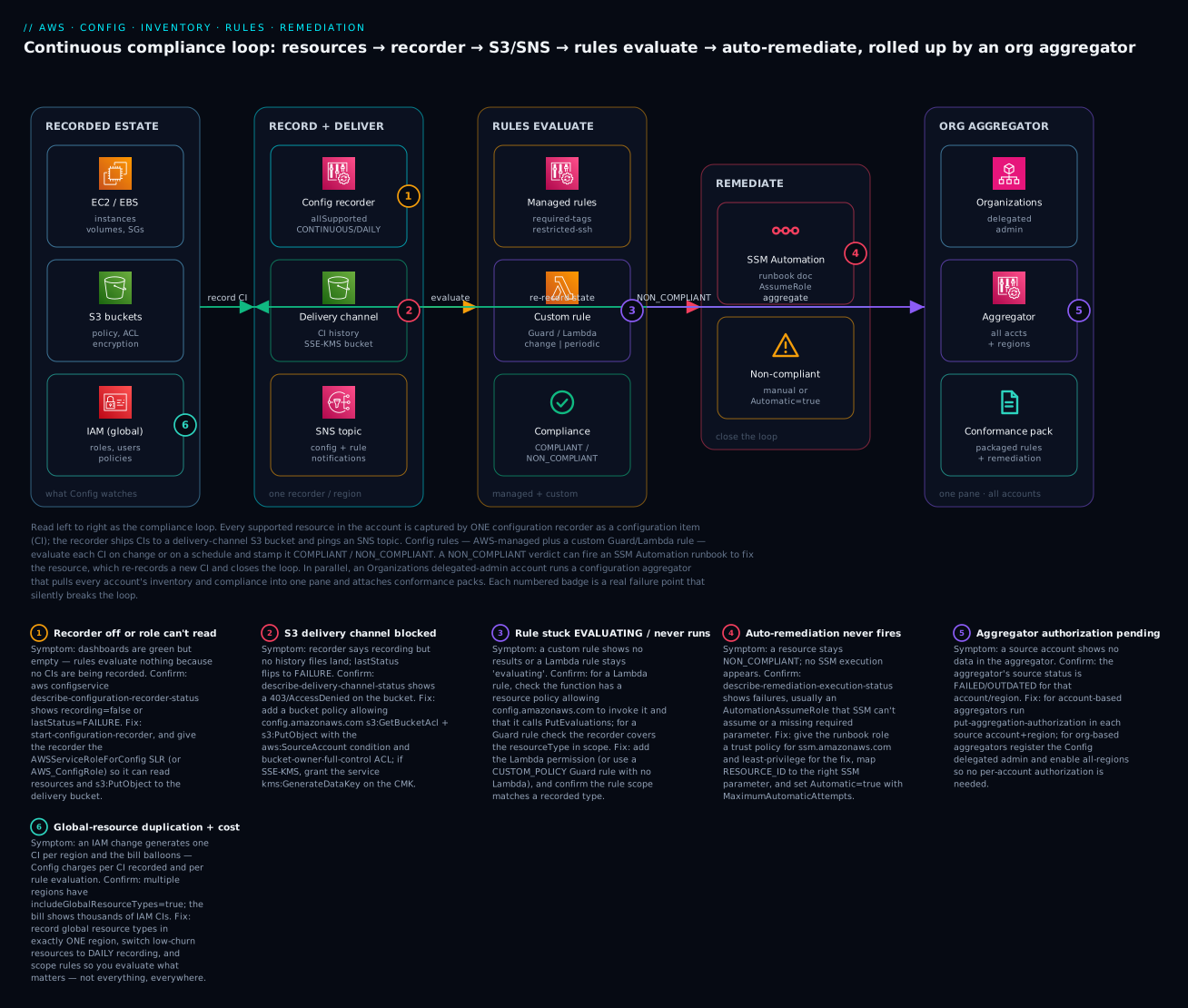
The diagram traces the continuous-compliance loop left to right, from a resource changing to the drift being fixed and rolled up org-wide. In the recorded estate, EC2/EBS, S3 and IAM (global) resources are what Config watches. Every change is captured by the single configuration recorder as a configuration item; the recorder ships CIs to a delivery-channel S3 bucket (SSE-KMS) and notifies an SNS topic. In the rules-evaluate zone, AWS-managed rules (required-tags, restricted-ssh) and a custom Guard/Lambda rule evaluate each CI on change or on a schedule and stamp it COMPLIANT or NON_COMPLIANT. A NON_COMPLIANT verdict flows into remediate, where an SSM Automation runbook fixes the resource — manually or Automatic=true — and the fix re-records a new CI, closing the loop. In parallel, the org aggregator zone shows Organizations (delegated admin) running a configuration aggregator across all accounts and regions, with conformance packs attaching packaged rules and remediation.
The six numbered badges mark where the loop silently breaks: the recorder off or its role unable to read (badge 1) so everything downstream sees nothing; the S3 delivery channel blocked by a bucket policy (badge 2) so no history lands; a custom rule stuck EVALUATING because a Lambda lacks the invoke permission or the Guard scope misses the type (badge 3); auto-remediation that never fires because the AutomationAssumeRole cannot be assumed (badge 4); an aggregator with pending authorization (badge 5) leaving an account blank; and global-resource duplication plus per-CI/per-evaluation cost (badge 6). The legend narrates each as symptom, the exact confirm command, and the fix.
Real-world scenario
Novantic Health, a fictional but realistic health-tech company, runs a 28-account AWS organization in ap-south-1 and us-east-1, regulated under HIPAA and pursuing SOC 2 Type II. The platform team is five engineers. The monthly Config bill — CIs, rule evaluations and conformance-pack evaluations — sits around ₹78,000, and the CFO questions it every quarter until the audit makes the case for him.
The crisis surfaced three weeks before the SOC 2 window closed. The auditor asked Novantic to prove that no S3 bucket holding PHI had been publicly readable at any point in the audit period, and that any exception had been detected and closed within the stated SLA. The security lead opened the Config aggregator, filtered s3-bucket-public-read-prohibited, and the dashboard was reassuringly green — until someone noticed the resource count for account #19 was zero. That account, onboarded four months earlier during a hiring crunch, had a Config recorder that had been created but never started. Every rule for that account had been returning INSUFFICIENT_DATA, which the roll-up rendered as “no non-compliant resources” — green. They had a four-month blind spot in a PHI account. This is badge 1 exactly: describe-configuration-recorder-status returned recording: false.
The fix became the template. First, they repaired the recording plane everywhere: a Terraform module that created the recorder with allSupported=true, includeGlobalResourceTypes=true only in ap-south-1, a delivery channel to a central log-archive bucket, and — critically — the aws_config_configuration_recorder_status resource that actually starts it, deployed to all 28 accounts through their pipeline. Within twenty minutes, account #19 lit up with seven publicly-readable buckets that had been invisible for a third of a year. Second, they replaced their scattered individual rules with a single conformance pack built from the Operational Best Practices for HIPAA Security sample template, deployed org-wide with put-organization-conformance-pack from their delegated-admin account, so a future new account could not be onboarded without the controls.
Third — carefully — they added remediation. For s3-bucket-public-read-prohibited they wired automatic remediation to AWS-DisableS3BucketPublicReadWrite, but only after two safeguards: an idempotent runbook, and a compliance-exception=true tag the pack honoured for the two genuinely-public buckets serving a patient-facing static site. They had learned badge 4’s lesson the hard way a year earlier — an auto-remediation whose AutomationAssumeRole lacked s3:PutBucketPublicAccessBlock had silently failed for weeks, leaving buckets NON_COMPLIANT with no execution ever recorded, until someone finally ran describe-remediation-execution-status and saw the AccessDenied.
Fourth, they attacked cost. The bill had crept up because three engineers had, at various times, set includeGlobalResourceTypes=true in both regions “to be safe,” doubling every IAM CI (badge 6). They pinned global recording to one region and switched a batch of high-churn, low-risk types (security-group associations churned by autoscaling) to DAILY recording, cutting CI volume by roughly a third with no loss of meaningful coverage.
At the audit, the security lead answered the public-bucket question in ninety seconds: an aggregate advanced query listing every AWS::S3::Bucket with its public-access status across all accounts, and a Config compliance timeline showing account #19’s seven buckets going NON_COMPLIANT and then COMPLIANT after remediation, with timestamps inside the SLA. Novantic passed with zero findings on monitoring. The line that went on the wall: “Green isn’t compliant — empty is also green. Prove the recorder is started in every account before you trust one dashboard.” The order is the lesson:
| Phase | Finding | Action | Effect |
|---|---|---|---|
| Pre-audit | Aggregator green, but account #19 count = 0 | describe-configuration-recorder-status = false |
Found the blind spot |
| Day 1 | Recorder created, never started | Deploy recorder status resource org-wide | Recording began everywhere |
| Day 1 | 7 public PHI buckets appear | HIPAA conformance pack org-wide | Controls enforced by default |
| Week 1 | Some buckets stay NON_COMPLIANT | describe-remediation-execution-status → AccessDenied |
Fixed AutomationAssumeRole |
| Week 2 | Bill too high | Global types → one region; low-risk → DAILY | ~⅓ CI reduction |
Advantages and disadvantages
| Advantages | Disadvantages |
|---|---|
| Continuous drift detection, not point-in-time | Detective only — never blocks the bad action |
| Timestamped configuration history for audits | Per-CI + per-evaluation cost adds up fast |
| Resource relationships turn inventory into a graph | Change-triggered rules lag under DAILY recording |
| 400+ managed rules; custom Guard needs no Lambda | Custom Lambda rules are code you must run/patch |
| Conformance packs deploy a framework in one shot | Packs are immutable — a change means a redeploy |
| Org aggregator = one pane over the whole estate | Aggregator is read-only; no central remediation |
| Native SSM remediation closes the loop | Auto-remediation blast radius if unscoped |
| Feeds Security Hub, Control Tower, audit tooling | “Empty looks compliant” — silent blind spots |
Config is worth its cost the first time an auditor asks a “prove it stayed correct” question — but only if you have paid the discipline tax up front: recorder started in every account, scope tuned so you are not paying to record noise, rules scoped so INSUFFICIENT_DATA is rare, and remediation scoped so it fixes without fighting. Skip that discipline and you get a large bill and a green dashboard that proves nothing.
Hands-on lab
You will turn on Config, add one managed rule and one custom Guard rule, wire automatic remediation, make a resource go NON_COMPLIANT, and watch it flip back — via Console notes, aws configservice, and Terraform, then tear it all down. Region ap-south-1, account 111122223333. ⚠️ Config is not free — you pay per configuration item and per rule evaluation; the teardown at the end stops the meter.
Step 0 — Prerequisites
aws sts get-caller-identity            # confirm account + region
export AWS_DEFAULT_REGION=ap-south-1
export ACCT=$(aws sts get-caller-identity --query Account --output text)
Step 1 — Create the service-linked role and a delivery bucket
# Service-linked role Config uses to read resources + write S3 (idempotent)
aws iam create-service-linked-role --aws-service-name config.amazonaws.com 2>/dev/null || true

# Delivery bucket (block public access, default encryption)
aws s3api create-bucket --bucket acme-config-$ACCT --region ap-south-1 \
  --create-bucket-configuration LocationConstraint=ap-south-1
aws s3api put-public-access-block --bucket acme-config-$ACCT \
  --public-access-block-configuration BlockPublicAcls=true,IgnorePublicAcls=true,BlockPublicPolicy=true,RestrictPublicBuckets=true
Attach the bucket policy Config needs (write it to bucket-policy.json with the three statements from the delivery-channel table, then):
aws s3api put-bucket-policy --bucket acme-config-$ACCT --policy file://bucket-policy.json
Console path: Config → Get started walks you through recorder + delivery bucket + role in one wizard; the CLI below is the explicit form.
Step 2 — Turn on the recorder and delivery channel
SLR="arn:aws:iam::$ACCT:role/aws-service-role/config.amazonaws.com/AWSServiceRoleForConfig"

aws configservice put-configuration-recorder --configuration-recorder \
  "{\"name\":\"default\",\"roleARN\":\"$SLR\",\"recordingGroup\":{\"allSupported\":true,\"includeGlobalResourceTypes\":true}}"

aws configservice put-delivery-channel --delivery-channel \
  "{\"name\":\"default\",\"s3BucketName\":\"acme-config-$ACCT\"}"

aws configservice start-configuration-recorder --configuration-recorder-name default
Verify (expected output):
aws configservice describe-configuration-recorder-status \
  --query 'ConfigurationRecordersStatus[0].{recording:recording,last:lastStatus}'
# {
#     "recording": true,
#     "last": "SUCCESS"
# }
If recording is false or last is FAILURE, jump to the troubleshooting playbook — do not proceed until this is SUCCESS.
Step 3 — Add the managed rule
aws configservice put-config-rule --config-rule '{
  "ConfigRuleName": "s3-bucket-public-read-prohibited",
  "Source": { "Owner": "AWS", "SourceIdentifier": "S3_BUCKET_PUBLIC_READ_PROHIBITED" },
  "Scope": { "ComplianceResourceTypes": ["AWS::S3::Bucket"] }
}'
Step 4 — Add the custom Guard rule
Save the s3_sse.guard policy from earlier, then create a CUSTOM_POLICY rule (CLI takes the policy inline via the rule JSON, or use the Terraform in Step 7). Confirm both rules exist:
aws configservice describe-config-rules --query 'ConfigRules[].ConfigRuleName'
# [ "s3-bucket-public-read-prohibited", "s3-default-encryption-guard" ]
Step 5 — Create a deliberately non-compliant resource
# A test bucket, then make it public-read (this is what the rule should catch)
aws s3api create-bucket --bucket acme-badbucket-$ACCT --region ap-south-1 \
  --create-bucket-configuration LocationConstraint=ap-south-1
aws s3api delete-public-access-block --bucket acme-badbucket-$ACCT
aws s3api put-bucket-acl --bucket acme-badbucket-$ACCT --acl public-read
Force an evaluation instead of waiting, then check compliance:
aws configservice start-config-rules-evaluation --config-rule-names s3-bucket-public-read-prohibited
sleep 30
aws configservice get-compliance-details-by-config-rule \
  --config-rule-name s3-bucket-public-read-prohibited \
  --query 'EvaluationResults[].{r:EvaluationResultIdentifier.EvaluationResultQualifier.ResourceId,c:ComplianceType}'
# [ { "r": "acme-badbucket-111122223333", "c": "NON_COMPLIANT" } ]
Step 6 — Wire automatic remediation and watch it flip
Create the remediation role (trusts ssm.amazonaws.com, least-privilege for the fix), then the remediation configuration from the CLI block earlier. After it runs:
aws configservice describe-remediation-execution-status \
  --config-rule-name s3-bucket-public-read-prohibited \
  --query 'RemediationExecutionStatuses[].{r:ResourceKey.ResourceId,s:State}'
# [ { "r": "acme-badbucket-111122223333", "s": "SUCCEEDED" } ]

# Re-evaluate — the bucket should now be COMPLIANT
aws configservice start-config-rules-evaluation --config-rule-names s3-bucket-public-read-prohibited
sleep 30
aws configservice get-compliance-details-by-config-rule \
  --config-rule-name s3-bucket-public-read-prohibited \
  --query 'EvaluationResults[0].ComplianceType'
# "COMPLIANT"
You have watched the full loop: record → evaluate → NON_COMPLIANT → auto-remediate → re-record → COMPLIANT.
Step 7 — The whole lab as Terraform
The recorder, channel, status, both rules and the remediation in one file (abbreviated — combine the blocks shown earlier plus the status resource):
resource "aws_config_configuration_recorder_status" "this" {
  name       = aws_config_configuration_recorder.this.name
  is_enabled = true
  depends_on = [aws_config_delivery_channel.this]
}
Step 8 — Teardown (stops the billing)
| # | Action | Command |
|---|---|---|
| 1 | Delete remediation config | aws configservice delete-remediation-configuration --config-rule-name s3-bucket-public-read-prohibited --resource-type AWS::S3::Bucket |
| 2 | Delete both rules | aws configservice delete-config-rule --config-rule-name <name> (each) |
| 3 | Stop the recorder | aws configservice stop-configuration-recorder --configuration-recorder-name default |
| 4 | Delete delivery channel | aws configservice delete-delivery-channel --delivery-channel-name default |
| 5 | Delete the recorder | aws configservice delete-configuration-recorder --configuration-recorder-name default |
| 6 | Empty + delete buckets | aws s3 rb s3://acme-badbucket-$ACCT --force and aws s3 rb s3://acme-config-$ACCT --force |
| 7 | (Optional) remove remediation role | aws iam delete-role --role-name config-remediation (detach policies first) |
⚠️ Stopping the recorder is what halts per-CI charges; deleting rules halts per-evaluation charges. Leaving Config “on but idle” still bills for any CIs recorded.
Common mistakes & troubleshooting
This is the section you open mid-incident. The playbook first — symptom to fix — then the API-error reference, a decision table, and prose on the nastiest failures.
| # | Symptom | Root cause | Confirm (exact command / console path) | Fix |
|---|---|---|---|---|
| 1 | Dashboard green but a resource count is 0 | Recorder created but never started | aws configservice describe-configuration-recorder-status → recording:false |
start-configuration-recorder; deploy the status/start step in IaC |
| 2 | Recorder recording, but no history in S3 | Delivery bucket policy denies config.amazonaws.com |
describe-delivery-channel-status → lastStatus:FAILURE, AccessDenied |
Add the three bucket-policy statements with aws:SourceAccount |
| 3 | Delivery FAILURE with an SSE-KMS bucket | CMK key policy blocks the service | KMS CloudTrail Decrypt/GenerateDataKey deny |
Grant config.amazonaws.com kms:GenerateDataKey on the CMK |
| 4 | Rule stuck in EVALUATING forever |
Lambda rule never calls PutEvaluations / no invoke permission |
Lambda logs; get-function-policy missing config.amazonaws.com |
Add lambda:add-permission for Config; ensure code calls PutEvaluations |
| 5 | Rule shows INSUFFICIENT_DATA |
Recorder does not capture the rule’s resource type | describe-configuration-recorder recordingGroup lacks the type |
Widen recording group; wait for a CI |
| 6 | Custom Guard rule never flags anything | Scope resource type not recorded, or Guard path wrong | Rule scope vs recordingGroup; Guard debug log in S3 | Record the type; fix the supplementaryConfiguration path |
| 7 | Auto-remediation never runs | AutomationAssumeRole not assumable / missing param |
describe-remediation-execution-status → AccessDenied/param error |
Fix role trust (ssm.amazonaws.com) + permissions; map RESOURCE_ID |
| 8 | Remediation loops on the same resource | A pipeline keeps re-creating the violation | CloudTrail shows repeated fix + re-break | Add compliance-exception tag the rule honours; fix the pipeline |
| 9 | Aggregator shows an account as blank | Authorization missing (account-based) | Aggregator source status FAILED |
put-aggregation-authorization in the source account+region |
| 10 | Org aggregator empty for new accounts | Delegated admin / SLR not set | describe-configuration-aggregators; org access |
Register Config delegated admin; use AllAwsRegions |
| 11 | IAM CIs duplicated, bill jumps | includeGlobalResourceTypes=true in many regions |
Count IAM CIs per region; recordingGroup per region | Enable global types in one region only |
| 12 | Config bill much higher than expected | Recording everything, everywhere, CONTINUOUS | Cost Explorer by usage type; CI count | DAILY for low-risk types; scope recording; scope rules |
| 13 | put-config-rule fails NoAvailableConfigurationRecorder |
Rule created before the recorder exists | describe-configuration-recorder empty |
Create + start recorder first; depends_on in TF |
| 14 | Deleting a rule fails | Remediation still attached | describe-remediation-configurations |
Delete remediation config first, then the rule |
API / operation error reference
| Error / status | Where it appears | Meaning | Fix |
|---|---|---|---|
NoAvailableConfigurationRecorderException |
put-config-rule, put-remediation-configurations |
No recorder exists yet | Create + start the recorder first |
MaxNumberOfConfigRulesExceededException |
put-config-rule |
Over the 150-rule limit | Request a quota increase; consolidate into packs |
InsufficientDeliveryPolicyException |
put-delivery-channel |
Bucket policy insufficient | Add Config service statements to the bucket policy |
ValidationException on remediation |
put-remediation-configurations |
Parameter/type mismatch | Match runbook params; set ResourceValue: RESOURCE_ID |
InsufficientPermissionsException |
remediation execution | Assume-role cannot perform the fix | Add least-privilege perms to the runbook role |
OrganizationAccessDeniedException |
org rule/pack/aggregator | Org access or delegated admin missing | Enable trusted access; register delegated admin |
NoSuchConfigurationRecorderException |
start/stop recorder | Wrong recorder name | Use the actual name (default) |
LastDeliveryChannelDeleteFailedException |
delete-delivery-channel |
Recorder still references the channel | Stop recorder before deleting the channel |
Decision table — read the symptom, name the cause
| If you see… | It’s probably… | Do this |
|---|---|---|
| Everything COMPLIANT and counts are 0 | Recorder off / never started | describe-configuration-recorder-status |
| Only new accounts are blind | Recorder start step not in the account template | Add the start/status step to IaC and redeploy |
A rule stuck EVALUATING |
Lambda not reporting or not permitted | Check PutEvaluations + Lambda invoke permission |
INSUFFICIENT_DATA on a rule |
Type not recorded / rule brand new | Widen recording group; wait one cycle |
| NON_COMPLIANT that never self-fixes | No remediation, or role can’t assume | Wire remediation; fix AutomationAssumeRole |
| A fix that keeps re-breaking | Deploy pipeline fights the remediation | Exception tag + fix the source |
| The bill spiking | Over-recording + duplicated globals | Scope + DAILY + one-region globals |
The three nastiest failures, in prose
“Green is empty.” The most dangerous Config failure is not a red dashboard — it is a green one over an account whose recorder never started. Every rule returns INSUFFICIENT_DATA, roll-ups render that as “no non-compliant resources,” and you have a blind spot that looks like health. The only defence is to treat resource count = 0 as an alarm, not a comfort, and to make the recorder start step (start-configuration-recorder / aws_config_configuration_recorder_status) a non-optional part of every account’s baseline. A recorder that exists but is stopped is the single most common real-world Config gap.
Auto-remediation that silently no-ops. You wire Automatic=true, feel safe, and weeks later discover buckets sitting NON_COMPLIANT with zero remediation executions — because the AutomationAssumeRole either cannot be assumed by SSM (wrong trust policy) or lacks the specific permission the runbook needs (e.g. s3:PutBucketPublicAccessBlock). Config does not shout about this; the evidence is in describe-remediation-execution-status showing AccessDenied or nothing at all. Always test a new remediation against a deliberately-broken resource in a sandbox and confirm you see SUCCEEDED before you trust it in production.
Global-resource duplication. Because IAM is global, includeGlobalResourceTypes=true in several regions records the same IAM change once per region — multiplying both your CI count and your bill for no added coverage. It is insidious because each engineer who set it “to be safe” was individually reasonable. Enable it in exactly one home region, verify with a per-region CI count, and encode the rule in your recorder module so nobody re-introduces it.
Best practices
| # | Practice | Why |
|---|---|---|
| 1 | Record in every account and region; treat count = 0 as an alarm | Empty renders as green — the classic blind spot |
| 2 | Make start-configuration-recorder a non-optional part of the account baseline |
A stopped recorder is the #1 real-world gap |
| 3 | Enable includeGlobalResourceTypes in one region only |
Avoids duplicate IAM CIs and duplicate cost |
| 4 | Deliver to a central, immutable log-archive bucket in a security account | Tamper-proof evidence; survives account compromise |
| 5 | Prefer conformance packs over scattered rules for frameworks | Auditable, versioned, org-wide in one shot |
| 6 | Prefer custom Guard over custom Lambda when a policy expresses it | No Lambda to run, permission, or patch |
| 7 | Scope rules to the resource types that matter | Fewer INSUFFICIENT_DATA, lower evaluation cost |
| 8 | Make every remediation runbook idempotent and honour an exception tag | Prevents the fix-then-refight loop |
| 9 | Test new auto-remediation in a sandbox before Automatic=true in prod |
Catches assume-role and blast-radius failures |
| 10 | Use an organization aggregator, not account-based | No per-account authorization to forget |
| 11 | Switch low-churn, low-risk types to DAILY recording | Cuts CI cost with no meaningful loss |
| 12 | Route only HIGH/CRITICAL compliance changes to a ticket via EventBridge | Keeps the signal actionable |
Security notes
Config is a security tool, so its own security matters. Least-privilege, a tamper-proof archive, and careful remediation permissions are the whole game.
| Concern | Risk | Control |
|---|---|---|
| Recorder role over-permission | Role can read everything it records | Use the service-linked role; do not add write perms |
| Delivery bucket in the same account | A compromised account can delete its own evidence | Deliver to a separate security/log-archive account bucket |
| Archive mutability | Attacker deletes the proof | S3 Object Lock (WORM) + SCP denying StopConfigurationRecorder/DeleteDeliveryChannel |
| KMS on the delivery bucket | Wrong key policy blocks delivery | Grant only config.amazonaws.com kms:GenerateDataKey; least-privilege the CMK |
| Remediation assume-role scope | Over-broad role = large blast radius | One narrowly-scoped role per remediation; only the actions the runbook needs |
| Custom Lambda rule code | Supply-chain / privilege in the function | Least-privilege execution role; pin dependencies; review code |
| Org delegated admin | A delegated account can see everything | Delegate to a dedicated security/audit account only |
| Advanced-query data exposure | Inventory reveals the estate | Restrict config:SelectAggregateResourceConfig to auditors |
Key IAM actions to gate, and to whom:
| Action | Grants | Give to |
|---|---|---|
config:PutConfigurationRecorder / StartConfigurationRecorder |
Turn recording on/off | Platform automation only |
config:StopConfigurationRecorder |
Disable evidence | Nobody in prod (SCP-deny; break-glass only) |
config:PutConfigRule / PutOrganizationConfigRule |
Author rules | Security engineering |
config:PutRemediationConfigurations |
Wire auto-fixes | Platform + service teams (reviewed) |
config:StartRemediationExecution |
Trigger a manual fix | On-call responders |
config:SelectResourceConfig / SelectAggregateResourceConfig |
Query the inventory | Auditors, read-only |
Cost & sizing
Config has no meaningful free tier for real use — you pay for what it does. Two drivers dominate: configuration items recorded and rule evaluations. Conformance packs are billed per pack evaluation. SSM Automation for remediation is billed separately under Systems Manager.
| Cost driver | Roughly | Note |
|---|---|---|
| Configuration item recorded | ~$0.003 per CI (US/most regions) | The main lever; scope + DAILY reduce it |
| Config rule evaluation | ~$0.001 each (first 100k/region/mo), then cheaper tiers | Per resource per evaluation |
| Conformance pack evaluation | ~$0.0012 each (first 500k), then cheaper tiers | Per rule-in-pack evaluation |
| Advanced queries | No extra charge | Query freely |
| SSM Automation (remediation) | Systems Manager pricing | Separate line item |
| S3 storage for history | S3 pricing | Small unless you keep years |
| SNS notifications | SNS pricing | Negligible |
A worked example for a single 200-resource account with all-supported CONTINUOUS recording and ~20 rules:
| Component | Estimate | Monthly (USD) | Monthly (INR ≈ ₹83/$) |
|---|---|---|---|
| ~4,000 CIs/month (churn + snapshots) | 4,000 × $0.003 | ~$12 | ~₹1,000 |
| ~30,000 rule evaluations | 30,000 × $0.001 | ~$30 | ~₹2,490 |
| Conformance pack (one, ~40 rules) | pack evals | ~$10 | ~₹830 |
| Total (indicative) | — | ~$52 | ~₹4,300 |
Multiply by account count for an org — which is exactly why scope discipline matters at scale. The levers, ranked by impact:
| Lever | Saves | Trade-off |
|---|---|---|
| Global types in one region | Removes duplicate IAM CIs | None — pure waste removal |
| DAILY for low-churn types | Fewer CIs on chatty resources | Slower drift detection on those |
| Inclusion/exclusion recording scope | Skip low-value types | Miss drift on excluded types |
| Fewer, better-scoped rules | Fewer evaluations | Cover only what matters |
| Right-size conformance packs | Fewer pack evaluations | Do not stack overlapping packs |
Interview & exam questions
Q1. What is the difference between AWS Config and CloudTrail? CloudTrail records API activity (who called what, when, from where); Config records resource configuration state over time and whether it complies with rules. CloudTrail answers “who did it,” Config answers “is it still right.” You need both; a Config CI even links to the CloudTrail event that caused it. (SCS-C02)
Q2. Why can a Config dashboard show all-green yet be wrong? Because a recorder that is off or never started makes every rule return INSUFFICIENT_DATA, which roll-ups render as “no non-compliant resources” — green over a blind spot. Always verify describe-configuration-recorder-status shows recording: true. (SOA-C02)
Q3. When would you choose a custom Guard (policy) rule over a custom Lambda rule? When the check is a declarative property assertion on the configuration item — Guard needs no Lambda to run, permission, or patch. Use Lambda only for imperative logic, external lookups, or cross-resource state a policy language cannot express. (SOA-C02)
Q4. What is the difference between config-change and periodic triggers? Config-change rules evaluate when a CI is recorded for an in-scope resource (near real-time); periodic rules run on a fixed schedule (1–24 h) even with no change — required for account-wide checks like iam-password-policy that have no single triggering resource. (SOA-C02)
Q5. How does automatic remediation actually execute the fix? Config invokes an SSM Automation document against the NON_COMPLIANT resource, executed under an AutomationAssumeRole you supply. The role must trust ssm.amazonaws.com and carry least-privilege permissions for that specific fix; a resource parameter (usually RESOURCE_ID) tells the runbook which resource to act on. (SOA-C02)
Q6. What is a conformance pack and why use one? An immutable, versioned bundle of Config rules and their remediation in one template, deployable org-wide from a delegated-admin account — the way to roll out a whole framework (PCI, CIS, HIPAA) consistently rather than wiring rules one at a time. (SCS-C02)
Q7. Account-based vs organization aggregator — which and why? Organization aggregators require no per-account authorization (they use org trust), so they scale to the whole org automatically; account-based aggregators require each source account to run put-aggregation-authorization for the aggregator account+region, which is easy to forget per region. Prefer organization aggregators. (SAP-C02)
Q8. Why is recording global resource types in every region a problem? IAM resources are global, so includeGlobalResourceTypes=true in multiple regions records the same change once per region — duplicating CIs and cost with no added coverage. Enable it in exactly one home region. (SOA-C02)
Q9. What does INSUFFICIENT_DATA mean and how do you fix it? The rule could not evaluate — usually the recorder is not capturing the resource type the rule needs, or the rule was just created and has not yet seen a CI. Widen the recording group to include the type and wait a cycle. (SOA-C02)
Q10. How do you make Config evidence tamper-proof? Deliver to an S3 bucket in a separate security/log-archive account with Object Lock (WORM), and use an SCP to deny StopConfigurationRecorder/DeleteDeliveryChannel org-wide (with a break-glass exception) so a compromised workload account cannot erase its own evidence. (SCS-C02)
Q11. What are the two dominant Config cost drivers and how do you control them? Configuration items recorded and rule evaluations. Control CIs with scoped recording, one-region global types, and DAILY mode for low-churn types; control evaluations with fewer, better-scoped rules. (SOA-C02)
Q12. How do you stop an auto-remediation from fighting a deploy pipeline? Make the runbook idempotent and have the rule honour an exception tag (e.g. compliance-exception=true) for legitimately non-standard resources, then fix the pipeline that keeps re-introducing the violation. Otherwise the fix and the pipeline loop forever. (SOA-C02)
Quick check
- Your Config aggregator shows an account with zero resources and all rules green. What is the first thing you check, and with which command?
- You need a compliance check that asserts a property on an S3 bucket’s configuration item. Which rule type avoids running any Lambda?
- Which recorder setting, if enabled in multiple regions, silently duplicates IAM configuration items and cost?
- A rule sits in
EVALUATINGforever. Name the two most likely causes for a custom Lambda rule. - Auto-remediation is wired with
Automatic=truebut the resource stays NON_COMPLIANT and no execution appears. Where do you look and what is the usual cause?
Answers
- That the recorder is actually started —
aws configservice describe-configuration-recorder-statusshould showrecording: true. Zero resources + green usually means the recorder never started, so every rule returnsINSUFFICIENT_DATA(which renders as green). - A custom Guard (policy) rule (
CUSTOM_POLICY,guard-2.0.0) — AWS runs the policy against the CI; there is no Lambda to deploy or permission. recordingGroup.includeGlobalResourceTypes = true— enable it in exactly one region.- The function never calls
PutEvaluations, orconfig.amazonaws.comlackslambda:InvokeFunctionpermission on the function. aws configservice describe-remediation-execution-status— the usual cause is anAutomationAssumeRoleSSM cannot assume (wrong trust) or that lacks the specific permission the runbook needs (e.g.s3:PutBucketPublicAccessBlock).
Glossary
| Term | Definition |
|---|---|
| Configuration recorder | The per-region, per-account component that captures resource configuration as configuration items. |
| Recording group | The recorder setting deciding which resource types (and whether global types) are captured. |
| Recording mode | CONTINUOUS (per change) or DAILY (at most once a day) capture, settable per resource type. |
| Delivery channel | The S3 bucket (required) and SNS topic (optional) the recorder delivers to. |
| Configuration item (CI) | A point-in-time JSON snapshot of one resource’s state, relationships and related events. |
| Relationship | A recorded link between two resources (e.g. instance is associated with a security group). |
| Configuration timeline | The ordered history of a resource’s CIs, with diffs and the CloudTrail events that caused them. |
| Config rule | A check that evaluates CIs and returns COMPLIANT / NON_COMPLIANT / NOT_APPLICABLE / INSUFFICIENT_DATA. |
| Managed rule | An AWS-authored Config rule you configure by parameters. |
| Custom Guard rule | A CloudFormation Guard (guard-2.0.0) policy rule AWS runs with no Lambda. |
| Custom Lambda rule | A Config rule whose logic runs in your Lambda, which must call PutEvaluations. |
| Trigger | What causes a rule to evaluate: configuration-change, periodic, or both. |
| Conformance pack | An immutable, versioned bundle of rules and remediation deployed as one unit, optionally org-wide. |
| Remediation configuration | The wiring that runs an SSM Automation runbook against a NON_COMPLIANT resource. |
| AutomationAssumeRole | The IAM role SSM assumes to perform a remediation; trusts ssm.amazonaws.com. |
| Aggregator | A read-only, multi-account/region roll-up of CIs and compliance, ideally org-based. |
Next steps
- Pair Config with its activity-log other half in AWS CloudTrail and Config: Audit and Compliance at Scale to answer “who did it” alongside “is it still right.”
- Enforce the tag standard your
required-tagsrule depends on with AWS Tagging Strategy for Cost Allocation & Enforcement. - Layer preventive controls beneath these detective ones with AWS Organizations, SCPs & Multi-Account Guardrails.
- Adopt Config as a managed detective guardrail set through AWS Control Tower Guardrails: a Multi-Account Foundation.
- Extend the org aggregator into a full landing zone with an account factory so every new account is recording, packed and aggregated from birth.