kubectl get pods returns three columns you did not want to see: a pod that has been Pending for nine minutes, another cycling CrashLoopBackOff with RESTARTS climbing past forty, and a third stuck on ImagePullBackOff. The deployment says READY 0/3, the on-call channel is filling up, and the single thing standing between you and a fix is a command you have not run yet: kubectl describe pod and, specifically, the Events block at the bottom of it. Almost every EKS pod incident is won or lost in the first sixty seconds — on whether you read the pod’s state, its container’s Last State, Reason, and Exit Code, and the scheduler’s own words in Events, or whether you start guessing: bumping memory on a pod that was actually starved of an IP address, or “fixing” IRSA on an ImagePullBackOff that the kubelet was never going to solve with IRSA in the first place.
A pod fails to reach Running in a small number of very specific ways, and each one writes an exact string. 0/3 nodes are available: 3 Insufficient cpu, failed to assign an IP address to container, pod has unbound immediate PersistentVolumeClaims, Back-off pulling image, Reason: OOMKilled, Liveness probe failed — these are not vague. Each maps one-to-one onto a phase of the pod’s journey (schedule → assign IP → mount volume → pull image → start container → pass probes) and onto exactly one fix. The entire skill of operating Kubernetes on Amazon EKS at 2 a.m. is naming the class fast from the state and the event string, not shotgunning changes at a manifest.
This is the reference you keep open during the incident. It treats a pod as what it actually is — a workload that must clear the scheduler, get a real VPC IP from the AWS VPC CNI, bind any volume through the EBS CSI driver, be pulled by the kubelet under the node instance role, and then survive its liveness and readiness probes — and it walks every failure class that pages you, in kubectl, aws CLI, and Terraform, with real event strings, real IAM actions, and real limits. The bulk is a scannable master playbook, a waiting-reason and exit-code reference, and a decision table, plus the three nastiest failures in full: VPC CNI IP exhaustion, OOMKilled versus a liveness-probe kill, and the IRSA-versus-node-role image-pull confusion. It maps to the container and troubleshooting domains of SAA-C03, DVA-C02 and SOA-C02.
What problem this solves
Kubernetes is declarative and self-healing, which is exactly why a stuck pod is so disorienting: you asked for three replicas, the control plane keeps trying to give you three, and the failure is buried in a status field or an event you have to go read. There is no crash dialog. A pod in Pending is not an error the cluster shouts — it is the scheduler quietly saying “I looked at every node and none of them fit,” and unless you open kubectl describe pod and read the Events, you will never see the sentence that tells you why. A CrashLoopBackOff pod is even more deceptive: it did start, it is being restarted, and the logs you get from kubectl logs are from the current attempt — which may show nothing, because the real error was printed by the container that already died. You need kubectl logs --previous, and if you do not know that, the pod is an opaque wall.
What breaks without this skill is delivery velocity and uptime, quietly and repeatedly. A team pushes a deployment with a resources.requests.cpu of 4 onto a cluster of t3.medium nodes (2 vCPU each), and every pod sits Pending forever with Insufficient cpu — a one-line manifest typo that reads like a cluster outage. Another team scales a service from 20 to 200 pods on a handful of large nodes, runs the subnets dry of IP addresses, and watches new pods hang in ContainerCreating with failed to assign an IP address to container — the nodes have plenty of CPU, so CPU dashboards look fine and the real limit (VPC IPs) is invisible unless you know to look. A third wires a database password into a Secret, references a key that does not exist, and gets CreateContainerConfigError — which they misread as a crash and “fix” by restarting, forever. A fourth sets a livenessProbe with initialDelaySeconds: 5 on an app that takes 45 seconds to warm its JVM, and the app is killed and restarted before it can ever answer — a CrashLoopBackOff caused entirely by the health check, not the app. None of these are exotic. They are the default behaviour of the platform when you do not know which phase does what.
Who hits this: anyone running EKS past the first tutorial. It bites hardest on teams new to the AWS VPC CNI (real VPC IPs, not an overlay — subnets exhaust), on anyone who confuses the node role with IRSA (image pull versus app runtime), on teams that treat memory limits as advisory (they are a hard OOM ceiling), and on anyone who copied a livenessProbe from a blog without matching it to their app’s real startup time. The fix is almost never “delete the pod and hope.” It is: read the state, read the Events and Last State, name the phase, and apply the one change that phase needs.
Here is the whole failure field on one screen — the state you see, the class, the exact signal, and the one-line fix — so you can orient before the deep dive:
| Pod state you see | Class | The signal you’ll see | The one-line fix |
|---|---|---|---|
Pending |
Insufficient capacity | 0/N nodes are available: N Insufficient cpu/memory |
Right-size requests; let Autoscaler/Karpenter add a node (check max) |
Pending |
Taint / affinity | had untolerated taint {...} / didn't match Pod's node affinity/selector |
Add tolerations; fix nodeSelector/labels/affinity |
Pending |
PVC unbound | pod has unbound immediate PersistentVolumeClaims |
Install EBS CSI + IRSA; default StorageClass; same-AZ |
ContainerCreating (stuck) |
CNI IP exhaustion | failed to assign an IP address to container |
Prefix delegation; bigger instance; more subnet IPs |
ImagePullBackOff |
Image pull | ErrImagePull → Back-off pulling image |
Node-role ECR perms; fix tag; add route; mirror Docker Hub |
CrashLoopBackOff |
App exit / config | Last State: Terminated, Exit Code: 1 |
Read logs --previous; supply config/secret |
CrashLoopBackOff |
OOMKilled | Reason: OOMKilled, Exit Code: 137 |
Raise memory limit; fix the leak |
CrashLoopBackOff |
Liveness kill | Liveness probe failed + Killing container |
Add startupProbe; raise initialDelaySeconds |
Running 0/1 |
Readiness never ready | Pod up, READY 0/1, out of Service endpoints |
Fix readiness path/deps; pod is live but not ready |
Node NotReady |
Node health | kubectl get nodes shows NotReady |
Check aws-node/kubelet, disk/memory pressure |
Learning objectives
By the end of this article you can:
- Run the four-command diagnostic —
kubectl describe pod,kubectl logs --previous,kubectl get events --sort-by=.lastTimestamp, andkubectl top— and read a pod’s phase, containerLast State,Reason, andExit Codefluently. - Decode a
Pendingpod from the scheduler’sEventsstring into one of its real causes — insufficient CPU/memory requests, Cluster Autoscaler / Karpenter not scaling (or at max), untolerated taints, unmatched node affinity / selector, PVC unbound, or pod-topology-spread — and fix each. - Diagnose VPC CNI IP exhaustion (
InsufficientFreeAddressesOnInterface) from themax-podsmath, and fix it with prefix delegation, a bigger instance, or more subnet capacity. - Separate the node instance role (which the kubelet uses to pull images from ECR) from IRSA (which only reaches the running container), and stop trying to fix
ImagePullBackOffwith the wrong one. - Read the
ImagePullBackOffsuffix —not found,denied/no basic auth credentials,i/o timeout,toomanyrequests— and map each to route, auth, tag, or rate-limit. - Distinguish the three
CrashLoopBackOffdeaths — a non-zero application exit (bad config/secret), an OOMKill at the memory limit (Reason: OOMKilled, exit 137), and a liveness probe killing a slow-starting app — and apply the different fix each needs. - Diagnose node
NotReady(kubelet,aws-node/CNI, disk/memory pressure) and CoreDNS/DNS failures, and run a state → class → root cause → confirm → fix playbook end to end — reproducingPending,CrashLoopBackOff, andImagePullBackOffin a hands-on lab.
Prerequisites & where this fits
You should already be comfortable with the Kubernetes and EKS basics: a Pod is the smallest deployable unit (one or more containers sharing a network namespace and IP), a Deployment manages a ReplicaSet that keeps N pod replicas running, the kube-scheduler assigns each pending pod to a node, and the kubelet on that node pulls images and starts containers. You should know that on EKS the control plane is AWS-managed (you never see the API server hosts), that worker nodes run as a managed node group (an EC2 Auto Scaling group), Karpenter, or Fargate, and that the AWS VPC CNI (aws-node DaemonSet) gives every pod a real IP from your VPC subnets. You should be able to run kubectl against a cluster (aws eks update-kubeconfig), read YAML, and know what requests and limits, a Secret, a ConfigMap, and a PersistentVolumeClaim are. IAM roles and policies, VPC subnets and route tables, and Linux exit codes should be familiar.
This sits in the Containers track and is the operational companion to the design- and setup-side references. The decision that put you on EKS rather than ECS or plain Fargate is made in Choosing Your AWS Container Path: ECS vs EKS vs Fargate, and the broader compute picture is in AWS Compute: EC2 vs Lambda vs ECS vs EKS. Standing up the cluster and node groups themselves — the eksctl/managed-node-group hands-on that this article assumes you have already done — and the IRSA deep-dive that gives a pod its own fine-grained IAM (distinct from the node role that pulls images, which this article leans on heavily) are the natural companions to read alongside this one. The image side — building, tagging, pushing and pulling from a registry, and the exact ECR permissions a pull needs — is covered in Push and Pull with Amazon ECR, Hands-On. The ECS analogue of this playbook, worth reading for the shared patterns (the two-roles split, the private-subnet pull path), is ECS Task Won’t Start: The Complete Troubleshooting Playbook. And because so many “won’t start” failures are really “can’t reach ECR or the API server from a private subnet,” the network-path diagnosis lives in The VPC Connectivity Troubleshooting Playbook.
Before the deep dive, fix the mental model of where each failure lives, so you look in the right place first:
| Layer | What lives here | Failure classes it causes | First place to look |
|---|---|---|---|
| Scheduler | Node fit: requests, taints, affinity, spread | Pending: Insufficient cpu/memory, untolerated taint, affinity |
kubectl describe pod → Events |
| Autoscaling | Cluster Autoscaler / Karpenter add nodes | Pending that never resolves (at max, no fit) |
Autoscaler / Karpenter controller logs |
| VPC CNI (network) | Real VPC IP per pod from ENIs | Stuck ContainerCreating: no free IP |
describe pod; aws-node logs; max-pods |
| Storage (CSI) | PVC → PV bind via EBS CSI | Pending: unbound PVC; AZ conflict |
kubectl get pvc; get sc; CSI pods |
| Image pull (kubelet) | ECR auth + route + tag, under node role | ImagePullBackOff / ErrImagePull |
describe pod Events suffix |
| Container runtime | Start, config, probes, limits | CrashLoopBackOff, OOMKilled, CreateContainerConfigError |
logs --previous; describe Last State |
| Node | kubelet, aws-node, kube-proxy, pressure |
Node NotReady; mass evictions |
kubectl describe node; kube-system pods |
| Cluster DNS | CoreDNS resolves service/external names | no such host; app can’t reach deps |
kubectl logs -n kube-system deploy/coredns |
Core concepts
The pod lifecycle — every phase can fail differently
A pod has a top-level phase (Pending, Running, Succeeded, Failed, Unknown) and, underneath it, a container state for each container (Waiting, Running, Terminated) with a human reason. kubectl get pods shows a blend of these in the STATUS column — sometimes the phase (Pending), sometimes the container’s waiting reason (ImagePullBackOff, CrashLoopBackOff), sometimes a transient (ContainerCreating). Knowing which is which tells you where in the journey the pod died.
What STATUS shows |
It’s really… | Phase of the journey | Failures that live here |
|---|---|---|---|
Pending |
Pod phase | Not yet scheduled (or scheduled, waiting on IP/volume) | Insufficient requests, taints, affinity, PVC unbound |
ContainerCreating |
Container Waiting |
Scheduled; kubelet setting up sandbox | CNI IP exhaustion, volume mount failure |
ErrImagePull / ImagePullBackOff |
Container Waiting.reason |
Pulling the image | Auth, route, wrong tag, rate limit |
CreateContainerConfigError |
Container Waiting.reason |
Building the container config | Missing ConfigMap/Secret/key referenced |
RunContainerError / CreateContainerError |
Container Waiting.reason |
Starting the container | Bad command, mount, or runtime error |
Running (READY 1/1) |
Pod phase + ready | Started and passing readiness | Steady state |
Running (READY 0/1) |
Running, not ready | Started but readiness failing | Readiness probe / dependency not up |
CrashLoopBackOff |
Container Waiting.reason |
Started, exited, backing off restart | App exit, OOMKill, liveness kill |
Completed / CrashLoopBackOff (Job) |
Terminated | Ran to completion (or keeps failing) | Job exit code |
Terminating (stuck) |
Deletion | Being deleted, blocked | Finalizer, preStop, terminationGracePeriod |
The four commands — your entire diagnostic toolkit
You confirm every class below with the same small set of commands. Learn to reach for them in this order.
| Command | What it tells you | When to reach for it |
|---|---|---|
kubectl describe pod <pod> |
Events (scheduler + kubelet), container Last State, Reason, Exit Code, probe results |
Always first — names the class |
kubectl logs <pod> --previous (-p) |
The crashed container’s own stdout/stderr (the attempt that died) | Any CrashLoopBackOff |
kubectl logs <pod> -c <container> -f |
The current container’s live logs | Running-but-misbehaving |
kubectl get events --sort-by=.lastTimestamp |
The cluster-wide timeline (scale-ups, evictions, probe fails) | When the pod event is a symptom of a node/cluster event |
kubectl top pod / kubectl top node |
Real CPU/memory vs requests/limits (needs metrics-server) | OOM suspicion, right-sizing |
kubectl get pod <pod> -o yaml |
The full status, including containerStatuses[].state and .lastState |
When you need the exact machine fields |
kubectl get nodes -o wide / describe node |
Node Ready conditions, taints, allocatable, pressure |
Pending with no fit; NotReady |
kubectl get pvc / kubectl get sc |
PVC bind status and available StorageClasses | Pending on a volume |
The single habit that separates a two-minute fix from a two-hour outage: run kubectl describe pod and read the Events block before you change anything. The scheduler and kubelet narrate exactly what went wrong there, in plain English, at the bottom of the output.
phase vs container state vs reason — reading the status field
The confusion that trips people is that STATUS in kubectl get pods is not a single field. A pod can be phase: Pending because it is unscheduled, or phase: Pending because it is scheduled but its container is Waiting with reason ContainerCreating. The authoritative machine fields are .status.phase and .status.containerStatuses[].state / .lastState.
| Field | Where | Example values | Read it for |
|---|---|---|---|
.status.phase |
Pod | Pending, Running, Succeeded, Failed |
Where in life the pod is |
.status.conditions |
Pod | PodScheduled, Initialized, Ready, ContainersReady |
Which gate it cleared |
.status.containerStatuses[].state |
Container | waiting{reason}, running, terminated{reason,exitCode} |
Current container state |
.status.containerStatuses[].lastState |
Container | terminated{reason: OOMKilled, exitCode: 137} |
Why the previous attempt died |
.status.containerStatuses[].restartCount |
Container | integer, climbing | CrashLoop severity |
.status.containerStatuses[].ready |
Container | true/false |
Whether readiness passes |
The scheduler’s job — why “Pending” happens
The kube-scheduler watches for pods with no assigned node and, for each, runs two stages: filtering (which nodes can run this pod — enough allocatable CPU/memory for the pod’s requests, taints tolerated, node affinity/selector matched, ports free, volume topology satisfiable) and scoring (of the survivors, which is best). If filtering leaves zero nodes, the pod stays Pending and the scheduler writes a FailedScheduling event that literally lists the reasons per node: 0/5 nodes are available: 3 Insufficient cpu, 2 node(s) had untolerated taint. That event is the diagnosis. Crucially, the scheduler filters on requests, not limits and not actual usage — a pod requesting 2 CPU will not schedule onto a node with 1.5 free even if it would only ever use 0.1.
Read describe, events, and logs first
This is the reference you scan while READY is stuck at 0/3. First the commands, then the four lookup tables — scheduler events, container waiting-reasons, exit codes, and the decision table — that turn a string into a class.
# The one command you run first — Events name the class; Last State + Exit Code name the death
kubectl describe pod my-app-7d9f8-abcde
# ...scroll to the bottom:
#   Events:
#     Warning  FailedScheduling  0/5 nodes are available: 3 Insufficient cpu, 2 had untolerated taint
#   -- or, for a crash:
#     Last State:  Terminated
#       Reason:    OOMKilled
#       Exit Code: 137

# The crashed container's own last words (NOT the current attempt)
kubectl logs my-app-7d9f8-abcde --previous -c my-app

# The cluster-wide timeline, newest last — catches evictions, scale-ups, node NotReady
kubectl get events --sort-by=.lastTimestamp | tail -30

# Real usage vs requests/limits (needs metrics-server; confirms OOM and right-sizing)
kubectl top pod my-app-7d9f8-abcde --containers
The scheduler-event reference (why a pod is Pending)
When a pod is Pending, the FailedScheduling event lists a reason per node. Read the reason; it is the class.
| Event message (excerpt) | Root cause it points to | Confirm | Fix |
|---|---|---|---|
Insufficient cpu |
No node has enough free CPU for the pod’s requests.cpu |
kubectl describe node → Allocatable vs Allocated |
Lower the request, or add/enlarge nodes |
Insufficient memory |
Same, for requests.memory |
Node Allocatable memory | Lower request; bigger nodes; scale out |
Insufficient ephemeral-storage |
Requested ephemeral storage exceeds node free disk | Node ephemeral-storage allocatable | Lower request; bigger disk |
too many pods / Insufficient pods |
Node hit its max-pods (CNI IP cap) |
kubectl get node -o jsonpath='{..allocatable.pods}' |
Prefix delegation; bigger instance; more nodes |
had untolerated taint {key: value} |
Pod lacks a toleration for a node taint | kubectl describe node → Taints |
Add a matching toleration (or remove the taint) |
didn't match Pod's node affinity/selector |
nodeSelector/nodeAffinity matches no node’s labels |
Compare pod’s selector to kubectl get nodes --show-labels |
Fix labels or the selector |
had volume node affinity conflict |
Pod’s PV is in an AZ with no schedulable node | kubectl describe pv; node AZ labels |
Same-AZ node; WaitForFirstConsumer |
unbound immediate PersistentVolumeClaims |
PVC hasn’t bound (no CSI / SC / provisioner) | kubectl get pvc, get sc |
Install EBS CSI + IRSA; default SC |
didn't match pod topology spread constraints |
topologySpreadConstraints can’t be satisfied |
The constraint’s maxSkew/topologyKey |
Loosen skew; whenUnsatisfiable: ScheduleAnyway |
had taint {node.kubernetes.io/not-ready} |
The only nodes are themselves NotReady |
kubectl get nodes |
Fix the node (below), not the pod |
pod didn't trigger scale-up: max node group size reached |
Cluster Autoscaler is at the ASG max | Autoscaler logs; node group max size | Raise max size; Karpenter; smaller pod |
pod didn't trigger scale-up (...) no matching instance type |
No node group / NodePool offers an instance the pod fits | Autoscaler/Karpenter logs | Add a node group/NodePool with a fitting type |
The container waiting-reason reference
When the pod is scheduled but the container is Waiting, .state.waiting.reason names the class.
reason |
Meaning | Typical root cause | Confirm |
|---|---|---|---|
ContainerCreating |
kubelet is setting up the sandbox | Normal briefly; if stuck: CNI IP or volume mount | describe pod Events (FailedCreatePodSandBox) |
ErrImagePull |
First image-pull attempt failed | Auth, route, wrong tag, rate limit | describe pod Events suffix |
ImagePullBackOff |
Kubelet is backing off after repeated pull failures | Same as ErrImagePull, persisting |
Events; the suffix names it |
InvalidImageName |
The image reference is syntactically invalid | Typo in image: (bad registry/tag chars) |
kubectl get pod -o yaml image field |
ErrImageNeverPull |
imagePullPolicy: Never and image absent on node |
Image not pre-loaded on the node | Pod spec imagePullPolicy |
CreateContainerConfigError |
Container config can’t be built | Referenced ConfigMap/Secret/key doesn’t exist | describe pod names the missing object |
CreateContainerError |
Container couldn’t be created | Bad command, mount, or hostPath |
describe pod Events |
RunContainerError |
Container created but couldn’t start | Runtime error, device, seccomp | describe pod; kubelet logs |
CrashLoopBackOff |
Container started, exited, kubelet backing off | App exit, OOM, liveness kill | logs --previous; Last State |
The exit-code reference
For CrashLoopBackOff, the container’s Exit Code in Last State is the real diagnosis. Codes above 128 encode the killing signal as 128 + signal.
| Exit code | Meaning | Typical EKS cause | Fix |
|---|---|---|---|
| 0 | Clean exit | A one-shot process used as a long-running container | Keep it long-running, or run it as a Job/CronJob |
| 1 | General application error | App threw on boot: bad config, missing env, DB unreachable | logs --previous; supply config; fix the startup bug |
| 126 | Command found but not executable | Entrypoint lacks execute bit / wrong file type | chmod +x; fix the entrypoint |
| 127 | Command not found | Bad command/args, missing binary, wrong path |
Fix the command; ensure the binary is in the image |
| 128 | Invalid exit / bad exec |
Container exec failure |
Check command/args and the image |
| 137 | SIGKILL (128+9) |
OOMKilled at the memory limit, or a SIGTERM the app ignored then force-killed |
Raise memory limit; fix leak; handle SIGTERM |
| 139 | SIGSEGV (128+11) |
Segfault — native crash, corrupt binary, arch mismatch | Fix the native bug; check base image/arch |
| 143 | SIGTERM (128+15) |
Graceful stop (rollout, scale-in, or a liveness/eviction kill the app handled) | Usually expected; confirm it’s not a probe kill |
| 255 | Exit status out of range / exit(-1) |
App-specific fatal; uncaught top-level error | logs --previous; the app defines it |
The exit codes that fool people: 137 looks like a crash but is usually an OOMKill — confirm with Reason: OOMKilled in describe, because a plain SIGKILL (a node draining, a liveness kill escalated) also shows 137 without the OOM reason. And exit 0 on a container that keeps restarting means a job image (a script that finishes) was deployed as a long-running Deployment; it completes, exits 0, and the ReplicaSet relaunches it forever — the fix is a Job/CronJob, not a Deployment.
The decision table — state/string → class → first move
When the clock is running, collapse everything above into one lookup: read the state and the event string, name the class, take the first action.
| If you see… | It’s probably… | Do this first |
|---|---|---|
Pending + Insufficient cpu/memory |
Requests too big / no capacity | Right-size requests; check Autoscaler/Karpenter isn’t at max |
Pending + untolerated taint |
Missing toleration | Add the toleration (or fix the taint) |
Pending + didn't match node affinity/selector |
Label/selector mismatch | Fix nodeSelector/labels |
Pending + unbound ... PersistentVolumeClaims |
Storage not provisioning | Install EBS CSI + IRSA; default StorageClass |
Pending + volume node affinity conflict |
EBS/pod AZ mismatch | Same-AZ node; WaitForFirstConsumer |
Stuck ContainerCreating + failed to assign an IP |
CNI IP exhaustion | Prefix delegation; bigger instance; subnet IPs |
ImagePullBackOff + not found |
Wrong image/tag | Fix the tag; pin a digest |
ImagePullBackOff + denied/no basic auth |
ECR/registry auth | Node-role ECR perms; imagePullSecret; repo policy |
ImagePullBackOff + i/o timeout |
No route to ECR | Add NAT or ECR+S3 endpoints |
ImagePullBackOff + toomanyrequests |
Docker Hub 429 | Mirror to ECR / public.ecr.aws / authenticate |
CreateContainerConfigError |
Missing ConfigMap/Secret/key | Create it / fix the key name |
CrashLoopBackOff + exit 1 |
App error on boot | logs --previous; supply config/secret |
CrashLoopBackOff + OOMKilled/137 |
Memory limit too low / leak | Raise limit; fix leak |
CrashLoopBackOff + Liveness probe failed |
Probe killing a slow starter | startupProbe; raise initialDelaySeconds |
Running 0/1 forever |
Readiness failing | Fix readiness path/deps (pod is live, not ready) |
Node NotReady |
Node/CNI/kubelet/pressure | describe node; kube-system pods |
Pending: no node will take the pod
Pending is the scheduler telling you it filtered every node and none survived. The FailedScheduling event names the reason per node — read it first, then match it to one of the five causes below.
Insufficient CPU/memory requests (and the autoscaler not scaling)
The most common Pending: the pod’s requests exceed what any node has free. Remember the scheduler filters on requests, so a pod that uses 100 MiB but requests 8 GiB needs a node with 8 GiB free.
| Symptom | Root cause | Confirm | Fix |
|---|---|---|---|
Pending, Insufficient cpu |
requests.cpu > any node’s allocatable free CPU |
kubectl describe node → Allocated resources |
Lower the request; add/enlarge nodes |
Pending, Insufficient memory |
requests.memory > free memory on every node |
Same | Right-size; scale out; bigger instance |
Pending even though nodes look idle |
Requests are set high “to be safe”; usage is low | kubectl top nodes vs requests |
Set requests to real usage + headroom |
Pending that never resolves |
Autoscaler/Karpenter can’t or won’t add a node | Autoscaler/Karpenter controller logs | See the scale-up table below |
Pending after a scale-out |
Node group at max size | Node group --scaling-config; CA logs max node group size reached |
Raise max; add capacity |
On EKS you add nodes automatically with one of two systems, and they fail to scale for different reasons. Knowing which you run tells you where to look.
| Aspect | Cluster Autoscaler (CA) | Karpenter |
|---|---|---|
| How it adds nodes | Increases an ASG’s desired count (fixed node groups) | Provisions right-sized EC2 directly from a NodePool |
| Won’t scale when | ASG at maxSize; pod fits no node group’s type |
NodePool limits (cpu/memory) reached; no matching instance |
| Common “stuck Pending” | Max size reached; pod bigger than any group’s node | NodePool limit hit; constraints exclude all types |
| Where to look | kubectl logs -n kube-system deploy/cluster-autoscaler |
kubectl logs -n karpenter deploy/karpenter |
| Event on the pod | pod didn't trigger scale-up: max node group size reached |
did not schedule pod ... incompatible with nodepool |
| Fix lever | Raise maxSize; add a node group with a fitting type |
Raise NodePool limits; widen instance requirements |
The trap: a node group whose instances are t3.medium (2 vCPU, 4 GiB) will never satisfy a pod that requests 3 CPU, and CA knows it — so it does not even try to scale, and the pod sits Pending with pod didn't trigger scale-up. The fix is not “wait longer”; it is to add a node group (or Karpenter requirement) that offers a large-enough instance, or to shrink the request.
Node selector, affinity, and taints/tolerations
A pod can be unschedulable even with idle nodes, because you (or a controller) told the scheduler to avoid them. Three mechanisms do this.
| Mechanism | What it does | Failure event | Fix |
|---|---|---|---|
nodeSelector |
Hard: pod only lands on nodes with these labels | didn't match Pod's node affinity/selector |
Fix the label on nodes or the selector |
nodeAffinity (required) |
Hard: richer label expressions | Same event | Correct the expression / node labels |
nodeAffinity (preferred) |
Soft: a scoring preference, not a filter | (doesn’t block scheduling) | N/A — it never causes Pending |
podAffinity (required) |
Must co-locate with matching pods | didn't match pod affinity rules |
Ensure the target pods exist/are labelled |
podAntiAffinity (required) |
Must not co-locate; needs spare nodes | didn't match pod anti-affinity rules |
Add nodes; relax to preferred |
| Taint + toleration | Node repels pods that lack a matching toleration | had untolerated taint {key: value} |
Add the toleration, or remove the taint |
Some taints are set by Kubernetes automatically and are worth recognizing on sight — a pod stuck behind one of these usually means the node is the problem, not the pod.
| Well-known taint | Set when | Effect | What it means for your pod |
|---|---|---|---|
node.kubernetes.io/not-ready |
Node condition Ready=False |
NoSchedule/NoExecute |
Node is unhealthy — fix the node |
node.kubernetes.io/unreachable |
Node controller lost contact | NoExecute |
kubelet/network problem on the node |
node.kubernetes.io/disk-pressure |
Low disk | NoSchedule |
Node evicting; free disk / bigger volume |
node.kubernetes.io/memory-pressure |
Low memory | NoSchedule |
Node under memory pressure |
node.kubernetes.io/pid-pressure |
PID exhaustion | NoSchedule |
Too many processes on the node |
node.kubernetes.io/unschedulable |
kubectl cordon |
NoSchedule |
Node cordoned for maintenance |
node.cloudprovider.kubernetes.io/uninitialized |
Node just joined | NoSchedule |
Cloud controller hasn’t initialized it |
Custom (e.g. dedicated=gpu:NoSchedule) |
You set it | NoSchedule |
Pod needs a matching toleration |
PVC unbound: EBS CSI, StorageClass, AZ mismatch
A pod that mounts a PersistentVolumeClaim cannot schedule until that claim binds to a PersistentVolume. On modern EKS this requires the EBS CSI driver — it is no longer built in, so a fresh cluster with no CSI addon leaves every dynamic PVC Pending forever.
| Symptom | Root cause | Confirm | Fix |
|---|---|---|---|
Pending, unbound immediate PersistentVolumeClaims |
PVC never binds | kubectl get pvc shows Pending |
Install aws-ebs-csi-driver addon + IRSA |
PVC Pending, no events |
No default StorageClass | kubectl get sc (none marked default) |
Mark one default; set storageClassName |
PVC Pending with a StorageClass |
CSI controller can’t provision (IAM) | kubectl logs -n kube-system deploy/ebs-csi-controller |
Grant the CSI IRSA role EBS perms |
Pod Pending, volume node affinity conflict |
EBS volume in AZ-a, only nodes in AZ-b | kubectl describe pv → nodeAffinity AZ |
Node in the volume’s AZ; WaitForFirstConsumer |
PVC binds but pod stuck ContainerCreating |
Attach/mount failure | describe pod → FailedAttachVolume/FailedMount |
Check CSI node DaemonSet; volume not already attached |
WaitForFirstConsumer PVC “stuck” Pending |
Normal until a pod consumes it | It’s expected; binds when the pod schedules | No action — this is correct behaviour |
The AZ trap is the subtle one: EBS volumes are AZ-scoped, so a volume created in ap-south-1a can only attach to a node in ap-south-1a. If the scheduler puts the pod on a node in 1b, you get volume node affinity conflict. The fix that prevents it entirely is volumeBindingMode: WaitForFirstConsumer on the StorageClass — the volume is only provisioned after the scheduler picks a node, guaranteeing they share an AZ.
# Terraform: the EBS CSI driver as an EKS addon, wired to an IRSA role (so PVCs can bind)
resource "aws_eks_addon" "ebs_csi" {
  cluster_name             = aws_eks_cluster.this.name
  addon_name               = "aws-ebs-csi-driver"
  service_account_role_arn = aws_iam_role.ebs_csi_irsa.arn  # least-priv EBS perms
  resolve_conflicts_on_update = "OVERWRITE"
}
# A StorageClass that avoids the AZ trap by binding only when a pod consumes it
apiVersion: storage.k8s.io/v1
kind: StorageClass
metadata:
  name: gp3
  annotations: { storageclass.kubernetes.io/is-default-class: "true" }
provisioner: ebs.csi.aws.com
volumeBindingMode: WaitForFirstConsumer   # <-- provisions in the pod's AZ, not eagerly
parameters: { type: gp3, encrypted: "true" }
VPC CNI IP exhaustion — the nastiest Pending cousin
This one hides in plain sight because the pod is not, strictly, Pending — it is scheduled and then stuck in ContainerCreating, because the AWS VPC CNI could not hand it an IP. On EKS every pod gets a real VPC IP from an ENI attached to its node, so the number of pods a node can run is capped by IP capacity, not just CPU/memory.
The max-pods a node supports (without prefix delegation) is (ENIs × (IPv4-per-ENI − 1)) + 2. That cap is small on small instances, and it is the invisible ceiling that a scale-out hits first.
| Instance type | ENIs | IPv4 / ENI | max-pods (no prefix) |
max-pods (prefix delegation) |
|---|---|---|---|---|
t3.small |
3 | 4 | 11 | (capped at 110) |
t3.medium |
3 | 6 | 17 | ~110 |
m5.large |
3 | 10 | 29 | ~110 |
m5.xlarge |
4 | 15 | 58 | ~110 |
m5.2xlarge |
4 | 15 | 58 | ~110 |
m5.4xlarge |
8 | 30 | 234 | (capped at 250 by default) |
| Symptom | Root cause | Confirm | Fix |
|---|---|---|---|
Stuck ContainerCreating, failed to assign an IP address to container |
ENIs have no free secondary IP | describe pod Events; aws-node logs InsufficientFreeAddressesOnInterface |
Enable prefix delegation; bigger instance |
Pending, too many pods |
Node hit max-pods |
kubectl get node -o jsonpath='{..allocatable.pods}' |
Prefix delegation; more/bigger nodes |
| Subnets run dry cluster-wide | Small subnets, many pods | Subnet free IPs in the console/CLI | Bigger subnets; secondary CIDR; prefix delegation |
| New pods fail only during a scale-up | Warm-pool IPs exhausted under burst | aws-node env WARM_IP_TARGET/MINIMUM_IP_TARGET |
Tune warm targets; prefix delegation |
Prefix delegation is the real fix: instead of assigning individual secondary IPs, the CNI assigns /28 prefixes (16 IPs) to each ENI, multiplying capacity ~16× and letting a node run up to 110 (small) or 250 pods. Enable it on the aws-node DaemonSet (or the VPC CNI addon) and the IP ceiling stops being the bottleneck.
# Enable prefix delegation on the VPC CNI so each ENI carries /28 prefixes (16 IPs each)
kubectl set env daemonset aws-node -n kube-system ENABLE_PREFIX_DELEGATION=true
kubectl set env daemonset aws-node -n kube-system WARM_PREFIX_TARGET=1
# New/replaced nodes then advertise a much higher allocatable pods count.
# Terraform: same, but as declarative addon configuration (survives addon updates)
resource "aws_eks_addon" "vpc_cni" {
  cluster_name  = aws_eks_cluster.this.name
  addon_name    = "vpc-cni"
  configuration_values = jsonencode({
    env = { ENABLE_PREFIX_DELEGATION = "true", WARM_PREFIX_TARGET = "1" }
  })
}
Pod topology spread and anti-affinity
The last Pending class: you asked to spread pods across zones or nodes and there is nowhere left to spread to.
| Constraint | What it enforces | Why it causes Pending | Fix |
|---|---|---|---|
topologySpreadConstraints (DoNotSchedule) |
Even spread across a topologyKey within maxSkew |
No node keeps the skew within bounds | Loosen maxSkew; whenUnsatisfiable: ScheduleAnyway |
podAntiAffinity (requiredDuringScheduling) |
One pod per node/zone | Fewer eligible nodes than replicas | Add nodes; relax to preferred |
topologyKey: kubernetes.io/hostname |
One replica per node | Replicas > nodes | Scale nodes; use zone spread instead |
ImagePullBackOff and ErrImagePull
ErrImagePull is the first failed pull; ImagePullBackOff is the kubelet backing off after repeated failures (backoff grows to a 5-minute cap). The container never starts. Read the suffix in the describe pod Events — it is the actual diagnosis.
| Event suffix / symptom | Root cause | Confirm | Fix |
|---|---|---|---|
... not found / manifest unknown |
Wrong image name or :tag/digest |
The event names the ref; check the repo | Push the tag, or pin an existing @sha256: digest |
... no basic auth credentials / denied |
ECR/registry auth failed | Node role’s ECR perms; repo policy | Attach AmazonEC2ContainerRegistryReadOnly to the node role |
... dial tcp ...:443: i/o timeout |
No route to the registry | Private subnet, no NAT/endpoints | Add NAT or ECR (api+dkr) + S3 endpoints |
... toomanyrequests: ... rate limit |
Docker Hub anonymous 429 | Pulling nginx:latest etc. from Docker Hub |
Mirror to ECR / use public.ecr.aws / authenticate |
... no matching manifest for linux/arm64 |
Arch mismatch | Image arch vs node arch (Graviton?) | Build multi-arch; match node arch |
... x509 / TLS error |
Cert / proxy interception | Corporate proxy, custom CA | Trust the CA; fix the proxy |
InvalidImageName |
Malformed image: string |
kubectl get pod -o yaml |
Correct the registry/repo/tag syntax |
The exact ECR permissions a pull needs (on the node role)
An ECR pull needs four actions. On EKS the kubelet performs the pull using the node instance role, so these live on the node role — the managed AmazonEC2ContainerRegistryReadOnly policy grants exactly them.
| Action | Resource | Why |
|---|---|---|
ecr:GetAuthorizationToken |
* |
Get a registry auth token (account-wide) |
ecr:BatchCheckLayerAvailability |
repo ARN | Check which layers are already present |
ecr:GetDownloadUrlForLayer |
repo ARN | Get the (S3-backed) URL for each layer |
ecr:BatchGetImage |
repo ARN | Fetch the image manifest |
For a cross-account private ECR pull, the node role in account B is not enough — the repository in account A also needs a repository policy allowing account B (or its node role) to pull. And for a private Docker Hub or third-party registry, you attach an imagePullSecret to the pod’s ServiceAccount. None of these is IRSA — which is the confusion the next section clears up.
IRSA vs the node role for image pull — the confusion that wastes hours
Here is the single most misdiagnosed ImagePullBackOff: a team has set up IRSA (IAM Roles for Service Accounts) so their pod can call S3/DynamoDB, they hit ImagePullBackOff on a private ECR image, and they spend an hour adding ECR permissions to the IRSA role — with no effect. The reason is a timing fact about how identities are delivered.
| Question | Node instance role | IRSA (pod role) |
|---|---|---|
| Who uses it | The kubelet (node agent) | Your application container (its AWS SDK) |
| When | Before the container starts — during image pull | After the container is running |
| Delivered how | EC2 instance profile on the node | Projected OIDC token mounted into the pod |
| Governs | Image pull from ECR; CNI; logs | The app’s own AWS API calls at runtime |
Fixes ImagePullBackOff? |
Yes — this is the one to change | No — it isn’t active until after the pull |
The image pull happens before your container exists, performed by the kubelet using the node’s EC2 instance profile. IRSA credentials are injected into the running container via a projected token — they are simply not present at pull time. So the fix for an ECR-auth ImagePullBackOff is always the node role (or a repo policy, or an imagePullSecret), never IRSA. IRSA is the right fix for the opposite symptom: the pod is Running and your app logs AccessDenied on an S3 call.
CrashLoopBackOff: the container keeps dying
CrashLoopBackOff means the container started, then exited, and the kubelet is restarting it with an exponential back-off (roughly 10s, 20s, 40s… capped at 5 minutes). The pod is not broken at pull or schedule — it ran your code and your code (or the platform) killed it. The two commands that crack it: kubectl logs --previous (the dead container’s own words) and kubectl describe pod (the Last State, Reason, and Exit Code).
App exits non-zero, or a missing config/secret
| Symptom | Exit Code / reason |
Root cause | Fix |
|---|---|---|---|
Cycles immediately, exit 1 |
Error, exit 1 |
App threw on boot (bad config, DB unreachable, missing env) | logs --previous; supply config; fix the dep |
CreateContainerConfigError (not CrashLoop) |
— | Referenced ConfigMap/Secret/key doesn’t exist | describe names it; create it / fix key name |
Exit 127 |
Error, exit 127 |
Bad command/args, missing binary |
Correct the command; verify the binary path |
Exit 126 |
Error, exit 126 |
Entrypoint not executable | chmod +x; fix the file |
Exit 0, keeps restarting |
Completed then restart |
A one-shot/job image run as a Deployment |
Run as a Job/CronJob, or keep it long-running |
Exit 139 |
Error, exit 139 |
Segfault — native crash or arch mismatch | Fix the native bug; check base image/arch |
A crucial distinction: a missing environment variable value (the app reads DB_HOST, it’s empty, the app throws) is a CrashLoopBackOff with exit 1 — the container started. But a missing referenced object (envFrom a Secret that doesn’t exist, or a secretKeyRef to a key that isn’t there) is CreateContainerConfigError — the container never started, because the kubelet couldn’t assemble its config. The first you debug with logs --previous; the second describe tells you outright, naming the missing ConfigMap/Secret.
The liveness probe killing a slow-starting app
The cruelest CrashLoopBackOff, because the app is fine — it is just slow to boot, and the liveness probe is killing it before it finishes. A liveness probe that starts checking at initialDelaySeconds: 5 against an app that needs 45 seconds to warm up will fail, the kubelet will kill the container (Killing container ... failed liveness probe), restart it, and the cycle repeats forever. The RESTARTS count climbs, but logs --previous shows a healthy startup that was interrupted.
| Symptom | Root cause | Confirm | Fix |
|---|---|---|---|
Restarts climb; logs -p looks healthy but cut off |
Liveness probe fails during slow startup | describe → Liveness probe failed + Killing container |
Add a startupProbe; raise initialDelaySeconds/failureThreshold |
| Restarts under load, not at boot | Liveness times out when app is busy | describe → periodic Liveness probe failed |
Raise timeoutSeconds/failureThreshold; fix latency |
Running 0/1, never gets traffic |
Readiness (not liveness) failing | describe → Readiness probe failed |
Fix readiness path/deps; separate from liveness |
| Liveness passes locally, fails in-cluster | Probe hits a path/port the app doesn’t serve | kubectl exec + curl the probe path |
Point the probe at a real endpoint/port |
The right tool for slow starters is the startupProbe: it gates the liveness/readiness probes until the app has booted, giving a generous window once without loosening the steady-state liveness check. Use it instead of inflating initialDelaySeconds everywhere.
# A startupProbe gives a slow app up to 5 minutes to boot (30 × 10s), THEN liveness takes over
startupProbe:
  httpGet: { path: /healthz, port: 8080 }
  failureThreshold: 30      # 30 failures allowed...
  periodSeconds: 10         # ...checked every 10s = 300s startup budget
livenessProbe:              # only active AFTER startupProbe first succeeds
  httpGet: { path: /healthz, port: 8080 }
  periodSeconds: 10
  failureThreshold: 3       # tight once running: 3 × 10s = 30s to declare dead
readinessProbe:             # gates traffic; failing here = Running 0/1, not a restart
  httpGet: { path: /ready, port: 8080 }
  periodSeconds: 5
OOMKilled (exit 137) — the memory-limit death
If a container exceeds its memory limit, the Linux kernel’s OOM killer terminates it and the kubelet records Reason: OOMKilled, Exit Code: 137. This is not the app being buggy — it is the app hitting a ceiling you set (or the default). It is distinct from node memory pressure, where the kubelet evicts whole pods to save the node.
| Setting | Level | Behaviour | Gotcha |
|---|---|---|---|
resources.requests.memory |
Container | Scheduling floor (guaranteed) | Scheduler uses this; doesn’t cap usage |
resources.limits.memory |
Container | Hard cap — exceed it → OOMKill (137) | Too low → OOMKilled under load; not “buggy app” |
No limits.memory |
Container | Can use up to node capacity | One pod can trigger node memory pressure → evictions |
requests == limits (memory) |
Container | Guaranteed QoS class | Least likely to be evicted; but a tight limit still OOMs |
| Node memory pressure | Node | kubelet evicts BestEffort/Burstable pods |
Different from OOMKill — read the event |
Confirm an OOMKill two ways: describe pod shows Last State: Terminated, Reason: OOMKilled, Exit Code: 137, and kubectl top pod (or Container Insights) shows memory at ~100% of the limit just before the kill. The backoff cadence is worth memorizing so you can tell a crash loop from a slow retry.
| Restart # | Back-off delay | Cumulative time |
|---|---|---|
| 1 | ~10 s | 10 s |
| 2 | ~20 s | 30 s |
| 3 | ~40 s | 70 s |
| 4 | ~80 s | 150 s |
| 5 | ~160 s | 310 s |
| 6+ | 300 s cap | +5 min each |
Probes and QoS reference
Probes and QoS classes decide when a container is killed or evicted, so they underpin half the CrashLoop and eviction failures above.
| Probe | Question it asks | On failure | Use for |
|---|---|---|---|
livenessProbe |
“Is the process wedged?” | Restart the container | Deadlock/hang detection |
readinessProbe |
“Can it serve traffic now?” | Remove from Service endpoints (no restart) | Load-balancing gate |
startupProbe |
“Has it finished booting?” | Restart if startup budget exceeded; gates the other two | Slow-starting apps |
| Probe setting | Default | What it controls | When to change |
|---|---|---|---|
initialDelaySeconds |
0 | Delay before the first check | Raise for slow boots (or use startupProbe) |
periodSeconds |
10 | Interval between checks | Lower for faster detection |
timeoutSeconds |
1 | How long a check may take | Raise for slow endpoints (avoid false kills) |
failureThreshold |
3 | Consecutive fails before acting | Raise to tolerate blips |
successThreshold |
1 | Consecutive successes to recover | Readiness flap control |
| QoS class | Set by | Eviction priority | When you get it |
|---|---|---|---|
| Guaranteed | requests == limits for cpu and memory |
Evicted last | Critical workloads |
| Burstable | Requests set, but < limits (or partial) |
Evicted after BestEffort | The common case |
| BestEffort | No requests or limits | Evicted first | Never for production |
Node NotReady and DNS failures
Two failures are not about the pod at all — the node is sick, or cluster DNS is broken — but they surface as unschedulable or crash-looping pods, so they belong in the playbook.
Node NotReady
kubectl get nodes showing NotReady means the node’s Ready condition is False — the kubelet has stopped reporting healthy, so the scheduler taints it and places nothing there (and may evict what’s running).
| Root cause | Confirm | Fix |
|---|---|---|
aws-node (VPC CNI) pod not running |
kubectl get pods -n kube-system -l k8s-app=aws-node |
Fix CNI DaemonSet; node role AmazonEKS_CNI_Policy |
| kubelet down / unhealthy | kubectl describe node conditions; SSM to the node, journalctl -u kubelet |
Restart kubelet; check the node’s bootstrap |
| DiskPressure | describe node → DiskPressure=True |
Free disk; bigger volume; prune images |
| MemoryPressure | describe node → MemoryPressure=True |
Bigger instance; set limits; evict noisy pods |
| PIDPressure | describe node → PIDPressure=True |
Fewer processes; bigger instance |
| Node never joined the cluster | Node not in kubectl get nodes at all |
aws-auth ConfigMap / EKS access entry; node role; SG |
kube-proxy not running |
kubectl get pods -n kube-system -l k8s-app=kube-proxy |
Fix the DaemonSet; Service networking breaks without it |
| Instance unhealthy / terminated | EC2 console; ASG activity | Let the ASG replace it; check the launch template |
A node that never even appears in kubectl get nodes is almost always an authorization problem: the node’s IAM role isn’t mapped in the aws-auth ConfigMap (or a modern EKS access entry), or the node role lacks AmazonEKSWorkerNodePolicy/AmazonEKS_CNI_Policy/AmazonEC2ContainerRegistryReadOnly, or the node’s security group can’t reach the cluster API endpoint.
| Node role policy | Grants | Symptom if missing |
|---|---|---|
AmazonEKSWorkerNodePolicy |
Node ↔ control-plane operations | Node never becomes Ready |
AmazonEKS_CNI_Policy |
VPC CNI to manage ENIs/IPs | aws-node fails; no pod IPs |
AmazonEC2ContainerRegistryReadOnly |
Pull images from ECR | ImagePullBackOff on private ECR |
CoreDNS and DNS failures
When pods can’t resolve my-svc or api.example.com, the culprit is usually CoreDNS (the cluster DNS, running as a Deployment in kube-system) or the path to it.
| Symptom | Root cause | Confirm | Fix |
|---|---|---|---|
lookup ... no such host / i/o timeout |
CoreDNS pods down or overloaded | kubectl get pods -n kube-system -l k8s-app=kube-dns |
Scale CoreDNS; check it’s Running |
| DNS works then flakes under load | Too few CoreDNS replicas | kubectl top CoreDNS; query latency |
Scale replicas; NodeLocal DNSCache |
| Only external names fail | ndots:5 search-domain overhead / upstream |
kubectl exec + nslookup internal vs external |
Tune ndots; check upstream resolver |
| All DNS fails on some nodes | Security group blocks UDP/TCP 53 | Node/cluster SG rules | Allow 53 within the cluster SG |
CoreDNS CrashLoopBackOff with plugin/loop |
Resolver loop in the node’s /etc/resolv.conf |
kubectl logs -n kube-system deploy/coredns |
Fix upstream resolver; the loop plugin config |
| Service resolves, connection refused | kube-proxy not programming iptables/IPVS |
kubectl get pods -n kube-system -l k8s-app=kube-proxy |
Fix kube-proxy DaemonSet |
# The canonical DNS smoke test from inside the cluster
kubectl run -it --rm dns-test --image=busybox:1.36 --restart=Never -- \
  nslookup kubernetes.default.svc.cluster.local
# Expect: an answer with 10.100.0.1 (the kube-dns/CoreDNS service ClusterIP)
Architecture at a glance
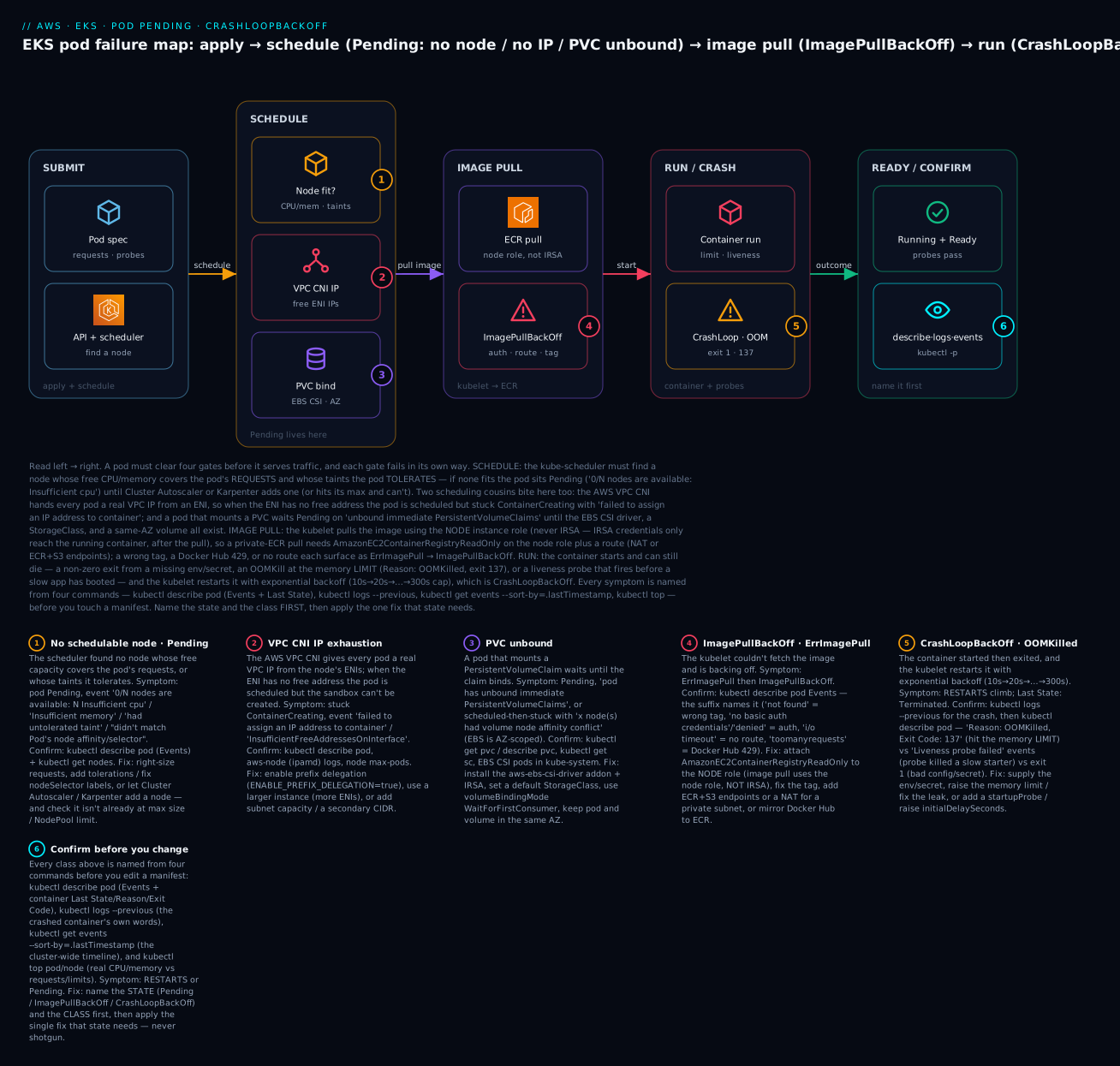
The diagram traces a pod’s real journey to Running and pins each failure class to the exact gate where it bites. Read it left to right: you kubectl apply a pod spec and the API server + kube-scheduler try to place it; the schedule gate filters nodes on requests, taints, and affinity (a miss → Pending), then the VPC CNI must hand the pod a real IP (no free IP → stuck ContainerCreating) and any PVC must bind through the EBS CSI driver (unbound → Pending); the kubelet then pulls the image from ECR under the node role (auth/route/tag failure → ImagePullBackOff); the container runs and can still die from a bad config, an OOMKill at the memory limit, or a liveness probe firing too early (→ CrashLoopBackOff); and the outcome is Running/Ready or a restart. Every one of the six numbered badges is a class you confirm by reading kubectl describe pod (Events + Last State), kubectl logs --previous, kubectl get events, and kubectl top.
Real-world scenario
Streamline Analytics, a data startup running its ingestion API on EKS in ap-south-1, scaled a service from 20 to 200 replicas ahead of a customer launch and took the API down for thirty-five minutes — through three separate failures that surfaced in sequence, each fixed only after someone finally read kubectl describe pod.
The first failure hit at replica ~120: new pods hung in ContainerCreating, not Pending, which sent the on-call engineer down the wrong path — “the scheduler is fine, nodes have CPU, why won’t they start?” The nodes were m5.large (a max-pods of 29 without prefix delegation), and at 120 pods across four nodes the ENIs were out of secondary IPs. The tell was in the pod Events: failed to assign an IP address to container ... InsufficientFreeAddressesOnInterface. They enabled prefix delegation on the VPC CNI (ENABLE_PREFIX_DELEGATION=true, WARM_PREFIX_TARGET=1), and as the node group rolled to replace nodes, max-pods jumped to 110 per node and the IP wall disappeared. The lesson they wrote down: on EKS, a node’s real pod ceiling is IPs, not CPU — and IP exhaustion looks like ContainerCreating, not Pending.
The second failure appeared as the pods that did get IPs went straight to ImagePullBackOff. The image lived in a private ECR repo in a different AWS account (a shared platform account), and the node role in the workload account had AmazonEC2ContainerRegistryReadOnly — which lets it pull from its own account’s ECR, but the cross-account repo’s repository policy did not grant the workload account’s node role. The engineer’s first instinct was to “fix IRSA,” and twenty minutes evaporated adding ECR permissions to the IRSA role — with no effect, because the kubelet pulls under the node role, before the container (and IRSA) exist. Once they read that the pull identity is the node role, the fix was a one-line repository policy in the platform account granting the workload node role ecr:BatchGetImage and friends. Pulls succeeded.
The third failure was the subtle one. With IPs and images working, pods reached Running and then began CrashLoopBackOff — but only about a third of them, and kubectl logs on a crashing pod showed nothing useful. kubectl logs --previous was the unlock: the JVM-based service took ~40 seconds to warm up, and the livenessProbe had initialDelaySeconds: 10, failureThreshold: 3 — a 40-second boot against a 40-second liveness budget, so under the heavier scheduling contention of a 200-pod rollout, the slower-starting pods tripped the probe and were killed mid-boot (describe showed Liveness probe failed and Killing container). They added a startupProbe with a 300-second budget (failureThreshold: 30, periodSeconds: 10) that gated liveness until boot completed, and left the steady-state liveness tight. READY climbed to 200/200 and held. Every one of the three was readable from describe/logs --previous in the first two minutes — had they started there instead of guessing.
Advantages and disadvantages
EKS’s Kubernetes model is self-healing and declarative, which is both its strength and the reason a stuck pod is so opaque: the cluster keeps trying, loudly restarting and rescheduling, but the why is in a status field you must go read.
| Advantages (of the EKS/Kubernetes model) | Disadvantages (the traps to manage) |
|---|---|
| Self-healing: crashed pods restart, failed nodes drain automatically | A crash loop cycles quietly until you look at describe/logs -p |
Every failure writes an exact Event / Reason / Exit Code |
You must read them — get pods alone hides the cause |
| Real VPC IPs per pod: native security groups, flow logs, routing | Subnets and max-pods exhaust; IP is the hidden ceiling |
| Fine-grained IAM per pod via IRSA | IRSA vs node role confusion breaks image-pull diagnosis |
| Probes give real liveness/readiness/startup control | A mis-tuned liveness probe causes CrashLoopBackOff |
| Rich scheduling: affinity, taints, spread, topology | The same features make pods unschedulable in subtle ways |
| Portable, huge ecosystem, CNCF-standard | More moving parts than ECS; a steeper operational floor |
The advantages dominate for teams that need Kubernetes portability, fine-grained scheduling, and a large ecosystem, and who invest in reading the platform’s signals. The disadvantages dominate when you treat EKS like “ECS with more YAML”: ignoring the VPC CNI’s IP math, copying probes from a blog, or confusing the two identities. The skill is configuring the guardrails — prefix delegation, right-sized requests, a startupProbe, the node-role ECR permissions — before the incident, and knowing the Event string already contains the answer.
Hands-on lab
You will reproduce and fix the three states that cause the most EKS pod outages — a Pending pod (an impossible CPU request), a CrashLoopBackOff (a bad command), and an ImagePullBackOff (a private-ECR image that won’t pull) — reading the diagnosis from kubectl describe/logs --previous each time. This assumes you already have a small EKS cluster with a managed node group and kubectl configured (if not, stand one up first with the companion EKS cluster-setup hands-on). Everything here is free-tier-adjacent: the pods are tiny and short-lived; the only real cost is the cluster’s control plane (~$0.10/hour) and its nodes, which you already run. Work in ap-south-1.
Step 0 — Point kubectl at the cluster and confirm nodes.
export AWS_DEFAULT_REGION=ap-south-1
aws eks update-kubeconfig --name lab-eks
kubectl get nodes -o wide          # expect: 1-2 nodes, STATUS Ready
kubectl create namespace lab 2>/dev/null || true
Step 1 — Reproduce Pending with an impossible CPU request. Ask for more CPU than any node has, so the scheduler can filter every node out.
cat <<'YAML' | kubectl apply -n lab -f -
apiVersion: v1
kind: Pod
metadata: { name: pending-demo }
spec:
  containers:
    - name: app
      image: public.ecr.aws/nginx/nginx:stable
      resources: { requests: { cpu: "64" } }   # 64 vCPU — no node has this
YAML
sleep 5
kubectl get pod pending-demo -n lab             # STATUS: Pending
kubectl describe pod pending-demo -n lab | sed -n '/Events:/,$p'
Expected: STATUS: Pending, and the Events block ends with Warning FailedScheduling ... 0/N nodes are available: N Insufficient cpu. The image and everything else are fine — this is purely a request no node can satisfy. That fingerprint (Insufficient cpu) is the whole diagnosis.
Step 2 — Fix the Pending pod (right-size the request).
kubectl delete pod pending-demo -n lab
cat <<'YAML' | kubectl apply -n lab -f -
apiVersion: v1
kind: Pod
metadata: { name: pending-demo }
spec:
  containers:
    - name: app
      image: public.ecr.aws/nginx/nginx:stable
      resources: { requests: { cpu: "100m" } }  # 0.1 vCPU — fits easily
YAML
sleep 10
kubectl get pod pending-demo -n lab             # STATUS: Running
Expected: STATUS: Running. Same pod, same image — the only change was a request the node could satisfy. (In production the other fix is to let Cluster Autoscaler/Karpenter add a node — but only if a node type large enough exists.) Clean up: kubectl delete pod pending-demo -n lab.
Step 3 — Reproduce CrashLoopBackOff with a bad command. Give the container a command that exits non-zero immediately.
cat <<'YAML' | kubectl apply -n lab -f -
apiVersion: v1
kind: Pod
metadata: { name: crash-demo }
spec:
  containers:
    - name: app
      image: public.ecr.aws/docker/library/busybox:1.36
      command: ["sh", "-c", "echo starting; sleep 2; exit 1"]  # exits 1, forever
YAML
sleep 30
kubectl get pod crash-demo -n lab               # STATUS: CrashLoopBackOff, RESTARTS climbing
kubectl describe pod crash-demo -n lab | grep -A3 'Last State'
kubectl logs crash-demo -n lab --previous       # the crashed attempt's own words
Expected: STATUS: CrashLoopBackOff, RESTARTS incrementing, Last State: Terminated, Reason: Error, Exit Code: 1, and kubectl logs --previous printing starting (proving the container ran and then exited 1). This is the habit: --previous shows the dead container, not the one about to start.
Step 4 — Fix the CrashLoopBackOff (a command that stays up).
kubectl delete pod crash-demo -n lab
cat <<'YAML' | kubectl apply -n lab -f -
apiVersion: v1
kind: Pod
metadata: { name: crash-demo }
spec:
  containers:
    - name: app
      image: public.ecr.aws/docker/library/busybox:1.36
      command: ["sh", "-c", "echo healthy; sleep 3600"]  # stays alive
YAML
sleep 10
kubectl get pod crash-demo -n lab               # STATUS: Running, RESTARTS 0
Expected: STATUS: Running, RESTARTS 0. Clean up: kubectl delete pod crash-demo -n lab.
Step 5 — Reproduce ImagePullBackOff from a private ECR repo. Create an empty private repo and reference a tag that was never pushed — a reliable, safe way to force the pull failure without touching your node role.
ACCT=$(aws sts get-caller-identity --query Account --output text)
aws ecr create-repository --repository-name lab-app >/dev/null 2>&1 || true
cat <<YAML | kubectl apply -n lab -f -
apiVersion: v1
kind: Pod
metadata: { name: pull-demo }
spec:
  containers:
    - name: app
      image: ${ACCT}.dkr.ecr.ap-south-1.amazonaws.com/lab-app:does-not-exist
YAML
sleep 30
kubectl get pod pull-demo -n lab                # STATUS: ImagePullBackOff
kubectl describe pod pull-demo -n lab | grep -A2 -i 'Failed'
Expected: STATUS: ImagePullBackOff, and Events containing Failed to pull image ... not found (the repo exists but the does-not-exist tag doesn’t). Read the suffix: not found is a wrong-tag problem, not a permissions problem. Had the suffix been no basic auth credentials/denied, the fix would be the node role’s ECR permissions (AmazonEC2ContainerRegistryReadOnly) or a cross-account repository policy — never IRSA, because the kubelet pulls before the container’s IRSA identity exists.
Step 6 — Fix the ImagePullBackOff (a valid public image).
kubectl delete pod pull-demo -n lab
kubectl run pull-demo -n lab --image=public.ecr.aws/nginx/nginx:stable
sleep 15
kubectl get pod pull-demo -n lab                # STATUS: Running
Expected: STATUS: Running. Same pod shape, a valid image reference this time.
Validation checklist. You reproduced three distinct states and confirmed each from its own fingerprint:
| Step | State reproduced | The fingerprint | The fix you applied |
|---|---|---|---|
| 1–2 | Pending |
FailedScheduling ... Insufficient cpu; image valid |
Right-size requests.cpu (prod: scale nodes) |
| 3–4 | CrashLoopBackOff |
Last State: Terminated, Exit Code: 1; logs -p shows the crash |
Fix the command so the process stays up |
| 5–6 | ImagePullBackOff |
Failed to pull image ... not found |
Correct the image/tag (perms path: node role, not IRSA) |
Teardown.
kubectl delete namespace lab
aws ecr delete-repository --repository-name lab-app --force >/dev/null 2>&1 || true
# The cluster + node group keep costing money — delete them if this was a throwaway:
# eksctl delete cluster --name lab-eks   (or terraform destroy)
Cost note. The pods ran for seconds and cost effectively nothing. The cluster control plane bills ~$0.10/hour (~₹9/hr, ~₹6,000/mo if left up) and the nodes bill as EC2 — so the meaningful charge is the cluster itself. Delete the whole cluster if it was created just for this lab.
Common mistakes & troubleshooting
This is the playbook — the part you bookmark. First the scannable master table you read while READY is stuck at 0/N, then the three nastiest failures in full. Every row is a real failure with the state you see, the class, the root cause, the exact kubectl command to confirm, and the fix.
| # | State + symptom | Class | Root cause | Confirm (kubectl) | Fix |
|---|---|---|---|---|---|
| 1 | Pending, Insufficient cpu/memory |
Schedule | Requests exceed any node’s free capacity | describe pod Events; describe node allocatable |
Right-size requests; scale/enlarge nodes |
| 2 | Pending, max node group size reached |
Autoscale | Cluster Autoscaler at ASG max | logs -n kube-system deploy/cluster-autoscaler |
Raise max size; add a fitting node group |
| 3 | Pending, no matching instance type |
Autoscale | No node group/NodePool offers a fitting type | Karpenter/CA logs | Add a node group/NodePool with the right type |
| 4 | Pending, untolerated taint {...} |
Schedule | Missing toleration | describe node → Taints |
Add the toleration or remove the taint |
| 5 | Pending, didn't match node affinity/selector |
Schedule | Label/selector mismatch | get nodes --show-labels vs pod selector |
Fix labels or nodeSelector/affinity |
| 6 | Pending, unbound ... PersistentVolumeClaims |
Storage | No EBS CSI / StorageClass / provisioner | get pvc; get sc; CSI controller logs |
Install EBS CSI + IRSA; default StorageClass |
| 7 | Pending, volume node affinity conflict |
Storage | EBS volume AZ ≠ node AZ | describe pv nodeAffinity |
Same-AZ node; WaitForFirstConsumer |
| 8 | Stuck ContainerCreating, failed to assign an IP |
CNI | VPC CNI IP exhaustion | describe pod; aws-node logs; max-pods |
Prefix delegation; bigger instance; subnet IPs |
| 9 | Pending, too many pods |
CNI | Node hit max-pods cap |
get node -o jsonpath='{..allocatable.pods}' |
Prefix delegation; more/bigger nodes |
| 10 | ImagePullBackOff, not found |
Image | Wrong image name/tag | describe pod Events suffix |
Fix the tag; pin a @sha256: digest |
| 11 | ImagePullBackOff, denied/no basic auth |
Image | ECR/registry auth (node role / repo policy) | describe pod; node role policies |
Attach AmazonEC2ContainerRegistryReadOnly to node role; repo policy |
| 12 | ImagePullBackOff, i/o timeout |
Image | No route to ECR from a private subnet | describe pod; route table; endpoints |
Add NAT or ECR (api+dkr) + S3 endpoints |
| 13 | ImagePullBackOff, toomanyrequests |
Image | Docker Hub anonymous 429 | The event suffix | Mirror to ECR / public.ecr.aws / authenticate |
| 14 | CreateContainerConfigError |
Config | Referenced ConfigMap/Secret/key missing | describe pod names the object |
Create it; fix the key/name |
| 15 | CrashLoopBackOff, exit 1 |
App exit | App threw on boot | logs --previous; describe Last State |
Supply config/secret; fix the startup bug |
| 16 | CrashLoopBackOff, OOMKilled/137 |
OOM | Container hit its memory limit | describe Reason: OOMKilled; top pod |
Raise limits.memory; fix the leak |
| 17 | CrashLoopBackOff, Liveness probe failed |
Probe | Liveness kills a slow-starting app | describe → Killing container + Liveness probe failed |
Add startupProbe; raise initialDelaySeconds |
| 18 | CrashLoopBackOff, exit 127 / exec format error |
App/arch | Bad command, or x86 image on Graviton | logs -p; image arch vs node arch |
Fix command; build multi-arch/match arch |
| 19 | Running 0/1 forever |
Readiness | Readiness probe failing | describe → Readiness probe failed |
Fix readiness path/deps (pod is live, not ready) |
| 20 | Node NotReady |
Node | kubelet/CNI/pressure | describe node; kube-system pods |
Fix aws-node/kubelet; free disk/memory |
| 21 | Pod Running but AccessDenied in app logs |
IRSA | App’s own AWS call denied (not pull) | App logs; the IRSA role policy |
Add the action to the IRSA role (not node) |
| 22 | no such host / DNS timeouts |
DNS | CoreDNS down / SG blocks 53 | get pods -n kube-system -l k8s-app=kube-dns |
Scale CoreDNS; open 53 in the cluster SG |
The three that cause the most damage, expanded:
A. VPC CNI IP exhaustion (the “it’s not Pending, it’s ContainerCreating” ghost). A service scales out and new pods hang — but in ContainerCreating, not Pending, which is the trap: the pod was scheduled (the scheduler found a node with CPU), so people stare at CPU dashboards while the real limit is invisible. On EKS the AWS VPC CNI gives every pod a real VPC IP from ENIs attached to the node, and each instance type has a hard max-pods = (ENIs × (IPs-per-ENI − 1)) + 2; an m5.large tops out at 29 pods regardless of how much CPU is free. When the ENIs run dry, the kubelet can’t create the pod sandbox and describe pod shows failed to assign an IP address to container / the aws-node logs show InsufficientFreeAddressesOnInterface. Confirm: kubectl describe pod for the sandbox event, kubectl logs -n kube-system -l k8s-app=aws-node for the ipamd error, and kubectl get node -o jsonpath='{..allocatable.pods}' for the ceiling. Fix: enable prefix delegation (ENABLE_PREFIX_DELEGATION=true on the VPC CNI addon), which assigns /28 prefixes and raises max-pods to ~110–250; or use a larger instance (more ENIs); or add subnet capacity / a secondary VPC CIDR when the subnets (not just the node) are exhausted. The mistake is “add CPU” — that changes nothing when the ceiling is IPs.
B. OOMKilled versus a liveness-probe kill (two restarts that look identical). Both make RESTARTS climb and both show Last State: Terminated, but they need opposite fixes, and telling them apart takes one field. An OOMKill happens when the container exceeds its limits.memory: describe pod shows Reason: OOMKilled, Exit Code: 137, and kubectl top pod shows memory pinned at ~100% of the limit just before the kill — the fix is to raise the memory limit (or fix a genuine leak), never to restart. A liveness kill happens when the app is healthy but too slow (or briefly too busy) to answer the probe: describe pod shows Warning Unhealthy: Liveness probe failed followed by Normal Killing: ... failed liveness probe, the exit code is whatever the app returns on SIGTERM (often 143), and logs --previous shows a normal startup that was interrupted — the fix is a startupProbe (or a higher initialDelaySeconds/failureThreshold), never more memory. Reading 137 + OOMKilled versus Liveness probe failed in the Events is the entire diagnosis; guessing wrong doubles the outage.
C. IRSA versus the node role for image pull (the identity you can’t fix with IRSA). A team with IRSA configured hits ImagePullBackOff on a private ECR image and pours time into the IRSA role’s ECR permissions — with zero effect — because of a timing fact: the kubelet performs the image pull using the node instance role, before your container exists, and IRSA credentials are only projected into the running container. They are not present at pull time. So an ECR-auth pull failure (no basic auth credentials, denied) is fixed on the node role (AmazonEC2ContainerRegistryReadOnly), or — for a cross-account repo — with a repository policy granting the node role, or — for a private third-party registry — with an imagePullSecret on the pod’s ServiceAccount. Confirm: read the describe pod suffix (denied/no basic auth = auth, not route or tag), then check the node role’s attached policies, not IRSA. The tell that you have the right identity: IRSA is the correct fix only for the opposite symptom — a pod that is already Running and whose app logs AccessDenied on its own S3/DynamoDB call. Start-time pull = node role; run-time app call = IRSA.
Best practices
- Run
kubectl describe podand read theEventsblock before you touch anything. The scheduler and kubelet narrate the exact cause there; guessing wastes the incident. Make it the first command, every time. - For any
CrashLoopBackOff, usekubectl logs --previous. The current attempt’s logs are useless; the dead container’s logs hold the error. - Set
requestsfrom real usage, not fear. The scheduler filters onrequests; padding them to “be safe” causesPendingand wastes nodes. Measure withkubectl topand set requests to usage + modest headroom. - Always set a memory
limit, and know it’s a hard OOM ceiling. Too low →OOMKilled(137) under load; none at all → one pod triggers node memory pressure and mass evictions. Right-size, don’t omit. - Use a
startupProbefor slow-starting apps. It gives a generous one-time boot budget while keeping the steady-state liveness probe tight — the correct fix for a liveness-induced crash loop. - Enable VPC CNI prefix delegation from day one. It removes the invisible
max-podsIP ceiling before a scale-out finds it, and costs nothing. - Fix image-pull auth on the node role, not IRSA. The kubelet pulls under the node role; attach
AmazonEC2ContainerRegistryReadOnlythere, add a repo policy for cross-account, and reserve IRSA for the app’s runtime AWS calls. - Install the EBS CSI driver addon with IRSA before you need a PVC, and use
volumeBindingMode: WaitForFirstConsumerto avoid the AZ-mismatchvolume node affinity conflict. - Pin images by digest (
@sha256:), not:latest. It removes a whole class ofnot found/surprise-pull failures and makes rollbacks deterministic. - Separate liveness and readiness deliberately. Liveness restarts (use it for hangs only); readiness gates traffic (use it for dependencies). A deep dependency check in a liveness probe turns a slow database into a crash loop.
- Alarm on the right signals —
kube_pod_status_phase{phase="Pending"}, restart counts,OOMKilledevents, nodeNotReady, and CoreDNS health — via Container Insights/Prometheus, so a stuck pod pages you instead of hiding. - Give the node role exactly
AmazonEKSWorkerNodePolicy+AmazonEKS_CNI_Policy+AmazonEC2ContainerRegistryReadOnlyso nodes join, get pod IPs, and pull images — the three failures that leave a nodeNotReadyor pods unpullable.
Security notes
- Keep the node role minimal and separate from IRSA. The node role needs only the three managed policies (worker, CNI, ECR read); everything an application touches belongs on a per-workload IRSA role scoped to exact ARNs. A broad node role is a blast radius on every pod that shares the node.
- Prefer VPC endpoints over a NAT gateway for ECR/S3/STS/logs egress. Interface endpoints for
ecr.api/ecr.dkr/sts/logsplus the S3 gateway endpoint keep image pulls and IRSA token exchange on the AWS backbone, off the public internet — and remove the most common private-subnet pull timeout. - Inject secrets, never bake them. Use Kubernetes
Secrets (ideally sourced from Secrets Manager/SSM via the Secrets Store CSI driver or External Secrets) so credentials arrive as env/volume at start and never live in the image; a missing reference fails asCreateContainerConfigError, which is a safe, loud failure. - Lock down pod networking with security groups and NetworkPolicy. Because every pod has a real ENI IP, you can apply security groups for pods and Kubernetes NetworkPolicy to restrict east-west traffic — a pod open to the world defeats the point of private subnets.
- Scope the EBS CSI IRSA role to the volumes it manages, and encrypt volumes with a customer-managed KMS key (
encrypted: "true"+kmsKeyIdin the StorageClass), granting the CSI rolekms:Decrypt/GenerateDataKeyon exactly that key. - Restrict who can
execinto pods.kubectl execis invaluable for probe/DNS debugging but is a shell into production; gate it with RBAC, audit it via the EKS control-plane audit log, and prefer ephemeral debug containers over long-livedexec. - Manage cluster access with EKS access entries (or a tight
aws-auth). A node that can’t join is often an access-entry/aws-authgap — fix it there with least privilege rather than broadening the node role.
Cost & sizing
EKS charges ~$0.10/hour per cluster for the control plane (~₹6,000/month, flat, regardless of size) plus whatever runs your pods — EC2 nodes (managed node groups or Karpenter) or Fargate (per-pod vCPU/GB-seconds). The failure classes above have direct cost consequences: over-requesting CPU/memory “to avoid Pending” pays for nodes you don’t use, and a crash-looping pod burns node capacity restarting forever.
| Cost driver | How it’s billed | Right-size by | Rough figure |
|---|---|---|---|
| Control plane | Per cluster-hour | Consolidate clusters; fewer, bigger | ~$0.10/hr (~₹6,000/mo) flat |
| EC2 nodes | Instance price | Match requests to real usage; bin-pack; Karpenter consolidation |
e.g. m5.large ~₹7–8/hr |
| Fargate pods | vCPU-sec + GB-sec | Right-size pod requests; no idle nodes | Per-pod; good for spiky/small |
| Over-requested pods | Nodes you must add to fit inflated requests | kubectl top → set requests to usage + headroom |
Often 30–50% waste |
| Spot nodes | Up to ~70% off on-demand | Interruptible workers + on-demand base | Big savings; handle interruptions |
| NAT gateway | Hourly + per-GB | VPC endpoints for AWS egress | ~₹3–4/hr + data — often the biggest line |
| EBS volumes (PVC) | Per-GB-month + IOPS | gp3 over gp2; delete orphaned PVs | gp3 ~₹7/GB-mo (ap-south-1, varies) |
| CloudWatch/Container Insights | Per metric + GB logs | Sample; set log retention | Grows quietly without retention |
Sizing rules of thumb: set pod requests from measured usage (kubectl top, Container Insights) plus modest headroom — this is the single biggest lever on node cost, because the scheduler packs nodes by requests. Use prefix delegation so you get full pod density per node (an m5.large running 110 pods instead of 29 is ~4× the density for the same instance cost). Prefer Karpenter or capacity-provider consolidation to bin-pack and scale down idle nodes, and put interruptible workers on Spot with an on-demand base. Compare shared VPC endpoints (a few rupees/hour, flat) against a NAT gateway for private-subnet AWS egress — endpoints usually win on cost and security. In INR terms, a minimal EKS footprint (one cluster + two small nodes) starts around ₹10,000–13,000/month before the workload — the control plane and the NAT/endpoint decision are usually where the real money is.
Interview & exam questions
Q1. A pod has been Pending for ten minutes and you have thirty seconds. What’s the first command and what do you read?
kubectl describe pod <pod>, and you read the Events block at the bottom — the scheduler writes a FailedScheduling event that lists the reason per node (Insufficient cpu, untolerated taint, unbound PersistentVolumeClaims). That string is the class; you fix what it names. (SAA-C03, SOA-C02)
Q2. A pod is stuck in ContainerCreating, not Pending, with failed to assign an IP address to container. What’s happening and how do you fix it?
VPC CNI IP exhaustion: the pod was scheduled but the AWS VPC CNI has no free ENI IP to give it, so the sandbox can’t be created. The node hit its max-pods cap. Fix with prefix delegation (ENABLE_PREFIX_DELEGATION=true), a larger instance (more ENIs), or more subnet capacity. Adding CPU does nothing. (SAA-C03, ANS)
Q3. ImagePullBackOff on a private ECR image, and your team has IRSA set up. Where do you grant the permission?
On the node instance role (AmazonEC2ContainerRegistryReadOnly), or a cross-account repository policy — not IRSA. The kubelet pulls the image under the node role before the container starts, so IRSA credentials (projected into the running container) are not available at pull time. (DVA-C02, SAA-C03)
Q4. Distinguish an OOMKill from a liveness-probe kill; both show climbing restarts.
OOMKill: describe pod shows Reason: OOMKilled, Exit Code: 137, memory at the limit — fix by raising limits.memory. Liveness kill: describe shows Liveness probe failed + Killing container, logs --previous shows a healthy-but-interrupted startup — fix with a startupProbe/higher initialDelaySeconds. Same symptom, opposite fixes. (SOA-C02, DVA-C02)
Q5. What is the difference between CrashLoopBackOff and CreateContainerConfigError?
CrashLoopBackOff means the container started and then exited (app error, OOM, liveness kill) — debug with logs --previous. CreateContainerConfigError means the container never started because a referenced ConfigMap/Secret/key doesn’t exist — describe pod names the missing object; create it or fix the key. (DVA-C02)
Q6. A pod is Running but READY 0/1 and gets no traffic. What’s wrong?
Its readiness probe is failing, so the pod is removed from its Service’s endpoints — it’s alive but not accepting traffic. This is not a crash (no restart). Check describe pod for Readiness probe failed, and fix the readiness endpoint or the dependency it checks. (SOA-C02)
Q7. A PVC-backed pod is Pending with unbound immediate PersistentVolumeClaims. Walk the diagnosis.
kubectl get pvc (is it Pending?), kubectl get sc (is there a default StorageClass?), and the EBS CSI controller pods/logs in kube-system. On modern EKS the CSI driver isn’t built in — if it’s not installed (as an addon with IRSA) or there’s no StorageClass, dynamic PVCs never bind. (SAA-C03, SOA-C02)
Q8. Why might a pod be Pending even though kubectl top nodes shows the nodes are nearly idle?
The scheduler filters on requests, not actual usage. A pod requesting 4 CPU won’t schedule onto a node with 2 free even if every pod there is idle. Either the requests are oversized (right-size them) or the node genuinely lacks the requested headroom (scale). (SAA-C03)
Q9. Cluster Autoscaler isn’t adding a node for a Pending pod. Name two reasons.
(1) The node group is at its max size (pod didn't trigger scale-up: max node group size reached). (2) No node group offers an instance type the pod could ever fit (a pod requesting 8 CPU with only 2-CPU node groups) — CA won’t scale a group that can’t help. Karpenter’s analogue is a NodePool limits cap or no matching instance. (SAA-C03)
Q10. A node shows NotReady. What are the first three things you check?
kubectl describe node conditions (DiskPressure/MemoryPressure/Ready), the aws-node (VPC CNI) and kube-proxy pods in kube-system (a failed CNI keeps a node NotReady), and the node role’s policies / aws-auth-or-access-entry mapping (a node that never joined is usually an auth gap). (SOA-C02, SAA-C03)
Q11. Pods can’t resolve service names (no such host). Where do you look?
CoreDNS: kubectl get pods -n kube-system -l k8s-app=kube-dns (are they Running?), kubectl logs -n kube-system deploy/coredns, and a smoke test (kubectl run --rm -it ... nslookup kubernetes.default). Also confirm the cluster security group allows UDP/TCP 53 and that kube-proxy is healthy. (ANS, SOA-C02)
Q12. What does exit code 137 mean, and why isn’t it always an OOMKill?
137 is 128 + 9 = SIGKILL. It’s usually an OOMKill (confirm with Reason: OOMKilled), but a plain SIGKILL from a node draining, an eviction, or a liveness kill escalated after SIGTERM also yields 137 without the OOM reason. Read the Reason, not just the code. (SOA-C02, DVA-C02)
Quick check
- A pod is
Pending. What single command do you run, and which part of its output names the cause? - A pod is stuck in
ContainerCreatingwithfailed to assign an IP address to container. What’s the class, and what’s the real fix (and the non-fix)? ImagePullBackOffon a private ECR image — which IAM identity do you fix, and why is IRSA a trap here?- Two pods have climbing
RESTARTS. One showsReason: OOMKilled, Exit Code: 137; the other showsLiveness probe failed. What are the two different fixes? - What’s the difference between
CrashLoopBackOffandCreateContainerConfigError, and which command diagnoses each?
Answers
kubectl describe pod <pod>— read theEventsblock at the bottom. The scheduler’sFailedSchedulingevent lists the reason per node (Insufficient cpu,untolerated taint,unbound PersistentVolumeClaims,didn't match node affinity/selector). That string is the class.- VPC CNI IP exhaustion. The pod was scheduled but the AWS VPC CNI has no free ENI IP, so the sandbox can’t be created; the node hit its
max-podscap. Fix: enable prefix delegation, use a bigger instance, or add subnet IPs. Non-fix: adding CPU/memory — the ceiling is IPs, not compute. - Fix the node instance role (
AmazonEC2ContainerRegistryReadOnly) or a cross-account repository policy. The kubelet pulls the image under the node role before the container exists, so IRSA credentials — which are only projected into the running container — aren’t present at pull time and can’t fix a pull failure. - OOMKill: raise
limits.memory(or fix the leak) — the container hit its hard memory ceiling. Liveness kill: add astartupProbe(or raiseinitialDelaySeconds/failureThreshold) — a healthy but slow-starting app was killed by the probe before it booted. Same symptom (climbing restarts), opposite fixes. CrashLoopBackOff= the container started and exited (app error/OOM/liveness) — diagnose withkubectl logs --previous.CreateContainerConfigError= the container never started because a referenced ConfigMap/Secret/key is missing —kubectl describe podnames the missing object.
Glossary
| Term | Definition |
|---|---|
| Pod | The smallest deployable unit — one or more containers sharing a network namespace and a single VPC IP on EKS. |
| Pending | Pod phase meaning it hasn’t been scheduled onto a node (or is scheduled but waiting on an IP/volume). |
| CrashLoopBackOff | A container that started, exited, and is being restarted by the kubelet with exponential back-off (to a 5-min cap). |
| ImagePullBackOff | The kubelet couldn’t pull the image and is backing off — auth, route, wrong tag, or rate limit. |
| ContainerCreating | The kubelet is setting up the sandbox; if stuck, usually CNI IP exhaustion or a volume-mount failure. |
| OOMKilled | The container exceeded its limits.memory and was killed by the kernel OOM killer (Exit Code: 137). |
| AWS VPC CNI | The aws-node DaemonSet that gives each pod a real VPC IP from ENIs; its max-pods cap is the hidden IP ceiling. |
| Prefix delegation | A VPC CNI mode assigning /28 (16-IP) prefixes per ENI, multiplying max-pods ~16× (up to 110–250). |
| Node instance role | The EC2 role the kubelet uses to pull images, manage ENIs, and write logs — before containers run. |
| IRSA | IAM Roles for Service Accounts — a per-pod IAM identity projected into the running container for its own AWS calls. |
| livenessProbe | A health check that restarts the container on failure; misuse (too-tight timing) causes CrashLoopBackOff. |
| readinessProbe | A health check that removes a pod from Service endpoints on failure (no restart) — gates traffic. |
| startupProbe | A one-time boot-budget probe that gates liveness/readiness until a slow app has started. |
| EBS CSI driver | The addon that provisions and attaches EBS volumes for PVCs; not built in — dynamic PVCs need it installed. |
| Cluster Autoscaler / Karpenter | The two systems that add nodes for unschedulable pods (ASG-based vs right-sized-EC2). |
| Taint / toleration | A node repels pods that lack a matching toleration; unmatched taints cause Pending. |
Next steps
- Stand up the cluster and node groups this article assumes you already have — the companion EKS cluster-setup (eksctl/managed node group) hands-on walks it end to end.
- Give a pod its own fine-grained AWS permissions (distinct from the node role that pulls images) with the companion IRSA hands-on — the identity you use for the app’s runtime calls, not for image pull.
- Fix the image side of pull failures — building, tagging, and the exact ECR permissions a pull needs — in Push and Pull with Amazon ECR, Hands-On.
- Compare this playbook with its ECS analogue — the two-roles split, the private-subnet pull path — in ECS Task Won’t Start: The Complete Troubleshooting Playbook.
- When the failure is really “can’t reach ECR/the API from a private subnet,” work the network path in The VPC Connectivity Troubleshooting Playbook.
- Revisit whether EKS is even the right runtime versus ECS or plain Fargate in Choosing Your AWS Container Path: ECS vs EKS vs Fargate.