Sooner or later something starts hammering your application from the internet — a credential-stuffing script against your login, a scraper walking every product page, a SQL-injection probe in a query string, or a botnet turning a single URL into 40,000 requests a second. Your security groups will not help: they filter by IP, port and protocol at layer 3/4, and this traffic is well-formed HTTPS on port 443 that they happily pass. What you need is a filter that reads the content of each HTTP request — the path, the headers, the body, the country of origin, the rate — and decides Allow, Block, count-and-watch, or make-them-prove-they-are-human. That filter is AWS WAF (Web Application Firewall), and the object you configure is a web ACL (web access control list).
This is not a “check the box to enable WAF” tutorial. A web ACL is a small rule engine: an ordered list of rules, each with a statement (what to match) and an action (what to do), evaluated in priority order against a fixed WCU (WAF Capacity Unit) budget, ending in a default action for anything nothing matched. Get the ordering wrong and a broad Block shadows a narrow Allow. Deploy a managed rule set straight to Block and you will take down a legitimate feature within the hour. Attach a CLOUDFRONT-scope ACL in the wrong region and it simply will not exist. Name your log destination anything but aws-waf-logs-… and the logs silently never arrive. WAF is easy to turn on and easy to get subtly, expensively wrong.
By the end of this article you can read the whole request path — from the internet, through the web ACL’s managed, rate-based and geo rules, into a CloudFront distribution or an Application Load Balancer, and on to your app — and know which rule bit, from one log line. You will understand every rule-statement type and every action, budget WCUs before an update fails, deploy AWS Managed Rules the safe way (Count first, scope-down, version-pinned), chain rules with labels, wire logging with redaction, and place WAF correctly against Shield and security groups. Then you will build a real web ACL on an ALB — the AWS Common rule set plus a 2,000-request rate limit plus a geo-block — deploy it in Count to tune it, flip it to Block, turn on logging, test it, and tear it down, with both aws wafv2 CLI and Terraform.
What problem this solves
Everything in front of your origin that speaks HTTP is an attack surface, and the attacks are application-layer: they look like valid requests. A SQL-injection attempt is a normal GET with a nasty query string. Credential stuffing is thousands of normal POST /login calls with leaked username/password pairs. A layer-7 DDoS is a flood of legitimate-looking GET / requests designed to exhaust your compute, not your bandwidth. Content scraping is a bot politely requesting every page. None of these trip a network firewall, because at layer 3/4 they are indistinguishable from your best customers. The damage — data exfiltration, account takeover, downtime, cloud-bill blowout, stolen catalog — lands on the application and the people who run it.
Without WAF you push all of that detection into your own code: every service re-implements input validation, rate limiting, IP allow/deny lists, geo rules and bot heuristics, inconsistently, and you still cannot stop a flood before it reaches and scales your Lambdas or fills your ALB target group’s connections. WAF externalizes that into a managed, edge-or-regional rule engine that inspects each request before it reaches your application and blocks, counts, or challenges it. AWS ships curated managed rule groups (the OWASP-style Core set, known-bad-inputs, SQLi, IP-reputation, Bot Control, account-takeover protection) so you inherit a security team’s ruleset without writing regexes, and you layer your own rate-based and geo and IP-set rules on top. The pain it removes is real; the pain it introduces is a false positive that blocks a paying customer, a WCU ceiling you hit mid-deploy, and a scope/region model that is unforgiving if you skim the docs. This article is about getting the second set right.
Here is the request path this article covers, hop by hop, with what each hop does and its characteristic failure:
| # | Hop | What it does | Config surface | Characteristic failure |
|---|---|---|---|---|
| 1 | Client (internet) | Sends HTTP(S); may be user, bot, or flood | — | Nothing you control; everything downstream filters it |
| 2 | Web ACL (evaluation) | Runs rules in priority order; first Allow/Block terminates | Rules, priority, default action, WCU | Rule order shadows a rule; WCU budget exceeded |
| 3 | Managed rule group | Curated rules add labels, Block/Count | Managed group + overrides + scope-down | False positive blocks legit traffic |
| 4 | Rate-based rule | Blocks an aggregation key over the limit | Limit, window, aggregation key | Never triggers (wrong key/window) |
| 5 | Geo / IP-set rule | Blocks or allows by country / CIDR | Geo-match, IP set, forwarded IP | Blocks users behind a proxy/CDN |
| 6 | Association | Binds the ACL to CloudFront / ALB / API GW | Scope + region + resource ARN | Wrong scope/region → “not found” |
| 7 | Front door → app | Allowed request reaches CloudFront/ALB → origin | Distribution / listener | — |
| 8 | Logging + metrics | Records every request; feeds tuning + alarms | Log config, redaction, filters | Wrong destination-name prefix → no logs |
Learning objectives
By the end of this article you can:
- Explain the web ACL model — rules, rule groups, priority ordering, the default action, and how the first terminating action wins — and budget the 1,500-WCU ceiling before an update fails.
- Choose the right rule statement for a job: IP set, geo-match, rate-based, byte/string, regex, size constraint, SQLi, XSS, label-match, and the
AND/OR/NOTlogical combinators, with the correct text transformations and field-to-match. - Apply every rule action — Allow, Block, Count, CAPTCHA, Challenge — and the managed-group override, and know which ones terminate evaluation.
- Deploy AWS Managed Rules safely: Count-first tuning, exclusions, scope-down statements, version pinning with SNS notifications, and the intelligent-threat groups (Bot Control, ATP, ACFP/Fraud Control).
- Associate a web ACL correctly — CloudFront (global, us-east-1) vs REGIONAL (ALB, API Gateway, AppSync, Cognito, App Runner, Verified Access) — and know why the region matters.
- Chain rules with labels, and wire logging to CloudWatch Logs / S3 / Firehose with redaction and filters (and the
aws-waf-logs-prefix rule). - Place WAF correctly against Shield / Shield Advanced and security groups / NACLs — different layers, not substitutes.
- Work a false-positive, a rate-rule-not-firing, a WCU-exceeded, a wrong-region, and a CAPTCHA-loop failure to root cause from the console and the logs.
Prerequisites & where this fits
You should have the AWS CLI v2 configured for a sandbox account, permission to create WAF, ELB, EC2 and IAM resources, and a rough grasp of HTTP (methods, headers, query strings, status codes) and CIDR notation. The hands-on lab builds an Application Load Balancer to attach the ACL to; if you have never stood one up, skim AWS Elastic Load Balancing Hands-On: Application Load Balancers and Target Groups first — this article assumes you can create an ALB and read its listener. Terraform ≥ 1.5 with the aws provider is used for every IaC snippet.
AWS WAF is the layer-7 edge filter in a defence-in-depth stack. It sits in front of, and complements, the CDN work in Amazon CloudFront Hands-On: CDN Setup, Caching and Origins (a CLOUDFRONT-scope ACL attaches directly to a distribution), the load-balancer work in AWS Elastic Load Balancing Hands-On: Application Load Balancers and Target Groups (a REGIONAL ACL attaches to an ALB), and the API tier in Amazon API Gateway Hands-On: REST vs HTTP APIs, Authorizers and Throttling (a REGIONAL ACL attaches to a REST-API stage). The findings a WAF generates feed a central security-posture view — the companion article on AWS Security Hub findings and compliance covers aggregating and triaging them alongside GuardDuty and Config. WAF is one control among many; this article makes it the sharp one.
Core concepts
Seven mental models carry the whole service.
A web ACL is an ordered rule engine with a default. The web ACL (AWS WAF v2, API namespace wafv2) is the top-level object you attach to a resource. It holds an ordered list of rules; each rule has one statement (the match condition) and one action (Allow / Block / Count / CAPTCHA / Challenge — or, for a rule group, an override). WAF evaluates rules in ascending priority number. The first rule whose action is Allow or Block terminates evaluation for that request. If no rule terminates, the web ACL’s default action decides — and the default action is a deliberate design choice, not an afterthought.
Rules cost capacity, and capacity is capped. Every statement consumes WCUs (WAF Capacity Units) — a complexity budget so AWS can guarantee latency. A simple IP-set match is 1 WCU; a rate-based rule is ~2; a regex or SQLi match is more; the Common managed rule set is 700. A web ACL has a default ceiling of 1,500 WCUs (raisable via a service-quota request). Blow the budget and your create/update call is rejected — you cannot even save the ACL. Capacity planning here is rule planning.
Managed rule groups are somebody else’s rules, embedded as a unit. A rule group is a reusable, named bundle of rules. AWS Managed Rules (AMR) are AWS-authored groups — Core/Common, Known Bad Inputs, SQLi, Linux/POSIX, IP reputation, Bot Control, and more — that you reference by name and version. You do not see the individual rules’ internals, but you can override the whole group (or specific rules inside it) to Count, exclude rules that misfire, and add a scope-down statement so the group only inspects part of your traffic. This is how you get a security team’s ruleset for a dollar a month.
Count is for learning; Allow/Block are for enforcing. The Count action is special: it increments a metric and adds labels but does not terminate — the request keeps flowing through the remaining rules. That is exactly why you deploy new rules in Count first: you see what would have been blocked in the metrics and logs without actually blocking anyone. CAPTCHA and Challenge are terminating-ish: they interrupt the request to verify a human/browser, then let a proven client through for an immunity period.
Scope decides where the ACL can live and what it can guard. A web ACL has a scope: CLOUDFRONT or REGIONAL. A CLOUDFRONT ACL is global, must be created in us-east-1 (N. Virginia), and attaches only to CloudFront distributions. A REGIONAL ACL lives in a specific region and attaches to an ALB, API Gateway stage, AppSync API, Cognito user pool, App Runner service, or Verified Access instance in that same region. The scope is fixed at creation — you cannot convert one to the other.
Labels let rules talk to each other. During evaluation a rule (or managed group) can add a label — a string like awswaf:managed:aws:core-rule-set:SizeRestrictions_Body — to the request’s transient metadata. A later rule (higher priority number, evaluated afterwards) can then match on that label with a label-match statement. This is the key to safe managed-rule tuning: run a group in Count so it only labels, then Block on the specific labels you trust and ignore the one that false-positives.
Everything is observable — sampled requests are always on; full logs are opt-in. WAF always keeps a sampled view of recent matched requests (a rolling window, up to a few hours) that you can read in the console per rule, even with no logging configured — priceless for tuning. Full logging streams every evaluated request to CloudWatch Logs, S3, or Kinesis Data Firehose, and is off by default; you turn it on per web ACL, choosing redaction and filters.
The moving parts, pinned down:
| Term | One-line definition | Where set | Why it matters |
|---|---|---|---|
| Web ACL | The attachable rule engine + default action | wafv2 |
The unit you associate to a resource |
| Rule | One statement + one action, at a priority | Web ACL / rule group | The atom of matching |
| Statement | The match condition (IP, geo, rate, regex, …) | Rule | What to look for |
| Action | Allow / Block / Count / CAPTCHA / Challenge | Rule | What to do on a match |
| Rule group | A reusable named bundle of rules | Referenced by a rule | Managed or your own; costs WCU as a unit |
| Default action | Allow or Block for unmatched requests | Web ACL | The safety posture (allow-list vs deny-list) |
| Priority | Ascending integer evaluation order | Rule | First terminating action wins |
| WCU | Capacity/complexity cost of rules | Per rule; capped per ACL | 1,500 ceiling blocks over-budget updates |
| Scope | CLOUDFRONT or REGIONAL |
Web ACL (at create) | Where it lives + what it guards |
| Association | Binding an ACL to a resource | Distribution / associate-web-acl |
One ACL per resource |
| Label | Transient tag added during evaluation | Rule / managed group | Chain rules; tune managed groups |
| Scope-down | A statement narrowing what a group inspects | Managed group / rate rule | Cut cost + false positives |
| Sampled requests | Rolling sample of matched requests | Always on | Tune without full logging |
| Logging config | Full per-request log stream | Per web ACL | Audit + tuning; aws-waf-logs- prefix |
The evaluation order, step by step
| Step | What happens | Can terminate? | Notes |
|---|---|---|---|
| 1 | Request arrives at the associated resource | — | CloudFront edge or regional resource |
| 2 | Rule at lowest priority evaluated | Yes (Allow/Block) | CAPTCHA/Challenge may interrupt |
| 3 | On no-match, next priority evaluated | — | Count-action rules never terminate |
| 4 | A matching Allow/Block ends evaluation | Yes | Later rules never run for this request |
| 5 | Count matches add labels + metrics, continue | No | Basis for chaining and tuning |
| 6 | If nothing terminated, default action applies | Yes | Allow (deny-list) or Block (allow-list) |
| 7 | Request logged (if logging on) + sampled | — | Labels captured in the log record |
The web ACL model: rules, priority, WCU and the default action
The web ACL has four things you must get right together: the rule list, the priority order, the WCU budget, and the default action.
Anatomy of a web ACL
| Component | What it is | Values / range | Notes |
|---|---|---|---|
| Name / ID / ARN | Identity of the ACL | String; ARN is region+account scoped | ARN differs for CLOUDFRONT (us-east-1) |
| Scope | Where it attaches | CLOUDFRONT | REGIONAL |
Fixed at creation |
| Default action | Fate of unmatched requests | Allow{} | Block{} |
The posture; most ACLs default-Allow |
| Rules | Ordered list of rules | 0 → many (WCU-bounded) | Each has statement + action + priority |
| Rule priority | Evaluation order | Integers, ascending | Need not be contiguous; must be unique |
| VisibilityConfig | Metrics + sampling per rule/ACL | CloudWatch metric name, sampled on/off | Required on every rule and the ACL |
| CustomResponseBodies | Reusable custom Block bodies | Named key → content | Referenced by Block custom responses |
| AssociationConfig | Oversize body inspection limit | 8/16/32/64 KB | Extra WCU; CloudFront up to 64 KB |
| TokenDomains | Domains that share CAPTCHA/Challenge tokens | List of domains | For multi-subdomain apps |
| Capacity (WCU) | Sum of rule costs | ≤ 1,500 default | Over-budget = rejected update |
Priority — the ordering rule that trips everyone
Rules run in ascending priority number (0, then 1, then 2…). The first rule that returns Allow or Block wins and stops evaluation. Two consequences bite in practice:
- A broad Block at a low priority shadows a narrow Allow at a higher priority. If priority 0 is “Block country = IN” and priority 1 is “Allow IP = my office in India”, the office is blocked — priority 0 already terminated. Put the allow first.
- Count rules do not terminate, so their priority only affects label availability. If a Count rule adds a label, any rule at a higher priority number can match that label; a rule at a lower number cannot (it ran first, before the label existed).
| Ordering guideline | Why |
|---|---|
| Put explicit allow-lists (trusted IPs, health checks) at the lowest priorities | So nothing downstream can block them |
| Put hard blocks (IP deny-list, geo-block, rate limit) next | Cheap terminations before expensive inspection |
| Put managed rule groups after your own cheap rules | Don’t pay their latency on already-decided traffic |
| Put label-match rules after the rule that emits the label | A label only exists for higher-priority-number rules |
| Keep priorities spaced (10, 20, 30…) | Room to insert a rule later without renumbering |
WCU — the capacity budget
Every statement has a WCU cost. The web ACL total must stay under 1,500 (default; request an increase for more). You can query the cost of a rule set before committing with check-capacity. Representative costs:
| Statement / construct | Approx WCU | Notes |
|---|---|---|
| IP set match | 1 | + up to 30 for forwarded-IP position |
| Geo-match | 1 | Per statement, any number of countries |
| Rate-based rule | ~2 | + cost of any scope-down statement |
| Byte-match (string) | ~1 per + transformations | Text transforms add cost |
| Regex pattern set match | ~3 base | Grows with field + transforms |
| Size constraint | 1 | Per statement |
| SQLi match | ~20 | Higher — content inspection |
| XSS match | ~40 | Highest single-statement class |
| Label-match | 1 | Cheap chaining |
AND / OR / NOT |
Sum of children (+ small) | Nesting adds up fast |
| Core rule set (Common) | 700 | Dominates most budgets |
| Known Bad Inputs | 200 | |
| Amazon IP reputation list | 25 | Cheapest managed group |
| Anonymous IP list | 50 | |
| SQLi managed rule set | 200 | |
| Bot Control (common) | 50 | + subscription cost |
The lesson: the Common rule set alone eats nearly half your budget. Two or three managed groups plus a handful of custom rules is a realistic ACL; a kitchen-sink of every managed group will exceed 1,500 and be rejected.
Default action — deny-list vs allow-list
| Default action | Posture | You then write rules that… | Typical use |
|---|---|---|---|
| Allow | Deny-list (“block the bad”) | …Block known-bad traffic | Public web apps, APIs — the common case |
| Block | Allow-list (“allow the known-good”) | …Allow explicitly trusted traffic | Internal/partner APIs, admin panels, allow-listed IPs only |
Most public web ACLs default to Allow and Block bad traffic. A default-Block ACL is a strict allow-list — powerful for a partner API where only known IPs/tokens should ever get through, but one forgotten Allow rule and you have locked out production. Choose deliberately, and test with the default before you rely on the rules.
Rule statements: every match type
A statement is the match condition. There are match statements, a rate statement, a reference statement (rule group), a label-match statement, and logical combinators. Enumerated:
| Statement | Matches on | Key parameters | WCU class | Use it for |
|---|---|---|---|---|
| IP set match | Source IP in a named IP set | IP set ARN, forwarded-IP config | Low (1) | Allow-list office IPs; deny-list abusers |
| Geo-match | ISO-3166 country of the IP | Country codes, forwarded-IP config | Low (1) | Block/allow by country; add a geo label |
| Rate-based | Request rate over a window | Limit, window, aggregation key(s), scope-down | Low (~2) | L7 flood / brute-force throttling |
| Byte-match (string) | A literal string in a field | Search string, positional constraint, transforms | Low | Match a header, path, user-agent |
| Regex pattern set | Any regex in a named set | Regex set ARN, field, transforms | Med (~3+) | Flexible path/UA/param matching |
| Regex match (inline) | A single inline regex | Regex string, field, transforms | Med | One-off pattern |
| Size constraint | Length of a field vs a number | Comparison op, size, field | Low (1) | Reject oversize bodies/headers |
| SQLi match | SQL-injection patterns in a field | Field, sensitivity, transforms | High (~20) | Inline SQLi detection |
| XSS match | Cross-site-scripting patterns | Field, transforms | High (~40) | Inline XSS detection |
| Label-match | A label added earlier in evaluation | Label string, scope LABEL/NAMESPACE | Low (1) | Chain off managed-group labels |
| Managed/own rule group | A referenced bundle of rules | Group ARN/name+version, overrides, scope-down | Group’s WCU | Inherit a curated ruleset |
AND (and) |
All child statements match | 1…n child statements | Sum | Combine conditions |
OR (or) |
Any child statement matches | 1…n child statements | Sum | Alternatives |
NOT (not) |
The child does not match | 1 child statement | Child | “Everything except…” (e.g. not-from-my-country) |
Field to match — where a statement looks
Match statements need a field-to-match. The options:
| Field | What it inspects | Notes / limit |
|---|---|---|
| UriPath | The path portion of the URI | After host, before query |
| QueryString | The full query string | Everything after ? |
| SingleQueryArgument | One named query arg | Case-insensitive name |
| AllQueryArguments | All query args together | |
| SingleHeader | One named header (e.g. user-agent) |
Lowercased name |
| Headers | Multiple/all headers | Choose keys/values/all; count-limited |
| Cookies | Cookie values/names | Count-limited |
| HeaderOrder | The order of header names | Fingerprinting bots |
| Body | The request body | First 8 KB by default; raise via AssociationConfig (extra WCU) |
| JsonBody | Parsed JSON body | Match on keys/values; parse behavior config |
| Method | The HTTP method | GET/POST/… |
| JA3Fingerprint | TLS client fingerprint | Identify client stacks/bots |
Text transformations — normalize before matching
Attackers obfuscate. Text transformations normalize the field before the statement matches, so SELECT and %53ELECT and sel/**/ect collapse to the same thing. You can chain several (each adds WCU):
| Transformation | Effect | Defeats |
|---|---|---|
NONE |
No change | (default) |
LOWERCASE |
Lowercase the input | Case-mixing evasion |
URL_DECODE |
Percent-decode | %53 style encoding |
HTML_ENTITY_DECODE |
Decode HTML entities | S style encoding |
COMPRESS_WHITE_SPACE |
Collapse whitespace | Space-padding |
REMOVE_NULLS |
Strip null bytes | Null-byte injection |
CMD_LINE |
Normalize shell syntax | Command-injection tricks |
REPLACE_COMMENTS |
Strip SQL/HTML comments | sel/**/ect |
BASE64_DECODE / HEX_DECODE |
Decode encodings | Encoded payloads |
NORMALIZE_PATH |
Canonicalize ../// |
Path-traversal evasion |
ESCAPE_SEQ_DECODE |
Decode escape sequences | \x53 style |
Rule of thumb: for SQLi/XSS, pair the match with URL_DECODE + HTML_ENTITY_DECODE + LOWERCASE at minimum. AWS Managed Rules already apply sensible transforms internally.
Geo-match in depth
Geo-match resolves the source IP to an ISO-3166-1 alpha-2 country code (US, IN, CN, RU, BR…). Two patterns dominate:
| Pattern | Statement | Effect |
|---|---|---|
| Block a set of countries | GeoMatchStatement{ CountryCodes:[CN,RU,KP] } + Block |
Deny listed countries |
| Allow only your countries | NOT( GeoMatch{ CountryCodes:[IN,US] } ) + Block |
Block everyone except IN/US |
| Just label by geo | GeoMatch + Count (adds awswaf:clientip:geo:country:* labels) |
Feed a later label-match rule |
If your resource sits behind another proxy or CDN (so the immediate source IP is the proxy), set ForwardedIPConfig to read the client IP from a header like X-Forwarded-For, with a fallback behavior (MATCH/NO_MATCH) for when the header is missing. Get this wrong and geo/IP/rate rules evaluate the proxy’s IP, not the user’s.
Rate-based rules in depth
A rate-based rule counts requests per aggregation key over a trailing evaluation window, and applies its action to any key over the limit.
| Setting | Values | Default | Notes |
|---|---|---|---|
| Limit | 10 → 2,000,000,000 | — | Requests allowed per key per window |
| Evaluation window | 60 / 120 / 300 / 600 seconds | 300 (5 min) | Trailing window over which the rate is measured |
| Aggregation key | Source IP; forwarded IP; or custom keys | Source IP | Custom: header, cookie, query arg, query string, URI path, HTTP method, label namespace, IP — and combinations |
| Scope-down statement | Any statement | none | Only count requests that also match (e.g. only POST /login) |
| Forwarded IP config | Header + fallback | — | For proxied traffic |
| Action | Block / Count / CAPTCHA / Challenge | — | Applied while the key is over the limit |
Three things people miss:
- The window is a trailing measurement, not a reset bucket. WAF continuously evaluates the trailing window; the action engages when a key crosses the limit and disengages a while after it drops back. There can be a short delay (a minute or two) before blocking starts and before it stops — do not expect instant on/off.
- The aggregation key is the whole game. Default is source IP. If attackers rotate IPs, aggregate on something stickier — a session cookie, a login username in a header, or a combination — so the rate follows the actor, not the address.
- Scope-down narrows the count. A bare rate rule counts all requests. To brute-force-protect a login without throttling page views, add a scope-down of
URI = /login AND method = POST, and set a low limit (say 100 / 5 min per IP).
Positional constraints for byte-match
| Constraint | Matches when the search string… |
|---|---|
EXACTLY |
equals the whole field |
STARTS_WITH |
is a prefix of the field |
ENDS_WITH |
is a suffix of the field |
CONTAINS |
appears anywhere in the field |
CONTAINS_WORD |
appears as a whole word |
Rule actions: Allow, Block, Count, CAPTCHA, Challenge
The action is what happens on a match. Five, plus the rule-group override:
| Action | Terminates? | What the client gets | Adds labels? | Cost | Use for |
|---|---|---|---|---|---|
| Allow | Yes | Request proceeds to the app | Optional custom request headers | — | Explicit allow-list entries |
| Block | Yes | 403 (or your custom response) | — | — | Known-bad traffic |
| Count | No | Nothing — request continues | Yes (rule’s label + counters) | — | Tuning / visibility / chaining |
| CAPTCHA | Interrupts | A CAPTCHA puzzle; token on success | Yes | Per challenge attempt | Suspected bots, protect a form |
| Challenge | Interrupts | Silent JS/browser challenge; token on success | Yes | Lower / no per-attempt | Verify a real browser, no user friction |
Block — the custom response
By default Block returns a bare 403 Forbidden. You can attach a custom response: a different status code (e.g. 429 for a rate block, or 503), custom headers, and a custom body (referenced from CustomResponseBodies). This lets your front-end distinguish “WAF blocked you” from an app error, and lets you return a branded “access denied” page instead of a raw 403.
Count — why every rollout starts here
Count is the safety valve. Because it does not terminate, a rule in Count mode tells you — in CloudWatch metrics and the logs/labels — exactly which requests it would have blocked, with zero customer impact. You deploy a new managed group or a new custom rule in Count, watch for a day (or an hour under load), confirm only genuine attacks are matching, then switch to Block. Skipping this step is the single most common way to break production with WAF.
CAPTCHA vs Challenge
| Dimension | CAPTCHA | Challenge |
|---|---|---|
| User experience | Visible puzzle (user solves it) | Silent (browser solves a JS problem) |
| Stops | Bots + non-human clients | Non-browser / scripted clients |
| Friction | High (annoys real users) | None (invisible) |
| Token on success | aws-waf-token cookie, immune for a period |
Same mechanism |
| Default immunity time | 300 s (configurable) | 300 s (configurable) |
| Cost | Per challenge-attempt fee | Lower / no per-attempt fee |
| Use when | You must stop automation on a sensitive action | You want bot friction without user pain |
Both issue a token (the aws-waf-token cookie) on success; while the token is valid (the immunity time), the client is not re-challenged. For single-page apps and mobile, integrate the CAPTCHA/Challenge JavaScript SDK or API so the token is captured and re-sent — otherwise you get the dreaded CAPTCHA loop (covered in troubleshooting).
Managed-group override
A referenced rule group does not take a plain action — instead you set an override:
| Override | Effect |
|---|---|
| None | The group’s rules act as the group authored them (usually Block) |
| Override to Count (whole group) | Every rule in the group is forced to Count — for safe rollout |
| Per-rule action override | Force a specific rule inside the group to Count / Block / etc. — surgical tuning |
| Exclude / rule action = Count | Neutralize just the one rule that false-positives, keep the rest enforcing |
AWS Managed Rules: catalog, scope-down and version pinning
AWS Managed Rules (AMR) give you curated, AWS-maintained rule groups. The baseline and use-case groups carry no extra fee (they count as one rule at the usual per-rule price); the intelligent-threat groups (Bot Control, ATP, ACFP) carry a subscription.
The catalog
Managed rule group (vendor AWS) |
Purpose | Approx WCU | Extra cost? |
|---|---|---|---|
| Core rule set (CommonRuleSet) | OWASP-style broad protection (bad patterns, oversize, LFI/RFI) | 700 | No |
| Known Bad Inputs | Patterns tied to known exploits/CVEs | 200 | No |
| Admin protection | Block access to exposed admin pages | 100 | No |
| SQL database (SQLi) | SQL-injection patterns | 200 | No |
| Linux operating system | LFI/traversal for Linux hosts | 200 | No |
| POSIX/Unix operating system | POSIX command patterns | 100 | No |
| Windows operating system | PowerShell/Windows command patterns | 200 | No |
| PHP application | PHP-specific injection | 100 | No |
| WordPress application | WordPress-specific rules | 100 | No |
| Amazon IP reputation list | AWS threat-intel bad IPs | 25 | No |
| Anonymous IP list | VPNs, Tor, hosting/proxy IPs | 50 | No |
| Bot Control | Detect/manage bots (common + targeted) | 50+ | Yes (subscription + per request) |
| Account Takeover Prevention (ATP) | Protect login against credential stuffing | ~50 | Yes (subscription + per login attempt) |
| Account Creation Fraud Prevention (ACFP) | Protect sign-up against fake accounts (Fraud Control) | ~50 | Yes (subscription + per creation attempt) |
Start almost every public web ACL with Common + Known Bad Inputs + Amazon IP reputation — broad coverage for ~925 WCU and one dollar a month. Add the OS/app group that matches your stack (Linux, PHP, WordPress…). Reach for the intelligent-threat groups only when you actually face bots or account attacks, because they cost real money per request/attempt.
Bot Control, ATP and ACFP
| Group | What it inspects | Levels / notes |
|---|---|---|
| Bot Control | User-agent, headers, JA3, behavior; labels verified vs unverified bots | Common inspection level (static signals) vs Targeted (adds CAPTCHA/Challenge, TGT_ rules, session tokens) — targeted costs more WCU and money |
| ATP | Login request bodies (username/password), response codes, stolen-credential intel | Point it at your POST /login path + specify the username/password field locations; labels sign-in as awswaf:managed:aws:atp:* |
| ACFP | Account-creation bodies (email, phone, address) | Point it at your sign-up path + form fields; scores fraud risk on new-account attempts |
For ATP/ACFP you must tell the group where the login/sign-up endpoint is and which JSON/form fields hold the credentials, and add a scope-down so it only inspects those requests.
Scope-down statements
A scope-down statement attached to a managed rule group (or a rate-based rule) restricts what it evaluates. Two big wins:
| Reason | Example | Benefit |
|---|---|---|
| Cut false positives | Only run WordPress rules on /wp-* paths |
Your API stops tripping WordPress rules |
| Cut cost | Only run Bot Control on /api/* (not static assets) |
Pay Bot Control’s per-request fee on far fewer requests |
| Target a group | Only run ATP where URI = /login |
ATP inspects only real logins |
Version pinning and updates
Managed rule groups are versioned. You choose:
| Version choice | Behavior | Trade-off |
|---|---|---|
| Default (unversioned) | AWS auto-rolls you to new versions | Newest protection, but a new version can change behavior unexpectedly |
| Locked to a specific version | You pin Version_1.x |
Stable behavior, but static versions are eventually retired — a pinned version can expire and updates fail |
| Subscribe to the SNS topic | AWS notifies you of new versions | Test a new version in Count on staging before adopting |
Best practice: pin a version in production, subscribe to the managed-rule-group SNS notification topic, test each new version in Count on a staging ACL, then advance the pin — and never let a pinned version reach its retirement date, or your ACL update will start failing.
Association and scope: CloudFront (global) vs regional
Scope is the concept people get wrong most often, because it silently spans two things: where the ACL object lives and what it can guard.
| Dimension | CLOUDFRONT scope |
REGIONAL scope |
|---|---|---|
| Reach | Global (edge) | One region |
| Where the ACL is created | us-east-1 only (N. Virginia) | The resource’s own region |
CLI --scope |
CLOUDFRONT |
REGIONAL |
| Guards | CloudFront distributions | ALB, API Gateway stage, AppSync, Cognito user pool, App Runner, Verified Access |
| How you attach | In the distribution config (WebACLId = the ACL ARN) |
aws wafv2 associate-web-acl (ACL ARN + resource ARN) |
| Where it inspects | At the CloudFront edge (before origin) | At the regional resource |
| Body inspection default | 8 KB (up to 64 KB via AssociationConfig) | 8 KB (up to 16 KB) |
The associable regional resources
| Resource | Association method | Notes |
|---|---|---|
| Application Load Balancer | associate-web-acl |
The classic web-app case (this lab) |
| API Gateway (REST) stage | associate-web-acl (stage ARN) |
Per-stage; HTTP APIs are not directly WAF-able — front with CloudFront |
| AppSync GraphQL API | associate-web-acl |
GraphQL protection |
| Amazon Cognito user pool | associate-web-acl |
Protect the hosted UI / auth endpoints |
| App Runner service | associate-web-acl |
Container service front door |
| Verified Access instance | associate-web-acl |
Zero-trust access |
Two hard rules that cause most “it doesn’t work” tickets:
- A
CLOUDFRONTACL must be created in us-east-1. Run thecreate-web-acl(and all subsequentget/update) calls with--region us-east-1 --scope CLOUDFRONT. Create it anywhere else and CloudFront cannot see it (WAFNonexistentItemException), and the console won’t list it under your working region. - One web ACL per resource. A distribution or ALB can have exactly one associated ACL. Associating a second replaces the first. One ACL, however, can guard many resources of the same scope/region.
Labels: chaining rules and tuning managed groups
A label is a transient string added to the request during evaluation, visible only to rules that run later (higher priority number) and captured in the logs. Managed rule groups add labels for every rule they evaluate — even in Count mode — which is the mechanism behind safe tuning.
| Label use | How | Example |
|---|---|---|
| Tune a managed group | Run the group in Count; it labels matches without blocking. Add a label-match Block rule for the labels you trust; skip the label that false-positives | Block awswaf:managed:aws:core-rule-set:CrossSiteScripting_Body, ignore SizeRestrictions_Body |
| Chain your own rules | A Count rule adds a custom label; a later rule matches it | Count “is-logged-in” via cookie, then rate-limit only anonymous users |
| Geo + rate combo | Geo-match adds awswaf:clientip:geo:country:CN; a later label-match + rate rule throttles only that country |
Country-specific throttling |
| Namespace vs exact | Match LABEL (exact string) or NAMESPACE (prefix) |
NAMESPACE awswaf:managed:aws:core-rule-set: matches any Core-set label |
Label namespace format: awswaf:<owner>:<rule-group>:<label-name> (owner is managed:aws for AWS groups, or your own for custom groups). This is the professional way to run managed rules: Count the group, Block on labels, so one noisy rule never forces you to disable the whole group.
Logging: destinations, redaction and filters
Full logging streams every evaluated request (with its matched rule, action, labels, and request metadata) to a destination. It is off by default and configured per web ACL.
| Destination | Best for | Notes |
|---|---|---|
| CloudWatch Logs | Quick querying with Logs Insights, alarms | Log group name must start with aws-waf-logs- |
| Amazon S3 | Cheap long-term retention, Athena queries | Bucket name must start with aws-waf-logs- |
| Kinesis Data Firehose | Fan-out to S3 / OpenSearch / partners, transforms | Delivery stream name must start with aws-waf-logs- |
The aws-waf-logs- prefix is mandatory on the destination name — miss it and logging configuration fails or silently delivers nothing. Beyond the destination:
| Logging option | What it does | Why |
|---|---|---|
| Redacted fields | Omit specific fields (e.g. authorization header, a query arg, a cookie) from the log |
Keep secrets/PII out of logs |
| Logging filter | Log only requests matching a condition (by action or label) | Log only BLOCK+COUNT, drop ALLOW noise/volume |
| Log scope | Full vs a subset | Cost control |
Independent of full logging, sampled requests are always available in the console (a rolling window of recent matches per rule) — use them to tune before you even enable logging. A typical log record includes:
| Field | Meaning |
|---|---|
action |
ALLOW / BLOCK / COUNT / CAPTCHA / CHALLENGE |
terminatingRuleId |
Which rule decided (or Default_Action) |
terminatingRuleType |
REGULAR / RATE_BASED / GROUP |
ruleGroupList |
Managed-group results + which sub-rule matched |
labels |
Labels added during evaluation |
rateBasedRuleList |
Rate rules and the offending aggregation key |
httpRequest |
Client IP, country, URI, headers, method |
WAF vs Shield vs security groups: different layers
WAF is one control in a stack; confusing it with the others leaves gaps.
| Control | Layer | Inspects | Direction / model | You configure | Cost |
|---|---|---|---|---|---|
| Security group | L3/L4 | IP, port, protocol | Stateful, allow-only, per ENI | Inbound/outbound allow rules | Free |
| Network ACL | L3/L4 | IP, port, protocol | Stateless, allow and deny, per subnet | Numbered allow/deny rules | Free |
| AWS Shield Standard | L3/L4 | Volumetric/protocol DDoS | Automatic, always on, all customers | Nothing (automatic) | Free |
| AWS Shield Advanced | L3/L4 and L7 | Advanced DDoS + app-layer | Subscription; SRT support; cost protection; auto app-layer mitigation | Protected resources, health checks | ~$3,000/mo + data (1-yr commit) |
| AWS WAF | L7 | HTTP content: path, headers, body, geo, rate | Rule engine on the resource | Web ACL + rules | Per ACL/rule/request |
The mental model:
- Security groups / NACLs decide whether a packet reaches the resource (address/port). They cannot read a URL or a SQLi payload.
- Shield Standard absorbs common network/transport DDoS for free, automatically, for everyone.
- Shield Advanced adds proactive DDoS response, a response team, billing protection during an attack, and automatic application-layer DDoS mitigation (which uses WAF under the hood) — and it includes AWS WAF at no extra WAF charge on protected resources.
- WAF is the only one that reads the application content and stops SQLi, XSS, bad bots, geo, and rate abuse.
They are complementary layers, not alternatives: a hardened app uses security groups to limit reachability, Shield for DDoS, and WAF for application-layer filtering — together.
Architecture at a glance
The diagram traces one request left to right. A client (a real user, a scraper, or a member of an L7 flood) sends HTTPS. It enters the web ACL, which runs its rules in priority order against a 1,500-WCU budget: the managed rule groups (Common + Amazon IP reputation) inspect content and add labels, a rate-based rule blocks any source IP over 2,000 requests in the trailing 5-minute window, and a geo-match rule blocks or counts by country — with a default action of Allow for everything none of them terminated. Traffic that survives is forwarded to the associated front door — a CloudFront distribution (CLOUDFRONT scope, created in us-east-1) or an ALB (REGIONAL scope, in the resource’s region) — and on to the app targets (an Auto Scaling group, ECS, or EC2). In parallel, every evaluated request is streamed to a logging destination whose name starts with aws-waf-logs-, and per-rule metrics (BlockedRequests, CountedRequests) flow to CloudWatch. Each numbered badge marks a decision or failure point, so a problem names its own rule.
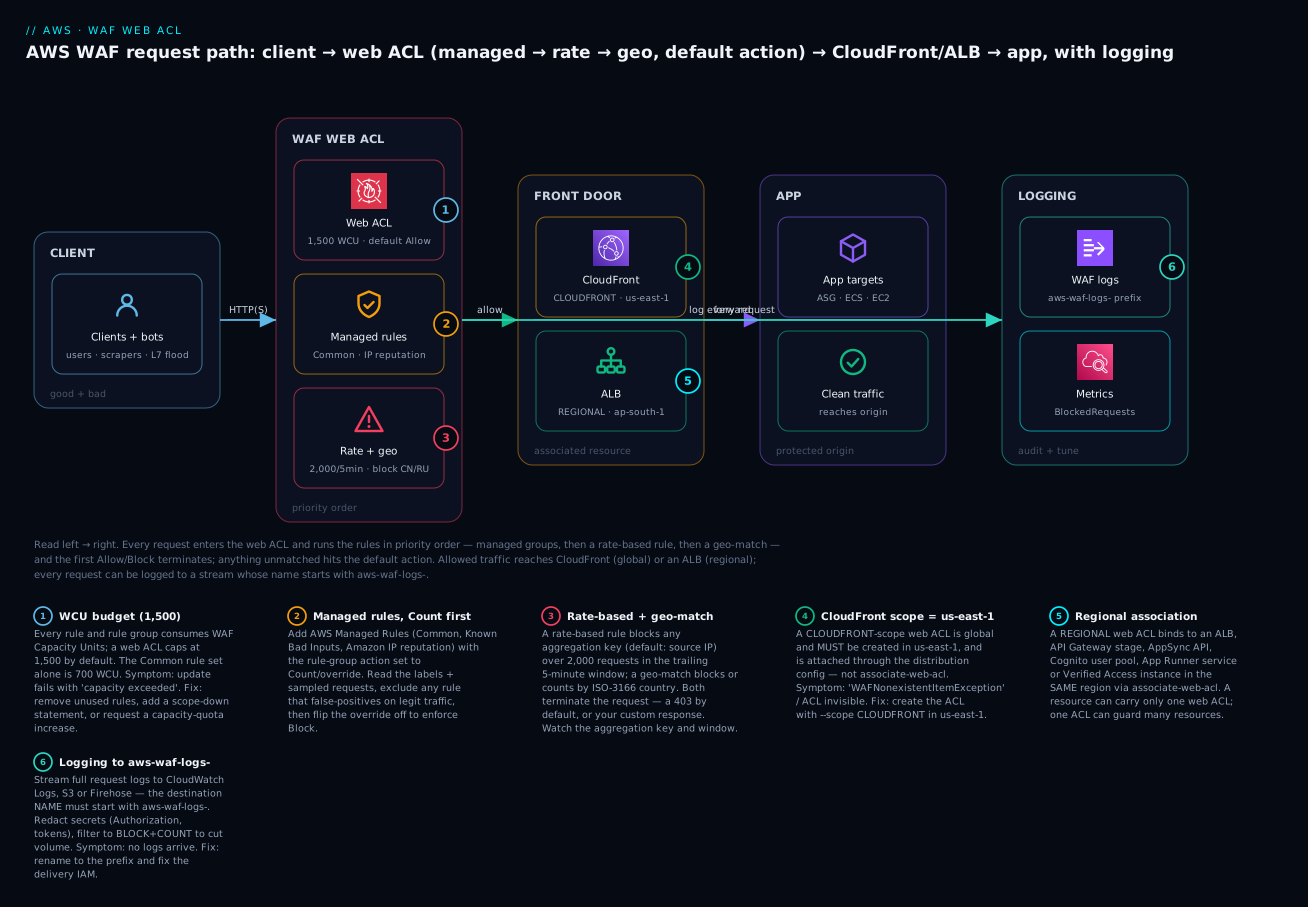
Real-world scenario
Coralline Retail, a mid-size e-commerce company, ran a Node.js storefront behind an ALB in ap-south-1, fronted by CloudFront. Three incidents in one quarter pushed them to WAF, and each taught a lesson about how to deploy it.
The first was a credential-stuffing wave: over a weekend, ~400,000 POST /login attempts arrived from a rotating pool of residential IPs, locking thousands of real accounts and spiking their auth-service bill. Their first instinct — a rate-based rule aggregating on source IP at 100/5-min — barely helped, because the attacker used a different IP for almost every request. The fix was to aggregate the rate rule on a custom key (the submitted username header) with a scope-down of URI=/login AND method=POST, so the limit followed the account being attacked, not the address, plus the ATP managed group pointed at the login endpoint to score known-stolen credentials. Attempts against any single account now died at the limit.
The second was a self-inflicted outage. Eager after the first win, an engineer added the Common rule set straight to Block. Within twenty minutes, checkout broke: a legitimate rule (SizeRestrictions_Body) was blocking their large cart-submission payloads, and CrossSiteScripting_Body false-positived on a product review containing the literal text “<script>” in a code sample. Revenue stopped for 35 minutes. The rollback taught them the discipline they now enforce: every new rule or group ships in Count for at least a full business day, they read the labels in the sampled requests and logs, they exclude the one or two rules that misfire (running just those in Count while the rest enforce), and only then does the group go to Block. They also raised the inspected-body size via AssociationConfig because their carts legitimately exceeded 8 KB.
The third was scope confusion. When they moved WAF from the ALB to the CloudFront edge (to block bad traffic before it ever paid for regional data transfer), they created the new ACL in ap-south-1 with --scope CLOUDFRONT and spent an afternoon on a WAFNonexistentItemException when attaching it to the distribution. The ACL has to be created in us-east-1 for CloudFront; recreating it there, attaching it via the distribution config, and pinning the managed-rule-group versions (with an SNS subscription to test new versions in Count on staging) finished the migration. A year on, their standing rules are pinned on the wall: Count first, aggregate the rate rule on the actor not the IP, and CloudFront WAF lives in us-east-1. Their blended WAF bill runs about $25/month — a web ACL, eight rules, and a few hundred million requests — against the six-figure cost of the weekend they did not have it.
Advantages and disadvantages
| Advantages | Disadvantages |
|---|---|
| Layer-7 filtering that security groups/Shield cannot do | Only inspects what you configure; not a turnkey “secure” button |
| Managed rule groups = a security team’s ruleset for ~$1/mo | Managed rules false-positive; require Count-first tuning |
| Blocks bad traffic before it reaches/scales your app | WCU 1,500 ceiling limits how many rules you can stack |
| Rate-based + geo + IP-set stop floods and abuse at the edge | Rate rules have a minute-scale delay to engage/disengage |
| Count mode makes rollout safe and observable | Scope/region model (CloudFront=us-east-1) trips newcomers |
| Rich logging + always-on sampled requests for tuning | Logging silent-fails without the aws-waf-logs- prefix |
| CAPTCHA/Challenge stop bots without full blocking | CAPTCHA loops if the token cookie isn’t handled (SPAs) |
| Per-request pricing, no infrastructure to run | Intelligent-threat groups (Bot Control/ATP/ACFP) cost real money per request/attempt |
WAF wins whenever the threat is in the HTTP content: injection, bad bots, scraping, credential stuffing, geo-abuse, or an L7 flood. It is not a substitute for input validation in your code, for Shield’s DDoS protection, or for network-layer controls — it is the application-layer member of the team. The discipline it demands (Count-first, budget WCUs, get scope right) is the price of not blocking your own customers.
Hands-on lab
You will build a REGIONAL web ACL on an Application Load Balancer, layer the AWS Common managed rule set + a rate-based rule (2,000 req / 5 min per IP) + a geo-block, deploy it in Count to observe, flip it to Block, enable logging to CloudWatch, test it, and tear it all down. Both aws wafv2 CLI and Terraform are shown.
⚠️ Cost note: AWS WAF is not free-tier — a web ACL is ~$5/month prorated, each rule ~$1/month, and requests ~$0.60/million. Running this lab for an hour costs pennies. The ALB itself bills per hour + LCU. Tear everything down at the end. This lab uses no intelligent-threat groups (Bot Control/ATP/ACFP), which carry per-request fees.
Step 0 — variables and a target ALB
You need an internet-facing ALB to attach the ACL to. If you already have one, export its ARN and skip to Step 1. Otherwise, create a minimal one in a default VPC:
export AWS_REGION=ap-south-1
export ACCT=$(aws sts get-caller-identity --query Account --output text)

# Default VPC + two subnets (ALBs need >=2 AZs)
VPC_ID=$(aws ec2 describe-vpcs --filters Name=isDefault,Values=true \
  --query 'Vpcs[0].VpcId' --output text)
SUBNETS=$(aws ec2 describe-subnets --filters Name=vpc-id,Values=$VPC_ID \
  --query 'Subnets[0:2].SubnetId' --output text)
SG_ID=$(aws ec2 create-security-group --group-name waf-lab-alb-sg \
  --description "waf lab alb" --vpc-id $VPC_ID --query GroupId --output text)
aws ec2 authorize-security-group-ingress --group-id $SG_ID \
  --protocol tcp --port 80 --cidr 0.0.0.0/0

ALB_ARN=$(aws elbv2 create-load-balancer --name waf-lab-alb \
  --subnets $SUBNETS --security-groups $SG_ID --type application \
  --query 'LoadBalancers[0].LoadBalancerArn' --output text)
# A dummy target group + fixed-response listener so the ALB answers 200
TG_ARN=$(aws elbv2 create-target-group --name waf-lab-tg --protocol HTTP \
  --port 80 --vpc-id $VPC_ID --query 'TargetGroups[0].TargetGroupArn' --output text)
aws elbv2 create-listener --load-balancer-arn $ALB_ARN --protocol HTTP --port 80 \
  --default-actions Type=fixed-response,FixedResponseConfig='{StatusCode=200,ContentType=text/plain,MessageBody=ok}'
ALB_DNS=$(aws elbv2 describe-load-balancers --load-balancer-arns $ALB_ARN \
  --query 'LoadBalancers[0].DNSName' --output text)
echo "ALB: $ALB_DNS"
Expected: ALB_DNS prints something like waf-lab-alb-123456789.ap-south-1.elb.amazonaws.com. Give it a minute to become active, then curl http://$ALB_DNS should return ok.
Step 1 — an IP set and a rate/geo rule set (in Count)
Create the web ACL with the Common managed group (overridden to Count), a rate-based rule (Count), and a geo-block (Count) — everything observing, nothing blocking yet. Write the rules to a file:
cat > rules.json <<'EOF'
[
  {
    "Name": "CommonRuleSet",
    "Priority": 10,
    "Statement": {
      "ManagedRuleGroupStatement": {
        "VendorName": "AWS",
        "Name": "AWSManagedRulesCommonRuleSet"
      }
    },
    "OverrideAction": { "Count": {} },
    "VisibilityConfig": {
      "SampledRequestsEnabled": true,
      "CloudWatchMetricsEnabled": true,
      "MetricName": "CommonRuleSet"
    }
  },
  {
    "Name": "RateLimitPerIP",
    "Priority": 20,
    "Statement": {
      "RateBasedStatement": {
        "Limit": 2000,
        "EvaluationWindowSec": 300,
        "AggregateKeyType": "IP"
      }
    },
    "Action": { "Count": {} },
    "VisibilityConfig": {
      "SampledRequestsEnabled": true,
      "CloudWatchMetricsEnabled": true,
      "MetricName": "RateLimitPerIP"
    }
  },
  {
    "Name": "GeoBlock",
    "Priority": 30,
    "Statement": {
      "GeoMatchStatement": { "CountryCodes": ["CN", "RU", "KP"] }
    },
    "Action": { "Count": {} },
    "VisibilityConfig": {
      "SampledRequestsEnabled": true,
      "CloudWatchMetricsEnabled": true,
      "MetricName": "GeoBlock"
    }
  }
]
EOF

ACL_ARN=$(aws wafv2 create-web-acl \
  --name waf-lab-acl --scope REGIONAL --region $AWS_REGION \
  --default-action Allow={} \
  --rules file://rules.json \
  --visibility-config SampledRequestsEnabled=true,CloudWatchMetricsEnabled=true,MetricName=wafLabAcl \
  --query 'Summary.ARN' --output text)
echo "ACL: $ACL_ARN"
Expected: an ARN like arn:aws:wafv2:ap-south-1:123456789012:regional/webacl/waf-lab-acl/abc-123. Note the LockToken in the full response — you need it for updates.
💡 Before creating, you can price the rule set:
aws wafv2 check-capacity --scope REGIONAL --rules file://rules.jsonreturns the total WCU (here ~700 + 2 + 1). If it exceeds 1,500 the create will fail.
Step 2 — associate the ACL with the ALB
aws wafv2 associate-web-acl \
  --web-acl-arn "$ACL_ARN" \
  --resource-arn "$ALB_ARN" \
  --region $AWS_REGION
# verify
aws wafv2 get-web-acl-for-resource --resource-arn "$ALB_ARN" \
  --region $AWS_REGION --query 'WebACL.Name' --output text   # -> waf-lab-acl
For a CloudFront distribution you would instead create the ACL with --scope CLOUDFRONT --region us-east-1 and set the ACL ARN as WebACLId in the distribution config — not associate-web-acl.
Step 3 — enable logging (CloudWatch Logs)
The log group name must start with aws-waf-logs-:
aws logs create-log-group --log-group-name aws-waf-logs-waf-lab --region $AWS_REGION
LOG_ARN="arn:aws:logs:$AWS_REGION:$ACCT:log-group:aws-waf-logs-waf-lab"

aws wafv2 put-logging-configuration --region $AWS_REGION --logging-configuration \
  "ResourceArn=$ACL_ARN,LogDestinationConfigs=[$LOG_ARN],\
RedactedFields=[{SingleHeader={Name=authorization}}],\
LoggingFilter={DefaultBehavior=DROP,Filters=[{Behavior=KEEP,Requirement=MEETS_ANY,Conditions=[{ActionCondition={Action=BLOCK}},{ActionCondition={Action=COUNT}}]}]}"
This logs only BLOCK and COUNT requests (dropping ALLOW noise) and redacts the Authorization header. Expected: the call returns the logging configuration echoed back.
Step 4 — generate traffic and read the Count metrics
# hit the ALB a few times; Common-rule-set / geo would only match on
# matching traffic, but the rate rule counts everything
for i in $(seq 1 50); do curl -s -o /dev/null "http://$ALB_DNS/?q=%27%20OR%201=1--"; done

# read the CountedRequests for the Common rule set over the last 15 min
aws cloudwatch get-metric-statistics --namespace AWS/WAFV2 \
  --metric-name CountedRequests \
  --dimensions Name=WebACL,Value=waf-lab-acl Name=Rule,Value=CommonRuleSet \
    Name=Region,Value=$AWS_REGION \
  --start-time $(date -u -v-15M +%Y-%m-%dT%H:%M:%SZ 2>/dev/null || date -u -d '15 min ago' +%Y-%m-%dT%H:%M:%SZ) \
  --end-time $(date -u +%Y-%m-%dT%H:%M:%SZ) \
  --period 300 --statistics Sum
The ?q=' OR 1=1-- in the URL is a classic SQLi probe — with the Common set in Count, you will see CountedRequests climb (the request is labeled and counted, not blocked). In the console, WAF → your ACL → Rules → CommonRuleSet → Sampled requests shows exactly which sub-rule matched (e.g. SQLi_QUERYARGUMENTS) and the labels. This is the tuning step: confirm only genuine attacks match before you enforce.
Step 5 — flip to Block
Once the Count data looks clean (only real attacks matching), enforce. You must pass the current LockToken. Edit rules.json to change "OverrideAction": { "Count": {} } → "OverrideAction": { "None": {} } for the Common set (so its rules Block as authored), and "Action": { "Count": {} } → "Action": { "Block": {} } for the rate and geo rules, then:
LOCK=$(aws wafv2 get-web-acl --name waf-lab-acl --scope REGIONAL --region $AWS_REGION \
  --id $(echo $ACL_ARN | awk -F/ '{print $NF}') --query 'LockToken' --output text)

aws wafv2 update-web-acl --name waf-lab-acl --scope REGIONAL --region $AWS_REGION \
  --id $(echo $ACL_ARN | awk -F/ '{print $NF}') \
  --default-action Allow={} --rules file://rules.json --lock-token "$LOCK" \
  --visibility-config SampledRequestsEnabled=true,CloudWatchMetricsEnabled=true,MetricName=wafLabAcl
Now re-run the SQLi probe:
curl -s -o /dev/null -w "%{http_code}\n" "http://$ALB_DNS/?q=%27%20OR%201=1--"   # expect 403
curl -s -o /dev/null -w "%{http_code}\n" "http://$ALB_DNS/"                        # expect 200
Expected: the SQLi probe now returns 403 (blocked by the Common set), while a clean request returns 200. You have gone from observe to enforce with evidence, not a guess.
Step 6 — the same thing in Terraform
resource "aws_wafv2_web_acl" "lab" {
  name  = "waf-lab-acl"
  scope = "REGIONAL"                       # us-east-1 + CLOUDFRONT for a distribution
  default_action { allow {} }

  visibility_config {
    cloudwatch_metrics_enabled = true
    metric_name                = "wafLabAcl"
    sampled_requests_enabled   = true
  }

  rule {
    name     = "CommonRuleSet"
    priority = 10
    override_action { none {} }            # {count{}} while tuning
    statement {
      managed_rule_group_statement {
        vendor_name = "AWS"
        name        = "AWSManagedRulesCommonRuleSet"
        # rule_action_override { name = "SizeRestrictions_Body" action_to_use { count {} } }  # exclude a false positive
      }
    }
    visibility_config {
      cloudwatch_metrics_enabled = true
      metric_name                = "CommonRuleSet"
      sampled_requests_enabled   = true
    }
  }

  rule {
    name     = "RateLimitPerIP"
    priority = 20
    action { block {} }                    # {count{}} while tuning
    statement {
      rate_based_statement {
        limit                 = 2000
        evaluation_window_sec = 300
        aggregate_key_type    = "IP"
      }
    }
    visibility_config {
      cloudwatch_metrics_enabled = true
      metric_name                = "RateLimitPerIP"
      sampled_requests_enabled   = true
    }
  }

  rule {
    name     = "GeoBlock"
    priority = 30
    action { block {} }
    statement {
      geo_match_statement { country_codes = ["CN", "RU", "KP"] }
    }
    visibility_config {
      cloudwatch_metrics_enabled = true
      metric_name                = "GeoBlock"
      sampled_requests_enabled   = true
    }
  }
}

resource "aws_wafv2_web_acl_association" "alb" {
  resource_arn = aws_lb.app.arn
  web_acl_arn  = aws_wafv2_web_acl.lab.arn
}

resource "aws_cloudwatch_log_group" "waf" {
  name              = "aws-waf-logs-waf-lab"   # prefix is mandatory
  retention_in_days = 14
}

resource "aws_wafv2_web_acl_logging_configuration" "lab" {
  resource_arn            = aws_wafv2_web_acl.lab.arn
  log_destination_configs = [aws_cloudwatch_log_group.waf.arn]
  redacted_fields { single_header { name = "authorization" } }
  logging_filter {
    default_behavior = "DROP"
    filter {
      behavior    = "KEEP"
      requirement = "MEETS_ANY"
      condition { action_condition { action = "BLOCK" } }
      condition { action_condition { action = "COUNT" } }
    }
  }
}
Step 7 — teardown (deletes everything)
# disassociate first, then delete the ACL (needs the current lock token)
aws wafv2 disassociate-web-acl --resource-arn "$ALB_ARN" --region $AWS_REGION
aws wafv2 delete-logging-configuration --resource-arn "$ACL_ARN" --region $AWS_REGION
LOCK=$(aws wafv2 get-web-acl --name waf-lab-acl --scope REGIONAL --region $AWS_REGION \
  --id $(echo $ACL_ARN | awk -F/ '{print $NF}') --query 'LockToken' --output text)
aws wafv2 delete-web-acl --name waf-lab-acl --scope REGIONAL --region $AWS_REGION \
  --id $(echo $ACL_ARN | awk -F/ '{print $NF}') --lock-token "$LOCK"
aws logs delete-log-group --log-group-name aws-waf-logs-waf-lab --region $AWS_REGION
# the ALB scaffold
aws elbv2 delete-load-balancer --load-balancer-arn "$ALB_ARN"
sleep 30
aws elbv2 delete-target-group --target-group-arn "$TG_ARN"
aws ec2 delete-security-group --group-id "$SG_ID"
⚠️ You must disassociate before deleting the ACL — a delete fails with WAFAssociatedItemException while any resource is still attached.
Common mistakes & troubleshooting
This is the section you reread when legitimate customers are being blocked. Read the symptom, confirm with the exact command or console path, then apply the fix.
The playbook
| # | Symptom | Root cause | Confirm (exact command / console path) | Fix |
|---|---|---|---|---|
| 1 | Legit traffic gets 403 right after enabling a managed group | A managed-group rule false-positives on your real payload | WAF → ACL → Sampled requests shows the request matching e.g. SizeRestrictions_Body; log terminatingRuleId = the group |
Set that group to Count, identify the sub-rule, add a rule-action override to Count just that rule (rule_action_override), keep the rest at Block |
| 2 | Rate rule never triggers under an obvious flood | Aggregation key/window wrong, or limit too high, or scope-down excludes the traffic | get-web-acl → check RateBasedStatement Limit/EvaluationWindowSec/AggregateKeyType; watch CountedRequests on the rule |
Lower limit; aggregate on the right key (attacker rotates IPs → use a header/cookie); remove/fix scope-down; expect a 1–2 min engage delay |
| 3 | Rate rule blocks too much / real users | Aggregation on a shared IP (corporate NAT, mobile carrier) or a CDN’s IP | Sampled requests show many users at one IP; the key IP is a proxy | Aggregate on a per-user key; set ForwardedIPConfig to read X-Forwarded-For so you rate the real client, not the proxy |
| 4 | WAFLimitsExceededException / “capacity exceeded” on create/update |
Sum of rule WCUs > 1,500 | aws wafv2 check-capacity --scope … --rules file://rules.json |
Remove unused rules; add a scope-down; drop a managed group; or request a capacity quota increase |
| 5 | WAFNonexistentItemException attaching a CloudFront ACL |
ACL created in the wrong region for CLOUDFRONT scope |
The ACL isn’t listed under Global (CloudFront) in the console | Recreate the ACL in us-east-1 with --scope CLOUDFRONT; attach via the distribution config |
| 6 | associate-web-acl fails |
Wrong scope for the resource, or resource in another region, or HTTP API (not supported) | get-web-acl-for-resource; compare ACL scope/region to the resource |
Use a REGIONAL ACL in the same region; for an HTTP API front it with CloudFront instead |
| 7 | No logs arriving | Destination name doesn’t start with aws-waf-logs-, or delivery IAM missing |
get-logging-configuration; check the log-group/bucket/stream name prefix |
Rename the destination to start with aws-waf-logs-; fix the resource policy / Firehose role |
| 8 | CAPTCHA loop — user solves it, gets challenged again | The aws-waf-token cookie isn’t stored/sent (SPA, cross-domain, blocked cookies) or immunity too short |
Browser devtools: no aws-waf-token cookie set/sent; short immunity time |
Integrate the CAPTCHA/Challenge JS SDK/API; set TokenDomains for subdomains; raise the immunity time; ensure third-party cookies aren’t blocked |
| 8b | 403 on everything after go-live |
Web ACL default action = Block with no Allow rule matching normal traffic | get-web-acl → DefaultAction is Block{} |
Switch default to Allow (deny-list posture), or add the Allow rules your allow-list needs |
| 9 | A Block rule seems ignored | A lower-priority rule already terminated (Allow) the request | get-web-acl priorities; the log terminatingRuleId is a different, earlier rule |
Reorder: put the Block at a lower priority than the shadowing Allow, or narrow the Allow |
| 10 | Label-match rule never matches | The labeling rule runs at a higher priority number than the label-match (label doesn’t exist yet) | Compare the two rules’ Priority; labels only exist for higher-numbered rules |
Give the labeling rule a lower priority number than the label-match rule |
| 11 | Managed group behaves differently overnight | You’re on the default (unversioned) channel and AWS rolled a new version | ACL shows the group with no pinned version; AWS version-release notification | Pin a version, subscribe to the group’s SNS topic, test new versions in Count on staging |
| 12 | Pinned managed version suddenly errors | The static version you pinned was retired | Update fails referencing the old version | Advance the pin to a current version (test in Count first); never let a pin reach its retirement date |
| 13 | Body-based rule misses a large payload | Only the first 8 KB of the body is inspected by default | Rule matches small payloads, misses big ones | Raise the inspected size via AssociationConfig (up to 16 KB regional / 64 KB CloudFront) — costs extra WCU |
| 14 | SQLi/XSS rule bypassed by encoding | Missing text transformations on the match | The payload is URL-/HTML-encoded in sampled requests | Add URL_DECODE + HTML_ENTITY_DECODE + LOWERCASE transforms to the statement |
| 15 | WAFAssociatedItemException deleting an ACL |
The ACL is still associated to a resource | list-resources-for-web-acl |
Disassociate (or remove WebACLId from the distribution) first, then delete |
| 16 | Geo-block blocks the wrong users / misses VPN traffic | Geo reads the proxy IP, or attackers use VPNs/hosting IPs | Sampled requests show the geo label from a proxy IP | Set ForwardedIPConfig; add the Anonymous IP list managed group to catch VPN/Tor/hosting |
Behavior / response reference
| Situation | What the client sees | Where to look |
|---|---|---|
| Block (default) | 403 Forbidden | Log action=BLOCK, terminatingRuleId |
| Block with custom response | Your status code (e.g. 429/503) + body | Log responseCodeSent |
| Rate limit hit | 403 (or your custom response) while over limit | rateBasedRuleList, the offending key |
| CAPTCHA served | CAPTCHA interstitial + aws-waf-token on success |
action=CAPTCHA; browser cookie |
| Challenge served | Silent JS challenge, then proceeds | action=CHALLENGE |
| Count match | Nothing — request continues | action=COUNT, labels, metrics |
| Default action (no match) | Allow → app; Block → 403 | terminatingRuleId=Default_Action |
Decision table — from a symptom to a cause
| If you see… | It’s probably… | Do this |
|---|---|---|
| 403 on a specific feature after adding a group | A managed sub-rule false positive | Count the group, override the one rule to Count |
| 403 on everything at go-live | Default action = Block | Set default to Allow |
| A flood not being throttled | Rate key = IP but attacker rotates IPs | Aggregate on a header/cookie key |
| Real users throttled together | Rate key aggregating a shared/proxy IP | Use ForwardedIPConfig / per-user key |
| Update rejected on save | WCU over 1,500 | check-capacity, trim rules, scope-down |
| CloudFront ACL invisible | Created outside us-east-1 | Recreate in us-east-1, CLOUDFRONT scope |
| No log records | Destination name lacks aws-waf-logs- |
Rename the destination |
| CAPTCHA keeps re-appearing | Token cookie not persisted | JS SDK + TokenDomains + immunity time |
The three nastiest, in prose
The straight-to-Block false positive. The most damaging WAF mistake is deploying a managed group directly to Block. The Common rule set is broad by design; SizeRestrictions_Body, GenericLFI_QueryArguments, and the XSS/SQLi body rules routinely match legitimate large uploads, file paths in parameters, or user content that happens to contain <script> or SQL keywords. Deployed to Block, they take out checkout, file upload, or a rich-text editor within minutes. The cure is procedural, not technical: always Count first, read the sampled requests and labels for a full business day of real traffic, then either exclude the offending sub-rule (run just it in Count via a rule-action override) or add a scope-down so the group never sees the traffic that trips it. A managed group is a starting point you tune, not a switch you flip.
The rate rule that guards the wrong thing. A rate-based rule aggregating on source IP is useless against a distributed attack (rotating residential IPs) and harmful against traffic behind a shared IP (a corporate NAT, a mobile carrier, or your own CDN — where thousands of users share a handful of addresses, so one limit throttles them all). The two failure modes are mirror images of the same mistake: the aggregation key doesn’t map to the actor. Fix the distributed case by aggregating on something the attacker can’t cheaply rotate (a submitted username, a session cookie, or a custom key combination) with a tight scope-down on the sensitive endpoint. Fix the shared-IP case by setting ForwardedIPConfig to read the true client IP from X-Forwarded-For, or by aggregating on a per-user key. And remember the rate rule has a minute-scale engage/disengage delay — it is a throttle, not an instantaneous gate.
The scope/region trap. WAF’s scope model quietly couples two ideas — what the ACL guards and where the ACL object lives. A CLOUDFRONT ACL is global but must be created in us-east-1, and is attached through the distribution config, not associate-web-acl. Create it in your working region and it simply does not exist for CloudFront (WAFNonexistentItemException), and it won’t appear in the console unless you switch the console to Global (CloudFront). A REGIONAL ACL must live in the same region as the ALB/API-Gateway/AppSync/Cognito/App-Runner resource it guards, and cannot guard an HTTP API at all (front those with CloudFront). Decide scope first, create in the right place, and the association just works.
Best practices
- Count first, always. Ship every new rule or managed group in Count for at least a full business day of real traffic; read the sampled requests and labels; only then flip to Block.
- Budget WCUs before you build. Run
check-capacityon the rule set; know that the Common set is ~700 of your 1,500; plan managed groups + custom rules to fit, and use scope-down to trim. - Order rules deliberately. Allow-lists (health checks, trusted IPs) at the lowest priorities; hard blocks next; managed groups after; label-match rules after the rule that emits the label.
- Aggregate rate rules on the actor, not the address. Use a header/cookie/custom key + a scope-down for brute-force endpoints; use ForwardedIPConfig behind a proxy/CDN.
- Tune managed groups with labels, not by disabling them. Override the one noisy sub-rule to Count; keep the rest enforcing.
- Pin managed-rule-group versions in production, subscribe to their SNS topic, and test each new version in Count on staging before advancing the pin.
- Get scope right on day one. CloudFront ACLs live in us-east-1 and attach via the distribution; regional ACLs live with their resource.
- Turn on logging with the
aws-waf-logs-prefix, redact secrets/PII, and filter toBLOCK+COUNTto control volume and cost. - Layer defence. WAF for L7 content, Shield for DDoS, security groups/NACLs for reachability — together, not instead of each other.
- Add Amazon IP reputation + Anonymous IP cheaply (25 + 50 WCU) as a baseline on any public ACL.
- Alarm on
BlockedRequestsandCountedRequestsso a spike (attack) or a sudden rise in blocks (false positive) pages you. - Use a custom Block response (e.g. 429 for rate blocks) so your front-end and your ops can distinguish WAF from app errors.
Security notes
- Least privilege on WAF management.
wafv2:*is powerful — scope IAM to the specific ACLs/actions a role needs; separate who can view (get/list, sampled requests) from who can change rules and the default action. - Redact secrets in logs. Always redact
authorization, session cookies, and any credential-bearing field in the logging configuration so tokens don’t land in CloudWatch/S3. - Protect the log store. Encrypt the S3 bucket / log group (KMS), restrict who can read WAF logs (they contain client IPs and request detail), and set retention deliberately.
- Don’t rely on WAF alone for auth. WAF filters traffic; it is not authentication or authorization. Keep input validation in your app and real authz at the API/identity layer.
- Use WAF to enforce edge auth cheaply. A
NOT(has valid token)or IP/geo allow-list at the edge stops unauthenticated abuse before it reaches your compute — but it complements, not replaces, application authz. - Version-pin to avoid surprise behavior changes that could open or over-close protection without review.
- Combine with Shield Advanced for high-value targets — it includes WAF at no extra WAF charge on protected resources and adds automatic L7 DDoS mitigation and a response team.
- Audit control-plane changes with CloudTrail — a quietly-added Allow rule or a default-action flip is a security event worth alerting on.
Cost & sizing
WAF pricing has three standing components plus usage and optional intelligent-threat fees. Prices are indicative (us-east-1, USD); check the current pricing page.
| Driver | Price (indicative) | Notes |
|---|---|---|
| Web ACL | ~$5.00 / month | Per ACL, prorated hourly |
| Rule | ~$1.00 / month each | A managed rule group counts as one rule |
| Requests | ~$0.60 / million | Requests evaluated by the ACL |
| Bot Control | +$10 / month + ~$1 / million requests inspected | Scope-down to cut the per-request cost |
| ATP (Fraud Control) | +$10 / month + ~$1 / 1,000 login attempts | Only your login endpoint |
| ACFP (Fraud Control) | +$10 / month + ~$1 / 1,000 account-creation attempts | Only your sign-up endpoint |
| CAPTCHA | ~$0.40 / 1,000 challenge attempts | Challenge action has no per-attempt fee |
| Logging | CloudWatch/S3/Firehose ingestion + storage | Filter to BLOCK+COUNT to cut volume |
| Example ACL | Components | Rough monthly cost |
|---|---|---|
| Small site, 10 M req | 1 ACL + 4 rules + 10 M req | ~$5 + $4 + $6 = ~$15 |
| Busy app, 300 M req | 1 ACL + 8 rules + 300 M req | ~$5 + $8 + $180 = ~$193 |
+ Bot Control on /api (50 M req) |
above + Bot Control | +$10 + ~$50 = ~$253 |
| Rough INR (₹86/$) | Small (~$15) | Busy (~$193) |
|---|---|---|
| Per month | ~₹1,290 | ~₹16,600 |
There is no free tier for WAF. Right-sizing rules: put WAF on CloudFront rather than the ALB when you can, so you block bad traffic before paying for regional data transfer and compute; scope-down the expensive intelligent-threat groups to only the paths that need them; filter logs to BLOCK+COUNT; and delete unused rules — every rule is a dollar a month whether or not it ever matches. The requests line dominates at scale, so blocking abusive traffic at the edge pays for itself twice: once on WAF requests, once on everything downstream it never reaches.
Interview & exam questions
1. What is a web ACL, and what is its default action? A web ACL is the AWS WAF v2 object you attach to a resource; it holds an ordered list of rules evaluated in priority order, and a default action (Allow or Block) that decides the fate of any request no rule terminated. Default-Allow is a deny-list posture (block the bad); default-Block is an allow-list posture. (SAA-C03, SCS-C02)
2. How does rule priority interact with actions? Rules run in ascending priority number; the first rule whose action is Allow or Block terminates evaluation. Count actions never terminate — they add labels and metrics and let the request continue — which is why a broad low-priority Block can shadow a higher-priority Allow, and why you place allow-lists first. (SCS-C02)
3. What are WCUs and why do they matter? WAF Capacity Units measure the complexity/cost of your rules; a web ACL has a default ceiling of 1,500 WCUs. An update whose rules exceed the budget is rejected. The Common managed rule set alone is ~700 WCUs, so you plan managed groups + custom rules to fit and use scope-down to trim. (SCS-C02, ANS-C01)
4. Why deploy a managed rule group in Count before Block? Count does not terminate — it labels and counts what would have been blocked, with zero customer impact — so you can read the sampled requests and logs, find false positives, exclude the offending sub-rule, and only then enforce. Deploying straight to Block routinely breaks legitimate features. (SCS-C02)
5. Your ALB is being flooded from thousands of rotating IPs and an IP-aggregated rate rule isn’t helping. What do you change? Change the rate rule’s aggregation key from source IP to something the attacker can’t cheaply rotate — a submitted username header, a session cookie, or a custom-key combination — with a scope-down on the targeted endpoint (e.g. POST /login). Consider the ATP managed group for credential stuffing. (SCS-C02)
6. Where must a CloudFront-scope web ACL be created, and how is it attached? In us-east-1 with --scope CLOUDFRONT, and it’s attached via the distribution configuration (WebACLId), not associate-web-acl. Create it elsewhere and CloudFront cannot see it (WAFNonexistentItemException). (SAA-C03, ANS-C01)
7. Which resources can a REGIONAL web ACL protect? An Application Load Balancer, an API Gateway (REST) stage, an AppSync GraphQL API, a Cognito user pool, an App Runner service, and a Verified Access instance — all in the same region as the ACL. HTTP APIs cannot be WAF’d directly; front them with CloudFront. (SAA-C03, SCS-C02)
8. How do labels enable safe managed-rule tuning? A managed group adds a label per matched sub-rule even in Count mode; a later (higher-priority-number) label-match rule can then Block only the labels you trust and ignore the one that false-positives — tuning without disabling the whole group. (SCS-C02)
9. What’s the difference between CAPTCHA and Challenge actions? CAPTCHA shows a visible puzzle a human solves; Challenge runs a silent JavaScript/browser check with no user friction. Both issue an aws-waf-token cookie granting an immunity period. CAPTCHA carries a per-attempt fee and annoys users; Challenge is invisible and cheaper. (SCS-C02)
10. How does WAF differ from a security group and from Shield? Security groups filter at L3/L4 by IP/port (they can’t read HTTP); Shield defends against DDoS (Standard L3/L4 free; Advanced adds L7 + a response team + cost protection); WAF inspects L7 application content — SQLi, XSS, bots, geo, rate. They are complementary layers. (SAA-C03, SCS-C02)
11. Why are my WAF logs not appearing? The destination name almost certainly doesn’t start with aws-waf-logs- (mandatory for CloudWatch Logs groups, S3 buckets, and Firehose streams), or the delivery IAM/resource policy is missing. Rename the destination and fix permissions. (SCS-C02)
12. How do you keep a managed rule group’s behavior stable? Pin a specific version rather than using the default channel, subscribe to the group’s SNS topic for new-version notifications, and test each new version in Count on a staging ACL before advancing the pin — and never let a pinned version reach its retirement date, or updates fail. (SCS-C02)
Quick check
- In what order are web ACL rules evaluated, and which action(s) terminate evaluation?
- What is the default WCU ceiling for a web ACL, and roughly how many does the Common rule set consume?
- What must you do before switching a managed rule group from Count to Block?
- Where must a
CLOUDFRONT-scope web ACL be created, and how is it attached to the distribution? - What prefix must a WAF log destination’s name start with?
Answers
- In ascending priority number; the first rule with an Allow or Block action terminates. Count never terminates (it labels + counts and continues). 2. 1,500 WCUs default; the Common rule set is ~700. 3. Deploy it in Count, read the sampled requests/labels/logs on real traffic, and exclude/override any sub-rule that false-positives (and/or add a scope-down). 4. In us-east-1 with
--scope CLOUDFRONT, attached via the distribution config (WebACLId), notassociate-web-acl. 5.aws-waf-logs-.
Glossary
| Term | Definition |
|---|---|
| Web ACL | AWS WAF v2 object: an ordered rule list + default action, attached to a resource |
| Rule | One statement + one action at a priority within a web ACL or rule group |
| Statement | The match condition (IP set, geo, rate, byte/regex, SQLi/XSS, label, AND/OR/NOT) |
| Action | Allow / Block / Count / CAPTCHA / Challenge (or an override for a rule group) |
| Default action | Allow or Block applied to requests no rule terminated |
| Priority | Ascending integer evaluation order; first terminating action wins |
| WCU | WAF Capacity Unit — a rule’s complexity cost; capped at 1,500 per ACL by default |
| Rule group | A reusable named bundle of rules (AWS-managed, marketplace, or your own) |
| AWS Managed Rules | AWS-authored rule groups (Common, Known Bad Inputs, SQLi, IP reputation, Bot Control, ATP, ACFP…) |
| Scope | CLOUDFRONT (global, us-east-1) or REGIONAL (ALB/API GW/AppSync/Cognito/App Runner/Verified Access) |
| Association | Binding a web ACL to a resource; one ACL per resource |
| Rate-based rule | Blocks an aggregation key over a request limit within a trailing window |
| Geo-match | Matches on the ISO-3166 country of the (optionally forwarded) client IP |
| Scope-down statement | A statement narrowing what a managed group or rate rule inspects |
| Label | A transient tag added during evaluation, matchable by later rules |
| Count | An action that labels + counts a match without terminating — for tuning |
| CAPTCHA / Challenge | Interstitials that verify human/browser and issue an aws-waf-token |
| Version pinning | Locking a managed rule group to a specific, tested version |
| Sampled requests | An always-on rolling sample of recent matched requests, per rule |
Next steps
- Attach a
CLOUDFRONT-scope ACL at the edge in Amazon CloudFront Hands-On: CDN Setup, Caching and Origins. - Protect the regional resource this lab used in AWS Elastic Load Balancing Hands-On: Application Load Balancers and Target Groups.
- Put a
REGIONALACL on an API in Amazon API Gateway Hands-On: REST vs HTTP APIs, Authorizers and Throttling. - Aggregate the findings WAF and its peers generate into a single posture view with the companion article on AWS Security Hub findings and compliance (GuardDuty, Config and WAF logs triaged together).