Your AKS cluster is humming along on three Standard_D4s_v3 nodes. A batch job lands that needs 200 GB of memory in fifteen pods, and suddenly half of them sit in Pending while Kubernetes shrugs. Nothing is wrong with your cluster — there is simply nowhere to put the pods, and something has to notice the gap and conjure more compute. On Azure Kubernetes Service (AKS) that “something” is one of two distinct mechanisms, and the one you chose months ago (often by accident, by clicking a checkbox at cluster-create time) decides how fast those pods get scheduled, how much you overpay for idle capacity, and how much node-pool plumbing you maintain by hand.
The two mechanisms are the Cluster Autoscaler (CA) — the long-standing, battle-tested component that scales a predefined node pool between a --min-count and --max-count you set — and Node Auto-Provisioning (NAP), AKS’s managed implementation of the open-source Karpenter project, which throws away the idea of fixed node pools and instead provisions a right-sized VM for whatever pods are pending, choosing the SKU itself from your constraints. They solve the same headline problem — “pods are pending, add nodes” — but their mental models are opposites. CA picks from VM boxes you pre-shaped; NAP shapes the box to fit the pods. Confuse the two and you will either fight CA’s per-pool rigidity or get surprised by NAP provisioning a VM family you never expected.
This article is the decision guide. You will build a crisp mental model of each scaler, see exactly how each decides to add and remove a node (the signals, the timers, the defaults), learn the real az flags and Karpenter CRDs you actually type, and walk a left-to-right architecture that shows where each one sits in the cluster. Then a set of comparison grids and a decision table tell you which to reach for — by workload shape, by team maturity, by cost target — followed by a hands-on lab, the failure modes that bite in production, and the security, cost and exam angles. By the end you will never again pick a node scaler by guessing.
What problem this solves
Kubernetes schedules pods onto nodes, but it does not create nodes. The scheduler is a Tetris engine that places blocks into a board it did not build. If the board is full, pods sit in Pending forever and your service degrades — not because anything crashed, but because nobody added capacity. Conversely, when the batch job finishes and those pods drain away, the extra nodes sit there empty, burning money by the hour, because nobody removed them either. Node-level autoscaling is the missing half of elasticity: turning “I have pending pods” into “I have new nodes” and “these nodes are empty” into “these nodes are gone”, automatically, in seconds-to-minutes.
What breaks without it is a tax paid at both ends. Without scale-up, every traffic spike, every CI surge, every Spark job either fails to schedule or forces an engineer to manually az aks scale at 2 a.m. Without scale-down, you provision for peak and pay for peak twenty-four hours a day — a cluster sized for the Monday-morning login storm sits 70% idle every night and every weekend. The teams that get this wrong are not the ones who forgot to enable a scaler; they are the ones who enabled the wrong scaler for their workload, then either over-provisioned “to be safe” or watched pods pend during the exact spike the scaler was supposed to absorb.
Who hits this: anyone running variable load on AKS. Bursty CI/CD and batch (where pod shape changes constantly and CA’s fixed pools waste money), data and ML workloads (where one job wants 8 vCPU and the next wants a GPU), cost-sensitive platforms chasing Spot savings, and large multi-team clusters where hand-maintaining a node pool per workload profile becomes a full-time job. The fix is rarely “scale harder” — it is “choose the scaler whose model matches how your pods actually change”, and then tune its handful of timers so it reacts at the speed your SLO needs without thrashing.
To frame the whole decision before the deep dive, here is the field in one table — the two scalers, what each one fundamentally is, and the one sentence that tells you when it fits:
| Scaler | What it fundamentally is | Unit it adds/removes | You pre-decide… | NAP/Karpenter decides… | Reach for it when… |
|---|---|---|---|---|---|
| Cluster Autoscaler (CA) | Watches pending pods, resizes a fixed node pool’s VM Scale Set between min and max | A node of the pool’s single VM SKU | The VM size, zones, min, max — per pool | Nothing (you own the shape) | Stable, well-understood workloads on a few VM sizes; you want predictability and proven behaviour |
| Node Auto-Provisioning (NAP / Karpenter) | Watches pending pods, provisions a right-sized VM from your constraints | A node of whatever SKU best fits | The constraints (families, capacity type, limits) | The exact VM SKU, size and zone, on demand | Heterogeneous, bursty, cost-driven workloads; you want bin-packing and Spot without hand-built pools |
Learning objectives
By the end of this article you can:
- Explain, in one sentence each, how the Cluster Autoscaler and Node Auto-Provisioning decide to add a node and to remove a node — the signal, the timer, and the unit.
- Enable and tune CA with the right
az aksflags (--enable-cluster-autoscaler,--min-count,--max-count) and the cluster-wide autoscaler profile, knowing the real default values and what each one trades off. - Enable NAP (
--node-provisioning-mode Auto), read and write the core Karpenter CRDs (NodePool,AKSNodeClass,NodeClaim), and constrain it with well-known labels andspec.limits. - Choose between on-demand and Spot capacity in both models, and understand why NAP’s
karpenter.sh/capacity-typeselector makes mixed-capacity bin-packing far simpler than CA priority expanders. - Pick the correct scaler for a given workload using a decision table keyed on workload shape, cost target, networking model and team maturity.
- Diagnose the common failure modes of each — pods stuck
Pending, nodes that won’t scale down, NAP networking prerequisites, drift, and Spot-eviction churn — with the exact command or config to confirm and fix. - State the hard constraints that rule one option in or out (NAP’s no-Windows / no-service-principal / no-stop limits; CA’s uniform-VM-per-pool rule) before you commit.
Prerequisites & where this fits
You should already understand the AKS basics: a cluster has a managed control plane and one or more node pools, each backed by a Virtual Machine Scale Set (VMSS) of identical VMs; pods carry resource requests that the scheduler uses to place them; and you can drive az aks and kubectl from Cloud Shell. Familiarity with taints, tolerations and node selectors helps, because both scalers respect them when deciding whether a pending pod can fit a (real or hypothetical) node. If node pools themselves are still fuzzy, read AKS Node Pools Demystified: System vs User vs Spot, Taints, Labels, and When to Split Workloads first — this article assumes that foundation and builds the automation on top of it.
This sits in the Compute / Kubernetes operations track. It is downstream of the cluster-architecture fundamentals in AKS Architecture Explained: Managed Control Plane, Node Pools, and the Azure Integrations That Make It Tick, and it assumes you have a cluster running — if not, stand one up with Your First AKS Cluster: A Side-by-Side Walkthrough with az CLI, the Portal, and Bicep. It pairs with the networking decision in AKS Networking Models Explained: Kubenet vs Azure CNI vs CNI Overlay and Their IP Trade-offs, because NAP imposes real networking prerequisites, and with the Spot fundamentals in Azure Spot Virtual Machines Explained: How Eviction, Capacity and Pricing Save You up to 90%, because both scalers can ride Spot.
Three layers of autoscaling exist in Kubernetes, and node scaling is only one of them. Keep them straight or you will tune the wrong knob:
| Layer | What it scales | Trigger | The component | Relationship to node scaling |
|---|---|---|---|---|
| Horizontal Pod Autoscaler (HPA) | Number of pod replicas | CPU/memory/custom metrics via Metrics Server | HorizontalPodAutoscaler |
Creates more pods → may create pending pods → triggers node scaling |
| Vertical Pod Autoscaler (VPA) | CPU/memory requests on a pod | Historical usage | VerticalPodAutoscaler |
Right-sizes requests so node scaling packs more accurately |
| Node scaling (this article) | Number/size of nodes | Pending pods (and idle nodes) | Cluster Autoscaler or NAP | The bottom layer — turns pending pods into capacity |
The mental shorthand: HPA and VPA shape the pods; CA and NAP shape the nodes. You almost always run HPA (or VPA) and a node scaler together — the pod autoscaler makes the pending pods, the node scaler makes the room.
Core concepts
Five mental models make every later comparison obvious.
Both scalers are driven by pending pods, not by node CPU. This is the single most misunderstood point. Neither CA nor NAP looks at “node CPU is at 80%, add a node.” They look at the scheduler’s output: are there pods that cannot be placed on any existing node? If yes, add capacity sized to make them schedulable. If a node’s CPU is pinned at 95% but every pod is still running, neither scaler adds a node — that is the Horizontal Pod Autoscaler’s job (make more pods), and those new pods, if they don’t fit, are what wake the node scaler. Internalise this and the “why didn’t it scale?” mysteries mostly dissolve: it didn’t scale because nothing was actually pending.
Cluster Autoscaler resizes pools; it never invents a VM size. CA is bound to node pools you defined. Each pool is a VMSS of one uniform VM SKU, with a --min-count and --max-count. When pods pend, CA runs a scheduling simulation against each autoscaling-enabled pool: “if I added one node of this pool’s SKU, would the pending pods fit?” If yes, it bumps that pool’s VMSS by one (or more). It cannot decide that the pod really wanted an E-series memory VM if you only gave it D-series pools — it can only add more of what you pre-shaped. Scale-down is the mirror: it finds nodes that have been underutilised past a timer and evicts/removes them, respecting pod disruption budgets and “do not evict” annotations.
Node Auto-Provisioning shapes the VM to the pods. NAP is AKS’s managed Karpenter. Instead of fixed pools, you give it constraints — “use the D and F families, AMD64, Spot-then-on-demand, up to 1000 vCPU total” — expressed as a Karpenter NodePool plus an AKSNodeClass (the Azure-specific node template: image family, OS disk, subnet). When pods pend, NAP looks at their combined resource requests and picks the cheapest VM SKU that satisfies them, creates a NodeClaim (its record of a node it’s bringing up), and provisions that VM directly — bypassing the slower ARM node-pool path. It then consolidates: it actively repacks pods onto fewer/cheaper nodes and deletes the leftovers, including replacing a node with a smaller or Spot variant when that’s cheaper.
A node pool is “uniform” in CA but a fluid set in NAP. Under CA, every node in a pool is the same SKU, same labels, same taints — by design, because the simulation assumes uniformity (Azure even warns you never to hand-edit individual nodes in an autoscaled pool). Under NAP, a single NodePool constraint can yield a mix of SKUs over time as workloads change, all managed as NodeClaims. That fluidity is NAP’s superpower for heterogeneous workloads and its surprise for teams expecting a stable fleet.
Consolidation and disruption are first-class in NAP, bolted-on in CA. CA’s scale-down is utilitarian: a node is “unneeded” if its pods fit elsewhere and it’s been underutilised long enough, then it goes. NAP’s disruption model is richer — it distinguishes consolidation (repack for cost), expiration (expireAfter max node age), and drift (the node no longer matches its template), and it rate-limits all of this with disruption budgets (e.g. “never disrupt more than 20% at once”, “block disruption 9 a.m.–5 p.m.”). This is why NAP can chase cost aggressively without taking your app down — the budgets are the guardrail.
The vocabulary in one table
Before the deep sections, pin down every moving part. The glossary repeats these for lookup; this table is the mental model side by side:
| Concept | One-line definition | Belongs to | Why it matters |
|---|---|---|---|
| Cluster Autoscaler (CA) | Resizes a fixed node pool between min/max on pending pods | Both (component) | The default, predictable scaler |
| Node Auto-Provisioning (NAP) | Managed Karpenter; provisions right-sized VMs from constraints | AKS feature | The flexible, cost-optimising scaler |
| Karpenter | Open-source node-provisioning controller NAP is built on | Upstream project | NAP’s engine; same CRDs |
NodePool (Karpenter CRD) |
Constraints + disruption rules for NAP-provisioned nodes | NAP | Where you set families, capacity type, limits |
AKSNodeClass (CRD) |
Azure node template: image, OS disk, subnet | NAP | The “how” of the VM NAP builds |
NodeClaim (CRD) |
NAP’s record of a node it is bringing up/managing | NAP | What you watch to see NAP working |
| Autoscaler profile | Cluster-wide CA timers/thresholds | CA | Tunes how fast/aggressive CA is |
--min-count / --max-count |
Per-pool node-count bounds for CA | CA | The hard floor/ceiling per pool |
spec.limits |
Total cpu/memory ceiling for a NAP NodePool |
NAP | NAP’s equivalent of max-count |
| Consolidation | NAP repacking pods onto fewer/cheaper nodes | NAP | The mechanism behind NAP’s savings |
| Disruption budget | Rate limit on NAP’s voluntary node removals | NAP | Keeps consolidation from causing outages |
capacity-type |
spot vs on-demand selector | Both (NAP label / CA pool) | How each model does Spot |
How the Cluster Autoscaler decides
CA is a control loop. Every scan-interval (default 10 seconds) it asks two questions: do I need to scale up? and can I scale down? Understanding the answers — and the timers that gate them — is most of operating CA well.
Scale-up: pending pods drive it
When the Kubernetes scheduler marks a pod unschedulable (no node has room, or none satisfies its selectors/taints/affinity), CA runs a simulation per autoscaling-enabled pool: would adding N nodes of this pool’s SKU make these pods schedulable? If yes for some pool, it raises that pool’s VMSS capacity, Azure provisions the VM, the kubelet joins, and the scheduler places the pod. The whole path is typically a few minutes dominated by VM provisioning and node-image boot — max-node-provision-time (default 15 minutes) is the patience limit before CA gives up on a node and tries elsewhere.
Two subtleties trip people up. First, CA scales up based on requests, not actual usage — a pod requesting 4 vCPU it never uses still forces a node. Second, when multiple pools could satisfy the pods, an expander breaks the tie. The default expander is random; the ones you’ll actually want are least-waste (pick the pool that leaves the least idle capacity — best for bin-packing) and priority (pick by a priority list — the canonical way to prefer Spot pools, fall back to on-demand under CA).
# Enable CA on a new pool with explicit bounds
az aks create \
  --resource-group rg-aks-prod --name aks-prod \
  --node-count 2 --enable-cluster-autoscaler --min-count 2 --max-count 10 \
  --node-vm-size Standard_D4s_v3 --generate-ssh-keys

# Add a second autoscaling pool (e.g. memory-optimised) with its own bounds
az aks nodepool add \
  --resource-group rg-aks-prod --cluster-name aks-prod --name mempool \
  --node-vm-size Standard_E4s_v3 --enable-cluster-autoscaler --min-count 0 --max-count 6
resource aks 'Microsoft.ContainerService/managedClusters@2024-09-01' = {
  name: 'aks-prod'
  location: location
  identity: { type: 'SystemAssigned' }
  properties: {
    dnsPrefix: 'aksprod'
    agentPoolProfiles: [
      {
        name: 'system'
        mode: 'System'
        vmSize: 'Standard_D4s_v3'
        enableAutoScaling: true
        minCount: 2
        maxCount: 10
        count: 2
      }
    ]
  }
}
The expander choices, and when each one earns its place:
| Expander | How it picks among pools | Best for | Watch-out |
|---|---|---|---|
random (default) |
Picks an eligible pool at random | Single-pool clusters where it never matters | Wasteful with mixed SKUs |
least-waste |
Pool leaving the least idle CPU/mem after the pod fits | Bin-packing across mixed SKUs | Can pick small nodes that scale-thrash |
most-pods |
Pool that schedules the most pending pods at once | Large burst of many small pods | May over-provision big nodes |
priority |
Highest-priority pool from a ConfigMap list | Spot-first, on-demand-fallback | Needs the cluster-autoscaler-priority-expander ConfigMap kept in sync |
Scale-down: the underutilisation timers
CA removes a node when it has been unneeded — its pods can be rescheduled elsewhere and its utilisation is below the threshold — for longer than the configured window. Three timers and one threshold govern this, and they are the knobs you reach for to trade cost against stability:
| Setting | What it controls | Default | Lower it to… | Raise it to… |
|---|---|---|---|---|
scale-down-utilization-threshold |
Below this (CPU+mem requests ÷ allocatable) a node is a scale-down candidate | 0.5 | Be stingier (only very empty nodes go) | Reclaim more aggressively |
scale-down-unneeded-time |
How long a node stays unneeded before removal | 10 min | Save cost faster | Ride out short idle dips |
scale-down-delay-after-add |
Quiet period after a scale-up before any scale-down | 10 min | React faster after bursts | Avoid add/remove thrash |
scale-down-unready-time |
How long an unready node waits before removal | 20 min | Clear broken nodes faster | Tolerate slow-joining nodes |
The default profile is deliberately conservative — it errs toward not removing nodes so you don’t lose capacity under a spiky load. The two named profiles Azure documents make the trade-off concrete: a cost-optimised profile shortens scale-down-unneeded-time and scale-down-delay-after-add, raises scale-down-utilization-threshold, and bumps max-empty-bulk-delete; a bursty-workload profile lengthens scan intervals and unready tolerances so a flood of short jobs doesn’t make CA flap.
# Apply an aggressive cost-optimised profile cluster-wide (affects ALL CA pools)
az aks update --resource-group rg-aks-prod --name aks-prod \
  --cluster-autoscaler-profile \
  scan-interval=20s,scale-down-unneeded-time=5m,scale-down-delay-after-add=2m,\
scale-down-utilization-threshold=0.6,max-empty-bulk-delete=50,skip-nodes-with-local-storage=false
The full set of profile knobs you’ll actually touch, with their real defaults — this is the reference to keep open when tuning:
| Profile setting | Description | Default |
|---|---|---|
scan-interval |
How often CA re-evaluates the cluster | 10 s |
scale-down-delay-after-add |
Pause scale-down this long after a scale-up | 10 min |
scale-down-delay-after-delete |
Pause scale-down after a node delete | scan-interval |
scale-down-delay-after-failure |
Pause after a failed scale-down | 3 min |
scale-down-unneeded-time |
Unneeded duration before removal | 10 min |
scale-down-unready-time |
Unready duration before removal | 20 min |
scale-down-utilization-threshold |
Utilisation below which a node is removable | 0.5 |
max-graceful-termination-sec |
Max wait for pod termination on drain | 600 s |
balance-similar-node-groups |
Keep similar pools balanced (zones!) | false |
expander |
Tie-breaker among pools | random |
skip-nodes-with-local-storage |
Don’t remove nodes with EmptyDir/HostPath pods | false |
skip-nodes-with-system-pods |
Don’t remove nodes with kube-system pods | true |
max-empty-bulk-delete |
Max empty nodes deleted at once | 10 |
new-pod-scale-up-delay |
Ignore unscheduled pods younger than this | 0 s |
max-total-unready-percentage |
Above this % unready, CA halts | 45% |
ok-total-unready-count |
Allowed unready nodes regardless of % | 3 |
max-node-provision-time |
Max wait for a node to provision | 15 min |
ignore-daemonsets-utilization |
Exclude DaemonSet pods from utilisation maths | false |
Two operating rules that save real incidents. The profile is cluster-wide — you cannot set it per pool, so a setting tuned for your bursty pool also hits your steady pool; if they truly need different behaviour, that’s an argument for NAP (or for separating clusters). And scale down by removing workloads, not by editing min/max — yanking --min-count down on a busy pool fights CA and causes surprises; let the timers do their job.
What stops CA scaling down (and up)
Most “CA won’t scale down” tickets are one of a short list of blockers. Knowing them turns a head-scratch into a one-line fix:
| Blocker | Why it stops scale-down | Confirm | Fix |
|---|---|---|---|
| Pod not backed by a controller | A bare pod can’t be safely rescheduled | kubectl get pod -o wide (no ownerRef) |
Run it via Deployment/Job |
| Restrictive PodDisruptionBudget | PDB won’t allow pods below a floor | kubectl get pdb |
Loosen the PDB minAvailable |
safe-to-evict: "false" annotation |
Pod pinned to its node | Check pod annotations | Remove annotation if safe |
| Pod uses local storage | skip-nodes-with-local-storage=true (default) |
Pod has EmptyDir/HostPath | Set flag false (if data is disposable) |
| kube-system pod on the node | skip-nodes-with-system-pods=true (default) |
System pod scheduled there | Use a dedicated system pool |
Node at the pool --min-count |
CA won’t go below the floor | az aks nodepool show |
Lower --min-count |
And when scale-up fails while pods pend, the cause is almost always one of a short list. kubectl get events --field-selector reason=NotTriggerScaleUp is your first stop — it names which one:
| Scale-up blocker | What it looks like | Confirm | Fix |
|---|---|---|---|
Pool at --max-count |
Pods pend, node count flat at ceiling | az aks nodepool show --query maxCount |
Raise --max-count or add a pool |
| Subnet out of IP addresses | Provisioning fails / IPAM errors | Subnet free-IP count in the portal | Add a subnet + node pool in it |
| Core quota exhausted | 429/quota error, pool in exponential backoff |
Activity log; quota blade | Request a core-quota increase |
| No SKU satisfies the pod | NotTriggerScaleUp (predicate/taint) |
kubectl describe pod events |
Relax selectors/taints/affinity |
How Node Auto-Provisioning (Karpenter) decides
NAP inverts the model. There are (by default) no fixed pools to resize — there is a NodePool of constraints and an AKSNodeClass template, and NAP synthesises the right VM on demand.
Scale-up: pick the cheapest VM that fits
When pods pend, NAP examines their combined resource requests, plus their scheduling constraints (node selectors, affinities, taints), intersects them with your NodePool requirements, and asks Azure for the cheapest VM SKU that satisfies the lot. It records the intent as a NodeClaim, provisions the VM directly (not via the ARM node-pool API, which is why it’s typically faster than CA’s path), the node joins, and the pods schedule. Because NAP can pick any SKU in your allowed families, ten pending pods that together want 6 vCPU and 40 GB might land on one Standard_E8s_v3 rather than four small nodes — bin-packing you’d have to hand-design under CA.
You enable it at create time and shape it with the default-pools flag:
# New cluster with NAP, Azure CNI Overlay + Cilium, and two default NodePools
az aks create \
  --resource-group rg-aks-nap --name aks-nap \
  --node-provisioning-mode Auto \
  --node-provisioning-default-pools Auto \
  --network-plugin azure --network-plugin-mode overlay --network-dataplane cilium \
  --generate-ssh-keys

# Turn NAP on for an existing (compatible) cluster
az aks update --resource-group rg-aks-nap --name aks-nap \
  --node-provisioning-mode Auto
The default NodePool NAP creates is instructive — it’s a Karpenter CRD, and reading it teaches the whole model:
apiVersion: karpenter.sh/v1
kind: NodePool
metadata:
  name: default
spec:
  disruption:
    consolidationPolicy: WhenEmptyOrUnderutilized   # repack aggressively for cost
  template:
    spec:
      nodeClassRef:
        name: default
      expireAfter: Never                            # nodes don't age out by default
      requirements:
      - key: kubernetes.io/arch
        operator: In
        values: ["amd64"]
      - key: kubernetes.io/os
        operator: In
        values: ["linux"]
      - key: karpenter.sh/capacity-type
        operator: In
        values: ["on-demand"]
      - key: karpenter.azure.com/sku-family
        operator: In
        values: ["D"]
  limits:
    cpu: "1000"                                     # NAP's "max-count": total vCPU ceiling
The well-known labels you put in requirements are how you constrain the SKU. The ones you’ll use constantly:
| Selector label | Constrains | Example values |
|---|---|---|
karpenter.sh/capacity-type |
Spot vs on-demand | spot, on-demand |
karpenter.azure.com/sku-family |
VM family | D, E, F, L, N |
karpenter.azure.com/sku-name |
Exact SKU | Standard_D4s_v3 |
karpenter.azure.com/sku-cpu |
vCPU count | 4, 8, 16 |
karpenter.azure.com/sku-memory |
Memory (MiB) | 32768, 131072 |
kubernetes.io/arch |
CPU architecture | amd64, arm64 |
topology.kubernetes.io/zone |
Availability zone | eastus-1, eastus-2 |
kubernetes.azure.com/os-sku |
OS image | Ubuntu, AzureLinux |
The AKSNodeClass is the Azure-side template — it answers how the VM is built, not which SKU:
apiVersion: karpenter.azure.com/v1beta1
kind: AKSNodeClass
metadata:
  name: default
spec:
  imageFamily: Ubuntu2204        # or AzureLinux
  osDiskSizeGB: 128
  # vnetSubnetID: "/subscriptions/.../subnets/snet-nap"   # optional custom subnet
A critical scoping detail: NAP prioritises Spot when both spot and on-demand are present in capacity-type. That is the entire mechanism for “Spot-first, on-demand-fallback” — no priority-expander ConfigMap, no second pool. You list both values, set a sane limits.cpu, and NAP grabs Spot when it can and falls back when it can’t.
Scale-down: consolidation, expiration, drift
NAP’s removal logic is its biggest differentiator. It runs three kinds of disruption:
| Disruption type | What triggers it | Key field | Default behaviour |
|---|---|---|---|
| Consolidation | A node is empty, or workloads could pack onto fewer/cheaper nodes | spec.disruption.consolidationPolicy |
WhenEmptyOrUnderutilized on the default pool |
| Expiration | A node exceeds a max age | spec.disruption.expireAfter |
Never (no aging) until you set it |
| Drift | The node no longer matches its NodePool/AKSNodeClass (e.g. image changed) |
(automatic) | NAP rotates the node to match |
Consolidation has two policies. WhenEmpty only removes nodes with zero workload pods — conservative, predictable. WhenEmptyOrUnderutilized is the aggressive cost mode: NAP will replace a lightly-loaded node with a smaller (or Spot) one when that’s cheaper, repacking your pods. The consolidateAfter timer (e.g. 30s) sets how long NAP waits after spotting an opportunity before acting — your buffer against thrash.
spec:
  disruption:
    consolidationPolicy: WhenEmptyOrUnderutilized
    consolidateAfter: 1m           # wait 1 minute before consolidating
    expireAfter: 720h              # also rotate nodes older than 30 days (image hygiene)
    budgets:
    - nodes: "20%"                 # never disrupt more than 20% of this pool at once
    - nodes: "0"                   # ...and never during business hours
      schedule: "0 9 * * 1-5"
      duration: 8h
The piece that makes aggressive consolidation safe is disruption budgets. Left undefined, NAP defaults to a single budget of nodes: 10% — meaning at most 10% of the pool’s nodes are voluntarily disrupted at once. You override it to add a percentage or absolute cap, and crucially to add time windows (schedule + duration) that block disruption during peak hours or releases. This is how you let NAP chase cost at 3 a.m. while guaranteeing it never repacks your nodes during the Monday demo.
The hard prerequisites and limits — read before you commit
NAP is powerful but constrained. These are not preferences; they are gates that rule it in or out. Check every row against your cluster before you plan a migration:
| Constraint | NAP requirement / limit | Consequence if you don’t meet it |
|---|---|---|
| Network plugin | Azure CNI, Azure CNI Overlay, or Overlay + Cilium (Cilium recommended) | Kubenet / dynamic-IP allocation unsupported → can’t enable |
| Coexistence with CA | Cannot run on a cluster with the Cluster Autoscaler enabled | Enable one or the other, not both |
| Windows nodes | Not supported | Windows workloads need a non-NAP pool/cluster |
| Cluster identity | Managed identity only — no service principal | SP-auth clusters can’t use NAP |
| Stop/Start | Cannot stop a NAP-enabled cluster | Lose the stop-to-save-cost option |
| Egress outbound type | Cannot change after cluster creation | Decide egress up front |
| IPv6 | Not supported | IPv6 clusters can’t use NAP |
| Custom VNet LB | Must use Standard Load Balancer | Basic LB blocks it |
| Network policy | Cilium network policy yes; Calico no | Calico users must rethink |
| Azure CLI | 2.76.0 or later |
Older CLI lacks the flags |
The two that catch the most teams: you can’t have both CA and NAP on one cluster (it’s an either/or per cluster), and NAP-enabled clusters can’t be stopped — if your dev/test cost play was az aks stop overnight, NAP removes that lever (though its own consolidation will scale the cluster down close to empty anyway).
How each one handles Spot
Spot is where the two models diverge most visibly, and it’s often the deciding factor because Spot is the single biggest AKS cost lever. Both can use Azure Spot VMs (up to ~90% off, evicted on ~30 seconds’ notice when Azure reclaims capacity), but the ergonomics differ sharply.
Under CA, Spot is a separate node pool (--priority Spot --eviction-policy Delete). To get “prefer Spot, fall back to on-demand” you run two pools and a priority expander ConfigMap that ranks the Spot pool above the on-demand one. It works, but it’s static plumbing: every workload profile that wants Spot-with-fallback needs its own pool pair, and the ConfigMap regex must stay in sync with pool names.
Under NAP, Spot is a value in a list. You put ["spot", "on-demand"] in capacity-type, NAP prefers Spot, and on eviction or scarcity it provisions on-demand automatically — one NodePool, no expander, no second pool. NAP also bin-packs across capacity types in a way CA’s discrete pools can’t.
| Aspect | Cluster Autoscaler | Node Auto-Provisioning |
|---|---|---|
| How Spot is expressed | A dedicated Spot node pool | A value in karpenter.sh/capacity-type |
| Spot-first, on-demand-fallback | Two pools + priority expander ConfigMap | One NodePool listing both values |
| Eviction handling | CA replaces the lost node in the same pool | NAP re-provisions, may switch capacity type |
| Mixed SKUs on Spot | One SKU per Spot pool | Any allowed SKU, NAP picks cheapest available |
| Maintenance overhead | Per-profile pool pairs + ConfigMap sync | None beyond the NodePool |
| Best when | A few stable Spot workloads | Heterogeneous, cost-driven, Spot-heavy fleets |
If you want the eviction and pricing mechanics in depth — interruption rates, eviction policies, when Spot is safe — see Azure Spot Virtual Machines Explained: How Eviction, Capacity and Pricing Save You up to 90%. The node-scaler choice sits on top of that: NAP makes Spot operationally cheaper to adopt, which is frequently why teams move to it.
Architecture at a glance
Walk the diagram left to right. It starts with pending pods — the universal trigger — produced when the scheduler can’t place work the Horizontal Pod Autoscaler (or a batch job) created. That pending signal flows into the AKS managed control plane, where the two scalers live as alternatives: the Cluster Autoscaler runs as a managed component watching pods and resizing your fixed pools, while Node Auto-Provisioning runs the Karpenter controller reconciling NodePool and AKSNodeClass CRDs into NodeClaims. Only one of these is active on a given cluster — that’s the either/or limit drawn as the fork.
From the control plane, the path splits into the Azure compute the scaler creates. CA’s branch resizes a VMSS-backed node pool of one uniform SKU between --min-count and --max-count; NAP’s branch provisions right-sized VMs of whatever family fits, directly, and tracks each as a NodeClaim. Both branches land in the data plane — the worker nodes where your pods finally run — and both reach back to Azure Compute / quota for the actual VMs, subject to subnet IPs and core quota. The numbered badges mark the four places this most often breaks: a pool maxed out or a NodePool limit hit (scale-up stalls), a missing networking prerequisite (NAP won’t enable), Spot eviction churn, and consolidation/scale-down removing a node you needed. Follow the flow once and the failure-mode table later reads like a map.
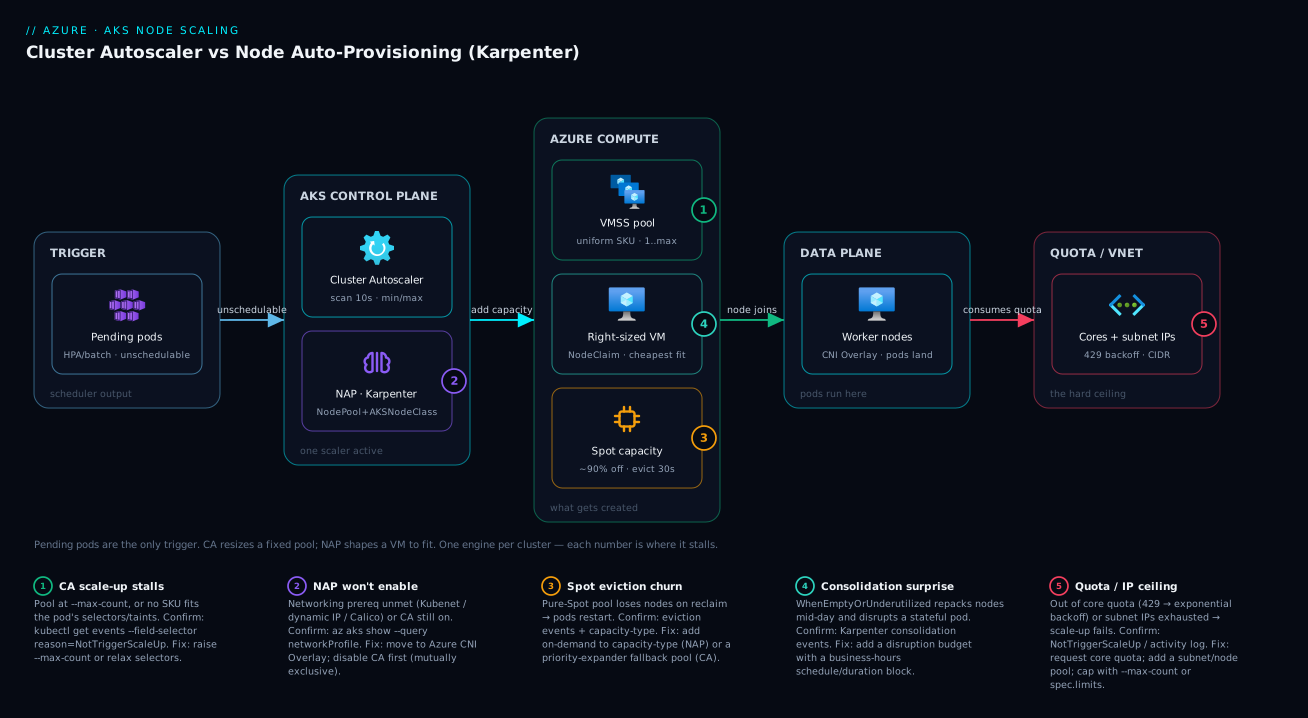
The one-line reading of the diagram: pending pods in, right capacity out — the only question the architecture answers is which engine shapes that capacity, and what constrains how much of it Azure will actually give you.
Real-world scenario
Lumio Retail runs an AKS platform for a mid-size e-commerce business: a steady set of API and web services, plus two spiky workloads — a nightly catalogue re-index (Spark-style, memory-hungry, runs 01:00–03:00) and flash-sale bursts that 5× the front-end traffic for an hour with no warning. They started on the Cluster Autoscaler with three pools: a Standard_D4s_v3 system pool (min 2, max 4), a D8s_v3 app pool (min 3, max 20), and an E8s_v3 memory pool (min 0, max 8) for the re-index.
It worked, but two costs nagged. First, money: the app pool’s --min-count 3 meant three D8s_v3 nodes ran twenty-four hours a day even though nights and weekends needed one; and the re-index pool, though min-0, only had E8s_v3 — when a smaller re-index would have fit on an E4s_v3, CA still booted the bigger box. Their monthly AKS compute sat around ₹4,80,000. Second, flash-sale latency: a sale would spike traffic, HPA made pods, the pods pended, CA simulated the app pool, bumped the VMSS, and Azure took ~3–4 minutes to provision and join D8s_v3 nodes — long enough that the first wave of shoppers saw elevated latency before capacity arrived.
The platform team piloted NAP on a parallel cluster. They expressed the whole fleet as two NodePools: a general pool allowing D and F families with capacity-type: ["spot", "on-demand"], and a memory pool allowing E family for the re-index, each with a limits.cpu ceiling instead of per-pool min/max. The results over a month: NAP consolidated the idle night/weekend fleet down to near-empty (no --min-count floor forcing always-on app nodes), and it placed the re-index on the cheapest E-series SKU that fit each night’s actual data size rather than always E8s_v3. With Spot-first on the general pool, front-end burst capacity came mostly from Spot at a fraction of on-demand price, with automatic on-demand fallback during a regional Spot squeeze. Flash-sale provisioning got modestly faster too, since NAP provisions VMs directly rather than through the slower ARM pool-resize path.
The trade-offs were real and worth naming. The team had to migrate to Azure CNI Overlay (they’d been on a supported plugin already, so low effort) and accept that they could no longer az aks stop the dev clusters overnight — though NAP’s consolidation made that lever nearly redundant. They also had to add a disruption budget blocking consolidation during the 09:00–18:00 trading window after an early incident where consolidation repacked nodes mid-afternoon and briefly disrupted a stateful cache. After tuning, monthly compute landed around ₹3,15,000 — roughly a 34% cut — driven mostly by killing the always-on min-count floor and by Spot. Their summary in the retro: “CA was correct and safe; NAP was correct, safe, and cheaper — but only after we drew the disruption budgets that matched our business hours.”
Advantages and disadvantages
The honest two-column trade-off, before the prose:
| Cluster Autoscaler | Node Auto-Provisioning (NAP) | |
|---|---|---|
| Advantages | Mature, proven, predictable; works with every AKS networking model; per-pool control; familiar mental model; no extra prerequisites | Right-sizes VMs to pods (bin-packing); Spot-first in one line; aggressive cost consolidation with safe budgets; no hand-built pool zoo; faster direct provisioning; mixed SKUs/arch from one constraint |
| Disadvantages | Wastes capacity on fixed SKUs and min-count floors; Spot needs pool pairs + priority expander; per-pool maintenance grows; profile is cluster-wide only | Hard prerequisites (Overlay/Cilium, MI-only, no Windows, no stop); fleet is fluid/less predictable; newer operational surface; consolidation can surprise without budgets; can’t coexist with CA |
When each advantage actually matters: CA’s predictability wins for regulated or change-averse teams who value “the fleet is exactly these SKUs” and have stable, well-characterised workloads on one or two VM sizes. Its lack of prerequisites means it works on any cluster today — no migration. NAP’s bin-packing and Spot ergonomics win the moment your workloads are heterogeneous (different jobs want different shapes) or cost-driven (you’re chasing Spot and hate idle min-count nodes). The fluidity that scares the CA crowd is exactly what saves money: NAP is not loyal to a SKU, so it always reaches for the cheapest box that fits. The disadvantages flip the same way — NAP’s prerequisites and “can’t stop the cluster” are dealbreakers for some, and its surprise factor (a VM family you didn’t expect, a mid-day consolidation) is real until you’ve set limits and disruption budgets that fence it in.
Hands-on lab
This lab stands up a small cluster, watches the Cluster Autoscaler add and remove a node, then (on a second, NAP-enabled cluster) watches Karpenter right-size one. Keep node counts and SKUs small to stay cheap; tear everything down at the end.
1. Set variables and create a CA cluster.
RG=rg-aks-scale-lab
LOC=eastus
az group create -n $RG -l $LOC

az aks create -g $RG -n aks-ca-lab \
  --node-count 1 --enable-cluster-autoscaler --min-count 1 --max-count 4 \
  --node-vm-size Standard_D2s_v3 --generate-ssh-keys
az aks get-credentials -g $RG -n aks-ca-lab --overwrite-existing
2. Force pending pods and watch CA scale up. Deploy more replicas than one node can hold (each requests 500m CPU; a D2s_v3 has ~2 vCPU allocatable):
kubectl create deployment inflate --image=registry.k8s.io/pause:3.9 --replicas=8
kubectl set resources deployment inflate --requests=cpu=500m
kubectl get pods -w        # watch some go Pending, then schedule as nodes arrive
kubectl get nodes -w       # node count rises toward max-count=4
Expected: within ~1–4 minutes the node count climbs as CA adds D2s_v3 nodes until the pods fit or --max-count is hit. Inspect why a scale-up did or didn’t fire:
kubectl get events --field-selector source=cluster-autoscaler
kubectl get configmap -n kube-system cluster-autoscaler-status -o yaml
3. Scale down and watch nodes drain. Delete the deployment; after scale-down-unneeded-time (default 10 min) the empty nodes go:
kubectl delete deployment inflate
kubectl get nodes -w       # node count falls back toward min-count=1 after the timer
4. Create a NAP cluster and inspect the default NodePool.
az aks create -g $RG -n aks-nap-lab \
  --node-provisioning-mode Auto \
  --network-plugin azure --network-plugin-mode overlay --network-dataplane cilium \
  --generate-ssh-keys
az aks get-credentials -g $RG -n aks-nap-lab --overwrite-existing

kubectl get nodepools.karpenter.sh                 # the default + system-surge pools
kubectl get aksnodeclasses.karpenter.azure.com
kubectl get nodeclaims                              # currently provisioned NAP nodes
5. Make NAP provision a right-sized node. Deploy a workload whose requests don’t fit existing capacity and watch a NodeClaim appear:
kubectl create deployment napflate --image=registry.k8s.io/pause:3.9 --replicas=5
kubectl set resources deployment napflate --requests=cpu=1
kubectl get nodeclaims -w        # a NodeClaim is created; note the SKU NAP chose
kubectl get nodes -L node.kubernetes.io/instance-type   # see the instance type it picked
6. Watch consolidation reclaim it. Delete the workload; with WhenEmptyOrUnderutilized NAP consolidates the now-empty node:
kubectl delete deployment napflate
kubectl get nodeclaims -w        # the NodeClaim is removed as NAP consolidates
7. Teardown — delete everything to stop charges.
az group delete -n $RG --yes --no-wait
What you should take away: under CA you watched a pool grow and shrink within bounds you set; under NAP you watched a VM sized to the work appear and vanish with no pool to pre-shape. Same trigger (pending pods), two fundamentally different responses.
Common mistakes & troubleshooting
The failure modes that actually generate tickets, with the exact confirm and fix for each:
| # | Symptom | Root cause | Confirm | Fix |
|---|---|---|---|---|
| 1 | Pods stuck Pending, no scale-up |
Pool at --max-count, or out of IPs/quota, or no SKU satisfies selectors |
kubectl get events --field-selector reason=NotTriggerScaleUp; kubectl describe pod |
Raise --max-count; add subnet/quota; relax selectors |
| 2 | CA never scales down an idle node | A blocker: PDB, local-storage pod, system pod, or safe-to-evict:false |
kubectl get pdb; check pod annotations/owner |
Loosen PDB; dedicate system pool; set flags |
| 3 | “CA enabled but NAP won’t turn on” | CA and NAP can’t coexist | az aks show --query autoUpgradeProfile / nodepool autoscale state |
Disable CA first, then enable NAP |
| 4 | az aks update --node-provisioning-mode Auto fails |
Networking prereq unmet (Kubenet/dynamic IP/Calico) | az aks show --query networkProfile |
Move to Azure CNI Overlay; drop Calico |
| 5 | NAP provisions a surprising VM family | NodePool requirements too broad |
kubectl get nodeclaims -o wide |
Constrain sku-family/sku-name in requirements |
| 6 | NAP scale-up blocked despite pending pods | spec.limits.cpu/memory reached |
kubectl describe nodepool default (limits) |
Raise limits; or accept the ceiling |
| 7 | Consolidation disrupts app mid-day | No disruption budget / window | Karpenter events show consolidation | Add budgets with a business-hours block |
| 8 | Spot nodes churn, pods restart constantly | Pure-Spot pool, frequent evictions | Eviction events; capacity-type | Add on-demand to capacity-type for fallback |
| 9 | Nodes won’t scale below expectation under CA | --min-count floor too high |
az aks nodepool show --query "minCount" |
Lower --min-count (or set 0 for scale-to-zero pools) |
| 10 | Zones drift / pods pend in one zone | balance-similar-node-groups=false + multi-zone single pool |
Check profile + pod topology spread | One pool per zone + balance-similar-node-groups=true |
| 11 | Scale-up “succeeds” then node stuck NotReady | Node image/boot/networking issue; max-node-provision-time exceeded |
kubectl get nodes; CA status configmap |
Fix networking/quota; CA retries elsewhere |
| 12 | Can’t az aks stop the cluster |
NAP-enabled clusters can’t be stopped | az aks stop errors |
Use consolidation to shrink instead; or don’t enable NAP on stop-reliant clusters |
A few of these deserve the expanded reasoning, because they burn the most hours:
1 — Pending pods, nothing scales. The instinct is “the autoscaler is broken.” It almost never is. Run kubectl get events --field-selector reason=NotTriggerScaleUp and it will tell you why: the predicted node wouldn’t help (selector/taint mismatch), the pool is maxed, or provisioning failed (quota/IP). Under NAP the analogue is checking the NodePool limits and the NodeClaim/Karpenter events. The scaler is reporting the truth; you just have to read it.
3 — CA and NAP coexistence. This is a hard platform rule, not a tuning issue: a single AKS cluster runs either the Cluster Autoscaler or NAP, never both. Trying to enable NAP on a CA cluster (or vice-versa) fails the API call. Plan migrations as “disable one, enable the other”, and expect the node fleet to be re-managed by the new owner.
7 — Mid-day consolidation. NAP’s WhenEmptyOrUnderutilized plus no budget means it will repack your nodes whenever it finds a cheaper arrangement — including 2 p.m. on your busiest day. The fix is not to disable consolidation (you’d lose the savings) but to add a disruption budget with a schedule/duration that blocks voluntary disruption during business hours. Let it work the night shift.
8 — Spot churn. A pool that is only Spot will faithfully lose nodes whenever Azure reclaims capacity, and if your pods can’t tolerate that you’ll see constant restarts. Under NAP the fix is one line: add on-demand to capacity-type so eviction triggers an on-demand replacement. Under CA it’s a priority-expander on-demand fallback pool.
Best practices
- Always pair a node scaler with a pod scaler. Run HPA (or VPA) so the system makes the pending pods that the node scaler then satisfies. A node scaler with static replica counts does little.
- Set accurate resource requests. Both scalers act on requests. Over-request and you provision idle capacity; under-request and you over-pack and get OOM/evictions. Use VPA in recommendation mode to calibrate.
- Under CA, keep node pools uniform and never hand-edit individual nodes. The simulation assumes every node in a pool is identical; editing one breaks that assumption and causes erratic decisions.
- Use
--min-count 0for bursty CA pools that should scale to zero (e.g. the batch/GPU pool), and a small non-zero min only for pools that must always have warm capacity. - For multi-zone CA, run one pool per zone and set
balance-similar-node-groups=trueso scale-up/down keeps zones balanced and zone-pinned volumes schedule. - Under NAP, always set
spec.limits(cpu/memory) on everyNodePool— it’s your blast-radius cap, the equivalent of--max-count, and prevents a runaway workload from provisioning the whole subscription quota. - Under NAP, define disruption budgets with business-hours windows before turning on
WhenEmptyOrUnderutilizedin production. Let consolidation chase cost off-peak, not mid-incident. - Constrain NAP
requirementsdeliberately. Start narrow (a couple of families) and widen as you trust it; an over-broad pool can pick exotic SKUs you didn’t budget for. - Use Spot the native way for each model — priority-expander fallback pools under CA,
capacity-type: ["spot","on-demand"]under NAP — and never run latency-critical, eviction-intolerant workloads pure-Spot. - Set
expireAfteron NAP pools for image hygiene (e.g.720h) so nodes rotate onto patched images even when consolidation wouldn’t otherwise replace them. - Enable control-plane logs for the autoscaler and alert on
NotTriggerScaleUpand scale-up failures — these are your leading indicators that capacity is about to run short. - Tune CA’s profile for your dominant workload, and accept it’s cluster-wide. If two workloads genuinely need opposite profiles, that’s a signal to split clusters or move to NAP’s per-
NodePoolcontrol.
Security notes
- Use a managed identity, not a service principal — required outright for NAP, and the right choice for CA too. Avoid long-lived credentials on the cluster. For the deeper trade-offs see AKS Cluster Identity: Managed Identity vs Service Principal and Why It Matters for Day-2.
- Scope the cluster identity’s network permissions tightly when using custom subnets with NAP. NAP needs
Microsoft.Network/virtualNetworks/subnets/readand.../join/actionon the subnets it provisions into. Prefer a scoped custom role on the specific subnet over blanketNetwork Contributoron the whole VNet. - Plan subnet CIDRs to avoid conflicts — NAP (via Karpenter) provisions nodes instantly without the extended ARM validation, so a custom
vnetSubnetIDthat overlaps your pod or service CIDR will fail silently or break routing. Validate ranges before you point aNodeClassat a subnet. - Keep node images patched. Set a Kubernetes auto-upgrade channel and node-image upgrades; NAP nodes follow the control-plane version automatically, and
expireAfterforces rotation onto fresh images. - Mind the IP/quota blast radius. Both scalers can exhaust a subnet’s IPs or your core quota under a surprise burst; cap the ceiling (
--max-count/limits) so an autoscaler can’t consume the whole subscription and starve other clusters. - Don’t disable node-removal safety to chase cost. Flags like
skip-nodes-with-local-storage=falseand aggressive PDB-bypassingterminationGracePeriodsettings can drop stateful pods ungracefully — change them only when you understand the data loss they permit.
Cost & sizing
The bill is driven almost entirely by the VMs the scaler creates — the AKS control plane is free on the Free tier (you pay for the Standard tier only if you need its uptime SLA), so node-scaling efficiency is your cost story. Three levers dominate:
- Idle floor. Every
--min-countnode under CA, and every node consolidation can’t remove under NAP, runs 24×7. The fastest savings are killing unnecessary min-count floors (scale bursty pools to zero) and letting NAP consolidate aggressively off-peak. This alone is often a 20–40% cut on spiky clusters. - Right-sizing. CA pays for the pool’s SKU even when a smaller one would fit; NAP picks the cheapest SKU per workload. The more heterogeneous your pods, the more NAP’s bin-packing saves — homogeneous workloads on one SKU see little difference.
- Spot. Up to ~90% off on-demand. NAP makes Spot-with-fallback trivial (
capacity-type: ["spot","on-demand"]), so teams adopt more Spot and save more; CA’s pool-pair plumbing is a friction that often leaves Spot savings on the table.
Both scalers themselves are free — you pay only for the compute. Rough INR figures for context (East US-ish on-demand list, before any reservations/Spot):
| Item | What it is | Rough monthly INR | Cost note |
|---|---|---|---|
| AKS control plane (Free tier) | Managed control plane, no SLA | ₹0 | Standard tier ~₹6,000–7,000 for the uptime SLA |
1× Standard_D2s_v3 node |
2 vCPU / 8 GB, on-demand | ~₹6,500–8,000 | Your smallest practical worker |
1× Standard_D8s_v3 node |
8 vCPU / 32 GB, on-demand | ~₹26,000–32,000 | Typical app node |
| Same node on Spot | ~70–90% off, evictable | ~₹3,000–9,000 | NAP/CA-Spot capacity |
| Cluster Autoscaler | The scaler itself | ₹0 | You pay only for the nodes |
| Node Auto-Provisioning | The scaler itself | ₹0 | You pay only for the nodes |
| Idle min-count node (CA) | One always-on node you didn’t need | ~₹6,500–32,000 | The cost NAP/scale-to-zero removes |
A pragmatic sizing rule: start CA conservative (small min, generous max, default profile) to avoid pending-pod incidents, measure idle capacity for a week, then either tighten CA’s cost profile or migrate the spiky/heterogeneous parts to NAP. Don’t buy a bigger SKU to “be safe” — buy the smallest that meets measured load and let the scaler add more. For a structured way to find the idle nodes, Azure Advisor for Cost: Acting on Rightsizing and Idle-Resource Recommendations surfaces underused VMSS instances you can hand to the scaler to reclaim.
Interview & exam questions
1. What signal drives both the Cluster Autoscaler and NAP to add a node? Pending (unschedulable) pods — not node CPU/memory pressure. The scheduler can’t place a pod, the scaler notices, and it adds capacity sized to make the pod schedulable. Node-utilisation-based scaling of pods is HPA’s job; those new pods, if unschedulable, are what trigger the node scaler.
2. Fundamental difference between CA and NAP? CA resizes predefined node pools (each a uniform VM SKU) between a min and max you set — it can only add more of what you pre-shaped. NAP (managed Karpenter) provisions a right-sized VM chosen from your constraints, with no fixed pools — it shapes the box to the pods and bin-packs/consolidates for cost.
3. Can you run CA and NAP on the same cluster? No. They are mutually exclusive per cluster; enabling one requires the other to be disabled. Migrations are “turn one off, turn the other on.”
4. Name three hard prerequisites or limits for NAP. It requires Azure CNI / Overlay (Kubenet and dynamic-IP allocation unsupported), a managed identity (no service principal), and Linux only (no Windows nodes). Also: you can’t stop a NAP-enabled cluster, and it can’t coexist with CA.
5. How does each model implement “prefer Spot, fall back to on-demand”? CA needs two node pools (a Spot pool and an on-demand pool) plus a priority expander ConfigMap ranking Spot first. NAP needs one NodePool with karpenter.sh/capacity-type: ["spot","on-demand"] — it prioritises Spot and falls back automatically.
6. What does the CA scale-down-utilization-threshold default of 0.5 mean? A node becomes a scale-down candidate when the sum of its pods’ CPU+memory requests divided by allocatable falls below 0.5 (50%). Raise it to reclaim more aggressively; lower it to only remove nearly-empty nodes. It works with scale-down-unneeded-time (default 10 min).
7. What is consolidation in NAP, and what are the two policies? Consolidation is NAP actively repacking pods onto fewer/cheaper nodes and deleting the leftovers — including replacing a node with a smaller or Spot one. WhenEmpty only removes nodes with zero workload pods (conservative); WhenEmptyOrUnderutilized also replaces underused nodes for cost (aggressive).
8. How do you stop NAP from disrupting workloads during business hours? Define a disruption budget with a schedule (cron) and duration that blocks voluntary disruption in that window, e.g. nodes: "0", schedule: "0 9 * * 1-5", duration: 8h. Budgets also cap how many nodes (20%, or an absolute number) NAP disrupts at once.
9. The CA profile is set where, and what’s the catch? It’s a cluster-wide setting (--cluster-autoscaler-profile) applied to all CA-enabled pools — you cannot set it per pool. If two pools need opposite behaviour, that’s a reason to split clusters or use NAP’s per-NodePool control.
10. A pod is Pending and no node is added. What’s your first diagnostic step under CA? kubectl get events --field-selector reason=NotTriggerScaleUp (and the cluster-autoscaler-status configmap), which states why — selector/taint mismatch, pool at max, or a provisioning failure (out of IPs/quota → backoff). The scaler reports the cause; you read it before assuming it’s broken.
11. What Karpenter CRDs does NAP use, and what does each do? NodePool (constraints + disruption rules — families, capacity type, limits, budgets), AKSNodeClass (the Azure node template — image family, OS disk, subnet), and NodeClaim (NAP’s record of a node it’s provisioning/managing). You write the first two; NAP manages the third.
12. When is CA the better choice than NAP? When workloads are stable and homogeneous (one or two VM sizes), you value predictability and a fixed fleet, you can’t meet NAP’s prerequisites (Windows, Kubenet, service principal, stop-to-save), or you want the most mature, proven path with zero migration. NAP wins for heterogeneous, bursty, cost/Spot-driven fleets.
These map to AZ-104 (Azure Administrator) — configure and manage AKS, scaling, and node pools — and to the CKA/CKAD operational mindset around autoscaling. The Spot and VM-family angle touches VM-sizing knowledge from the broader compute curriculum. A compact cert/topic mapping:
| Question theme | Primary cert | Objective area |
|---|---|---|
| CA vs NAP model, pending-pod trigger | AZ-104 | Configure & manage AKS |
| Node pools, min/max, profile | AZ-104 | Manage node pools & scaling |
| Karpenter CRDs, consolidation | CKA mindset | Cluster scaling & scheduling |
| Spot capacity, VM families | AZ-104 | Compute & cost optimisation |
| Networking prerequisites for NAP | AZ-104 | AKS networking |
Quick check
- CPU on every node is pinned at 90% but no pod is pending. Will CA or NAP add a node? Why or why not?
- You want “prefer Spot, fall back to on-demand” with the least plumbing. Which scaler, and what’s the one-line configuration?
- True or false: you can enable both the Cluster Autoscaler and NAP on the same AKS cluster for redundancy.
- Under NAP, what stops a single runaway workload from provisioning your entire subscription’s core quota?
- A NAP cluster repacks nodes at 2 p.m. and briefly disrupts a stateful service. What’s the fix that keeps the cost savings?
Answers
- Neither. Both scale on pending pods, not node CPU. High utilisation with everything still running is the Horizontal Pod Autoscaler’s cue to make more pods; only if those new pods can’t be scheduled does the node scaler add a node.
- NAP. Put
karpenter.sh/capacity-type: ["spot", "on-demand"]in theNodePoolrequirements — NAP prioritises Spot and falls back to on-demand automatically, with no second pool or priority-expander ConfigMap (which is what CA would require). - False. CA and NAP are mutually exclusive on a cluster — enabling one requires disabling the other. There is no “both for redundancy” mode.
spec.limits(cpu and/or memory) on theNodePool. It’s NAP’s equivalent of--max-count— once the total exceeds the limit, NAP stops creating instances. Always set it as a blast-radius cap.- Add a disruption budget with a time window that blocks voluntary disruption during business hours — e.g.
nodes: "0",schedule: "0 9 * * 1-5",duration: 8h. Consolidation still runs off-peak, so you keep the savings without mid-day disruption.
Glossary
- Cluster Autoscaler (CA) — the AKS component that resizes a predefined node pool’s VMSS between
--min-countand--max-countin response to pending pods; removes underutilised nodes after a timer. - Node Auto-Provisioning (NAP) — AKS’s managed implementation of Karpenter; provisions right-sized VMs from your constraints with no fixed node pools, and consolidates for cost.
- Karpenter — the open-source node-provisioning controller NAP is built on; uses
NodePool/AKSNodeClass/NodeClaimCRDs. NodePool(Karpenter CRD) — defines node constraints (families, capacity type, zones), resourcelimits, and disruption rules/budgets for NAP.AKSNodeClass(CRD) — the Azure node template NAP uses: image family (Ubuntu2204/AzureLinux), OS disk size, optionalvnetSubnetID.NodeClaim(CRD) — NAP’s internal record representing a node it is provisioning or managing; what you watch to see NAP working.- Pending pod — a pod the scheduler can’t place on any existing node; the universal trigger for both node scalers.
- Autoscaler profile — the cluster-wide set of CA timers/thresholds (
scan-interval,scale-down-unneeded-time, etc.); cannot be set per pool. --min-count/--max-count— per-node-pool floor and ceiling for CA’s node count.spec.limits— total cpu/memory ceiling for a NAPNodePool; the NAP equivalent of--max-count.- Consolidation — NAP repacking pods onto fewer/cheaper nodes and deleting the rest; the mechanism behind NAP’s savings.
consolidationPolicy—WhenEmpty(remove only empty nodes) orWhenEmptyOrUnderutilized(also replace underused nodes for cost).- Disruption budget — a rate limit (percentage or count, optionally time-windowed) on NAP’s voluntary node removals; keeps consolidation safe.
- Expiration (
expireAfter) — a max node age after which NAP rotates the node (image hygiene); defaults toNever. - Drift — NAP detecting that a node no longer matches its
NodePool/AKSNodeClassand rotating it to match. - Expander — CA’s tie-breaker when multiple pools could satisfy pending pods (
random,least-waste,most-pods,priority). capacity-type— the Spot-vs-on-demand selector; a NAP label (karpenter.sh/capacity-type) or a CA node-pool property.- Spot VM — an Azure VM at up to ~90% off, evicted on ~30s notice when capacity is reclaimed; both scalers can use it.
Next steps
You can now pick a node scaler on purpose and tune it. Build outward:
- Next: AKS Node Pools Demystified: System vs User vs Spot, Taints, Labels, and When to Split Workloads — the node-pool fundamentals both scalers build on.
- Related: AKS Architecture Explained: Managed Control Plane, Node Pools, and the Azure Integrations That Make It Tick — where the scalers sit in the cluster.
- Related: AKS Networking Models Explained: Kubenet vs Azure CNI vs CNI Overlay and Their IP Trade-offs — meet NAP’s networking prerequisites with eyes open.
- Related: Azure Spot Virtual Machines Explained: How Eviction, Capacity and Pricing Save You up to 90% — the Spot mechanics that make either scaler cheaper.
- Related: Fixing AKS Ingress: 502/504 Backends, Application Routing Add-on Quirks, and Key Vault TLS Failures — once nodes scale, the next thing that breaks is the path to them.