You have a repository — a Node API, a Python service, a Go binary, a .NET app — and a brand-new AKS cluster, and between them sits a wall of boilerplate nobody enjoys writing: a Dockerfile you’ll copy from a half-remembered blog post, a deployment.yaml and service.yaml you’ll get almost right, an ingress you’ll fight with, and a CI pipeline that builds the image, pushes it to a registry, and rolls it out — including the federated-identity dance so the pipeline can authenticate to Azure without a stored secret. Doing this by hand for one repo is tedious; doing it for the tenth repo this quarter is a tax. Draft is Microsoft’s answer: an open-source CNCF tool, shipped as the az aks draft extension, that scaffolds all of it. Point it at a repo and it detects the language, writes a sensible multi-stage Dockerfile, generates the Kubernetes manifests (or a Helm chart, or a Kustomize overlay), sets up GitHub OIDC so your pipeline logs into Azure passwordlessly, and emits a ready-to-run GitHub Actions workflow that builds, pushes to Azure Container Registry (ACR) and deploys to your cluster.
The promise is “from source code to a deployed app on AKS without writing the YAML yourself,” and Draft mostly delivers — but it delivers a starting point, not a finished artifact. The generated Dockerfile is a reasonable default, not a tuned production image; the manifests have no resource requests, no liveness probe, and one replica until you say otherwise. The point of Draft is to get a green deploy in minutes and then harden from a working baseline, instead of staring at an empty editor. That trade — speed and correctness of the plumbing in exchange for “you still own the hardening” — is exactly right for getting a new service onto a cluster fast.
This is a step-by-step implementation guide. You will install the extension, run az aks draft create to scaffold a Dockerfile and manifests, run az aks draft setup-gh to federate a GitHub repo to an Entra app, run az aks draft generate-workflow to emit the pipeline (and see how az aks draft up does the last two at once), and push to watch it deploy. We do it in the portal (the AKS Automated Deployments experience that wraps Draft), in the az CLI (the real engine, every flag), and as Bicep (for the supporting ACR, cluster attach, and the federated credential — the parts Draft doesn’t manage). Every step has expected output and a validation check, the option matrices tell you which deployment type and language template to pick, and the troubleshooting section covers the failures you will hit — ImagePullBackOff from a missing AcrPull, OIDC AADSTS70021 from a wrong federation subject, and a workflow that pushes but never rolls out. By the end you can take any repo to a running AKS deployment with a passwordless CI pipeline, and know which generated lines to keep and which to replace.
What problem this solves
The gap between “code that runs on my laptop” and “code running on AKS with CI/CD” is filled with artifacts that are individually simple and collectively a slog: a Dockerfile, a .dockerignore, a deployment, a service, an ingress, a namespace, image-tag wiring, registry auth, cluster auth, and a pipeline that ties them together. None of it is hard for someone who has done it ten times. All of it is friction for someone doing it the first time, and repetitive friction for a platform team onboarding service after service. Worse, the parts people get wrong are the boring parts — a Dockerfile that copies the whole context and balloons to 1.8 GB, a service that targets the wrong targetPort, a pipeline that stores a service-principal secret in a GitHub secret (a credential to rotate and leak).
What breaks without something like Draft: teams copy a Dockerfile from an old project that no longer matches the language version, ship images with the build toolchain baked in, hand-write manifests with latest tags (so rollbacks are impossible and pods pull stale images), and wire CI with long-lived secrets. Each is a known anti-pattern, and each is avoidable boilerplate — precisely what a scaffolder should own. Draft encodes the sane defaults: multi-stage builds, a digest-pinnable image reference, manifests parameterised on the image tag, and OIDC for the pipeline (a federated credential, no stored secret).
Who hits this: anyone standing up a new service on AKS, platform teams building a golden path, and developers who know their language but not Kubernetes YAML. Draft is aimed at the developer who wants to deploy without first becoming a manifest expert — and at the architect who wants every new repo to start from the same vetted scaffolding instead of ten subtly different hand-rolled versions. It is not a replacement for understanding what it generates; it is a way to start from correct-by-default and harden, which is the right order.
To frame the whole tool before the deep dive, here is what each Draft subcommand produces and when you reach for it:
| Subcommand | What it generates | When you run it | Runs once or repeatedly |
|---|---|---|---|
az aks draft create |
Dockerfile + manifests (K8s/Helm/Kustomize) | First, to scaffold the artifacts | Once per repo (re-run to regenerate) |
az aks draft setup-gh |
GitHub OIDC: Entra app + federated credential + repo secrets | After create, before the workflow |
Once per repo |
az aks draft generate-workflow |
.github/workflows/*.yml build-push-deploy pipeline |
After OIDC is set up | Once per repo (re-run to update) |
az aks draft up |
OIDC setup and the workflow, in one command | Instead of setup-gh + generate-workflow |
Once per repo |
az aks draft update |
Annotations/manifests for the Application Routing ingress add-on | When you want managed NGINX ingress + HTTPS | Once per repo |
Learning objectives
By the end of this article you can:
- Install the
aks-preview/Draft tooling and runaz aks draft createto scaffold a language-appropriate Dockerfile and Kubernetes manifests for any repo. - Choose correctly between the three manifest deployment types — plain Kubernetes manifests, Helm, and Kustomize — and explain the trade-off of each.
- Wire GitHub OIDC with
az aks draft setup-ghso your pipeline authenticates to Azure with a federated credential and no stored secret, and explain the subject/issuer that federation pins. - Generate a working GitHub Actions workflow with
az aks draft generate-workflowthat builds, pushes to ACR, and deploys to AKS — and read every job in it. - Use
az aks draft upto do OIDC setup and workflow generation in one command, andaz aks draft updateto add managed Application Routing ingress. - Stand up the supporting pieces Draft does not own — the ACR, the
--attach-acr(AcrPull) grant, and the federated credential — in bothazCLI and Bicep. - Diagnose the canonical failures:
ImagePullBackOfffrom a missingAcrPull, OIDCAADSTS70021from a wrong federation subject, a pipeline that pushes but never rolls out, and a manifest with no probe or resource requests. - Harden the generated output into a production-grade Dockerfile and manifest set (resource requests/limits, probes, replicas, non-root, digest pinning).
Prerequisites & where this fits
You should already have an AKS cluster you can reach (az aks get-credentials works and kubectl get nodes returns Ready nodes), an Azure Container Registry, and a GitHub repository for the app you want to deploy. You need the Azure CLI (az, a recent version) signed in (az login) with rights to create role assignments and an Entra app registration in the target subscription, plus kubectl and git. Familiarity with what a Dockerfile and a Kubernetes Deployment are helps, even if you’ve never written one from scratch — Draft assumes you can read what it writes. If clusters and registries are new, start with Your First AKS Cluster: CLI, Portal, and Bicep Walkthrough and Containerize and Deploy Your First App to AKS.
This sits in the Containers / developer-experience track, one layer above raw kubectl apply. It assumes the cluster fundamentals from AKS Cluster Architecture: Control Plane and Data Plane Explained and pairs with the registry hardening in Azure Container Registry: Secure Supply Chain with Private ACR and Tasks. The OIDC and identity it sets up build on Managed Identity: System-Assigned vs User-Assigned Patterns and AKS Managed Identity vs Service Principal for Cluster Auth. When you add ingress, the troubleshooting in AKS Ingress 502/503 and TLS with Application Routing is the companion. Where it sits in the lifecycle, and what Draft does versus what you still own:
| Stage | What you bring | What Draft generates | What you still do by hand |
|---|---|---|---|
| Containerise | Source code | Dockerfile, .dockerignore |
Tune base image, layers, non-root user |
| Describe deploy | App name, port | deployment.yaml + service.yaml (or Helm/Kustomize) |
Resource requests/limits, probes, replicas, HPA |
| Authenticate CI | GitHub repo | Entra app + federated credential + repo variables | Review least-privilege scope of the app |
| Pipeline | Cluster + ACR names | .github/workflows/*.yml (build·push·deploy) |
Add tests, scans, approvals, environments |
| Ingress (optional) | Hostname | Ingress annotations for Application Routing | DNS record, certificate, WAF if needed |
Core concepts
A few mental models make every later step obvious.
Draft is a scaffolder, not a controller. It runs locally, inspects your repo, and writes files — a Dockerfile, manifests, a workflow YAML. It does not run on your cluster, does not watch anything, and does not “own” the files after writing them. This is the opposite of an operator: no reconciliation loop, no drift correction. Re-running draft create re-prompts and can overwrite, but day-to-day the artifacts live in your repo under your control.
Language detection drives the templates. draft create reads your repo (lock files and extensions — package.json, requirements.txt, go.mod, *.csproj, pom.xml) and picks a language template, which determines the Dockerfile it writes. Override the detected language with --language (and the runtime with --version) to make it deterministic in a script.
The three deployment types say the same thing three ways. Draft emits plain Kubernetes manifests (raw deployment.yaml + service.yaml), a Helm chart (templated, values-driven releases), or a Kustomize base (patch overlays per environment). They describe the same Deployment + Service; they differ in how you parameterise and promote. Pick based on how you already manage config.
OIDC federation replaces the stored secret. The old way to let CI deploy to Azure was a service principal with a client secret stored in GitHub — a long-lived credential to rotate and protect. Draft instead sets up a federated identity credential: an Entra app trusts GitHub’s OIDC issuer for a specific repo, branch/environment, and subject, and GitHub mints a short-lived token per run — no secret stored anywhere. The federation pins an exact subject (e.g. repo:org/repo:ref:refs/heads/main or repo:org/repo:environment:production); a workflow running from a context that doesn’t match is rejected. That subject is the key to the most common OIDC failure.
Two identities, two jobs. Don’t conflate them. The CI identity (the Entra app Draft federates) is what the pipeline uses to log into Azure, push to ACR and run kubectl. The kubelet identity is what nodes use to pull images from ACR — granted by az aks update --attach-acr, which creates an AcrPull role assignment. A pipeline can push perfectly and pods still ImagePullBackOff because the cluster was never granted pull. Separate grants; both must exist.
The vocabulary in one table
| Concept | One-line definition | Where it lives | Why it matters here |
|---|---|---|---|
| Draft | CNCF scaffolder shipped as az aks draft |
Your laptop / Cloud Shell | Generates the Dockerfile, manifests, workflow |
draft.yaml |
Records your Draft choices (lang, port, type) | Repo root | Lets re-runs and the portal reuse your answers |
| Deployment type | manifests | helm | kustomize | --deploy-type flag |
How the manifests are parameterised |
| Federated credential (FIC) | Trust between Entra app and GitHub OIDC | Entra app registration | Passwordless CI login; pinned to a subject |
| OIDC subject | The exact repo:ref/environment string | The FIC | Wrong subject → token rejected (AADSTS70021) |
--attach-acr |
Grants the cluster AcrPull on a registry |
Role assignment on ACR | Without it, pods can’t pull → ImagePullBackOff |
| Automated Deployments | Portal UI that wraps Draft | AKS blade | The point-and-click path to the same output |
| Application Routing | Managed NGINX ingress add-on | AKS add-on | draft update wires manifests to it |
Installing Draft and connecting your tools
Draft ships as an Azure CLI extension. Install it, confirm the cluster and registry are reachable, and you’re ready to scaffold.
The extension and the login state
# Add the Draft-bearing extension (aks-preview carries az aks draft)
az extension add --name aks-preview
az extension update --name aks-preview   # if already installed

# Confirm the subcommands are present
az aks draft --help
Expected: help text listing create, generate-workflow, setup-gh, up, and update. If az aks draft is “not recognised,” the extension didn’t install — re-run az extension add and check az version is current.
Confirm you’re logged in to the right subscription and can reach the cluster:
az login
az account set --subscription "<your-subscription-id>"

# Cluster reachability — get creds, then list nodes
az aks get-credentials -g rg-aks-lab -n aks-lab --overwrite-existing
kubectl get nodes -o wide
Expected: one or more nodes in Ready state. If kubectl can’t connect, fix get-credentials before going further — Draft generates files regardless, but the pipeline’s deploy step needs a working cluster.
The prerequisites checklist as a table — confirm every row before scaffolding:
| Requirement | How to confirm | If it fails |
|---|---|---|
| Azure CLI signed in | az account show returns your tenant |
az login |
| Draft extension present | az aks draft --help lists subcommands |
az extension add --name aks-preview |
| Cluster reachable | kubectl get nodes → Ready |
az aks get-credentials --overwrite-existing |
| ACR exists | az acr show -n <acr> returns it |
az acr create ... --sku Basic |
| Rights to assign roles | You’re Owner/User Access Admin on the RG | Ask an admin or scope down |
| Rights to register an app | You can create Entra app registrations | Ask an admin to pre-create the app |
GitHub repo + gh (optional) |
gh auth status |
gh auth login (or use a PAT) |
az aks draft create: scaffolding the Dockerfile and manifests
This is the first and most-used command. Run it from the repo root; it inspects the code, asks a few questions (or takes flags), and writes the files.
Running it interactively, then non-interactively
# From the repo root — interactive: Draft prompts for language, port, deploy type
cd ~/src/my-api
az aks draft create
Interactively it asks for the language (pre-filled from detection), the port your app listens on, the deployment type, and the app/chart name, then writes the files into the current directory. In a script or golden-path automation, pass everything as flags so it never prompts:
az aks draft create \
  --destination ~/src/my-api \
  --language javascript \
  --deploy-type manifests \
  --app my-api \
  --dockerfile-only false \
  --skip-file-detection false
Expected output: Draft prints the files it created. For --deploy-type manifests you get a Dockerfile, a .dockerignore, and a manifests/ (or deployments/manifests/) folder containing deployment.yaml and service.yaml, plus a draft.yaml recording your choices.
The flags that matter on create, what each does, and its default:
| Flag | What it does | Default | When to set it |
|---|---|---|---|
--destination |
Target directory to scaffold into | current dir | Running outside the repo root |
--language |
Override detected language | auto-detected | Make it deterministic in scripts |
--deploy-type |
manifests | helm | kustomize |
manifests | Match how you manage config |
--app |
Application / chart name | repo/dir name | Control the resource names |
--dockerfile-only |
Generate only the Dockerfile, no manifests | false | You already have manifests |
--deployment-only |
Generate only manifests, no Dockerfile | false | You already have a Dockerfile |
--skip-file-detection |
Don’t auto-detect; rely on flags | false | Fully scripted, no prompts |
--variable (--var) |
Pass template variables (KEY=value) |
none | Override port, image, etc. |
Choosing the deployment type
The single most consequential choice. Three ways to describe the same Deployment + Service:
| Deploy type | What you get | Best when | Trade-off |
|---|---|---|---|
| manifests | Raw deployment.yaml + service.yaml |
Simple apps; you apply YAML directly; learning | No templating — env differences are copy-paste |
| helm | A chart with values.yaml + templates |
You version releases, manage many environments via values | Helm to learn/operate; templating indirection |
| kustomize | A base/ + overlay structure |
You promote with per-env patches, GitOps (Argo/Flux) | Patch mental model; no values templating |
Generate a Helm chart instead:
az aks draft create --deploy-type helm --app my-api --language go --destination .
# Produces charts/ (Chart.yaml, values.yaml, templates/deployment.yaml, templates/service.yaml)
Generate a Kustomize base:
az aks draft create --deploy-type kustomize --app my-api --language python --destination .
# Produces a base/ with kustomization.yaml + deployment.yaml + service.yaml
What the generated Dockerfile and manifests actually contain
A representative generated Dockerfile is multi-stage and sane-by-default, but generic. For a Node app it looks like:
# Build stage — full toolchain
FROM node:20-alpine AS build
WORKDIR /app
COPY package*.json ./
RUN npm ci
COPY . .
RUN npm run build

# Runtime stage — slim, just the app
FROM node:20-alpine
WORKDIR /app
COPY --from=build /app ./
EXPOSE 3000
CMD ["node", "dist/server.js"]
The generated deployment.yaml/service.yaml is intentionally minimal — and that minimalism is the thing to fix before production. What Draft writes versus what you must add:
| Manifest field | Draft’s default | Production-ready value | Why it matters |
|---|---|---|---|
replicas |
1 | ≥ 2 (or HPA) | One replica = an outage on any restart |
resources.requests |
absent | set CPU + memory | Without requests, scheduling and QoS are wrong |
resources.limits |
absent | set (esp. memory) | Prevents a noisy pod starving the node |
livenessProbe |
absent | a real /healthz |
No probe → a hung pod never restarts |
readinessProbe |
absent | a real readiness path | No probe → traffic to a not-ready pod |
image tag |
placeholder / latest |
digest or immutable tag | latest breaks rollbacks and caching |
securityContext |
minimal | runAsNonRoot, drop caps |
Least-privilege container |
imagePullSecrets |
none (uses AcrPull) | confirm AcrPull exists | Otherwise ImagePullBackOff |
Validate the generated files before committing:
# Lint the manifests offline (server-side dry-run needs the cluster)
kubectl apply -f manifests/ --dry-run=client -o yaml
# Build the image locally to confirm the Dockerfile works
docker build -t my-api:test .
Expected: the dry-run echoes the objects with no schema error; the build completes and produces an image. Fix any error here — a broken Dockerfile fails the pipeline later, far from where you can iterate fast.
az aks draft setup-gh: wiring passwordless GitHub OIDC
Before a workflow can deploy, the pipeline needs to authenticate to Azure. setup-gh does this without a stored secret by federating an Entra app to your GitHub repo. Run it once per repo.
What it creates
az aks draft setup-gh \
  --app draft-cicd-my-api \
  --gh-repo myorg/my-api \
  --subscription-id <sub-id> \
  --resource-group rg-aks-lab \
  --provider azure
Expected: Draft (a) creates or reuses an Entra app registration (draft-cicd-my-api), (b) creates a federated identity credential on it that trusts GitHub’s OIDC issuer for your repo, and © sets the GitHub repository variables the workflow reads (AZURE_CLIENT_ID, AZURE_TENANT_ID, AZURE_SUBSCRIPTION_ID). It prints the app’s client ID. Crucially, no client secret is created or stored — the federation is the credential.
The arguments on setup-gh and what each pins:
| Flag | What it sets | Notes |
|---|---|---|
--app |
Name of the Entra app to create/reuse | Reused on re-run — idempotent-ish |
--gh-repo |
The owner/repo to federate and set variables on |
Must be a repo you can admin |
--subscription-id |
Subscription the app gets scoped to | Where ACR + AKS live |
--resource-group |
RG scope for the role assignment | Least-privilege scope |
--provider |
Cloud provider (azure) |
Azure OIDC federation |
--path / --destination |
Repo path (for draft.yaml context) |
When run outside repo root |
The federation subject — the thing that breaks
The federated credential is pinned to a subject claim. GitHub mints a token whose sub describes the run context — and Azure only accepts the token if that sub matches the credential exactly. The common subjects:
| Workflow trigger | Subject (sub) the FIC must match |
Set this when |
|---|---|---|
| Push to a branch | repo:owner/repo:ref:refs/heads/main |
Deploy on push to main |
| A tag | repo:owner/repo:ref:refs/tags/v1.0.0 |
Deploy on release tags |
| A pull request | repo:owner/repo:pull_request |
PR-time validation deploys |
| A GitHub Environment | repo:owner/repo:environment:production |
Gated environment deploys |
Inspect what Draft created and confirm the subject matches how your workflow triggers:
APP_ID=$(az ad app list --display-name draft-cicd-my-api --query "[0].appId" -o tsv)
OBJ_ID=$(az ad app show --id "$APP_ID" --query id -o tsv)
az ad app federated-credential list --id "$OBJ_ID" \
  --query "[].{name:name, subject:subject, issuer:issuer}" -o table
Expected: a row with issuer = https://token.actions.githubusercontent.com and a subject like repo:myorg/my-api:ref:refs/heads/main. If your workflow deploys from an environment but the FIC pins a branch ref (or vice-versa), the login step fails with AADSTS70021: No matching federated identity record found. This mismatch is the single most common OIDC failure, and fixing it is just adding the right subject.
Doing the federation by hand (and in Bicep)
Sometimes you want the federation in IaC rather than created imperatively by Draft — for review and reproducibility. The az equivalent:
az ad app create --display-name draft-cicd-my-api
APP_ID=$(az ad app list --display-name draft-cicd-my-api --query "[0].appId" -o tsv)
OBJ_ID=$(az ad app show --id "$APP_ID" --query id -o tsv)
az ad app federated-credential create --id "$OBJ_ID" --parameters '{
  "name": "gh-main",
  "issuer": "https://token.actions.githubusercontent.com",
  "subject": "repo:myorg/my-api:ref:refs/heads/main",
  "audiences": ["api://AzureADTokenExchange"]
}'
The Bicep that declares the same federated credential on a user-assigned identity (a clean alternative to an app registration for CI):
param location string = resourceGroup().location

resource ci 'Microsoft.ManagedIdentity/userAssignedIdentities@2023-01-31' = {
  name: 'id-cicd-my-api'
  location: location
}

resource fic 'Microsoft.ManagedIdentity/userAssignedIdentities/federatedIdentityCredentials@2023-01-31' = {
  parent: ci
  name: 'gh-main'
  properties: {
    issuer: 'https://token.actions.githubusercontent.com'
    subject: 'repo:myorg/my-api:ref:refs/heads/main'
    audiences: [ 'api://AzureADTokenExchange' ]
  }
}
az aks draft generate-workflow: emitting the GitHub Actions pipeline
With the artifacts scaffolded and OIDC federated, generate the pipeline.
Generating the workflow
az aks draft generate-workflow \
  --resource-group rg-aks-lab \
  --cluster-name aks-lab \
  --registry-name acrlab \
  --container-name my-api \
  --branch main \
  --destination .
Expected: a .github/workflows/<name>.yml file. It defines a pipeline that, on push to main, logs into Azure via OIDC, builds the image with the generated Dockerfile, pushes it to acrlab.azurecr.io/my-api:<sha>, gets cluster credentials, and applies your manifests. The flags:
| Flag | What it sets | Used in the workflow for |
|---|---|---|
--resource-group |
RG of the cluster + registry | az aks get-credentials scope |
--cluster-name |
Target AKS cluster | The deploy target |
--registry-name |
ACR to push to | <registry>.azurecr.io/<container> |
--container-name |
Image repository name | The image name + tag |
--branch |
Branch that triggers the workflow | The on: push trigger + FIC subject |
--destination |
Where to write .github/workflows |
Repo root |
Reading the generated workflow
The emitted YAML has a recognisable shape — and you should read every part of it, because you own it now:
on:
  push:
    branches: [ main ]
permissions:
  id-token: write      # REQUIRED for OIDC — without it, login fails
  contents: read
jobs:
  buildImage:
    runs-on: ubuntu-latest
    steps:
      - uses: actions/checkout@v4
      - uses: azure/login@v2
        with:
          client-id: ${{ vars.AZURE_CLIENT_ID }}
          tenant-id: ${{ vars.AZURE_TENANT_ID }}
          subscription-id: ${{ vars.AZURE_SUBSCRIPTION_ID }}
      - run: az acr build --registry acrlab --image my-api:${{ github.sha }} .
  deploy:
    needs: [ buildImage ]
    runs-on: ubuntu-latest
    steps:
      - uses: actions/checkout@v4
      - uses: azure/login@v2
        with:
          client-id: ${{ vars.AZURE_CLIENT_ID }}
          tenant-id: ${{ vars.AZURE_TENANT_ID }}
          subscription-id: ${{ vars.AZURE_SUBSCRIPTION_ID }}
      - uses: azure/aks-set-context@v4
        with:
          resource-group: rg-aks-lab
          cluster-name: aks-lab
      - run: kubectl apply -f manifests/
The pieces that fail silently if you don’t understand them:
| Workflow element | What it does | The trap if it’s wrong |
|---|---|---|
permissions: id-token: write |
Lets the job request a GitHub OIDC token | Missing → azure/login can’t get a token, login fails |
vars.AZURE_CLIENT_ID (not secrets.) |
OIDC uses repo variables, not secrets | If you stored it as a secret, the reference is empty |
az acr build vs docker build+push |
Builds in ACR (no local Docker, no push creds) | Using docker push needs registry login the FIC may lack |
${{ github.sha }} image tag |
Immutable, traceable per-commit tag | Using latest breaks rollbacks + caching |
azure/aks-set-context |
Fetches kubeconfig for the deploy | Wrong RG/cluster name → context fetch fails |
kubectl apply -f manifests/ |
Rolls out your manifests | If manifests still reference a placeholder image, no rollout |
A subtle but important point (the last table row): if the manifest’s image: line isn’t updated to the freshly-built :${{ github.sha }} before kubectl apply, the cluster applies an unchanged manifest and nothing rolls out — the pipeline goes green while the app never updates. Troubleshooting Mistake 3 covers the fix.
az aks draft up: OIDC and workflow in one shot
up is the convenience wrapper: it does setup-gh and generate-workflow together, so you go from scaffolded artifacts to a federated, pipeline-ready repo in a single command:
az aks draft up \
  --app draft-cicd-my-api \
  --gh-repo myorg/my-api \
  --subscription-id <sub-id> \
  --resource-group rg-aks-lab \
  --cluster-name aks-lab \
  --registry-name acrlab \
  --container-name my-api \
  --branch main \
  --destination .
Use up for the happy path (new repo, you control everything). Use the separate setup-gh + generate-workflow when you want to set up OIDC once and regenerate the workflow repeatedly, or when an admin federates the app and a developer only generates the pipeline.
Architecture at a glance
Read the diagram left to right as the lifecycle of one deploy. On the far left, Draft runs in your developer environment (Cloud Shell or laptop): draft create writes the Dockerfile and manifests, and draft setup-gh/up reaches into Entra to register the CI app and pin a federated credential to your repo’s subject. Those generated files land in your GitHub repository alongside the emitted Actions workflow. When you push to the trigger branch, GitHub Actions starts: it requests a short-lived OIDC token (because the workflow has id-token: write), and azure/login exchanges that token against the federated credential — no stored secret crosses the wire. Authenticated, the pipeline runs az acr build to build and push the image into Azure Container Registry, then aks-set-context + kubectl apply to roll the manifests onto AKS.
The two grants the diagram calls out are the ones people forget. The federated credential (badge on the Entra zone) is what lets the pipeline log in; get its subject wrong and login fails with AADSTS70021. The AcrPull grant (badge on the AKS→ACR pull edge) is separate — it’s the cluster’s kubelet identity being allowed to pull images, created by --attach-acr. A pipeline can push the image perfectly and the pods still ImagePullBackOff because that second grant is missing. Notice the flow that matters most: the OIDC token is short-lived and minted per run, so there is no long-lived secret anywhere in the path — that is the whole security win of the Draft-generated pipeline.
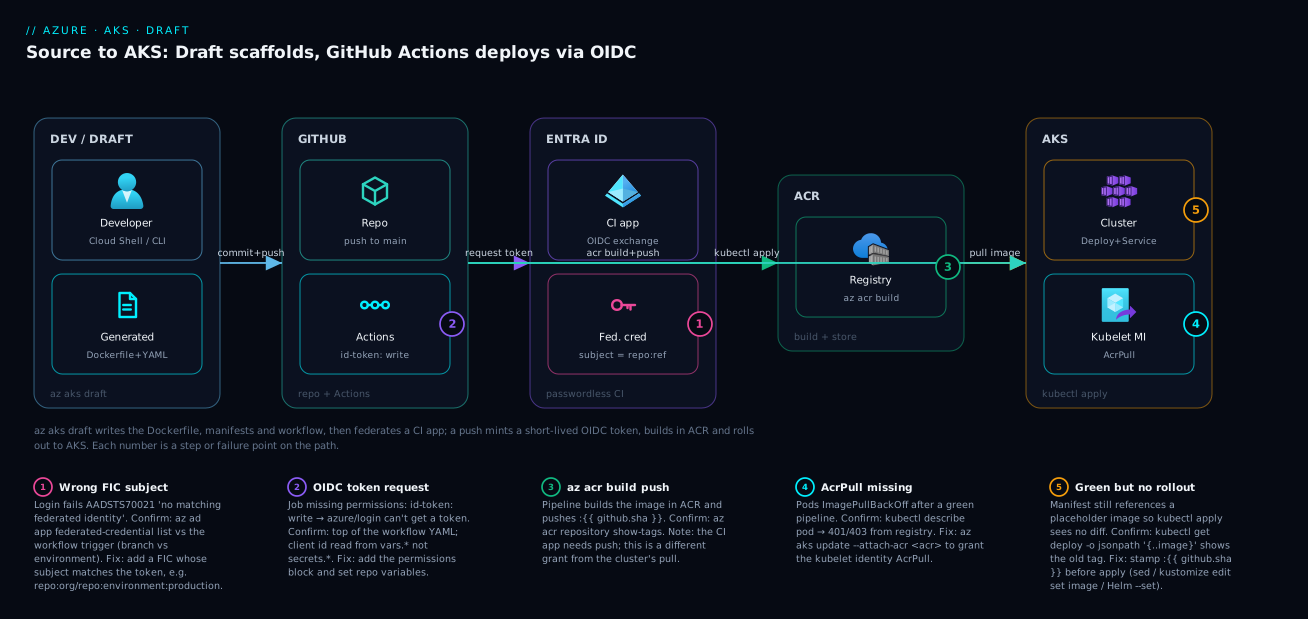
Real-world scenario
Finlytic, a fintech analytics startup, has eight microservices and a two-person platform team. Each new service used to take a developer the better part of a day to “get onto the cluster”: copy a Dockerfile from an older Go service (which baked the full build toolchain into a 900 MB runtime image), hand-write a Deployment and Service (usually with image: finlyticacr.azurecr.io/svc:latest), and ask the platform team to set up the CI service principal — whose client secret then lived in GitHub and went stale every 90 days, breaking deploys until someone rotated it. With eight services and more arriving, the toil was real, and the latest-tag habit meant rollbacks were “redeploy the previous commit and hope.”
The platform lead piloted Draft to build a golden path. For a new Python ingestion service (svc-ingest), they ran az aks draft create --language python --deploy-type kustomize --app svc-ingest, which produced a multi-stage Dockerfile on python:3.12-slim (runtime image: 180 MB, down from the Go team’s 900 MB pattern) and a Kustomize base. Then az aks draft setup-gh --app cicd-svc-ingest --gh-repo finlytic/svc-ingest federated an Entra app to the repo — no stored secret — and az aks draft generate-workflow emitted the build-push-deploy pipeline. Total time from empty repo to a green deploy: under twenty minutes, most of it spent reading what Draft wrote.
The first deploy went green in CI but the pods sat in ImagePullBackOff. The pipeline had pushed finlyticacr.azurecr.io/svc-ingest:<sha> fine — the CI app could push — but the cluster had never been granted pull on the registry. One command fixed it: az aks update -g rg-finlytic -n aks-prod --attach-acr finlyticacr, which created the AcrPull role assignment for the kubelet identity. The lesson stuck: push and pull are two different grants. The second snag was that the Kustomize base still referenced a placeholder image, so the first apply didn’t change the running tag. They added a kustomize edit set image step before kubectl apply to stamp the ${{ github.sha }} tag, and rollouts became deterministic and traceable per commit.
The platform team then templated the flow: they scripted draft create with fixed --language/--deploy-type/--app flags (no prompts), pre-created the Entra apps with a least-privilege role (push to ACR + Azure Kubernetes Service RBAC Writer scoped to the app’s namespace, nothing broader), and committed the manifests with resource requests, two replicas, and a real /healthz liveness probe on top of Draft’s bare scaffold. Onboarding a ninth service took 15 minutes and zero hand-written YAML, and the credential-rotation pages stopped entirely — no secrets left to rotate. The platform lead’s summary on the wiki: “Draft doesn’t write your production manifest. It writes a correct skeleton in two minutes so you spend your hour on probes and limits, not on remembering the federated-credential JSON.”
The pilot as a before/after, because the deltas are the point:
| Dimension | Before (hand-rolled) | After (Draft golden path) |
|---|---|---|
| Time to first deploy | ~1 day per service | ~15–20 min per service |
| Runtime image size | 900 MB (toolchain baked in) | 180 MB (multi-stage) |
| Image tag | :latest (no rollback) |
:<git-sha> (traceable) |
| CI credential | SP secret in GitHub (90-day rotation) | Federated OIDC, no secret |
| Rotation incidents | ~1 per service per quarter | Zero |
| Pull grant | Manual, often forgotten | Scripted --attach-acr |
Advantages and disadvantages
Draft is a scaffolder, and scaffolders trade completeness for speed. Weigh it honestly:
| Advantages (why Draft helps) | Disadvantages (why it isn’t the whole answer) |
|---|---|
| Eliminates first-deploy boilerplate — Dockerfile, manifests, workflow in minutes | Output is a starting point, not production-ready (no probes/limits/replicas) |
| Sets up passwordless OIDC — no stored CI secret to rotate or leak | The Entra app it federates may be broader-scoped than you want; review it |
| Language detection picks a sensible multi-stage Dockerfile per stack | Generated Dockerfile is generic — not tuned for your image-size/security bar |
| Three deploy types (manifests/Helm/Kustomize) fit different workflows | It doesn’t manage the files after generation — no drift control, it’s not an operator |
| Portal Automated Deployments gives a no-CLI on-ramp to the same output | The portal hides the flags; scripting needs the CLI anyway |
draft up does OIDC + workflow in one command for the happy path |
Doesn’t grant the cluster AcrPull — a separate step people forget (ImagePullBackOff) |
Encodes good defaults (immutable tags, az acr build, id-token: write) |
The image-tag substitution before apply is easy to miss → green pipeline, no rollout |
The model is right when you’re standing up new services and want a vetted, repeatable skeleton instead of copy-pasting from an old repo — especially as a platform golden path. It is not a substitute for owning your manifests: treat the generated YAML as a first draft you harden, and the federated app as something to scope to least privilege. Used that way — scaffold fast, then harden from a working baseline — Draft removes the boring, error-prone part and leaves you the engineering that matters.
Hands-on lab
End to end: scaffold a real Node app with Draft, set up passwordless OIDC, generate the pipeline, grant the cluster pull, push, and watch it deploy to AKS — then tear it all down. Free-tier-friendly (Basic ACR, a small cluster). Run in Cloud Shell (Bash) or a local shell with az, kubectl, git, and the aks-preview extension. Replace the unique names where noted.
Step 1 — Variables and resource group.
RG=rg-draft-lab
LOC=centralindia
AKS=aks-draft-lab
ACR=acrdraft$RANDOM          # must be globally unique, lowercase alphanumeric
APP=draft-cicd-todo
GH_REPO=<your-gh-user>/draft-todo-lab   # a repo you can admin
az group create -n $RG -l $LOC -o table
Expected: a resource-group row with provisioningState: Succeeded.
Step 2 — Create an ACR (Basic) and a small AKS cluster, attaching the registry.
az acr create -g $RG -n $ACR --sku Basic -o table

az aks create -g $RG -n $AKS \
  --node-count 1 --node-vm-size Standard_B2s \
  --attach-acr $ACR \
  --enable-managed-identity --generate-ssh-keys -o table
The --attach-acr here is the pull grant — it creates the AcrPull role assignment for the cluster’s kubelet identity up front, so we don’t hit ImagePullBackOff later. Expected: the cluster takes a few minutes; final state Succeeded.
Step 3 — Get cluster credentials and confirm reachability.
az aks get-credentials -g $RG -n $AKS --overwrite-existing
kubectl get nodes -o wide
Expected: one node in Ready. If not, stop and fix before scaffolding.
Step 4 — Create a tiny app repo to scaffold. A minimal Node server on port 3000:
mkdir -p ~/draft-todo-lab && cd ~/draft-todo-lab
git init -q
cat > package.json <<'JSON'
{ "name": "draft-todo", "version": "1.0.0", "main": "server.js",
  "scripts": { "start": "node server.js" } }
JSON
cat > server.js <<'JS'
const http = require('http');
const port = process.env.PORT || 3000;
http.createServer((req, res) => {
  if (req.url === '/healthz') { res.writeHead(200); return res.end('ok'); }
  res.writeHead(200, { 'Content-Type': 'text/plain' });
  res.end('Hello from Draft on AKS\n');
}).listen(port, '0.0.0.0', () => console.log(`listening on ${port}`));
JS
Expected: a repo with package.json and server.js.
Step 5 — Scaffold with az aks draft create.
az aks draft create \
  --destination . \
  --language javascript \
  --deploy-type manifests \
  --app draft-todo \
  --skip-file-detection false
Expected: Draft writes a Dockerfile, a .dockerignore, a manifests/ folder with deployment.yaml + service.yaml, and a draft.yaml. If it prompts for a port, answer 3000.
Step 6 — Validate the scaffold locally.
docker build -t draft-todo:test . 2>/dev/null && echo "image built OK" || echo "build needs Docker; skip in Cloud Shell"
kubectl apply -f manifests/ --dry-run=client
Expected: the dry-run prints deployment.apps/draft-todo created (dry run) and service/draft-todo created (dry run) with no schema error. (In Cloud Shell without Docker, skip the build — az acr build in the pipeline builds it server-side anyway.)
Step 7 — Push the repo to GitHub. Create the repo, then:
gh repo create $GH_REPO --public --source=. --remote=origin --push
# or: git remote add origin https://github.com/$GH_REPO.git && git add -A && git commit -m "scaffold" && git push -u origin main
Expected: the repo exists on GitHub with the scaffolded files on main.
Step 8 — Set up passwordless OIDC with setup-gh.
SUB=$(az account show --query id -o tsv)
az aks draft setup-gh \
  --app $APP \
  --gh-repo $GH_REPO \
  --subscription-id $SUB \
  --resource-group $RG \
  --provider azure
Expected: an Entra app draft-cicd-todo is created, a federated credential is added for the repo, and GitHub repo variables AZURE_CLIENT_ID/AZURE_TENANT_ID/AZURE_SUBSCRIPTION_ID are set. Confirm the federation subject:
APP_ID=$(az ad app list --display-name $APP --query "[0].appId" -o tsv)
OBJ_ID=$(az ad app show --id "$APP_ID" --query id -o tsv)
az ad app federated-credential list --id "$OBJ_ID" \
  --query "[].{subject:subject, issuer:issuer}" -o table
Expected: subject like repo:<gh-user>/draft-todo-lab:ref:refs/heads/main, issuer https://token.actions.githubusercontent.com. This must match the branch the workflow triggers on (Step 9).
Step 9 — Generate the deploy pipeline with generate-workflow.
az aks draft generate-workflow \
  --resource-group $RG \
  --cluster-name $AKS \
  --registry-name $ACR \
  --container-name draft-todo \
  --branch main \
  --destination .
Expected: a .github/workflows/<name>.yml. Open it and confirm it has permissions: id-token: write, an azure/login step using vars.AZURE_CLIENT_ID, an az acr build step, and a kubectl apply -f manifests/ step.
Step 10 — Stamp the image tag before apply (the rollout fix). Ensure the deploy uses the freshly-built tag. Add a substitution step to the workflow’s deploy job before kubectl apply (edit the YAML in your editor):
      - name: Set image tag in manifest
        run: |
          sed -i "s|image: .*draft-todo.*|image: ${{ env.ACR }}.azurecr.io/draft-todo:${{ github.sha }}|" manifests/deployment.yaml
This guarantees the applied manifest references the new image, so the rollout actually happens. (Helm/Kustomize users set a value/kustomize edit set image instead.)
Step 11 — Commit and push to trigger the deploy.
git add -A && git commit -m "draft: dockerfile, manifests, oidc workflow"
git push origin main
Expected: the GitHub Actions run starts. Watch it:
gh run watch # or view it in the repo's Actions tab
Expected jobs: buildImage (logs in via OIDC, az acr build pushes draft-todo:<sha>), then deploy (sets cluster context, applies manifests).
Step 12 — Validate the rollout on the cluster.
kubectl get pods -l app=draft-todo -o wide
kubectl rollout status deployment/draft-todo
kubectl get svc draft-todo
Expected: pods Running and Ready 1/1, rollout successfully rolled out. Port-forward to hit the app:
kubectl port-forward svc/draft-todo 8080:80 &
curl -s localhost:8080         # → Hello from Draft on AKS
curl -s localhost:8080/healthz # → ok
Expected: the greeting and ok. That’s a full source-to-AKS deploy via a passwordless pipeline.
Step 13 — (Optional) Add managed ingress with draft update. To expose it over HTTP via the Application Routing add-on:
az aks approuting enable -g $RG -n $AKS          # enable the managed NGINX ingress add-on
az aks draft update --destination . --host todo.example.com
git add -A && git commit -m "draft: application routing ingress" && git push origin main
draft update writes the ingress manifest/annotations for the add-on. Expected: an ingress.yaml and a new rollout. (You still own DNS + TLS.)
Step 14 — Teardown. Delete everything to stop charges:
kubectl delete -f manifests/ --ignore-not-found
az group delete -n $RG --yes --no-wait
# Remove the federated CI app
az ad app delete --id "$APP_ID"
# Optionally delete the GitHub repo
gh repo delete $GH_REPO --yes
Expected: the resource group deletes asynchronously; the Entra app and repo are removed. Confirm with az group exists -n $RG.
The lab steps as a checklist, with the validation that proves each:
| Step | Command | Validate with | Expected |
|---|---|---|---|
| Cluster + ACR | az aks create --attach-acr |
kubectl get nodes |
Node Ready; AcrPull granted |
| Scaffold | draft create |
kubectl apply --dry-run=client |
Dockerfile + manifests written |
| OIDC | draft setup-gh |
az ad app federated-credential list |
Subject matches branch |
| Workflow | draft generate-workflow |
open the YAML | id-token: write + acr build + apply |
| Deploy | git push |
gh run watch |
Both jobs green |
| Rollout | (pipeline) | kubectl rollout status |
Successfully rolled out |
| App | kubectl port-forward |
curl localhost:8080 |
Greeting returned |
Common mistakes & troubleshooting
The failures you will actually hit, each with the symptom, how to confirm it, and the fix.
| # | Symptom | Root cause | Confirm with | Fix |
|---|---|---|---|---|
| 1 | Pods ImagePullBackOff after a green pipeline |
Cluster never granted AcrPull on the ACR |
kubectl describe pod → “401/403 from registry” |
az aks update --attach-acr <acr> |
| 2 | azure/login fails AADSTS70021 |
FIC subject doesn’t match the run context | az ad app federated-credential list vs the workflow trigger |
Add/replace the FIC with the right subject |
| 3 | Pipeline green but app never updates | Manifest still references a placeholder/old image tag | kubectl get deploy -o jsonpath='{..image}' shows old tag |
Stamp :${{ github.sha }} before kubectl apply |
| 4 | azure/login “OIDC token request failed” |
Workflow missing permissions: id-token: write |
Top of the workflow YAML | Add the permissions block |
| 5 | Login uses an empty client id | Stored as a secret, workflow reads a variable | ${{ vars.* }} vs where you saved it |
Set repo variables AZURE_CLIENT_ID etc. |
| 6 | az aks draft not recognised |
Extension not installed | az extension list |
az extension add --name aks-preview |
| 7 | Container starts but Service has no endpoints | service.targetPort ≠ container port |
kubectl get endpoints <svc> empty |
Align targetPort/containerPort/PORT |
| 8 | kubectl apply fails “unknown field” |
Hand-edited manifest typo / wrong apiVersion | kubectl apply --dry-run=client |
Fix the field; re-run dry-run |
| 9 | Deploy step “context not found” | Wrong RG/cluster in aks-set-context |
the workflow inputs | Correct resource-group/cluster-name |
| 10 | Image huge / slow build | Dockerfile copies build toolchain into runtime | docker history <image> |
Keep Draft’s multi-stage; add .dockerignore |
Mistake 1 — ImagePullBackOff: push works, pull doesn’t
The most common first-deploy failure, and the most misleading: CI is green (the image pushed fine) but pods won’t start. Push and pull are different grants — the CI identity could push; the cluster’s kubelet identity was never allowed to pull.
kubectl describe pod <pod> | grep -A3 -i "failed to pull\|unauthorized\|401\|403"
# Fix: grant the cluster AcrPull on the registry
az aks update -g rg-draft-lab -n aks-draft-lab --attach-acr acrdraft123
Confirm the grant landed: az role assignment list --scope $(az acr show -n <acr> --query id -o tsv) --query "[?roleDefinitionName=='AcrPull']".
Mistake 2 — AADSTS70021: the federation subject is wrong
azure/login fails with No matching federated identity record found — GitHub minted a token whose sub matches no FIC on the app. The classic version: the FIC pins ref:refs/heads/main but the workflow deploys from a GitHub Environment (real sub is environment:production), or the branch differs.
# What the FIC expects
az ad app federated-credential list --id "$OBJ_ID" --query "[].subject" -o table
# Add the subject your workflow actually presents (example: an environment)
az ad app federated-credential create --id "$OBJ_ID" --parameters '{
  "name":"gh-env-prod","issuer":"https://token.actions.githubusercontent.com",
  "subject":"repo:myorg/my-api:environment:production",
  "audiences":["api://AzureADTokenExchange"]}'
The subject-mismatch matrix — what the token presents for each trigger:
| Your workflow triggers on | Token sub will be |
FIC subject must be |
|---|---|---|
push to main |
repo:org/repo:ref:refs/heads/main |
the same ref string |
A release/tag |
repo:org/repo:ref:refs/tags/<tag> |
the tag ref (or a wildcard FIC) |
environment: production |
repo:org/repo:environment:production |
the environment string |
pull_request |
repo:org/repo:pull_request |
the PR subject |
Mistake 3 — green pipeline, no rollout
The pipeline builds, pushes, and kubectl apply succeeds — but the Deployment’s image is unchanged, so Kubernetes sees no diff and rolls nothing out. The app stays on old code while every check is green, because the manifest references a fixed placeholder image rather than the new per-commit tag.
# Prove it: the running image isn't the new sha
kubectl get deploy draft-todo -o jsonpath='{.spec.template.spec.containers[0].image}'; echo
Fix by stamping the tag before apply (sed for raw manifests, kustomize edit set image for Kustomize, --set image.tag= for Helm). Each push then produces a new image reference, so kubectl apply always triggers a rollout traceable to a commit.
Mistake 7 — Service has no endpoints (port mismatch)
The pod runs, but hitting the Service returns nothing because its targetPort doesn’t match the port the container listens on — answer Draft’s port prompt wrong (or read PORT differently) and they diverge.
kubectl get endpoints draft-todo            # empty ENDPOINTS = mismatch
kubectl get svc draft-todo -o jsonpath='{.spec.ports[0].targetPort}'; echo
Align three numbers: the app’s listen port, the Deployment’s containerPort, and the Service’s targetPort. For the Node sample all three are 3000 (the Service’s external port can still be 80).
Best practices
- Treat generated files as a first draft, then harden. Before the first production deploy, add resource requests/limits, liveness and readiness probes, ≥ 2 replicas (or an HPA), and
runAsNonRoot— Draft’s scaffold has none of these by design. - Always pin images by immutable tag or digest. Keep the generated
${{ github.sha }}tagging and never apply a manifest pinned to:latest; it breaks rollbacks, caching, and audit. Stamp the new tag beforekubectl apply(sed /kustomize edit set image/ Helm--set) so every push actually rolls out. - Keep OIDC, drop secrets. Use the federated credential Draft creates; never fall back to a stored service-principal secret. If you must store anything, store the client id as a variable, not a secret.
- Scope the CI app to least privilege. The federated Entra app should have only what CI needs — push to the one ACR, deploy to the one namespace (
Azure Kubernetes Service RBAC Writerscoped narrowly) — not Contributor on the subscription. - Grant the cluster
AcrPullexplicitly. Run--attach-acr(or assignAcrPullto the kubelet identity) at cluster bootstrap so the first deploy doesn’tImagePullBackOff. - Script
draft createwith flags, not prompts. Pin--language,--deploy-type,--app,--skip-file-detectionso the golden path is deterministic and reviewable. - Pick the deploy type to match your config strategy. Raw manifests for simple/single-env apps, Kustomize for GitOps overlays, Helm when you version releases and template heavily.
- Build in ACR with
az acr build. The generated pipeline uses it — keep it; it avoids needing a Docker daemon and push creds on the runner, and builds close to the registry. - Gate production with a GitHub Environment. Add
environment: production(with reviewers) to the deploy job — and a matching FIC subject — so a human approves prod rollouts. - Re-generate, don’t drift. If you regenerate (e.g. a new language version), diff the output into your hardened files rather than overwriting your probes and limits.
- Add tests and image scanning. Draft gives you build·push·deploy; insert unit tests and a vulnerability scan before the deploy job.
Security notes
The Draft-generated path is more secure than the hand-rolled default it replaces, but only if you respect a few rules. The biggest win is passwordless CI: the federated credential means no long-lived secret in GitHub to leak or rotate — short-lived OIDC tokens are minted per run. Protect that by pinning the FIC subject tightly (a specific branch or environment, not an open wildcard) so a fork or unexpected branch can’t mint a usable token. Scope the federated Entra app to least privilege — push to one ACR, deploy to one namespace, never broad Contributor — so a compromised pipeline touches only its own app, and keep id-token: write on the job that needs it, not blanket across the workflow.
On the cluster side, the kubelet’s AcrPull grant (--attach-acr) is read-only on the registry — correct least privilege for pulling; don’t over-grant it to push. Harden the container itself: the manifest should run runAsNonRoot: true, drop Linux capabilities, and use a read-only root filesystem where the app allows — Draft’s scaffold adds none of these, so you must. Pull from a private registry and consider Private Endpoints for the ACR so images never traverse the public internet (see Azure Container Registry: Secure Supply Chain); the identity model builds on Managed Identity: System-Assigned vs User-Assigned Patterns. Finally, gate production behind a GitHub Environment with required reviewers and a matching FIC subject, so the passwordless convenience still has a human in the loop for the blast-radius-heavy step.
The security-relevant settings Draft touches, and what to verify:
| Surface | Draft’s default | Harden to | Why |
|---|---|---|---|
| CI credential | Federated OIDC, no secret | Keep it; pin subject tightly | No long-lived secret to leak |
| CI app scope | As granted at setup | Push one ACR + deploy one namespace | Least privilege blast radius |
| Workflow permissions | id-token: write set |
Scope to the job that needs it | Minimise token exposure |
| Container user | Often root | runAsNonRoot, drop caps |
Reduce container escape impact |
| Registry exposure | Public reachable | Private Endpoint / private link | Images off the public internet |
| Prod deploy | Auto on push | GitHub Environment + reviewers | Human gate on the risky step |
Cost & sizing
Draft itself is free — it’s an open-source CLI extension; you pay for what it deploys to, not for the tool. The costs are the cluster, the registry, and CI minutes:
| Component | What drives the cost | Rough figure (Central India) | Free-tier / notes |
|---|---|---|---|
| AKS control plane | Free SKU vs Standard/Premium | Free tier ₹0; Standard ~₹6,000/mo (uptime SLA) | Free tier fine for dev/lab |
| AKS nodes | VM size × count × hours | 1× Standard_B2s ≈ ₹2,800–3,500/mo |
Stop/scale to zero when idle |
| ACR | SKU (Basic/Standard/Premium) + storage | Basic ≈ ₹400/mo | Basic is plenty for one app |
az acr build tasks |
Build minutes (after the included quota) | Pennies per build | Included quota covers light use |
| GitHub Actions | CI minutes (free quota on public repos) | Free for public; metered on private | Public repo = free minutes |
| Egress / image pulls | Cross-region pulls | Negligible same-region | Keep ACR + AKS in one region |
Sizing notes that move the bill: keep ACR Basic for a single-app lab (Standard/Premium buy throughput, geo-replication and private link you don’t need yet); use the AKS Free tier control plane for non-production; run the smallest node that holds your pod (Standard_B2s is fine — burstable, cheap). The dominant cost is nodes left running, so scale the pool to zero or delete the cluster when done (the lab’s teardown does this). CI is effectively free on public repos. None of Draft’s defaults add cost — the expensive choices (replica count, node size, ACR SKU) are yours, made after the scaffold.
Interview & exam questions
Q1. What does az aks draft create actually generate, and does it run on the cluster?
It scaffolds a language-appropriate Dockerfile (plus .dockerignore) and Kubernetes manifests — or a Helm chart or Kustomize base depending on --deploy-type. It runs locally and only writes files; it does not deploy anything or run on the cluster. It’s a scaffolder, not a controller.
Q2. How does the Draft-generated pipeline authenticate to Azure without a stored secret?
Via GitHub OIDC federation: setup-gh/up creates an Entra app (or identity) with a federated identity credential trusting GitHub’s OIDC issuer for a specific repo subject. The workflow requests a short-lived token (id-token: write) and azure/login exchanges it — no client secret is stored anywhere.
Q3. A pipeline pushes the image successfully but pods ImagePullBackOff. Why?
Push and pull are separate grants. The CI identity could push, but the cluster’s kubelet identity was never granted AcrPull on the registry. Fix with az aks update --attach-acr <acr> (or assign AcrPull to the kubelet identity).
Q4. The login step fails with AADSTS70021. What’s wrong?
The federated credential’s subject doesn’t match the token GitHub minted. For example the FIC pins ref:refs/heads/main but the workflow runs from a GitHub Environment (subject environment:production). Add/replace the FIC with the subject the workflow actually presents.
Q5. Difference between the three Draft deployment types?
manifests = raw deployment.yaml+service.yaml (no templating). helm = a templated, values-driven chart with versioned releases. kustomize = a base + per-environment patch overlays. All describe the same Deployment+Service; they differ in how you parameterise and promote across environments.
Q6. What does az aks draft up do that the individual commands don’t?
Nothing new — it’s a convenience wrapper that runs setup-gh (OIDC) and generate-workflow (the pipeline) in a single command, taking you from scaffolded artifacts to a federated, pipeline-ready repo at once.
Q7. Why might a Draft pipeline go green but the app never update?
The manifest references a fixed/placeholder image, so the freshly-built :${{ github.sha }} tag is never applied — Kubernetes sees no diff and rolls nothing out. Stamp the new tag before kubectl apply (sed / kustomize edit set image / Helm --set).
Q8. Is the generated Dockerfile/manifest production-ready?
No. The Dockerfile is a sensible multi-stage default; the manifests have one replica, no resource requests/limits, and no probes. Treat the output as a hardened-from baseline: add replicas/HPA, requests/limits, liveness/readiness, and runAsNonRoot.
Q9. What permission must the GitHub workflow declare for OIDC, and what reads the client id?
permissions: id-token: write (so the job can request the OIDC token). The azure/login step reads the client/tenant/subscription from repository variables (vars.AZURE_CLIENT_ID, …), not secrets — storing them as secrets leaves the references empty.
Q10. How do you add managed ingress with Draft?
Enable the Application Routing add-on (az aks approuting enable), then az aks draft update --host <fqdn> writes the ingress manifest/annotations wired to the add-on’s managed NGINX controller. You still provide DNS and TLS.
Q11. Where do these map on certs? The container + CI/CD + identity surface maps to AZ-204 (deploying containers, managed identity, OIDC) and AZ-400 (CI/CD, secure pipelines, GitHub Actions), with the cluster operations relevant to CKA/CKAD fundamentals.
Q12. Why use az acr build in the pipeline instead of docker build + docker push?
az acr build builds the image inside ACR — no Docker daemon and no registry push credentials needed on the runner, and the build runs close to the registry. It pairs cleanly with the OIDC login the pipeline already has.
Quick check
- Which Draft subcommand creates the Dockerfile and Kubernetes manifests?
- What kind of credential does
setup-ghcreate so the pipeline needs no stored secret? - A green pipeline leaves pods in
ImagePullBackOff. What single grant is missing? - What must the federated credential’s subject match for the login to succeed?
- Name the three
--deploy-typeoptions.
Answers
az aks draft create— it scaffolds the Dockerfile (.dockerignore) and the manifests (or Helm/Kustomize per--deploy-type).- A federated identity credential (OIDC federation) on an Entra app/identity, trusting GitHub’s OIDC issuer for the repo — no client secret is stored.
- The cluster’s
AcrPullgrant on the registry (the kubelet identity). Fix:az aks update --attach-acr <acr>. Push and pull are different grants. - The token’s subject that GitHub mints — e.g.
repo:org/repo:ref:refs/heads/mainfor a branch push orrepo:org/repo:environment:productionfor an environment. A mismatch yieldsAADSTS70021. - manifests, helm, and kustomize.
Glossary
- Draft — Open-source CNCF scaffolding tool, shipped as the
az aks draftCLI extension, that generates Dockerfiles, Kubernetes/Helm/Kustomize manifests, and a GitHub Actions deploy workflow for a repo. draft.yaml— File Draft writes to the repo recording your choices (language, port, deploy type), so re-runs and the portal can reuse them.- Deployment type — Draft’s
--deploy-type:manifests(raw YAML),helm(chart), orkustomize(base + overlays). - Federated identity credential (FIC) — A trust on an Entra app/identity that lets GitHub’s OIDC issuer mint short-lived tokens for a specific repo subject — passwordless CI auth.
- OIDC subject — The exact
subclaim (e.g.repo:org/repo:ref:refs/heads/mainor…:environment:production) the FIC must match for a token to be accepted. az acr build— Builds a container image inside ACR (no local Docker), used by the generated pipeline to build and push.--attach-acr—az aksoption that grants the cluster’s kubelet identity theAcrPullrole on a registry, so nodes can pull images.- AcrPull — The Azure built-in role that allows pulling images from an ACR; required on the cluster identity to avoid
ImagePullBackOff. - Automated Deployments — The AKS portal experience that wraps Draft, generating the same Dockerfile/manifests/workflow through a UI.
- Application Routing — The managed NGINX ingress add-on for AKS;
draft updatewires manifests to it. ImagePullBackOff— Pod state where Kubernetes can’t pull the image — here usually a missingAcrPullgrant on the cluster.AADSTS70021— “No matching federated identity record found” — the OIDC token’s subject didn’t match any FIC.az acr build-pushed tag — The immutable per-commit image tag (:${{ github.sha }}) the pipeline uses for traceable, rollback-able deploys.- Kubelet identity — The managed identity AKS nodes use to authenticate to Azure (including pulling from ACR).
Next steps
- Containerise and ship a real app onto a cluster end to end with Containerize and Deploy Your First App to AKS.
- Harden the registry Draft pushes to with Azure Container Registry: Secure Supply Chain with Private ACR and Tasks.
- When the generated ingress misbehaves, work AKS Ingress 502/503 and TLS with Application Routing.
- Debug the pull failures this guide warns about with AKS Pod Cannot Pull Image: ACR Authorization Failures.
- Solidify the identity model behind the OIDC pipeline with Managed Identity: System-Assigned vs User-Assigned Patterns and AKS Managed Identity vs Service Principal for Cluster Auth.