A queue is filling up. Ten thousand orders just landed from a flash sale, your consumer Deployment is pinned at two replicas, and the Horizontal Pod Autoscaler (HPA) you configured is staring at CPU — barely at 30%, because the bottleneck is I/O waiting on the queue, not compute. CPU-based autoscaling is blind to the one signal that matters: how much work is waiting. By the time CPU climbs enough to trigger a scale-out, your backlog is an hour deep and customers see “order pending.” This is the gap KEDA — Kubernetes Event-Driven Autoscaling — exists to close. KEDA scales a Deployment on the event source itself: messages in an Azure Service Bus queue, the length of an Azure Storage Queue, lag on an Event Hub, a Prometheus metric, a cron schedule — over 70 built-in scalers — and it scales all the way down to zero replicas when there is nothing to do.
On AKS you do not install KEDA by hand and own its lifecycle. You enable the managed KEDA add-on, and Azure installs, patches and upgrades the KEDA operator and metrics adapter for you, version-aligned to your Kubernetes version. Your job shrinks to the part that carries value: writing a ScaledObject (for long-running Deployments) or a ScaledJob (for one-shot Jobs per message), pointing it at an event source, and wiring authentication so KEDA reads that source without a connection string baked into a Secret. The clean way to do that on AKS is Microsoft Entra Workload Identity — a federated token, no secrets on disk.
This is a build guide, not a survey. You will enable the add-on with az, the portal, and Bicep; deploy a real Service Bus consumer that scales 0→N on queue depth; add a second ScaledObject driven by a Storage Queue; then wire a custom external scaler — the escape hatch for any metric KEDA doesn’t ship a scaler for. Every step has the exact command, the expected output, and a validation to run before moving on. By the end you will have event-driven autoscaling working end to end, know which knobs change the scaling behaviour (and what each one breaks), and be able to debug the three failures that catch everyone first time: a ScaledObject stuck at zero, a metrics error in the HPA, and an auth failure that silently keeps the scaler from ever reading the queue.
What problem this solves
The default Kubernetes scaler, the HPA, scales on resource metrics — CPU and memory — or on custom metrics you plumb in through a metrics API. For a web front end where load is CPU, that works. For a worker that pulls messages off a queue, processes them, and acks, CPU is a terrible proxy: a worker can be 100% backlogged at 20% CPU because it spends its life blocked on network I/O. Scale on CPU and you scale late, scale too little, and never scale to zero — so you pay for idle workers around the clock to handle a load that arrives in bursts twice a day.
What breaks without event-driven autoscaling is the economics and the latency together. You over-provision for the peak (expensive, idle most of the day) or under-provision and eat a deep backlog every spike (slow, angry users, sometimes message time-to-live (TTL) expiry and lost work). Teams reach for hand-rolled fixes — a cron that scales up at 9am and down at 6pm, a custom controller that polls the queue and patches replicas — and now own fragile infrastructure that drifts, breaks on the next API change, and has no scale-to-zero.
Who hits this: anyone running asynchronous workers on Kubernetes — order processors, image/video transcoders, ETL batch consumers, webhook fan-out, ML inference queues, notification senders. The pattern is always the same (a producer drops work onto a broker, a consumer pulls it off) and so is the right signal: how much work is waiting, and how fast is it draining. KEDA reads that signal natively from the broker and translates it into a replica count, and the add-on means you don’t run KEDA itself as a day-2 burden.
The scaling-signal problem in one table — what each approach scales on, and where it falls down:
| Approach | Scales on | Scale to zero? | Good for | Where it fails |
|---|---|---|---|---|
| HPA (CPU/memory) | Pod resource use | No (min 1) | CPU-bound web tiers | Blind to queue depth; scales late for I/O workers |
| HPA (custom metric) | Any metric via metrics API | No | Teams already running a metrics adapter | You build/own the adapter and metric pipeline |
| Cron / manual scaling | Wall-clock time | Manual | Predictable 9–5 load | No reaction to real demand; drifts; brittle |
| KEDA ScaledObject | Event source (queue depth, lag, metric) | Yes (0→N) | Async workers, bursty queues | Needs the source readable + auth wired |
| KEDA ScaledJob | One Job per message/batch | Yes | Long, isolated, per-message work | More moving parts than a Deployment |
Learning objectives
By the end of this article you can:
- Enable, verify, and (if needed) disable the managed KEDA add-on on AKS via
az, the Azure portal, and Bicep — and explain why the add-on is preferable to a self-managed Helm install. - Write a ScaledObject that scales a Deployment from zero to N on Azure Service Bus queue depth, and tune
minReplicaCount,maxReplicaCount,pollingInterval,cooldownPeriod, and the scaler’smessageCounttarget. - Add a second ScaledObject driven by Azure Storage Queue length, and choose correctly between the Service Bus and Storage Queue scalers for a given workload.
- Authenticate KEDA to Azure event sources with Entra Workload Identity via a TriggerAuthentication, so no connection string ever lands in a Kubernetes Secret.
- Wire a custom external scaler (or a Prometheus scaler) for any metric KEDA has no built-in scaler for, and know the gRPC contract it implements.
- Choose between a ScaledObject (long-running consumer) and a ScaledJob (one Job per message) for a given workload, and explain the trade-offs.
- Debug the three classic failures: a ScaledObject stuck at zero, an HPA reporting
unable to fetch metrics, and a TriggerAuthentication that silently fails so the scaler never reads the source.
Prerequisites & where this fits
You should already have a working AKS cluster and be comfortable with kubectl (Deployments, Jobs, Secrets, namespaces) and basic az CLI. If you have not stood up a cluster yet, start with Create your first AKS cluster (CLI, portal, Bicep); the control-plane/data-plane split that KEDA plugs into is covered in AKS cluster architecture: control plane vs data plane. You should understand what an Azure Service Bus queue is and how a sender/receiver works — Create a Service Bus namespace, queue, and .NET sender/receiver is the prerequisite for the messaging half, and Service Bus queues vs topics: when to use which explains the broker semantics.
This sits in the AKS / Containers track, between “I can deploy a pod” and “I run production workloads efficiently.” KEDA is a scaling controller; it does not replace the cluster autoscaler. The two work as a pair: KEDA scales your pods on events, and when those pods can’t be scheduled for lack of room, the cluster autoscaler adds nodes. Picking node pools for bursty workers is covered in AKS node pools: system, user, spot, and taints explained; the identity model we use throughout is in Managed identity: system-assigned vs user-assigned patterns. If you’re still deciding whether AKS is the right host, weigh the alternatives in AKS vs Container Apps vs ACI: choosing your compute — Container Apps has KEDA built in as its scaling engine, so the model transfers.
Who owns what once KEDA is running, so you debug at the right layer:
| Layer | What lives here | Who owns it | Failures it causes |
|---|---|---|---|
| Event source (Service Bus / Storage Queue) | The queue, its messages, its TTL | App / platform team | Scaler reads zero (wrong queue/namespace); auth denied |
| Auth (Workload Identity + TriggerAuthentication) | Federated token, RBAC role | Platform / identity | Scaler can’t read source → never scales |
| KEDA operator + metrics adapter (add-on) | ScaledObject reconcile, metrics API | Azure (managed) | Operator down → no scaling; metrics adapter down → HPA errors |
| ScaledObject / HPA | Replica math, min/max, cooldown | App team | Wrong target → over/under-scale; min=0 stuck |
| Deployment / Job (your worker) | The code that drains the queue | App team | Slow consumer → backlog grows despite scale-out |
| Cluster autoscaler + node pool | Adding nodes for new pods | Platform team | Pods Pending (no node capacity) |
Core concepts
A handful of mental models make every later step obvious.
KEDA is two components doing two jobs. The KEDA operator watches your ScaledObject/ScaledJob custom resources, polls each configured scaler (Service Bus, Storage Queue, Prometheus, …) on an interval, and creates/updates a plain Kubernetes HPA to drive replicas between 1 and maxReplicaCount. The KEDA metrics adapter is an external-metrics API server that exposes the scaler’s value (e.g. queue message count) so the HPA can read it. The crucial trick is the 0↔1 boundary: an HPA cannot scale to or from zero, so KEDA itself handles 0→1 (activating when the source has work) and N→0 (deactivating after the cooldown), handing 1↔N to the HPA. That is why a ScaledObject can do what an HPA alone cannot.
A ScaledObject points at an existing workload; it does not own it. You deploy your Deployment as normal; a ScaledObject references it by name in scaleTargetRef and adds triggers (one per scaler). KEDA then manages that Deployment’s replica count. Delete the ScaledObject and the Deployment stays, frozen at its last replica count — so you can add or remove KEDA from an existing app without redeploying it.
A scaler turns an event-source reading into a desired replica count. Each scaler exposes a metric (queue length, lag, a Prometheus result) and a target (the per-replica value to hold). The math is simple: desiredReplicas = ceil(currentMetricValue / targetValuePerReplica). For Service Bus, messageCount: 5 means “about 5 messages per replica,” so 50 messages → 10 replicas (capped at maxReplicaCount). Too low a target over-scales (a pod per message); too high under-scales and builds a backlog. This single number is the most important tuning knob you own.
Authentication is separate from the trigger, on purpose. A scaler needs credentials to read its source. KEDA supports three ways: a connection string in a Secret (via TriggerAuthentication), Workload Identity (a federated token, no secret), or a connection-string env var. On AKS the right answer is Workload Identity: KEDA’s operator gets a federated credential mapped to a User-Assigned Managed Identity that holds an RBAC role on the queue. No secret rotates, nothing leaks in a kubectl get secret. You wire it once as a TriggerAuthentication and reference it from every ScaledObject.
ScaledObject vs ScaledJob is “keep the worker warm” vs “one Job per unit of work.” A ScaledObject scales a long-running Deployment that loops pulling and processing messages — efficient, but a crash mid-batch can lose in-flight work unless you handle it. A ScaledJob spawns a fresh Kubernetes Job per message (or batch), runs it to completion, and disposes it — perfect isolation, ideal for long single-message work (a 20-minute transcode), but heavier (pod startup per Job). Choose by the shape of the work.
The vocabulary in one table
Before the build, pin down every moving part — the model side by side (the glossary repeats these for lookup):
| Term | One-line definition | Where it lives | Why it matters |
|---|---|---|---|
| KEDA add-on | Azure-managed KEDA operator + metrics adapter | Cluster add-on (kube-system) |
You get KEDA without owning its lifecycle |
| ScaledObject | CRD that scales a Deployment on events | Your namespace | The main object you write |
| ScaledJob | CRD that runs one Job per message/batch | Your namespace | For isolated, long, per-message work |
| Scaler | Plugin that reads one event source | Inside KEDA | Turns queue depth → metric |
| Trigger | One scaler config inside a ScaledObject | In the CRD | Where you set the target value |
| TriggerAuthentication | Reusable auth config for triggers | Your namespace | Wires Workload Identity / Secret |
| HPA (managed by KEDA) | The autoscaler KEDA creates for 1↔N | Your namespace | Does the replica math |
minReplicaCount |
Floor replicas (0 = scale to zero) | ScaledObject spec | 0 unlocks scale-to-zero |
maxReplicaCount |
Ceiling replicas | ScaledObject spec | Caps blast radius / cost |
pollingInterval |
How often KEDA reads the source | ScaledObject spec | Reaction speed vs API load |
cooldownPeriod |
Idle wait before scaling to zero | ScaledObject spec | Avoids flapping at zero |
| Activation | 0→1 transition KEDA does itself | KEDA operator | HPAs can’t do 0↔1 |
| Workload Identity | Federated token → UAMI, no secret | Entra + cluster | Secret-free scaler auth |
The KEDA add-on: what you get and what you don’t
Azure ships KEDA as a first-party cluster add-on (--enable-keda), not just a Helm chart. With the add-on, Microsoft owns the KEDA operator and metrics-adapter Deployments in kube-system, patches CVEs, and upgrades KEDA in lockstep with your Kubernetes version — so a cluster upgrade never strands you on a KEDA build incompatible with the new API server. You give up running a specific KEDA version or a bleeding-edge scaler not yet in the add-on; for most teams that trade is worth it.
The decision laid out — add-on versus self-managed Helm:
| Dimension | Managed add-on (--enable-keda) |
Self-managed (Helm) |
|---|---|---|
| Install | One flag on the cluster | helm install kedacore/keda |
| Upgrades / patching | Microsoft, version-aligned to k8s | You, manually |
| KEDA version control | Tied to AKS release train | Any version you want |
| New/preview scalers | Whatever the add-on ships | Latest immediately |
| Custom operator config | Limited (managed component) | Full values.yaml control |
| Support | Covered by AKS support | Community / your own |
| Runs in | kube-system (managed) |
Namespace you choose |
| Best for | Most production clusters | Edge cases needing a specific build |
Hard constraints to know before you enable it:
| Constraint | Detail | Why it bites |
|---|---|---|
| One KEDA per cluster | Add-on and a self-managed install conflict | Two metrics adapters fight over the external-metrics API |
| Managed namespace | Add-on lives in kube-system |
You can’t freely reconfigure those pods |
| Version follows AKS | KEDA version is chosen by the add-on | You can’t pin an arbitrary KEDA release |
| Other external-metrics users | Only one external metrics adapter can serve the API | KEDA + another adapter (e.g. a custom one) can clash |
If you already run KEDA via Helm, uninstall it before enabling the add-on — otherwise both register the external.metrics.k8s.io API service and the HPA gets non-deterministic answers.
ScaledObject anatomy: every field that changes behaviour
A ScaledObject is small, but each field changes how aggressively (and how cheaply) you scale — the full spec field-by-field:
| Field | What it does | Default | When to change | Gotcha |
|---|---|---|---|---|
scaleTargetRef.name |
The Deployment/StatefulSet to scale | — (required) | Always set | Must match an existing workload in the same namespace |
minReplicaCount |
Floor replicas | 0 | Set >0 if cold-start latency matters | 0 = scale to zero; 0→1 adds first-message latency |
maxReplicaCount |
Ceiling replicas | 100 | Always cap for cost/blast radius | Too low → permanent backlog under load |
pollingInterval |
Seconds between source reads | 30 | Lower for faster reaction; raise to cut API calls | Very low values hammer the source’s API |
cooldownPeriod |
Idle seconds before scaling to 0 | 300 | Raise to avoid flapping; lower to save cost faster | Only applies on the path to zero |
idleReplicaCount |
Replicas while idle (alt to min) | unset | Hold N>min while idle without disabling scale-to-zero math | Must be < minReplicaCount; niche |
fallback.replicas |
Replicas if the scaler errors | unset | Set so a broker outage doesn’t zero you out | Only fires when the metrics source is unreachable |
advanced.horizontalPodAutoscalerConfig |
Override the generated HPA behaviour | KEDA defaults | Tune scale-up/down stabilization | You’re editing HPA behavior semantics |
advanced.restoreToOriginalReplicaCount |
On delete, restore pre-KEDA replicas | false | true if you want graceful hand-back | Off by default; Deployment freezes at last count |
triggers[] |
One block per scaler | — (required) | Add multiple to scale on the max of several signals | Multiple triggers → KEDA takes the highest desired count |
Two behaviours people miss: with multiple triggers, KEDA uses the largest desired count (a quiet queue won’t shrink you below what a busy one demands); and cooldownPeriod governs only the descent to zero — scale-down between N and 1 is the HPA’s stabilization window, tuned under advanced.horizontalPodAutoscalerConfig.
The Azure scalers: Service Bus and Storage Queue, field by field
We use two scalers in the lab. Know their exact trigger metadata before you write YAML.
Azure Service Bus scaler (azure-servicebus)
Reads the active message count of a queue or topic subscription. Key metadata:
| Metadata field | What it sets | Required? | Notes |
|---|---|---|---|
queueName |
Queue to watch | Yes (queue mode) | Mutually exclusive with topic/subscription |
topicName + subscriptionName |
Topic subscription to watch | Yes (topic mode) | Use instead of queueName for pub/sub |
messageCount |
Target active messages per replica | No (default 5) | The core tuning knob; lower = more aggressive |
namespace |
Service Bus namespace (for Workload Identity) | With WI | Needed when no connection string is given |
activationMessageCount |
Threshold to go 0→1 | No (default 0) | Stay at zero until at least this many messages |
cloud |
Sovereign cloud selection | No | AzurePublicCloud by default |
The messageCount vs activationMessageCount distinction is subtle and important: activationMessageCount decides when to wake from zero (set it to 1 so a single message activates), while messageCount decides how many replicas once active — different thresholds for different transitions.
Azure Storage Queue scaler (azure-queue)
Reads the approximate message count of a Storage Queue. Its fields:
| Metadata field | What it sets | Required? | Notes |
|---|---|---|---|
queueName |
Storage Queue name | Yes | The queue in the storage account |
accountName |
Storage account (for Workload Identity) | With WI | Needed when authenticating without a key |
queueLength |
Target messages per replica | No (default 5) | Same role as messageCount above |
activationQueueLength |
Threshold to go 0→1 | No (default 0) | Wake-from-zero threshold |
connectionFromEnv |
Env var holding the connection string | Alt auth | Use when not using Workload Identity |
The count Storage Queues report is approximate and includes invisible (in-flight) messages — fine for autoscaling, but don’t treat it as an exact gauge. Service Bus’s active-message count is more precise.
Choosing between them
The scaler choice should follow the broker you already use, not the other way around — use Service Bus + its scaler if you need rich semantics (sessions, dead-lettering, topics, larger messages); Storage Queue if you only need a cheap, lightweight queue:
| Need | Use this broker + scaler | Why |
|---|---|---|
| Ordered sessions, dead-letter, topics, 256 KB–100 MB msgs | Service Bus + azure-servicebus |
Rich enterprise messaging semantics |
| Cheap, simple, huge backlog tolerance, 64 KB msgs | Storage Queue + azure-queue |
Lowest cost, very high capacity |
| Event streaming / high-throughput telemetry | Event Hubs + azure-eventhub |
Partitioned stream, consumer lag |
| Any custom metric (latency, business KPI) | Prometheus + prometheus, or an external scaler |
When no native scaler fits |
Authentication: Workload Identity, not connection strings
The naive way to let KEDA read a Service Bus queue is to drop the namespace connection string into a Kubernetes Secret and reference it from a TriggerAuthentication. It works, but now a full-access Manage connection string sits in etcd, shows up in kubectl get secret -o yaml for anyone with read access, and rotates by hand. The production way on AKS is Microsoft Entra Workload Identity: a federated token, scoped RBAC, nothing on disk.
The chain: a Kubernetes ServiceAccount annotated with a client ID → AKS’s OIDC issuer mints a token for pods using that SA → a federated identity credential on a User-Assigned Managed Identity (UAMI) trusts that issuer+subject → the UAMI holds an Azure RBAC role (e.g. Azure Service Bus Data Receiver) scoped to the queue. KEDA’s operator presents the federated token, gets an access token for the UAMI, and reads the queue’s message count over HTTPS.
The auth options KEDA supports for the Azure scalers, ranked by production fit:
| Auth method | How it works | Secret on disk? | Production verdict |
|---|---|---|---|
Workload Identity (podIdentity: azure-workload) |
Federated SA token → UAMI → RBAC | No | Best — secret-free, scoped, auditable |
Connection string Secret (TriggerAuthentication → Secret) |
Full conn string in a k8s Secret | Yes | Works, but leaks a powerful credential |
connectionFromEnv |
Conn string in a container env var | Yes (in the pod) | Avoid — credential in env + manifests |
| Pod Identity (AAD Pod Identity, legacy) | Older identity binding | No | Deprecated — use Workload Identity |
The RBAC roles to grant the UAMI — get these wrong and the scaler authenticates but reads nothing:
| Source | Role to grant the UAMI | Scope | If you skip it |
|---|---|---|---|
| Service Bus queue (read depth) | Azure Service Bus Data Receiver | The queue (or namespace) | Scaler returns 0 / 401; never scales |
| Service Bus (also consume in the worker) | Azure Service Bus Data Receiver | The queue | Worker can’t receive messages |
| Storage Queue (read length) | Storage Queue Data Reader | The queue / account | Scaler can’t read length |
| Storage Queue (also consume) | Storage Queue Data Message Processor | The queue | Worker can’t dequeue |
Grant the least that works: the scaler needs only to read the count (Data Receiver / Queue Data Reader); the worker needs receive/consume rights. Same UAMI or two, but scope to the queue.
Architecture at a glance
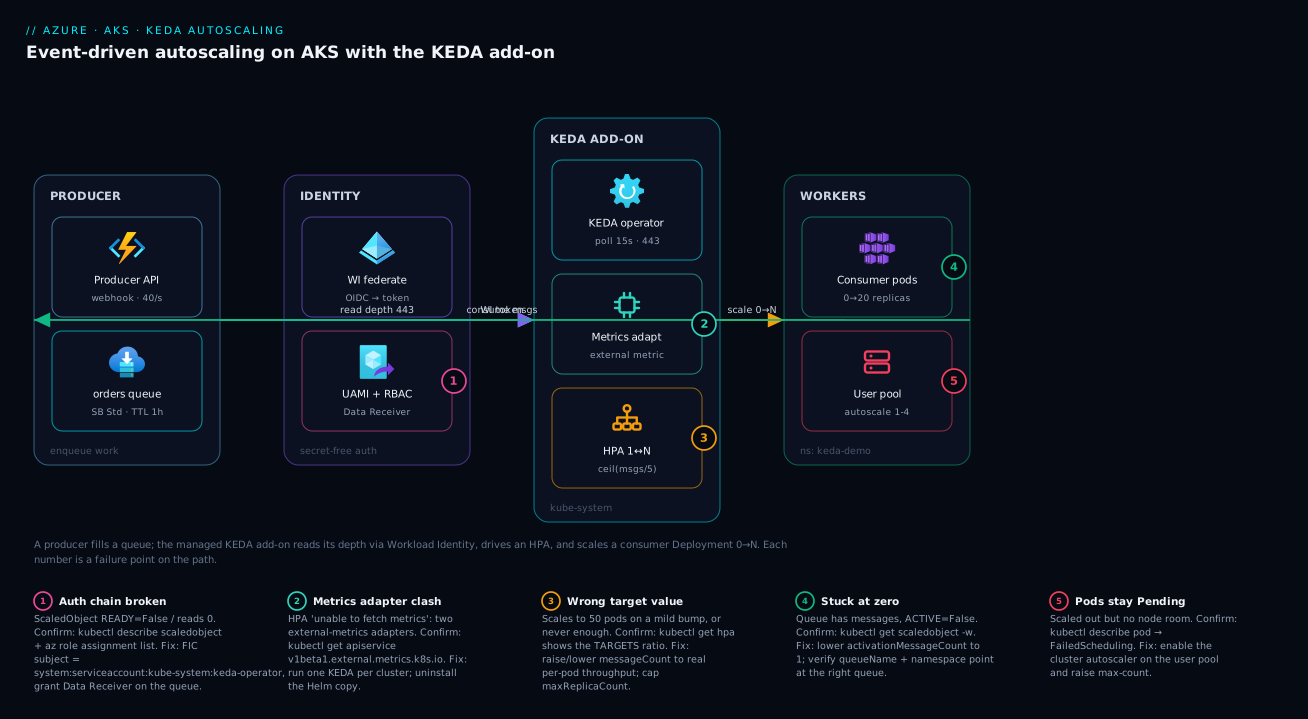
Walk the path left to right. A producer — a web API, a function, a webhook handler — drops messages onto an Azure Service Bus queue (or a Storage Queue). Inside the AKS cluster, the KEDA add-on (operator + metrics adapter, living in kube-system) polls that queue’s active-message count every pollingInterval seconds. It does this without a connection string: KEDA’s service account presents a federated Workload Identity token, Entra exchanges it for an access token tied to a User-Assigned Managed Identity that holds the Service Bus Data Receiver role on the queue, and KEDA reads the depth over HTTPS 443.
KEDA feeds that depth into the math ceil(messages / messageCount) and drives the result through a Kubernetes HPA it creates for the 1↔N range, handling the 0↔1 activation itself. The HPA patches your consumer Deployment’s replica count; new worker pods start on a user node pool (if there’s no room, the cluster autoscaler adds a node); each worker authenticates with the same Workload Identity to consume messages and drains the queue; and once the backlog clears and the cooldownPeriod elapses, KEDA scales the Deployment back to zero. The five badges mark the failure points: the federation/RBAC join, the metrics-adapter→HPA hop, the activation boundary, the consumer drain rate, and the node-capacity ceiling.
Real-world scenario
KloudShip Logistics runs a parcel-tracking platform. Carriers POST status webhooks — “picked up,” “in transit,” “delivered” — into an API that enqueues each event onto a Service Bus queue, parcel-events, where a Python consumer Deployment on AKS processes them: validate, enrich with route data, write to Cosmos DB, fan out a customer notification. Normal load is a steady 40 messages/second. But twice a day, when two major carriers run their batch scans, the producer dumps 80,000 events in under three minutes.
The original setup pinned the consumer at 6 replicas with a CPU-based HPA (target 70%). During a batch dump CPU climbed to maybe 55% — the workers were I/O-bound on Cosmos writes — so the HPA never scaled out. The 80,000-message burst drained at the fixed throughput of 6 replicas, and the backlog took 38 minutes to clear; customers got “delivered” notifications 35 minutes after the parcel arrived, and some events neared the queue’s TTL and risked dead-lettering. The on-call workaround — manually scaling to 30 replicas during known batch windows — drifted: someone forgot, a carrier changed its schedule, and the backlog returned.
The fix was a single ScaledObject. They enabled the KEDA add-on, granted a UAMI the Service Bus Data Receiver role on parcel-events, wired a TriggerAuthentication with Workload Identity, and replaced the CPU HPA with an azure-servicebus trigger: messageCount: 200, minReplicaCount: 2, maxReplicaCount: 50, activationMessageCount: 50, pollingInterval: 15. Now, fifteen seconds into a batch dump, KEDA sees 80,000 messages, computes ceil(80000/200) = 400, caps at 50, and the HPA scales the Deployment to 50 replicas. The cluster autoscaler adds three nodes to fit them. The backlog clears in just under 4 minutes, and past the cooldown KEDA scales back to 2.
The numbers that moved: backlog-clear from 38 minutes to under 4; notification latency from 35 minutes to under 1; and steady-state cost dropped — outside the two daily spikes the Deployment sits at 2 replicas instead of 6, and the user pool scales its nodes down with it. They tuned messageCount once: 100 over-scaled (50 replicas for a mild 6,000-message bump), so they raised it to 200 to match per-pod Cosmos throughput. One CRD, no custom controller, no cron drift.
Advantages and disadvantages
KEDA is the right tool for event-driven workloads, but not free of trade-offs. The honest two-column view:
| Advantages | Disadvantages |
|---|---|
| Scales on the real signal (queue depth, lag), not a CPU proxy | One more controller and CRD set to understand and debug |
| Scale to zero — pay nothing when there’s no work | 0→1 activation adds first-message latency (cold start) |
| 70+ built-in scalers; one model for many sources | Add-on pins the KEDA version to the AKS release train |
| Managed add-on = no day-2 lifecycle burden | Only one external-metrics adapter per cluster (conflicts with custom adapters) |
| Decoupled from the workload — add/remove without redeploy | Mis-tuned target value silently over- or under-scales |
| Workload Identity = secret-free auth | Auth chain (SA→UAMI→RBAC) has several places to get wrong |
| Works with the cluster autoscaler for node-level elasticity | KEDA scales pods only; node capacity is a separate concern |
The advantages dominate for bursty async workers, anything that idles for long stretches, and teams who want to stop hand-rolling scaling logic. The disadvantages bite on ultra-low-latency paths where a 0→1 cold start is unacceptable (keep minReplicaCount ≥ 1), and clusters already running a custom external-metrics adapter you can’t give up — there, run KEDA but don’t scale to zero, and resolve the adapter conflict before enabling the add-on.
Hands-on lab
This is the centerpiece. You will provision the messaging and identity, enable the KEDA add-on, deploy a Service Bus consumer that scales 0→N on queue depth, prove it by sending messages, add a Storage Queue ScaledObject, then wire a custom external scaler. Every step shows the command and expected output; a teardown at the end removes everything.
What you need: an Azure subscription with rights to create AKS, Service Bus, Storage, and managed identities; az CLI ≥ 2.60; kubectl; a shell. Budget roughly ₹40–80 (USD 0.50–1.00) per hour while it runs, so do the teardown when done. Set your variables once:
# Lab variables — edit RG/region/names as you like; names must be globally unique where noted
export RG=rg-keda-lab
export LOC=centralindia
export AKS=aks-keda-lab
export SB_NS=sbkedalab$RANDOM        # Service Bus namespace — globally unique
export SB_QUEUE=orders
export ST_ACCT=stkedalab$RANDOM      # Storage account — globally unique, lowercase
export ST_QUEUE=jobs
export UAMI=id-keda-lab
export NS=keda-demo                  # Kubernetes namespace for the demo workload
Step 1 — Resource group, Service Bus, and Storage Queue
Create the resource group and both event sources.
az group create --name $RG --location $LOC

# Service Bus namespace (Standard tier — supports queues + topics) and a queue
az servicebus namespace create --resource-group $RG --name $SB_NS --location $LOC --sku Standard
az servicebus queue create --resource-group $RG --namespace-name $SB_NS --name $SB_QUEUE \
  --max-delivery-count 10 --default-message-time-to-live PT1H

# Storage account + a queue (we'll use this for the second ScaledObject)
az storage account create --resource-group $RG --name $ST_ACCT --location $LOC --sku Standard_LRS
az storage queue create --account-name $ST_ACCT --name $ST_QUEUE --auth-mode login
Expected output: each command returns a JSON block with "provisioningState": "Succeeded". Validate the queue exists:
az servicebus queue show -g $RG --namespace-name $SB_NS --name $SB_QUEUE \
  --query "{name:name, status:status, msgs:messageCount}" -o table
# Name    Status   Msgs
# ------  -------  ----
# orders  Active   0
Step 2 — AKS cluster with OIDC issuer and Workload Identity
Create an AKS cluster with the OIDC issuer and Workload Identity enabled — both required for secret-free scaler auth. (On an existing cluster, enable them with az aks update --enable-oidc-issuer --enable-workload-identity.)
az aks create --resource-group $RG --name $AKS --location $LOC \
  --node-count 1 --node-vm-size Standard_B2s \
  --enable-oidc-issuer --enable-workload-identity \
  --generate-ssh-keys

# Add a user node pool with the cluster autoscaler for the burst workers
az aks nodepool add --resource-group $RG --cluster-name $AKS --name userpool \
  --node-vm-size Standard_B2s --enable-cluster-autoscaler --min-count 1 --max-count 4 \
  --mode User

az aks get-credentials --resource-group $RG --name $AKS --overwrite-existing
Expected output: az aks create runs 3–6 minutes and ends with a large JSON. get-credentials prints Merged "aks-keda-lab" as current context. Validate the OIDC issuer is on and grab its URL — you need it for the federated credential:
export OIDC_ISSUER=$(az aks show -g $RG -n $AKS --query "oidcIssuerProfile.issuerUrl" -o tsv)
echo $OIDC_ISSUER
# https://centralindia.oic.prod-aks.azure.com/<tenant-guid>/<cluster-guid>/
kubectl get nodes
# NAME                STATUS   ROLES   AGE   VERSION
# aks-nodepool1-...   Ready    <none>  5m    v1.30.x
# aks-userpool-...    Ready    <none>  2m    v1.30.x
Step 3 — Enable the KEDA add-on
Enable the managed add-on:
az aks update --resource-group $RG --name $AKS --enable-keda
Expected output: a few minutes, then JSON showing "workloadAutoScalerProfile": { "keda": { "enabled": true } }. Validate the operator and metrics adapter are running:
kubectl get pods -n kube-system -l app.kubernetes.io/name=keda-operator
# NAME                             READY   STATUS    RESTARTS   AGE
# keda-operator-xxxxxxxxxx-xxxxx   1/1     Running   0          90s

# Confirm the CRDs registered
kubectl get crd | grep keda.sh
# scaledobjects.keda.sh
# scaledjobs.keda.sh
# triggerauthentications.keda.sh
# clustertriggerauthentications.keda.sh
If scaledobjects.keda.sh is missing, the add-on didn’t finish — re-run the az aks show to check keda.enabled is true.
Step 4 — Create the managed identity and federated credential
Create the UAMI, grant it RBAC on the queue, and federate it to KEDA’s service account and your workload’s.
# 1. Create the user-assigned managed identity
az identity create --resource-group $RG --name $UAMI
export UAMI_CLIENT_ID=$(az identity show -g $RG -n $UAMI --query clientId -o tsv)
export UAMI_PRINCIPAL_ID=$(az identity show -g $RG -n $UAMI --query principalId -o tsv)
export TENANT_ID=$(az account show --query tenantId -o tsv)

# 2. Grant it the role to READ queue depth + CONSUME messages (scoped to the namespace)
export SB_ID=$(az servicebus namespace show -g $RG -n $SB_NS --query id -o tsv)
az role assignment create --assignee-object-id $UAMI_PRINCIPAL_ID --assignee-principal-type ServicePrincipal \
  --role "Azure Service Bus Data Receiver" --scope $SB_ID

# 3. Federate the KEDA operator's service account (so the SCALER can read the queue)
#    The add-on's operator SA is 'keda-operator' in kube-system.
az identity federated-credential create --name fic-keda-operator \
  --identity-name $UAMI --resource-group $RG \
  --issuer $OIDC_ISSUER \
  --subject system:serviceaccount:kube-system:keda-operator \
  --audience api://AzureADTokenExchange
Expected output: the role assignment returns JSON with the role name; the federated credential returns its config. Validate the role landed:
az role assignment list --assignee $UAMI_PRINCIPAL_ID --scope $SB_ID \
  --query "[].roleDefinitionName" -o tsv
# Azure Service Bus Data Receiver
Now create the demo namespace and a workload ServiceAccount annotated for Workload Identity, and federate it too (so the worker pods can consume):
kubectl create namespace $NS

cat <<EOF | kubectl apply -f -
apiVersion: v1
kind: ServiceAccount
metadata:
  name: order-consumer
  namespace: $NS
  annotations:
    azure.workload.identity/client-id: "$UAMI_CLIENT_ID"
EOF

az identity federated-credential create --name fic-order-consumer \
  --identity-name $UAMI --resource-group $RG \
  --issuer $OIDC_ISSUER \
  --subject system:serviceaccount:$NS:order-consumer \
  --audience api://AzureADTokenExchange
Step 5 — Deploy the consumer Deployment
Deploy a worker that consumes from the queue. The key bits are the azure.workload.identity/use: "true" pod label and the serviceAccountName.
cat <<EOF | kubectl apply -f -
apiVersion: apps/v1
kind: Deployment
metadata:
  name: order-consumer
  namespace: $NS
spec:
  replicas: 0
  selector:
    matchLabels: { app: order-consumer }
  template:
    metadata:
      labels:
        app: order-consumer
        azure.workload.identity/use: "true"
    spec:
      serviceAccountName: order-consumer
      containers:
        - name: worker
          image: mcr.microsoft.com/k8s/keda/sample-consumer:latest  # replace with your worker image
          env:
            - name: AZURE_SERVICEBUS_NAMESPACE
              value: "$SB_NS.servicebus.windows.net"
            - name: AZURE_SERVICEBUS_QUEUE
              value: "$SB_QUEUE"
          resources:
            requests: { cpu: "100m", memory: "128Mi" }
            limits: { cpu: "500m", memory: "256Mi" }
EOF
Expected output: deployment.apps/order-consumer created. Because we set replicas: 0, no pods start yet — that’s correct; KEDA will own the replica count from here. Validate:
kubectl get deploy order-consumer -n $NS
# NAME             READY   UP-TO-DATE   AVAILABLE   AGE
# order-consumer   0/0     0            0           20s
Note:
mcr.microsoft.com/k8s/keda/sample-consumeris a placeholder — point it at your own image that receives fromAZURE_SERVICEBUS_QUEUEusingDefaultAzureCredential(which picks up the Workload Identity token automatically). The scaling you’re about to test depends only on KEDA reading the queue, not on this image.
Step 6 — Wire the TriggerAuthentication and ScaledObject
Create a TriggerAuthentication that tells KEDA to use Workload Identity, then a ScaledObject that scales the Deployment on Service Bus queue depth.
cat <<EOF | kubectl apply -f -
apiVersion: keda.sh/v1alpha1
kind: TriggerAuthentication
metadata:
  name: sb-auth
  namespace: $NS
spec:
  podIdentity:
    provider: azure-workload
    identityId: "$UAMI_CLIENT_ID"
---
apiVersion: keda.sh/v1alpha1
kind: ScaledObject
metadata:
  name: order-consumer-scaler
  namespace: $NS
spec:
  scaleTargetRef:
    name: order-consumer
  minReplicaCount: 0
  maxReplicaCount: 20
  pollingInterval: 15
  cooldownPeriod: 60
  triggers:
    - type: azure-servicebus
      metadata:
        queueName: "$SB_QUEUE"
        namespace: "$SB_NS"
        messageCount: "5"
        activationMessageCount: "1"
      authenticationRef:
        name: sb-auth
EOF
Expected output: triggerauthentication.keda.sh/sb-auth created and scaledobject.keda.sh/order-consumer-scaler created. KEDA now creates an HPA behind the scenes. Validate both the ScaledObject is Ready and the HPA exists:
kubectl get scaledobject -n $NS
# NAME                    SCALETARGETKIND      MIN   MAX   READY   ACTIVE   AGE
# order-consumer-scaler   apps/v1.Deployment   0     20    True    False    15s

kubectl get hpa -n $NS
# NAME                            REFERENCE                   TARGETS       MINPODS  MAXPODS  REPLICAS
# keda-hpa-order-consumer-scaler  Deployment/order-consumer   0/5 (avg)     1        20       0
READY=True means KEDA authenticated and is polling. ACTIVE=False with the queue empty is correct — it’s holding the Deployment at zero. If READY=False, jump to the troubleshooting section — it’s almost always the auth chain.
Step 7 — Send messages and watch it scale 0→N
Now prove it. Send 50 messages to the queue and watch KEDA wake the Deployment and scale it out. Send messages with the CLI (using your own identity, which has the data role inherited from being the subscription owner — or assign yourself Azure Service Bus Data Sender if needed):
# Send 50 messages (loop the CLI send; or use any Service Bus sender you have)
for i in $(seq 1 50); do
  az servicebus queue send --resource-group $RG --namespace-name $SB_NS \
    --queue-name $SB_QUEUE --message-body "order-$i" >/dev/null
done
echo "sent 50 messages"
Immediately watch the queue depth, the ScaledObject, and the replica count in a loop:
# Watch KEDA react (Ctrl-C after you've seen it scale up and back to zero)
kubectl get hpa keda-hpa-order-consumer-scaler -n $NS -w
# Within ~15s (one pollingInterval): TARGETS climbs to 50/5, REPLICAS jumps toward 10
# As the consumer drains the queue, TARGETS falls; after cooldownPeriod (60s) at 0, REPLICAS → 0
Expected behaviour: within one pollingInterval (15s), ACTIVE flips to True, the HPA TARGETS shows roughly 50/5, and REPLICAS rises toward ceil(50/5)=10 (capped at 20). Confirm the activation and pods:
kubectl get scaledobject order-consumer-scaler -n $NS \
  -o jsonpath='{.status.conditions[?(@.type=="Active")].status}{"\n"}'   # True while messages present
kubectl get pods -n $NS -l app=order-consumer   # ~10 pods during the burst
As the workers drain the queue to zero and the 60-second cooldownPeriod elapses, KEDA scales the Deployment back to 0. Watching that full cycle — 0 → 10 → 0 — is the proof. If pods sit in Pending, the cluster autoscaler is adding a node (give it a minute) — the KEDA + cluster-autoscaler pairing in action.
Step 8 — Add a Storage Queue ScaledObject
Now add the second scaler so you’ve used both Azure queue sources. Grant the UAMI the Storage Queue read role, then apply a ScaledObject for a second Deployment.
# Grant the UAMI rights to read the Storage Queue length
export ST_ID=$(az storage account show -g $RG -n $ST_ACCT --query id -o tsv)
az role assignment create --assignee-object-id $UAMI_PRINCIPAL_ID --assignee-principal-type ServicePrincipal \
  --role "Storage Queue Data Reader" --scope $ST_ID

# Deploy a second worker 'job-consumer' (same shape as Step 5: replicas 0,
# the azure.workload.identity/use label, serviceAccountName: order-consumer),
# then attach a Storage Queue ScaledObject to it:
cat <<EOF | kubectl apply -f -
apiVersion: keda.sh/v1alpha1
kind: ScaledObject
metadata:
  name: job-consumer-scaler
  namespace: $NS
spec:
  scaleTargetRef:
    name: job-consumer
  minReplicaCount: 0
  maxReplicaCount: 10
  pollingInterval: 20
  triggers:
    - type: azure-queue
      metadata:
        queueName: "$ST_QUEUE"
        accountName: "$ST_ACCT"
        queueLength: "5"
        activationQueueLength: "1"
      authenticationRef:
        name: sb-auth
EOF
Expected output: the new Deployment and ScaledObject are created. Push a few messages onto the Storage Queue and confirm it scales:
for i in $(seq 1 20); do
  az storage message put --account-name $ST_ACCT --queue-name $ST_QUEUE \
    --content "job-$i" --auth-mode login >/dev/null
done

kubectl get scaledobject job-consumer-scaler -n $NS
# ACTIVE should flip to True within ~20s; REPLICAS rises toward ceil(20/5)=4
You’ve now driven two Deployments off two different Azure queue sources with a single shared TriggerAuthentication.
Step 9 — A custom external scaler (the escape hatch)
For any metric KEDA doesn’t ship a scaler for, use the external scaler type — a gRPC service you run that implements KEDA’s ExternalScaler contract (IsActive, GetMetricSpec, GetMetrics), called on every poll. The ScaledObject just points at its address. This is the pattern for “scale on a business KPI” — a billing backlog, a per-tenant SLA queue, anything you can express as a number. Deploy your gRPC scaler as a Service, then reference it in a trigger:
# The 'external' trigger block — scalerAddress is your in-cluster gRPC Service
triggers:
  - type: external
    metadata:
      scalerAddress: "my-external-scaler.keda-demo.svc.cluster.local:9090"
      metricName: "billing_backlog"   # your scaler defines it
      targetValue: "10"               # per-replica target
A common shortcut avoids the gRPC code entirely: if your metric is already in Prometheus, use the built-in prometheus trigger (serverAddress, a query, and a threshold as the per-replica target) — no custom scaler to build or run. The external vs external-push distinction: external is pull (KEDA polls GetMetrics every interval); external-push lets your scaler stream activation events in real time, for sub-poll-interval reaction.
Step 10 — Teardown
Delete everything so the lab stops billing. The resource group sweep removes the cluster, Service Bus, Storage, and identity in one shot.
# Remove the federated credentials first (they reference the cluster issuer)
az identity federated-credential delete --name fic-keda-operator --identity-name $UAMI -g $RG --yes
az identity federated-credential delete --name fic-order-consumer --identity-name $UAMI -g $RG --yes

# Then delete the whole resource group (cluster, SB, storage, UAMI)
az group delete --name $RG --yes --no-wait
Expected output: the federated-credential deletes return immediately; az group delete --no-wait returns at once and the deletion runs in the background. Confirm it’s gone after a few minutes:
az group exists --name $RG
# false
Bicep version
To provision the same KEDA-ready cluster declaratively, the essential resources are the AKS cluster with the OIDC issuer, Workload Identity, and the KEDA add-on all enabled. The workloadAutoScalerProfile.keda.enabled flag is the add-on:
@description('KEDA-ready AKS cluster: OIDC issuer + Workload Identity + KEDA add-on')
param location string = resourceGroup().location
param clusterName string = 'aks-keda-lab'

resource aks 'Microsoft.ContainerService/managedClusters@2024-09-01' = {
  name: clusterName
  location: location
  identity: { type: 'SystemAssigned' }
  properties: {
    dnsPrefix: clusterName
    oidcIssuerProfile: { enabled: true }            // required for Workload Identity
    securityProfile: {
      workloadIdentity: { enabled: true }           // federated token support
    }
    workloadAutoScalerProfile: {
      keda: { enabled: true }                        // the managed KEDA add-on
    }
    agentPoolProfiles: [
      {
        name: 'system'
        mode: 'System'
        count: 1
        vmSize: 'Standard_B2s'
      }
      {
        name: 'userpool'
        mode: 'User'
        vmSize: 'Standard_B2s'
        enableAutoScaling: true                       // cluster autoscaler for burst pods
        minCount: 1
        maxCount: 4
      }
    ]
  }
}

output oidcIssuerUrl string = aks.properties.oidcIssuerProfile.issuerURL
The ScaledObject, TriggerAuthentication, federated credentials, and RBAC assignments are applied after the cluster exists (the CRDs only register once the add-on is on) — keep those as the kubectl apply and az steps from Steps 4–8 in your pipeline.
Common mistakes & troubleshooting
The failures that catch everyone — symptom → root cause → confirm (exact command) → fix.
| # | Symptom | Root cause | Confirm with | Fix |
|---|---|---|---|---|
| 1 | ScaledObject READY=False |
Auth chain broken (FIC/RBAC/SA) | kubectl describe scaledobject <name> -n <ns> |
Fix the federated credential subject + RBAC role |
| 2 | Stays at 0 even with messages | activationMessageCount too high, or scaler reads wrong queue |
kubectl get hpa <name> -w; check TARGETS |
Lower activation; verify queueName/namespace |
| 3 | HPA unable to fetch metrics |
Metrics adapter can’t reach source / two adapters | kubectl describe hpa keda-hpa-<name> |
Resolve metrics-adapter conflict; check auth |
| 4 | Never scales to zero | minReplicaCount ≥ 1, or cooldown not elapsed |
kubectl get scaledobject -o yaml |
Set minReplicaCount: 0; wait cooldownPeriod |
| 5 | Scales way too high | messageCount/queueLength target too low |
kubectl get hpa shows huge TARGETS ratio |
Raise the target to match per-pod throughput |
| 6 | Pods Pending after scale-up |
No node capacity; cluster autoscaler not on | kubectl describe pod <pod> → FailedScheduling |
Enable cluster autoscaler; raise maxCount |
| 7 | Scaler authenticates but reads 0 | Wrong RBAC role (e.g. missing Data Receiver) | az role assignment list --assignee <pid> |
Grant Service Bus Data Receiver on the queue |
| 8 | Flaps between 0 and 1 | cooldownPeriod too short for trickle traffic |
watch kubectl get hpa -w |
Raise cooldownPeriod; set minReplicaCount: 1 |
| 9 | Two ScaledObjects, one stops working | Both generate HPAs targeting the same Deployment | kubectl get hpa -n <ns> (duplicate target) |
One ScaledObject per workload only |
| 10 | Worker pods crash on startup | Pod missing azure.workload.identity/use: "true" label |
kubectl logs <pod> → DefaultAzureCredential error |
Add the label to the pod template + restart |
The auth-chain failure (the #1 issue)
If READY=False or the scaler reads zero despite a full queue, walk the chain in order:
# 1. The ScaledObject's own status names the auth failure
kubectl describe scaledobject order-consumer-scaler -n $NS
#   Look in Events/Conditions for: "unable to get credentials" / "401" / "AADSTS70021"

# 2. KEDA operator logs show the token exchange / read attempt
kubectl logs -n kube-system -l app.kubernetes.io/name=keda-operator --tail=50 | grep -i -E "error|auth|servicebus"

# 3. Is the federated credential subject EXACTLY the operator's SA?
az identity federated-credential show --name fic-keda-operator --identity-name $UAMI -g $RG \
  --query "{subject:subject, issuer:issuer}" -o json
#   subject MUST equal: system:serviceaccount:kube-system:keda-operator
#   issuer MUST equal your cluster's OIDC issuer URL

# 4. Does the UAMI actually hold the role on the queue?
az role assignment list --assignee $UAMI_PRINCIPAL_ID --scope $SB_ID --query "[].roleDefinitionName" -o tsv
#   Must include: Azure Service Bus Data Receiver
AADSTS70021: No matching federated identity record found always means the FIC subject or issuer doesn’t match — recreate the FIC with the exact system:serviceaccount:kube-system:keda-operator subject and your cluster’s issuer URL.
The “stuck at zero” decision table
When the Deployment refuses to wake despite a queue with messages:
| If you see… | It’s probably… | Do this |
|---|---|---|
ACTIVE=False, queue has messages |
activationMessageCount ≥ message count |
Lower activationMessageCount to 1 |
HPA TARGETS shows 0/5 |
Scaler reads the wrong queue/namespace | Fix queueName + namespace in the trigger |
READY=False |
Auth failing | Walk the auth chain above |
TARGETS shows <unknown> |
Metrics adapter can’t serve the metric | kubectl describe hpa; check for adapter conflict |
| Everything looks right, still 0 | KEDA hasn’t polled yet | Wait one pollingInterval; check operator logs |
The metrics-adapter conflict
If the HPA says unable to fetch metrics from external metrics API, you likely have two external-metrics adapters (the add-on plus a leftover Helm install, or another custom adapter). Only one can register v1beta1.external.metrics.k8s.io:
# Which API service currently owns external metrics?
kubectl get apiservice v1beta1.external.metrics.k8s.io -o jsonpath='{.spec.service.name}{"\n"}'
# Should be the KEDA metrics adapter. If it's something else (or a stale Helm release), uninstall the other one.
Best practices
- Use the managed add-on, not a Helm install, unless you have a specific reason to pin a KEDA version. It removes the day-2 lifecycle and keeps KEDA version-aligned to your cluster.
- Authenticate with Workload Identity, never a connection-string Secret. No secret on disk, scoped RBAC, full audit trail.
- Grant least privilege: the scaler needs only Data Receiver / Queue Data Reader to read depth; give the worker the consume role. Scope roles to the queue, not the whole namespace, where you can.
- Always cap
maxReplicaCount. Without a ceiling, a producer bug or a poison-message storm can scale you to 100 pods and a huge bill before you notice. - Tune the target value (
messageCount/queueLength) to real per-pod throughput. Start higher than you think; over-scaling wastes money and can overwhelm a downstream (a database that now has 50 writers). - Pick
activationMessageCount≥ 1 so a single message wakes you from zero, but set it higher if you want to ignore trickle traffic and only spin up for real batches. - Pair KEDA with the cluster autoscaler and give burst workers a user node pool (ideally spot nodes for cheap, interruptible batch work). KEDA scales pods; nodes are a separate elasticity layer.
- Set a
fallbackso a transient broker outage holds a safe replica count instead of scaling you to zero and stranding the queue. - Prefer a ScaledJob for long, isolated, per-message work (a 20-minute transcode); a ScaledObject for high-throughput streaming consumers.
- One ScaledObject per workload. Two targeting the same Deployment generate competing HPAs and undefined behaviour — use multiple triggers in one ScaledObject to scale on several signals (KEDA takes the max).
- Watch the scale-down path:
cooldownPeriodgoverns the descent to zero; tune the HPA stabilization window for the 1↔N range to avoid thrashing. - Monitor the queue depth and the consumer drain rate. If depth keeps climbing at
maxReplicaCount, the bottleneck is downstream (the database, an API), not pod count — adding replicas won’t help.
Security notes
KEDA touches an event source and your workload’s identity, so its security posture is mostly about the credential and the blast radius.
| Concern | Risk | Mitigation |
|---|---|---|
| Scaler credentials | A connection-string Secret leaks a powerful Manage credential | Use Workload Identity; never put a connection string in a Secret |
| Over-privileged UAMI | A single identity with broad rights is a fat target | Scope RBAC to the queue; grant only Data Receiver to the scaler |
| Worker identity | Worker over-permissioned (e.g. Manage instead of receive) | Grant the worker only Data Receiver / message-processor on its queue |
| Secret-free attack surface | Federated tokens are short-lived | Workload Identity tokens auto-rotate; no long-lived secret to steal |
| ClusterTriggerAuthentication scope | A cluster-wide auth object is usable by any namespace | Prefer namespaced TriggerAuthentication; use cluster-scoped sparingly |
| Network exposure of the source | Queue reachable over public internet | Use Private Endpoints for Service Bus/Storage; KEDA reads over the backbone |
| Poison-message scale storm | A malformed message that never acks can pin you at max replicas | Set maxDeliveryCount + dead-letter; cap maxReplicaCount |
| External scaler endpoint | A rogue gRPC scaler could force scale-up | Run external scalers in-cluster; restrict who can deploy them with RBAC/NetworkPolicy |
The two rules that matter most: scaler and worker get separate, least-privilege roles scoped to the queue, and the source is reached privately. With Workload Identity there is no static secret anywhere in the path — the most common credential-leak vector for queue consumers doesn’t exist.
Cost & sizing
KEDA itself is free — the add-on adds no licence cost; you pay only for the small operator/metrics-adapter pods in kube-system. The savings come from scale-to-zero and right-sized bursts. What actually drives the bill:
| Cost driver | Scales with | How to control it | Rough figure |
|---|---|---|---|
| Worker pod compute | Replicas × pod size × time | maxReplicaCount cap; scale to zero when idle |
Node-hour cost ÷ pods per node |
| Node capacity (the real cost) | Nodes the autoscaler adds for pods | User pool min/max; spot for batch | Standard_B2s ≈ ₹3–4 (USD 0.04)/hr |
| Service Bus | Tier + operations | Standard tier; batch sends | Standard ≈ ₹800 (USD 10)/mo base |
| Storage Queue | Transactions + storage | Cheap; pennies for most loads | Fractions of a ₹/USD for typical volume |
| KEDA polling API calls | pollingInterval (lower = more calls) |
Don’t poll faster than you need | Negligible unless extremely frequent |
The single biggest lever is scale-to-zero with a user node pool + cluster autoscaler: when KEDA scales the Deployment to 0 and no other pods need those nodes, the cluster autoscaler removes the nodes — you pay nothing for idle worker capacity. A workload that bursts for 20 minutes twice a day costs roughly 1/30th of one pinned to peak 24/7. Sizing rule: set maxReplicaCount to the point where your downstream (database, API) saturates — past that, more pods deepen contention, not throughput.
Interview & exam questions
Q1. Why is CPU-based HPA a poor fit for a queue consumer, and what does KEDA change? A queue worker is usually I/O-bound — blocked on the broker and downstream — so CPU stays low even with a deep backlog, and the HPA scales late or not at all. KEDA scales on the event source (queue depth, lag) directly, so replicas track the actual work waiting, and it can scale to zero. (AKS / CKA-adjacent.)
Q2. How does KEDA scale a Deployment to and from zero when an HPA cannot?
An HPA’s range is 1↔N. KEDA handles the 0↔1 transitions itself: it activates the Deployment (0→1) when the source crosses the activation threshold, and deactivates it (N→0) after the cooldownPeriod. It delegates the 1↔N range to a standard HPA it creates. (KEDA fundamentals.)
Q3. What’s the difference between messageCount and activationMessageCount on the Service Bus scaler?
activationMessageCount is the threshold to wake from zero (0→1); messageCount is the target messages per replica once active, driving the 1↔N replica math. They control different transitions. (KEDA scalers.)
Q4. Why is Workload Identity preferred over a connection-string Secret for KEDA auth? A connection-string Secret stores a powerful, long-lived credential in etcd that’s visible to anyone with Secret read access and must be rotated manually. Workload Identity uses a short-lived federated token mapped to a scoped UAMI with RBAC — no secret on disk, auto-rotating, least-privilege, auditable. (Azure security.)
Q5. A ScaledObject shows READY=False. Where do you look first?
The auth chain. kubectl describe scaledobject surfaces the failure; then verify the federated credential’s subject is exactly the service account (system:serviceaccount:kube-system:keda-operator for the operator), the issuer matches the cluster OIDC URL, and the UAMI holds the right RBAC role on the queue. (Troubleshooting.)
Q6. How do KEDA and the cluster autoscaler relate? They’re complementary, at different layers. KEDA scales pods on events; when those pods can’t be scheduled for lack of node capacity, the cluster autoscaler adds nodes. KEDA never adds nodes itself. (AKS architecture.)
Q7. When would you choose a ScaledJob over a ScaledObject? For long-running, isolated, per-message work — e.g. a 20-minute video transcode — where you want one Kubernetes Job per message with clean isolation and no risk of one message’s failure affecting another. A ScaledObject is better for high-throughput streaming consumers that loop. (KEDA patterns.)
Q8. Your ScaledObject scales to 50 pods for a mild bump in queue depth. Why, and what do you change?
The target value (messageCount/queueLength) is too low, so KEDA computes too many replicas per message. Raise it to match real per-pod throughput. (KEDA tuning.)
Q9. What’s the risk of running the KEDA add-on alongside a Helm-installed KEDA?
Both register the external.metrics.k8s.io API service; only one can serve it, so the HPA gets non-deterministic metrics and scaling breaks. Run exactly one KEDA per cluster. (AKS add-on constraints.)
Q10. How do you scale on a metric KEDA has no built-in scaler for?
Use the external scaler — a gRPC service implementing KEDA’s ExternalScaler contract — or, if the metric is already in Prometheus, the prometheus scaler with a query and threshold. (KEDA extensibility.)
Q11. Why scope the scaler’s RBAC to “Data Receiver” rather than “Manage”? The scaler only needs to read the queue’s message count; Data Receiver grants that. Manage would let it create/delete entities — far more than required, violating least privilege and widening the blast radius if the identity is compromised. (Azure RBAC.)
Quick check
- What replica count does KEDA target for 120 active messages with
messageCount: 20? - Which component handles the 0→1 transition that an HPA cannot — the HPA or KEDA itself?
- You want a single message to wake the Deployment from zero. Which field do you set, and to what?
- Name the two RBAC roles: one for the scaler to read a Service Bus queue’s depth, one for the worker to consume — and note if they differ.
- Two ScaledObjects target the same Deployment. What goes wrong, and what’s the correct pattern?
Answers
- 6.
ceil(120 / 20) = 6(capped atmaxReplicaCount). - KEDA itself. It activates (0→1) and deactivates (N→0) the workload; it hands the 1↔N range to a generated HPA.
activationMessageCount: "1"— the threshold to transition from zero to one.- Both are Azure Service Bus Data Receiver here — the receiver role covers reading depth and consuming. (You could give the scaler only Data Receiver and the worker the same; they don’t have to differ for Service Bus. For Storage Queue they do: Storage Queue Data Reader to read length vs Storage Queue Data Message Processor to dequeue.)
- They generate two competing HPAs against one Deployment → undefined scaling. Correct pattern: one ScaledObject per workload, with multiple triggers inside it if you need several signals (KEDA scales on the highest).
Glossary
- KEDA (Kubernetes Event-Driven Autoscaling): a controller that scales Kubernetes workloads on external event sources (queues, streams, metrics), including scale-to-zero.
- KEDA add-on: the Azure-managed installation of KEDA on AKS (
--enable-keda); Microsoft owns its lifecycle and version-aligns it to the cluster. - ScaledObject: a KEDA CRD that scales an existing Deployment/StatefulSet on one or more event triggers.
- ScaledJob: a KEDA CRD that runs one Kubernetes Job per message/batch — for isolated, long-running work.
- Scaler: a KEDA plugin that reads one event source and exposes its value as a metric (e.g.
azure-servicebus,azure-queue,prometheus,external). - Trigger: one scaler configuration block inside a ScaledObject, where you set the target value.
- TriggerAuthentication: a reusable KEDA object that supplies credentials (Workload Identity, Secret) to triggers in its namespace.
- HPA (HorizontalPodAutoscaler): the native Kubernetes autoscaler KEDA creates to drive the 1↔N replica range.
messageCount/queueLength: the target number of messages per replica; the core tuning knob for how aggressively you scale.activationMessageCount/activationQueueLength: the threshold that triggers the 0→1 wake-from-zero transition.pollingInterval: how often (seconds) KEDA reads the event source.cooldownPeriod: the idle time (seconds) before KEDA scales a Deployment to zero.- Workload Identity (Entra): AKS feature mapping a Kubernetes ServiceAccount to a User-Assigned Managed Identity via a federated token — secret-free Azure auth.
- User-Assigned Managed Identity (UAMI): a standalone Azure identity you grant RBAC roles to; the target of the Workload Identity federation.
- Federated identity credential (FIC): the trust between the cluster’s OIDC issuer + a ServiceAccount subject and a UAMI; the join that makes Workload Identity work.
- Cluster autoscaler: the AKS component that adds/removes nodes when pods can’t be scheduled — KEDA’s partner for node-level elasticity.
Next steps
- Stand up the cluster KEDA runs on with Create your first AKS cluster (CLI, portal, Bicep), then revisit the add-on enablement here.
- Give burst workers the right home with AKS node pools: system, user, spot, and taints explained — spot user pools make event-driven batch work genuinely cheap.
- Master the messaging source behind the Service Bus scaler in Create a Service Bus namespace, queue, and .NET sender/receiver and Service Bus queues vs topics: when to use which.
- Wire the identity model properly with Managed identity: system-assigned vs user-assigned patterns.
- Compare the host options — Container Apps uses KEDA as its built-in scaler — in AKS vs Container Apps vs ACI: choosing your compute.
- Close the loop on observability so you can see scaling and drain rates with Azure Monitor & Application Insights for observability.