You have a web app behind a single Application Gateway, and last quarter it became the thing that took you down. One availability zone in the region had a power event, your gateway instance happened to live there, and for nineteen minutes every request to your public endpoint returned nothing — even though the backend App Service was perfectly healthy in the other two zones. The gateway, the one component meant to make you resilient, was itself a single point of failure. That is the gap this article closes. Application Gateway v2 — the Standard_v2 and WAF_v2 SKUs — can run as a zone-redundant resource that places its instances across multiple availability zones, and it can autoscale its instance count up and down with traffic instead of running a fixed, hand-sized fleet. Built correctly from the start, a single zone failure costs you nothing and a traffic spike scales you out automatically rather than paging you.
This is a build guide, not a survey. You will stand up a real Standard_v2 gateway from an empty resource group three ways — clickable in the portal, scripted with az CLI, and declared in Bicep — with autoscaling (a minimum and maximum instance count) and zone redundancy on (instances spread across zones 1, 2 and 3). You wire the four pieces every gateway needs — a frontend listener, a backend pool, a backend HTTP setting and a health probe joined by a routing rule — then validate that it works and actually spans zones, because “I created it” and “it is resilient” are different claims. The exemplar for the v2 platform mechanics is the end-to-end TLS build in End-to-End TLS with Application Gateway v2 + WAF; this article is the zone-redundancy and autoscaling layer underneath it.
By the end you will understand why the v1 SKU could not do this, why zone redundancy is a deployment-time decision you cannot toggle later, what the autoscale floor and ceiling cost, and how to read the metrics that prove the gateway is healthy across all three zones — plus the mistakes that turn a thirty-minute task into a two-hour one: the undersized /24 subnet, the NSG that silently breaks the platform’s health channel, and the Standard_v2 versus Standard SKU confusion that leaves you on the old, non-zonal platform.
What problem this solves
A load balancer that is itself a single point of failure is a liability with good intentions. The classic failure mode is the one above: you build redundancy at the backend (App Service instances, VMs in a scale set, pods across nodes) then funnel all of it through one gateway instance pinned to one zone. When that zone has an incident — and Azure zones are isolated precisely because incidents happen — the backend survives but nobody can reach it. You bought high availability everywhere except the one place every packet passes through.
The second problem is capacity that does not move. Application Gateway v1 ran a fixed number of instances you sized by hand. Under-provision and a traffic spike (a marketing email, a flash sale, a viral post) overwhelms the gateway: requests queue, latency climbs, connections drop, while the backend sits half-idle. Over-provision and you pay around the clock for headroom you use ninety minutes a week. Either way an engineer is in the loop dragging a slider — the work autoscaling exists to delete.
Who hits this: anyone running a public web app or API that needs layer-7 routing (path/host routing, TLS termination, cookie affinity, or a WAF) and an availability target above a single zone’s. If layer 4 is enough, the regional Azure Load Balancer is already zone-redundant and cheaper. But the moment you need HTTP-aware routing or a WAF and must survive a zone failure, a zone-redundant, autoscaling Application Gateway v2 is the answer — built that way from the first command, because the zonal decision is not reversible in place.
| Pain in production | What it looks like | Without zone-redundant autoscaling v2 | With it |
|---|---|---|---|
| Single-zone gateway dies | All requests fail though backend is healthy | 15–30 min outage per zone incident | Zero impact; surviving zones serve |
| Traffic spike | Latency climbs, connections drop | Manual scale-up, paged engineer | Autoscale adds capacity in minutes |
| Quiet hours | Paying for peak fleet at 3 a.m. | Fixed instance bill 24/7 | Scales down to the floor |
| Maintenance / platform patch | Brief capacity dip | Single instance = downtime window | Rolling across zones, no dip |
| v1 SKU end-of-life | Migration pressure, no autoscale | Stuck on fixed-capacity v1 | On the supported v2 platform |
Learning objectives
By the end of this article you can:
- Explain how Application Gateway v2 achieves zone redundancy and autoscaling, and why the v1 SKU cannot do either.
- Choose correctly between
Standard_v2andWAF_v2, and between zone-redundant and zonal deployment, knowing which choices are fixed at creation. - Plan the dedicated gateway subnet, public IP, and NSG so the platform’s health and management traffic is never blocked.
- Deploy a complete, working Standard_v2 gateway end to end in the portal, with
az network application-gateway create, and as a parameterised Bicep template — each with autoscaling and zones 1, 2, 3. - Wire and validate the five core components — listener, backend pool, HTTP setting, health probe, routing rule — and confirm backend health with the correct command.
- Verify that the gateway is genuinely spread across zones and that autoscaling reacts to load, reading the metrics that prove it.
- Diagnose the common build failures — wrong SKU, undersized subnet, NSG blocking ports 65200–65535, probe host mismatch, unhealthy backend — using the exact
azand portal paths. - Right-size the autoscale floor and ceiling and estimate the monthly cost in INR and USD, including the Capacity Unit model.
Prerequisites & where this fits
You should be comfortable with the core networking primitives: a virtual network and subnets with CIDR ranges, a public IP, and what a network security group (NSG) does. If CIDR sizing is shaky, read Azure VNet IP Address Planning: CIDR & Subnetting first — subnet sizing is the most common Application Gateway mistake. You should know that availability zones are physically isolated datacentres within a region (Azure Regions & Availability Zones Explained). You will run everything in Cloud Shell or a local Azure CLI; a two-VM or App Service backend to point at helps.
This sits in the Networking track, one layer above the load balancer. Application Gateway is Azure’s layer-7 (HTTP/HTTPS) reverse proxy and WAF; the Azure Load Balancer vs Application Gateway decision (layer 4 vs layer 7) is upstream of it. Next steps are TLS termination and WAF tuning (the end-to-end TLS deep-dive) and outbound design with a NAT Gateway; pulling certificates from Key Vault uses a user-assigned managed identity.
Where each moving part lives and who owns it, so you wire it with the right team:
| Layer | Component | What it does here | Usual owner |
|---|---|---|---|
| Edge / DNS | Public IP + DNS A record | Stable entry point for clients | Network / SRE |
| Gateway subnet | Dedicated AppGatewaySubnet |
Hosts gateway instances only | Network |
| Gateway | Application Gateway v2 | L7 routing, TLS, WAF, autoscale | Network / platform |
| Health | Backend health probe | Marks backends in/out of rotation | Network + app |
| Backend | App Service / VMSS / VMs | Serves the actual requests | App / dev team |
| Security | NSG on gateway subnet | Allows platform + client traffic | Network / security |
Core concepts
Five ideas make every step obvious.
Application Gateway v2 is a different platform from v1, not a faster v1. The v2 SKUs (Standard_v2, WAF_v2) add autoscaling, zone redundancy, static VIPs and ~5x better TLS performance. The v1 SKUs (Standard, WAF) run a fixed instance count, live in a single zone, and are on a deprecation path. The names are a trap: Standard and Standard_v2 are different products. Everything here requires a v2 SKU; on v1 the autoscale and zone options do not exist.
Zone redundancy is instance placement, decided at creation. A zone-redundant gateway spreads its instances across availability zones 1, 2 and 3 in regions that support zones. If one zone fails, instances in the other two keep serving — the public IP is a zone-redundant Standard SKU IP, so the VIP survives too. The catch that bites everyone: you choose zones at creation and cannot change them in place. A gateway created without zones (or zonal — pinned to one zone) stays that way until you rebuild it. Get it right on the first command.
Autoscaling sizes the instance count between a floor and a ceiling. A v2 gateway has a minimum and maximum capacity; the platform adds and removes instances with load, within your bounds. The minimum is your always-on floor — never 0 for production, because warming from zero takes minutes and you eat cold latency or dropped connections. The maximum (up to 125) is your safety ceiling and cost cap. You are billed for what the gateway actually runs, in Capacity Units, not for the maximum you allow.
The Capacity Unit is the v2 billing and sizing atom. A v2 gateway’s work is metered in Capacity Units (CU), each bundling a slice of three dimensions: compute (≈ 50 connections/sec for Standard_v2, fewer with WAF), persistent connections (≈ 2,500), and throughput (≈ 2.22 Mbps). The gateway scales to satisfy the most-stressed dimension. The bill is a fixed price per hour plus a per-CU-hour charge — an idle gateway at the floor still costs the fixed fee. The CU model is how you predict the bill and size the floor.
A gateway is five components wired into a path. Every request follows: listener (frontend IP + port) → routing rule → backend HTTP setting (protocol, port, timeout) → backend pool, with a health probe continuously deciding which members are eligible. Miss any one and you get errors: no listener, nothing answers; no healthy backend, 502; wrong HTTP-setting port, 502; probe host mismatch, backend Unhealthy. The build is creating these five and connecting them — resilience and scale config sits on top.
The vocabulary in one table
Every term, side by side, before the build (the glossary repeats these for lookup).
| Concept | One-line definition | Where it lives | Why it matters here |
|---|---|---|---|
| Standard_v2 / WAF_v2 | The v2 SKUs (autoscale + zones capable) | Gateway SKU tier | Required for everything in this guide |
| Zone redundancy | Instances spread across zones 1/2/3 | Set at creation, immutable | Survives a single-zone failure |
| Autoscaling | Instance count between min and max | Gateway SKU capacity | Scales with load, caps cost |
| Capacity Unit (CU) | The v2 unit of work and billing | Metric + bill | How you size the floor and predict cost |
| Gateway subnet | Dedicated subnet for instances only | VNet, /24 recommended |
Undersized → autoscale/upgrade fails |
| Frontend IP | Public (and/or private) entry IP | Public IP resource | The client-facing VIP; zone-redundant |
| Listener | Frontend IP + port + protocol | Gateway config | Where requests arrive |
| Backend pool | The set of targets (IPs/FQDN/NIC) | Gateway config | What the gateway forwards to |
| HTTP setting | Backend protocol, port, timeout, probe | Gateway config | How the gateway talks to the backend |
| Health probe | Periodic check of pool members | Gateway config | Decides in/out of rotation |
| Routing rule | Joins listener → setting → pool | Gateway config | The wiring that makes traffic flow |
Standard_v2 versus WAF_v2 — choosing the SKU
The first decision is which v2 SKU to deploy. Both autoscale and both can be zone-redundant; the difference is the web application firewall. WAF_v2 is Standard_v2 plus an integrated OWASP-rule firewall (managed via a separate WAF policy resource). Need layer-7 attack protection (SQLi, XSS, OWASP CRS) → WAF_v2; WAF lives elsewhere (e.g. Front Door) or the app is internal → Standard_v2 is leaner and cheaper.
| Capability | Standard_v2 | WAF_v2 | v1 (Standard / WAF) |
|---|---|---|---|
| Autoscaling | Yes | Yes | No (fixed instances) |
| Zone redundancy | Yes | Yes | No (single zone) |
| Static VIP | Yes | Yes | No (VIP can change) |
| WAF / OWASP CRS | No | Yes | WAF v1 only |
| Header rewrite | Yes | Yes | Limited |
| URL rewrite / redirect | Yes | Yes | Redirect only |
| Max instances | 125 | 125 | 32 (fixed) |
| Relative cost | Lower | Higher (WAF premium) | Legacy |
The crucial caveat: you cannot change a deployed gateway’s SKU tier between Standard_v2 and WAF_v2 in place — like the zonal decision, it is a recreate. Decide WAF-or-not before the create command.
| If you need… | Choose | Why |
|---|---|---|
| L7 routing, no firewall at this layer | Standard_v2 |
Cheaper; WAF handled elsewhere or not needed |
| OWASP protection at the gateway | WAF_v2 |
Integrated firewall with managed rules |
| Internal-only app, trusted clients | Standard_v2 |
No public attack surface to firewall |
| Public app, compliance requires WAF | WAF_v2 |
Required control at the entry point |
| Lowest cost, edge already has WAF (Front Door) | Standard_v2 |
Avoid paying for WAF twice |
This guide builds Standard_v2; the WAF policy attachment is a one-line addition when you move to WAF_v2 (covered in the end-to-end TLS deep-dive). Zones and autoscaling are identical between the two.
Zone redundancy — what it buys and what it costs
Choosing zones at creation is one short array, but the most consequential choice in the build. Three postures: zone-redundant (the goal) passes [1, 2, 3] and distributes instances across all three zones for the highest availability; zonal passes a single zone, e.g. [1], pinning all instances to one zone (only when you must co-locate with a zonal resource and accept the risk); non-zonal passes nothing, the legacy default with no zone guarantee. For production in a zone-enabled region, always choose zone-redundant.
| Posture | Zones value | Survives one-zone failure | When to use | SLA posture |
|---|---|---|---|---|
| Zone-redundant | [1,2,3] |
Yes | Production default in zone regions | Highest |
| Zonal (pinned) | [1] (or [2]/[3]) |
No | Co-locate with a zonal dependency | Single-zone |
| Non-zonal | (omitted) | No (no guarantee) | Region without zones; legacy | Baseline |
Three facts that save real incidents. First, zone redundancy protects against a zone failure, not a region failure — surviving a region outage needs a second gateway in a second region behind Traffic Manager or Front Door. Second, the public IP must be zone-redundant too — a v2 gateway requires a Standard-SKU IP, and for true zone redundancy that IP should itself be zone-redundant (the default); a zonal IP pinned to a failed zone undermines the whole design. Third, you cannot retrofit it — there is no update --zones that re-spreads a running gateway, so plan zones into the first deployment or face a side-by-side rebuild and DNS cutover.
There is no separate charge for zone redundancy — you pay for the instances/CUs the gateway runs, same as a non-zonal gateway. The only difference is indirect: a zone-redundant gateway runs a few instances across zones, so the floor is rarely a single instance.
Autoscaling — sizing the floor and the ceiling
Autoscaling replaces a fixed instance count with a minimum and maximum capacity; the platform watches load (the CU dimensions) and adds or removes instances within your bounds. The two numbers carry weight.
The minimum is your always-warm floor and baseline cost. It must be high enough that a sudden burst does not arrive before the platform can scale, because scale-out is not instant. For most production gateways a minimum of 2 is the sane floor — it gives headroom and, with zone redundancy, presence in more than one zone. A minimum of 0 is legal and cheap but lets the gateway fully scale in, so the first request after idle pays a multi-minute warm-up — never for anything user-facing.
The maximum is your safety ceiling and cost cap, up to 125. Set it well above expected peak so a genuine spike is absorbed, but not so high that a runaway loop or attack scales you into a surprise bill. A maximum of 10 covers most mid-size workloads; raise it as you learn your traffic.
| Setting | Values | Default / typical | When to change | Trade-off / limit |
|---|---|---|---|---|
| Minimum capacity | 0–125 instances | 2 (production), 0 (dev) | Higher for spiky traffic / multi-zone presence | Higher floor = higher baseline cost |
| Maximum capacity | min–125 instances | 10 (mid-size) | Raise as peak grows | Too low → throttling at peak; too high → runaway cost |
| Autoscale vs fixed | Autoscale or fixed capacity |
Autoscale | Fixed only for steady, predictable load | Fixed wastes money off-peak |
| Scale signal | CU dimensions (platform) | Platform-managed | Not directly tunable | You bound it, the platform decides within |
Two sizing rules learned the hard way. One instance serves roughly 10 Capacity Units for Standard_v2 (fewer for WAF), so convert your peak (connections/sec, throughput) to CUs and set the maximum with headroom above it. And scale-out takes minutes, not seconds — autoscaling smooths sustained load but does not absorb an instantaneous wall of traffic the way a pre-warmed fleet would, so size the minimum for your burst and the maximum for your peak. (The --min-capacity/--max-capacity and --zones flags appear in full in the lab.)
The dedicated subnet, public IP, and NSG
Before the gateway can exist, three supporting resources must be right. Getting these wrong is the cause of most failed builds.
The gateway subnet
Application Gateway instances live in a dedicated subnet that holds nothing else — no VMs, no private endpoints, no other service (the name is conventional; the dedication, not the name, is what matters). Size it /24 (256 addresses): a v2 gateway consumes addresses per instance, and autoscaling plus rolling upgrades need spare addresses to provision new instances before draining old ones, so a /28 fails to scale or upgrade once you have a handful of instances — recommended /24, never smaller than /26. And keep one v2 gateway per subnet (you cannot mix v1 and v2 in one subnet).
| Subnet attribute | Requirement | Why | Failure if wrong |
|---|---|---|---|
| Dedication | Gateway only, nothing else | Platform owns the subnet | Create fails / conflicts |
| Size | /24 recommended, /26 min |
Room for scale + rolling upgrade | Autoscale/upgrade can’t get IPs |
| Name | Conventional (e.g. AppGatewaySubnet) |
Readability only | None (name is not enforced) |
| SKU mixing | One v2 gateway per subnet | v1/v2 cannot coexist | Deployment conflict |
The public IP
A v2 gateway requires a Standard SKU, static public IP; Basic and dynamic are not supported. For zone redundancy it should be zone-redundant (the default when created without a specific zone). This static IP is the VIP clients resolve to via DNS.
| Public IP attribute | v2 requirement | Note |
|---|---|---|
| SKU | Standard | Basic not supported on v2 |
| Allocation | Static | Dynamic not supported on v2 |
| Zones | Zone-redundant (default) | Don’t pin to one zone for a zone-redundant gateway |
| Tier | Regional | Global tier is for cross-region scenarios |
The NSG on the gateway subnet
This is the silent killer. If you place an NSG on the gateway subnet (recommended for hygiene), it must allow the platform’s health and management traffic, or the gateway becomes unhealthy or fails provisioning even though your application rules look fine. The required inbound allowance is TCP ports 65200–65535 from the GatewayManager service tag — the v2 control-plane channel the platform uses to manage and probe your instances. Block it and the symptom is a gateway stuck in a failed/unhealthy state with no obvious application cause.
| Direction | Source | Destination | Ports | Purpose | Mandatory? |
|---|---|---|---|---|---|
| Inbound | GatewayManager (service tag) |
Any | TCP 65200–65535 | v2 platform management/health | Yes — gateway breaks without it |
| Inbound | AzureLoadBalancer (service tag) |
Any | * | Health probe from the LB | Yes |
| Inbound | Internet (or your client CIDR) | Any | 80, 443 (your listener ports) | Client traffic to listeners | Yes (for public) |
| Inbound | VirtualNetwork | Any | As needed | Intra-VNet clients | If applicable |
| Outbound | Any | Any | * | Default allow (do not over-restrict) | Keep permissive |
The rule that catches everyone: people lock the gateway subnet to 443 from Internet and nothing else, then spend an afternoon wondering why the gateway is unhealthy. The fix is always the same — add the 65200–65535 from GatewayManager inbound rule. (These ports are an internal management channel, not an internet exposure on your part.)
Architecture at a glance
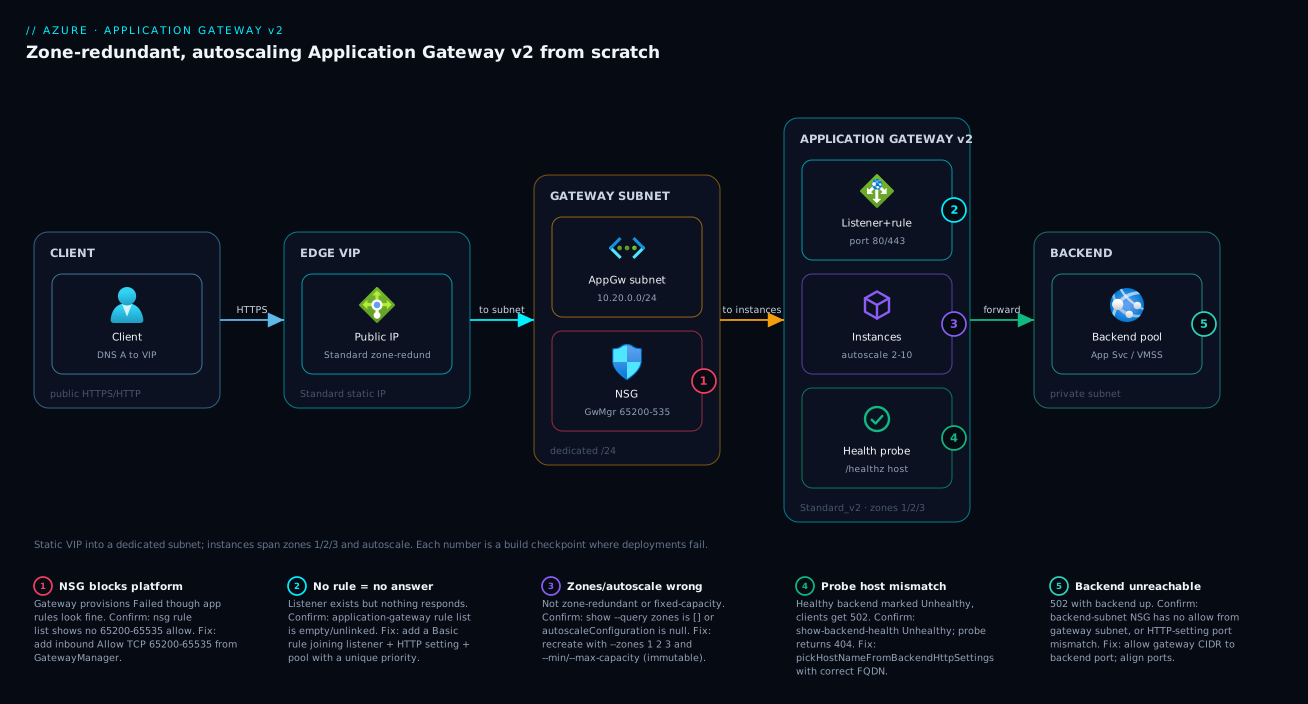
Walk the request path left to right. A client resolves your DNS name to the gateway’s static, zone-redundant public IP and opens an HTTPS/HTTP connection. It lands on a frontend listener — frontend IP + port (443/80) + protocol — served by gateway instances spread across availability zones 1, 2 and 3. Because the fleet is zone-redundant and autoscaled, whichever instances are running answer; if a whole zone fails, the surviving two keep answering with no config change. The listener hands off to a routing rule, which selects a backend HTTP setting (protocol, port, timeout) and a backend pool (App Service, VMSS, or VMs), while a health probe runs continuously so the rule only forwards to healthy members.
The diagram marks where a build goes wrong. The numbered badges sit on the failure-prone hops: the NSG (where the 65200–65535 rule must live), the listener and rule (a missing rule means nothing answers), the health probe (a host/path mismatch marks a healthy backend unhealthy), and the backend pool (where a 502 originates). The legend narrates each as a checkpoint — purpose, how to confirm, and the fix. Read the path once, then keep the legend beside the lab.
Real-world scenario
Northwind Retail runs an e-commerce site for the Indian market on Azure in Central India, where availability zones are supported. The storefront and checkout API run on an App Service plan with three instances, fronted by a single Standard (v1) Application Gateway created two years earlier at a fixed two instances. It worked — until a power-distribution fault took down one zone for about twenty minutes during a Friday-evening sale. The App Service backend, spread across zones, never went down. But the v1 gateway’s instances sat in the affected zone, the VIP went dark, and the storefront returned nothing. The finding was blunt: the gateway was the only non-redundant hop in an otherwise resilient stack, and v1 could not be made zone-redundant.
The fix was a clean rebuild on Standard_v2. Krithika, the platform engineer, stood up a new gateway in a fresh /24 subnet with zones [1,2,3] and autoscaling at minimum 2, maximum 12, attached a new Standard, zone-redundant static public IP, re-pointed the App Service backend pool, copied the listener, HTTP setting, health probe (/healthz on the App Service host) and routing rule, and validated backend health before touching DNS. The cutover was a single DNS A-record change with a short TTL at low traffic; build-and-validate took under an hour and the swing completed within the TTL.
The payoff showed up twice in the first month. A planned Azure platform update rolled the instances zone by zone — with three across three zones and a minimum of two, capacity never dropped, so there was no maintenance window. Then a Diwali campaign drove a 4x spike on a Sunday evening; autoscaling took the gateway from two instances to seven over about eight minutes, latency stayed flat, and it scaled back to two by midnight. Nobody was paged for either. The one wrinkle was self-inflicted: she had pre-created an NSG locked to 443 from Internet, and the gateway provisioned into Failed — the fix was the rule everyone learns once, inbound allow TCP 65200–65535 from GatewayManager, after which it came up healthy across all three zones. The runbook lesson: zone redundancy and autoscaling are creation-time decisions, so the rebuild was unavoidable but cheap — and the time to do it was before the next sale, not during it.
Advantages and disadvantages
| Advantages | Disadvantages |
|---|---|
| Survives a single availability-zone failure with no config change | Zone/SKU choice is fixed at creation — wrong choice means a rebuild |
| Autoscales with load; no manual sizing or paging | Scale-out takes minutes, not seconds — must size the floor for bursts |
| Rolling platform updates cause no capacity dip (with ≥2 instances) | Requires a dedicated /24 subnet you cannot reuse for anything else |
| Static, zone-redundant VIP — DNS never has to change | WAF_v2 adds real cost vs Standard_v2; pay only if you need it |
| Pay for actual usage (Capacity Units), capped by your maximum | Fixed hourly base charge even at the floor; not free when idle |
| L7 features: path/host routing, TLS termination, header rewrite, WAF | More moving parts than an L4 load balancer; steeper to operate |
When each side matters: the advantages dominate for any public, user-facing workload with uneven traffic where an outage costs revenue or reputation — zone redundancy and autoscaling pay for themselves the first time a zone blips or a campaign spikes. The disadvantages bite hardest on small, steady, internal workloads: if traffic is flat and L4 zone redundancy is enough, you are paying base fee and complexity for layer-7 features you do not use — there the Azure Load Balancer is the cheaper, simpler resilient choice. The most painful disadvantage is the creation-time immutability of zones and SKU: plan both before the first command.
Hands-on lab
This is the centrepiece: an end-to-end build of a zone-redundant, autoscaling Standard_v2 gateway, three ways — portal, az CLI, and Bicep — each with validation and teardown. Do the CLI path first (fastest to verify), then the portal and Bicep as alternatives producing the same result. All three deploy into Central India (any zone-enabled region works) and front a tiny backend. Expected output is shown at each step.
Lab prerequisites
| Requirement | How to get / check |
|---|---|
| Azure subscription with rights to create networking + gateway | az account show returns your subscription |
| Azure CLI ≥ 2.50 (or Cloud Shell) | az version |
| A zone-enabled region | Use centralindia, eastus, westeurope, etc. |
| A backend to target | This lab creates two tiny VMs; an App Service works too |
| ~₹200–400 of spend tolerance for the lab duration | Tear down at the end (final section) |
Set shell variables once (CLI path):
# Lab variables — adjust REGION to any zone-enabled region
RG=rg-agw-lab
LOC=centralindia
VNET=vnet-agw-lab
AGW_SUBNET=AppGatewaySubnet
BACKEND_SUBNET=snet-backend
PIP=pip-agw-lab
NSG=nsg-agw-lab
AGW=agw-lab
Step 1 — Resource group and virtual network
Create the resource group, VNet, the dedicated /24 gateway subnet, and a separate backend subnet.
az group create --name $RG --location $LOC

az network vnet create \
  --resource-group $RG --name $VNET \
  --address-prefix 10.20.0.0/16 \
  --subnet-name $AGW_SUBNET --subnet-prefix 10.20.0.0/24

az network vnet subnet create \
  --resource-group $RG --vnet-name $VNET \
  --name $BACKEND_SUBNET --address-prefix 10.20.1.0/24
Expected output: each returns JSON with "provisioningState": "Succeeded". The gateway subnet is 10.20.0.0/24 (256 addresses — the recommended size).
Step 2 — NSG with the mandatory platform rule
Create an NSG, add the mandatory GatewayManager rule plus the AzureLoadBalancer and client (80/443) rules, then attach it to the gateway subnet. The step everyone skips and regrets.
az network nsg create --resource-group $RG --name $NSG

# MANDATORY: v2 platform management/health channel
az network nsg rule create --resource-group $RG --nsg-name $NSG \
  --name Allow-GatewayManager --priority 100 --direction Inbound --access Allow \
  --protocol Tcp --source-address-prefixes GatewayManager \
  --destination-port-ranges 65200-65535 \
  --destination-address-prefixes '*' --source-port-ranges '*'

# MANDATORY: Azure Load Balancer health probe
az network nsg rule create --resource-group $RG --nsg-name $NSG \
  --name Allow-AzureLB --priority 110 --direction Inbound --access Allow \
  --protocol '*' --source-address-prefixes AzureLoadBalancer \
  --destination-port-ranges '*' \
  --destination-address-prefixes '*' --source-port-ranges '*'

# Client traffic to your listeners (tighten the source for non-public apps)
az network nsg rule create --resource-group $RG --nsg-name $NSG \
  --name Allow-Client-HTTP --priority 120 --direction Inbound --access Allow \
  --protocol Tcp --source-address-prefixes Internet \
  --destination-port-ranges 80 443 \
  --destination-address-prefixes '*' --source-port-ranges '*'

# Attach the NSG to the gateway subnet
az network vnet subnet update --resource-group $RG --vnet-name $VNET \
  --name $AGW_SUBNET --network-security-group $NSG
Expected output: each rule returns JSON with its priority; the subnet update shows networkSecurityGroup populated. If the gateway ever provisions to Failed, re-check this first.
Step 3 — Standard, zone-redundant static public IP
Create the VIP — Standard SKU, static, zone-redundant (omit --zone for the zone-redundant default in a zone region).
az network public-ip create \
  --resource-group $RG --name $PIP \
  --sku Standard --allocation-method Static \
  --version IPv4
Expected output: JSON with "sku": { "name": "Standard" }, "publicIPAllocationMethod": "Static", and an assigned ipAddress. Note the IP — clients will resolve to it.
Step 4 — A minimal backend (two tiny VMs)
Create two small Linux VMs running a web server so the gateway has something healthy to forward to. (Skip if you already have an App Service or VMSS backend — use its address in Step 5.)
for i in 1 2; do
  az vm create \
    --resource-group $RG --name vm-backend-$i \
    --image Ubuntu2204 --size Standard_B1s \
    --vnet-name $VNET --subnet $BACKEND_SUBNET \
    --admin-username azureuser --generate-ssh-keys \
    --public-ip-address "" \
    --custom-data 'cloud-init.txt' 2>/dev/null || \
  az vm create \
    --resource-group $RG --name vm-backend-$i \
    --image Ubuntu2204 --size Standard_B1s \
    --vnet-name $VNET --subnet $BACKEND_SUBNET \
    --admin-username azureuser --generate-ssh-keys \
    --public-ip-address ""
done

# Install nginx + a /healthz on each (run-command, no SSH needed)
for i in 1 2; do
  az vm run-command invoke --resource-group $RG --name vm-backend-$i \
    --command-id RunShellScript \
    --scripts "sudo apt-get update && sudo apt-get install -y nginx && echo 'ok' | sudo tee /var/www/html/healthz && echo \"backend vm-$i\" | sudo tee /var/www/html/index.html && sudo systemctl enable --now nginx"
done

# Capture the two backend private IPs
BACKEND_IPS=$(az vm list-ip-addresses --resource-group $RG \
  --query "[].virtualMachine.network.privateIpAddresses[0]" -o tsv | tr '\n' ' ')
echo "Backend IPs: $BACKEND_IPS"
Expected output: two VMs (no public IPs — they sit behind the gateway), each running nginx serving index.html and /healthz. BACKEND_IPS holds two 10.20.1.x addresses.
Step 5 — Create the gateway (the core command)
This single command creates the gateway with zone redundancy and autoscaling and wires the default listener, pool, HTTP setting and rule.
az network application-gateway create \
  --resource-group $RG --name $AGW \
  --location $LOC \
  --sku Standard_v2 \
  --min-capacity 2 --max-capacity 10 \
  --zones 1 2 3 \
  --public-ip-address $PIP \
  --vnet-name $VNET --subnet $AGW_SUBNET \
  --servers $BACKEND_IPS \
  --frontend-port 80 \
  --http-settings-port 80 \
  --http-settings-protocol Http \
  --priority 100
The load-bearing step — what each flag does:
| Flag | Value here | What it controls | Change it when |
|---|---|---|---|
--sku |
Standard_v2 |
The v2 SKU (autoscale + zones) | WAF_v2 if you need the firewall |
--min-capacity |
2 |
Autoscale floor (always-on instances) | Higher for spiky traffic |
--max-capacity |
10 |
Autoscale ceiling (cost cap) | Raise as peak grows (max 125) |
--zones |
1 2 3 |
Zone-redundant placement | Single value to pin; omit for non-zonal |
--public-ip-address |
$PIP |
The frontend VIP | Your Standard static IP |
--subnet |
AppGatewaySubnet |
The dedicated /24 |
Always the gateway-only subnet |
--servers |
backend IPs | Initial backend pool members | FQDN/App Service host as needed |
--frontend-port |
80 |
Listener port | 443 for HTTPS (needs a cert) |
--http-settings-port |
80 |
Port the gateway uses to reach backend | Match the backend’s listening port |
--priority |
100 |
Routing-rule priority (v2 requires it) | Unique per rule |
Expected output: the command runs for several minutes (5–15 min is normal), then returns the gateway JSON. Confirm the key properties:
az network application-gateway show --resource-group $RG --name $AGW \
  --query "{sku:sku, zones:zones, state:provisioningState, op:operationalState}" -o json
You want "provisioningState": "Succeeded", "operationalState": "Running", "zones": ["1","2","3"], and sku.name/sku.tier = Standard_v2 with no fixed capacity (autoscale lives in the autoscale config, shown next).
Step 6 — Confirm autoscaling and zones took effect
Two checks prove the resilience you configured exists.
# Autoscale min/max
az network application-gateway show --resource-group $RG --name $AGW \
  --query "autoscaleConfiguration" -o json
# Expect: { "minCapacity": 2, "maxCapacity": 10 }

# Zones
az network application-gateway show --resource-group $RG --name $AGW \
  --query "zones" -o json
# Expect: [ "1", "2", "3" ]
| What you check | Command query | Healthy value | If wrong |
|---|---|---|---|
| Autoscale bounds | autoscaleConfiguration |
minCapacity 2, maxCapacity 10 |
You set fixed capacity instead — recreate with --min/--max |
| Zone spread | zones |
["1","2","3"] |
Empty/single → not zone-redundant; recreate with --zones 1 2 3 |
| SKU | sku.name |
Standard_v2 |
Standard → you got v1; recreate with --sku Standard_v2 |
| State | operationalState |
Running |
Stopped/Failed → check NSG rule, subnet size |
Step 7 — Validate backend health (the most important check)
Creating the gateway is not the same as it working. Confirm the backend pool is Healthy — the command that tells you traffic will flow.
az network application-gateway show-backend-health \
  --resource-group $RG --name $AGW \
  --query "backendAddressPools[].backendHttpSettingsCollection[].servers[].{address:address, health:health}" -o table
Expected output: a row per backend with Health = Healthy. If Unhealthy, jump to troubleshooting — usual causes are a probe host mismatch, the backend not listening, or an NSG on the backend subnet blocking the gateway.
Now hit the public IP and confirm a real response:
AGW_IP=$(az network public-ip show --resource-group $RG --name $PIP --query ipAddress -o tsv)
curl -s http://$AGW_IP/         # Expect: "backend vm-1" / "backend vm-2" (alternating)
curl -s http://$AGW_IP/healthz  # Expect: "ok"
Hitting it a few times alternates between the two backends — proof the pool, rule, HTTP setting and probe are wired correctly.
Step 8 — Add an explicit health probe (production hygiene)
The default probe checks the backend’s root path. In production, point it at a real health endpoint (/healthz) and set the host correctly. Create a custom probe and bind it to the HTTP setting.
# Custom probe against /healthz
az network application-gateway probe create \
  --resource-group $RG --gateway-name $AGW \
  --name probe-healthz --protocol Http --path /healthz \
  --host-name-from-http-settings true \
  --interval 30 --timeout 30 --threshold 3

# Point the existing HTTP setting at the probe
az network application-gateway http-settings update \
  --resource-group $RG --gateway-name $AGW \
  --name appGatewayBackendHttpSettings \
  --probe probe-healthz
| Probe setting | Value | Meaning | Gotcha |
|---|---|---|---|
--path |
/healthz |
What the probe requests | Must return 200–399; not a slow page |
--host-name-from-http-settings |
true |
Use the HTTP setting’s host for the probe Host header | Wrong host → backend (esp. App Service) returns 404 → Unhealthy |
--interval |
30 (sec) |
How often to probe | Too short adds load; too long slows eviction |
--timeout |
30 (sec) |
How long to wait per probe | Shorter than backend’s slow path → false unhealthy |
--threshold |
3 |
Consecutive successes to mark Healthy | Higher rides transient blips |
Re-run show-backend-health and confirm still Healthy against the new probe.
Step 9 — Validate zone resilience and autoscale behaviour
You cannot trigger a real zone outage, but you can confirm the config that guarantees survival and watch autoscale move.
# Live capacity-unit consumption (proxy for instance count)
AGW_ID=$(az network application-gateway show -g $RG -n $AGW --query id -o tsv)
az monitor metrics list --resource "$AGW_ID" \
  --metric "CurrentCapacityUnits" --interval PT1M --aggregation Average -o table

# Generate sustained load to watch autoscale move
for i in $(seq 1 5000); do curl -s -o /dev/null http://$AGW_IP/ & done; wait
Expected output: under sustained load, CurrentCapacityUnits (and the instance count) climbs toward the maximum, then settles back to the minimum minutes after load stops. The zones confirmed in Step 6 are the resilience guarantee — with ["1","2","3"] and a minimum of 2, instances span zones and a single-zone loss leaves serving capacity.
| Metric | What it tells you | Healthy pattern |
|---|---|---|
CurrentCapacityUnits |
Live CU consumption | Tracks load; within min/max |
CurrentCompute(Units) |
Compute-dimension load | Below ceiling at peak |
Throughput |
Bytes/sec served | Matches expected traffic |
HealthyHostCount |
Backends in rotation | Equals your pool size |
UnhealthyHostCount |
Backends evicted | 0 in steady state |
FailedRequests |
502/5xx from the gateway | Near 0; spikes signal backend trouble |
Step 10 — The portal path (same result, clickable)
To build the same gateway in the portal:
| # | Portal action | Field / value |
|---|---|---|
| 1 | Create a resource → search Application Gateway → Create | — |
| 2 | Basics → Tier | Standard V2 (not “Standard”) |
| 3 | Basics → Enable autoscaling | Yes; Min 2, Max 10 |
| 4 | Basics → Availability zone | Select 1, 2, 3 (zone-redundant) |
| 5 | Basics → Virtual network / Subnet | vnet-agw-lab / AppGatewaySubnet |
| 6 | Frontends → Frontend IP type | Public; create/select the Standard static IP |
| 7 | Backends → Add a backend pool | Add the two backend IPs (or App Service FQDN) |
| 8 | Configuration → Add a routing rule | Listener: port 80; Priority 100 |
| 9 | Routing rule → Backend targets → HTTP settings | Port 80, protocol HTTP; add the /healthz probe |
| 10 | Review + create → wait for deployment | ~5–15 min; then check Backend health blade = Healthy |
The portal’s Backend health blade is the GUI equivalent of show-backend-health — green/Healthy is the goal. The Availability zone field is greyed out after creation — the portal making the immutability concrete.
Step 11 — The Bicep path (declarative, repeatable)
The same gateway as Bicep — the artifact you actually keep; portal and CLI are for one-offs and learning.
@description('Location with availability zones')
param location string = resourceGroup().location
param vnetName string = 'vnet-agw-lab'
param agwSubnetName string = 'AppGatewaySubnet'
param agwName string = 'agw-lab'
param pipName string = 'pip-agw-lab'
@description('Backend server IPs or FQDNs')
param backendAddresses array = ['10.20.1.4', '10.20.1.5']
param minCapacity int = 2
param maxCapacity int = 10

resource pip 'Microsoft.Network/publicIPAddresses@2023-11-01' = {
  name: pipName
  location: location
  sku: { name: 'Standard' }          // Standard required for v2
  zones: ['1', '2', '3']             // zone-redundant VIP
  properties: { publicIPAllocationMethod: 'Static' }
}

resource vnet 'Microsoft.Network/virtualNetworks@2023-11-01' existing = {
  name: vnetName
}
resource agwSubnet 'Microsoft.Network/virtualNetworks/subnets@2023-11-01' existing = {
  parent: vnet
  name: agwSubnetName
}

resource agw 'Microsoft.Network/applicationGateways@2023-11-01' = {
  name: agwName
  location: location
  zones: ['1', '2', '3']             // IMMUTABLE: zone-redundant placement
  properties: {
    sku: {
      name: 'Standard_v2'            // v2 SKU — enables autoscale + zones
      tier: 'Standard_v2'
    }
    autoscaleConfiguration: {        // autoscaling floor/ceiling
      minCapacity: minCapacity
      maxCapacity: maxCapacity
    }
    gatewayIPConfigurations: [
      {
        name: 'appGatewayIpConfig'
        properties: { subnet: { id: agwSubnet.id } }
      }
    ]
    frontendIPConfigurations: [
      {
        name: 'appGwPublicFrontendIp'
        properties: { publicIPAddress: { id: pip.id } }
      }
    ]
    frontendPorts: [
      { name: 'port80', properties: { port: 80 } }
    ]
    backendAddressPools: [
      {
        name: 'backendPool'
        properties: {
          backendAddresses: [for a in backendAddresses: { ipAddress: a }]
        }
      }
    ]
    probes: [
      {
        name: 'probe-healthz'
        properties: {
          protocol: 'Http'
          path: '/healthz'
          interval: 30
          timeout: 30
          unhealthyThreshold: 3
          pickHostNameFromBackendHttpSettings: true
        }
      }
    ]
    backendHttpSettingsCollection: [
      {
        name: 'httpSettings'
        properties: {
          port: 80
          protocol: 'Http'
          requestTimeout: 30
          pickHostNameFromBackendAddress: false
          probe: {
            id: resourceId('Microsoft.Network/applicationGateways/probes', agwName, 'probe-healthz')
          }
        }
      }
    ]
    httpListeners: [
      {
        name: 'listener80'
        properties: {
          frontendIPConfiguration: {
            id: resourceId('Microsoft.Network/applicationGateways/frontendIPConfigurations', agwName, 'appGwPublicFrontendIp')
          }
          frontendPort: {
            id: resourceId('Microsoft.Network/applicationGateways/frontendPorts', agwName, 'port80')
          }
          protocol: 'Http'
        }
      }
    ]
    requestRoutingRules: [
      {
        name: 'rule1'
        properties: {
          ruleType: 'Basic'
          priority: 100              // v2 requires a unique priority
          httpListener: {
            id: resourceId('Microsoft.Network/applicationGateways/httpListeners', agwName, 'listener80')
          }
          backendAddressPool: {
            id: resourceId('Microsoft.Network/applicationGateways/backendAddressPools', agwName, 'backendPool')
          }
          backendHttpSettings: {
            id: resourceId('Microsoft.Network/applicationGateways/backendHttpSettingsCollection', agwName, 'httpSettings')
          }
        }
      }
    ]
  }
}
Deploy and validate:
az deployment group create --resource-group $RG \
  --template-file appgw.bicep \
  --parameters backendAddresses="['10.20.1.4','10.20.1.5']"

# Same health check as the CLI path
az network application-gateway show-backend-health -g $RG -n $AGW -o table
Expected output: provisioningState: Succeeded and the backend health table shows Healthy. The zones and autoscaleConfiguration blocks are the two that make this resilient and elastic — note zones is a top-level property of the gateway resource, not inside properties.
Step 12 — Teardown
The gateway accrues an hourly charge, so delete the whole resource group when you finish.
az group delete --name $RG --yes --no-wait
Expected output: the command returns immediately (--no-wait); deletion of the gateway, IP, VMs, VNet and NSG completes in the background. Confirm later with az group exists --name $RG returning false.
| Teardown step | Command | Note |
|---|---|---|
| Delete everything | az group delete -n $RG --yes --no-wait |
Cleanest; removes all lab resources |
| Keep VNet, drop gateway only | az network application-gateway delete -g $RG -n $AGW |
If reusing the network |
| Confirm gone | az group exists -n $RG |
Returns false when complete |
Common mistakes & troubleshooting
The failure modes below are the ones that turn a thirty-minute build into a long afternoon. Each is symptom → root cause → exact confirm → fix.
| # | Symptom | Root cause | Confirm (exact path/command) | Fix |
|---|---|---|---|---|
| 1 | Gateway provisions to Failed/unhealthy, app rules look fine |
NSG on gateway subnet blocks platform mgmt | az network nsg rule list -g $RG --nsg-name $NSG -o table — no 65200–65535 allow |
Add inbound Allow TCP 65200–65535 from GatewayManager |
| 2 | --zones had no effect / gateway not zone-redundant |
Created without --zones, or region lacks zones |
az network application-gateway show ... --query zones returns [] |
Recreate with --zones 1 2 3 in a zone-enabled region (immutable) |
| 3 | Autoscale flags ignored; fixed instance count | Set --capacity (fixed) instead of --min/--max-capacity |
... --query autoscaleConfiguration is null |
Recreate with --min-capacity/--max-capacity (no --capacity) |
| 4 | Got v1 features, no autoscale option | Used --sku Standard not Standard_v2 |
... --query sku.name = Standard |
Recreate with --sku Standard_v2 |
| 5 | Backend health = Unhealthy, 502 to clients |
Probe Host header wrong (esp. App Service multi-tenant) | show-backend-health Unhealthy; probe returns 404 |
Set --host-name-from-http-settings true or a correct --host-name |
| 6 | 502 from gateway, backend up |
HTTP setting port ≠ backend’s listening port | ... http-settings list --query "[].port" vs backend port |
Align --http-settings-port to the backend |
| 7 | Autoscale/upgrade fails after a few instances | Gateway subnet too small (/28) |
Subnet prefix shows /28//29 |
Recreate in a /24 (subnet can’t grow under a live gateway easily) |
| 8 | Backend Unhealthy though probe path is right | NSG on backend subnet blocks the gateway | Backend NSG has no allow from the gateway subnet/VirtualNetwork |
Allow the gateway subnet CIDR to the backend port |
| 9 | Listener exists but nothing answers | No routing rule joining listener → pool | ... rule list -o table empty or unlinked |
Add a Basic rule with listener + HTTP setting + pool + priority |
| 10 | Public IP not supported error on create |
Basic SKU or dynamic public IP | ... public-ip show --query "sku.name" = Basic |
Recreate the IP as Standard, Static |
| 11 | Rule create fails: priority required | v2 routing rules require a unique priority |
Create error mentions priority | Add --priority <unique int> to each rule |
| 12 | TLS listener fails / cert error | Cert not from Key Vault or MI lacks access | Listener config / Key Vault access policy | Grant the gateway’s managed identity get on the secret (see end-to-end TLS guide) |
Three notes. #1 (GatewayManager) is by far the most common — 65200–65535 is internal control-plane traffic, not an internet exposure; check it first when the gateway is unhealthy and app config looks fine. #5 (probe host) bites hardest with App Service, which routes by Host header — a wrong host hits the wrong site, gets a 404, and marks a healthy backend Unhealthy; pickHostNameFromBackendHttpSettings fixes it. #2, #3, #4 (the immutable trio) share one fix — recreate.
When a backend is Unhealthy, this table localises it fast:
| If you see… | It’s probably… | Do this |
|---|---|---|
| All backends Unhealthy, app is up | Probe host/path wrong, or backend NSG | Check probe Host header; check backend-subnet NSG |
| Some Unhealthy, some Healthy | Those specific instances down/misconfigured | Inspect the failing members; restart/repair |
| Healthy in portal but clients get 502 | HTTP setting port or protocol mismatch | Align HTTP setting to the backend’s port/protocol |
| Gateway itself Failed/Stopped | NSG blocks 65200–65535, or subnet too small | Add GatewayManager rule; verify /24 subnet |
Best practices
- Always create v2 as zone-redundant (
zones [1,2,3]) in a zone-enabled region. Same price as non-zonal, and the only posture that survives a zone failure. - Set the autoscale minimum to at least 2. It guarantees multi-zone presence and absorbs bursts that arrive before scale-out completes. Reserve 0 for throwaway dev gateways.
- Dedicate a
/24subnet and put nothing else in it. Undersized subnets are the second-most-common build failure;/24leaves room for autoscale and rolling upgrades. - Put an NSG on the gateway subnet, and allow GatewayManager 65200–65535 inbound. Document the rule in your runbook so the next engineer does not relearn it.
- Always use a custom health probe at a real
/healthzwith the correct Host header — never rely on the default root-path probe in production, especially behind App Service. - Use a Standard, static, zone-redundant public IP — required, and a stable VIP means DNS never has to change, so keep the gateway stateless and point DNS at the VIP.
- Decide SKU (Standard_v2 vs WAF_v2) and zones before the first command. Both are immutable; planning them up front avoids a rebuild.
- Monitor
UnhealthyHostCount,FailedRequestsandCurrentCapacityUnits. Alert on unhealthy backends and on nearing the autoscale ceiling; wire these into Azure Monitor metric alerts. - Keep the Bicep as the source of truth, and set the maximum with deliberate headroom (not infinity). Build in the portal to learn but commit the template; the maximum is your cost cap and blast-radius limit against a runaway or attack.
Security notes
A gateway is an internet-facing front door; treat it like one.
- Least privilege on the data path: plain HTTP needs no standing credentials. For TLS, give the gateway a user-assigned managed identity with only
get/liston the specific Key Vault secret holding the cert — never broad access. See Azure Key Vault: Secrets, Keys & Certificates and the end-to-end TLS deep-dive. - Network isolation: keep backends in a private subnet with no public IPs (as the lab does) so the gateway is the only entry point. The backend NSG should allow the gateway subnet’s CIDR to the backend port and little else; see Network Security Groups: Rules & Priorities.
- The 65200–65535 rule is not an exposure you create. It allows the platform’s
GatewayManagerservice tag, not the internet, to manage your instances. It is required and safe; do not “harden” it away. - Add WAF_v2 for any public app handling untrusted input. Start the WAF policy in Detection, triage false positives, then move to Prevention.
- Restrict the listener source where you can, and terminate TLS / re-encrypt to the backend for sensitive traffic so data is never clear-text on the wire — even inside the VNet. Combine with VNet DDoS protection for public endpoints (volumetric L3/4 attacks are a separate control).
Cost & sizing
A v2 gateway has two cost components: a fixed hourly charge (the gateway exists even idle) plus a Capacity Unit (CU) charge for the work it does. WAF_v2 carries higher fixed and per-CU rates; there is no separate charge for zone redundancy. Figures below are rough, region-dependent and for planning only — confirm against the pricing calculator.
| Cost driver | Standard_v2 (rough) | WAF_v2 (rough) | Notes |
|---|---|---|---|
| Fixed gateway hour | ~$0.20–0.25 /hr | ~$0.35–0.45 /hr | Charged whenever the gateway exists |
| Capacity Unit hour | ~$0.008 /CU-hr | ~$0.014 /CU-hr | Billed on actual CU consumption |
| Minimum floor (2 instances ≈ ~20 CU baseline) | adds to the bill | adds to the bill | Your always-on cost |
| Public IP (Standard) | ~$0.005 /hr + data | same | Small, but real |
| Data processing | included in CU throughput dim | included | Throughput is one CU dimension |
Worked monthly estimate (Standard_v2, light traffic, floor of 2, ~730 hrs):
| Line item | Estimate (USD/mo) | Estimate (INR/mo) |
|---|---|---|
| Fixed gateway hours (~$0.22 × 730) | ~$160 | ~₹13,300 |
| Baseline CU (floor, light load) | ~$15–40 | ~₹1,250–3,300 |
| Public IP + misc | ~$4 | ~₹330 |
| Approx total (Standard_v2, light) | ~$180–205 | ~₹15,000–17,000 |
Sizing guidance:
| Workload | Min / Max capacity | SKU | Rationale |
|---|---|---|---|
| Dev / throwaway | 0 / 2 | Standard_v2 | Cost-minimal; cold start acceptable |
| Small steady prod | 2 / 5 | Standard_v2 | Multi-zone floor, modest ceiling |
| Mid-size, spiky | 2 / 12 | Standard_v2 / WAF_v2 | Burst floor + room for campaigns |
| Large public, compliance | 3 / 25+ | WAF_v2 | WAF required; higher floor + ceiling |
Two cost rules: the floor is your real baseline — a minimum of 2 costs the same whether or not traffic uses it, so do not over-set it — and WAF_v2 roughly adds 50–80% to the fixed and per-CU rate, so pay it only when you need OWASP protection here. Right-size by watching CurrentCapacityUnits over a representative week and setting the maximum a comfortable margin above the observed peak.
Interview & exam questions
1. Why can Application Gateway v1 not be made zone-redundant or autoscaling?
The v1 SKUs run on an older platform with a fixed instance count and no zone-distribution. Autoscaling, zone redundancy and static VIPs are exclusive to the v2 platform (Standard_v2/WAF_v2). Moving v1→v2 is a migration to a new resource, not an in-place toggle. (AZ-700)
2. A gateway provisions to a Failed state but the application config is correct. Most likely cause?
An NSG on the gateway subnet is blocking the platform’s management channel. v2 requires inbound TCP 65200–65535 from the GatewayManager service tag; without it the platform cannot manage or probe the instances. Add that rule. (AZ-700, AZ-104)
3. Can you change a deployed gateway from non-zonal to zone-redundant?
No. Zone configuration is set at creation and is immutable. To become zone-redundant you create a new gateway with zones [1,2,3] (typically side by side) and cut over via DNS. The same immutability applies to the SKU tier. (AZ-700)
4. What size should the dedicated gateway subnet be, and why?
/24 recommended (minimum /26). The gateway consumes addresses per instance, and autoscaling plus rolling upgrades need spare addresses to provision new instances before draining old ones. A /28 runs out once you have several instances. (AZ-104, AZ-700)
5. What is a Capacity Unit and how does it relate to billing? A CU bundles compute (≈50 conn/sec), persistent connections (≈2,500) and throughput (≈2.22 Mbps). The gateway scales to satisfy the most-stressed dimension; you are billed a fixed hourly charge plus a per-CU-hour charge on actual consumption — not on your maximum. (AZ-700)
6. Backend is up, but the gateway reports it Unhealthy and clients get 502. First check?
The health probe’s Host header, especially with App Service or other multi-tenant backends that route by host — a wrong host hits the wrong site and gets a 404. Set pickHostNameFromBackendHttpSettings (with the correct FQDN) or an explicit probe host. (AZ-700)
7. How do you set the autoscale floor and ceiling, and what does each control?
Via --min-capacity/--max-capacity (or the autoscaleConfiguration block in Bicep) on a v2 SKU. The minimum is the always-on floor (baseline cost / multi-zone presence); the maximum (up to 125) is the ceiling and cost cap. Do not set a fixed capacity if you want autoscaling. (AZ-700)
8. When would you choose Standard_v2 over WAF_v2? When you do not need a WAF at this layer — an internal app with trusted clients, or a public app where WAF lives at the edge (Front Door). Standard_v2 is cheaper and identical for zones and autoscaling; WAF_v2 is required for OWASP CRS protection at the gateway. (AZ-700)
9. Does zone redundancy protect against a region outage? No — it protects against a single zone failure within one region. Surviving a full region outage requires a second gateway in a second region behind a global router (Traffic Manager or Front Door). (AZ-305, AZ-700)
10. Why must the public IP be Standard SKU and static for a v2 gateway? v2 only supports Standard-SKU static public IPs; Basic and dynamic are rejected at creation. For true zone redundancy the Standard IP should also be zone-redundant, so the VIP survives a zone loss with the instances. (AZ-700, AZ-104)
11. The gateway is hitting its autoscale maximum during a campaign and latency is rising. What do you do? Raise the maximum (up to 125) so the platform can add instances, and confirm the backend can absorb the extra traffic. Investigate whether the CU pressure is compute, connections or throughput. Alert on nearing the ceiling so you act before it throttles. (AZ-700)
12. Difference between a routing rule, a listener, an HTTP setting and a backend pool? The listener is the frontend IP+port+protocol where requests arrive; the backend pool is the targets; the HTTP setting is how the gateway talks to the backend (protocol, port, timeout, probe); the routing rule joins listener → HTTP setting → pool (and in v2 carries a required priority). All four plus a probe must exist and be linked for traffic to flow. (AZ-700)
Quick check
- Which two capabilities require the v2 SKU and cannot be added to a v1 gateway in place?
- What inbound NSG rule is mandatory on the gateway subnet, and why?
- Can you change a running gateway from non-zonal to zone-redundant? If not, what do you do?
- What is the recommended size of the dedicated gateway subnet, and what breaks if it is a
/28? - A healthy backend shows as Unhealthy and clients get 502 — what is the first thing to check?
Answers
- Autoscaling and zone redundancy (also static VIP). Both are exclusive to
Standard_v2/WAF_v2; v1 is fixed-capacity, single-zone. Moving to them is a recreate, not a toggle. - Inbound Allow TCP 65200–65535 from the
GatewayManagerservice tag — the v2 platform’s management/health channel. Without it the gateway cannot be managed and provisions to a Failed/unhealthy state. - No — zone configuration is immutable at creation. Create a new gateway with
zones [1,2,3](often side by side) and cut over via a DNS A-record change. /24recommended (/26minimum). A/28runs out of addresses for autoscale and rolling upgrades once you have several instances, so scale-out and platform updates fail.- The health probe’s Host header (and path). A wrong host hits the wrong site on a multi-tenant backend (App Service) and returns 404, marking it Unhealthy. Use
pickHostNameFromBackendHttpSettingswith the correct FQDN.
Glossary
- Application Gateway v2 — Azure’s layer-7 reverse proxy/WAF on the modern platform (
Standard_v2,WAF_v2) supporting autoscaling, zone redundancy and static VIPs. - Standard_v2 / WAF_v2 — the two v2 SKUs;
WAF_v2isStandard_v2plus an integrated OWASP web application firewall. - Zone redundancy — placing gateway instances across availability zones 1, 2 and 3 so a single-zone failure does not take the gateway down. Set at creation; immutable.
- Availability zone — a physically isolated datacentre (power, cooling, network) within an Azure region; zones fail independently.
- Autoscaling — automatic adjustment of the gateway’s instance count between a configured minimum and maximum based on load.
- Capacity Unit (CU) — the v2 unit of work and billing, bundling compute, persistent-connection and throughput slices; the gateway scales to satisfy the most-stressed dimension.
- Gateway subnet — the dedicated subnet (recommended
/24) that holds only the gateway’s instances. - Frontend IP / VIP — the public (and/or private) IP clients connect to; for v2 a Standard, static, zone-redundant public IP.
- Listener — a frontend IP + port + protocol combination; where requests arrive at the gateway.
- Backend pool — the set of backend targets (IP, FQDN, NIC, App Service) the gateway forwards to.
- Backend HTTP setting — the protocol, port, timeout and probe the gateway uses to reach the backend pool.
- Health probe — a periodic check of backend members; failing members are removed from rotation.
- Routing rule — the configuration joining a listener to an HTTP setting and backend pool; v2 rules require a unique priority.
- GatewayManager — the Azure service tag for the v2 platform’s management channel (TCP 65200–65535) that must be allowed inbound on the gateway subnet.
- WAF policy — the separate resource holding OWASP rules and settings, attached to a
WAF_v2gateway (or listener/path).
Next steps
- Add TLS termination and a WAF policy by following End-to-End TLS with Application Gateway v2 + WAF — the natural layer on top of this build.
- Confirm you actually need layer 7 (vs a cheaper zone-redundant L4 load balancer) with Azure Load Balancer vs Application Gateway.
- Solidify the zone model behind all of this in Azure Regions & Availability Zones Explained.
- Get the dedicated subnet right the first time with Azure VNet IP Address Planning: CIDR & Subnetting.
- Wire health and capacity alerts on the gateway using Azure Monitor Metric Alerts & Action Groups.