A batch job in your subnet starts failing intermittently. The error is SNAT port exhaustion or a flat connection timeout to an external API, and it only happens under load — at rest everything is fine. You scale up, it goes away for a day, then comes back worse. Meanwhile the third-party API team asks you, reasonably, “what’s your source IP so we can allowlist you?” and you have no good answer, because your outbound traffic leaves Azure from a pool of shared addresses you do not control. Both problems share one fix: Azure NAT Gateway (also written NAT gateway), a fully managed outbound-only network address translation service you attach to a subnet so that every resource in that subnet shares one stable set of public IPs and a large pool of SNAT (Source Network Address Translation) ports.
NAT Gateway is the modern, recommended way to do outbound connectivity from a virtual network. You associate it with one or more subnets and give it one or more public IP addresses (or a public IP prefix), and from that moment all egress from those subnets is translated through it. It hands out roughly 64,000 SNAT ports per public IP, allocates them on demand across every VM in the subnet, and presents a single predictable source IP an external partner can allowlist. It is zonal, cheap relative to the incidents it prevents, and crucially it does not affect inbound traffic — a Load Balancer, Application Gateway, or public IP on the VM still handles ingress exactly as before. NAT Gateway is purely about traffic leaving your network.
This guide is a hands-on implementation walkthrough. By the end you will have built a working NAT Gateway three ways — in the Azure portal, with the az CLI, and with a Bicep template — attached it to a subnet, proven a test VM’s outbound IP is now the NAT Gateway’s IP, and torn it all down cleanly. Along the way you will learn the three outbound options, the SNAT mechanics that make it scale, the mistakes that bite first-timers (the “still on default outbound” trap, prefix-vs-IP confusion, the idle-timeout gotcha), and how to size and budget it. The lab is free-tier-friendly and fully reversible.
What problem this solves
Every resource in a virtual network needs a way to reach the internet for outbound calls — pulling container images, calling a payment API, hitting a package registry, sending telemetry. Azure has historically given you that for free via default outbound access: if a VM has no explicit outbound method, the platform silently assigns it a SNAT IP. This is convenient and it is also a trap. The IP is not yours, it can change, it is shared, and Microsoft has announced that default outbound access is being retired for new deployments — so building anything durable on it is building on sand.
The second problem is SNAT port exhaustion. Each simultaneous outbound connection to the same destination IP and port consumes one SNAT port, and the default and Load-Balancer methods pre-allocate a small, fixed number per VM. A chatty workload — one that opens a new connection per request instead of reusing a pool, or fans out under load — burns through that allocation and new connections then fail or hang. The symptom is maddening: it works at rest, fails under load, and “fixes itself” when you scale or wait. This is the same failure class covered for PaaS in Troubleshooting Azure App Service: 502/503 Errors, Cold Starts & Restart Loops; at the VNet level, NAT Gateway is the cure.
The third problem is predictability and allowlisting. Partners, on-prem firewalls, and SaaS vendors frequently require you to declare your source IP so they can permit only your traffic. With shared default outbound you cannot make that promise; NAT Gateway gives you a small, stable, declarable set of egress IPs (or a contiguous prefix) that you own for the life of the resource.
Who hits this: anyone running VMs, VM Scale Sets, AKS clusters, or container workloads that make outbound calls — nearly everyone. It bites hardest on high-throughput backends, ETL jobs, crawlers, CI agents pulling artifacts, and any workload an external party needs to allowlist.
| Pain in production | What the reader experiences | NAT Gateway’s answer |
|---|---|---|
| SNAT exhaustion under load | Intermittent connection timeouts that vanish at rest | ~64,000 ports per IP, allocated on demand across the subnet |
| Unstable / unknown egress IP | “What’s your source IP?” → no answer; allowlists break | One stable public IP (or prefix) you own |
| Default outbound retirement | New deployments lose implicit internet access | Explicit, supported, future-proof outbound method |
| Per-VM IP sprawl | Dozens of public IPs to manage and pay for | One NAT Gateway serves the whole subnet |
| Noisy-neighbour SNAT | One VM starves others on shared allocation | Dynamic pooling shares ports fairly |
Learning objectives
By the end of this article you can:
- Explain the three ways Azure provides outbound connectivity (default outbound, Load Balancer outbound rules, NAT Gateway) and justify NAT Gateway as the default for SNAT-heavy or allowlist-required workloads.
- Describe how NAT Gateway allocates SNAT ports, why it scales past the default methods, and what a public IP vs a public IP prefix buys you.
- Deploy a NAT Gateway end to end in the Azure portal, attach it to a subnet, and associate a public IP.
- Reproduce the same deployment with the
azCLI, command by command, with expected output at each step. - Express the entire setup as Bicep infrastructure-as-code and deploy it idempotently.
- Validate that outbound traffic now egresses through the NAT Gateway IP, and tear down every resource cleanly.
- Diagnose the common first-timer failures — subnet not associated, still using default outbound, prefix size mistakes, idle-timeout resets — using exact commands.
- Right-size the number of public IPs, set a sensible idle timeout, and estimate the monthly cost in INR/USD.
Prerequisites & where this fits
You need an Azure subscription (the Azure free account works for the lab) and either Cloud Shell or a local az CLI logged in with az login. You should be comfortable with virtual networks and subnets — if not, read Azure Virtual Network, Subnets and NSGs: Networking Fundamentals first, since NAT Gateway attaches to a subnet. For the Bicep section, a pass through Deploy Your First Bicep File From Scratch helps, though everything is copy-pasteable.
This sits in the Networking track. NAT Gateway is the outbound half of edge connectivity; the inbound half is handled by other services, and the two are independent. Knowing where it sits relative to its neighbours saves you from the wrong tool:
| You need to… | Use | NAT Gateway’s relationship |
|---|---|---|
| Give a subnet stable, scalable outbound internet | NAT Gateway | This article |
| Distribute inbound L4 traffic to a VM pool | Azure Standard Load Balancer | Independent; can coexist on the same VMs |
| Do inbound L7 routing, TLS, WAF | Application Gateway v2 WAF | Independent; ingress only |
| Reach Azure PaaS privately (no internet) | Private Endpoint / Private Link | Complementary; private traffic skips NAT GW |
| Choose between LB and App Gateway | Load Balancer vs Application Gateway | Both are inbound; orthogonal to egress |
A key note before you start: NAT Gateway only handles outbound. It silently takes precedence over default outbound and Load Balancer outbound rules on any subnet it is attached to, but never touches inbound flows. Traffic to a private endpoint or service endpoint also bypasses it entirely, because that traffic never leaves the Azure backbone.
Core concepts
A few models make every later step obvious.
NAT Gateway is a subnet-level egress translator. You create the resource once, attach one or more public IP addresses (or a single public IP prefix), and associate it with one or more subnets in the same region. From then on, any resource in those subnets that initiates an outbound connection has its private source IP and port rewritten to one of the NAT Gateway’s public IPs and an allocated SNAT port; return traffic comes back through the same mapping. Nothing in the VM changes — no agent, no config, no reboot.
SNAT ports are the scarce resource, and NAT Gateway has a lot of them. Each attached public IP provides approximately 64,000 SNAT ports, allocated dynamically and on demand across all VMs in the subnet — a busy VM gets many, an idle one holds none. This is the opposite of the default and Load-Balancer methods, which pre-allocate a small fixed block per VM, and it is exactly why NAT Gateway survives bursty, fan-out workloads that exhaust the alternatives.
A public IP prefix scales ports and keeps them contiguous. Instead of individual public IPs, you can attach a public IP prefix — a contiguous block (/28 = 16 addresses, /31 = 2). This multiplies your port pool (16 IPs ≈ ~1,000,000 ports) and gives the partner a single, clean CIDR to allowlist. You can attach up to 16 public IPs total (individually or via a prefix) to one NAT Gateway.
NAT Gateway is zonal. You pin it to an availability zone or leave it non-zonal (regional). There is no cross-zone NAT Gateway, so a zone-resilient design deploys one per zone. (See Azure Regions and Availability Zones.)
The idle timeout governs how long a flow holds its port. A flow holds its SNAT port until the connection closes or the TCP idle timeout expires — default 4 minutes, configurable up to 120. Quiet long-lived connections (database keep-alives, some brokers) can be reset if the idle timeout is shorter than the app’s own keep-alive interval — a subtle source of “random” disconnects.
Those eight terms — NAT Gateway, SNAT port, public IP, public IP prefix, subnet association, idle timeout, default outbound, availability zone — are the whole vocabulary; the Glossary at the end repeats them for lookup.
The three outbound options, compared
Azure gives you exactly three explicit ways for a private resource to reach the internet outbound, plus the implicit default. Picking correctly up front saves a migration later.
| Method | SNAT ports | IP stability | Inbound? | When to use | Status |
|---|---|---|---|---|---|
| Default outbound | Small, fixed, shared | None (can change) | No | Never for production | Retiring for new deployments |
| Public IP on the VM | ~64K for that one VM | Stable (per VM) | Yes (also inbound) | A single VM that also needs inbound | Supported |
| Load Balancer outbound rules | Configurable, pre-allocated per VM | Stable | Yes (LB is also inbound) | Already using a Standard LB for inbound | Supported |
| NAT Gateway | ~64K per IP, dynamic & pooled | Stable (your IPs) | No (outbound only) | Default for outbound at scale | Recommended |
The decisive differences are allocation model and direction. Load Balancer outbound rules force you to pre-allocate a port block per backend VM; NAT Gateway allocates on demand from a shared pool, so a quiet VM costs nothing and a busy one borrows what it needs. And because it is outbound-only, it cleanly separates egress from ingress: you can run a Load Balancer for inbound and a NAT Gateway for outbound on the same subnet. For the Load Balancer outbound path specifically, see Azure Standard Load Balancer Deep Dive: Outbound Rules, HA Ports, and Cross-Region Load Balancing.
A short decision table for the common cases:
| If your situation is… | Choose | Why |
|---|---|---|
| New subnet, outbound-heavy, no inbound need | NAT Gateway | Dynamic ports, stable IP, future-proof |
| External partner must allowlist your IP | NAT Gateway + public IP prefix | One CIDR to declare |
| One lone VM that also needs inbound | Public IP on the VM | Simplest; both directions |
| Already have a Standard LB for inbound | NAT Gateway for egress (don’t reuse LB) | Cleaner scaling than LB outbound rules |
| Reaching Azure PaaS only | Private Endpoint | Traffic never leaves the backbone; no NAT GW needed |
How SNAT allocation and IP prefixes work
Understanding the port math lets you size confidently and recognise exhaustion. When a VM in a NAT-Gateway-attached subnet opens an outbound connection, Azure rewrites the source from privateIP:privatePort to natGatewayPublicIP:allocatedSnatPort; the tuple of (destination IP, destination port, source public IP, source SNAT port) must stay unique for the life of the flow. Each attached public IP contributes roughly 64,000 ports, drawn from the pool dynamically — no per-VM block, so the full pool serves whichever VMs are busy. That is the structural win over Load Balancer outbound rules, where a VM is capped at a pre-allocated slice and exhausts it while others sit idle.
| Quantity | Value | Note |
|---|---|---|
| SNAT ports per public IP | ~64,000 | The usable ephemeral port range |
| Max public IPs per NAT Gateway | 16 | Individually or via a prefix |
| Max ports at full scale | ~1,000,000 | 16 IPs × ~64K |
| Default TCP idle timeout | 4 minutes | Configurable to 120 |
The sizing rule: estimate peak simultaneous connections to your busiest single destination, divide by ~64,000, round up to a number of public IPs. Most workloads need one; add IPs only when one destination pushes a single VM toward tens of thousands of concurrent flows — and fix the client first (keep-alive and pooled connections cut port pressure far more cheaply).
You attach egress addresses in one of two shapes. A public IP address is a single Standard-SKU static address: one IP to declare. A public IP prefix is a contiguous CIDR block reserved up front (/28 = 16 addresses, /30 = 4, /31 = 2) — more ports plus a single CIDR (e.g. 203.0.113.16/28) the partner allowlists in one line. Prefer the prefix whenever an external party is involved.
| Option | Addresses | Ports | Allowlist shape | Best for |
|---|---|---|---|---|
| 1 × Public IP | 1 | ~64K | One IP | Most workloads |
| N × Public IP | up to 16 | up to ~1M | A list of N IPs | Ad-hoc scaling, no partner |
Public IP prefix /28 |
16 | ~1M | One CIDR | Partner allowlists; clean scaling |
Public IP prefix /30 |
4 | ~256K | One CIDR | Moderate scale + clean CIDR |
Architecture at a glance
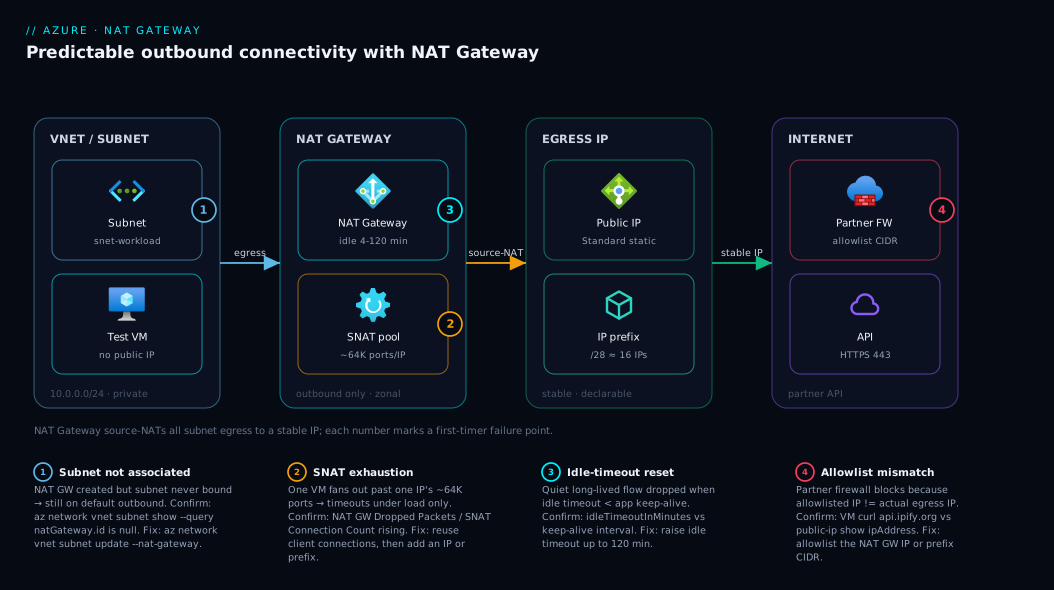
Trace the outbound path left to right. A VM (or scale set, or AKS node) in a private subnet of your virtual network issues an outbound request — say to a partner payment API. Because the subnet is associated with a NAT Gateway, the platform rewrites the source from the VM’s private IP to one of the NAT Gateway’s attached public IPs, drawing a SNAT port from the shared ~64K-per-IP pool. The translated packet egresses from that stable, declarable IP; the partner’s firewall, which allowlisted exactly that IP (or the prefix’s CIDR), accepts it, and return traffic flows back through the same mapping. Inbound-initiated traffic is untouched — a Load Balancer or VM public IP handles that on a separate path.
The diagram below shows the three zones — VNet/subnet on the left, NAT Gateway with its public IPs in the middle, internet/partner on the right — with SNAT translation as the central step. The numbered badges mark the four places first-timers get it wrong: the subnet never associated, the SNAT pool that can still exhaust on a hard single-destination fan-out, the idle timeout that resets quiet flows, and the partner allowlist that must match your egress IP exactly.
Real-world scenario
ShipfleetIN, a Bengaluru logistics startup, runs a nightly route-optimisation batch on a VM Scale Set of 12 instances in a single subnet. Each instance hammers a third-party traffic-and-tolls API, opening hundreds of short-lived HTTPS connections per second as it scores thousands of route permutations. The job ran fine in testing with two instances. In production at twelve, it began failing two hours in with connection timed out errors the on-call engineer could not reproduce the next morning — by then the batch had finished and load was zero.
The team’s first instinct was to blame the partner API and open a vendor ticket. The vendor’s logs showed the requests never arrived — they were dying inside Azure. The give-away was the shape: clean at rest, broken under load, self-healing when load dropped — the SNAT-exhaustion signature. The scale set had no explicit outbound method, so it used default outbound with its small, shared, fixed allocation. Twelve instances each opening hundreds of concurrent connections to the same destination IP blew past it, and new connections had no port to claim. A slower-burn problem surfaced in the same incident: the partner had asked for a source IP to allowlist so they could lift a rate limit, and the team genuinely could not provide one.
The fix was a single NAT Gateway. They created one zonal NAT Gateway in the subnet’s zone, attached a /30 public IP prefix (four addresses, ~256K ports — comfortable headroom for twelve fan-out instances against one destination), and associated it with the scale set’s subnet. No VM was rebuilt; the change took effect on new connections within seconds. They then handed the partner the prefix’s CIDR — one line — and the rate limit was lifted. The batch has run clean since. The retro note: “We spent six hours blaming the vendor for an Azure egress default. NAT Gateway was a ten-minute deploy and the prefix gave us the allowlist answer for free.” The lesson generalises: any fan-out workload — ETL, crawlers, CI agents, microservices calling a shared upstream — belongs on NAT Gateway from day one, not discovered the hard way at 2 a.m. on default outbound.
Advantages and disadvantages
| Advantages | Disadvantages |
|---|---|
| ~64K SNAT ports per IP, allocated dynamically from a shared pool | Outbound only — does not provide any inbound path |
| Stable, declarable egress IP(s) or a single allowlist CIDR | Zonal, not zone-redundant — resilience needs one per zone |
| No per-VM config, agent, or reboot; attaches at the subnet | Adds a (modest) hourly resource charge + data-processing cost |
| Replaces retiring default outbound with a supported method | Idle timeout can reset quiet long-lived flows if misset |
| Coexists cleanly with Load Balancer / public IPs for inbound | Does not affect traffic to private endpoints (by design) |
| Fully managed — no capacity planning, scales to ~1M ports | One more resource to template, monitor, and budget |
The advantages dominate for any subnet doing meaningful outbound. The two disadvantages that matter in design are zonal resilience (deploy one per zone if your subnet spans zones) and the idle timeout (set it above your app’s keep-alive interval for long-lived connections). NAT Gateway is only the wrong tool when your “outbound” is entirely to Azure PaaS — there a private endpoint keeps traffic on the backbone and you need no NAT Gateway at all.
Hands-on lab
This is the centerpiece. You will build a NAT Gateway three ways and prove it works. Each method is independent — do the portal one to see it, then the CLI and Bicep to automate it. The lab is free-tier-friendly: one Standard_B1s VM, one Standard public IP, and one NAT Gateway cost a few rupees for the time it takes, and you tear it all down at the end.
Lab prerequisites
| Requirement | How to get it / check |
|---|---|
| Azure subscription | az account show returns your subscription |
az CLI ≥ 2.50 (or Cloud Shell) |
az version |
| Logged in | az login (skip in Cloud Shell) |
| Network contributor on the RG | Default for subscription owners |
| A region you can deploy in | This lab uses centralindia |
Set shared variables once (used by the CLI section):
# Shared variables for the lab
LOCATION=centralindia
RG=rg-natgw-lab
VNET=vnet-natgw-lab
SUBNET=snet-workload
NATGW=natgw-lab
NATIP=pip-natgw-lab
VM=vm-egress-test

az group create --name $RG --location $LOCATION
# Expected: JSON with "provisioningState": "Succeeded"
Part A — Deploy in the Azure portal
This path is for seeing every knob. Numbered steps; each says what to expect.
-
Create the resource group and VNet first (or reuse the CLI one). In the portal, search Virtual networks → Create. Pick your subscription and resource group (
rg-natgw-lab), name itvnet-natgw-lab, region Central India. On the IP Addresses tab accept the default10.0.0.0/16and rename the default subnet tosnet-workload(10.0.0.0/24). Review + create → Create. Expected: deployment succeeds, the VNet appears with one subnet. -
Create the NAT Gateway. Search NAT gateways → Create. On Basics: subscription,
rg-natgw-lab, namenatgw-lab, region Central India. Set Availability zone to a specific zone (e.g. Zone 1) for a zonal deployment, or No zone for regional. Set TCP idle timeout to 4 minutes (the default) for now. Expected: the Basics tab validates with a green tick. -
Attach a public IP. On the Outbound IP tab, under Public IP addresses, click Create a new public IP address, name it
pip-natgw-lab(this is a Standard SKU, static — NAT Gateway requires Standard). Leave Public IP prefixes empty for this first pass. Expected: one public IP listed under outbound IPs. -
Associate the subnet. On the Subnet tab, select
vnet-natgw-laband ticksnet-workload. Expected: the subnet shows as selected. This is the step that activates egress — skipping it is the number-one mistake. -
Review + create. Confirm the summary shows: 1 outbound public IP, 1 associated subnet, your chosen zone, 4-minute idle timeout. Click Create. Expected: “Your deployment is complete” within ~1 minute.
-
Verify the association. Open the NAT Gateway → Subnets blade:
snet-workloadis listed. Open Outbound IP:pip-natgw-labis listed. Expected: both present. The subnet is now egressing through the NAT Gateway.
| Portal tab | Setting | Lab value | Why |
|---|---|---|---|
| Basics | Name | natgw-lab |
Identifier |
| Basics | Availability zone | Zone 1 (or No zone) | Zonal vs regional |
| Basics | TCP idle timeout | 4 min | Default; raise for long-lived flows |
| Outbound IP | Public IP address | pip-natgw-lab (Standard) |
The stable egress IP |
| Outbound IP | Public IP prefix | (empty) | Use for many IPs / clean CIDR |
| Subnet | Associated subnet | snet-workload |
Activates egress |
Part B — Deploy with the az CLI
This is the automatable path. Run after az group create above. Each command notes expected output.
- Create the VNet and subnet.
az network vnet create \
  --resource-group $RG --name $VNET \
  --address-prefix 10.0.0.0/16 \
  --subnet-name $SUBNET --subnet-prefix 10.0.0.0/24 \
  --location $LOCATION
# Expected: JSON with the vnet and one subnet "snet-workload"
- Create a Standard, static public IP for egress. NAT Gateway requires Standard SKU; a Basic IP will be rejected.
az network public-ip create \
  --resource-group $RG --name $NATIP \
  --sku Standard --allocation-method Static \
  --location $LOCATION
# Expected: JSON; note "ipAddress": "<your egress IP>" (may populate after association)
- Create the NAT Gateway and attach the public IP.
--idle-timeoutis in minutes (4 default, up to 120). Add--zone 1for a zonal deployment.
az network nat gateway create \
  --resource-group $RG --name $NATGW \
  --public-ip-addresses $NATIP \
  --idle-timeout 4 \
  --location $LOCATION
# Expected: JSON with "provisioningState": "Succeeded" and the public IP listed
- Associate the NAT Gateway with the subnet. This is the activating step.
az network vnet subnet update \
  --resource-group $RG --vnet-name $VNET --name $SUBNET \
  --nat-gateway $NATGW
# Expected: JSON; the subnet now shows "natGateway": { "id": ".../natgw-lab" }
- Confirm the wiring.
# Which public IP(s) does the NAT GW carry?
az network nat gateway show -g $RG -n $NATGW \
  --query "{name:name, idleTimeout:idleTimeoutInMinutes, ips:publicIpAddresses[].id}" -o jsonc

# Is the subnet really associated?
az network vnet subnet show -g $RG --vnet-name $VNET -n $SUBNET \
  --query "natGateway.id" -o tsv
# Expected: a resource ID ending in /natGateways/natgw-lab
- Deploy a test VM in the subnet (no public IP on the VM). A VM with no public IP forces all egress through the NAT Gateway, which is exactly what you want to prove.
az vm create \
  --resource-group $RG --name $VM \
  --image Ubuntu2204 --size Standard_B1s \
  --vnet-name $VNET --subnet $SUBNET \
  --public-ip-address "" \
  --admin-username azureuser --generate-ssh-keys
# Expected: JSON with "powerState": "VM running"; "publicIpAddress": "" (none)
- Validate egress IP from inside the VM. Since the VM has no public IP, you reach it via Azure Bastion or the Run Command action. Run Command needs no inbound connectivity:
# Ask the VM what the internet sees as its source IP
az vm run-command invoke \
  --resource-group $RG --name $VM \
  --command-id RunShellScript \
  --scripts "curl -s https://api.ipify.org"
# Expected: the output value equals the NAT Gateway's public IP (pip-natgw-lab)
Compare that returned IP to the NAT Gateway’s IP:
az network public-ip show -g $RG -n $NATIP --query ipAddress -o tsv
# Expected: identical to the curl result above → egress is through the NAT Gateway
If those two match, you have proven the architecture: a VM with no public IP is reaching the internet from your stable NAT Gateway address.
| CLI step | Command verb | Expected key in output |
|---|---|---|
| 7 | vnet create |
subnets[0].name = snet-workload |
| 8 | public-ip create |
sku.name = Standard |
| 9 | nat gateway create |
provisioningState = Succeeded |
| 10 | vnet subnet update |
natGateway.id present |
| 12 | vm create |
publicIpAddress = "" |
| 13 | run-command invoke |
curl output == NAT GW IP |
Part C — Deploy with Bicep
The same topology as infrastructure-as-code, idempotent and reviewable. Save as natgw.bicep.
// natgw.bicep — VNet + subnet + Standard public IP + NAT Gateway, wired together
@description('Location for all resources')
param location string = resourceGroup().location

@description('TCP idle timeout in minutes (4-120)')
@minValue(4)
@maxValue(120)
param idleTimeoutInMinutes int = 4

var vnetName = 'vnet-natgw-lab'
var subnetName = 'snet-workload'
var natGwName = 'natgw-lab'
var pipName = 'pip-natgw-lab'

// Standard, static public IP for egress (NAT GW requires Standard)
resource pip 'Microsoft.Network/publicIPAddresses@2023-09-01' = {
  name: pipName
  location: location
  sku: { name: 'Standard' }
  zones: [ '1' ]              // zonal IP to match a zonal NAT GW; omit for regional
  properties: {
    publicIPAllocationMethod: 'Static'
  }
}

// The NAT Gateway, carrying the public IP
resource natgw 'Microsoft.Network/natGateways@2023-09-01' = {
  name: natGwName
  location: location
  sku: { name: 'Standard' }
  zones: [ '1' ]
  properties: {
    idleTimeoutInMinutes: idleTimeoutInMinutes
    publicIpAddresses: [
      { id: pip.id }
    ]
  }
}

// VNet with the subnet already associated to the NAT Gateway
resource vnet 'Microsoft.Network/virtualNetworks@2023-09-01' = {
  name: vnetName
  location: location
  properties: {
    addressSpace: { addressPrefixes: [ '10.0.0.0/16' ] }
    subnets: [
      {
        name: subnetName
        properties: {
          addressPrefix: '10.0.0.0/24'
          natGateway: { id: natgw.id }   // the association, declared inline
        }
      }
    ]
  }
}

output egressIpId string = pip.id
output natGatewayId string = natgw.id
- Validate and deploy.
what-ifshows the plan before you commit — always run it first.
# Dry run: see exactly what will be created/changed
az deployment group what-if \
  --resource-group $RG --template-file natgw.bicep
# Expected: a "+ Create" plan for the public IP, NAT GW, and VNet/subnet

# Deploy for real
az deployment group create \
  --resource-group $RG --template-file natgw.bicep
# Expected: "provisioningState": "Succeeded"; outputs show egressIpId and natGatewayId
- Re-run to prove idempotency. Deploying the same template again should report no changes — that is the point of declarative IaC.
az deployment group create \
  --resource-group $RG --template-file natgw.bicep
# Expected: Succeeded again, with no resource churn (what-if would show "No change")
| Bicep element | Property | Lab value | Note |
|---|---|---|---|
| Public IP | sku.name |
Standard |
Mandatory for NAT GW |
| Public IP | zones |
['1'] |
Match NAT GW zone; omit = regional |
| NAT Gateway | idleTimeoutInMinutes |
4 |
4–120, validated by @minValue/@maxValue |
| NAT Gateway | publicIpAddresses |
[{ id: pip.id }] |
Attach IP by resource id |
| Subnet | natGateway.id |
natgw.id |
The inline association |
Teardown
Delete the whole resource group — one command removes the VM, NAT Gateway, public IP, and VNet so nothing keeps billing.
az group delete --name $RG --yes --no-wait
# Expected: returns immediately; deletion proceeds in the background.
# Verify later: az group exists --name $RG  → false
If you only want to detach the NAT Gateway from the subnet but keep everything else (e.g. to test default outbound), null out the association:
az network vnet subnet update -g $RG --vnet-name $VNET -n $SUBNET --remove natGateway
# Expected: subnet's natGateway is removed; egress reverts to default outbound
Common mistakes & troubleshooting
The failures below are the ones that actually catch people. Each gives the symptom, the root cause, the exact way to confirm, and the fix.
| # | Symptom | Root cause | Confirm (exact command / path) | Fix |
|---|---|---|---|---|
| 1 | Egress IP is not the NAT GW IP | Subnet never associated | az network vnet subnet show ... --query natGateway.id is null |
az network vnet subnet update --nat-gateway <natgw> |
| 2 | BasicSkuNotSupported on create |
Attached a Basic public IP | az network public-ip show ... --query sku.name = Basic |
Recreate the IP with --sku Standard |
| 3 | Connections still time out under load | Single VM fans out past one IP’s ~64K ports | NAT GW metric SNAT Connection Count / Dropped packets rising | Add a public IP or a larger prefix; reuse client connections |
| 4 | Long-lived DB connection randomly drops | Idle timeout shorter than app keep-alive | NAT GW idleTimeoutInMinutes < app keep-alive interval |
Raise idle timeout (up to 120) or shorten app keep-alive |
| 5 | VM still uses old shared IP after attach | Existing flows keep their old SNAT mapping | New curl shows the new IP; old long-lived flow doesn’t |
Expected — only new connections move; restart the client |
| 6 | Can’t associate — subnet already has one | A subnet can have only one NAT Gateway | Portal shows the subnet greyed in another NAT GW | Detach from the other NAT GW first |
| 7 | Traffic to Azure SQL still uses public path | Expected NAT GW to “privatise” PaaS | It’s egress NAT, not private routing | Use a Private Endpoint for PaaS |
| 8 | Prefix attach fails — “not contiguous/too large” | Wrong prefix size or region mismatch | Prefix prefixLength and location vs NAT GW |
Create the prefix in the same region; pick a valid size (/28–/31) |
| 9 | NAT GW created but no egress at all | NSG/UDR blocks or forces traffic elsewhere | Effective routes / NSG via Network Watcher | Allow outbound in NSG; check UDR isn’t black-holing 0.0.0.0/0 |
| 10 | Zone outage took egress down | Single zonal NAT GW, no per-zone redundancy | Only one NAT GW for a multi-zone subnet | Deploy one NAT GW per zone for zone-resilient egress |
The “still on default outbound” trap (mistake #1)
The single most common error: you create the NAT Gateway and public IP perfectly, but forget the subnet association, so nothing changes. The give-away is curl https://api.ipify.org from a VM returning an IP that is not your NAT Gateway IP. One-line confirm:
az network vnet subnet show -g $RG --vnet-name $VNET -n $SUBNET --query natGateway.id -o tsv
If that prints nothing, run subnet update --nat-gateway and re-test. If a UDR forces the route elsewhere or an NSG denies outbound, route diagnostics from Diagnosing Azure VNet Connectivity: NSGs, UDRs, Effective Routes & Network Watcher show why the packet never reached the NAT Gateway.
Reading the SNAT metrics (mistakes #3 and #4)
NAT Gateway publishes metrics in Azure Monitor that tell you the truth about port pressure. A non-zero Dropped Packets under load is the smoking gun for exhaustion — add an IP or prefix then, after checking whether the client can reuse connections. The full Azure Monitor workflow is in Azure Monitor and Application Insights: Full-Stack Observability.
| Metric | What it tells you | Act when |
|---|---|---|
| SNAT Connection Count | Active outbound flows | Trending toward IP-count × ~64K |
| Dropped Packets | Flows failing to get a port | Anything above ~0 sustained |
| Packet Count / Bytes | Throughput through the NAT GW | Capacity / cost trending |
Best practices
- Always associate the subnet — the resource does nothing until you do; validate with the
natGateway.idquery before declaring victory. - Use a public IP prefix when a partner must allowlist you — hand them one CIDR, and grow the prefix later without re-allowlisting.
- Size for your busiest single destination — one IP suits most workloads; add IPs only when one VM nears tens of thousands of concurrent flows to one endpoint.
- Fix the client before adding IPs — HTTP keep-alive and pooled DB connections cut port pressure far more cheaply.
- Set the idle timeout above your app’s keep-alive interval for long-lived connections (databases, brokers); default 4 minutes is fine for short HTTP.
- Deploy one NAT Gateway per zone for zone-resilient egress — a single zonal one is a zone-scoped single point of failure.
- Keep egress out of inbound’s way — NAT Gateway for outbound, Load Balancer / public IP for inbound.
- Use a private endpoint for Azure PaaS so traffic skips the public internet and does not consume NAT Gateway ports.
- Template it in Bicep/Terraform and review the
natGatewayassociation in code so an environment never drifts back to default outbound. - Alert on Dropped Packets > 0 in Azure Monitor so exhaustion pages you before users feel it.
- Plan for default-outbound retirement — audit subnets on implicit egress and give them an explicit NAT Gateway before it bites.
Security notes
NAT Gateway is an egress control point and a useful security primitive, but it is not a firewall.
- It does not filter traffic. NAT Gateway translates source addresses; it does not inspect or block by destination, port, or content. For outbound filtering (allow only certain FQDNs/IPs), put Azure Firewall or an NVA in the path — the two are often used together.
- A stable egress IP is a control for the other side. A partner allowlisting your exact NAT Gateway IP (or prefix) means only traffic from your subnet is accepted upstream — treat the egress IP/prefix as a declared trust boundary.
- No inbound exposure. Being outbound-only, NAT Gateway opens no inbound listening surface; inbound stays governed by your NSGs, Load Balancer rules, and public IPs.
- NSGs still apply. Outbound flows are evaluated by subnet/NIC NSGs before they reach the NAT Gateway — keep an explicit allow only for what the workload needs.
- Private endpoints over public egress for secrets. Traffic to Key Vault, Storage, or SQL should go via private endpoints so credentials never traverse the public internet — that traffic bypasses NAT Gateway by design.
Cost & sizing
NAT Gateway pricing has two components plus the public IP. The numbers below are indicative for an India region; check the Azure pricing calculator for your region and currency, as prices change.
| Cost component | Rough rate | Notes |
|---|---|---|
| NAT Gateway resource | Per-hour charge (~₹4–5/hr ≈ ~₹3,000–3,500/mo) | Billed while the resource exists, idle or not |
| Data processed | Per-GB on data through the NAT GW (~₹4/GB) | Scales with outbound volume |
| Standard public IP | Small per-hour charge per IP | One IP suffices for most; more = more cost |
| Public IP prefix | Per-IP in the prefix | A /28 reserves 16 → 16 IP charges |
The hourly resource charge is fixed, so the variables you control are how many public IPs you attach and how much data flows. Right-sizing is mostly not over-provisioning IPs: start with one, watch the SNAT Connection Count and Dropped Packets metrics, and add an IP or small prefix only under real pressure. A /28 prefix is overkill for most single subnets — its 16 IPs each bill — so prefer the smallest prefix that gives a clean allowlist CIDR (/30 or /31) unless you genuinely need the headroom. The lab cost is negligible — an hour then teardown is a few rupees. For production budgeting and alerts, wire it into Azure Cost Management: Budgets, Alerts & Your First 30 Days.
| Sizing question | Rule of thumb |
|---|---|
| How many public IPs? | Start with 1; add when Dropped Packets > 0 under load |
| Prefix or individual IPs? | Prefix only if a partner allowlists you (clean CIDR) |
| What idle timeout? | 4 min for HTTP; raise to match long-lived keep-alives |
| Zonal or regional? | Zonal + one-per-zone for resilience; regional for simplicity |
Interview & exam questions
These map to AZ-700 (Designing and Implementing Azure Networking) and the networking portions of AZ-104 and AZ-305.
-
What does Azure NAT Gateway do, and which direction of traffic does it handle? It provides managed, scalable outbound-only source NAT for a subnet: every resource in an associated subnet egresses through the NAT Gateway’s public IP(s) and shared SNAT-port pool. It does not handle any inbound traffic.
-
Why does NAT Gateway scale better than Load Balancer outbound rules for SNAT? NAT Gateway allocates SNAT ports dynamically from a shared pool across the subnet, whereas Load Balancer outbound rules pre-allocate a fixed block per VM. A bursty VM under NAT Gateway can borrow from the full ~64K-per-IP pool; under LB it is capped at its pre-allocated slice and exhausts while other slices sit idle.
-
How many SNAT ports does each public IP give you, and how do you get more? Roughly 64,000 per public IP. You get more by attaching additional public IPs (up to 16 total) or a public IP prefix, multiplying the pool toward ~1,000,000 at full scale.
-
A workload fails under load with connection timeouts but works at rest. What is your first hypothesis? SNAT port exhaustion. Confirm via NAT Gateway’s Dropped Packets / SNAT Connection Count metrics, fix by reusing client connections first, then by adding a public IP or prefix.
-
What is default outbound access and why should you not rely on it? It is the implicit, shared, fixed SNAT the platform gives a VM with no explicit outbound method. The IP is unstable and shared, and it is being retired for new deployments — use NAT Gateway (or another explicit method) instead.
-
Does NAT Gateway affect traffic to a private endpoint, and what SKU of public IP does it require? No — private-endpoint traffic stays on the Azure backbone and bypasses NAT Gateway; it only translates public-internet egress. It requires a Standard public IP (Basic is rejected at creation).
-
How do you make outbound connectivity resilient to a single availability-zone failure? NAT Gateway is zonal, so you deploy one per zone, each serving that zone’s resources. There is no single zone-redundant NAT Gateway.
-
What is the idle timeout and what breaks if it is too short? The TCP idle timeout (default 4 minutes, up to 120) is how long an idle flow holds its SNAT port. Shorter than the app’s keep-alive interval, long-lived quiet connections (e.g. to a database) get reset unexpectedly.
-
A partner needs to allowlist your egress IP. What’s the cleanest way? Attach a public IP prefix and hand them the single CIDR — they allowlist one block, and you can scale within it without re-allowlisting. Note a subnet can be bound to at most one NAT Gateway, but one NAT Gateway can serve multiple subnets.
-
You attached NAT Gateway but the VM still shows the old egress IP. Why? Either the subnet association is missing (confirm
natGateway.idon the subnet), or existing long-lived flows keep their old mapping — only new connections move, so restart the client to confirm.
Quick check
- Which direction of traffic does NAT Gateway handle — inbound, outbound, or both?
- Roughly how many SNAT ports does one public IP provide to a NAT Gateway?
- What single step “activates” egress through a NAT Gateway after you create it and attach an IP?
- What public IP SKU does NAT Gateway require?
- How do you make outbound connectivity survive an availability-zone failure?
Answers
- Outbound only. Inbound is unaffected and handled separately (Load Balancer, public IP, etc.).
- About 64,000 SNAT ports per public IP, allocated dynamically from a shared pool.
- Associating the subnet with the NAT Gateway (
az network vnet subnet update --nat-gateway ...or the Subnet tab in the portal). - Standard. Basic public IPs are rejected.
- Deploy one zonal NAT Gateway per availability zone — there is no single zone-redundant NAT Gateway.
Glossary
- NAT Gateway — Managed Azure resource providing outbound-only source NAT for one or more subnets, with stable public IP(s) and a large shared SNAT-port pool.
- SNAT (Source Network Address Translation) — Rewriting a private source IP:port to a public IP:port so an outbound flow can traverse the internet and return.
- SNAT port — One ephemeral-port entry tracking an outbound flow; roughly 64,000 per public IP.
- SNAT port exhaustion — Running out of SNAT ports, causing new outbound connections to fail or hang under load.
- Default outbound access — Azure’s implicit, shared, unstable egress for resources with no explicit method; being retired for new deployments.
- Public IP (Standard SKU) — A static, zone-aware public address; required by NAT Gateway as its egress IP.
- Public IP prefix — A reserved contiguous CIDR block of public IPs, for more ports and a single allowlist CIDR.
- Subnet association — Binding a NAT Gateway to a subnet, which activates egress through it for every resource in that subnet.
- Idle timeout — How long an idle TCP flow holds its SNAT port; default 4 minutes, configurable to 120.
- Availability zone — A physically separate datacenter within a region; a NAT Gateway is zonal (or regional/non-zonal).
- Outbound connectivity — A private resource’s ability to initiate connections to the internet; the problem NAT Gateway solves.
- Run Command — An Azure VM operation that runs a script on the VM without inbound access — useful for validating egress.
Next steps
- Pair NAT Gateway’s egress with private ingress by reading Azure Standard Load Balancer Deep Dive: Outbound Rules, HA Ports, and Cross-Region Load Balancing.
- Keep PaaS traffic off the public internet (and off NAT Gateway) with Azure Private Endpoint vs Service Endpoint: Secure PaaS Access.
- Master the routing and NSG diagnostics behind egress with Diagnosing Azure VNet Connectivity: NSGs, UDRs, Effective Routes & Network Watcher.
- Solidify the underlying network model with Azure Virtual Network, Subnets and NSGs: Networking Fundamentals.
- Template every networking resource cleanly by starting from Deploy Your First Bicep File From Scratch.