Open any mature Azure subscription and look at the Network Security Group rules. You will find lines like allow 10.4.2.0/26 → 10.4.6.10 tcp 1433, and nobody on the team can tell you, with confidence, what those CIDRs are. Is 10.4.2.0/26 the web tier or the jump-box subnet? Did the app subnet get re-IP’d in the last VNet redesign? When the web tier autoscaled from 4 to 30 VMs, did anyone widen the rule, and is it now too wide? IP-based firewall rules rot the moment your infrastructure moves — and it always moves. This is IP sprawl: a growing pile of address literals in security rules that drift out of sync with reality until the only safe edit is no edit.
Application Security Groups (ASGs) fix this by letting you attach a name — a logical role like asg-web, asg-app, asg-db — to the network interfaces of VMs, and then write NSG rules against those names instead of IP addresses. A rule becomes allow asg-web → asg-app tcp 8080, which reads like the intent it encodes and, crucially, keeps meaning the same thing as VMs come and go. Add a new web VM, put its NIC in asg-web, and it inherits every rule that references asg-web — no rule edit, no IP to look up, no CIDR to widen. The ASG is a moving handle on a set of NICs; the rule points at the handle, the platform resolves the handle to current IPs at evaluation time. That indirection is the whole idea, and it is the foundation of practical microsegmentation on Azure IaaS.
This article is the mental model and the decision framework for ASGs. You will learn exactly what an ASG is and is not, how it sits beside service tags and raw IP-CIDR sources in the NSG rule grammar, where the hard scoping boundaries are (an ASG and the NIC it tags must share a region and a virtual network — get this wrong and the rule silently does nothing), how augmented rules let one rule span multiple ASGs and ports, and how to lay out a three-tier microsegmentation pattern that survives scaling, re-IP-ing, and rebuilds. We close with a copy-pasteable lab, a troubleshooting section for the failures that actually bite, and exam-grade Q&A. By the end you’ll reach for an ASG by reflex and treat an IP literal in an NSG rule as a code smell.
What problem this solves
Network rules written against IP addresses are correct exactly once — the day you write them — and decay from there. Three forces drive the decay, and every Azure estate hits all three.
Scale breaks the source range. You write allow 10.4.2.0/27 → app for a web tier of a few VMs. Autoscale grows the tier, the subnet fills, someone “temporarily” widens the rule to 10.4.2.0/24, and now it permits a quarter-thousand addresses — most not web servers, some nothing yet, a few whatever lands in that subnet next. The rule is no longer a statement about the web tier; it’s a statement about a subnet that happens to contain the web tier and room for surprises.
Re-IP-ing breaks the literal. A VNet redesign, a region move, a merge of two address plans, a subnet resize — any of these renumber VMs. Every NSG rule that named the old address is now either pointing at the wrong host or, worse, pointing at an address that has been reassigned to a different workload. The rules still parse, still “work,” and now quietly allow the wrong traffic. Nobody notices until an audit or an incident.
Rebuilds break the assumption. Immutable infrastructure, blue-green deployments, and routine VM replacement mean the host behind an IP is not the host you wrote the rule for. You assumed 10.4.6.10 was the database; it was, until the DB VM was rebuilt with a new NIC and address, and now 10.4.6.10 is a build agent. The rule did not change; the meaning did.
ASGs sever the rule from the address. You tag the NIC with a role once (usually at provisioning time, via IaC), and the rule names the role forever: when the web tier scales, new NICs join asg-web and inherit the rules; when you re-IP, the ASG follows the NIC; when you rebuild, the same template puts the new NIC in the same ASG and the rule is satisfied on day one. Who hits the original problem hardest: anyone running multi-tier IaaS, anyone with autoscaling scale sets behind NSGs, anyone who has lived through a VNet re-address, and any team chasing zero-trust microsegmentation (allow only the flows each role needs) while drowning in CIDR bookkeeping. ASGs are how you express “web talks to app, app talks to db, nothing else” in a form that stays true.
Here is the core problem each rule-source type creates, and which one ASGs replace:
| Rule source you might use | What it names | How it rots | Best left for |
|---|---|---|---|
| IP address / CIDR | A literal address or range | Drifts on scale, re-IP, rebuild; widens over time | On-prem ranges, fixed external partners |
| Subnet (CIDR of a subnet) | Everything in a subnet | Coarse; allows whatever else lands in the subnet | Broad subnet-to-subnet baselines |
| Service tag | A named Azure service’s IPs (Microsoft-managed) | Doesn’t rot — but only covers Azure services, not your VMs | Azure PaaS/platform sources/destinations |
| Application Security Group | A set of your NICs by logical role | Doesn’t rot — follows the NIC across IP changes | Your own multi-tier VM workloads |
The last two rows are the rot-proof ones. Service tags name Microsoft’s address space for a service (Storage, Sql, AzureLoadBalancer); ASGs name your workload roles. Together they let you write an entire NSG rule set with almost no IP literals.
Learning objectives
By the end of this article you can:
- Explain precisely what an ASG is — a named grouping of network interfaces — and why naming roles instead of addresses makes NSG rules survive scaling, re-IP-ing, and rebuilds.
- Place ASGs correctly in the NSG rule grammar alongside service tags and IP-CIDR sources/destinations, and pick the right source type for any given rule.
- State and respect the hard scoping rules: an ASG is region-scoped and a NIC can only join an ASG in the same VNet, and an NSG rule using an ASG must have all referenced ASGs reachable from that NSG’s scope.
- Use augmented NSG rules to reference multiple ASGs and multiple ports in a single rule, and explain how that collapses a rule sprawl into a few intent-named lines.
- Design a three-tier (web/app/db) microsegmentation pattern with a default-deny posture, expressed entirely in ASG-named rules.
- Distinguish ASGs from look-alike constructs — subnets, NSGs themselves, AKS network policy, and Azure Firewall rules — and know when each is the right tool.
- Build the whole thing hands-on with
azand Bicep, attach NICs to ASGs, write ASG-to-ASG rules, and verify the effective rules and flow with Network Watcher. - Troubleshoot the classic ASG failures: cross-VNet/region mismatch, NIC not actually in the ASG, a deny rule shadowing the ASG allow, and the inbound/outbound direction trap.
Prerequisites & where this fits
You should already be comfortable with the Azure networking basics: a virtual network (VNet) is your private address space, carved into subnets; a network interface (NIC) connects a VM to a subnet and holds its private IP; and a Network Security Group (NSG) is the stateful, priority-ordered allow/deny rule set you attach to a subnet or a NIC. If priorities, the default rules, and the difference between subnet-level and NIC-level NSGs are fuzzy, read Azure Network Security Groups: Rules & Priorities Explained first — ASGs are an addition to that rule grammar, not a replacement for it. The broader VNet/subnet picture is in Azure Virtual Network: Subnets & NSGs, and the addressing discipline that makes re-IP pain real is in Azure VNet IP Address Planning: CIDR & Subnetting.
Where this fits: ASGs live squarely in the NSG layer — a way to express the source and destination of NSG rules, nothing more. They sit underneath higher-level controls (an Azure Firewall for centralized L3–L7 egress, an Application Gateway for L7 WAF on inbound HTTP) and beside container data-plane controls (AKS network policies segment pods, not VM NICs). Their naming benefits from a convention — Azure Naming Conventions: Cloud Adoption Framework gives the asg-<role>-<env> discipline that makes a rule set self-documenting. This article assumes IaaS VMs; for PaaS isolation you reach for Private Endpoint vs Service Endpoint.
A quick map of which layer owns which segmentation, so you reach for the right tool:
| Segmentation need | Right tool | Granularity | Why not the others |
|---|---|---|---|
| Allow/deny between VM roles in a VNet | NSG + ASG | Per-NIC, per-role | Firewall is overkill/cost; subnet rules too coarse |
| Broad subnet-to-subnet baseline | NSG with subnet/CIDR sources | Per-subnet | ASG is finer than you need here |
| Centralized egress to internet/on-prem with FQDN/L7 | Azure Firewall | Per-flow, L3–L7 | NSG/ASG can’t do FQDN or app-layer rules |
| Inbound HTTP filtering / WAF | Application Gateway / Front Door | L7, per-URL | NSG/ASG are L3/L4 only |
| Pod-to-pod inside Kubernetes | AKS network policy (Calico/Cilium) | Per-pod label | ASG tags VM NICs, not pods |
Core concepts
Five mental models make every later decision obvious.
An ASG is a named handle on a set of NICs — nothing else. It has no rules of its own, no IP, no CIDR, no policy — an empty container whose only content is whatever network interfaces you place in it. You create asg-web, then associate VM NICs (a NIC can belong to several ASGs at once). On its own it’s inert, until an NSG rule references it as a source or destination. The value is entirely in the indirection: the rule names the handle, and the platform resolves it to the current private IPs behind those NICs at evaluation time. Internalize this and the limits stop surprising you — an ASG isn’t a security boundary, it’s a label you point a rule at.
ASGs live inside the NSG rule, as a source or destination type. Each side of a rule can be an IP address/CIDR, a token (*, VirtualNetwork, Internet, AzureLoadBalancer), a service tag (Storage, Sql, …), or an Application Security Group. Choosing ASG is how the rule says “this role” instead of “this address”; everything else — priority, direction, protocol, port, allow/deny — is unchanged. ASGs don’t add a new rule engine; they add a new name you use where an address used to go.
Scope is the trap, and it has two halves. An ASG is regional, and a rule that references it must reach it. Two hard boundaries: (1) a NIC can only join ASGs in the same VNet, and (2) all ASGs in a single rule must be associated with NICs in the same VNet as where the NSG applies. So ASGs cross neither VNets nor regions. Tag a NIC in vnet-east, reference that ASG from a rule on a NIC in vnet-west, and it won’t work — and the failure is usually silent (the rule matches nothing, traffic falls through). This one fact explains most “my ASG rule isn’t working” tickets.
Augmented rules let one rule do the work of many. On a Resource Manager NSG, a single rule can carry multiple sources, destinations, and port ranges — the augmented security rule capability — so sources: [asg-web, asg-jumpbox] → destinations: [asg-app] ports: [8080, 8443] is one line instead of a rule per source/destination/port combination. With ASGs + augmentation, a whole tier-to-tier policy is a handful of readable lines (the deep section below works this through).
ASGs are stateful, L3/L4, and VM-NIC-only — like the NSG they live in. Because an ASG is just a name inside an NSG rule, it inherits every NSG property: rules are stateful (return traffic permitted automatically), operate at layers 3 and 4 (IP, TCP/UDP, ports — not FQDNs, URLs, or HTTP methods), and apply only to VM network interfaces. An ASG can’t tag a PaaS endpoint, a pod, or anything without a NIC you control. If you need FQDN egress, application-layer rules, or pod-level policy, the ASG is the wrong layer.
The vocabulary in one table
Before the deep sections, pin down every moving part. The glossary repeats these for lookup; this table is the mental model side by side:
| Concept | One-line definition | Where it lives | Why it matters for microsegmentation |
|---|---|---|---|
| Application Security Group (ASG) | A named grouping of network interfaces | Resource group, region-scoped | The role handle you write rules against |
| Network interface (NIC) | A VM’s connection to a subnet, holds its IP | Attached to a VM, in a subnet | The thing you place into an ASG |
| Network Security Group (NSG) | Priority-ordered stateful allow/deny rules | Subnet and/or NIC | The engine; ASGs are names inside its rules |
| Service tag | Microsoft-managed IP set for an Azure service | Used as source/dest in a rule | Names Azure’s address space; complements ASGs |
| Augmented rule | One rule with multiple sources/dests/ports | An NSG security rule | Lets a few rules express a whole tier policy |
| Source / destination type | IP-CIDR, tag, *, service tag, or ASG |
Within each NSG rule | Choosing ASG is what removes the IP literal |
| Priority | The order (100–4096) rules are evaluated | Each NSG rule | A lower-priority deny can shadow an ASG allow |
| Direction | Inbound or outbound (separate rule sets) | Each NSG rule | ASG-as-source vs ASG-as-destination flips by direction |
| Effective security rules | The merged subnet+NIC rules a NIC actually sees | Computed per NIC | Where you confirm an ASG rule is really applied |
| Default-deny | A low-priority Deny * you add to block the rest |
NSG rule (e.g. priority 4000) | The posture ASGs let you safely express |
ASGs vs service tags vs IP-CIDR: choosing the source type
The single most useful skill is knowing, for any rule, which kind of source/destination to use. Three families: your own VMs (ASG), Microsoft’s services (service tag), and everything else (IP-CIDR or the built-in tokens). Picking wrong is how rules rot or, worse, become too wide.
| You are pointing the rule at… | Use this source/dest type | Example value | Rots when? | Notes |
|---|---|---|---|---|
| Your own VMs, by workload role | ASG | asg-web |
Never (follows NIC) | The default choice for VM-to-VM rules |
| An Azure service (Storage, SQL, etc.) | Service tag | Storage, Sql, AzureKeyVault |
Never (Microsoft-managed) | Can be region-scoped, e.g. Storage.WestEurope |
| All Azure / cloud address space | Service tag | AzureCloud, AzureCloud.WestEurope |
Never | Broad — prefer a specific tag |
| Anything inside your VNet (and peers) | Built-in token | VirtualNetwork |
Never | Includes the VNet + peered + on-prem ranges |
| The Azure load balancer probe/source | Built-in token | AzureLoadBalancer |
Never | Needed to allow health probes |
| The public internet | Built-in token | Internet |
Never | Use sparingly on inbound |
| A fixed external partner / on-prem host | IP-CIDR | 203.0.113.0/24 |
On their renumber | The legitimate place for an IP literal |
| A specific subnet baseline | IP-CIDR (subnet range) | 10.4.2.0/24 |
On re-IP/resize | Coarse; ASG is finer |
The rule of thumb: if it’s your VM, use an ASG; if it’s an Azure service, use a service tag; use an IP literal only for external, fixed addresses. Service tags and ASGs are siblings — both names the platform resolves to current IPs — but name different things, and compose freely: allow asg-app → Sql tcp 1433 mixes an ASG source with a service-tag destination, neither side an IP literal.
Why service tags don’t replace ASGs (and vice versa)
Why not just use service tags for everything? Because they only exist for Azure-managed services — there is no tag for “my web tier,” and that’s the gap ASGs fill. Conversely you can’t make an ASG meaning “all of Azure Storage’s IPs” — that set is enormous, dynamic, and Microsoft-owned, which is why it ships as the Storage tag. Use each for what it names:
| Property | Service tag | Application Security Group |
|---|---|---|
| Names | Microsoft-managed Azure service IPs | Your VM network interfaces by role |
| Who maintains the membership | Microsoft (auto-updated) | You (associate NICs) |
| Can you create / edit it | No (built-in list) | Yes (it’s your resource) |
| Scope | Global or region-scoped (Tag.Region) |
Region + VNet bound |
| Typical use | Destination for egress to PaaS; allow LB probes | Source/dest for VM-to-VM tier rules |
| Rots? | No | No |
| Example | Sql.WestEurope, AzureKeyVault, Internet |
asg-web, asg-app, asg-db |
The scoping rules you must respect
Because an ASG is region- and VNet-bound, most ASG problems are scope problems. Internalize these four boundaries to pre-empt the majority of failures. The platform enforces some at deployment and others silently — the silent ones are the dangerous ones.
| # | Boundary | What it means | What happens if you cross it | How it fails |
|---|---|---|---|---|
| 1 | ASG ↔ NIC same VNet | A NIC can only join ASGs whose other members are in the NIC’s VNet | Association rejected or rule matches nothing | Deploy error or silent no-match |
| 2 | ASG ↔ NIC same region | ASG and the NIC it tags must be in the same Azure region | Cannot associate across regions | Deploy/association error |
| 3 | All ASGs in one rule reachable from the NSG scope | Every ASG referenced in a single rule must be associable from where the NSG applies | Rule is invalid / matches nothing | Validation error or silent no-match |
| 4 | ASGs don’t cross peering | Peered VNets are still separate VNets for ASG purposes | An ASG in VNet A can’t be referenced for NICs in VNet B | Silent no-match |
The one that catches everyone is #4: VNet peering makes two VNets reachable at the IP layer, so people assume an ASG spans the peering. It does not. An ASG is bound to a single VNet; to segment a hub-and-spoke or peered topology you create a parallel ASG in each VNet (asg-web in each spoke) and write the rule in each spoke’s NSG, or fall back to address ranges / service tags for the cross-VNet leg. There is no “global” ASG.
A practical consequence for VM scale sets: the NIC configuration in the scale set model carries the ASG association, so every instance the VMSS creates lands in the right ASG automatically. You declare the role once in the scale set’s network profile and every autoscaled instance inherits it — precisely the scale-survives-the-rule property we want.
Where to attach the NSG when using ASGs
ASGs work whether the NSG is attached to the subnet or the NIC, but the combination matters: both NSGs (if present) are evaluated, and a flow must pass both for the relevant direction. The recommended pattern is to attach the NSG at the subnet level and let ASGs differentiate roles within and across subnets — one subnet NSG holds the tier policy, and ASG membership decides which VMs each rule hits.
| Attach NSG to… | Pros for ASG use | Cons | When to choose |
|---|---|---|---|
| Subnet | One policy per subnet; ASGs differentiate roles inside it; fewer objects | Coarser blast radius if misconfigured | Default for tier microsegmentation |
| NIC | Per-VM override; useful for exceptions | Many objects; easy to forget one | Targeted exceptions, sensitive single VMs |
| Both | Defence in depth; subnet baseline + NIC tightening | Must satisfy both; harder to reason about | Regulated workloads needing layered control |
A subtle but important point: you can put VMs of different roles in the same subnet and still segment them with ASGs, because the rule keys on ASG membership, not subnet — decoupling your IP/subnet plan from your security plan, a major reason ASGs feel liberating after years of “one tier per subnet.”
Augmented rules: collapsing sprawl into intent
Before ASGs and augmented rules, a three-tier policy was a wall of single-source/single-destination/single-port rules, each carrying an IP literal — n web sources × m app destinations × p ports is n·m·p rules in the worst case. Augmented security rules let a single rule carry multiple sources, destinations, and port ranges, and when those are ASGs, one line expresses an entire tier-to-tier relationship. The IP-literal way for web→app on two ports sprawls into many rules; the ASG + augmented way is one rule:
# One augmented rule: web tier → app tier on 8080 and 8443
az network nsg rule create \
  --resource-group rg-seg-prod --nsg-name nsg-app \
  --name allow-web-to-app --priority 200 --direction Inbound --access Allow \
  --protocol Tcp \
  --source-asgs asg-web \
  --destination-asgs asg-app \
  --destination-port-ranges 8080 8443
That rule keeps working when the web tier scales 4→40 (new NICs join asg-web), when the app tier is rebuilt (NICs rejoin asg-app), and when both are re-IP’d (the ASG follows the NIC). What augmentation buys you concretely:
| Capability | Classic single-value rule | Augmented rule |
|---|---|---|
| Sources per rule | 1 (one IP/CIDR/tag) | Multiple (list of CIDRs/tags/ASGs) |
| Destinations per rule | 1 | Multiple (incl. multiple ASGs) |
| Destination ports per rule | 1 port or range | Multiple ports and ranges |
| Rules to express n×m×p flows | up to n·m·p | often 1 |
| Readability | IP soup | Intent (asg-web → asg-app) |
| Survives scale/re-IP | No (IP literals) | Yes (ASG names) |
Augmentation isn’t infinite — an NSG caps total rules, and a rule caps its sources/destinations/ports and ASGs — but normal topologies stay well under those caps, and a clean three-tier policy fits in under a dozen rules.
A worked multi-ASG rule
Suppose both the web tier and a jump box must reach the app tier on two ports — two sources, one destination, two ports — a single augmented rule with two ASGs on the source side. The Bicep makes the property shape explicit:
resource ruleWebJumpToApp 'Microsoft.Network/networkSecurityGroups/securityRules@2023-11-01' = {
  parent: nsgApp
  name: 'allow-web-and-jump-to-app'
  properties: {
    priority: 210
    direction: 'Inbound'
    access: 'Allow'
    protocol: 'Tcp'
    sourceApplicationSecurityGroups: [
      { id: asgWeb.id }
      { id: asgJumpbox.id }
    ]
    destinationApplicationSecurityGroups: [
      { id: asgApp.id }
    ]
    sourcePortRange: '*'
    destinationPortRanges: [ '8080', '8443' ]
  }
}
Note the property names: sourceApplicationSecurityGroups and destinationApplicationSecurityGroups take arrays of ASG resource IDs, and an augmented rule uses the plural destinationPortRanges (not the singular destinationPortRange). Mixing the singular and plural forms in one rule is a common authoring error that produces a confusing validation failure.
Microsegmentation patterns with ASGs
ASGs exist to make microsegmentation — least-privilege flows between roles — practical. The canonical pattern is the three-tier app: a public web tier, a private app tier, and a database tier, with traffic allowed only in the chain web→app→db and a default-deny for the rest. The flow policy you want:
| From (ASG) | To (ASG / target) | Protocol / port | Direction (on dest NSG) | Why |
|---|---|---|---|---|
Internet (via LB) |
asg-web |
TCP 443 | Inbound | Public HTTPS to the web tier |
AzureLoadBalancer |
asg-web |
TCP (probe port) | Inbound | Allow health probes |
asg-web |
asg-app |
TCP 8080/8443 | Inbound (on app NSG) | Web calls the app API |
asg-app |
asg-db |
TCP 1433 | Inbound (on db NSG) | App reaches SQL |
asg-db |
Sql (service tag) or PE |
TCP 1433 | Outbound | DB VM to managed SQL, if used |
asg-jumpbox |
asg-web/asg-app/asg-db |
TCP 22/3389 | Inbound | Admin access via bastion/jump |
| any | any (the rest) | any | both | Deny (default-deny floor) |
Three design rules turn that table into a robust policy:
Default-deny is the point — add it explicitly. Azure’s built-in rules already allow intra-VNet traffic (AllowVnetInBound / AllowVnetOutBound at priority 65000), so until you add a lower-numbered deny, every VM in the VNet can talk to every other VM on every port. Microsegmentation means adding a Deny * → * any at a high priority number (e.g. 4000, evaluated after your allows) so that anything you did not explicitly permit is dropped. The ASG allows sit above it (lower numbers), the deny is the floor.
One ASG per role, not per VM and not per subnet. The right granularity is the role: asg-web, asg-app, asg-db, asg-jumpbox. Per-VM ASGs reinvent IP literals; per-subnet ASGs reinvent subnet rules. A role can span subnets and a subnet can hold multiple roles — that’s the flexibility you’re buying.
Direction follows the NSG you’re editing. A “web → app” flow is an inbound allow on the app NSG (app is the destination) with asg-web as source. Because NSGs are stateful, you author the rule only on the destination side for the initiating direction; the return is automatic. Most teams write tier rules as inbound on each tier’s NSG and leave outbound permissive (or add an outbound default-deny for true zero-trust egress).
Naming and tagging discipline
A microsegmentation rule set is only as readable as its ASG names. Adopt a convention and stick to it:
| Element | Convention | Example | Rationale |
|---|---|---|---|
| ASG name | asg-<role>-<env> |
asg-web-prod, asg-db-prod |
Self-documenting; sorts by role |
| NSG name | nsg-<tier-or-subnet>-<env> |
nsg-app-prod |
Maps NSG to the tier it guards |
| Rule name | allow-<src>-to-<dst>-<port> |
allow-web-to-app-8080 |
The rule reads as its intent |
| Deny floor | deny-all-inbound / deny-all-outbound |
priority 4000 | Obvious it’s the catch-all |
| Env separation | distinct ASGs per env | asg-web-dev vs asg-web-prod |
Prevents dev NICs in prod rules |
Two anti-patterns: reusing one ASG across environments (a dev NIC added to asg-web inherits production rules — keep asg-web-dev and asg-web-prod separate), and letting an ASG accumulate mixed-role NICs (“just put everything in asg-app”), which quietly broadens every rule referencing it. An ASG is a security boundary in spirit; treat its membership with the care you’d give a security group’s.
ASGs vs the look-alikes
ASGs get confused with constructs that merely sound like grouping or segmentation. Drawing the lines prevents reaching for the wrong tool.
| Construct | What it actually is | Operates on | Use instead of ASG when… |
|---|---|---|---|
| Subnet | An IP range within a VNet | IP addressing | You want a coarse address-based boundary |
| NSG | The rule engine itself | Subnet/NIC traffic | (You don’t — ASGs live inside NSGs) |
| Service tag | Microsoft-managed IP set for a service | Azure service IPs | The target is an Azure service, not your VM |
| AKS network policy | Pod-to-pod L3/L4 rules (Calico/Cilium) | Pod labels | You’re segmenting Kubernetes pods, not VMs |
| Azure Firewall rule | Centralized L3–L7 / FQDN filtering | Flows through the firewall | You need FQDN, app-layer, or central egress |
| Resource group / tags | Management & billing grouping | Azure resources | You’re organizing for ops/cost, not traffic |
| Security group (Entra ID) | Identity group for RBAC | Users/principals | You’re granting permissions, not network flow |
The two that trip people most: AKS network policy and Azure Firewall. On AKS, an ASG on the node-pool NICs segments the nodes, not the pods — pod-level segmentation needs a Kubernetes network policy (see AKS Azure CNI Overlay: Pod CIDR & IP Planning). Egress to *.contoso.com or HTTP filtering is Azure Firewall territory — NSGs and ASGs are L3/L4 and can’t match a domain or URL. ASGs are precisely for VM-NIC-to-VM-NIC, by role, at L3/L4: unbeatable in that lane, the wrong tool outside it.
Architecture at a glance
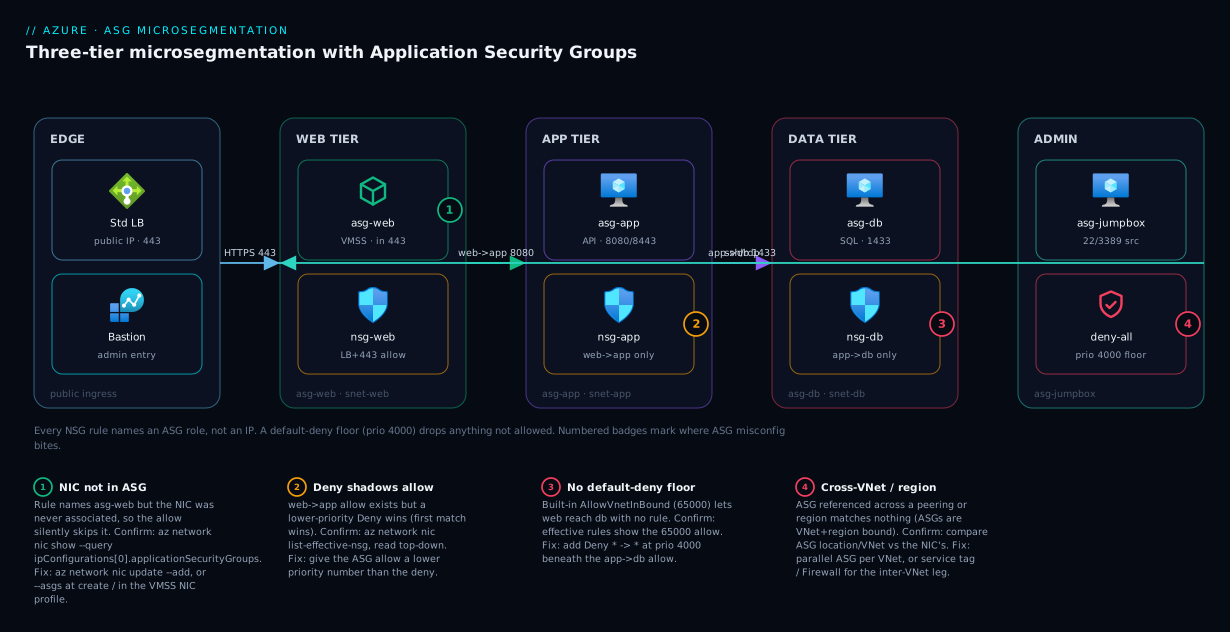
Picture a single VNet, 10.20.0.0/16, carrying a classic three-tier workload, with every NSG rule written against ASGs rather than addresses. Traffic enters from the left at a Standard Load Balancer holding the public IP, which forwards HTTPS on 443 to the web tier — a VM scale set whose every instance lands in asg-web. The web subnet’s NSG allows Internet → asg-web on 443 and AzureLoadBalancer → asg-web for health probes, and denies the rest. The web tier calls the app tier over 8080/8443; that flow is a single inbound rule on the app subnet’s NSG: asg-web → asg-app, two ports, one augmented line. The app tier reaches the database tier on 1433 via asg-app → asg-db, again one rule on the db NSG. A separate jump box in asg-jumpbox (fronted by Bastion) is the only source permitted to reach 22/3389 on any tier. Underneath all of it sits a default-deny floor at priority 4000 on each NSG, so anything not named by an ASG allow is dropped — including, importantly, web-to-db (there is no asg-web → asg-db rule, so the web tier physically cannot reach the database even though they share the VNet).
Follow the left-to-right path and the power of the indirection shows: autoscale adds ten web instances, their NICs join asg-web and inherit → asg-app with zero rule edits; the database VM is rebuilt with a new IP, its new NIC rejoins asg-db, and asg-app → asg-db is satisfied immediately — and no rule ever holds an address literal that could drift. The numbered badges mark the four hops where ASG misconfiguration bites — a NIC missing from its ASG, a cross-VNet scope mismatch, a deny rule shadowing the allow, and the inbound/outbound direction trap — each resolved in the troubleshooting section.
Real-world scenario
Meridian Retail ran a three-tier order-management platform on Azure IaaS — a web tier (initially 4 VMs), an app/API tier (3 VMs), and a SQL Server-on-VM database pair — in one VNet, 10.30.0.0/16, one subnet per tier. The NSGs were the original 2021 build: every rule written against subnet CIDRs and a few VM IP literals. Traffic flowed, but the security posture had quietly eroded. Over two years the web tier autoscaled to 22 VMs, the subnet was widened twice, and the “web → app” rule now read allow 10.30.1.0/24 → 10.30.2.0/24 any — any port, a quarter-thousand source addresses, because nobody dared tighten it in prod. A penetration test flagged the obvious: the web tier could reach the database directly on 1433 (intra-VNet traffic was never denied), so a compromised web VM had a clear path to the data.
The remediation, led by their platform engineer, was a textbook zero-downtime ASG retrofit. First, they created four ASGs — asg-web-prod, asg-app-prod, asg-db-prod, asg-jumpbox-prod — and associated every existing NIC via a scripted loop over az network nic update --add; ASG association doesn’t interrupt traffic, so this was invisible to users. Next, they authored the new rules alongside the old ones at lower priority numbers (so they took precedence): asg-web → asg-app on 8080/8443, asg-app → asg-db on 1433, asg-jumpbox → all on 22/3389, plus Internet/AzureLoadBalancer → asg-web on 443 and the probe. They ran a week in this overlapping state, watching NSG flow logs to confirm no legitimate flow was newly denied. Only then did they add the default-deny at priority 4000 on each NSG and delete the old wide CIDR rules.
The result: web→db was now physically blocked (no rule permitted it, the deny floor dropped it), the rule count fell from 31 mostly-IP rules to 11 intent-named ones, and — the part the engineer cared about most — the next autoscale event Just Worked. Twelve new web VMs came up during a sale, their scale-set NIC profile placed every NIC in asg-web-prod, and they inherited the → asg-app permission with no rule change and no 3 a.m. CIDR-widening. Six weeks later they re-IP’d the entire VNet during a hub-and-spoke migration; because every rule named ASGs, not addresses, the policy survived the renumber untouched — they validated effective rules post-move and not a single flow had to be re-authored. The pen-test finding closed, and the rule set finally said what it meant.
Advantages and disadvantages
ASGs are close to free and almost always worth it for VM workloads, but they are not a universal segmentation tool. The honest trade-off:
| Advantages | Disadvantages / limits |
|---|---|
| Rules name roles, not IPs — survive scale, re-IP, rebuild | Region- and VNet-bound; do not span VNets or peering |
| Autoscaled/rebuilt NICs inherit policy automatically | Only tag VM NICs — no PaaS, pods, or non-NIC resources |
| Augmented rules collapse tier policy into a few lines | L3/L4 only — no FQDN, URL, or app-layer matching |
Self-documenting rule sets (asg-web → asg-app) |
An over-broad ASG silently widens every rule referencing it |
| Decouples security plan from IP/subnet plan | Misconfigured scope fails silently (rule matches nothing) |
| Free — no charge for the ASG resource itself | Adds a membership object to manage and audit |
| Native to NSG; nothing new to learn beyond the source type | Cross-VNet/global segmentation needs Firewall or parallel ASGs |
Advantages dominate for any multi-tier IaaS workload in a single VNet, anything with autoscaling scale sets, and any team pursuing zero-trust microsegmentation on VMs. The disadvantages bite on cross-VNet topologies (use parallel per-VNet ASGs plus service tags / Firewall for the inter-VNet leg), Kubernetes (use network policy), and FQDN/application-layer egress (use Azure Firewall). The decision is rarely “ASG or not” — it’s “ASG for the VM-to-VM lane, the right neighbour for everything else.”
Hands-on lab
This builds a two-tier microsegmentation in one VNet — a web ASG that may reach an app ASG on 8080, an app reachable by nothing else, and a default-deny floor — then verifies it. It uses small B-series VMs, is teardown-friendly, and runs in Cloud Shell.
1. Resource group, VNet, and two subnets.
RG=rg-asg-lab; LOC=westeurope
az group create -n $RG -l $LOC

az network vnet create -g $RG -n vnet-asg -l $LOC \
  --address-prefix 10.40.0.0/16 \
  --subnet-name snet-web --subnet-prefix 10.40.1.0/24
az network vnet subnet create -g $RG --vnet-name vnet-asg \
  -n snet-app --address-prefix 10.40.2.0/24
2. Create the two ASGs. They are empty until NICs join them.
az network asg create -g $RG -n asg-web -l $LOC
az network asg create -g $RG -n asg-app -l $LOC
resource asgWeb 'Microsoft.Network/applicationSecurityGroups@2023-11-01' = {
  name: 'asg-web'
  location: location
}
resource asgApp 'Microsoft.Network/applicationSecurityGroups@2023-11-01' = {
  name: 'asg-app'
  location: location
}
3. Create an NSG and the ASG-based rules. Allow web→app on 8080, then a default-deny floor.
az network nsg create -g $RG -n nsg-app -l $LOC

# Allow: web tier -> app tier on 8080 (ASG source AND destination, no IP literal)
az network nsg rule create -g $RG --nsg-name nsg-app \
  --name allow-web-to-app-8080 --priority 200 \
  --direction Inbound --access Allow --protocol Tcp \
  --source-asgs asg-web --destination-asgs asg-app \
  --destination-port-ranges 8080

# Default-deny floor: anything not allowed above is dropped
az network nsg rule create -g $RG --nsg-name nsg-app \
  --name deny-all-inbound --priority 4000 \
  --direction Inbound --access Deny --protocol '*' \
  --source-address-prefixes '*' --destination-address-prefixes '*' \
  --destination-port-ranges '*'
4. Associate the NSG with the app subnet.
az network vnet subnet update -g $RG --vnet-name vnet-asg -n snet-app \
  --network-security-group nsg-app
5. Create one VM per tier and put each NIC in its ASG. Using --asgs at creation associates the NIC directly.
# Web VM in snet-web, NIC joined to asg-web
az vm create -g $RG -n vm-web -l $LOC --image Ubuntu2204 --size Standard_B1s \
  --vnet-name vnet-asg --subnet snet-web \
  --asgs asg-web --admin-username azureuser --generate-ssh-keys --public-ip-address ""

# App VM in snet-app, NIC joined to asg-app
az vm create -g $RG -n vm-app -l $LOC --image Ubuntu2204 --size Standard_B1s \
  --vnet-name vnet-asg --subnet snet-app \
  --asgs asg-app --admin-username azureuser --generate-ssh-keys --public-ip-address ""
6. Confirm the NIC is really in the ASG — the check that prevents most “it’s not working” surprises:
APP_NIC=$(az vm show -g $RG -n vm-app --query 'networkProfile.networkInterfaces[0].id' -o tsv)
az network nic show --ids "$APP_NIC" \
  --query 'ipConfigurations[0].applicationSecurityGroups[].id' -o tsv   # prints asg-app's ID
7. Verify the effective rules and the flow. The effective rules show the merged policy the NIC enforces; IP-flow-verify tests a specific flow (needs Network Watcher):
az network nic list-effective-nsg --ids "$APP_NIC" \
  --query "value[].rules[?contains(name,'web-to-app')]" -o jsonc

WEB_IP=$(az vm list-ip-addresses -g $RG -n vm-web --query '[0].virtualMachine.network.privateIpAddresses[0]' -o tsv)
APP_IP=$(az vm list-ip-addresses -g $RG -n vm-app --query '[0].virtualMachine.network.privateIpAddresses[0]' -o tsv)
az network watcher test-ip-flow -g $RG --vm vm-app --direction Inbound --protocol TCP \
  --local "$APP_IP:8080" --remote "$WEB_IP:0"   # expect Access=Allow, rule=allow-web-to-app-8080
Expected outcome: the web→app flow on 8080 is allowed by allow-web-to-app-8080; the same flow on 1433 (or from any non-ASG source) is denied by deny-all-inbound. You’ve expressed “only web may reach app, only on 8080” without a single IP literal.
8. Teardown. Everything is in one resource group:
az group delete -n $RG --yes --no-wait
Common mistakes & troubleshooting
The failure modes below actually generate tickets — each with symptom, root cause, the exact command/portal path to confirm, and the fix. The recurring theme: ASG misconfiguration usually fails silently — the rule matches nothing and traffic falls through to the next rule (often the deny floor or the permissive default), so you see “blocked” or “wide open” rather than an error.
| # | Symptom | Root cause | Confirm with | Fix |
|---|---|---|---|---|
| 1 | ASG rule “does nothing”; traffic still blocked/allowed wrong | NIC isn’t actually in the ASG | az network nic show ... --query ipConfigurations[0].applicationSecurityGroups |
Associate the NIC: az network nic update --add or --asgs at create |
| 2 | Rule referencing an ASG in another VNet/region matches nothing | ASG is VNet/region-bound; cross-scope reference is invalid | Compare ASG location/VNet vs NIC’s VNet | Use a parallel ASG per VNet; don’t cross peering |
| 3 | App tier reachable from web despite no allow rule | Built-in AllowVnetInBound (65000) permits intra-VNet; no deny floor |
az network nic list-effective-nsg shows the 65000 allow |
Add an explicit Deny * → * at e.g. priority 4000 |
| 4 | ASG allow exists but flow still denied | A lower-priority deny shadows the allow | Effective rules — find the first matching rule | Renumber: allow must have a lower priority number than the deny |
| 5 | “web → app” works but “app responds” seems blocked | Authored the wrong direction; misread stateful return | Check rule direction; NSGs are stateful |
Author the initiating direction only; return is automatic |
| 6 | Can’t associate NIC with ASG | Cross-region, or ASG in a different VNet’s members | Deploy error message; check regions | Put ASG and NIC in the same region/VNet |
| 7 | Health probe traffic dropped; LB marks backend unhealthy | No rule allowing AzureLoadBalancer to the tier |
Effective rules; LB backend health | Add AzureLoadBalancer → asg-web allow for the probe port |
| 8 | New autoscaled VMs not covered by the policy | Scale set NIC profile doesn’t include the ASG | Inspect VMSS networkProfile; check an instance NIC |
Add the ASG to the scale set’s NIC configuration |
| 9 | Rule references the ASG but uses singular port field | Mixed singular/plural fields in an augmented rule | Bicep/ARM validation error | Use destinationPortRanges (plural) for multi-port rules |
| 10 | Deleting/recreating a VM lost its segmentation | New NIC wasn’t re-added to the ASG | NIC’s ASG list is empty after rebuild | Put ASG association in IaC so rebuilds re-tag automatically |
The silent-no-match trap (the one that wastes the most time)
Most of the above reduce to one habit: never trust that an ASG rule applies — verify the NIC membership and the effective rules. When a rule “isn’t working,” the question is almost always “is this NIC actually in the ASG the rule names, in this VNet/region?” Run both checks together:
# (a) Is the NIC in the ASG the rule references?
az network nic show --ids "$NIC_ID" \
  --query "ipConfigurations[0].applicationSecurityGroups[].id" -o tsv

# (b) What rules does this NIC actually enforce, in priority order?
az network nic list-effective-nsg --ids "$NIC_ID" \
  --query "value[].rules[].{name:name, prio:priority, dir:direction, access:access}" -o table
If (a) is empty, the NIC was never tagged — every rule naming that ASG silently skips it. If (a) is fine but the flow is still wrong, read (b) top-down: the first matching rule wins, so a deny at priority 300 shadows your allow at 400. The portal equivalent is the NIC’s Effective security rules view plus Network Watcher → IP flow verify, which names the exact rule that decided a flow. For the deeper workflow, NSG Flow Debugging: Effective Rules & IP Flow Verify is the companion playbook.
Direction and statefulness, decoded
Rows 4 and 5 deserve a note. The flow “web calls app on 8080” is an inbound rule on the app NSG, asg-web → asg-app. Because NSGs are stateful, you do not need an outbound allow on app for the response nor an inbound allow on web for the reply — the platform permits the return automatically, so you author only the initiating direction. Where people go wrong: they add an outbound deny on web, then puzzle over “app can’t respond” — but app’s response is the stateful return of an inbound flow; what the web-outbound-deny actually blocks is web initiating new outbound connections, a different thing. Separate “who starts the conversation” (the direction you author) from “the reply” (automatic).
Best practices
- Treat an IP literal in an NSG rule as a code smell. If the target is your VM, use an ASG; if it’s an Azure service, a service tag; reserve IP literals for genuinely external, genuinely fixed addresses.
- One ASG per role, named
asg-<role>-<env>. Not per VM (that’s IP literals again), not per subnet (that’s subnet rules again). Keep dev and prod ASGs distinct so a dev NIC never inherits a prod rule. - Add an explicit default-deny floor. The built-in rules allow all intra-VNet traffic; microsegmentation only exists once you add a
Deny * → *at a high priority number beneath your ASG allows. - Author rules on the destination’s NSG in the initiating direction. Let statefulness handle the return; don’t double-author inbound and outbound for one conversation.
- Put ASG association in your IaC. Tag NICs in the same template that builds the VM/VMSS so scale-out and rebuild re-tag automatically — this is the whole “survives the rebuild” payoff.
- Attach the NSG at the subnet, segment with ASGs inside it. One policy per subnet, ASG membership decides which VMs each rule hits; decouple your IP plan from your security plan.
- Verify, don’t assume. After any change, check
applicationSecurityGroupson the NIC and the effective rules; ASG failures are silent. - Allow
AzureLoadBalancerto public-facing tiers. Forgetting the probe rule makes the LB mark healthy backends unhealthy. - Roll out tighter rules alongside the old ones, then add the deny. Author the ASG allows at lower priority numbers, watch flow logs for a cycle, then add the default-deny and remove the wide CIDR rules — zero-downtime migration.
- Keep ASG membership tidy and audited. A drifting, over-broad ASG silently widens every rule it appears in; review membership like you’d review a security group.
- Don’t reach for ASGs across VNets. Use parallel per-VNet ASGs or service tags / Azure Firewall for cross-VNet and FQDN/L7 needs.
Security notes
- ASGs are an enabler of least privilege, not a control by themselves. The security comes from the default-deny posture plus narrow ASG allows. An ASG with no deny floor beneath it grants nothing and protects nothing; it’s the combination that segments.
- Guard ASG membership like a privilege grant. Adding a NIC to
asg-apphands that VM every permissionasg-appcarries. Use RBAC to control who can modify NIC associations and ASGs, and review membership in audits. - Block the lateral path explicitly. The classic breach is “compromise the web VM, pivot to the database.” With ASGs, the absence of an
asg-web → asg-dbrule plus the deny floor makes that pivot impossible at L3/L4 — design so no role reaches a tier it has no business reaching. - Pair ASGs with private connectivity for PaaS. For VM-to-managed-service traffic, combine the ASG source with a service tag destination or a private endpoint so egress is both role-scoped and off the public internet — see Private Endpoint vs Service Endpoint.
- Layer, don’t replace. ASGs are L3/L4; put a WAF (Application Gateway / Front Door) in front of inbound HTTP and an Azure Firewall for FQDN/egress control. ASGs handle the east-west VM lane; the neighbours handle north-south and app-layer.
- Enable NSG flow logs. Flow logs (to storage / Log Analytics) are how you prove the segmentation does what you intend and catch a flow you forgot to deny. Wire them before you need them.
- Mind environment isolation. Reusing an ASG across dev/prod is a security bug waiting to happen — a test NIC in a prod-referenced ASG inherits production access. Distinct ASGs per environment.
Cost & sizing
The cost story is the easiest in Azure networking: the Application Security Group resource is free. You aren’t billed for creating ASGs, associating NICs, or referencing them in rules — there’s no per-ASG, per-association, or per-rule charge. The only adjacent costs are the things ASGs help you manage, not the ASGs themselves:
| Item | Cost driver | Rough figure | Note |
|---|---|---|---|
| Application Security Group | None | Free | No charge to create, associate, or reference |
| Network Security Group | None | Free | The rule engine is free |
| NSG flow logs | Stored log volume + Log Analytics ingest | ~₹250–2,000+/mo depending on traffic | The real cost — but the way you prove segmentation |
| Network Watcher | Mostly free; some checks metered | Negligible for IP-flow-verify | Used to validate ASG rules/flows |
| Azure Firewall (if you add it) | Per-hour + per-GB processed | ~₹40,000+/mo (Standard) | Only if you need FQDN/L7 — not an ASG cost |
| Private endpoints (for PaaS) | Per-endpoint hour + per-GB | ~₹600–900/mo per endpoint | Optional pairing for PaaS egress |
There’s no capacity “sizing” for an ASG — but there are limits to respect. An ASG holds many NICs, an NSG caps security rules, and a single rule caps how many sources/destinations/ports and ASGs it references. Normal topologies are nowhere near these caps; approaching the rules-per-NSG limit usually means you’re using per-VM ASGs (collapse to per-role) or should split policy across subnet NSGs. The one real cost lever is flow logs — turn them on, but scope retention sensibly so a chatty VNet doesn’t run up a Log Analytics bill.
| Limit (per the platform) | Practical guidance |
|---|---|
| NICs per ASG | High; you’ll hit role-clarity limits first — keep one role per ASG |
| ASGs an NSG rule can reference | Bounded; a tier rule needs only 1–3, so non-issue |
| Security rules per NSG | Bounded; per-role ASGs keep you far under it |
| Sources/destinations/ports per rule | Bounded by the augmented-rule cap; tier rules stay small |
If you’re new to the surrounding quota model, Azure Subscription Quotas & Limits covers how to read and raise networking limits.
Interview & exam questions
1. What is an Application Security Group, in one sentence? A named grouping of network interfaces that you reference as the source or destination of NSG rules, so the rule names a workload role (e.g. asg-web) instead of an IP address — and keeps meaning the same thing as VMs scale, are re-IP’d, or rebuilt.
2. How do ASGs differ from service tags? Both are names the platform resolves to current IPs, but a service tag names Microsoft-managed Azure service address space (you can’t create or edit it — e.g. Storage, Sql), while an ASG names your VM NICs by role (you create it and associate NICs). Use a service tag when the target is an Azure service, an ASG when it’s your VM.
3. What are the scope limitations of an ASG? An ASG is region-scoped, and a NIC can only be associated with ASGs in the same VNet as the NIC; all ASGs referenced in one NSG rule must be reachable from the NSG’s scope. ASGs therefore do not span VNets or peering — cross-VNet segmentation needs parallel per-VNet ASGs or service tags/Firewall.
4. What is an augmented security rule and why does it matter for ASGs? A Resource Manager rule that carries multiple sources, destinations, and port ranges in one rule. With ASGs this means one line expresses a whole tier relationship — asg-web → asg-app on 8080/8443 — instead of one rule per IP/port combination, collapsing sprawl into a few intent-named rules.
5. You add an ASG rule allowing web→app, but web still can’t reach app. What do you check first? Whether the source/destination NICs are actually in the ASGs the rule names (az network nic show ... applicationSecurityGroups), then the effective rules in priority order (a lower-priority deny may shadow the allow), and that the ASGs and NICs are in the same VNet/region. ASG misconfig fails silently, so verify membership and effective rules rather than assuming.
6. Why must you add an explicit default-deny when doing ASG microsegmentation? Azure’s built-in rules allow all intra-VNet traffic (AllowVnetInBound/Out at priority 65000), so until you add a lower-numbered Deny * → *, every VM can reach every other VM on every port — your ASG allows add permissions on top of an already-open baseline. Segmentation exists only once the deny floor is in place.
7. Can an ASG span two peered VNets? No. VNet peering connects VNets at the IP layer, but an ASG is bound to a single VNet — it does not cross the peering. To segment across peered/hub-spoke VNets you create a parallel ASG in each VNet and write the rule in each, or use service tags / Azure Firewall for the inter-VNet leg.
8. Do you need both an inbound and an outbound rule for a web→app call? No — NSGs are stateful, so authoring the inbound allow on the app NSG (asg-web → asg-app) is enough; the return traffic is permitted automatically. You author only the initiating direction. A separate outbound deny on web blocks web initiating new outbound connections, which is unrelated to app’s stateful response.
9. When is an ASG the wrong tool? When you need cross-VNet segmentation (use parallel ASGs / Firewall), FQDN or application-layer egress rules (use Azure Firewall), pod-level segmentation on AKS (use a Kubernetes network policy), or to tag anything without a NIC you control (PaaS endpoints, managed services). ASGs are precisely for VM-NIC-to-VM-NIC, by role, at L3/L4.
10. How do ASGs make autoscaling and rebuilds safe? The rule references the ASG, not the VM’s IP, and the scale set NIC profile (or your VM IaC) places every new NIC in the right ASG at creation. So an autoscaled or rebuilt instance inherits every rule referencing that ASG with no rule edit — the policy survives the change because it never named the address that changed.
11. You’re told a web tier can reach the database directly and it shouldn’t. How do you fix it with ASGs? Confirm there’s no asg-web → asg-db allow and that intra-VNet traffic isn’t being explicitly permitted, then ensure a default-deny floor exists on the db NSG beneath the legitimate asg-app → asg-db allow. The absence of a web→db rule plus the deny makes the lateral path impossible at L3/L4.
12. What does it cost to use ASGs? Nothing — ASGs (and NSGs) are free; there’s no per-ASG, per-association, or per-rule charge. The only adjacent costs are optional companions you choose for visibility or extra layers: NSG flow logs (storage/Log Analytics ingest) and, if needed, Azure Firewall or private endpoints.
These map most directly to AZ-700 (Azure Network Engineer Associate) — design and implement network security, NSGs, ASGs, and service tags — and to AZ-104 (Administrator) and AZ-500 (Security Engineer) for the segmentation and zero-trust angles. A compact cert-mapping for revision:
| Question theme | Primary cert | Objective area |
|---|---|---|
| ASG definition, scope, vs service tags | AZ-700 | Design & implement network security (NSG/ASG) |
| Augmented rules, microsegmentation patterns | AZ-700 | Secure network connectivity; segmentation |
| Default-deny, lateral-movement prevention | AZ-500 | Implement platform protection; network security |
| NSG/ASG operations, effective rules | AZ-104 | Configure & manage virtual networking |
| ASG vs AKS network policy / Firewall | AZ-700 / AZ-500 | Choose the right control layer |
Quick check
- Your colleague wrote an NSG rule with
source asg-web → destination asg-dbbut the web VMs still can’t reach the database. Name two things you’d verify first. - True or false: an ASG created in
vnet-eastcan be referenced by an NSG rule protecting NICs in a peeredvnet-west. - Why does adding ASG allow rules, on its own, not give you microsegmentation? What’s the missing piece?
- You need a rule allowing both the web tier and a jump box to reach the app tier on ports 8080 and 8443. Roughly how many rules does this take with ASGs + augmented rules, and why?
- For a VM that talks to Azure SQL Database, which source/destination types do you use to avoid IP literals entirely?
Answers
- (a) That the web and db NICs are actually associated with
asg-web/asg-db(az network nic show ... applicationSecurityGroups— empty means the rule silently skips them), and (b) the effective rules in priority order, since a lower-priority deny may be shadowing the allow. Also confirm the ASGs and NICs share a VNet/region. - False. An ASG is bound to a single VNet and does not cross peering —
vnet-westNICs can’t be matched by avnet-eastASG. You’d create a parallelasg-webinvnet-west(or use service tags / Firewall for the cross-VNet leg). - Because Azure’s built-in rules already allow all intra-VNet traffic (priority 65000), so your allows sit on top of an open baseline and grant nothing new restrictive. The missing piece is an explicit default-deny (
Deny * → *at e.g. priority 4000) beneath the ASG allows — only then is anything unlisted dropped. - One rule. An augmented rule carries multiple sources and multiple ports, so
sources: [asg-web, asg-jumpbox] → destination: asg-app, ports: [8080, 8443]is a single line — that’s the rule-sprawl collapse ASGs + augmentation provide. - Use an ASG for the VM source (e.g.
asg-app) and a service tag for the SQL destination (e.g.Sql/Sql.WestEurope) — or a private endpoint target. Neither side carries an IP literal, and both names are resolved to current IPs by the platform.
Glossary
- Application Security Group (ASG) — a named, region- and VNet-scoped grouping of network interfaces, referenced as the source or destination of NSG rules so the rule names a role instead of an IP.
- Network interface (NIC) — a VM’s connection to a subnet, holding its private IP; the object you associate with one or more ASGs.
- Network Security Group (NSG) — the stateful, priority-ordered allow/deny rule set attached to a subnet and/or NIC; ASGs are names used inside its rules.
- Service tag — a Microsoft-managed, auto-updated set of IP ranges for an Azure service (e.g.
Storage,Sql,AzureLoadBalancer,Internet), usable as a rule source/destination; you cannot create or edit it. - Augmented security rule — a Resource Manager NSG rule that can carry multiple sources, destinations, and port ranges (including multiple ASGs) in one rule.
- Microsegmentation — restricting network flows to only those each workload role needs (least-privilege east-west traffic), the posture ASGs make practical.
- Default-deny — an explicit low-priority
Deny * → *rule you add so any flow not explicitly allowed is dropped; required because built-in rules allow all intra-VNet traffic. - Priority — the 100–4096 number ordering NSG rule evaluation; the first matching rule wins, so a lower-numbered deny can shadow a higher-numbered ASG allow.
- Direction — inbound vs outbound; ASG-as-source vs ASG-as-destination depends on which side and direction you author (NSGs are stateful, so you author only the initiating direction).
- Stateful — the NSG property that automatically permits the return traffic of an allowed flow, so you don’t author both directions for one conversation.
- Effective security rules — the merged subnet + NIC rule set a given NIC actually enforces; the place to confirm an ASG rule is really applied.
- VM scale set NIC profile — the network configuration in a scale set model that carries the ASG association, so every autoscaled instance inherits the role.
- Lateral movement — an attacker pivoting from a compromised host to another tier; prevented when no ASG rule (plus the deny floor) permits the path.
- VNet peering — IP-layer connectivity between two VNets; does not extend an ASG across the boundary (ASGs stay per-VNet).
Next steps
You can now express VM-to-VM security as intent and keep an NSG rule set that says what it means. Build outward:
- Next: Azure Network Security Groups: Rules & Priorities Explained — the rule engine ASGs live inside: priorities, the six default rules, and evaluation order.
- Related: NSG Flow Debugging: Effective Rules & IP Flow Verify — prove which rule decided a flow when an ASG rule isn’t behaving.
- Related: Troubleshooting VNet Connectivity: NSG, UDR, Effective Routes & Network Watcher — the wider east-west connectivity playbook.
- Related: Azure VNet IP Address Planning: CIDR & Subnetting — design the address plan so re-IP is rare and ASGs decouple security from it.
- Related: Private Endpoint vs Service Endpoint — pair ASG-scoped egress with private connectivity for PaaS targets.