You sized the AKS subnet for the cluster you have today: a /22, about a thousand addresses, comfortable. Eighteen months later the platform team files a ticket — they cannot create a new node pool, and pods are stuck ContainerCreating with failed to allocate for range 0: no IP addresses available. Nothing is misconfigured. You simply ran the subnet dry, because with classic Azure CNI every single pod takes a real IP from that subnet, and at 30 pods per node across 30 nodes you quietly consumed 900 of your 1,024 addresses before anyone noticed. The cluster did exactly what you told it to. The mistake was made at design time, in the IP plan, long before the first ContainerCreating.
Azure CNI Overlay is Microsoft’s answer to that failure mode, and it changes the arithmetic completely. Instead of drawing pod IPs from your VNet, Overlay gives every node a slice of a private overlay CIDR — the --pod-cidr — that lives entirely off the VNet. Pods get addresses from a logical network the rest of Azure never sees; only the nodes consume VNet IPs. A 1,000-node cluster running 100,000 pods can live behind a /24 node subnet of 256 addresses, because the 100,000 pod IPs come from the overlay, not the subnet. The pod network and the VNet are decoupled, and that single architectural decision is the difference between a cluster you can grow for years and one you have to rebuild when it outgrows its subnet.
This article is the mental model and the planning discipline for that network. You will learn how Overlay carves the --pod-cidr into a per-node block (a /24 by default, ~250 usable pods), how to size both the node subnet and the pod CIDR so neither runs out, where the real ceilings sit (nodes, pods-per-node, total pods), and how pod-to-pod and pod-to-external traffic flows when the pod IP is not routable on the VNet. We compare Overlay against classic Azure CNI and the now-deprecated kubenet, walk a reference architecture end to end, and close with a troubleshooting playbook for the ways an overlay network still bites — overlapping CIDRs, a pod CIDR too small for your scale, and the connectivity quirks of non-VNet pod addresses. Every plan comes with the az CLI and the Bicep to express it, because an IP plan that lives only in your head is one resignation away from being lost.
What problem this solves
The pain is VNet IP exhaustion, and on classic Azure CNI it is not a question of if but when. With classic CNI, AKS pre-allocates IPs to every node based on --max-pods — a node configured for 30 pods reserves 31 VNet IPs the moment it joins (one for the node, 30 for pods), whether or not those pods exist. Multiply by node count and the subnet drains fast: 50 nodes × 31 = 1,550 IPs gone, and a /22 only holds 1,024. You hit the wall, you cannot add nodes, autoscaling stalls mid-incident, and the only fixes are ugly — a bigger subnet you cannot easily resize in place, or a brand-new cluster.
Worse, those pod IPs are real VNet addresses, which means they collide with everything else. Peered VNets, on-premises ranges reachable over ExpressRoute or VPN, other subnets, partner networks — every pod IP must be unique across that entire routable space, so a careless cluster can consume hundreds of addresses out of a corporate address plan that took a network team months to allocate. Two clusters that each want a /22 of “real” space in a /16 enterprise VNet is a meeting, not a kubectl apply.
Who hits this: anyone running AKS at meaningful scale, anyone whose VNet is part of a hub-and-spoke topology with finite enterprise address space, and anyone who under-sized the AKS subnet early — almost everyone, because the cost of getting it wrong is invisible until you cross the line. Overlay solves it by making pod IPs cost nothing on the VNet. You size the node subnet for nodes — a few hundred IPs even for a large cluster — and let pods live in a private overlay you reuse across every cluster in the company. The trade-off, which the rest of this article makes concrete, is that pod IPs are no longer directly reachable from outside the cluster, and a few networking features behave differently. For the vast majority of workloads that trade is overwhelmingly worth it; Overlay is now Microsoft’s recommended default for new clusters.
Learning objectives
By the end of this article you can:
- Explain how Azure CNI Overlay decouples the pod network from the VNet, and why that makes VNet IP exhaustion a non-issue.
- Size the
--pod-cidrand the node subnet independently and correctly, and compute the node/pod ceilings either implies before you deploy. - Describe the per-node
/24block allocation, the ~250-usable-pods-per-node limit, and the cluster-wide limits (nodes, total pods) Overlay supports. - Trace pod-to-pod, pod-to-VNet, and pod-to-internet traffic when pod IPs are not routable on the VNet, and explain where SNAT happens.
- Choose correctly between Overlay, classic Azure CNI (VNet pods), Azure CNI with dynamic IP allocation, and kubenet for a given requirement.
- Avoid the three CIDR-overlap landmines (pod CIDR vs VNet, vs service CIDR, vs peered/on-prem ranges) and pick non-conflicting ranges.
- Provision an Overlay cluster with
azCLI and Bicep, set--max-podssensibly, and confirm the effective pod CIDR and per-node allocation. - Diagnose the common Overlay failure modes —
no IP addresses available, overlapping-CIDR rejections, and pods that cannot reach a private endpoint — and apply the right fix.
Prerequisites & where this fits
You should already be comfortable with the AKS basics: a cluster has a managed control plane and one or more node pools of VM instances, pods run on nodes, and a CNI (Container Network Interface) plugin is the component that wires each pod into the network. You should know what a CIDR block is (an IP range like 10.244.0.0/16), how to read a subnet mask, and that CIDR ranges must not overlap if the networks are meant to talk. Running az in Cloud Shell and reading JSON output is assumed.
This sits in the AKS networking track and is the natural next step after you have picked a networking model in general. The model comparison upstream of it is AKS Networking Models Explained: Kubenet vs Azure CNI vs CNI Overlay; this article zooms into Overlay specifically and the IP-planning maths that model glosses over. It assumes the platform context from AKS Architecture Explained: Managed Control Plane, Node Pools, and the Azure Integrations, and the general VNet-planning discipline from Azure VNet IP Address Planning: CIDR, Subnetting and Avoiding Overlap. If the CNI plugin choice itself is still fuzzy, read the kubenet-vs-CNI piece first and come back.
Here is the layer map — where each address actually lives and who must keep it unique — because half of Overlay’s value is knowing which ranges are “real” and which are private to the cluster:
| Network layer | What lives here | Example range | Must be unique across… | Who owns it |
|---|---|---|---|---|
| Node subnet (VNet) | Node NICs, internal LB, system pods on host net | 10.0.0.0/24 |
The whole VNet + peers + on-prem | Network team |
| Pod CIDR (overlay) | All pod IPs (Overlay only) | 10.244.0.0/16 |
This cluster only | Cluster owner |
| Service CIDR | ClusterIP virtual service IPs | 10.0.16.0/20 |
This cluster only | Cluster owner |
| DNS service IP | CoreDNS ClusterIP | 10.0.16.10 |
Inside the service CIDR | Cluster owner |
| Peered / on-prem | Other VNets, datacentre ranges | 10.1.0.0/16, 192.168.0.0/16 |
The routable space | Network / hub team |
The big idea to carry forward: on Overlay, only the node subnet competes with the rest of your routable address space. The pod CIDR and service CIDR are private to the cluster and can be the same values on a hundred different clusters without conflict.
Core concepts
Five mental models make every later decision obvious.
Overlay decouples the pod network from the VNet. In classic Azure CNI, a pod’s IP is a real address on the VNet subnet — routable, visible to peers, and counted against your subnet’s capacity. In Overlay, pod IPs come from a separate logical network defined by --pod-cidr that the Azure VNet does not know about. The VNet only ever sees node IPs. Azure programs the underlying network so that traffic between nodes carries pod packets transparently, but from the VNet’s accounting point of view, a 100,000-pod cluster and a 100-pod cluster consume the same handful of node IPs. This is the entire point: pods are free on the VNet.
Each node owns a slice of the pod CIDR — a /24 by default. AKS carves the --pod-cidr into per-node blocks and hands each node one block to allocate pods from. By default that block is a /24 — 256 addresses, of which ~250 are usable for pods (a few are reserved). A node never borrows from another node’s block; when a node is full, it is full regardless of free space elsewhere. So the pod CIDR’s size sets the maximum number of nodes (pod CIDR size ÷ 256), and the /24 block sets the maximum pods per node (~250, and you cap it lower with --max-pods). Sizing the cluster is sizing these two numbers.
Pods are not directly reachable from outside the cluster. Because pod IPs live in the overlay and aren’t on the VNet, a VM in a peered VNet, a machine on-premises, or an Azure PaaS service cannot dial a pod IP directly — there is no route to it. Pods reach out fine (egress is SNATed to the node’s IP), and you expose pods in through the normal Kubernetes front doors: a Service of type LoadBalancer, an Ingress, or an internal load balancer — all of which present a VNet-routable IP. The only things you lose are scenarios that need a pod’s own IP to be dialed directly from outside, and those are rare.
Egress is SNATed to the node IP. When a pod talks to anything off-cluster — the internet, a database, a private endpoint — the source pod IP (meaningless on the VNet) is source-NATed to the node’s VNet IP as the packet leaves the node. The outside world sees traffic from the node, not the pod. Outbound capacity is governed by the cluster’s outbound type (load balancer, NAT Gateway, or user-defined routing), exactly as for any AKS cluster.
Three CIDRs must not collide, but only one competes with the VNet. A cluster juggles the pod CIDR, the service CIDR, and the node subnet. The three must not overlap each other as the cluster routes them. But — the liberating part — because the pod and service CIDRs are private to the cluster, they do not need to be unique across your enterprise: you can hand 10.244.0.0/16 to every cluster in the company. Only the node subnet has to fit, uniquely, into your real address plan.
The vocabulary in one table
Pin down every moving part before the deep sections; the glossary repeats these for lookup.
| Term | One-line definition | Where it lives | Why it matters |
|---|---|---|---|
| Azure CNI Overlay | CNI mode where pod IPs come from an off-VNet overlay CIDR | --network-plugin-mode overlay |
Eliminates VNet IP exhaustion |
--pod-cidr |
The overlay range all pod IPs draw from | Cluster network profile | Sets max nodes (size ÷ 256) |
| Per-node block | The /24 slice of the pod CIDR a node owns |
Per node, automatic | Sets max pods/node (~250) |
| Node subnet | VNet subnet holding node NICs | The VNet | The only thing that competes for VNet IPs |
--max-pods |
Pods AKS will schedule per node | Node pool config | Caps pods/node; default 250 on Overlay |
| Service CIDR | Range for ClusterIP virtual service IPs | Cluster network profile | Must not overlap pod CIDR / subnet |
| SNAT | Rewriting pod source IP to the node IP on egress | Node / outbound path | Why pods reach out but aren’t reachable in |
| Outbound type | How egress leaves the cluster (LB / NAT GW / UDR) | Cluster network profile | Governs SNAT-port capacity |
| Classic Azure CNI | Pods get real VNet IPs | --network-plugin azure (no overlay) |
The model Overlay replaces |
| kubenet | Legacy overlay-via-UDR plugin | --network-plugin kubenet |
Deprecated; Overlay supersedes it |
How Azure CNI Overlay allocates IPs
This is the section that turns “Overlay saves IPs” from a slogan into arithmetic you can plan with. There are exactly two ranges to size, and they answer two different questions.
The pod CIDR sets your maximum node count
AKS slices --pod-cidr into /24 blocks and assigns one block per node. So the number of /24s that fit inside your pod CIDR is your hard ceiling on node count. The maths is a single division:
Max nodes ≈ (addresses in pod CIDR) ÷ 256
A /16 pod CIDR (65,536 addresses) yields 65,536 ÷ 256 = 256 /24 blocks → up to 256 nodes. That is plenty for most clusters but not enough for a genuinely large one, which surprises people who assume “/16 is huge.” If you need more nodes, you make the pod CIDR bigger (a larger prefix range), not smaller. Here is the table that turns a pod CIDR size straight into a node ceiling — memorise the shape of it:
| Pod CIDR | Total addresses | /24 blocks |
Max nodes (≈) | Max pods @ 250/node | Good for |
|---|---|---|---|---|---|
/24 |
256 | 1 | 1 | 250 | Never use — single node only |
/20 |
4,096 | 16 | 16 | 4,000 | Tiny dev cluster |
/18 |
16,384 | 64 | 64 | 16,000 | Small prod |
/16 |
65,536 | 256 | 256 | 64,000 | Most clusters (common default) |
/14 |
262,144 | 1,024 | 1,024 | 250,000 | Very large clusters |
/12 |
1,048,576 | 4,096 | 4,096 | 1,000,000+ | Beyond practical AKS limits |
The default pod CIDR AKS proposes is 10.244.0.0/16. Keep it unless you know you will exceed ~256 nodes, in which case go to /15 or /14. Going bigger than you need costs nothing — the pod CIDR is private, so a /14 does not consume real address space — so when in doubt, size up. There is no penalty for a generous pod CIDR and a painful rebuild for a stingy one.
The per-node block sets your maximum pods per node
Every node gets a /24, so the architectural ceiling is 256 addresses → ~250 usable pods per node (a handful are reserved for the node and gateway). You then choose --max-pods at or below that. On Overlay the default --max-pods is 250; the maximum is 250. You cannot push a single node above ~250 pods on Overlay because the per-node block is a /24 — if you need more pod density, you add nodes, not pods-per-node. The knobs and their real values:
| Setting | What it controls | Default (Overlay) | Min | Max | Notes |
|---|---|---|---|---|---|
--pod-cidr |
Overlay range for all pods | 10.244.0.0/16 |
— | a /8 is fine |
Size ÷ 256 = max nodes |
| Per-node block | Slice each node gets | /24 (256) |
fixed | fixed | Not user-tunable on Overlay |
--max-pods |
Pods scheduled per node | 250 | 10 | 250 | Lower it to leave headroom |
--max-pods (classic CNI) |
Pods per node | 30 (CLI) / 110 | 10 | 250 | Different default — don’t confuse |
--node-count / autoscaler max |
Nodes in a pool | 1 (set explicitly) | 1 | bounded by pod CIDR | Cluster max ≤ pod-CIDR ceiling |
A subtle but important contrast with classic Azure CNI: on classic CNI, --max-pods directly drives VNet IP pre-allocation — set it to 250 and every node reserves 251 real subnet IPs whether the pods exist or not, draining the subnet. On Overlay, --max-pods costs you nothing on the VNet — the pods come from the overlay block, so you can leave it at 250 without burning a single subnet address. The only reason to lower --max-pods on Overlay is workload fit (fewer, busier pods per node) or to leave room within the /24 for churn, not to save VNet IPs.
Sizing the node subnet (the only VNet cost)
On Overlay the node subnet only holds node NICs plus a small platform overhead. Size it for node count, with headroom for surge during upgrades (AKS adds a surge node by default when upgrading) and autoscale peaks. The rule of thumb:
Node subnet size ≥ (max nodes) + (upgrade surge) + (a safety margin), then round up to a clean prefix.
A /24 node subnet (251 usable Azure IPs after the 5 Azure reserves) comfortably handles a ~240-node cluster with surge headroom. A /25 (123 usable) handles ~110 nodes. Compare that to classic CNI, where the same 240-node cluster at 250 pods/node would demand ~60,000 subnet IPs — a /16 — versus Overlay’s /24. The node-subnet sizing table:
| Node subnet | Usable IPs (–5 Azure) | Comfortable max nodes (w/ surge) | When to use |
|---|---|---|---|
/27 |
27 | ~20 | Small dev cluster |
/26 |
59 | ~50 | Small prod |
/25 |
123 | ~110 | Mid-size prod |
/24 |
251 | ~240 | Most large clusters |
/23 |
507 | ~490 | Very large / multi-pool |
/22 |
1,019 | ~1,000 | At the AKS node ceiling |
Azure reserves 5 IPs per subnet (network, gateway, two for Azure DNS mapping, broadcast), so always subtract 5 from the theoretical count. And always leave surge room: an upgrade that needs a surge node will fail if the node subnet is full, turning a routine patch into an outage. Size the node subnet one prefix larger than your steady-state need.
Putting both together: a worked plan
Say you want a cluster that can grow to 300 nodes at up to 250 pods each — 75,000 pods at the ceiling. The plan falls straight out of the two rules:
| Decision | Calculation | Result |
|---|---|---|
| Pod CIDR for 300 nodes | need ≥ 300 /24 blocks → 300 × 256 = 76,800 addresses → next is /15 (512 blocks) |
10.244.0.0/15 |
| Max pods/node | architectural max on Overlay | 250 |
| Total pod capacity | 300 nodes × 250 | 75,000 pods |
| Node subnet for 300 nodes | 300 + surge + margin ≈ 330 → /24 is only 251, so go /23 |
10.0.0.0/23 (507 usable) |
| Service CIDR | non-overlapping, sized for service count | 10.0.16.0/20 (4,094 services) |
Notice the asymmetry that defines Overlay: the pod network is a /15 (131,072 addresses) but consumes zero real VNet space; the node subnet is a tiny /23 (512 addresses) of real VNet space. On classic CNI that same cluster would need ~76,000 real subnet IPs. That gap — 512 versus 76,000 — is the whole reason Overlay exists.
The routing and data path
The question everyone asks once they grasp the IP maths is: if pod IPs aren’t on the VNet, how does anything reach them? Azure CNI Overlay programs the host networking so pod packets ride between nodes transparently, and exposes pods outward only through VNet-routable front doors. Walk the three traffic patterns.
Pod-to-pod, same node and across nodes
Two pods on the same node talk through the node’s local bridge — never leaves the host, full speed, no encapsulation overhead. Two pods on different nodes is where the overlay does its work: the source pod’s packet (with its overlay pod IP) is delivered to the destination node, which routes it into the right pod’s block. Azure handles this node-to-node delivery as part of the managed network — you do not configure route tables or tunnels yourself the way you did with kubenet’s user-defined routes. The key properties:
| Path | Crosses the VNet? | Encapsulation | Latency overhead | You configure |
|---|---|---|---|---|
| Pod → pod, same node | No | None | None | Nothing |
| Pod → pod, different nodes | Node-to-node only | Managed by Azure CNI | Minimal | Nothing |
| Pod → ClusterIP service | No (kube-proxy/iptables) | None | Minimal | Nothing |
| Pod → VNet resource (VM/PE) | Yes, SNATed to node IP | None on VNet | None | NSGs allow node IP |
| Pod → internet | Yes, SNATed via outbound type | None | None | Outbound type / NAT GW |
The practical consequence for NSGs and firewalls: rules that filter VNet traffic see the node IP, not the pod IP, because egress is SNATed at the node. So an NSG rule allowing a database connection must allow the node subnet, not a pod range (which the NSG cannot even see). This trips up people who try to write per-pod NSG rules — there is no pod IP on the wire outside the node to match.
Pod-to-external and where SNAT lives
When a pod calls a database, a private endpoint, or the public internet, the node performs source NAT, replacing the pod’s overlay IP with the node’s VNet IP. The destination sees the node. This is identical to how any AKS cluster handles egress; Overlay does not change it. Outbound capacity — the number of simultaneous outbound flows — is governed by the cluster’s outbound type:
| Outbound type | What provides egress | SNAT-port scale | When to choose |
|---|---|---|---|
loadBalancer (default) |
Standard LB outbound rules | ~64k ports / frontend IP, shared | Default; fine for moderate egress |
managedNATGateway |
AKS-managed NAT Gateway | Up to ~64k ports per IP, far more headroom | Heavy/chatty egress; avoids SNAT exhaustion |
userAssignedNATGateway |
Your own NAT Gateway | As provisioned | You want to own the NAT GW + public IPs |
userDefinedRouting (UDR) |
Your route table → NVA/firewall | Per your NVA | Forced-tunnel through Azure Firewall/NVA |
If pods make many concurrent outbound connections (microservices calling APIs, scrapers, chatty integrations), the default load-balancer outbound path can hit SNAT port exhaustion — intermittent connection failures and timeouts under load, not at rest. The fix: switch the outbound type to a NAT Gateway for a much larger SNAT pool, or use private endpoints for Azure PaaS so traffic stays on the backbone. For a stable outbound IP, How to Deploy Azure NAT Gateway for Predictable Outbound Connectivity walks the pattern; for PaaS off the public path, Azure Private Endpoint vs Service Endpoint is the companion.
Inbound: how the outside reaches a pod
Since pod IPs are unreachable from outside, all inbound traffic arrives through a VNet-routable front door that load-balances onto the pods:
| Inbound mechanism | Presents | Reaches pods via | Typical use |
|---|---|---|---|
Service type: LoadBalancer (public) |
Public IP on Standard LB | LB → node → pod | Public app endpoint |
Service type: LoadBalancer (internal) |
Private VNet IP | Internal LB → node → pod | Internal API for peers/on-prem |
| Ingress controller | One LB IP, many hostnames | Ingress pod → backend pods | HTTP(S) routing, TLS termination |
kubectl port-forward |
Localhost tunnel | API server → pod | Debugging only |
So the pattern is: pods talk out freely (SNAT to node), the world talks in through a load balancer or ingress. A peer VNet calling a service on the cluster targets an internal load balancer IP (a real VNet address), never a pod IP. This is the same model you’d use on classic CNI in practice; Overlay just makes it the only model, which is cleaner.
Overlay vs the alternatives
Overlay is the default recommendation now, but the other models still have niches. The decision turns on one question: do you need pod IPs to be real, routable VNet addresses? If yes (rare), you need classic CNI or dynamic allocation. If no (almost always), Overlay wins on IP efficiency and scale. The head-to-head:
| Dimension | Azure CNI Overlay | Classic Azure CNI (VNet pods) | Azure CNI + dynamic IP | kubenet (legacy) |
|---|---|---|---|---|
| Pod IP source | Overlay --pod-cidr (off-VNet) |
Node subnet (real VNet IP) | A separate pod subnet (real VNet IP) | Overlay range via UDR |
| VNet IPs per pod | 0 | 1 (pre-allocated) | 1 (allocated on demand) | 0 |
| Pod directly routable on VNet | No | Yes | Yes | No |
| Max nodes | ~1,000+ (per pod CIDR) | Subnet-bound | Subnet-bound | ~400 (UDR route limit) |
| Max pods/node | 250 | 250 | 250 | 110 |
| IP efficiency | Excellent | Poor (drains subnet) | Good (on-demand) | Excellent |
| Route-table management | Azure-managed | None needed | None needed | UDR you must manage |
| Windows node pools | Supported | Supported | Supported | Not supported |
| Status | Recommended default | Supported, niche | Supported | Deprecated (retiring) |
A few rows deserve a sentence. Classic Azure CNI still makes sense only when something genuinely needs to dial a pod by its IP from outside the cluster — a legacy appliance, a specific service-mesh or networking integration — and you have the subnet space to burn. Dynamic IP allocation is the middle ground: pods still get real VNet IPs (so they are routable) but from a dedicated pod subnet, allocated on demand rather than pre-reserved, which softens the exhaustion problem without giving up routability. kubenet is the one to actively move off: it is deprecated and on a retirement path, it caps at ~400 nodes because it relies on user-defined routes (which have a route-count ceiling), it does not support Windows node pools, and Overlay does everything kubenet did (no VNet pod IPs) without the UDR management burden or the node ceiling. If you are on kubenet today, Overlay is the migration target.
When to pick which, distilled:
| If you need… | Choose | Because |
|---|---|---|
| Maximum scale, minimal VNet IPs, simplest ops | Overlay | Pods free on VNet, no UDR, 1,000+ nodes |
| Pods reachable directly by IP from peers/on-prem | Classic CNI or dynamic IP | Pod gets a real, routable VNet address |
| Routable pods but without draining the subnet | Dynamic IP allocation | Real IPs allocated on demand from a pod subnet |
| To migrate off a deprecated plugin | Overlay (from kubenet) | Same “no VNet pod IP” model, no UDR limit |
| Windows containers + overlay efficiency | Overlay | kubenet can’t do Windows; Overlay can |
For the full side-by-side of the underlying models and their trade-offs, AKS Networking Models Explained: Kubenet vs Azure CNI vs CNI Overlay is the parent article; this section is the Overlay-centric decision view.
Architecture at a glance
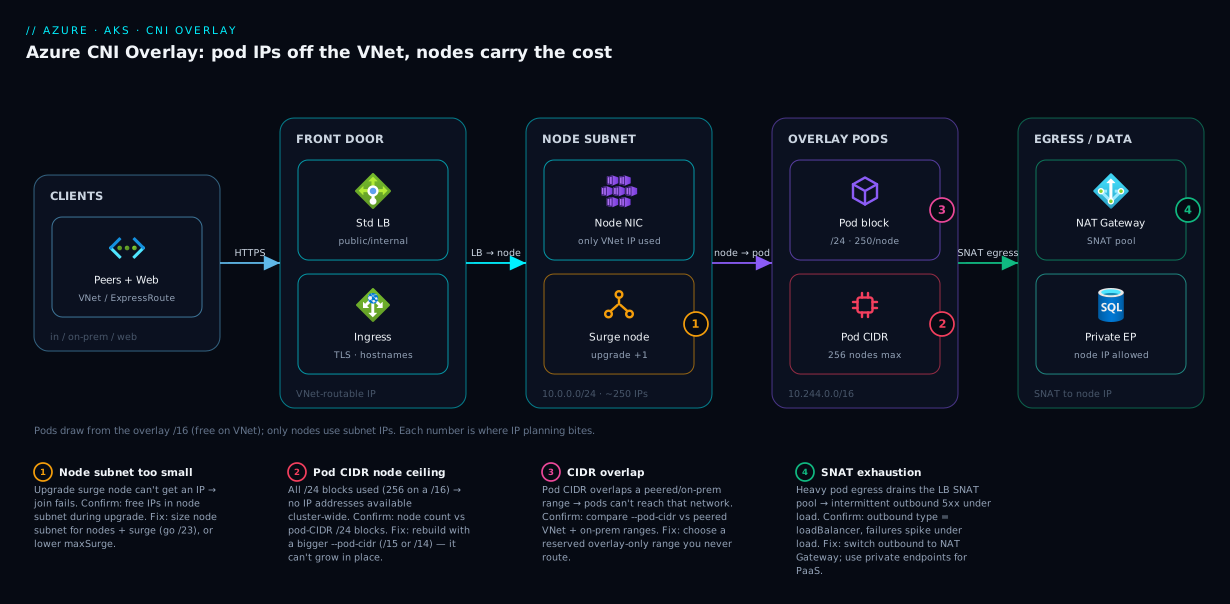
Read the network left to right and the decoupling becomes visual. On the left, clients — internal peers, on-prem over ExpressRoute, or the public internet — arrive at a VNet-routable front door: a Standard Load Balancer (public or internal) or an ingress controller, each presenting a real VNet IP from the node subnet’s address space. That front door fans traffic onto nodes, whose NICs are the only things consuming VNet IPs (a tiny /24 node subnet here, ~250 addresses for a cluster of hundreds of nodes). Each node owns a /24 slice of the overlay pod CIDR — 10.244.0.0/16 in the diagram — and schedules up to 250 pods from that private block. The pod IPs never appear on the VNet; pod-to-pod traffic rides node-to-node under Azure’s management, and pod egress is SNATed to the node IP before it leaves, exiting through the cluster’s outbound path (NAT Gateway shown) to databases, private endpoints, or the internet.
The numbered badges mark where IP planning bites in practice: the node subnet being too small to surge during an upgrade (badge 1), the pod CIDR being too small for the node count you grow into (badge 2), a CIDR that overlaps a peered or on-prem range (badge 3), and SNAT-port exhaustion on heavy egress (badge 4). Trace any flow and you can see why Overlay scales: every arrow that would consume a VNet IP on classic CNI consumes an overlay IP here, and the overlay is private and effectively unlimited.
Real-world scenario
Meridian Retail runs a microservices platform on AKS for an Indian e-commerce brand — about 180 services, traffic that triples during festival sales. They started two years ago on classic Azure CNI in a /21 subnet (2,048 addresses) carved out of a hub-and-spoke /16 enterprise VNet shared with finance, logistics, and three other business units. The platform team picked --max-pods 30 and the cluster ran happily at ~40 nodes for a year.
Then growth hit. A new recommendations service and a search rework pushed pod density up; the team raised --max-pods to 100 to consolidate workloads onto fewer, bigger nodes. The arithmetic turned hostile overnight: at 100 pods/node, classic CNI pre-allocated 101 VNet IPs per node, so 40 nodes now reserved ~4,040 IPs — but the subnet only held 2,048. New nodes failed to join with InsufficientSubnetSize; the cluster autoscaler stalled at the worst possible moment, three days before the Diwali sale. The network team could not simply grow the subnet — the adjacent ranges in the /16 were already allocated to logistics, and re-IPing a shared enterprise VNet under a deadline was not an option.
The fix was a migration to Azure CNI Overlay, which Microsoft supports as an in-place update for eligible clusters. The team kept the existing /21 as the node subnet (now wildly oversized for nodes alone, which was fine), introduced a 10.244.0.0/16 overlay pod CIDR that consumed zero enterprise address space, and confirmed it did not overlap any peered or on-prem range (their on-prem was 172.16.0.0/12, comfortably clear of 10.244). After the migration the same 40 nodes consumed 40 VNet IPs instead of 4,040; pod count could grow to the overlay’s 256-node ceiling without touching the subnet again. They set --max-pods 250 and switched the outbound type to a managed NAT Gateway, because the consolidation had increased per-node outbound concurrency and they had started seeing SNAT timeouts to a payment API under load.
The Diwali sale ran on autoscale to 95 nodes with no IP drama — the overlay had room for 256 nodes, the node subnet for ~2,000. The lesson the team wrote into their runbook: on classic CNI, --max-pods is an IP-budget decision; on Overlay it is free. They standardised every new cluster on Overlay with a reusable 10.244.0.0/16 pod CIDR and a node subnet sized purely for node count plus surge — and never had an IP-exhaustion incident again. Total cost impact was a NAT Gateway (~₹2,500–4,000/month) and a few hours of migration, versus rebuilding the cluster or re-architecting a shared enterprise VNet.
Advantages and disadvantages
The honest two-column view before the prose:
| Advantages of Azure CNI Overlay | Disadvantages / costs |
|---|---|
| Pods consume zero VNet IPs — exhaustion solved | Pod IPs not directly routable from outside the cluster |
| Scales to ~1,000+ nodes / 250k+ pods | Some pod-IP-dependent integrations don’t work |
| Reuse the same pod CIDR across every cluster | Slight node-to-node overhead vs raw VNet pods |
| No user-defined route tables to manage (unlike kubenet) | NSG/firewall rules must target node IPs, not pods |
| Tiny node subnet even for huge clusters | Migration from classic CNI requires planning/eligibility |
| Microsoft’s recommended default; Windows-capable | A too-small pod CIDR still caps node count (plan it once) |
| Decouples cluster scale from enterprise address plan | Pod-level network policy still needs a policy engine |
When the advantages dominate — which is the overwhelming majority of clusters — you have finite enterprise address space, you run at any real scale, you have multiple clusters that would each demand a chunk of routable space, or you are escaping kubenet’s node ceiling and UDR upkeep. Overlay turns the IP plan from a recurring fight into a one-time decision.
When the disadvantages matter — narrow cases — you have a workload or appliance that must reach a pod by its own IP from outside the cluster, or a compliance model requiring every workload IP to be a real, auditable VNet address. There, classic CNI or dynamic-IP allocation earns its subnet cost. For everything else, the loss of direct pod routability is invisible because you were going to front pods with a load balancer or ingress anyway.
Hands-on lab
This lab provisions an Overlay cluster, inspects the pod CIDR and per-node block, watches IP allocation, and tears down — all on a small SKU to stay cheap. You need an Azure subscription, az CLI (or Cloud Shell), and kubectl.
1. Set variables and create a resource group.
RG=rg-aks-overlay-lab
LOC=centralindia
AKS=aks-overlay-lab
az group create --name $RG --location $LOC
2. Create an Overlay cluster. The two flags that matter are --network-plugin azure and --network-plugin-mode overlay; --pod-cidr defines the overlay range.
az aks create \
  --resource-group $RG \
  --name $AKS \
  --node-count 2 \
  --node-vm-size Standard_B2s \
  --network-plugin azure \
  --network-plugin-mode overlay \
  --pod-cidr 10.244.0.0/16 \
  --service-cidr 10.0.16.0/20 \
  --dns-service-ip 10.0.16.10 \
  --max-pods 250 \
  --generate-ssh-keys
Expected: provisioning takes a few minutes and finishes with "provisioningState": "Succeeded". Note the cluster came up with no VNet pod-subnet sizing at all — the pods live in the overlay.
3. Confirm the network profile. Read back the effective plugin mode, pod CIDR, and service CIDR.
az aks show -g $RG -n $AKS \
  --query "networkProfile.{plugin:networkPlugin, mode:networkPluginMode, podCidr:podCidr, serviceCidr:serviceCidr, outbound:outboundType}" -o table
Expected output resembles:
Plugin    Mode     PodCidr          ServiceCidr      Outbound
--------  -------  ---------------  ---------------  ------------
azure     overlay  10.244.0.0/16    10.0.16.0/20     loadBalancer
4. Get credentials and inspect node/pod IPs.
az aks get-credentials -g $RG -n $AKS
kubectl get nodes -o wide
kubectl get pods -A -o wide | head -20
Look at the columns: node INTERNAL-IP values come from the node subnet (e.g. 10.224.0.x), but pod IP values come from the overlay (10.244.0.x). Two different worlds — that visible split is the whole concept made concrete.
5. See the per-node /24 block. Each node’s pods cluster inside one /24 of 10.244.0.0/16.
kubectl get pods -A -o wide --field-selector spec.nodeName=$(kubectl get nodes -o jsonpath='{.items[0].metadata.name}') \
  | awk '{print $7}' | grep -E '^10\.244' | sort -u | head
Expected: every pod IP shares the same third octet (e.g. all 10.244.0.x), proving they came from that node’s single /24 block.
6. Prove pod egress is SNATed to the node IP. Run a throwaway pod and check the source IP the internet sees.
kubectl run egresstest --image=curlimages/curl --restart=Never --rm -it -- \
  curl -s https://ifconfig.me
Expected: the returned public IP is the cluster’s outbound (load balancer) IP, not the pod IP — egress was SNATed away from the unreachable pod address.
7. Tear down to stop billing.
az group delete --name $RG --yes --no-wait
What you proved: pods got overlay IPs (10.244.x) while nodes got subnet IPs; each node allocated pods from a single /24; and pod egress left as the node/LB IP. That is Azure CNI Overlay in three observations.
The same cluster expressed as Bicep, for the IaC version of step 2:
resource aks 'Microsoft.ContainerService/managedClusters@2024-09-01' = {
  name: 'aks-overlay-lab'
  location: location
  identity: { type: 'SystemAssigned' }
  properties: {
    dnsPrefix: 'aksoverlay'
    agentPoolProfiles: [
      {
        name: 'systempool'
        count: 2
        vmSize: 'Standard_B2s'
        mode: 'System'
        maxPods: 250          // up to 250 on Overlay; costs no VNet IPs
      }
    ]
    networkProfile: {
      networkPlugin: 'azure'
      networkPluginMode: 'overlay'   // <-- the switch that makes it Overlay
      podCidr: '10.244.0.0/16'       // overlay range; private to this cluster
      serviceCidr: '10.0.16.0/20'
      dnsServiceIP: '10.0.16.10'
      outboundType: 'loadBalancer'   // or 'managedNATGateway' for heavy egress
    }
  }
}
Common mistakes & troubleshooting
Overlay removes the biggest failure mode (subnet exhaustion from pods) but introduces a few of its own, almost all rooted in CIDR planning. The playbook — scan the table, then read the detail for your row:
| # | Symptom | Root cause | Confirm with | Fix |
|---|---|---|---|---|
| 1 | Pods stuck ContainerCreating, no IP addresses available |
Node’s /24 block full (hit --max-pods) or pod CIDR exhausted of /24s |
kubectl describe pod; count nodes vs pod-CIDR /24s |
Add nodes; or enlarge pod CIDR (rebuild) — Overlay can’t extend it live |
| 2 | az aks create rejected: overlapping CIDR |
Pod/service CIDR overlaps the node subnet or each other | Compare --pod-cidr, --service-cidr, VNet/subnet ranges |
Pick non-overlapping ranges; service CIDR ≠ pod CIDR ≠ subnet |
| 3 | Pods can’t reach an on-prem / peered host | Pod CIDR overlaps a peered or on-prem range (routing confusion) | Map pod CIDR vs peered VNet + on-prem ranges | Choose a pod CIDR outside all routable ranges |
| 4 | New nodes fail to join during upgrade | Node subnet too small for surge | kubectl get nodes; check subnet free IPs |
Resize/replace node subnet larger; lower surge |
| 5 | Pod can’t reach a private endpoint | DNS or NSG blocks the node IP; PE not in a reachable VNet | nslookup from a pod; check private DNS zone + NSG |
Link private DNS zone; allow node subnet in NSG |
| 6 | Intermittent outbound failures under load | SNAT port exhaustion on default LB outbound | Outbound type = loadBalancer; failures spike under load | Switch outbound to NAT Gateway; use private endpoints |
| 7 | Can’t migrate existing cluster to Overlay | Cluster ineligible (e.g. Windows on older plugin, dual-stack) | az aks update ... --network-plugin-mode overlay errors |
Check migration prerequisites; may need a new cluster |
| 8 | Network policy not enforced between pods | No policy engine enabled | az aks show --query networkProfile.networkPolicy is null |
Enable Azure/Calico network policy (set at create) |
The ones that bite hardest, expanded:
1. Pods stuck ContainerCreating with no IP addresses available.
Root cause: Either a single node hit its --max-pods (its /24 block is full) — schedule onto another node — or, at large scale, the pod CIDR has run out of /24 blocks because you have as many nodes as the CIDR allows. The pod CIDR is the ceiling on node count.
Confirm: kubectl describe pod <pod> shows the IPAM error; kubectl get nodes | wc -l against your pod CIDR’s block count (/16 = 256 nodes) tells you if you are at the node ceiling.
Fix: If a single node is full, add nodes or raise nothing (250 is the max). If the cluster is at the pod-CIDR ceiling, you must enlarge the pod CIDR — and that cannot be changed in place, so it means a new cluster with a bigger --pod-cidr (e.g. /14). This is why you size the pod CIDR generously up front; over-provisioning it is free.
2. Pods can’t reach an on-prem or peered host, even though nodes can.
Root cause: The pod CIDR overlaps a routable range — a peered VNet or an on-prem subnet reachable via ExpressRoute/VPN. Even though pod IPs are SNATed on egress (so the pod IP shouldn’t appear on the wire), an overlap confuses the cluster’s own routing decisions about what is “local” vs “remote.”
Confirm: Compare your --pod-cidr against every peered VNet range and every advertised on-prem range. If 10.244.0.0/16 collides with an on-prem 10.244.x, that is the bug.
Fix: Choose a pod CIDR that sits outside every routable range in your topology. The classic trick: reserve a documented, company-wide “overlay-only” range that you never route on the real network, and use it for pod CIDRs everywhere. Then overlap is impossible by policy. Candidate ranges to reserve as overlay-only:
| Candidate pod range | Size | Why it’s a safe overlay choice | Watch-out |
|---|---|---|---|
10.244.0.0/16 |
256 nodes | AKS default; memorable; rarely routed in practice | Confirm no on-prem 10.244.x is advertised |
10.244.0.0/15 |
512 nodes | Same family, double the node ceiling | Carve it once, document it as non-routed |
100.64.0.0/10 slice |
Huge | CGNAT space, by convention never routed internally | Some appliances treat it specially |
A documented /14 in 10.0.0.0/8 |
1,024 nodes | Big headroom if you reserve it org-wide | Must be excluded from every route table |
3. New nodes fail to join during a cluster upgrade.
Root cause: AKS upgrades by adding a surge node before draining an old one; if the node subnet is full, the surge node can’t get an IP and the upgrade fails. Overlay shrinks the node subnet need so far that people sometimes size it with no surge headroom.
Confirm: kubectl get nodes during the upgrade; check the node subnet’s free-IP count in the portal/CLI.
Fix: Size the node subnet one prefix larger than steady-state node count to leave surge room, or reduce the upgrade maxSurge. A /24 node subnet for a 240-node cluster leaves only ~10 IPs of headroom — go /23 if you upgrade with surge.
Best practices
- Default to Overlay for new clusters. It is Microsoft’s recommended model, eliminates VNet IP exhaustion, and avoids kubenet’s deprecation and UDR upkeep. Reach for classic CNI only when you have a proven need for routable pod IPs.
- Size the pod CIDR generously — it is free. A
/16gives 256 nodes; if you might exceed that, start at/15or/14. Since the pod CIDR is private and consumes no real address space, over-sizing costs nothing and saves a rebuild. - Reserve one company-wide overlay range. Pick a range (e.g.
10.244.0.0/16) that is documented as “overlay-only, never routed,” and reuse it as the pod CIDR on every cluster. Overlap with real networks then becomes impossible by policy. - Size the node subnet for nodes + surge, not pods. A small subnet (
/24–/23) is plenty for hundreds of nodes; always leave headroom for the upgrade surge node so a routine patch can’t fail on an exhausted subnet. - Keep
--max-podsat 250 on Overlay unless workload fit says otherwise. Unlike classic CNI, it costs no VNet IPs, so there is no IP reason to lower it — only density/right-sizing reasons. - Verify pod/service/subnet CIDRs are provably disjoint before
az aks create, including against peered and on-prem ranges. The service CIDR must not overlap the node subnet (a default-10.0.0.0/16service CIDR plus a10.0.xnode subnet is the classic clash). - Choose the outbound type deliberately. For heavy or chatty egress, use a NAT Gateway outbound type up front to avoid SNAT exhaustion; use private endpoints for Azure PaaS so the traffic never needs SNAT at all.
- Write NSG/firewall rules against the node subnet, not pods. Egress is SNATed to node IPs; pod IPs never appear outside the node, so per-pod network rules belong to a Kubernetes network policy engine, not NSGs.
- Enable a network policy engine at create time if you need pod-to-pod segmentation (Azure or Calico) — it cannot be added to a running cluster after the fact in the same way.
- Document the IP plan as code, and alert on node-subnet utilisation. Put the pod CIDR, service CIDR, node subnet, and DNS service IP in Bicep/Terraform and review them in PRs. Since pods are free, the only VNet pressure is node IPs — alert at ~80% of the node subnet as an early warning for surge/scale headroom.
Security notes
- Pod IPs are unroutable, which is a quiet security win. An attacker on a peered network cannot dial a pod directly; the only inbound attack surface is your load balancers and ingress, which you harden and front with a WAF. This reduces the lateral-movement surface versus classic CNI’s routable pods.
- Segment pod-to-pod traffic with a network policy engine. Overlay carries no policy by itself; enable Azure Network Policy or Calico so a compromised pod can’t freely reach the rest of the cluster.
- Use a managed identity for the cluster and least-privilege RBAC. The cluster’s identity should hold only the roles it needs (e.g. to manage its load balancers and pull from ACR); see AKS Cluster Identity: Managed Identity vs Service Principal for getting that right.
- Reach PaaS over private endpoints. Pod egress is SNATed to the node IP, so lock data services (SQL, Storage, Key Vault) behind private endpoints and allow only the node subnet — pods then reach them on the Azure backbone, never the public internet.
- Filter egress through Azure Firewall when policy demands it. Set the outbound type to userDefinedRouting to force pod egress through a firewall/NVA, giving you FQDN-based egress allow-lists for a cluster whose pods would otherwise reach anywhere.
- Control the inbound front door. A public
LoadBalancerservice exposes the cluster to the internet; prefer an internal load balancer plus a hardened ingress (WAF, TLS, IP restrictions) for anything that doesn’t strictly need public reach. - Restrict who can change the network profile. The pod CIDR, outbound type, and network policy are security-relevant; gate changes behind RBAC and IaC review so nobody silently opens egress or disables policy.
Cost & sizing
Overlay’s cost story is mostly about what it saves. The overlay networking itself is free — part of the AKS networking you already pay for — and what it saves is the operational cost of running out of VNet IPs plus the scarce enterprise address space it would otherwise consume. The dominant bill is still the node VMs (and disks), unchanged by the network model, so right-size node SKUs to your pods. A NAT Gateway outbound type, if you choose it, adds a small hourly + per-GB charge (~₹2,500–4,000/month) — far cheaper than SNAT-exhaustion outages under load — while the default load-balancer outbound is free but SNAT-limited. Inbound Standard LB + public IPs carry the usual small per-rule/IP cost (an internal LB is cheaper and stays off the public internet), and the control plane is free on the Free tier or a small hourly fee on the Standard tier (uptime SLA).
A rough monthly picture for a mid-size cluster: 5–10 nodes of Standard_D4s_v5-class VMs dominate at ₹40,000–90,000/month, plus a NAT Gateway (~₹3,000) and a couple of public IPs (~₹500 each). The network model contributes almost nothing — Overlay’s value is operational (no IP rebuilds, no address-space fights), not a line item. The cost/sizing levers:
| Lever | What it drives | Rough INR / month | Overlay impact |
|---|---|---|---|
| Node VMs + disks | The dominant cluster cost | ₹40,000–90,000 (5–10 nodes) | Unchanged by Overlay |
| Control plane (Standard tier) | Uptime SLA | ~₹1,500 | Orthogonal |
| NAT Gateway (outbound type) | Egress SNAT headroom | ~₹2,500–4,000 | Optional; avoids SNAT 5xx |
| Standard LB + public IPs | Inbound front door | ~₹500–1,500 | Same as any model |
| VNet address space | Enterprise IP allocation | “Free” but scarce | Saved — pods cost 0 IPs |
Interview & exam questions
1. What problem does Azure CNI Overlay solve, in one sentence? VNet IP exhaustion: it draws pod IPs from a private overlay CIDR off the VNet instead of from the node subnet, so pods consume zero VNet addresses and only nodes do. That decouples cluster scale from your enterprise address plan and lets a huge cluster live behind a tiny node subnet.
2. How does the size of --pod-cidr determine the maximum number of nodes? AKS gives each node a /24 (256-address) slice of the pod CIDR, so the number of /24 blocks that fit in the pod CIDR is the node ceiling — roughly pod-CIDR addresses ÷ 256. A /16 yields 256 nodes; for more, use a larger range like /15 or /14.
3. What is the maximum number of pods per node on Overlay, and why? About 250, because the per-node block is a /24 (256 addresses, ~250 usable after reserves). --max-pods defaults to 250 and caps at 250 on Overlay; to run more pods you add nodes, not density.
4. On Overlay, does raising --max-pods consume more VNet IPs? No. Unlike classic Azure CNI — where --max-pods pre-allocates that many real subnet IPs per node — on Overlay the pods come from the overlay block, so --max-pods costs nothing on the VNet. The only reasons to lower it are workload density, not IP budget.
5. If pod IPs aren’t on the VNet, how does a pod reach a database, and how does the database see it? Pod egress is SNATed to the node’s VNet IP as it leaves the node, so the database sees the node IP, not the pod IP. Consequently NSG/firewall rules allowing that connection must permit the node subnet, and outbound capacity is governed by the cluster’s outbound type (load balancer vs NAT Gateway).
6. How does an external client reach a service running in pods on an Overlay cluster? Through a VNet-routable front door — a LoadBalancer service (public or internal) or an ingress controller — which presents a real VNet IP and load-balances onto the pods. Clients never address a pod IP directly because it isn’t routable; a peer VNet targets an internal load balancer IP.
7. Why is Overlay preferred over kubenet? kubenet is deprecated, caps at ~400 nodes because it relies on user-defined routes (which have a route-count limit), and doesn’t support Windows node pools. Overlay achieves the same “no VNet pod IPs” outcome without UDR management, scales to ~1,000+ nodes, and supports Windows — so it is the migration target for kubenet clusters.
8. What three CIDRs must not overlap, and which one competes for enterprise address space? The pod CIDR, the service CIDR, and the node subnet must be mutually non-overlapping (and the pod CIDR must also avoid peered/on-prem ranges). Only the node subnet is a real VNet range competing for enterprise space; the pod and service CIDRs are private to the cluster and can be reused across clusters.
9. A pod can’t reach an on-prem host though nodes can. What network-design mistake is likely? The pod CIDR overlaps a routable range (an on-prem subnet over ExpressRoute/VPN, or a peered VNet), confusing the cluster’s local-vs-remote routing. Fix by choosing a pod CIDR that sits outside every routable range — ideally a reserved “overlay-only” range you never route.
10. You ran out of /24 blocks in the pod CIDR. Can you fix it live? No — the pod CIDR cannot be enlarged in place, so hitting its node ceiling means building a new cluster with a bigger --pod-cidr. This is why you size the pod CIDR generously up front (it is free, being private), and it is the single most important Overlay planning decision.
11. When would you still choose classic Azure CNI over Overlay? Only when something genuinely needs pod IPs to be real, routable VNet addresses — a legacy appliance or integration that must dial a pod by its IP from outside the cluster, or a compliance model requiring every workload IP to be an auditable VNet address — and you have the subnet space to spend. Otherwise Overlay wins on IP efficiency and scale.
12. Which outbound type would you pick for a cluster with heavy, chatty pod egress, and why? A NAT Gateway (managedNATGateway or userAssignedNATGateway), because the default load-balancer outbound shares a limited SNAT-port pool and exhausts under high concurrency, causing intermittent outbound failures. A NAT Gateway provides far more SNAT ports; private endpoints remove SNAT entirely for PaaS targets.
These map to AZ-104 (Administrator) — configure AKS networking and VNet integration — and to the CKA networking domain (CNI, pod networking, services). The IP-planning and CIDR-overlap angle touches AZ-700 (Network Engineer) for the VNet design. The migration and outbound-type material is squarely AZ-104 day-2 operations.
| Question theme | Primary cert | Objective area |
|---|---|---|
| Overlay vs CNI vs kubenet, IP efficiency | AZ-104 | Configure AKS networking |
| Pod CIDR / node ceiling maths | AZ-104 / CKA | Cluster networking & scaling |
| SNAT, outbound type, egress | AZ-700 | Design & implement connectivity |
| CIDR overlap, VNet design | AZ-700 | Network address planning |
| Network policy, segmentation | AZ-500 / CKS | Secure cluster networking |
Quick check
- You want an Overlay cluster that can grow to 400 nodes. What is the smallest pod CIDR prefix that allows it, and why?
- True or false: raising
--max-podsfrom 100 to 250 on an Overlay cluster consumes more VNet subnet IPs. - A database’s NSG must allow connections from your cluster’s pods. Which IP range do you put in the rule — the pod CIDR or the node subnet — and why?
- Your pod CIDR is
10.244.0.0/16and your on-prem network advertises10.244.10.0/24over ExpressRoute. What will break, and what’s the fix? - You hit
no IP addresses availablecluster-wide at 256 nodes on a/16pod CIDR. Can you fix it without rebuilding the cluster?
Answers
- A
/15. Each node needs a/24block; 400 nodes need ≥ 400 blocks. A/16holds only 256 blocks (too few), so you go up one prefix to/15, which holds 512/24blocks — enough for 512 nodes. (Pod-CIDR addresses ÷ 256 = node ceiling.) - False. On Overlay, pods draw from the overlay block, so
--max-podsconsumes zero VNet subnet IPs regardless of value. (On classic CNI it would pre-allocate that many real subnet IPs per node — that’s the model people confuse it with.) - The node subnet. Pod egress is SNATed to the node IP, so the database sees the node’s address, not the pod’s — the pod IP never appears on the wire outside the node, and the NSG couldn’t match it anyway.
- The pod CIDR overlaps a routable on-prem range, so pods will fail to reach that on-prem
10.244.10.xnetwork (the cluster treats it as local overlay space). Fix: choose a pod CIDR outside all routed ranges — e.g. a reserved overlay-only range you never advertise on the real network — which means rebuilding with a non-overlapping--pod-cidr. - No. The pod CIDR cannot be enlarged in place; at 256 nodes you’ve used all 256
/24blocks in the/16. You must build a new cluster with a larger--pod-cidr(e.g./15or/14). This is exactly why you size the pod CIDR generously from the start — it’s free because it’s private.
Glossary
- Azure CNI Overlay — an AKS networking mode (
--network-plugin azure --network-plugin-mode overlay) where pod IPs come from a private overlay CIDR off the VNet, so pods consume no VNet addresses. --pod-cidr— the overlay range all pod IPs are drawn from (default10.244.0.0/16); its size, divided by 256, sets the cluster’s maximum node count.- Per-node block — the
/24(256-address, ~250 usable) slice of the pod CIDR that AKS assigns to each node; a node allocates its pods only from this block. - Node subnet — the VNet subnet holding node NICs; on Overlay it is the only range that consumes real VNet IPs, sized for node count plus upgrade surge.
--max-pods— the number of pods AKS schedules per node; default 250 and max 250 on Overlay, and (unlike classic CNI) it costs no VNet IPs.- Service CIDR — the range for ClusterIP virtual service IPs; must not overlap the pod CIDR or node subnet, but is private to the cluster.
- DNS service IP — the ClusterIP CoreDNS listens on (e.g.
10.0.16.10), which must sit inside the service CIDR. - SNAT (Source NAT) — rewriting a pod’s overlay source IP to the node’s VNet IP on egress, so off-cluster destinations see the node, not the pod.
- Outbound type — how egress leaves the cluster:
loadBalancer(default),managedNATGateway/userAssignedNATGateway, oruserDefinedRouting; governs SNAT-port capacity. - Classic Azure CNI (VNet pods) — the model where each pod gets a real, routable VNet IP pre-allocated from the node subnet; routable but drains the subnet.
- Dynamic IP allocation — an Azure CNI variant where pods get real VNet IPs from a dedicated pod subnet, allocated on demand rather than pre-reserved.
- kubenet — the legacy plugin that gave pods overlay IPs via user-defined routes; deprecated, capped at ~400 nodes, no Windows support — superseded by Overlay.
- CIDR overlap — two IP ranges sharing addresses; pod/service/node ranges must be disjoint, and the pod CIDR must also avoid peered and on-prem ranges.
- Internal load balancer — a
LoadBalancerservice that presents a private VNet IP, the correct way for peers/on-prem to reach a service whose pods aren’t routable.
Next steps
You can now plan an Overlay network, size the pod CIDR and node subnet correctly, and reason about the data path and its failure modes. Build outward:
- Next: AKS Networking Models Explained: Kubenet vs Azure CNI vs CNI Overlay — the full side-by-side of every model and when each wins.
- Related: AKS Architecture Explained: Managed Control Plane, Node Pools, and the Azure Integrations — where the network sits in the bigger cluster picture.
- Related: Azure VNet IP Address Planning: CIDR, Subnetting and Avoiding Overlap — the enterprise address-plan discipline your node subnet must fit into.
- Related: Fixing AKS Ingress: 502/504 Backends, Application Routing Add-on Quirks, and Key Vault TLS Failures — the inbound front door that fronts your unroutable pods.
- Related: How to Deploy Azure NAT Gateway for Predictable Outbound Connectivity — the outbound type that fixes SNAT exhaustion on heavy pod egress.
- Related: AKS Node Pools Demystified: System vs User vs Spot, Taints, Labels — how node pools (and their
--max-pods) interact with your pod-CIDR plan.