Your finance team just signed a contract that says customer trade data never crosses the public internet, and your monitoring dashboard shows the new on-prem-to-Azure link jittering between 12 ms and 380 ms at peak. Both problems point at the same answer, and it is not “buy more VPN bandwidth.” It is Azure ExpressRoute — a private, dedicated layer-3 connection between your on-premises network (or a colocation facility) and Microsoft’s cloud edge that does not traverse the public internet at all. Where a site-to-site VPN tunnels encrypted packets over the internet and inherits its variability, an ExpressRoute circuit rides a predictable private path through a connectivity provider or a direct fibre cross-connect into a Microsoft Enterprise Edge (MSEE) router, giving you consistent latency, a committed bandwidth tier, and an SLA the public internet can never offer.
The trouble is that ExpressRoute has more moving parts than any other Azure networking primitive, and the words overlap confusingly. A circuit is not a cable. Private peering and Microsoft peering are not two products but two routing domains on the same circuit, reaching completely different targets. “ExpressRoute Direct” and “an ExpressRoute circuit” are related but distinct purchases. People wire it up, watch routes fail to appear, and cannot tell whether the fault is theirs, the provider’s, or Microsoft’s — because they never built the mental model of where the boundary sits. This article builds that model. You will learn what a circuit is at each layer, exactly what each peering type reaches and how its routes are advertised over BGP, which of the three connectivity models to choose, how the gateway and SKUs constrain throughput, and how redundancy, Global Reach and FastPath change the picture — with the az commands and Bicep to provision each piece and the decision tables to pick correctly the first time.
By the end you will stop guessing at the boundary. When a route doesn’t propagate you will know whether to look at your edge router’s BGP session, the provider’s VLAN tagging, the peering config on the circuit, or the gateway on the Azure side — and which of private versus Microsoft peering you even need. That clarity is the difference between a clean cutover and a three-week finger-pointing exercise with a telco.
What problem this solves
The public internet is a best-effort network — fine for a brochure site, a liability for a hybrid enterprise on three axes. Performance: paths vary, latency swings, throughput dips when other traffic surges across shared transit, and there’s no contractual floor. Compliance: regulated workloads (payments, health, government) often must guarantee data never transits the public internet, and “we use TLS” doesn’t satisfy an auditor who wants the path private, not just the payload encrypted. Bandwidth economics: moving terabytes over a metered VPN is slow and costly, and the VPN gateway caps out around the low gigabits where ExpressRoute scales to 100 Gbps.
What breaks without it: teams force a hybrid enterprise onto a VPN and hit a wall. The gateway saturates and the weekend migration takes three. Latency-sensitive apps — a trading floor, a Citrix/AVD estate, a chatty three-tier app split across the boundary — feel sluggish. Compliance blocks go-live because traffic to Azure SQL or storage is “on the internet.” Someone adds a second VPN tunnel, then a third, and the mesh becomes its own nightmare with no SLA under any of it.
Who hits this: every enterprise with a real datacentre or colo footprint moving to Azure; anyone migrating large data volumes; any workload whose regulatory regime constrains the transit path; latency-sensitive estates (financial services, virtual desktop, real-time analytics); and multi-site organisations wanting branches and Azure to reach each other privately. The fix is a private circuit with the right peering and connectivity model.
To frame the field, here is the layered way to think about an ExpressRoute deployment, top to bottom:
| Layer | What it is | You configure it | Failure here looks like |
|---|---|---|---|
| Physical / provider | Fibre, cross-connect, provider’s MPLS or a Direct port | Provider (or you, for Direct) | No link light; circuit NotProvisioned |
| Circuit | The logical ExpressRoute resource (bandwidth + SKU) | You, in Azure | ServiceProviderProvisioningState stuck |
| Peering | A BGP routing domain on the circuit (private or Microsoft) | You + provider | BGP down; no routes learned |
| Connection | Links a circuit to a VNet via a gateway | You, in Azure | VNet can’t reach on-prem |
| Routing | BGP advertises prefixes both ways | You (on-prem) + Azure | Routes missing / asymmetric |
Learning objectives
By the end of this article you can:
- Define an ExpressRoute circuit precisely at the physical, logical and routing layers, and explain why a circuit is not a cable and a peering is not a product.
- Distinguish private peering from Microsoft peering by exactly what each reaches, how its routes are advertised, and which workloads need which (or both).
- Choose between the three connectivity models — provider (cloud exchange / point-to-point), ExpressRoute Direct, and the partner-managed path — using a decision table, not folklore.
- Read the BGP relationship on each peering: ASNs, advertised prefixes, route limits (4,000 / 10,000), and why a private and a public ASN behave differently.
- Size a deployment correctly: pick a circuit SKU (Local / Standard / Premium), a bandwidth tier, and a gateway SKU, and explain what each tier unlocks and caps.
- Design for redundancy with the mandatory dual BGP sessions, and extend reach across regions with Global Reach and accelerate dataplane latency with FastPath.
- Provision a circuit, peering and connection end to end with
azand Bicep, and localise a “no routes” failure to the exact layer that owns it.
Prerequisites & where this fits
You should already understand core Azure networking: a virtual network (VNet) and subnets (Azure Virtual Network, Subnets and NSGs), and how CIDR ranges are planned so they don’t overlap (Azure VNet IP Address Planning) — overlapping address space between on-prem and Azure is the single most common ExpressRoute design defect. A conceptual familiarity with BGP (autonomous system numbers, prefix advertisement, route propagation) is assumed; you needn’t be a CCIE, but should know BGP is how the two sides tell each other which IP ranges they own. Be comfortable running az in Cloud Shell and reading JSON.
This sits in the Networking & Hybrid Connectivity track. It’s upstream of the hub-and-spoke patterns in Azure VNet Peering Done Right, because an ExpressRoute gateway typically lives in a connectivity hub using gateway transit to serve spokes — the topology codified in the Azure Enterprise-Scale Landing Zone. It’s the private alternative to the public-internet path in How to Configure Point-to-Site VPN; many enterprises run both. When routes misbehave, Diagnosing Connectivity with Network Watcher and User-Defined Routes and Route Tables are where you confirm what BGP actually programmed.
A quick map of who owns what during provisioning, so you escalate to the right party:
| Domain | Who owns it | What they configure | Common mistake |
|---|---|---|---|
| On-prem edge router | Your network team | BGP session, advertised prefixes, ASN | Advertising too many / wrong prefixes |
| Connectivity provider | The telco / exchange | Q-in-Q tagging, VLAN, last-mile fibre | Wrong VLAN ID; circuit not provisioned |
| ExpressRoute circuit | You (Azure) | Bandwidth, SKU, peering config | Peering left half-configured |
| Gateway + connection | You (Azure) | Gateway SKU, connection to circuit | Gateway SKU too small for the circuit |
| Azure routing | You (Azure) | UDRs, route propagation toggles | Disabling BGP route propagation by accident |
Core concepts
Six mental models make every later decision obvious — the rest of the article is consequences.
A circuit is a logical resource, not a cable. Creating an ExpressRoute circuit creates an Azure resource that represents a dedicated connection of a chosen bandwidth (50 Mbps–10 Gbps via a provider, up to 100 Gbps on Direct). The fibre and cross-connect are provisioned by your connectivity provider (or by you on ExpressRoute Direct). The circuit carries a service key (s-key) — a GUID you hand the provider so they match their physical provisioning to your resource; until they light their side, ServiceProviderProvisioningState reads NotProvisioned. So “a circuit” is a three-party agreement (you, Microsoft, the provider) made concrete as one Azure object plus one physical path.
A circuit terminates at a redundant pair of MSEE routers. Every circuit connects to two Microsoft Enterprise Edge (MSEE) routers at a peering location, by design. This is why ExpressRoute always has two BGP sessions per peering — one to each MSEE. You cannot opt out of the pair; redundancy is built in, and the SLA only applies when both links are configured.
Peering is a routing domain on the circuit — and there are two. A circuit can carry up to two peerings — independent BGP relationships toward different destinations. Private peering reaches your VNets’ private IP space (VMs, private endpoints, internal load balancers). Microsoft peering reaches Microsoft’s public endpoints over the private circuit — Azure PaaS public IPs (Storage, SQL) routed privately, and Microsoft 365 historically. They share one circuit and one bandwidth pool but are separate sessions with separate prefixes and purposes. Confusing the two is the root of most ExpressRoute misunderstandings.
BGP is how both sides exchange “who owns what.” Over each peering, your edge advertises the on-prem prefixes it owns and Azure advertises its own (your VNet ranges on private peering; Microsoft public prefixes on Microsoft peering). Each side needs an autonomous system number (ASN): Azure is 12076 on both; your side uses your own (public for Microsoft peering, private 16/32-bit allowed on private). Prefixes you advertise into Microsoft are capped — 4,000 on Standard, 10,000 on Premium — and exceeding it drops the session.
A connection binds a circuit to a VNet through a gateway. The circuit reaches the MSEE; to land traffic in a VNet you create a virtual network gateway of type ExpressRoute (distinct from a VPN gateway) in a dedicated GatewaySubnet, then a connection linking the gateway to the circuit’s private peering. The gateway SKU caps how much circuit bandwidth one VNet can use and whether FastPath is available. One circuit fans out to many VNets via many connections, and gateway transit lets a hub gateway serve spokes so you don’t deploy one per spoke.
Connectivity model is how the circuit is delivered, not what it reaches. In cloud exchange (co-location) you’re in a facility with your provider and connect virtually; in point-to-point Ethernet the provider gives a dedicated L2 link; in any-to-any (IPVPN/MPLS) the provider integrates Azure as another WAN node. ExpressRoute Direct removes the provider for the cross-connect: you connect to Microsoft’s routers with your own dual 10/100 Gbps ports. The model affects bandwidth, who you call when it breaks, and cost — but the two peering types work the same across all of them.
The vocabulary in one table
Before the deep sections, pin down every moving part — the model side by side (the glossary repeats these for lookup):
| Term | One-line definition | Where it lives | Why it matters |
|---|---|---|---|
| Circuit | The logical ExpressRoute resource (bandwidth + SKU) | Azure subscription | The thing you create and pay the base fee on |
| Service key (s-key) | GUID matching your circuit to the provider’s provisioning | On the circuit | Hand to provider; gates Provisioned state |
| Peering location | The facility where you meet Microsoft’s edge | Physical (provider map) | Determines latency and which providers serve you |
| MSEE | Microsoft Enterprise Edge router (a redundant pair) | Microsoft’s edge | Where your circuit terminates; source of dual BGP |
| Private peering | BGP domain reaching your VNets’ private IPs | On the circuit | The path for VM/PaaS-private traffic |
| Microsoft peering | BGP domain reaching Microsoft public endpoints | On the circuit | Private path to PaaS public IPs / M365 |
| ASN | Autonomous System Number identifying each BGP speaker | Both edges | Azure = 12076; yours on the other side |
| Gateway | ExpressRoute-type VNet gateway in GatewaySubnet |
In your VNet | Brings circuit traffic into a VNet; caps throughput |
| Connection | Resource linking a circuit (private peering) to a gateway | Azure | Without it the VNet can’t use the circuit |
| Global Reach | Links two circuits so on-prem sites reach each other | Across circuits | Branch-to-branch via Microsoft’s backbone |
| FastPath | Bypasses the gateway dataplane for lower latency | On the connection | Sends traffic NIC-direct; needs a capable SKU |
| Route Server / propagation | How BGP routes reach subnets | Hub VNet | Disable it by accident → on-prem unreachable |
What an ExpressRoute circuit actually is
A circuit is three things stacked: a physical path your provider builds, a logical Azure resource you create, and a pair of BGP sessions on top. Getting all three to agree is provisioning; one disagreeing is your fault domain.
The circuit resource and its states
You create the circuit in Azure first, choosing a peering location, provider, bandwidth, SKU tier and billing model. It’s born with two state fields you watch during turn-up:
| State field | Values | Owned by | Means |
|---|---|---|---|
CircuitProvisioningState |
Enabled / Disabled |
Azure | The Azure-side resource is created and enabled |
ServiceProviderProvisioningState |
NotProvisioned → Provisioning → Provisioned |
Your provider | Whether the provider has lit the physical link |
The flow: create the circuit (Enabled / NotProvisioned), copy the service key, hand it to your provider, and wait for them to flip ServiceProviderProvisioningState to Provisioned — only then can BGP come up. A circuit stuck at NotProvisioned for days is almost always a provider delay or a mis-handed s-key, not an Azure bug.
# Create the circuit (provider model). Bandwidth in Mbps; tier = SKU; family = billing.
az network express-route create \
  --name er-circuit-prod --resource-group rg-connectivity \
  --location centralindia \
  --provider "Equinix" --peering-location "Mumbai" \
  --bandwidth 1000 --sku-tier Standard --sku-family MeteredData

# The service key you give your provider, plus both provisioning states:
az network express-route show -n er-circuit-prod -g rg-connectivity \
  --query "{skey:serviceKey, azure:circuitProvisioningState, provider:serviceProviderProvisioningState}" -o jsonc
resource circuit 'Microsoft.Network/expressRouteCircuits@2023-11-01' = {
  name: 'er-circuit-prod'
  location: 'centralindia'
  sku: {
    name: 'Standard_MeteredData'   // <tier>_<family>
    tier: 'Standard'               // Local | Standard | Premium
    family: 'MeteredData'          // MeteredData | UnlimitedData
  }
  properties: {
    serviceProviderProperties: {
      serviceProviderName: 'Equinix'
      peeringLocation: 'Mumbai'
      bandwidthInMbps: 1000
    }
    allowClassicOperations: false
  }
}
Bandwidth, SKU tier and billing model
Three independent choices, often conflated. Bandwidth is the committed circuit tier (50 Mbps–10 Gbps on the provider model). SKU tier is the reach and capability class — Local, Standard or Premium. Billing model is Metered (per GB outbound; inbound free) or Unlimited (flat fee, all data). They combine into the SKU name like Premium_UnlimitedData.
| Choice | Options | Drives | Gotcha |
|---|---|---|---|
| Bandwidth | 50/100/200/500 Mbps; 1/2/5/10 Gbps (provider) | Throughput ceiling of the circuit | You can scale up in place; scaling down may need a new circuit |
| SKU tier | Local / Standard / Premium | Geographic reach + route limits + #VNets | Premium is a meaningful price step — buy it for a reason |
| Billing model | Metered / Unlimited | How egress is charged | High-egress workloads almost always favour Unlimited |
The SKU tiers are not subtle — each unlocks specific limits:
| Capability | Local | Standard | Premium |
|---|---|---|---|
| Geographic reach | Region(s) near the peering location only | Within the same geopolitical region | Global (any region, cross-geo) |
| Egress charge (Local) | Included (no per-GB egress) | Metered or Unlimited | Metered or Unlimited |
| Max routes from private peering (into Azure) | 4,000 | 4,000 | 10,000 |
| Number of VNets per circuit | (Local: same-metro VNets) | up to 10 | up to 100+ (scales with bandwidth) |
| Global Reach support | No | Yes | Yes |
| Best for | Bulk data into the nearest region cheaply | Standard single-geo enterprise hybrid | Global estates, many VNets, cross-geo reach |
Local is the quiet money-saver: if your data only needs the region nearest the peering location (e.g. Mumbai → Central India), it includes egress — no per-GB charge — which for a high-volume backup or migration can dwarf every other saving. Premium is for breadth: more routes, more VNets, cross-geo reach.
Private peering vs Microsoft peering
This is the section people skip and then misconfigure. Both peerings live on the same physical circuit and share its bandwidth, but they are independent BGP sessions reaching fundamentally different things. Get the targets right and everything else follows.
What each peering reaches
| Aspect | Private peering | Microsoft peering |
|---|---|---|
| Reaches | Your VNets’ private IP space (RFC1918 and your own) | Microsoft public endpoints over the private circuit |
| Typical targets | VMs, internal load balancers, private endpoints, AKS pods | Azure PaaS public IPs (Storage, SQL), Microsoft 365* |
| IPs in play | Private (yours) | Public (Microsoft’s), routed privately not via internet |
| Your ASN | Public or private ASN allowed | Public ASN required (it’s public routing) |
| NAT requirement | None | NAT required for your advertised public prefixes |
| Route filter | Not used | Route filter mandatory (you select BGP communities) |
| Default state | What most hybrid workloads need | Optional; for private access to PaaS public endpoints |
| Gateway needed | Yes (ExpressRoute gateway + connection) | No gateway — routes go to your edge directly |
*Microsoft 365 over ExpressRoute is supported only in specific, Microsoft-approved scenarios; the guidance is that most M365 traffic should go over the internet. Treat it as the exception, not the default.
The single most important distinction: private peering needs a gateway and a connection to land traffic in a VNet; Microsoft peering does not — its routes go straight to your on-prem edge, which reaches Microsoft public endpoints by their public IPs over the circuit. That’s why a Microsoft peering can exist with no VNet at all.
How routes are advertised on each
On private peering, Azure advertises your VNet address space (and prefixes learned via gateway transit from spokes) toward your edge; your edge advertises your on-prem prefixes toward Azure. Both sides use a /30 (or /126 for IPv6) from a pair of point-to-point subnets — a primary and a secondary — one per MSEE. You supply these /30s; they must not overlap your real address space.
On Microsoft peering, you advertise your owned public prefixes (validated against an RIR) and Azure advertises Microsoft’s public prefixes, filtered by a route filter in which you select the BGP communities for the services and regions you want. Without a route filter attached, Microsoft peering advertises nothing — a frequent “it’s up but no routes” head-scratcher.
# --- Private peering: you provide the two /30 point-to-point subnets and a VLAN ---
az network express-route peering create \
  --circuit-name er-circuit-prod -g rg-connectivity \
  --peering-type AzurePrivatePeering \
  --peer-asn 65010 --vlan-id 100 \
  --primary-peer-subnet 192.168.10.0/30 \
  --secondary-peer-subnet 192.168.10.4/30

# --- Microsoft peering: public ASN, your advertised public prefixes, then a route filter ---
az network express-route peering create \
  --circuit-name er-circuit-prod -g rg-connectivity \
  --peering-type MicrosoftPeering \
  --peer-asn 64500 --vlan-id 200 \
  --primary-peer-subnet 203.0.113.0/30 \
  --secondary-peer-subnet 203.0.113.4/30 \
  --advertised-public-prefixes 203.0.113.0/24
// Private peering as a child of the circuit
resource privatePeering 'Microsoft.Network/expressRouteCircuits/peerings@2023-11-01' = {
  parent: circuit
  name: 'AzurePrivatePeering'
  properties: {
    peeringType: 'AzurePrivatePeering'
    peerASN: 65010
    vlanId: 100
    primaryPeerAddressPrefix: '192.168.10.0/30'
    secondaryPeerAddressPrefix: '192.168.10.4/30'
  }
}
Choosing which peering(s) you need
Match your workload to the row:
| If your goal is… | You need… | Why |
|---|---|---|
| Reach Azure VMs / private endpoints from on-prem | Private peering | That’s the private-IP routing domain into VNets |
| Private access to Azure PaaS public endpoints (legacy) | Microsoft peering or (better) Private Link | Private Link is now the preferred private-PaaS path |
| Reach Microsoft 365 privately (approved scenario only) | Microsoft peering + route filter | M365 lives on Microsoft public prefixes |
| Most modern PaaS private access (Storage, SQL, etc.) | Private Link over private peering | See note below — this is the current best practice |
| Branch-to-branch via Azure backbone | Private peering on each circuit + Global Reach | Global Reach stitches circuits together |
The modern simplification: for private access to Azure PaaS, the current best practice is Private Link / Private Endpoints over private peering, not Microsoft peering. A private endpoint gives the service a private IP inside your VNet, reachable from on-prem over private peering — no public IPs, no route filter, no NAT (see Azure Private Link and Private DNS). Reserve Microsoft peering for the genuine cases (approved M365, or services without a Private Link option) — this one decision removes most of the complexity that gives ExpressRoute its reputation.
Connectivity models: how the circuit is delivered
The connectivity models change who builds the cross-connect and what bandwidths you get — not how peering works. Pick by where your datacentre sits, how much bandwidth you need, and how much you want to own.
| Model | What it is | Bandwidth range | Provider role | Choose when |
|---|---|---|---|---|
| Cloud exchange co-location | You’re in a facility with the provider; connect virtually | 50 Mbps–10 Gbps | Provider runs the exchange | You already colo near a peering location |
| Point-to-point Ethernet | Provider gives a dedicated L2 link to the edge | 50 Mbps–10 Gbps | Provider owns the link | You want a clean dedicated pipe, no shared WAN |
| Any-to-any (IPVPN / MPLS) | Azure joins your existing WAN as another site | 50 Mbps–10 Gbps | Provider integrates Azure into MPLS | You run a global MPLS WAN already |
| ExpressRoute Direct | Your own dual 10G/100G ports onto Microsoft’s routers | Up to 100 Gbps | None for the cross-connect | You need massive bandwidth / physical isolation |
ExpressRoute Direct deserves a note. Instead of buying a circuit through a provider, you provision a pair of physical ports (dual 10 or 100 Gbps) directly onto Microsoft’s edge, then carve multiple circuits from that port pair — for organisations needing extreme bandwidth, dedicated physical capacity (regulatory isolation, massive ingestion), and many circuits from one pair. The trade-off: you own the cross-connect — no provider to call — and the cost floor is far higher.
# ExpressRoute Direct: provision the port pair first, then circuits reference it.
az network express-route port create \
  --name erdirect-ports -g rg-connectivity --location centralindia \
  --peering-location "Mumbai" --bandwidth 10 --encapsulation Dot1Q

# Then create a circuit on those ports (express-route-port model):
az network express-route create \
  --name er-direct-circuit -g rg-connectivity --location centralindia \
  --express-route-port erdirect-ports --bandwidth 5000 \
  --sku-tier Premium --sku-family MeteredData
Distilled: a single datacentre wanting it managed takes a provider point-to-point or cloud exchange circuit; a global org with an existing MPLS WAN takes any-to-any (IPVPN) so Azure becomes a WAN node; anyone needing ≥10 Gbps, physical isolation, or many circuits from one port goes ExpressRoute Direct; and a cost-sensitive workload whose data only needs the nearest region takes a provider circuit on the Local SKU.
Gateways, connections and SKUs
The circuit reaches the MSEE; the ExpressRoute virtual network gateway brings that traffic into a VNet. It’s a different gateway type from a VPN gateway, lives in the dedicated GatewaySubnet, and its SKU caps how much of the circuit a single VNet can use.
The gateway SKU table
| Gateway SKU | Throughput (approx) | Max circuit connections | FastPath | Typical use |
|---|---|---|---|---|
Standard |
~1 Gbps | 4 | No | Small single-VNet hybrid |
HighPerformance |
~2 Gbps | 8 | No | Mid-size hub |
UltraPerformance |
~10 Gbps | 16 | Yes | High-throughput hub; FastPath |
ErGw1AZ |
~1 Gbps | 4 | No | Standard + zone redundancy |
ErGw2AZ |
~2 Gbps | 8 | No | HighPerf + zone redundancy |
ErGw3AZ |
~10 Gbps | 16 | Yes | UltraPerf + zone redundancy + FastPath |
Two traps live here. First, gateway throughput, not circuit bandwidth, is often the real per-VNet ceiling: a 10 Gbps circuit behind a Standard (~1 Gbps) gateway delivers ~1 Gbps. Match the SKU to the throughput you need. Second, prefer the ...AZ zone-redundant SKUs in AZ regions — a single zone failure shouldn’t sever hybrid connectivity, which matters more here than almost anywhere because this is your link to the datacentre.
# 1) Dedicated GatewaySubnet (name is mandatory; /27 or larger recommended)
az network vnet subnet create -g rg-connectivity --vnet-name vnet-hub \
  --name GatewaySubnet --address-prefixes 10.0.255.0/27

# 2) Public IP + the ExpressRoute gateway (zone-redundant SKU)
az network public-ip create -g rg-connectivity -n pip-ergw --sku Standard --zone 1 2 3
az network vnet-gateway create -g rg-connectivity -n ergw-hub \
  --vnet vnet-hub --gateway-type ExpressRoute --sku ErGw3AZ \
  --public-ip-addresses pip-ergw

# 3) Connection: bind the gateway to the circuit's PRIVATE peering
az network vpn-connection create -g rg-connectivity -n conn-hub-to-circuit \
  --vnet-gateway1 ergw-hub \
  --express-route-circuit2 \
    $(az network express-route show -n er-circuit-prod -g rg-connectivity --query id -o tsv)
resource ergw 'Microsoft.Network/virtualNetworkGateways@2023-11-01' = {
  name: 'ergw-hub'
  location: location
  properties: {
    gatewayType: 'ExpressRoute'
    sku: { name: 'ErGw3AZ', tier: 'ErGw3AZ' }   // zone-redundant, FastPath-capable
    ipConfigurations: [ {
      name: 'default'
      properties: {
        subnet: { id: gatewaySubnetId }          // must be named 'GatewaySubnet'
        publicIPAddress: { id: pip.id }
      }
    } ]
  }
}

resource connection 'Microsoft.Network/connections@2023-11-01' = {
  name: 'conn-hub-to-circuit'
  location: location
  properties: {
    connectionType: 'ExpressRoute'
    virtualNetworkGateway1: { id: ergw.id }
    peer: { id: circuit.id }                     // the circuit (uses private peering)
  }
}
One circuit, many VNets — gateway transit
You do not deploy a gateway per VNet. The standard pattern puts one ExpressRoute gateway in a connectivity hub and uses gateway transit over VNet peering so spokes reach on-prem through the hub’s gateway — the hub-and-spoke model from Azure VNet Peering Done Right. The spoke peering enables useRemoteGateways; the hub peering enables allowGatewayTransit. Get the toggles backwards and the spoke silently loses on-prem connectivity.
| Setting | Set on | Effect | Symptom if wrong |
|---|---|---|---|
allowGatewayTransit |
Hub-side peering | Hub shares its gateway with spokes | Spokes can’t learn on-prem routes |
useRemoteGateways |
Spoke-side peering | Spoke uses the hub’s gateway | Spoke tries to use its own (absent) gateway |
| BGP route propagation | Spoke route tables | Lets BGP routes into spoke subnets | Disabled → on-prem unreachable from spoke |
Routing, ASNs and the limits that bite
BGP is where ExpressRoute either works or quietly fails, and the failures are numeric — exact prefix counts and ASNs.
ASNs and the BGP relationship
Azure’s side of both peerings uses ASN 12076. Your side uses your own ASN. On private peering you may use a private ASN (16-bit 64512–65534, or 32-bit private ranges) or a public one. On Microsoft peering you must use a public ASN because it is public-prefix routing. The session comes up on the point-to-point /30s you configured; you watch it from either side.
# Azure-side view of the BGP session and learned routes on private peering
az network express-route get-stats -n er-circuit-prod -g rg-connectivity -o jsonc

# The route table Azure has learned FROM your edge (the prefixes you advertised)
az network express-route list-route-tables \
  -n er-circuit-prod -g rg-connectivity \
  --path primary --peering-name AzurePrivatePeering -o table
The route limits — exact numbers
These caps are the classic “it worked, then everything died” cause: advertise one prefix too many and BGP tears down, taking all routes with it.
| Limit | Standard | Premium | Note |
|---|---|---|---|
| Prefixes advertised into Microsoft (private peering) | 4,000 | 10,000 | Over-advertise → session drops; aggregate your routes |
| Prefixes on Microsoft peering | 200 | 200 | Public-prefix advertisement cap |
| Circuits per ExpressRoute Direct 100G port pair | up to 100 | up to 100 | Carve many circuits from one port pair |
| VNets connectable to one circuit | 10 | up to 100+ | Premium + higher bandwidth raises this |
| Global Reach | — | Supported | Premium also extends cross-geo reach |
Two rules fall out. Aggregate your on-prem advertisements — summarise 10.0.0.0/8 rather than ten thousand /24s — so you never approach the ceiling. And the cap is on routes you send in; the routes Azure sends you (your VNet ranges) are far fewer and rarely a problem.
Route propagation inside Azure
Even with BGP perfect on the circuit, a subnet only uses on-prem routes if route propagation is enabled on its route table and no conflicting UDR overrides it. Many “on-prem unreachable” tickets are a route table with “Propagate gateway routes” off, or a 0.0.0.0/0 UDR sending everything to a firewall that drops it (User-Defined Routes and Route Tables). The one-line check: do the effective routes on the NIC list your on-prem prefixes with next-hop VirtualNetworkGateway?
Redundancy, Global Reach and FastPath
Three features turn a single circuit into a resilient, fast, multi-site fabric — each mapping to a concrete requirement.
Built-in redundancy and the SLA
Every circuit terminates on two MSEEs with two BGP sessions per peering — redundancy is how ExpressRoute is shaped, not a bolt-on. But the SLA only applies when both sessions are up; a single-session circuit has none. Mature designs go further with two circuits at two peering locations, each on a zone-redundant gateway, so a whole-facility outage can’t sever connectivity.
| Redundancy level | What it protects against | Cost | When to use |
|---|---|---|---|
| Dual BGP (built-in) | One MSEE / one link failing | Included | Always — it’s mandatory for the SLA |
Zone-redundant gateway (...AZ) |
A single availability zone failing | Same/similar SKU | Any production hub in an AZ region |
| Two circuits, two peering locations | A whole facility / metro outage | ~2× circuit cost | Tier-1 workloads; regulatory HA |
| ExpressRoute + VPN failover | Total ER outage | Small (VPN gateway) | Cheap insurance behind a single circuit |
A pragmatic middle path: one circuit for steady state plus a site-to-site VPN as automatic failover — far cheaper than a second circuit, with Azure preferring ExpressRoute while healthy and falling back to the VPN if it drops.
Global Reach — branch-to-branch over Microsoft’s backbone
By default a circuit connects your sites to Azure, not to each other. ExpressRoute Global Reach links two circuits (different peering locations, even different countries) so your on-premises networks talk to each other across Microsoft’s backbone instead of your WAN or the internet. It’s enabled on the private peering of both circuits — ideal for connecting, say, a London datacentre to a Mumbai one privately, or for site-to-site DR, a building block for Azure Multi-Region Active-Active Architecture.
# Global Reach: connect circuit A's private peering to circuit B (a /29 for the link)
az network express-route peering connection create \
  --circuit-name er-circuit-london -g rg-connectivity \
  --peering-name AzurePrivatePeering --name gr-london-mumbai \
  --peer-circuit \
    $(az network express-route show -n er-circuit-mumbai -g rg-connectivity --query id -o tsv) \
  --address-prefix 192.168.250.0/29
FastPath — taking the gateway out of the dataplane
Normally on-prem→VNet traffic flows through the ExpressRoute gateway, which can become a bottleneck. FastPath sends data packets directly between on-prem and the VNet’s VMs, bypassing the gateway in the dataplane (it still runs the control plane / BGP). It lowers latency and lifts throughput, but requires an UltraPerformance or ErGw3AZ gateway and has scenario limits (certain UDR and private-endpoint paths interact with it).
| Feature | Requires | Buys you | Watch-out |
|---|---|---|---|
| Global Reach | Standard/Premium circuit; private peering on both | On-prem-to-on-prem via Microsoft backbone | Billed per circuit; a /29 for the link |
| FastPath | UltraPerformance / ErGw3AZ gateway |
Lower latency, higher throughput (gateway bypass) | Some scenarios (UDR/PE) have constraints |
| Zone redundancy | ...AZ gateway SKU + AZ region |
Gateway survives a zone outage | Slightly higher cost than non-AZ |
Architecture at a glance
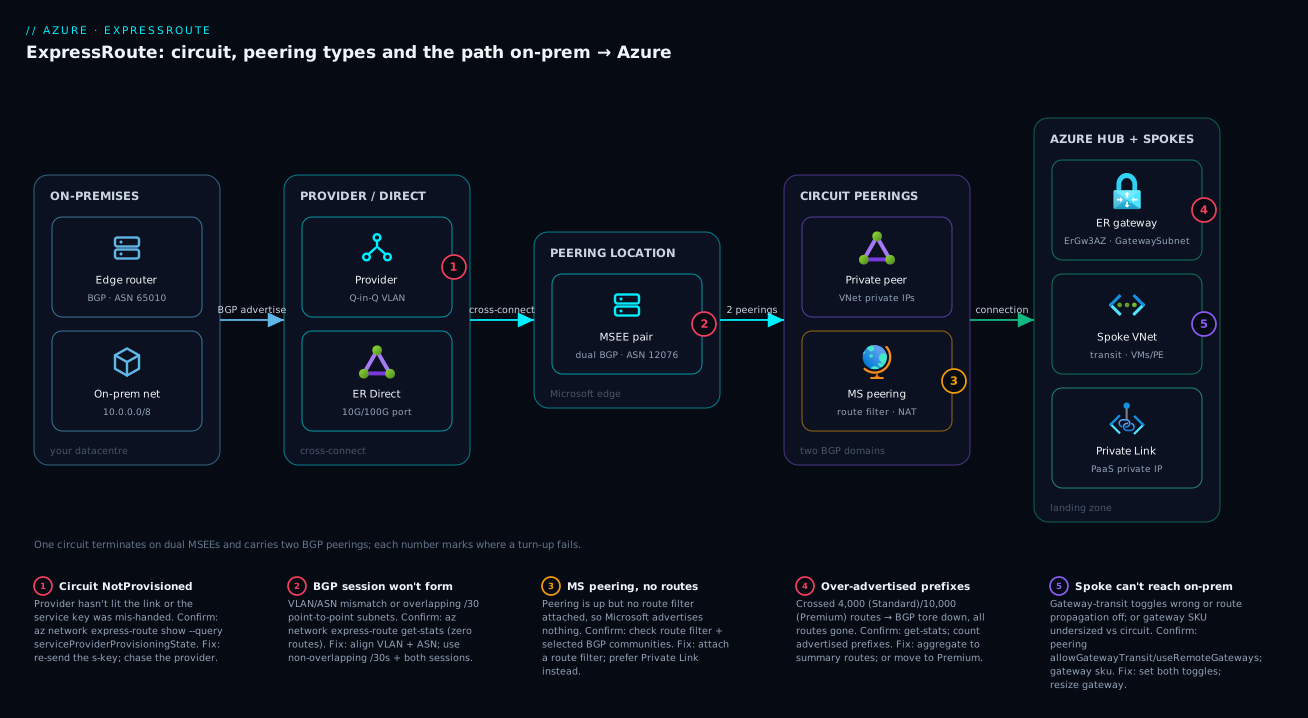
Follow a packet from your datacentre to an Azure VM, left to right. Your on-prem edge router holds a BGP session (your ASN, e.g. 65010) and advertises on-prem prefixes through the connectivity provider (or a Direct port), which handles the cross-connect and VLAN tagging into the peering location. There the circuit terminates on a redundant pair of MSEE routers — the boundary between “your/provider’s world” and “Microsoft’s world,” and the source of the two BGP sessions per peering. On the circuit sit up to two peerings: private peering (Azure ASN 12076) carrying private-IP routes toward your VNets, and optionally Microsoft peering carrying route-filtered public-endpoint routes. Private-peering traffic crosses into the connectivity hub VNet via the ExpressRoute gateway in its GatewaySubnet, bound by a connection; from the hub, gateway transit carries it to spoke VNets where your VMs and private endpoints live.
The diagram maps each failure class onto the hop where it bites — provider NotProvisioned, a dropped BGP session from over-advertised prefixes, a Microsoft peering with no route filter, an undersized gateway SKU, and a spoke that lost its routes to wrong transit toggles. Read the numbered legend as symptom → confirm → fix.
Real-world scenario
Meridian Logistics, a fictional but representative freight company, ran a 400-server Mumbai datacentre and was migrating its core TMS (transport management system), an Oracle estate, and a Citrix/AVD desktop fleet to Azure Central India. They started on a site-to-site VPN, and three problems surfaced within a month. The nightly Oracle backup sync (~2 TB) ran past the maintenance window because the VPN gateway saturated near 1 Gbps. AVD dispatchers complained the desktops felt “laggy” at peak as internet latency to the gateway swung between 18 ms and 140 ms. And compliance flagged that customer shipment data, contractually “not to traverse the public internet,” was doing exactly that inside the tunnel.
The architect provisioned a 1 Gbps Standard, Metered circuit via Equinix at the Mumbai peering location, with private peering (ASN 65010, two /30 subnets) into a connectivity hub VNet behind an ErGw3AZ zone-redundant gateway, and the TMS/Oracle/AVD spokes using gateway transit. For Azure Storage (the backup target) and Azure SQL they deliberately chose Private Endpoints over private peering rather than Microsoft peering — keeping everything on private IPs and avoiding route filters and NAT entirely.
The results were concrete. The 2 TB backup sync completed in the window because the circuit delivered close to its committed rate and the ErGw3AZ gateway (~10 Gbps) was not the bottleneck. AVD latency stabilised in the low-teens of milliseconds with no peak swings, and the complaints stopped. Compliance signed off because the path was demonstrably private to the MSEE and into Azure on private peering. One turn-up mistake: a junior engineer advertised every /24 individually (~1,200 prefixes) “to be safe,” creeping toward the 4,000 limit on a later expansion — the fix was to aggregate to summary routes, which should have been the design from day one. Six months on, after acquiring a Pune facility, they added a second circuit and enabled Global Reach so the two datacentres reached each other over Microsoft’s backbone instead of back-hauling through the old MPLS. Total connectivity cost landed around ₹2.2–2.8 lakh/month for the dual-circuit, zone-redundant design — a fraction of the exposure from a missed compliance deadline.
Advantages and disadvantages
| Advantages | Disadvantages |
|---|---|
| Private path — traffic never touches the public internet | Higher cost and a real provisioning lead time (days–weeks) |
| Predictable latency and an SLA (with dual BGP) | More moving parts; steeper learning curve than VPN |
| High, committed bandwidth (to 10 Gbps / 100 Gbps on Direct) | Depends on a connectivity provider (except Direct) |
| Scales to many VNets and (Premium) cross-geo reach | Premium / Direct / second-circuit HA add meaningful cost |
| Global Reach connects on-prem sites privately | Misconfigured BGP (route limits, ASN) can hard-fail |
| Lower egress on the Local SKU for bulk data | Local SKU’s reach is restricted to nearby region(s) |
When each side matters: the advantages dominate for regulated, latency-sensitive, high-volume hybrid enterprises — the cost and complexity are the price of a guaranteed private path, and they pay for themselves the first time a compliance deadline or a saturated VPN would have cost real money. The disadvantages dominate for small or bursty workloads — a startup with one app and a modest on-prem footprint is better served by a point-to-site VPN until volume, latency, or compliance forces the upgrade. The honest rule: don’t buy ExpressRoute for prestige; buy it when the internet path is a measured liability.
Hands-on lab
You can stand up the Azure-side of an ExpressRoute deployment without a provider lighting the physical link — the circuit, peering config, gateway and connection are all real resources you create, inspect and tear down. The circuit sits at NotProvisioned (no provider), which is exactly what lets you learn the resource model safely. Note: the circuit and gateway do incur charges — create, inspect, and delete promptly.
Step 1 — Resource group and a hub VNet with a GatewaySubnet.
az group create -n rg-er-lab -l centralindia

az network vnet create -g rg-er-lab -n vnet-hub \
  --address-prefix 10.50.0.0/16 \
  --subnet-name GatewaySubnet --subnet-prefix 10.50.255.0/27
Step 2 — Create the circuit (provider model, Standard/Metered, 50 Mbps — the smallest bandwidth, to minimise cost).
az network express-route create -n er-lab-circuit -g rg-er-lab -l centralindia \
  --provider "Equinix" --peering-location "Mumbai" \
  --bandwidth 50 --sku-tier Standard --sku-family MeteredData

# Expected: provisioningState Succeeded; serviceProviderProvisioningState NotProvisioned
az network express-route show -n er-lab-circuit -g rg-er-lab \
  --query "{skey:serviceKey, azure:circuitProvisioningState, provider:serviceProviderProvisioningState}" -o jsonc
Step 3 — Configure private peering. This succeeds at the Azure level even before the provider lights the link, staging the BGP config.
az network express-route peering create \
  --circuit-name er-lab-circuit -g rg-er-lab \
  --peering-type AzurePrivatePeering \
  --peer-asn 65010 --vlan-id 100 \
  --primary-peer-subnet 192.168.10.0/30 \
  --secondary-peer-subnet 192.168.10.4/30

az network express-route peering list --circuit-name er-lab-circuit -g rg-er-lab \
  --query "[].{type:name, asn:peerASN, vlan:vlanId, state:state}" -o table
Step 4 — Create the ExpressRoute gateway (the slow step — gateways take 20–45 minutes), using a zone-redundant SKU.
az network public-ip create -g rg-er-lab -n pip-er-lab --sku Standard --zone 1 2 3

az network vnet-gateway create -g rg-er-lab -n ergw-lab \
  --vnet vnet-hub --gateway-type ExpressRoute --sku ErGw1AZ \
  --public-ip-addresses pip-er-lab --no-wait

# Poll until provisioningState is Succeeded
az network vnet-gateway show -n ergw-lab -g rg-er-lab --query provisioningState -o tsv
Step 5 — Inspect the BGP/route view (will show no learned routes until a provider/edge is connected — expected in the lab):
az network express-route get-stats -n er-lab-circuit -g rg-er-lab -o jsonc || true
Step 6 — Teardown (do this promptly to avoid charges).
az network vnet-gateway delete -n ergw-lab -g rg-er-lab
az network express-route delete -n er-lab-circuit -g rg-er-lab
az group delete -n rg-er-lab --yes --no-wait
What you proved: you can create a circuit, read its service key and two provisioning states, stage private peering with your ASN and /30s, and stand up an ExpressRoute-type gateway — the entire Azure-side resource model — and saw why a circuit sits at NotProvisioned until a provider acts.
Common mistakes & troubleshooting
The failures cluster into a handful of patterns, each with an exact place to confirm it. Scan the table, then read the detail.
| # | Symptom | Root cause | Confirm with | Fix |
|---|---|---|---|---|
| 1 | Circuit stuck NotProvisioned for days |
Provider hasn’t lit the link / wrong s-key handed over | az network express-route show --query serviceProviderProvisioningState |
Re-send the service key; chase the provider |
| 2 | BGP session won’t come up | Wrong VLAN ID, ASN mismatch, or /30 overlap |
az network express-route get-stats; provider’s VLAN |
Align VLAN/ASN; use non-overlapping /30s |
| 3 | Microsoft peering “up” but no routes | No route filter attached (or empty) | Check route filter + selected BGP communities | Attach a route filter; select the service communities |
| 4 | Everything died after adding subnets | Exceeded the 4,000/10,000 advertised-prefix limit → session drop | get-stats; count advertised prefixes |
Aggregate routes; or move Standard→Premium (10k) |
| 5 | VNet can’t reach on-prem despite healthy BGP | No connection to the circuit, or wrong gateway type | az network vpn-connection list; gateway gatewayType |
Create the connection to private peering |
| 6 | Spoke can’t reach on-prem (hub can) | Gateway-transit toggles wrong, or propagation off | Peering allowGatewayTransit/useRemoteGateways; route table |
Fix the two toggles; enable route propagation |
| 7 | Throughput capped far below circuit bandwidth | Gateway SKU too small (e.g. Standard ~1 Gbps) | az network vnet-gateway show --query sku |
Resize to UltraPerformance/ErGw3AZ |
| 8 | On-prem→on-prem traffic won’t flow | Expecting circuits to talk without Global Reach | No Global Reach connection on private peering | Enable Global Reach on both circuits |
| 9 | Asymmetric routing / dropped return traffic | A 0.0.0.0/0 UDR or firewall overrides BGP routes |
Effective routes on the NIC; UDR table | Remove/scope the UDR; check firewall return path |
| 10 | No SLA credit after an outage | Ran on a single BGP session | Circuit shows one peering session up | Configure both primary and secondary |
The four that cause the most wasted hours, expanded:
The “up but no routes” trap (rows 3 and 4). These two share a cruel property: BGP reports healthy, so you look everywhere but BGP. On Microsoft peering, an absent or empty route filter means Microsoft advertises zero prefixes even though the session is up — attach a filter and select the service/region BGP communities. On private peering, crossing the advertised-prefix limit (4,000 Standard / 10,000 Premium) tears the whole session down, so all routes vanish at once and it reads like a total outage rather than one missing prefix. The fix for the latter is to aggregate on-prem advertisements into summary routes; reach for Premium’s 10,000 only when you genuinely own that many.
The missing connection (row 5). The circuit reaching the MSEE is necessary but not sufficient — a VNet only uses the circuit once a connection binds the gateway to the circuit’s private peering. Two adjacent slips live here: the gateway must be gatewayType: ExpressRoute (not Vpn, a frequent copy-paste error), and on the spoke side gateway transit needs allowGatewayTransit on the hub peering plus useRemoteGateways on the spoke peering, with route propagation left on. All three are silent — connectivity simply isn’t there, with no error to point at.
Throughput capped below the circuit (row 7). A single VNet’s throughput is bounded by the gateway SKU, not the circuit bandwidth: a 10 Gbps circuit behind a Standard (~1 Gbps) gateway delivers ~1 Gbps. Confirm with az network vnet-gateway show --query sku and resize to UltraPerformance/ErGw3AZ for real throughput (and FastPath).
No SLA after an outage (row 10). The SLA requires both BGP sessions, primary and secondary. Run on one and you were never covered — redundancy is structural here, not an upgrade. The remaining rows (provider NotProvisioned, VLAN/ASN mismatch, missing Global Reach, asymmetric 0.0.0.0/0 UDRs) are read straight from the table: the confirm column is the command, the fix column is the action.
Best practices
- Plan address space first. Non-overlapping CIDR between on-prem and every Azure VNet is non-negotiable; an overlap is impossible to fix later. Reserve the
/30point-to-point ranges out of space you don’t otherwise use. - Aggregate your BGP advertisements. Summary routes, not thousands of
/24s, keep you far under the 4,000/10,000 limit so BGP never tears down on a subnet expansion. - Always configure both BGP sessions. Redundancy is built into the topology and the SLA depends on it — a single session means no SLA and no resilience.
- Match the gateway SKU to real throughput, and prefer zone-redundant (
...AZ) SKUs — the gateway is usually the per-VNet ceiling, and it’s your link to the datacentre, so let it survive a zone failure. - Use Private Link over private peering for PaaS, not Microsoft peering, wherever a Private Endpoint exists — it removes route filters, NAT and public-IP routing entirely.
- Adopt hub-and-spoke with gateway transit. One gateway in a hub serving all spokes beats a gateway per VNet; get the transit toggles right.
- Pick the SKU tier deliberately. Local for cheap bulk data to the nearest region; Premium only for its routes, VNet count, or cross-geo reach — it’s a real price step.
- Design HA to your tier. Dual BGP is the floor; add a second circuit at a second peering location (or a VPN failover) for tier-1 workloads.
- Monitor the circuit, not just the apps. Alert on BGP session state, advertised-prefix count nearing the limit, and throughput;
get-statsand the route-table commands are your truth source. - Keep Microsoft 365 on the internet unless you’re in a Microsoft-approved ExpressRoute-for-M365 scenario.
Security notes
- Encryption is your job, not the circuit’s. ExpressRoute provides a private path, not an encrypted one — L2/L3 isolation is not encryption. For data that must be encrypted in transit, run IPsec/MACsec over the circuit (MACsec on Direct ports, or an IPsec tunnel over private peering).
- Treat the on-prem edge as a trust boundary. What you advertise into Azure becomes reachable; advertise the minimum prefixes, and use NSGs and an Azure Firewall in the hub to control what the on-prem side can actually reach.
- Scope Microsoft peering tightly. Since it routes public Microsoft prefixes over the circuit, restrict the route filter to only the services and regions you need.
- Use a connectivity-subscription RBAC boundary. Per the landing-zone model, the circuit, gateway and hub live in a dedicated connectivity subscription with tight RBAC (Azure Enterprise-Scale Landing Zone) so a workload-team mistake can’t reconfigure the corporate link.
- Don’t bypass the firewall with a stray UDR. A
0.0.0.0/0route around your inspection point is both a security hole and a cause of asymmetric routing; route on-prem-bound traffic through the intended NVA. - Audit Global Reach exposure. It makes two on-prem networks mutually reachable through Azure — ensure that’s intended and that NSGs/firewalls between them enforce least privilege, not just the absence of a route.
Cost & sizing
What drives the ExpressRoute bill, in order of impact:
- Circuit base fee scales with bandwidth and SKU tier (Premium adds a per-circuit uplift) — a fixed monthly cost regardless of usage.
- Egress data is per GB on Metered (inbound free); Unlimited is a flat fee covering all data — high-egress workloads (backups, replication) usually come out cheaper on Unlimited. The Local SKU includes egress to the nearby region, often the cheapest path for bulk data to one region.
- Gateway bills per hour by SKU —
ErGw3AZ/UltraPerformancecost several times aStandard. Size it to measured throughput, not “just in case.” - Global Reach adds a per-circuit charge on each linked circuit; ExpressRoute Direct has a high port-pair fee but lets you carve many circuits, so per-circuit cost can fall at scale.
A rough monthly picture for an Indian enterprise (INR, indicative — confirm current rates):
| Component | Choice | Rough INR / month | What it buys |
|---|---|---|---|
| Circuit base | 1 Gbps Standard, Metered | ~₹40,000–55,000 | The dedicated 1 Gbps private circuit |
| Premium uplift | If Premium needed | +₹50,000–70,000 | 10k routes, 100+ VNets, cross-geo reach |
| Egress (Metered) | Per GB outbound | varies with volume | Pay-as-you-go egress |
| Egress (Unlimited) | Flat, all data | bundled in a higher base | Predictable cost for heavy egress |
| ExpressRoute gateway | ErGw1AZ (~1 Gbps) |
~₹25,000–35,000 | Brings the circuit into the VNet (zone-redundant) |
| Gateway (high throughput) | ErGw3AZ (~10 Gbps) |
~₹70,000–90,000 | High throughput + FastPath |
| Global Reach | Per linked circuit | ~₹15,000–25,000 + data | On-prem-to-on-prem over the backbone |
There is no free tier — the circuit and gateway both bill from creation, which is why the lab stresses prompt teardown. Right-sizing levers, in order: Local if you only need the nearest region; Unlimited vs Metered by egress volume; the gateway sized to measured throughput; and Premium only for a concrete reason (routes, VNet count, cross-geo), not by default.
Interview & exam questions
1. What is an ExpressRoute circuit, precisely — and is it a cable? No. A circuit is a logical Azure resource representing a dedicated private connection of a chosen bandwidth and SKU; the physical fibre/cross-connect is provisioned by a connectivity provider (or by you on Direct). It carries a service key you hand the provider to match provisioning, and terminates on a redundant pair of MSEE routers.
2. Differentiate private peering and Microsoft peering. Both are independent BGP routing domains on the same circuit. Private peering reaches your VNets’ private IPs (VMs, private endpoints) and needs a gateway + connection. Microsoft peering reaches Microsoft public endpoints over the private circuit, requires a public ASN, NAT and a route filter, and needs no gateway. “Private IPs into your VNet” vs “Microsoft public IPs, privately routed.”
3. Why does ExpressRoute always have two BGP sessions? Every circuit terminates on a redundant pair of MSEE routers by design, so each peering has a primary and secondary BGP session — one per MSEE. Redundancy is structural, and Microsoft’s SLA only applies when both sessions are configured; a single session means no SLA.
4. What ASN does Azure use, and what can you use on each peering? Azure’s side is ASN 12076 on both peerings. On private peering you may use a private ASN (e.g. 64512–65534) or a public one. On Microsoft peering you must use a public ASN because it advertises public prefixes.
5. You added subnets and the whole link went down. What happened? You crossed the advertised-prefix limit — 4,000 on Standard, 10,000 on Premium — and BGP tore down the session, dropping all routes at once (looks like a total outage). Fix by aggregating advertisements into summary routes, or move to Premium for the higher cap.
6. Compare the three connectivity models. Cloud exchange co-location (you’re in a provider facility, connect virtually), point-to-point Ethernet (dedicated L2 link), and any-to-any/IPVPN (Azure joins your MPLS WAN) — all provider-delivered, 50 Mbps–10 Gbps. ExpressRoute Direct removes the provider: you own dual 10G/100G ports onto Microsoft’s edge and carve multiple circuits, up to 100 Gbps. The model changes delivery and bandwidth, not how peering works.
7. What does the gateway SKU determine, and what’s the common trap? It determines per-VNet throughput (Standard ~1 Gbps up to UltraPerformance ~10 Gbps), max circuit connections, and FastPath availability. The trap: the gateway, not the circuit, is usually the throughput ceiling — a 10 Gbps circuit behind a Standard gateway delivers ~1 Gbps.
8. What is Global Reach and when do you use it? Global Reach links two ExpressRoute circuits’ private peerings so your on-premises sites reach each other across Microsoft’s backbone (even across countries). Use it for branch-to-branch connectivity or site-to-site DR without back-hauling through your own WAN or the internet.
9. What is FastPath and what does it require? FastPath sends dataplane packets directly between on-prem and the VNet’s VMs, bypassing the ExpressRoute gateway for lower latency and higher throughput (the gateway still runs the control plane). It requires an UltraPerformance or ErGw3AZ gateway and has some scenario constraints (e.g. certain UDR/private-endpoint paths).
10. Is ExpressRoute traffic encrypted? No — it provides a private path, not encryption. For encryption in transit you layer IPsec (over private peering) or MACsec (on Direct ports) on top. Auditors who require encryption need this explicitly; “it’s private” is not “it’s encrypted.”
11. For private access to Azure Storage/SQL, should you use Microsoft peering? Generally no — the modern best practice is Private Link / Private Endpoints over private peering, giving the service a private IP in your VNet reachable from on-prem, with no route filters, NAT, or public IPs. Reserve Microsoft peering for approved M365 or services without a Private Link option.
12. ExpressRoute vs VPN — when each? VPN tunnels encrypted traffic over the public internet (best-effort latency, gateway caps ~low Gbps, cheap, fast to set up). ExpressRoute is a private, dedicated path (predictable latency, SLA, up to 100 Gbps, higher cost and lead time). Choose ExpressRoute for regulated, latency-sensitive, high-volume hybrid; VPN for small/bursty workloads or as failover behind ExpressRoute.
These map most directly to AZ-700 (Azure Network Engineer Associate), with overlap into AZ-305 (Solutions Architect) hybrid-networking design and AZ-104 (Administrator) at a foundational level:
| Question theme | Primary cert | Objective area |
|---|---|---|
| Circuit, peering types, ASNs | AZ-700 | Design & implement hybrid connectivity |
| Connectivity models, Direct | AZ-700 | Implement ExpressRoute |
| Global Reach, FastPath, redundancy | AZ-700 | Optimize & secure hybrid connectivity |
| Hub-spoke, gateway transit | AZ-305 / AZ-700 | Design hybrid network topology |
| Private Link vs Microsoft peering | AZ-700 / AZ-305 | Private access to PaaS |
| ExpressRoute vs VPN decision | AZ-104 / AZ-305 | Connect on-prem to Azure |
Quick check
- Your VNet has a healthy ExpressRoute circuit (BGP up, routes learned) but VMs still can’t reach on-prem. What resource is most likely missing?
- A colleague says “we’ll use Microsoft peering to reach our Azure VMs from on-prem.” Correct them in one sentence.
- After a subnet expansion the entire ExpressRoute link drops. What’s the numeric cause, and the fix?
- True or false: ExpressRoute traffic is encrypted by default.
- You need on-premises sites in Mumbai and London to reach each other privately through Azure. Which feature, and on which peering?
Answers
- The connection resource binding the gateway to the circuit’s private peering (and the gateway must be type
ExpressRoute). The circuit reaching the MSEE isn’t enough — without the connection, traffic never lands in the VNet. - Wrong domain — private peering reaches VNets’ private IPs; Microsoft peering reaches Microsoft public endpoints. For Azure VMs you want private peering.
- You crossed the advertised-prefix limit (4,000 Standard / 10,000 Premium) and BGP tore down, dropping all routes. Aggregate your advertisements into summary routes (or move to Premium for 10,000).
- False. ExpressRoute provides a private path, not encryption. Layer IPsec (private peering) or MACsec (Direct) for encryption in transit.
- Global Reach, enabled on the private peering of both circuits — it links them across Microsoft’s backbone for on-prem-to-on-prem connectivity.
Glossary
- ExpressRoute circuit — the logical Azure resource representing a dedicated private connection (bandwidth + SKU); not the physical cable.
- Service key (s-key) — the GUID on a circuit that you hand to your connectivity provider so they match physical provisioning to your Azure resource.
- MSEE (Microsoft Enterprise Edge) — the redundant pair of Microsoft edge routers where a circuit terminates; the source of the dual BGP sessions.
- Peering location — the physical facility where you meet Microsoft’s edge; determines latency and which providers can serve you (distinct from an Azure region).
- Private peering — the BGP routing domain on a circuit that reaches your VNets’ private IP space; needs a gateway and a connection.
- Microsoft peering — the BGP routing domain that reaches Microsoft public endpoints (PaaS public IPs, approved M365) over the circuit; needs a public ASN, NAT and a route filter.
- ASN (Autonomous System Number) — the identifier for a BGP speaker; Azure uses 12076; your edge uses your own (public for Microsoft peering, private allowed on private peering).
- Route filter — the object on Microsoft peering in which you select BGP communities; without one, Microsoft peering advertises no routes.
- ExpressRoute gateway — a virtual network gateway of type
ExpressRoutein theGatewaySubnetthat brings circuit traffic into a VNet; its SKU caps per-VNet throughput. - Connection — the resource linking an ExpressRoute gateway to a circuit’s private peering; without it the VNet can’t use the circuit.
- Gateway transit — sharing a hub VNet’s gateway with peered spoke VNets (
allowGatewayTransit+useRemoteGateways) so spokes reach on-prem without their own gateways. - SKU tier (Local / Standard / Premium) — the circuit’s reach and limits class: Local (nearest region, egress included), Standard (single geo), Premium (global, 10k routes, 100+ VNets).
- Billing model (Metered / Unlimited) — Metered charges per GB of egress (inbound free); Unlimited is a flat fee covering all data.
- ExpressRoute Direct — provisioning your own dual 10G/100G ports onto Microsoft’s edge (no provider for the cross-connect) and carving multiple circuits, up to 100 Gbps.
- Global Reach — links two circuits’ private peerings so on-premises sites reach each other across Microsoft’s backbone.
- FastPath — sends dataplane traffic directly between on-prem and VNet VMs, bypassing the gateway; requires an UltraPerformance/
ErGw3AZgateway. - Advertised-prefix limit — the cap on routes you advertise into Microsoft on private peering (4,000 Standard / 10,000 Premium); exceeding it drops the BGP session.
Next steps
You can now name what a circuit, a peering and a connectivity model each are, and localise a routing failure to its layer. Build outward:
- Next: Azure VNet Peering Done Right: Gateway Transit, Global Peering and Transitivity — the hub-and-spoke topology your ExpressRoute gateway plugs into.
- Related: Azure Private Link and Private DNS: Keeping PaaS Off the Public Internet — the modern, simpler alternative to Microsoft peering for private PaaS access.
- Related: How to Configure Point-to-Site VPN with Microsoft Entra Authentication — the public-internet path, often run as ExpressRoute’s failover.
- Related: User-Defined Routes and Route Tables: Steering Azure Traffic the Way You Intend — confirm what BGP actually programmed and avoid asymmetric routing.
- Related: Diagnosing Connectivity with Network Watcher — the tools to prove where a hybrid path breaks.
- Related: Azure Enterprise-Scale Landing Zone — where the circuit, gateway and connectivity hub live in a mature subscription design.