You wire an Azure Functions app to a Service Bus queue, it works, and you assume the next integration will be the same. Then you point a function at an Event Grid topic and nothing fires — the subscription sits at AwaitingValidation forever. You switch a third to Event Hubs and it processes fine in test, then in production falls hours behind on one partition while thirty-one sit idle. Three triggers, one surface programming model ([ServiceBusTrigger], [EventGridTrigger], [EventHubTrigger] are all just attributes), and three completely different machines underneath. The trigger you choose decides whether delivery is pull or push, whether you get retries and a dead-letter queue or best-effort, how the host scales, and what “I processed this message” even means.
This article makes those differences concrete. We treat the three triggers as three distinct delivery contracts: Service Bus (a broker you pull with peek-lock, retries and a dead-letter sub-queue — for work that must not be lost), Event Grid (a push-based router that validates your endpoint with a handshake and fans reactive notifications out to many subscribers), and Event Hubs (a partitioned stream you read with checkpoints, for high-throughput telemetry where you replay by offset). For each you will learn the binding, the host.json knobs that matter, how the scale controller adds instances, how to use a managed identity instead of a connection string, and the production failure modes — with the exact az command or portal blade to confirm each, plus a Bicep version.
By the end you will stop reaching for whichever trigger you used last and start choosing on the delivery semantics the workload needs. When an event “didn’t arrive,” you will know whether to peek the dead-letter queue, re-run the Event Grid validation handshake, or check a partition’s checkpoint — and you will know it in minutes, because you will understand which machine is actually running under the attribute.
What problem this solves
The Functions programming model is deliberately uniform: decorate a method with a trigger attribute, declare input/output bindings, and the runtime handles connection, deserialization, retries and scaling. That uniformity is the appeal — and the trap. Because all three triggers look identical in code, teams pick one by habit and inherit delivery semantics they never chose. A team needing guaranteed, retryable command processing reaches for Event Grid because “it’s events,” loses messages on transient failures, and has no DLQ to recover them; another ingesting telemetry uses Service Bus and hits the per-message overhead wall at a few thousand messages a second.
What breaks is rarely a crash — it is silent wrong behaviour: messages vanish because a best-effort trigger dropped them on a transient error; the same message is processed twice because the code assumed exactly-once when the platform promises only at-least-once; throughput plateaus because per-message acknowledgement was never meant for a firehose; a subscription never delivers because the handshake failed and nobody looked at provisioningState. None of these throw an exception you can grep for — they surface as missing data, duplicate side effects, or latency, the hardest failures to diagnose after the fact.
Who hits this: every team building event-driven systems on Azure. It bites hardest on developers moving to a mixed broker estate, on engineers who treat a stream like a queue (or vice versa), and on anyone who enabled a trigger, saw it work once with a test message, and shipped without testing a transient failure, a poison message, or load. The fix is not more code; it is choosing the trigger whose delivery contract matches the workload.
To frame the field before the deep dive — each trigger’s identity, the workload it’s built for, and its most common mistake:
| Trigger | Delivery model | Built for | Acknowledgement | Most common mistake |
|---|---|---|---|---|
| Service Bus | Pull (broker, peek-lock) | Commands, workflows, ordered/guaranteed work | Complete/abandon per message; DLQ on failure | Treating it as fire-and-forget; ignoring the DLQ |
| Event Grid | Push (HTTP webhook) | Reactive notifications, fan-out to many handlers | HTTP 2xx = delivered; retries then dead-letter to blob | Validation handshake fails; subscription never delivers |
| Event Hubs | Stream (partitioned, checkpointed) | High-throughput telemetry, event streaming | Checkpoint by offset, per batch — not per message | Using it like a queue; one hot partition; double-processing |
Learning objectives
By the end of this article you can:
- Choose between the Service Bus, Event Grid and Event Hubs triggers on delivery semantics — pull vs push vs stream, at-least-once vs best-effort, retries and dead-lettering — rather than habit.
- Configure each trigger’s binding and
host.json: Service Bus prefetch/concurrency, Event Grid’s webhook handshake, and Event Hubs batching, checkpointing andmaxEventBatchSize. - Replace connection strings with an identity-based connection and grant the exact data-plane RBAC role each service requires.
- Handle poison messages correctly:
MaxDeliveryCountand the dead-letter sub-queue for Service Bus, Event Grid’s retry-then-dead-letter policy, and why Event Hubs has none built in. - Reason about scaling: how the scale controller and target-based scaling decide instance count per trigger, and the partition/concurrency ceilings that cap it.
- Diagnose the headline failure modes — a subscription stuck at
AwaitingValidation, a Service Bus DLQ filling up, an Event Hubs consumer lagging on one partition, and a trigger that never fires for a missing role. - Stand up all three triggers end to end in the portal, with
azCLI and as a Bicep template, validate each fires, and tear it down.
Prerequisites & where this fits
You should already understand the Functions basics: a function app is the deployment and scale unit; inside it each function has exactly one trigger plus optional input/output bindings; and the app runs on a hosting plan (Consumption, Flex Consumption, Premium, or Dedicated). You should be comfortable running az in Cloud Shell and know what a Service Bus queue, an Event Grid topic and an Event Hub are. Familiarity with managed identities and Azure RBAC helps, because identity-based connections are the modern default.
If the trigger-and-binding mental model is new, start with Azure Functions Triggers and Bindings for Beginners and Wiring Azure Functions to Storage Queues and Cosmos DB. This article sits one level up — it assumes you can wire a simple trigger — and pairs with the broker deep-dives Service Bus Queues vs Topics and Event Hubs Fundamentals, which explain the brokers themselves; here we focus on how a Function consumes them.
When something breaks, the owning layer differs by symptom: the producer (wrong schema, no events, key skew), the broker (throttling, DLQ full, validation pending, partition lag), the connection (a missing RBAC role → the trigger never fires), the host/scale controller (under-scaling, double-processing), the handler (poison messages, duplicate side effects), or the output binding/downstream (partial writes, throttling).
Core concepts
Five mental models make every later decision obvious.
The trigger is a listener, not just an attribute. When the host starts, each trigger spins up a listener that connects to its source and either pulls work (Service Bus, Event Hubs) or registers an HTTP endpoint to be pushed to (Event Grid). The attribute ([ServiceBusTrigger("orders")]) is metadata the runtime reads to build that listener via an extension (the Microsoft.Azure.*.Extensions.* package — each trigger has its own, installed in the project). The listener is the real machine; the attribute describes it.
Pull, push and stream are three different contracts. A pull trigger (Service Bus, Event Hubs) has the host fetch on its own schedule, so the host controls concurrency, prefetch and back-pressure. A push trigger (Event Grid) has the source deliver to an HTTP endpoint, so the source controls timing and retries, and your endpoint must survive a validation handshake first. A stream (Event Hubs) is a pull of an append-only log read by offset with checkpoints — you can replay, and “done” means “I checkpointed past here,” not “I removed this message.”
At-least-once is the universal promise; exactly-once is your job. None of these triggers gives exactly-once delivery to your handler — Service Bus and Event Grid redeliver on failure, Event Hubs reprocesses from the last checkpoint on restart. Therefore idempotency is not optional: your handler must tolerate seeing the same message twice. Duplicate-detection windows and Durable Functions help, but the baseline contract is at-least-once, full stop.
Dead-lettering means three different things. Service Bus has a first-class DLQ — after MaxDeliveryCount failures (default 10) the broker moves the message to a $DeadLetterQueue sub-queue you inspect and replay. Event Grid retries on a schedule and, if you set a dead-letter destination (a blob container), drops undeliverable events there after the retry window. Event Hubs has no built-in poison handling — a crashing record is re-read from the checkpoint forever unless your code routes it out. Knowing which model you’re in is the difference between a recoverable failure and an infinite loop.
Scaling is signal-driven and trigger-specific. A scale controller watches each trigger’s backlog and adds or removes instances: queue/subscription depth for Service Bus, unprocessed events per partition for Event Hubs (hard-capped at one instance per partition), and HTTP concurrency for Event Grid. The newer target-based scaling model scales in bigger steps. The ceiling differs per trigger — you cannot get more Event Hubs concurrency than you have partitions.
The three triggers compared
Before the per-trigger deep dives, the master comparison — the one table to bookmark, because it drives every choice that follows:
| Dimension | Service Bus | Event Grid | Event Hubs |
|---|---|---|---|
| Delivery model | Pull (peek-lock) | Push (HTTP webhook) | Pull (partitioned stream) |
| Built for | Commands, workflows, transactions | Reactive notifications, fan-out | High-throughput telemetry/streaming |
| Ordering | FIFO per session (with sessions) | None guaranteed | Per partition |
| Delivery guarantee | At-least-once | At-least-once | At-least-once (from checkpoint) |
| Retries | Broker redelivers up to MaxDeliveryCount |
Exponential, up to 24h window | Re-read from last checkpoint |
| Poison handling | Dead-letter sub-queue (built-in) | Dead-letter to blob (opt-in) | None built-in — your code must route |
| Acknowledgement | Complete/abandon per message | HTTP 2xx response | Checkpoint by offset (per batch) |
| Replay | No (consumed = gone) | No | Yes (rewind to any offset in retention) |
| Scaling unit | Queue/subscription depth | HTTP concurrency | Partition count (1 instance/partition max) |
| Throughput ceiling | High (per-message overhead) | Very high (event router) | Highest (millions/sec with enough TUs) |
| Message size | 256 KB (Std) / 100 MB (Premium) | 1 MB per event | 1 MB per event |
| Typical latency | Low (ms) | Low (sub-second) | Low (ms, batched) |
In one sentence each: choose Service Bus when losing or duplicating a message has business consequences and you need retries plus a recovery queue; Event Grid to react to something and fan it out to independent handlers; Event Hubs when volume is high, order-within-a-shard matters, and you may need to replay. A common mistake conflates Event Grid and Event Hubs because both say “Event” — one is a discrete-notification router, the other a streaming pipe. They are not alternatives.
| If the workload is… | The signal is… | Choose | Because |
|---|---|---|---|
| “Process this order exactly, never lose it” | A command that must complete | Service Bus | Peek-lock + DLQ + retries |
| “A blob was created, do something” | A discrete state change | Event Grid (system topic) | Native source, push, fan-out |
| “Millions of IoT readings per minute” | A high-volume telemetry firehose | Event Hubs | Partitioned stream, replay |
| “Notify 5 unrelated services of an event” | One event, many independent reactions | Event Grid | One publish, N subscriptions |
| “Strict FIFO per customer” | Ordered work keyed by entity | Service Bus (sessions) | Session = ordered, single-consumer |
| “Replay the last 3 days for reprocessing” | Need to rewind history | Event Hubs | Offset-based replay within retention |
The Service Bus trigger in depth
The Service Bus trigger is a pull listener that fetches messages from a queue or topic subscription using peek-lock. The host receives a message, your function runs, and on success the runtime completes it (removes it); on an unhandled exception it abandons it (the lock releases and the broker redelivers). After MaxDeliveryCount failed deliveries — default 10 — the broker moves the message to the dead-letter sub-queue. Use this trigger whenever a message represents work that must not be silently lost.
The binding in the isolated (.NET 8+) model:
[Function("ProcessOrder")]
public async Task Run(
    [ServiceBusTrigger("orders", Connection = "SbConnection")] ServiceBusReceivedMessage message,
    FunctionContext context)
{
    var logger = context.GetLogger("ProcessOrder");
    logger.LogInformation("Order {id}, delivery #{n}", message.MessageId, message.DeliveryCount);
    // process idempotently; throw to abandon → retry → eventually DLQ
}
The Connection value names an app setting (a connection string or the prefix of an identity-based connection, below). For a topic subscription you add TopicName/SubscriptionName.
The host.json settings that actually matter
The Service Bus extension’s host.json block controls concurrency and prefetch — get these wrong and you either under-utilise the app or overwhelm a downstream:
Setting (extensions.serviceBus) |
What it does | Default | When to change |
|---|---|---|---|
maxConcurrentCalls |
Max messages processed in parallel per instance (non-session) | 16 | Lower to protect a fragile downstream; raise for CPU-light work |
maxConcurrentSessions |
Max sessions processed in parallel (session-enabled) | 8 | Tune session throughput |
prefetchCount |
Messages fetched ahead into memory | 0 | Raise to cut round-trips on high throughput; costs lock time |
autoCompleteMessages |
Auto-complete on success / abandon on exception | true | Set false only if you call Complete/Abandon yourself |
maxAutoLockRenewalDuration |
How long the runtime keeps renewing the lock | 5 min | Raise for long-running handlers; cap by your processing time |
messageHandlerOptions.maxConcurrentCalls (legacy host) |
Same as above on older runtime | 16 | Legacy in-process apps |
For a guaranteed-delivery workload talking to a rate-limited API, a sane host.json caps maxConcurrentCalls to ~8, sets prefetchCount to ~20, leaves autoCompleteMessages true, and raises maxAutoLockRenewalDuration to match the longest handler.
Poison messages and the dead-letter queue
The behaviour to internalise: a message that always throws is retried MaxDeliveryCount times, then dead-lettered — not lost, not looped forever. That is the feature. Make the handler idempotent (so a transient failure plus a retry doesn’t double-process) and have a plan for the DLQ (<queue>/$DeadLetterQueue) — trigger a second function on it to alert and replay.
| Behaviour | How to control it | Where |
|---|---|---|
| Retries before dead-letter | MaxDeliveryCount (1–2147483647, default 10) |
Queue/subscription property |
| Lock duration per delivery | LockDuration (max 5 min) |
Queue/subscription property |
| Auto dead-letter on expiry | DeadLetteringOnMessageExpiration |
Queue/subscription property |
| Inspect dead-lettered messages | Peek $DeadLetterQueue |
Service Bus Explorer / SDK |
| Recover / replay | Read DLQ, resubmit to main queue | Custom function or tool |
# Messages in the queue vs its dead-letter sub-queue
az servicebus queue show --namespace-name sb-shop-prod --resource-group rg-shop-prod \
  --name orders \
  --query "{active:countDetails.activeMessageCount, dead:countDetails.deadLetterMessageCount}" -o table
A non-zero, climbing dead count means a permanent failure is dead-lettering — go read those messages rather than raising MaxDeliveryCount.
Sessions and ordering
By default Service Bus delivers to many concurrent handlers with no ordering — fast, but unordered. For FIFO per entity (all events for customer 42 in order), enable sessions on the queue and set IsSessionsEnabled = true on the trigger; the broker hands each session to one consumer at a time, preserving order within it at the cost of cross-session parallelism. (For near-exactly-once, a duplicate-detection window on the queue suppresses repeats at roughly a 20% throughput cost.)
The Event Grid trigger in depth
Event Grid is a push model, and that one fact explains everything strange about it. Instead of your function pulling, Event Grid POSTs events to an HTTP endpoint the function exposes. Before delivering any real event, Event Grid runs a validation handshake: it sends a SubscriptionValidationEvent and expects your endpoint to echo back the validationCode. The Functions Event Grid extension handles this automatically — which is why you use the extension’s trigger rather than rolling your own, and why a failed handshake leaves the subscription stuck with no events ever arriving.
The binding (isolated model):
[Function("OnBlobCreated")]
public void Run([EventGridTrigger] CloudEvent cloudEvent, FunctionContext context)
{
    var logger = context.GetLogger("OnBlobCreated");
    logger.LogInformation("Type {t} subject {s}", cloudEvent.Type, cloudEvent.Subject);
    // return normally = 2xx = delivered; throw = non-2xx = retried
}
Note there is no Connection — Event Grid pushes to you, so auth is on the subscription side (a system key in the webhook URL, or the native azurefunction binding via the portal). Your handler’s return is the acknowledgement: return normally and delivery is recorded; throw and Event Grid retries.
The validation handshake — the #1 Event Grid gotcha
Because the handshake is invisible when it works and fatal when it doesn’t, here is the exact flow and how to confirm it:
| Step | What happens | If it fails |
|---|---|---|
| 1. Create subscription | Event Grid needs to verify you own the endpoint | — |
| 2. Validation event sent | EG POSTs SubscriptionValidationEvent with a validationCode |
— |
| 3. Endpoint echoes code | Extension responds with { "validationResponse": "<code>" } |
No echo → provisioningState stays not-Succeeded |
| 4. Subscription active | EG begins delivering real events | If stuck, no events ever flow |
Confirm the subscription’s state — the single command that tells you whether the handshake worked:
# provisioningState 'Succeeded' = handshake passed and it will deliver
az eventgrid event-subscription show \
  --name fn-blob-sub \
  --source-resource-id $(az storage account show -n stshopdata -g rg-shop-prod --query id -o tsv) \
  --query "{state:provisioningState, endpointType:destination.endpointType}" -o table
If provisioningState is anything other than Succeeded, the endpoint didn’t echo the validation code (extension not installed, wrong route, app cold/unreachable at creation, or the wrong system key). Fix the endpoint and re-create the subscription; Event Grid retries the handshake.
Retry, dead-lettering and event delivery
Event Grid retries failed deliveries on a back-off schedule for up to 24 hours, then drops the event — unless you set a dead-letter destination (a blob container), where undeliverable events land for inspection. This is opt-in and easy to forget, which is how reactive events silently disappear.
| Setting | What it controls | Default | Notes |
|---|---|---|---|
| Max delivery attempts | Retry attempts before giving up | 30 | Configurable on the subscription |
| Event time-to-live | Retry window | 1440 min (24h) | After this, dropped or dead-lettered |
| Dead-letter destination | Blob container for undeliverable events | none (off) | Opt-in — set it or lose failed events |
| Advanced filters | Deliver only matching events | none | Filter by event type, subject prefix/suffix, data fields |
| Delivery schema | CloudEvents 1.0 or Event Grid schema | EventGrid | CloudEvents recommended for portability |
Set the dead-letter destination with az eventgrid event-subscription update ... --deadletter-endpoint <storage-id>/blobServices/default/containers/<name> — undeliverable events then land in that blob container instead of being dropped.
System topics vs custom topics
Two ways events reach the trigger. A system topic is built into an Azure resource — a storage account emits Microsoft.Storage.BlobCreated, a resource group emits Microsoft.Resources.ResourceWriteSuccess — so you subscribe a function to Azure’s own events with no publisher code, using the resource-defined Event Grid schema. A custom topic is one you create and your application publishes domain events to (CloudEvents recommended). For reacting to Azure infrastructure, system topics are the free, native path; see Event Grid System Topics Explained for the source list and How to Build an Event Grid Custom Topic for publishing your own.
The Event Hubs trigger in depth
Event Hubs is a partitioned stream, and the trigger reads it like a log file: by offset, in batches, recording a checkpoint to mark how far it got. It is built for volume — telemetry, clickstreams, IoT — where Service Bus’ per-message acknowledgement would be far too expensive. Three defining constraints: ordering is per partition only, concurrency is capped at one instance per partition, and there is no built-in poison handling — a crashing record is re-read from the checkpoint forever unless your code routes it out.
The binding (isolated model, batched — the efficient default):
[Function("IngestTelemetry")]
public async Task Run(
    [EventHubTrigger("telemetry", Connection = "EhConnection", ConsumerGroup = "fn")]
    EventData[] events,
    FunctionContext context)
{
    var logger = context.GetLogger("IngestTelemetry");
    foreach (var e in events)
    {
        // checkpoints AFTER the batch returns; throwing aborts it → no checkpoint → re-read
    }
}
Always give the function its own consumer group (ConsumerGroup = "fn") so its checkpoint state is isolated; sharing $Default with other consumers causes contention and confusing replays.
Checkpoints, offsets and exactly-once myths
A checkpoint is “I have processed up to offset N on partition P.” On restart (deploy, scale, crash), the trigger resumes from the last checkpoint — which is why Event Hubs is at-least-once: if the host processed a batch but crashed before checkpointing, that batch is read again. There is no exactly-once to your handler. The checkpoint store is the app’s AzureWebJobsStorage account (a blob per consumer group/partition); if it’s unreachable, checkpointing fails and you reprocess.
| Concept | Meaning | Consequence |
|---|---|---|
| Offset | Position of a record within a partition | Resume point; monotonic per partition |
| Checkpoint | Saved offset in AzureWebJobsStorage blob |
Where reprocessing starts after restart |
| At-least-once | A batch may be re-read after a crash | Handler MUST be idempotent |
| Retention | How long records stay (1–7 days Std; up to 90 Premium) | The replay window |
$Default vs custom group |
Shared vs isolated reader view | Use a dedicated group per app |
Batching and the host.json knobs
Event Hubs throughput lives or dies on batching — these settings govern how many events you get per invocation and how often you checkpoint:
Setting (extensions.eventHubs) |
What it does | Default | When to change |
|---|---|---|---|
maxEventBatchSize |
Max events per function invocation | 100 (10 on older versions) | Raise for throughput; lower to bound memory/latency |
batchCheckpointFrequency |
Checkpoint every N batches | 1 | Raise to checkpoint less often (faster, more replay on crash) |
prefetchCount |
Events fetched ahead | 300 | Tune for very high throughput |
maxBatchSize (legacy name) |
Older alias of batch size | — | Legacy runtime |
initialOffsetOptions.type |
Where a new consumer starts | fromStart | fromEnd to skip backlog on first run |
A high-throughput host.json might set maxEventBatchSize to 256, batchCheckpointFrequency to 5 and prefetchCount to 500. That subtle trade-off: raising batchCheckpointFrequency checkpoints less often (faster, fewer storage writes) but a crash re-reads more — throughput against replay volume. Fine for idempotent handlers; keep it low for expensive side effects.
Partitions, scaling and the one-instance-per-partition ceiling
The constraint people miss: the scale controller never runs more instances of an Event Hubs trigger than the hub has partitions. A 4-partition hub caps at 4 concurrent instances, no matter how high maxScaleOutCount or how deep the backlog. Partition count is set at creation (1–32 on Standard; 100+ on Premium/Dedicated) and is the parallelism dial. A hot partition — a low-cardinality partitionKey sending most events to one shard — pins the load on one instance while the others idle, the classic “Event Hubs is slow” report.
| Symptom | Cause | Confirm | Fix |
|---|---|---|---|
| Consumer falls behind globally | Not enough partitions / TUs | IncomingMessages >> OutgoingMessages |
Add throughput units; more partitions (new hub) |
| One partition lags, rest idle | Hot partition (skewed key) | Per-partition metrics; one partition’s lag high | Use a higher-cardinality partitionKey (or null = round-robin) |
| Scales to N then stops | Hit partition-count ceiling | Instance count == partition count | More partitions (requires a new hub on Standard) |
| Reprocesses on every deploy | Checkpoint store unreachable | Host error; storage firewall blocks app | Open AzureWebJobsStorage firewall to the app |
For the full partitioning model — how keys map to shards, consumer groups, and offsets — see Event Hubs Fundamentals.
Identity-based connections (no connection strings)
All three triggers historically used a connection string — a secret granting full data-plane access that you must store, rotate and protect. The modern default is an identity-based connection: the app authenticates via its managed identity, and you grant that identity a least-privilege RBAC data role on the namespace — no secret, no rotation, scoped to what the trigger needs. (For system-assigned vs user-assigned, see Managed Identities Demystified.)
Instead of a full connection string, provide the fully-qualified namespace under a connection prefix:
# Set the FQDN (not a connection string) under the connection prefix
az functionapp config appsettings set -n fn-shop-prod -g rg-shop-prod \
  --settings "SbConnection__fullyQualifiedNamespace=sb-shop-prod.servicebus.windows.net"
# Event Hubs equivalent: EhConnection__fullyQualifiedNamespace=eh-shop-prod.servicebus.windows.net
The binding’s Connection = "SbConnection" resolves to that setting and the runtime acquires a token via the app’s identity. Then grant the role — the step whose absence makes a trigger silently never fire:
| Service | Least-privilege role to RECEIVE | Role to also SEND (output) | Scope |
|---|---|---|---|
| Service Bus | Azure Service Bus Data Receiver | Azure Service Bus Data Sender | Namespace (or queue/topic) |
| Event Hubs | Azure Event Hubs Data Receiver | Azure Event Hubs Data Sender | Namespace (or hub) |
| Event Grid | (push model — EG authenticates to you) | EventGrid Data Sender (to publish) | Topic |
AzureWebJobsStorage |
Storage Blob Data Owner (checkpoints/leases) | — | Storage account |
# Enable the identity and grant it receive on the namespace
az functionapp identity assign -n fn-shop-prod -g rg-shop-prod
PRINCIPAL=$(az functionapp identity show -n fn-shop-prod -g rg-shop-prod --query principalId -o tsv)
SB_ID=$(az servicebus namespace show -n sb-shop-prod -g rg-shop-prod --query id -o tsv)
az role assignment create --assignee "$PRINCIPAL" \
  --role "Azure Service Bus Data Receiver" --scope "$SB_ID"
(The Bicep equivalent appears in the lab’s template below.) The failure signature when this role is missing is cruel: the function deploys and the host starts, no exception is thrown in your code, yet the trigger never fires — because the listener can’t authenticate to the data plane. The tell is an Unauthorized in the host logs, not your application logs.
Architecture at a glance
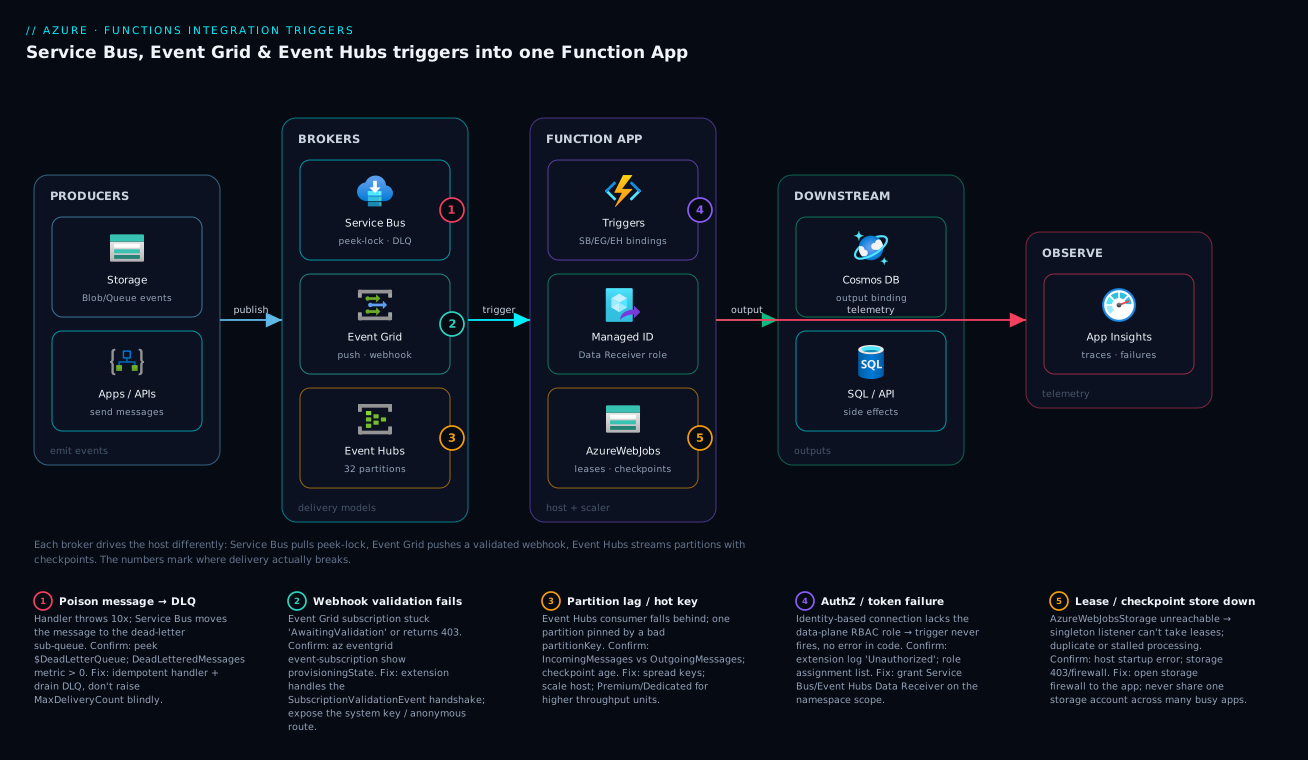
The diagram below walks the event-driven path left to right. On the left, producers emit work: an Azure resource (a storage account) raising native events, and your own apps sending messages or publishing events. These flow into the middle band — the three brokers, each with its own delivery contract: Service Bus under peek-lock with a dead-letter sub-queue, Event Grid pushing validated webhooks, and Event Hubs buffering a partitioned stream. The single Function App hosts all three triggers; its managed identity (granted the Data Receiver role) authenticates to the brokers, and its AzureWebJobsStorage account holds the Event Hubs checkpoints and the singleton leases that stop two instances grabbing the same work. From there the function writes through output bindings to Cosmos DB and other systems, while emitting traces to Application Insights on the right.
Follow the numbered badges to where delivery actually breaks: a poison message dead-lettering on Service Bus, an Event Grid webhook validation that never completed, an Event Hubs hot partition falling behind, the authorization gap when the identity lacks its role, and a checkpoint/lease store that’s unreachable. The legend narrates each as symptom, check and fix — the same diagnostic map the troubleshooting section expands.
Real-world scenario
Meridian Retail rebuilt its order pipeline around Azure Functions with three integrations: a Service Bus queue driving a ProcessOrder function (charge payment, decrement inventory — must not be lost or double-charged), an Event Grid system topic triggering GenerateThumbnails when a product photo lands in blob storage, and Event Hubs streaming page views into a RollupAnalytics function. One team, three triggers, three delivery models.
It worked in staging and broke three ways in the first production month. The order pipeline started dead-lettering — the DLQ count climbed and orders weren’t confirming. The on-call engineer’s instinct was to raise MaxDeliveryCount, which only wasted more retries per doomed message. Peeking the dead-letter sub-queue (deadLetterMessageCount at 1,400 and rising) revealed the cause: a downstream inventory API had renamed a field, every order threw the same deserialization error, and after 10 abandons the broker dead-lettered them. A code fix plus a DLQ-replay function recovered all 1,400 stranded orders — none lost, precisely because Service Bus dead-lettered rather than dropped. The lesson: a filling DLQ is a symptom to read, not a dial to turn.
The thumbnail function simply never ran — no errors, no invocations. The Event Grid subscription existed but was created while the app was scaled to zero and slow to wake, so the validation handshake failed and provisioningState was stuck. az eventgrid event-subscription show confirmed a non-Succeeded state; re-creating it once the app was warm fixed it instantly, and Always-Ready instances kept the endpoint reachable thereafter. The lesson: an Event Grid subscription that “doesn’t deliver” is almost always a failed handshake — check provisioningState first.
The analytics function fell hours behind during a flash sale. IncomingMessages far exceeded OutgoingMessages — but only on one of four partitions. The producer used customerRegion as the partition key and 70% of traffic came from one region, pinning that partition to a single instance while the one-instance-per-partition ceiling stopped the scale controller from helping. Switching the key to the higher-cardinality sessionId spread the load, and a new 16-partition hub lifted the ceiling. The lesson: Event Hubs concurrency is capped by partition count, and a low-cardinality key wastes the partitions you have. Three triggers, three failure modes, each diagnosed in minutes once the team read the trigger as a delivery contract, not just a connection.
Advantages and disadvantages
Each trigger is the right answer for its workload and the wrong answer outside it:
| Trigger | Advantages | Disadvantages |
|---|---|---|
| Service Bus | Guaranteed at-least-once; built-in retries + DLQ; sessions for FIFO; transactions; rich filtering | Per-message overhead caps throughput; 256 KB messages (Std); more cost per message; no replay |
| Event Grid | Native Azure-event sources (free system topics); massive fan-out; push = no polling cost; sub-second | Validation handshake friction; dead-lettering is opt-in; no ordering; not for high-volume streaming |
| Event Hubs | Highest throughput; replay within retention; per-partition ordering; cheap per event at scale | No built-in poison handling; one-instance-per-partition ceiling; checkpoint complexity; hot-partition risk |
When each matters: Service Bus earns its overhead the moment a lost or duplicated message has business cost — payments, inventory, anything transactional. Event Grid shines for reactive fan-out, and its system topics turn Azure’s own state changes into triggers for free. Event Hubs is the only sane choice once volume crosses thousands of events per second or you need to replay. Choosing wrong is rarely catastrophic on day one — it’s the month-two surprise the trade-off table prevents.
Hands-on lab
You will stand up all three triggers against one function app, wire each to its broker with an identity-based connection, fire a test event into each, confirm it ran, and tear everything down — the centerpiece of this article. It is free-tier-friendly: Service Bus Basic, a free Event Grid system topic, an Event Hubs Basic namespace and a Consumption function app cost a few rupees for the hour and nothing once deleted. We give the portal path for orientation, the az CLI as the authoritative copy-pasteable version, and a Bicep template for the infrastructure. Run the CLI in Cloud Shell (Bash).
Part A — Prerequisites and variables
Step 1 — Set variables and a resource group. Everything is named off these for one-command cleanup.
RG=rg-fn-triggers-lab
LOC=centralindia
SB=sb-fnlab-$RANDOM           # Service Bus namespace (globally unique)
EH=eh-fnlab-$RANDOM           # Event Hubs namespace (globally unique)
ST=stfnlab$RANDOM             # storage acct: lowercase, no dashes, ≤24 chars
FN=fn-triggers-$RANDOM        # function app (globally unique)
az group create -n $RG -l $LOC -o table
Expected: a resource group row with provisioningState: Succeeded.
Step 2 — Confirm the CLI extension and provider. The Event Grid commands need the eventgrid extension and the Microsoft.EventGrid provider registered:
az extension add --name eventgrid --upgrade 2>/dev/null
az provider register --namespace Microsoft.EventGrid --wait
Expected: the provider’s registrationState is Registered (check with az provider show --namespace Microsoft.EventGrid --query registrationState -o tsv).
Part B — Create the brokers and the function app (CLI)
Step 3 — Service Bus namespace + queue (with a real dead-letter setting).
az servicebus namespace create -n $SB -g $RG --sku Basic -o table
az servicebus queue create --namespace-name $SB -g $RG --name orders \
  --max-delivery-count 5 -o table
Expected: a queue row; note maxDeliveryCount: 5 — after 5 failed deliveries a message dead-letters. (Basic SKU supports queues; topics need Standard.)
Step 4 — Event Hubs namespace + hub + dedicated consumer group.
az eventhubs namespace create -n $EH -g $RG --sku Basic -o table
az eventhubs eventhub create --namespace-name $EH -g $RG --name telemetry \
  --partition-count 2 --message-retention 1 -o table
az eventhubs eventhub consumer-group create --namespace-name $EH -g $RG \
  --eventhub-name telemetry --name fn -o table
Expected: an event hub with partitionCount: 2 and a consumer group fn. Event Hubs Basic supports only the $Default consumer group, so the consumer-group create line needs --sku Standard on the namespace (use it if that command errors).
Step 5 — Storage account and function app (Consumption, .NET isolated). The storage backs AzureWebJobsStorage (checkpoints + leases).
az storage account create -n $ST -g $RG -l $LOC --sku Standard_LRS -o table
az functionapp create -n $FN -g $RG \
  --storage-account $ST --consumption-plan-location $LOC \
  --runtime dotnet-isolated --functions-version 4 --os-type Linux -o table
Expected: a function app row, state: Running, kind containing functionapp,linux.
Step 6 — Enable the managed identity and grant the data-plane roles — the step that makes the triggers fire without secrets.
az functionapp identity assign -n $FN -g $RG -o table
PRINCIPAL=$(az functionapp identity show -n $FN -g $RG --query principalId -o tsv)

# Receive roles scoped to each namespace
az role assignment create --assignee "$PRINCIPAL" --role "Azure Service Bus Data Receiver" \
  --scope $(az servicebus namespace show -n $SB -g $RG --query id -o tsv)
az role assignment create --assignee "$PRINCIPAL" --role "Azure Event Hubs Data Receiver" \
  --scope $(az eventhubs namespace show -n $EH -g $RG --query id -o tsv)

# Verify the assignments landed
az role assignment list --assignee "$PRINCIPAL" --query "[].roleDefinitionName" -o tsv
Expected output: the two role names printed. If they’re missing, the triggers will deploy but never fire — re-run the create commands.
Step 7 — Wire the identity-based connections as app settings (the binding Connection prefixes resolve to these):
az functionapp config appsettings set -n $FN -g $RG --settings \
  "SbConnection__fullyQualifiedNamespace=$SB.servicebus.windows.net" \
  "EhConnection__fullyQualifiedNamespace=$EH.servicebus.windows.net" -o none
echo "App settings set."
Expected: App settings set. (Event Grid needs no connection — it pushes to the function.)
Part C — The function code (three triggers, one app)
Step 8 — The three handlers (isolated .NET 8). Create Functions.cs and deploy with your normal pipeline (func azure functionapp publish $FN).
public class Triggers
{
    [Function("ProcessOrder")]
    public void ProcessOrder(
        [ServiceBusTrigger("orders", Connection = "SbConnection")] string body,
        FunctionContext ctx)
        => ctx.GetLogger("ProcessOrder").LogInformation("Order: {b}", body);

    [Function("OnImageUploaded")]
    public void OnImageUploaded([EventGridTrigger] CloudEvent e, FunctionContext ctx)
        => ctx.GetLogger("OnImageUploaded").LogInformation("EG {t}: {s}", e.Type, e.Subject);

    [Function("RollupTelemetry")]
    public void RollupTelemetry(
        [EventHubTrigger("telemetry", Connection = "EhConnection", ConsumerGroup = "fn")] string[] batch,
        FunctionContext ctx)
        => ctx.GetLogger("RollupTelemetry").LogInformation("EH batch of {n}", batch.Length);
}
The project must reference the three extensions (Microsoft.Azure.Functions.Worker.Extensions.ServiceBus, ...EventGrid, ...EventHubs) and a host.json with the settings from the deep-dive sections above.
Step 9 — Create the Event Grid subscription (the handshake). This points a storage system topic at the OnImageUploaded function; the extension echoes the validation code automatically.
# Subscribe the function to the storage account's BlobCreated events
SRC=$(az storage account show -n $ST -g $RG --query id -o tsv)
FNID=$(az functionapp show -n $FN -g $RG --query id -o tsv)
az eventgrid event-subscription create --name img-sub \
  --source-resource-id $SRC \
  --endpoint-type azurefunction \
  --endpoint "$FNID/functions/OnImageUploaded" \
  --included-event-types Microsoft.Storage.BlobCreated -o table
Expected: provisioningState: Succeeded. If it is anything else, the handshake failed (function not deployed yet, or app cold) — deploy the code first, then re-run.
Part D — Fire a test event into each trigger and validate
Step 10 — Service Bus: send a message, confirm it processed (or dead-lettered).
# Send an order message (or use Service Bus Explorer in the portal)
az servicebus queue message send 2>/dev/null \
  || echo "Use Service Bus Explorer (portal) if 'message send' is unavailable."
# active should drain to 0 as the function processes; dead should stay 0
az servicebus queue show --namespace-name $SB -g $RG --name orders \
  --query "{active:countDetails.activeMessageCount, dead:countDetails.deadLetterMessageCount}" -o table
Expected: after the function runs, active: 0, dead: 0. If dead climbs, your handler is throwing — read the DLQ.
Step 11 — Event Grid: upload a blob to trigger the system topic.
echo "hello" > /tmp/test.jpg
az storage blob upload --account-name $ST --auth-mode login \
  -c '$web' -f /tmp/test.jpg -n test.jpg 2>/dev/null \
  || az storage blob upload --account-name $ST --auth-mode login -c images -f /tmp/test.jpg -n test.jpg
Expected: the upload succeeds and, within a second or two, the OnImageUploaded function logs a Microsoft.Storage.BlobCreated event. (Create the container first if needed: az storage container create -n images --account-name $ST --auth-mode login.)
Step 12 — Event Hubs: send an event, confirm a batch invocation.
# Send an event (or use the portal's Data Explorer → Send events)
az eventhubs eventhub send 2>/dev/null \
  || echo "Use the Event Hubs portal 'Data Explorer → Send events'."
Expected: the RollupTelemetry function logs EH batch of N (the first run on a fresh checkpoint may read from the start of the stream).
Step 13 — Confirm all three in Application Insights. Functions auto-wires App Insights; query the invocations:
// Last 30 min: which functions ran and their success rate
requests
| where timestamp > ago(30m)
| summarize invocations=count(), failures=countif(success==false) by operation_Name
| order by invocations desc
Expected: rows for ProcessOrder, OnImageUploaded and RollupTelemetry, each with invocations >= 1 and failures == 0.
Validation checklist. You created three brokers and one function app whose managed identity holds the Data Receiver roles, wired identity-based connections (no secrets), got an Event Grid subscription past its handshake, and fired one event into each trigger to see all three invoke. The steps mapped to what each proves:
| Step | What you did | What it proves |
|---|---|---|
| 6 | Grant Data Receiver roles | Identity-based triggers fire only with the right RBAC |
| 9 | Create EG subscription | The validation handshake must reach Succeeded |
| 10 | Send + check DLQ | Service Bus completes on success, dead-letters on failure |
| 11 | Upload a blob | A system topic turns an Azure event into a trigger |
| 12 | Send to the hub | The stream trigger reads in batches per partition |
| 13 | App Insights query | One pane confirms all three delivery models worked |
Part E — Bicep version of the infrastructure
For repeatable deploys, the infrastructure as Bicep (brokers, storage, function app, identity, role assignments) — deploy the function code on top with your pipeline:
@description('Location for all resources')
param location string = resourceGroup().location
param prefix string = 'fnlab'

resource sb 'Microsoft.ServiceBus/namespaces@2022-10-01-preview' = {
  name: '${prefix}-sb-${uniqueString(resourceGroup().id)}'
  location: location
  sku: { name: 'Basic', tier: 'Basic' }
  resource orders 'queues' = { name: 'orders', properties: { maxDeliveryCount: 5 } }
}

resource eh 'Microsoft.EventHub/namespaces@2024-01-01' = {
  name: '${prefix}-eh-${uniqueString(resourceGroup().id)}'
  location: location
  sku: { name: 'Standard', tier: 'Standard' }   // Standard so a custom consumer group is allowed
  resource hub 'eventhubs' = {
    name: 'telemetry'
    properties: { partitionCount: 2, messageRetentionInDays: 1 }
    resource cg 'consumergroups' = { name: 'fn' }
  }
}

resource st 'Microsoft.Storage/storageAccounts@2023-05-01' = {
  name: toLower('${prefix}st${uniqueString(resourceGroup().id)}')
  location: location
  sku: { name: 'Standard_LRS' }
  kind: 'StorageV2'
}

resource plan 'Microsoft.Web/serverfarms@2023-12-01' = {
  name: '${prefix}-plan'
  location: location
  sku: { name: 'Y1', tier: 'Dynamic' }   // Consumption
}

resource fn 'Microsoft.Web/sites@2023-12-01' = {
  name: '${prefix}-app-${uniqueString(resourceGroup().id)}'
  location: location
  kind: 'functionapp,linux'
  identity: { type: 'SystemAssigned' }
  properties: {
    serverFarmId: plan.id
    siteConfig: {
      linuxFxVersion: 'DOTNET-ISOLATED|8.0'
      appSettings: [
        { name: 'FUNCTIONS_EXTENSION_VERSION', value: '~4' }
        { name: 'AzureWebJobsStorage__accountName', value: st.name }
        { name: 'SbConnection__fullyQualifiedNamespace', value: '${sb.name}.servicebus.windows.net' }
        { name: 'EhConnection__fullyQualifiedNamespace', value: '${eh.name}.servicebus.windows.net' }
      ]
    }
  }
}

// Data-plane RBAC: RECEIVE on both namespaces
resource sbRx 'Microsoft.Authorization/roleAssignments@2022-04-01' = {
  name: guid(fn.id, sb.id, 'sb-rx')
  scope: sb
  properties: {
    roleDefinitionId: subscriptionResourceId('Microsoft.Authorization/roleDefinitions',
      '4f6d3b9b-027b-4f4c-9142-0e5a2a2247e0') // Azure Service Bus Data Receiver
    principalId: fn.identity.principalId
    principalType: 'ServicePrincipal'
  }
}
resource ehRx 'Microsoft.Authorization/roleAssignments@2022-04-01' = {
  name: guid(fn.id, eh.id, 'eh-rx')
  scope: eh
  properties: {
    roleDefinitionId: subscriptionResourceId('Microsoft.Authorization/roleDefinitions',
      'a638d3c7-ab3a-418d-83e6-5f17a39d4fde') // Azure Event Hubs Data Receiver
    principalId: fn.identity.principalId
    principalType: 'ServicePrincipal'
  }
}
Deploy and validate it preflighted cleanly:
az deployment group create -g $RG --template-file main.bicep --parameters prefix=fnlab -o table
Expected: provisioningState: Succeeded for the deployment and each resource.
Part F — Teardown
Step 14 — Delete everything in one command. This stops all charges.
az group delete -n $RG --yes --no-wait
The Event Grid subscription is deleted with its source storage account inside the group, so one command zeroes all charges. A handful of test executions on Consumption is effectively free under the monthly grant.
Common mistakes & troubleshooting
The failure modes that actually bite, each as symptom → root cause → confirm → fix — first the scannable playbook, then detail on the non-obvious ones.
| # | Symptom | Root cause | Confirm (exact cmd / portal path) | Fix |
|---|---|---|---|---|
| 1 | Trigger never fires; no error in code | Identity lacks the Data Receiver role | Host logs show Unauthorized; az role assignment list --assignee <principalId> empty |
Grant Service Bus/Event Hubs Data Receiver on the namespace |
| 2 | Event Grid subscription delivers nothing | Validation handshake failed | az eventgrid event-subscription show --query provisioningState ≠ Succeeded |
Deploy the function first; re-create the subscription when the app is warm |
| 3 | Service Bus DLQ filling up | Handler throws every time (poison message) | az servicebus queue show --query countDetails.deadLetterMessageCount > 0 and rising |
Fix the handler; replay the DLQ; don’t just raise MaxDeliveryCount |
| 4 | Same message processed twice | Handler not idempotent; at-least-once redelivery | App Insights shows duplicate operationIds / side effects | Make the handler idempotent (dedupe key, upsert) |
| 5 | Event Hubs consumer falls behind, one partition | Hot partition from a low-cardinality key | Per-partition IncomingMessages skew; one partition’s lag high |
Use a higher-cardinality partitionKey; add partitions/TUs |
| 6 | Event Hubs scales to N then stops | Hit the one-instance-per-partition ceiling | Instance count == partition count | More partitions (new hub on Standard) |
| 7 | Reprocesses the whole stream on deploy | Checkpoint store (AzureWebJobsStorage) unreachable |
Host startup error; storage firewall blocks the app | Open storage firewall to the app; verify the storage connection |
| 8 | Function times out on big batches | maxEventBatchSize too high for the work |
Invocation duration near the plan timeout | Lower maxEventBatchSize; raise plan timeout; process async |
| 9 | Throughput plateaus on Service Bus | maxConcurrentCalls/prefetchCount too low |
CPU idle while backlog grows | Raise concurrency/prefetch; protect downstream first |
| 10 | Messages lost on Event Grid failures | No dead-letter destination configured | Subscription has no deadLetterDestination |
Set a blob dead-letter endpoint on the subscription |
Two of these reward a closer look.
#3 — Service Bus DLQ filling up. A climbing dead-letter count means a permanent failure is dead-lettering after MaxDeliveryCount retries. The wrong move is raising MaxDeliveryCount — that wastes more retries on doomed messages. The right move: peek the dead-letter sub-queue (Service Bus Explorer or the SDK), read the actual error, fix the cause, and replay the messages to the main queue. The DLQ existing is the feature; ignoring it is the bug.
#5/#6 — Event Hubs partition problems. A hot partition (low-cardinality key) pins load on one instance; the partition ceiling caps total concurrency at the partition count. Both report as “Event Hubs is slow” but have different fixes — spread the key, or add partitions for the ceiling. Confirm with per-partition metrics (Metrics → split by partition). On Standard you can’t add partitions to an existing hub, so plan partition count up front against peak parallelism.
Best practices
- Choose the trigger by delivery semantics, not habit — Service Bus for must-not-lose commands, Event Grid for reactive fan-out, Event Hubs for high-volume streaming and replay — and write down why.
- Make every handler idempotent. All three triggers are at-least-once; dedupe on a business key and prefer upserts over inserts.
- Read the DLQ; don’t tune around it. A climbing Service Bus dead-letter count is a defect report — stand up a DLQ-triggered alert/replay function and keep
MaxDeliveryCountmodest (5–10). - Always set an Event Grid dead-letter destination, or undeliverable events are dropped after the retry window — a blob container costs nothing and saves the events you’ll wish you had.
- Give every Event Hubs function its own consumer group; never share
$Default, so one app’s replays don’t confuse another’s checkpoints. - Size partition count for peak parallelism up front — you can’t add partitions to a Standard hub later.
- Prefer identity-based connections over connection strings: set
<Conn>__fullyQualifiedNamespace, grant the least-privilege Data Receiver role, and eliminate a secret to rotate. - Pin extension versions; defaults like
maxEventBatchSizechange between versions, so test before upgrading. - Tune
host.jsonto protect downstreams — capmaxConcurrentCalls(Service Bus) andmaxEventBatchSize(Event Hubs) so a burst doesn’t overwhelm a rate-limited API or database. - Don’t share one storage account across many busy apps;
AzureWebJobsStorageholds checkpoints and singleton leases, and contention there causes stalls and duplicate processing. - Instrument with Application Insights from day one — the one pane showing all three delivery models’ invocations, failures and the exception filling your DLQ.
- Test a transient failure and a poison message before shipping — throw on purpose in staging and watch the retry, the DLQ and the redelivery you’d otherwise discover in production.
Security notes
The shift from connection strings to identity-based connections is the biggest security improvement for these triggers and should be your default. A connection string is a long-lived secret with broad data-plane rights; if it leaks (a commit, a log, an over-shared app setting) an attacker can read or write the broker. A managed identity has no secret to leak, and you grant the least-privilege role — Data Receiver to consume, Data Sender only if the function publishes — scoped to the specific namespace, queue or hub. Avoid the broad Owner/Contributor roles on data resources; they grant management-plane rights the trigger never needs.
| Concern | Risk | Control |
|---|---|---|
| Secret leakage | Connection string in code/logs grants full access | Identity-based connection; no secret at all |
| Over-privileged access | One role grants send+receive+manage | Grant only Data Receiver (and Data Sender if publishing), scoped tight |
| Network exposure | Broker reachable from the public internet | Private endpoints on SB/EH; restrict to the app’s VNet |
| Event Grid endpoint abuse | Anyone could POST fake events to the function | System key in the webhook URL; validate event source/type |
| Data at rest | Messages/events stored unencrypted | Platform encrypts by default; customer-managed keys on Premium |
| Storage for checkpoints | AzureWebJobsStorage holds operational state |
Restrict storage firewall to the app; identity-based storage connection |
One topic-specific note: Event Grid’s push model inverts the auth direction — it authenticates to your function via the system key in the endpoint URL, so protect that key and validate the source/type of incoming events rather than trusting any POST. In a regulated environment, put brokers behind private endpoints and force the function’s egress through the VNet so neither a public endpoint nor a secret is exposed.
Cost & sizing
The bill comes from two places: the broker (per operation or per throughput unit) and the function executions (per invocation + GB-seconds on Consumption, or per instance-hour on Premium/Dedicated). The brokers price very differently, which feeds back into trigger choice at scale.
| Driver | Service Bus | Event Grid | Event Hubs |
|---|---|---|---|
| Billing unit | Per operation (Basic/Std); per messaging unit (Premium) | Per million operations (events) | Per throughput unit (TU) + ingress; or Premium capacity |
| Cheapest tier | Basic (queues only) | Pay-per-event (very cheap) | Basic (1 TU) |
| Scales cost with | Message count + operations | Event count | Throughput units, not event count directly |
| Best cost profile | Moderate volume, high value per message | Spiky, reactive, fan-out | Very high volume (cheap per event at scale) |
| Watch out for | Per-operation cost at high volume | Dead-letter storage; high event counts | Idle TUs you pay for regardless of volume |
Rough figures (vary by region; order-of-magnitude): Service Bus Basic is a few rupees per million operations; Event Grid is around ₹50–60 per million operations after a free grant; Event Hubs Basic is a small hourly charge per throughput unit — and an idle TU still costs. The function side on Consumption has a monthly free grant (1M executions + 400,000 GB-s) covering most low-volume integrations; for steady high-throughput streams, Premium or Flex Consumption often costs less and eliminates cold-start handshake failures. To right-size: cap Service Bus concurrency/prefetch (more isn’t free); match Event Hubs TUs to peak and don’t over-provision partitions; and use Event Grid advanced filters so a chatty source doesn’t bill for events you ignore.
Interview & exam questions
Q1. What’s the fundamental difference between the Service Bus and Event Grid triggers? Service Bus is pull — the function fetches messages with peek-lock, gets retries and a DLQ, and is built for guaranteed command/workflow processing. Event Grid is push — it POSTs events to an HTTP endpoint after a validation handshake and acknowledges via the HTTP response. One is a durable broker you drain; the other an event router that delivers to you. (AZ-204, AZ-305.)
Q2. An Event Grid subscription was created but no events are arriving. What do you check first?
The subscription’s provisioningState. If it isn’t Succeeded, the validation handshake failed — the endpoint didn’t echo the validationCode. Deploy the function and re-create the subscription when the app is warm. (AZ-204.)
Q3. Why must Azure Functions message handlers be idempotent? Because all three triggers deliver at-least-once, not exactly-once: a crash after processing but before completing (Service Bus) or checkpointing (Event Hubs) redelivers the message. Idempotency — dedupe keys, upserts — prevents duplicate side effects. (AZ-204, AZ-305.)
Q4. How does the Service Bus dead-letter queue work, and what’s the wrong response to it filling up?
After MaxDeliveryCount failures (default 10), the broker moves the message to the $DeadLetterQueue sub-queue — not lost, recoverable. The wrong response is raising MaxDeliveryCount (it wastes more retries on a doomed message); the right one is to peek the DLQ, fix the cause, and replay. (AZ-204.)
Q5. Why can’t an Event Hubs-triggered function scale beyond a certain point? The scale controller runs at most one instance per partition — a 4-partition hub caps at 4 concurrent instances regardless of backlog. To scale higher you need more partitions, which on Standard means a new hub. (AZ-204, AZ-305.)
Q6. What is a “hot partition” in Event Hubs and how do you fix it? A partition getting a disproportionate share of events because the partition key has low cardinality; it pins load on one instance while others idle. Fix with a higher-cardinality key (or null for round-robin) and, if needed, more partitions. (AZ-305.)
Q7. How do identity-based connections work, and what’s the most common failure?
You set <Conn>__fullyQualifiedNamespace and the app authenticates via its managed identity. The common failure is forgetting the RBAC data role (Data Receiver) — the trigger then deploys but never fires, with an Unauthorized only in the host logs, not your code. (AZ-204.)
Q8. When would you choose Event Hubs over Service Bus? When volume is high (thousands+ events/sec), you need per-partition ordering and the ability to replay within the retention window, and per-message acknowledgement would be too costly. Service Bus is for lower-volume, high-value messages needing guaranteed delivery and a DLQ. (AZ-305.)
Q9. What does batchCheckpointFrequency trade off in the Event Hubs trigger?
It checkpoints every N batches: higher values checkpoint less often (fewer storage writes, higher throughput) but a crash re-reads more events. Safe to raise for idempotent handlers, best kept low for expensive side effects. (AZ-204.)
Q10. What’s the difference between an Event Grid system topic and a custom topic? A system topic is built into an Azure resource that emits events natively — you subscribe with no publisher code. A custom topic is one you create and your application publishes to. System topics are the free, native path for reacting to Azure state changes. (AZ-204.)
Q11. How do you recover messages that Event Grid failed to deliver? Only if you configured a dead-letter destination (a blob container) on the subscription — undeliverable events land there after the retry window; without it, they’re dropped. Always set a dead-letter blob endpoint for events you can’t afford to lose. (AZ-204.)
Quick check
- Which trigger is push-based, and what must happen before it delivers any real event?
- After how many failed deliveries does a Service Bus message dead-letter by default, and where does it go?
- What hard ceiling caps the concurrency of an Event Hubs-triggered function?
- With an identity-based connection, what’s the symptom when the function’s identity lacks the Data Receiver role?
- Why must all three triggers’ handlers be idempotent?
Answers
- Event Grid is push-based; it must complete the validation handshake (echo the
validationCodefrom theSubscriptionValidationEvent) and reachprovisioningState: Succeededbefore any real event is delivered. - After
MaxDeliveryCountfailed deliveries (default 10), the broker moves the message to the$DeadLetterQueuesub-queue, where it can be inspected and replayed — not lost. - One instance per partition. A hub with N partitions caps at N concurrent processing instances regardless of backlog or scale-out settings.
- The function deploys but the trigger never fires, with no exception in your code — only an
Unauthorizedin the host logs, because the listener can’t authenticate to the data plane. - Because all three deliver at-least-once — a crash before completing (Service Bus) or checkpointing (Event Hubs), or an Event Grid retry, can deliver the same message twice; idempotency prevents duplicate side effects.
Glossary
- Trigger — the single event source that invokes a function (e.g.
[ServiceBusTrigger]); determines the delivery model and how the function scales. - Binding — a declarative input or output connection to a service; a function has one trigger and any number of input/output bindings.
- Extension — the package (
Microsoft.Azure.*.Extensions.*) implementing a trigger/binding; its version pins behaviour and defaults. - Peek-lock — Service Bus receive mode that fetches and locks a message, completing it on success or abandoning it on failure (enabling retries + DLQ).
MaxDeliveryCount— failed deliveries (default 10) before Service Bus moves a message to the dead-letter queue.- Dead-letter queue (DLQ) — the
$DeadLetterQueuesub-queue holding messages that exceededMaxDeliveryCount, for inspection and replay. - Validation handshake — Event Grid’s
SubscriptionValidationEventecho proving your endpoint owns the URL; without it the subscription never delivers. - System / custom topic — an Event Grid topic built into an Azure resource that emits events natively, versus one you create and publish domain events to.
- Partition — one ordered shard of an Event Hub; the unit of parallelism and the cap on a trigger’s concurrency (one instance per partition).
- Offset / checkpoint — a record’s position within a partition, and the saved offset in
AzureWebJobsStoragemarking how far a consumer has processed. - Consumer group — an independent reader view of an Event Hub stream with its own checkpoint state; give each app its own.
- At-least-once — the guarantee all three triggers share: a message may arrive more than once, so handlers must be idempotent.
- Identity-based connection — authenticating to a broker via the app’s managed identity (
<Conn>__fullyQualifiedNamespace), requiring an RBAC data role. AzureWebJobsStorage— the storage account the host uses for checkpoints and singleton leases; contention or unavailability causes stalls and reprocessing.
Next steps
You can now choose and configure the right messaging trigger for any event-driven workload. Build outward:
- Next: Azure Functions Triggers and Bindings for Beginners — solidify the attribute-driven model if any binding syntax felt unfamiliar.
- Related: Service Bus Queues vs Topics — choose the broker shape (point-to-point vs pub/sub) behind the Service Bus trigger.
- Related: Event Hubs Fundamentals: Partitions, Consumer Groups, Checkpoints and Offsets — go deep on the streaming model under the Event Hubs trigger.
- Related: How to Build an Event Grid Custom Topic — publish your own domain events and master the handshake.
- Related: Cosmos DB Change Feed in Action: Event-Driven Pipelines with Azure Functions — a fourth event source: react to database changes with the Cosmos DB trigger.
- Related: Managed Identities Demystified: System vs User-Assigned — pick the right identity for your identity-based connections.