A workflow that only works when every dependency is healthy is not a workflow — it is a demo. The moment you put a Logic App into production it talks to systems that throttle (HTTP 429), time out, restart, or blink for two seconds during a deployment. The default behaviour hides this: most actions already retry four times behind the scenes, so a flaky call looks fine until the day the downstream is down for thirty seconds — and because there was no catch block, the failure is silent (no alert, no compensation, no dead-letter, just a red run in a history blade nobody watches). This is the single most common reason a “working” integration loses a message in production.
This article is the resilience playbook for Azure Logic Apps — both Consumption (multi-tenant, per-action-billed) and Standard (single-tenant, App Service-hosted). It treats error handling as four primitives you compose deliberately: the retry policy on each action (how many times, how far apart, and which failures even qualify), the Scope action that groups steps into a unit you guard as a whole, the runAfter property — the one piece of workflow JSON that turns a linear flow into try / catch / finally by letting an action run after another action failed, was skipped, or timed out — and the Terminate action plus expressions like result() and @actions('Name') that let a catch block read exactly which step blew up and react. Master those four and any workflow degrades gracefully instead of dying.
By the end you will stop shipping happy-path-only workflows — knowing when a retry helps versus merely delays the inevitable, how to guard a transaction with a Scope and a catch that runs only on failure, how to read the failed action inside that catch, and how to dead-letter a poison message instead of losing it. Everything comes with the portal click-path, the az CLI, and the raw workflow JSON, because in Logic Apps the JSON is the source of truth and the designer is just a view over it.
What problem this solves
Logic Apps make integration deceptively easy: drag an HTTP action, point it at an API, drag a “Send to Service Bus” after it, and you have shipped a pipeline in ten minutes. What you have not done is decide what happens when the HTTP call returns 429, when Service Bus is mid-failover, or when the API returns a 200 with a body that says {"error":"validation failed"}. In the happy path none of that matters; in production all of it eventually happens, usually at 2am, usually on the run that mattered.
What breaks without deliberate handling cuts two ways. A transient 503 fails the whole run even though a retry two seconds later would have succeeded — you get paged for a fault that no longer exists. Or the opposite: the default retry masks a real outage until it exhausts, the run goes red, and because nothing runs runAfter a failure, no one is notified and the message — already consumed off its trigger queue — is gone. A workflow without a catch block can lose data; one that blindly retries non-idempotent writes does the reverse — charges a card twice, sends a duplicate email.
This bites every team past the prototype, hardest on workflows that fan out to SaaS APIs (rate limits, timeouts), consume from a queue (a lost message is a lost business event), or do multi-step writes (a halfway failure leaves the world inconsistent). The fix is never “hope it works”: retry the ones worth retrying, catch the rest, and make the catch do something — alert, compensate, or dead-letter.
The failure modes this article addresses, what goes wrong without handling, and the primitive that fixes each:
| Failure mode | What happens with no handling | Primitive that fixes it | Section |
|---|---|---|---|
| Transient fault (429/503/timeout) | One blip fails the whole run | Retry policy (exponential/fixed) | Core concepts, Retry deep-dive |
| Real outage after retries exhausted | Run goes red, nobody notified, message lost | Scope + runAfter catch |
runAfter section, Catch patterns |
| Multi-step write fails halfway | World left inconsistent, no rollback | Scope grouping + compensation | Scopes section |
| Need to read which step failed | Catch block has no idea what broke | result() / @actions() |
Reading the failure |
| Poison message that can never succeed | Infinite retries or silent data loss | Dead-letter / Terminate | Dead-letter patterns |
| Business-logic error returned as 200 | Treated as success, bad data flows on | Condition + Terminate Failed | Common mistakes |
Learning objectives
By the end of this article you can:
- Read and set the retry policy on any action —
none,fixed,exponential, the count and interval — and explain which HTTP status codes Logic Apps retries by default and which it never will. - Decide when a retry is the right tool and when it merely delays an inevitable failure, and never retry a non-idempotent operation without an idempotency key.
- Wrap a group of actions in a Scope and reason about Scope status aggregation — how a Scope reports
Failed,Succeeded, orAbortedbased on its children. - Build try / catch / finally using the
runAfterproperty: a catch Scope that runs only when the try ScopeFailedorTimedOut, and a finally Scope that runs regardless. - Read the failing action inside a catch block with the
result('ScopeName')function and@actions('ActionName')to surface the exact status code, error code and message. - Use the Terminate action to end a run as
Failed,CancelledorSucceededwith a meaningful code and message, so run history and alerts tell the truth. - Implement a dead-letter pattern that routes a poison message to a Service Bus dead-letter queue or a storage table instead of losing it, and configure run-failure alerts in Azure Monitor.
- Author all of the above in the portal designer, with
az logic/ REST, and as ARM/Bicep workflow JSON — and know the differences between Consumption and Standard for each.
Prerequisites & where this fits
You should already be able to build a basic workflow — a trigger plus a couple of actions — as in How to Build Your First Logic App Workflow: Triggers, Actions, Connectors and Expressions. Know that a Logic App is defined by Workflow Definition Language (a JSON document of triggers and actions), that the designer is a view over that JSON, and that Code view lets you edit it directly. Comfort with az in Cloud Shell, reading JSON, and HTTP status codes is assumed — you do not need to be a developer; this is configuration and expressions, not application code.
This sits in the Integration track, one layer up from your first workflow, squarely in “make it production-grade.” The hosting-model choice — which changes pricing, networking and a few error-handling details — is in Logic Apps Consumption vs Standard: Pricing, Networking and Stateful Workflows Compared. The patterns here pair with a durable broker — if you consume from or dead-letter to a queue, Service Bus Queues vs Topics: Choosing Point-to-Point or Publish-Subscribe Without Regret is the upstream decision. And because a catch block is only useful if someone sees the failure, Azure Monitor and Application Insights: Full-Stack Observability and How to Create Your First Metric Alert and Action Group for Email, SMS and Push are how you wire failure to a human.
Ownership splits cleanly: the integration team owns the retry policies and the Scope/runAfter graph (over-retry causes duplicates; a missing catch causes silent failure), the platform team owns the Service Bus/Storage dead-letter target (poison messages, DLQ growth), the downstream/partner team owns the API that emits the 429/5xx the retry handles, and SRE owns the Azure Monitor alert without which a failure is invisible. Knowing the boundary tells you who to page.
Core concepts
Five mental models make every later pattern obvious.
Every action has a retry policy, and by default it is already retrying. Most connector actions — HTTP, Service Bus, SQL — ship with a default retry policy of exponential, 4 retries. That is good (transient blips self-heal) and dangerous (a non-idempotent call retried can duplicate side effects). A policy has three parts: a type (none, fixed, exponential), a count (0–90 retries), and an interval (an ISO-8601 duration like PT20S), living under inputs.retryPolicy.
Logic Apps only retries retriable failures. It does not re-run an action that returned a 400 — retrying a malformed request just fails again. The runtime retries on HTTP 408, 429, and 5xx (500–599) plus genuine connection/timeout errors; a 401/403/404/400/409 is a deterministic failure that fails immediately regardless of your count. This is why “I set retries to 10 and it still fails instantly” is almost always a 4xx.
A Scope is a single action containing other actions, and rolls their status up. A Scope groups a sequence into one logical unit with a status computed from its children: any unhandled child fails → Failed; all succeed → Succeeded; cancelled mid-Scope → Aborted/Cancelled. This roll-up is the lever for try/catch — you guard a whole transaction by watching the Scope’s status, not each action.
runAfter is the dependency edge — and the whole secret to catch blocks. Every action has a runAfter object naming the predecessor(s) and the statuses under which it runs. The default { "Previous": ["Succeeded"] } runs only if the previous action succeeded; ["Failed", "TimedOut"] makes it a catch block; all four statuses make it a finally block. The four statuses — Succeeded, Failed, Skipped, TimedOut — are the alphabet of error handling. There is no try/catch syntax in Logic Apps, only runAfter with the right statuses.
A catch block can read what failed, and a run can end with a chosen status. result('ScopeName') returns an array of every child action’s result — each with status, code, and error — so a catch finds which action failed and why, and @actions('ActionName') gives one action’s outputs and status. The Terminate action then ends the run with a status you choose plus a custom code and message, so run history (and any alert keyed on it) reflects reality instead of a generic failure.
The vocabulary in one table
Every moving part, side by side (the glossary repeats these for lookup):
| Concept | One-line definition | Where it lives | Why it matters to resilience |
|---|---|---|---|
| Action | One step in a workflow | definition.actions |
Each can retry, fail, be caught |
| Retry policy | How an action re-attempts on transient faults | inputs.retryPolicy |
Wrong policy → brittleness or duplicates |
| Retriable failure | A fault the runtime will retry (408/429/5xx) | Runtime behaviour | Non-retriable (4xx) fails instantly |
| Scope | A container action grouping children | An action of type Scope |
The unit you guard as try/catch |
runAfter |
Statuses of predecessors that gate this action | Every action | Turns linear flow into try/catch/finally |
| Status | Succeeded / Failed / Skipped / TimedOut | Per action at runtime | The alphabet of runAfter |
result() |
Results array of a scope’s child actions | Expression | Lets a catch read what failed |
| Terminate | Ends the run with a chosen status | An action | Makes run history/alerts truthful |
| Dead-letter | Routing a poison message aside | Service Bus DLQ / storage | Stops infinite retry and data loss |
| Idempotency | Safe to repeat without extra side effects | Your design | Required before retrying writes |
How the retry policy actually works
The retry policy is the first line of defence and the most misunderstood setting in Logic Apps — get it right and most transient faults vanish before they become an incident. Every retry type, what it does, and when to pick it:
The four retry types
| Type | Behaviour | Use when | Trade-off / limit |
|---|---|---|---|
exponential (default) |
Waits a randomised, exponentially-growing interval between retries (jittered to avoid thundering herd) | Default for almost everything; especially good against 429 throttling | Total time before final failure can be large; less predictable timing |
fixed |
Waits a constant interval between retries | You want predictable, evenly-spaced retries (e.g. a downstream with a known recovery window) | No back-off; can hammer a struggling dependency |
none |
No retry — fail on first error | The operation is non-idempotent and unsafe to repeat, or you want to handle the failure yourself immediately | One transient blip fails the action |
default |
Use the connector’s built-in policy (exponential, ~4 retries) | You explicitly want the platform default and to signal that intent | Same as exponential default |
The count ranges from 0 to 90, the interval is an ISO-8601 duration, and exponential also takes a minimumInterval/maximumInterval to bound the back-off. Real defaults and limits worth memorising:
| Property | Default | Min | Max | Notes |
|---|---|---|---|---|
retryPolicy.type |
exponential |
— | — | On most connector actions |
count (retries) |
4 | 0 | 90 | This is retries after the first attempt |
interval |
PT7S–PT20S (varies) |
PT5S |
PT1D |
ISO-8601 duration |
minimumInterval (exponential) |
varies | PT5S |
— | Lower bound of back-off |
maximumInterval (exponential) |
varies | — | PT1D |
Upper bound of back-off |
Action timeout (limit.timeout) |
PT1M–P30D (action-dependent) |
— | up to P30D long-running |
Separate from retry; caps a single attempt |
Which failures get retried — and which never do
A retry policy only ever fires on a retriable status; a deterministic 4xx fails immediately no matter what count you set:
| HTTP status / condition | Retried? | Why | What to do instead |
|---|---|---|---|
| 408 Request Timeout | Yes | Transient — the server didn’t answer in time | Let it retry; maybe raise the per-action timeout |
| 429 Too Many Requests | Yes | Throttling — back-off is exactly right | Exponential retry; honour Retry-After if present |
| 500–599 (5xx) | Yes | Server-side transient | Retry; if persistent, catch and alert |
| Connection failure / socket reset | Yes | Network blip | Retry |
| 400 Bad Request | No | Deterministic — request is malformed | Fix the request; don’t retry |
| 401 / 403 | No | Auth/permission — won’t change on retry | Fix credentials/RBAC |
| 404 Not Found | No | Resource isn’t there | Fix the URL/resource; catch if expected |
| 409 Conflict | No | Logical conflict (e.g. duplicate) | Handle in a catch; often means “already done” |
Action none policy set |
No (by design) | You opted out | Handle failure in a catch immediately |
A subtle one: a 429 with a Retry-After header tells you exactly when to come back. Exponential back-off respects the spirit of this, but a high-rate target like Azure OpenAI may want explicit handling — see Azure OpenAI 429 Rate-Limit Errors: TPM, RPM and Retry Handling.
Setting a retry policy — portal, JSON, az
Portal: open the action → Settings (… menu) → Retry Policy → choose Type, Count, Interval. In the workflow JSON, the policy is a child of the action’s inputs:
"HTTP_Call_Inventory": {
  "type": "Http",
  "inputs": {
    "method": "POST",
    "uri": "https://api.contoso.com/inventory",
    "body": "@triggerBody()",
    "retryPolicy": {
      "type": "exponential",
      "count": 4,
      "interval": "PT10S",
      "minimumInterval": "PT5S",
      "maximumInterval": "PT1H"
    }
  },
  "runAfter": {}
}
To turn retries off entirely on a non-idempotent action, use "retryPolicy": { "type": "none" }. In Bicep, a Consumption workflow embeds the whole definition and the identical retryPolicy block appears inside the action — see the complete Bicep workflow in the lab’s Part C.
When a retry is the wrong tool
A retry is a hammer; not everything is a nail. Before adding retries:
| Situation | Retry helps? | Why / what to do instead |
|---|---|---|
| Downstream throttles you (429) | Yes | Exponential back-off is textbook-correct |
| Downstream is briefly down (5xx) | Yes | A few retries ride out a restart |
| Request is malformed (400) | No | Same input fails every time — fix the input |
| Non-idempotent write (charge card, send email) | Only with an idempotency key | Otherwise you duplicate the side effect |
| Auth failed (401/403) | No | Credentials won’t fix themselves — fail fast, alert |
| Business rule rejected it (200 with error body) | No | Not a transient fault — branch on the body |
| Long outage (minutes) | Partially | Retries waste time; prefer dead-letter + alert + reprocess later |
The standout trap is the non-idempotent write: a retry after a lost-response timeout (the payment succeeded, the response didn’t) charges twice. Pass an idempotency key so the downstream deduplicates; if it cannot, set the policy to none and resolve the ambiguous timeout in a catch.
Grouping work with Scopes
A Scope is the container that makes try/catch possible. On its own it is just visual grouping; its status roll-up is what you exploit.
Scope status semantics
A Scope’s final status is computed from its children:
| Child outcomes inside the Scope | Scope status | What it means downstream |
|---|---|---|
| All children Succeeded | Succeeded | The whole unit worked |
| Any child Failed (unhandled inside) | Failed | The transaction broke; trigger the catch |
| Children Skipped because an earlier one failed | (contributes to Failed) | Cascade — later steps never ran |
| Run cancelled / aborted mid-Scope | Aborted / Cancelled | Operator or platform stopped it |
| A child TimedOut | Failed (TimedOut surfaces as the failure) | A step exceeded its action timeout |
Because the Scope aggregates, you attach one catch to the Scope rather than a catch to each action. That is the entire ergonomic win: guard the transaction, not every line.
What goes inside the try Scope
Put the steps that must succeed together inside one Scope — the multi-step write, the fan-out, the sequence where a half-finished result is bad — and keep outside it whatever should run regardless (logging the start, reading the trigger):
| Element | Inside try Scope? | Reason |
|---|---|---|
| Read/parse the trigger payload | Usually outside | If this fails the run can’t proceed anyway |
| The core multi-step transaction | Inside | This is what you’re guarding as a unit |
| Calls with side effects (writes, sends) | Inside | A failure mid-way is what the catch compensates |
| Logging “started” | Outside (before) | Should always happen |
| The catch (compensation / alert) | A separate Scope, runAfter the try |
Runs only on failure |
| The finally (cleanup) | A separate Scope, runAfter both |
Runs regardless |
Nesting and limits
Scopes nest, and you can put a Condition, a For-each, or another Scope inside one. Practical limits to respect:
| Limit | Value (typical) | Why it matters |
|---|---|---|
| Max nesting depth of scopes/conditions | 8 levels | Deeply nested try/catch gets unreadable and hits the cap |
| Actions per workflow | ~500 (Consumption soft limit) | Huge workflows are a smell; split them |
| For-each parallelism | up to 50 (configurable) concurrent iterations | Affects how many retries fire at once |
| Switch/Condition cases | bounded | Branch logic inside a scope still counts toward depth |
Nesting four Scopes deep is a sign to split the workflow into a parent calling child workflows (each its own try/catch), which also makes each unit independently retriable.
try / catch / finally with runAfter
This is the heart of the article. Logic Apps has no dedicated try/catch keyword — you build it from a try Scope, a catch Scope whose runAfter fires on failure, and an optional finally Scope whose runAfter fires on everything.
The runAfter status matrix
Every action’s runAfter maps predecessor names to the statuses under which this action runs. What each configuration gives you:
runAfter statuses |
Role | Runs when… |
|---|---|---|
["Succeeded"] |
Normal next step (default) | The predecessor succeeded |
["Failed", "TimedOut"] |
Catch block | The predecessor failed or timed out |
["Skipped"] |
Alt-path | The predecessor was skipped (its own runAfter wasn’t met) |
["Succeeded", "Failed", "Skipped", "TimedOut"] |
Finally block | Always — regardless of predecessor outcome |
["Failed"] only |
Strict catch | Only on outright failure (not timeout) |
["Succeeded", "Skipped"] |
Continue-on-skip | Succeeded or the predecessor never ran |
Building it in the designer
The mechanic is a small menu most people miss:
- Add a Scope action; rename it
Try. Put your transaction inside it. - Add a second Scope after it; rename it
Catch. - On the
CatchScope, open the…menu → Configure run after. - Untick is successful and tick has failed and has timed out. Save.
- (Optional) Add a third Scope
Finally; Configure run after the Catch (or both Try and Catch) with all four boxes ticked.
That “Configure run after” dialog is the entire UI for runAfter — its tick-boxes are the four statuses.
Building it in JSON / Bicep
The same structure as raw workflow JSON — Catch_Scope’s runAfter names Try_Scope with Failed/TimedOut, and Finally_Scope runs after both with all statuses:
"actions": {
  "Try_Scope": {
    "type": "Scope",
    "actions": {
      "Reserve_Inventory": {
        "type": "Http",
        "inputs": { "method": "POST", "uri": "https://api.contoso.com/reserve", "body": "@triggerBody()" },
        "runAfter": {}
      },
      "Charge_Payment": {
        "type": "Http",
        "inputs": {
          "method": "POST",
          "uri": "https://api.contoso.com/charge",
          "headers": { "Idempotency-Key": "@triggerBody()?['orderId']" },
          "body": "@triggerBody()",
          "retryPolicy": { "type": "exponential", "count": 4, "interval": "PT10S" }
        },
        "runAfter": { "Reserve_Inventory": ["Succeeded"] }
      }
    },
    "runAfter": {}
  },
  "Catch_Scope": {
    "type": "Scope",
    "actions": {
      "Capture_Error": {
        "type": "Compose",
        "inputs": "@result('Try_Scope')",
        "runAfter": {}
      },
      "Terminate_Failed": {
        "type": "Terminate",
        "inputs": {
          "runStatus": "Failed",
          "runError": {
            "code": "TransactionFailed",
            "message": "@{first(result('Try_Scope'))?['error']?['message']}"
          }
        },
        "runAfter": { "Capture_Error": ["Succeeded"] }
      }
    },
    "runAfter": { "Try_Scope": ["Failed", "TimedOut"] }
  },
  "Finally_Scope": {
    "type": "Scope",
    "actions": {
      "Log_Completion": {
        "type": "Compose",
        "inputs": "Run finished",
        "runAfter": {}
      }
    },
    "runAfter": { "Try_Scope": ["Succeeded", "Failed", "Skipped", "TimedOut"], "Catch_Scope": ["Succeeded", "Failed", "Skipped", "TimedOut"] }
  }
}
Two things make this correct and non-obvious. First, the Finally_Scope runs after both the Try and the Catch with all four statuses: name only the Catch and the Finally is skipped on the happy path (because the Catch was skipped when the Try succeeded) — naming both guarantees it always runs. This single bug is why “my cleanup never runs when everything works” is a recurring support question. Second, the catch uses result('Try_Scope') to read what happened — covered next.
Reading the failure inside a catch block
A catch that just says “something failed” is barely better than no catch; the point is to react to what failed.
result() — the failure inspector
result('ScopeName') returns an array, one entry per action in that scope, each with name, status, code, error, and the action’s outputs/inputs. Filter it to the failed ones:
"Filter_Failures": {
  "type": "Query",
  "inputs": {
    "from": "@result('Try_Scope')",
    "where": "@equals(item()?['status'], 'Failed')"
  },
  "runAfter": {}
}
The fields you actually read in each result() element:
| Field | Example value | Use in a catch |
|---|---|---|
name |
"Charge_Payment" |
Which action failed |
status |
"Failed" |
Filter to failures |
code |
"BadRequest" / "ActionFailed" |
Categorise the failure |
error.code |
"InvalidCard" |
Map to a business decision |
error.message |
"card declined" |
Human-readable for alerts/logs |
outputs.statusCode |
402 |
The HTTP status the action saw |
outputs.body |
{...} |
The downstream’s error payload |
Common expressions for catch blocks
Where result() discovers the failure across a scope, @actions('ActionName') drills into one known action’s record. The expressions you will reach for:
| Expression | Returns | Typical use |
|---|---|---|
result('Try_Scope') |
Array of all child action results | Inspect the whole scope |
first(result('Try_Scope')) |
First child result object | Quick single-action scopes |
@actions('Name')?['status'] |
"Failed" etc. |
Branch on a known action’s status |
@actions('Name')?['outputs']?['statusCode'] |
HTTP status (e.g. 429) | Decide retry vs dead-letter |
@actions('Name')?['error']?['message'] |
Error message string | Put in the alert / log |
@{coalesce(...,'unknown')} |
First non-null | Defensive against missing fields |
A robust catch extracting the first failure’s code and message into a clean object for logging or alerting:
"Build_Error_Record": {
  "type": "Compose",
  "inputs": {
    "failedAction": "@{first(body('Filter_Failures'))?['name']}",
    "statusCode": "@{first(body('Filter_Failures'))?['outputs']?['statusCode']}",
    "errorCode": "@{first(body('Filter_Failures'))?['error']?['code']}",
    "message": "@{coalesce(first(body('Filter_Failures'))?['error']?['message'], 'unknown error')}",
    "orderId": "@{triggerBody()?['orderId']}"
  },
  "runAfter": { "Filter_Failures": ["Succeeded"] }
}
Terminate, dead-letter and compensation
Catching a failure is half the job; the other half is doing the right thing. Three responses — terminate, dead-letter, compensate — and the right one depends on the failure.
Terminate — end the run with a truthful status
The Terminate action stops the run immediately with a status you choose. Without it, a catch that “handles” a failure makes the overall run show Succeeded — lying to your monitoring; use it to mark a caught-but-fatal failure as Failed so alerts fire and run history is honest.
runStatus |
Effect on the run | Use when |
|---|---|---|
Failed |
Run shown as Failed; can carry a runError code+message |
A fatal error you caught and recorded — most catch blocks |
Cancelled |
Run shown as Cancelled | A deliberate, non-error stop (e.g. business rule said “skip”) |
Succeeded |
Run shown as Succeeded | The catch fully recovered; the failure was expected & handled |
"Terminate_As_Failed": {
  "type": "Terminate",
  "inputs": {
    "runStatus": "Failed",
    "runError": { "code": "PaymentDeclined", "message": "@{body('Build_Error_Record')?['message']}" }
  },
  "runAfter": { "Build_Error_Record": ["Succeeded"] }
}
Dead-letter — never lose a poison message
A poison message can never succeed (malformed, references a deleted entity, violates a constraint). Retrying it forever wastes runs; failing silently loses it; the right move is to route it aside for a human or a separate process while the main flow continues.
| Dead-letter target | How to send | Best when |
|---|---|---|
| Service Bus DLQ | The queue/subscription’s built-in dead-letter sub-queue, or a “Dead-letter the message” action | You already consume from Service Bus; native DLQ semantics |
| Storage Queue / Table | “Insert entity” / “Put message” action in the catch | Lightweight, cheap, queryable later |
| A separate “errors” Service Bus queue | “Send message” in the catch | You want a dedicated reprocessing pipeline |
| Blob (JSON file) | “Create blob” with the payload + error | Audit trail of every poison payload |
A catch that writes the failed payload plus error to a storage table for later inspection:
"Dead_Letter_To_Table": {
  "type": "ApiConnection",
  "inputs": {
    "host": { "connection": { "name": "@parameters('$connections')['azuretables']['connectionId']" } },
    "method": "post",
    "path": "/Tables/deadletters/entities",
    "body": {
      "PartitionKey": "@{formatDateTime(utcNow(),'yyyy-MM-dd')}",
      "RowKey": "@{guid()}",
      "OrderId": "@{triggerBody()?['orderId']}",
      "Error": "@{string(body('Build_Error_Record'))}",
      "Payload": "@{string(triggerBody())}"
    }
  },
  "runAfter": { "Build_Error_Record": ["Succeeded"] }
}
Compensation — undo a half-done transaction
If your try Scope did a multi-step write and failed halfway, the catch should compensate — undo what succeeded so the world is consistent. Example: Reserve_Inventory succeeded but Charge_Payment failed → the catch runs a Release_Inventory HTTP action, deciding what to undo by reading result('Try_Scope') for the steps that reached Succeeded.
Which response to use:
| If the failure is… | Response | Example |
|---|---|---|
| Transient and now resolved | Retry already handled it | 503 that recovered |
| Fatal but the message could be reprocessed | Dead-letter + Terminate Failed | Downstream down for hours |
| Fatal and the data is bad | Dead-letter (no reprocess) + Terminate | Malformed payload |
| Half-completed multi-step write | Compensate + Terminate | Reserved but not charged |
| Expected business rejection | Branch + Terminate Cancelled | “Customer on hold” |
Architecture at a glance
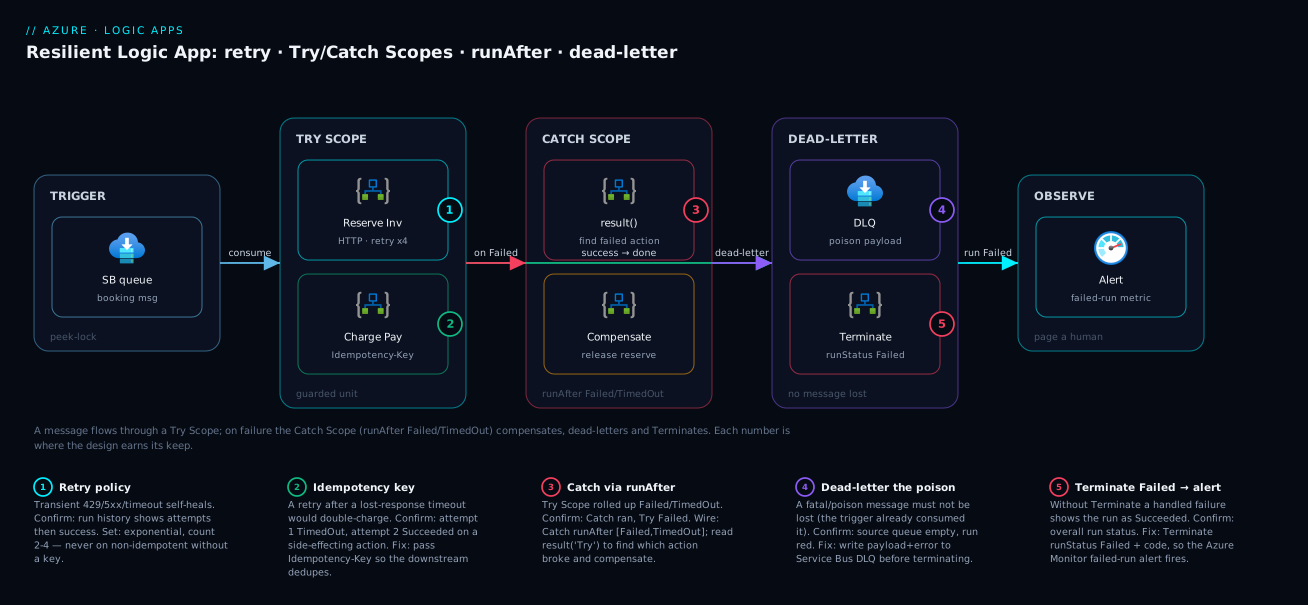
The diagram traces a single message through a resilient order-processing workflow, left to right, and shows where each primitive bites. A message arrives on the Service Bus trigger (a queue the workflow peek-locks from) and enters the Try Scope, where two side-effecting actions run in sequence: Reserve Inventory (HTTP with an exponential retry) and Charge Payment (HTTP carrying an idempotency key so a retry can’t double-charge). Both succeed → the message completes and the lock releases (the happy path); either exhausts its retries on a real outage → the Try Scope rolls up to Failed.
That failure triggers the Catch Scope (runAfter: ["Failed","TimedOut"], so it runs only on failure). Inside, the workflow reads result('Try_Scope') to find which action broke, compensates if inventory was reserved but payment failed, writes the poison payload to the Service Bus dead-letter queue so nothing is lost, and ends with Terminate (Failed) so run history is truthful and an Azure Monitor alert fires to a human. The five numbered badges mark where the design earns its keep; the legend narrates each as symptom · confirm · the primitive that handles it. The shape is the lesson: a happy path guarded by a Scope, a catch on its failure, and a dead-letter that turns a bad message into a queue entry, not a lost event.
Real-world scenario
Tindra Logistics runs a shipment-booking workflow on a Consumption Logic App in Central India: a Service Bus queue receives a booking, the workflow reserves capacity with a carrier API, charges the customer via a billing API, and writes the booking to Cosmos DB. Three engineers, ~12,000 bookings/day, ~₹9,000/month — “working” for four months.
The incident surfaced as a finance complaint, not an alert — which is the whole problem. The billing team found 47 customers charged twice in one week; no failed runs were flagged, no pages, the run history was healthy green. The integration lead’s first instinct — “our code is fine, it’s the billing API” — was wrong in the usual way.
The breakthrough came from reading two runs side by side. On the duplicated orders, Charge_Payment showed a first attempt that timed out (the billing API was slow during a deployment) then a retry that succeeded — the default exponential retry policy doing exactly what it was designed to do. But the API had actually processed the first charge; only the response was lost, so the retry charged again, and the workflow passed no idempotency key. Worse, there was no catch block at all — so on the rarer runs where the API was down past all retries, the run failed silently, the message had already been consumed off the queue, and the booking was lost. They had been losing roughly one booking a day and never knew.
The fix came in three changes. First, an idempotency key: the charge call now passes Idempotency-Key: @{triggerBody()?['bookingId']} and the billing team enabled dedupe — ending the double-charges. Second, the reserve/charge/write sequence was wrapped in a Try Scope with a Catch Scope (runAfter: ["Failed","TimedOut"]) that reads result('Try_Scope'), compensates by releasing the carrier reservation if the charge failed, writes the failed payload to a Service Bus dead-letter queue, and runs Terminate (Failed). Third, an Azure Monitor alert on the failed-run metric now pages on-call, and the DLQ is drained by a small reprocessing workflow each morning. The next month: zero double-charges, zero silent losses, four poison messages caught and reprocessed by hand — and the bill went up ~₹400 for the DLQ and catch actions, cheap insurance against a finance incident.
The incident as a timeline — the order of discovery is the lesson:
| When | Symptom | What they thought | What was actually true |
|---|---|---|---|
| Week 0 | 47 double-charges | “Billing API bug” | Their retry + no idempotency key |
| Day 1 | Green run history | “Nothing’s failing” | Silent failures had no catch to surface them |
| Day 2 | Two runs compared | “Random” | Timeout → retry → double side effect |
| Day 3 | Root cause | — | Non-idempotent retry + no catch/dead-letter |
| Day 4 | Idempotency key added | — | Double-charges stop immediately |
| Week 2 | Try/Catch + DLQ + alert | — | Silent loss ends; failures now visible |
| Month 2 | Stable | — | 0 dupes, 0 lost, 4 caught & reprocessed |
Advantages and disadvantages
The Scope-plus-runAfter model gives you real try/catch/finally with no code — but it has sharp edges. Weigh it honestly:
| Advantages | Disadvantages |
|---|---|
| Default retry policies self-heal most transient faults with zero config | That same default silently retries non-idempotent calls → duplicate side effects |
runAfter gives genuine try/catch/finally with a tick-box UI — no code |
The “skipped” status makes finally blocks subtly wrong if you don’t name both try and catch |
result() lets a catch read exactly which action failed and why |
The expression syntax is fiddly; missing ?['...'] null-safety throws inside the catch |
| Scopes group a transaction so you guard it as a unit, not per-action | Compensation is manual — Logic Apps has no automatic rollback; you write the undo |
| Terminate makes run status truthful so alerts/monitoring reflect reality | Forgetting Terminate makes a “handled” failure show as Succeeded — a silent lie |
| Dead-letter patterns turn a lost message into a recoverable queue entry | You must build dead-lettering yourself; nothing is automatic for HTTP/most connectors |
| Same JSON in designer, az and Bicep — fully reproducible | Deep nesting (>4 scopes) gets unreadable fast and hits the 8-level cap |
The model is right for virtually every production workflow — the alternative is a happy-path-only integration that loses data. It shines for queue-driven workflows (dead-letter is natural) and multi-step writes (compensation matters), and bites teams that ship the designer default without opening the retry policy or adding a catch. Every disadvantage is manageable — but only if you know it exists, which is the point of this article.
Hands-on lab
You will build a resilient workflow end to end — a Consumption Logic App with a manual HTTP trigger, a Try Scope calling a deliberately-failing endpoint, a Catch Scope wired via runAfter that reads the failure with result() and Terminates as Failed, and a Finally Scope — then reproduce a failure, watch the catch fire, and confirm the status is truthful. We do it three ways — portal, az CLI, Bicep — free-tier-friendly (a few paise), deleting everything at the end.
Prerequisites: an Azure subscription, Cloud Shell (Bash) open, and az logged in. No code, no local tools.
Part A — Portal designer
Step 1 — Resource group.
RG=rg-lapp-lab
LOC=centralindia
az group create -n $RG -l $LOC -o table
Expected: a table row with provisioningState: Succeeded.
Step 2 — Create an empty Consumption Logic App in the portal. Portal → Create a resource → Logic App → Consumption → resource group rg-lapp-lab, name lapp-resilient-lab, region Central India → Review + create → Create. When it deploys, Go to resource → it opens the Logic Apps Designer.
Step 3 — Add the trigger. In the designer, choose When a HTTP request is received as the trigger (search “Request”). Leave the JSON schema empty for now. Save — a POST URL is generated; copy it, you will call it in Step 9.
Step 4 — Add the Try Scope. Click + New step → search Scope → add it → rename it Try. Inside the Scope, Add an action → HTTP → method GET, URI https://httpbin.org/status/500 — a public endpoint that returns HTTP 500 every time, a guaranteed (and retriable) failure. Open the action’s Settings → set Retry Policy to Exponential, Count = 2, Interval = PT5S so the lab fails fast after 2 retries rather than the default 4.
Step 5 — Add the Catch Scope. Below the Try Scope, + New step → Scope → rename it Catch. Inside it add a Compose action named Capture_Error with input expression @result('Try'). Add a second action inside the catch: Terminate (search “Terminate”) → set Status = Failed, Code = TryFailed, Message = @{first(result('Try'))?['error']?['message']}.
Step 6 — Wire the catch’s runAfter (the key step). On the Catch Scope, click … → Configure run after → it lists Try. Untick “is successful”, tick “has failed” and “has timed out” → Done. The connector between Try and Catch now shows the failed-path styling.
Step 7 — Add a Finally Scope. + New step → Scope → rename Finally. Inside, add a Compose named Log_Done with input Run finished. On the Finally Scope → Configure run after → tick all four boxes for both Try and Catch. Done.
Step 8 — Save. Click Save; the designer validates the runAfter graph. If it flags an unreachable action, re-check Steps 6–7.
Step 9 — Run it and watch the catch fire. Trigger the workflow by POSTing to the URL from Step 3:
TRIGGER_URL='<paste the POST URL from Step 3>'
curl -s -X POST "$TRIGGER_URL" -H "Content-Type: application/json" -d '{"orderId":"A-1001"}' -i | head -5
Then in the portal open Overview → Run history → click the latest run. Expected:
TryScope: Failed (retried twice, then failed on the 500).CatchScope: Succeeded (it ran — catching is success).Capture_Error: outputs theresult('Try')array with the HTTP action’sstatus: Failed,code, anderror.message.Terminate: present.- Overall run: Failed with code
TryFailed— truthfully red even though the catch handled it.
Step 10 — Prove the happy path. Edit the Try HTTP action’s URI to https://httpbin.org/status/200 → Save → POST again. Expected: Try Succeeded, Catch Skipped, Finally Succeeded, run Succeeded — both branches confirmed.
Part B — The same workflow via az CLI
Deploy the entire workflow definition from a JSON file with az logic workflow create. First write the definition:
cat > /tmp/resilient.definition.json <<'JSON'
{
  "$schema": "https://schema.management.azure.com/providers/Microsoft.Logic/schemas/2016-06-01/workflowdefinition.json#",
  "contentVersion": "1.0.0.0",
  "triggers": {
    "manual": {
      "type": "Request",
      "kind": "Http",
      "inputs": { "schema": {} }
    }
  },
  "actions": {
    "Try": {
      "type": "Scope",
      "actions": {
        "Call_Failing": {
          "type": "Http",
          "inputs": {
            "method": "GET",
            "uri": "https://httpbin.org/status/500",
            "retryPolicy": { "type": "exponential", "count": 2, "interval": "PT5S" }
          },
          "runAfter": {}
        }
      },
      "runAfter": {}
    },
    "Catch": {
      "type": "Scope",
      "actions": {
        "Capture_Error": { "type": "Compose", "inputs": "@result('Try')", "runAfter": {} },
        "Terminate": {
          "type": "Terminate",
          "inputs": {
            "runStatus": "Failed",
            "runError": { "code": "TryFailed", "message": "@{first(result('Try'))?['error']?['message']}" }
          },
          "runAfter": { "Capture_Error": ["Succeeded"] }
        }
      },
      "runAfter": { "Try": ["Failed", "TimedOut"] }
    },
    "Finally": {
      "type": "Scope",
      "actions": { "Log_Done": { "type": "Compose", "inputs": "Run finished", "runAfter": {} } },
      "runAfter": { "Try": ["Succeeded", "Failed", "Skipped", "TimedOut"], "Catch": ["Succeeded", "Failed", "Skipped", "TimedOut"] }
    }
  },
  "outputs": {}
}
JSON
Deploy it (az logic is an extension, installed on first use):
az extension add --name logic --only-show-errors
az logic workflow create \
  --resource-group $RG \
  --name lapp-resilient-cli \
  --location $LOC \
  --definition /tmp/resilient.definition.json \
  -o table
Expected: a workflow resource with provisioningState: Succeeded. Get the callback (trigger) URL and invoke it:
# Get the POST URL for the manual trigger
CALLBACK=$(az rest --method post \
  --uri "$(az logic workflow show -g $RG -n lapp-resilient-cli --query id -o tsv)/triggers/manual/listCallbackUrl?api-version=2016-06-01" \
  --query value -o tsv)
curl -s -X POST "$CALLBACK" -H "Content-Type: application/json" -d '{"orderId":"A-2002"}' -i | head -5
Inspect the run result:
# Most recent run and its status (should be Failed, code TryFailed)
RUN=$(az logic workflow run list -g $RG --name lapp-resilient-cli --query "[0].name" -o tsv)
az logic workflow run show -g $RG --name lapp-resilient-cli --run-name "$RUN" \
  --query "{status:status, code:error.code, started:startTime}" -o json
Expected JSON: status: "Failed", code: "TryFailed" — the catch fired and Terminate set a truthful status, all from the CLI.
Part C — The same workflow as Bicep
For repeatable, reviewed deployments the definition lives inside a Microsoft.Logic/workflows resource — write resilient.bicep:
param location string = resourceGroup().location

resource workflow 'Microsoft.Logic/workflows@2019-05-01' = {
  name: 'lapp-resilient-bicep'
  location: location
  properties: {
    state: 'Enabled'
    definition: {
      '$schema': 'https://schema.management.azure.com/providers/Microsoft.Logic/schemas/2016-06-01/workflowdefinition.json#'
      contentVersion: '1.0.0.0'
      triggers: {
        manual: { type: 'Request', kind: 'Http', inputs: { schema: {} } }
      }
      actions: {
        Try: {
          type: 'Scope'
          actions: {
            Call_Failing: {
              type: 'Http'
              inputs: {
                method: 'GET'
                uri: 'https://httpbin.org/status/500'
                retryPolicy: { type: 'exponential', count: 2, interval: 'PT5S' }
              }
              runAfter: {}
            }
          }
          runAfter: {}
        }
        Catch: {
          type: 'Scope'
          actions: {
            Capture_Error: { type: 'Compose', inputs: '@result(\'Try\')', runAfter: {} }
            Terminate: {
              type: 'Terminate'
              inputs: {
                runStatus: 'Failed'
                runError: { code: 'TryFailed', message: '@{first(result(\'Try\'))?[\'error\']?[\'message\']}' }
              }
              runAfter: { Capture_Error: ['Succeeded'] }
            }
          }
          runAfter: { Try: ['Failed', 'TimedOut'] }
        }
        Finally: {
          type: 'Scope'
          actions: { Log_Done: { type: 'Compose', inputs: 'Run finished', runAfter: {} } }
          runAfter: { Try: ['Succeeded', 'Failed', 'Skipped', 'TimedOut'], Catch: ['Succeeded', 'Failed', 'Skipped', 'TimedOut'] }
        }
      }
      outputs: {}
    }
  }
}

output workflowName string = workflow.name
Deploy and verify:
az deployment group create -g $RG --template-file resilient.bicep -o table
az logic workflow show -g $RG -n lapp-resilient-bicep --query "{name:name, state:state, provisioning:provisioningState}" -o json
Expected: state: Enabled, provisioning: Succeeded. The escaped single quotes (\') inside the Bicep expression strings are the one Bicep-specific gotcha when embedding Workflow Definition Language expressions.
Validation checklist
| Step | What you did | What it proves |
|---|---|---|
| A-4/5 | Try Scope calls a 500, Catch Scope after it | Scopes group the transaction; catch is a separate scope |
| A-6 | Configure run after → has failed/timed out | runAfter is the entire try/catch mechanic |
| A-9 | Run; Try Failed, Catch Succeeded, run Failed | Catch fires only on failure; Terminate makes status truthful |
| A-10 | Switch to 200; Catch Skipped, run Succeeded | The happy path skips the catch correctly |
| B | Same workflow from a JSON definition via az logic |
The JSON is the source of truth; fully scriptable |
| C | Same workflow as reviewed Bicep | Reproducible IaC; expression-escaping handled |
Teardown
az group delete -n $RG --yes --no-wait
Cost note. Consumption Logic Apps bill per action execution; a dozen lab runs is well under ₹5, deleting the resource group stops all billing, and a generous monthly free grant of built-in action executions makes this lab effectively free.
Common mistakes & troubleshooting
The failure modes that bite real teams, as a scannable table first, then the detail on the ones that hurt most.
| # | Symptom | Root cause | Confirm (exact path) | Fix |
|---|---|---|---|---|
| 1 | Duplicate side effects (double charge/email) | Non-idempotent action retried after a lost-response timeout | Run history: action shows attempt 1 TimedOut, attempt 2 Succeeded | Pass an idempotency key; or set retry none + handle timeout |
| 2 | “I set retries to 10, still fails instantly” | The failure is a 4xx (400/401/403/404) — not retriable | Action outputs statusCode is 4xx |
Fix the request/creds; retries only help 408/429/5xx |
| 3 | Run shows Succeeded but the work failed | Catch handled the error but no Terminate | Overall status green despite a Failed action inside a scope | Add Terminate (Failed) in the catch |
| 4 | Finally Scope never runs on the happy path | Finally’s runAfter names only the Catch (which was Skipped) |
Finally shows Skipped when Try Succeeded | runAfter both Try and Catch with all four statuses |
| 5 | Catch block throws / shows null | Expression accesses a missing field without ?[...] |
Catch action error: “property ‘X’ cannot be selected” | Null-safe everything: result('S')?[0]?['error']?['message'] |
| 6 | Message lost on failure | Trigger consumed the message, run failed, no dead-letter | Failed run; the source queue message is gone | Dead-letter the payload in the catch before Terminate |
| 7 | Catch never fires even though an action failed | The failing action is outside the guarded Scope | The Failed action isn’t a child of the Try Scope | Move side-effecting actions inside the Try Scope |
| 8 | 200 response treated as success, bad data flows | Downstream returns 200 with an error body | Action Succeeded but body has "error" |
Add a Condition on the body → Terminate if error |
| 9 | Retries hammer a struggling API for minutes | Large count with fixed policy and no back-off |
Run history: many evenly-spaced attempts | Use exponential; cap count; dead-letter long outages |
| 10 | “Action timed out” on a legitimately long call | Per-action limit.timeout shorter than the operation |
Action status TimedOut before downstream replies | Raise inputs.limit.timeout (up to P30D for long-running) |
| 11 | runAfter validation error on save | An action’s runAfter names a non-existent or unreachable action |
Designer: “action X cannot be reached” | Fix the predecessor name; ensure the path is reachable |
| 12 | Catch fires but result() is empty |
result() called on the wrong scope name (case-sensitive) |
Compose output is [] |
Match the exact Scope action name in result('Name') |
Row 1 is the most damaging and easiest to miss: the operation actually succeeded (its response was lost to a timeout), so the default retry runs it again — you see attempt 1: TimedOut, attempt 2: Succeeded on a side-effecting action. An idempotency key is the only real fix; without dedupe, set retryPolicy: { "type": "none" } and resolve the timeout in a catch. And rows 3, 4 and 12 share one root cause — the Skipped status: a finally naming only the (skipped) catch never runs, a handled failure with no Terminate stays green, and result() on the wrong scope returns []. When in doubt, read every action’s status in run history, not just the overall verdict.
Best practices
- Be deliberate about every retry policy. Decide per action:
exponentialfor idempotent transient-prone calls,nonefor non-idempotent ones,fixedonly when you have a reason. - Never retry a non-idempotent write without an idempotency key. If the downstream can’t dedupe, set
noneand handle the ambiguous timeout explicitly. - Wrap every multi-step transaction in a Try Scope and attach exactly one Catch Scope wired
runAfter: ["Failed","TimedOut"]. Guard the unit, not each line. - Always Terminate fatal catches as Failed with a meaningful
codeandmessage, so run history and alerts reflect reality. - Make finally blocks depend on both the try and the catch with the full four-status set — never just the catch.
- Dead-letter, don’t drop. On a fatal failure, write the payload + error to a Service Bus DLQ, storage, or blob before terminating — a lost message is a lost business event.
- Read the failure with
result()and null-safe expressions. A catch that knows what broke can compensate, alert, or branch. - Branch on success bodies, not just status codes. If a downstream can return 200-with-error, inspect the body and fail deliberately.
- Keep nesting shallow. If you’re past three nested Scopes, split into child workflows — each its own try/catch and independently retriable.
- Wire failed runs to a human. An Azure Monitor alert on the workflow’s failed-run signal turns a silent red run into a page.
- Treat the workflow JSON as code. Author in Bicep/ARM, review it, and deploy via pipeline — the designer is a view, the JSON is the truth.
- Test the failure path, not just the happy path. Force a 500 (as in the lab) in a non-prod copy and confirm the catch, compensation, dead-letter and Terminate fire.
Security notes
Error handling touches secrets, payloads and identities, so a few rules keep a resilient workflow from also being a leaky one:
- Don’t log secrets or full payloads in plaintext. A catch that writes
result()or the trigger body to a table/blob for debugging can capture tokens, PII or card data — store only an ID/hash, and mark sensitive action inputs/outputs as secure (runtimeConfiguration.secureData) so they’re scrubbed from run history. - Use a managed identity for connections, not embedded keys. Keys in HTTP URLs/headers end up in run history and the definition; prefer managed identity, and reference Key Vault for secrets you do need — see Azure Key Vault: Secrets, Keys and Certificates Done Right.
- Lock down the dead-letter store. A DLQ or table of failed payloads contains exactly the data that mattered — apply least-privilege RBAC, encryption at rest, and a retention policy so poison payloads don’t accumulate forever.
- Don’t let error messages leak internals to callers. Returning the raw
error.messagefrom a synchronous HTTP-triggered workflow can expose stack traces, hostnames or SQL errors — return a generic message and log the detail internally. - Restrict who can edit the workflow. The
runAftergraph and retry policies are security-relevant (a bad change can drop messages) — scope edit rights with RBAC and require the JSON to flow through reviewed IaC.
Cost & sizing
What drives the bill differs sharply by hosting model; error handling adds a little:
| Model | Billing unit | What error handling adds | Free grant |
|---|---|---|---|
| Consumption | Per action execution + standard-connector calls + trigger evaluations | Each catch/compose/terminate is an extra action execution; retries count as executions | Generous monthly free built-in action grant |
| Standard | App Service / Workflow Standard plan (vCPU-hours), not per-action | Catch actions are “free” within the plan; retries don’t add per-action cost | Plan capacity is fixed; you pay for the plan |
The cost levers specific to resilience:
| Lever | Cost effect | Guidance |
|---|---|---|
| Retry count | Each retry is a billable execution (Consumption) | Cap count (2–4 is usually enough); huge counts cost and delay |
exponential vs fixed |
Same per-execution cost; exponential reduces total attempts against a recovering dep | Prefer exponential — fewer wasted attempts |
| Catch/compensation actions | A few extra executions per failed run only | Negligible — failures are the minority; cheap insurance |
| Dead-letter writes | One storage/Service Bus operation per poison message | Tiny; far cheaper than a lost-message incident |
| Polling triggers | Each poll is a trigger evaluation (billable) | Lengthen recurrence or use push triggers where possible |
| Standard plan sizing | Fixed plan cost regardless of volume | High-volume workflows are cheaper on Standard than per-action Consumption |
Rough figures: a Consumption workflow at ~12,000 runs/day lands in the low thousands of rupees per month; adding try/catch/dead-letter (extra actions only on failures, plus a cheap DLQ) adds a few hundred — much less than one finance incident. Above roughly a few million action executions a month, model Standard (a flat plan) against Consumption; that decision is in Logic Apps Consumption vs Standard: Pricing, Networking and Stateful Workflows Compared.
Interview & exam questions
Q1. What is the default retry policy on a Logic Apps action, and which failures does it apply to? The default is exponential with 4 retries on most connector actions. It only fires on retriable failures — HTTP 408, 429, and 5xx, plus connection/timeout errors. Deterministic 4xx (400/401/403/404/409) fail immediately regardless of the count. (Relevant to AZ-204, AZ-305.)
Q2. How do you implement try/catch in a Logic App?
There is no try/catch keyword. Put the guarded steps in a Scope, add a second (catch) Scope, and set its runAfter to ["Failed","TimedOut"] on the try Scope so it runs only when the try failed. A finally Scope uses runAfter with all four statuses on both the try and the catch.
Q3. Why might a finally Scope not run even though it’s configured?
Because its runAfter names only the catch, which is Skipped on the happy path (the try succeeded), so a finally waiting on the catch’s Succeeded never fires. Fix it by depending on both the try and the catch with the full ["Succeeded","Failed","Skipped","TimedOut"] set.
Q4. How does a catch block know which action failed and why?
Use result('ScopeName') — it returns an array of every child action’s result (name, status, code, error, outputs); filter to status == 'Failed'. Or use @actions('ActionName') to drill into a specific known action.
Q5. What’s the danger of retrying a non-idempotent operation, and how do you fix it?
If the operation succeeds but its response is lost to a timeout, the retry repeats the side effect — a double charge or duplicate email. Pass an idempotency key so the downstream deduplicates; if it can’t, set the policy to none and handle the ambiguous timeout explicitly.
Q6. What does the Terminate action do and why does it matter?
It ends the run immediately with a status you choose — Succeeded, Failed, or Cancelled — plus a custom code and message. Without it, a catch that handles an error leaves the overall run Succeeded, hiding the failure from monitoring; Terminate makes run status truthful.
Q7. A team set retries to 10 but the action still fails on the first attempt. Why? The failure is non-retriable — almost certainly a 4xx (e.g. 400 or 401). Logic Apps only retries 408/429/5xx and connection errors, so no count changes a deterministic 4xx; fix the request or credentials.
Q8. What is a dead-letter pattern and when do you use it? Routing a poison message (one that can never succeed) aside — to a Service Bus DLQ, a storage queue/table, or a blob — instead of retrying forever or losing it. Use it for fatal failures where the message should be preserved for manual review or reprocessing.
Q9. How does a Scope determine its status? It rolls up its children: all children Succeeded → Scope Succeeded; any unhandled child Failed or TimedOut → Scope Failed; cancelled mid-scope → Aborted/Cancelled. This roll-up is what lets you guard a whole transaction with one catch.
Q10. A downstream returns HTTP 200 with an error in the body. How should the workflow handle it? The retry policy won’t help — the runtime saw success. Add a Condition (or Switch) after the call to inspect the response body and Terminate (Failed) or route to the catch when it indicates failure.
Q11. What’s the difference between result() and @actions()?
result('ScopeName') returns an array of all child results in a scope — use it to discover which action failed. @actions('ActionName') returns a single action’s record — use it to drill into a known one.
Q12. Where does error handling differ between Consumption and Standard? The primitives (retry, Scope, runAfter, Terminate) are identical. The differences are billing (Consumption charges per action execution; Standard is a flat plan) and networking — Standard runs single-tenant with VNet integration, which affects how you reach private dead-letter targets.
Quick check
- Which three retry types can you set on an action, and which is the default?
- What
runAfterstatus set turns a Scope into a catch block? - Why might a finally Scope be skipped on the happy path, and how do you fix it?
- Which HTTP status codes does Logic Apps retry, and which does it never retry?
- What does Terminate (runStatus: Failed) fix that a catch block alone does not?
Answers
none,fixed,exponential(plusdefault).exponential(≈4 retries) is the default on most connector actions.["Failed", "TimedOut"](sometimes just["Failed"]) on the guarded predecessor Scope.- Because its
runAfternames only the catch, which is Skipped when the try succeeds. Fix: depend on both the try and the catch with all four statuses["Succeeded","Failed","Skipped","TimedOut"]. - Retries on 408, 429, 5xx and connection/timeout errors; never on deterministic 4xx (400/401/403/404/409).
- It makes the overall run status truthful — without it, a handled failure leaves the run Succeeded, so failure alerts never fire.
Glossary
- Action — one step in a workflow (HTTP, Compose, Scope, Terminate, etc.); the unit that can retry, fail, or be caught.
- Retry policy — per-action setting (
type,count,interval) for re-attempts on transient faults; the defaultexponentialgrows a jittered back-off. - Retriable failure — a fault the runtime retries: HTTP 408/429/5xx and connection/timeout errors. 4xx are not retriable.
- Idempotency key — a stable identifier a downstream uses to deduplicate a repeated call, preventing double side effects.
- Scope — a container action grouping child actions into one unit whose status rolls up from its children.
runAfter— the property naming the predecessor(s) and the statuses under which an action runs; the mechanism behind try/catch/finally.- Status — an action’s outcome: Succeeded, Failed, Skipped, TimedOut; what
runAfterkeys on. - Catch block — a Scope whose
runAfteris["Failed","TimedOut"], running only when the guarded Scope failed. - Finally block — a Scope whose
runAftercovers all four statuses on both try and catch, running regardless of outcome. result()— function returning the array of a scope’s child action results, used by a catch to inspect what failed.@actions()— reference to one action’s full record (status, outputs, error).- Terminate — an action that ends the run with a chosen status (
Succeeded/Failed/Cancelled) and optional error code/message. - Dead-letter — routing a poison message aside (Service Bus DLQ, storage, blob) instead of retrying forever or losing it.
- Compensation — manually undoing the succeeded steps of a partially-failed transaction to keep state consistent.
- Consumption / Standard — the two hosting models; multi-tenant per-action billing vs single-tenant App Service plan.
Next steps
- Build the baseline first: How to Build Your First Logic App Workflow: Triggers, Actions, Connectors and Expressions.
- Pick the right hosting model: Logic Apps Consumption vs Standard: Pricing, Networking and Stateful Workflows Compared.
- Choose the broker your dead-letter relies on: Service Bus Queues vs Topics: Choosing Point-to-Point or Publish-Subscribe Without Regret.
- Wire failed runs to a human: How to Create Your First Metric Alert and Action Group for Email, SMS and Push and Azure Monitor and Application Insights: Full-Stack Observability.
- Handle the most common retriable fault: Azure OpenAI 429 Rate-Limit Errors: TPM, RPM and Retry Handling.