Three Azure services have confusingly similar names and overlapping marketing copy, and choosing wrong costs you weeks. Azure Migrate is a free assessment-and-migration hub for moving whole servers to Azure. Azure Site Recovery (ASR) is a disaster-recovery service that continuously replicates a running machine so you can fail over when a region or datacentre dies. The Azure Database Migration Service (DMS) is a managed pipeline for moving a database engine — schema and rows — from one place to another. They sound interchangeable. They are not. Pick Site Recovery for a one-time server move and you will pay for replication you do not need and fight a cutover model built for outages, not migrations. Pick Azure Migrate for a database and you will lift-and-shift a SQL Server VM when you could have landed a fully managed Azure SQL Database for a fraction of the run cost.
This article gives you the one mental model that makes the choice obvious: match the tool to the thing you are moving and the cutover you can tolerate. Migrate moves the machine; ASR moves a running machine’s live state continuously, for near-zero loss in an outage; DMS moves the data inside a database engine, with an online mode that keeps the source serving until you flip the switch. Get that triple straight and 90% of real decisions answer themselves — the remaining 10% are the handoffs, and the most common real-world migration uses two of these tools together, not one.
By the end you will be able to look at any workload — a fleet of VMware VMs, a production SQL Server, a database that can’t tolerate more than five minutes of downtime — and name the right tool, the right mode, and the moment one tool hands the baton to the next. You will also know when the answer is “none of these” (some moves are a backup-and-restore or an export-and-import, not a migration-service job at all).
What problem this solves
Migration projects stall on the wrong question. Teams ask “how do I move to Azure?” when the answerable question is “what am I moving, and how much downtime can it take?” Without a clean framework, three failure patterns repeat across every migration I’ve seen.
The first is tool sprawl: someone reads that Site Recovery can “migrate” a VM (it can — that was its original use case), replicates fifty VMs with ASR, finishes the cutover, and leaves replication running for months because nobody turned it off. ASR is priced per protected instance plus storage and egress — a recurring, invisible bill.
The second is the lift-and-shift-everything trap: Azure Migrate will happily rehost a SQL Server VM, so the team does that for every database — and now patches, licenses and backs up Windows + SQL Server VMs that could have been Azure SQL Database or Managed Instance at a fraction of the run cost and ops. The tool worked; the target was wrong, because nobody considered DMS.
The third is the cutover surprise: a database move is planned as a simple copy, the source taken offline “for an hour”, and a 400 GB bulk load runs for nine hours while the business is down. DMS’s online (continuous sync) mode exists precisely so the source keeps serving — but only if you chose it up front. The cutover model is a design decision, not an afterthought.
Who hits this: anyone running a datacentre-exit, a cloud-adoption programme, a regulatory DR mandate, or a database modernisation. The cost of the wrong call is rarely a failed migration — it’s a successful one to the wrong target, with a recurring bill or an outage you didn’t need.
Learning objectives
By the end of this article you can:
- State in one sentence each what Azure Migrate, Azure Site Recovery, and the Database Migration Service move, and the cutover model each uses.
- Choose the right tool for a given workload from a decision table, and justify the choice by the thing moved and the downtime tolerated.
- Explain the difference between a migration (one-time, ends in cutover) and disaster recovery (ongoing, ends in failover/failback) — and why Site Recovery does both but is billed for the ongoing case.
- Pick between rehost (lift-and-shift) to a VM and modernise to a managed database, and map each to its tool.
- Choose DMS offline vs online mode based on the downtime budget, and size the cutover window honestly.
- Identify the common two-tool migrations (servers with Azure Migrate, their databases with DMS) and where the handoff sits.
- Recognise the cases where the answer is “none of these” — a backup/restore, an export/import, or an app-level re-platform.
Prerequisites & where this fits
You should be comfortable with the basics: an Azure subscription and resource group, what a virtual machine and managed disk are, and what a relational database is (tables, schema, rows). You should know roughly what RTO (how long you can be down) and RPO (how much data you can lose) mean — if not, BCDR Foundations on Azure: Making Sense of RTO, RPO, and the Resilience Spectrum is the upstream read, because the migrate-vs-DR distinction turns on those two numbers.
This sits at the front of the Migration & Modernisation track — the “which door do I walk through” article. Downstream: Azure Migrate Discovery & Assessment: From Appliance Deployment to Your First Right-Sizing Report takes the server path deeper, Azure Backup and Site Recovery: Protecting Workloads from Loss covers the DR side, and the database target choice is in Azure SQL Database Purchasing Models: DTU vs vCore and How to Pick Without Overpaying.
Who owns each tool during a programme, so you pull in the right people:
| Tool | Primary job | Usually owned by | Lives in (Azure portal) |
|---|---|---|---|
| Azure Migrate | Discover, assess, rehost servers | Migration / infra team | Azure Migrate hub (project) |
| Azure Site Recovery | Replicate + fail over for DR | SRE / BCDR team | Recovery Services vault |
| Database Migration Service | Move a database engine’s data | DBA / data team | Azure Database Migration Service resource |
Core concepts
Four mental models make every later decision fall out cleanly.
Match the tool to the thing you move — the master rule. Azure Migrate moves a machine (OS, disks, installed apps) and lands it as an Azure VM. DMS moves the data inside a database engine (schema and rows) into a managed database. Site Recovery moves a running machine’s live disk state, continuously. Server → Migrate/ASR territory; database → DMS territory. Naming the unit first removes most of the confusion.
Migration ends; disaster recovery never does. A migration discovers, copies, validates, then cuts over — after which the source is decommissioned and the tool’s job is done. Disaster recovery replicates continuously, forever, so that if a failure happens you can fail over and later fail back. Site Recovery is built and priced for the second case (per-instance, ongoing); it can do a one-time migration, but a tool that bills you to keep replicating is the wrong long-term fit for “move and be done” unless you stop it at cutover.
Cutover model is the second axis — the moment the source stops being authoritative is what you feel as downtime. A VM cutover (Migrate) is a final delta-sync then a traffic switch. A failover (ASR) is near-instant because the target is continuously caught up. A database cutover (DMS) is either offline (source down for the whole load) or online (source stays up; cut over after the sync catches up). Choose the cutover before the tool, because it constrains which tool and mode you can use.
Rehost vs modernise is the target decision, separate from the tool. Rehost (lift-and-shift) keeps the workload as-is — a VM stays a VM (Migrate). Modernise (re-platform) changes the shape — a self-managed SQL Server becomes a managed Azure SQL Database or Managed Instance (DMS). Same source database, two very different futures and run-costs — the decision that affects your Azure bill three years out more than any other.
The three tools in one table
The side-by-side the rest of the article expands — keep it open while you read:
| Dimension | Azure Migrate | Azure Site Recovery (ASR) | Database Migration Service (DMS) |
|---|---|---|---|
| Moves | Whole servers (VM = OS + disks + apps) | A running machine’s live disk state | Data inside a DB engine (schema + rows) |
| Primary purpose | One-time migration to Azure | Disaster recovery (and one-time VM migration) | One-time database migration / modernisation |
| Ends in | Cutover, then decommission source | Failover (then failback) — ongoing | Cutover, then decommission source DB |
| Typical target | Azure VM (IaaS) | Paired Azure region (or secondary) | Azure SQL DB / Managed Instance / Flexible Server |
| Cutover style | Final delta sync + switch traffic | Near-instant (continuously replicated) | Offline (bulk) or online (continuous sync) |
| Replication cadence | Continuous during the migration wave | Continuous, indefinitely | Continuous (online) or one-shot (offline) |
| Core cost | Free tool; pay for target + ASR replication under the hood | Per protected instance + storage + egress | Free Standard tier; Premium billed by vCore-hours |
| Best for | Datacentre exit, fleet rehost | Regulatory DR, region resilience | DB modernisation, engine moves |
Azure Migrate — the front door for moving servers
Azure Migrate is a hub, not a single feature. You create an Azure Migrate project and run two phases inside it: discovery + assessment first, migration second. It is the starting point for any datacentre-exit or rehosting programme, and the tool itself is free — you pay only for the resources you land and the replication machinery (ASR under the hood) during the move.
Discovery and assessment use a lightweight Azure Migrate appliance in the source environment (VMware, Hyper-V, physical). It collects inventory, performance metrics, and dependency mapping, then produces an assessment: Azure readiness, a recommended VM size/SKU, and a monthly cost estimate. This is where rehost-vs-modernise gets evidence — it flags an over-provisioned box, or a SQL Server that’s a candidate for Azure SQL. Azure Migrate Discovery & Assessment: From Appliance Deployment to Your First Right-Sizing Report walks it end to end.
Migration then replicates the chosen servers and lets you test-migrate (an isolated copy to validate) before the real migrate (final cutover). Test migration is what separates a calm migration from a hopeful one — you prove the workload runs in an isolated VNet before you commit. What each capability does and when you use it:
| Capability | What it does | When you use it | Output you act on |
|---|---|---|---|
| Project | Container for all discovery + migration data | First, once per programme | A workspace your tools register into |
| Appliance | Agentless collector in the source estate | Before assessment | Inventory + performance + dependencies |
| Assessment | Readiness, right-size SKU, cost estimate | To plan waves and targets | Per-server “rehost as Dsv5”, est. ₹/month |
| Dependency mapping | Shows server-to-server traffic | To group apps into move waves | A map so you don’t orphan a dependency |
| Test migration | Boots a copy in an isolated VNet | Before every real cutover | Proof the workload runs in Azure |
| Migration (cutover) | Final delta sync + bring up in Azure | At the planned cutover window | The live workload, now in Azure |
You mostly drive Migrate from the portal, but the project is a real resource:
# List Azure Migrate projects in a resource group
az resource list --resource-group rg-migrate \
  --resource-type "Microsoft.Migrate/migrateProjects" \
  --query "[].{name:name, location:location}" -o table
The crucial note: Azure Migrate’s migration engine is the same replication technology as Site Recovery — which is why the two get confused. The difference is lifecycle: Migrate wraps it in a cutover-then-stop workflow; ASR in a replicate-forever, fail-over-on-disaster one. Same engine, opposite endgame.
Azure Site Recovery — replicate to survive a disaster
Azure Site Recovery keeps a workload runnable elsewhere by continuously replicating its disks, so that when the primary fails you fail over to the replica with minimal data loss. Its home is the Recovery Services vault, and its defining property is that it is ongoing — a capability you maintain, not a project that ends. You measure it in RPO (how far behind the replica is — seconds to a couple of minutes) and RTO (how fast you bring the replica up).
ASR serves DR scenarios: Azure-to-Azure (replicate a production VM to its paired region), on-premises to Azure (Azure as your DR site instead of a second datacentre), and the historical one-time migration use. Its signature features are the safety mechanisms a real failover needs: recovery plans (ordered multi-VM failover with scripts), test failover (prove DR in isolation), and failback (return to the primary once it recovers).
The trap — the single most common ASR mistake — is using ASR as a one-time mover and forgetting to stop replication. ASR bills per protected instance plus replica storage and egress; replicate fifty VMs, cut over, walk away, and you keep paying to protect machines you’ve already moved. For a migration, Migrate’s wrapper makes you stop; for DR, never stopping is the point. How the same engine serves opposite goals:
| Aspect | ASR for disaster recovery | ASR (or Migrate) for one-time migration |
|---|---|---|
| Lifecycle | Runs indefinitely | Runs until cutover, then stop |
| End state | Fail over on disaster, fail back later | Decommission source, disable replication |
| What you measure | RPO / RTO continuously | A single successful cutover |
| Billing posture | Ongoing per-instance cost (expected) | Should end at cutover (often forgotten) |
| Better tool | Site Recovery (its core job) | Azure Migrate (wraps the same engine) |
The decision that keeps people honest is migrate-vs-DR. Server + “move it and be done” → Azure Migrate. Server + “keep a runnable copy elsewhere, forever” → Site Recovery. If you do use ASR for a move, set a calendar reminder to disable replication at cutover — the bill otherwise outlives the project.
Database Migration Service — move the data, not the box
The Azure Database Migration Service (DMS) moves a database engine’s contents — schema, data, and (in supported paths) logins and objects — into a managed Azure target. Its reason to exist is that you usually do not want to lift-and-shift a database server: moving the VM keeps you patching SQL Server yourself, while moving the data into Azure SQL Database, Azure SQL Managed Instance, or Azure Database for PostgreSQL/MySQL hands engine operations to Azure. DMS is the modernise path; Migrate’s VM rehost is the rehost path.
DMS pairs with an assessment: for SQL Server you run the Data Migration Assistant to surface compatibility issues and pick the target tier, then DMS moves the data. It comes in two tiers — Standard (free, offline) and Premium (vCore-hours, online at scale) — and its defining choice is offline vs online:
| Mode | How it works | Source during migration | Cutover downtime | When to choose | Tier |
|---|---|---|---|---|---|
| Offline | One bulk load of the whole database | Effectively read-only / down | Whole load duration (hours for big DBs) | Downtime budget comfortably exceeds load time | Standard (free) |
| Online | Bulk load + continuous change sync | Stays live and serving | Minutes (cut over after sync caught up) | Tight downtime budget; busy production DB | Premium (vCore-hours) |
The key insight: online mode makes the downtime the drain-and-switch (minutes), not the whole bulk load (hours) — because the source keeps serving while DMS replays changes to a target that’s already caught up. For offline the sizing question is blunt: “is my window longer than the bulk load?” Get it wrong and you discover, mid-window, that a 400 GB load needs nine hours and your window was four.
A representative source-to-target map (more pairs exist; confirm your exact engine and version in the current docs):
| Source | Common Azure target | Move style | Note |
|---|---|---|---|
| SQL Server | Azure SQL Database | Modernise | Assess compatibility first |
| SQL Server | Azure SQL Managed Instance | Modernise (high compat) | Closest to on-prem SQL Server |
| SQL Server | SQL Server on Azure VM | Rehost | The Migrate path, not DMS |
| PostgreSQL | Azure Database for PostgreSQL Flexible Server | Modernise | Online keeps source serving |
| MySQL | Azure Database for MySQL Flexible Server | Modernise | Online keeps source serving |
The rehost row is the reminder: if the database genuinely must stay a self-managed SQL Server (a legacy dependency, an unsupported feature, a licensing reason), you do not use DMS — you move the whole VM with Azure Migrate. DMS is for when modernising into a managed service is the goal.
How to choose: the decision table
Everything above collapses into one question pair: what are you moving, and how much downtime can it take? Answer both and the tool is determined. Read top to bottom — the first row that matches is your answer:
| If the thing you’re moving is… | …and your goal is… | Use | Mode / note |
|---|---|---|---|
| A whole server (OS + apps) | Move to Azure once and be done | Azure Migrate | Assess → test-migrate → cutover |
| A whole server | Keep a runnable copy elsewhere, ongoing | Site Recovery | DR; replicate indefinitely |
| A fleet of servers | Datacentre exit / mass rehost | Azure Migrate | Group by dependency into waves |
| A database | Modernise to a managed DB, small/low-traffic | DMS (offline) | Free; window must exceed load time |
| A database | Modernise to a managed DB, large/busy | DMS (online) | Premium; cutover in minutes |
| A database that must stay self-managed | Keep running SQL Server yourself in Azure | Azure Migrate | Rehost the whole VM, not the data |
| A few files / a file server | Move bulk file data | Neither | Azure File Sync / AzCopy / Storage tools |
| A single small DB you can dump | Quick one-off load | Often neither | Native backup/restore or export/import |
Two sanity checks. First, “migrate” in a tool name doesn’t mean “the only thing that migrates” — backup/restore, native export/import, and file-copy tools move plenty of workloads; reach for a migration service when scale, continuity, or assessment justify it. Second, the biggest real migrations use two tools: move the application servers with Azure Migrate and their databases with DMS, because the fleet and the database have different ideal targets and cutover models.
Where the tools hand off
A three-tier app doesn’t move as one unit: the web/app tiers are servers (Azure Migrate), the database is data (DMS), sequenced so the database is caught up (DMS online) before the app tier cuts over (Migrate). Note the third row — Site Recovery comes after the migration, not instead of it:
| Workload component | Nature | Tool | Why |
|---|---|---|---|
| Web / app tier servers | Machines | Azure Migrate | Rehost OS + app; cutover with the wave |
| The SQL database | Data | DMS (online) | Modernise to managed; keep serving until cutover |
| Ongoing region resilience (post-move) | Running machines | Site Recovery | Add DR after you’ve migrated, if required |
| Bulk file shares | Files | File Sync / AzCopy | Not a migration-service job |
Architecture at a glance
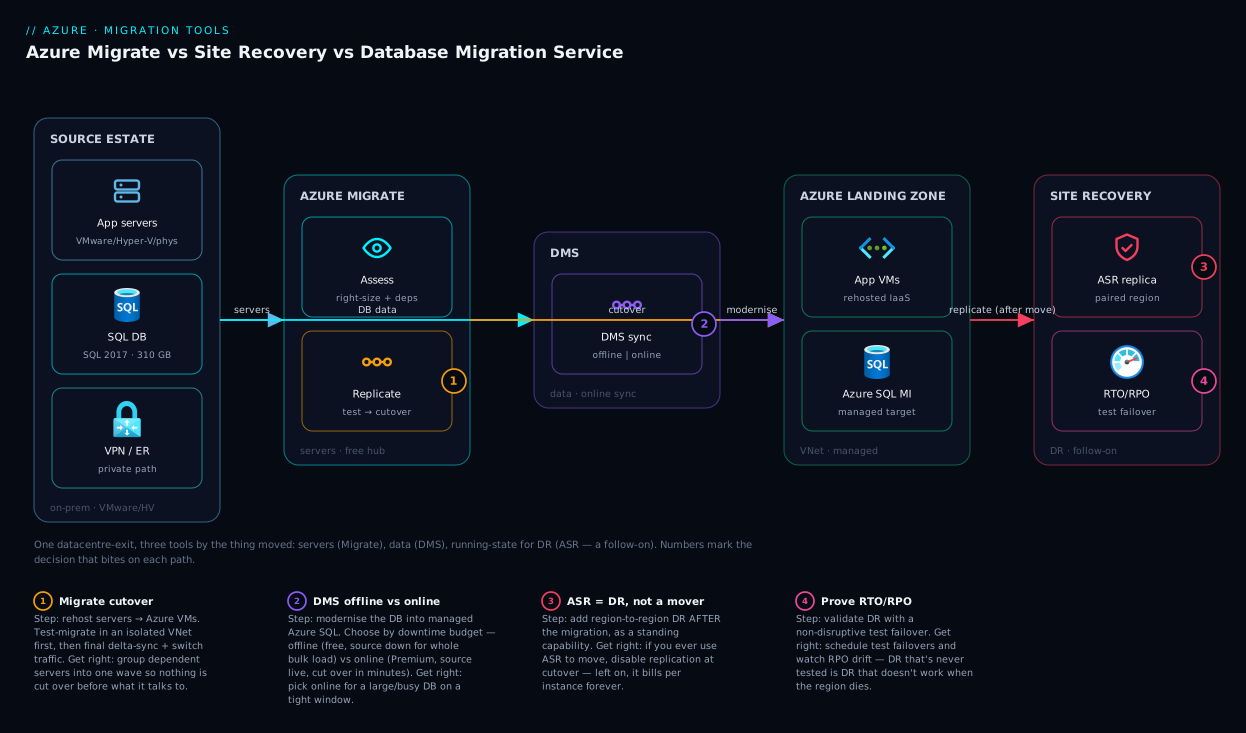
The diagram lays the three tools out left to right by the role they play in a datacentre-exit, so you see where one hands off to the next. On the far left is the source estate — VMware/Hyper-V/physical servers and their on-premises SQL database, connected to Azure over VPN or ExpressRoute. The Azure Migrate zone is the server-move control plane: the appliance discovers and assesses, then the engine replicates the app-tier servers into Azure as VMs. In parallel, the DMS zone takes the database path — landing the SQL database as a managed Azure SQL target in online mode, so the source keeps serving until cutover. The two paths converge in the Azure landing zone, where the migrated VMs connect to the modernised database.
Off to the side, the Site Recovery zone is a follow-on: once the workload is live in Azure, ASR replicates the running VMs to a paired region for ongoing DR. The numbered badges mark where each tool’s signature decision bites — the Migrate cutover switch, the DMS offline-vs-online choice, the “stop replication at cutover” reminder, and the post-migration DR decision — each narrated in the legend.
Real-world scenario
FinServ Retail, a mid-size lender, had to exit a leased datacentre in eleven weeks. The estate: 38 application servers (VMware and physical), one production SQL Server 2017 database of about 310 GB behind a customer-facing lending portal, and a 6 TB file share of scanned documents. The portal could tolerate a 20-minute Sunday-night cutover, but not the multi-hour outage a naive database copy would impose. The whiteboard’s first plan — “replicate everything with Site Recovery and fail over” — would have worked mechanically and been wrong three ways.
The architect split the estate by the master rule, what are you moving? The 38 servers were machines → Azure Migrate. The database was data, and nobody wanted to keep patching SQL Server → DMS to Azure SQL Managed Instance (chosen over Azure SQL Database for the compatibility the portal’s stored procedures needed). The 6 TB of documents were files, not a migration-service job → bulk-copied into Blob Storage out of band. Three units, three tools — and Site Recovery, the original answer, was used for none of the move.
The two paths ran in parallel. Migrate discovered the 38 servers, the assessment right-sized 11 down a tier, and dependency mapping grouped them into four waves so nothing was cut over before what it talked to. DMS ran in online mode: the 310 GB load ran while the portal stayed live, then change-sync kept the Managed Instance current for the week before cutover. On cutover Sunday the team stopped the portal, let DMS drain the final transactions, confirmed the target was caught up, then cut the app-tier wave over in Migrate. Total downtime: 17 minutes, inside the 20-minute budget — because only the final drain-and-switch counted. Offline mode would have blown the window five times over.
After go-live they enabled Site Recovery on the migrated VMs to a paired region — DR as a deliberate follow-on, not a forgotten migration bill. The lesson was the master rule: servers → Migrate; data → DMS (online, because the window was tight); files → neither; DR → Site Recovery, after the move, on purpose.
Advantages and disadvantages
Each tool is excellent at its job and a poor fit outside it:
| Tool | Strengths | Weaknesses / limits |
|---|---|---|
| Azure Migrate | Free; assessment + right-sizing + dependency mapping; test-migrate before cutover; clean cutover-then-stop lifecycle | Lands IaaS VMs (rehost) — doesn’t modernise databases; relies on replication storage during the wave |
| Site Recovery | Near-zero-RPO replication; ordered recovery plans; non-disruptive test failover; true region resilience | Per-instance + storage + egress runs forever; misused as a mover it bills silently; overkill for a simple move |
| DMS | Modernises to managed databases; online mode = minutes of downtime on big busy DBs; Standard tier free | Online/scale needs Premium (vCore-hours); needs a compatibility assessment; source→target pairs are specific |
When each matters most: Azure Migrate wins when the unit is a server and the goal is to land and stop — its assessment and waves separate a planned migration from a hopeful one. Site Recovery wins when “stay runnable elsewhere” is a standing requirement, and is worth its ongoing cost precisely because that requirement never ends. DMS wins when you want out of running a database engine — its online mode is the only one that moves a large, busy production database with minutes of downtime. The failure mode for all three is using them outside that sweet spot.
Hands-on lab
You can’t run a full migration in a few free minutes — but you can stand up the entry points for all three tools and see exactly where each lives, which is the most common first stumble. This lab is free (no billable replication or compute) and teardown is trivial.
1. Set variables and confirm your subscription.
RG=rg-migration-lab
LOC=centralindia
az group create --name $RG --location $LOC -o table
az account show --query "{sub:name, id:id}" -o table
2. Create an Azure Migrate project (the server front door). Free; it’s the workspace assessments register into:
az resource create --resource-group $RG \
  --resource-type "Microsoft.Migrate/migrateProjects" \
  --name "migrate-lab-project" \
  --location $LOC \
  --properties '{}' -o table
# Expected: a Microsoft.Migrate/migrateProjects resource in Succeeded state.
3. Create a Recovery Services vault (where Site Recovery lives). ASR and Azure Backup operate from this vault; free to create, you pay only when you protect something:
az backup vault create --resource-group $RG \
  --name "rsv-migration-lab" --location $LOC -o table
# Expected: a Recovery Services vault. Site Recovery features are configured inside it.
4. Register the Database Migration provider (DMS prerequisite). The step people miss before a database move:
az provider register --namespace Microsoft.DataMigration
az provider show --namespace Microsoft.DataMigration --query "registrationState" -o tsv
# Expected: "Registered" (may briefly show "Registering").
5. Confirm all three entry points. List what you created — the front door for each tool in one resource group:
az resource list --resource-group $RG \
  --query "[].{name:name, type:type}" -o table
# Expected rows: the Migrate project, the Recovery Services vault, (DMS provider is subscription-level).
6. Read the decision back. With the three doors open, name — for one real workload you own — which door it walks through and why (server→Migrate, data→DMS, ongoing-DR→ASR). That naming step is the skill this article teaches.
7. Teardown. Delete the resource group (nothing here was billable, but tidy up):
az group delete --name $RG --yes --no-wait
You haven’t migrated anything — you’ve done the thing most teams skip: confirming where each tool lives and that your subscription is ready, so the real project starts from a known-good baseline.
Common mistakes & troubleshooting
The failures here are choice failures more than command failures — wrong tool, wrong mode, or wrong target. Each row is a real pattern with how to spot it and what to do instead:
| # | Symptom | Root cause | How to confirm | Fix |
|---|---|---|---|---|
| 1 | Recurring bill after a “finished” migration | Used ASR to move, never disabled replication | Vault → Replicated items still listed; cost analysis shows ASR + storage | Disable replication; use Migrate’s cutover-then-stop flow next time |
| 2 | DB cutover ran for hours, business was down | Chose DMS offline for a large DB; window < load time | DMS shows one long bulk load, no continuous-sync phase | Re-plan with online mode (Premium); cut over after sync catches up |
| 3 | Now patching SQL Server VMs you didn’t want | Rehosted the DB VM with Migrate instead of modernising | Windows+SQL VMs where Azure SQL would do | For the next DB, use DMS to a managed target; assess first |
| 4 | App tier cut over but can’t reach the database | Sequenced the two-tool move wrong (app before DB) | App VMs up; DB not yet cut over / still on-prem | Cut the DMS database over (or confirm current) before the Migrate app wave |
| 5 | “Migration” forced through the wrong service | Tried to move a 6 TB file share with a DB/VM tool | The unit is files, not a server or database | Use Azure File Sync / AzCopy / Storage — not a migration service |
| 6 | DMS deploy fails / resource type not found | Resource provider not registered | az provider show -n Microsoft.DataMigration ≠ Registered |
az provider register --namespace Microsoft.DataMigration |
| 7 | Test-migrated VM works, real cutover breaks connectivity | Cutover changed IP/DNS; dependencies split across waves | Dependency map shows a partner server in another wave | Group dependent servers into one wave; align DNS/traffic switch |
| 8 | DR “works” but failover is slow / data stale | Treated ASR like backup; never tested, RPO drift | Vault shows large RPO; no recent test-failover | Run scheduled test failovers; tune replication; validate the recovery plan |
Two confirmations save the most time. Migration vs DR problem: ask whether the source is meant to be decommissioned (migration) or kept replicating (DR) — same engine, never the same lifecycle. Tool vs target problem: ask whether the move succeeded but landed the wrong shape (a VM where a managed service belonged) — that’s a target/design issue (rehost-vs-modernise), not a tool bug, and no command fixes it.
Best practices
- Name the unit first. Before opening any tool, say whether you’re moving a server, data, files, or running-state-for-DR. The unit picks the tool.
- Decide the cutover window before the tool. The downtime you can tolerate constrains DMS offline-vs-online; size the bulk-load time honestly against it.
- Assess before you move. Run Migrate’s assessment (servers) and a DMS compatibility assessment (databases) — the findings change both target and cost.
- Use test-migrate / test-failover every time. They prove the workload runs before you commit; skipping them is how go-lives fail.
- Group servers by dependency into waves. Never cut a server over ahead of the servers it depends on.
- Prefer modernise over rehost for databases unless a real constraint (feature, licence, legacy dependency) forces self-management — managed targets cut run-cost and ops.
- For two-tool migrations, sequence DB-current-then-app-cutover. Keep the database synced (DMS online) and cut the app tier over (Migrate) only once it’s caught up.
- Stop ASR replication the moment a migration cuts over. Replication is meant to be forever only for DR.
- Add DR as a follow-on, on purpose. Enable Site Recovery after you’re running in Azure — not as a substitute for the migration.
- Don’t force a migration service onto files or trivial DBs. File shares use storage tooling; a tiny dumpable database can be a native backup/restore.
Security notes
Migration moves your most sensitive data across a boundary, so security matters as much as mechanics. Authenticate every tool with least privilege — the Migrate appliance and DMS should use scoped service principals or managed identities, not subscription Owner. Keep data in transit on a private path (a VPN or ExpressRoute circuit, and where supported private endpoints) rather than the public internet, so neither disk replication nor database rows are exposed in flight.
On the target side, land into a secured landing zone: migrated VMs and the database behind NSGs, with a database firewall that admits only the app tier — not 0.0.0.0/0. Treat cutover as a security event: rotate any credentials that travelled with a VM, and decommission the source promptly so you aren’t left with a second, unpatched copy of production data. For DR, an ASR replica is a full copy of production — secure it, and the vault, to the same standard as the primary.
| Concern | Migrate | DMS | ASR |
|---|---|---|---|
| Identity | Scoped SPN/MI for the appliance; least-privilege | Scoped credentials to source + target | Vault-scoped roles; least-privilege |
| In transit | Replication over VPN/ExpressRoute | Private path to managed target | Replication over private path |
| Target hardening | NSGs on landed VMs | DB firewall admits app tier only | Secure the secondary region too |
| Post-cutover | Decommission + rotate source creds | Drop/secure the source DB | Replica = production; protect equally |
Cost & sizing
The three tools have very different cost shapes, and the most expensive mistakes are run cost (wrong target) and forgotten cost (replication left on), not the tools themselves:
| Tool | What’s free | What you pay for | The cost trap |
|---|---|---|---|
| Azure Migrate | The tool: discovery, assessment, planning | The Azure VMs you land + replication storage during the wave | Rehosting databases as VMs (high run cost forever) |
| DMS | Standard tier (offline migrations) | Premium tier by vCore-hours (online/scale) | Choosing Premium and leaving it running after cutover |
| Site Recovery | Nothing ongoing (a 31-day trial per instance aside) | Per protected instance + replica storage + egress | Replication left enabled after a migration — billed forever |
Right-sizing turns on two moves: trust Migrate’s assessment right-sizing (FinServ shrank 11 of 38 boxes a tier) and prefer modernising databases over paying VM+OS+SQL run-cost forever; and with DMS, size the cutover — online costs Premium vCore-hours but turns a multi-hour outage into minutes, provided you turn Premium off at cutover. Site Recovery cost is per-instance and indefinite by design — a standing DR line item, but any ASR cost lingering after a migration is a bug to fix.
The headline: the tools are cheap (Migrate and DMS-Standard add nothing; DMS-Premium bills only for the online window; ASR bills per instance as long as DR is on). The target choice and forgotten replication move the number — confirm figures with the Azure pricing calculator.
Interview & exam questions
Q1. In one sentence each, what do Azure Migrate, Site Recovery and DMS move? Azure Migrate moves whole servers (OS + disks + apps, landed as Azure VMs); Site Recovery continuously replicates a running machine’s disk state for DR; DMS moves the data inside a database engine into a managed Azure database. The unit moved — server, running-state, or data — distinguishes them. (AZ-900 / AZ-305.)
Q2. Site Recovery can migrate a VM. Why is Azure Migrate usually the better one-time mover? Both use the same replication engine, but Migrate wraps it in a cutover-then-stop lifecycle with assessment and waves, whereas ASR replicates indefinitely and bills per instance forever — easy to forget after a move. Migrate is built to end; ASR is built to persist.
Q3. Difference between a migration and disaster recovery? A migration is a one-time project ending in cutover and decommissioning the source; DR is a standing capability that replicates continuously and ends in failover/failback only when a disaster occurs. Site Recovery does both but is priced for the ongoing case.
Q4. When choose DMS online mode over offline? When the database is large/busy and the downtime budget is tight: online bulk-loads while the source keeps serving, then syncs changes so cutover is a final drain-and-switch measured in minutes. Offline downs the source for the whole load — fine only when the window exceeds load time. Online needs the Premium tier.
Q5. A team rehosted a SQL Server as an Azure VM with Migrate. What else could they have done? Used DMS to modernise the data into Azure SQL Database or Managed Instance, handing patching, backups and HA to Azure and cutting run-cost. Rehosting keeps them running and licensing SQL Server themselves — a target decision separate from the tool.
Q6. Describe a typical two-tool migration. Rehost the web/app-tier servers with Azure Migrate and modernise their database with DMS (online), sequenced so the database is caught up before the app tier cuts over. Servers and databases have different ideal targets and cutover models, so they use different tools in one coordinated wave.
Q7. A finished migration didn’t drop the bill. First check? Whether Site Recovery replication is still enabled on the migrated items — used as a mover and not disabled, ASR keeps billing per instance plus replica storage. Check the vault’s replicated items and disable replication.
Q8. What does Migrate’s assessment give beyond “it’ll run”? Azure readiness, a right-sized VM SKU (often smaller than the over-provisioned on-prem box), a monthly cost estimate, and dependency mapping to group servers into safe waves. It turns guesswork into evidence for sizing and sequencing.
Q9. Does Site Recovery come instead of a migration, or after it? Usually after — you migrate with Migrate (and DMS for databases), then optionally add ASR for region-to-region DR as a deliberate standing capability. Migrate gets you there; ASR keeps you resilient once you have arrived.
Q10. When is the answer “none of these three”? When the unit isn’t a server, a running machine, or a database engine’s data — bulk file shares use Azure File Sync/AzCopy/Storage tooling, and a tiny dumpable database can be a native backup/restore or export/import. Reach for a migration service only when scale, continuity, or assessment justify it.
Q11. The prerequisite people forget before a DMS migration? Registering the Microsoft.DataMigration resource provider on the subscription, and running a compatibility assessment against the target so feature gaps surface before cutover, not during it.
Q12. RTO and RPO — which tool’s primary metric, and why? Site Recovery’s: DR is measured by how much data you can lose (RPO — how far behind the replica is) and how fast you can be running again (RTO — failover time). Migrations care about the cutover window; DR cares about RPO/RTO continuously.
Quick check
- You must move 40 VMware servers to Azure once and be done. Which tool, and what feature lets you validate before cutover?
- A 500 GB production database can tolerate only 15 minutes of downtime. Which tool and which mode?
- True or false: Site Recovery is the best tool for a one-time server migration.
- You finished migrating but costs stayed high. What’s the most likely cause?
- Web servers move with one tool and their database with another — name both and the sequencing rule.
Answers
- Azure Migrate, using test migration (boot an isolated copy in Azure to validate before the real cutover).
- DMS in online (continuous sync) mode — the source stays live during the bulk load and you cut over in minutes after the sync catches up. (Online uses the Premium tier.)
- False. ASR can do it, but it’s built for ongoing DR and bills per instance indefinitely; Azure Migrate wraps the same engine in a cutover-then-stop lifecycle and is the better one-time mover.
- Site Recovery replication left enabled after using it as a mover — disable replication on the migrated items.
- Azure Migrate for the web/app servers, DMS (online) for the database; keep the database synced and cut it over (or confirm it’s current) before the app-tier cutover, so the moved servers connect to a current database.
Glossary
| Term | Definition |
|---|---|
| Azure Migrate | Free Azure hub for discovering, assessing and migrating whole servers to Azure. |
| Azure Site Recovery (ASR) | DR service that continuously replicates a machine’s disk state so you can fail over on disaster; can also do one-time VM migration. |
| Database Migration Service (DMS) | Managed service that moves a database engine’s schema and data into a managed Azure database, offline or online. |
| Rehost (lift-and-shift) | Move a workload to Azure unchanged — a VM stays a VM. Migrate is the server rehost engine. |
| Modernise (re-platform) | Change a workload’s shape — a self-managed database becomes a managed service. DMS is the database modernise engine. |
| Cutover | The moment the source stops being authoritative and the Azure target takes over; the downtime you feel. |
| Failover / failback | Switch to a DR replica when the primary fails (failover) and return once it recovers (failback) — ASR’s job. |
| RTO / RPO | Recovery Time Objective (how long down) and Recovery Point Objective (how much data lost) — the DR metrics. |
| Offline / online migration (DMS) | Offline = one bulk load, source down (free Standard). Online = bulk load + continuous sync, source live, cutover in minutes (Premium). |
| Azure Migrate appliance | Lightweight collector in the source estate gathering inventory, performance and dependency data for assessment. |
| Recovery Services vault | The Azure resource hosting Site Recovery (and Azure Backup) configuration and replicas. |
| Dependency mapping | Migrate’s view of which servers communicate, used to group workloads into safe cutover waves. |
| Test migration / test failover | Booting a copy in isolation to validate before a real cutover (Migrate) or prove DR works (ASR). |
Next steps
- Go deep on the server path with Azure Migrate Discovery & Assessment: From Appliance Deployment to Your First Right-Sizing Report and Deploying the Azure Migrate Appliance: Discovering VMware, Hyper-V & Physical Estates.
- Make the DR side a deliberate capability with Azure Backup and Site Recovery: Protecting Workloads from Loss and ground the metrics in BCDR Foundations on Azure: Making Sense of RTO, RPO, and the Resilience Spectrum.
- Pick the right database target before you run DMS with Azure SQL Database Purchasing Models: DTU vs vCore and How to Pick Without Overpaying, or aim for managed MySQL via Deploy Azure Database for MySQL Flexible Server: Networking, Backups and First Connection.
- Plan where your migrated workloads land with Azure Regions and Availability Zones: Designing for Resilience.