Your Azure bill has a compute line that never goes to zero. A baseline of virtual machines, App Service plans and SQL databases runs every hour of every month, and you are paying full pay-as-you-go (PAYG) rates for capacity you already know you will consume. Azure offers two ways to trade a commitment for a discount on that baseline — Azure Reservations (the “reserved instance” model, often shortened to RI) and Azure Savings Plans for compute — and they are not interchangeable. Pick the wrong one and you either leave 20–30% of the available discount on the table, or you lock money into a commitment your workload outgrows in three months and cannot easily unwind.
This article is the decision framework. The core question is never “which is cheaper?” in the abstract — both buy roughly the same headline discount tier off PAYG. The real question is how stable and how specific your committed consumption is, because that is the axis the two products are built around. A Reservation buys a specific thing (this VM size, in this region) for a deep discount and rewards you for being right about exactly what you will run. A Savings Plan buys a dollar-per-hour of compute for a slightly shallower discount and rewards you for being right only about how much you will spend, letting the what and where float. Knowing which kind of “right” you can be — exact-SKU-stable versus spend-stable-but-shape-shifting — is the entire game, and it is what separates a finance-grade commitment portfolio from a gamble.
By the end you will stop treating commitments as a checkbox the finance team ticks once a year. You will read a workload’s profile — a fixed fleet of D8s_v5 boxes that will sit there for three years, or a containerised platform that re-architects every quarter — and map it to the right instrument, term (1 vs 3 years), payment option (all-upfront vs monthly), and scope (resource group, subscription, or shared across the billing account). You will know the exchange, refund and cancellation rules cold, so a commitment is never a trap, and exactly which az commands and Cost Management views tell you what you own, what it covers, and what is being wasted.
What problem this solves
The pain shows up on the invoice. A team stands up a production estate — 40 VMs, a dozen App Service instances, a few SQL Hyperscale databases — and runs it at PAYG rates for a year because nobody owned the commitment decision. That is real money: PAYG compute typically costs 40–60% more than the same capacity under a 3-year commitment. On a ₹10–20 lakh/month estate that’s lakhs of rupees evaporating every month, for capacity you were always going to consume. Nobody notices because the bill “looks normal” — it is, it’s just the expensive normal.
The opposite failure is just as common and more embarrassing. A well-meaning engineer, told to “cut costs,” buys three-year all-upfront Reservations for the exact VM SKUs running today. Six months later the platform team migrates those workloads to Azure Kubernetes Service (AKS) on a different VM family, or re-sizes everything from v4 to v5, and the Reservations now cover machines that no longer exist. The discount silently stops applying, the upfront cash is committed, and unwinding it means navigating exchange and refund rules under a 50,000-USD annual cancellation cap. The commitment meant to save money is now a line item finance asks awkward questions about.
Who hits this: essentially every organisation past the experimentation phase — hardest on teams with a stable baseline they are not committing (pure waste), teams mid-migration who over-commit to soon-to-vanish SKUs (stranded RIs), and teams that never revisit commitments as utilisation drifts (coverage rots). The fix is not “buy more reservations.” It is a framework: measure your stable baseline, classify how much is SKU-stable versus merely spend-stable, layer the right instrument over each slice — and re-check it every quarter.
To frame the whole decision before the deep dive, here is the one table that captures the trade at the heart of this article:
| Dimension | Azure Reservation (RI) | Azure Savings Plan for compute | PAYG (no commitment) |
|---|---|---|---|
| What you commit to | A specific resource type/size in a region (or shared) | A fixed hourly dollar/INR amount of compute | Nothing |
| What you’re rewarded for being right about | Exactly what you’ll run | How much you’ll spend | — |
| Headline discount off PAYG | Deepest (up to ~60–72% on some SKUs, 3-yr) | Deep but slightly less than the matching RI | 0% (baseline) |
| Flexibility (change SKU/region/service) | Low — tied to the reserved attribute (instance-size flexibility within a group only) | High — applies to many VM families, regions, and compute services automatically | Total (you pay full price for it) |
| Term options | 1 or 3 years | 1 or 3 years | none |
| Best for | Stable, predictable, fixed-shape fleets | Dynamic compute whose amount is stable but shape shifts | Spiky, short-lived, unpredictable workloads |
Learning objectives
By the end of this article you can:
- Explain, in one sentence each, what an Azure Reservation and an Azure Savings Plan actually commit you to, and why that difference drives every other decision.
- Map a workload’s profile — SKU-stable vs spend-stable, fixed vs re-architecting — to the right instrument using a concrete decision tree.
- Choose the right term (1 vs 3 years) and payment option (all-upfront, monthly, or — for RIs — partial) and explain the cash-flow and discount trade-off of each.
- Set the right commitment scope (single resource group → single subscription → shared/management-group) so a commitment covers the resources you intend and no others.
- State the exchange, refund and cancellation rules for Reservations and Savings Plans accurately, including the cancellation cap, so a commitment is never an irreversible trap.
- Recognise which services and SKUs are eligible for each instrument (and the notable things that are not, like Spot, and where Azure Hybrid Benefit stacks).
- Read your existing position with
azand Cost Management — what you own, your utilisation %, and what’s leaking — and act on under-utilisation before it rots.
Prerequisites & where this fits
You should already understand Azure’s billing shape: a billing account (Enterprise Agreement, Microsoft Customer Agreement, or pay-as-you-go) contains one or more subscriptions, which contain resource groups, which contain resources. If that hierarchy is fuzzy, read Azure Subscriptions Explained: Types, Billing Boundaries and When to Create a New One first — scope is half of this topic. You should know what a VM SKU is (e.g. Standard_D8s_v5) and that VM families come in series; Decoding Azure VM Series: Picking the Right D, E, F, L, N and M Family for Your Workload is the companion. Comfort running az in Cloud Shell and reading JSON output helps.
This sits in the Cost Management / FinOps track, downstream of cost visibility and upstream of cost governance. You commit after you can see your spend, not before — so Azure Cost Management for Beginners: Budgets, Alerts and Cost Analysis in Your First 30 Days and the broader Azure FinOps and Cost Management: Controlling Cloud Spend at Scale are the bookends around this article. Commitments are one of three cost levers, and they only make sense after the other two: right-size first (don’t reserve an over-provisioned box — see Azure Advisor for Cost: Acting on Rightsizing and Idle-Resource Recommendations), then shut off waste, then commit to the genuine baseline. For the spiky top of your workload that you’d never commit, Azure Spot Virtual Machines Explained is the complementary lever.
A quick map of where each cost lever applies, so you reach for the right one:
| Workload shape | Right lever | Why |
|---|---|---|
| Stable 24/7 baseline, fixed SKU | Reservation | Deepest discount; you can be exact about the SKU |
| Stable spend, shifting SKU/region/service | Savings Plan | Discount follows the spend, not the resource |
| Over-provisioned but steady | Right-size first, then commit | Never commit to waste — shrink the box first |
| Spiky / batch / interruptible | Spot VMs / autoscale | Don’t commit to capacity you only need sometimes |
| Genuinely unpredictable, short-lived | PAYG | Flexibility is worth the premium here |
Core concepts
Five mental models make every later decision obvious. Internalise these and the comparison tables read themselves.
A commitment is a billing-layer discount, not an infrastructure change. Neither instrument provisions, reserves, or guarantees any VM, or changes what runs or how it performs. Both are purely a billing benefit: you pre-commit (to a thing, or to an amount of spend), and Azure’s billing engine applies a discounted rate to matching usage each hour. If matching usage shows up, the discount applies; if not, that commitment hour is wasted. You are buying a price, not capacity. (VM reservations could historically add a separate capacity reservation for a guarantee — but the discount itself is a billing artefact.)
Reservation = commit to a what; Savings Plan = commit to a how much. A Reservation says “I will run this — a D8s_v5-equivalent in West Europe — for three years; give me the deep rate.” A Savings Plan says “I will spend this much — ₹500 of compute every hour — for three years; give me a good rate on whatever compute that buys, across families, regions and services.” The RI is precise and deep; the Savings Plan is flexible and slightly shallower. Every other difference flows from this one.
The discount applies hourly, against matching usage, and unused commitment evaporates. Each hour Azure applies your commitments at the discounted rate: a Savings Plan covers your most-discountable eligible usage first up to the committed amount (overage falls back to PAYG); a Reservation applies its reserved quantity to matching running instances. Anything committed but unused that hour is lost — no rollover. That’s why utilisation % (the share actually consumed) is the number that decides saving versus wasting.
Scope decides which resources a commitment can “see”. A commitment’s scope controls which subscriptions/resource groups its benefit applies to. Shared floats across all eligible subscriptions in the billing account (best utilisation, least control); single subscription/resource group pins it to one place (more control, risk of stranding if that scope goes quiet); management-group scope (RIs) covers a management group’s subscriptions. Scope is your main lever for keeping utilisation high without babysitting.
Instance Size Flexibility (ISF) is the RI’s one bit of give. Within an ISF group (sizes in one series sharing a ratio), a VM reservation’s benefit floats across sizes — one reservation sized in D4s_v5 units can cover two D2s_v5-equivalents or half a D8s_v5-equivalent. This softens “exactly what” within a family/series but does not cross families (a D-series RI won’t cover an E-series VM) or regions (unless region-flexible). The Savings Plan exists precisely because ISF doesn’t stretch far enough for dynamic estates.
The vocabulary in one table
Pin down every moving part before the deep sections. The glossary repeats these for lookup; this is the mental model side by side:
| Concept | One-line definition | Where it lives | Why it matters to the decision |
|---|---|---|---|
| Reservation (RI) | Commit to a specific resource type/size for a term | Reservation order on the billing account | Deepest discount; lowest flexibility |
| Savings Plan | Commit to an hourly compute spend amount for a term | Savings plan order on the billing account | High flexibility; slightly shallower discount |
| Term | 1 year or 3 years | Property of the commitment | Longer term = bigger discount, more lock-in |
| Payment option | All-upfront / monthly (RI also: partial) | Property of the commitment | Cash flow vs total saving |
| Scope | Which subscriptions/RGs the benefit applies to | Property of the commitment | Controls coverage and utilisation |
| Utilisation % | Share of the commitment actually consumed | Cost Management / reservation blade | The KPI that says “saving” vs “wasting” |
| Instance Size Flexibility (ISF) | Benefit floats across sizes within a series group | VM reservation behaviour | Softens “exact SKU” for VMs only |
| Azure Hybrid Benefit (AHB) | Bring your own Windows/SQL licences | Per-resource toggle | Stacks on top of a commitment |
| Coverage % | Share of eligible usage that a commitment is discounting | Cost Management | Tells you how much PAYG is still leaking |
| Exchange / refund | Swap or cancel a commitment | Reservation management | Determines how reversible the bet is |
How a Reservation actually applies
A Reservation is the older, deeper instrument. You commit to a reserved quantity of a specific thing for one or three years, pay (upfront or monthly), and Azure applies the reserved rate to matching usage each hour. The “specific thing” depends on the service — for VMs a size in a region; for SQL Database vCores of a tier; for Cosmos DB provisioned RU/s; for storage a capacity tier. The discount is deep because you told Azure exactly what to expect.
The crucial mechanics that trip people up:
| Mechanic | How it works | The gotcha |
|---|---|---|
| What you reserve | A resource type + attributes (VM size+region, SQL vCores+tier, etc.) | Reserve the wrong attribute and it covers nothing |
| Matching | Each hour, the reserved quantity applies to running matching resources | Stop the matching resource and that hour’s benefit is wasted |
| Instance Size Flexibility | VM benefit floats across sizes in the same ISF group by ratio | Crosses sizes, never families or (by default) regions |
| Scope resolution | Benefit applies within its scope (RG / sub / shared / mgmt-group) | Wrong scope → discount strands on an idle subscription |
| Discount basis | Lowers the rate; you still pay for the resource’s other meters | A reserved VM still bills disk, IP, bandwidth, OS at PAYG/AHB |
| OS/software costs | VM reservation covers the compute, not Windows licensing | Use Azure Hybrid Benefit for the Windows/SQL licence portion |
Reservation-eligible services (the ones worth knowing)
Reservations exist for many services, not just VMs. Knowing the catalogue stops you from paying PAYG on something you could have reserved. This is the practical short list architects actually use:
| Reserved resource | You commit to | Typical term discount vs PAYG | Notes |
|---|---|---|---|
| Virtual Machines | A size in a region (with ISF) | High (deepest of the lot on many sizes) | The canonical RI; pairs with AHB for Windows |
| Azure SQL Database / Managed Instance | vCores of a tier | High | Reserve the compute; licensing via AHB separately |
| Azure Cosmos DB | Provisioned RU/s | Moderate–high | Reserve baseline throughput; bursts stay PAYG |
| Azure Cache for Redis | A cache tier/size | Moderate | Stable cache footprints only |
| Azure Database for MySQL / PostgreSQL | vCores (flexible server) | High | Reserve the steady DB compute |
| Storage (Blob, Files) | A capacity tier amount | Moderate | Capacity reservation, not transactions |
| App Service (Isolated/Premium v3 via plan) | Reserved instances of the plan SKU | Moderate–high | For steady premium plans; many teams use Savings Plans instead now |
| Azure Dedicated Host / specialised SKUs | The host / SKU | High | Niche; only when you actually run dedicated hosts |
The pattern: anything with a stable, provisioned baseline (vCores, RU/s, instances, capacity) usually has a reservation. Anything consumption-metered and spiky (function executions, per-transaction storage ops, egress) does not — and shouldn’t.
Instance Size Flexibility worked through
ISF is the most misunderstood RI feature, so make it concrete. Sizes in the same ISF group carry a ratio (a relative “size unit”). A reservation is really for a quantity of those units, so it can spread across sizes in the group:
| Reserved as | Ratio (illustrative) | Can instead cover | Cannot cover |
|---|---|---|---|
1× D8s_v5 |
8 units | 2× D4s_v5 (4+4) or 4× D2s_v5 |
Any E-series VM (different family) |
2× D4s_v5 |
4+4 = 8 units | 1× D8s_v5 or 8× D1-class equivalents |
A VM in a different region (unless region-flexible) |
1× E16s_v5 |
16 units | 2× E8s_v5, 4× E4s_v5 |
Any D- or F-series VM |
Two hard limits to memorise: ISF stays within one series/family (the ratio table is per family), and it does not cross regions by default — match the reservation’s region to where the VMs run, or buy a region-flexible variant where offered. ISF is also a VM feature; SQL, Cosmos and the rest have their own (narrower) flexibility models.
How a Savings Plan actually applies
A Savings Plan for compute is the newer, flexibility-first instrument. You commit to an hourly amount of compute spend — say ₹500/hour or $6/hour — for one or three years. Each hour Azure automatically applies that commitment to your eligible compute at savings-plan rates, starting with the highest-discount usage until the hourly commitment is consumed; usage beyond it bills at PAYG. You never specify a size, family, region, or service — the benefit follows your spend wherever it lands.
This is the model for an estate whose amount of compute is predictable but whose shape isn’t. Re-size v4 to v5, migrate VMs to Container Apps, shift a workload from West Europe to Sweden Central — as long as it’s eligible compute and you’re still spending around your committed amount, the discount keeps applying with zero action from you.
The mechanics that matter:
| Mechanic | How it works | The implication |
|---|---|---|
| What you commit | A fixed hourly currency amount of compute | You size the spend, Azure picks what it covers |
| Auto-application | Highest-discount eligible usage covered first, each hour | You don’t manage matching; the engine optimises |
| Eligible surface | Many VM families, App Service, Container Instances/Apps, Functions Premium, Dedicated Host, etc. | Re-architecting within compute keeps the benefit |
| Overage | Usage above the hourly commit bills at PAYG | Slightly under-commit to avoid paying for empty hours |
| Underuse | Eligible usage below the commit that hour wastes the rest | Right-size the commitment to your floor, not your average |
| Region/family agnostic | Benefit isn’t pinned to a region or family | The headline flexibility win over RIs |
What a Savings Plan covers (and conspicuously doesn’t)
The eligible surface is “compute”, broadly — but not everything, and not as deep as a perfectly-matched RI. Know the edges:
| Covered by Savings Plan | Not covered by Savings Plan |
|---|---|
| Most general-purpose & compute-optimised VM families | Spot VMs (already deeply discounted; never commit them) |
| App Service (Premium v3 and similar plan compute) | SQL Database / Managed Instance vCores (use SQL reservations) |
| Azure Container Instances, Container Apps (dedicated) | Cosmos DB RU/s (use Cosmos reservations) |
| Azure Functions Premium plan compute | Azure Cache for Redis (use a Redis reservation) |
| Azure Dedicated Host | Storage / bandwidth / networking meters |
| Many newer compute SKUs as they’re onboarded | Anything already covered by an existing Reservation (RI applies first) |
The single most common surprise: a Savings Plan is compute-only. Your SQL, Cosmos and Redis baselines still need Reservations — most real estates run a mix of both instruments, not one or the other. And RIs apply before Savings Plans each hour, so an existing reservation isn’t double-counted.
Why “slightly shallower” is the price of flexibility
The Savings Plan discount on a given VM is typically a few percentage points less than the perfectly matched 3-year RI for that exact size — that gap is the premium you pay for never having to be right about the SKU. A stranded RI’s effective discount is zero for the hours it covers nothing, so a Savings Plan that’s a few points shallower but always applies beats a deep RI that lapses: flexibility has positive expected value whenever your SKU certainty is below ~100%. The math that decides which wins:
| If your stable baseline is… | Expected better choice | Reasoning |
|---|---|---|
| Locked to exact SKUs for the full term | Reservation | Capture the extra few % the deeper RI rate gives |
| Stable in spend but shifting in SKU/region | Savings Plan | A stranded RI saves 0%; a Savings Plan keeps applying |
| Mostly stable with a re-architecture planned | Savings Plan (or short-term RI) | Don’t lock a 3-yr RI to SKUs you’ll abandon |
| A mix (fixed DB + dynamic VMs) | Both — RI for the DB, Savings Plan for VMs | Use each where its strength lies |
Choosing the term and payment option
Two more dials sit on top of the instrument choice, and they apply to both RIs and Savings Plans: term and payment. They trade discount depth and total saving against lock-in and cash flow.
Term: 1 year vs 3 years
| Term | Discount depth | Lock-in risk | Choose when |
|---|---|---|---|
| 1 year | Good (less than 3-yr) | Low — re-evaluate annually | Tech/SKU likely to change; first-time committer; uncertain roadmap |
| 3 years | Deepest | Higher — you’re betting on stability | Genuinely stable baseline you’re confident persists 3 years |
The 3-year term gives the largest discount but bets that the workload — and your use of that workload — survives three years without the commitment being orphaned. For a Savings Plan the bet is softer (spend stability, not SKU stability), which is why 3-year Savings Plans are often the sweet spot: deep discount, but the flexibility absorbs the SKU churn that would strand a 3-year RI.
Payment option: upfront vs monthly
| Payment option | Available on | Effect on discount | Cash-flow effect |
|---|---|---|---|
| All upfront | RI and Savings Plan | Largest (sometimes a small extra vs monthly) | Full cost paid day one |
| Monthly | RI and Savings Plan | Slightly less than all-upfront (or equal, depending on offer) | Spread evenly over the term, no interest |
| Partial upfront | Some RIs (not Savings Plans) | Between the two | Part now, remainder over term |
A key, often-missed fact: Azure’s monthly payment usually carries no interest — you don’t necessarily sacrifice discount to spread the cost. So unless finance specifically wants to deploy cash for a marginally larger discount, monthly is the default sensible choice: same-or-near discount, far better cash flow, and you’re not out the full amount if you later need to exchange. Confirm the exact upfront-vs-monthly delta on the purchase screen for your specific SKU — it varies by offer and is sometimes zero.
Putting term × payment together
| Profile | Term | Payment | Rationale |
|---|---|---|---|
| First commitment, cautious | 1 year | Monthly | Lowest risk; learn your utilisation before going long |
| Confident stable fleet, cash available | 3 years | All upfront | Maximise total saving |
| Confident baseline, protect cash flow | 3 years | Monthly | Near-max discount, no big cash outlay |
| Stable spend, churning SKUs | 3 years (Savings Plan) | Monthly | Deep discount + flexibility + smooth cash |
| Budget-driven, predictable cash | 1 or 3 years | Monthly | Even, forecastable line item |
Getting the scope right
Scope is where good commitment plans quietly fail. A perfectly-sized reservation pinned to the wrong scope can sit at 30% utilisation while the same money at shared scope would run at 95%. Scope controls which subscriptions and resource groups a commitment’s benefit is allowed to apply to.
| Scope level | Benefit applies to | Utilisation tendency | Control / blast radius | Choose when |
|---|---|---|---|---|
| Single resource group | One RG only | Lowest (narrow target) | Tightest — chargeback-clean | One team owns the spend and wants it pinned |
| Single subscription | One subscription | Moderate | Per-subscription chargeback | A subscription is a stable cost centre |
| Management group (RIs) | Subscriptions under that MG | Higher | Org-unit scoped | A division/BU shares commitments |
| Shared | All eligible subs in the billing account | Highest | Loosest — benefit floats anywhere | You want maximum utilisation and central FinOps |
The default recommendation for most organisations is shared scope unless a specific chargeback or governance need forces narrower. Shared scope means a commitment never strands just because one subscription went quiet — the benefit hunts for matching usage across the whole account. The trade-off is that costs land wherever the benefit applies, which complicates strict per-team chargeback (you solve that with Azure Resource Tagging Strategy: Drive Cost Allocation and Governance From Day One and Cost Management views, not with narrow scope).
If your subscription hierarchy is itself the chargeback boundary, Management Groups 101: Designing a Hierarchy That Scopes Policy and RBAC is where management-group scope for RIs becomes useful.
A practical scope decision table:
| If you need… | Use scope | Because |
|---|---|---|
| Maximum discount utilisation, central FinOps | Shared | Benefit floats to wherever matching usage is |
| Strict per-team cost attribution | Single subscription / RG | Discount lands only on that team’s resources |
| A BU to share commitments across its subs | Management group (RI) | One scope covers the BU’s subscriptions |
| To pin a benefit to one critical workload | Single resource group | Guarantees that workload is covered first |
Architecture at a glance
Walk the path a single hour of usage takes through the billing engine, because that path is the architecture of this whole topic. On the left, your consumption — VMs, App Service, SQL, Cosmos — emits metered usage every hour. That usage flows into Azure’s billing/rating engine, which holds your commitment inventory: every Reservation and every Savings Plan, each with its term, scope, and (for RIs) its reserved SKU and ISF group. Each hour the engine resolves benefits in a fixed order — Reservations match first (to their specific SKUs within scope), then Savings Plans absorb the most-discountable remaining eligible compute up to the committed hourly amount — and only the leftover, uncovered usage rates at full PAYG. The output on the right is your invoice, split into discounted (reserved/savings-plan rate) and undiscounted (PAYG) lines, with utilisation and coverage metrics computed from the match.
The diagram below makes that flow concrete and marks the four places it goes wrong: a Reservation whose SKU no longer matches anything in scope (badge 1, the stranded RI — utilisation collapses), a Savings Plan over-committed past your real floor so empty hours waste the commit (badge 2), eligible usage that should be covered but is leaking to PAYG because no commitment targets it (badge 3), and a commitment pinned to a narrow scope while the matching usage lives in a different subscription (badge 4). Follow the arrows left to right: consumption → rating engine (RI then Savings Plan then PAYG) → invoice, with the four failure badges sitting exactly on the hops where coverage rots.
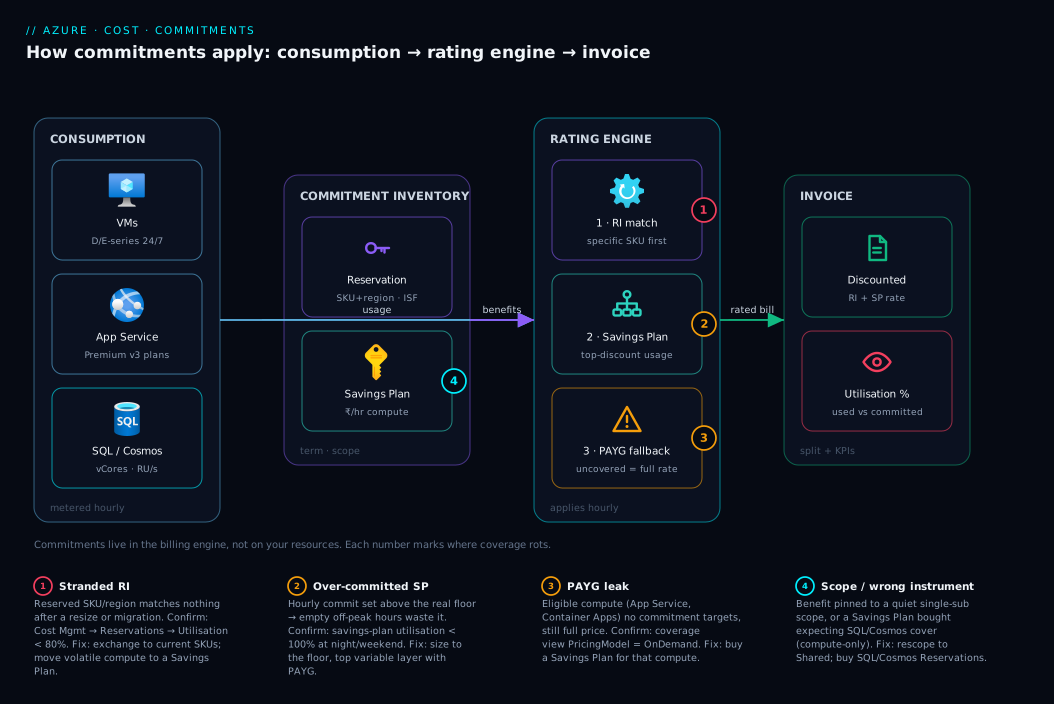
The lesson: commitments live in the billing engine, not with your resources, and the engine matches them to usage by rules (SKU, scope, order). Every optimisation and failure here is a property of that match — align the what, the amount and the scope to your real consumption and the discount flows; misalign any one and it leaks.
Real-world scenario
Nimbus Retail (a fictional but representative mid-market e-commerce company) ran a steady Azure estate: ~₹14 lakh/month, dominated by 60 production VMs (D-series web/app tiers, E-series cache/data tiers), a SQL Managed Instance, a Cosmos DB catalogue, and a fleet of App Service APIs. Everything ran 24/7. They had no commitments — the platform was built fast during a growth sprint and FinOps came later. Cost Management showed the obvious: nearly the entire bill was PAYG compute and database, capacity they consumed every single hour.
Their first instinct was the trap. A new platform engineer, handed a “cut 30%” target, bought 3-year all-upfront VM Reservations for the exact 60 VM SKUs running that week — D8s_v5, E16s_v5, and the rest — and a large upfront cheque went out. It worked beautifully for ten weeks. Then the platform team, already mid-project, migrated the web and app tiers to Azure Container Apps and AKS, re-sizing the remaining VMs from v5 to the newer family and consolidating regions. Overnight, half the reservations matched nothing. Reservation utilisation on the blade dropped from 98% to ~52%. The upfront money was committed; the discount had evaporated on the migrated half.
The fix was a re-architecture of the commitment portfolio, not the infrastructure. Working through this article’s framework, Nimbus split the estate by stability:
- The SQL Managed Instance and Cosmos DB baselines were genuinely fixed in shape — they bought a 3-year SQL reservation (vCores) and a 3-year Cosmos reservation (provisioned RU/s), monthly payment, shared scope. These never strand because the DB tiers don’t churn.
- The dynamic compute — the now-containerised web/app tiers, the App Service APIs, and the remaining VMs that kept re-sizing — went onto a 3-year Savings Plan for compute, monthly, shared scope, sized to the floor of their measured hourly compute spend (not the average, to avoid wasting empty hours). Re-sizing and the AKS migration no longer mattered: the discount followed the spend.
- The over-bought VM Reservations were exchanged (within the same instrument family, no cancellation fee) for reservations matching the still-stable VM SKUs, with the excess converted toward the Savings Plan commitment rather than refunded under the cancellation cap.
The result after one quarter: blended commitment utilisation back above 94%, an effective discount of ~38% off the original PAYG baseline, and — critically — a portfolio that survives the next migration because the volatile two-thirds is on the flexible instrument. The bill went from ₹14 lakh to ~₹9 lakh/month for the same workload. The lesson Nimbus took away wasn’t “reservations are risky”; it was “match the instrument to the stability of each slice, and never put a 3-year-fixed bet on something you’re actively re-architecting.”
Advantages and disadvantages
The explicit trade-off, instrument by instrument:
| Advantages | Disadvantages | |
|---|---|---|
| Reservation (RI) | Deepest discount; covers DB/Cosmos/Redis that Savings Plans don’t; ISF gives some VM-size give; capacity-reservation option for VMs | Tied to specific SKU/region; strands on migration/re-size; exchanges are manual; narrow flexibility |
| Savings Plan | Flexible across families/regions/compute services; survives re-architecture; auto-applies to highest-discount usage; simple to size (just spend) | Slightly shallower discount than a matched RI; compute-only (no SQL/Cosmos/Redis); over-commit wastes empty hours |
| PAYG | Total flexibility; no lock-in; right for spiky/short-lived | Most expensive per unit; pure waste on a stable baseline |
When each matters: choose the Reservation when you can be genuinely certain of the SKU for the full term and when the resource type is RI-only (SQL, Cosmos, Redis) — there’s no Savings Plan alternative there, so the question is just “reserve or PAYG.” Choose the Savings Plan for the compute that re-sizes, migrates, or re-architects — the few points of shallower discount are cheap insurance against stranding. Keep PAYG deliberately for the spiky top of the workload and anything you’d be embarrassed to commit. Almost every mature estate is a blend: RIs under the stable databases and any truly-fixed VMs, a Savings Plan under the dynamic compute, PAYG (and Spot) for the variable peak.
Hands-on lab
This lab is read-and-analyse, not buy — never purchase a commitment to “try it,” because exchanges and the cancellation cap make experimentation costly. Instead you’ll inventory what you (or your billing account) already have, measure utilisation and coverage, and surface what’s leaking to PAYG. All commands are free to run in Cloud Shell (Bash); reading reservation and Cost Management data incurs no charge.
Step 1 — See your stable baseline before committing to anything. Pull last month’s compute/DB spend by service so you know what’s even worth committing:
# Requires the costmanagement extension (auto-installs on first use)
az costmanagement query \
  --type ActualCost \
  --timeframe MonthToDate \
  --dataset-aggregation '{"totalCost":{"name":"Cost","function":"Sum"}}' \
  --dataset-grouping name="ServiceName" type="Dimension" \
  --scope "/subscriptions/$(az account show --query id -o tsv)" \
  -o table
Expected: a table of services with their month-to-date cost. The big, flat line items (Virtual Machines, SQL, Cosmos) are your commitment candidates.
Step 2 — List the reservations you already own. Many estates already hold commitments nobody is tracking:
# All reservation orders visible to you, with term and state
az reservations reservation-order list \
  --query "[].{name:displayName, term:term, state:provisioningState, billing:billingPlan}" -o table
# Drill into a specific order to see SKU, quantity, and scope
ORDER_ID=<reservation-order-id-from-above>
az reservations reservation list --reservation-order-id "$ORDER_ID" \
  --query "[].{sku:sku.name, qty:properties.quantity, scopeType:properties.appliedScopeType, state:properties.provisioningState}" -o table
Expected: each reservation’s SKU, quantity, applied-scope type (Shared / Single / ManagementGroup), and state. A Succeeded state with Shared scope is the healthy default.
Step 3 — Measure utilisation: is the commitment actually being used? Utilisation % is the make-or-break KPI. In the portal: Cost Management + Billing → Reservations → (select one) → Utilisation. Via CLI, summarise reservation usage:
# Reservation summaries (daily) — look at the utilised vs reserved quantities
az reservations reservation-order list --query "[0].id" -o tsv
# Then review utilisation in Cost Management:
#   Cost Management > Reservations > Utilization (%), per reservation
# A reservation sitting <80% sustained is leaking money — investigate scope/SKU drift.
Expected reasoning: anything below ~80% sustained means the reserved SKU isn’t matching enough running usage — a sign of SKU drift (the workload moved/resized) or too-narrow scope. That’s your exchange-or-rescope trigger.
Step 4 — Find what’s not covered (the PAYG leak). Coverage is the inverse view — eligible usage still paying full price:
# Surface the largest VM/compute line items still billing at PAYG rates
az costmanagement query \
  --type ActualCost --timeframe TheLastMonth \
  --dataset-aggregation '{"totalCost":{"name":"Cost","function":"Sum"}}' \
  --dataset-grouping name="MeterCategory" type="Dimension" \
  --dataset-grouping name="PricingModel" type="Dimension" \
  --scope "/subscriptions/$(az account show --query id -o tsv)" \
  -o json
Expected: line items tagged with a pricing model of OnDemand for compute/DB categories are uncommitted baseline — the candidates a new commitment would discount. (The exact PricingModel values depend on your agreement; the goal is to separate OnDemand from Reservation/SavingsPlan.)
Step 5 — Model the decision for the leaking baseline. For each leaking, stable line item, apply the framework: is the SKU fixed for the term (→ Reservation) or the spend fixed but the shape shifting (→ Savings Plan)? For VMs you’re unsure about, prefer a Savings Plan; for SQL/Cosmos/Redis it’s a Reservation by default (no Savings Plan covers them).
Step 6 — (Portal, no purchase) Read the official recommendation. Azure computes recommendations from your last 7/30/60 days of usage: Cost Management → Reservations → Add (or Savings Plans → Add) shows a recommended commitment, projected savings %, and break-even. Read it, don’t buy it in the lab. It’s a strong sanity check — but it’s based on recent usage, so temper it with your knowledge of upcoming migrations.
Validation checklist. You inventoried spend (Step 1), found existing commitments and their scope (Step 2), measured utilisation to spot leaks (Step 3), isolated the uncovered PAYG baseline (Step 4), classified each slice by stability (Step 5), and cross-checked against Azure’s own recommendation (Step 6) — the exact sequence a FinOps review follows before any money is committed. The lab steps mapped to what each proves:
| Step | What you did | What it proves |
|---|---|---|
| 1 | Spend by service | Where the committable baseline actually is |
| 2 | List reservations + scope | What you already own (often forgotten) |
| 3 | Utilisation % | Whether existing commitments are saving or wasting |
| 4 | PAYG leak by pricing model | How much baseline is still at full price |
| 5 | Classify by stability | Which instrument fits each slice |
| 6 | Azure’s recommendation | An independent sanity check on your sizing |
Cleanup. Nothing to delete — every step was read-only. (That’s deliberate: the only “teardown” risk with commitments is buying one you must then exchange.)
Common mistakes & troubleshooting
The failure modes here aren’t crashes — they’re silent money leaks and stranded bets. First as a scannable table, then the entries that bite hardest in detail.
| # | Symptom | Root cause | Confirm (exact path / cmd) | Fix |
|---|---|---|---|---|
| 1 | Bought RIs, then bill barely dropped | Reserved SKUs don’t match running resources (wrong size/region) | Cost Management → Reservations → Utilisation < 80% | Exchange to the right SKU; or rescope to Shared |
| 2 | RI utilisation collapsed weeks after a migration | Workload re-sized / moved to another family or service | Reservation blade utilisation drop; az reservations reservation list SKU vs running VMs |
Exchange RI; move dynamic compute to a Savings Plan |
| 3 | Savings Plan saving less than expected | Over-committed past the real hourly floor → empty hours waste the commit | Savings plan utilisation < 100% in off-peak hours | Lower commitment to the floor; layer a second plan for the rest |
| 4 | Large compute line still at PAYG despite “having commitments” | No commitment targets that surface (e.g. App Service, Container Apps) | Cost Management coverage view; PricingModel = OnDemand |
Buy a Savings Plan (covers many compute services) |
| 5 | SQL/Cosmos still full price after buying a Savings Plan | Savings Plans are compute-only; they don’t cover SQL/Cosmos/Redis | Coverage shows those meters uncovered | Buy the matching Reservation for SQL/Cosmos/Redis |
| 6 | Commitment covers nothing on one subscription, lots on another | Scope pinned to a single subscription/RG that went quiet | appliedScopeType = Single; usage lives elsewhere |
Change scope to Shared (or the right sub) |
| 7 | Can’t cancel an over-bought reservation | Annual cancellation cap (≈ $50k) reached, or cancellation not allowed | Reservation → Refund shows cap/limit | Exchange instead of refund; or rescope to use it up |
| 8 | Windows VMs still pricey even under an RI | RI covers compute, not the Windows licence | Cost still shows OS/licence meter | Apply Azure Hybrid Benefit on top of the RI |
| 9 | Spot VMs “not getting” the Savings Plan rate | Spot is ineligible (already deeply discounted) | Coverage excludes Spot usage | Leave Spot on Spot pricing; don’t commit it |
| 10 | Recommendation says buy big, but you have a migration next month | Azure recommends from recent usage, blind to your roadmap | Recommendation based on last 7/30/60 days | Size to the post-migration baseline; prefer Savings Plan / 1-yr |
The expanded reasoning for the ones that cost the most:
1 & 2 — The stranded reservation. The bill barely moved, or moved then crept back. Root cause: the reserved SKU/region no longer matches enough running resources — someone re-sized VMs (v4→v5), changed regions, or migrated to a different family or to containers. Confirm: Reservation → Utilisation below 80% (or off a cliff after a known migration date); cross-check az reservations reservation list SKUs against running VM sizes. Fix: exchange the reservation for current SKUs (same instrument family, no cancellation fee), and move the volatile compute onto a Savings Plan so the next migration doesn’t strand it. The structural fix is instrument choice, not a better-aimed RI.
3 — The over-committed Savings Plan. It saves less than projected. Root cause: you committed to your average hourly compute spend, but compute dips below that off-peak, wasting the unused portion those hours. Confirm: savings-plan utilisation < 100% concentrated in nights/weekends. Fix: size to your floor (the minimum hourly compute you always run), then add a second smaller plan or use PAYG for the variable layer. Under-committing and topping up beats over-committing.
4 & 5 — Coverage gaps from the wrong instrument. A big compute or DB line is still at PAYG despite “having commitments.” Root cause: either nothing targets that compute surface (App Service / Container Apps were never on an RI and you bought no Savings Plan), or — the classic — you bought a Savings Plan expecting it to cover SQL/Cosmos/Redis, which it never does (compute-only). Confirm: the coverage view shows those meters uncovered, PricingModel = OnDemand. Fix: a Savings Plan for the uncovered compute; a Reservation for the SQL/Cosmos/Redis baselines. This split is the #1 first-pass mistake.
6 — Scope strands the discount. A commitment covers almost nothing on one subscription while matching usage runs un-discounted on another. Root cause: it’s pinned to single-subscription/RG scope and that scope’s usage dropped. Confirm: appliedScopeType = Single while the matching VMs live elsewhere. Fix: change scope to Shared (free, editable on the reservation) so the benefit floats to the matching usage.
7 — The cancellation cap surprise. You over-bought and Azure won’t let you refund. Root cause: the annual refund cap (~$50,000 of reservations per billing account per rolling 12 months) is reached, or the product/term disallows self-service refund. Confirm: the Reservation → Refund flow shows the cap or blocks the action. Fix: exchange instead (no cap impact, no fee), or rescope to Shared so the commitment gets used up rather than cancelled.
8 — Forgetting Azure Hybrid Benefit. Windows/SQL VMs stay expensive under an RI because the RI discounts the compute, not the OS/SQL licence. Fix: toggle Azure Hybrid Benefit on the resource — it stacks on top of the compute discount for the largest combined saving.
Best practices
- Right-size before you commit. Never reserve an over-provisioned box — shrink it first (Advisor rightsizing), then commit to the smaller, correct baseline. A 3-year RI on a too-big VM locks in waste.
- Commit to the floor, not the average. Size Savings Plans and reservations to the compute you always run. Top the variable layer with PAYG/Spot. Under-committing slightly beats wasting empty hours.
- Use a blend, not a single instrument. RIs under stable databases (SQL/Cosmos/Redis) and any truly-fixed VMs; a Savings Plan under the dynamic compute; PAYG/Spot for the spiky peak. Almost no real estate is one-instrument.
- Default to Shared scope unless a chargeback or governance need forces narrower — it keeps utilisation high and prevents stranding when one subscription goes quiet.
- Prefer Savings Plans for compute you’ll re-architect. The few points of shallower discount are cheap insurance; a stranded RI saves 0%.
- Default to monthly payment unless finance wants the marginal upfront discount — it’s usually interest-free, protects cash flow, and keeps you nimbler for exchanges.
- Start with 1-year (or 3-year Savings Plan) on your first pass. Learn your real utilisation before locking a 3-year fixed RI; the flexible instrument absorbs early mistakes.
- Review utilisation every quarter and after every migration. Utilisation < 80% is an exchange-or-rescope trigger. Commitments rot silently as the estate drifts.
- Read Azure’s recommendation, but temper it with your roadmap. It’s computed from recent usage and is blind to next month’s migration — size to the post-change baseline.
- Stack Azure Hybrid Benefit on Windows/SQL reservations for the licence portion the compute discount doesn’t cover.
- Layer commitments rather than replacing them. Buy a second smaller Savings Plan as the baseline grows instead of cancelling and re-buying the first.
- Keep Spot out of commitments. Spot is already deeply discounted and ineligible — committing it is a category error.
Security notes
Commitments are a billing construct, so the “security” surface is access control, financial governance, and tenancy, not network or encryption:
- Restrict who can purchase and manage commitments. Buying a 3-year all-upfront reservation is a large financial action. Gate it behind a dedicated RBAC role — the Reservation Purchaser role (or billing-account purchase permissions) — not blanket Owner/Contributor. See Azure RBAC Fundamentals: Roles, Scope and Assignments for scoping the assignment tightly.
- Separate purchase from management. The right to view/manage utilisation (FinOps team) should be distinct from the right to purchase (finance approver). Use least-privilege custom roles if the built-in split is too coarse — Azure RBAC Custom Roles: Least-Privilege Actions and NotActions.
- Control reservation visibility across the tenant. Billing-account-level settings govern whether subscription owners can see/use shared-scope reservations. Lock this to your governance model so a stray subscription can’t silently consume (or be blamed for) shared commitments.
- Treat the cancellation cap as a guardrail, not a setting to fight. The ~$50k annual refund cap is a built-in brake on rash purchases — design your process (read recommendations, model, approve) so you never need to cancel at scale in the first place.
- Audit purchases. Reservation and savings-plan purchases appear in the activity/billing logs; alert on them so a large commitment is never made without finance sign-off. This pairs with budget alerts from Azure Cost Management for Beginners: Budgets, Alerts and Cost Analysis in Your First 30 Days.
- Tag for attribution, don’t narrow scope for it. Resist pinning commitments to tiny scopes purely for chargeback — it tanks utilisation. Solve attribution with tags and Cost Management views instead.
The access controls that matter, mapped to what they prevent:
| Control | Mechanism | Prevents |
|---|---|---|
| Purchase gating | Reservation Purchaser / billing purchase role | Unapproved large commitments by general Contributors |
| Purchase ≠ management split | Separate RBAC roles for view vs buy | FinOps accidentally committing money |
| Shared-scope visibility setting | Billing-account reservation policy | Stray subscriptions consuming shared benefit unexpectedly |
| Purchase auditing + budget alerts | Activity log + Cost Management alerts | Silent, unreviewed commitments |
| Cancellation cap (built-in) | ~$50k/year refund limit | Large impulsive purchases being trivially reversible (forces discipline) |
Cost & sizing
The whole article is about cost, so this section is about sizing the commitment correctly and the rules that govern reversing it.
What drives the saving. Three multipliers stack: instrument (matched RI deepest, Savings Plan slightly less), term (3-year > 1-year), payment (all-upfront ≥ monthly, often equal); Azure Hybrid Benefit adds the Windows/SQL licence saving on top. A 3-year commitment typically lands 40–60%+ off PAYG on common compute, some VM sizes higher — the exact number is SKU-specific and shown on the purchase screen.
How to size. Commit to your stable floor, not your peak or average. Measure the minimum hourly compute (for a Savings Plan) or the count of always-on instances per SKU (for an RI) over a representative period that excludes one-off spikes, then commit to that floor and let PAYG/Spot/autoscale absorb everything above it. Re-derive the floor after any migration.
Break-even and reversibility. A commitment pays back once cumulative discount exceeds the commitment cost. For monthly payment the break-even is essentially immediate (you save from month one). For all-upfront, you’re “in the red” until the accumulated discount catches the upfront cheque — usually a few months. Reversibility is bounded by the rules below; size conservatively so you rarely test them.
The exchange / refund / cancellation rules — memorise these, they decide how safe the bet is:
| Action | Reservations | Savings Plans |
|---|---|---|
| Exchange (swap for a different SKU/region, same instrument) | Allowed, no cancellation fee; doesn’t count against refund cap | Not exchangeable the way RIs are — you can’t swap to a different commitment after purchase |
| Refund / cancel | Allowed up to the annual cap (~$50,000/billing account/12 months); remaining term value refunded | Not cancellable / non-refundable once purchased |
| Rescope (change which subs/RGs the benefit applies to) | Allowed any time, free | Allowed (scope is editable), free |
| Change payment after purchase | Not after the fact (set at purchase) | Not after the fact |
| Adjust size up | Buy an additional reservation (layer) | Buy an additional savings plan (layer) |
The reversibility asymmetry is the most important sizing input: a Savings Plan, once bought, you keep for the term — its safety comes from flexibility of application, not from being cancellable. An RI is less flexible in what it covers but more reversible (exchange freely, refund within the cap). The conservative play: size Savings Plans to a confident floor (flexible but hard to undo), and lean on RIs’ exchangeability when SKU certainty is high but you want an escape hatch.
A rough sizing picture for Nimbus Retail’s profile (≈₹14 lakh/month PAYG baseline):
| Slice | Instrument | Term / payment | Scope | Rough effect |
|---|---|---|---|---|
| SQL Managed Instance (fixed) | SQL Reservation | 3-yr / monthly | Shared | ~40–55% off that line |
| Cosmos DB baseline RU/s (fixed) | Cosmos Reservation | 3-yr / monthly | Shared | ~20–40% off provisioned throughput |
| Dynamic VMs + App Service + containers | Savings Plan | 3-yr / monthly | Shared | ~35–50% off committed compute |
| Spiky peak / batch | PAYG + Spot | n/a | n/a | Spot up to ~90% off; no commitment |
| Net blended | — | — | — | ~₹14L → ~₹9L/month for the same workload |
Free-tier note: there is no “free tier” for commitments — they’re a discount on paid usage, not a quota. The only no-cost actions are reading your position and rescoping existing commitments.
Interview & exam questions
1. In one sentence, what’s the core difference between an Azure Reservation and a Savings Plan? A Reservation commits you to a specific resource type/size (the “what”) for a deep discount, while a Savings Plan commits you to a fixed hourly amount of compute spend (the “how much”) for a slightly shallower but far more flexible discount that follows your spend across families, regions, and compute services.
2. A team bought 3-year RIs and the bill barely changed. What’s the most likely cause and how do you confirm it? The reserved SKUs/region don’t match enough running resources — usually after a re-size or migration. Confirm via Cost Management → Reservations → Utilisation showing sustained < 80%, and by diffing the reservation SKUs against actual running VM sizes. Fix by exchanging to current SKUs and moving volatile compute onto a Savings Plan.
3. Which is more flexible and why? The Savings Plan. It isn’t tied to any SKU, family, region, or even a single compute service — it auto-applies its hourly commitment to your most-discountable eligible compute wherever it runs. An RI is tied to a specific reserved attribute (with only Instance Size Flexibility within a series as give).
4. Does a Savings Plan cover Azure SQL Database or Cosmos DB? No — Savings Plans are compute-only. SQL Database/Managed Instance, Cosmos DB, and Cache for Redis baselines need their own Reservations. Most real estates run a blend: Savings Plan for compute, Reservations for the databases.
5. What is Instance Size Flexibility, and what are its two hard limits? ISF lets a VM reservation’s benefit float across sizes within the same series by a ratio (e.g. one D8s_v5 reservation can cover two D4s_v5). The two limits: it stays within one family/series (won’t cross D→E) and does not cross regions by default (match the region or buy a region-flexible variant).
6. When would you pick a 1-year over a 3-year term? When the technology, SKU, or roadmap is likely to change — a first-time committer, a workload mid-evolution, or an uncertain plan. The 3-year term gives the deepest discount but bets on 3 years of stability; 1-year lets you re-evaluate annually. For Savings Plans, 3-year is often still safe because flexibility absorbs SKU churn.
7. All-upfront vs monthly payment — what’s the trade-off, and what’s the common misconception? All-upfront sometimes gives a marginally larger discount but ties up cash day one; monthly spreads the cost evenly. The misconception is that monthly “costs more” — Azure’s monthly payment is typically interest-free, so monthly is usually the sensible default for cash flow with little-to-no discount sacrifice.
8. How does scope affect a commitment, and what’s the safe default? Scope (single RG → single subscription → management group → shared) controls which resources the benefit can apply to. Shared is the safe default for most orgs: the benefit floats across all eligible subscriptions, maximising utilisation and preventing stranding when one subscription goes quiet. Narrow scope only for strict chargeback needs.
9. You over-bought a reservation and need to undo it. What are your options, and what’s the catch? Exchange it (swap for a different SKU, no cancellation fee, doesn’t count against the cap) or refund it (allowed up to the ~$50,000/year per billing account cancellation cap). You can also just rescope to Shared so it gets used up. Savings Plans, by contrast, are non-cancellable — their safety is flexibility, not reversibility.
10. How do Reservations and Savings Plans interact in the same hour? Reservations apply first to their matching SKUs within scope; then the Savings Plan absorbs the most-discountable remaining eligible compute up to its hourly commitment; only the leftover rates at PAYG. They don’t double-count, and the ordering is why you don’t “lose” by holding both.
11. Does a VM Reservation make Windows VMs fully discounted? No — the reservation discounts the compute, not the Windows (or SQL) licence. Stack Azure Hybrid Benefit on top to bring your own licence for the OS/SQL portion; the two discounts combine.
12. Azure recommends a large 3-year commitment. You have a migration next month. What do you do? Don’t take the recommendation at face value — it’s computed from recent usage and is blind to your roadmap. Size to the post-migration baseline instead, and prefer the flexible instrument (Savings Plan) or a shorter term so the upcoming change doesn’t strand the commitment.
These map to AZ-104 (Administrator) — monitor and maintain Azure resources; manage cost (reservations, cost analysis, budgets) — and broadly to FinOps Certified Practitioner material (commitment-based discounts, rate optimisation, utilisation/coverage KPIs). The licensing-stack angle (Azure Hybrid Benefit) and DB reservations also touch AZ-305 (Solutions Architect) cost-optimisation design. A compact cert map:
| Question theme | Primary cert | Objective area |
|---|---|---|
| RI vs Savings Plan, term, payment | AZ-104 | Manage Azure cost; reservations |
| Utilisation/coverage KPIs, blended portfolio | FinOps Practitioner | Rate optimisation; commitments |
| Scope, exchange/refund, cap | AZ-104 | Cost management & governance |
| Hybrid Benefit stacking, DB reservations | AZ-305 | Cost-optimised architecture design |
Quick check
- You have a containerised platform that re-sizes and migrates VM families every quarter, but its total hourly compute spend is steady. Reservation or Savings Plan, and why?
- True or false: a Savings Plan will discount your Azure SQL Database vCores.
- Your reservation’s utilisation has been sitting at 55% since a migration last month. Name two fixes.
- What’s the safe default scope for most organisations, and what does it prevent?
- You over-bought a Savings Plan. Can you cancel it for a refund? What about an over-bought Reservation?
Answers
- Savings Plan. The amount of compute is stable (commit to the spend) but the shape (family/size/region) keeps changing — exactly the case a Savings Plan is built for. A 3-year RI would strand on each migration; the Savings Plan’s discount follows the spend automatically.
- False. Savings Plans are compute-only. SQL Database/Managed Instance vCores need a SQL Reservation; a Savings Plan never covers them.
- (a) Exchange the reservation for SKUs matching what’s actually running now (no cancellation fee). (b) Rescope to Shared so the benefit floats to other matching usage. Structurally, also move the volatile compute to a Savings Plan so it doesn’t strand again.
- Shared scope. It lets the benefit apply across all eligible subscriptions in the billing account, maximising utilisation and preventing the discount from stranding when one subscription’s usage drops.
- No — Savings Plans are non-cancellable / non-refundable once purchased (their safety is application flexibility, not reversibility). An over-bought Reservation can be refunded, up to the ~$50,000/year per billing account cancellation cap, or exchanged for free.
Glossary
- Azure Reservation (RI) — a commitment to a specific resource type/size (VM size+region, SQL vCores, Cosmos RU/s, etc.) for 1 or 3 years in exchange for the deepest discount off PAYG.
- Azure Savings Plan for compute — a commitment to a fixed hourly amount of compute spend for 1 or 3 years; the discount auto-applies to eligible compute across families, regions, and services.
- Pay-as-you-go (PAYG) — the default, un-committed, full-price billing rate; the baseline every discount is measured against.
- Term — the commitment length, 1 year or 3 years; longer term = deeper discount and more lock-in.
- Payment option — all-upfront, monthly, or (RIs only) partial-upfront; trades cash flow against (sometimes) a marginally larger discount.
- Scope — which subscriptions/resource groups a commitment’s benefit can apply to: single resource group, single subscription, management group (RIs), or shared (whole billing account).
- Utilisation % — the share of a commitment actually consumed; the KPI that determines whether a commitment is saving or wasting money.
- Coverage % — the share of eligible usage that a commitment is discounting; reveals how much baseline is still leaking to PAYG.
- Instance Size Flexibility (ISF) — the behaviour that lets a VM reservation’s benefit float across sizes within the same series by ratio; doesn’t cross families or (by default) regions.
- Azure Hybrid Benefit (AHB) — bringing your own Windows/SQL licences to reduce the licence portion of cost; stacks on top of a reservation or savings plan compute discount.
- Exchange — swapping a reservation for a different SKU/region of the same instrument family, with no cancellation fee and without counting against the refund cap.
- Refund / cancellation cap — the limit (~$50,000 per billing account per rolling 12 months) on reservation refunds; Savings Plans are non-refundable.
- Reserved quantity — the number of units (instances, vCores, RU/s) a reservation commits to.
- Rescope — changing a commitment’s scope after purchase; free and reversible, the cheapest fix for a stranded discount.
- Stranded commitment — a reservation (or over-sized savings plan) covering little or nothing because the matching usage moved, re-sized, or stopped.
Next steps
You can now match the right commitment instrument, term, payment, and scope to each slice of your estate, and read your position before committing a rupee. Build outward:
- Next: Azure FinOps and Cost Management: Controlling Cloud Spend at Scale — the full operating model that commitments plug into (visibility → optimisation → governance).
- Foundation: Azure Cost Management for Beginners: Budgets, Alerts and Cost Analysis in Your First 30 Days — see and forecast spend before you commit to any of it.
- Right-size first: Azure Advisor for Cost: Acting on Rightsizing and Idle-Resource Recommendations — shrink the box before you reserve it.
- The variable layer: Azure Spot Virtual Machines Explained: How Eviction, Capacity and Pricing Save You up to 90% — the complementary lever for the spiky peak you’d never commit.
- Cost attribution: Azure Resource Tagging Strategy: Drive Cost Allocation and Governance From Day One — solve chargeback with tags so you can keep commitments at shared scope.
- Know your billing boundaries: Azure Subscriptions Explained: Types, Billing Boundaries and When to Create a New One — the scope hierarchy commitments apply within.