A team moved a three-tier app to Azure and put every VM in one subnet with the default rules untouched. When a web server was compromised, the attacker had direct SMB access to the database — because inside a Virtual Network (VNet), Azure lets every machine talk to every other machine by default. There was no firewall between the web tier and the database; there was nothing between anything and anything else. Proper subnetting and network security groups (NSGs) would have contained the breach to the web tier and turned a database exfiltration into a logged, blocked packet. This is the single most common networking mistake on Azure, and it traces to one misunderstanding: people assume a VNet is secure by default. It is private by default — not reachable from the public internet without an explicit public IP — but it is wide open internally.
This article is the practitioner’s foundation for the three primitives every Azure network is built from. A VNet is your private IP address space in a region — 10.0.0.0/16, isolated, yours. Subnets carve that space into smaller ranges (10.0.1.0/24 for web, 10.0.2.0/24 for app, 10.0.3.0/24 for data) so you can apply different controls to different tiers. NSGs are stateful, five-tuple (source, destination, port, protocol, direction) firewalls you attach to a subnet or a NIC to decide which packets land and which are dropped. Get these three right and the rest of Azure networking — peering, private endpoints, gateways, firewalls — slots in cleanly on top. Get them wrong and you either ship a flat, breach-amplifying network or a maze of rules nobody can reason about at 2 a.m.
By the end you will design an address space that peers without collisions, size subnets knowing Azure silently reserves five addresses in each, write NSG rules whose priorities and default rules you fully understand, use Application Security Groups (ASGs) so a rule says “from the web tier” instead of a brittle IP list, decide between service endpoints and private endpoints for PaaS, and read effective security rules and effective routes to confirm — not guess — why a packet was dropped. Because this is a reference you will return to mid-incident, every setting, default, limit and failure mode is laid out as a scannable table alongside the prose and the az/Bicep that configures it.
What problem this solves
Cloud resources need the same network controls you had on-premises — isolation, segmentation, traffic filtering, controlled egress — but expressed in software, applied at scale, and auditable. Without VNets you have no private addressing: every VM would need a public IP and live on the internet. Without subnets you have no segmentation: one flat broadcast-free L3 network where a foothold anywhere is a foothold everywhere. Without NSGs you have no filtering: Azure’s defaults allow all intra-VNet traffic and all outbound internet, so a compromised web server reaches your database, your domain controller, and the internet for exfiltration, unimpeded.
What breaks without this knowledge is rarely a hard failure — it is a silent one. The network “works”: the app responds, traffic flows, nobody notices that the data tier accepts connections from the entire VNet, that PaaS traffic to Storage and Key Vault is exiting over the public internet, or that a forgotten “allow Any-Any” rule at priority 100 sits above every careful deny you wrote. The failure surfaces later — in a breach post-mortem, a compliance audit, a peering that collides because two teams both chose 10.0.0.0/16, or a 2 a.m. incident where a VM cannot reach SQL and you have no idea whether it is an NSG, a route, DNS, or the app itself.
Who hits this: everyone who runs anything beyond a single public web app. It bites hardest on teams lifting-and-shifting on-prem three-tier apps (they replicate the servers but not the firewalls between them), teams that will later peer VNets or connect to on-prem over VPN/ExpressRoute (address-space collisions are painful to fix after the fact), and anyone subject to PCI/HIPAA/ISO segmentation requirements. The fix is almost never “add a firewall appliance” — it is “segment into tier subnets, write deny-by-default NSGs scoped by ASG, and route PaaS over the backbone.” To frame the whole field before the deep dive, here is every problem class this article addresses, what goes wrong without it, and the first place to look:
| Problem class | What breaks without it | Who hits it hardest | First place to look |
|---|---|---|---|
| No private addressing | Every VM needs a public IP, lives on the internet | Anyone past a single web app | VNet address space; public IP assignments |
| Flat network (no subnets) | One foothold = total lateral movement | Lift-and-shift three-tier apps | Subnet list; which tier shares a subnet |
| Open internal traffic (no NSG) | Web tier reaches DB/DC/internet freely | Everyone using defaults | NSG list; AllowVnetInBound default rule |
| Address-space collision | Peering / VPN fails or routes ambiguously | Multi-VNet, hybrid, M&A | CIDR plan across all VNets + on-prem |
| Brittle IP-based rules | Rules break when tiers scale or re-IP | Autoscaling tiers | NSG rule sources (CIDR vs ASG) |
| PaaS egress over internet | Storage/SQL/KV traffic leaves the backbone | Compliance-bound workloads | Service/private endpoints; effective routes |
| Asymmetric / blackholed routes | SYN arrives, reply vanishes | NVA / forced-tunnel designs | Effective routes; UDR next-hops |
Learning objectives
By the end of this article you can:
- Design a VNet address space with non-overlapping CIDRs that peers cleanly and leaves room to grow, and explain why RFC 1918 ranges and
/16-per-VNet are the sane defaults. - Size subnets correctly — accounting for the five Azure-reserved addresses per subnet and the special-purpose subnets (GatewaySubnet, AzureBastionSubnet, AzureFirewallSubnet) that have naming and sizing rules you cannot break.
- Write NSG rules whose priority ordering, stateful return-traffic behaviour, and default rules (
AllowVnetInBound,AllowAzureLoadBalancerInBound,DenyAllInBound, and the outbound trio) you fully understand — and explain why “allow” and “deny” at the same scope is a priority race. - Use Application Security Groups (ASGs) to express rules by workload role (“from
asg-web”) instead of fragile IP lists, so rules survive scaling and re-IP. - Decide between service endpoints and private endpoints for PaaS access, and explain the security, DNS and cost trade-offs of each.
- Apply user-defined routes (UDRs) to force traffic through an NVA/Azure Firewall, and recognise the asymmetric-routing and blackhole failures they cause.
- Drive Network Watcher to diagnose drops: IP Flow Verify, Effective Security Rules, Effective Routes, Connection Troubleshoot, and NSG flow logs — confirming root cause with the exact command instead of guessing.
- Read the canonical NSG, subnet, endpoint and limit reference tables and pick the right control for each isolation requirement.
Prerequisites & where this fits
You should be comfortable with IP fundamentals — what a CIDR like /24 means (256 addresses, 254 usable on-prem, fewer in Azure), the RFC 1918 private ranges (10.0.0.0/8, 172.16.0.0/12, 192.168.0.0/16), and the basics of TCP/UDP ports and the difference between L3/L4 (IP/port) and L7 (HTTP/application). You should be able to run az in Cloud Shell, read JSON output, and know that an Azure resource group holds resources and a region is where they physically live. No prior Azure networking is assumed; this article is the foundation.
This sits at the base of the Networking track and everything else builds on it. It is upstream of Diagnosing Azure VNet Connectivity: NSGs, UDRs, Effective Routes & Network Watcher, which goes deep on the diagnostic tooling this article introduces. It pairs with Azure Private Endpoint vs Service Endpoint: Secure PaaS Access and Azure Private Link and Private DNS: Keeping PaaS Off the Public Internet for the PaaS-egress decisions touched on here. When NSGs aren’t enough, the L7 layer is Application Gateway v2 WAF: End-to-End TLS, mTLS, and Custom Rule Tuning; the L4 vs L7 choice is in Azure Load Balancer vs Application Gateway: Picking the Right Traffic Manager. At organisation scale, address-space planning and policy-driven NSGs live in the Azure Enterprise-Scale Landing Zone: Foundation for Large Organizations, which itself assumes the Azure Resource Hierarchy Explained: Subscriptions, Resource Groups and Resources.
A quick map of who owns each layer, so you escalate to the right person when a packet goes missing:
| Layer | What lives here | Who usually owns it | What it can cause |
|---|---|---|---|
| Address space / IPAM | CIDR allocation across VNets + on-prem | Network / platform team | Peering collisions, no room to grow |
| Subnets | Tier/role segmentation, delegated subnets | Network + app team | Flat network, lateral movement |
| NSG rules | L4 allow/deny by 5-tuple | Network + security | Drops, over-exposure, priority races |
| ASGs | Logical grouping of NICs by role | App + network | Rules that break on scale (if unused) |
| Routes (system + UDR) | Next-hop decisions, forced tunnelling | Network team | Asymmetric drops, blackholes |
| Endpoints (service/private) | PaaS reachability over the backbone | Network + data team | PaaS egress over internet; DNS issues |
| Diagnostics | Network Watcher, flow logs | SRE / network | (the truth source for all the above) |
Core concepts
Six mental models make every later decision obvious.
A VNet is a private L3 boundary, scoped to one region and one subscription. A VNet is an isolated slice of Azure’s network with an address space you choose (one or more CIDR blocks). Resources inside it get private IPs from that space and can reach each other; nothing outside reaches in without an explicit public IP, peering, or a gateway. A VNet lives in exactly one region and one subscription — to span regions or subscriptions you create separate VNets and peer them. The address space is the most consequential early decision because changing it after you peer or connect on-prem is painful.
Subnets segment the space; segmentation is the whole security story. A subnet is a contiguous range carved from the VNet (10.0.1.0/24). Subnets are how you apply different controls to different tiers — a web subnet open to 443, an app subnet open only from web, a data subnet open only from app. Without subnet segmentation, every NSG you write is fleet-wide and lateral movement is unconstrained. Azure reserves five addresses in every subnet (network, gateway ×1, DNS ×2, broadcast), so a /24 gives you 251 usable, not 254 — a number that bites when you size tight.
An NSG is a stateful, priority-ordered packet filter. A network security group holds security rules, each a 5-tuple match (source, source-port, destination, destination-port, protocol) plus a direction (inbound/outbound), an action (allow/deny), and a priority (100–4096; lower number wins). It is stateful: allow an inbound flow and the return traffic is automatically permitted (you do not write a matching outbound rule). Rules are evaluated by priority, first match wins, and there are immutable default rules beneath your custom ones that allow all intra-VNet traffic and deny everything else inbound. You attach an NSG to a subnet (protects every NIC in it) or a NIC (protects one VM) — or both, in which case both are evaluated.
Sources and destinations can be addresses, service tags, or ASGs. A rule’s source/destination is not limited to a CIDR. It can be a service tag — a Microsoft-maintained label for a cloud service’s IP ranges (Internet, VirtualNetwork, AzureLoadBalancer, Storage, Sql, AzureCloud) that auto-updates so you never chase IP changes — or an Application Security Group (ASG), a logical handle you attach to NICs so a rule reads “from asg-web to asg-app on 8080” and membership follows the machine, not its address. ASGs and service tags are what keep rules readable and resilient as tiers scale.
Routing is separate from filtering, and UDRs override it. NSGs decide whether a packet is allowed; routes decide where it goes next. Azure injects system routes (intra-VNet, to the internet, to peered VNets, to gateways) automatically. A user-defined route (UDR) in a route table attached to a subnet overrides them — typically to force traffic through a network virtual appliance (NVA) or Azure Firewall for inspection, or to forced-tunnel internet egress on-prem. UDRs are powerful and dangerous: a 0.0.0.0/0 route to an NVA that doesn’t route the reply back creates asymmetric routing — the connection’s SYN arrives but the response vanishes, a drop that no NSG explains.
PaaS reachability has its own model: service vs private endpoints. Azure PaaS (Storage, SQL, Key Vault) lives on public IPs by default; reaching it from a VNet normally exits to the internet. A service endpoint extends your subnet’s identity to the PaaS service over the Azure backbone (the PaaS firewall then trusts the subnet) — the traffic stays on Azure’s network but the resource keeps a public IP. A private endpoint gives the PaaS resource a private IP inside your subnet via Private Link, so it is reachable only privately and you can turn off public access entirely. Which you choose is a recurring decision with security, DNS and cost consequences.
The vocabulary in one table
Before the deep sections, pin down every moving part. The glossary at the end repeats these for lookup; this table is the mental model side by side:
| Concept | One-line definition | Where it lives | Why it matters |
|---|---|---|---|
| VNet | Private IPv4/IPv6 address space in a region | Subscription / resource group | The isolation boundary; one region each |
| Address space | The CIDR block(s) the VNet owns | VNet property | Collisions break peering/VPN |
| Subnet | A contiguous range carved from the VNet | Inside a VNet | The unit of segmentation |
| NSG | Stateful 5-tuple allow/deny firewall | Subnet and/or NIC | Decides which packets land |
| Security rule | One allow/deny entry with a priority | Inside an NSG | First match by priority wins |
| Default rule | Immutable base rules under yours | Every NSG | Allows intra-VNet, denies the rest |
| Service tag | Microsoft-maintained IP-range label | Rule source/destination | Auto-updating, no IP chasing |
| ASG | Logical group of NICs by role | Attached to NICs | Rules by role, survive scaling |
| UDR / route table | A route that overrides system routing | Subnet | Forces traffic via NVA/firewall |
| Service endpoint | Subnet identity extended to PaaS | Subnet + PaaS firewall | PaaS over backbone, public IP kept |
| Private endpoint | PaaS gets a private IP in your subnet | Subnet (NIC) | Fully private PaaS, public off |
| Peering | Connects two VNets privately | Between VNets | Cross-VNet/region/subscription reach |
| Effective rules/routes | The computed result on a NIC | Network Watcher / NIC | The truth when a packet drops |
Address space and CIDR planning
The address space is the decision you most regret getting wrong, because fixing it after peering or hybrid connectivity is established means re-IPing live workloads. Plan it once, centrally, with room to grow.
Use RFC 1918 private ranges (10.0.0.0/8, 172.16.0.0/12, 192.168.0.0/16). Pick non-overlapping blocks across every VNet you will ever peer and every on-prem range you will connect — overlap makes peering refuse to create and makes routes ambiguous. The convention that scales: allocate a large supernet to the organisation (say 10.0.0.0/8), carve a /16 per VNet (65,536 addresses, far more than you need but cheap and collision-proof), and /24 subnets within. Reserve, do not assign, the ranges you will grow into.
A VNet can hold multiple address-space blocks, which lets you extend a VNet that ran out of room without re-IPing — add 10.1.0.0/16 alongside 10.0.0.0/16. Azure does not bill for the size of the space; a /16 costs the same as a /27. So size generously.
# Create a VNet with a /16 space and a first /24 subnet
az network vnet create \
  --name vnet-shop-prod --resource-group rg-shop-prod --location eastus \
  --address-prefixes 10.0.0.0/16 \
  --subnet-name snet-web --subnet-prefixes 10.0.1.0/24
resource vnet 'Microsoft.Network/virtualNetworks@2023-11-01' = {
  name: 'vnet-shop-prod'
  location: location
  properties: {
    addressSpace: { addressPrefixes: [ '10.0.0.0/16' ] }  // add '10.1.0.0/16' later to grow, no re-IP
    subnets: [
      { name: 'snet-web', properties: { addressPrefix: '10.0.1.0/24' } }
    ]
  }
}
The CIDR sizes you actually use, and how many hosts each yields in Azure (after the five reserved addresses):
| CIDR | Total addresses | Azure-usable (−5) | Typical use | Note |
|---|---|---|---|---|
/29 |
8 | 3 | Tiny/test subnet | Smallest usable general subnet |
/28 |
16 | 11 | Small service subnet | Often the floor for a real tier |
/27 |
32 | 27 | Small app tier; AzureBastionSubnet min | Bastion requires /26 or larger now |
/26 |
64 | 59 | Medium tier; AzureBastionSubnet | Bastion recommended minimum |
/24 |
256 | 251 | Standard tier subnet | The comfortable default |
/22 |
1,024 | 1,019 | Large/AKS node subnet | AKS pods can need this or larger |
/16 |
65,536 | 65,531 | A whole VNet | The recommended per-VNet block |
/8 |
16,777,216 | — | Org supernet (reserve, don’t assign) | Carve /16s from it |
The three private ranges and how to think about allocating them at scale:
| Range | Size | Best use | Watch-out |
|---|---|---|---|
10.0.0.0/8 |
~16.7M | Org supernet; /16 per VNet | Easy to overlap if uncoordinated — use IPAM |
172.16.0.0/12 |
~1M | Secondary / acquisitions | Often collides with on-prem defaults |
192.168.0.0/16 |
~65K | Small/home/lab; avoid in cloud | Clashes with home routers over VPN |
| Public/owned ranges | varies | Rare; only if you own them | Never use public IPs you don’t own |
The smallest VNet Azure accepts is /29 and the largest is /8; the practical limits and gotchas:
| Limit / rule | Value | Why it matters |
|---|---|---|
| Smallest VNet address space | /29 |
Cannot create anything smaller |
| Largest VNet address space | /8 |
One VNet can be enormous |
| Address blocks per VNet | Multiple supported | Grow without re-IP |
| Subnets per VNet | up to 3,000 (soft) | Plenty for any real design |
| Overlap with peered VNet | Not allowed | Peering refuses to create |
| Overlap with on-prem (VPN/ER) | Routes become ambiguous | Plan around on-prem ranges first |
| Resizing a VNet/subnet with resources | Constrained | Easier to add a block than shrink |
Subnets: sizing, reservations and special subnets
A subnet is a range inside the VNet, and the first thing to internalise is that Azure reserves five addresses in every subnet: the network address (.0), the default gateway (.1), two reserved for Azure DNS (.2, .3), and the network broadcast (.255 on a /24). So a /24 yields 251 usable host addresses, not 254. Size a subnet for a tier that might scale, and remember this overhead — a /29 (8 total) leaves only 3 usable, which is why /29 is the realistic floor for anything real.
# Add app and data subnets to the existing VNet
az network vnet subnet create -g rg-shop-prod --vnet-name vnet-shop-prod \
  --name snet-app  --address-prefixes 10.0.2.0/24
az network vnet subnet create -g rg-shop-prod --vnet-name vnet-shop-prod \
  --name snet-data --address-prefixes 10.0.3.0/24
Several subnets are special-purpose with mandatory names and minimum sizes — get the name wrong and the gateway/bastion/firewall will not deploy into it. Subnet delegation is the related concept: some PaaS services (Azure SQL Managed Instance, App Service VNet integration, Container Apps) require a subnet delegated to them, dedicated to that service. The reserved addresses per subnet, enumerated so you never miscount:
Reserved address (on 10.0.1.0/24) |
Purpose | Usable by you? |
|---|---|---|
10.0.1.0 |
Network identifier | No |
10.0.1.1 |
Default gateway | No |
10.0.1.2 |
Azure DNS mapping | No |
10.0.1.3 |
Azure DNS mapping (reserved) | No |
10.0.1.255 |
Network broadcast | No |
10.0.1.4 – 10.0.1.254 |
Your resources | Yes (251) |
The special-purpose subnets, their exact required names, and minimum sizes:
| Purpose | Required subnet name | Minimum size | NSG allowed? | UDR allowed? |
|---|---|---|---|---|
| VPN / ExpressRoute gateway | GatewaySubnet | /29 (recommend /27) |
No (ignored historically) | Limited |
| Azure Bastion | AzureBastionSubnet | /26 |
Yes (specific rules) | Caution |
| Azure Firewall | AzureFirewallSubnet | /26 |
No | Managed by service |
| Azure Firewall mgmt (forced tunnel) | AzureFirewallManagementSubnet | /26 |
No | Managed |
| App Gateway v2 | (any name) dedicated | /24 recommended |
Yes (required ports) | Caution |
| App Service VNet integration | (any) delegated | /28+ (size for scale) |
Yes | Yes |
Subnet design patterns and when each fits — the choice drives your whole NSG strategy:
| Pattern | Layout | Pros | Cons / when not |
|---|---|---|---|
| Per-tier (web/app/data) | One subnet per tier | Clean NSG-per-tier; classic segmentation | More subnets to manage |
| Per-environment | dev/test/prod VNets or subnets | Strong blast-radius isolation | More VNets/peering |
| Per-workload | A subnet per app/service | Fine-grained control | Subnet sprawl; IPAM overhead |
| Hub-and-spoke | Shared services hub + spokes | Central firewall/DNS/gateway | Requires peering + UDR discipline |
| Flat (single subnet) | Everything in one subnet | Simplest | No segmentation — avoid in prod |
| Delegated | Subnet dedicated to one PaaS | Required for some services | Cannot mix other resources in it |
NSGs in depth: rules, priority and the default rules that surprise you
An NSG is the workhorse. Internalise three facts and most NSG bugs disappear.
First, priority and first-match. Each rule has a priority 100–4096; the platform evaluates inbound (or outbound) rules in ascending priority order and applies the first rule that matches, then stops. So a broad allow at priority 100 wins over a specific deny at priority 200 — putting allow before deny at overlapping scope is a silent over-exposure. Reserve low numbers for your most specific rules; leave gaps (100, 200, 300…) so you can insert later.
Second, statefulness. NSGs are stateful. If you allow an inbound flow, the return packets are automatically permitted — you do not write a matching outbound allow. This trips people who add redundant outbound rules and then break egress. Connection state is tracked per flow.
Third, the default rules. Beneath your custom rules sit immutable default rules you cannot delete (only override with higher-priority custom rules). They are the reason a fresh VNet is wide open internally:
# Create an NSG and inspect the default rules that already govern it
az network nsg create -g rg-shop-prod -n nsg-web
az network nsg rule list -g rg-shop-prod --nsg-name nsg-web \
  --include-default --query "[].{name:name, prio:priority, dir:direction, access:access, src:sourceAddressPrefix, dst:destinationAddressPrefix}" -o table
The full set of NSG default rules — memorise these, they explain most “why did this work / why is this open” questions:
| Direction | Priority | Name | Source | Destination | Action | Effect |
|---|---|---|---|---|---|---|
| Inbound | 65000 | AllowVnetInBound | VirtualNetwork | VirtualNetwork | Allow | All intra-VNet traffic flows by default |
| Inbound | 65001 | AllowAzureLoadBalancerInBound | AzureLoadBalancer | Any | Allow | LB health probes reach the VM |
| Inbound | 65500 | DenyAllInBound | Any | Any | Deny | Everything else inbound is dropped |
| Outbound | 65000 | AllowVnetOutBound | VirtualNetwork | VirtualNetwork | Allow | Intra-VNet egress allowed |
| Outbound | 65001 | AllowInternetOutBound | Any | Internet | Allow | All outbound internet allowed by default |
| Outbound | 65500 | DenyAllOutBound | Any | Any | Deny | Everything else outbound dropped |
The two that cause incidents: AllowVnetInBound (65000) is why the flat-network breach happened — every VM trusts every VM until you override it; and AllowInternetOutBound (65001) is why a compromised box can exfiltrate until you restrict egress. The anatomy of a custom rule, field by field:
| Rule field | Values | Default / note | Gotcha |
|---|---|---|---|
| Priority | 100–4096 | Lower wins | Leave gaps (100/200/300) to insert later |
| Direction | Inbound / Outbound | — | Statefulness means you rarely need both |
| Access | Allow / Deny | — | Allow above Deny at same scope = over-exposed |
| Protocol | Tcp / Udp / Icmp / Esp / Ah / * |
* = any |
Be specific; * is broad |
| Source | CIDR / service tag / ASG / * |
— | Prefer service tag or ASG over raw CIDR |
| Source port | port / range / * |
usually * |
Source port is ephemeral; almost always * |
| Destination | CIDR / service tag / ASG / * |
— | Use ASG for “this tier” |
| Dest port | port / range / list 80,443 / * |
— | List or range allowed |
Write the three-tier rule set — explicit allows then an explicit deny above the default 65000:
# Web subnet: allow HTTPS from the internet, deny the rest inbound (above AllowVnetInBound)
az network nsg rule create -g rg-shop-prod --nsg-name nsg-web -n Allow-HTTPS-In \
  --priority 100 --direction Inbound --access Allow --protocol Tcp \
  --source-address-prefixes Internet --destination-port-ranges 443
az network nsg rule create -g rg-shop-prod --nsg-name nsg-web -n Deny-VNet-In \
  --priority 4000 --direction Inbound --access Deny --protocol '*' \
  --source-address-prefixes VirtualNetwork --destination-port-ranges '*'

# App subnet: allow 8080 only from the web ASG (see next section)
az network nsg rule create -g rg-shop-prod --nsg-name nsg-app -n Allow-Web-8080 \
  --priority 100 --direction Inbound --access Allow --protocol Tcp \
  --source-asgs asg-web --destination-port-ranges 8080
resource nsgWeb 'Microsoft.Network/networkSecurityGroups@2023-11-01' = {
  name: 'nsg-web'
  location: location
  properties: {
    securityRules: [
      {
        name: 'Allow-HTTPS-In'
        properties: {
          priority: 100, direction: 'Inbound', access: 'Allow', protocol: 'Tcp'
          sourceAddressPrefix: 'Internet', sourcePortRange: '*'
          destinationAddressPrefix: '*', destinationPortRange: '443'
        }
      }
      {
        name: 'Deny-VNet-In'
        properties: {
          priority: 4000, direction: 'Inbound', access: 'Deny', protocol: '*'
          sourceAddressPrefix: 'VirtualNetwork', sourcePortRange: '*'
          destinationAddressPrefix: '*', destinationPortRange: '*'
        }
      }
    ]
  }
}
Subnet-NSG versus NIC-NSG — both can apply, and the evaluation order matters:
| Aspect | Subnet-level NSG | NIC-level NSG |
|---|---|---|
| Scope | Every NIC in the subnet | One VM’s NIC |
| Inbound evaluation order | Subnet NSG first, then NIC NSG | NIC NSG after subnet |
| Outbound evaluation order | NIC NSG first, then subnet NSG | (mirror of inbound) |
| Both must allow? | Yes — traffic must pass both | Yes |
| Best for | Tier-wide baseline | Per-VM exceptions |
| Risk | One NSG governs many VMs | NSG sprawl if overused |
The key NSG limits you can actually hit:
| NSG limit | Value (soft, raisable) | When it bites |
|---|---|---|
| NSGs per region per subscription | 5,000 | Large estates |
| Rules per NSG | 1,000 | Sprawling IP lists (use ASGs/service tags) |
| Sources/destinations per rule | 4,000 (combined) | Huge address lists |
| ASGs per rule | depends | Many roles in one rule |
| NSGs per NIC/subnet | 1 each | You attach one NSG per scope |
Application Security Groups: rules by role, not by IP
The fastest way to make an NSG rule set rot is to write sources as IP lists. The web tier scales out, a VM gets a new IP, someone re-IPs a subnet — and now your “allow from web” rule on the app tier is wrong, silently. Application Security Groups (ASGs) fix this: an ASG is a named handle you attach to NICs (a VM’s NIC can belong to several ASGs), and an NSG rule uses the ASG as source or destination. The rule reads “allow from asg-web to asg-app on 8080” and the membership — which actual IPs are “web” — follows the NIC automatically. Scale the web tier from 2 to 20 VMs and the rule needs no change.
# Create ASGs, attach to NICs, and reference them in a rule
az network asg create -g rg-shop-prod -n asg-web -l eastus
az network asg create -g rg-shop-prod -n asg-app -l eastus

# Attach a NIC's IP config to an ASG (repeat per VM, or set in VMSS model)
az network nic ip-config update -g rg-shop-prod --nic-name nic-web-01 \
  --name ipconfig1 --application-security-groups asg-web

# Rule: app tier accepts 8080 only from the web ASG
az network nsg rule create -g rg-shop-prod --nsg-name nsg-app -n Allow-Web-to-App \
  --priority 100 --direction Inbound --access Allow --protocol Tcp \
  --source-asgs asg-web --destination-asgs asg-app --destination-port-ranges 8080
resource asgWeb 'Microsoft.Network/applicationSecurityGroups@2023-11-01' = {
  name: 'asg-web'
  location: location
}
// In the NSG rule, reference by resource id:
//   sourceApplicationSecurityGroups: [ { id: asgWeb.id } ]
//   destinationApplicationSecurityGroups: [ { id: asgApp.id } ]
ASG versus raw-IP versus service tag — when to reach for which source/destination type:
| Source/dest type | Example | Auto-updates? | Best for | Limitation |
|---|---|---|---|---|
| Raw CIDR | 10.0.1.0/24 |
No | Fixed on-prem ranges, partner IPs | Breaks on scale/re-IP; brittle |
| Service tag | Internet, Sql, Storage |
Yes (Microsoft) | Cloud-service ranges you can’t track | Coarse; whole-service granularity |
| ASG | asg-web |
Yes (by membership) | “This tier/role” within your VNet | Same region; your NICs only |
VirtualNetwork tag |
the whole VNet + peers | Yes | “Anything internal” | Too broad for tier isolation |
AzureLoadBalancer |
the LB probe source | Yes | Allowing health probes | Probe-only, not data |
ASG rules and limits worth knowing before you design around them:
| ASG rule | Behaviour | Implication |
|---|---|---|
| A NIC can be in multiple ASGs | e.g. asg-web + asg-monitored |
Compose roles freely |
| ASG and rule must be same region | Region-scoped | Plan per-region ASGs |
| All NICs in a rule’s ASG must be in the same VNet | VNet-scoped membership | Cross-VNet needs another approach |
| ASGs replace IP lists, not service tags | Use both together | “from asg-web” + “to Sql” |
| Empty ASG = matches nothing | No members → rule is inert | New tier silently unreachable until joined |
Commonly-used service tags you will reach for constantly:
| Service tag | Represents | Typical use |
|---|---|---|
Internet |
All public IP space outside Azure | Allow/deny public ingress/egress |
VirtualNetwork |
This VNet + peered + on-prem (connected) | “Internal” allow/deny |
AzureLoadBalancer |
Azure’s health-probe source | Allow LB probes |
Storage / Storage.EastUS |
Azure Storage ranges (global/regional) | Egress to Storage / service endpoints |
Sql / Sql.EastUS |
Azure SQL ranges | Egress to SQL |
AzureKeyVault |
Key Vault ranges | Egress to Key Vault |
AzureCloud / AzureCloud.EastUS |
All Azure public IPs (global/regional) | Broad Azure egress |
AzureActiveDirectory |
Entra ID endpoints | Auth egress |
Routing: system routes, UDRs and forced tunnelling
Filtering (NSGs) and routing (route tables) are independent. Azure gives every subnet a set of system routes automatically — to the local VNet, to peered VNets, to the internet (0.0.0.0/0 → Internet), and to gateways — and you usually never touch them. You override them with a user-defined route (UDR) in a route table attached to a subnet, almost always to force traffic through inspection (an NVA or Azure Firewall) or to forced-tunnel internet-bound traffic back on-prem.
The canonical UDR is 0.0.0.0/0 with next-hop VirtualAppliance pointing at the firewall’s IP, applied to the workload subnets so all egress is inspected. The danger is asymmetry: if the return path doesn’t traverse the same appliance (or the appliance doesn’t SNAT), the reply is dropped and you get a connection that opens but hangs — a failure no NSG rule explains, which is why effective-routes is the first thing to check after NSGs.
# Route table forcing all egress through an Azure Firewall, applied to the app subnet
az network route-table create -g rg-shop-prod -n rt-app
az network route-table route create -g rg-shop-prod --route-table-name rt-app \
  -n default-to-fw --address-prefix 0.0.0.0/0 \
  --next-hop-type VirtualAppliance --next-hop-ip-address 10.0.0.4
az network vnet subnet update -g rg-shop-prod --vnet-name vnet-shop-prod \
  -n snet-app --route-table rt-app
resource rtApp 'Microsoft.Network/routeTables@2023-11-01' = {
  name: 'rt-app'
  location: location
  properties: {
    routes: [
      {
        name: 'default-to-fw'
        properties: {
          addressPrefix: '0.0.0.0/0'
          nextHopType: 'VirtualAppliance'
          nextHopIpAddress: '10.0.0.4'   // the firewall's private IP
        }
      }
    ]
  }
}
The next-hop types a UDR can use, and what each is for:
| Next-hop type | Meaning | Typical use | Gotcha |
|---|---|---|---|
| VirtualAppliance | Send to an IP (NVA/firewall) | Inspect/forced-tunnel egress | Asymmetry if return path differs |
| VirtualNetworkGateway | Send to VPN/ER gateway | Forced-tunnel to on-prem | Needs gateway + propagation |
| Internet | Send to the internet | Override a forced tunnel for specific prefixes | Re-exposes that prefix |
| VnetLocal | Stay within the VNet | Keep intra-VNet local | Default for VNet prefix |
| VirtualNetworkPeering | To a peered VNet | Hub-spoke routing | Peering must exist |
| None | Blackhole — drop | Deliberately drop a prefix | Accidental None = silent drop |
System routes Azure injects so you understand what a UDR is overriding:
| System route prefix | Next hop | When present |
|---|---|---|
| VNet address space | VnetLocal | Always |
0.0.0.0/0 |
Internet | Always (unless overridden) |
| Peered VNet space | VNetPeering | When peering exists |
| Gateway-advertised prefixes | VirtualNetworkGateway | When a gateway + BGP/propagation |
10.0.0.0/8, 192.168.0.0/16, 172.16.0.0/12 |
None (historically) | Reserved private space handling |
How NSGs and routes interact on a single packet — the order that explains most “it’s allowed but doesn’t work” cases:
| Step | What is checked | Decides | If it fails |
|---|---|---|---|
| 1. Route lookup | Most-specific route for the destination | Where the packet goes next | None next-hop → silent drop |
| 2. Outbound NSG | Source NIC/subnet NSG rules | Whether egress is allowed | Deny → dropped at source |
| 3. Inbound NSG | Destination NIC/subnet NSG rules | Whether ingress is allowed | Deny → dropped at destination |
| 4. Return traffic | Stateful — auto-allowed by NSG | Reply permitted | Asymmetric route → reply lost |
Service endpoints vs private endpoints for PaaS
When a VM in your subnet talks to Azure Storage, SQL or Key Vault, the default path exits to the internet (those services have public IPs). Two mechanisms keep that traffic private, and choosing between them is a recurring design decision.
A service endpoint turns on a flag on the subnet that extends the subnet’s identity to the PaaS service over the Azure backbone. The PaaS firewall is then configured to allow that subnet (Microsoft.Storage, Microsoft.Sql, …). Traffic stays on Azure’s network and the PaaS resource sees the private source, but the resource keeps its public IP and is still publicly resolvable — you have narrowed who can connect, not removed the public surface.
A private endpoint (built on Private Link) gives the PaaS resource a private IP inside your subnet. You then resolve the resource’s hostname to that private IP (via Private DNS) and can disable public access entirely. It is the stronger isolation and the direction most security-conscious designs go, at the cost of a per-endpoint charge and DNS plumbing.
# Service endpoint: flag the data subnet for Storage + SQL, then allow it on the resource
az network vnet subnet update -g rg-shop-prod --vnet-name vnet-shop-prod -n snet-data \
  --service-endpoints Microsoft.Storage Microsoft.Sql

# Private endpoint: give a storage account a private IP inside snet-data
az network private-endpoint create -g rg-shop-prod -n pe-stshop \
  --vnet-name vnet-shop-prod --subnet snet-data \
  --private-connection-resource-id $(az storage account show -n stshopprod -g rg-shop-prod --query id -o tsv) \
  --group-id blob --connection-name pe-stshop-conn
// Service endpoint on a subnet
resource dataSubnet 'Microsoft.Network/virtualNetworks/subnets@2023-11-01' = {
  name: '${vnet.name}/snet-data'
  properties: {
    addressPrefix: '10.0.3.0/24'
    serviceEndpoints: [ { service: 'Microsoft.Storage' }, { service: 'Microsoft.Sql' } ]
  }
}
The decision, head to head:
| Dimension | Service endpoint | Private endpoint |
|---|---|---|
| What it does | Extends subnet identity to PaaS | Gives PaaS a private IP in your subnet |
| Resource keeps public IP? | Yes (still publicly resolvable) | No (can disable public access) |
| Isolation strength | Moderate (narrows who, not surface) | Strong (fully private) |
| DNS changes needed? | None | Yes — Private DNS zone |
| Cost | Free | Per-endpoint hourly + per-GB |
| Granularity | Per service type, per subnet | Per resource (per account/db) |
| Cross-region / on-prem reach | Same-region subnet only (mostly) | Reachable from peers + on-prem |
| Best when | Quick, free narrowing; same region | “No public surface” mandate |
Common PaaS targets and the typical choice:
| PaaS target | Service endpoint tag | Private endpoint group-id | Usual pick |
|---|---|---|---|
| Storage (Blob) | Microsoft.Storage |
blob |
Private endpoint if compliance-bound |
| Azure SQL DB | Microsoft.Sql |
sqlServer |
Private endpoint for prod data |
| Key Vault | Microsoft.KeyVault |
vault |
Private endpoint (secrets are sensitive) |
| Cosmos DB | Microsoft.AzureCosmosDB |
Sql/MongoDB/… |
Private endpoint |
| Service Bus | Microsoft.ServiceBus |
namespace |
Either; private for isolation |
| App Service (inbound) | n/a | sites |
Private endpoint to take it off internet |
Peering and connecting VNets
A VNet is one region, one subscription — to connect two you peer them, which gives private, low-latency, backbone connectivity (no gateway needed for the peering itself). Peering is non-transitive: if A peers B and B peers C, A does not reach C — you design a hub-and-spoke with a hub that does the transit (via a firewall/NVA and UDRs), or you mesh-peer. Address spaces must not overlap, which is the entire reason the CIDR planning above matters.
# Peer two VNets (run the reciprocal command on the other side too)
az network vnet peering create -g rg-shop-prod -n hub-to-spoke \
  --vnet-name vnet-hub --remote-vnet vnet-shop-prod --allow-vnet-access \
  --allow-forwarded-traffic --allow-gateway-transit
az network vnet peering create -g rg-shop-prod -n spoke-to-hub \
  --vnet-name vnet-shop-prod --remote-vnet vnet-hub --allow-vnet-access \
  --use-remote-gateways
The peering flags and what each one actually enables:
| Peering flag | What it allows | Set it when |
|---|---|---|
--allow-vnet-access |
Basic reachability between the VNets | Almost always |
--allow-forwarded-traffic |
Accept traffic forwarded (not originated) by the peer | Hub NVA forwards spoke traffic |
--allow-gateway-transit |
Let the peer use this VNet’s gateway | On the hub with the gateway |
--use-remote-gateways |
Use the peer’s gateway for on-prem/VPN | On the spoke (only one side) |
Ways to connect networks, compared:
| Method | Connects | Transit? | Throughput | Cost driver | Best for |
|---|---|---|---|---|---|
| VNet peering | VNet ↔ VNet (any region/sub) | Non-transitive | Very high (backbone) | Per-GB both directions | Hub-spoke, cross-region |
| VPN gateway (S2S) | VNet ↔ on-prem | Via gateway | Up to ~10 Gbps (SKU) | Gateway hour + egress | Hybrid over internet |
| ExpressRoute | VNet ↔ on-prem (private) | Via gateway | Up to 100 Gbps | Circuit + gateway | Private, high-bandwidth hybrid |
| VPN gateway (P2S) | Client ↔ VNet | Via gateway | Per-client | Gateway hour | Remote admins/devs |
| Virtual WAN | Many VNets + branches | Managed transit | High | Hub units + data | Large global mesh |
Architecture at a glance
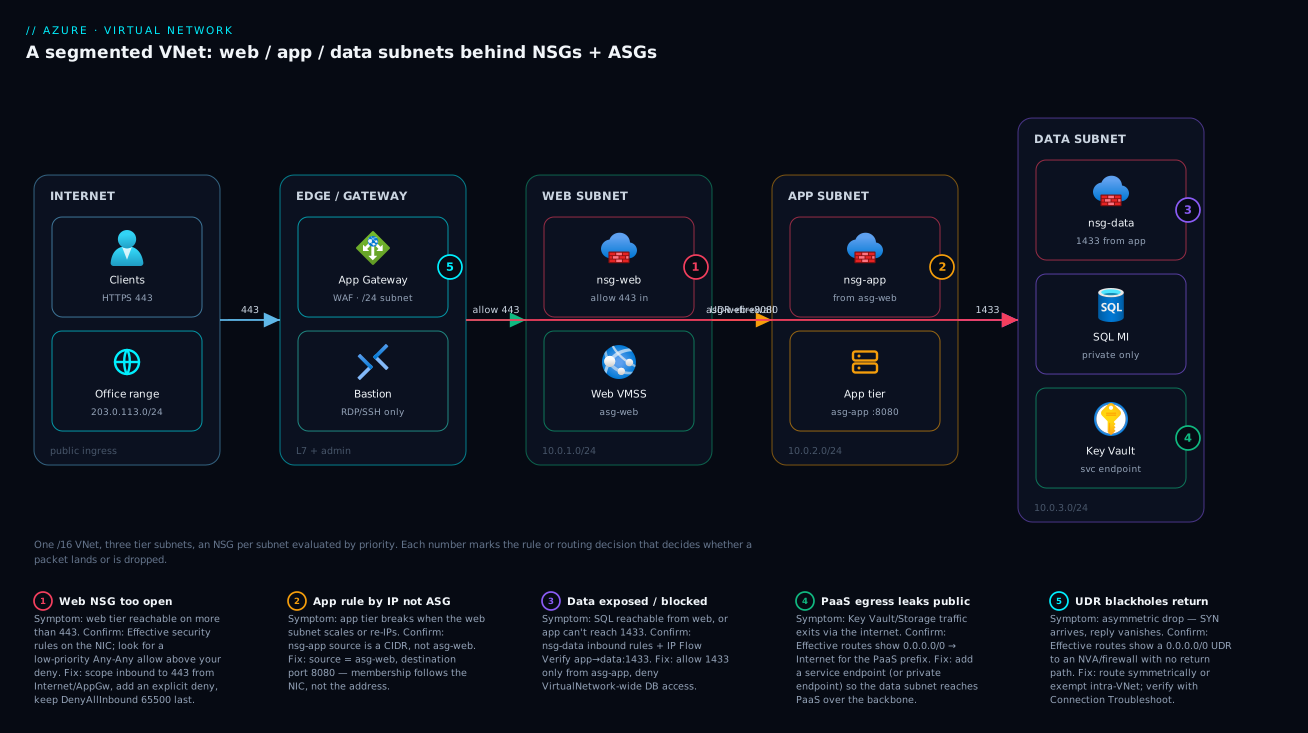
The diagram below traces a request through a properly segmented VNet, left to right, and maps each security control to the exact hop where it is enforced and the exact way it most commonly fails. On the left, clients (and a known office range for admin) arrive over HTTPS. They land first at the edge / gateway zone — an Application Gateway v2 with WAF in its own dedicated /24 subnet for public web traffic, and Azure Bastion in the mandatory AzureBastionSubnet (/26) for RDP/SSH, so administrators never need a public IP on a VM. From there the path crosses three tier subnets, each fronted by its own NSG: the web subnet (10.0.1.0/24, nsg-web allowing 443 in, VMs tagged asg-web), the app subnet (10.0.2.0/24, nsg-app allowing 8080 only from asg-web, VMs tagged asg-app), and the data subnet (10.0.3.0/24, nsg-data allowing 1433 only from asg-app, holding SQL Managed Instance reachable privately and a Key Vault reached over a service endpoint).
Follow the flows: client → gateway on 443, gateway → web on allowed 443, web → app on asg-web→8080, app → data on 1433. The dashed red flow is the UDR that forces internet-bound egress through the firewall — the line that, mis-built, blackholes return traffic. The five numbered badges sit on the controls that most often bite, and the legend narrates each as symptom · how to confirm · fix: an over-open web NSG (1), an app rule written by IP instead of ASG that breaks on scale (2), a data tier exposed VNet-wide or blocking the app (3), PaaS egress leaking to the public internet for want of an endpoint (4), and a UDR that blackholes the return path (5). Read the architecture and the diagnostic map together — the picture is the playbook.
Real-world scenario
Lumio Retail runs an e-commerce platform — a React storefront, a .NET API tier, and Azure SQL Managed Instance — and migrated it to Azure under deadline. The first cut was the textbook mistake: a single VNet, one subnet (10.0.0.0/16 with everything in 10.0.0.0/24), default NSG rules untouched. It worked, passed UAT, and went live. Three weeks later a dependency vulnerability in the storefront’s image-resize library gave an attacker remote code execution on a web VM. Because AllowVnetInBound (priority 65000) lets every VM reach every VM, the attacker port-scanned the subnet, found SQL MI on 1433, and began pulling customer rows. The only reason it was caught was an unusual egress spike — there was no segmentation to slow them down at all.
The remediation, done over a weekend, is the design this article teaches. They re-architected into three tier subnets in a fresh, properly-planned address space: snet-web 10.0.1.0/24, snet-app 10.0.2.0/24, snet-data 10.0.3.0/24, with a dedicated App Gateway subnet and an AzureBastionSubnet. Each tier got its own NSG. nsg-web allowed only 443 from Internet (priority 100) and denied the rest. nsg-app allowed 8080 only from asg-web (an ASG, not an IP list, so the rule survived the API tier’s autoscaling) and denied VirtualNetwork otherwise. nsg-data allowed 1433 only from asg-app and denied all other inbound — so even a fully-owned web VM now had no route to the database port. They added a private endpoint for Key Vault and a service endpoint for Storage so secrets and blobs left the public internet. Bastion replaced the public-IP’d jump box.
The instructive part was the confirmation. After applying the rules, the API tier couldn’t reach SQL — a 2 a.m. “the fix broke prod” moment. Instead of guessing, the on-call ran IP Flow Verify from an app NIC to the data IP on 1433: it returned Allowed by Allow-App-1433, so NSGs were fine. Then Effective Routes on the app NIC showed a 0.0.0.0/0 UDR (added that night to force egress through a new firewall) with no return route configured on the firewall side — the SYN reached SQL, the reply went to the firewall and died. Asymmetric routing, not an NSG. They exempted the VNet prefix from the forced-tunnel route and connectivity returned. Total hardening cost: the App Gateway, Bastion, a private endpoint, and a NAT/firewall already in the budget — roughly ₹18,000–22,000/month over the flat design, for turning a breach-amplifier into a contained, logged, defensible network. The lesson Lumio took away: the network “working” and the network being safe are different states, and only effective rules/routes tell you which one you’re in.
Advantages and disadvantages
| Advantages | Disadvantages |
|---|---|
| Segmentation — subnets isolate tiers; a breach is contained, not amplified | Complexity — large rule sets across many subnets get hard to reason about |
| Stateful L4 filtering — precise allow/deny by 5-tuple, return traffic automatic | Defaults surprise you — intra-VNet allow + internet-out allow are on until you override |
| Free — NSGs, subnets and ASGs cost nothing themselves | L4 only — no application/HTTP awareness; not a WAF |
| Scales by attachment — one subnet NSG protects every VM in it | Priority races — an allow above a deny silently over-exposes |
| ASGs / service tags — rules by role, resilient to scaling and IP change | Region-scoped — ASGs and NSGs don’t span VNets/regions |
| Auditable as code — Bicep/Terraform makes rules reviewable in PRs | Diagnosis takes tooling — a drop needs Network Watcher, not a guess |
| Endpoints keep PaaS off the public internet (backbone / private IP) | Private endpoints add DNS + cost — plumbing and per-endpoint charges |
NSGs are the right control when you need L4 segmentation between tiers and from the internet at zero cost and at scale — which is most of the time. They are the wrong sole control when the threat is application-layer (SQL injection, malicious HTTP, bot traffic): there you add Application Gateway WAF or Azure Firewall for L7 inspection, with NSGs still doing the coarse L4 job beneath. The complexity disadvantage is real but manageable: keep rules in code, scope by ASG, leave priority gaps, and the rule set stays legible. The defaults disadvantage is the dangerous one — every flat-network breach traces to AllowVnetInBound being left in force, which is exactly why “deny-by-default with explicit allows” is the first best practice below.
Hands-on lab
This builds a three-tier VNet with deny-by-default NSGs, ASGs, and a service endpoint — all free-tier-friendly except a single tiny VM you delete at the end. Run it in Cloud Shell.
1. Create the resource group and VNet with three subnets.
az group create -n rg-vnet-lab -l eastus

az network vnet create -g rg-vnet-lab -n vnet-lab \
  --address-prefixes 10.10.0.0/16 \
  --subnet-name snet-web --subnet-prefixes 10.10.1.0/24
az network vnet subnet create -g rg-vnet-lab --vnet-name vnet-lab \
  -n snet-app --address-prefixes 10.10.2.0/24
az network vnet subnet create -g rg-vnet-lab --vnet-name vnet-lab \
  -n snet-data --address-prefixes 10.10.3.0/24
2. Create NSGs and the ASGs, and attach the NSGs to subnets.
az network nsg create -g rg-vnet-lab -n nsg-web
az network nsg create -g rg-vnet-lab -n nsg-app
az network nsg create -g rg-vnet-lab -n nsg-data
az network asg create -g rg-vnet-lab -n asg-web -l eastus
az network asg create -g rg-vnet-lab -n asg-app -l eastus

az network vnet subnet update -g rg-vnet-lab --vnet-name vnet-lab -n snet-web  --network-security-group nsg-web
az network vnet subnet update -g rg-vnet-lab --vnet-name vnet-lab -n snet-app  --network-security-group nsg-app
az network vnet subnet update -g rg-vnet-lab --vnet-name vnet-lab -n snet-data --network-security-group nsg-data
3. Write the tiered rules — explicit allows, explicit denies above the defaults.
# Web: 443 from Internet, deny the rest
az network nsg rule create -g rg-vnet-lab --nsg-name nsg-web -n Allow-HTTPS \
  --priority 100 --direction Inbound --access Allow --protocol Tcp \
  --source-address-prefixes Internet --destination-port-ranges 443
az network nsg rule create -g rg-vnet-lab --nsg-name nsg-web -n Deny-VNet \
  --priority 4000 --direction Inbound --access Deny --protocol '*' \
  --source-address-prefixes VirtualNetwork --destination-port-ranges '*'

# App: 8080 only from asg-web
az network nsg rule create -g rg-vnet-lab --nsg-name nsg-app -n Allow-Web-8080 \
  --priority 100 --direction Inbound --access Allow --protocol Tcp \
  --source-asgs asg-web --destination-port-ranges 8080

# Data: 1433 only from asg-app
az network nsg rule create -g rg-vnet-lab --nsg-name nsg-data -n Allow-App-1433 \
  --priority 100 --direction Inbound --access Allow --protocol Tcp \
  --source-asgs asg-app --destination-port-ranges 1433
4. Add a service endpoint for Storage on the data subnet.
az network vnet subnet update -g rg-vnet-lab --vnet-name vnet-lab -n snet-data \
  --service-endpoints Microsoft.Storage
# Expected: the subnet now lists "serviceEndpoints": [{ "service": "Microsoft.Storage", ... }]
5. Verify with Network Watcher — confirm a packet, don’t assume. Create one tiny VM in the app subnet (joined to asg-app), then ask whether it can reach the data IP on 1433:
az vm create -g rg-vnet-lab -n vm-app-01 --image Ubuntu2204 --size Standard_B1s \
  --vnet-name vnet-lab --subnet snet-app --nsg "" --public-ip-address "" \
  --admin-username azureuser --generate-ssh-keys
az network nic ip-config update -g rg-vnet-lab --nic-name vm-app-01VMNic \
  --name ipconfig1 --application-security-groups asg-app

# IP Flow Verify: app NIC → a data-subnet IP on 1433 → expect "Access: Allow"
az network watcher test-ip-flow -g rg-vnet-lab --vm vm-app-01 \
  --direction Outbound --protocol TCP --local 10.10.2.4:50000 --remote 10.10.3.4:1433

# Effective rules + routes on the NIC — the source of truth
az network nic list-effective-nsg -g rg-vnet-lab -n vm-app-01VMNic -o table
az network nic show-effective-route-table -g rg-vnet-lab -n vm-app-01VMNic -o table
6. Tear down.
az group delete -n rg-vnet-lab --yes --no-wait
What each verification step should tell you:
| Lab check | Command | Expected result | If it differs |
|---|---|---|---|
| App→Data:1433 allowed | test-ip-flow |
Access: Allow (rule Allow-App-1433) |
NIC not in asg-app, or rule wrong |
| Web→Data:1433 blocked | test-ip-flow from a web NIC |
Access: Deny (DenyAllInBound) |
A stray allow is over-exposing data |
| Effective NSG | list-effective-nsg |
Your rules above the 65000 defaults | Subnet NSG not attached |
| Effective routes | show-effective-route-table |
System routes only (no surprise UDR) | An unexpected UDR blackholes traffic |
| Service endpoint | subnet serviceEndpoints |
Microsoft.Storage present |
Flag not applied to the right subnet |
Common mistakes & troubleshooting
The differentiator. Below is the symptom → root cause → confirm (exact command/portal path) → fix playbook. Scan the table, then read the detail for the row that matches your incident.
| # | Symptom | Root cause | Confirm (exact path) | Fix |
|---|---|---|---|---|
| 1 | Web tier reachable on ports beyond 443 | Over-open rule, or no explicit deny above AllowVnetInBound |
az network nic list-effective-nsg on a web NIC |
Scope to 443; add explicit Deny at low-enough priority |
| 2 | App tier breaks when web tier scales/re-IPs | Rule source is a CIDR, not an ASG | Inspect nsg-app rule sourceAddressPrefix |
Change source to asg-web; join web NICs to it |
| 3 | Compromised web VM reaches the database | AllowVnetInBound left in force; no tier deny |
IP Flow Verify web→data:1433 → Allow |
Deny VirtualNetwork inbound on data; allow only asg-app |
| 4 | App can’t reach SQL; rules look correct | A 0.0.0.0/0 UDR blackholes the return path |
show-effective-route-table on app NIC |
Fix the route/NVA return path; exempt VNet prefix |
| 5 | Storage/Key Vault traffic exits to internet | No service/private endpoint on the subnet | Effective routes: PaaS prefix → Internet |
Add service endpoint or private endpoint |
| 6 | Allow rule exists but traffic still dropped | A higher-priority deny wins, or NIC+subnet NSG conflict | Effective NSG shows which rule matched | Re-prioritise; remember both NSGs must allow |
| 7 | Peering won’t create | Overlapping address spaces | az network vnet show --query addressSpace both sides |
Re-plan CIDRs; no overlap allowed |
| 8 | A→C unreachable through a hub | Peering is non-transitive | Topology: A–B and B–C peered, no A–C | Hub NVA + UDRs, or mesh-peer A–C |
| 9 | Gateway/Bastion won’t deploy into a subnet | Wrong subnet name or too small | Subnet name ≠ GatewaySubnet/AzureBastionSubnet |
Recreate with the exact required name + size |
| 10 | Subnet “full” far below CIDR count | Forgot the 5 reserved addresses | /29 → only 3 usable, not 8 |
Size up; account for reservations |
| 11 | LB-backed app health-probes fail | Custom deny blocked AzureLoadBalancer tag |
Effective NSG; missing AllowAzureLoadBalancerInBound override |
Allow AzureLoadBalancer source on the probe port |
| 12 | Outbound to a PaaS service intermittently fails | Hard-coded PaaS IPs instead of a service tag | Rule uses raw CIDR for Storage/Sql |
Use the Storage/Sql service tag (auto-updates) |
| 13 | Connection opens then hangs (no reset) | Asymmetric routing via NVA without SNAT | Connection Troubleshoot shows one-way path | SNAT at the NVA or route symmetrically |
| 14 | Flow logs empty / no forensic data | NSG flow logs never enabled | Network Watcher → NSG flow logs status | Enable flow logs to a storage account |
Mistake 1 — Web tier open beyond 443 (the missing explicit deny)
People add Allow 443 from Internet and stop, assuming everything else is blocked. Inbound from the internet is — DenyAllInBound (65500) handles that — but inbound from inside the VNet is allowed by AllowVnetInBound (65000). If a peered VNet or another subnet is hostile, the web tier is reachable on every port internally.
Confirm. Compute the effective rules on a web NIC and look for what actually governs internal traffic:
az network nic list-effective-nsg -g rg-shop-prod -n nic-web-01 \
  --query "value[].{name:name, rules:effectiveSecurityRules[].name}" -o json
Fix. Add an explicit deny for VirtualNetwork inbound at a priority below 65000 (so it wins over the default), allowing only what each tier legitimately needs first.
Mistake 2 — App rules written by IP instead of ASG
The app tier’s NSG says allow 8080 from 10.0.1.0/24. It works — until the web subnet is re-CIDR’d, or you decide some web VMs live elsewhere, or a VMSS instance lands on an IP the rule didn’t anticipate. The rule is now subtly wrong and the failure is silent.
Confirm. Inspect the rule’s source:
az network nsg rule show -g rg-shop-prod --nsg-name nsg-app -n Allow-Web-to-App \
  --query "{src:sourceAddressPrefix, srcAsg:sourceApplicationSecurityGroups[].id, port:destinationPortRange}" -o json
If src is a CIDR and srcAsg is empty, that’s the bug. Fix: switch the source to asg-web and ensure web NICs are members.
Mistake 4 — The UDR that blackholes the return path
This is the cruel one because NSGs are innocent. Someone adds a 0.0.0.0/0 route to an NVA/firewall to inspect egress. Now the SYN from the app to SQL (or to the internet) goes out fine, but the reply is routed to the NVA, which either drops it (no return route) or sends it from a different source (no SNAT) — so the client sees a connection that opens and then hangs.
Confirm. The effective route table on the NIC reveals the override:
az network nic show-effective-route-table -g rg-shop-prod -n nic-app-01 \
  --query "value[?addressPrefix[0]=='0.0.0.0/0'].{prefix:addressPrefix, hop:nextHopType, ip:nextHopIpAddresses}" -o json
# Or end-to-end:
az network watcher test-connectivity -g rg-shop-prod \
  --source-resource vm-app-01 --dest-address 10.0.3.4 --dest-port 1433
Fix. Make routing symmetric (return traffic traverses the same appliance) or have the NVA SNAT; exempt the VNet prefix from the forced-tunnel route if intra-VNet traffic shouldn’t be inspected.
Mistake 6 — “Allow exists but it’s still dropped”
Two traps. Priority: a higher-priority (lower-number) deny matched first and stopped evaluation, so your allow at priority 300 never ran. Two NSGs: with both a subnet NSG and a NIC NSG, both must allow — one denying overrides the other allowing.
Confirm. Effective rules show exactly which rule won; if you see your deny matching before the allow, that’s a priority bug; if the subnet NSG allows but the NIC NSG denies, that’s the dual-NSG trap. Fix: re-prioritise (specific allows below broad denies, or restructure), and reconcile the two NSGs.
Network Watcher tools — what to reach for and when
The whole reason to know NSGs and routes deeply is to confirm a drop instead of guessing. The toolset:
| Tool | Answers the question | Command / path |
|---|---|---|
| IP Flow Verify | “Is this exact 5-tuple allowed, and by which rule?” | az network watcher test-ip-flow |
| Effective Security Rules | “What’s the computed NSG on this NIC?” | az network nic list-effective-nsg |
| Effective Routes | “Where does this NIC actually send a packet?” | az network nic show-effective-route-table |
| Connection Troubleshoot | “Can A reach B, and where does it die?” | az network watcher test-connectivity |
| NSG Flow Logs | “Show me what was allowed/denied over time” | Network Watcher → NSG flow logs |
| Connection Monitor | “Continuously watch this path’s health” | Network Watcher → Connection Monitor |
| Next Hop | “What’s the next hop for this destination?” | az network watcher show-next-hop |
| Topology | “Draw what’s actually wired together” | Network Watcher → Topology |
The order to run them in a connectivity incident — it localises the drop fastest:
| Step | Run | If it says… | Then |
|---|---|---|---|
| 1 | IP Flow Verify (source→dest:port) | Deny | It’s an NSG rule — fix the rule (you even get its name) |
| 2 | (if Allow) Effective Routes | A surprise 0.0.0.0/0 UDR |
Routing/asymmetry — fix the route/NVA |
| 3 | (if routes fine) Connection Troubleshoot | Fails at a hop | Inspect that hop (NVA, firewall, DNS) |
| 4 | (if still unclear) NSG Flow Logs | Shows the drop | Confirm direction + rule; widen investigation |
| 5 | (app-layer) check the app/DNS | Network is clean | It’s not the network — hand to app team |
Best practices
- Deny by default, allow explicitly. Never rely on Azure’s defaults. Add explicit deny rules (e.g. deny
VirtualNetworkinbound on the data tier) below the 65000 default so only intentional traffic flows. The flat-network breach is always a missing explicit deny. - Segment into tier subnets from day one. Web/app/data (or per-workload) subnets, each with its own NSG. A foothold should be contained to one tier, not the whole VNet.
- Reserve a /16 per VNet and plan CIDRs centrally. Non-overlapping across every VNet and on-prem range you will ever connect. Use an IPAM discipline; overlap is painful to fix after peering.
- Use ASGs, not IP lists, for tier rules. “From
asg-web” survives scaling and re-IP;10.0.1.0/24does not. Reserve raw CIDRs for fixed external ranges. - Use service tags for cloud-service ranges.
Internet,Sql,Storage,AzureLoadBalancerauto-update — never hard-code Microsoft IP ranges. - Leave priority gaps (100, 200, 300…). So you can insert a rule between two existing ones without renumbering the whole set.
- Keep PaaS off the public internet. Service endpoints (free, same region) or private endpoints (fully private, with DNS) for Storage, SQL, Key Vault — don’t let backend data egress over the internet.
- Treat UDRs as high-risk. A
0.0.0.0/0to an NVA needs a symmetric return path or SNAT; document every route table and verify with effective-routes after any change. - Manage rules as code. Bicep/Terraform, reviewed in PRs. A network change is a security change; a stray “allow Any-Any” should be caught in review, not in a breach.
- Enable NSG flow logs to storage. When (not if) you need forensics or to debug a drop, the data must already be flowing. Wire flow logs and Network Watcher before the incident.
- Don’t ask NSGs to be a WAF. They are L4. Application-layer threats need Application Gateway WAF or Azure Firewall; layer them, with NSGs underneath.
- Right-name special subnets.
GatewaySubnet,AzureBastionSubnet,AzureFirewallSubnetmust be spelled exactly and sized to minimum, or the service won’t deploy.
The leading indicators to alert on, so a misconfiguration surfaces before a breach does:
| Alert on | Signal | Why it’s leading |
|---|---|---|
| New broad allow rule | NSG rule with * source/port added |
Catches over-exposure at change time |
| Deny-rule hit spike | Flow logs: rising deny count | Probe/scan in progress, or a broken legit flow |
| Public IP attached to a tier NIC | Resource graph query | A VM that should be private went public |
| PaaS firewall set to “all networks” | Storage/SQL network setting | Endpoint isolation regressed |
UDR 0.0.0.0/0 added/changed |
Route table change event | Potential blackhole/asymmetry incoming |
| Flow logs stopped | No data in the log storage | Lost forensic visibility |
Security notes
- Default-deny is the posture, not an add-on. The single most important security action is overriding
AllowVnetInBoundwith tier-scoped denies. A VNet is private from the internet but flat inside — close that. - Least privilege at L4. Each tier accepts only the exact port(s) from the exact source ASG it must. The data tier should be unreachable on its DB port from anything but the app tier — verify with IP Flow Verify from a web NIC (expect Deny).
- Take PaaS off the public internet. Private endpoints (with public access disabled) for sensitive data stores — Key Vault, SQL, Storage holding PII. Service endpoints where private endpoints are overkill, but never leave backend PaaS publicly open with only an account key.
- Admin access through Bastion, not public IPs. No RDP/SSH from the internet on a VM. Azure Bastion in
AzureBastionSubnetgives browser-based RDP/SSH with no public IP on the workload; restrict who reaches Bastion to a known admin range. - Restrict and inspect egress.
AllowInternetOutBound(65001) lets a compromised box exfiltrate. Restrict outbound to required destinations (service tags), and for high-assurance workloads force egress through Azure Firewall with FQDN filtering. - Log everything for forensics. NSG flow logs (and traffic analytics) are how a breach is reconstructed and how lateral-movement attempts are detected. The flat-network breach was only caught by an egress anomaly — make that detection deliberate.
- Encrypt in transit regardless. Segmentation is defence-in-depth, not a license to run plaintext internally — TLS between tiers, mTLS where warranted.
The security control matrix — which Azure control answers which threat, and where it sits relative to NSGs:
| Threat | Primary control | Layer | NSG’s role |
|---|---|---|---|
| Lateral movement between tiers | Tier NSGs + ASGs (deny-by-default) | L4 | The control |
| Public exposure of a VM | No public IP + Bastion + NSG | L3/L4 | Enforces “no inbound from Internet” |
| Application attacks (SQLi, XSS) | App Gateway WAF | L7 | Coarse L4 beneath the WAF |
| Malicious egress / exfiltration | Azure Firewall (FQDN filtering) + UDR | L4–L7 | Restrict egress by service tag |
| PaaS data exposed publicly | Private endpoint (+ disable public) | L3 | Allow only the subnet to the PE |
| Credential/secret theft | Key Vault + private endpoint + RBAC | L3+identity | Reach KV only privately |
| Undetected intrusion | NSG flow logs + traffic analytics | observability | Source of the deny/allow record |
Cost & sizing
The good news: the core primitives are free. VNets, subnets, NSGs, ASGs and route tables cost nothing — you are billed for what flows and for the gateways/endpoints you add, not for the network structure. So segment generously; there is no cost reason to run a flat network.
What actually drives the bill: VNet peering charges per GB in both directions (ingress and egress on the peering), which adds up on chatty cross-region hub-spoke traffic. Private endpoints cost a small hourly charge per endpoint plus per-GB processed — meaningful at scale (one per sensitive resource). VPN/ExpressRoute gateways are the big-ticket items (a continuous hourly charge by SKU, plus egress), justified by hybrid connectivity, not networking hygiene. Azure Firewall (if you forced-tunnel egress) carries a substantial hourly + per-GB cost. NAT Gateway for outbound SNAT scaling is a modest hourly + per-GB. Data egress to the internet is billed per GB across all of these.
For Lumio’s hardening, the structure (subnets, NSGs, ASGs) was free; the added cost was the App Gateway, Bastion, one private endpoint, and the firewall/NAT already budgeted — roughly ₹18,000–22,000/month over the flat design, which is trivial against the cost of the breach it prevents. The cost drivers and what each buys:
| Cost driver | What you pay for | Rough INR / month | What it buys | Watch-out |
|---|---|---|---|---|
| VNet / subnet / NSG / ASG | Nothing | ₹0 | All segmentation + filtering | No reason not to segment |
| VNet peering | Per-GB both directions | ~₹1/GB each way | Cross-VNet/region private reach | Chatty hub-spoke adds up |
| Private endpoint | Hourly + per-GB | ~₹600–900 + data, each | Fully-private PaaS | One per resource; multiplies |
| Service endpoint | Nothing | ₹0 | PaaS over backbone (same region) | Resource keeps public IP |
| Azure Bastion | Hourly (SKU) + outbound | ~₹10,000–14,000 | No public IPs for admin | Per-VNet (or peered) cost |
| Azure Firewall | Hourly + per-GB | ~₹40,000+ | Egress inspection/FQDN filtering | Expensive — justify it |
| NAT Gateway | Hourly + per-GB | ~₹1,500–3,000 | Outbound SNAT scaling | Needs the right subnet |
| VPN gateway (S2S) | Hourly (SKU) + egress | ~₹8,000–30,000 | Hybrid over internet | SKU drives throughput + price |
| Internet egress | Per-GB out | ~₹7–9/GB (tiered) | (the data leaving) | The silent recurring line |
Sizing rules of thumb: a /16 per VNet and /24 per tier subnet is the comfortable default that never bites; size AKS node/pod subnets generously (/22+); always honour the five-reserved overhead; and place a private endpoint per sensitive resource (not per every PaaS object) to control the per-endpoint cost.
Interview & exam questions
1. Why is a freshly-created Azure VNet not secure by default, even though it has no public IP? Because the default NSG rule AllowVnetInBound (priority 65000) permits all traffic between resources inside the VNet (and peered VNets). A VNet is private from the internet but flat internally — any foothold can reach any other VM on any port until you add explicit deny rules. Security requires overriding that default with tier-scoped denies.
2. Explain NSG rule priority and statefulness. Rules have a priority 100–4096; the platform evaluates in ascending order and applies the first match, then stops — so a broad allow at 100 beats a specific deny at 200. NSGs are stateful: allowing an inbound flow automatically permits its return traffic, so you don’t write a matching outbound rule. Most NSG bugs are a priority race (allow above deny) or a redundant outbound rule breaking statefulness.
3. What are the default NSG rules and which two cause the most incidents? Inbound: AllowVnetInBound (65000), AllowAzureLoadBalancerInBound (65001), DenyAllInBound (65500). Outbound: AllowVnetOutBound, AllowInternetOutBound, DenyAllOutBound. The two that cause incidents are AllowVnetInBound (flat-network lateral movement) and AllowInternetOutBound (unrestricted egress/exfiltration) — both must be overridden for a secure posture.
4. ASG vs raw IP vs service tag as a rule source — when each? Use an ASG for “this tier/role” inside your VNet (membership follows the NIC, surviving scale/re-IP); a service tag (Internet, Sql, Storage) for cloud-service ranges Microsoft maintains and auto-updates; a raw CIDR only for fixed external ranges (on-prem, partner IPs). Hard-coding IPs for an autoscaling tier or a Microsoft service is the classic brittle mistake.
5. How many usable addresses in a /24 subnet in Azure, and why? 251, not 254 — Azure reserves five addresses per subnet: network (.0), default gateway (.1), two for Azure DNS (.2, .3), and broadcast (.255). This overhead is why a /29 (8 total) leaves only 3 usable and is the realistic floor for a real subnet.
6. An app VM can’t reach SQL; IP Flow Verify says the traffic is Allowed. What next, and what are you looking for? The NSGs are fine, so it’s routing. Run Effective Routes on the app NIC and look for a 0.0.0.0/0 UDR to an NVA/firewall — if present and the return path isn’t symmetric (or the NVA doesn’t SNAT), you have asymmetric routing: the SYN arrives but the reply is dropped. Fix the route/return path or exempt the VNet prefix.
7. Difference between a service endpoint and a private endpoint? A service endpoint extends the subnet’s identity to a PaaS service over the Azure backbone (the PaaS firewall then trusts the subnet) — free, same-region, but the resource keeps its public IP. A private endpoint gives the PaaS resource a private IP inside your subnet (Private Link), so you can disable public access entirely — stronger isolation, but it costs per-endpoint and needs Private DNS. Compliance-bound data stores usually want private endpoints.
8. Why won’t two VNets peer, and why is peering “non-transitive”? They won’t peer if their address spaces overlap — Azure refuses the peering. Peering is non-transitive: if A↔B and B↔C are peered, A still can’t reach C; you route A↔C through a hub (NVA/firewall + UDRs) or peer A↔C directly. This is why central, non-overlapping CIDR planning is foundational.
9. You add Allow 443 from Internet to the web NSG. Is the web tier now locked down? Why or why not? No. That rule only governs inbound from the internet; inbound from inside the VNet is still allowed by AllowVnetInBound. A peered VNet or another subnet can reach the web VMs on any port. You must add an explicit deny for VirtualNetwork inbound (and allow only legitimate internal flows) to actually lock it down.
10. How do you give RDP/SSH to admins without putting a public IP on a VM? Deploy Azure Bastion into the mandatory AzureBastionSubnet (/26); it provides browser-based RDP/SSH over TLS with no public IP on the workload VMs, and you restrict who can reach Bastion to a known admin range. A public-IP’d jump box is the anti-pattern Bastion replaces.
11. A health-probe-based load-balanced app starts failing health checks after you tighten the NSG. Likely cause? Your custom deny rule blocked the AzureLoadBalancer service tag, so the platform’s health probes can’t reach the VMs and they’re marked unhealthy. Re-allow AzureLoadBalancer as a source on the probe port (the default AllowAzureLoadBalancerInBound does this until a custom rule overrides it).
12. Both a subnet NSG and a NIC NSG are attached. How is a packet evaluated? Both are evaluated and both must allow for traffic to pass. For inbound, the subnet NSG is evaluated first, then the NIC NSG; for outbound, NIC first then subnet. A common “my allow doesn’t work” bug is one NSG allowing while the other denies.
These map to AZ-104 (Administrator) — configure and manage virtual networking (VNets, subnets, NSGs, ASGs, peering, service endpoints) — and AZ-700 (Network Engineer) — design and implement core networking, routing, and private access. The security framing (segmentation, egress control, private endpoints) overlaps AZ-500. A compact cert-mapping for revision:
| Question theme | Primary cert | Exam objective area |
|---|---|---|
| VNets, subnets, address space | AZ-104 / AZ-700 | Configure virtual networks; design IP addressing |
| NSG rules, priority, defaults | AZ-104 | Configure network security groups |
| ASGs, service tags | AZ-104 / AZ-500 | Secure connectivity; NSG/ASG |
| UDRs, routing, NVA, forced tunnel | AZ-700 | Design and implement routing |
| Service vs private endpoints | AZ-700 / AZ-500 | Private access to PaaS |
| Peering, hub-spoke, transitivity | AZ-700 | Design hybrid/inter-VNet connectivity |
| Network Watcher diagnostics | AZ-104 / AZ-700 | Monitor and troubleshoot networking |
Quick check
- A new VNet has no public IPs and “isn’t reachable from the internet.” Why is it still not secure, and which default rule is responsible?
- An NSG has
Allow Any-Anyat priority 100 andDeny 3389at priority 200. Is RDP blocked? Why? - How many usable IP addresses does a
/27subnet give you in Azure, and why isn’t it 32 (or 30)? - An app NIC’s IP Flow Verify to the DB on 1433 returns Allow, but the app still can’t connect. What is the single most likely culprit and the command to confirm it?
- You need the app tier to accept 8080 only from the web tier, which autoscales. What do you use as the rule source, and why not a CIDR?
Answers
- Because the default rule
AllowVnetInBound(priority 65000) allows all intra-VNet (and peered-VNet) traffic — the VNet is private from the internet but flat internally, so any foothold reaches any VM on any port. You must override it with explicit tier-scoped deny rules. - No, RDP is not blocked. Evaluation is by ascending priority with first-match-wins:
Allow Any-Anyat priority 100 matches the RDP packet first and stops evaluation, so theDeny 3389at 200 never runs. Put specific denies above (lower number than) broad allows. - 27 usable. A
/27has 32 total addresses, but Azure reserves five per subnet (network, gateway, two DNS, broadcast), leaving 27 — not 30 (the on-prem figure) and not 32. - A UDR causing asymmetric routing (a
0.0.0.0/0route to an NVA/firewall with no symmetric return path or SNAT) — the SYN arrives, the reply is dropped. Confirm withaz network nic show-effective-route-tableon the app NIC and look for the0.0.0.0/0next-hop to a VirtualAppliance. - An Application Security Group (
asg-web) as the source. ASG membership follows the NIC, so as the web tier autoscales or re-IPs the rule stays correct; a CIDR like10.0.1.0/24breaks silently when instances land on unexpected IPs or the subnet is re-planned.
Glossary
- Virtual Network (VNet) — an isolated private IP address space in one Azure region and subscription; resources inside get private IPs and reach each other by default.
- Address space — the CIDR block(s) a VNet owns (e.g.
10.0.0.0/16); must not overlap with peered VNets or connected on-prem ranges. - Subnet — a contiguous range carved from the VNet (e.g.
10.0.1.0/24); the unit of segmentation to which NSGs and route tables attach. - Reserved addresses — the five IPs Azure takes in every subnet (network, gateway, two DNS, broadcast); a
/24yields 251 usable, not 254. - Network Security Group (NSG) — a stateful, priority-ordered 5-tuple (source, dest, port, protocol, direction) allow/deny firewall attached to a subnet and/or NIC.
- Security rule — one entry in an NSG: priority (100–4096, lower wins), direction, access (allow/deny), protocol, and source/destination (CIDR, service tag, or ASG).
- Default rules — the immutable base NSG rules:
AllowVnetInBound,AllowAzureLoadBalancerInBound,DenyAllInBoundand the outbound trio; overridable only by higher-priority custom rules. - Service tag — a Microsoft-maintained, auto-updating label for a cloud service’s IP ranges (
Internet,VirtualNetwork,Sql,Storage,AzureLoadBalancer). - Application Security Group (ASG) — a logical handle attached to NICs so a rule references a role (“from
asg-web”) instead of IPs; membership follows the machine. - User-defined route (UDR) — a route in a route table attached to a subnet that overrides Azure’s system routes, typically to force traffic through an NVA/firewall.
- Network virtual appliance (NVA) — a firewall/router VM (or Azure Firewall) that traffic is routed through for inspection or forced tunnelling.
- Asymmetric routing — when a flow’s request and reply take different paths (often a UDR to an NVA without a symmetric return or SNAT), causing the reply to be dropped.
- Service endpoint — a subnet flag that extends the subnet’s identity to a PaaS service over the Azure backbone; the resource keeps its public IP, but the PaaS firewall can trust the subnet.
- Private endpoint — a private IP inside your subnet for a PaaS resource (via Private Link), allowing public access to be disabled; needs Private DNS to resolve.
- VNet peering — a private, backbone connection between two VNets (any region/subscription); non-transitive and requires non-overlapping address spaces.
- GatewaySubnet / AzureBastionSubnet / AzureFirewallSubnet — special-purpose subnets with mandatory exact names and minimum sizes required by their respective services.
- Network Watcher — the diagnostic suite: IP Flow Verify, Effective Security Rules, Effective Routes, Connection Troubleshoot, NSG flow logs, Next Hop and Topology.
Next steps
You can now design and secure a segmented VNet and confirm a drop instead of guessing. Build outward:
- Next: Diagnosing Azure VNet Connectivity: NSGs, UDRs, Effective Routes & Network Watcher — the full diagnostic playbook for the tools this article introduced.
- Related: Azure Private Endpoint vs Service Endpoint: Secure PaaS Access — go deeper on the PaaS-egress decision.
- Related: Azure Private Link and Private DNS: Keeping PaaS Off the Public Internet — the DNS plumbing that makes private endpoints work.
- Related: Application Gateway v2 WAF: End-to-End TLS, mTLS, and Custom Rule Tuning — the L7 layer for when NSGs aren’t enough.
- Related: Azure Load Balancer vs Application Gateway: Picking the Right Traffic Manager — choosing L4 vs L7 in front of your tiers.
- Related: Azure Enterprise-Scale Landing Zone: Foundation for Large Organizations — address-space planning and policy-driven NSGs at organisation scale.